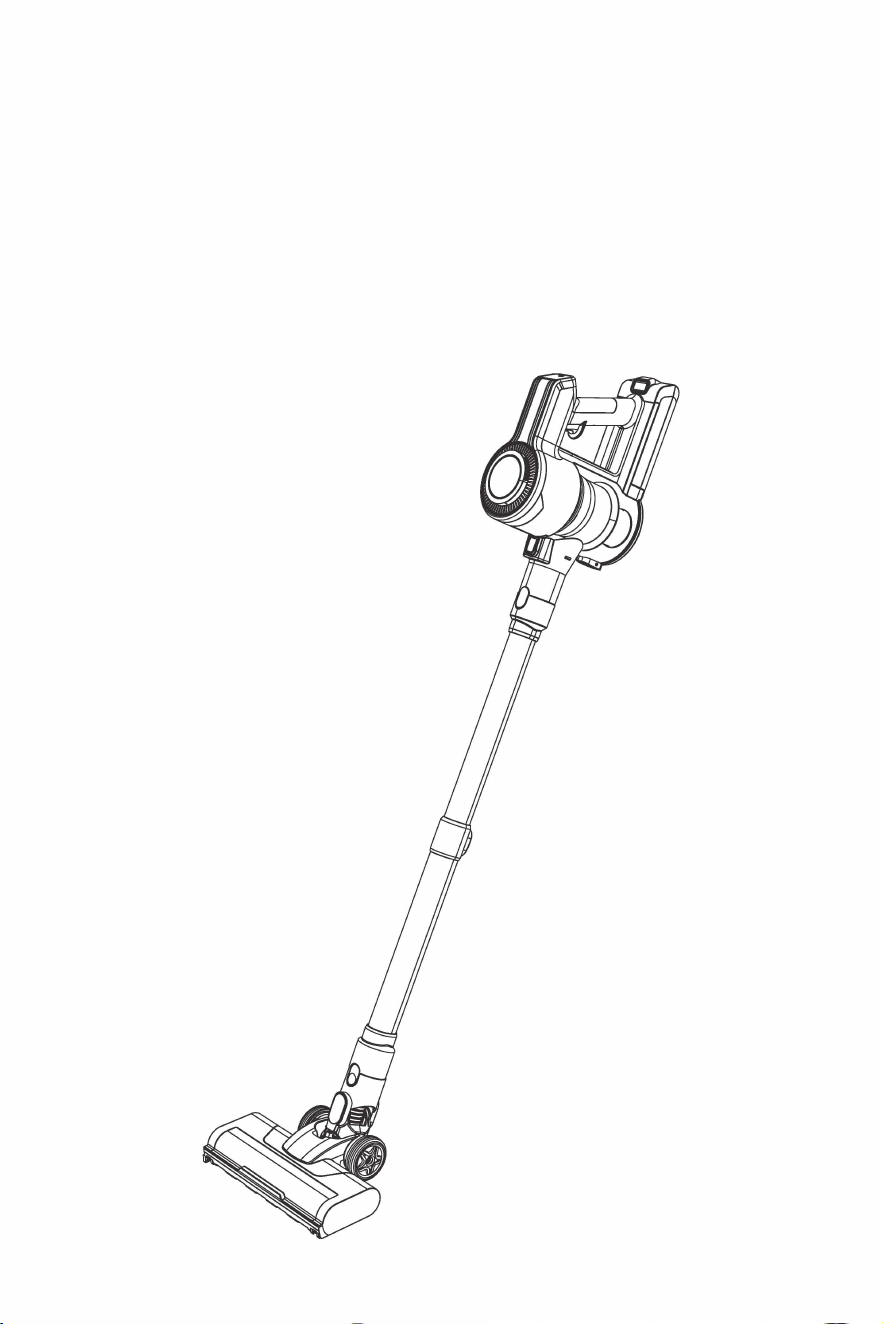
Ey
eVac
R
eac
h
User Manual

One-Year Limited Warranty. What is covered: JPaulJones, LPTM warrants to the first retail
purchaser of this vacuum that should this product or any part be proved defective in
materials or workmanship from the date of proof of purchase for a period of one (1) year,
then it will be subject to the terms of this one-year limited warranty. Such defects will be
replaced, or credit issued at JPaulJones, LP’s option, without charge for parts or labor
directly related to the defect. Limitations and Exclusions: This warranty gives you specific
legal rights and you may also have other rights which vary from state to state. This
warranty does not apply to any cost incurred for removal or re-installation, or to any
product or part thereof which has suffered through normal wear and tear, alteration,
improper installation, physical abuse, misuse, neglect or accident. Nor does it cover defects
caused by shipment to JPaulJones, LP or repair or service of the product by anyone other
than JPaulJones, LP. Damage resulting from an unforeseen circumstanc
e including but not
limited to fire, floo
d, earthquake, and other natural causes will be excluded. This Limited
warranty is in lieu of all other warranties, express or implied either in fact or by operations
of law, statutory or otherwise, including, but not limited to any implied warranty of
merchantability or fitness for a particular use. JPaulJones, LP does not authorize any other
person to assume any liability beyond the warranty herein described. In no event, whether
based in contract or tort shall be liable for incidental, inconsequential, indirect, special
or punitive damages of any kind from the use of this product. In no event shall be liable for
damage in excess of the purchase price. EyeVac Reach is not for commercial use.
For Warranty Service, submit a Service Request at http://eyevac.com/connect/ or contact:
JPaulJones, LP, 7500 Rialto Blvd., Bldg. 1, Suite 122, Austin, TX 78735 or call 512-485-3050.
©2014 JPaulJones, LP Intellectual Property. All rights reserved, JPaulJones, LP, JPaulJones,
LP logo and all other marks contained herein are trademarks of JPaulJones, LP Intellectual
Property and/or JPaulJones, LP affiliated companies.
Limited Warranty
JPaulJones, LP
7500 Rialto Blvd, Bldg. 1 STE. 122
Austin, TX 78735
(512) 485-3050
For service and general inquiries please visit www.eyevac.com/connect

Important Safety Instructions
Basic precautions should always be observed when using any electrical equipment, including the f
o
llowing:
WARNING:
READ ALL SAFETY INSTRUCTIONS AND THE ENTIRE MANUAL. Failure to heed the warnings and instructions
may result in electric shock, fire, or serious injuries. Please read all instructions before using this device.
WARNING:
• Do not let the device be used as a toy. Close attention is necessary when used near children. Do not
use leave appliance plugged in near children, infants or small animals.
reduce the risk of injury or damage, please observe the following
safety precautions when installing, using and maintaining the device:
• Please read all instructions regarding safety and operation bef
o
re using the device.
• Keep the safety and user manual for future reference.
• Follow all opera ling and usage inslruclions.
Correct Disposal of this Product
This markin
g indicates that this product should not be disposed with other household wastes. To
prevent possible harm to the environment or human health from uncontrolled waste disposal, recycle
it responsibly to promote the sustainable reuse of material resources. To return your used device,
please use the return and collection systems or contact the retailer where the product was purchased.
They can take this product for environmentally safe recycling. This appliance is a dry pick-up, Canister
type vacuum cleaner for household and indoor use. Also, it is a general-purpose vacuum cleaner,
which can be used for hard floor cleaning.
Restrictions
• Please read all contents of this manual carefully before using this product.
• Do not use the Vacuum Cleaner to vacuum detereent, kerosene, elass drees, needles, wet items,
sewage, matches and other items.
• Do not use the Vacuum Cleaner to vacuum toys, paper balls and other laree objects, otherwise it will
cause blockage of the Vacuum Cleaner, motor burnout and other failures.
• Keep the Vacuum Cleaner away from fire and other hot places.
• Make sure to install the filter modules and the roller brush of the floor brush.
• Make sure not to block the suction inlet or block the roller brush, as this may cause motor failure when
using the Vacuum Cleaner.
• Do not pour or spill water or other liquids into the machine to avoid short circuits and burning out the
machine.
• Fully charge the battery when using a new battery or the battery used for the first time after long-term
storage. Please ensure that it is charged and discharged at least every three months when the
machine is not used for a lone time.
01
-

, The appliance is only to be used with the power supply unit provided with the appliance.
, The plug must be removed from the socket-outlet before cleaning or maintaining the appliance.
, Please do not use or store the Vacuum Cleaner in high temperatures, low temperatures and other
adverse conditions, and do not use them outdoors or on wet surfaces. It is recommended to use them
indoors at an ambient temperature of 0-30
°
C. Please store it in a cool and dry place, and do not expose
it to sunlighl for a long Lime.
, Do not allow children to use or play with the Vacuum Cleaner.
, When the Vacuum Cleaner can not work, it must be tested and repaired at the designated service
center. Do not disassemble the machine by yourself. Waste battery packs should be safely recycled
and disposed of, please do not dispose of Lhem at will.
, lf the power cord is damaged, in order to avoid danger, you must go to the manufacturer's local
mainlenance deparlmenl or similar deparlmenl Lo have il replaced by a professional.
FCC Compliance Statement
This device complies with Part 15 of the FCC Rules. Operation is subject to the following two conditions:
(1) This device may not cause harmful interference, and (2) this device must accept any interference
received, including interference that may cause undesired operation.
Warning: Changes or modifications not expressly approved by the party responsible for compliance could
void the user's authority to operate the equipment.
Note: This equipment has been tested and found to comply with the limits for a Class B digital device,pur
suant to Part 15 of the FCC Rules. These limits are designed to provide reasonable protection against
harmful interference in a residential installation. This equipment generates, uses, and can radiate radio
frequency energy and, if not installed and used in accordance with the instructions, may cause harmful
interference to radio communications. However, there is no guarantee that interference will not occur in a
particular installation. If this equipment docs cause harmful interference to radio or television reception,
which can be determined by turning the equipment o and on, the user is encouraged to try to correct the
interference by one or more of the following measures: (1) Reorient or relocate the receiving antenna. (2)
Increase the separation between the equipment and receiver. (3) Connect the equipment into an outlet on
a circuit dierenl from thal to which the receiver is connected.(�) Consull the dealer or an experienced
radio/ TV technician for help.
02
03
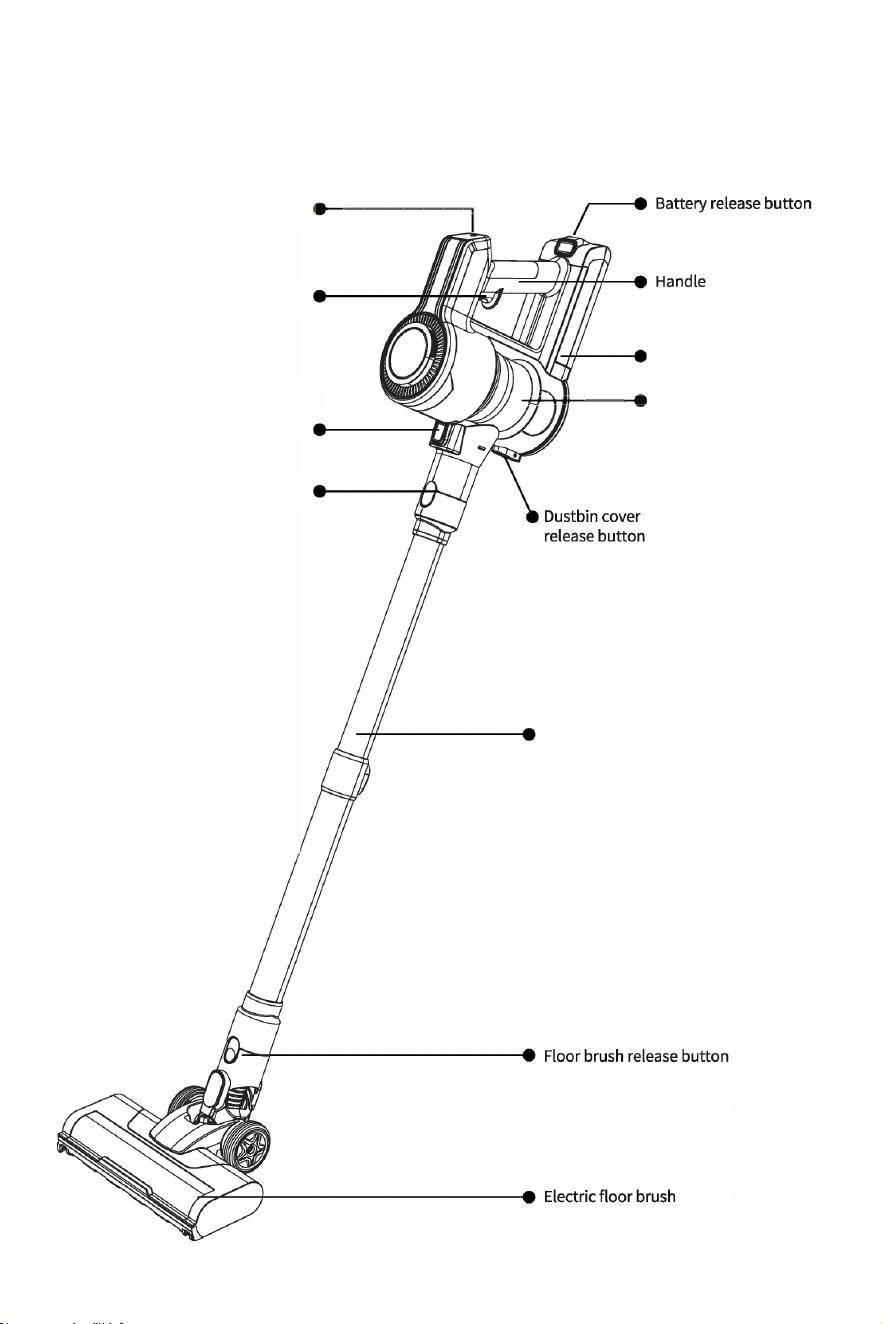
Power switch button
Dustbin release button
Dust tube release button
Telescopic dust tube
Speed Adjustment Button
Dustbin
Battery
Overview
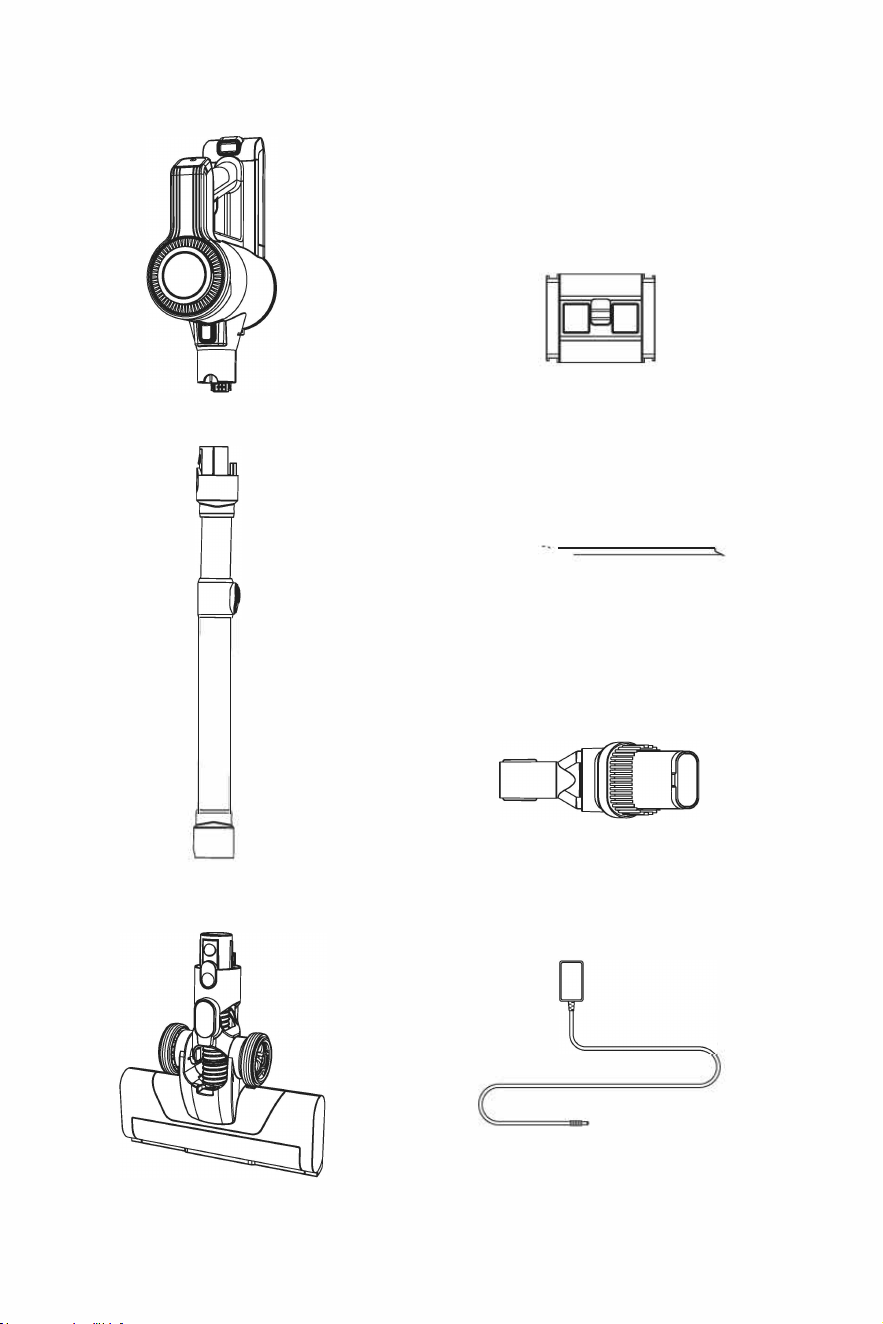
Vacuum Unit
Wall mount
El>==\
Long crevice nozzle
2-in-l dusting brush
Telescopic dust tube
Electric floor brush
Power adaptor
04
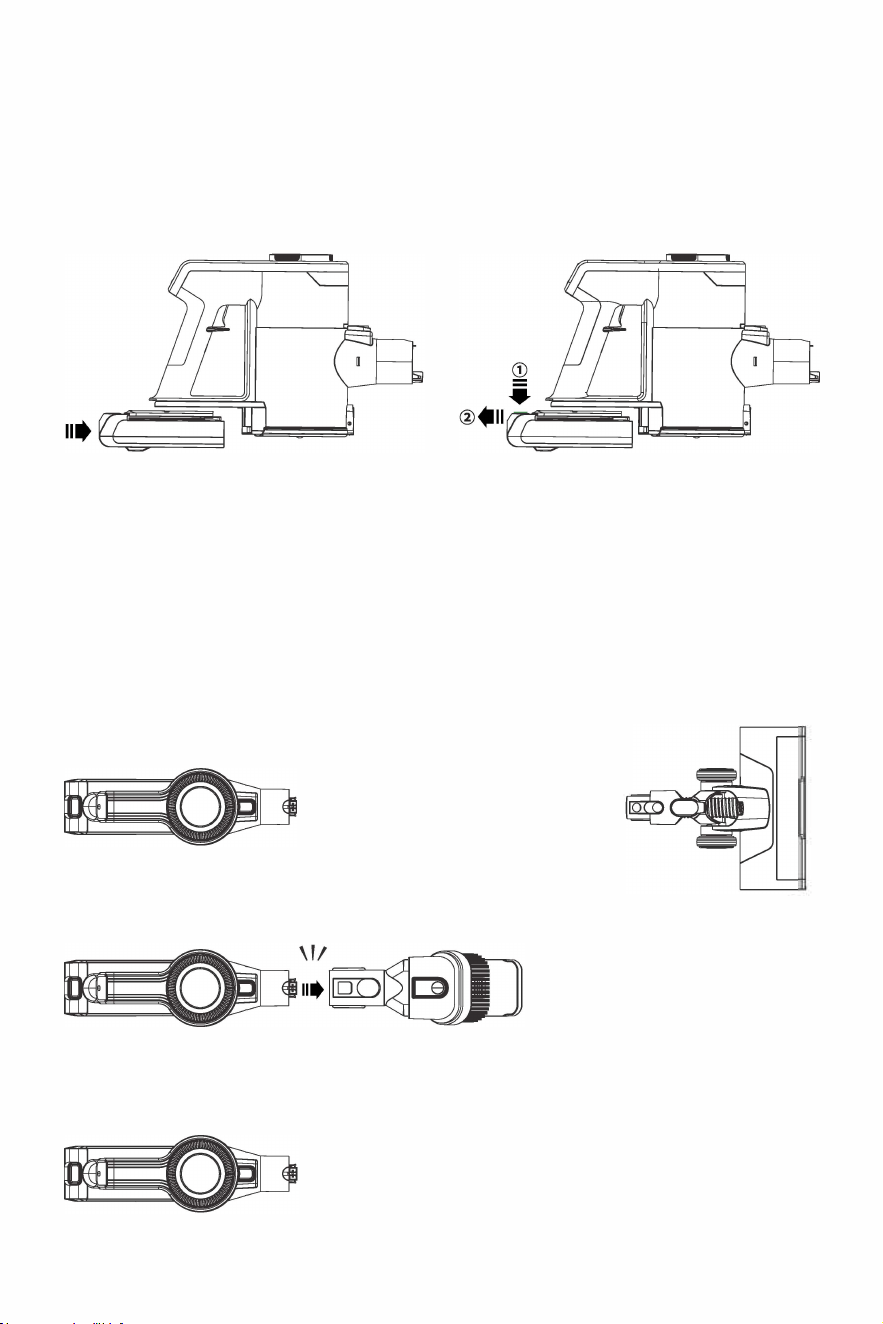
Product Assembly
1. Battery installation and removal
Installation: align the battery with the back-end
position of the vacuum unit and slide it in until
it is clamped in place.
Removal: press the battery release button and
pull it out for removal.
2. Installation and disassembly of the whole machine
Installation: insert the electric floor brush joint at the dust pipe, and the other end of the dust pipe at
the vacuum unit when the installation is complete.
Removal: Press the corresponding release button and pull it out to remove the electric floor brush and
the host.
clik
clik
"'
"'
11.�11•
clik
clik
"'
II·�
05
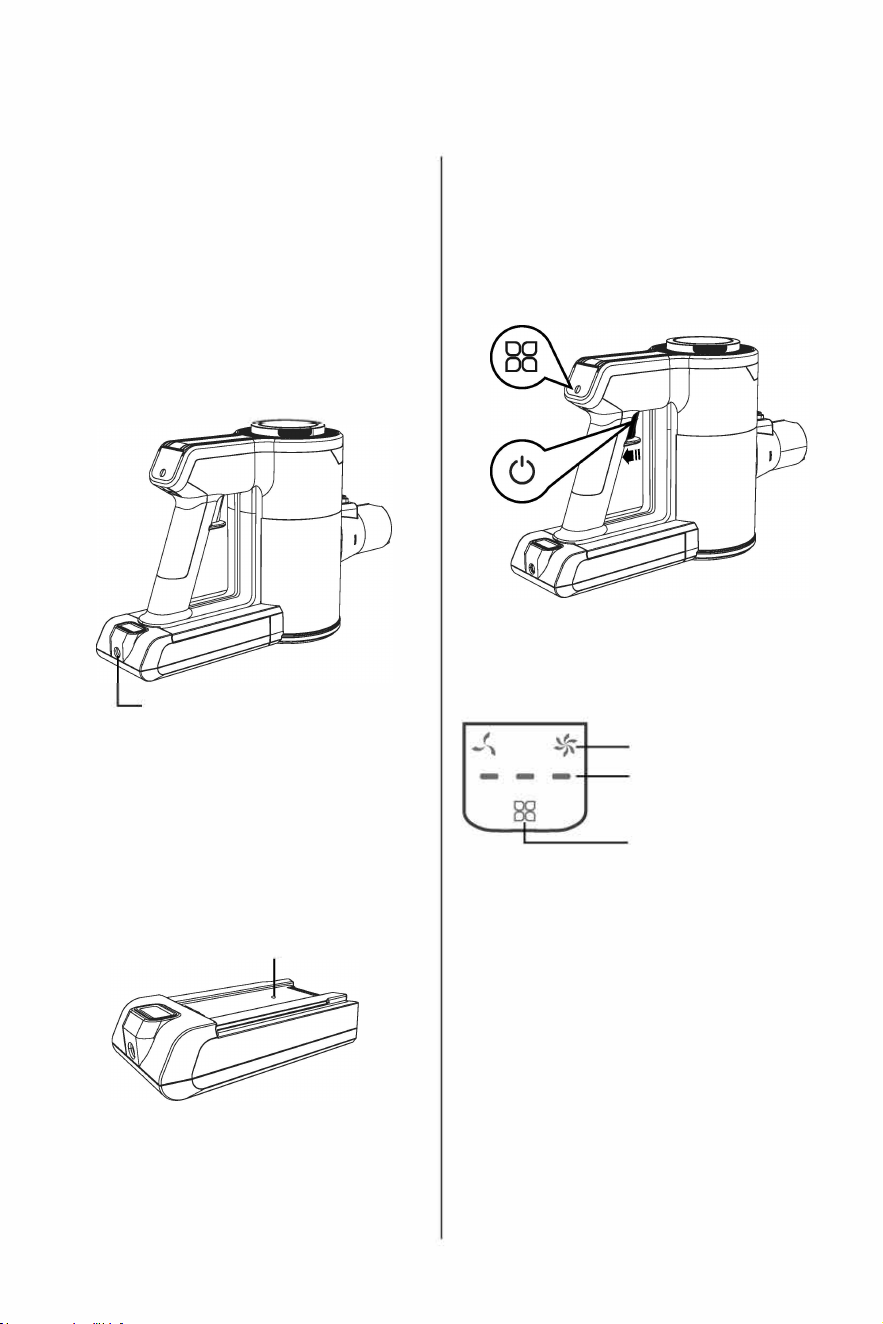
Operation
In the process of use, when the display light
flashes, it indicates that the power is insuicient,
and it needs to be recharged in time so as not to
aect the use.
Note: please charge with the original power
adapter.
Charging:
1. As shown in the picture, the charging plug on
the power adapter is inserted into the charging
port of the battery and it will be charged. When
the charge is displayed as three lights constantly
lit indicates full charge.
Charging port
2. As shown in the picture, after the battery is
removed, insert the charging plug into the
charging port on the battery, the indicator light
is flashing blue, indicating that it is charging; the
indicator light is solid , indicating full charge.
Indicator light
06
1. Press the switch button and the machine
starts working; press the switch button again
and the machine shuts down.
2. The machine has two suction gears, short
press " 88 " , dierent suction gears can be
switched.
Display screen indications
Suction indicator
Power indicator light
Gear switch button
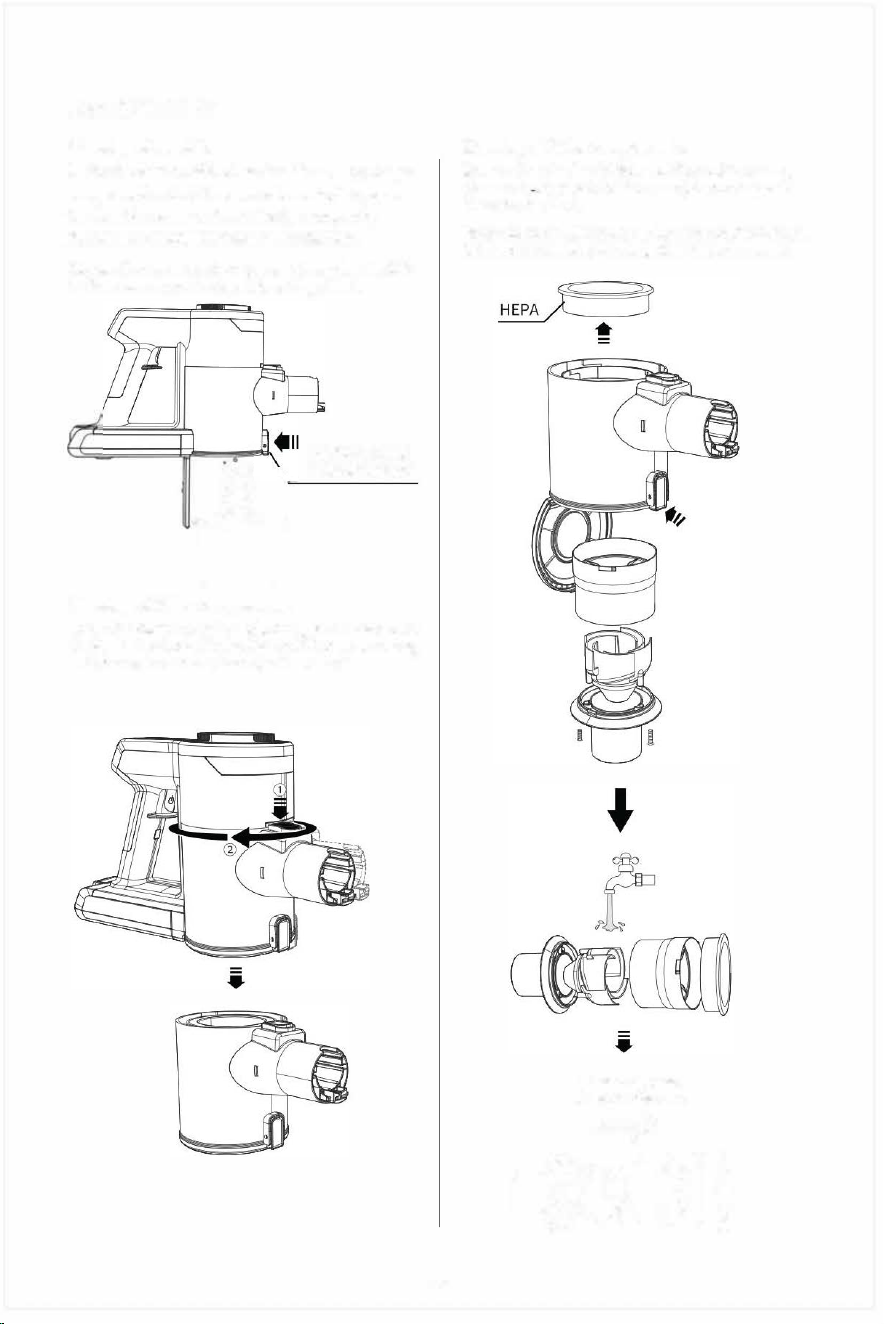
Maintenance
Cleaning of dustbin
1. Aim the bottom of the dustbin at the garbage can,
press the dustbin cover release button, open the
dustbin cover automatically, and gently shake it
to empty the dust in the dustbin.
Note: Please clean the dustbin after each use to
ensure the best cleaning effect.
....
n
Cleaning of filter components
Dustbin cover
release button
Press the dust cup release button, and then turn it
clockwise as shown in the figure till it cannot move,
and then take out the dust cup downward.
07
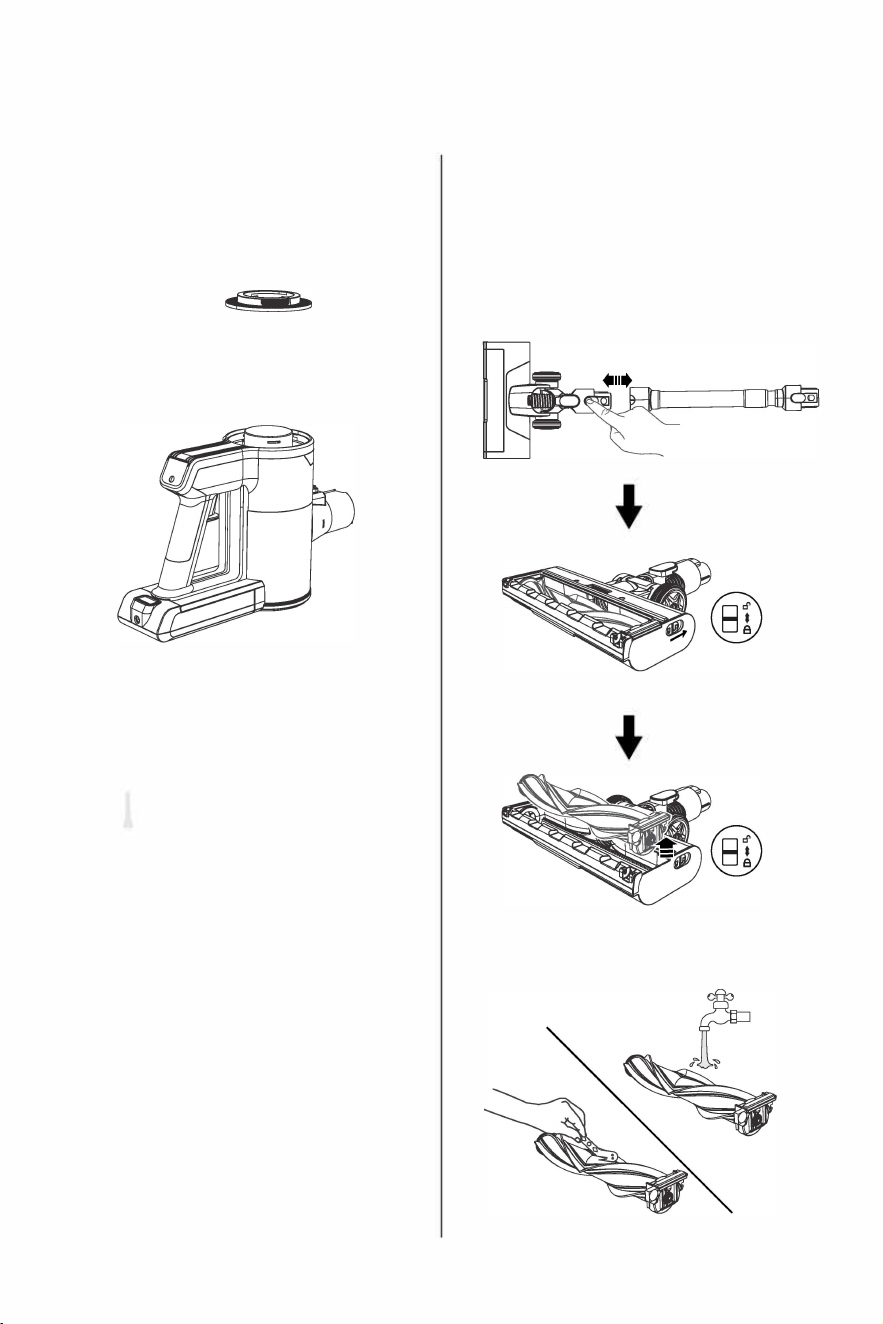
Cleaning of filter components
Note: after rinsing inlet and outlet filters with
water, please air -dry them before use (do not
expose them in the sun).
Note: to maintain the best cleaning performance,
it is recommended to clean them once a week.
do not expose
them in the sun
I
nlet
F
i
lter
Warning:
I.Do not use this machine when filter compo
nents are not installed!
2. Filter components are prohibited
from being used bere they are dried
completely aer flushing.
O
utlet filter--
•
♦
.t
do not expose
them in the sun
111•
08
Cleaning of electric floor brush
1. As shown in the picture, push the lock button
down to the unlocked state, and take out one end
of the roller brush and pull out the whole brush.
Note: when pulled out, some dust will fall.
2.
R
emo
v
e any hair or debris on the roller brush.
If it is washed with water, it must be fully dry
before returning to the brush housing.
♦
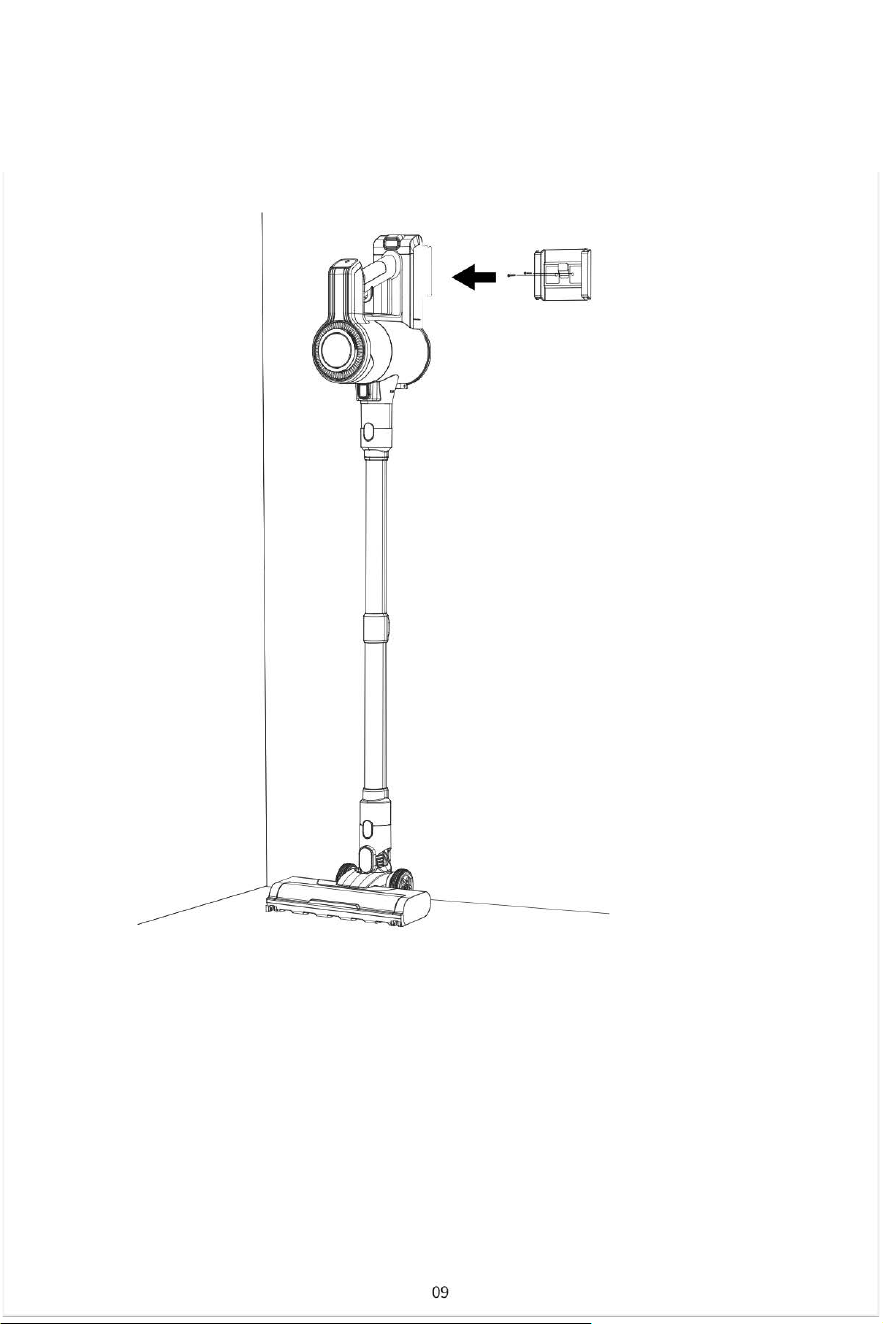
Maintenance
A
fter use, the vacuum can be hung on the wall using the wall mount for convenient storage.
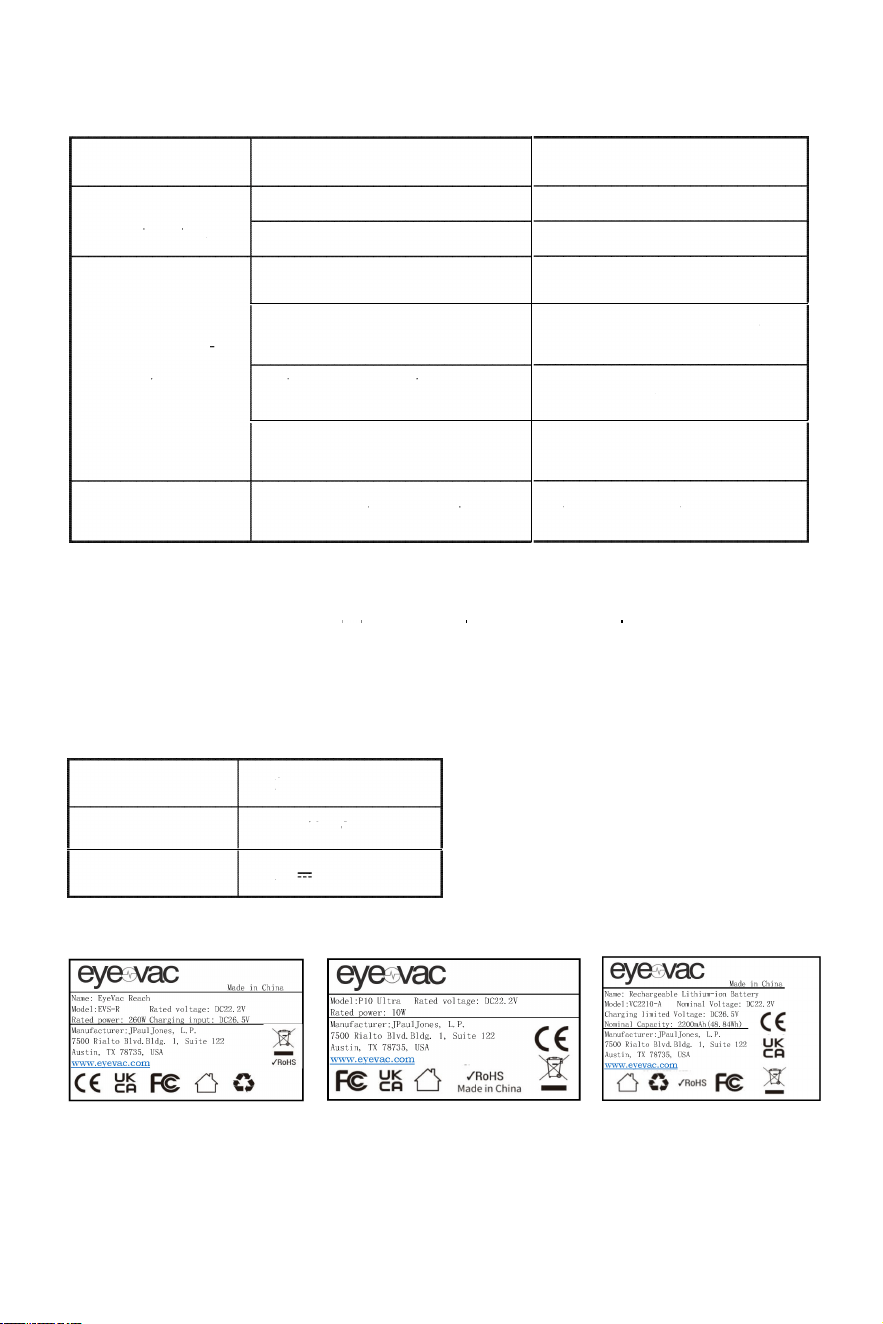
Troubleshooting
Fault Possible Issues
The machine
The battery is not installed correctly
cannol be slarled.
The battery is dead
The dustbin is full
Solution
Install the battery correctly
Charge the battery
Vacuum cleaner
has no suction/
suction becomes
smaller.
Clean up the suction of the dust
pipe or floor brush
Reinstall the dustbin and filters
The suction of the dust pipe or floor
brush is blocked by a foreign body
Duslbin or filters are nol
installed correctly
Filter blockage
Dust is leaking
Filters are not installed correctly
Clean filters, dry fully and put
it back
Install filters correctly
from the air outlet.
Note:
• This vacuum cleaner must be used with the original ballery and power adapter.
• Do not use the battery for any purpose other than this vacuum cleaner.
Specifications
Vacuum Cleaner Specifications
Working Voltage
22.2V
Adapter Rated Input
100-240V~50/60Hz
Adapter Rated Output
26.SV
0.SA
10
Empty the rubbish in the
dustbin