-
1
-
2
A
21
CS
FR
Accessoires fournis
Pile de format « AAA »
PT
Acessórios fornecidos Controlo remoto
Pilha de tamanho “AAA”
ID
Aksesori yang disertakan
Unit remote kontrol Baterai ukuran “AAA”
AR
5 64
CS
FR
Vis
PT
Parafusos
ID
Sekrup
AR
LED BACKLIGHT TV
EN
EN
Initial setup guide
Please read “Important safety precautions” before setting up the TV.
Guide d’installation initiale
Veuillez lire les « Précautions de sécurité importantes » avant d’installer le téléviseur.
Guia de confi guração inicial
Antes de começar a confi gurar o televisor, leia as “Importantes Precauções de Segurança”.
ID
ID
Panduan penyiapan awal
Harap baca “Tindakan pencegahan penting untuk keselamatan” sebelum menyiapkan TV.
4T-C65FL1X
4T-C55FL1X
4T-C50FL1X
4T-C75FK1X
4T-C65FK1X
4T-C55FK1X
4T-C50FK1X
4T-C42FK1X
TINS-H726WJN1
23P07-MA-NS
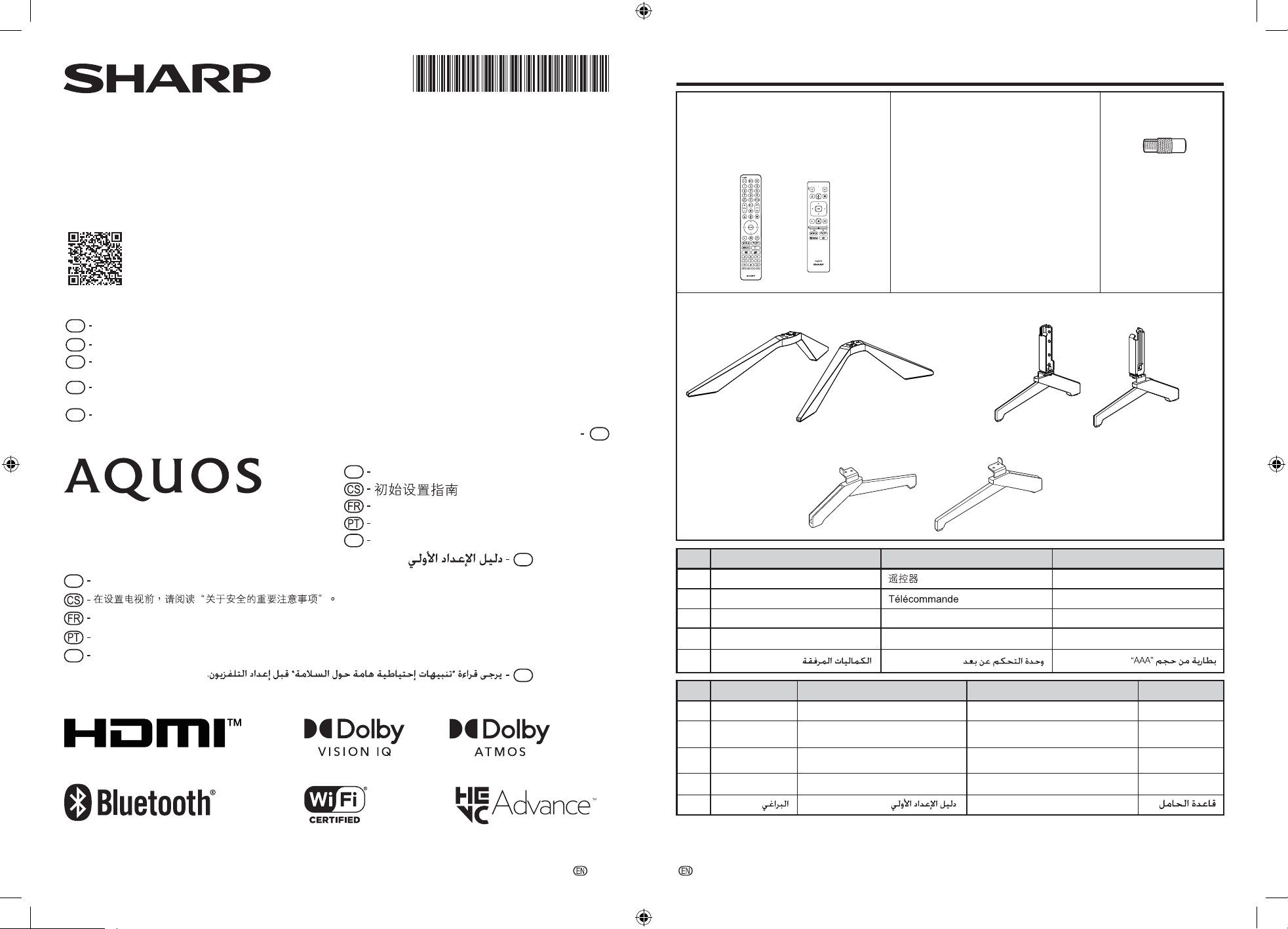
A. Supplied accessories
TINS-H726WJN1
3
Guide d’installation initiale
Guia de configuração inicial
Panduan penyiapan awal
初始设置指南
“AAA” 型号电池
随机附件
螺丝钉
底座
Socle
Base do suporte
Dasar Dudukan
AR
AR
EN
CS
FR
PT
AR
.ﺖﻧﺮﺘﻧﻹﺍ ﺕﺎﻜﺒﺷ ﻡﻮﺳﺭ ﻖﻴﺒﻄﺗ ﻢﺘﻴﺳ .PDF ﻖﻴﺴﻨﺘﺑ ﻲﺗﻭﺮﺘﻜﻟﻹﺍ ﻞﻴﻟﺪﻟﺍﻰﻟﺇ ﻝﻮﺻﻮﻠﻟ ﻩﻼﻋﺃ ﺰﻣﺮﻟﺍ ﺢﺴﻣ ﯽﺟﺮﻳ
Please scan the code above to access PDF E-Manual. The networks of the internet charges will be applied.
Veuillez scanner le code ci-dessus pour accéder au manuel électronique PDF. Les réseaux des charges
internet seront appliqués.
Por favor, escaneie o código acima para acessar o PDF E-Manual. As redes das taxas de internet serão
aplicadas.
请扫描上面的代码以访问 PDF 电子手册。将应用互联网收费的网络。
https://global.sharp/restricted/support/aquos/emanual/asia/pdf/fk/android11/index.html
A型, B型
Type A, Type B
Tipo A, Tipo B
,A
ﻉﻮﻧB ﻉﻮﻧ
Tipe A, Tipe B
天线适配器 (仅限菲律宾)
Adaptateur d'antenne
(Les Philippines uniquement)
Adaptor de antena
Antena Adaptor
(Filipinas apenas)
(Filipina saja)
ﻲﺋﺍﻮﻬﻟﺍ ﻝﻮﺤﻣ
(ﻄﻘﻓ ﻦﻴﺒﻠﻔﻠﻟ)
ID
Harap pindai kode di atas untuk mengakses PDF E-Manual. Biaya jaringan internet akan diterapkan.
1 Remote control unit 2 “AAA” size battery 5
65FL / 55FL / 50FL
(
m 4)
75FK / 65FK / 55FK / 50FK / 42FK
(
65FL / 55FL / 50FL
( Type A m 1, Type B m 1 )
75FK / 65FK / 55FK / 50FK / 42FK
( Type A m 1 )
m 2)
3
Initial setup guide
6 Stand base
65FL / 65FK75FK
55FL / 55FK / 50FL / 50FK / 42FK
75FK / 65FL / 65FK
55FL / 55FK / 50FL / 50FK / 42FK
Screws
4
(M5 x 15mm) m 4
(M4 x 12mm) m 4
R
RL
L
R
L R
L
Type A Type B
Antenna adaptor
(The Philippines only)
-
3
-
4
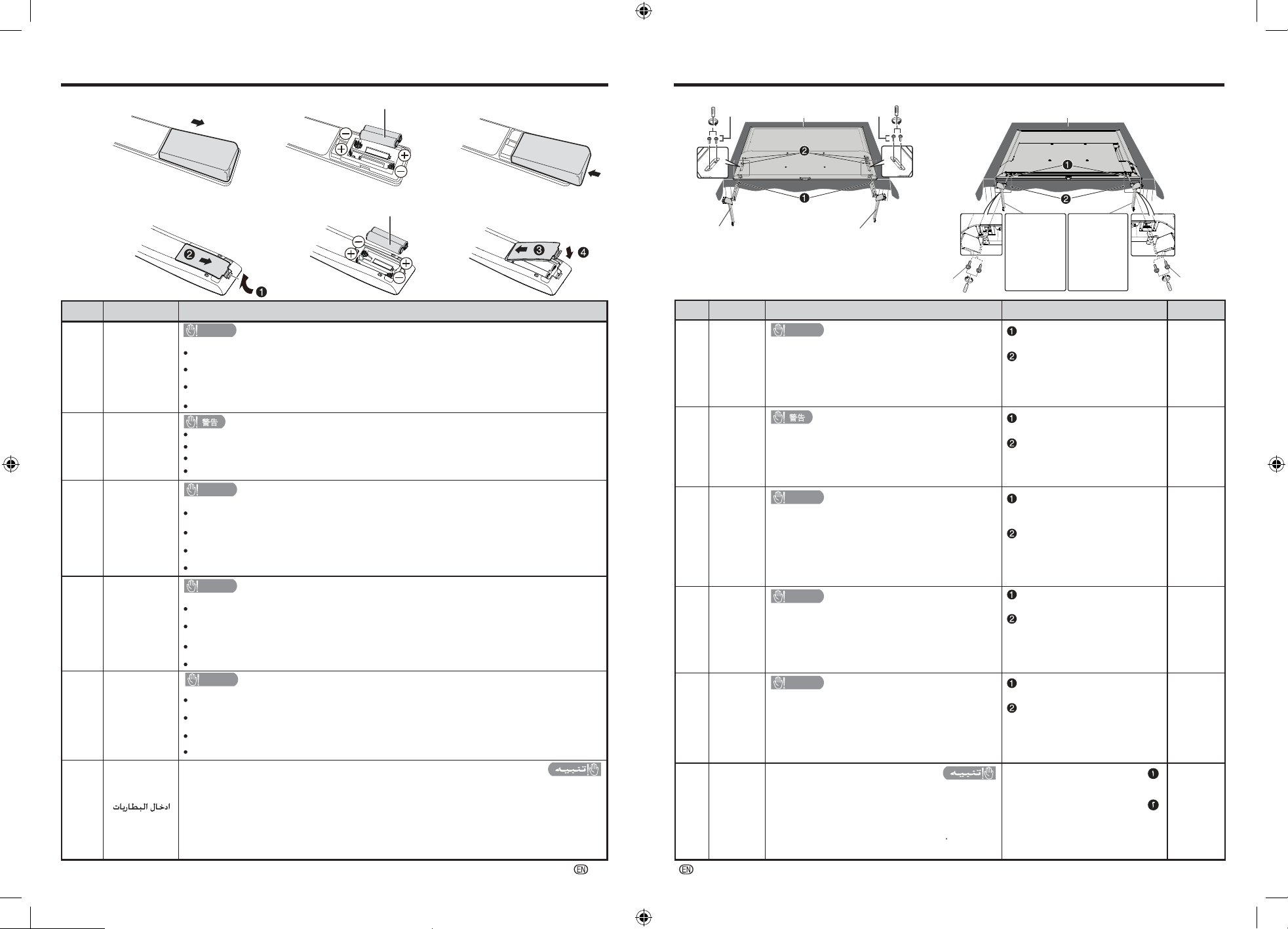
B. Inserting the batteries
B CAUTION
装入电池
Insertion
des piles
Inserting the
batteries
Colocar
as pilhas
CAUTION
CAUTION
•
•
Replacement of a battery with an incorrect type that can defeat a safeguard (for example,
in the case of some lithium battery types).
CS
EN
FR
ATTENTION
ATTENTION
•
•
•
•
•
•
•
•
Remplacement d'une batterie par un type incorrect qui peut annuler une protection (par
exemple, dans le cas de certains types de batteries au lithium).
PT
CUIDADO
CUIDADO
Substituição de uma bateria por um tipo incorreto que pode anular uma proteção (por
Penggantian baterai dengan jenis yang salah yang dapat merusak perlindungan
(misalnya, untuk beberapa jenis baterai litium).
exemplo, no caso de alguns tipos de bateria de lítio).
ID
PERHATIAN
PERHATIAN
AR
C. Attaching the stand
Memasukkan
Baterai
•
•
•
•
•
•
•
•
•
•
•
•
•
•
•
•
•
•
•
•
•
•
•
•
Attaching
the stand
Assemble on a soft cushion on a
stable, flat and wide table.
Work with two or more people.
Do not grab the corners of the TV when lifting.
Do not remove protective pad until TV is assembled.
Otherwise, the screen can be damaged from direct
pressure.
bottom/rear of the TV.
Insert and tighten the screws
into the aligned holes in the
TV and stand base holes on
the
Insert the stand base into the
openings on the bottom of the TV.
C
CS
EN
安裝支座
FR
Fixation
du socle
PT
Instalar
o suporte
ID
Memasang
Dudukan
AR
Insérez la base du support dans
les ouvertures au bas du
téléviseur.
Insérez et serrez les vis dans les
trous alignés du téléviseur et les
trous de la base du support au
bas/à l'arrière du téléviseur.
Insira a base do suporte nas
aberturas na parte inferior da TV.
Insira e aperte os parafusos nos
orifícios alinhados na TV e
suporte os orifícios da base na
parte inferior/traseira da TV.
Masukkan dasar dudukan ke
dalam lubang di bagian bawah TV.
Masukkan dan kencangkan
sekrup ke dalam lubang yang
sejajar di TV dan lubang alas
dudukan di bagian bawah/
belakang TV.
Assembly Steps
软衬垫
Coussin
moelleux
Almofada
macia
Bantalan
lunak
.ﻥﻮﻳﺰﻔﻠﺘﻟﺍﻞﻔﺳﺃ ﺓﺩﻮﺟﻮﻤﻟﺍ
ﺕﺎﺤﺘﻔﻟﺍ ﻲﻓ ﻞﻣﺎﺤﻟﺍ ﺓﺪﻋﺎﻗ ﻞﺧﺩﺃ
.ﺢﻴﺤﺻ ﺮﻴﻏ ﻉﻮﻨﺑ ﺔﻳﺭﺎﻂﺒﻟﺍ ﻝﺍﺪﺒﺘﺳﺍ ﻢﺗ ﺍﺫﺇ ﺭﺎﺠﻔﻧﺍ ﻭﺃ ﻖﻳﺮﺣ ﺏﻮﺸﻧ ﺮﻄﺧ
.ﻝﺎﻌﺘﺷﻼﻟ ﻞﺑﺎﻗ ﺯﺎﻏ ﻭﺃ ﻞﺋﺎﺳ ﺏﺮﺴﺗ ﻭﺃ ﺭﺎﺠﻔﻧﺍ ﺙﻭﺪﺣ ﺔﻳﺎﻐﻠﻟ ﺾﻔﺨﻨﻣ ﺀﺍﻮﻫ ﻄﻐﻀﻟ ﺔﻳﺭﺎﻂﺒﻟﺍ ﺽﺮﻌﺗ ﻦﻋ ﺞﺘﻨﻳ ﺪﻗ
ﺯﺎﻏ ﻭﺃ ﻞﺋﺎﺳ ﺏﺮﺴﺗ ﻭﺃ ﺭﺎﺠﻔﻧﺍ ﺙﻭﺪﺣ ﯽﻟﺇ ﺔﻂﻴﺤﻤﻟﺍ ﺔﺌﻴﺒﻟﺍ ﻲﻓ ﺔﻳﺎﻐﻠﻟ ﺔﻴﻟﺎﻋ ﺓﺭﺍﺮﺣ ﺔﺟﺭﺩ ﻲﻓ ﺔﻳﺭﺎﻂﺒﻟﺍ ﻙﺮﺗ ﻱﺩﺅﻳ ﺪﻗ
.ﻝﺎﻌﺘﺷﻼﻟ ﻞﺑﺎﻗ
ﻰﻟﺇ ׳ ﺎﻬﻌﻄﻗ ﻭﺃ ﺔﻳﺭﺎﻄﺒﻠﻟ ﻲﻜﻴﻧﺎﻜﻴﻤﻟﺍ ﺮﻴﺴﻜﺘﻟﻭﺃ ' ﻦﺧﺎﺳ ﻥﺮﻓ ﻲﻓ ﻭﺃ ﺭﺎﻨﻟﺍ ﻲﻓ ﺔﻳﺭﺎﻂﺒﻟﺍ ﻦﻣ ﺺﻠﺨﺘﻟﺍ ﻱﺩﺆﻳ ﻥﺃ ﻦﻜﻤﻳ
.(ﻡﻮﻴﺜﻴﻠﻟﺍ ﺕﺎﻳﺭﺎﻄﺑﻉﺍﻮﻧﺃ
ﺔﻟﻭﺎﻃ ﻰﻠﻋ ﺔﻤﻋﺎﻧ ﺓﺩﺎﺳﻭ ﻰﻠﻋ ﻊﻴﻤﺠﺘﻟﺎﺑ ﻢﻗ
.ﺔﻀﻳﺮﻋﻭ ﺔﻳﻮﺘﺴﻣﻭ ﺔﺘﺑﺎﺛ
ﻞﻣﺎﳊﺍﺐﻴﻛﺮﺗ ﺔﻨﻴﻟ ﺔﻴﺸﺣ
.ﺮﺜﻛﺃ ﻭﺃ ﻦﻴﺼﺨﺷ ﻊﻣ ﻞﻤﻌﻟﺍ
.ﻊﻓﺮﻟﺍ ﺪﻨﻋ ﻥﻮﻳﺰﻔﻠﺘﻟﺍ ﺎﻳﺍﻭﺰﺑ ﻚﺴﲤ ﻻ
.ﻥﻮﻳﺰﻔﻠﺘﻟﺍ ﻊﻴﻤﲡ ﻢﺘﻳ ﻰﺘﺣ ﺔﻴﻗﺍﻮﻟﺍ ﺓﺩﺎﺳﻮﻟﺍ ﺔﻟﺍﺯﺈﺑ ﻢﻘﺗ ﻻ
.ﺮﺷﺎﺒﳌﺍ ﻄﻐﻀﻟﺍ ﻦﻣ ﺔﺷﺎﺸﻟﺍ ﻒﻠﺘﺗ ﻥﺃ ﻦﻜﳝ ﻚﻟﺫ ﻑﻼﺧ
ﻒﻌﺑ ﺔﻟﺎﺣ ﻲﻓ ‘ ﻝﺎﺜﻤﻟﺍ ﻞﻴﺒﺳ ﯽﻠﻋ) ﺔﻳﺎﻤﺤﻟﺍ ﻞﻄﺒﻳ ﻥﺃ ﻦﻜﻤﻳ ﺢﻴﺤﺻ ﺮﻴﻏ ﻉﻮﻨﺑ ﺔﻳﺭﺎﻄﺒﻟﺍ ﻝﺍﺪﺒﺘﺳﺍ
.ﺭﺎﺠﻔﻧﺍ ﺙﻭﺪﺣ
ﺎﻬﻄﺑﺭ ﻢﻜﺣﺃﻭ ﺮﯿﻣﺎﺴﻤﻟﺍ ﻞﺧﺩﺃ
ﻲﻓ ﺓﺍﺫﺎﺤﻤﻟﺍ ﺕﺎﺤﺘﻔﻟﺍ
ﻲﻓ
ﻞﻣﺎﺤﻟﺍ ﺓﺪﻋﺎﻗ ﺕﺎﺤﺘﻓﻭ
ﻥﻮﻳﺰﻔﻠﺘﻟﺍ
ﻦﻣ ﻲﻔﻠﺨﻟﺍ ∕ﻲﻠﻔﺴﻟﺍ
ﺀﺰﺠﻟﺍ ﻲﻓ
.ﻥﻮﻳﺰﻔﻠﺘﻟﺍ
与两个或更多人一起工作。
抬起时请勿抓住电视机的角。
在组装电视机之前请勿取下保护垫。
否则,屏幕可能会因直接压力而损坏。
组装时请在一张稳定、平坦、宽大且
有软垫的桌子上进行。
将螺钉插入并拧紧电视底部/背
面对齐的电视孔和支架底座孔。
将支架底座插入电视底部的开口
中。
Travaillez avec deux personnes ou plus.
Ne saisissez pas les coins du téléviseur lorsque
vous le soulevez.
Ne retirez pas le coussin de protection tant que le
téléviseur n’est pas assemblé. Sinon, l’écran peut
être endommagé par la pression directe.
Assemblez sur un coussin moelleux
sur une table stable, plate et large.
Trabalhe com duas ou mais pessoas.
Não segura os cantos da TV ao levantá-la.
Não remova a almofada protetora até que a TV
seja montada. Caso contrário, a tela pode ser
danificada pela pressão direta.
uma mesa estável, plana e larga.
Monte em uma almofada macia em
Bekerja dengan dua orang atau lebih.
Jangan pegang sudut TV saat mengangkat.
Jangan lepaskan bantalan pelindung sampai TV
dipasang. Jika tidak, layar dapat rusak karena
tekanan langsung.
Susun di atas bantal empuk di atas
meja yang stabil, datar, dan lebar.
321
1 2 3
“AAA” size battery
2
“AAA” size battery
2
■
65FL / 65FK
■
75FK / 55FL / 55FK / 50FL / 50FK / 42FK
4 4
Stand base Stand base
4 Stand base “R”
75FK
50FL
50FK
42FK
- L
- R
- R
- R
75FK
50FL
50FK
42FK
4
Stand base “L”
5 Screws 5 Screws
5
Screws
5
Screws
Soft cushionSoft cushion
Soft CushionCAUTION
Soft cushion
- R
- L
55FL - R 55FL - L
55FK - R 55FK - L
- L
- L
Type B
Type A
Risk of fire or explosion if the battery is replaced by an incorrect type.
Disposal of a battery into fire or a hot oven, or mechanically crushing or cutting of a battery, can result in
an explosion.
A battery subjected to extremely low air pressure may result in an explosion or the leakage of flammable
liquid or gas.
如果更换的电池型号不正确,则有火灾或爆炸的危险。
将电池弃入火中或热烘箱中,或者机械挤压或切割电池,都可能导致爆炸。
Risque d'incendie ou d'explosion si la batterie est remplacée par un type incorrect.
L'élimination d'une batterie dans le feu ou dans un four chaud, ou l'écrasement ou le découpage
mécanique d'une batterie, peut entraîner une explosion.
Une batterie soumise à une pression d'air extrêmement basse peut entraîner une explosion ou une fuite
de liquide ou de gaz inflammable.
Laisser une batterie dans un environnement à température extrêmement élevée peut entraîner une
explosion ou une fuite de liquide ou de gaz inflammable.
Risco de incêndio ou explosão se a bateria for substituída por um tipo incorreto.
O descarte de uma bateria no fogo ou em um forno quente, ou o esmagamento ou corte mecânico de uma
bateria, pode resultar em explosão.
Deixar a bateria em um ambiente com temperatura extremamente alta pode resultar em explosão ou
vazamento de líquido ou gás inflamável.
Uma bateria submetida a pressão de ar extremamente baixa pode resultar em explosão ou vazamento de
líquido ou gás inflamável.
Risiko kebakaran atau ledakan jika baterai diganti dengan tipe yang salah.
Membiarkan baterai di lingkungan sekitar yang bersuhu sangat tinggi dapat mengakibatkan ledakan atau
kebocoran cairan atau gas yang mudah terbakar.
Pembuangan baterai ke dalam api atau oven panas, atau penghancuran atau pemotongan baterai secara
mekanis, dapat mengakibatkan ledakan.
Baterai yang terekspos tekanan udara yang sangat rendah dapat mengakibatkan ledakan atau kebocoran
cairan atau gas yang mudah terbakar.
Leaving a battery in an extremely high temperature surrounding environment can result in an explosion or
the leakage of flammable liquid or gas.
更换类型不正确的电池可能会破坏保护措施(例如某些锂电池类型)。
将电池留在极端高温的周围环境中可能会导致爆炸或泄漏易燃液体或气体。
承受极低气压的电池可能会导致爆炸或泄漏易燃液体或气体。
-
5
-
6
Thank you for your purchase of the SHARP LCD colour TV product. To ensure safety and many years of trouble-
free operation of your product, please read the Important Safety Precautions carefully before using this product.
Important Safety Precautions
[ENGLISH
EN
]
•
Stand base must be attached to prevent the TV set from falling down and cause injuries.
•
Cleaning — Unplug the AC cord from the AC outlet before cleaning the product. Use a soft damp cloth to clean the
product. Do not use liquid cleaners, aerosol cleaners or chemical cloth to clean it, as such materials may damage the
product.
•
Water and moisture — Do not use the product near water, such as bathtub, washbasin, kitchen sink, laundry tub,
swimming pool and in a wet basement.
•
Do not place vases or any other water-fi lled containers on this product.
The water may spill onto the product causing fi re or electric shock.
•
Stand — Do not place the product on an unstable cart, stand, tripod or table. Doing so can cause the product to fall,
resulting in serious personal injuries as well as damage to the product. Use only a cart, stand, tripod, bracket or table
recommended by the manufacturer or sold with the product. When mounting the product on a wall, be sure to follow the
manufacturer’s instructions. Use only the mounting hardware recommended by the manufacturer.
•
When relocating the product placed on a cart, it must be moved with utmost care. Sudden stops, excessive force and
uneven fl oor surface can cause the product to fall from the cart.
•
Ventilation — The vents and other openings in the cabinet are designed for ventilation. Do not cover or block these
vents and openings since insuffi cient ventilation can cause overheating and/or shorten the life of the product. Do not
place the product on a bed, sofa, rug or other similar surface, since they can block ventilation openings. This product is
not designed for built-in installation; do not place the product in an enclosed place such as a bookcase or rack, unless
proper ventilation is provided or the manufacturer’s instructions are followed.
•
The LCD panel used in this product is made of glass. Therefore, it can break when the product is struck forcefully or
with a sharp object. If the LCD panel is broken, be careful not to be injured by broken glass.
•
Heat sources — Keep the product away from heat sources such as radiators, heaters, stoves and other heat-generating
products (including amplifi ers).
•
To prevent fi re, never place any type of candle or naked fl ames on the top or near the TV set.
•
To prevent fi re or shock hazard, do not place the AC power cord under the TV set or other heavy items.
•
Do not place heavy objects on this product or stand on it. Doing so could cause injury if the product overturns. Take
special care near children and pets.
•
The LCD panel is made with extremely high precision technology, and has 99.99% or more effective pixels.
The 0.01% or less missing pixels or those that are always lit is not a malfunction.
Precautions when transporting the TV
When transporting the TV, never carry it by holding or otherwise putting pressure onto the display. Be sure to always
carry the TV by two people holding it with two hands — one hand on each side of the TV.
•
Do not display a still picture for a long time, as this could cause an afterimage to remain.
•
Install the product on the place where the AC cord can be unplugged easily from the AC outlet or from the AC INPUT
terminal on the rear of the product.
•
Do not install the TV in a location in which it will be subject to water drops such as underneath an air conditioning unit
or in the vicinity of a humidifi er.
•
Water drops falling onto the TV and water entering inside it may result in fi re, electric shock, or malfunctions.
•
We recommend that you install the TV at least 1m away from the outlet of an air conditioner.
Dear SHARP customer
A television set may fall, causing serious personal injury or death. Many injuries, particularly to children, can be
avoided by taking simple precautions such as:
Stability Hazard
If the existing television set is going to be retained and relocated, the same considerations as above should be applied.
•
-
-
-
-
-
-
-
-
-
ALWAYS use cabinets or stands or mounting methods recommended by the manufacturer of the television set.
ALWAYS use furniture that can safely support the television set.
ALWAYS ensure the television set is not overhanging the edge of the supporting furniture.
ALWAYS educate children about the dangers of climbing on furniture to reach the television set or its controls.
ALWAYS route cords and cables connected to your television so they cannot be tripped over, pulled or grabbed.
NEVER place a television set in an unstable location.
NEVER place the television set on tall furniture (for example, cupboards or bookcases) without anchoring both
the furniture and the television set to a suitable support.
NEVER place the television set on cloth or other materials that may be located between the television set and
supporting furniture.
NEVER place items that might tempt children to climb, such as toys and remote controls, on the top of the
television or furniture on which the television is placed.
Initial installation
Follow the steps below one by one when using the TV for the fi rst time. Some steps may not be necessary depending on
your TV installation and connection.
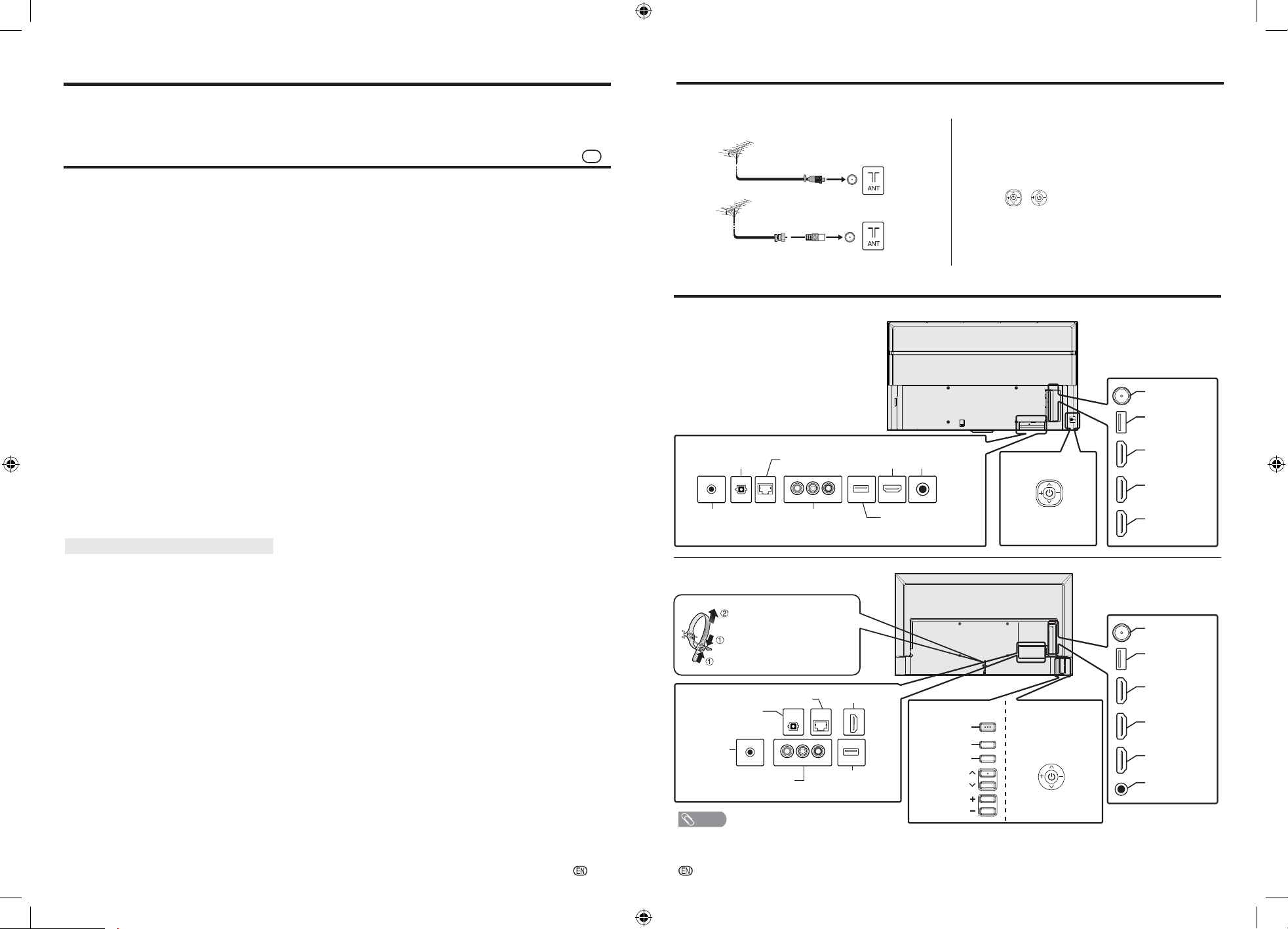
Connect an antenna cable to the antenna terminal.
Plug the AC cord into the AC outlet.
Run the initial installation.
•
Follow the guide on the TV screen to set the settings.
Press / (JOG-KEY) / POWER on the TV.
NOTE
• This drawings used throughout this manual are based on the 4T-C50FL1X / 4T-C50FK1X.
POWER
ENTER
INPUT
CHANNEL
VOLUME
• Place the TV close to the AC outlet, and keep the power
plug within reach.
• Product shape varies in some countries.
Terminal Diagram (TV Rear)
HDMI 4
LAN (10/100 BASE-T)
DIGITAL AUDIO
OUTPUT
USB 2
(DC5V 1.5A)
AV IN
VIDEO, L/R (AUDIO)
SERVICE
ONLY
Bundle the cables into
cable tie.
Press cable tie clip (
1
)
and pull out cable tie (
2
)
completely to release.
JOG-KEY
50FL / 50FK /
55FL / 55FK /
42FK
65FL / 65FK
Headphone
HDMI 3
HDMI 2
HDMI 1
(eARC/ARC)
Antenna
USB 1
(DC5V 1.5A)
HDMI 4
LAN
(10/100 BASE-T)
DIGITAL AUDIO
OUTPUT
USB 2
(DC5V 1.5A)
AV IN
R/L (AUDIO), VIDEO
SERVICE
ONLY
JOG-KEY
4T-C75FK1X
4T-C65/55/50FL1X
4T-C65/55/50/42FK1X
Headphone
HDMI 3
HDMI 2
HDMI 1
(eARC/ARC)
Antenna
USB 1
(DC5V 1.5A)
Antenna adaptor (supplied)
-
7
-
8
Model
Item
42FK
50FL
50FK
75FK
65FL
65FK
55FL
55FK
164 cm 139 cm189 cm 126 cm 105 cmlenapDCL
Resolution
8,294,400 pixels (3840
g
2160)
06LAP/34.4CSTN/85.3CSTN/MACES/LAPmetsysruolocoediV
TV function TV-
standard
Analogue PAL: B/G, D/K, I SECAM: B/G, D/K, K/K1 NTSC: M
Digital DVB-T/DVB-T2, DTMB ( For Hong Kong )
Receiving
channel
VHF/UHF 44.25 – 863.25 MHz
TV-tuning system Auto Preset
STEREO/BILINGUAL NICAM: B/G, I, D/K A2 stereo: B/G MTS: M
Audio amplifi er
10 W
g
2
Terminals Antenna
SERVICE ONLY
x D (mm)
W x H
3.5 mm jack
HDMI 1
HDMI 4K, ALLM/VRR, eARC/ARC
HDMI 2, 3, 4 HDMI 4K, ALLM/VRR
AV IN AUDIO in, VIDEO in
USB 1, 2 USB (DC5V 1.5A output)
LAN (10/100 BASE-T) Network connector
DIGITAL AUDIO
OUTPUT
Optical S/PDIF digital audio output
Headphone
3.5 mm stereo
ilpmiS/hsilgnE
egaugnalDSO
fi ed Chinese/Traditional Chinese (TW)/
Traditional Chinese (HK)/Arabic/French/Portuguese/Russian/Thai/
Vietnamese/Indonesia/Malay
zH06/05,V042–011CAtnemeriuqerrewoP
50FL:
235
(0.5)
50FK:
144
(0.6)
122
(0.6)
65FL:
65FK:
222
(0.5)
207
(0.5)
118
(0.6)
noitpmusnocrewoP
(Standby)(W)
(W)
Dimensions
without
stand
x D (mm)
W x H with
stand
948
g
544
g
80
948
g
607
g
273
1678
g
975
g
74
1462
g
854
g
76
1678
g
1056
g
403
1462
g
920
g
289
1118
g
655
g
80
1118
g
720
g
273
(with stand)(kg)
Weight without stand
(kg)
11.0
(11.5)
22.0
(23.0)
55FL:
55FK:
176
(0.5)
148
(0.5)
1232
g
722
g
80
1232
g
785
g
273
13.0
(13.5)
27.5
(28.5)
7.9
(8.3)
Operating temperature 0°C to +40°C
•
As a part of policy of continuous improvement, SHARP reserves the right to make design and specifi cation changes
for product improvement without prior notice. The performance specifi cation fi gures indicated are nominal values of
production units. There may be some deviations from these values in individual units.
•
Specifi cation may differ depending on the selected country.
CAUTION
•
Installing the Liquid Crystal Television requires special skill that should only be performed by qualifi ed service
personnel. Customers should not attempt to do the work themselves. SHARP bears no responsibility for improper
mounting or mounting that results in accident or injury.
•
Carefully read the instructions that come with the bracket before beginning work.
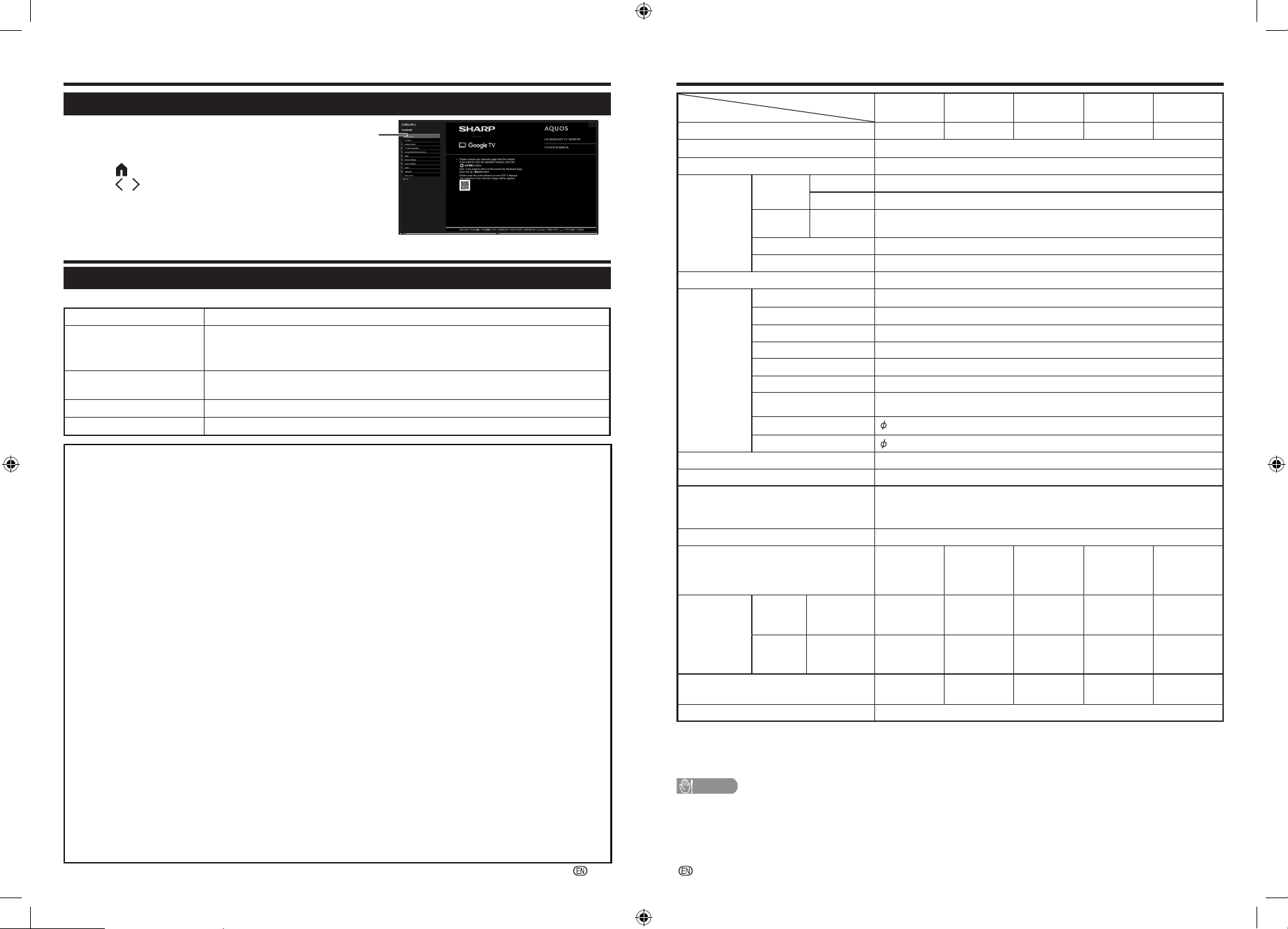
Viewing E-Manual
Viewing the Built-in Operation Manual
Displays the built-in operation manual on the screen.
You can read information about how to use this device.
Appendix
Troubleshooting
The problems described below are not always caused by malfunctions. Check the TV again before having the TV serviced.
noituloSelbissoPmelborP
•
No power.
•
Check if you pressed POWER on the remote control unit.
•
Is the AC cord disconnected?
•
Has the power been turned on?
•
Remote control unit does
not operate.
•
Are batteries inserted with polarity (+, –) aligned?
•
No picture.
•
Is connection to other components correct?
•
No sound.
•
Is connection to other components correct?
Specifications
75 q DIN type
Wi-Fi Protocole IEEE 802.11 a/b/g/n/ac 2T/2R Dual Band(Wi-Fi Security)
(WFA/WPA/WPA2)
Bluetooth V2.1/3.0/4.2/5.0
The internet connection will be required.
1
Press (HOME) to display the HOME screen,
press
/
to select “Manual”, and then press
ENTER/OK.
2 When you select contents, its page will be displayed.
This displays the built-in operation manual screen.
2
•
Do not install / mount the TV with tilting condition.
DISCLAIMERS
• This SHARP device facilitates the access to content and services provided by third parties. The content and
services accessible via this device belong to and may be proprietary to third parties. Therefore, any use of such
third party content and services must be in accordance with any authorization or terms of use provided by such
content or service provider. SHARP shall not be liable to you or any third party for your failure to abide by such
authorization or terms of use. Unless otherwise specifically authorized by the applicable content or service provider,
all third party content and services provided are for personal and non-commercial use; you may not modify, copy,
distribute, transmit, display, perform, reproduce, upload, publish, license, create derivative works from, transfer or
sell in any manner or medium any content or services available via this device.
• SHARP is not responsible, nor liable, for customer service-related issues related to the third party content or
services. Any questions, comments or service-related inquiries relating to the third party content or service should
be made directly to the applicable content or service provider.
• ALL THIRD PARTY CONTENT OR SERVICES ACCESSIBLE VIA THIS DEVICE IS PROVIDED TO YOU ON AN
"AS-IS" AND "AS AVAILABLE" BASIS AND SHARP AND ITS AFFILIATES MAKE NO WARRANTY OR
REPRESENTATION OF ANY KIND TO YOU, EITHER EXPRESS OR IMPLIED, INCLUDING, WITHOUT
LIMITATION, ANY WARRANTIES OF MERCHANTABILITY, NON-INFRINGEMENT, FITNESS FOR A
PARTICULAR PURPOSE OR ANY WARRANTIES OF SUITABILITY, AVAILABILITY, ACCURACY,
COMPLETENESS, SECURITY, TITLE, USEFULNESS, LACK OF NEGLIGENCE OR ERROR-FREE OR
UNINTERRUPTED OPERATION OR USE OF THE CONTENT OR SERVICES PROVIDED TO YOU OR THAT
THE CONTENT OR SERVICES WILL MEET YOUR REQUIREMENTS OR EXPECTATIONS.
• SHARP IS NOT AN AGENT OF AND ASSUMES NO RESPONSIBILITY FOR THE ACTS OR OMISSIONS OF
THIRD PARTY CONTENT OR SERVICE PROVIDERS, NOR ANY ASPECT OF THE CONTENT OR SERVICE
RELATED TO SUCH THIRD PARTY PROVIDERS.
• IN NO EVENT WILL SHARP AND/OR ITS AFFILIATES BE LIABLE TO YOU OR ANY THIRD PARTY FOR ANY
DIRECT, INDIRECT, SPECIAL, INCIDENTAL, PUNITIVE, CONSEQUENTIAL OR OTHER DAMAGES, WHETHER
THE THEORY OF LIABILITY IS BASED ON CONTRACT, TORT, NEGLIGENCE, BREACH OF WARRANTY,
STRICT LIABILITY OR OTHERWISE AND WHETHER OR NOT SHARP AND/OR ITS AFFILIATES HAVE BEEN
ADVISED OF THE POSSIBILITY OF SUCH DAMAGES.
You may not be able to access content or services from the device for a variety of reasons which may be unrelated
to the device itself, including, but not limited to, power failure, other Internet connection, or failure to configure your
device properly. SHARP, its directors, officers, employees, agents, contractors and affiliates shall not be liable to
you or any third party with respect to such failures or maintenance outages, regardless of cause or whether or not it
could have been avoided.
-
29
-
30
Trademarks
The terms HDMI, HDMI High-Definition Multimedia Interface, HDMI Trade dress and the HDMI Logos are trademarks
or registered trademarks of HDMI Licensing Administrator, Inc.
®
.
The Bluetooth
®
word mark and logos are registered trademarks owned by Bluetooth SIG, Inc. and any use of
such marks by SHARP Corporation is under license. Other trademarks and trade names are those of their respective
owners.
ANY USE OF THIS PRODUCT IN ANY MANNER OTHER THAN PERSONAL USE THAT COMPLIES WITH THE
MPEG-2 STANDARD FOR ENCODING VIDEO INFORMATION FOR PACKAGED MEDIA IS EXPRESSLY
PROHIBITED WITHOUT A LICENSE UNDER APPLICABLE PATENTS IN THE MPEG-2 PATENT PORTFOLIO,
WHICH LICENSE IS AVAILABLE FROM MPEG LA, LLC, 6312 S. Fiddlers Green Circle, Suite 400 E,
Greenwood Village, Colorado 80111 U.S.A.
THIS PRODUCT IS LICENSED UNDER THE VC-1 PATENT PORTFOLIO LICENSE FOR THE PERSONAL AND
NON-COMMERCIAL USE OF A CONSUMER TO (i) ENCODE VIDEO IN COMPLIANCE WITH THE VC-1
STANDARD (“VC-1 VIDEO”) AND/OR (ii) DECODE VC-1 VIDEO THAT WAS ENCODED BY A CONSUMER
ENGAGED IN A PERSONAL AND NON-COMMERCIAL ACTIVITY AND/OR WAS OBTAINED FROM A VIDEO
PROVIDER LICENSED TO PROVIDE VC-1 VIDEO. NO LICENSE IS GRANTED OR SHALL BE IMPLIED FOR ANY
OTHER USE. ADDITIONAL INFORMATION MAY BE OBTAINED FROM MPEG LA, L.L.C.
SEE HTTP://WWW.MPEGLA.COM
THIS PRODUCT IS LICENSED UNDER THE AVC PATENT PORTFOLIO LICENSE FOR THE PERSONAL USE OF
A CONSUMER OR OTHER USES IN WHICH IT DOES NOT RECEIVE REMUNERATION TO (i) ENCODE VIDEO
IN COMPLIANCE WITH THE AVC STANDARD (“AVC VIDEO”) AND/OR (ii) DECODE AVC VIDEO THAT WAS
ENCODED BY A CONSUMER ENGAGED IN A PERSONAL ACTIVITY AND/OR WAS OBTAINED FROM A VIDEO
PROVIDER LICENSED TO PROVIDE AVC VIDEO. NO LICENSE IS GRANTED OR SHALL BE IMPLIED FOR ANY
OTHER USE. ADDITIONAL INFORMATION MAY BE OBTAINED FROM MPEG LA, L.L.C.
SEE HTTP://WWW.MPEGLA.COM
THIS PRODUCT IS LICENSED UNDER THE MPEG-4 VISUAL PATENT PORTFOLIO LICENSE FOR THE
PERSONAL AND NON-COMMERCIAL USE OF A CONSUMER FOR (i) ENCODING VIDEO IN COMPLIANCE
WITH THE MPEG-4 VISUAL STANDARD (“MPEG-4 VIDEO”) AND/OR (ii) DECODING MPEG-4 VIDEO THAT WAS
ENCODED BY A CONSUMER ENGAGED IN A PERSONAL AND NON-COMMERCIAL ACTIVITY AND/OR WAS
OBTAINED FROM A VIDEO PROVIDER LICENSED BY MPEG LA TO PROVIDE MPEG-4 VIDEO. NO LICENSE IS
GRANTED OR SHALL BE IMPLIED FOR ANY OTHER USE. ADDITIONAL INFORMATION INCLUDING THAT
RELATING TO PROMOTIONAL, INTERNAL AND COMMERCIAL USES AND LICENSING MAY BE OBTAINED
FROM MPEG LA, L.L.C. SEE HTTP://WWW.MPEGLA.COM
Appendix
Dolby, Dolby Audio, Dolby Atmos, Dolby Vision, Dolby Vision IQ and the double-D symbol are trademarks of Dolby
Laboratories Licensing Corporation. Manufactured under license from Dolby Laboratories. Confidential unpublished
works. Copyright © 1992–2022 Dolby Laboratories. All rights reserved.
Covered by one or more claims of the HEVC patents listed at patentlist.accessadvance.com.
Google TV is the name of this device's software experience and a trademark of Google LLC. Google, YouTube,
Google Photos, Chromecast built-in and other marks are trademarks of Google LLC.
Google Assistant is not available in certain languages and countries. Availability of services varies by country and
language.
Appendix
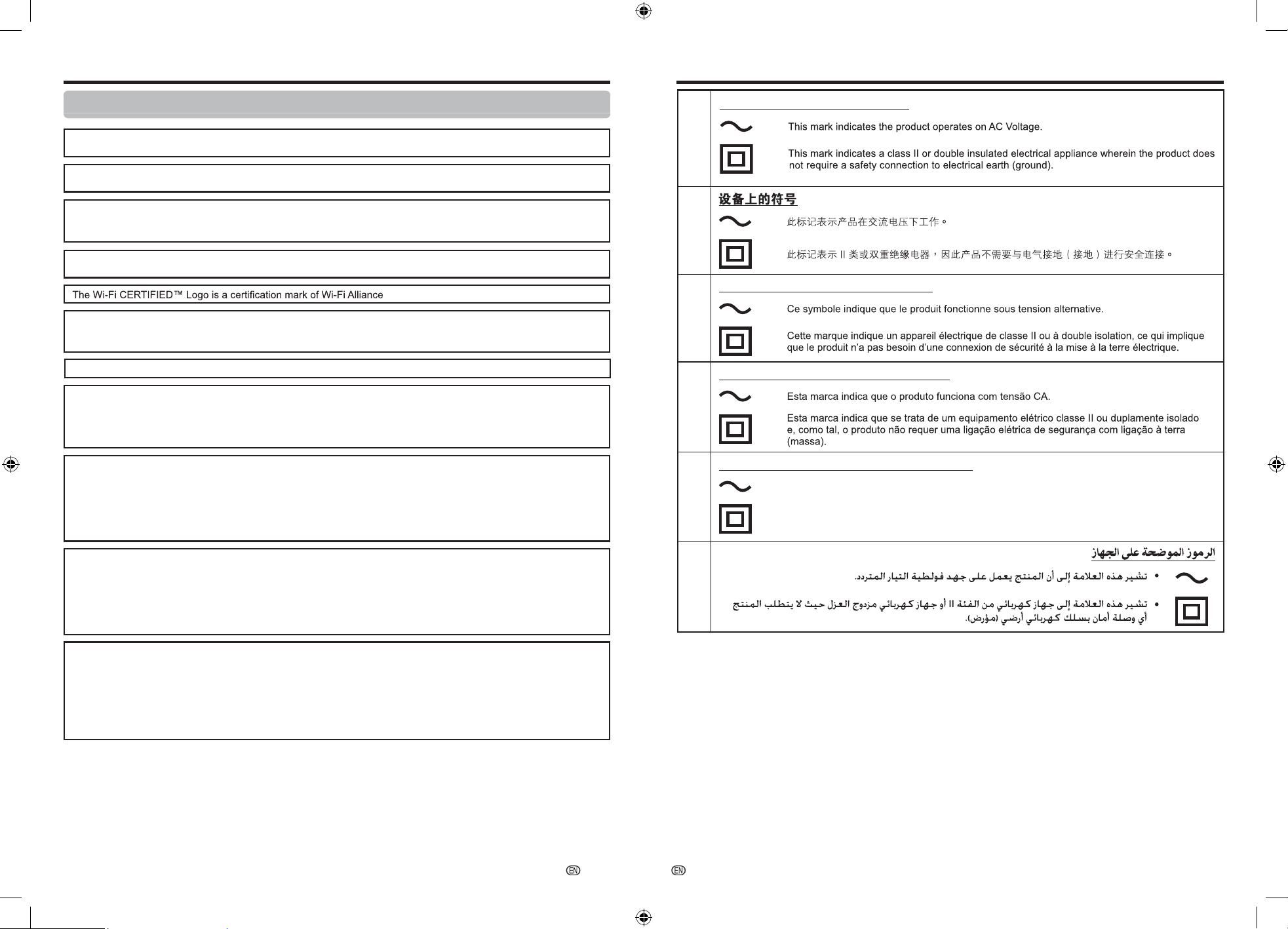
Symbols placed on equipment
•
•
CS
EN
•
•
FR
Symboles placés sur l’équipement
•
•
PT
Símbolos existentes no equipamento
•
•
AR
ID
•
•
Simbol yang ditempatkan pada peralatan
Tanda ini mengindikasikan bahwa produk beroperasi pada Tegangan AC.
Tanda ini mengindikasikan bahwa alat listrik terisolasi kelas II atau ganda, di mana produk
tersebut tidak memerlukan koneksi pengardean (pembumi).
-
31
-
32
SHARP CORPORATION
SHARP CORPORATION
Dimensional Drawing Appendix
Clearing the password
If you forget the password, clear the password using the following procedure.
1 From the Dashboard screen, select “Settings” > “System” > “About” > “Reset” > “Factory reset”, and then
press
ENTER/OK.
2 When you perform a reset, the TV will be returned to the factory preset values, and you need to set the
password again.
NOTE
•
As a precautionary measure, make a note of your password, and keep it in a safe place.
PT
ID
CS
EN
FR
AR
信息中心
关于
> 重置 >
/OK.
“
系统 ”
Effacement du mot de passe
Si vous oubliez le mot de passe, effacez le mot de passe à l’aide de la procédure suivante.
1
2
Lorsque vous effectuez une réinitialisation, le téléviseur revient aux valeurs préréglées en usine et vous
devez redéfinir le mot de passe.
REMARQUE
•
Par mesure de précaution, prenez soin de noter votre mot de passe et conservez-le dans un endroit sûr.
A partir de l’écran Tableau de bord, sélectionnez « Paramètres » > « Système » > « À propos »
« Réinitialiser » > « Rétablir la config. d'usine », et appuyez ensuite sur
ENTER/OK.
Apagar a senha
Se se esquecer da senha, apague-a através do seguinte procedimento.
2
palavra passe.
NOTA
•
Como medida de precaução, tome nota da sua palavra passe e guarde-a num local seguro.
1
ﺭﺳﻟﺍ ﺔﻣﻠﻛ ﻰﺳﻣ
ﺀﺍﺮﺟﻹﺍ ﻡﺍﺪﺨﺘﺳﺎﺑ ﺭﻭﺮﳌﺍ ﺔﻤﻠﻛﺢﺴﻣﺎﻓ ،ﺭﻭﺮﳌﺍ ﺔﻤﻠﻛﺖﻴﺴﻧ ﺍﺫﺇ
1
2
.ﺍ
ﹰ
ﺩﺪﺠﻣ ﺭﻭﺮﻤﻟﺍ ﺔﻤﻠﻛ ﻂﺒﻀﻟ ﺝﺎﺘﺤﺘﺳﻭ ﻰﻟﺇ ﺯﺎﻔﻠﺘﻟﺍ ﺩﻮﻌﻴﺳ ،ﻂﺒﺿ ﺓﺩﺎﻋﺇ ﻱﺮﺠﺗ ﺎﻣﺪﻨﻋ
•.ﻦﻣﺁ
ﹴ
ﻥﺎﻜﻣ ﻲﻓ ﺎﻬﺑ ﻆﻔﺘﺣﺍﻭ ،ﺭﻭﺮﻤﻟﺍ ﺔﻤﻠﻛ ﻦﻋ ﺔﻈﺣﻼﻣ ﻥ
ﹺ
ﻭﺩ ،ﻱﺯﺍﺮﺘﺣﺍ ﺮﻴﺑﺪﺘﻛﻭ
.
ENTER/OK
ﻝﺎﺧﺩﻹﺍ ﺭﺯ ﻰﻠﻋ ﻂﻐﺿﺍ
ﻢﺛ
“ﻂﺒﻀﻟﺍ ﺓﺩﺎﻋﺇ”
< “ﺔﺤﳌ” <
،“ ﺔﻴﻠ
ﺻ
ﻷﺍ
ﺕﺍﺩﺍﺪﻋﻹﺍﻰﻠﻋ ﻂﺒﻀﻟﺍ ﺓﺩﺎﻋﺇ ”
< < “ﺕﺍﺩﺍﺪﻋﻹﺍ” ﺩﺪﺣ،ﺕﺎﻧﺎﻴﺒﻟﺍﺔﺣﻮﻟ ﺔﺷﺎﺸﻟﺍﻦﻣ
،ﺎ
ﹰ
ﻘﺒﺴﻣ ﻊﻨﺼﻤﻟﺍ ﻢ
ﹼ
ﻴﻗ
“ﻡﺎﻈﻨﻟﺍ”
Membersihkan kata sandi
Jika Anda lupa kata sandi, hapus kata sandi menggunakan prosedur berikut.
1 Dari layar Dasbor, pilih “Setelan” > “Sistem” > “Tentang” > “Reset” > “Reset ke setelan pabrik”, lalu tekan
ENTER/OK
.
2 Ketika Anda melakukan reset, TV akan dikembalikan ke pengaturan standar pabrik, dan Anda harus
mengeset kata sandi kembali.
CATATAN
•
Sebagai langkah pencegahan, buat catatan untuk kata sandi Anda, dan simpan itu di tempat yang aman.
按下 "
此功能可以选择当地邮政编码。
"邮政编码" 仅在选择区域为 "印度尼
西亚" 时出现。
选择 "电视选项" > "高级选项" > "邮政编码"。
No ecrã Painel, selecione “Configurações” > “Sistema” > “Sobre” > “Reiniciar” > “Redefinir para a
configuração original”, e depois prima
ENTER/OK.
A F I JM
K
L
B
C
D
G
H
E
Printed in Malaysia
马来西亚印刷
Imprimé en Malaisie
Impresso na Malásia
Dicetak di Malaysia
•
Postal Code (Indonesia only)
This function enable you to select your local postal
code.
"Postal Code" will be appear only
when region "Indonesia" is selected.
Press "
(TOOLS)".
(TOOLS)".
Select "TV options" > "Advanced Options" > "Postal
Code".
NOTE
FR
PT
ID
AR
•
Kode Pos (Indonesia saja)
Code postal (Indonésien uniquement)
Código postal (apenas Indonésio)
Fungsi ini memungkinkan Anda memilih kode pos
lokal.
• "Kode pos" hanya akan ditampilkan
bila wilayah "Indonesia" dipilih.
"Code postal" apparaîtront
uniquement lorsque le région "Indonésie" est
sélectionné.
•
•
O "Código postal" aparecerão apenas
quando for selecionado o região "Indonésia".
CATATAN
Tekan " (TOOLS)".
"
. (TOOLS) "
Pilih "Opsi TV" > "Opsi Lanjutan" > "Kode Pos".
Cette fonction vous permet de sélectionner votre
code postal local.
Esta função permite-lhe selecionar o seu código
postal local.
Appuyez sur "
(TOOLS)".
Prima " (TOOLS)".
Sélectionnez "Options TV" > "Options avancées"
> "Code postal".
Selecione "Opções da TV" > "Opções avançadas"
> "Código postal".
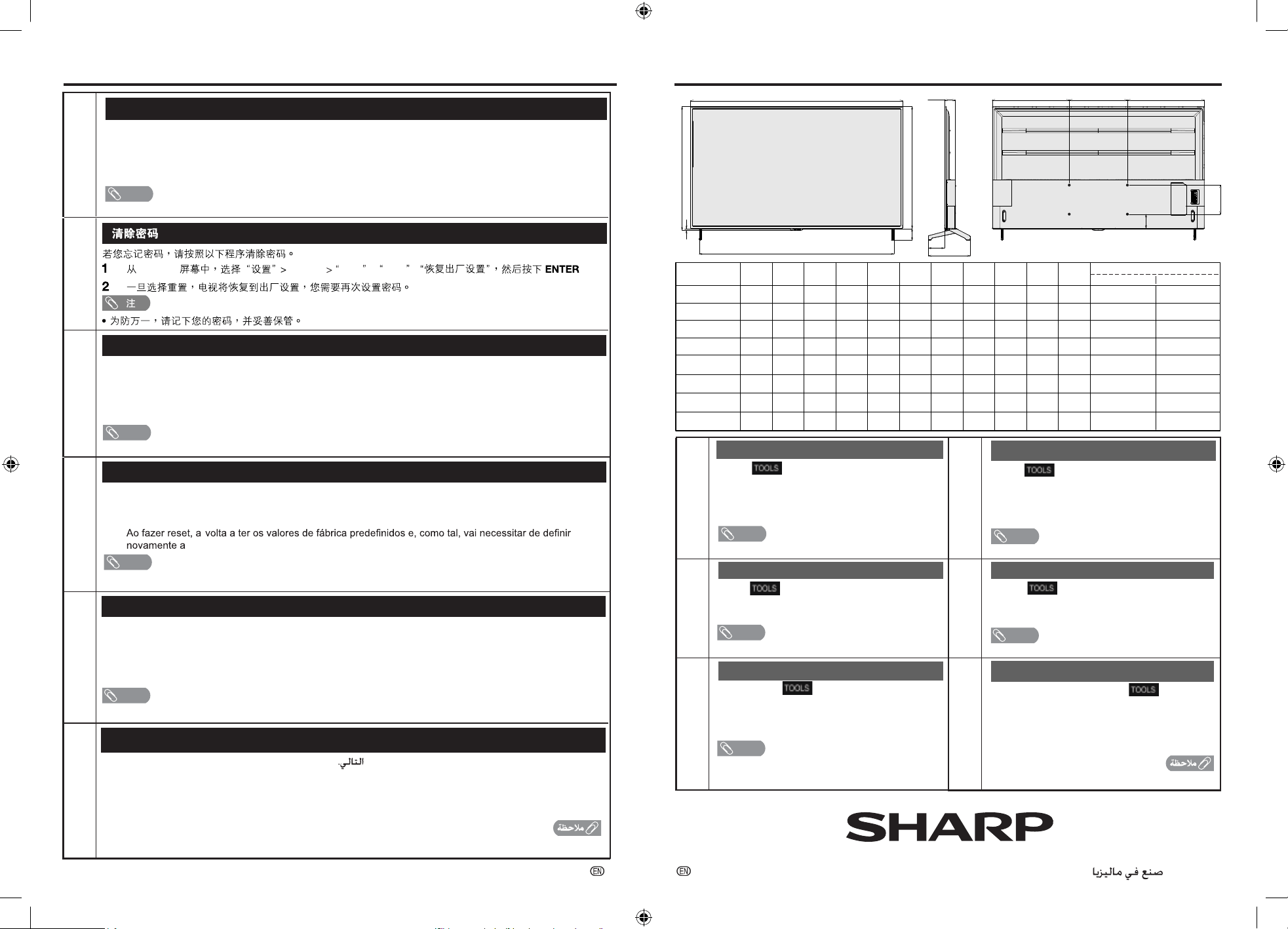
Unit : mm
300 x 600
200 x 400
200 x 400
200 x 300
200 x 300
150 x 150
M8 x 32
M6 x 15
M6 x 15
M4 x 12
M4 x 12
M4 x 12
1678
A B C D E F G H I J K
1462
1462
1118
1118
948
975
854
854
655
655
544
1636
1341
1341
928
928
761
74
76
76
80
80
80
14
13
13
15
15
15
95
79
79
80
80
78
188
111
111
108
108
112
403
289
289
273
273
273
539
531
531
409
409
399
539
531
531
409
409
399
75
100
100
122
122
177
Model name
L x M
VESA
Type & Depth
4T-C75FK1X
4T-C65FL1X
4T-C65FK1X
4T-C50FL1X
4T-C50FK1X
200 x 300
200 x 300
M6 x 30
M6 x 30
1232
1232
722
722
1043
1043
80
80
5
5
78
78
108
108
273
273
466
466
466
466
144
144
4T-C55FL1X
4T-C55FK1X
4T-C42FK1X
CS
EN
•
邮政编码(仅限印尼)
注
REMARQUE
NOTA
(ﻂﻘﻓ ﺎﯿﺴﯿﻧﻭﺪﻧﻹﺍ) ﻱﺪﻳ ﺮﺒﻟﺍ ﺰﻣﺰﻟﺍ
ﻲﻠﻋ ﻄﻐﺿﺍ
ﻲﻠﺤﳌﺍ ﻱﺪﻳﺮﺒﻟﺍ ﺰﻣﺮﻟﺍ ﺪﻳﺪﺤﺗ ﻦﻣ ﺔﻔﯿﻠﻇﻮﻟﺍ ﻩﺬﻫ ﻚﻨﻜﻤﺗ
.ﻚﺑﺹﺎﺨﻟﺍ
ﺭﺎﯿﺘﺧﺍ ﺪﻨﻋ “ﻱﺪﻳﺮﺒﻟﺍ ﺰﻣﺮﻟﺍ“ ﺮﻬﻈﺘﺳ
ﺔﻘﻄﻨﳌﺍ .ﻄﻘﻓ “ﺎﻴﺴﻴﻧﻭﺪﻧﺇ“
“ﺔﻣﺪﻘﺘﳌﺍ ﺕﺍﺭﺎﯿﺨﻟﺍ” < “ﻥﻮﻳﺰﻔﻠﺘﻟﺍ ﺕﺍﺭﺎﯿﺧ” ﺩﺪﺣ
.”ﻱﺪﻳﺮﺒﻟﺍ ﺰﻣﺮﻟﺍ” <