Operation Guide 3549
EN-9
CC
C
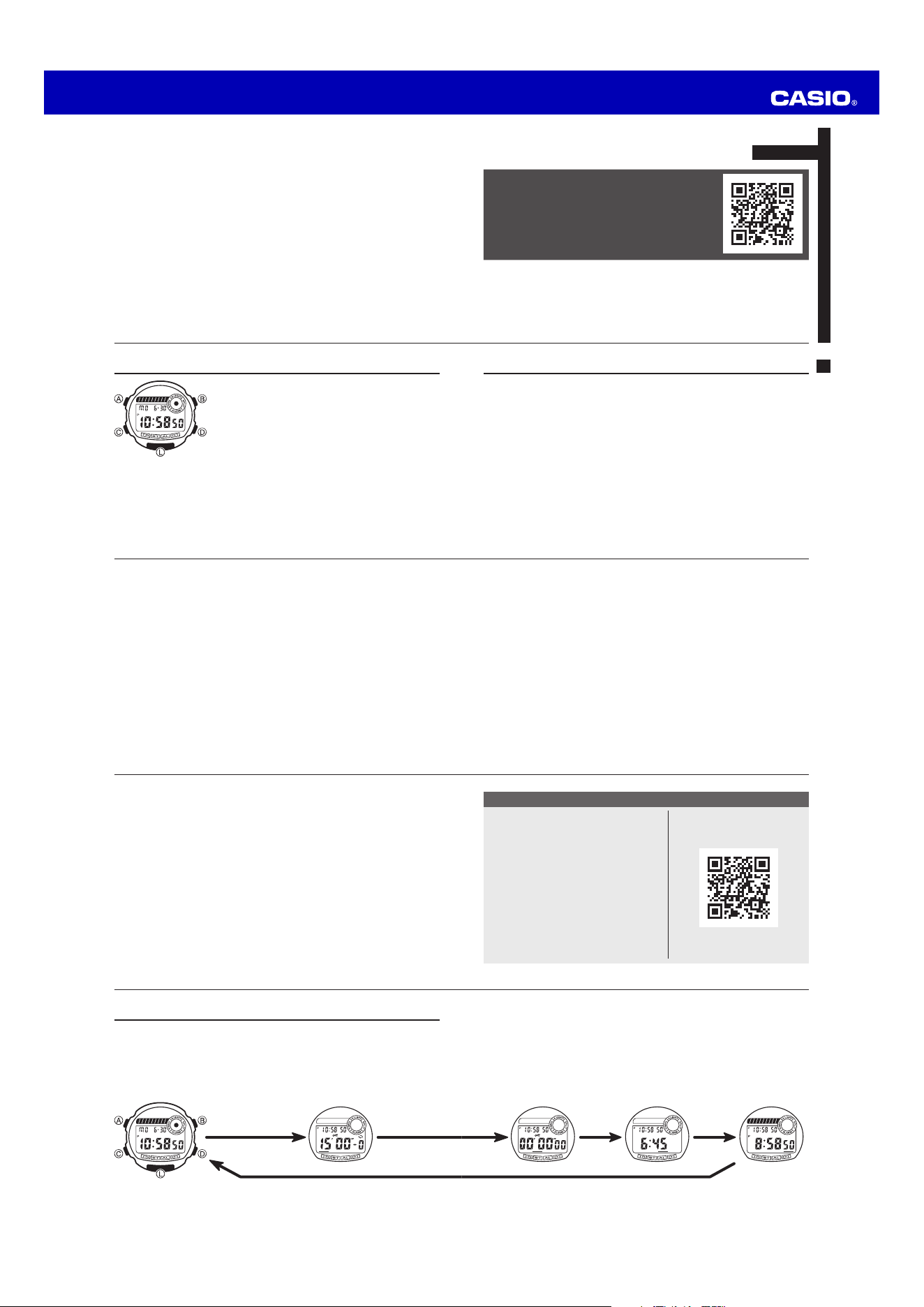
Stopwatch Mode Alarm Mode Dual Time Mode
x This watch returns to the Timekeeping Mode whenever you hold down the C
button for one or two seconds. If you ever lose track of what mode you are in or
what you should do next, hold down C to return to regular timekeeping.
x In any mode press L to illuminate the display.
EN-8
Selecting a Mode
x Press C to change from mode to mode.
x After you perform an operation in any mode, pressing C returns to the
Timekeeping Mode.
x If you do not press any button for a few minutes while making settings in any mode
(indicated when settings are flashing), the watch automatically clears the setting screen
(settings stop flashing) and returns to the normal display for the mode you are in.
C
Timekeeping Mode Timer Mode
C
EN-7
Watch Features
You can also find information
about operational procedures
at the CASIO website.
https://s.casio.jp/mw/en/3549/
◆
Timer
◆
Stopwatch
◆
Alarm
◆
Dual Time
EN-6
To test the alarm sound ..................................................................................... EN-30
To set the Dual Time .......................................................................................... EN-31
EN-5
Procedure Lookup
The following is a handy reference list of all the operational procedures contained in
this manual.
To set the time and date .................................................................................... EN-11
To switch the auto light switch function on and off ....................................... EN-16
To set the countdown start time ...................................................................... EN-19
To use the timer.................................................................................................. EN-20
To switch auto repeat timing and the progress beeper on and off ............... EN-21
To turn the Auto-Start function on and off ...................................................... EN-24
To set the Target Time and to turn it on and off ............................................. EN-25
To set the alarm time ......................................................................................... EN-27
To turn the daily alarm and hourly time signal on and off ............................. EN-29
EN-4
EN-3
Contents
About This Manual................................................................................................ EN-2
Watch Features ..................................................................................................... EN-7
Selecting a Mode .................................................................................................. EN-8
Timekeeping Mode ............................................................................................. EN-11
About the Backlight ............................................................................................ EN-14
Timer Mode ......................................................................................................... EN-19
Stopwatch Mode ................................................................................................ EN-22
Alarm Mode ......................................................................................................... EN-27
Dual Time Mode .................................................................................................. EN-31
Specifications ..................................................................................................... EN-33
EN-2
About This Manual
x Button operations are indicated using the letters
shown in the illustration.
x Note that the product illustrations in this manual are
intended for reference only, and so the actual product
may appear somewhat different than depicted by an
illustration.
EN-1
ENGLISH
You can also find information about
operational procedures at the CASIO website.
https://s.casio.jp/mw/en/3549/
MA2501-EA
© 2025 CASIO COMPUTER CO., LTD.
Published: 1/2025
Operation Guide 3549
EN-19
Timer Mode
The timer can be set within a range of 1second to
24hours. When the countdown reaches zero, an alarm
sounds for 10 seconds or until you press any button.
To set the countdown start time
1. Hold down A while in the Timer Mode. The hours
digits flash on the display because they are selected.
2. Press C to change the selection in the following
sequence.
CC
Hour Minutes Seconds
C
1/10 Seconds
Seconds
Minutes
Auto repeat on indicator
Current time
Progress beeper on indicator
Mode
indicator
EN-18
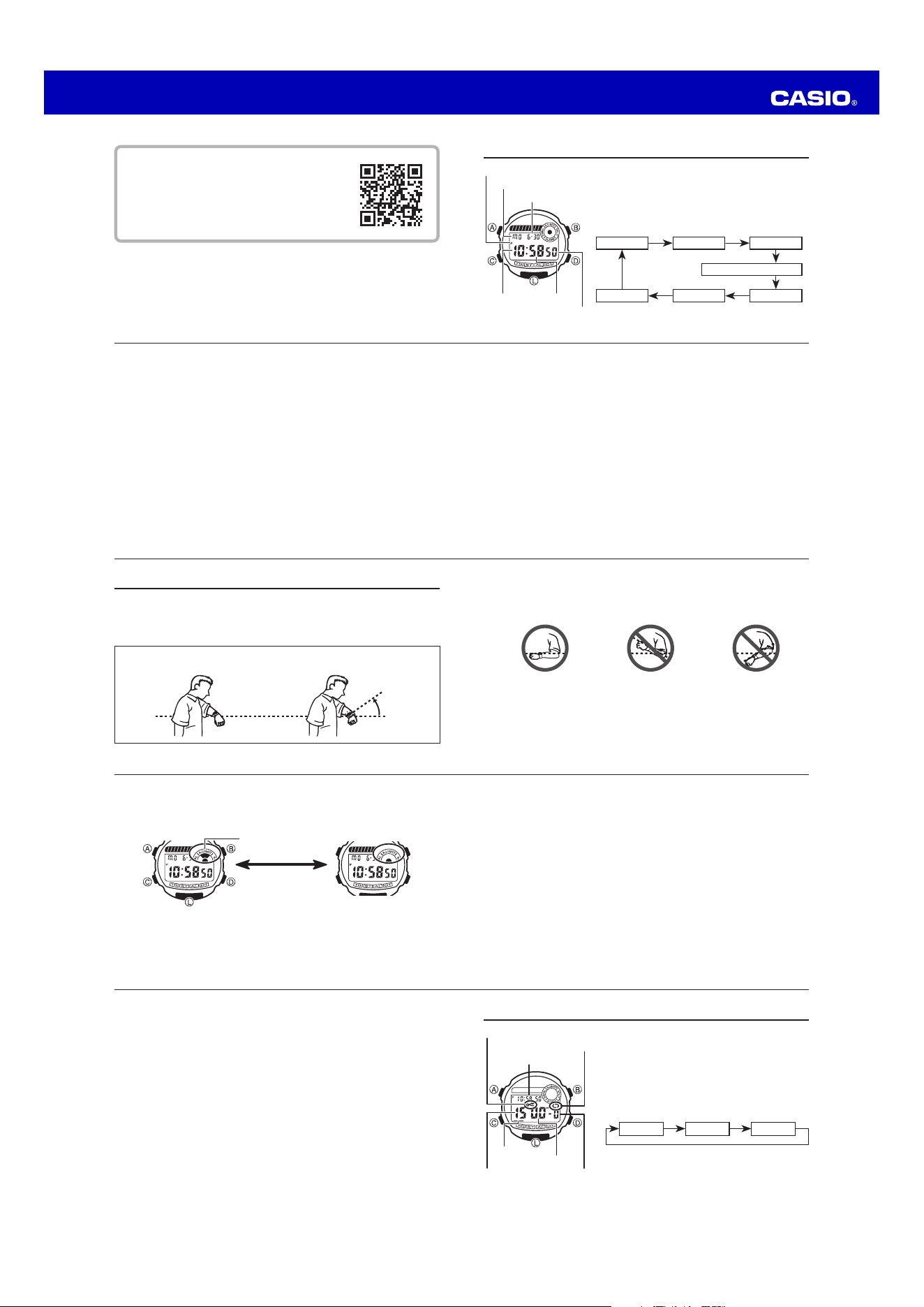
x When you are wearing the watch, make sure that its auto light switch
function is turned off before riding on a bicycle or operating a motorcycle
or any other motor vehicle.
Sudden and unintended operation of the auto light switch can create a
distraction, which can result in a traffic accident and serious personal
injury.
EN-17
x Pressing L while in the Timekeeping Mode illuminates the display, regardless
of the auto light switch’s on/off setting.
Caution
x Frequent use of the backlight shortens the battery life.
Warning!
x Never try to read your watch when mountain climbing or hiking in areas
that are dark or in areas with poor footing. Doing so is dangerous and can
result in serious personal injury.
x Never try to read your watch when running where there is the danger
of accidents, especially in locations where there might be vehicular or
pedestrian traffic. Doing so is dangerous and can result in serious personal
injury.
x Never try to read your watch when riding on a bicycle or when operating
a motorcycle or any other motor vehicle. Doing so is dangerous and can
result in a traffic accident and serious personal injury.
EN-16
To switch the auto light switch function on and off
In the Timekeeping Mode, hold down B for one or two seconds to turn the auto light
switch function on and off.
Auto light switch indicator
Hold down B.
ON OFF
x The auto light switch indicator is shown on the display in all modes while the
auto light switch function is on.
x In order to protect against running down the battery, the auto light switch function
is automatically turned off approximately three hours after you turn it on. Repeat
the above procedure to turn the auto light switch function back on if you want.
EN-15
x The backlight may not illuminate if the face of the watch is more than 15 degrees
off parallel to the left or right. Make sure that the back of your hand is parallel to
the ground.
Parallel to ground More than 15 degrees
too high
More than 15 degrees
too low
x Static electricity or magnetic force can interfere with proper operation of the
auto backlight function. If the auto backlight does not illuminate, try moving the
watch back to the starting position (parallel with the ground) and then tilt it back
toward you again. If this does not work, drop your arm all the way down so it
hangs at your side, and then bring it back up again.
x Under certain conditions the backlight may not light until about one second or
less after turning the face of the watch towards you. This does not necessarily
indicate malfunction of the backlight.
EN-14
About the Backlight
About the Auto Light Switch Function
When the auto light switch function is turned on, the backlight automatically turns on
for two seconds under the conditions described below. Avoid wearing the watch on
the inside of your wrist. Doing so causes the auto light switch to operate when not
needed, which shortens battery life.
Moving the watch to a position that is parallel to the ground and then tilting it
towards you approximately 40 degrees causes the backlight to illuminate.
Parallel to ground
40°
EN-13
5. After you set the time and date, press A to return to the Timekeeping Mode.
EN-12
3. While the seconds digits are selected (flashing), press D to reset the seconds
to 00. If you press D while the seconds count is in the range of 30 to 59, the
seconds are reset to 00 and 1 is added to the minutes. If the seconds count is in
the range of 00 to 29, the minutes count is unchanged.
4. While any other digits (beside seconds) are selected (flashing), press D to
increase the number or B to decrease it. While the 12/24-hour format setting is
selected, press D or B to toggle it between 12 and 24.
x Except for when adjusting the seconds or setting the 12/24-hour format,
holding down a button changes the current selection at high speed.
x When the 12-hour format is selected, the indicator P appears on the display
to indicate “P.M.” times. There is no indicator for “A.M.” times.
x When the 24-hour format is selected, the indicator 24 appears on the display.
x The year can be set in the range of 2000 to 2099.
x The watch’s built-in full automatic calendar makes allowances for different
month lengths and leap years. Once you set the date, there should be no
reason to change it except after you have the watch’s battery replaced.
x The day of the week is displayed automatically in accordance with the date
(year, month, and day) settings.
EN-11
Timekeeping Mode
To set the time and date
1. Hold down A while in the Timekeeping Mode until
the seconds digits flash on the display because they
are selected.
2. Press C to change the selection in the following
sequence.
12/24-Hour Format
C
C
C
Seconds
Hour Minutes
Day Month Year
CC
C
C
Seconds
MinutesHour
Day of week
Month – Day
PM indicator
EN-10
You can also find information about operational
procedures at the CASIO website.
https://s.casio.jp/mw/en/3549/
Operation Guide 3549
EN-29
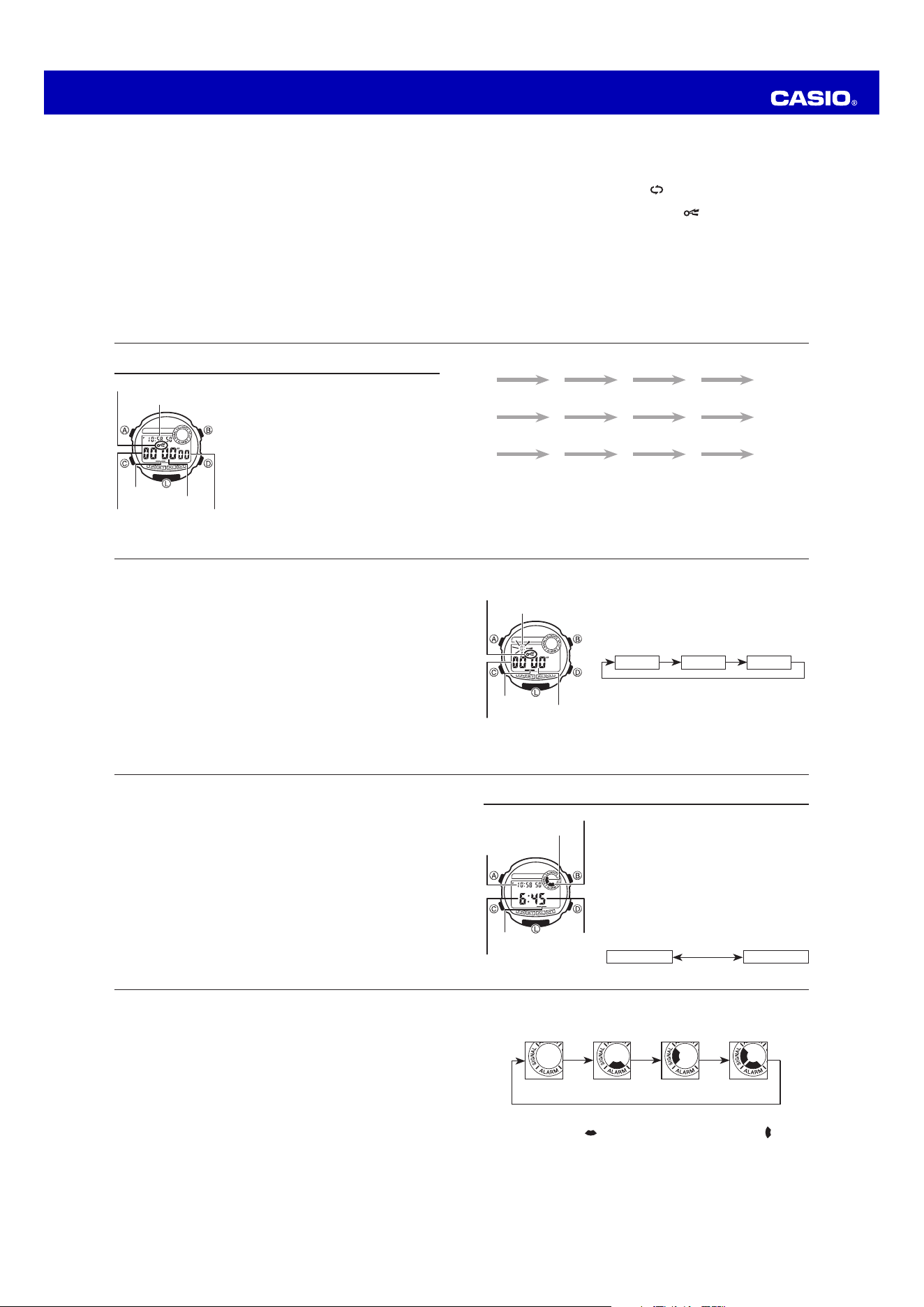
To turn the daily alarm and hourly time signal on and off
Press B while in the Alarm Mode to change the status of the daily alarm and hourly
time signal in the following sequence.
B B B
Both OFF Daily Alarm
Only
Hourly Time
Signal Only
Both ON
B
x The alarm on indicator ( ) and the Hourly Time Signal on indicator ( ) are
shown on the display in all modes while these functions are turned on.
EN-28
3. Press D to increase the selected digits and B to decrease them. Holding down
either button changes the selection at high speed.
x The format (12-hour and 24-hour) of the alarm time matches the format you
select for regular timekeeping.
x When setting the alarm time using the 12-hour format, take care to set the
time correctly as morning (no indicator) or afternoon (P).
4. After you set the alarm time, press A to return to the Alarm Mode.
EN-27
Alarm Mode
When the Daily Alarm is switched on, the alarm
sounds for 20 seconds at the preset time each day.
Press any button to stop the alarm after it starts to
sound. When the Hourly Time Signal is on, the watch
beeps every hour on the hour.
To set the alarm time
1. Hold down A until the hour digits start to flash
on the display. The hour digits flash because they
are selected.
x This operation will switch the Daily Alarm on
automatically.
2. Press C to change the selection in the following
sequence.
Hour Minutes
C
Minutes
Hour
Hourly time signal
on indicator
Current time
Alarm on indicator
Mode
indicator
EN-26
4. Press A to move the flashing to the target time ON/OFF setting.
5. Press D or B to toggle the target time on and off.
6. Press A to return to the Stopwatch Mode.
Important!
The alarm will not sound if you do not turn on the target time.
x Press A, C or L to stop the alarm after it starts to sound.
EN-25
To set the Target Time and to turn it on and off
1. While the display is showing all zeros in the
Stopwatch Mode, hold down A, and the hour
digit of the target time starts to flash because it is
selected.
2. Press C to change the selection in the following
sequence.
CC
Hour Minutes Seconds
C
3. Press D to increase the selected number or B to
decrease it. Holding down either button changes the
selection at high speed.
x Press D and B at the same time to clear the
setting to 0:00' 00".
Seconds
Minutes
Hour
Target time on indicator
Mode
indicator
EN-24
About the Auto-Start function
With the Auto-Start function, the watch performs a 5-second countdown. When the
countdown reaches zero, stopwatch operation starts automatically. During the final
three seconds of the countdown, a beeper sounds with each second.
To turn the Auto-Start function on and off
While the display is showing all zeros in the Stopwatch Mode, press B to toggle it
on and off.
x The indicator AUTO-ST appears and 05 is shown in the upper display while
Auto-Start is turned on. The AUTO-ST indicator is not shown and the upper
part of the display shows the current time when Auto-Start is turned off.
About the Target Time function
With the Target Time function, an alarm sounds for ten seconds whenever the time
being kept by the stopwatch reaches a target time you have preset.
EN-23
(a) Elapsed time measurement
D D D D B
Start Stop Re-start Stop Reset
(b) Split time measurement
D B B D B
Start Split Split release Stop Reset
(c) Split time and two finishes
D B D B B
Start Split
First runner
finishes.
Stop
Second runner
finishes.
Record time of
first runner.
Split release
Record time of
second runner.
Reset
EN-22
Stopwatch Mode
The Stopwatch Mode lets you measure elapsed
time, split times, and two finishes. The range of the
stopwatch is 23 hour, 59 minutes, 59.99 seconds. You
can also have an alarm sound when a target time is
reached. The Stopwatch Mode also features an Auto-
Start function.
1/100 Seconds
Seconds
Minutes
Current time
Target time on indicator
Mode
indicator
EN-21
To switch auto repeat timing and the progress beeper on and off
1. Hold down A while in the Timer Mode. The hour digits flash on the display
because they are selected. Press A again to move the flashing to the auto repeat
ON/OFF setting.
2. Press D or B to toggle auto repeat on ( ) and off.
3. Press C to move the flashing to the progress beeper ON/OFF setting.
4. Press D or B to toggle the progress beeper on (
) and off.
5. Press A to return to the Timer Mode.
x When the end of the countdown is reached while auto repeat is on, the alarm
sounds, but the countdown restarts from the beginning without stopping. You
can stop the countdown by pressing D and manually reset to the start time by
pressing B.
x If you set a starting time of 10 seconds or less and have Auto Repeat turned
on, the timer tone (which normally sounds for 10 seconds) sounds for only one
second.
x When the progress beeper is turned on, the watch beeps as the countdown
time passes the 10, 5, 4, 3, 2, and 1-minute marks, and the 50, 40, 30, 20, 10,
5, 4, 3, 2, and 1-second marks.
EN-20
3. Press D to increase the selected number or B to decrease it. Holding down
either button changes the selection at high speed.
x Press D and B at the same time to clear the starting time to 0:00' 00".
x To set the starting value of the countdown time to 24 hours, set 0:00' 00".
4. After you set the countdown start time, press A twice to return to the Timer
Mode.
To use the timer
1. Press D while in the Timer Mode to start the timer.
2. Press D again to stop the timer.
x You can resume timer operation by pressing D.
3. Stop the timer and then press B to reset the countdown time to its starting value.
x When the end of the countdown is reached and auto repeat timing is off, the
alarm sounds for 10 seconds or until you stop the alarm by pressing any button.
Countdown timing stops and the countdown time is automatically reset to its
starting value after the alarm stops.
Operation Guide 3549
EN-34
Dual Time
Illumination: LED (light-emitting diode)
Battery: One lithium battery (Type: CR1616)
Battery nominal voltage: 3V
Battery life: 3 years under the following conditions
x One 2-second light operation per day
x One 20-second alarm operation per day
EN-33
Specifications
Accuracy at normal temperature: ±30 seconds per month
Timekeeping: Hour, minutes, seconds, pm (P), day of the week, month, day
Time format: 12-hour and 24-hour formats
Calendar system: Full Auto-calendar pre-programmed from the year 2000 to 2099
Timer
Measuring unit: 1/10 second
Input range: 1 second to 24 hours
Others: Auto repeat function, progress beeper function
Stopwatch
Measuring unit: 1/100 second
Measuring capacity: 23 hours 59 minutes, 59.99 seconds
Measuring modes: Elapsed time, split time and two finishes
Others: Target Time Alarm, Auto-Start
Alarm: Daily alarm, hourly time signal
EN-32
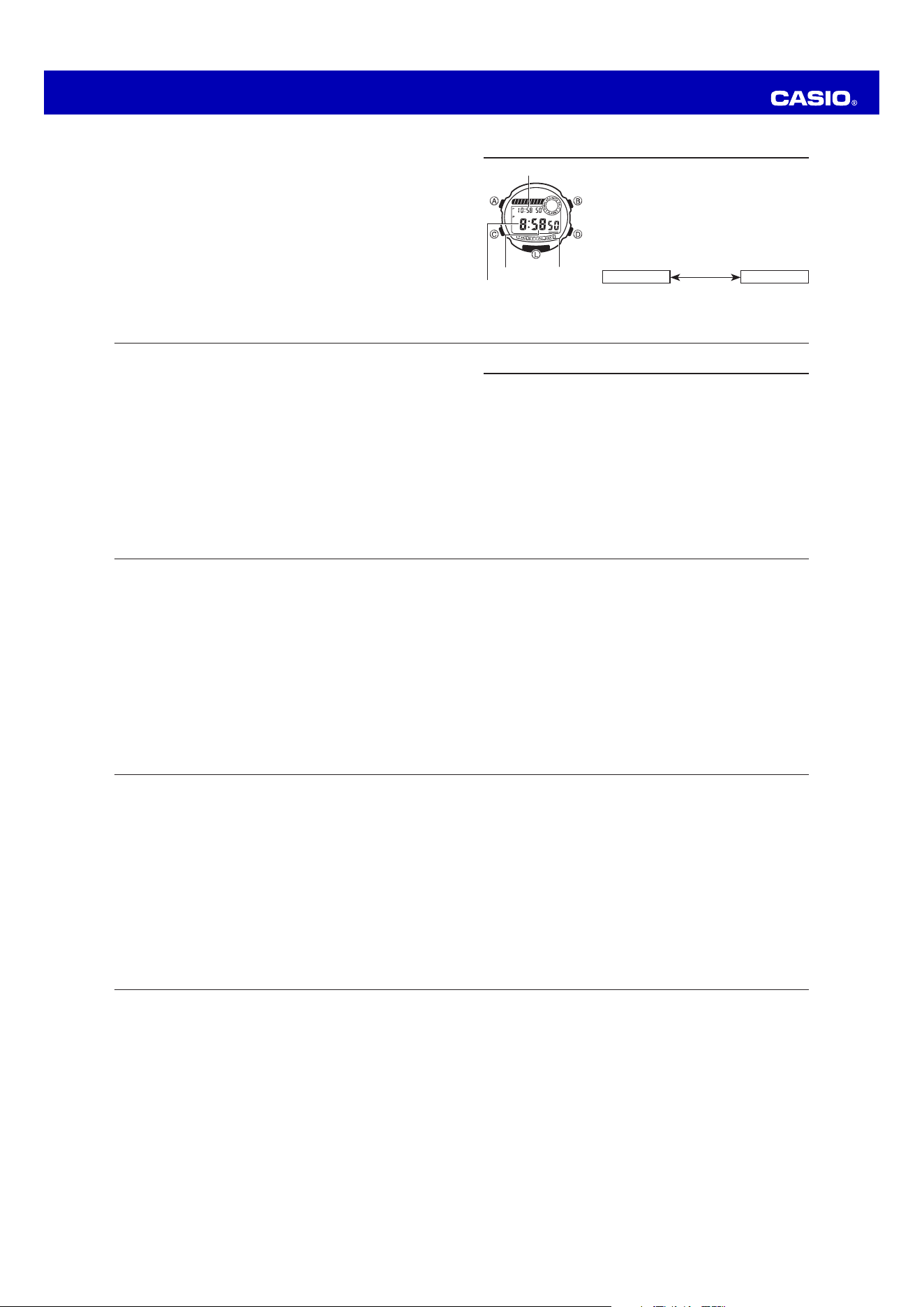
3. Press D to increase the selected digits and B to decrease them. Holding down
either button changes the selection at high speed.
4. After you set the time, press A to return to the Dual Time Mode.
x In the Dual Time Mode, the seconds count is synchronized with the seconds
count of the Timekeeping Mode.
x In the Dual Time Mode, press B to toggle between the 12-hour and 24-hour
formats.
EN-31
Dual Time Mode
The Dual Time Mode lets you keep track of the time in
another time zone. You can also select the timekeeping
format (12-hour or 24-hour) separately from the
Timekeeping Mode.
To set the Dual Time
1. Hold down A while in the Dual Time Mode. The hour
digits flash on the display because they are selected.
2. Press C to change the selection in the following
sequence.
Hour Minutes
C
Mode indicatorMinutes
Current time
Hour
EN-30
To test the alarm sound
Hold down B while in the Alarm Mode to sound the alarm.
x Note that pressing B also changes the alarm and the hourly time signal ON/
OFF settings.

