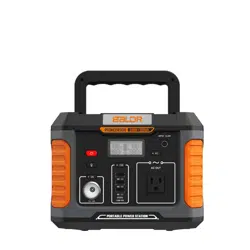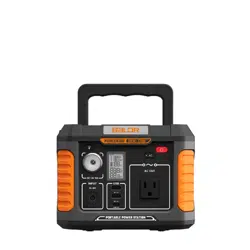
RECOMMENDED TO FULLY CHARGE BALDR 500 BEFORE USE
www.togopower.com
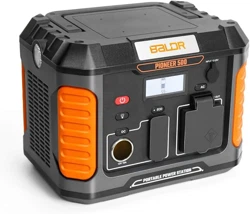
BALDR 500
GENERAL SPECIFICATIONS
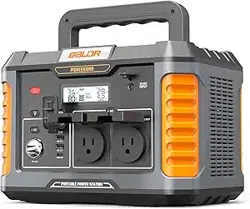
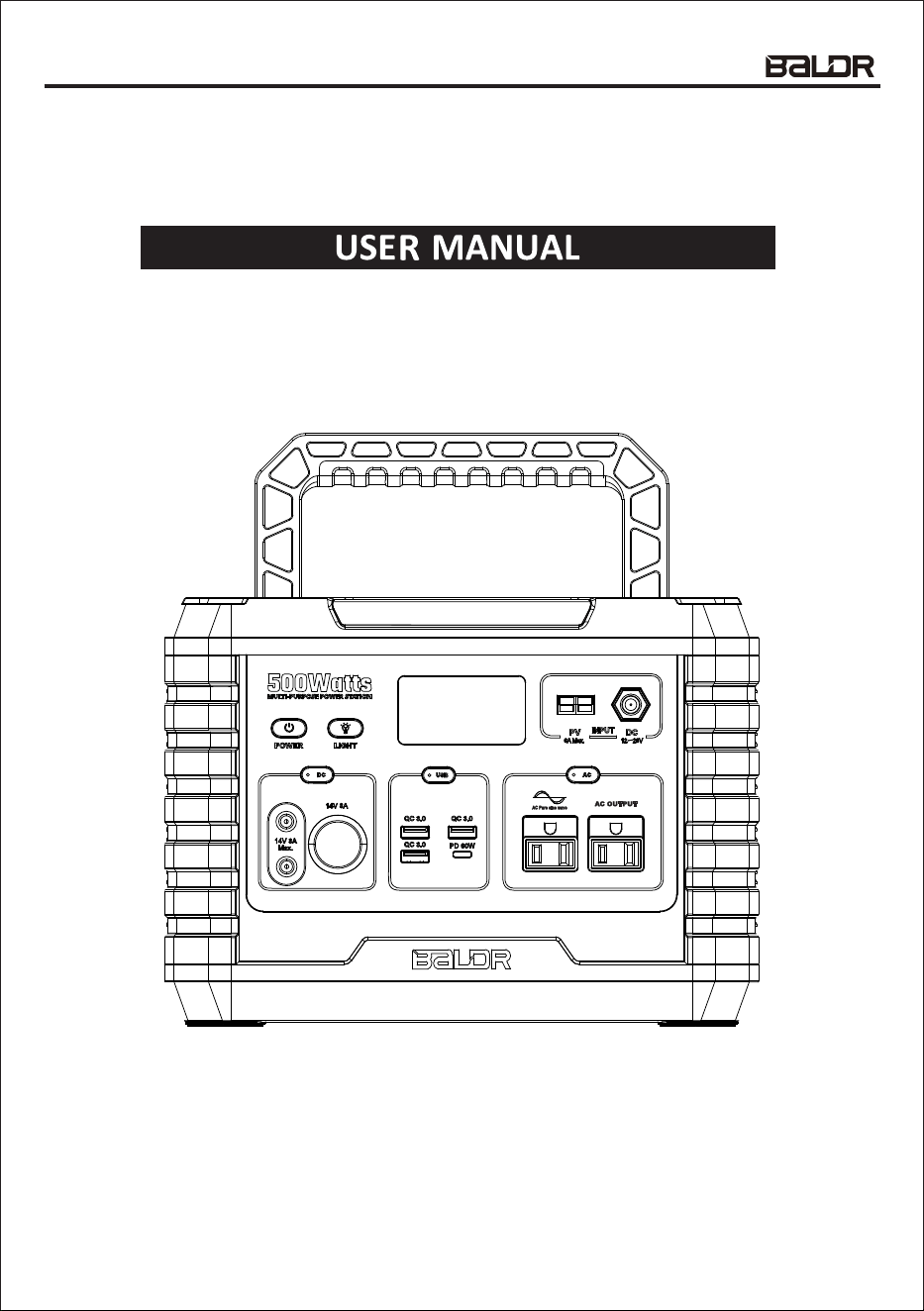
The BALDR 500 is a portable battery pack with the ability to supply 500W of pure sine wave
AC power via the onboard AC output. Additionally, The BALDR 500 is able to support USB
quick charging via the onboard 1 x USB-PD port and 3 x USB-A ports. Overall storage capacity
is 519Wh of energy.
1
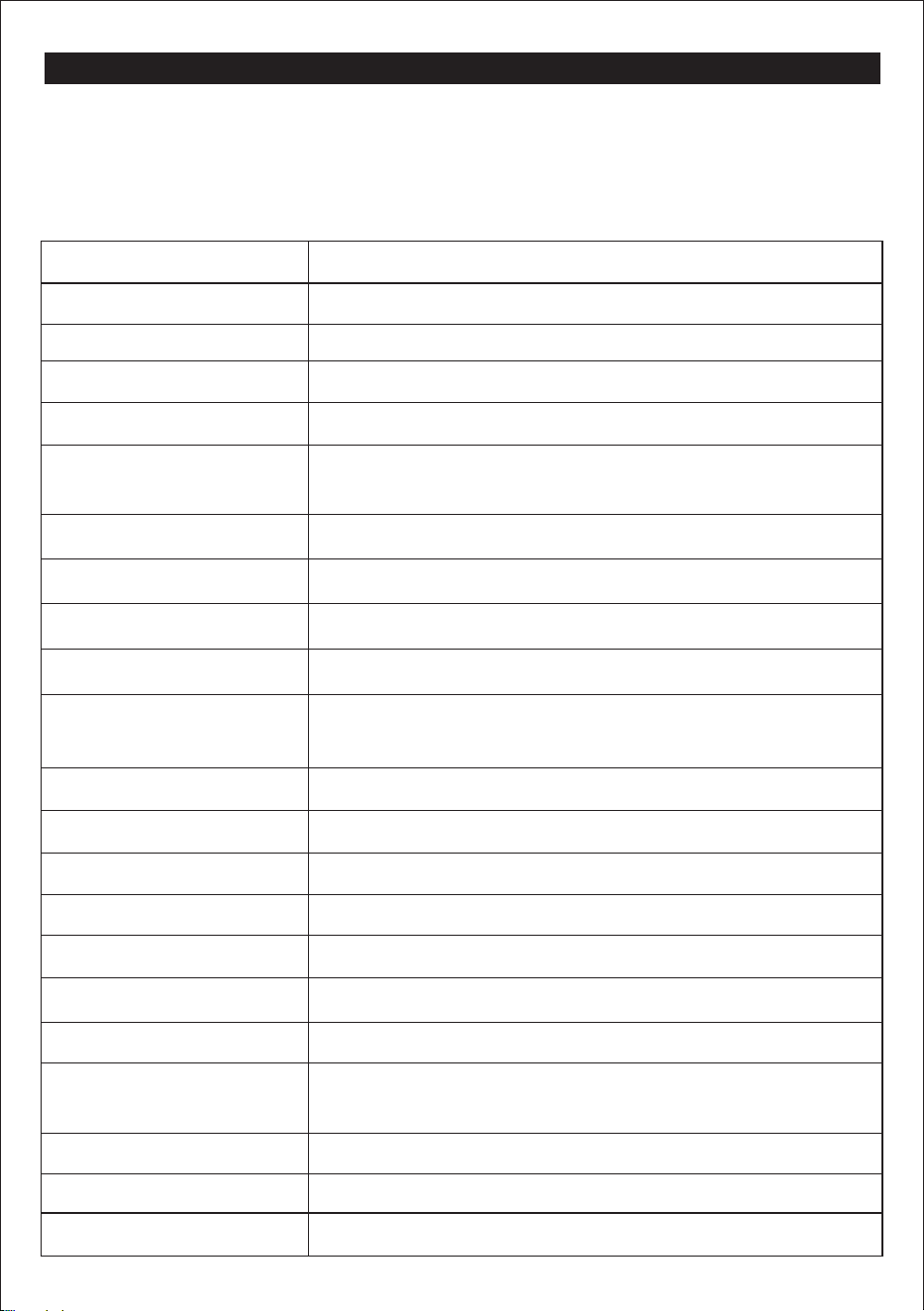
Capacity
Cell Type
519.48Wh
18650
Lithium-ion
L11.5" * W7.9" * H 7.6" ( L292* W202 *H194mm) Dimensions
Cell Chemistry
Weight 14.8lbs(6.7KG)
Fully charged 6 to 7 hoursCharging Time
Shelf Life Charge every 3 months (fully charged before storage)
Input, 8mm Charging Port
Output USB-A ( x 3 )
12-26V, up to 6A ( Max 120W)
PV Input 18V, 6A MAX
110V+/-10%, 60Hz (500W Rated, 1000W Surge)
5V 9V 12V, up to 2.5A, (Max 54W total,with QC3.0 protocol)
Output AC(Output, pure
sine wave)
Output USB-PD ( x 1 ) 5V 9V 12V 15V 20V, up to 3A (Max 60W , with PD 3.0 protocol)
Output DC ( x 2 ) 5525 type 14V/8A
Output Cigarette lighter 14V/8A
Wireless Charger 10W
LED Light Power 3W
Operating / Storage Altitude up to 6562 ft. (2000m)
Operating / Storage
Maximum Humidity
up to 75% non-condensing
Operating Temp 14 to 104°F (-10 to 40°C)
Charging Temp 32 to 113°F (0 to 45°C)
Storage Temp -4 to 113°F (-20 to 45°C)
500 cycles to 85% capacity typical (depending on use
and care)
Life Expectancy

WARNINGS
To ensure safe operation and service of the meter, follow these instructions. Failure to
observe these warnings can result in severe injury or death.
• DO NOT use BALDR 500 in excess of its output rating. Overload outputs above rating
may result in a risk of fire or injury to persons, even though we have built-in overload
protection.
• DO NOT use BALDR 500 or AC Wall plug power adapter, if it is damaged or has been
modified. Damaged or modified batteries may exhibit unpredictable behavior resulting in
fire, explosion, or risk of injury.
• DO NOT subject to vibration, impacts, or drops. Secure BALDR 500 during transport.
The housing may not show signs of damage, but internal components may have been
compromised. It is adviseable to replace it if any such severe events occur.
• DO NOT expose BALDR 500 to moisture, rain, or snow.
• DO NOT charge, use or store BALDR 500 in a bathroom or in an area exposed to rain
or moisture.
• DO NOT leave children or the persons, who with reduced physical/sensory or mental
capabilities/or lack of experience and knowledge, along with BALDR 500 unless they have
been given supervision or instruction concerning use of it by a person responsible for
their safety.
• DO NOT attempt to repair BALDR 500 or AC Wall plug power adapt er. There are no
user-serviceable components inside.
• DO NOT handle BALDR 500 with wet hands.
• DO NOT place BALDR 500 on its side or upside down while in use or in storage.
• If rust, odor, overheating, or other abnormal circumstance are observed, stop using and
contact BALDR customer service.
• Children should be supervised to ensure that they DO NOT play with the BALDR 500 alone.
• The BALDR 500 is only used for emergency power station, it cannot replace the standard
AC or DC power of household appliances or digital products.
• Keep away from high voltage electrical fields.
• Risk of fire and burns, DO NOT open, crush, heat above 113°F (45°C ) or incinerate. Follow
all instructions.
• Use of a power supply, charger, or cable not recommended or sold by portable battery
manufacturer may result in a risk of fire or injury to persons.
• Should fluid from inside of BALDR 500 come in contact with your skin or clothing, wash
the affected areas with tap water.
• The accessories included in the box should only be used with the BALDR 500.
• KEEP THIS PRODUCT AWAY FROM PETS.
2
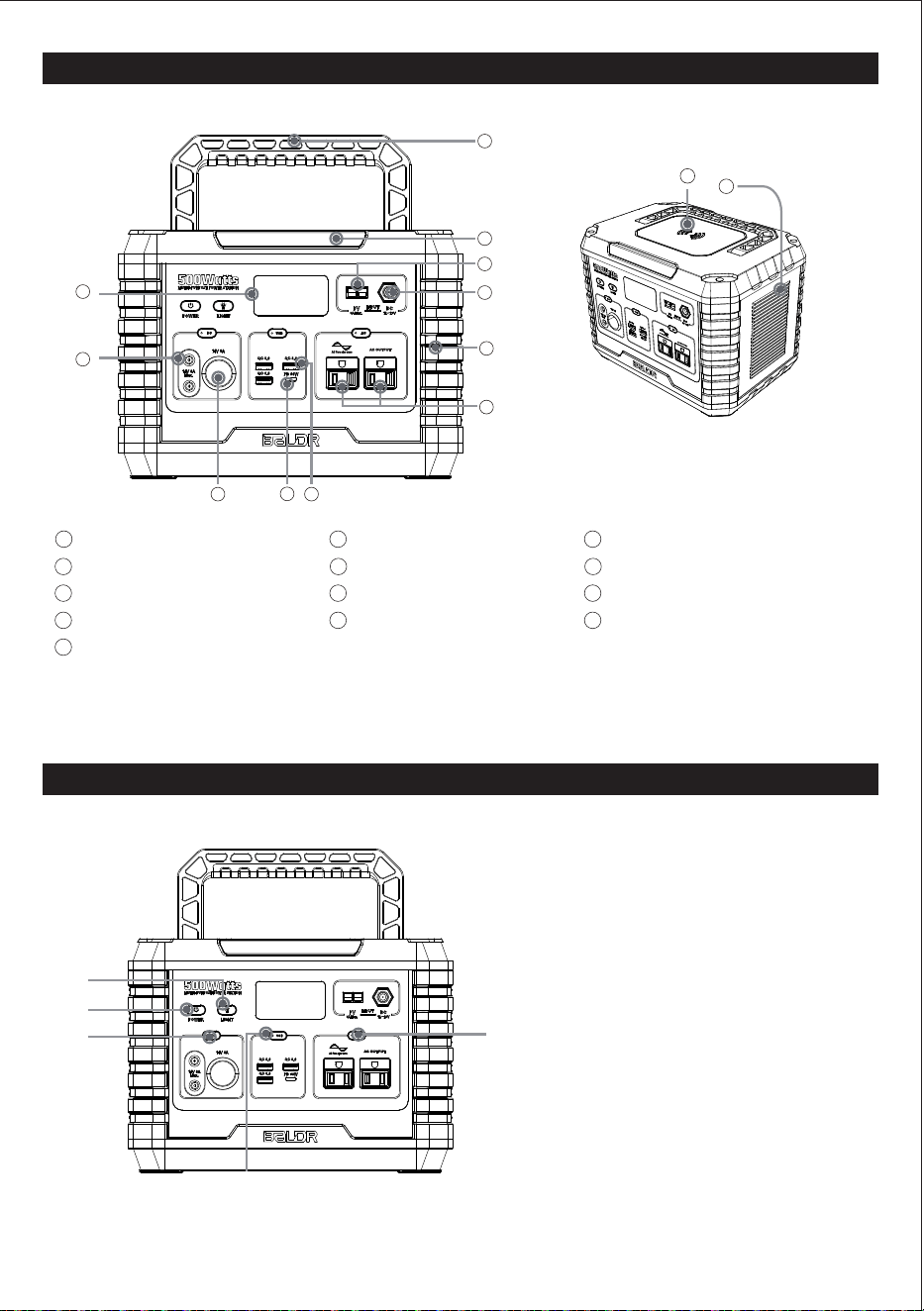
FEATURE DETAILS
BUTTON FEATURE
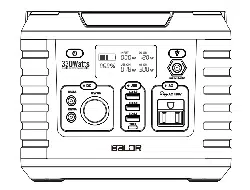
LCD Screen Display
DC Output
Cigarette Lighter Output
USB-PD Output
A:
BALDR 500 Power ON/OFF Button
B:
SOS mode & LED light Button
C:
DC Outputs Power ON/OFF Button
D:
USB Outputs Power ON/OFF Button
E:
AC Outputs Power ON/OFF Button
PV Input
Folding Handle
Wireless Charger
Note: No user-serviceable parts inside.
Recommended to fully charge the BALDR 500 before use.
1
3
4
USB-A Output
5
2
500W Rated AC Outputs
Anti-collision Strip
DC Input
7
8
SOS MODE & LED light
9
6
10
11
12
Air Intake Vent with Cooling Fan
13
3
3
4
5
7
6
8
10
9
11
1
2
D
E
C
A
B
13
12
AC OUTPUT
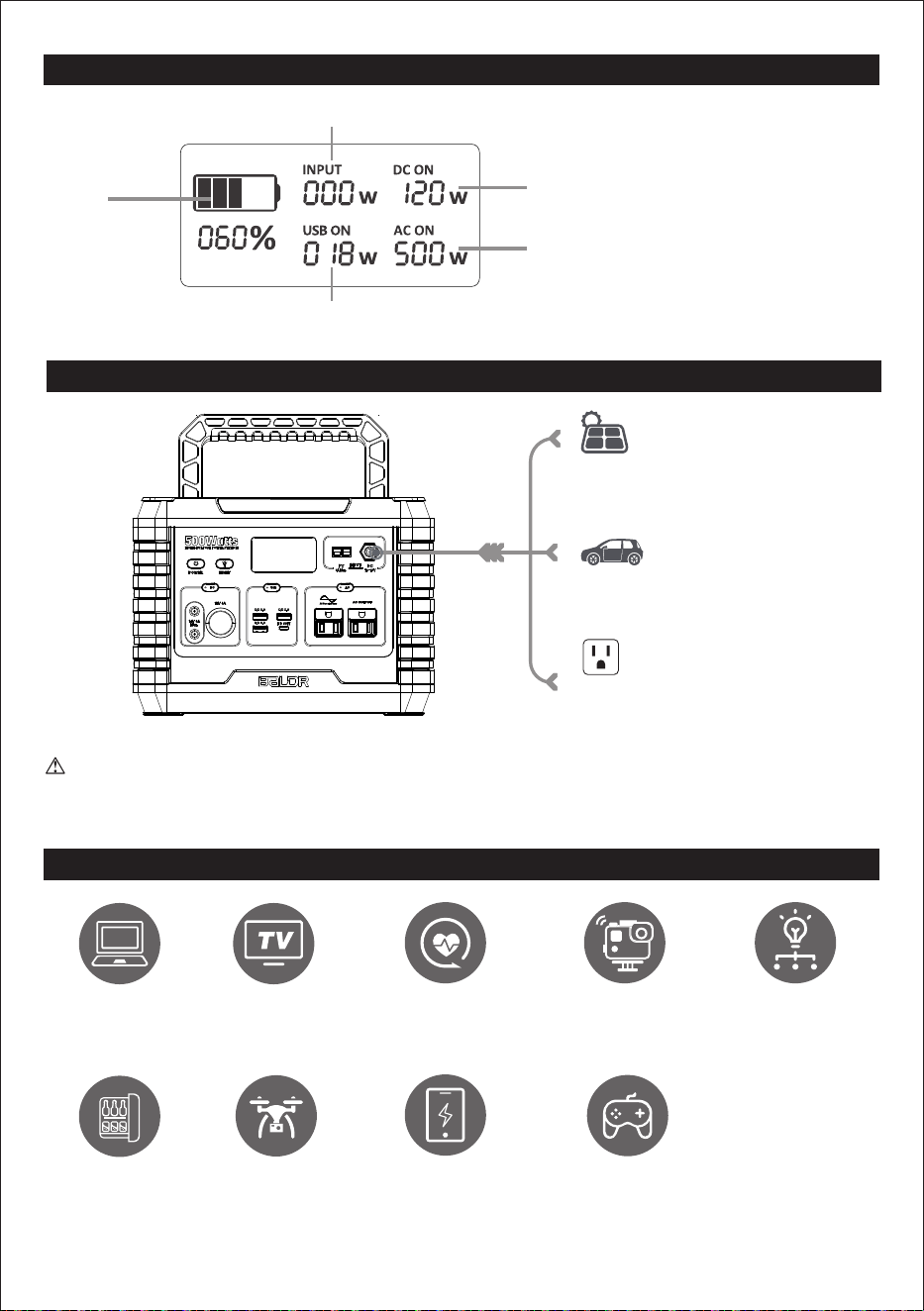
LCD FEATURES
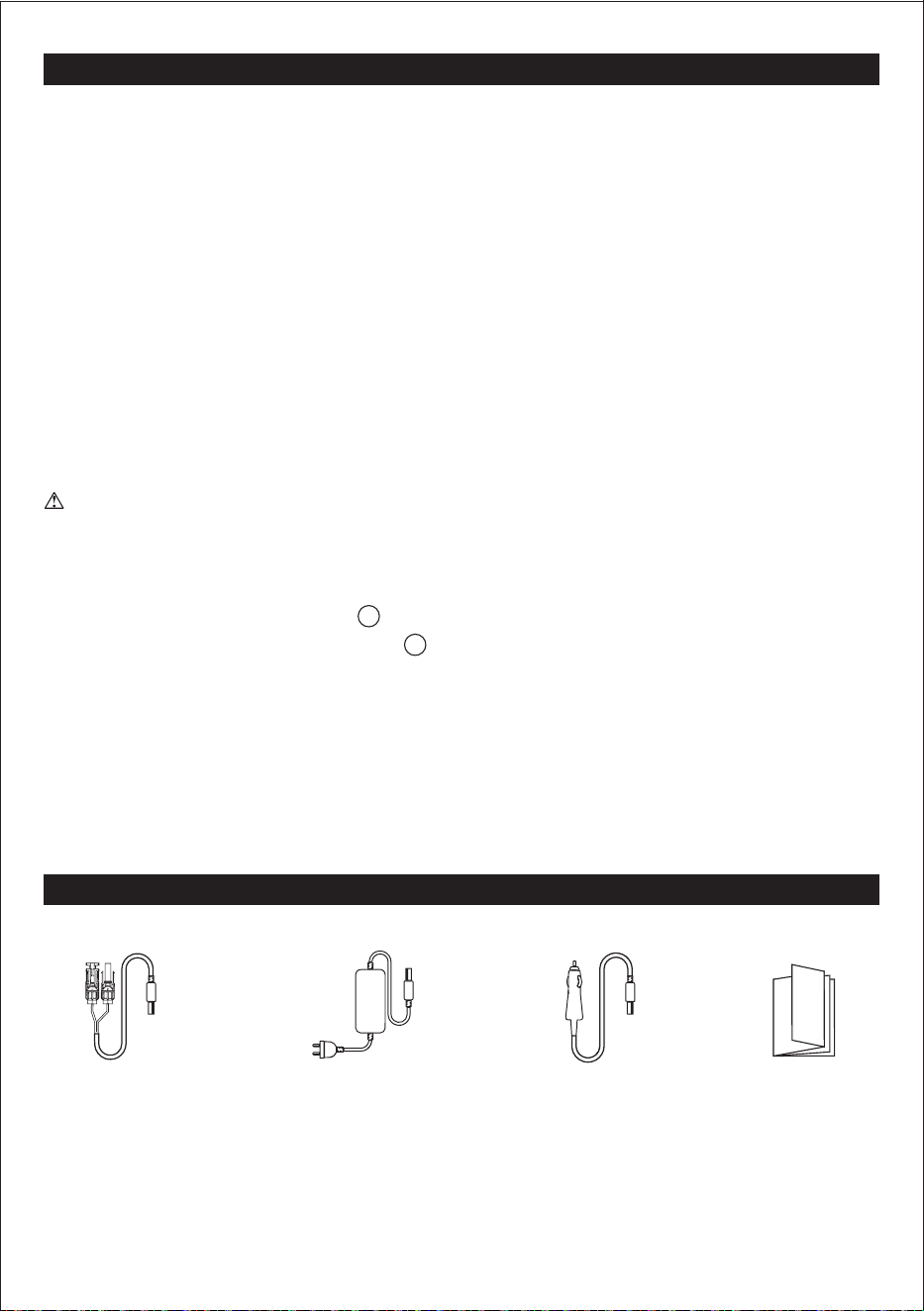
HOW TO CHARGE
WHAT IT POWERS
DO NOT CONNECT DEVICE VIA AC OUTPUT PORT WHILE CHARGE THE BALDR 500.
RECOMMEND TO DISCONNECT THE BALDR 500 WHEN FULLY CHARGED.
H
I
L
H: Battery Level Indicator
I:
Input Status
J:
DC Outputs Status
K:
AC Outputs Status
USB Outputs Status
L:
J
K
Around
10 Recharges
Around
7 hours
Around 11 hours
Around 5 Recharges
Around
74 Recharges
Around 3 nights
Laptops (41.4Wh)
32" TV(60W)
DJ Drone(89.2Wh)
Gopro (5.9Wh)
CPAP without heated
humidifier (15W)
Mini Fridge(40W)
Around
44 Recharges
Smartphone(10Wh)
Switch(16Wh)
Around
27 Recharges
Around
110 hours
Floodlight(4W)
4
From Solar Charger
200W 6-9 hours
From Car Port 12V
10-12 hours when car running
From Wall Charger 110V
6-7 hours
depending on solar conditions
+MORE

FUNCTION BUTTONS
5
WIRELESS CHARGER
Press ON/OFF Button A before charging. Press ON/OFF Button to shut down the output(s)
when not in use.
12
COOLING FAN
BALDR 500 utilizes an internal cooling fan to ensure the product is operating within the
appropriate temperature range. BALDR 500, when it experiences a higher output load, will
automatically turn on the fan. During discharge, and possibly charging, the fan may operate
intermittently to keep internal temperature within operating range. The fan will likely start when
the AC circuit is activated to ensure proper operation.
13
BALDR 500 POWER ON/OFF A
Button A is the master switch. Press Button A to activate the button C/D.
Press Button A to shut down the output(s) When not in use.
SOS MODE & LED LIGHT B
Function available no matter the Button A activate or not.
First, press Button B to turn on the LED light;
Second, DOUBLE-Press to turn on the SOS mode;
Third, press Button B back to LED light, one more time again, will turn off the light.
DC OUTPUTS POWER ON/OFF C
The DC output ports will NOT function until the appropriate Button A & C are both pressed to
activate. Press Button C to shut down the output(s) When not in use.
USB OUTPUTS POWER ON/OFF D
The USB output ports will NOT function until the appropriate Button A & D are both pressed to
activate.
Press Button D to shut down the output(s) when not in use.
AC OUTPUTS POWER ON/OFF E
The AC outlets will NOT function until the appropriate Button A & E are both pressed to
activate.
Press Button E to shut down the output(s) when not in use.

Connect the provided AC Wall power adapter to Input , and allow BALDR 500 to fully charge
prior to use, approx. 6-7 hours.
Connect the Anderson plug to the Input , and allow BALDER 500 to fully charge prior to use,
approx. 6-9 hours with the Solar Panel. Noted that the red part of the Anderson plug is positive,
and the black part is negative. Please connect positive to positive and negative to negative to
ensure using correctly.
When charging, the LCD Screen will be illuminated, and the LCD display will provide Battery
level Indicator H, BALDR 500 is fully charged when the level is 100%. It is recommended to
fully charge BALDR every 3 months to maintain the health of the battery pack.
BATTERY LEVEL INDICATOR H : The battery level is provided by percentage of battery
charge corresponding to the number of bars and percentage displayed. The segments in the
battery level correspond to the current state of charge, 1-20% one segment, 21-40% two
segments, 41-60% three segments, 61-80% four segments, and all five are lit when charge
level is 81-100%.
Provides the user live telemetry data on time to completely charge, or deplete the battery based
upon the energy entering or leaving the battery.
Highly recommend to fully charge BALDR 500 when first use. Higher battery level indicator
show, more precise the data will indicate.
PLEASE BE AWARE that this value can adjust multiple times as the energy draw changes from
the connected devices. This is evident during initial activation of ports with a connected device.
RECOMMENDED back to charge the BALDR 500 when battery indicates less than 20%.
Note that when you first plug in a power source, whether it's a solar panel or a wall charger, the
BALDR 500 may take a minute to detect and adjust its charge circuitry before it starts drawing
power from the source.
DETAILS DISPLAYED ON LCD
OPERATING INSTRUCTIONS
6
10
1
8
LCD Screen will enter sleep mode after of inactivity (no new output load
detected), and will "wake up" when inputting a charging cord or when any button is pressed.
1
20 seconds
INPUT Status I: The BALDR 500 is capable of providing input energy in watts.
DC Outputs Status J: The display will provide output watts of the DC ports .
AC Outputs Status K: The display will provide output watts of the AC Outlets .
2 3
6
CHARGING BALDR 500
USB Outputs Status L: The display will provide output watts of the USB Outputs
4 5
.
Select the type of outlet required by pressing the Output ON/OFF Button C/D/E. The output
port will NOT function until the appropriate button is pressed to activate the port. When
activated, the indicator on the button will illuminate green, indicating that the output(s) are
active, and the LCD display will turn on and provide details on the charging output. The
LCD Screen will automatically shut down when no outputs are activated.
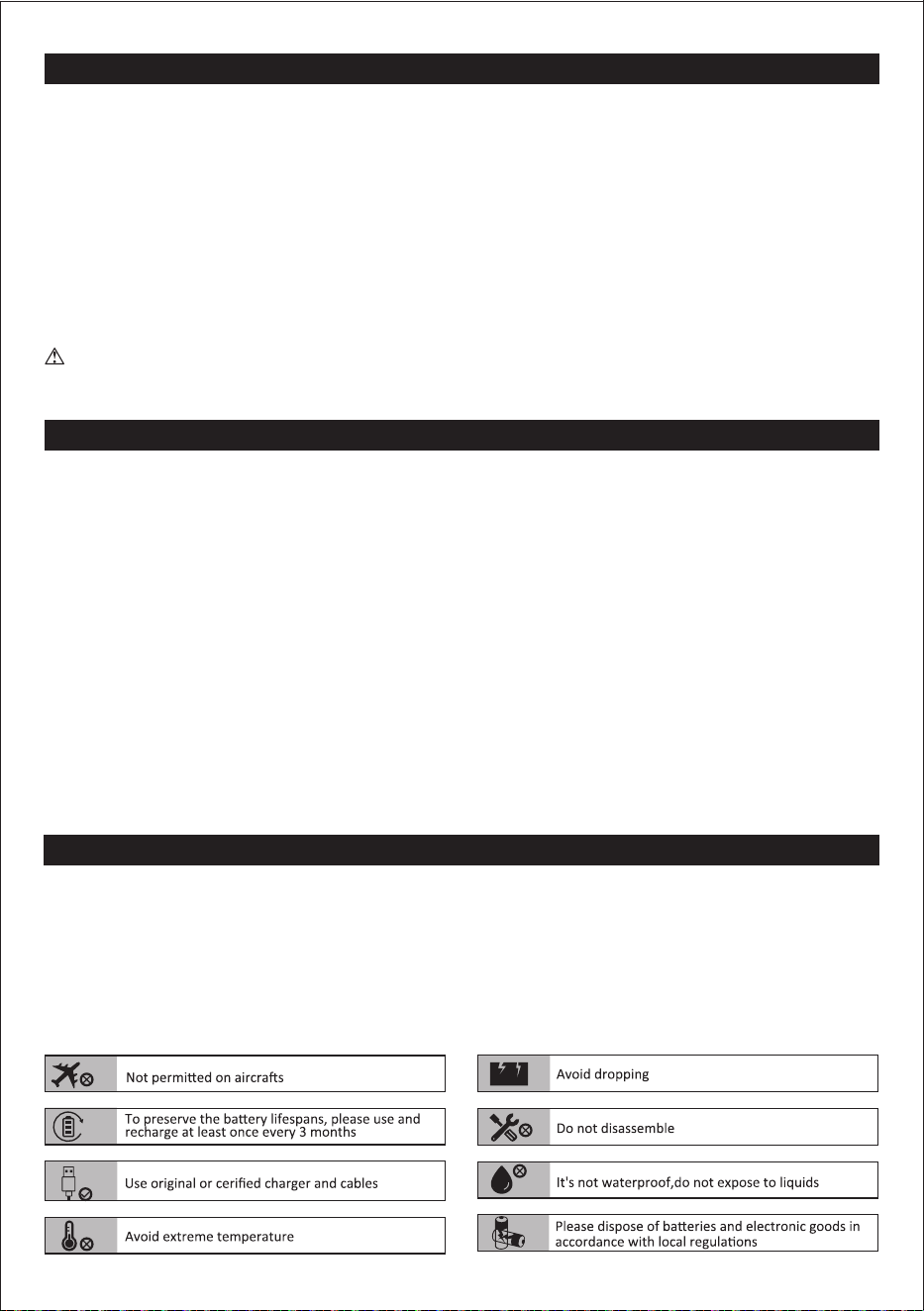
BALDR 500 ACCESSORY LIST
PASS-THROUGH CHARGING
The advanced battery management system of the BALDR 500 allows it to charge a connected
device via DC outputs & USB outputs while charge the BALDR 500.
DO NOT CONNECTED DEVICE VIA AC OUTPUTS WHILE CHARGE THE BALDR 500.
Do following:
• Check the input charge cable. The port will be efficient when the input charge cable meets
the specification outlined in the GENERAL SPECIFICATIONS section.
• Only charge BALDR 500 with provided AC wall power adapter.
OVERLOAD CONDITION
If an overload condition occurs on the OUTPUT ports, BALDR 500 will:
• Automatically turn off AC Outlets power.
• The blue indicator light of LCD Screen still illuminated.
• DC Outputs Status J still the same status as usual.
• 110V AC wall plug
power adapter
• 18V with MC4
connector cable
Recommend to use 200W Solar panel (not included).
• 12V Car Charger
cable
7
1
6
POWERING / CHARGING DEVICES WITH BALDR 500
BALDR 500 will enter sleep mode after 20 seconds of inactivity (no new output load detected),
and will "wake up" when inputting a charging cord or when any button is pressed.
Press the ON/OFF button(s) to shut down the output(s) when not in use.
• User Manual
STORAGE
ATTENTION
CLEANING
Transportation:BALDR 500 complies with all legal requirements for transport of dangerous
goods. The capacity of the lithium battery pack exceeds 100Wh. Based on international
standards, if BALDR 500 is transported by airplane, it must be transported in accordance with
IATA standard packaging. IATA instructions and labeling requirements and the relevant
declarations must be completed.
If storing for more than 1 month, charge completely before storage and recharge approximately
every 3 months to avoid full discharge and possible damage.
Store indoors, in cool temperatures, mild humidity, and away from direct sunlight (See GENERAL
SPECIFICATIONS section). Leaving in a vehicle or other confined spaces in extreme hot
temperatures can lead to decreased service life, overheating, and fire. Extreme cold conditions
below specific storage range can also harm BALDR 500 performance and service life.
Keep away from corrosion chemicals and gases.
After taking out of storage, visually inspect to make sure BALDR 500 and all accessories look
satisfactory. This increase review the intake and exhaust side vents to ensure they are clear of
debris. Allow BALDR 500 to return to ambient conditions before recharging, or charging other
Be sure that BALDR 500 is disconnected from all input power sources and output devices.
Use a clean, dry, soft-lint-free cloth to wipe down it. Remove any debris, dirt, or other
blockages on both side vents. When cleaning debris from the side vents, do not allow the
debris, dirt, or other blockages to enter the body of BALDR 500.
DO NOT use abrasive cleaners or solvents.
DO NOT use compressed air to clean side cooling vents, as this will force foreign
particles into the internal circuitry.
8
To avoid the risk of electrical shock, DO NOT use metal objects to clean ports.
devices.

BALDR 500 WILL NOT CHARGE OR OPERATE connected devices:
• Ensure that the DC/USB/AC Output Ports / / / / are activated by pressing the
Button(s) A & C/D/E for the port(s) in use.
• Confirm the connected device is suitable for the BALDR 500 by reviewing the output
specifications provided in the GENERAL SPECIFICATIONS section.
• Confirm BALDR 500 is charged by reviewing the Battery Level Indicator H.
• Verify the watt data displayed on the Status Indicator I/J/K/L of LCD Screen for overload
condition.
TROUBLESHOOTING
MAINTENANCE
DISPOSAL/RECYCLE
BALDR 500 WILL NOT CHARGE:
• Confirm that the wall plug power adapter's cord is inserted fully into the DC Input .
• Confirm that the AC wall plug power adapter is the charger provided with BALDR 500.
• If the input does not comply with the requirements located in the GENERAL
SPECIFICATIONS section, the Low Watt range 0 to 10 may be displayed on
Input Status I of LCD screen .
Recharge as needed. There are no pre-designated intervals at which to recharge as long as the
BALDR 500 is being used regularly. Avoid discharging completed on a regular basis, as this can
impact overall life.
Regularly inspect all ports and wall charger for any debris, dirt, damage and corrosion.
DO NOT attempt to fix.
DO NOT cover the BALDR 500 with towels, clothing or other items.
Regularly observe if the side vents are collecting dirt or dust, and clean following cleaning
procedures noted in manual.
Do not place equipment and its accessories in the trash. Items must be properly disposed
of in accordance with local regulations. See www.epa.gov for additional information.
9
STATEMENT
Copyright BALDR. All rights reserved. All trademarks cited herein are the property of their
respective owners.
The information contained herein is subject to change without notice. The only warranties for
BALDR products and services are set forth in the warranty statements accompanying such
products and services. BALDR shall not be liable for technical or editorial errors or omissions
contained herein.
First Edition: Sep. 2020. This user guide describes features that are common to most models.
C
2
1
1
8
3 4 5 6

WARRANTY
10
Limited Warranty
BALDR Warrants to the original consumer purchaser that the BALDR will be free from defects
in workmanship and material under normal consumer use during the applicable warranty period
identified in the “Warranty Period” section below, subject to the exclusions set forth below. This
warranty statement sets forth BALDR's total and exclusive warranty obligation. We will not
assume, nor authorize any person to assume for us, any other liability in connection with the
sale of our products.
Warranty Period
The warranty period is 12 months. In each case, the warranty period is measured starting on
the date of purchase by the original consumer purchaser. The sales receipt from the first
consumer purchase, or other reasonable documentary proof, is required in order to establish
the start date of the warranty period.
The warranty can be extended to TWO TOTAL years if you registered via
www.togopower.com or contact [email protected].
Remedy
BALDR will repair or replace( at BALDR's option) any BALDR product that fails to operate
during the applicable warranty period due to defect in workmanship or material. If a valid claim
is made during the applicable period, BALDR, at its option, will either (1) replace the product,
or (2) exchange the product with a product that is of equal value. A replacement product
assumes the remaining warranty of the original product or ninety (90) days from the date of
replacement, whichever is greater. Customer is responsible for the return shipping costs.
Limited to Original Consumer Buyer
The warranty on BALDR's product is limited to the original consumer purchaser and to any
subsequent owner.
Exclusions
BALDR's warranty does not apply to (i) any product that is misused, abused, modified,
damaged by accident, or used for anything other than normal consumer use as authorized in
BALDR's current product literature, or (ii) any product purchased through an online auction
house. BALDR's warranty does not apply to the battery cell unless the battery cell is fully
charged by you within seven days after you purchase the product and at least every 3 months
thereafter.
How to Receive Service
To obtain warranty service, contact our customer service team at [email protected].