

TRUE WIRELESS
OWNER’S MANUAL
Appuyer pendant 1 seconde
Mantener oprimido durante 1 s
1 Sek. gedrückt halten
Tenere premuto per 1 secondo
Pressionar por 1 segundo
按住 1 秒
1秒間押します
3
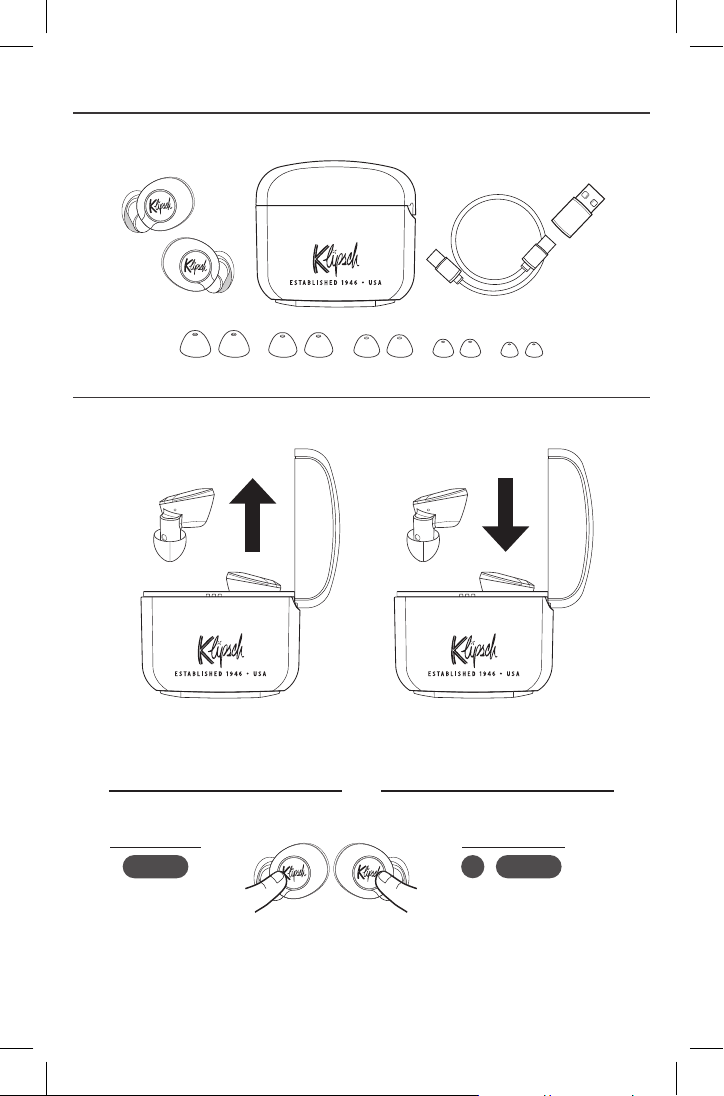
INSIDE
CONTENU • CONTENIDO • INHALT • CONTENUTO • CONTEÚDO • 内 • 内部
POWER
SOUS TENSION / HORS TENSION • ENCENDIDO / APAGADO • EIN / AUS • ACCESO / SPENTO • LIGAR / DESLIGAR • 开/关
• オン/オフ
OR
OU
O BIEN
ODER
OPPURE
OU
或
または
Short Hold Press then Hold 1s
Appuyer pendant 1 seconde
Mantener oprimido durante 1 s
1 Sek. gedrückt halten
Tenere premuto per 1 secondo
Pressionar por 1 segundo
按住 1 秒
1秒間押します
Appuyer puis tenir 1 sec.
Oprimir y mantener oprimido durante 1 s
Drücken, dann erneut 1 Sek. Halten
Premere e rilasciare e poi tenere premuto per 1 secondo
Pressionar rapidamente e depois manter pressionado por 1 segundo
短按再按住 1 秒
さらに1秒間押します
ON
オン
OFF
オフ
1s 1s
ON OFF
オン オフ
4
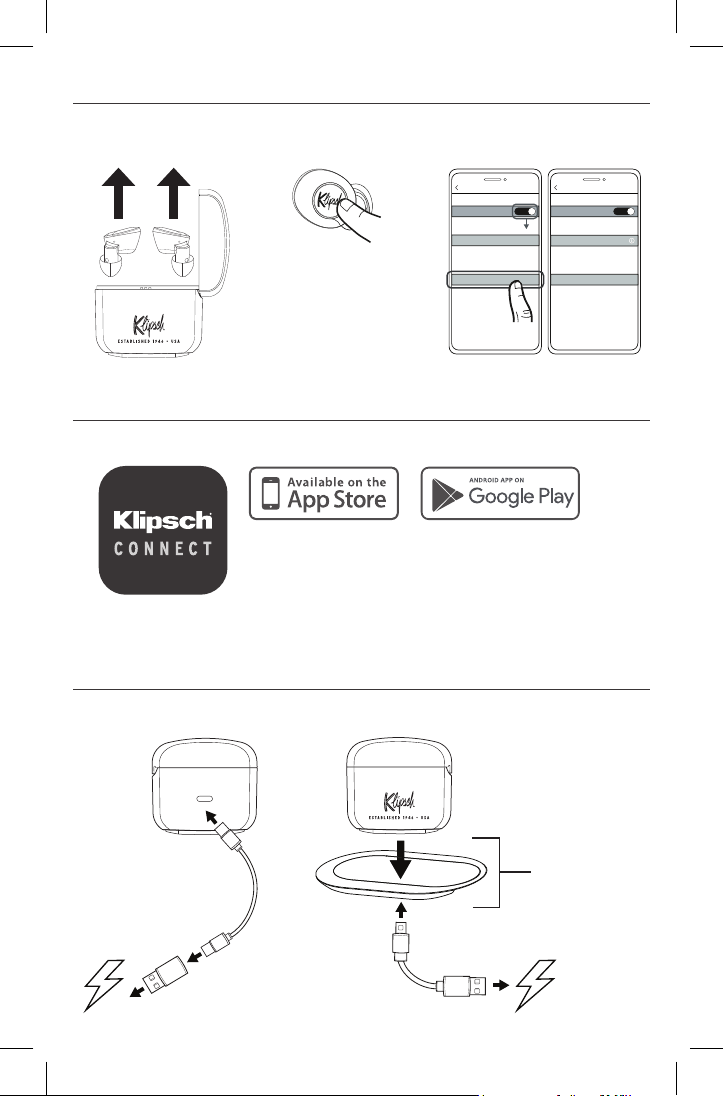
CHARGING
SETUP
CHARGE BATTERIE • CARGA DE LA PILA • AKKULADESTAND • CARICA BATTERIA • CARGA DA BATERIA • 电池充电 • 充電する
CONFIGURATION • CONFIGURACIÓN • SETUP • APPRONTAMENTO • CONFIGURAÇÃO • 设置 • 設定
PAIRING
APPAIRAGE • VINCULACIÓN • VERBINDUNG • ASSOCIAZIONE • PAREAMENTO • 配对 • ペ アリング
Bluetooth
Bluetooth
ON
My Devices
Settings
Klipsch T5 ANC
Other Devices
Bluetooth
Bluetooth
ON
My Devices
Other Devices
Settings
Klipsch T5 ANC
Connected
HOLD 3 SECONDS
Appuyer pendant 3 secondes
Mantenga presionado durante 3 segundos
3 Sekunden gedrückt halten
Tenere premuto per 3 secondi
Manter pressionado por 3 segundos
按住 3 秒
3秒間押します
R
Download the Klipsch Connect app and follow the instructions
Télécharger l’application Klipsch Connect et suivre les instructions
Descargue la aplicación Klipsch Connect y siga las instrucciones
Laden Sie die Klipsch Connect App herunter und folgen Sie den Anweisungen
Scaricare l’app Klipsch Connect e seguire le istruzioni
Baixe o aplicativo Klipsch Connect e siga as instruções
下载 Klipsch Connect 应用程序,然后按指导进行操作。
Klipsch Connectアプリをダウンロードして使用説明に従ってください
Bluetooth
Bluetooth
ON
My Devices
Settings
Klipsch T5 ANC
Other Devices
Bluetooth
Bluetooth
ON
My Devices
Other Devices
Settings
Klipsch T5 ANC
Connected
Bluetooth
Bluetooth
ON
My Devices
Settings
Klipsch T5 ANC
Other Devices
Bluetooth
Bluetooth
ON
My Devices
Other Devices
Settings
Klipsch T5 ANC
Connected
- OR -
WIRELESS CHARGER
CHARGEUR SANS FIL
CARGADOR INALÁMBRICO
DRAHTLOSES LADEGERÄT
CARICABATTERIA WIRELESS
CARREGADOR SEM FIO
无线充电器
ワイヤレス充電器
5
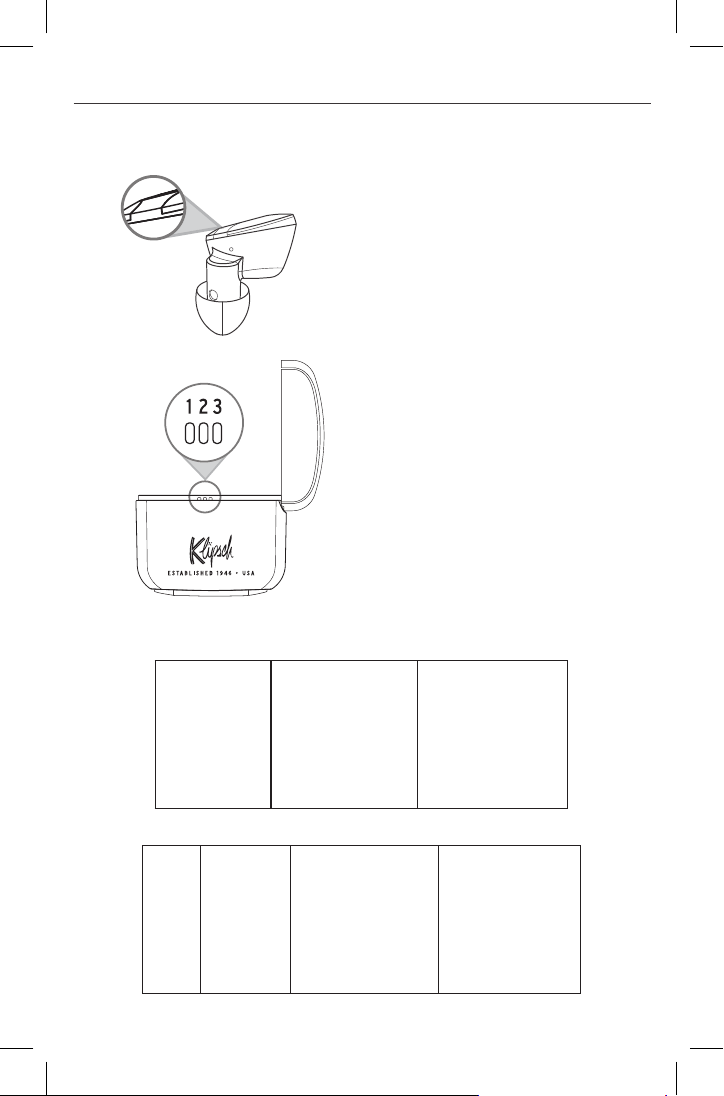
STATUS INDICATORS
VOYANT INDICATEUR • INDICADOR DE ESTADO • STATUS • SPIA DELLO STATO • INDICADOR DE STATUS • 状态指示灯 •
ステータスインジケータ―
Solid Red
ª
Charging
Slow Blink Blue
ª
Ready to Pair
Fast Blink Blue
ª
Connected
LED 1
ª
Charging 0-33%
LED 2
ª
Charging 33-66%
LED 3
ª
Charging 66-100%
LED
Témoin
LED
LED
LED
LED
LED
LED
Charging
Charge
Cargando
Batterie lädt
Ricarica
Carregando
电池充电
充電する
Ready to Pair
Prêt pour l’appairage
Listo para vincular
Zur Verbindung bereit
Pronti per l’associazione
Pronto para emparelhar
可以配对
ペアリング準備完了
Connected
En fonctionnement, connecté
Encendido, conectado
An, verbunden
Accesi, connessi
Ligado, conectado
连接的
接続済み
Solid Red
Rouge fixe
Rojo sólido
Dauerhaft rot
Rosso a luce fissa
Vermelho contínuo
持续亮红灯
赤く点灯
Slow Blink Blue
Clignotement bleu lent
Parpadeo azul lento
Blinkt langsam blau
Blu lampeggiante lento
Azul intermitente lento
慢闪烁蓝灯
青でゆっくり点滅
Fast Blink Blue
Clignotement bleu rapide
Parpadeo azul rápido
Blinkt schnell blau
Blu lampeggiante veloce
Azul intermitente rápido
快闪烁蓝灯
青で素早く点滅
6
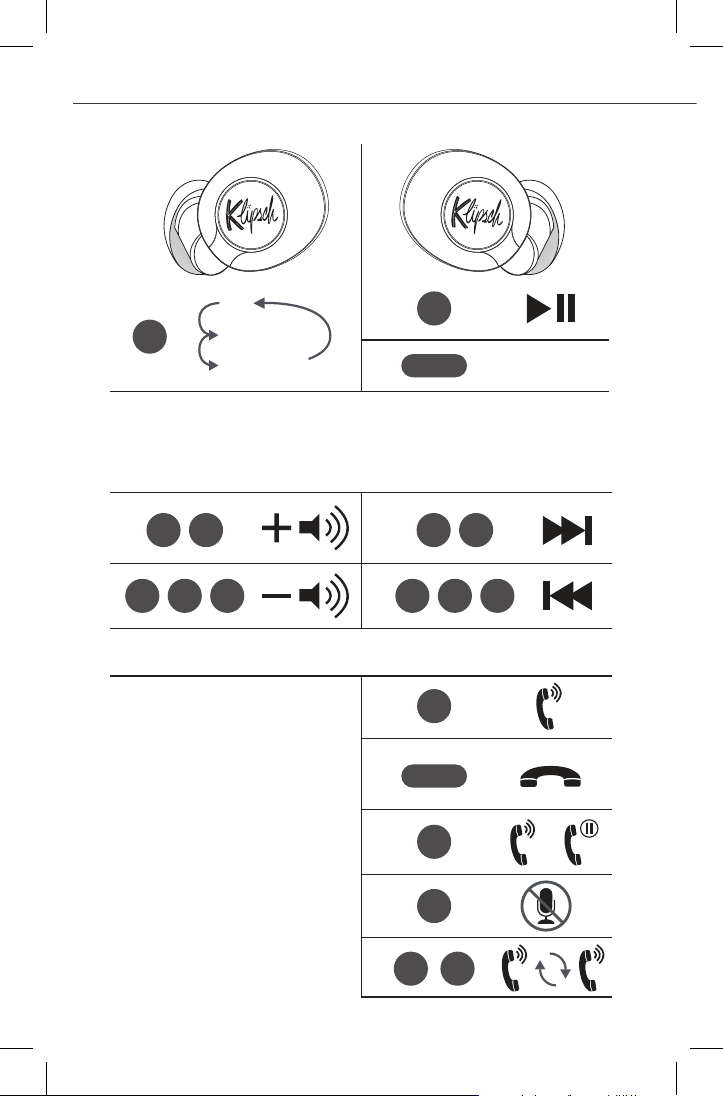
Voice Assistant
CONTROLS
CONTRÔLES • CONTROLES • STEUERUNG • CONTROLLI • CONTROLES • 控制 • コ ントロ ー ル
RL
*Note: Hot button can be configured in the Klipsch Connect App
** Active Noise Cancellation
CALL HANDLING
+
*During Call
*
*
*
DURING PLAYBACK
*
OFF
A.N.C.
**
Transparency
1s
1s
7
1s
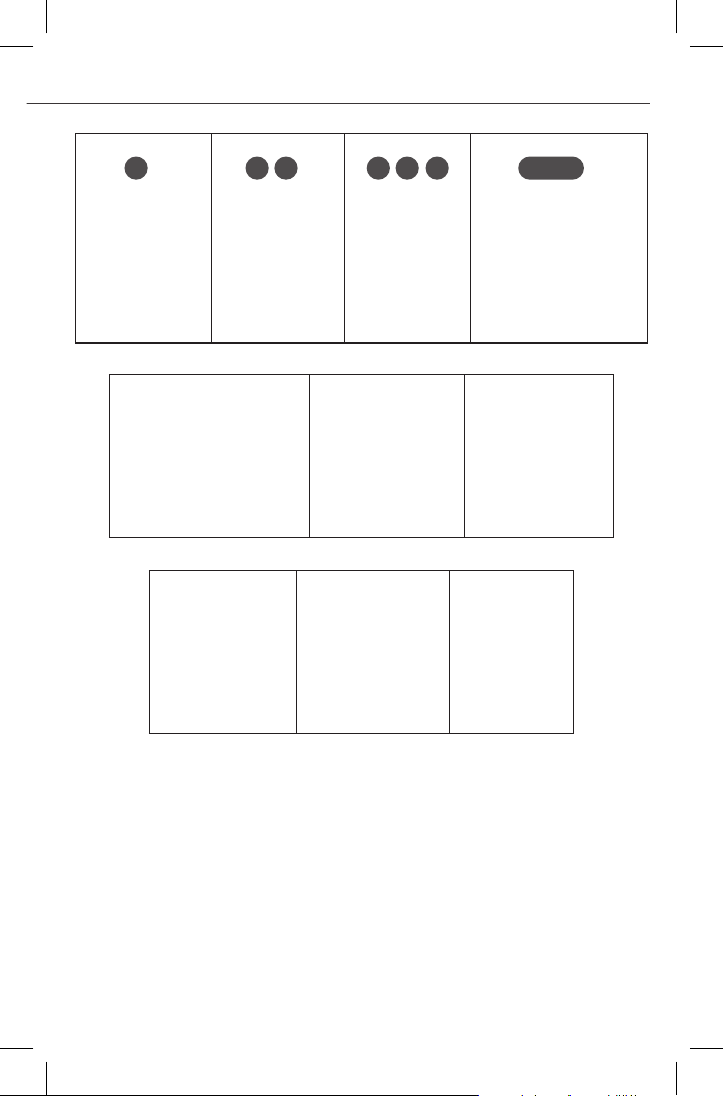
Short Press
Appui bref
Oprimir una vez
Kurz drücken
Pressione breve
Pressionar rapidamente
短按
短押し
Double Press
Double appui
Oprimir dos veces
Doppelt drücken
Doppia pressione
Pressionar duas vezes
按两次
2回押し
Triple Press
Triple appui
Oprimir tres veces
Dreimal drücken
Tripla pressione
Pressionar três vezes
按三次
3回押し
Short Hold
Appuyer pendant 1 seconde
Mantener oprimido durante 1 s
1 Sek. gedrückt halten
Tenere premuto per 1 secondo
Pressionar por 1 segundo
按住 1 秒
1秒間押します
Active Noise Cancelling
Réduction active du bruit
Reducción Activa de Ruido
Aktive Geräuschunterdrückung
Cancellazione attiva del rumore
Cancelamento de ruído ativo
有源降噪
アクティブノイズ キ ャン セル
Transparency
Transparence
Transparencia
Umgebungsgeräusche
Trasparenza ai suoni esterni
Transparência
透明模式
トランスペアレンシー
During Playback
Pendant la lecture
Durante la reproducción
Während der Wiedergabe
Durante la riproduzione
Durante a reprodução
在播放期间
再生中
Voice Assistant
Assistance vocale
Asistente de voz
Sprachassistent
Assistente vocale
Assistente de voz
语音助手
音 声 ア シスト
Call Handling
Gestion des appels
Procesamiento de llamadas
Anrufabwicklung
Gestione chiamate
Administração de chamadas
通话处理
通話の応答/拒否
During Call
Pendant un appel
Durante la llamada
Während des Anrufs
Durante la chiamata
Durante a chamada
通话期间
通話中
8
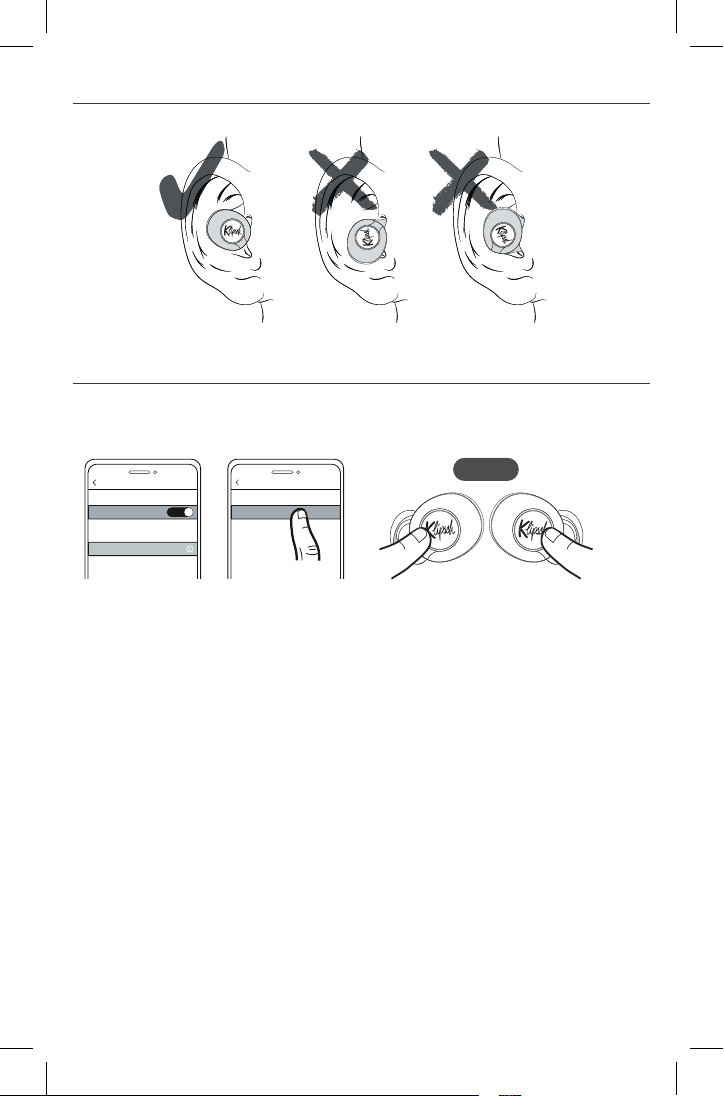
PLACEMENT
POSITIONNEMENT • UBICACIÓN • PLATZIERUNG • POSIÇÃO • COLLOCAZIONE • 布置 • 装着
FACTORY RESET
RÉINITIALISATION • RESTABLECIMIENTO DE FÁBRICA • RÜCKSETZUNG AUF WERKSEINSTELLUNG • RIPRISTINO IMPOSTAZIONI
DI FABBRICA • RESTABELECIMENTO DAS CONFIGURAÇÕES DE FÁBRICA • 恢复出厂设置 • 工場出荷時設定リセット
15s
Bluetooth
Bluetooth
ON
My Devices
Other Devices
Settings
Klipsch T5 ANC
Connected
Forget This Device
Klipsch T5 ANC
Bluetooth
LEDs on both Left and Right will alternate RED/BLUE
Les LED des deux côtés gauche et droit clignoteront respectivement en ROUGE et BLEU
Los LED de los auriculares derecho e izquierdo alternan entre ROJO y AZUL
LEDs am L/R Ohrhörer abwechselnd ROT/BLAU
I LED su entrambi gli auricolari lampeggeranno alternativamente in ROSSO/BLU
Os LEDs nos fones de ouvido esquerdo e direito alternarão entre VERMELHO e AZUL
左耳机和右耳机上的发光二极管将交替发红光/蓝光。
左右イヤホンのLEDは赤色と青色で交互に点滅します
9
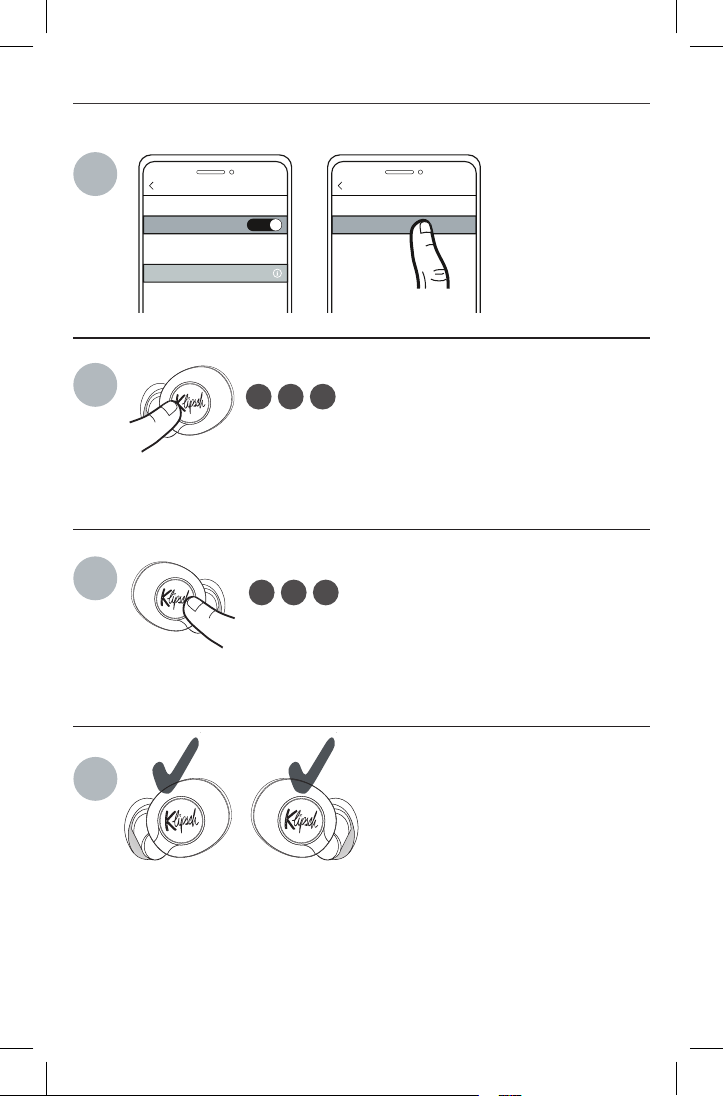
TRUE WIRELESS RESET
RÉINITIALISER • REINICIAR • ZURÜCKSETZEN • RESET • REINICIALIZAR • 重启 • リ セット
Bluetooth
Bluetooth
ON
My Devices
Other Devices
Settings
Klipsch T5 ANC
Connected
Forget This Device
Klipsch T5 ANC
Bluetooth
2
3
4
1
LED will alternate RED/BLUE
Les LED clignoteront en ROUGE/BLEU
El LED alterna entre ROJO y AZUL
LED abwechselnd ROT/BLAU
Il LED lampeggerà alternativamente in ROSSO/BLU
O LED alternará entre VERMELHO/AZUL
发光二极管将交替发红光/蓝光。
LEDは赤色と青色で交互に点滅します
LED will alternate RED/BLUE
Les LED clignoteront en ROUGE/BLEU
El LED alterna entre ROJO y AZUL
LED abwechselnd ROT/BLAU
Il LED lampeggerà alternativamente in ROSSO/BLU
O LED alternará entre VERMELHO/AZUL
发光二极管将交替发红光/蓝光。
LEDは赤色と青色で交互に点滅します
Glow solid purple
S’allume en violet constant
Brilla MORADO fijo
Leuchtet stetig LILA
Acceso a luce fissa VIOLA
Aceso na cor ROXA
持续发紫光
紫色で点灯します

10
TOPIC: My audio and video won’t sync up.
SOLUTION: Some apps do not always use the cor-
rect audio codec for lowest latency. If the audio is
delayed in an App, try streaming the same video
using your device’s web browser.
TOPIC: Are my earphones water and dust
resistant?
SOLUTION: Your earphones are IPX4 sweat resis-
tant which means they can handle humid environ-
ments and sweat but CANNOT be submerged in
water. Please note the charging case is not water
or dust proof and should be kept away from the
elements.
TOPIC: One earphone is unresponsive or stuck.
SOLUTION: Hold the power button on that ear-
phone for 20 seconds, place it back into the
charging case, then remove it.
ADDITIONAL SUPPORT:
Be sure to check klipsch.com/support and down-
load Klipsch Connect to install the latest firmware
available.
SPECIFICATIONS:
Bluetooth 5.0
A2DP Codecs: SBC, AAC
Range: up to 10m (33 ft.)
Charging Case Input Rating: 5V DC, 0.5A
TROUBLESHOOTING
TOPIC: There is sound coming from one side only.
SOLUTION: Insert both earphones into the case
and remove them again.
TOPIC: How do I get the best Bluetooth
connection?
SOLUTION: Ensure your device isn’t being blocked
by your body or any objects (move it from your
pocket). Next, place the earphones back in the
case and take out the earphone that corresponds
with the side your device is on first (Right ear-
phone if right pocket, left earphone if left pocket).
Try to reduce the distance between your earbuds
and your audio device to further improve perfor-
mance.
TOPIC: What if I have poor wireless connectivity?
SOLUTION: If possible, move away from cell
phone towers, dense WiFi networks, other Blue-
tooth devices and household appliances like mi-
crowave ovens.
TOPIC: I want more bass.
SOLUTION: Try a larger ear tip, further boost bass
using the Klipsch Connect App.
TOPIC: I can’t connect to my phone.
SOLUTION: Press and hold the right earphone but-
ton for three (3) seconds to engage pairing mode.
ENGLISH

11
DÉPANNAGE
OBJET: Il n’y a du son que d’un côté.
SOLUTION: Insérez l’autre écouteur dans le boîti-
er et retirez-le à nouveau.
OBJET: Comment puis-je obtenir la meilleure con-
nexion Bluetooth?
SOLUTION: Veillez à ce que la communication
avec votre appareil ne soit pas bloquée par votre
corps ou par d’autres objets (sortez-le de votre
poche). Ensuite, remettez les écouteurs dans
le boîtier et sortez en premier l’écouteur qui
correspond au côté où se trouve votre appareil
(écouteur droit si poche droite, écouteur gauche
si poche gauche). Essayez de réduire la distance
entre vos écouteurs et votre appareil audio pour
améliorer encore les performances.
OBJET: Que puis-je faire si j’ai une mauvaise con-
nectivité sans fil?
SOLUTION: Si possible, éloignez-vous des an-
tennes-relais, des réseaux WiFi à haute densité,
des autres appareils Bluetooth et des appareils
ménagers tels que les fours à micro-ondes.
OBJET: Je veux plus de basses.
SOLUTION: Essayez un embout plus grand. Vous
pouvez aussi rehausser les basses à l’aide de l’ap-
plication Klipsch Connect.
OBJET: Je n’arrive pas me connecter à mon télé-
phone.
SOLUTION: Réinitialisez les écouteurs en appuy
ant pendant 3 secondes à la fois sur le bouton de
l’écouteur gauche et celui de droite.
OBJET: L’audio et la vidéo n’arrivent pas à se
synchroniser.
SOLUTION: Certaines applications n’utilisent pas
toujours le codec audio correct pour obtenir la
latence la plus faible. Si l’audio accuse un retard
dans une application, essayez de regarder la
même vidéo à l’aide du navigateur web de votre
appareil.
TOPIC: Mes écouteurs sont-ils résistants à l’eau
et à la poussière?
SOLUTION: Vos écouteurs bénéficient d’un indice
de protection IPX4, ce qui signifie qu’ils peuvent
résister aux environnements humides et à la
transpiration, mais ne peuvent PAS être immergés
dans l’eau. Veuillez noter que le boîtier de charge
n’est pas étanche à l’eau ni à la poussière et doit
être tenu à l’écart des éléments.
PROBLÈME: Un écouteur ne répond pas ou est
bloqué.
SOLUTION: Tenez enfoncé le bouton de mise en
marche de cet écouteur pendant 20 secondes.
Remettez-le en place dans le boîtier de charge-
ment, puis retirez-le.
ASSISTANCE SUPPLÉMENTAIRE: Consultez
klipsch.com/support et téléchargez Klipsch Con-
nect pour installer le dernier micrologiciel dis-
ponible.
FRANÇAIS

12
SOLUCIÓN DE PROBLEMAS
TEMA: Mi audio y video no se sincronizan.
SOLUCIÓN: Algunas aplicaciones no siempre usan
el códec de audio correcto para la latencia más
baja. Si el audio está retrasado en una aplicación,
trate de reproducir en directo el mismo video us-
ando el navegador web de su dispositivo.
TEMA: ¿Mis audífonos son resistentes al agua y
el polvo?
SOLUCIÓN: Sus auriculares tienen resistencia al
sudor IPX4, lo cual significa que soportan ambi-
entes húmedos pero NO se pueden sumergir en
agua. El estuche de carga no es a prueba de pol-
vo o de agua y debe mantenerse alejado de los
elementos.
TEMA: Uno de los auriculares no responde o está
atascado.
SOLUCIÓN: Mantenga oprimido el botón de en-
cendido de ese auricular durante 20 segundos,
póngalo nuevamente en el estuche de carga y
luego retírelo.
SOPORTE ADICIONAL: Asegúrese de consultar
klipsch.com/support y descargue Klipsch Connect
para instalar el último firmware disponible.
TEMA: Solo hay sonido proveniente de un lado.
SOLUCIÓN: Inserte el otro audífono en el estuche
y vuelva a sacarlo.
TEMA: ¿Cómo obtengo la mejor conexión Blue-
tooth?
SOLUCIÓN: Asegúrese de que su dispositivo no
esté siendo bloqueado por su cuerpo o por algún
objeto (sáquelo de su bolsillo). Después, coloque
los audífonos de regreso en el estuche y saque el
audífono que corresponda al lado donde su dis-
positivo esté encendido primero (audífono dere-
cho en el bolsillo derecho, audífono izquierdo en
el bolsillo izquierdo). Trate de acortar la distancia
entre su audífono y su dispositivo de audio para
mejorar más su desempeño.
TEMA: ¿Qué pasa si tengo una mala conectividad
inalámbrica?
SOLUCIÓN: Si le es posible, aléjese de torres de
telefonía celular, redes WiFi con muchos usuarios,
otros dispositivos Bluetooth y electrodomésticos
como los hornos de microondas.
TEMA: Quiero más bajos.
SOLUCIÓN: Pruebe un auricular más grande;
aumente los bajos usando la aplicación Klipsch
Connect.
TEMA: No me puedo conectar a mi teléfono.
SOLUCIÓN: Implemente el reinicio de fábrica
sosteniendo el botón en el audífono izquierdo y
el derecho durante 3 segundos.
ESPAÑOL

13
PROBLEMBEHANDLUNG
einstellung zurück, indem sie die Tasten links und
rechts 3 Sekunden gedrückt halten.
THEMA: Mein Audio und mein Video laufen nicht
synchron.
LÖSUNG: Manche Apps verwenden nicht immer
den für die geringste Latenz erforderlichen kor-
rekten Audio-Codec. Wenn der Ton in der App mit
Verzögerung läuft, sollten Sie versuchen, das Vi-
deo im Webbrowser Ihres Geräts zu streamen.
THEMA: Sind meine Ohrhörer wasser- und staub-
geschützt?
LÖSUNG: Ihr Ohrhörer ist gemäß IPX4-Norm
schweißgeschützt, so dass er feuchte
Umgebungen und Schweiß aushalten kann, aber
er darf NICHT ins Wasser eingetaucht werden.
Denken Sie daran, dass das Lade-Etui nicht
wasser- oder staubdicht ist und vor den
Elementen geschützt werden muss.
THEMA: Ein Ohrhörer reagiert nicht oder hängt im
Programm fest.
LÖSUNG: Halten Sie die Einschalttaste an diesem
Ohrhörer 20 Sekunden lang gedrückt, legen Sie
ihn zurück in die Ladehülle und nehmen Sie ihn
dann wieder heraus.
WEITERER SUPPORT: Besuchen Sie klipsch.com/
support und laden Sie Klipsch Connect herunter,
um die neueste verfügbare Firmware zu instal-
lieren.
THEMA: Nur aus einer Seite kommt Sound.
LÖSUNG: Anderen Ohrhörer in Etui legen und wie-
der herausnehmen.
THEMA: Wie erreiche ich die beste Blue-
tooth-Verbindung?
LÖSUNG: Stellen Sie sicher, dass Ihr Gerät
nicht von Ihrem Körper oder von Gegenständen
blockiert wird (nehmen Sie es aus Ihrer Tasche).
Legen Sie dann die Ohrhörer wieder ins Etui und
nehmen Sie den Ohrhörer zuerst heraus, der der
Seite entspricht, wo sich Ihr Audiogerät befindet
(rechter Ohrhörer wenn es in der rechten Tasche
ist, linker Ohrhörer im Fall der linken Tasche). Ver-
suchen Sie, den Abstand zwischen den Ohrhörern
und Ihrem Audiogerät zu verringern, um die Leis-
tung weiter zu steigern.
THEMA: Was ist, wenn ich eine schlechte draht-
lose Verbindung habe?
LÖSUNG: Wenn möglich, sollten Sie sich von
Mobilfunktürmen, dichten WLAN-Netzwerken und
anderen Bluetooth-Geräten und Haushaltsgeräten
wie Mikrowellenherden entfernt halten.
TTHEMA: Ich will mehr Bass.
LÖSUNG: Versuchen Sie ein größeres Ohrpolster
oder verstärken Sie den Bass in der Klipsch Con-
nect App.
THEMA: Ich kann keine Verbindung zu meinem
Smartphone herstellen.
LÖSUNG: Setzen Sie die Ohrhörer auf die Werks-
DEUTSCHE

14
SOLUZIONE DEI PROBLEMI
PROBLEMA. L’audio e il video non sono sincron-
izzati.
SOLUZIONE. Alcune app non utilizzano sempre la
codifica-decodifica audio corretta che permette di
ottenere il ritardo più breve possibile. Se l’audio
risulta ritardato in un’app, provare a trasmettere
in streaming lo stesso video utilizzando il browser
del dispositivo audio.
PROBLEMA. Gli auricolari sono impermeabili e
antipolvere?
SOLUZIONE. Gli auricolari hanno grado di pro-
tezione IPX4, quindi resistono in ambienti umidi e
sono a prova di sudore ma NON POSSONO essere
immersi nell’acqua. Tenere presente che la custo-
dia di carica non è impermeabile né antipolvere e
non deve essere esposta alle intemperie.
PROBLEMA. Un auricolare non risponde o si è
“inceppato”.
SOLUZIONE. Tenere premuto per 20 secondi il
pulsante sull’auricolare che non funziona, collo-
carlo nella custodia di carica e poi estrarlo.
SOPORTE ADICIONAL: Asegúrese de consultar
klipsch.com/support y descargue Klipsch Connect
para instalar el último firmware disponible.
PROBLEMA. Il suono proviene da un lato solo.
SOLUZIONE. Inserire l’altro auricolare nella custo-
dia ed estrarlo di nuovo.
PROBLEMA. Come ottenere la connessione Blue-
tooth ottimale?
SOLUZIONE. Accertarsi che il dispositivo au-
dio non sia bloccato dal corpo o da altri oggetti
(estrarlo dalla tasca). Collocare poi gli auricolari
nella custodia ed estrarre per primo l’auricolare
corrispondente al lato in cui si trova il dispositivo
(auricolare destro o sinistro se il dispositivo si
trova, rispettivamente, nella tasca destra o sinis-
tra). Provare a ridurre la distanza fra gli auricolari
e il dispositivo per migliorare ulteriormente le
prestazioni.
PROBLEMA. Cosa fare se la qualità della connes-
sione wireless è scadente?
SOLUZIONE. Se possibile, allontanarsi da torri
cellulari, reti WiFi dense, altri dispositivi Bluetooth
ed elettrodomestici quali i forni a microonde.
PROBLEMA. I bassi non sono abbastanza forti.
SOLUZIONE. Provare a usare inserti più grandi;
amplificare ulteriormente i bassi tramite l’app
Klipsch Connect.
PROBLEMA. Impossibile collegare gli auricolari
al telefono.
SOLUZIONE. Ripristinare le impostazioni di fab-
brica degli auricolari tenendo premuto per 3 sec-
ondi entrambi i pulsanti, destro e sinistro.
ITALIANO

15
SOLUÇÃO DE PROBLEMAS
PROBLEMA: O áudio e o vídeo não sincronizam.
SOLUÇÃO: Alguns aplicativos nem sempre usam
o codec de áudio correto para obter a menor
latência. Se o áudio estiver atrasado em um apli-
cativo, tente transmitir o mesmo vídeo usando o
navegador da web do seu dispositivo.
PROBLEMA: Meus fones de ouvido são resistentes
à água e poeira?
SOLUÇÃO: Os fones de ouvido têm classificação
IPX4 de resistência ao suor, o que significa que su-
portam ambientes úmidos e suor, mas NÃO PODEM
ser submergidos em água. Observe que o estojo
de recarga não é à prova d’água ou poeira e deve
ser mantido protegido desses elementos.
PROBLEMA: Um fone de ouvido não responde ou
travou.
SOLUÇÃO: Mantenha o botão liga/desliga do fone
de ouvido pressionado por 20 segundos, colo-
que-o de volta no estojo de recarga e, em seguida,
remova-o.
SUPORTE ADICIONAL: Não deixe de visitar
klipsch.com/support e baixar o Klipsch Connect
para instalar o firmware mais recente disponível.
PROBLEMA: Só um lado reproduz som.
SOLUÇÃO: Insira o outro fone de ouvido no estojo
e retire-o novamente.
PROBLEMA: Como faço para ter a melhor conexão
Bluetooth possível?
SOLUÇÃO: Certifique-se de que seu dispositivo
não esteja sendo bloqueado pelo seu corpo ou
por algum objeto (tire-o do bolso). Em seguida,
coloque os fones de ouvido de volta no estojo e
retire o fone de ouvido que corresponde ao lado
em que seu dispositivo está primeiro (fone de ou-
vido direito, se no bolso direito, fone de ouvido
esquerdo, se no bolso esquerdo). Tente reduzir a
distância entre os auriculares e o dispositivo de
áudio para melhorar ainda mais o desempenho.
PROBLEMA: E se a conexão sem fio for ruim?
SOLUÇÃO: Se possível, afaste-se de torres de
telefonia celular, redes WiFi densas, outros dispos-
itivos Bluetooth e eletrodomésticos, como fornos
de micro-ondas.
PROBLEMA: Quero graves mais intensos.
SOLUÇÃO: Experimente usar uma ponteira maior
e aumente ainda mais os graves usando o Klipsch
Connect App.
PROBLEMA: Não consigo estabelecer conexão
com meu telefone.
SOLUÇÃO: Restabeleça as configurações de
fábrica dos fones de ouvido mantendo os botões
esquerdo e direito pressionados por 3 segundos.
PORTUGUÊS

16
故障检查
问题:音频和视频不同步。
解决方法:某些应用程序并不总是使用
正确的音频编码解码器以确保最短的延
迟时间。如果应用程序中有音频延迟,
尝试使用您的设备上的网页浏览器来播
放同一段视频。
问题:我的耳机防水防尘吗?
您的耳机为 IPX4 防汗式,这意味着其
可应对潮湿环境和汗水,但不能浸入水
中。请注意,充电盒不防水或防尘,应
远离水和灰尘。
问题:一只耳机无反应或卡住。
解决方法:按住该耳机上的电源按键
20 秒,将其放回充电盒中,然后将其
取下。
额外支持:请记得从 KLIPSCH.COM/
SUPPORT 下载 KLIPSCH CONNECT,
以安装最新可用的固件。
问题:只有一侧有声音。
解决方法:把另外那一个耳机插入箱
体,然后再把它拔出。
问题:怎样建立最佳蓝牙连接?
解决方法:确保您的设备不被您的身体
或任何物体阻挡(把它从您的口袋移
开)。然后,把耳机放回箱体内,取出
对应于您的设备一开始所位于的一侧的
耳机(对于右侧口袋,则是右侧耳机;
对于左侧口袋,则是左侧耳机)。尝试
缩短耳塞和音频设备之间的距离以进一
步提升性能。
问题:如果无线连接不佳,怎么办?
解决方法:如果有可能,离开手机信号
塔、高密度 WiFi 网络、其他蓝牙设备和
家用电器,如微波炉。
问题:我想要更多低音。
解决方法:尝试使用更大的耳塞,使用
Klipsch Connect 应用程序以进一步加
强低音。
问题:我连接不上我的手机。
解决方法:按下左右两侧的按钮并保持
3 秒,以恢复耳机的出厂设置。
中文

17
トラブ ル シュー ティン グ
ト ピ ッ ク:片方のイヤホンからしか音が聴
こ え ま せ ん 。
ソ リ ュ ー シ ョ ン:もう一方のイヤホンをケ
ースに挿入し、再び取り出してください。
ト ピ ッ ク:どうすれば最適にBluetooth接
続することができますか?
ソリューション:体の位置や何かモノ(ポケ
ッ ト に 他 の 物 が あ れ ば 取 り 出 す )に よ っ て
デバイスの電波が遮断されていないこと
を確認します。次に、イヤホンをケースに
戻し、最初にデバイスに反応して電源がオ
ンになった方のイヤホンを取り出します(
右ポケットの場合は右イヤホン、左ポケッ
トの場合は左イヤホン)。イヤホンを音声
デバイスに近づけると、繋がりやすくなり
ま す 。
ト ピ ッ ク:ワイヤレス接続が不良の場合は
どうすれ ばよいですか?
ソ リ ュ ー シ ョ ン:可能であれば、携帯電話
の中継塔、高密度のWi-Fiネットワーク環
境、その他のBluetoothデバイスや家電製
品( 電 子 レ ン ジ な ど )か ら 離 れ て く だ さ い 。
ト ピ ッ ク:低音をより響かせるにはどうす
れ ばよいですか?
ソ リ ュ ー シ ョ ン:より大きなイヤーチップ を
試し、Klipsch Connectアプリを使って重
低音を強化してください。
ト ピ ッ ク:電話に接続できません。
ソ リ ュ ー シ ョ ン:左右のボタンを3秒間押
して、イヤホンを工場出荷時の状態にリセ
ットし ま す。
ト ピ ッ ク:音声とビデオが同期化されま
せ ん 。
ソ リ ュ ー シ ョ ン:イヤホンはIPX4防汗性能
があります。これは、湿度の高い環境や汗
には対応できるものの、水に浸すことはで
きないことを意味します。充電ケースには
防水性または防塵性がないため、風雨を
避 けてくだ さい 。
ト ピ ッ ク:イヤホンの 1 つが 反 応しなくな
った。
解決策:そのイヤホンの電源ボタンを20
秒間押してから、充電ケースに入れ直して
から再び取り出します。
そ の 他 の サ ポ ー ト:
klipsch.com/supportからKlipsch Con-
nectをダウンロードし、最新のファームウ
ェ ア を イ ン ス ト ー ル し て く だ さ い 。
仕 様:
Bluetooth 5.0
A2DPコーデック:SBC、AAC
範囲:最大10m(33フィート)
充電ケース入力定格:5V DC、0.5A
日本語

V09 - 210607
©2020, Klipsch Group, Inc. is a wholly-owned subsidiary of Voxx
International Corporation. Klipsch and Keepers of the Sound
are trademarks of Klipsch Group Inc., registered in the U.S. and
other countries. Product of China.