Manual de instrucciones
Instruction manual
Manuel d’instructions
Bedienungsanleitung
Manuale di istruzioni
Manual de instruções
Handleiding
Instrukcja obsługi
Návod k použití
MAMBO COOKING VICTORY
MAMBO COOKING UNIQUE
MAMBO COOKING TOTAL GOURMET
Robot de cocina multifunción/Multifunctional cooking robot

9
MAMBO COOKING VICTORY_UNIQUE_TOTAL GOURMET
SAFETY INSTRUCTIONS
Before using the appliance, read the following instructions
carefully. Keep this instruction manual for future reference or
new users.
- When using electrical and electronic appliances, basic
precautions must always be followed to reduce the risk
of re, electrical shock, and injury.
- Make sure the voltage of your mains supply matches
the voltage requirements specied in the rating label of
the appliance.
- We recommend that the room where you intend to use
the appliance is equipped with a working extractor fan
or is well ventilated.
- Use the device only for the purposes described in this
manual. Incorrect or improper use can damage the
appliance and be dangerous for the user.
- Do not use the appliance outdoors.
- Check the power cable regularly for visible damage. If
the cable is damaged, it must be repaired by the ocial
Cecotec Technical Support Service to avoid any type of
danger.
- Switch o the appliance and unplug it from the mains
when not in use or when cleaning, before changing
accessories, disassembling, or assembling the product.
Allow it to cool down completely before attaching or
removing parts and before cleaning the appliance.
- Do not twist, bend, pull, or damage the power cable.
Protect it from sharp edges and heat sources. Do not
allow the cable to touch hot surfaces. Do not let the
cable hang over the edge of the working surface or
worktop.

10
- Do not remove the cover of the appliance when boiling
water or during operation.
- Do not use extension cords, unless advised by a
qualied electrician. Using the wrong type of extension
cable could cause damage to the appliance or injuries
to the user.
- The appliance should not be used in potentially
dangerous locations, such as ammable, explosive,
chemical-laden, or wet atmospheres.
- Place the appliance on an even, heat-resistant surface.
Do not place the appliance near heat sources, places
with high humidity levels, or near ammable materials.
Keep a minimum safety distance from the edge of the
worktop to prevent it from falling.
- Be careful when handling the product’s blades upon
changing accessories, cleaning, and emptying the jar.
- Do not immerse the cable, plug, or any other
non-removable part of the device in water or any other
liquid or expose electrical connections to water.
- Make sure your hands are dry before handling the plug
or switching on the appliance.
- Check the condition of the main body, jar, steamer, and
other components and accessories for damage. If you
detect any damage, refrain from using the appliance
and contact Cecotec’s ocial Technical Support Service.
- Make sure the blades are properly mounted, with the
sealing ring in place, before using the appliance.
- Do not leave the appliance plugged into an unattended
mains socket.
- This symbol means “caution, hot surface”. Do not
touch the surface of the appliance when in

11
MAMBO COOKING VICTORY_UNIQUE_TOTAL GOURMET
operation, as it will become hot when in use. Use some
type of protection to touch or move it.
- If the product stops working unexpectedly, switch it
o, unplug it from the mains immediately, and contact
Cecotec’s ocial Technical Support Service.
- To prevent steam from suddenly escaping or spillage,
make sure the cover is properly placed in its position
before operating the device and do not remove it until
the device stops. You can only cook without a cover if
you cook on speed 0. Do not touch the interior of the
appliance while in operation.
- After cooking with temperature settings, wait at least
3 minutes until the appliance has completely cooled
down before removing the cover.
- When cooking at a temperature, do not block the
measuring cup; leave it unlocked or avoid placing it to
facilitate steam release.
- When using the steamer, follow the below indications:
- Make sure the steamer and the jar are properly xed.
- When using it at high speed, use it only with its cover in
the correct place.
- Do not expose any body part to the steam produced
during operation.
- Make sure the vents on the product’s back are not
covered or blocked to avoid the appliance from
damaging.
- Cleaning and maintenance must be carried out
according to this instruction manual to make sure the
appliance operates properly.
- Do not try to repair the appliance by yourself.

12
- The hole on the product’s cover can only be covered
with the measuring cup. Do not use clothing or other
objects.
- This appliance is designed for domestic use only and is
not intended for bars, restaurants, farmhouses, hotels,
motels, and oces.
- This appliance can be used by children aged 8 and
above if they have been given supervision or instruction
concerning the use of the appliance in a safe way and
understand the hazards involved.
- Keep this appliance and its power cable out of reach of
children under the age of 8.
- Cleaning and maintenance of the appliance must not be
carried out by children, unless they are 8 years old or
older and are supervised.
- This product can be used by children and persons with
reduced physical, sensory, or mental capabilities or
lack of experience and knowledge, as long as they have
been given supervision or instruction concerning the
use of the appliance in a safe way and understand the
hazards involved.
- Supervise children to prevent them from playing with
the appliance. Close supervision is necessary when the
appliance is being used by or near children.

MAMBO COOKING VICTORY_UNIQUE_TOTAL GOURMET
75
ENGLISH
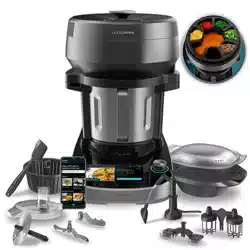
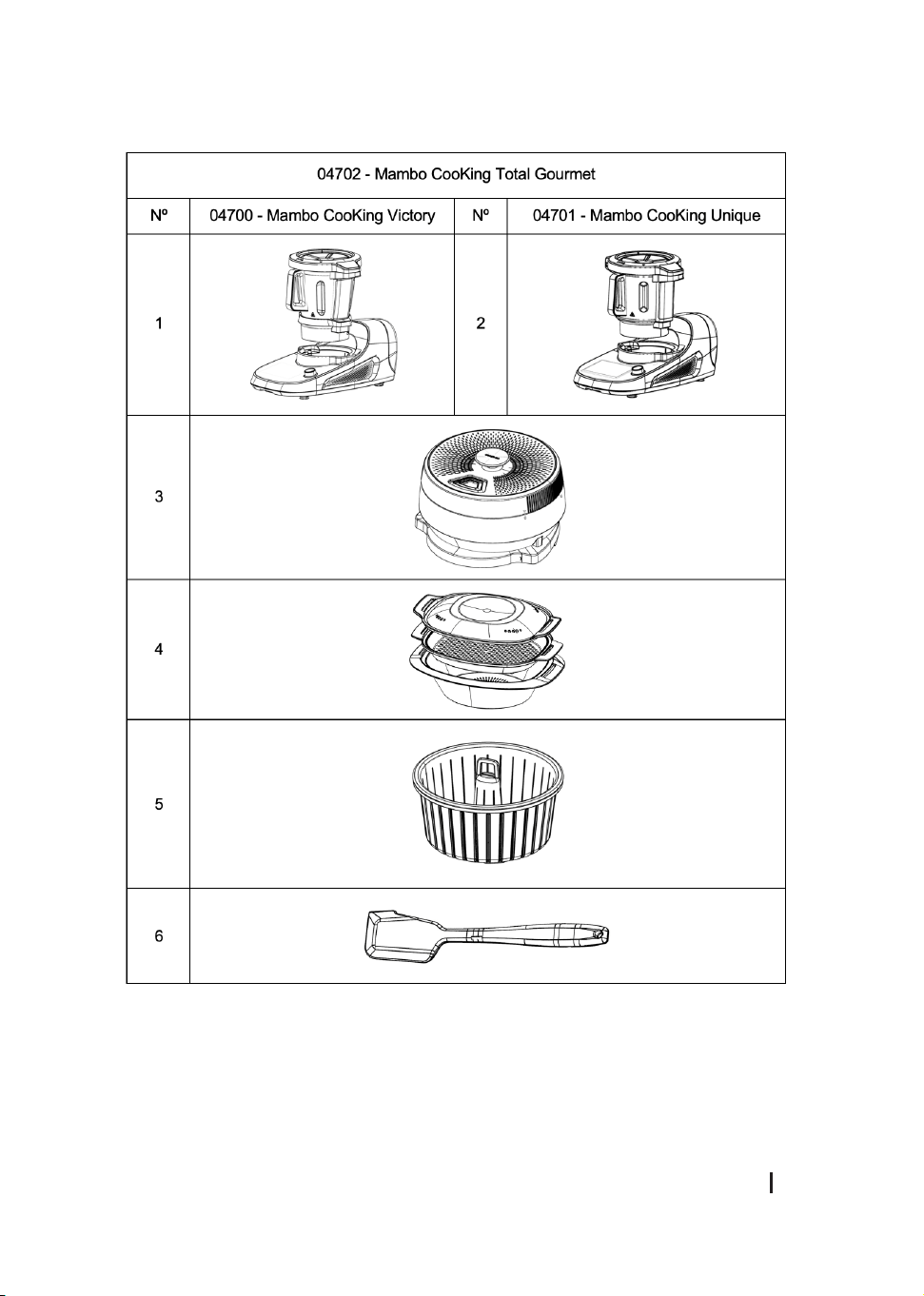
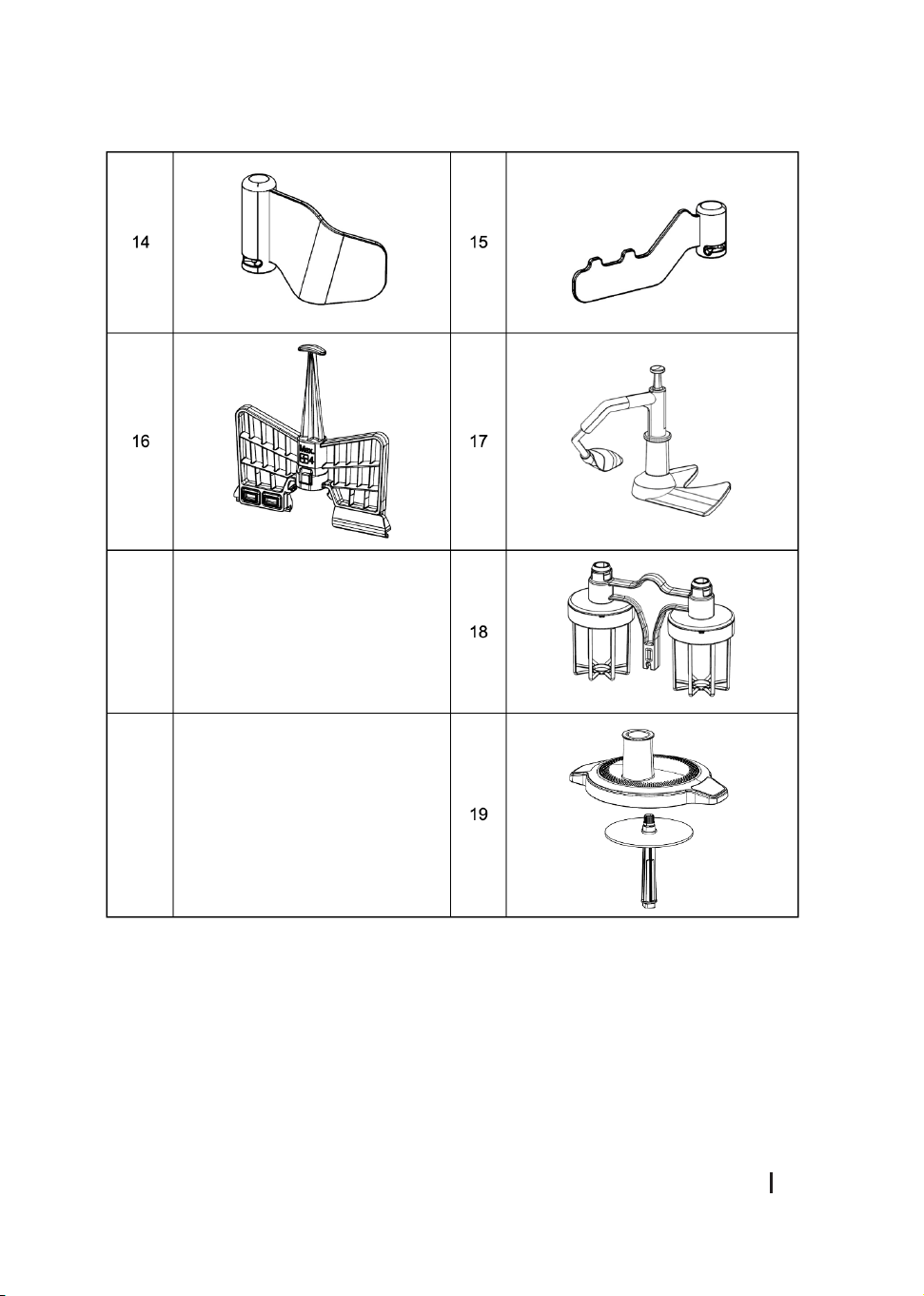
1. PARTS AND COMPONENTS
The following gure shows all the accessories and components of the mambo, each column
corresponds to a reference, and each column identies which accessory goes with which
reference. Each accessory is marked with a “V” or a “U” depending on the jar to which it
belongs. Make sure to match the letter marked on the ttings with the initial of the name on
each jar.
Fig. 1.
1. Mambo CooKing Victory
2. Mambo CooKing Unique
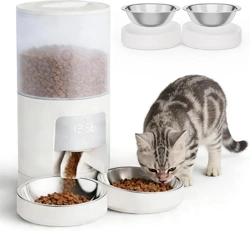
3. ChefCrown Automatic food dispenser
4. 2-level steamer
5. Boiling Basket
6. Spatula
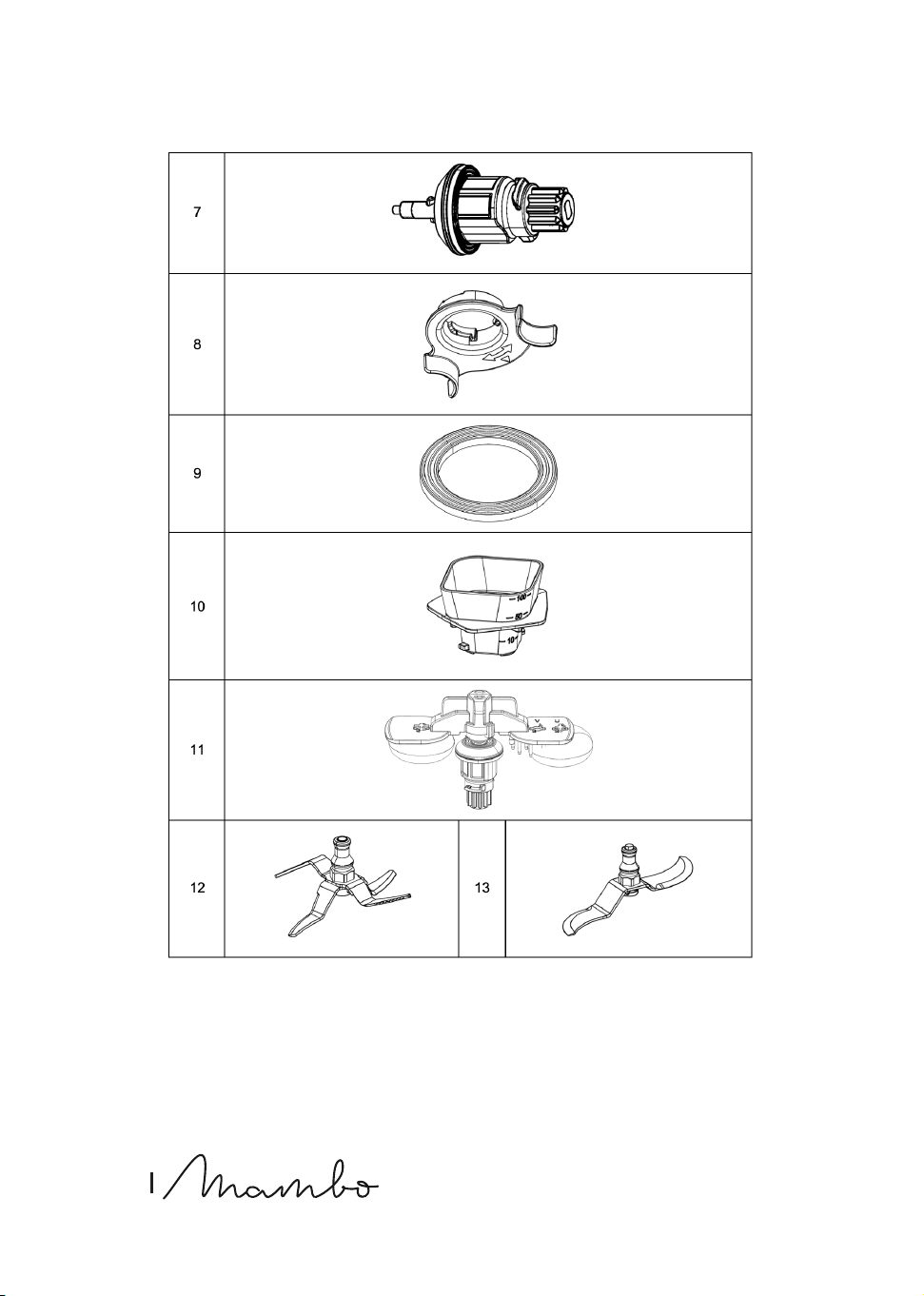
7. Accessories bracket
8. Accessory bracket xing system
9. Sealing gasket support bracket accessories
10. Measuring cup
11. Cleaning accessory
12. Blades
13. S blades
14. MamboMix Victory blade
15. MamboMix Unique blade
16. Buttery whisk
17. Sauté Blade
18. Double Whisk
19. Food processor (cover, presser cap, double-sided blade, centre shaft)
NOTE:
the graphics in this manual are schematic representations and may not exactly match the
device.
2. BEFORE USE
- This cooking robot comes in a package designed to protect it during transport. Unpack
the appliance and keep the original packaging box and other packaging materials in a
safe place. It will help prevent any damage if the product needs to be transported in the
future. In case the original packaging is disposed of, make sure all packaging materials
are recycled accordingly.

76
ENGLISH
- Make sure all parts and components are included and in good conditions. If there is any
piece missing or not in good condition, immediately contact the ocial Cecotec Technical
Support Service.
- Clean the jar and other accessories thoroughly with hot water, detergent, and a
non-abrasive sponge.
- Place the cooking robot on a at, stable surface. Maintain a minimum distance of 110 mm
between the socket outlet and the wall, surrounding furniture, and your cooking robot.
- Use a damp cloth to clean the main body and wipe it dry.
- The appliance has a space to store the power cable so that it can be tucked away in case
of excess cable.
Box content:
Mambo CooKing Victory Cooking robot
- Cooking robot
- Victory XL stainless-steel jar
- ChefCrown automatic food dispenser (cover, removable cover grille, container set, sealing
ring, ceramic plate, dispenser base, removable bottom cover, and removable motor)
- Accessories bracket
- Sealing gasket support bracket accessories
- Accessory bracket xing system
- Blade
- MamboMix Victory blade
- Buttery whisk
- Cleaning accessory
- Boiling Basket
- 2-level steamer
- Spatula
- Measuring cup
- Instruction manual
Mambo CooKing Unique Cooking robot
- Cooking robot
- Unique XL stainless-steel jar
- ChefCrown automatic food dispenser (cover, removable cover grille, container set,
sealing ring, ceramic plate, dispenser base, removable bottom cover and removable
motor)
- Accessories bracket
- Sealing gasket support bracket accessories
- Accessory bracket xing system
- S blades

MAMBO COOKING VICTORY_UNIQUE_TOTAL GOURMET
77
ENGLISH
- MamboMix Unique blade
- Sauté Blade
- Double Whisk
- Food processor (cover, presser cap, double-sided blade, centre shaft)
- Cleaning accessory
- Boiling Basket
- 2-level steamer
- Spatula
- Measuring cup
- Instruction manual
Mambo CooKing Total Gourmet Cooking robot
- Cooking robot
- Victory XL stainless-steel jar
- Unique XL stainless-steel jar
- ChefCrown automatic food dispenser (cover, removable cover grille, container set, sealing
ring, ceramic plate, dispenser base, removable bottom cover, and removable motor)
- Accessories bracket
- Sealing gasket support bracket accessories
- Accessory bracket xing system
- Blades
- S blades
- MamboMix Victory blade
- MamboMix Unique blade
- Buttery whisk
- Sauté Blade
- Double Whisk
- Food processor (cover, presser cap, double-sided blade, centre shaft)
- Cleaning accessory
- Boiling Basket
- 2-level steamer
- Spatula
- Instruction manual
Warning
Do not place the cooking robot on any surface that it is not heat resistant.

78
ENGLISH
3. OPERATION AND INSTALLATION
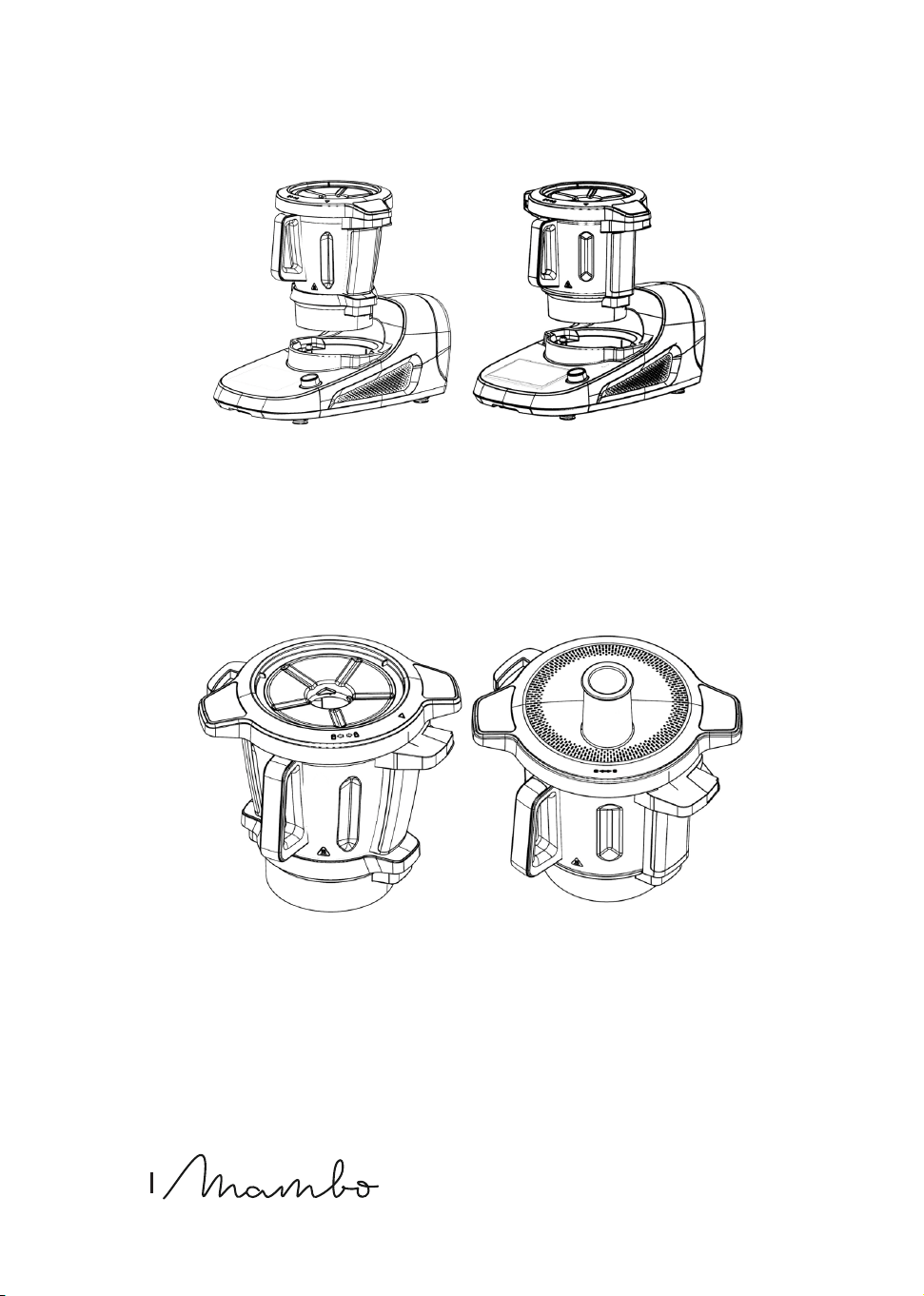
Assembly of stainless-steel Victory XL and Unique XL stainless steel jars
Place one of the jars on the main body, making the handle of the jar coincide with the front
of the main body, if it is not correctly positioned and you try to start cooking, the A2 warning
will appear on the display. FIG. 2. The robot has a jar detector so you can tell whether you are
tting the Victory XL or Unique XL jar.
Assembling the hinged cover
- Place the cover on the jar matching the markings on the jar and the cover, press the cover
around the jar’s rim and turn the cover clockwise to secure it. Should the cover not be
correctly tted when the speed is not on 0, the A1 warning will appear on the display. FIG.
3
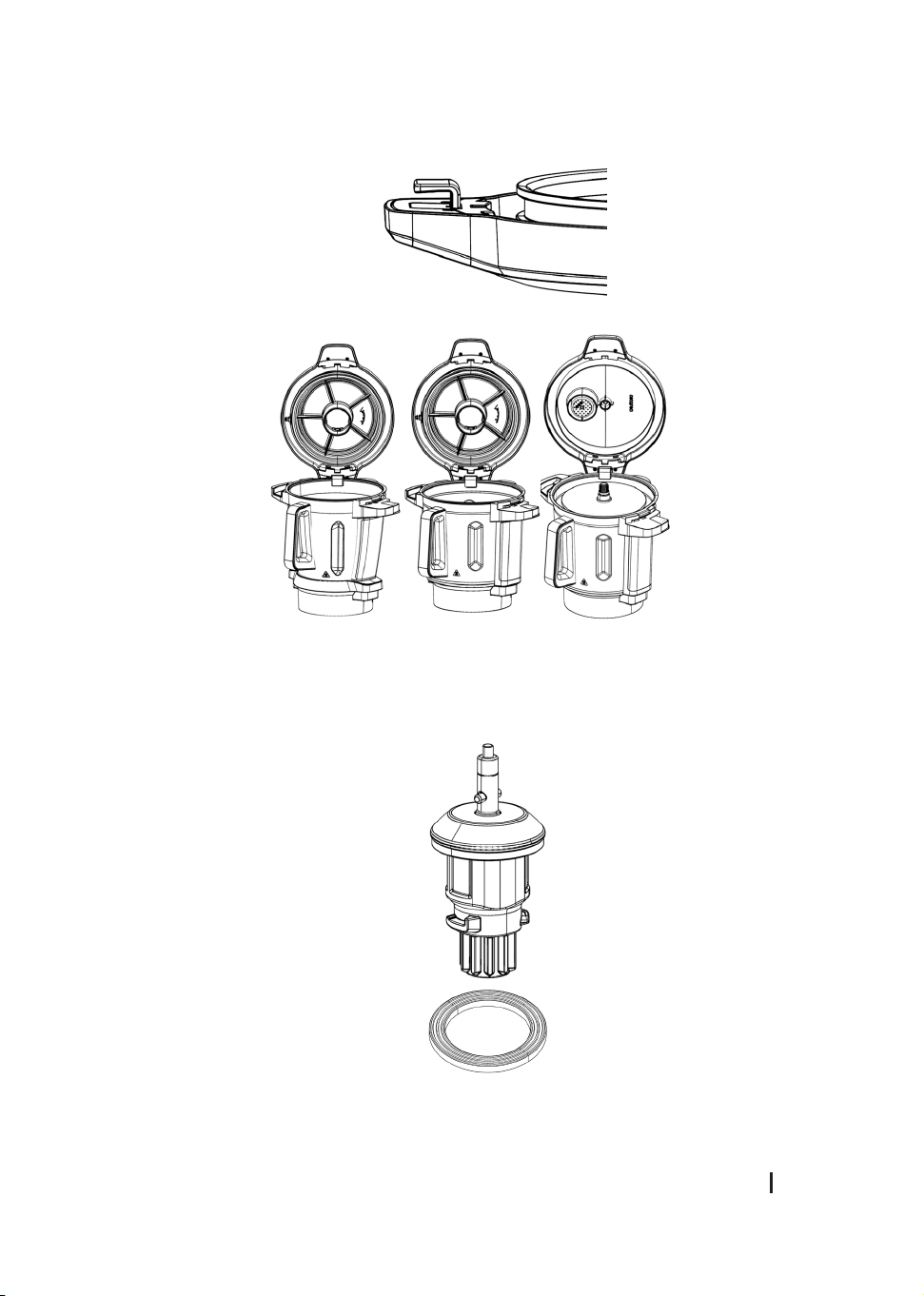
- When you open the cover, you have the possibility to leave it in the hinged position by
using the side handle with a hook to snap it onto the rim of the jar. The cover of the
cooking robot can also be hinged.
- The cover has a removable sealing gasket that can be cleaned.
Warning
Please note that if you subject the jar or the robot to movement, the cover may fall o to one
side. FIG. 4
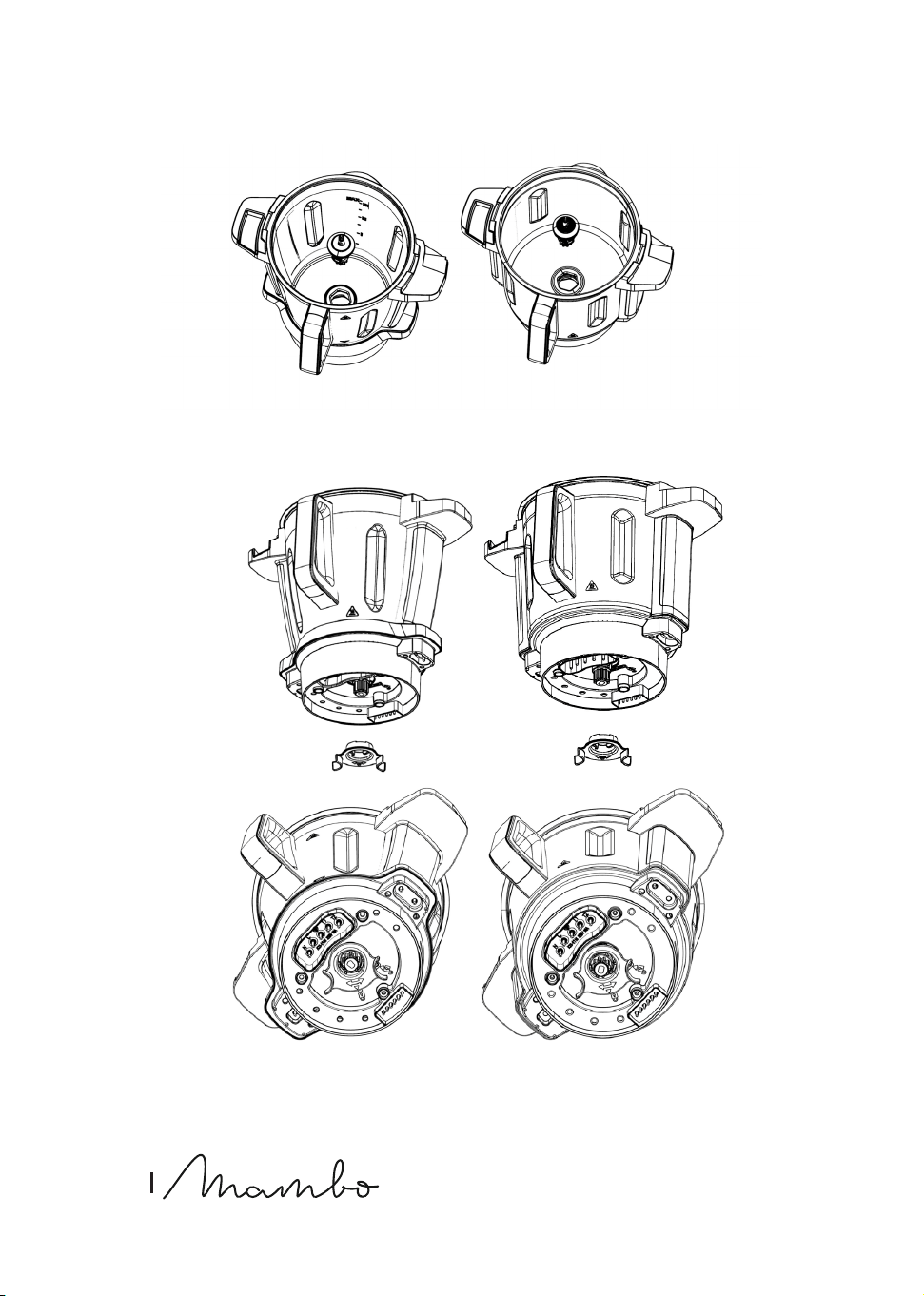
Assembling the accessory bracket and the xing system for the accessory bracket
- Make sure the accessory bracket’s sealing gasket is properly installed. When installing it
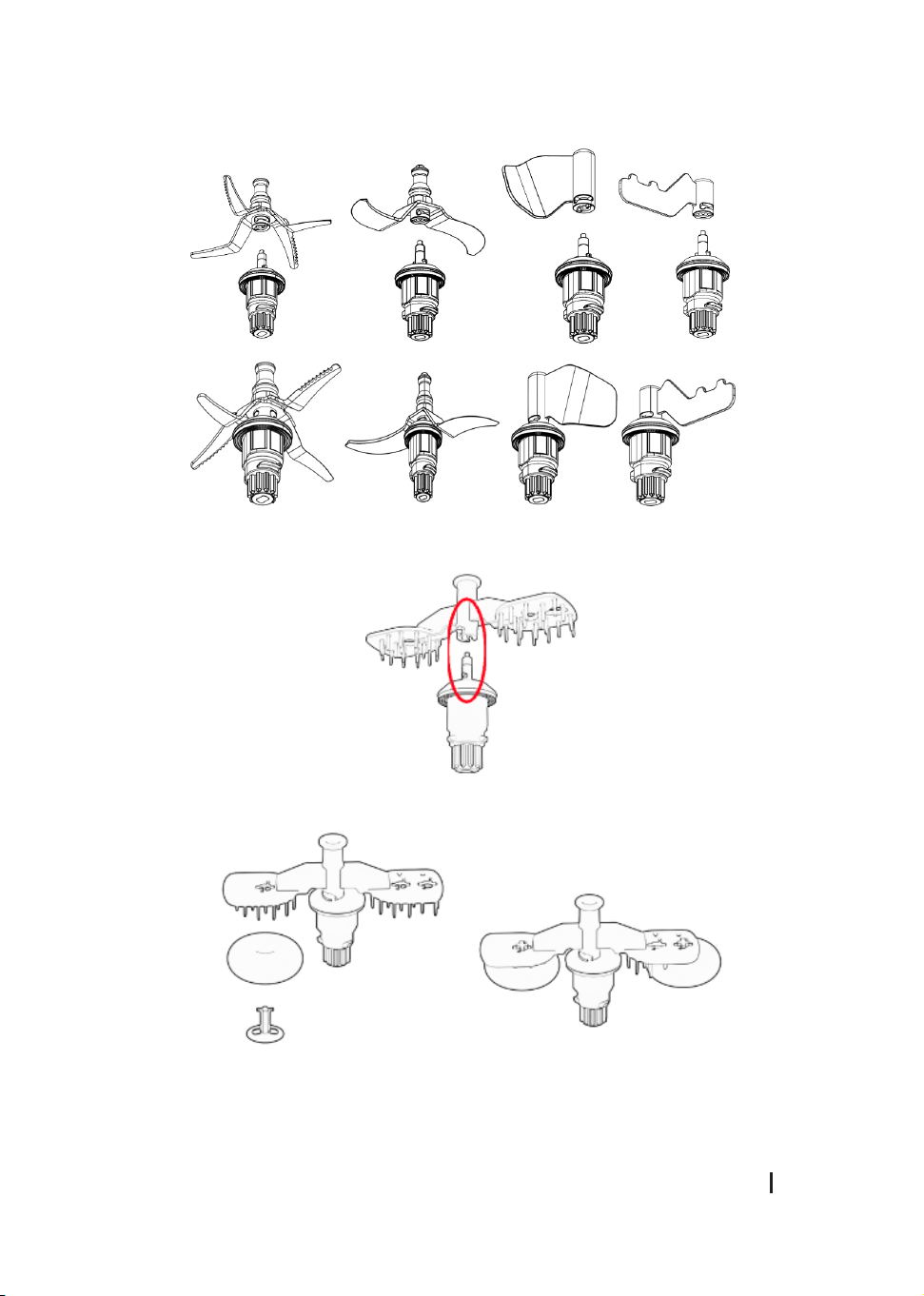
on the jar you must take into account that the bracket must be placed a certain way. Make
sure it ts correctly. FIG. 5 AND FIG. 6
- Hold and install the accessory bracket making sure it is correctly tted. Then install the
locking system on the bottom of the jar and turn it clockwise until the arrows on the
system match the padlock on the base of the jar to secure the accessory bracket. FIG. 7
Assembling the accessories on the bracket
- Once the accessory bracket is installed and xed, place the desired accessory on it and by
pressing down, turn it counterclockwise. FIG. 8 and ensure that it moves slightly upwards
again and snaps back into its safety housing. It is very important to ensure that they
are properly housed and secured. To check this, once they are in place, gently pull them
upwards and check that they cannot be removed easily.
- To remove the accessories, press and turn clockwise. Some accessories, such as the
blades, are very sharp, use extreme caution when handling them.
Tip
To attach the accessories, place the jar on the robot to make it easier to t the accessories.

MAMBO COOKING VICTORY_UNIQUE_TOTAL GOURMET
79
ENGLISH
Warning
- Use a cloth to cover the blades unit before handling them to avoid injuries.
- Position the xing system of the xing bracket and the sealing gasket correctly to prevent
food or liquids from leaking into the robot base.
- It is possible that some food may remain between the wall of the jar and the rims of some
accessories. If this happens, the motor of the product will stop working as a method of
protection. Use the spatula to mix and remove the stuck food for the cooking robot to
resume the cooking process.
Compatibilities
- Blades, MamboMix Victory Blade → 04700 - Mambo CooKing Victory cooking robot
- S Blades, MamboMix Unique blade, Saute Blade → 04701 - Mambo CooKing Unique
cooking robot
Assembling the cleaning accessory (Fig. 9)
- The cleaning accessory is mounted on top of the accessory bracket by snapping the
accessory bracket onto the two pins protruding from the accessory bracket. The cleaning
accessory has a locking system that is activated by turning the central ring of the
cleaning accessory counterclockwise.
- The cleaning accessory must change the position of its sponges depending on whether
it is mounted to clean the Victory XL or Unique XL jar. For the Victory XL jar it should be
mounted in the socket closest to the axis of the tting, for the Unique XL jar it should
be mounted in the socket furthest from the axis of the tting. A “V” for Victory or “U” for
Unique is marked on the tting at the pin entry hole.
- To t the cleaning sponges, insert the pin through the middle of the sponge and insert it
through the hole in the “+” shaped cleaning accessory and turn it to secure it.
- The sponges in the accessory are considered consumables.
Warning
Clean the cleaning accessory after each use to prevent the accumulation of dirt and food
debris on the cleaning accessory that may prevent it from functioning properly and being
assembled for future use.
Assembling the measuring cup
- The measuring cup is used as a cover accessory to avoid splashing and reduce heat loss
during cooking. In addition, it is marked with a ml measurement scale.
- To place it in the cover, make sure the clamping tabs t correctly into the cover and turn
clockwise. FIG. 10

80
ENGLISH
Note
- Use the measuring cup and not any accessory or object to avoid splashing and reduce
heat loss of the jar.
- When cooking with temperature setting, place the measuring cup in the cover’s gap
without locking it in place. This way, steam will be safely released.
Spatula
- The spatula is the only component to be used to stir the food in the jar.
- Do not use for mixing in the jar when the blades, buttery-whisk attachment, or
MamboMix is in operation.
Warning
Remove food from the jar only when the cooking robot’s motor is at a standstill.
Boiling basket
Place the basket inside the jar. The basket allows you to stew and steam soft foods, such as
pasta or noodles, and to cook side dishes such as rice or potatoes.
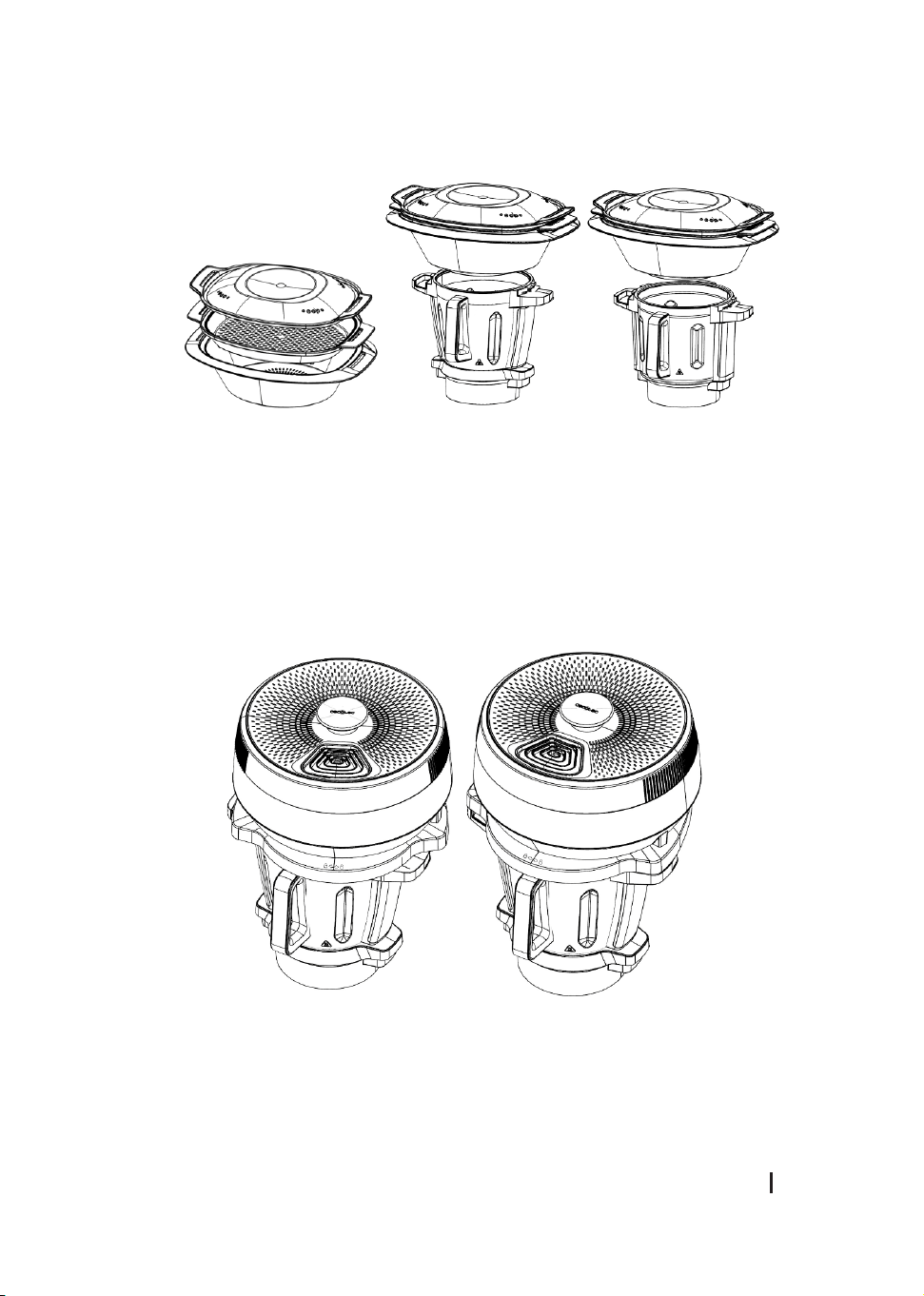
Assembling the steamer
- The steamer consists of 3 parts: Steamer body, tray, and cover.
- Place the ingredients to be cooked in the steamer, place the cover, and assemble the
steamer correctly in the jar.
- If you place the steamer on the jar with the cover on, make sure you remove the
measuring cup if you have one, and t it correctly.
- You can also use the steamer without the cover to better optimise the steam and improve
your cooking results, as long as you cook on speed 0. Fig. 12
Warning
- Do not touch or get close to the steamer to avoid burns.
- Do not cover the steamer’s holes with any cloth or object. Steam may come out from the
edge or other parts causing risk of burns.
- Allow steam to be released through the cover’s middle gap and sides; this way, steam
circulation will be improved, allowing a more even cooking of foods.
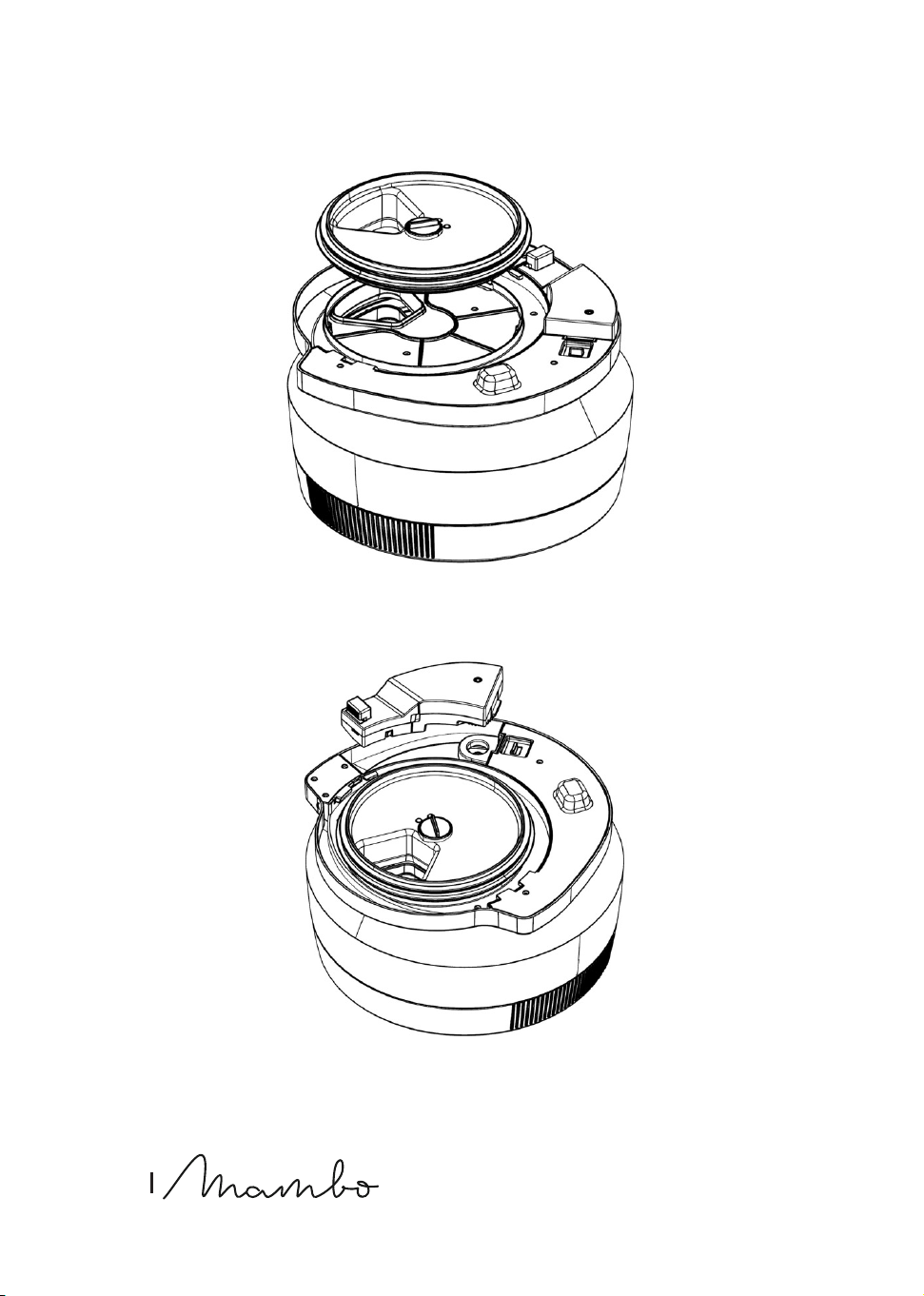
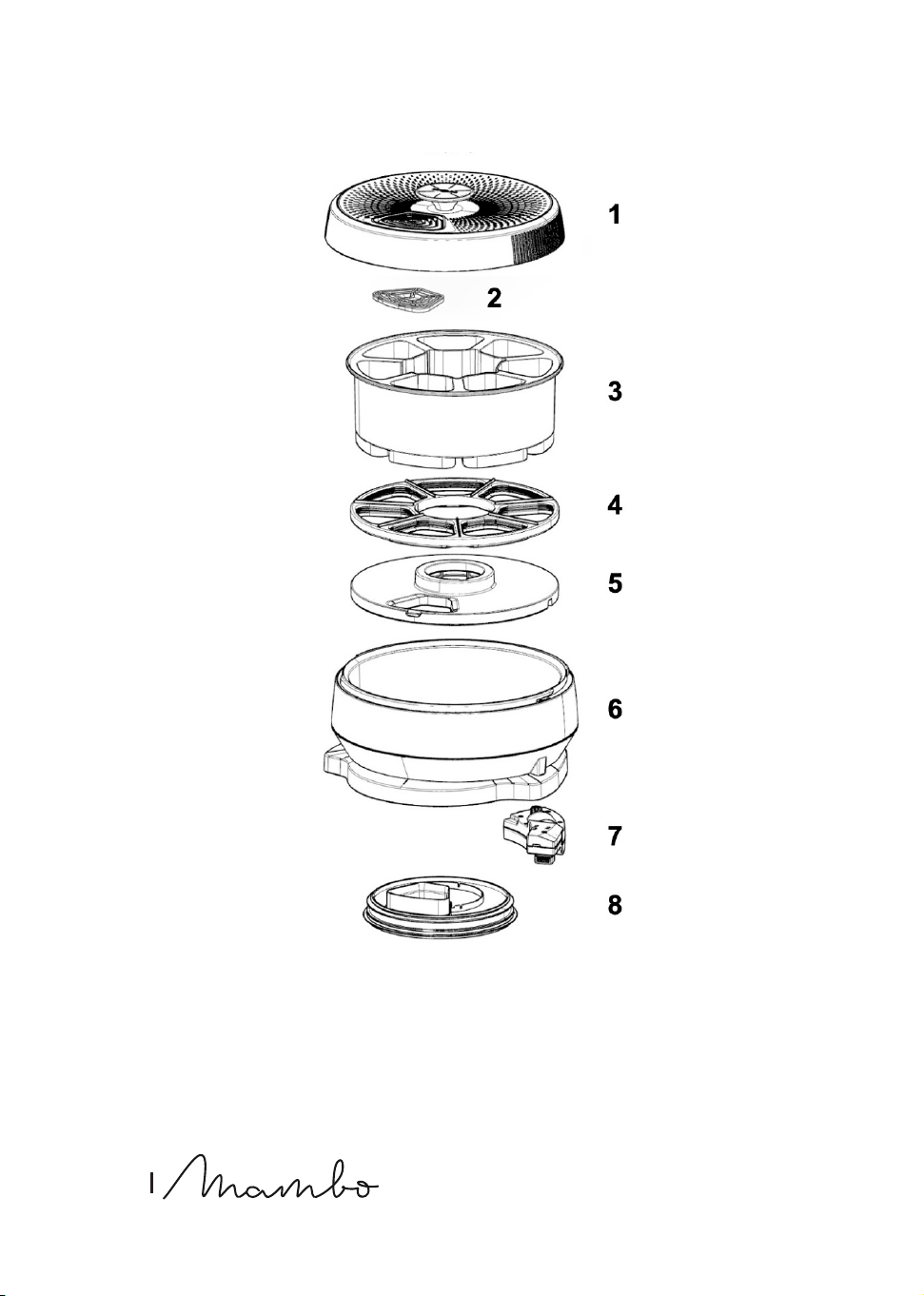
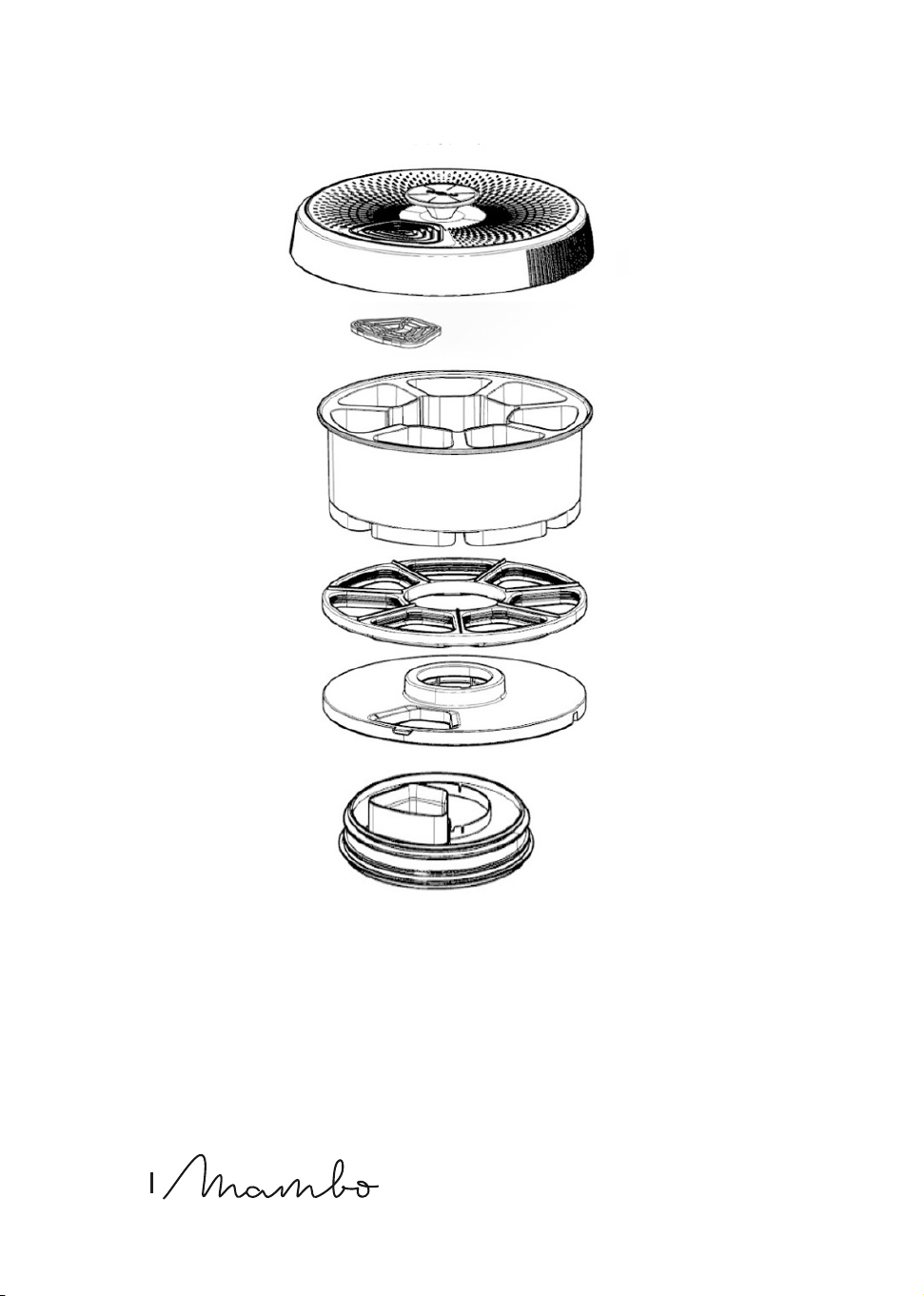
Assembling ChefCrown automatic food dispenser (Fig. 23)
Fig. 23 key
1. Dispenser cover
2. Detachable dispenser cover grille
3. Container set
4. Sealing ring

MAMBO COOKING VICTORY_UNIQUE_TOTAL GOURMET
81
ENGLISH
5. Ceramic plate
6. Dispenser base
7. Detachable motor
8. Removable bottom cover
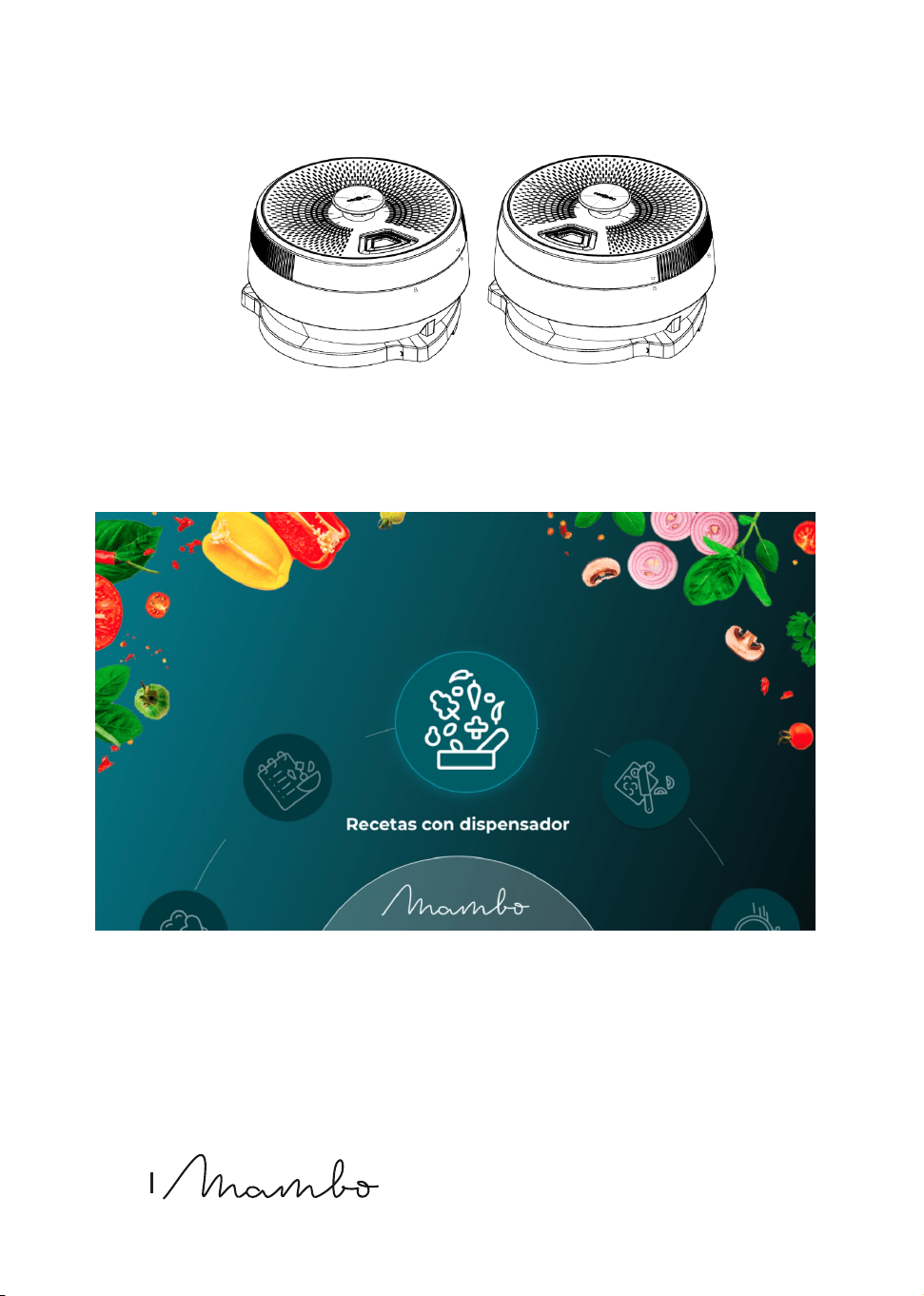
The dispenser is placed on top of either of the two jars. To do this, all the parts that make up
the dispenser must be assembled. Fig. 13
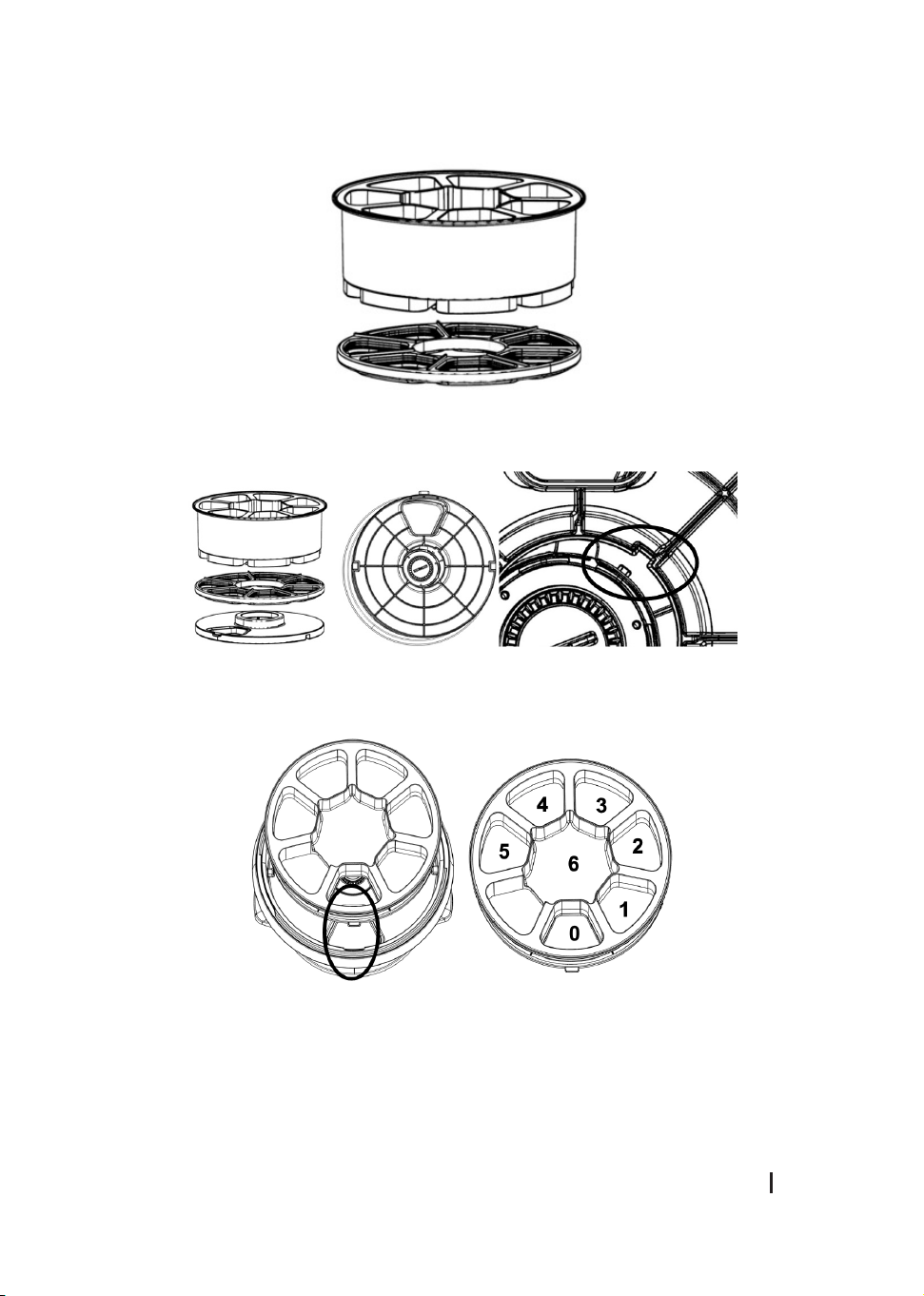
1. Mount the removable bottom cover on the bottom of the dispenser base, respecting
the food drop hole and making sure that it closes the safety tab correctly in a clockwise
direction. Once xed, turn the locking piece to x it to the other joint; note that the other
joint has 3 holes where the removable bottom cover should t. Fig. 14
2. After mounting the removable bottom cover, it is time to mount the motor. To do this,
press the motor assembly into its hole, taking into account that the gear must engage on
both sides. If it is not possible to engage the motor assembly, turn the gear slightly until it
engages again. To remove the motor assembly, use the tabs to pull it out. Fig. 15
Warning
- Always remember to mount the removable bottom cap on the base of the dispenser.
- It is important to perform this step without having mounted anything else on the base of
the dispenser so as not to activate the sensors prematurely and cause an impact on the
normal use of the dispenser.
1. Mount the sealing ring on the base of the container set by pressing the sealing ring into
the holes of the container set. The sealing ring is pressed into place facing the holes in
the bottom of the container set. Fig. 16
Warning
It is very important to assemble this sealing ring correctly, otherwise the food and liquids
in the bowls will not be sealed and will leak into the base of the ingredient dispenser, which
could cause problems.
2. After mounting the sealing ring on the container set base, mount the ceramic plate on the
sealing ring. It is very important to insert the ange of the container set into the recess of
the ceramic plate. Once it is well inserted, generate a little pressure on the ceramic plate
and close the lock in the centre of the ceramic plate by turning clockwise. Fig. 17
Please note
The food outlet must be in the same place as the container set outlet.
3. Once the 3 pieces, container set, sealing ring and ceramic plate have been assembled,
this assembly has to be inserted into the base of the dispenser. To do this, match the tab
on the ceramic plate, which is aligned with the food outlet hole, with the guide on the

82
ENGLISH
inside of the dispenser base. The dispenser should always have the same placement for
the order of the containers. Container 0 should be aligned with the inlet hole of the jar
and, clockwise, followed by containers 6 (liquids), 5, 4, 3, 2 and 1. Fig. 18
Warning
If the container set does not t properly, move slightly to both sides until it ts properly.
4. Finally, after placing all the ingredients in all the containers, except for container 0, which
is in direct contact with the jar, close the cover. To do so, place the cover according to the
markings on the cover and on the food dispenser. Once tted, turn the cover clockwise
and note the small “click” on the cover. Fig. 19
Assembling the removable dispenser cover grille
The cover of the dispenser consists of two pieces in the shape of a spider’s web, one of which
is xed to the cover, the other is removable for easy cleaning. You must press on the tab on
the lower edge of the part to remove it using the clipping system.
Assembling the food processor
- The food processor is mounted by means of a shaft that is placed on top of the accessory
bracket, the two tabs protruding from the bracket must t into the grooves of the
processor shaft. Once this shaft is in place, you have to place the grating or laminating
disc, using the large holes it has to insert the ngers so as not to cut yourself; depending
on which side you place it, you will be able to perform one of the functions.
- Once the shaft and the disc are in place, proceed to place the cover through which the
food will be introduced. This comes with a presser to help introduce the food inside
through the cover. Fig. 27
Warning
Be careful with the cutting disc as it is very sharp.
Compatibility
Mambo CooKing Unique Cooking robot
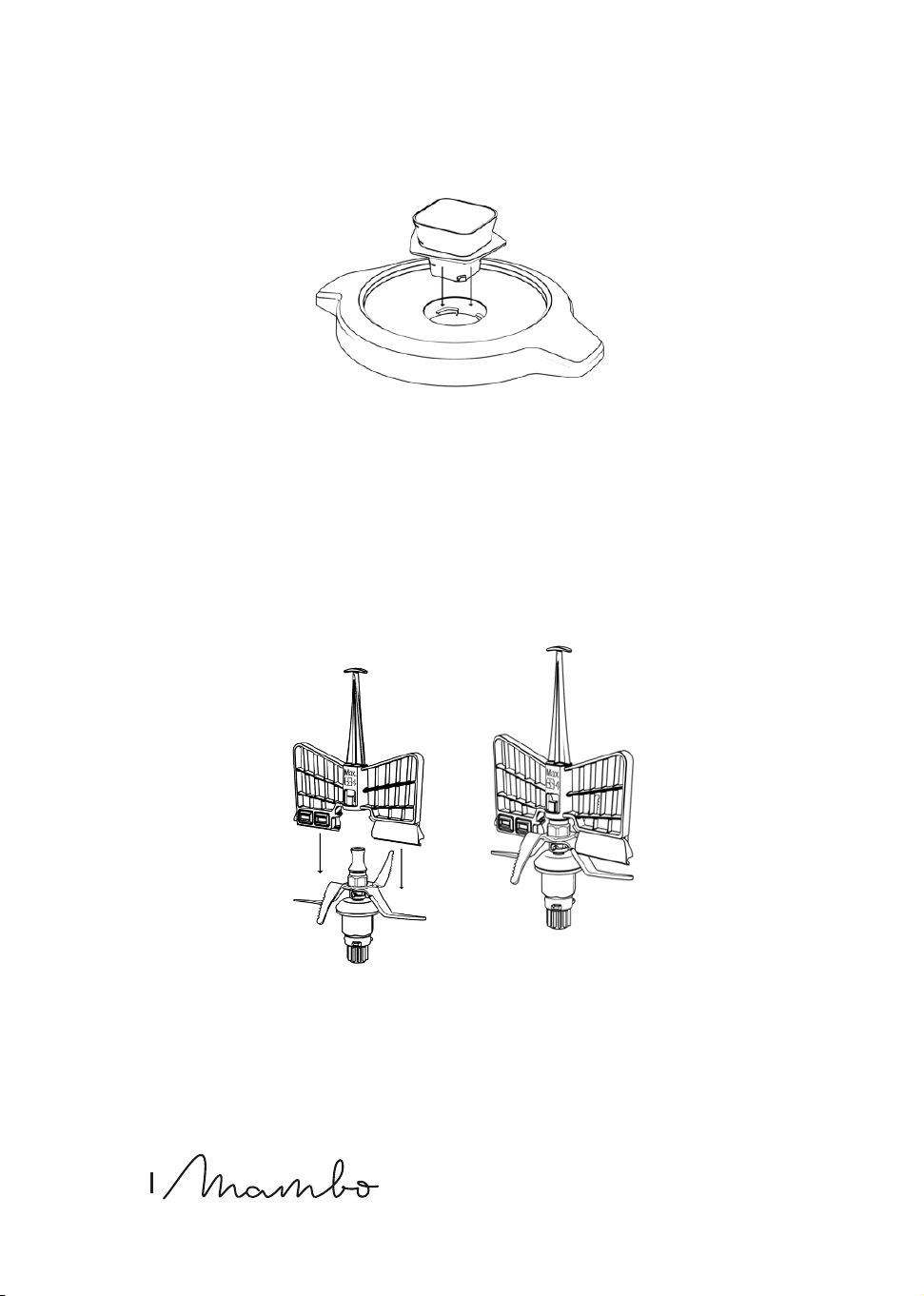
Assembling the buttery whisk
- This accessory is installed on the upper part of the blade assembly. Its main function is to
whip cream, egg whites, or similar ingredients. In addition, this accessory helps mix food
without being chopped by the blades and removes lumps.
- Install the buttery whisk on the set of blades for the Victory XL jar, ensuring that the
centre of the shaft ts with the hollow of the buttery accessory, and press down.
- To make sure the buttery whisk is properly xed, when placing it, it must emit a “click”
sound. Once assembled, gently pull and check you cannot easily remove it. FIG. 11

MAMBO COOKING VICTORY_UNIQUE_TOTAL GOURMET
83
ENGLISH
Warning
- Do not operate the food processor unless the accessory is xed in its place.
- Do not operate it with speeds over 4.
- Do not use the buttery at the same time as the spatula.
- Do not pour food into the jar while it is operating with this accessory to avoid damage or
blockage.
Compatibility
Mambo CooKing Victory Cooking robot
Assembling the Double Whisk accessory
The Double Whisk whipping accessory should be placed on top of the accessory bracket. The
two tabs protruding from the bracket should t into the slots of the whisk whipper.
Please note
The cooking robot can only be used with the Unique XL jar.
Compatibility
Mambo CooKing Unique Cooking robot
4. FUNCTIONS AND RECOMMENDATIONS
1. Chop: chops all kinds of ingredients, from meat or sh to fruit or vegetables. Perfect cuts
assured.
2. Mince: minces vegetables, meat, spices, and crush ice easily in just a few seconds. Perfect
for processing raw ingredients.
3. Mash: prepares sauces and creams with perfect texture. Mashes cold or hot ingredients
just by adjusting speed and time to each food type.
4. Grind: perfect ground level for all your recipes. Grinds coee, seeds, rice and dry nuts. It
also allows preparing homemade our.
5. Pulverise: pulverises any type of ingredient until it reaches the nest texture. Prepare
icing sugar or vanilla sugar for confectionery recipes.
6. Grate: introduce ingredients in the jar, do not exceed halfway the jar, and set speed 10 for
some seconds. Perfect results.
7. Blend: blends perfect mixtures in the simplest way. Prepare delicious milkshakes, sponge
cake dough, pancakes, crepes, beat eggs and more.
8. Whip: whips cream or egg whites until sti thanks to its buttery whisk. This is the ideas
function to turn into a professional cook.
9. Emulsify: this function allows preparing dips, dressings, and dierent types of
mayonnaise easily. Just introduce ingredients in the jar, Mambo will do the rest.

84
ENGLISH
Emulsies evenly for you to nish o your dishes as desired.
10. Mix: performs homogeneous mixtures with its 10 Mambo speeds. Perfect doughs
obtained in the simplest way.
11. Cook: cooks all types of dishes, such as stews, chicken with almonds or ratatouille, all of
them perfectly textured.
12. Stir: stirs food as it cooks it to ensure even heating and to achieve professional textures.
Cook delicious risottos, pasta salads, custard or prepare hot chocolate.
13. Steam: this function is ideal for steaming the healthiest recipes. It allows saving time
thanks to its 2-level steamer, as you can cook more than 1 dish at once.
14. Poach: progressive and little-by-little cooking, with absolute control over temperature
and time. Perfectly poached without paying attention to the clock. Perfect for obtaining
soft, juicy results.
15. Comt: processes ingredients at low temperatures and obtains irresistible results. This
technique is ideal for cooking all types of foodstus, especially meat, hard sh, and all
kinds of poultry.
16. Knead: kneads perfect doughs in one whole piece. Kneading has never been as easy as
with the exclusive MamboMix spoon. It does not cut dough, instead it stretches it out for
perfect results. Enjoy homemade bread and pizzas at any time.
17. Boil: pour enough water into the jar as to cover all the ingredients, set 120 ºC and heating
power 10, and then choose the desired cooking time depending on the ingredients.
18. Keep warm: keeps your dishes hot until they are served. After cooking your dishes, just
set the cooking robot at 60 ºC for liquid dishes or 60 ºC for solid dishes for the desired
amount of time.
19. Precision cooking: this function is the widest and most general function out of all. It
allows cooking any type of dish with absolute control over power.
20. Ferment: use this function to prepare excellent doughs. It nishes o bread or
confectionery recipes in little time, making dough rise quickly just by keeping it in the cup
at 50 ºC and speed 0.
21. Bain Marie: prepares perfect ans and tender vegetables. To cook in a bain-marie, ll the
jar with water up to 2 litres, set the cooking robot without speed, at a temperature of 120
ºC and heating power 10. When the water boils, turn the heat setting down to 9 and insert
the mould until the base touches the water.
22. Turbo: processes hard ingredients in the most eective way. Do not ll the jar over
halfway to achieve maximum performance.
23. SlowMambo: the best risottos and traditional stews with its exclusive MamboMix spoon
and SlowMambo motion. This unique Mambo motion allows stirring and mixing recipes
as if it was done with a real spoon.
24. Juice: prepares lemonade, juices, and multi-fruit shakes in just a few seconds.
25. Stir-frying: stir-frying ingredients before cooking them, enhances avours and improves

MAMBO COOKING VICTORY_UNIQUE_TOTAL GOURMET
85
ENGLISH
nal results. Stir-fry from garlics to meats. Brown food to taste, adjusting power and
time.
26. Browning: browning some ingredients, such as garlic and meat before cooking, enriches
dishes and enhances their end avour. Brown food to taste, adjusting power and time.
27. Reheat: Mambo allows reheating cooked food. If it is cold, from the day before, or frozen,
heat it up at 87 ºC and heating power 7, and it will be ready in a few minutes.
28. Yoghurt: prepares homemade yoghurts easily. Just out all the ingredients in the jar and
Mambo will do the rest for you. It keeps the mixture at ferment temperature so that the
next morning yoghurt is ready to cool and eat.
29. Basket: it can be used to steam food inside the jar and allows preparing up to 4 dishes
at once. It also can be used to allow better evaporation of food or liquids, instead of the
measuring cup.
30. Simmer: the traditional stews that require long-lasting cooking processes can be now
done with Mambo. Slow cooking, long hours, the best avours.
31. Zero speed: cooking without speed setting allows you to cook without the cover and to
stir it when desired. You can taste food as you cook it, as if it was cooked in a conventional
pot or pan.
32. Stew Function (A): achieves traditional results thanks to the stew mode, which will
alternate between dierent speeds to achieve the best results.
33. Pizza Function (B): gets a dough with a professional nish. Just put the ingredients in the
jar and Mambo does the rest.
34. Smoothie-Maker Function (C): makes homemade smoothies easily. Just put the
ingredients in the jar and Mambo does the rest.
35. Chopper Function (D): conveniently chops vegetables, meat, spices, or ice in a matter of
seconds with the best results.
36. Auto-Cleaning Function (E): with the self-cleaning function, cleaning Mambo will be
easier than ever.
37. ScreenBlock function: if you want to lock the screen functions, press the padlock icon at
the top left of the main screen. To unlock, touching the screen or pressing the selection
button will light up an icon and you can swipe on the screen to unlock.
38. Timer Function: use this function if you want to programme a countdown without setting
temperature or speed (to let the food ferment, cool down, or rest depending on the
recipe).
39. Food processor function: it manages to chop, slice, shred and mince vegetables and fruit
in seconds with the best results.
40. Food Dispenser function: place the food in the food dispenser and it will drop by itself into
the jar to be cooked.
41. Remote cooking function: cook food remotely by using the food dispenser without the
need to be present.
42. Keep Warm function: select the keep warm function to keep your food warm until it is
ready to eat.

86
ENGLISH
43. Timer function: cook your recipes whenever you want, indicating at what time you want
the automatic cooking to start.
44. Share recipes: share your favourite recipes with your friends, family or other people in the
Mambo community.
45. Create recipes: create your own recipes and use them whenever you want.
5. OPERATION
The robot has an on/o knob on its base, below the display.
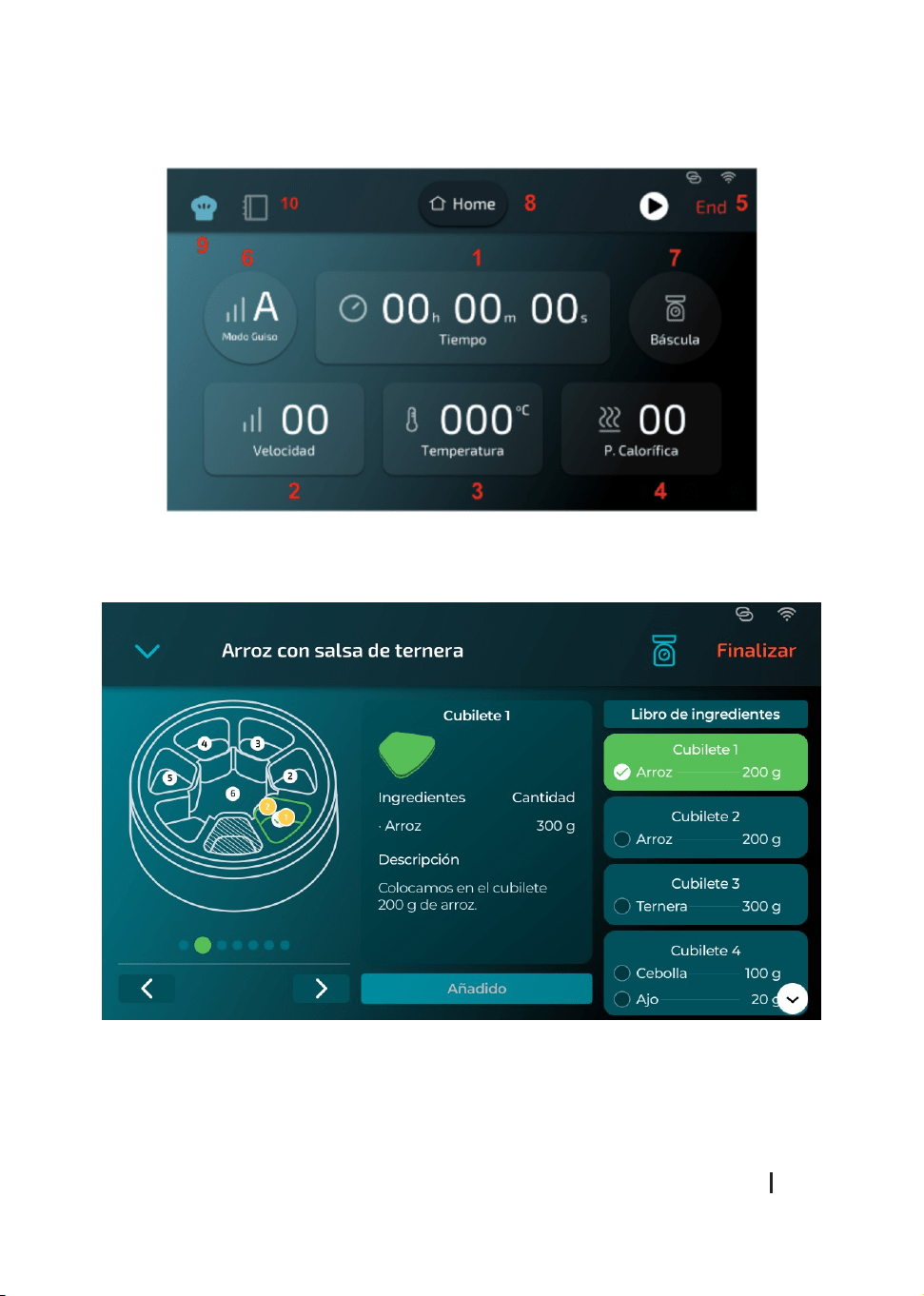
5.1. Display (Fig. 20)
- The display has the following menus:
- Mambo recipes
- ChefCrown dispenser recipes
- DIY
- Timer
- Settings
- Manual control
- Scale
- Favourite recipes
Mambo recipes
This menu has all the recipes for both the normal jar and food dispenser recipes. You will
nd all the recipe categories (soups and creams, rice and legumes, pasta, etc.); it also has a
Dispenser/ChefCrown category for direct access.
ChefCrown dispenser recipes
This menu has all the recipes to be made in the food dispenser.
DIY (Fig. 21)
This menu has a rst step where you can pre-select one of the preset functions such as Stew
Mode, Kneading Mode, Smoothie Mode, Chopping Mode, and Cleaning Mode. If you want
to use a function, tap on the one you want, otherwise tap anywhere on the display to enter
manual mode in which you can select the mode, time, scale, speed, temperature, and heating
power.
Timer
Select the time by pressing the hour, minute and second digits. If you wish to make a
progressive count, turn the knob, and select the option shown by the robot.

MAMBO COOKING VICTORY_UNIQUE_TOTAL GOURMET
87
ENGLISH
Settings
This menu contains the Wi-Fi settings to make the connection to Wi-Fi or mobile app, to
download and link to the application, for pending updates, to select a language, show the
number of recipes downloaded, get help, and adjust the screen brightness.
Manual control
This menu will prompt you to place a jar rst, so that the cooking robot will detect which jar it
is, and show you which accessories you want to put in. Then, select the accessory to be used
and nally set the cooking settings as you wish. The robot will take a few seconds to allow
you to open the cover for your safety.
Scale
This menu will display the scale. Wait a few seconds for it to become available and weigh
the food you want. To reset the counter to 0, press the Tare button. The maximum limit of the
scale is 5 kg.
Favourite recipes
This menu will show the favourite recipes that you have saved, so when you start or nish a
recipe, click on the heart icon to save that recipe in favourites.
5.2. Mambo recipes
- In the recipe menu you will select a recipe you wish to prepare. The display will show a
short description of diculty, time and allergens. Three icons appear at the top right, one
icon for downloading the recipes, one for adding notes and one for saving the recipe in
favourites.
- Dragging to the left once will show you the ingredients; dragging a second time, will show
you the full breakdown of steps that take place during the recipe.
5.3. ChefCrown dispenser recipes
- In the menu of recipes with dispenser you must select a recipe you want to prepare. The
display will show a short description of diculty, time and allergens. Three icons appear
at the top right, one icon for downloading the recipes, one for adding notes and one for
saving the recipe in favourites.
- Dragging to the left once will show you the ingredients; dragging a second time, will show
you the full breakdown of steps that take place during the recipe.
- First of all, we must place the corresponding jar and accessory. In the next step, it will
show us the amount of ingredients that we must add to the jar. Once these ingredients
have been introduced, we install the dispenser and select whether we want the robot to
keep the food warm at the end of the recipe. The next tab will show you an outline of the
containers where you should add the ingredients. Click on the containers to see what you
have to add. When you have added the ingredients, you can press the “Check” button on
the right-hand side of the display. (Fig. 22)

88
ENGLISH
Please note
- Container 0 is the initial container, and no ingredients are placed in it as it has direct
communication with the inside of the jar.
- Containers 1, 2, 3, 4 and 5 are the ones in which solid and liquid foods can be placed.
Remember to drop the food and not to press them.
- Centre container 6 is the liquid cup. Please, do not place solid ingredients or viscous
liquids in it as they will not fall into the jar.
- During some recipes using the dispenser, the latter will have to grind at high speeds
after steps in which high temperatures have been reached. For this, the robot will go into
pause mode to cool down the food. Once the device has reached a suitable temperature
for grinding, the robot will automatically continue cooking. In this type of recipes, the
times of the recipes can be increased.
Warning:
- Do not press food into the containers as it will not fall into the jar. Drop them on top of the
container.
- The food you put in the containers must never exceed the height of the container set.
- Some spices and/or salts are best placed on top of solid foods, as they are better
incorporated into the mixture. If you put them in liquids, it is possible that these spices
will stick to the wall of the container.
Timer function to start cooking
- Once all the ingredients have been added, press start. The robot will ask you to select
between cooking now or if you want to time the start of cooking to delay the start. If you
have selected the second option, set the timer by adding how much time you want to
elapse before cooking starts.
- When cooking starts, the display will show you the time countdown, speed, temperature,
and heating power.
5.4. Manual control panel (Fig. 21)
Fig. 21 key:
1. Timer
2. Speed
3. Temperature
4. Heating power
5. Wi-Fi
6. Turbo function and preset modes
7. Scale
8. Home
9. Manual cooking
10. Guided Recipes

MAMBO COOKING VICTORY_UNIQUE_TOTAL GOURMET
89
ENGLISH
Start/Pause/Select knob
- Once connected and after entering the settings for time, speed, temperature, and heating
power, press this knob to start your Mambo cooking robot.
- By pressing the knob to the right of the display during the cooking process, the cooking
robot pauses and goes into standby (you can open the cover, remove the jar, etc., but you
must place it properly before restarting cooking). If it is pressed again, it starts up again.
- If no settings are entered, your Mambo cooking robot will switch to standby mode after
10 minutes of inactivity.
- It is also a knob to set time, speed, temperature, and heating power. To do so, you have
to choose the setting you want to change and turn the knob clockwise to increase the
parameters and counterclockwise to decrease them.
- The pre-set functions are selected from the turbo icon by turning the knob to choose
them and pressing it to conrm them:
- Stew Function (A): in this mode, the cooking robot oers the best cooking results by
alternating between speed 1 and speed 0; you can also set temperature, heating power,
and time to your liking.
- Pizza Function (B): in this mode, the cooking robot sets the optimum speed for the best
kneading, and you can also set the time to your own liking.
- Smoothie-Maker Function (C): in this mode the cooking robot sets the optimum speed for
the best smoothie results. The default setting is 2 minutes, but you can change it if you
wish.
- Chopper Function (D): in this mode, the cooking robot automatically sets dierent and
optimal speeds to achieve the best results when chopping your ingredients. The default
setting is 2 minutes, but you can change it if you wish.
- Auto-Cleaning Function (E): in this mode, the cooking robot will heat the water up to 70
degrees and then perform ve cleaning cycles.
Warning
Once the setting has been conrmed, it will take a few seconds for the Mambo cooking robot
to start operating. The same will happen when you pause or end a function: it will take a few
seconds before you can unlock the system and open the cover and/or remove the jar from
the cooking robot.
Time
- The display shows the time indicator (hours: minutes: seconds).
- Press on the hours/minutes/seconds based on the time you want to set, and it will start
ashing. Turn the knob to set the desired time.
- If you press on the timer during the cooking process, the cooking robot will start the
countdown directly.
- At the end of the countdown, the cooking robot will beep.

90
ENGLISH
Speed
- Press this icon in standby mode or during the cooking process. The appliance will enter
speed-setting mode. The signal on the display will ash. It will then be possible to adjust
the speed. Turn the knob clockwise to choose the desired speed.
- The speed range is from level 0 to 10 for Unique XL jar and 0 to 15 for Victory XL jar.
- If the timer has not been set, the cooking robot will operate with the pre-set times:
- Heating (without blending): max. 12 hours.
- Beat at speed 1-7: maximum 1 hour.
- Beat at speed 8-15: maximum 5 minutes.
- There is a speed transfer in the structure, so it is normal to hear a faint noise before the
motor starts running and in the shift between speeds 7 and 8.
Temperature
- Press this icon in standby mode or during the heating process. The appliance enters the
temperature setting mode. The signal on the display will ash. It will then be possible to
adjust the temperature. Turn the knob to select the desired temperature.
- Temperature range: 37-180 ºC.
- The device has a LED light that changes colour to indicate whether the jar is above 60
°C or not. For this purpose the robot will always show a blue light. If the temperature is
exceeded, it will show a red light.
Heating power
- Press this icon in standby mode or during the heating process. The appliance will enter
heating power setting mode. The signal on the display will ash. It will then be possible to
adjust the heating power. Turn the knob to select the desired heating power.
- The heating power range is from level 1 to 15 for Unique XL jar and 0 to 10 for Victory XL
jar.
- It will not work if the heating power is selected but the temperature is not. It is
recommended to follow the default settings when choosing dierent temperature levels.
Warning
Please note that the higher the heating power, the greater the amount of heat generated to
reach the preset temperature. This may inuence cooking as foods that are dry or low in
water may tend to burn and scorch the base of the jar.
ScreenBlock
Activating the ScreenBlock function (child lock): if you want to lock the display functions,
press the padlock icon at the top left of the main display. A POP UP will then appear asking
if you want to lock the display. If you want to lock, press OK and the display will turn o. To
unlock, touching the display or pressing the knob button will illuminate a “Swipe up to unlock”
icon (similar to how mobile devices work) and you can swipe up on the display to unlock.

MAMBO COOKING VICTORY_UNIQUE_TOTAL GOURMET
91
ENGLISH
Timer
- To start this mode, enter the timer function on the main panel, then press the time icon to
add the desired time. Pressing start will start the countdown. At the end of the time, the
device will emit an acoustic signal.
- If you press the start knob without indicating any time, the robot will display a prompt
telling you whether you want to start a progressive count or add values to the time.
Scale
- Enter the scale function on the main panel.
- Electronic scales can help control the amount of ingredients more conveniently.
- 0000 will be shown on the TFT display. You can add ingredients based on your needs.
- The maximum weight is 5000g.
Pre-set mode
- Press this button during standby mode to activate pre-set functions or to activate Turbo
mode.
- The pre-set modes are Turbo Mode, Stew Mode, Kneading Mode, Smoothie Mode,
Chopping Mode, and Cleaning Mode.
Warning
The maximum time of the Turbo function is 5 seconds.
Do not use this function with any accessory other than the blade.
Wi-Fi
- These cooking robots are equipped with an app for mobile devices that connects via the
Wi-Fi network and allows full control of the cooking process.
- To congure your robot, follow the instructions in the APP manual.
Warnings
- In both guided cooking and manual cooking, it is not necessary to stay on the indicated
display. You can move across the dierent processor displays and cooking will be shown
in the minimized window to know at all times how the cooking goes.
- To download a recipe, click on the down arrow icon: the recipe will be automatically
downloaded and saved.
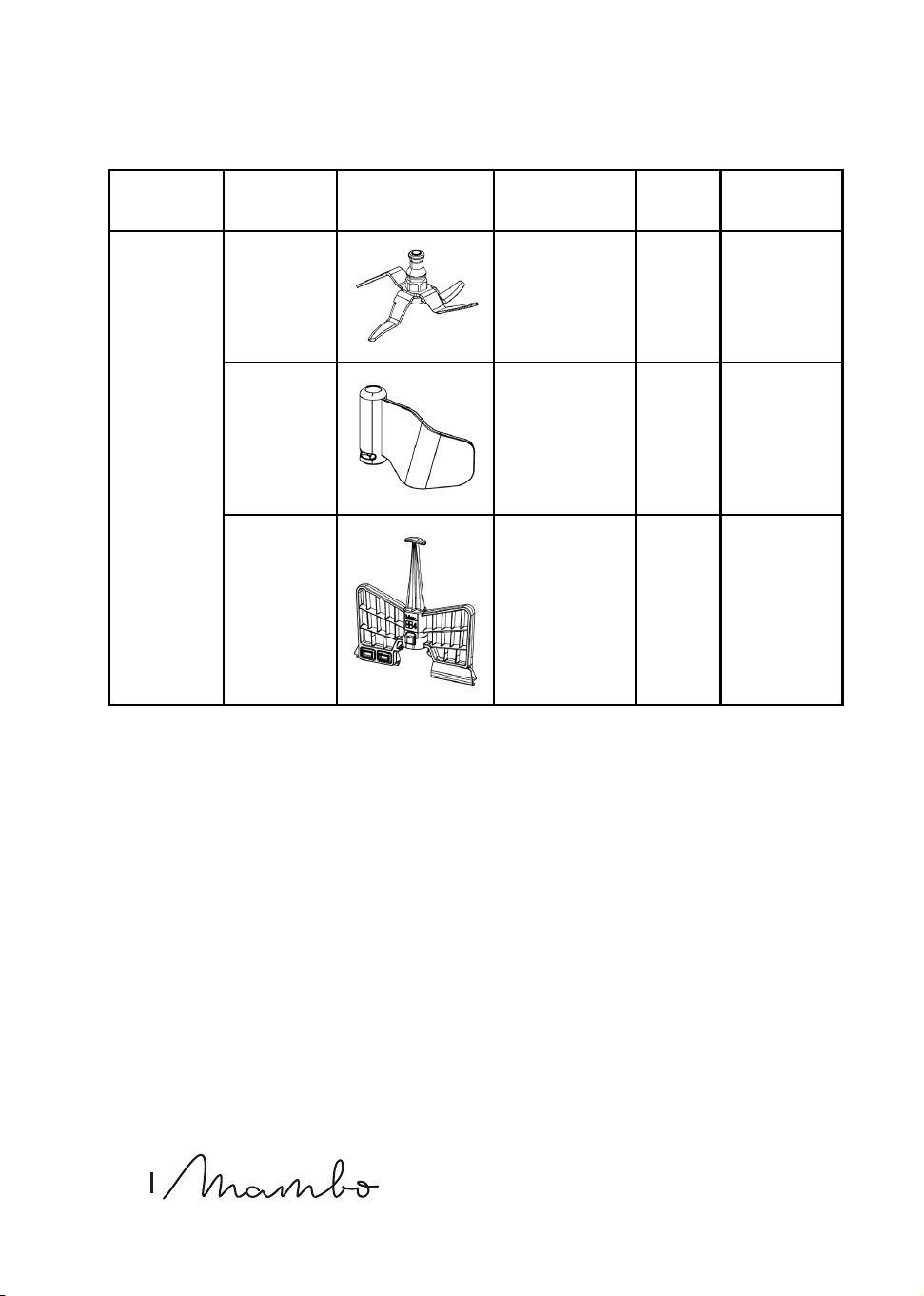
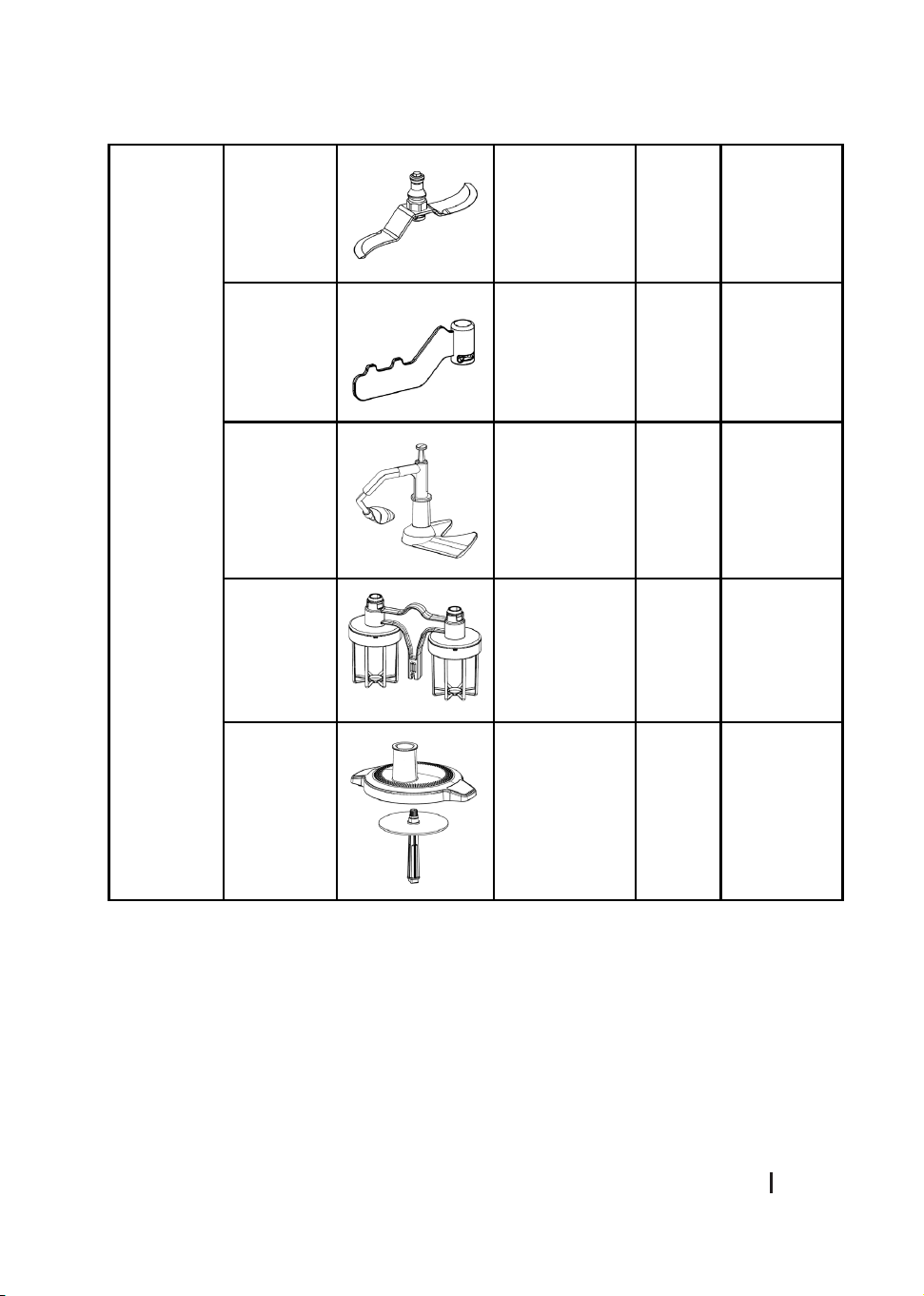
Speed and capacity for each accessory
92
ENGLISH
ROBOT ACCESSORY IMAGE FUNCTION
Max.
speed
Mac.
capacity
Mambo
CooKing
Victory
Cooking
robot
Blade
Cutting,
grinding, etc.
15 3.2 l
MamboMix
V
Kneading
dough for
bread, pizza,
etc.
3
2000 g
dough
maximum
Buttery
whisk
Mixing, beating
the egg whites
or the cream
4
12 egg
whites
MAMBO COOKING VICTORY_UNIQUE_TOTAL GOURMET
93
ENGLISH
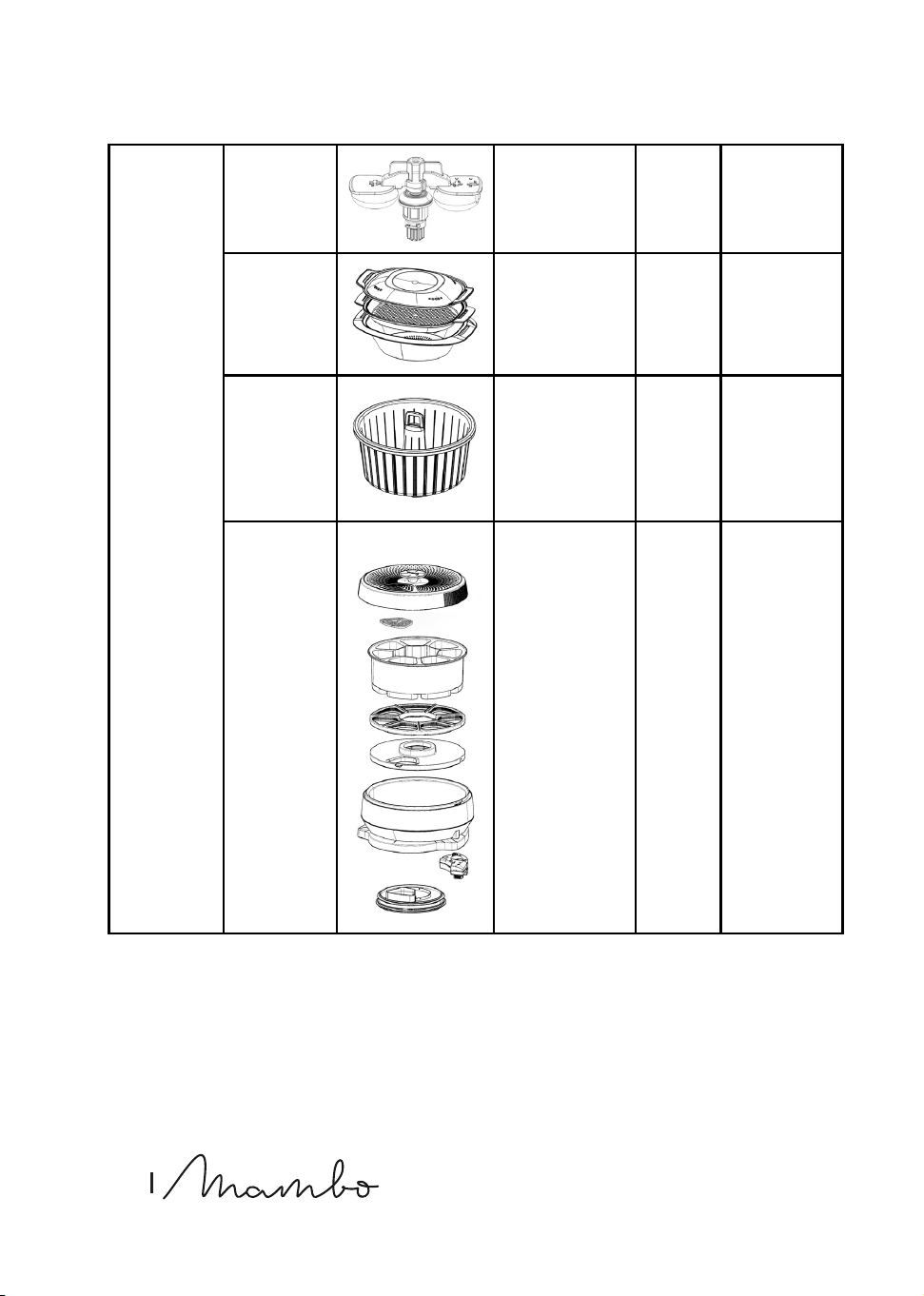
Mambo
CooKing
Unique
Cooking
robot
S blades
Cutting,
grinding, etc.
10 3.2 l
MamboMix
U
Kneading
dough for
bread, pizza,
etc.
3
2500-g
dough
maximum
Sauté Blade Mixing, stirring 3 3.2 l
Double
Whisk
Whisking egg
whites or
cream
4
20 egg
whites
Food
processor
Laminating,
cutting,
grinding.
4
Inlet
diameter
94
ENGLISH
Mambo
CooK-
ing Total
Gourmet
Cooking
robot
(Victo-
ry+Unique)
Cleaning
accessory
Cleaning 4 200-500 mL
Steam
cooker
Steam cooking - -
Steaming
basket
Steam cooking 3 -
ChefCrown
automatic
food
dispenser
Dispensing
ingredients
automatically
15
(Victo-
ry)
10
(Unique)
1 Liquid
container
1.2 L
+
5 Solid/
Liquid
containers
0.4 L
Warning
Do not assemble or use the MamboMix blade and the basket at the same time in either jar.
App manual
The APP manual explaining how the APP works is available online by scanning a QR code.

MAMBO COOKING VICTORY_UNIQUE_TOTAL GOURMET
95
ENGLISH
6. CLEANING AND MAINTENANCE
Cleaning the robot
- The stainless-steel jars are dishwasher safe. To be able to wash it in the dishwasher,
remove the accessory you have used, as well as the accessory bracket.
- Turn o and unplug the cooking robot from the power supply and allow it to cool down
before cleaning it.
- Clean the cooking robot after each use.
- Clean the accessories and the bracket of these and other accessories with warm soapy
water after use. Rinse and dry thoroughly.
- Wipe the main body with a clean damp cloth. If food residue remains, dampen the cloth
in warm soapy water before wiping it. Never immerse the main body in water or other
liquids.
- In order to maintain the good performance of your cooking robot, check and clean the
removable bottom part of the jar after each use. Wipe it with a soft damp cloth and dry it
thoroughly before using it again.
- If the cooking robot is not going to be used for a long time, unplug it from the power
supply and store it in a cool and safe place.
ChefCrown automatic food dispenser cleaning
- To carry out the cleaning of the food dispenser it is important to recognise all its
components. Among these are two components that are NOT dishwasher safe. These are
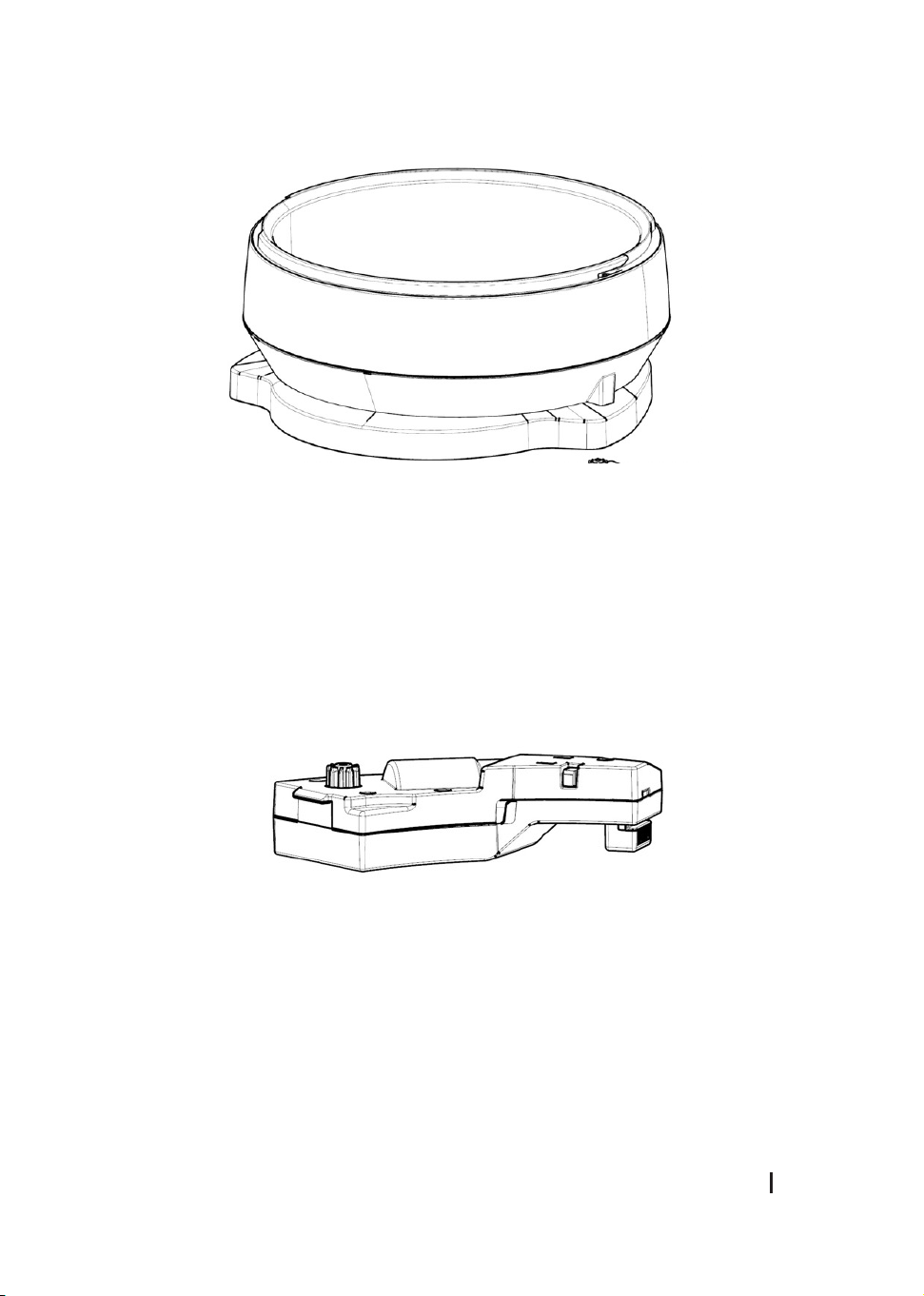
the dispenser base (FIG. 24) and the detachable motor (FIG. 25). The other components of
the dispenser ARE dishwasher safe. (FIG. 26)
To clean the base of the dispenser, clean it with a damp cloth, avoiding the areas where
the gears and connectors are located. To clean the detachable motor, wipe the surface
with a dry cloth and remove any dirt by hand.
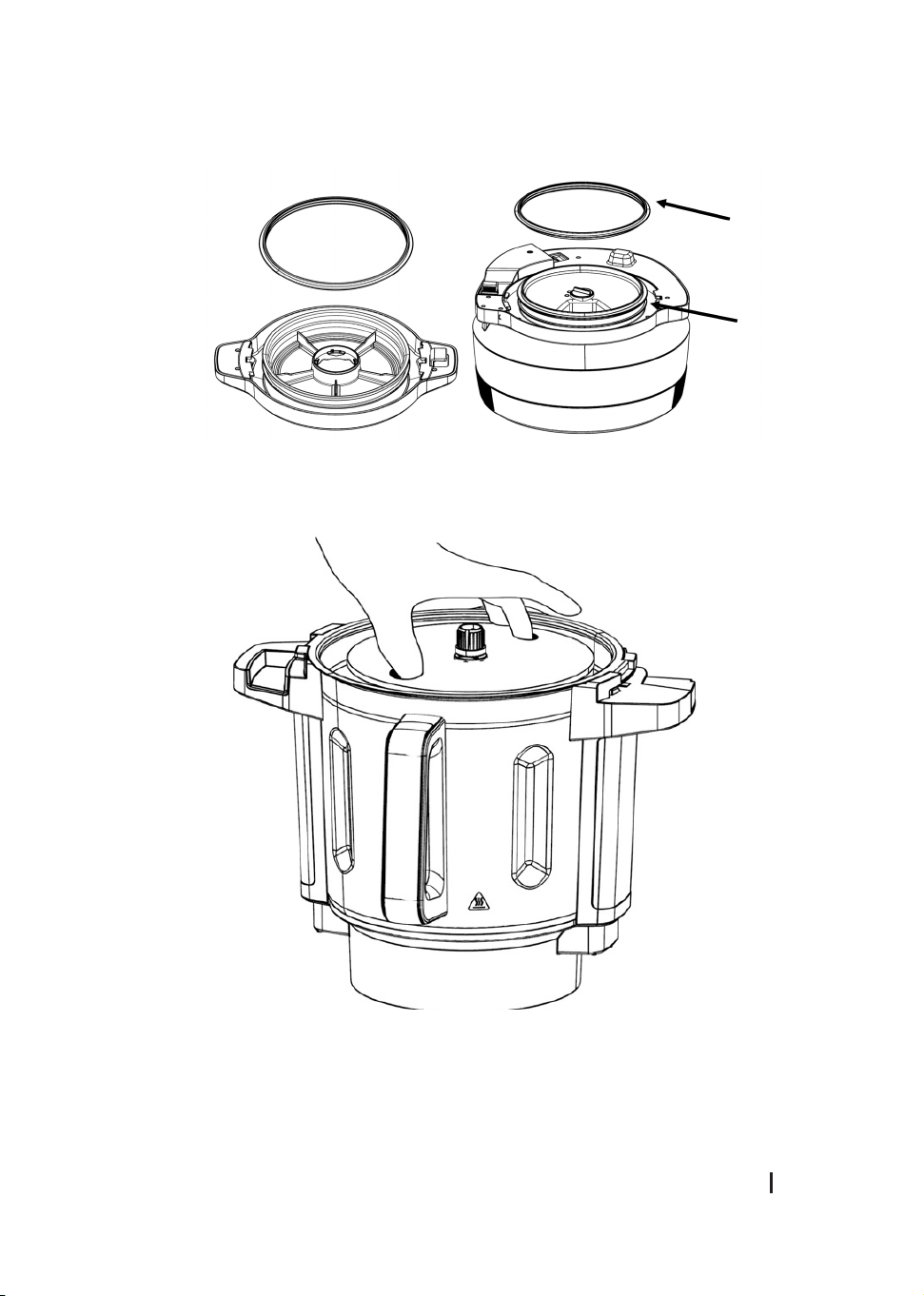
- The jar cover, removable bottom cover and bottom base have a removable sealing gasket
for cleaning. (Fig. 27)

96
ENGLISH
7. TROUBLESHOOTING
Warning code Description Possible cause Possible solution
A01 warning
Locking system.
The jar or the jar’s cover are
not xed properly.
Re-assemble the jar and
jar cover, make sure all
the parts are assembled
properly and tightly and
try operating it again.
A02 warning
Incorrectly
positioned jar.
The jar is not in its correct
position or connection of the
temperature sensor at the jar
base is damaged.
Re-assemble the jar
and make sure it is xed
properly.
A03 warning
Content
exceeded.
There is too much food inside
the jar.
Remove some food
from inside the jar or
cut the food to smaller
pieces and restart the
cooking robot.
A04 warning
The
temperature is
too high.
There is no or very little
food in the jar and the set
temperature is too high for too
much time.
Add food in the jar.
A05 warning
The motor’s
temperature is
too high.
The cooking robot has been
operating with too much food
for a lot of time.
Stop operating the
cooking robot and allow
it to cool down before
restarting it again.

MAMBO COOKING VICTORY_UNIQUE_TOTAL GOURMET
97
ENGLISH
A07 warning
The change in
speed could
not be done
successfully.
The speed change function
has been blocked.
Remove the jar, turn the
xing bracket manually
and place the jar again
in place. Restart the
cooking robot. Please
contact the ocial
Cecotec Technical
Support Service.
A08 warning
Wrong NTC
sensor reading.
The temperature sensor is not
working properly.
Please contact the
ocial Cecotec
Technical Support
Service.
A09 warning
Warning on the
jar lock.
The motor for locking the jar
has not been activated.
Replace the jar and
check if the cover of
the jar is securely
closed and then try
again. Please contact
the ocial Cecotec
Technical Support
Service.
A11 warning
High speeds
cannot be
used at high
temperatures.
For safety reasons, high
speeds must not be used
when cooking at high
temperatures.
Wait for the food to cool
before grinding.
A15 - A16 -
A19 warning
Failure to send
information.
The system does not
send information to the
components.
Restart the cooking
robot and wait a few
seconds. If the problem
persists, contact
the ocial Cecotec
Technical Service.

98
ENGLISH
A25 warning
The food
dispenser is not
in place.
The food dispenser is not in
place, or the detachable motor
is not installed.
Install the dispenser
and/or the detachable
motor.
A26 warning
The dispenser
does not work.
Dispenser does not rotate
properly
Restart the cooking
robot and wait a few
seconds. If the problem
persists, contact
the ocial Cecotec
Technical Support
Service.
A27 warning
The jar does not
match.
The jar does not match the jar
to be used for the recipe.
Swap for another jar to
start cooking.
8. TECHNICAL SPECIFICATIONS
Product reference: 04700 / 04701 / 04702
Model: Mambo CooKing Victory / Mambo CooKing Unique / Mambo CooKing Total Gourmet
Power:
Mambo CooKing Victory Cooking robot → 1700 W (Motor 700 W; Heating power 1000 W)
Mambo CooKing Unique Cooking robot → 2200 W (Motor 700 W; Heating power 1500 W)
Mambo CooKing Total Gourmet Cooking robot → Unique XL jar: 2200 W (Motor 700 W; Heating
power 1500 W) / Victory XL Jar: 1700 W (Motor 700 W; Heating power 1000 W)
Voltage: 220-240 V~
Frequency: 50/60 Hz
Total capacity: 4.5 L
Usable capacity: 3.2

MAMBO COOKING VICTORY_UNIQUE_TOTAL GOURMET
99
ENGLISH
Frequency band: 2.400 - 2.4835 GHz
Maximum Transmission Power: 20 dBm
Technical specications may change without prior notication to improve product quality.
Made in China | Designed in Spain
9. DISPOSAL OF OLD ELECTRICAL AND ELECTRONIC APPLIANCES
This symbol indicates that, according to the applicable regulations, the product
and/or batteries must be disposed of separately from household waste. When
this product reaches the end of its shelf life, you should dispose of the
batteries/accumulators and take them to a collection point designated by the
local authorities.
Consumers must contact their local authorities or retailer for information concerning the
correct disposal of old appliances and/or their batteries.
Compliance with the above guidelines will help protecting the environment.
10. TECHNICAL SUPPORT AND WARRANTY
Cecotec shall be liable to the end user or consumer for any lack of conformity that exists at
the time of delivery of the product under the terms, conditions, and deadlines established by
the applicable regulations.
It is recommended that repairs be carried out by qualied personnel.
If at any moment you detect any problem with your product or have any doubt, do not
hesitate to contact the ocial Cecotec Technical Support Service at +34 963 210 728.
11. COPYRIGHT
The intellectual property rights over the texts in this manual belong to CECOTEC
INNOVACIONES, S.L. All rights reserved. The contents of this publication may not, in whole or
in part, be reproduced, stored in a retrieval system, transmitted, or distributed by any means
(electronic, mechanical, photocopying, recording or similar) without the prior authorization of
CECOTEC INNOVACIONES, S.L.

100
ENGLISH
12. DECLARATION OF CONFORMITY
Cecotec Innovaciones hereby declares that these three cooking robots, model 04700_Mambo
CooKing Victory, 04701_Mambo CooKing Unique and 04702_Mambo CooKing Total Gourmet
are in conformity with the Radio Equipment Directive 2014/53/EU.
The full text of the EU Declaration of Conformity can be found on the following
website:
www.cecotec.es
287
MAMBO COOKING VICTORY_UNIQUE_TOTAL GOURMET
288
289
MAMBO COOKING VICTORY_UNIQUE_TOTAL GOURMET
Fig. / Img. / Rys. / Obr. 1
290
Fig. / Img. / Rys. / Obr. 2
Fig. / Img. / Rys. / Obr. 3
291
MAMBO COOKING VICTORY_UNIQUE_TOTAL GOURMET
Fig. / Img. / Rys. / Obr. 4
Fig. / Img. / Rys. / Obr. 5
292
Fig. / Img. / Rys. / Obr. 6
Fig. / Img. / Rys. / Obr. 7
293
MAMBO COOKING VICTORY_UNIQUE_TOTAL GOURMET
Fig. / Img. / Rys. / Obr. 9
Fig. / Img. / Rys. / Obr. 8
294
Fig. / Img. / Rys. / Obr. 10
Fig. / Img. / Rys. / Obr. 11
295
MAMBO COOKING VICTORY_UNIQUE_TOTAL GOURMET
Fig. / Img. / Rys. / Obr. 13
Fig. / Img. / Rys. / Obr. 12
296
Fig. / Img. / Rys. / Obr. 14
Fig. / Img. / Rys. / Obr. 15
297
MAMBO COOKING VICTORY_UNIQUE_TOTAL GOURMET
Fig. / Img. / Rys. / Obr. 17
Fig. / Img. / Rys. / Obr. 18
Fig. / Img. / Rys. / Obr. 16
298
Fig. / Img. / Rys. / Obr. 19
Fig. / Img. / Rys. / Obr. 20
299
MAMBO COOKING VICTORY_UNIQUE_TOTAL GOURMET
Fig. / Img. / Rys. / Obr. 21
Fig. / Img. / Rys. / Obr. 22
300
Fig. / Img. / Rys. / Obr. 23
301
MAMBO COOKING VICTORY_UNIQUE_TOTAL GOURMET
Fig. / Img. / Rys. / Obr. 25
Fig. / Img. / Rys. / Obr. 24
302
Fig. / Img. / Rys. / Obr. 26
303
MAMBO COOKING VICTORY_UNIQUE_TOTAL GOURMET
Fig. / Img. / Rys. / Obr. 27
Fig. / Img. / Rys. / Obr. 28

www.cecotec.es
Cecotec Innovaciones S.L.
Av. Reyes Católicos, 60
46910, Alfafar (Valencia), Spain
RP01230802