
A
B
1
2
3
4
5
6
7
8
9
10
11
12
1
1
2
3 5 6
4
7
8
91011121314
15
16
2
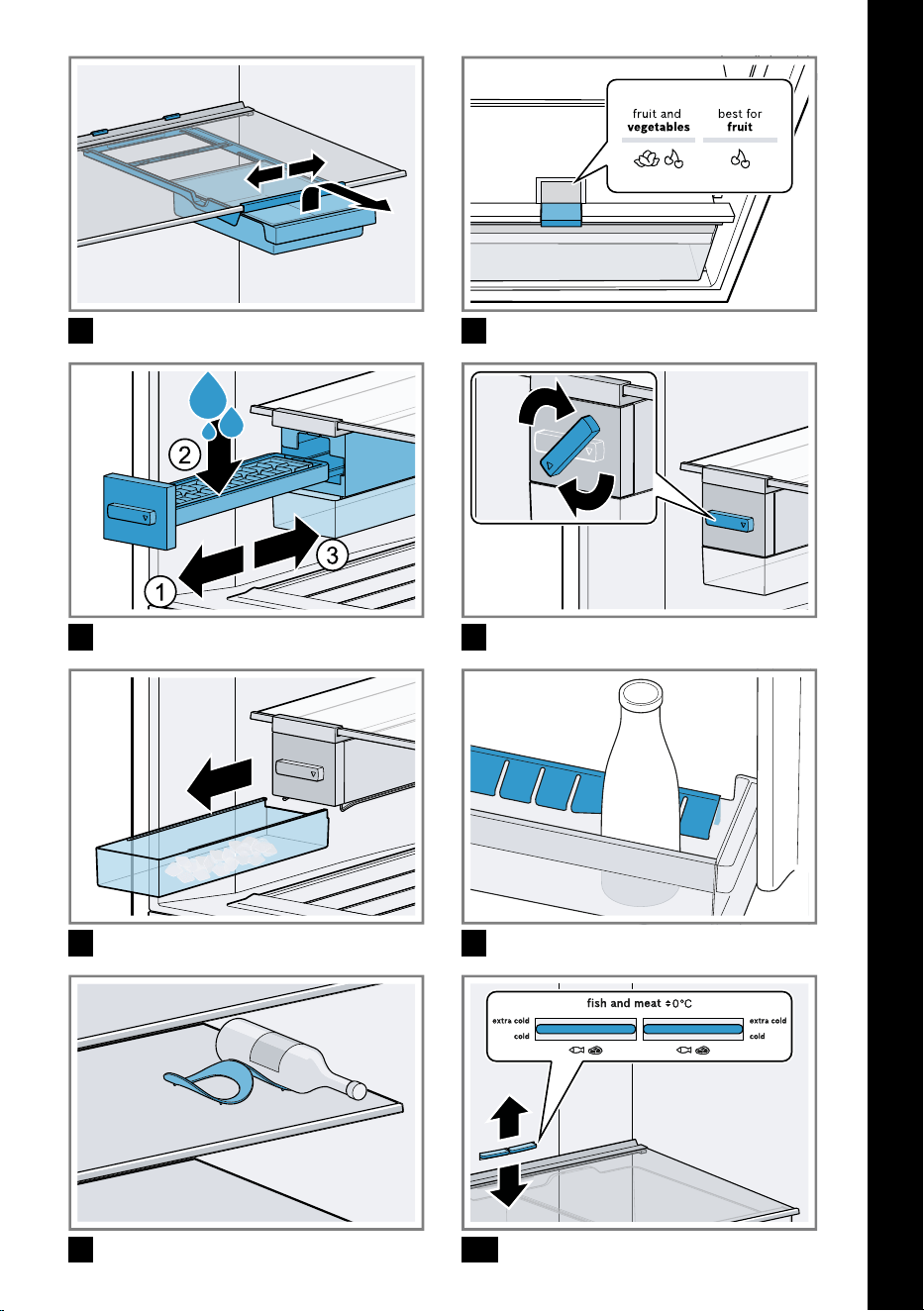
3
4
5
6
7
8
9
10
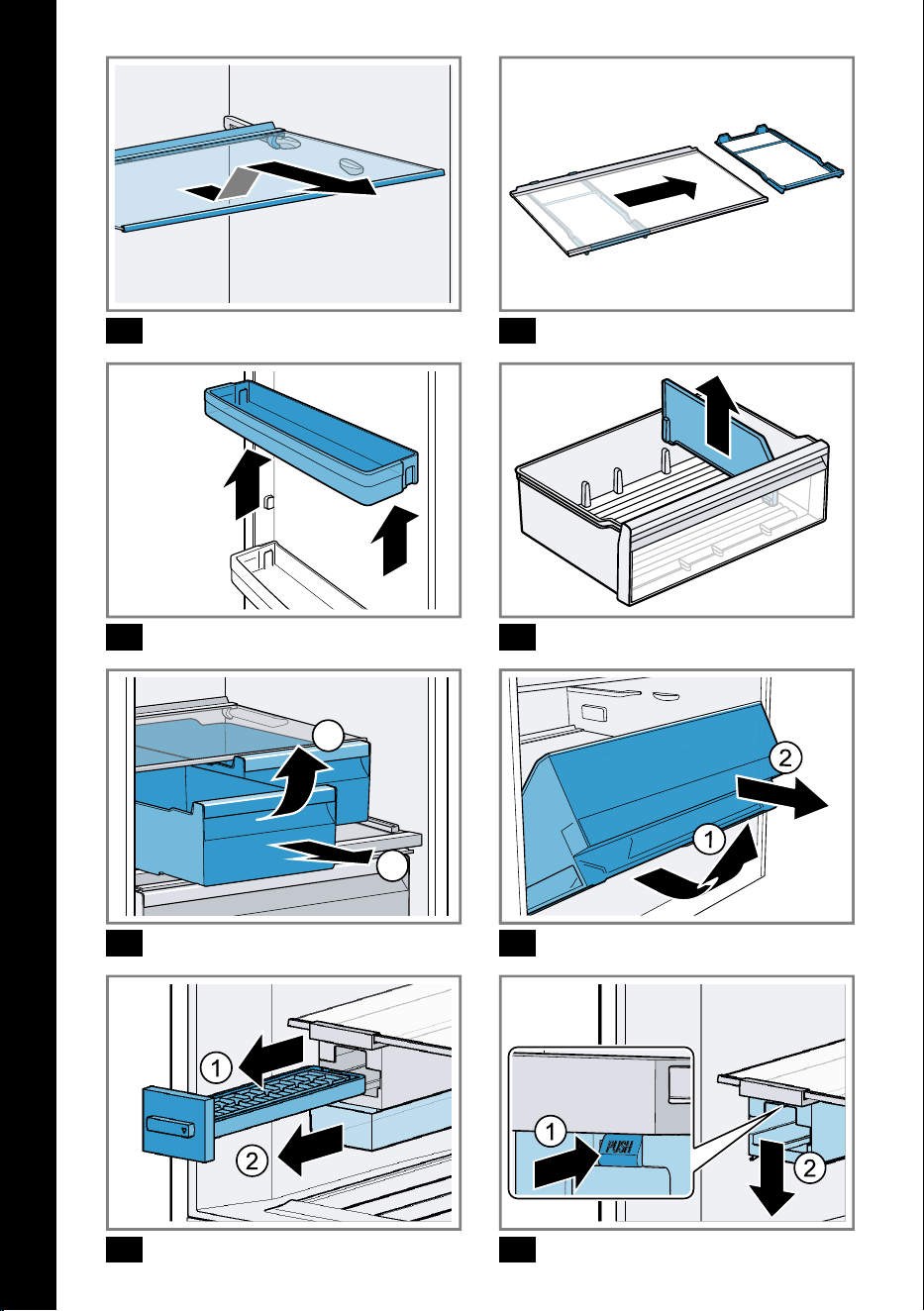
11 12
13 14
1
2
15
16
17
18
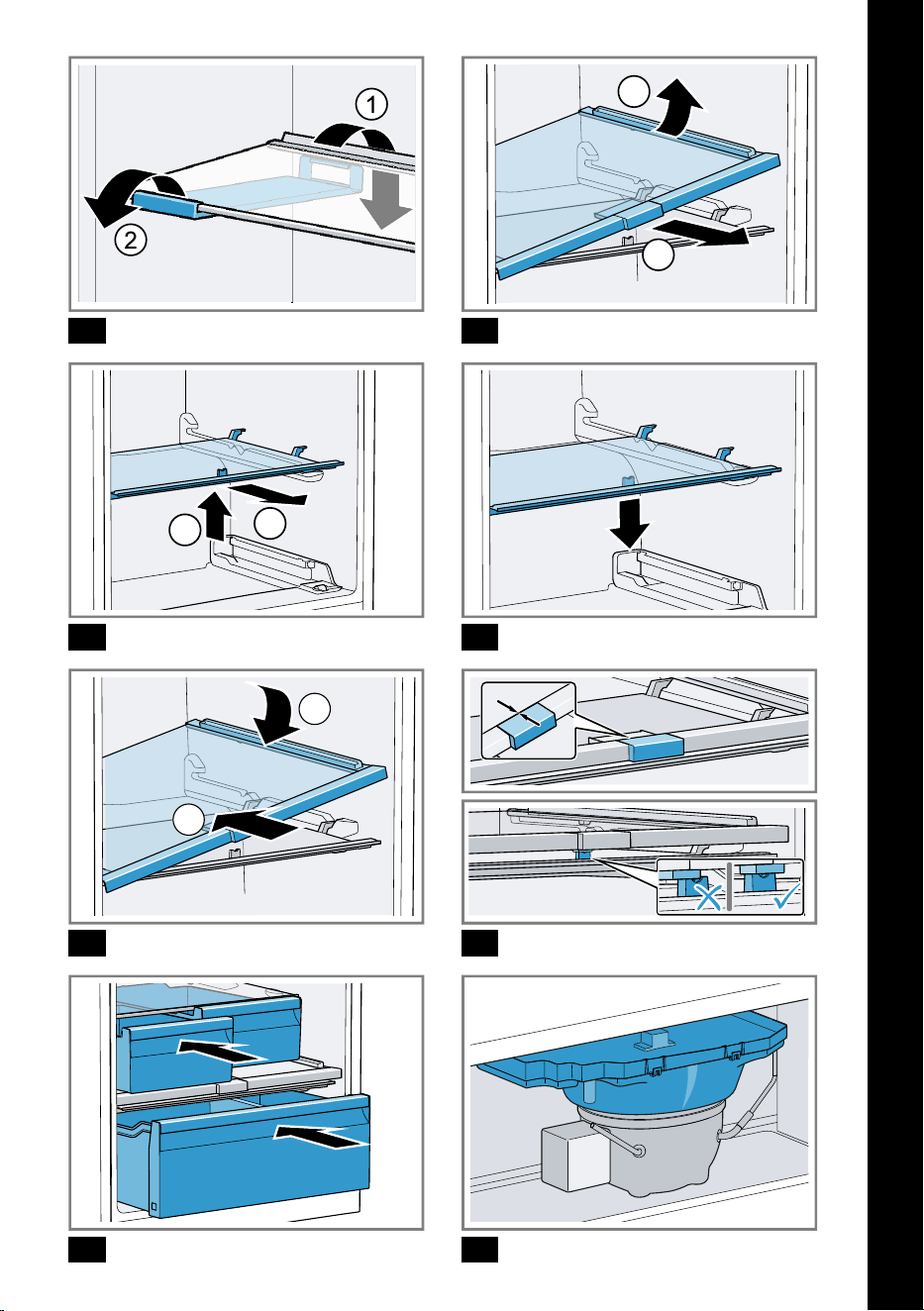
19
1
2
20
1
2
21
22
1
2
23
0 mm
24
25 26
en Table of contents
You can find additional information and explanations online.
Scan the QR code on the title page.
Table of contentsTable of contents
.......................................................... 7
1 Safety ............................................ 7
1.1 General information .................... 7
1.2 Intended use ................................ 7
1.3 Restriction on user group .......... 7
1.4 Safe transport .............................. 8
1.5 Safe installation ........................... 8
1.6 Safe use ........................................ 9
1.7 Damaged appliance ................. 11
2 Preventing material damage .... 12
3 Environmental protection and
saving energy ............................ 12
3.1 Disposing of packaging ........... 12
3.2 Saving energy ............................ 12
4 Installation and connection ...... 13
4.1 Scope of delivery ...................... 13
4.2 Criteria for the installation loc-
ation ............................................. 13
4.3 Installing the appliance ............ 14
4.4 Preparing the appliance for
the first time ............................... 14
4.5 Connecting the appliance to
the electricity supply ................. 14
5 Familiarising yourself with
your appliance ........................... 14
5.1 Appliance .................................... 14
5.2 Control panel ............................. 15
6 Features ..................................... 15
6.1 Shelf ............................................. 15
6.2 Snack container ........................ 15
6.3 Storage container ..................... 15
6.4 Fruit and vegetable container
with humidity control ................ 16
6.5 Container divider ....................... 16
6.6 Butter and cheese compart-
ment ............................................. 16
6.7 Door tray ..................................... 16
6.8 Ice cube maker ......................... 16
6.9 Accessories ............................... 17
7 Basic operation ......................... 17
7.1 Switching on the appliance ..... 17
7.2 Operating tips ............................ 17
7.3 Switching off the appliance ..... 18
7.4 Setting the temperature ........... 18
7.5 Keylock ....................................... 18
8 Additional functions ................. 18
8.1 Super cooling ........................... 18
8.2 Super freezing ........................... 19
8.3 Holiday mode ............................ 19
8.4 Energy-saving mode ................. 19
8.5 Freshness mode ....................... 19
9 Alarm .......................................... 20
9.1 Door alarm ................................. 20
9.2 Temperature alarm ................... 20
10 Refrigerator compartment ..... 20
10.1 Tips for storing food in the re-
frigerator compartment .......... 21
10.2 Chill zones in the refrigerator
compartment ........................... 21
11 Freezer compartment ............. 21
11.1 Freezing capacity .................... 21
11.2 Fully utilising the freezer
compartment volume ............. 21
11.3 Tips for storing food in the
freezer compartment .............. 22
11.4 Tips for freezing fresh food ... 22
11.5 Shelf life of frozen food at
−18°C ...................................... 22
11.6 Defrosting methods for
frozen food ............................... 22
12 Defrosting ................................ 23
6
Safety en
12.1 Defrosting in the refrigerator
compartment ........................... 23
12.2 Defrosting in the freezer com-
partment ................................... 23
13 Cleaning and servicing ........... 23
13.1 Preparing the appliance for
cleaning .................................... 23
13.2 Cleaning the appliance .......... 23
13.3 Removing the fittings ............. 24
13.4 Removing appliance com-
ponents ..................................... 24
14 Troubleshooting ...................... 25
14.1 Power failure ............................ 28
14.2 Conducting an appliance
self-test ..................................... 29
15 Storage and disposal .............. 29
15.1 Taking the appliance out of
operation .................................. 29
15.2 Disposing of old appliance ... 29
16 Customer Service ................... 30
16.1 Product number (E-Nr.) and
production number (FD) ........ 30
17 Technical data ......................... 30
Safety 1 Safety
Observe the following safety instructions.
1.1 General information
¡ Read this instruction manual carefully.
¡ Keep the instruction manual and the product information safe
for future reference or for the next owner.
¡ Do not connect the appliance if it has been damaged in transit.
1.2 Intended use
Only use this appliance:
¡ for chilling and freezing food and for making ice cubes.
¡ in private households and in enclosed spaces in a domestic en-
vironment.
¡ Up to an altitude of 2000 m above sea level.
1.3 Restriction on user group
This appliance may be used by children aged 8 or over and by
people who have reduced physical, sensory or mental abilities or
inadequate experience and/or knowledge, provided that they are
supervised or have been instructed on how to use the appliance
safely and have understood the resulting dangers.
7
en Safety
Do not let children play with the appliance.
Cleaning and user maintenance must not be performed by chil-
dren unless they are being supervised.
1.4 Safe transport
WARNING‒Risk of injury!
The heavy weight of the appliance may result in injury when lifted.
Do not lift the appliance on your own.
1.5 Safe installation
WARNING‒Risk of electric shock!
Incorrect installation is dangerous.
Connect and operate the appliance only in accordance with the
specifications on the rating plate.
Connect the appliance to a power supply with alternating cur-
rent only via a properly installed socket with earthing.
The protective conductor system of the domestic electrical in-
stallation must be properly installed.
Never equip the appliance with an external switching device,
e.g. a timer or remote control.
When the appliance is installed, the mains plug of the power
cord must be freely accessible. If free access is not possible, an
isolating switch must be integrated into the permanent electrical
installation according to the installation regulations.
When installing the appliance, check that the power cable is not
trapped or damaged.
If the insulation of the power cord is damaged, this is dangerous.
Never let the power cord come into contact with heat sources.
WARNING‒Risk of explosion!
If the appliance's ventilation openings are closed off, a leak in the
refrigeration circuit may result in a flammable mixture of gas and
air.
Keep ventilation openings in the appliance casing or in the in-
tegrated casing clear of obstruction.
8
Safety en
WARNING‒Risk of fire!
It is dangerous to use an extended power cord and non-approved
adapters.
Do not use extension cables or multiple socket strips.
Only use adapters and power cords approved by the manufac-
turer.
If the power cord is too short and a longer one is not available,
please contact an electrician to have the domestic installation
adapted.
Portable multiple socket strips or portable power supply units may
overheat and cause a fire.
Do not place portable multiple socket strips or power supply
units on the back of the appliance.
1.6 Safe use
WARNING‒Risk of electric shock!
An ingress of moisture can cause an electric shock.
Only use the appliance in enclosed spaces.
Never expose the appliance to intense heat or humidity.
Do not use steam- or high-pressure cleaners to clean the appli-
ance.
WARNING‒Risk of suffocation!
Children may put packaging material over their heads or wrap
themselves up in it and suffocate.
Keep packaging material away from children.
Do not let children play with packaging material.
Children may breathe in or swallow small parts, causing them to
suffocate.
Keep small parts away from children.
Do not let children play with small parts.
WARNING‒Risk of explosion!
If the cooling circuit is damaged, flammable refrigerant may es-
cape and explode.
To accelerate the defrosting process, do not use any other
mechanical devices or means other than those recommended
by the manufacturer.
9
en Safety
If food is stuck to the freezer compartment, loosen it with a blunt
object such as the handle of a wooden spoon.
Products which contain flammable propellants and explosive sub-
stances may explode, e.g. spray cans.
Do not store products which contain flammable propellants (e.g.
spray cans) or explosive substances in the appliance.
WARNING‒Risk of fire!
Electrical devices within the appliance may cause a fire, e.g. heat-
ers or electric ice makers.
Do not operate electrical devices within the appliance.
WARNING‒Risk of injury!
Containers that contain carbonated drinks may burst.
Do not store containers that contain carbonated drinks in the
freezer compartment.
Injury to the eyes caused by escaping flammable refrigerant and
hazardous gases.
Do not damage the tubes of the refrigerant circuit or the insula-
tion.
The appliance may tip.
Do not stand or support yourself on the base, runners or doors.
WARNING‒Risk of burns!
Individual parts on the back of the appliance become hot during
operation.
Never touch these hot parts.
WARNING‒Risk of cold burns!
Contact with frozen food and cold surfaces may cause burns by
refrigeration.
Never put frozen food straight from the freezer compartment
into your mouth.
Avoid prolonged contact of the skin with frozen food, ice and
surfaces in the freezer compartment.
10
Safety en
CAUTION‒Risk of harm to health!
To prevent food from being contaminated, you must observe the
following instructions.
If the door is open for an extended period of time, this may lead
to a considerable temperature increase in the compartments of
the appliance.
Regularly clean the surfaces that may come into contact with
food and accessible drain systems.
Store raw meat and fish in suitable containers in the refrigerator
so that they do not touch or drip on other food.
If the fridge/freezer is empty for an extended period of time,
switch off the appliance, defrost it, clean it and leave the door
open to prevent the formation of mould.
Metal or metal-style parts in the appliance may contain aluminium.
If acidic food comes into contact with aluminium in the appliance,
aluminium foil ions may pass into the food.
Do not consume soiled food.
1.7 Damaged appliance
WARNING‒Risk of electric shock!
If the appliance or the power cord is damaged, this is dangerous.
Never operate a damaged appliance.
Never pull on the power cord to unplug the appliance. Always
unplug the appliance at the mains.
If the appliance or the power cord is damaged, immediately un-
plug the power cord or switch off the fuse in the fuse box.
Call customer service.
Page30
Improper repairs are dangerous.
Repairs to the appliance should only be carried out by trained
specialist staff.
Only use genuine spare parts when repairing the appliance.
If the power cord of this appliance is damaged, it must be re-
placed by the manufacturer, the manufacturer's Customer Ser-
vice or a similarly qualified person in order to prevent any risk.
11
en Preventing material damage
WARNING‒Risk of fire!
If the tubes are damaged, flammable refrigerant and harmful
gases may escape and ignite.
Keep naked flames and ignition sources away from the appli-
ance.
Ventilate the room.
Switch off the appliance.
Page18
Unplug the mains plug from the mains or switch off the circuit
breaker in the fuse box.
Call customer service.
Page30
Preventing material damage2 Preventing material
damage
ATTENTION
If not rolling freely, the appliance's
castors may damage the floor when
the appliance is moved.
Transport the appliance using a
sack truck.
Use floor protection when moving
the appliance, and do not move it
in a zigzag fashion.
Using the appliance, base, runners or
doors as a seat or climbing surface
may damage the appliance.
Do not stand or lean on the appli-
ance, base, runners or doors.
Contamination with oil or fat may
cause plastic parts and door seals to
become porous.
Keep plastic parts and door seals
free of oil and grease.
Metal or metal-style parts in the appli-
ance may contain aluminium. When
aluminium comes into contact with
acidic foods, it corrodes and discol-
ours.
Only store packaged food in the
appliance.
If you clean fittings and accessories
in the dishwasher, this may cause
them to become deformed or discol-
our.
Never clean fittings and accessory
in the dishwasher.
Environmental protection and saving energy3 Environmental protec-
tion and saving energy
3.1 Disposing of packaging
The packaging materials are environ-
mentally compatible and can be re-
cycled.
Sort the individual components by
type and dispose of them separ-
ately.
3.2 Saving energy
If you follow these instructions, your
appliance will use less power.
Selecting the installation location
Keep the appliance out of direct
sunlight.
Install the appliance as far away as
possible from heating elements,
cookers and other heat sources:
12
Installation and connection en
– Maintain a 30mm clearance to
electric or gas cookers.
– Maintain a 300mm clearance to
oil or solid-fuel cookers.
Make sure there is a distance of
50mm between the side wall and
the appliance.
Never cover or block the external
ventilation openings.
Saving energy during use
Note: The arrangement of the fittings
does not affect the energy consump-
tion of the appliance.
Open the appliance only briefly
and then close it carefully.
Never cover or block the interior
ventilation openings or the exterior
ventilation openings.
Transport purchased food in a
cool bag and place in the appli-
ance quickly.
Allow warm food and drinks to
cool down before storing them.
Thaw frozen food in the refrigerator
compartment to utilise the low tem-
perature of the food.
Always leave some space between
the food and to the back panel.
Control panel energy-saving
mode
If the appliance is not being used,
the control panel automatically
switches to control panel energy-sav-
ing mode.
In control panel energy-saving mode,
the control panel brightness is re-
duced and the status display lights
up white.
Installation and connection4 Installation and con-
nection
4.1 Scope of delivery
After unpacking all parts, check for
any transport damage and for com-
pleteness of delivery.
If you have any complaints, contact
your dealer or our after-sales service
Page30
.
The delivery consists of the following:
Free-standing appliance
Equipment and accessories
1
Installation material
Installation instructions
User manual
Customer service directory
Warranty enclosure
2
Energy label
Information on energy consump-
tion and noises
4.2 Criteria for the installation
location
WARNING
Risk of explosion!
If the appliance is in a space that is
too small, a leak in the refrigeration
circuit may result in a flammable mix-
ture of gas and air.
Only install the appliance in a
space with a volume of at least
1m
3
per 8g refrigerant. The
volume of refrigerant is indicated
on the rating plate.
"Appliance", Fig.
1
/
Page14
The weight of the appliance ex works
may be up to 95kg depending on
the model.
1
Depending on the appliance specifications
2
Not in all countries
13
en Familiarising yourself with your appliance
The subfloor must be sufficiently
stable to bear the weight of the appli-
ance.
The surface must be level.
This refrigerator is intended for use at
ambient temperatures of 10°C to
43°C.
The appliance is fully functional within
the permitted room temperature.
If the appliance is operated at colder
room temperatures, the appliance will
not be damaged up to a room tem-
perature of 5°C.
Over-and-under and side-by-side
installation
If you want to install 2 refrigerating
appliances one over the other or side
by side, you must maintain a clear-
ance of at least 150mm between the
appliances. Selected appliances can
be installed without a minimum clear-
ance. Ask your dealer or kitchen
planner about this.
4.3 Installing the appliance
Install the appliance in accordance
with the enclosed installation in-
structions.
4.4 Preparing the appliance for
the first time
1.
Remove the informative material.
2.
Remove the protective foil and
transit bolts, e.g. remove the ad-
hesive strips and carton.
3.
Clean the appliance for the first
time.
Page23
4.5 Connecting the appliance
to the electricity supply
1.
Insert the mains plug of the appli-
ance's power cable in a socket
nearby.
The connection data of the appli-
ance can be found on the rating
plate.
"Appliance", Fig.
1
/
Page14
2.
Check the mains plug is inserted
properly.
The appliance is now ready for
use.
Familiarising yourself with your appliance5 Familiarising yourself
with your appliance
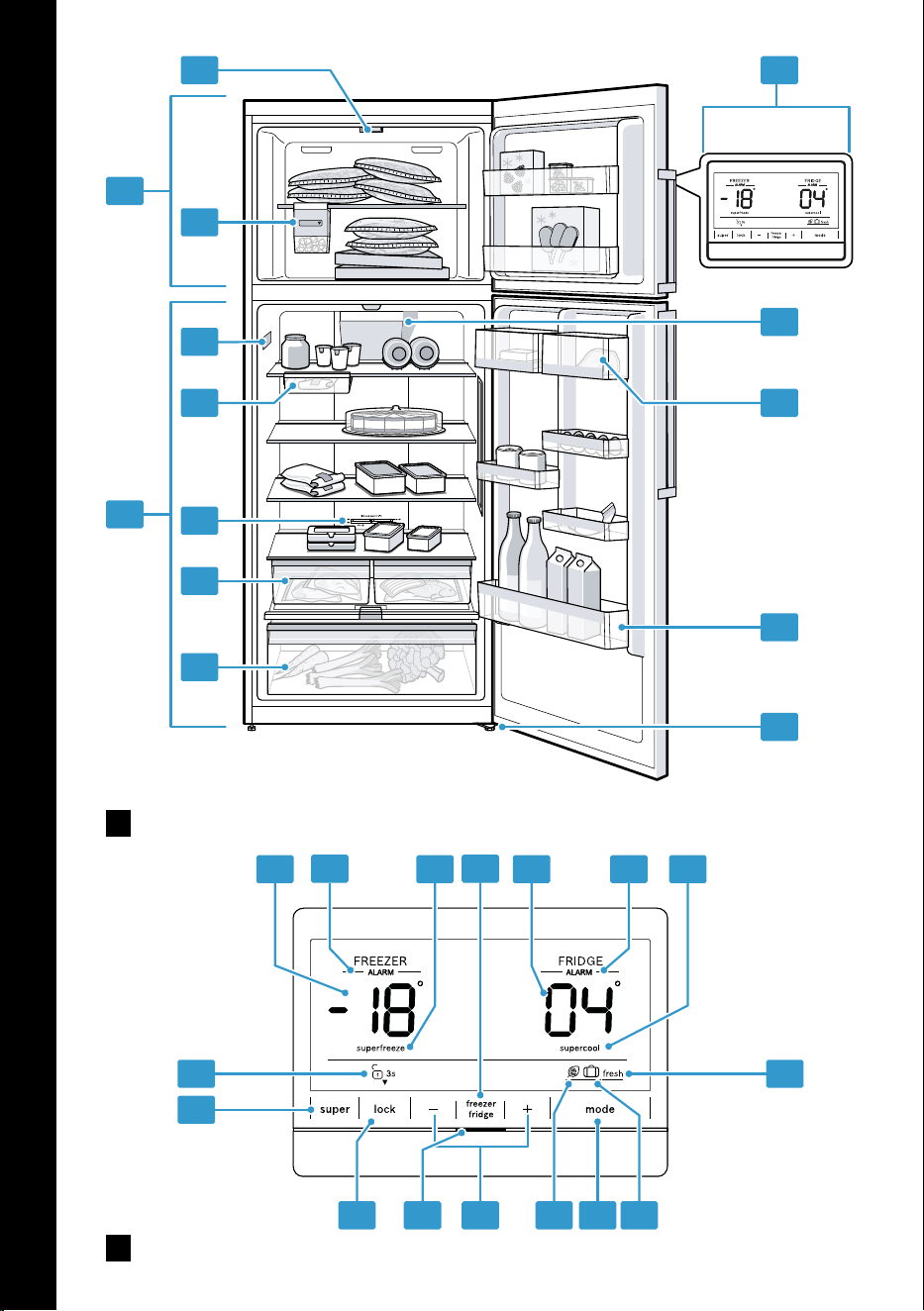
5.1 Appliance
You can find an overview of the parts
of your appliance here.
Fig.
1
Freezer compartment
Page21
Refrigerator compartment
Page20
Lighting
Ice cube maker
Page16
Rating plate
Page30
Snack container
Page15
1
Temperature controller (storage
container)
Page18
Storage container
Page15
Fruit and vegetable container
with humidity control
Page16
1
Depending on the appliance specifications
14
Features en
Control panel
Page15
Inner ventilation openings (refri-
gerator compartment)
Butter and cheese compartment
Page16
1
Door tray for large bottles
Page16
Screw foot
5.2 Control panel
You can use the control panel to con-
figure all functions of your appliance
and to obtain information about the
operating status.
Fig.
2
Displays the set temperature for
the freezer compartment in °C.
ALARM lights up when the tem-
perature alarm is switched on.
superfreeze lights up when Su-
per freezing is switched on.
freezerfridge is used to select a
compartment in order to change
the temperature or switch on
certain additional functions.
Displays the set temperature for
the refrigerator compartment
in°C.
ALARM lights up when the door
alarm is switched on.
supercool lights up when Super
cooling is switched on.
fresh lights up when the fresh-
ness mode is switched on.
lights up when holiday mode
is switched on.
mode is used to select a mode.
lights up when the energy-
saving mode is switched on.
/ sets the temperature of the
selected compartment.
The status indicator shows the
operating status of the appli-
ance.
super switches the button lock
for the control panel on or off.
super switches supercool and
superfreeze on or off in the se-
lected compartment.
3s/ 3s lights up if the button
lock is switched on or off.
Features6 Features
The features of your appliance de-
pend on the model.
6.1 Shelf
To vary the shelf as required, you
can remove the shelf and re-insert it
elsewhere.
"Removing the shelf", Page24
6.2 Snack container
Store packaged food or small snacks
in the snack container.
You can remove the snack container.
To do this, pull out and remove the
snack container. You can move the
holder for the snack container.
Fig.
3
6.3 Storage container
The temperatures in the storage con-
tainer are lower than in the refriger-
ator compartment. Temperatures be-
low 0°C may occur occasionally.
1
Depending on the appliance specifications
15
en Features
In order to reach temperatures close
to 0 °C in the storage container, set
the refrigerator compartment temper-
ature to 2 °C.
Page18
Use the lower temperatures in the
storage container to store highly per-
ishable food, e.g. fish, meat and
sausages.
6.4 Fruit and vegetable con-
tainer with humidity control
Store fresh fruit and vegetables loose
in the fruit and vegetable container.
Cover any chopped fruit and veget-
ables, or store in air-tight packaging.
You can adjust the humidity in the
fruit and vegetable container using
the humidity controller and a special
seal. This allows fresh fruit and veget-
ables to be stored for up to twice as
long as with conventional storage.
Fig.
4
The air humidity in the fruit and veget-
able container can be set according
to the type and amount of food to be
stored by pressing the humidity con-
troller:
Push in and engage for low humid-
ity when primarily storing fruit or
mixed items, or if the appliance is
very full.
Release for high humidity
when primarily storing vegetables
or when the appliance is not very
full.
Condensation may form in the fruit
and vegetable container depending
on the food and quantity stored.
Remove the condensation with a dry
cloth and adjust the air humidity to a
lower setting using the humidity con-
troller.
To ensure that the quality and aroma
are retained, store fruit and veget-
ables that are sensitive to cold out-
side of the appliance at temperatures
of approx. 8°C to 12°C, e.g. pine-
apple, bananas, citrus fruits, cucum-
bers, courgettes, peppers, tomatoes
and potatoes.
6.5 Container divider
To vary the division of the fruit and
vegetable container, you can remove
the container divider or move it to a
different location.
"Removing the container divider",
Page24
6.6 Butter and cheese com-
partment
Store butter and hard cheese in the
butter and cheese compartment.
6.7 Door tray
To adjust the door tray as required,
you can remove the door tray and re-
insert elsewhere.
"Removing door tray", Page24
6.8 Ice cube maker
Use the ice cube maker to make ice
cubes out of drinking water.
Making ice cubes
Use only drinking water tomake ice
cubes.
1.
Remove the ice cube tray , fill ¾
full with drinking water and re-
insert .
Fig.
5
Note: If it is filled with too much
drinking water, this may impair the
function of the ice cube maker.
The ice cubes cannot be removed
individually from the ice cube tray.
Too much drinking water was ad-
ded and isrunning into the ice
cube container, causing any ice
cubes tofreeze together.
16
Basic operation en
2.
When the ice cubes are frozen, ro-
tate the knob on the ice cube tray
several times in a clockwise direc-
tion and release it.
Fig.
6
The ice cubes will loosen and fall
into the ice cube container.
3.
Pull out the ice storage container
and remove the ice cubes.
Fig.
7
6.9 Accessories
Use original accessories. These have
been made especially for your appli-
ance.
The accessories for your appliance
depend on the model.
Egg tray
Store eggs safely on the egg tray.
Bottle holder
The bottle holder prevents bottles
from falling over when the appliance
door is opened and closed.
Fig.
8
Variable bottle shelf
Store bottles securely on the variable
bottle shelf.
Fig.
9
Ice cube tray
Use the ice cube tray to make ice
cubes.
Making ice cubes
Use only drinking water tomake ice
cubes.
1.
Fill the ice cube tray with drinking
water up to ¾ and place in the
freezer compartment.
If the ice cube tray is stuck to the
freezer compartment, loosen it with
a blunt object such as the handle
of a wooden spoon.
2.
To loosen the ice cubes, twist the
ice cube tray slightly or hold it
briefly under flowing water.
Basic operation7 Basic operation
7.1 Switching on the appliance
1.
Electrically connect the appliance.
Page14
Note: If the appliance has been
previously switched off using the
control panel, press and hold for
tenseconds.
The appliance begins to cool.
A warning tone sounds, the tem-
perature display (freezer compart-
ment) flashes, "ALARM" lights up
and the status display lights up
red because the freezer compart-
ment is still too warm.
2.
Switch off the warning tone using
freezerfridge.
"ALARM" goes out as soon as the
set temperature has been
reached.
3.
Set the required temperature.
Page18
7.2 Operating tips
Once you have switched on the
appliance, the set temperature is
only reached after several hours.
Do not put any food in the appli-
ance until the set temperature has
been reached.
The front and side panels of
thehousing heat up occasionally.
This prevents condensation from
forming.
When closing the door, make sure
that the door is not blocked by
stored items.
When you close the door, a va-
cuum may be created. The door is
17
en Additional functions
then difficult to open again. Wait a
moment until the vacuum is offset.
The temperature in the appliance
varies due to the following condi-
tions:
– How often the appliance is
opened
– Load capacity
– Temperature of newly stored
food
– Ambient temperature
– Direct sunlight
7.3 Switching off the appliance
Press and hold for 10seconds.
7.4 Setting the temperature
Setting the refrigerator compart-
ment temperature
1.
Select the refrigerator compart-
ment using freezerfridge.
2.
Press / repeatedly until the
temperature display (refrigerator
compartment) shows the required
temperature setting.
To reach the set temperature, slide
the temperature controller for the
storage container to a position that
is one third from the bottom.
Page18
The recommended temperature in
the refrigerator compartment is
4°C.
Setting the storage container tem-
perature
Select one of the options:
To reduce the temperature,
move the temperature controller
up towards "extra cold".
To increase the temperature,
move the temperature controller
down towards "cold".
Fig.
10
Setting the freezer compartment
temperature
1.
Select the freezer compartment
with freezerfridge.
2.
Press / repeatedly until the
temperature display (freezer com-
partment) shows the required tem-
perature setting.
The recommended temperature in
the freezer compartment is
−18°C.
7.5 Keylock
The keylock prevents the appliance
from being operated accidentally or
incorrectly while running.
Switching on the keylock
Press and hold super for
threeseconds.
"3s" lights up.
Switching off the keylock
Press and hold super for
threeseconds.
"3s" lights up.
Additional functions8 Additional functions
Find out which additional functions
can be used for your appliance.
8.1 Super cooling
With Super cooling, the refrigerator
compartment cools as cold as pos-
sible.
Switch on Super cooling before pla-
cing large quantities of food in the re-
frigerator compartment.
Note: When Super cooling is
switched on, increased noise may
occur.
Switching on Super cooling
Press super repeatedly until "su-
percool" lights up.
18
Additional functions en
Note: After approx. 6hours, the ap-
pliance switches to normal operation.
Switching off Super cooling
Press super.
The previously set temperature is
displayed.
8.2 Super freezing
With Super freezing, the freezer com-
partment cools as cold as possible.
Switch on Super freezing four to
sixhours before placing food weigh-
ing 2kg or more into the freezer
compartment.
In order to utilise the freezer capacity,
use Super freezing.
"Prerequisites for freezing capa-
city", Page21
Note: When Super freezing is
switched on, increased noise may
occur.
Switching on Super freezing
Press super repeatedly until "su-
perfreeze" lights up.
Note: After approx. 54hours, the ap-
pliance switches to normal operation.
Switching off Super freezing
Press super repeatedly until "su-
perfreeze" goes out.
8.3 Holiday mode
If you are going to be away for a long
time, you can switch on energy-sav-
ing holiday mode on the appliance.
CAUTION
Risk of harm to health!
The refrigerator compartment heats
up while the holiday mode is
switched on. The increased temperat-
ure may cause bacteria to increase
and spoil the food.
When the holiday mode is
switched on, do not store any food
in the refrigerator compartment.
The appliance automatically sets the
temperatures.
Refrigerator com-
partment
14°C
Freezer compart-
ment
Temperature re-
mains unchanged
Switching on holiday mode
Press mode repeatedly until is
highlighted.
Switching off holiday mode
Press mode repeatedly until no
mode is highlighted.
8.4 Energy-saving mode
You can set the appliance to save
energy with the energy-saving mode.
The appliance automatically sets the
temperatures.
Refrigerator com-
partment
8°C
Freezer compart-
ment
−16°C
Switching on energy-saving mode
Press mode repeatedly until is
highlighted.
Switching off energy-saving mode
Press mode repeatedly until no
mode is highlighted.
8.5 Freshness mode
In order to keep the food fresh for
longer, you can switch on the fresh-
ness mode on the appliance.
The appliance automatically sets the
temperatures.
19
en Alarm
Refrigerator com-
partment
2°C
Freezer compart-
ment
Temperature re-
mains unchanged
Switching freshness mode on
Press mode repeatedly until is
"fresh" highlighted.
Switching off freshness mode
Press mode repeatedly until no
mode is highlighted.
Alarm9 Alarm
9.1 Door alarm
If the appliance door is open for a
while, the door alarm switches on.
A warning tone sounds, the status
display lights up red and "ALARM"
appears for the affected compart-
ment.
Switching off the door alarm
Close the appliance door or press
freezerfridge.
The warning tone is switched off.
9.2 Temperature alarm
If the freezer compartment becomes
too warm, the temperature alarm is
switched on.
A warning tone sounds, the temperat-
ure display (freezer compartment)
flashes, "ALARM" appears and the
status display lights up red.
CAUTION
Risk of harm to health!
During the thawing process, bacteria
may multiply and spoil the frozen
food.
Do not refreeze food after it has
been defrosted or started to de-
frost.
Refreeze food only after cooking.
These items should no longer be
stored for the maximum storage
period.
The temperature alarm can be
switched on in the following cases:
The appliance is switched on.
Do not store any food until the ap-
pliance has reached the set tem-
perature.
Large quantities of fresh food are
being placed inside.
Switch on Super freezing before
placing large quantities of food in
the appliance.
The freezer compartment door is
open for too long.
Check whether the frozen food has
defrosted or thawed.
Switching off the temperature
alarm
Press freezerfridge.
The warning tone is switched off.
The temperature display (freezer
compartment) briefly indicates the
warmest temperature reached in
the freezer compartment. The tem-
perature display (freezer compart-
ment) then indicates the set tem-
perature again.
From this time on, the warmest
temperature is measured again
and saved.
Refrigerator compartment10 Refrigerator compart-
ment
You can keep meat, sausage, fish,
dairy products, eggs, prepared meals
and pastries in the refrigerator com-
partment.
The temperature can be set from
2°C to 8°C.
The refrigerator compartment can
also be used to store highly perish-
20
Freezer compartment en
able foods in the short to medium
term. The lower the selected temper-
ature, the longer the food remains
fresh.
10.1 Tips for storing food in
the refrigerator compart-
ment
Only store food when fresh and
undamaged.
Store food covered or in air-tight
packaging.
To avoid impeding the circulation
of air and to prevent food from
freezing, do not place food in front
of the inner ventilation openings or
in direct contact with the back wall.
Allow hot food and drinks to cool
down first before placing in the ap-
pliance.
Observe the best-before date or
use-by date specified by the manu-
facturer.
10.2 Chill zones in the refriger-
ator compartment
The air circulation in the refrigerator
compartment creates different chill
zones.
Coldest zone
The coldest zone is between the ar-
row stamped on the side and the
shelf underneath.
Tip: Store highly perishable food
such as fish, sausages and meat in
the coldest zone.
Warmest zone
The warmest zone is at the very top
of the door.
Tip: Store food that does not spoil
easily in the warmest zone, e.g. hard
cheese and butter. Cheese can then
continue to release its aroma and the
butter will still be easy to spread.
Freezer compartment11 Freezer compartment
You can store frozen food, freeze
food and make ice cubes in the
freezer compartment.
The temperature can be set from
−16°C to −24°C.
Long-term storage of food should be
at –18°C or lower.
The freezer compartment can be
used to store perishable food long-
term. The low temperatures slow
down or stop the spoilage.
11.1 Freezing capacity
The freezing capacity indicates the
quantity of food that can be frozen
right through to the centre within a
specific period of time.
Information on freezing capacity can
be found on the rating plate.
"Appliance", Fig.
1
/ Page14
Prerequisites for freezing capacity
1.
Approx. 24 hours before placing
fresh food in the appliance, switch
on Super freezing.
"Switching on Super freezing",
Page19
2.
Fill the front area of the freezer
compartment shelf with food first.
3.
If the front area of the freezer com-
partment shelf does not have
enough space, store the remaining
food in the front area of the freezer
compartment floor.
11.2 Fully utilising the freezer
compartment volume
Learn how to store the maximum
amount of frozen food in the freezer
compartment.
21
en Freezer compartment
1.
Remove all fittings from the freezer
compartment.
Page24
2.
Stack food directly on the floor of
the freezer compartment.
11.3 Tips for storing food in
the freezer compartment
Store food in air-tight packaging.
Do not bring food which is to be
frozen into contact with frozen
food.
Spread out the food over a wide
area in the freezer compartment.
11.4 Tips for freezing fresh
food
Freeze fresh and undamaged food
only.
Freeze food in portions.
Cooked food is more suitable than
food that can be eaten raw.
Vegetables: Wash, chop up and
blanch before freezing.
Fruit: Wash, pit and perhaps peel,
possibly add sugar or ascorbic
acid solution.
Food that is suitable for freezing in-
cludes baked items, fish and sea-
food, meat, game, poultry, eggs
without shells, cheese, butter and
quark, ready meals and leftovers.
Food that is unsuitable for freezing
includes lettuce, radishes, eggs in
shells, grapes, raw apples and
pears, yoghurt, sour cream, crème
fraîche and mayonnaise.
Packing frozen food
If you select suitable packaging ma-
terial and the correct type of pack-
aging, you can determine the product
quality and prevent freezer burn.
1.
Place the food in the packaging.
2.
Squeeze out the air.
3.
Pack food airtight to prevent it
from losing flavour and drying out.
4.
Label the packaging with the con-
tents and the date of freezing.
11.5 Shelf life of frozen food at
−18°C
Food Storage time
Fish, sausages, pre-
pared meals and
baked goods
up to
6months
Poultry, meat up to
8months
Vegetables, fruit up to
12months
The imprinted freezer calendar indic-
ates the maximum storage duration
in months at a constant temperature
of –18°C.
11.6 Defrosting methods for
frozen food
CAUTION
Risk of harm to health!
During the thawing process, bacteria
may multiply and spoil the frozen
food.
Do not refreeze food after it has
been defrosted or started to de-
frost.
Refreeze food only after cooking.
These items should no longer be
stored for the maximum storage
period.
Defrost animal-based food, such
as fish, meat, cheese, quark, in the
refrigerator compartment.
Defrost bread at room temperat-
ure.
Prepare food for immediate con-
sumption in the microwave, in the
oven, or on the hob.
22
Defrosting en
Defrosting12 Defrosting
12.1 Defrosting in the refriger-
ator compartment
The refrigerator compartment in your
appliance defrosts automatically.
12.2 Defrosting in the freezer
compartment
The fully automatic NoFrost system
ensures that the freezer compartment
remains frost-free. Defrosting is not
required.
Cleaning and servicing13 Cleaning and servi-
cing
To keep your appliance working effi-
ciently for a long time, it is important
to clean and maintain it carefully.
Customer Service must clean inac-
cessible points. Cleaning by cus-
tomer service can give rise to costs.
13.1 Preparing the appliance
for cleaning
1.
Switch off the appliance.
Page18
2.
Disconnect the appliance from the
power supply.
Unplug the appliance from the
mains or switch off the circuit
breaker in the fuse box.
3.
Take out all of the food and store it
in a cool place.
Place ice packs (if available) onto
the food.
4.
Remove all fittings and accessor-
ies from the appliance.
Page24
5.
Remove the shelf above the fruit
and vegetable container.
Page24
13.2 Cleaning the appliance
WARNING
Risk of electric shock!
An ingress of moisture can cause an
electric shock.
Do not use steam- or high-pres-
sure cleaners to clean the appli-
ance.
Liquid in the lighting, controls or in-
ner ventilation openings can be dan-
gerous.
The rinsing water must not drip
into the lighting, controls or inner
ventilation openings.
ATTENTION
Unsuitable cleaning products may
damage the surfaces of the appli-
ance.
Do not use hard scouring pads or
cleaning sponges.
Do not use harsh or abrasive de-
tergents.
Do not use cleaning products with
a high alcohol content.
If you clean fittings and accessories
in the dishwasher, this may cause
them to become deformed or discol-
our.
Never clean fittings and accessory
in the dishwasher.
1.
Prepare the appliance for cleaning.
Page23
2.
Clean the appliance, the fittings,
the accessories and the door seals
with a dish cloth, lukewarm water
and a little pH-neutral washing-up
liquid.
3.
Dry thoroughly with a soft, dry
cloth.
4.
Insert the fittings and install the re-
movable appliance parts.
5.
Electrically connect the appliance.
Page14
6.
Putting the food into the appliance.
23
en Cleaning and servicing
13.3 Removing the fittings
If you want to clean the fittings thor-
oughly, remove these from your ap-
pliance.
Removing the shelf
Pull out, lift and remove the shelf.
Fig.
11
Removing the snack container
with holder
1.
Remove the snack container.
2.
Remove the shelf with the holder.
3.
Slide the holder sideways off the
shelf.
Fig.
12
Removing door tray
Lift the door tray and remove it.
Fig.
13
Removing the container divider
Lift up and remove the container
divider.
Fig.
14
Removing the storage container
1.
Pull out the storage container as
far as it will go.
2.
Lift the storage container at the
front and remove it .
Fig.
15
Removing the fruit and vegetable
container
1.
Pull out the fruit and vegetable
container as far as it will go.
2.
Lift the fruit and vegetable con-
tainer at the front and remove it
.
Fig.
16
Removing the ice cube maker
1.
Remove and empty the ice cube
tray and the ice storage
container .
Fig.
17
2.
Press the push-button to release
the ice cube maker from the
holder and remove the ice cube
maker .
Fig.
18
3.
Lift the rear end of the holder and
lower it behind the freezer com-
partment shelf . Remove the
holder towards the front .
Fig.
19
13.4 Removing appliance com-
ponents
If you want to clean your appliance
thoroughly, you can remove certain
components from your appliance.
Shelf above the fruit and veget-
able container
You can remove the cover of the fruit
and vegetable container in order to
clean it thoroughly.
Removing the shelf above the fruit
and vegetable container
1.
Remove the fruit and vegetable
container.
Page24
2.
Remove the storage container.
Page24
3.
Tilt the shelf above the fruit and ve-
getable container to the side
and remove it .
Fig.
20
4.
Lift the fruit and vegetable con-
tainer cover and remove it .
Fig.
21
Fitting the shelf above the fruit and
vegetable container
1.
Clip the fruit and vegetable con-
tainer cover in place.
Fig.
22
2.
Tilt the shelf above the fruit and ve-
getable container to one side to in-
sert it and then lower .
Fig.
23
24
Troubleshooting en
3.
Move the humidity controller to the
front.
Fig.
24
Make sure that the fruit and veget-
able container cover sits in the
opening under the humidity con-
troller.
4.
Insert the storage containers and
the fruit and vegetable containers.
Fig.
25
Troubleshooting14 Troubleshooting
You can rectify minor faults on your appliance yourself. Read the troubleshoot-
ing information before contacting after-sales service. This will avoid unneces-
sary costs.
WARNING
Risk of electric shock!
Improper repairs are dangerous.
Repairs to the appliance should only be carried out by trained specialist
staff.
Only use genuine spare parts when repairing the appliance.
If the power cord of this appliance is damaged, it must be replaced by the
manufacturer, the manufacturer's Customer Service or a similarly qualified
person in order to prevent any risk.
Fault Cause and troubleshooting
The appliance is not
cooling, the displays
and lighting are lit.
Showroom mode is switched on.
1.
Press and hold freezerfridge for at least 15
seconds.
2.
After a short time, check whether your appliance is
cooling.
The LED lighting does
not work.
Different causes are possible.
Call customer service.
The customer service number can be found in the
enclosed customer service directory.
The refrigeration unit
is switching on more
frequently and for
longer.
The appliance has been opened frequently.
Do not open appliance door unnecessarily.
External ventilation openings are covered up.
Remove any obstructions from in front of the ex-
ternal ventilation openings.
Not a fault. Modern refrigeration machines switch on
more frequently and have different power levels to cool
more efficiently.
25
en Troubleshooting
Fault Cause and troubleshooting
The refrigeration unit
is switching on more
frequently and for
longer.
Remove any obstructions from in front of the ex-
ternal ventilation openings.
Install the appliance as far away as possible from
heating elements, cookers and other heat sources.
Avoid prolonged exposure of the appliance to direct
sunlight.
Only open the appliance door as briefly as neces-
sary.
Allow hot food and drinks to cool down first before
storing in the appliance.
A layer of frost forms
on the back wall of
the refrigerator com-
partment.
Not a fault. Modern refrigeration machines ensure a
more even temperature in the refrigerator compart-
ment. The back wall of the refrigerator compartment is
defrosted automatically at regular intervals.
Only open the appliance door as briefly as neces-
sary.
Pack the food airtight or cover it.
Allow hot food and drinks to cool down first before
storing in the appliance.
Always leave some space between the food and the
interior walls.
Side panels of the ap-
pliance are warm.
Not a fault. The side panels contain pipes which heat
up during the cooling process. Units touching the appli-
ance will not be damaged by the heat.
No action required.
"E" or "d" appears on
the temperature dis-
play.
The electronics have detected a fault.
1.
Switch off the appliance.
Page18
2.
Disconnect the appliance from the mains.
Unplug the appliance from the mains or switch off
the circuit breaker in the fuse box.
3.
Reconnect the appliance after five minutes.
4.
Switch on the appliance.
Page17
5.
If the message still appears on the display, call Cus-
tomer Service.
The customer service number can be found in the
enclosed customer service directory.
26
Troubleshooting en
Fault Cause and troubleshooting
A warning tone
sounds, the temperat-
ure display (freezer
compartment) flashes,
"ALARM" appears and
the status display
lights up red.
Different causes are possible.
Press freezerfridge.
The temperature display (freezer compartment)
briefly indicates the warmest temperature reached in
the freezer compartment. The temperature display
(freezer compartment) then indicates the set temper-
ature again.
The alarm is switched off.
"ALARM" lights up until the set temperature is
reached.
The appliance door is open.
Close the appliance door.
Larger quantities of fresh food have been put in.
Do not exceed the max. freezing capacity.
"Freezing capacity", Page21
The set temperature is
not reached.
Fully automatic de-
frosting no longer
works.
The freezer compartment door was open for a long
time. The evaporator (refrigeration unit) in the noFrost
system is heavily iced up.
Requirement: Store the frozen food well insulated in a
cool place.
1.
Switch off the appliance.
Page18
2.
Disconnect the appliance from the mains.
Unplug the appliance from the mains or switch off
the circuit breaker in the fuse box.
3.
Move the appliance away from the wall.
4.
Leave the appliance door open.
After approx. 20 minutes, the condensation starts to
run into the evaporation pan at the rear of the appli-
ance.
Fig.
26
5.
To prevent the evaporation pan from overflowing,
mop up the condensation water with a sponge.
The evaporator is defrosted if no more condensation
water runs into the evaporation pan.
6.
Clean the interior of the appliance.
Page23
7.
Switch the appliance back on.
Page17
27
en Troubleshooting
Fault Cause and troubleshooting
The temperature dif-
fers greatly from the
setting.
Different causes are possible.
1.
Switch off the appliance.
Page18
2.
Switch the appliance back on after fiveminutes.
Page17
If the temperature is too warm, check the temper-
ature again after a couple of hours.
If the temperature is too cold, check the temperat-
ure again on the following day.
Condensation accu-
mulates on the sur-
face of the appliance
and on the shelves in-
side.
The water contained in warm and humid air condenses
on the colder surfaces of the appliance.
1.
Wipe away the condensation water with a soft, dry
cloth.
2.
Open the appliance as briefly as possible.
3.
Ensure that the appliance is always closed properly.
The appliance hums,
bubbles, buzzes,
gargles, clicks,
crackles or hisses.
Not a fault. A motor is running, e.g. refrigerating unit,
fan. Refrigerant flows through the pipes. The motor,
switches or solenoid valves are switching on or off.
Automatic defrosting is running. The NoFrost system
defrosts; water droplets evaporate.
No action required.
The appliance makes
noises.
The appliance is not level.
Align the appliance using a spirit level and the screw
feet.
The appliance is not free-standing.
Observe the minimum clearances for the appliance.
Fittings wobble or stick.
Check the removable fittings and, if required, re-
place these.
Bottles or containers are touching.
Move the bottles or containers away from each
other.
Super freezing is switched on.
No action required.
14.1 Power failure
During a power failure, the temperat-
ure in the appliance rises; this re-
duces the storage time and the qual-
ity of the frozen food.
On the website for your appliance,
the technical data provides you with
the storage times for frozen food in
the event of a fault.
Notes
Open the appliance as little as
possible during a power failure
and do not place any other food in
the appliance.
Check the quality of the food im-
mediately after a power failure.
28
Storage and disposal en
– Dispose of any frozen food that
has defrosted and is hotter than
5°C.
– Cook or fry slightly thawed
frozen food, and then either con-
sume it or freeze it again.
14.2 Conducting an appliance
self-test
Your appliance has an appliance self-
test which displays faults that can be
eliminated by your customer service.
1.
Switch off the appliance.
Page18
2.
Disconnect the appliance from the
power supply.
Unplug the appliance from the
mains or switch off the circuit
breaker in the fuse box.
3.
Electrically reconnect the appli-
ance after 5minutes.
Page14
4.
Switch on the appliance.
Page17
5.
Within the first two minutes after
switching on, press and hold
freezerfridge for 3 seconds until
an audible signal sounds.
The appliance self-test starts.
If, at the end of the appliance self-
test, 2 audible signals sound and
the temperature display indicates
the set temperature, the temperat-
ure sensors on your appliance are
OK. The appliance switches to nor-
mal operation.
If, at the end of the appliance self-
test, 5audible signals sound, in-
form customer service.
Storage and disposal15 Storage and disposal
15.1 Taking the appliance out
of operation
1.
Switch off the appliance.
Page18
2.
Disconnect the appliance from the
power supply.
Unplug the appliance from the
mains or switch off the circuit
breaker in the fuse box.
3.
Remove all of the food.
4.
Clean the appliance.
Page23
5.
ATTENTION‒Objects jammed
between the door and the housing
may damage the door hinge.
Open the door until it remains
open by itself.
Do not insert any objects
between the door and the hous-
ing.
To guarantee the ventilation inside
the appliance, leave the appliance
open.
15.2 Disposing of old appli-
ance
Valuable raw materials can be re-
used by recycling.
WARNING
Risk of harm to health!
Children can lock themselves in the
appliance, thereby putting their lives
at risk.
Leave shelves and containers in-
side the appliance to prevent chil-
dren from climbing in.
Keep children away from the re-
dundant appliance.
WARNING
Risk of fire!
If the tubes are damaged, flammable
refrigerant and harmful gases may
escape and ignite.
Do not damage the tubes of the re-
frigerant circuit or the insulation.
1.
Unplug the appliance from the
mains.
29
en Customer Service
2.
Cut through the power cord.
3.
Dispose of the appliance in an en-
vironmentally friendly manner.
Information about current disposal
methods are available from your
specialist dealer or local authority.
Customer Service16 Customer Service
Detailed information about the war-
ranty period and the warranty condi-
tions in your country is available via
the QR code on the enclosed docu-
ment on service contacts and war-
ranty conditions, from our customer
service or on our website.
If you contact Customer Service, you
will require the product number (E-
Nr.) and the production number (FD)
of your appliance.
You can find the contact details for
our customer service via the QR
code on the enclosed document on
service contacts and warranty condi-
tions or on our website.
16.1 Product number (E-Nr.)
and production number
(FD)
You can find the product number (E-
Nr.) and the production number (FD)
on the appliance's rating plate.
"Appliance", Fig.
1
/ Page14
Make a note of your appliance's de-
tails and the Customer Service tele-
phone number to find them again
quickly.
Technical data17 Technical data
Refrigerant, cubic capacity and fur-
ther technical specifications can be
found on the rating plate.
"Appliance", Fig.
1
/ Page14
30
تايوتحملا سرهف ar
.تنرتنا ربع ةيفاضإ تاحيضوتو تامولعم ىلع عطا كنكمي
.ىلوا ةحفصلا يف اًيئوض ةعيرسلا ةباجتسا زمر حسما
تايوتحملا سرهفتايوتحملا سرهف
32 .......................................................
١32 ......................................... ناما
١۔١32 ........................... ةماع ٌتاداشرإ
٢۔١قباطملا لامعتسا
32 .................................... تاميلعتلل
٣۔١32 ......... نيمدختسملا ةرئاد دييقت
٤۔١33 ................................ نما لقنلا
٥۔١33 ............................. نما بيكرتلا
٦۔١34 ........................ نما مادختسا
٧۔١36 ............................. ررضتملا زاهجلا
٢36 ................. ةيداملا رارضا بنجت
٣37 ................. ريفوتلاو ةئيبلا ةيامح
١۔٣37 ....... فيلغتلا داوم نم صلختلا
٢۔٣37 .............................. ةقاطلا ريفوت
٤37 .................... ليصوتلاو بيصنتلا
١۔٤37 ................ جتنملا ةوبع تايوتحم
٢۔٤38 ................... بصنلا ناكم ريياعم
٣۔٤38 ............................... زاهجلا بيكرت
٤۔٤لو مادختسل زاهجلا ريضحت
38 .............................................. ةرم
٥۔٤38 ............... اًيئابرهك زاهجلا ليصوت
٥39 ........................................ فّرعتلا
١۔٥39 ........................................... زاهجلا
٢۔٥39 ........................ لامعتسا قاطن
٦39 ................................... تازيهجتلا
١۔٦40 ............................................ فرلا
٢۔٦40 ...... ةفيفخلا تابجولا ظفح ءاعو
٣۔٦40 ............................. نيزختلا ةيواح
٤۔٦عم تاورضخلاو ةهكافلا جرد
40 ............................ ةبوطرلا مّظنم
٥۔٦40 ............................ يناوا مسقم
٦۔٦40 .................... نبجلاو ةدبزلا جرد
٧۔٦40 .................................... بابلا فر
٨۔٦41 ......... جلثلا تابعكم دادعإ زاهج
٩۔٦41 .................................... تاقحلملا
٧41 .................. يساسا لامعتسا
١۔٧41 ............................. زاهجلا ليغشت
٢۔٧42 ............ ليغشتلا لوح تاداشرإ
٣۔٧42 .............................. زاهجلا فاقيإ
٤۔٧42 ..................... ةرارحلا ةجرد طبض
٥۔٧42 ................................. رارزا لفق
٨42 ..................... ةيفاضا فئاظولا
١۔٨42 ........................... قئافلا ديربتلا
٢۔٨43 ........................... قئافلا ديمجتلا
٣۔٨43 ............................... ةلطعلا عضو
٤۔٨43 .................... ةقاطلا ريفوت عضو
٥۔٨43 .............. ةجزاطلا ةمعطا عضو
٩44 ......................................... راذنا
١۔٩44 .................................. بابلا راذنإ
٢۔٩44 ..................... ةرارحلا ةجرد راذنإ
١٠44 ............................. ديربتلا مسق
١۔١٠يف ةمعطا نيزختل حئاصن
44 ............................. ديربتلا مسق
٢۔١٠مسق يف ةدرابلا تاقاطنلا
45 ....................................... ديربتلا
١١45 ...................... ديمجتلا قودنص
١۔١١45 ........................... ديمجتلا ةردق
٢۔١١قودنص ةعس لغتسا
45 ....................... لماكلاب ديمجتلا
٣۔١١يف ةمعطا نيزختل حئاصن
45 ...................... ديمجتلا قودنص
٤۔١١ةمعطا ديمجت لوح حئاصن
46 ..................................... ةجزاطلا
٥۔١١يف ةدمجملا ةمعطا ةيحص
46 ................ م°18− ةرارح ةجرد
٦۔١١نع دمجتلا ةباذإ قرط
46 .................... ةدمجملا ةمعطا
١٢46 ............................ دمجتلا ةباذإ
١۔١٢مسق يف دمجتلا ةباذإ
46 ....................................... ديربتلا
٢۔١٢قودنص يف دمجتلا ةباذإ
46 ...................................... ديمجتلا
١٣47 .................... ةيانعلاو فيظنتلا
31
ar ناما
١۔١٣47 ............. فيظنتلل زاهجلا ريضحت
٢۔١٣47 ........................... زاهجلا فيظنت
٣۔١٣47 ............... تازيهجتلا ءازجأ جارخإ
٤۔١٣48 ........................ زاهجلا ءازجأ كف
١٤48 ............. تتخا ىلع بلغتلا
١۔١٤52 ........... يئابرهكلا رايتلا عاطقنا
٢۔١٤52 ......... زاهجلل يتاذ رابتخا ذيفنت
١٥52 ..................... صلختلاو نيزختلا
١۔١٥52 ......... ةمدخلا نم زاهجلا جارخإ
٢۔١٥53 ..... ميدقلا زاهجلا نم صلختلا
١٦53 ........................... ءمعلا ةمدخ
١۔١٦عنصلا مقرو (E-Nr.) جتنملا مقر
53 ........................................... (FD)
١٧53 ........................ ةينقتلا تانايبلا
ناما ١ ناما
.ةيلاتلا ناما تاداشرإ ةاعارم ىلع صرحا
ةماع ٌتاداشرإ ١۔١
¡.ةيانعب ليلدلا اذه أرقا
¡وأ قحلا مادختسا ضرغل جتنملا تامولعمبو ليلدلاب ظفتحا
.يلاتلا كلاملا ىلإ اهميلستل
¡ةيلمع نع ةجتان رارضأ دوجو ةلاح يف ءابرهكلاب زاهجلا لصوت
.لقنلا
تاميلعتلل قباطملا لامعتسا ٢۔١
:إ زاهجلا مدختست
¡.جلثلا ريضحتو ،اهديمجتو ةيئاذغلا داوملا ديربتل
¡.ّيلزنملا طيحملا نم ةقلغملا نكاما يفو صاخلا لزنملا يف
¡.رحبلا حطس قوف م 2000 غلبي عافترا ىتح
نيمدختسملا ةرئاد دييقت ٣۔١
صاخشل كلذكو ،قوف امف تاونس 8 رمُع نم اًءدب لافطل نكمي
وأ ،ةيلقعلا وأ ةيسحلا وأ ةينامسُجلا تاردقلا يف اًصقن نوناعي نيذلا
اذه مادختسا ،امهيلك وأ ةفرعملا وأ كاردا يف اًصقن نوناعي
ليغشتلا ةيفيك ىلع مهعطا دعبو ٍفارشإ تحت كلذ مت اذإ ،زاهجلا
.ةجتانلا رطاخملا كاردإو ،زاهجلل نما
.زاهجلاب ثبعلا لافطل زوجي
ةطونملا ةنايصلا لامعأ ءارجإ وأ زاهجلا فيظنت لافطل زوجي
.كلذ ءانثأ مهتبقارم تمت اذإ إ مدختسملاب
32
ناما ar
نما لقنلا ٤۔١
!ةباصا رطخ‒ريذحت
.هعفر دنع ٍتاباصإ ىلإ زهاجلل عفترملا نزولا يدؤي دق
.كدرفمب زاهجلا عفرت
نما بيكرتلا ٥۔١
!يئابرهكلا قعصلا رطخ‒ريذحت
.ةروطخ لكشٌت اًينف ةميلسلا ريغ بيكرتلا لامعأ
.عنصلا ةحول ىلع ةحضوملا ميقلل اًقفو إ لّغشتو زاهجلا لصوت
ةلصوب دوزمو ةميلس ةقيرطب بّكرم سبقمب إ زاهجلا لصوت
.ددرتم رايت تاذ ءابرهكلا ةكبش نوكت نأ ىلع ضيرأت
تابيكرتب صاخلا ةيضرا ةيامحلا كسأ ماظن نوكي نأ بجي
.ةينعملا حئاولل اًقفو اًبكرم ةيئابرهكلا لزنملا
وأ يتاقيم ليبق نم ،ةيجراخ ليغشت ةزيهجت ربع اًدبأ زاهجلا دوزت
.دعب نع مكحت زاهج
ليصوتلا لباكل ءابرهكلا سباق نوكي نأ بجو اًبكرم زاهجلا ناك اذإ
ةلاح يف بجي ،هيلإ لوصولا ليهست رذعت اذإ وأ ،ةكرحلا رح ةكبشلاب
.ءانبلا تاعيرشتل اًقبط لصف ةزيهجت بيكرت مئادلا يئابرهكلا تيبثتلا
اًروشحم ءابرهكلا لباك نوكي أ ةاعارم ىلع صرحا زاهجلا بصن دنع
.اًررضتم وأ
.اًرطخ لكشي فوس ءابرهكلا لباكل ررضتم لزع يأ
رداصم عم سمت عضو يف ةكبشلا ةلصو عضوب اًقلطم مقت
.ةيرارح
!راجفنا رطخ‒ريذحت
برست ثودح ةلاح يف نكميف ،ةقلغم زاهجلا ةيوهت تاحتف تناك اذإ
.لاعتشل لباق ءاوهو زاغ طيلخ أشني نأ ديربتلا ةرودب
.بيكرتلا قودنص يف وأ زاهجلا مسج يف ةيوهتلا تاحتف قلغت
!قيرح بوشن رطخ‒ريذحت
.دمتعم ريغ ئياهمو لوطم ءابرهك لباك مادختسا دنع ةروطخ كانه
.اًددعتم اًسبقم وأ ةلاطإ لباك مدختست
ةهجلا نم اهب حرصُملا ءابرهكلا تباكو تائياهملا إ مدختست
.ةجتنُملا
،لوطأ ءابرهك لباك رفوتي و مزلا نم رصقأ ءابرهكلا لباك ناك اذإ
لدعُت يك ةيئابرهكلا تيصوتلا يف ةصصختم ةكرشب لصتاف
.ةيلزنملا تابيكرتلا
33
ar ناما
ةياغلل نخست نأ نكمي ةكبشلا ءازجأ وأ ةلقنتملا ةددعتملا سباقملا
.اًقيرح ببستو
ةهجلا ىلع ةكبشلا ءازجأ وأ ةلقنتملا ةددعتملا سباقملا عضت
.زاهجلل ةيفلخلا
نما مادختسا ٦۔١
!يئابرهكلا قعصلا رطخ‒ريذحت
.ةيئابرهك ًةمدص ببست دق زاهجلا يف لغوتت يتلا ةبوطرلا
.ةقلغم نكامأ يف إ زاهجلا مدختست
.نيتديدشلا ةبوطرلاو ةرارحلل اًدبأ زاهجلا ضرعت
،راخبلاب فيظنت ةزهجأ وأ يلاعلا طغضلاب فيظنت ةزهجأ مدختست
.زاهجلا فّظنت يك
!قانتخا رطخ‒ريذحت
اورشحني وأ مهسوؤر قوف فيلغتلا داوم لافطا فلي نأ نكمي
.اوقنتخيو اهلخادب
.لافطا لوانتم نع فيلغتلا داوم دعبأ
.زاهجلل فيلغتلا داومب نوبعلي َلافطا عدت
مث نمو اهوعلتبي وأ ةريغصلا ءازجا لافطا قشنتسي نأ نكمي
.نوقنتخي
.لافطا لوانتم نع ةريغصلا ءازجا دعبأ
.ةريغصلا ءازجاب نوبعلي َلافطا عدت
!راجفنا رطخ‒ريذحت
ةلباقلا ديربتلا ةدام برستت نأ نكمي ررضلل ديربتلا ةورد ضرعت دنع
.رجفنتو لاعتشل
تازيهجت ةيأ مدختست دمجتلا ةباذإ ةيلمع ليجعت ضرغل
لبق نم اهب ىصوملا كلت ريغ ىرخأ لئاسو ةيأ وأ ىرخأ ةيكيناكيم
.ةعناصلا ةهجلا
ةقعلم ضبقم لثم ،ةداح ريغ ةادأب ةدمجملا ةمعطا كفب مق
.ةيبشخ
داوملاو لاعتشل ةلباق ةثاّفن تازاغ ىلع ةيوتحملا تاجتنملا
.شرلا بلع ثم ،رجفنت نأ نكمي ةرجفتملا
وأ لاعتشل ةلباق ةثاّفن تازاغ ىلع ةيوتحملا تاجتنملا نيزخت بنجت
.زاهجلا يف ةرجفتم داوم
!قيرح بوشن رطخ‒ريذحت
،اًقيرح ببست نأ نكمي زاهجلا لخاد اهعضو متي ةيئابرهك ةزهجأ ةيأ
.ةيئابرهكلا جلثلا دادعإ ةزهجأ وأ تاناخسلا لثم
.زاهجلا لخاد ةيئابرهك ةزهجأ ةيأ ليغشتب مقت
34
ناما ar
!ةباصا رطخ‒ريذحت
.ةيزاغ تابورشم ىلع ةيوتحملا تايواحلا رجفنت نأ نكمي
قودنص يف ةيزاغ تابورشم ىلع ةيوتحملا تايواحلا نيزخت رظحي
.ديمجتلا
تازاغلاو لاعتشل ةلباقلا ديربتلا ةدام برست ءارج نم نينيعلا ةباصإ
.ةراضلا
.لزاعلا وأ ديربتلا ةرود بيبانأب رارضأ قاحلإ مدع ىلع صرحا
.بلقني نأ نكمي زاهجلا
دنتست و ،باوبا وأ ففرا وأ ةدعاقلا ىلع كمدقب طغضت
.اهيلع
!قورحب ةباصا رطخ‒ريذحت
.ةنخاس ةيفلخلا هؤازجأ حبصت زاهجلا ليغشت دنع
.ةنخاسلا ءازجا ادبأ سملت
!درب تاعسلب ةباصا رطخ‒ريذحت
ىلإ ةدرابلا حطساو ةدمجملا ةمعطا سمم يدؤت نأ نكمي
.ةدوربلا ببسب تاءاوتكاب ةباصا
قودنص نم اهجارخإ روف ،كمف يف ةدمجملا داوملا لوانتت
.ديمجتلا
وأ جلثلا وأ ةدمجملا داوملل ةليوط ةرتفل دلجلا ةسمم بنجت
.ديمجتلا قودنص يف ةدوجوملا حطسا
!ةيحص رارضأ ثودح رطخ‒سرتحا
.ةيلاتلا تاميلعتلا ةاعارم بجي ةمعطا ثولت بنجتل
ةجرد عفترت نأ نكمي ،ايبسن ةليوط ةرتفل بابلا حتف ةلاح يف
.زاهجلا ماسقأ يف غلاب لكشب ةرارحلا
ةمظنأو ةمعطا سمت يتلا حطسا فيظنتب ةيرود ةفصب مق
.اهيلإ لوصولا نكمي يتلا فيرصتلا
ثيحب ةجثلا يف ةبسانم ةيعوأ يف ةئينلا موحللاو كامسا ظفحا
.اهيلع رطاقتت وأ ىرخا ةمعطا سمت
فقوأ ،ايبسن ةليوط ةرتفل اًغراف ديمجتلا/ديربتلا زاهج كرت ةلاح يف
بنجتل ،اًحوتفم بابلا كرتاو ،هفيظنتو هب دمجتلا ةباذإب مقو زاهجلا
.نفعت ثودح
رهظمب زيمتت وأ ندعملا نم ةعونصملاو زاهجلا يف ةدوجوملا ،ءازجا
ةيضمحلا ةمعطا تسمت اذإ .موينمولا ىلع يوتحت دق ،ندعملا
ىلإ موينمولا تانويأ لقتنت دقف ،زاهجلا يف دوجوملا موينمولا عم
.ماعطلا
.ةثولملا ةمعطا لوانتت
35
ar ةيداملا رارضا بنجت
ررضتملا زاهجلا ٧۔١
!يئابرهكلا قعصلا رطخ‒ريذحت
.اًرطخ لكشي فوس فلات ءابرهك لباك وأ ررضتم ٍزاهج يأ
.فلات زاهج ليغشتب اًدبأ مقت
ةكبش نع زاهجلا لصفت يك ةكبشلاب لصتملا ءابرهكلا لباك دشت
.اًمئاد ءابرهكلا لباك نم ّيئابرهكلا سباقلا عزنا .اًدبأ ءابرهكلا
بحساف ،اًفلات ةكبشلاب ليصوتلا لباك وأ اًررضتم زاهجلا ناك اذإ
رهصملا لصفا وأ رايتلا لباكل ّيئابرهكلا سباقلا روفلا ىلع
.رهاصملا قودنص يف دوجوملا
53ةحفصلا
.ءمعلا ةمدخب لصتا
.راطخأ ىلع اًينف ةميلسلا ريغ حصا لامعأ يوطنت
مهل حمسُي كلذ لجأ نم نوبردملا ّينفلا مقاطلا دارفأ مهدحو
.زاهجلا ىلع تاحصإ ءارجإب
.زاهجلا حص ةيلصا رايغلا عطق مادختساب إ حمسُي
لبق نم هرييغت بجي ،اًررضتم زاهجلا اذهل ءابرهكلا لباك ناك اذإ
ينف لبق نم وأ اهل عباتلا ءمعلا ةمدخ زكرم وأ ةعناصلا ةهجلا
.رطاخملا بنجتل كلذو ،لثامم لكشب لهؤم
!قيرح بوشن رطخ‒ريذحت
ةلباقلا ديربتلا ةدام برستت نأ نكمي ريساوملاب ررض ثودح ةلاح يف
.لعتشتو ةراض تازاغ اهنم برستتو لاعتشل
.زاهجلا نع بهل رداصم وأ ران يأ روفلا ىلع دعبأ
.ناكملا ةيوهتب مق
42ةحفصلا
.زاهجلا فقوأ
دوجوملا رهصملا لصفا وأ رايتلا لباكل يئابرهكلا سباقلا بحسا
.رهاصملا قودنص يف
53ةحفصلا
.ءمعلا ةمدخب لصتا
ةيداملا رارضا بنجت ٢ةيداملا رارضا بنجت
هيبنت
فتإ زاهجلا تجع ةلامإ نع جتني دق
.زاهجلا لقن دنع ةيضرا
.لقن ةبرع مادختساب زاهجلا لقنا
ةيضرل يقاو مادختسا ىلع صرحا
ةقيرطب كرحتت و زاهجلا لقن دنع
.ةجرعتم
ءارج نم ررضلل زاهجلا ضرعتي نأ نكمي
وأ ففرا وأ ةدعاقلا مادختسا
.دوعص حطس وأ سولج حطسك باوبا
وأ زاهجلا ىلع كمدقب طغضت
و ،باوبا وأ ففرا وأ ةدعاقلا
.اهيلع دنتست
36
ريفوتلاو ةئيبلا ةيامح ar
نوهدلا وأ تويزلا تاخاستا لخ نم
ةيكيتسبلا ءازجا حبصت نأ نكمي
.ةيماسم بابلا ماكحإ رصانعو
رصانعو ةيكيتسبلا ءازجا ىلع ظفاح
تويزلا نم ةفيظن بابلا ماكحإ
.نوهدلاو
زاهجلا يف ةدوجوملا ،ءازجا
رهظمب زيمتت وأ ندعملا نم ةعونصملاو
.موينمولا ىلع يوتحت دق ،ندعملا
هنول ريغتيو أدصلل موينمولا ضرعتي
ةيوتحملا ةيئاذغلا داوملاب لاصتا دنع
.ضامحأ ىلع
زاهجلا يف ماعط يأ نيزختب مقت
.فيلغت نود
تازيهجتلا ءازجأ فيظنتب موقت امدنع
اهنإف ،يناوا ةلاسغ يف تاقحلملاو
.اهنول ريغتي وأ هوشتت نأ نكمي
تازيهجتلا ءازجأ فيظنتب اًدبأ مقت
.يناوا ةلاسغ يف تاقحلملاو
ريفوتلاو ةئيبلا ةيامح ٣ريفوتلاو ةئيبلا ةيامح
فيلغتلا داوم نم صلختلا ١۔٣
ةراض ريغ ٌتاماخ فيلغتلا داوم ةفاك
.اهلغتسا ةداعإ نكميو ةئيبلاب
ٍلكشب ةدرفملا تانوكملا نم صلخت
.اهعون بسح لصفنم
ةقاطلا ريفوت ٢۔٣
كلهتسي ،تاداشرا هذه عبتت امدنع
.ةقاطلا نم لقأ ًةيمك كُزاهج
بصنلا ناكم رايتخا
ةعشأ نم زاهجلا ةيامح ىلع صرحا
.ةرشابملا سمشلا
ام دعبأ زاهجلا بصن ناكم لعجا
دقوملا وأ نيخستلا رصانع نع نكمي
:ىرخا ةرارحلا رداصم وأ
–مم30 ةفاسم دوجو ىلع ظفاح
.ةيزاغلا وأ ةيئابرهكلا دقاوملا وحن
–وحن مم300 ةفاسم ىلع ظفاح
.محفلا وأ طفنلاب ةلماعلا دقاوملا
بناج نم مم 50 ةفاسمب مزتلا
.رادجلا
ةيوهتلا تاحتف ةيطغتب اًدبأ مقت
.اهقلغ وأ ةيجراخلا
مادختسا دنع ةقاطلا ريفوت
رثؤي تازيهجتلا ءازجأ بيترت :ةظحم
.زاهجلل ةقاطلا كهتسا ىلع
ةريصق ةرتفل إ زاهجلا حتفت
.ةيانعب هقلغأو
ةيوهتلا تاحتف ةيطغتب اًدبأ مقت
ةيجراخلا ةيوهتلا تاحتف وأ ةيلخادلا
.اهقلغ وأ
يتلا ةمعطا لقن ىلع صرحا
مث ةدوربلا ظفح ةبيقح يف اهيرتشت
.زاهجلا يف اًعيرس اهعض
تابورشملاو ةيئاذغلا داوملا كرتا
يف اهعضو لبق دربت ةنخاسلا
.ةجثلا
عض ةدمجملا داوملا ةدوربب عافتنل
ةباذإ دارملا ةدمجملا داوملا
.ديربتلا مسق يف اهدمجت
ةمعطا نيب اًمئاد ةفاسم كرتا
.زاهجلل يفلخلا رادجلاو
لامعتسا ةحول ةقاط ريفوت عضو
ةحول لقتنت ،زاهجلا مدختسُي مل اذإ
ةحول ةقاط ريفوت عضو ىلإ لامعتسا
.لامعتسا
لامعتسا ةحول ةءاضإ ةدش ضفخنت
لامعتسا ةحول ةقاط ريفوت عضو يف
.ضيبا نوللاب ةلاحلا نايب ءيضيو
ليصوتلاو بيصنتلا ٤ليصوتلاو بيصنتلا
جتنملا ةوبع تايوتحم ١۔٤
ةوبع نم ءازجا ةفاك جارخإ دعب
رارضأ ةيأ نم اهولخ نم دكأت ،فيلغتلا
ةعومجم لامتكاو لقنلا نع ةمجان
.تاديروتلا
كرجات ىلإ هجوت ىواكشلا تاح يف
ءمعلا ةمدخ زكرم ىلإ وأ
.انل عباتلا
53ةحفصلا
ةدروملا تازيهجتلا ةعومجم نوكتت
:نم
لقتسم زاهج
37
ar ليصوتلاو بيصنتلا
1
تاقحلملاو تازيهجتلا
بيكرتلا داوم
بيكرتلا ليلد
لامعتسا ليلد
ءمعلا ةمدخ لجس
2
نامضلا قحلم
ةقاطلا قصلم
ةقاطلا كهتسا لوح تامولعم
ءاضوضلاو
بصنلا ناكم ريياعم ٢۔٤
ريذحت
!راجفنا رطخ
ناكم يف اًدوجوم زاهجلا ناك اذإ
ثودح ةلاح يف نكميف ،ةياغلل ريغص
زاغ طيلخ أشني نأ ديربتلا ةرودب برست
.لاعتشل لباق ءاوهو
ناكم يف إ زاهجلا بصنب مقت
3
م1 نع لقي ةحاسم طسوتمب
ةيمك .ديربتلا ةدام نم مج8 لكل
ةحول ىلع ةنودم ديربتلا ةدام
.عنصلا
/
1
لكشلا ,"زاهجلا"
39ةحفصلا
نم زارطلل اعبت زاهجلا نزو لصي دق
.مجك95 ىتح عنصملا لبق
نوكت نأ بجي زاهجلا نزو لمحتل
.ةيفاك ةجردب ةرقتسم ةيضرا
.ةيوتسم ةيضرا نوكت نأ بجي
يف مادختسل ةجثلا هذه تممُص
م10 نم حوارتت ةطيحم ةرارح تاجرد
.م43 ىلإ
لماكب لمعلا ىلع اًرداق زاهجلا نوكي
ةرارحلا ةجرد قاطن يف هتقاط
.اهب حومسملا ةطيحملا
ةرارح ةجرد يف زاهجلا ليغشت دنع
داعبتسا نكميف ،ةدورب رثكأ ةطيحم
ةرارح ةجرد ىتح زاهجلاب رارضأ ثودح
.م°5 غلبت ةطيحم
يتحتلاو يقوفلا بيصنتلا
رواجتملاو
قوف ديربت يزاهج بيصنت تدرأ اذإ
امهضعب راوجب وأ ضعبلا امهضعب
ةفاسم ىلع ظافحلا بجيف ،ضعبلا
عم .مم150 نع لقت امهنيب ةلصاف
ءارجإ نكمي ةراتخملا ةزهجا ضعب
دحلاب مازتلا نود بيصنتلا ةيلمع
نع راسفتسا ىجرُي .ةفاسملل ىندا
صصختملا ليكولا لخ نم كلذ
.خبطملا ممصم وأ كيدل
زاهجلا بيكرت ٣۔٤
درو امل اًقبط زاهجلا بيكرتب مق
.قفرملا بيكرتلا ليلدب
مادختسل زاهجلا ريضحت ٤۔٤
ةرم لو
.1
.تامولعملا داوم جرخأ
.2
لئاسوو ةيامحلا قئاقر ةلازإب مق
ةقصلا ةطرشا ثم ،لقنلا نيمأت
.نوتراكلاو
.3
.ةرم لو زاهجلا فيظنتب مق
47ةحفصلا
اًيئابرهك زاهجلا ليصوت ٥۔٤
.1
لباكل ةكبشلا سبقم لخدأ
سبقم يف زاهجلل ءابرهكلاب ليصوتلا
.زاهجلا نم بيرق
ىلع زاهجلا ليصوت تانايب دجوت
.عنصلا ةحول
/
1
لكشلا ,"زاهجلا"
39ةحفصلا
.2
نم دكأتلل ةكبشلا سبقم صحفا
.هتابث
اًزهاج زاهجلا نوكي ذئدنعو
.ليغشتلل
1
زاهجلا زيهجت بسح
2
نادلبلا لك يف تسيل
38
فّرعتلا ar
فّرعتلا ٥فّرعتلا
زاهجلا ١۔٥
تانوكم ىلع ةماع ًةرظن انه دجت
.كزاهج
1
لكشلا
45ةحفصلا
دّمجملا
44ةحفصلا
ديربتلا جرد
ةءاضا
جلثلا تابعكم دادعإ زاهج
41ةحفصلا
53ةحفصلا
عنصلا ةحول
ةفيفخلا تابجولا ظفح ءاعو
1
40ةحفصلا
(نيزختلا ءاعو) ةرارحلا ةجرد مظنم
42ةحفصلا
40ةحفصلا
نيزختلا ةيواح
عم تاورضخلاو ةهكافلا جرد
40ةحفصلا
ةبوطرلا مّظنم
39ةحفصلا
لامعتسا قاطن
جرد) ةيلخادلا ةيوهتلا تاحتف
(ديربتلا
نبجلاو ةدبزلا جرد
1
40ةحفصلا
ةريبكلا تاجاجزلل بابلا فر
40ةحفصلا
ةينوزلح ريماسم تاذ مدق
لامعتسا قاطن ٢۔٥
ىلع لصحاو كزاهج فئاظو لك طبضا
ةحول ربع ليغشتلا ةلاح لوح ٍتامولعم
.لامعتسا
2
لكشلا
ةطوبضملا ةرارحلا ةجرد رهظي
.م° ةدحوب دمجملل
راذنإ نوكي امدنع ءيضي ALARM
.ًغشم ةرارحلا ةجرد
نوكي امدنع ءيضي superfreeze
.ًغشم قئافلا ديمجتلا
دحأ رايتخ مدختسُي freezerfridge
وأ ةرارحلا ةجرد رييغتل ماسقا
.ةنيعم ةيفاضإ فئاظو ليغشتل
ةطوبضملا ةرارحلا ةجرد رهظي
.م° ةدحوب ديربتلا مسقل
راذنإ نوكي امدنع ءيضي ALARM
.ًغشم بابلا
نوكي امدنع ءيضي supercool
.ًغشم قئافلا ديربتلا
طمن نوكي امدنع ءيضي fresh
.ًغشم ةجزاطلا ةمعطا
ةزاجا طمن نوكي امدنع ءيضي
.ًغشم
دحأ رايتخ mode مدختسُي
.عاضوا
ريفوت طمن نوكي امدنع ءيضي
.ًغشم ةقاطلا
مسقلا ةرارح ةجرد طبضي /
.راتخملا
ليغشت ةلاح ىلإ ةلاحلا نايب ريشي
.زاهجلا
فاقيإ وأ ليغشتب موقي super
.لامعتسا قاطن رارزأ لفق
ليغشت وأ فاقيإب موقي super
يف superfreeze و supercool
.راتخملا مسقلا
لفق ليغشت دنع ءيضي 3s/ 3s
.هفاقيإ وأ رارزا
تازيهجتلا ٦تازيهجتلا
.ينعملا زارطلاب كزاهج زيهجت طبتريو
1
زاهجلا زيهجت بسح
39
ar تازيهجتلا
فرلا ١۔٦
،ةجاحلا بسح ففرا عضاوم رييغتل
.رخآ عضوم يف هبيكرت دعأو فرلا جرخأ
47ةحفصلا ,"فرلا جارخإ"
ةفيفخلا تابجولا ظفح ءاعو ٢۔٦
وأ ةفلغملا ةمعطا نيزختب مق
جرد يف ةريغصلا ةفيفخلا تابجولا
.ةفيفخلا تابجولا ظفح
عفرا .ةفيفخلا تابجولا ظفح جرد جرخأ
هبحساو ةفيفخلا تابجولا ظفح جرد
ظفح جرد لماح كيرحت كنكمي .جراخلل
.ةفيفخلا تابجولا
3
لكشلا
نيزختلا ةيواح ٣۔٦
ةرارح تاجرد نيزختلا ءاعو يف دوسي
.ديربتلا جرد يف ةرارحلا ةجرد نم لقأ
م °0 نم لقأ تاجرد ىلإ لصت دقو
.رخ نيح نم
فراقي ام ىلإ ةرارحلا تاجردب لوصولل
ةجرد طبضا ،نيزختلا ةيواح يف م°0
.م°2 ىلع ديربتلا قودنص ةرارح
42ةحفصلا
يف ةضفخنملا ةرارحلا تاجرد مدختسا
ةلباقلا ةمعطا نيزختل ،نيزختلا ةيواح
محللاو كمسلا لثم ةلوهسب فلتلل
.قجسلاو
تاورضخلاو ةهكافلا جرد ٤۔٦
ةبوطرلا مّظنم عم
تاورضخلاو ةهكافلا نيزختب مق
ةهكافلا جرد يف فيلغت نودب ةجزاطلا
.تاورضخلاو
تاورضخلاو ةهكافلا ظفح دنع
اهفيلغت وأ اهتيطغتب مق ،ةعطقُملا
.ءاوهلا بيرست دض مكحم لكشب
ماكحإ رصنعو ةبوطرلا مظنم ةطساوب
ةبوطر ةجرد ةمءاوم كنكمي صاخ
.تاورضخلاو ةهكافلا جرد يف ءاوهلا
ةهكافلا ظفح كنكمي كلذبو
لوطأ ةدمل ةجزاطلا تاورضخلاو
ظفحلا ةدم نم فعضلا رادقمب
.ةيديلقتلا
4
لكشلا
جرد يف ءاوهلا ةبوطر ةجرد طبضا
ةيمكو عونل اًقفو تاورضخلاو ةهكافلا
لخ نم اهنيزخت بولطملا ةمعطا
:يلي امك ،ةبوطرلا مظنم ىلع طغضلا
ةبوطر ةجرد لجأ نم لخادلاب هتبث
ةيبلاغ نوكت امدنع ةضفخنم ءاوه
وأ ةهكافلا نم ةنزخملا ةمعطا
.عفترملا ليمحتلا وأ طلتخملا ليمحتلا
ةبوطر ةجرد لجأ نم جراخلاب هتبث
ةيبلاغ نوكت امدنع ةيلاع ءاوه
وأ تاوارضخلا نم ةنزخملا ةمعطا
.ليلقلا ليمحتلا ةلاح يف
داوملا عونو ةنزخملا ةيمكلل اًقفو
فثكتم ءام نوكتي نأ نكمي ةنزخملا
.تاورضخلاو ةهكافلا جرد يف
ةطساوب فثكتملا ءاملا ةلازإب مق
ءاوه ةبوطر ةجرد طبضاو فاج ليدنم
ةجرد مظنم قيرط نع ةضفخنم
.ةبوطرلا
ةدوجلا ىلع ظافحلا ىنستي يكل
ةهكافلا نيزختب مق ،ةهكنلاو
جراخ ةدوربلل ةساسحلا تاورضخلاو
يلاوح نم ةرارح تاجرد يف زاهجلا
،زوملا ،سانانا لثم ،م°12 ىتح م°8
،ولحلا لفلفلا ،ةسوكلا ،رايخلا ،حلاوملا
.سطاطبلاو مطامطلا
يناوا مسقم ٥۔٦
،تاورضخلاو ةهكافلا جاردأ عيزوت رييغتل
ىلإ هلقنو جاردا مسقم جارخإ كنكمي
.رخآ عضوم
47ةحفصلا ,"يناوا مسقم علخ"
نبجلاو ةدبزلا جرد ٦۔٦
يف بلصلا نبجلاو ةدبزلا نيزختب مق
.نبجلاو ةدبزلا جرد
بابلا فر ٧۔٦
،ةجاحلا بسح بابلا فر عضوم رييغتل
عضوم يف هبيكرت دعأو بابلا فر جرخأ
.رخآ
47ةحفصلا ,"بابلا فر جارخإ"
40
يساسا لامعتسا ar
جلثلا تابعكم دادعإ زاهج ٨۔٦
،جلثلا تابعكم دادعإ زاهج مدختسا
.برشلا ءام نم جلثلا تابعكم لمعل
جلثلا تابعكم لمع
عنصل برشلا ءام ىوس مدختست
.جلثلا تابعكم
.1
هماو جلثلا تابعكم قبط جرخأ
دعأ مث همجح ¾ ىتح برشلا ءامب
. هبيكرت
5
لكشلا
ءام نم ةدئاز ةيمكب ءلملا :ةظحم
دادعإ زاهج ةفيظوب رضي دق برشلا
تابعكم كفنت نلو .جلثلا تابعكم
قبط نم يدرف لكشب جلثلا
برشلا ءام قفدتيو .جلثلا تابعكم
ءانإ ىلإ دحلا نع دئاز لكشب ءولمملا
جلثلا تابعكم دمجتتو جلثلا تابعكم
.اًعم ةدوجوملا
.2
ردأ ،جلثلا تابعكم دمجت دعب
جلثلا تابعكم قبطل راودلا ضبقملا
.هكرتا مث تارم ةدع
6
لكشلا
ءانإ يف طقستو جلثلا تابعكم لحنت
.جلثلا تابعكم
.3
جرخأو جلثلا تابعكم ءانإ بحسا
.تابعكملا
7
لكشلا
تاقحلملا ٩۔٦
يهف .ةيلصا تاقحلملا مدختسا
.كزاهج عم بسانتتل ةممصم
.زارطلا ىلع كزاهج تاقحلم فقوتت
ضيبلا فر
فر ىلع نمآ لكشب ضيبلا نيزختب مق
.ضيبلا
تاجاجزلا لماح
بقنا عنم ىلع تاجاجزلا لماح لمعي
.زاهجلا باب قلغو حتف دنع تاجاجزلا
8
لكشلا
ريغتملا تاجاجزلا فر
ىلع نمآ لكشب تاجاجزلا عضوب مق
.ريغتملا تاجاجزلا فر
9
لكشلا
جلثلا تابعكم قبط
لمعل ،جلثلا تابعكم قبط مدختسا
.جلثلا تابعكم
جلثلا تابعكم لمع
عنصل برشلا ءام ىوس مدختست
.جلثلا تابعكم
.1
ةثث ىتح جلثلا تابعكم قبط ما
يف هعض مث برشلل حلاص ءامب هعابرأ
.ديمجتلا زيح
دمجملا جلثلا تابعكم قبط كفب مق
ةقعلم ضبقم لثم ،ةداح ريغ ةادأب
.ةيبشخ
.2
قبط عض ،جلثلا تابعكم كفل
ةدمل ءاملا تحت جلثلا تابعكم
.ًيلق هلبب مق وأ ،ةريصق
يساسا لامعتسا ٧يساسا لامعتسا
زاهجلا ليغشت ١۔٧
.1
.اًيئابرهك زاهجلا ليصوتب مق
38ةحفصلا
لكشب زاهجلا فاقيإ مت اذإ :ةظحم
،لامعتسا قاطن قيرط نع قبسم
.ناوث 10 ةدمل ىلع طغضا
.ديربتلا يف زاهجلا أدبي
ضمويو ةيتوص ريذحت ةراشإ ردصت
(ديمجتلا زيح) ةرارحلا ةجرد نايب
ةلاحلا نايب ءيضيو "ALARM" ءيضيو
ديمجتلا زيح ن اًرظن ،رمحا نوللاب
.ةياغلل اًئفاد لازام
.2
ةيتوصلا ريذحتلا ةراشإ فقوأ
.freezerfridge ةطساوب
لوصولا درجمب "ALARM" ئفطني
.ةطوبضملا ةرارحلا ةجرد ىلإ
.3
.ةبوغرملا ةرارحلا ةجرد طبضا
42ةحفصلا
41
ar ةيفاضا فئاظولا
ليغشتلا لوح تاداشرإ ٢۔٧
متي ،زاهجلا ليغشتب تمق اذإ
ةرارحلا ةجرد ىلإ لوصولا
.تاعاس ةدع دعب إ ةطوبضملا
ىلإ لوصولا لبق ةمعطأ ةيأ عضت
.ةطوبضملا ةرارحلا ةجرد
نايبناجلا نارادجلاو تاهجاولا حبصت
نيحلا نيب ءيشلا ضعب ةنخاس زاهجلل
ببسب ءاملا نوكت عنمي اذهو .رخاو
.فثكتلا
ةمعطاب بابلا ةقاعإ مدع ىعاري
.بابلا قغإ دنع ةنزخملا
دلوتي نأ نكمي ،بابلا قلغت امدنع
حتف عيطتست و .ضفخنم طغض
رظتنا .ةبوعصب إ ىرخأ ةرم بابلا
طغضلا ةلداعم متي ىتح ،ةظحل
.ضفخنملا
زاهجلا يف ةرارحلا ةجرد فلتخت
:ةيلاتلا طورشلا بسح
–زاهجلا حتف تايلمع راركت
–ةلومحلا رادقم
–ةنزخملا ةمعطا ةرارح ةجرد
اًثيدح
–ةطيحملا ةرارحلا ةجرد
–ةرشابملا سمشلا ةعشأ
زاهجلا فاقيإ ٣۔٧
10 ةدمل ىلع طغضلا يف رمتسا
.ٍناوث
ةرارحلا ةجرد طبض ٤۔٧
ديربتلا مسق ةرارح ةجرد طبض
.1
مادختساب ديربتلا جرد رتخا
.freezerfridge
.2
ريشي نأ ىلإ / ىلع طغضلا ررك
ىلإ (ديربتلا جرد) ةرارحلا ةجرد نايب
.بوغرملا ةرارحلا ةجرد طبض عضو
ةرارحلا ةجرد ىلإ لوصولل
ةرارح ةجرد مظنم كرح ،ةطوبضملا
نم ⅓ عضولا ىلإ نيزختلا جرد
42ةحفصلا
.لفسأ
مسق يف اهب ىصوملا ةرارحلا ةجرد
.م°4 غلبت ديربتلا
نيزختلا ءاعو ةرارحلا ةجرد طبض
:ةيرايتخا فئاظولا ىدحإ رتخا
مظنم كرح ةرارحلا ةجرد ليلقتل
هاجتا يف ىلعأ ىلإ ةرارحلا ةجرد
."extra cold"
مظنم كرح ةرارحلا ةجرد عفرل
هاجتا يف لفسأ ىلإ ةرارحلا ةجرد
."cold"
10
لكشلا
دمجملا ةرارح ةجرد طبض
.1
مادختساب ديمجتلا مسق رتخا
.freezerfridge
.2
ريشي نأ ىلإ / ىلع طغضلا ررك
ىلإ (ديمجتلا جرد) ةرارحلا ةجرد نايب
.بوغرملا ةرارحلا ةجرد طبض عضو
يف اهب ىصوملا ةرارحلا ةجرد
.م°18− غلبت دمجملا
رارزا لفق ٥۔٧
لامعتسا نود رارزا لفق لوحي
ريغ وأ ةبوغرم ريغ ةروصب زاهجلا
.ةبسانم
رارزا لفق ليغشت
.ناوث 3 ةدمل super ىلع طغضا
.ءيضي "3s"
رارزا لفق فاقيإ
.ناوث 3 ةدمل super ىلع طغضا
.ءيضي "3s"
ةيفاضا فئاظولا ٨ةيفاضا فئاظولا
ةلباقلا ةيفاضا فئاظولا ىلع فرعت
.كزاهج اهيلع يوتحي يتلا طبضلل
قئافلا ديربتلا ١۔٨
ديربتلا مسق لمعي قئافلا ديربتلا عم
.نكمم ديربت ءادأ ىصقأب
نيزخت لبق قئافلا ديربتلا ليغشتب مق
جرد يف ةريبكلا ةمعطا تايمك
.ديربتلا
قئافلا ديربتلا نوكي امدنع :ةظحم
.جيجضلا تاوصأ ديازتت دق ،ًغشم
42
ةيفاضا فئاظولا ar
قئافلا ديربتلا ليغشت
ءيضي نأ ىلإ ،super ىلع طغضلا ررك
."supercool"
لوحتي ةعاس6 يلاوح دعب :ةظحم
.يداعلا ليغشتلا عضو ىلإ زاهجلا
قئافلا ديربتلا فاقيإ
.super ىلع طغضا
يتلا ةرارحلا ةجرد ىلإ ةراشا متي
.اهطبض قبس
قئافلا ديمجتلا ٢۔٨
قودنص موقي قئافلا ديمجتلا عم
ديربت ءادأ ىصقأب ديربتلاب ديمجتلا
.نكمم
ىتح 4 لبق قئافلا ديمجتلا ليغشتب مق
ةيمك نيزختب مايقلا نم تاعاس6
.دمجملا يف مجك2 نم اًءدب ةمعطأ
مدختسا ،ديمجتلا ةردق نم ةدافتسل
.قئافلا ديمجتلا
,"ديمجتلا ةردق تابلطتم"
45ةحفصلا
قئافلا ديمجتلا نوكي امدنع :ةظحم
.جيجضلا تاوصأ ديازتت دق ،ًغشم
قئافلا ديمجتلا ليغشتب مق
ءيضي نأ ىلإ ،super ىلع طغضلا ررك
."superfreeze"
لوحتي ةعاس54 يلاوح دعب :ةظحم
.يداعلا ليغشتلا عضو ىلإ زاهجلا
قئافلا ديمجتلا فاقيإب مق
نأ ىلإ super ىلع طغضلا ررك
."superfreeze" ئفطني
ةلطعلا عضو ٣۔٨
ةدمل لزنملا نع بايغلا ةلاح يف
عضو ىلع زاهجلا ليغشت كنكمي ،ةليوط
.ةقاطلل رفوملا ةلطعلا
سرتحا
!ةيحص رارضأ ثودح رطخ
عفترت ،ًغشم ةلطعلا عضو نوكي امدنع
عافترا ببسبو .ديربتلا زيح ةرارح ةجرد
ايريتكبلا رثاكتت نأ نكمي ،ةرارحلا ةجرد
.ةمعطا دسفتو
يف ةمعطأ ةيأ نيزختب مقت
عضو نوكي امدنع ديربتلا قودنص
.ًغشم ةلطعلا
ةرارحلا تاجرد ليوحتب زاهجلا موقي
.يكيتاموتوأ
ديربتلا مسقم°14
ديمجتلا مسقةجرد ريغتت مل
ةرارحلا
ةلطعلا عضو ليغشت
زربي نأ ىلإ ،mode ىلع طغضلا ررك
.
ةلطعلا عضو ليغشت فاقيإ
نأ ىلإ ،mode ىلع طغضلا ررك
.عضولا يفتخي
ةقاطلا ريفوت عضو ٤۔٨
كنكمي ةقاطلا ريفوت عضو مادختساب
رفوملا ليغشتلا ىلإ زاهجلا ليوحت
.ةقاطلل
ةرارحلا تاجرد ليوحتب زاهجلا موقي
.يكيتاموتوأ
ديربتلا مسقم°8
دّمجملام°16−
ةقاطلا ريفوت عضو ليغشت
زربي نأ ىلإ ،mode ىلع طغضلا ررك
.
ةقاطلا ريفوت عضو فاقيإ
نأ ىلإ ،mode ىلع طغضلا ررك
.عضولا يفتخي
ةجزاطلا ةمعطا عضو ٥۔٨
ةدمل ةجزاط ةمعطا ىلع ظافحلل
ةمعطا عضو ليغشت كنكمي ،لوطأ
.زاهجلاب ةجزاطلا
ةرارحلا تاجرد ليوحتب زاهجلا موقي
.يكيتاموتوأ
43
ar راذنا
ديربتلا مسقم°2
دّمجملاةجرد ريغتت مل
ةرارحلا
ةجزاطلا ةمعطا عضو ليغشت
زربي نأ ىلإ ،mode ىلع طغضلا ررك
."fresh"
ةجزاطلا ةمعطا عضو فاقيإ
نأ ىلإ ،mode ىلع طغضلا ررك
.عضولا يفتخي
راذنا ٩راذنا
بابلا راذنإ ١۔٩
قلطني لوطأ ةدمل زاهجلا باب حتف دنع
.بابلا راذنإ
نايب ءيضيو ةيتوص ريذحت ةراشإ ردصت
يف "ALARM" رهظيو ةرارحلا ةجرد
.ينعملا جردلا
بابلا راذنإ ءافطإ
ىلع طغضا وأ زاهجلا باب قلغأ
.freezerfridge
.ةيتوصلا ريذحتلا ةراشإ فاقيإ متي
ةرارحلا ةجرد راذنإ ٢۔٩
قودنص ةرارح ةجرد حبصت امدنع
ةجرد راذنإ قلطني ،اًدج ةنخاس ديمجتلا
.ةرارحلا
نايب ضمويو ةيتوص ريذحت ةراشإ ردصت
رهظيو (ديمجتلا زيح) ةرارحلا ةجرد
نوللاب ةلاحلا نايب ءيضيو "ALARM"
.رمحا
سرتحا
!ةيحص رارضأ ثودح رطخ
،ايريتكبلا رثاكتت دق دمجتلا ةباذإ دنع
.ةدمجملا داوملا دسفت مث نمو
.ةباذملا داوملا ديمجت ةداعإب مقت
دعب إ اًددجم اهديمجتب مقت و
،اهيلق وأ اهوهط
نيزختلا ةدم ىلع دمتعت اهنيحو
.ًةلماك ىوصقلا
يف ةرارحلا ةجرد راذنإ قلطني دق
:ةيلاتلا تاحلا
.زاهجلا ليغشت ءدب دنع
إ ،ةيئاذغلا داوملا نيزختب مقت
ةرارحلا ةجرد ىلإ لوصولا دعب
.ةطوبضملا
ةمعطا نم ةريبك ةيمك عضو دنع
.ةجزاطلا
لبق قئافلا ديمجتلا ليغشتب مق
.ماعطلا نم ةريبك تايمك نيزخت
اًحوتفم ديمجتلا قودنص باب كرت
.ةليوط ةدمل
داوملا ةباذإ متي ناك اذإ ام صحفا
.ةدمجملا ةيئاذغلا
ةرارحلا ةجرد راذنإ ءافطإ
.freezerfridge ىلع طغضا
.ةيتوصلا ريذحتلا ةراشإ فاقيإ متي
قودنص) ةرارحلا ةجرد نايب ريشي
ىلعأ ىلإ ةريصق ةرتفل (ديمجتلا
يف ةدئاس تناك ةرارح ةجرد
ةجرد نايب ريشي كلذ دعبو .دّمجملا
ىرخأ ةرم (ديمجتلا قودنص) ةرارحلا
.ةطوبضملا ةرارحلا ةجرد ىلإ
اًددجم متيس ةظحللا هذه نم اًءدب
.اهنيزختو ةرارح ةجرد ىلعأ باستحا
ديربتلا مسق ١٠ديربتلا مسق
(قناقنلا) قجسلاو محللا ظفح كنكمي
ضيبلاو نابلا تاجتنمو كمسلاو
يف تازوبخملاو ةزهاجلا ةمعطاو
.ديربتلا مسق
نم ةميق ىلع ةرارحلا ةجرد طبض نكمي
.م°8 ىتح م°2
نيزخت درابلا نيزختلا ةطساوب كنكمي
ةرتفل ةلوهسب فلتلل لباقلا ماعطلا
تناك املك .ةطسوتم ىتحو ةريصق
،اًضافخنا رثكأ ةراتخملا ةرارحلا ةجرد
ةمعطا اهيف لظت يتلا ةدملا تلاط
.ةجزاط
يف ةمعطا نيزختل حئاصن ١۔١٠
ديربتلا مسق
ةميلسلاو ةجزاطلا ةمعطا ظفحا
.طقف
44
ديمجتلا قودنص ar
لكشب ةمعطا فيلغت ىلع صرحا
اهتيطغت وأ ءاوهلا بيرست دض مكحم
.اهظفح ءانثأ
ةيوهتلا تاحتف مامأ ةمعطا عضت
يفلخلا رادجلا راوجب وأ ةيلخادلا
ءاوهلا ريودت فعضي ىتح ًةرشابم
.ةمعطا دمجتت وأ
تابورشملاو ةمعطا كرت يغبني
.ًوأ دربتل ةنخاسلا
وأ ةيحصلا ءاهتنا خيرات ةاعارم بجي
لبق نم ددحملا كهتسا خيرات
.ةعناصلا ةهجلا
مسق يف ةدرابلا تاقاطنلا ٢۔١٠
ديربتلا
ديربتلا مسق يف ءاوهلا ريودت لخ نم
.ةفلتخم ةدراب تاقاطن أشنت
ةدورب ةقطنم رثكأ
دوجوملا كلذ وه ةدورب رثكا قاطنلا
نيبو بناجلا ىلع موسرملا مهسلا نيب
.هتحت دوجوملا فرلا
ةلباقلا ةمعطا نيزختب مق :ةحيصن
قجسلاو كمسلا لثم ،ةلوهسب فلتلل
.ةدورب رثكا قاطنلا يف ،محللاو
ةنوخس تاقاطنلا رثكأ
دنع عقاولا وه ةنوخس تاقاطنلا رثكأ
.اًمامت ىلعاب بابلا
ريغ ةمعطا نيزختب مق :ةحيصن
،ةدبزلاو بلصلا نبجلا ًثم ،ةساسحلا
كلذب .ةنوخس رثكا تاقاطنلا يف
هتحئار ىلع ظفاحي نأ نبجلل نكمي
.درفلا ةلهس ةدبزلا ىقبت امنيب ،ةحاوفلا
ديمجتلا قودنص ١١ديمجتلا قودنص
نيزخت كنكمي ديمجتلا قودنص يف
ماعطلا ديمجتو ،ةدمجملا ةيذغا
.جلثلا تابعكم لمعو
نم ةميق ىلع ةرارحلا ةجرد طبض نكمي
.م°24− ىتح م°16−
يغبني ةليوط ةرتفل ةمعطا نيزخت دنع
م°18– ةرارح ةجرد يف كلذ متي نأ
.لقأ وأ
ةدمجملا ةمعطا نيزخت ةيصاخ لضفب
دسفت يتلا ةمعطا نيزخت نكمي
ةرارحلا تاجردف .ةليوط ةرتفل ةعرسب
داسف فقوت وأ ئطبت ةضفخنملا
.ةمعطا
ديمجتلا ةردق ١۔١١
يتلا ماعطلا ةيمك ديمجتلا ةردق ددحت
ددعو اهنطاب ىتح اهديمجت نكمي
.كلذل ةمزلا تاعاسلا
ةردق ىصقأب ةصاخلا تانايبلا دجتس
.عنصلا ةحول ىلع ديمجت
39ةحفصلا /
1
لكشلا ,"زاهجلا"
ديمجتلا ةردق تابلطتم
.1
يلاوحب ةجزاطلا ةمعطا عضو لبق
ديمجتلا ليغشتب مق ،ةعاس24
.قئافلا
,"قئافلا ديمجتلا ليغشتب مق"
43ةحفصلا
.2
فرل يماما قاطنلا ما ةيادبلا يف
.ةمعطاب ديمجتلا زيح
.3
زيح فرل يماما قاطنلا ناك اذإ
نيزختب مقف ،ٍفاك ريغ ديمجتلا
يماما قاطنلا يف ةيقبتملا ةيمكلا
.ديمجتلا زيح ةيضر
قودنص ةعس لغتسا ٢۔١١
لماكلاب ديمجتلا
ىوصقلا ةيمكلا عضو ةيفيك ىلع فرعت
جرد يف هديمجت دارملا ماعطلا نم
.ديمجتلا
.1
جرد يف تازيهجتلا ءازجأ عيمج جرخأ
47ةحفصلا
.ديمجتلا
.2
ةيضرأ ىلع ماعطلا نيزختب مق
.ةرشابم دمجملا
يف ةمعطا نيزختل حئاصن ٣۔١١
ديمجتلا قودنص
لكشب ةمعطا فيلغت ىلع صرحا
.اهظفح ءانثأ ءاوهلا بيرست دض مكحم
دارملا ةمعطا ةقصم مدع
.ةدّمجملا ةمعطل اهديمجت
ىلع دمجملا يف ةمعطا عيزوتب مق
.ةنكمم ةحاسم ربكأ
45
ar دمجتلا ةباذإ
ةمعطا ديمجت لوح حئاصن ٤۔١١
ةجزاطلا
ةجزاطلا ةمعطا ديمجت ىلع صرحا
.طقف ةميلسلاو
.ائيشف ائيش ةمعطا ديمجتب مق
نم بسنأ نوكت ةزهاجلا ةمعطا
.ةئين اهلوانت نكمي يتلا ةمعطا
اهعيطقتو تاورضخلا لسغب مق
.ديمجتلا لبق اهقلسو
ةهكافلا لسغب مق ،ديمجتلا لبق
موزللا بسح اهريشقتو اهروذب عزنو
ضمح ةدام وأ ركسلا ةفاضإو
.كيبروكسا
ديمجتلل ةبسانملا ةمعطا نم
توكأملاو موحللاو تازوبخملا
رويطلاو ةيربلا موحللاو ةيرحبلا
نبجلاو ةرشق نودب ضيبلاو
تابجولاو رثخملا نبللاو ةدبزلاو
.ةمعطا اياقبو ةزهاجلا
ديمجتلل ةبسانملا ريغ ةمعطا نم
هترشقب ضيبلاو لجفلاو سخلا
ىرثمكلاو ئينلا حافتلاو بنعلاو
ةضماحلا ةميركلاو يدابزلاو
.زينوياملاو ةيرطلا ةدشقلاو
ةدمجملا داوملا فيلغت
ةقيرطو ةبسانملا فيلغتلا ةماخ
ظافحلا امهنأش نم ةحيحصلا فيلغتلا
قورح بنجتو جتنملا ةدوج ىلع
.ديمجتلا
.1
.فغلا يف ماعطلا عضوب مق
.2
.ءاوهلا غيرفتل اهيلع طغضلاب مق
.3
ىتح ،ءاوهلا دض ماكحإب فغلا قلغأ
.فجي وأ هتهكن ماعطلا دقفي
.4
خيراتو هاوتحم فغلا ىلع نّود
.هديمجت
ةدمجملا ةمعطا ةيحص ٥۔١١
م°18− ةرارح ةجرد يف
ةيئاذغلا داوملانيزختلا ةرتف
قناقنلاو كمسلا
ةزهاجلا ةمعطاو
تازوبخملاو
روهش6 ىتح
موحللاو رويطلاروهش8 ىتح
ةيئاذغلا داوملانيزختلا ةرتف
هكاوفلاو تاورضخلااًرهش12 ىتح
ىصقأ عوبطملا ديمجتلا ميوقت نّيبي
ةجرد لظ يف روهشلاب نيزخت ةدم
.م°18– غلبت ةتباث ةرارح
نع دمجتلا ةباذإ قرط ٦۔١١
ةدمجملا ةمعطا
سرتحا
!ةيحص رارضأ ثودح رطخ
،ايريتكبلا رثاكتت دق دمجتلا ةباذإ دنع
.ةدمجملا داوملا دسفت مث نمو
.ةباذملا داوملا ديمجت ةداعإب مقت
دعب إ اًددجم اهديمجتب مقت و
،اهيلق وأ اهوهط
نيزختلا ةدم ىلع دمتعت اهنيحو
.ًةلماك ىوصقلا
تاناويحلا ةيذغأ دمجت ةباذإب مق
نبللاو نبجلاو موحللاو كمسلا لثم
.ديربتلا زيح يف رثخملا
ةجرد يف زبخلا دمجت ةباذإب مق
.ةفرغلا ةرارح
فيووركيملا يف ةمعطا ريضحتب مق
دقوملا ىلع وأ نرفلا يف وأ
.روفلا ىلع اهلوانتل
دمجتلا ةباذإ ١٢دمجتلا ةباذإ
مسق يف دمجتلا ةباذإ ١۔١٢
ديربتلا
موقي كزاهج يف ديربتلا قودنص
.ايكيتاموتوأ دمجتلا ةباذإب
قودنص يف دمجتلا ةباذإ ٢۔١٢
ديمجتلا
يكيتاموتوا NoFrost ماظن لضفب
.جلثلا نم اًيلاخ دّمجملا ىقبي لماكلاب
ةباذ ةجاح كانه سيل يلاتلابو
.دمجتلا
46
ةيانعلاو فيظنتلا ar
ةيانعلاو فيظنتلا ١٣ةيانعلاو فيظنتلا
لظي يك ،ةقدب هب ينتعاو كزاهج فّظن
.ةليوط ةدمل هتفيظو ءادأ ىلع اًرداق
يتلا ،عضاوملا فيظنت متي نأ بجي
ةمدخ قيرط نع ،اهيلإ لوصولا بعصي
ربع فيظنتلا فلكي نأ نكمي .ءمعلا
.ةيلام ٍتاقفن ءمعلا ةمدخ
فيظنتلل زاهجلا ريضحت ١۔١٣
.1
42ةحفصلا
.زاهجلا فاقيإب مق
.2
.ةيئابرهكلا ةكبشلا نع زاهجلا لصفا
لباكل ّيئابرهكلا سباقلا بحسا
يف دوجوملا رهصملا لصفا وأ رايتلا
.رهاصملا قودنص
.3
يف اهنيزختب مقو ةمعطا عيمج جرخأ
.دراب ناكم
ىلع ،تدجُو نإ ،ةدوربلا مكارم عض
.ةمعطا
.4
ءازجأو تازيهجتلا ءازجأ عيمج جرخأ
47ةحفصلا
.زاهجلا نم تايلامكلا
.5
جرد قوف دوجوملا فرلا كفب مق
48ةحفصلا
.تاورضخلاو ةهكافلا
زاهجلا فيظنت ٢۔١٣
ريذحت
!يئابرهكلا قعصلا رطخ
ببست دق زاهجلا يف ةلغوتملا ةبوطرلا
.ةيئابرهك ًةمدص
طغضلاب فيظنت ةزهجأ مدختست
يك ،راخبلاب فيظنت ةزهجأ وأ يلاعلا
.زاهجلا فّظنت
رصانع وأ ةءاضا ىلإ لئاوس لوصو
ةيوهتلا تاحتف ىلإ وأ لامعتسا
.اًريطخ نوكي دق ةيلخادلا
ةءاضا ىلإ فطشلا ءام لوصو رظحي
تاحتف وأ لامعتسا رصانع وأ
.ةيلخادلا ةيوهتلا
هيبنت
رضت نأ نكمي ةبسانملا ريغ تافظنملا
.زاهجلا حطسب
عطق وأ ةّكاح دئاسو مدختست
.ةنشخ ةيجنفسإ
داوم وأ ةشداخ تافظنم مدختست
.ةداح فيظنت
يوتحت ةيوق تافظنم ةيأ مدختست
.لوحكلا ىلع
تازيهجتلا ءازجأ فيظنتب موقت امدنع
اهنإف ،يناوا ةلاسغ يف تاقحلملاو
.اهنول ريغتي وأ هوشتت نأ نكمي
تازيهجتلا ءازجأ فيظنتب اًدبأ مقت
.يناوا ةلاسغ يف تاقحلملاو
.1
.فيظنتلل زاهجلا ريضحتب مق
47ةحفصلا
.2
تازيهجتلا ءازجأو زاهجلا فيظنتب مق
ماكحإ رصانعو تايلامكلا ءازجأو
ءامو يناوأ ةطوف مادختساب بابلا
ةلداعتم فيظنت ةدام نم ردقو رتاف
.ينيجورديهلا سا
.3
كلذ دعب اًديج فيفجتلاب مق
.ةفاجو ةمعان ةطوف مادختساب
.4
بيكرتب مقو تازيهجتلا ءازجأ لخدأ
.كفلل ةلباقلا زاهجلا ءازجأ
.5
.اًيئابرهك زاهجلا ليصوتب مق
14ةحفصلا
.6
.ةمعطا عضوب مق
تازيهجتلا ءازجأ جارخإ ٣۔١٣
تازيهجتلا ءازجأ فيظنت ديرت امدنع
.كزاهج نم اهعلخا ،اًديج
فرلا جارخإ
.هعلخاو هعفراو جراخلل فرلا بحسا
11
لكشلا
ةفيفخلا تابجولا ظفح ءاعو جارخإ
لماحلا عم
.1
.ةفيفخلا تابجولا ظفح ءاعو جرخأ
.2
.لماحلا عم فرلا جرخأ
.3
نم فرلا نم لماحلا بحسا
.نيبناجلا
12
لكشلا
بابلا فر جارخإ
.هعلخاو بابلا فر عفرا
13
لكشلا
يناوا مسقم علخ
.هجرخأو جاردا مسقم عفرا
14
لكشلا
47
ar تتخا ىلع بلغتلا
نيزختلا ةيواح جرخأ
.1
ىتح جراخلل نيزختلا ءاعو بحسا
.ةياهنلا
.2
هجرخأو مامل نيزختلا ءاعو عفرا
.
15
لكشلا
تاورضخلاو ةهكافلا جرد جارخإ
.1
تاورضخلاو ةهكافلا جرد بحسا
.ةياهنلا ىتح جراخلل
.2
نم تاورضخلاو ةهكافلا ةيواح عفرا
. اهعلخا مث ماما
16
لكشلا
جلثلا تابعكم دادعإ زاهج جارخإ
.1
ءاعوو جلثلا تابعكم قبط جرخأ
.امهغيرفتب مقو جلثلا تابعكم
17
لكشلا
.2
زاهج كفل ، يطاغضنا رزلا طغضا
لماحلا نم جلثلا تابعكم دادعإ
. جلثلا تابعكم دادعإ زاهج علخاو
18
لكشلا
.3
لزنأو لماحلل يفلخلا فرطلا عفرا
علخا . فلخلا نم ديربتلا زيح فر
. مامل هبحسب لماحلا
19
لكشلا
زاهجلا ءازجأ كف ٤۔١٣
كنكمي ،ةيانعب كزاهج فيظنت تدرأ اذإ
.زاهجلا نم ةنيعم ءازجأ كف
ةهكافلا جرد قوف دوجوملا فرلا
تاورضخلاو
ةهكافلا جردو ءاطغلا كف كنكمي
.اديج امهفيظنتل تاورضخلاو
جرد قوف دوجوملا فرلا كف
تاورضخلاو ةهكافلا
.1
.تاورضخلاو ةهكافلا جرد جرخأ
48ةحفصلا
.2
48ةحفصلا
.نيزختلا ءاعو جرخأ
.3
جرد قوف دوجوملا فرلا بلقا
مث ابناج تاورضخلاو ةهكافلا
. هعلخا
20
لكشلا
.4
تاورضخلاو ةهكافلا جرد ءاطغ عفرا
. هعلخا مث
21
لكشلا
جرد قوف دوجوملا فرلا بيكرت
تاورضخلاو ةهكافلا
.1
ةهكافلا جرد ءاطغ قيلعتب مق
.تاورضخلاو
22
لكشلا
.2
جرد قوف دوجوملا فرلا بيكرتب مق
نم ئام تاورضخلاو ةهكافلا
. هلازنإب مق مث بناجلا
23
لكشلا
.3
عضولا ىلإ ةبوطرلا مظنم لقنا
.يماما
24
لكشلا
جرد ءاطغ رقتسي نأ كلذ ءانثأ ىعارُي
ةحتفلا يف تاورضخلاو ةهكافلا
.ةبوطرلا مظنم لفسأ
.4
جردو نيزختلا ءاعو بيكرتب مق
.تاورضخلاو ةهكافلا
25
لكشلا
تتخا ىلع بلغتلا ١٤تتخا ىلع بلغتلا
بلغتلا تامولعم أرقا .كزاهجب ةطيسبلا لاطعا حصإب كسفنب موقت نأ كنكمي
ريغ فيلاكت ةيأ كلذ كبنجي ثيح .عيبلا دعب ام ةمدخب لاصتا لبق لاطعا ىلع
.ةيرورض
48
تتخا ىلع بلغتلا ar
ريذحت
!يئابرهكلا قعصلا رطخ
.راطخأ ىلع اًينف ةميلسلا ريغ حصا لامعأ يوطنت
تاحصإ ءارجإب مهل حمسُي كلذ لجأ نم نوبردملا ّينفلا مقاطلا دارفأ مهدحو
.زاهجلا ىلع
.زاهجلا حص ةيلصا رايغلا عطق مادختساب إ حمسُي
وأ ةعناصلا ةهجلا لبق نم هرييغت بجي ،اًررضتم زاهجلا اذهل ءابرهكلا لباك ناك اذإ
بنجتل كلذو ،لثامم لكشب لهؤم ينف لبق نم وأ اهل عباتلا ءمعلا ةمدخ زكرم
.رطاخملا
لطعلالاطعا ىلع بلغتلاو ببسلا
امنيب ،دّربي زاهجلا
ةزيهجتو ةشاشلا
.ناتئيضم ةءاضا
.لّغشم ضرعلا طمن
.1
.ةيناث 15 ةدمل اًطوغضم freezerfridge رزلاب ظفتحا
.2
.زاهجلا ةدورب نم ةزيجو ةرتف دعب ققحت
.لمعت LED ةءاضإ.ةنكمم ةفلتخم بابسأ
.ءمعلا ةمدخب لصتا
ءمعلا ةمدخ زكارم ليلد يف ءمعلا ةمدخ مقر دجت
.قفرملا
لمعت ديربتلا ةنيكام
اًراركت رثكأ ةريتوب
.لوطأ ةدملو
.اًريثك زاهجلا حتف مت
.عاد نود زاهجلا باب حتفت
.ةدودسم ةيجراخلا ةيوهتلا تاحتف
ةيوهتلا تاحتف مامأ ةدوجوم قئاوع ةيأ ةلازإب مق
.ةيجراخلا
عتمتتو اًيئاقلت ةيرصعلا ديربتلا ةزهجأ لمعت .أطخ دجوي
.ربكأ ةيلاعفب ديربتلل ةفلتخم ةردق تاجردب
ةيوهتلا تاحتف مامأ ةدوجوم قئاوع ةيأ ةلازإب مق
.ةيجراخلا
رصانع نع نكمي ام دعبأ زاهجلا بيصنت ىلع صرحا
بنجت .ىرخا ةرارحلا رداصم وأ دقوملا وأ نيخستلا
.ةرشابملا سمشلا ةعش ةليوط ًةرتف زاهجلا ضيرعت
.ةجاحلا بسح ،ةريصق ةرتفل إ زاهجلا باب حتفت
لبق اًلوأ دربت ةنخاسلا تابورشملاو ةمعطا كرتا
.اهنيزخت
نم ةقبط نوكتت
رادجلا ىلع عيقصلا
.ديربتلا جردل يفلخلا
ةجرد ريفوت ةيرصعلا ديربتلا ةزهجأ نمضتو .أطخ دجوي
رادجلا دمجت ةباذإ متي .ديربتلا جرد يف ةيواستم ةرارح
.ماظتناب اًيئاقلت ديربتلا جردل يفلخلا
49
ar تتخا ىلع بلغتلا
لطعلالاطعا ىلع بلغتلاو ببسلا
نم ةقبط نوكتت
رادجلا ىلع عيقصلا
.ديربتلا جردل يفلخلا
.ةجاحلا بسح ،ةريصق ةرتفل إ زاهجلا باب حتفت
لوخد عنمل اهتيطغت وأ ةمعطا فيلغت ىلع صرحا
.ءاوهلا
لبق اًلوأ دربت ةنخاسلا تابورشملاو ةمعطا كرتا
.اهنيزخت
.ةيفلخلا ناردجلاو ةمعطا نيب ةفاسم اًمئاد كرتا
زاهجلل ةيبناجلا ناردجلا
.ةنخاس
نخست يهو ،ةيبناجلا ناردجلا ربع بيبانأ رمت .أطخ دجوي
ررضتي زاهجلا سمي يذلا ثاثا .ديربتلا ةيلمع ءانثأ
.ةرارحلا ببسب
.فرصت ذاخت عاد
يف "d" وأ "E" رهظي
.ةرارحلا ةجرد نايب
.أطخ دوجو ةينورتكلا ةدحولا تفشتكا
.1
42ةحفصلا
.زاهجلا فاقيإب مق
.2
.ةيئابرهكلا ةكبشلا نع زاهجلا لصفا
نم رايتلا ليصوت لباكل ّيئابرهكلا سباقلا بحسا
قودنص يف دوجوملا رهصملا لصفا وأ سبقملا
.رهاصملا
.3
.قئاقد 5 دعب ىرخأ ةرم زاهجلا ليصوتب مق
.4
41ةحفصلا
.زاهجلا ليغشتب مق
.5
.ءمعلا ةمدخب لصتاف ،غبلا روهظ رمتسا اذإ
ءمعلا ةمدخ زكارم ليلد يف ءمعلا ةمدخ مقر دجت
.قفرملا
ريذحت ةراشإ ردصت
نايب ضمويو ةيتوص
زيح) ةرارحلا ةجرد
رهظيو (ديمجتلا
نايب ءيضيو "ALARM"
.رمحا نوللاب ةلاحلا
.ةنكمم ةفلتخم بابسأ
.freezerfridgeىلع طغضا
ةريصق ةرتفل (ديمجتلا قودنص) ةرارحلا ةجرد نايب ريشي
دعبو .دّمجملا يف ةدئاس تناك ةرارح ةجرد ىلعأ ىلإ
ةرم (ديمجتلا قودنص) ةرارحلا ةجرد نايب ريشي كلذ
.ةطوبضملا ةرارحلا ةجرد ىلإ ىرخأ
.راذنا فاقيإ متي
ةرارحلا ةجرد ىلإ لوصولا ىتح "ALARM" ءيضي
.ةطوبضملا
.حوتفم زاهجلا باب
.زاهجلا باب قلغأ
.ةجزاطلا ةمعطا نم ةريبك ةيمك عضو مت
.ديمجت ةردق ىصقأ زواجتت
45ةحفصلا ,"ديمجتلا ةردق"
ىلإ لوصولا متي مل
ةرارحلا ةجرد
.ةطوبضملا
دمجتلا ةباذإ ةيصاخ
لماكلاب ةيكيتاموتوا
.لمعت
زاهج .ةليوط ةرتفل احوتفم ديمجتلا قودنص باب كرت مت
.ةدشب دمجتم NoFrost ماظن يف (ةدوربلا دلوم) ريخبتلا
ديج لكشب دمجملا ماعطلا نيزخت مت :يساسا طرشلا
.دراب ناكم يف
50
تتخا ىلع بلغتلا ar
لطعلالاطعا ىلع بلغتلاو ببسلا
ىلإ لوصولا متي مل
ةرارحلا ةجرد
.ةطوبضملا
دمجتلا ةباذإ ةيصاخ
لماكلاب ةيكيتاموتوا
.لمعت
.1
42ةحفصلا
.زاهجلا فاقيإب مق
.2
.ةيئابرهكلا ةكبشلا نع زاهجلا لصفا
نم رايتلا ليصوت لباكل ّيئابرهكلا سباقلا بحسا
قودنص يف دوجوملا رهصملا لصفا وأ سبقملا
.رهاصملا
.3
.طئاحلا نع زاهجلا دعبأ
.4
.اًحوتفم زاهجلا باب كرتا
يف نيسلاب باذملا ءاملا أدبي ةقيقد20 يلاوح دعب
.زاهجلل ةيفلخلا ةهجلا ىلع ريخبتلا ةينيص
26
لكشلا
.5
مق ةلاحلا هذه يف ريخبتلا ةينيص ىلع ءاملا ةدايز عنمل
.ةجنفسإ ةطساوب باذملا ءاملا طاقتلاب
فقوت دنع ريخبتلا زاهج نع دمجتلا ةباذإ مت دق نوكي
.ريخبتلا ةينيص يف باذملا ءاملا نيس
.6
47ةحفصلا
.زاهجلل يلخادلا زيحلا فيظنتب مق
.7
41ةحفصلا
.زاهجلا ليغشت دعأ
فلتخت ةرارحلا ةجرد
.طبضلا عضو نع اًريثك
.ةنكمم ةفلتخم بابسأ
.1
42ةحفصلا
.زاهجلا فاقيإب مق
.2
41ةحفصلا
.قئاقد5 يلاوح دعب زاهجلا ليغشت دعأ
نم ققحت ،اًدج ةعفترم ةرارحلا ةجرد نوكت امدنع
.تاعاس عضب دعب اًددجم ةرارحلا ةجرد
نم ققحت ،اًدج ةدراب ةرارحلا ةجرد نوكت امدنع
.يلاتلا مويلا يف اًددجم ةرارحلا ةجرد
ىلع فثكتم ءام نوكتي
ففراو زاهجلا حطس
.زاهجلا يف
حطسا ىلع بطرو ئفاد ءاوه ىلع يوتحملا ءاملا فثكتي
.ةدرابلا
.1
ةعطق مادختساب دمجتلا ةباذإ نع جتانلا ءاملا حسما
.ةفاجو ةمعان شامق
.2
.ناكما ردق يلق زاهجلا حتفا
.3
.ةحيحص ةروصب اًمئاد قلغم زاهجلا نأ دكأت
زيزأ توص ردصي زاهجلا
وأ نز وأ ةللقب وأ
وأ ةقطقط وأ ةقبقب
.نينط
.ةحورملا ،ديربتلا زاهج ثم ،لمعي كرحم .أطخ دجوي
فاقيإ وأ ليغشت متي .بيبانا ربع قفدتت ديربتلا ةدام
ةباذإ متي .ةيسيطانغملا تامامصلا وأ حاتفملا وأ كرحملا
عيقصلا نوكت عنم ماظن موقي .اًيكيتاموتوأ دمجتلا
.ءاملا تارطق رخبتتو ةباذاب NoFrost يكيتاموتوا
.فرصت ذاخت عاد
تاوصأ ردصي زاهجلا
.جيجض
.ةيوتسم ريغ ةيعضو يف زاهجلا
تاذ مادقاو ءام نازيم مادختساب زاهجلا ةاذاحمب مق
.ةينوزلحلا ريماسملا
.لصفنم سيل زاهجلا
.زاهجلل ةلصافلا تافاسملل ىندا دحلاب مزتلا
.رصحنت وأ جترت تازيهجتلا ءازجأ
نم اهبيكرتب مقو كفلل ةلباقلا تازيهجتلا ءازجأ صحفا
.ةلاحلا بسح ديدج
51
ar صلختلاو نيزختلا
لطعلالاطعا ىلع بلغتلاو ببسلا
تاوصأ ردصي زاهجلا
.جيجض
.سمتت يناوا وأ تاجاجزلا
.اهضعب نع يناوا وأ تاجاجزلا دعبأ
.لغشم قئافلا ديمجتلا
.فرصت ذاخت عاد
يئابرهكلا رايتلا عاطقنا ١۔١٤
ءانثأ زاهجلا يف ةرارحلا ةجرد عفترت
ةدم لقت يلاتلابو ءابرهكلا عاطقنا
ةمعطا ةدوج ضفخنتو نيزختلا
.ةدمجملا
صاخلا ينورتكلا انعقوم لخ نم
تانايبلا يف فرعتت فوس كزاهجب
داوملا نيزخت ةدم ىلع ةينفلا
.لاطعأ ثودح دنع ةدمجملا
تاظحم
و نكمي ام لقأب إ زاهجلا حتفت
.ىرخأ ةمعطأ نيزختب مقت
روف ةمعطا ةدوج نم ققحت
.ءابرهكلا عاطقنا
–يتلا ةدمجملا ةمعطا نم صلخت
اهترارح ةجرد تناكو اهدمجت باذ
.م° 5 نم ىلعأ
–ةدمجملا ةمعطا يهطب مق
مق وأ يلق اهدمجت باذملا
دعأ وأ اهلوانتو اهريمحتب
.اهديمجت
زاهجلل يتاذ رابتخا ذيفنت ٢۔١٤
رابتخا ةيصاخ ىلع كزاهج لمتشي
يتلا لاطعا ضرعل زاهجلل يتاذلا
.اهتجلاعم ءمعلا ةمدخل نكمي
.1
42ةحفصلا
.زاهجلا فاقيإب مق
.2
.ةيئابرهكلا ةكبشلا نع زاهجلا لصفا
لباكل ّيئابرهكلا سباقلا بحسا
يف دوجوملا رهصملا لصفا وأ رايتلا
.رهاصملا قودنص
.3
5 دعب ءابرهكلاب زاهجلا ليصوت دعأ
14ةحفصلا
.قئاقد
.4
41ةحفصلا
.زاهجلا ليغشتب مق
.5
،ليغشتلا نم نيتقيقد نوضغ يف
3 ةدمل freezerfridge ىلع طغضا
.ةيتوص ةراشإ ردصت ىتح ،ناوث
.زاهجلل يتاذلا رابتخا أدبي
يتاذلا رابتخا ةياهن دعب ردص اذإ
نايب راشأو ناتيتوص ناتراشإ زاهجلل
ةرارحلا ةجرد ىلإ ةرارحلا ةجرد
نأ ينعي اذهف ،ةطوبضملا
كزاهجب ةرارحلا ةجرد تارعشتسم
عضو ىلإ زاهجلا لقتني .ماري ام ىلع
.يداعلا ليغشتلا
يتاذلا رابتخا ةياهن دعب ردص اذإ
ةمدخ غلبأف ،ةيتوص تاراشإ 5 زاهجلل
.ءمعلا
صلختلاو نيزختلا ١٥صلختلاو نيزختلا
ةمدخلا نم زاهجلا جارخإ ١۔١٥
.1
42ةحفصلا
.زاهجلا فاقيإب مق
.2
.ةيئابرهكلا ةكبشلا نع زاهجلا لصفا
لباكل ّيئابرهكلا سباقلا بحسا
يف دوجوملا رهصملا لصفا وأ رايتلا
.رهاصملا قودنص
.3
.ةمعطا عيمج جرخأ
.4
47ةحفصلا
.زاهجلا فيظنتب مق
.5
بابلا ةلصفم ضرعتت دق‒هيبنت
ةروشحملا ضارغا لخ نم ررضلل
.مسجلاو بابلا نيب
اًحوتفم لظي ىتح بابلا حتفا
.يتاذ لكشب
.مسجلاو بابلا نيب اًضارغأ عضت
ةيوهت نامضل احوتفم زاهجلا كرتا
.يلخادلا زيحلا
52
ءمعلا ةمدخ ar
ميدقلا زاهجلا نم صلختلا ٢۔١٥
ماخلا داوملا ريودت ةداعإ نكمي
زاهجلا نم صلختلا لخ نم ةنيمثلا
.ةئيبلا ىلع ظفاحت ةقيرطب
ريذحت
!ةيحص رارضأ ثودح رطخ
زاجتحل لافطا ضرعتي نأ نكمي
ىلع ةروطخ كانه نوكتو زاهجلا لخاد
.مهتايح
مقت لخادلل لافطا للستل اًبنجت
.زاهجلا نم تايواحلاو ففرا بحسب
نع اًديعب لافطا ءاقب ىلع صرحا
.فلاتلا زاهجلا
ريذحت
!قيرح بوشن رطخ
نكمي ريساوملاب ررض ثودح ةلاح يف
لاعتشل ةلباق ديربت ةدام برستت نأ
.لعتشتو ةراض ٌتازاغو
رارضأ قاحلإ مدع ىلع صرحا
.لزاعلا وأ ديربتلا ةرود بيبانأب
.1
لباك نم ّيئابرهكلا سباقلا عزنا
.ءابرهكلا
.2
.ءابرهكلا لباك عطقا
.3
رضت ةقيرطب زاهجلا نم صلخت
.ةئيبلاب
تامولعملا ىلع لوصحلا كنكمي
نم صلختلا لبس ثدحأب ةصاخلا
وأ صصختملا كرجات ىدل تافلخملا
يتلا ةنيدملا وأ ةيدلبلا ةرادإ ىدل
.اهل عبتت
ءمعلا ةمدخ ١٦ءمعلا ةمدخ
ةيلصأ رايغ عطق ىلع لوصحلا نكمي
تاهيجوتل اًقفو ةفيظولاب ةلص تاذ
نم ةلصلا تاذ يجولوكيا ميمصتلا
ىلع تاونس 10 ةدمل ءمعلا ةمدخ
ةعلسلل ليمعلا متسا خيرات نم لقا
يتلا علسلل نامضلا ليعفت خيرات وأ
1
ليغشت وأ بيكرت ىلإ جاتحت
نع ةيليصفت تامولعم ىلع لوصحللو
يف نامضلا طورشو نامضلا ةرتف
ةباجتسا زمر مادختسا ىجرُي ،كدلب
دنتسملا ىلع دوجوملا ةعيرسلا
ةمدخلا لاصتا تاهج نأشب قفرملا
ةمدخب لاصتا وأ ،نامضلا طورشو
ةرايز وأ كيدل عزوملا وأ ءمعلا
.ينورتكلا انعقوم
فوس ،ءمعلا ةمدخ عم لصاوتت امدنع
(E-Nr.) جتنملا مقر ىلإ ةجاحب نوكت
.كزاهجب نيصاخلا (FD-Nr.) عنصلا مقرو
لاصتا تانايب ىلع لوصحلا نكميو
ةباجتسا زمر ربع ءمعلا ةمدخب
دنتسملا ىلع دوجوملا ةعيرسلا
ةمدخلا لاصتا تاهج نأشب قفرملا
انعقوم ىلع وأ نامضلا طورشو
.ينورتكلا
مقرو (E-Nr.) جتنملا مقر ١۔١٦
(FD) عنصلا
عنصلا مقرو (E-Nr.) جتنملا مقر دجت
.زاهجلل عنصلا حول ىلع (FD)
39ةحفصلا /
1
لكشلا ,"زاهجلا"
فتاه مقرو كزاهج تانايب دجت يك
كنكمي ،ةعرسب اًددجم ءمعلا ةمدخ
.تانايبلا نيودت
ةينقتلا تانايبلا ١٧ةينقتلا تانايبلا
ديربتلا ةدام لوح تامولعملا دجت
نم كلذ ريغو ةيفاصلا ةعسلاو
.عنصلا ةحول ىلع ةينفلا تانايبلا
39ةحفصلا /
1
لكشلا ,"زاهجلا"
1
رصم ىلع يرسي
53

Thank you for buying a
Bosch Home Appliance!
Register your new device on MyBosch now and profit directly from:
• Expert tips & tricks for your appliance
• Warranty extension options
• Discounts for accessories & spare-parts
• Digital manual and all appliance data at hand
• Easy access to Bosch Home Appliances Service
Free and easy registration – also on mobile phones:
www.bosch-home.com/welcome
Looking for help?
You'll find it here.
Expert advice for your Bosch home appliances, help with problems
or a repair from Bosch experts.
Find out everything about the many ways Bosch can support you:
www.bosch-home.com/service
Contact data of all countries are listed in the attached service
directory.
BSH Hausgeräte GmbH
Carl-Wery-Straße 34
81739 München, GERMANY
www.bosch-home.com
A Bosch Company
*8001229126*
8001229126 (050619)
en, ar