www.blackanddecker.com
www.blackanddecker.com
3
1
6
4
7 5
8
2
BCN115
https://kr.blackanddecker.global/ko-KR
ENGLISH 3
한국어 9
2
3
9
A B
C D

3
ENGLISH
(Original instructions)
2
3
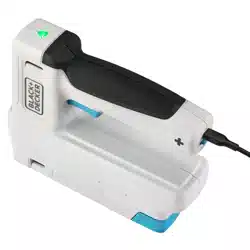
BCN115 STAPLER
Technical data
BCN115
Voltage
V
DC
3.6V(4V Max)
Staple size mm 6 - 14
Brad nail size mm 15
Weight kg 0.9
Intended use
Your BLACK+DECKER
TM
BCN115 cordless stapler has been
designed for craft applications. This product is intended for
household, consumer use only. Not suitable for xing electrical
cables.
Safety instructions
General power tool safety warnings
@
Warning! Read all safety warnings,
instructions, illustrations and
specications provided with this power
tool. Failure to follow the warnings and
instructions listed below may result in electric
shock, re and/or serious injury.
Save all warnings and instructions for future reference.
The term "power tool" in all of the warnings listed below
refers to your mains operated (corded) power tool or battery
operated (cordless) power tool.
1. Work area safety
a. Keep work area clean and well lit. Cluttered or dark
areas invite accidents.
b. Do not operate power tools in explosive atmospheres,
such as in the presence of ammable liquids, gases
or dust. Power tools create sparks which may ignite the
dust or fumes.
c. Keep children and bystanders away while operating a
power tool. Distractions can cause you to lose control.
2. Electrical safety
a. Power tool plugs must match the outlet. Never modify
the plug in any way.
Do not use any adapter plugs with earthed (grounded)
power tools. Unmodied plugs and matching outlets will
reduce risk of electric shock.
b. Avoid body contact with earthed or grounded
surfaces such as pipes, radiators, ranges and
refrigerators. There is an increased risk of electric shock
if your body is earthed or grounded.
c. Do not expose power tools to rain or wet conditions.
Water entering a power tool will increase the risk of
electric shock.
d. Do not abuse the cord. Never use the cord for
carrying, pulling or unplugging the power tool. Keep
cord away from heat, oil, sharp edges or moving
parts. Damaged or entangled cords increase the risk of
electric shock.
e. When operating a power tool outdoors, use an
extension cord suitable for outdoor use. Use of a cord
suitable for outdoor use reduces the risk of electric shock.
f. If operating a power tool in a damp location is
unavoidable, use a residual current device (RCD)
protected supply. Use of an RCD reduces the risk of
electric shock.
3. Personal safety
a. Stay alert, watch what you are doing and use common
sense when operating a power tool.
Do not use a power tool while you are tired or under
the inuence of drugs, alcohol or medication. A
moment of inattention while operating power tools may
result in serious personal injury.
b. Use personal protective equipment. Always wear eye
protection. Protective equipment such as a dust mask,
non-skid safety shoes, hard hat, or hearing protection
used for appropriate conditions will reduce personal
injuries.
c. Prevent unintentional starting. Ensure the switch is in
the off-position before connecting to power source
and/or battery pack, picking up or carrying the tool.
Carrying power tools with your nger on the switch or
energising power tools that have the switch on invites
accidents.
d. Remove any adjusting key or wrench before turning
the power tool on. A wrench or a key left attached to a
rotating part of the power tool may result in personal injury.
e. Do not overreach. Keep proper footing and balance at
all times. This enables better control of the power tool in
unexpected situations.
f. Dress properly. Do not wear loose clothing or jewellery.
Keep your hair and clothing away from moving parts.
Loose clothes, jewellery or long hair can be caught in
moving parts.
g. If devices are provided for the connection of dust
extraction and collection facilities, ensure these are
connected and properly used. Use of dust collection
can reduce dust-related hazards.
h. Do not let familiarity gained from frequent use of
tools allow you to become complacent and ignore
tool safety principles. A careless action can cause
severe injury within a fraction of a second.

4
ENGLISH
(Original instructions)
4. Power tool use and care
a. Do not force the power tool. Use the correct power
tool for your application.
The correct power tool will do the job better and safer at
the rate for which it was designed.
b. Do not use the power tool if the switch does not turn it
on and off. Any power tool that cannot be controlled with
the switch is dangerous and must be repaired.
c. Disconnect the plug from the power source and/or
remove the battery pack, if detachable, from the
power tool before making any adjustments, changing
accessories, or storing power tools. Such preventive
safety measures reduce the risk of starting the power tool
accidentally.
d. Store idle power tools out of the reach of children and
do not allow persons unfamiliar with the power tool or
these instructions to operate the power tool.
Power tools are dangerous in the hands of untrained
users.
e. Maintain power tools and accessories. Check for
misalignment or binding of moving parts, breakage of
parts and any other condition that may affect the
power tools operation. If damaged, have the power
tool repaired before use. Many accidents are caused by
poorly maintained power tools.
f. Keep cutting tools sharp and clean. Properly
maintained cutting tools with sharp cutting edges are less
likely to bind and are easier to control.
g. Use the power tool, accessories and tool bits etc. in
accordance with these instructions, taking into
account the working conditions and the work to be
performed.
Use of the power tool for operations different from those
intended could result in a hazardous situation.
h. Keep handles and grasping surfaces dry, clean and
free from oil and grease. Slippery handles and grasping
surfaces do not allow for safe handling and control of the
tool in unexpected situations.
5. Battery tool use and care
a. Recharge only with the charger specied by the
manufacturer. A charger that is suitable for one type of
battery pack may create a risk of re when used with
another battery pack.
b. Use power tools only with specically designated
battery packs. Use of any other battery packs may create
a risk of injury and re.
c. When battery pack is not in use, keep it away from
other metal objects, like paper clips, coins, keys,
nails, screws, or other small metal objects, that can
make a connection from one terminal to another.
Shorting the battery terminals together may cause burns
or a re.
d. Under abusive conditions, liquid may be ejected from
the battery; avoid contact. If contact accidentally
occurs, ush with water. If liquid contacts eyes,
additionally seek medical help. Liquid ejected from the
battery may cause irritation or burns.
e. Do not use a battery pack or tool that is damaged or
modied. Damaged or modied batteries may exhibit
unpredictable behaviour resulting in re, explosion or risk
of injury.
f. Do not expose a battery pack or tool to re or
excessive temperature. Exposure to re or temperature
above 130 °C may cause explosion.
g. Follow all charging instructions and do not charge the
battery pack or tool outside the temperature range
specied in the instructions. Charging improperly or at
temperatures outside the specied range may damage the
battery and increase the risk of re.
6. Service
a. Have your power tool serviced by a qualied repair
person using only identical replacement parts. This
will ensure that the safety of the power tool is maintained.
b. Never service damaged battery packs. Service of
battery packs should only be performed by the
manufacturer or authorized service providers.
Additional Safety Instructions for Cordless stapler
u Always wear safety glasses.
u Always wear ear protection.
u Only use fasteners of the type specied in the manual.
u Do not use any stands for mounting the tool to a
support.
u Do not disassemble or block any parts of the fastener
driving tool such as the contact trip.
u Prior to each operation check that the safety and
triggering mechanism is functioning properly and that
all nuts and bolts are tight.
u Do not use the tool as a hammer.
u Do not use the tool on a ladder.
u Never point any operational fastener driving tool at
yourself or at any other person.
u While working, hold the tool in such a way that no
injuries can be caused to the head or to the body in
the event of a possible recoil due to a disruption in
the energy supply or hard areas within the work piece.
u Never actuate the fastener driving tool into free space.
u In the work area, carry the tool at the workplace using
only one handle, and never with the trigger actuated.
u Consider the conditions in the work area Fasteners
can penetrate thin work pieces or slip off corners and
edges of the work piece, and thus put people at risk.
u Do not drive fasteners close to the edge of the work
piece.

5
ENGLISH
(Original instructions)
u Do not drive fasteners on top of other fasteners.
u Always assume that the tool contains fasteners.
Careless handling of the nailer can result in unexpected
ring of fasteners and personal injury.
u Do not point the tool towards yourself or anyone
nearby. Unexpected triggering will discharge the fastener
causing injury.
u Do not actuate the tool unless it is placed rmly
against the workpiece. If the tool is not in contact, the
fastener may be deected away from your target.
u Disconnect the tool from the power source when the
fastener jams in the tool. While removing a jammed
fastener, the nailer may be accidentally activated if it is
plugged in.
u Do not use this tool for fastening electrical cables.
It is not designed for electric cable installation and may
damage the insulation of electric cables thereby causing
electric shock or re hazards.
Labels on Appliance
The following symbols, along with the date code, are shown
on the appliance:
Warning! To reduce the risk of injury, the user
must read the instruction manual.
Important safety instructions for all integral battery
tools
Warning! Read all safety warnings, instructions, and
cautionary markings for the battery, charger and product.
Failure to follow the warnings and instructions may result in
electric shock, re and/or serious injury.
u Never force a charger plug into the tool.
u DO NOT modify the charger plug of a non-compatible
charger in any way to t into the tool as the battery may
rupture causing serious personal injury.
u DO NOT charge or use the battery in explosive atmos-
pheres, such as in the presence of ammable liquids,
gases or dust.
Inserting or removing the charger plug from the tool may
ignite the dust or fumes.
u Only charge the battery with the provided charge lead and
a suitable class 2 power supply.
u DO NOT splash or immerse in water.
u DO NOT allow water or any liquid to enter tool.
u DO NOT store or use the tool in locations where the
temperature may reach or exceed 104 °F (40 °C) (such as
outside sheds or metal buildings in summer). For best life
store tools in a cool, dry location.
u Do not store the tool with the switch locked on. Never tape
the switch in the ON position.
u DO NOT incinerate the tool even if it is severely dam-
aged or is completely worn out. The battery can explode
in a re. Toxic fumes and materials are created when
lithium-ion batteries are burned.
u If battery contents come into contact with the skin, im-
mediately wash area with mild soap and water. If battery
liquid gets into the eye, rinse water over the open eye for
15 minutes or until irritation ceases. If medical attention is
needed, the battery electrolyte is composed of a mixture
of liquid organic carbonates and lithium salts.
u Contents of opened battery cells may cause respiratory
irritation. Provide fresh air. If symptoms persist, seek
medical attention.
u Battery liquid may be ammable if exposed to spark or
ame.
u Never attempt to open the tool for any reason.
If the tool case is cracked or damaged, do not charge. Do
not crush, drop or damage the tool.
Do not use a tool or charger that has received a sharp
blow, been dropped, run over or damaged in any way
(e.g., pierced with a nail, hit with a hammer, stepped on).
Damaged tools should be returned to the service center
for recycling.
Storage recommendations
The best storage place is one that is cool and dry, away from
direct sunlight and excess heat or cold.
Store the fully charged tool disconnected from the charger.
Transportation
Note: Integral Li-ion tools should not be put in checked
baggage on airplanes and must be properly protected from
short circuits if they are in carry-on baggage.
Important safety instructions for all integral battery
charging
Warning! Read all safety warnings, instructions, and
cautionary markings for the battery, charging cable and
product. Failure to follow the warnings and instructions may
result in electric shock, re and/or serious injury.
u Use only with the Listed/Certied Information Technology
(computer) Equipment.
u DO NOT expose charging cable to water, rain or snow.
u Pull by the plugs rather than the cord when disconnecting
the charging cable. This will reduce the risk of damage to
the plugs and cord.
u Make sure that the cord is located so that it will not be
stepped on, tripped over or otherwise subjected to dam-
age or stress.
u When charging the tool outdoors, always provide a dry
location.
u DO NOT use a charging cable with a damaged cord or
plugs. Have them replaced immediately.

6
ENGLISH
(Original instructions)
u Foreign materials of a conductive nature, such as, but not
limited to, grinding dust, metal chips, steel wool, aluminum
foil or any buildup of metallic particles should be kept
away from the charging and micro charging plugs and
port.
u Always unplug the charging cable from the power supply
when there is no tool attached to it.
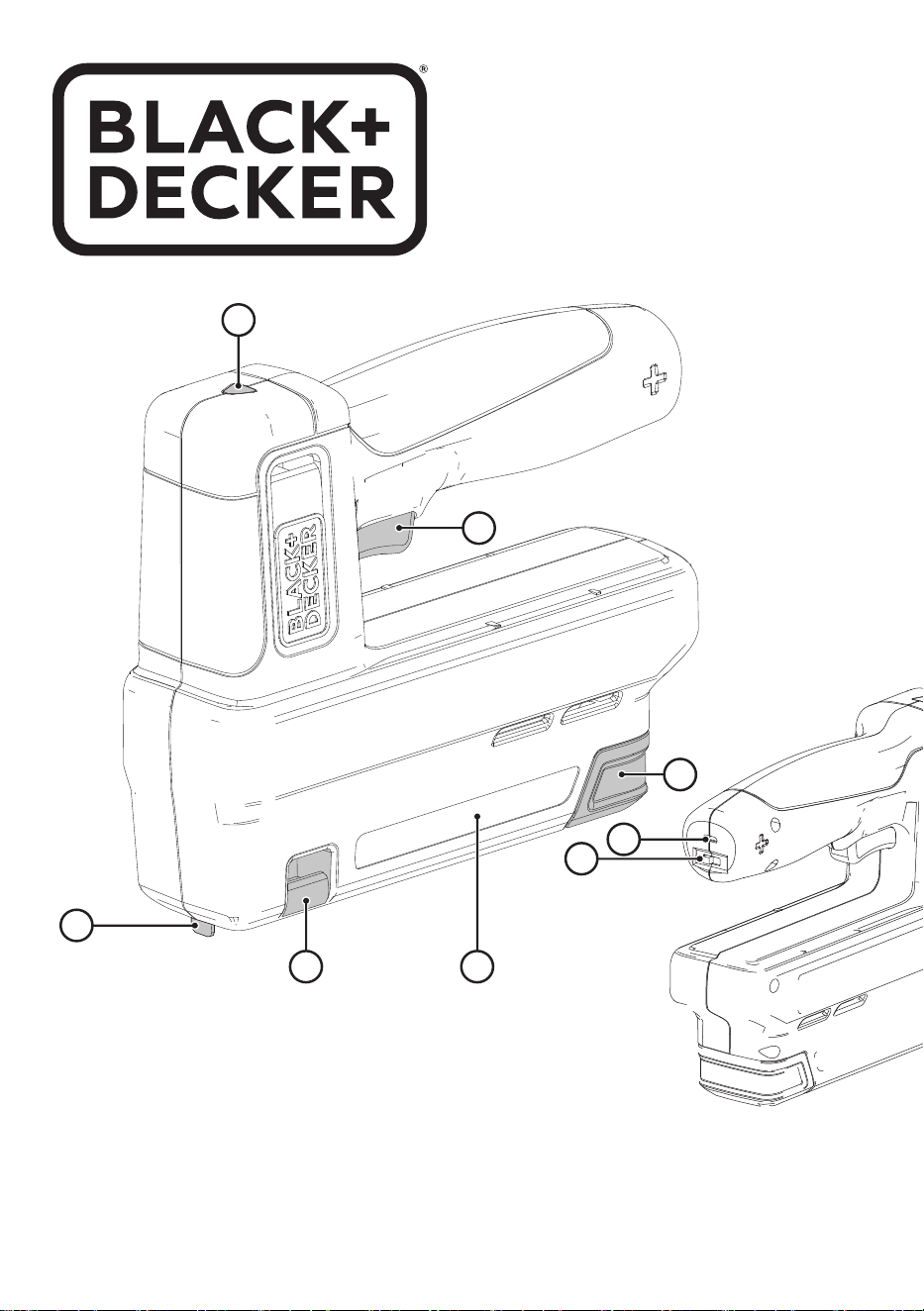
Features
This appliance includes some or all of the following features:
1. Trigger
2. Power switch
3. Charge indicator/ready to use LED
4. Contact trip
5. Magazine
6. Magazine release clip
7. Stapler viewing window
8. Charge port
9. Charge lead
Assembly
Warning! To reduce the risk of serious personal injury, turn
unit off and keep away from the on-off button before making
any adjustments or removing/installing attachments or
accessories. An accidental start‑up can cause injury.
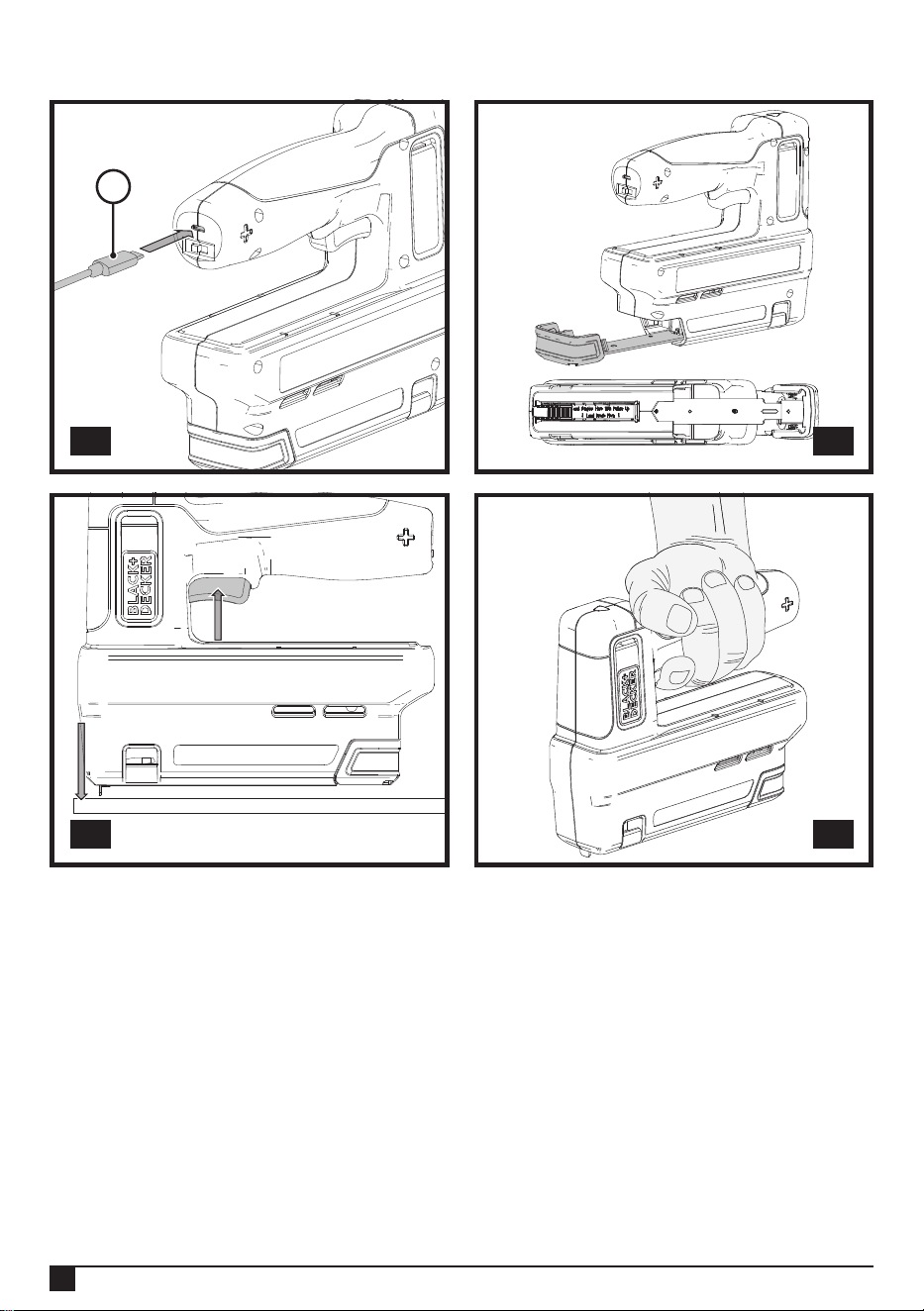
Charging procedure (g. A)
Warning! Do not use tool while it is connected to the charger.
u Insert the charging plug (9) into the charge port (8).
u Plug the charging plug into any charging port (such as on
a computer).
u The charging indicator LED (3) will ash red while
charging.
u The charging indicator LED will change to solid green
when fully charged.
u Battery can be left charging or charger can be
disconnnected.
Important charging notes
u The charger and tool may become warm to the touch
while charging.
This is a normal condition, and does not indicate a
problem. To facilitate the cooling of the tool after use,
avoid placing the charger or tool in a warm environment
such as in a metal shed or an uninsulated trailer.
u If the tool does not charge properly, take the tool and
charger to your local service center.
u You may charge a partially used battery whenever you
desire with no adverse effect on the tool.
Assembly and adjustments
Warning! To reduce the risk of serious personal injury,
turn unit off and keep away from the trigger before making
any adjustments or removing/installing attachments or
accessories. An accidental start‑up can cause injury.
Preparing the tool
Warning! Keep the tool pointed away from yourself and others.
Serious personal injury may result.
Warning! To reduce the risk of serious personal injury, ensure
power switch is in the off position and keep hands away from
trigger and remove staples and brad nails from magazine
before making adjustments.
Warning! NEVER spray or in any other way apply lubricants
or cleaning solvents inside the tool. This can seriously affect
the life and performance of the tool.
u Read the Safety Instruction section of this manual.
u Wear eye and ear protection.
u Ensure magazine 5 is empty of all fasteners.
u Place contact trip 4 onto work surface to check for smooth
and proper operation of contact trip. Do not use tool if it is
not functioning properly. NEVER use a tool that has the
contact trip restrained in the actuated position.
u Keep tool pointed away from yourself and others.
Loading the tool (Fig. B)
Warning! Keep the tool pointed away from yourself and
others. Serious personal injury may result.
Warning! Always ensure the power switch is in the off position
before loading or unloading.
Warning! Never load staples/brad nails with the contact trip or
trigger activated. Personal injury may result.
Universal compatibility with heavy duty staples 6mm-14mm,
10.6mm crown width, and 15mm brad nails.
u Pinch the magazine release clip (6) and pull out the sliding
magazine (5).
u Load fasteners. Ensure staples are loaded so that crown
of the staples sits against inside surface of the magazine.
Note: The head of the brad nail must sit against the left, inside
surface of the magazine. If loaded on right side the magazine
will not close.
u Close sliding magazine until the magazine latch clips
snuggly in place.
Unloading the tool
Warning! Always ensure the power switch is in the off (0)
position.
u Pinch the magazine release clip (6) and pull out the sliding
magazine (5) .
u Tip the tool to the side until the staples slide freely out of
the bottom of the magazine.
u Check to ensure no loose staples remain inside magazine.
u Close sliding magazine fully.
Clearing a jammed staple
If a staple becomes jammed in the magazine, keep the tool
pointed away from you and follow these instructions to clear:

7
ENGLISH
(Original instructions)
Warning! Always ensure the power switch is in the off position
before clearing a jammed staple
u Pinch the magazine release clip (6) and remove any
loaded staples.
u Visually check inside magazine (5) for any jammed
staples.
u Remove bent staple using pliers if necessary.
u Reinsert staples into magazine (see Loading the Tool).
Operation
Warning! To reduce the risk of serious personal injury,
turn unit off and keep away from the trigger before making
any adjustments or removing/installing attachments or
accessories. An accidental start‑up can cause injury.
Trigger operation (Fig. C)
Warning! Always wear proper eye and hearing protection
when operating tool.
Warning! Keep ngers AWAY from trigger when not driving
staples to avoid accidental fastener discharge. NEVER carry
tool with nger on trigger.
u Push the power switch (2) from "O" to "I" to turn stapler
on.
u Fully depress contact trip (4) against the work surface and
the green indicator (3) should light up.
u Pull trigger (1) fastener will drive into work surface.
Note: Maintain downward pressure on work surface until the
fastener is driven into the work surface.
u Release trigger.
u Lift contact trip off work surface.
u Repeat steps 1 through 4 for next application.
Note: The contact trip needs to be depressed followed by a
trigger pull for each fastener followed by a release of both the
contact trip and trigger after each fastener.
Correct hand position (Fig. D)
Warning! To reduce the risk of serious personal injury,
ALWAYS use proper hand position as shown.
Warning! To reduce the risk of serious personal injury,
ALWAYS hold securely in anticipation of a sudden reaction.
Correct hand position requires one hand on the main handle.
Maintenance
Your BLACK+DECKER appliance has been designed
to operate over a long period of time with a minimum of
maintenance. Continuous satisfactory operation depends
upon proper care and regular cleaning.
u Regularly clean the appliance using a damp cloth. Do not
use any abrasive or solvent-based cleaner. Never let any
liquid get inside the appliance and never immerse any part
of the appliance into liquid.
Accessories
Warning! Since accessories, other than those offered by
BLACK+DECKER, have not been tested with this product,
use of such accessories with this tool could be hazardous. To
reduce the risk of injury, only BLACK+DECKER recommended
accessories should be used with this product.
Recommended accessories for use with your tool are
available at extra cost from your local dealer or authorized
service center.
u TRA704T – 6mm Flat Wire Staple 10.6x 1.26mm
u TRA705T – 8 mm Flat Wire Staple 10.6x 1.26mm
u TRA706T – 10mm Flat Wire Staple 10.6x 1.26mm
u TRA708T – 12mm Flat Wire Staple 10.6x 1.26mm
u TRA709T – 14mm Flat Wire Staple 10.6x 1.26mm
u SWK‑BN0625T – 15mm/5/8"/18ga brad nails J type
Warning! Before performing any maintenance on the tool,
remove the battery from the tool. Unplug the charger before
cleaning it.
u Regularly clean the ventilation slots in your tool and
charger using a soft brush or dry cloth.
u Regularly clean the motor housing using a damp cloth. Do
not use any abrasive or solvent-based cleaner.
u Regularly tap bit holder to remove any dust from the
interior.
Maintenance
Your BLACK+DECKER tool has been designed to operate
over a long period of time with a minimum of maintenance.
Continuous satisfactory operation depends upon proper tool
care and regular cleaning.
Your charger does not require any maintenance apart from
regular cleaning.
Warning! Before performing any cleaning or maintenance on
the tool, unplug the charger.
● Regularly clean the ventilation slots in your tool using a
soft brush or dry cloth.
● Regularly clean the motor housing using a damp cloth.
Do not use any abrasive or solvent-based cleaner.
Protecting the environment
Z
Separate collection. Products and batteries
marked with this symbol must not be disposed of
with normal household waste.
Products and batteries contain materials that can be recov-
ered or recycled reducing demand for raw materials.
Please recycle electrical products and batteries accord-
ing to local provisions. Further information is available at
www.2helpU.com
Service Information
BLACK+DECKER offers a full network of company-owned
and authorized service locations throughtout Asia. All
BLACK+DECKER Service Centers are staffed with trained

8
9
8
ENGLISH
(Original instructions)
personnel to provide customers with efcient and reliable
product service.
Whether you need technical advice, repair, or genuine factory
replacement parts, contact the BLACK+DECKER location
nearest to you.
Note
● BLACK+DECKER’s policy is one of continuous improve-
ment to our products and, as such, we reserve the right to
change product specications without prior notice.
● Standard equipment and accessories may vary by country.
● Product specications may differ by country.
● Complete product range may not be available in all
countries. Contact your local BLACK+DECKER dealers for
range availability.
8
9
한국어
2
3
한국어
BCN115
스테이플러
기술데이터
BCN115
전압
V
DC
3.6V (4V Max)
스테이플 사이즈
mm 6 - 14
브래드 네일 크기
mm 15
무게
kg 0.9
용도
BLACK+DECKERTM BCN115 무선 스테이플러는 공예용으로 설계되
었습니다. 이 제품은 가정용, 소비자 전용입니다. 전기 케이블 고정
에는 적합하지 않습니다.
안전수칙
전동공구에관한일반안전경고
@
경고!안전경고,지침,그림및사양을읽으십
시오. 아래 나열된 경고 및 지침을 따르지 않으
면 감전, 화재 및 / 또는 심각한 부상을 입을 수
있습니다.
향후참고할수있도록모든경고및지시사항을보관해두십시오.
아래 나열된 모든 경고에서W“전동 공구”라는 용어는 주전원으로
작동되는 (유선) 전동 공구 또는 배터리로 작동되는 (무선) 전동
공구를 나타냅니다.
1. 작업장안전
a. 작업장을항상청결하고밝게유지하십시오. 혼잡하거나
어두운 작업장에서는 사고가 발생하기 쉽습니다.
b. 가연성액체,가스또는먼지등이있는폭발성대기에서전동
공구를사용하지마십시오.전동 공구에서 먼지나 가스를
발화시킬 수 있는 불꽃이 튈 수 있습니다.
c. 전동공구로작업하는동안에는어린이와주변사람들이작업
영역에가까이들어오지못하도록하십시오. 주의가 산만
해지면 통제력을 잃을 수 있습니다.
2. 전기안전
a. 전동공구의플러그는콘센트와형식이일치해야하며,
플러그를어떤형태로든개조하지마십시오.
또한접지된전동공구에다른어댑터플러그를사용하지
마십시오.
개조되지 않은 플러그 및 형식이 일치하는 콘센트를 사용하면
감전 위험이 줄어듭니다.
b. 파이프관,라디에이터,렌지,냉장고등의접지표면에물이
닿지않도록하십시오. 몸에 닿을 경우 감전이 될 위험이
높아집니다.
c. 전동공구를비또는습한환경에노출하지않도록
주의하십시오. 전동 공구에 물이 들어가면 감전 위험이
높아집니다.
d. 코드를남용하지마십시오.코드를사용하여전동공구를
운반하거나당기거나뽑지마십시오.코드를열,기름,
날카로운모서리또는움직이는부품에서멀리하십시오.
손상되거나 얽힌 코드는 감전의 위험을 높입니다.
e. 실외에서전동공구를사용할경우실외용으로적합한연장
코드를사용하십시오.실외 사용에 적합한 코드를 사용하면
감전의 위험을 줄일 수 있습니다.
f. 습한장소에서전동공구를작동하는것이불가피한경우RCD
(잔류전류장치)보호전원을사용하십시오. RCD 를 사용하면
감전의 위험이 줄어듭니다.
3. 신체안전사항
a. 전동공구를작동할때는경계를유지하고수행중인작업을
주의깊게살펴보고올바른방법으로사용하십시오.피곤한
상태이거나약물,술,치료제를복용한상태에서는전동공구를
사용하지마십시오.
전동 공구를 작동하는 동안 잠시 부주의하면 심각한 부상을
입을 수 있습니다.
b. 신체보호장비를착용하십시오.항상보안경을착용하십시오.
적합한 상황에서 방진 마스크, 미끄럼 방지 안전화, 안전모
또는 청력 보호 기구 등의 보호 장비를 사용하면 신체 부상
위험이 줄어듭니다.
c. 의도하지않은장비가동방지.전원및/또는배터리팩에
연결한상태로공구를선택또는운반할때는사전에스위치가
꺼짐위치에있는지반드시확인하십시오.스위치가 켜짐
위치에 있는 상태에서 스위치에 손가락이 닿은 상태로 전동
공구를 운반하거나 전동 공구에 전원을 공급하면 사고가
발생합니다.
d. 전동공구를켜기전에모든조정키또는렌치를제거하십시오.
전동 공구의 회전 부품에 렌치나 키가 부착되어 있으면 부상을
당할 수 있습니다.
e. 지나치게손을뻗지마십시오.항상적절한발판과균형을
유지하십시오. 안정된 자세로 작업을 할 경우 전동 공구를
안전하게 사용할 수 있습니다.
f. 작업에적절한의복을착용하십시오.헐렁한옷이나장신구를
착용하지마십시오.머리카락,의복및장갑을움직이는부품에
가까이하지마십시오. 헐렁한 옷, 장신구 또는 긴 머리가
움직이는 부품에 낄 수 있습니다.
g. 먼지배출및집진시설연결을위한장치가제공된경우,이들
장치가연결되어적절히사용되고있는지반드시확인하십시오.
집진 장치를 사용하면 먼지와 관련된 위험을 줄일 수 있습니다.
h. 공구를자주사용하여얻은친숙함으로인해안주하고도구
안전원칙을무시하게하지마십시오. 부주의한 행동은 1 초
미만의 찰나의 순간에 심각한 부상을 초래할 수 있습니다.
4. 전동공구사용및관리
a. 전동공구에무리한힘을가하지마십시오.해당용도에맞는
올바른전동공구를사용하십시오.올바른 전동 공구를
사용해야 설계된 속도로 작업을 더욱 안전하고 정확하게
수행할 수 있습니다.
b. 전원스위치가켜지지않거나꺼지지않는경우전동공구를
사용하지마십시오. 스위치로 제어되지 않는 전동 공구는
위험하므로 수리해야 합니다.
c. 조정을하거나,액세서리를교체하거나,전동공구를보관하기
전에전원에서플러그를뽑거나전동공구에서배터리팩을

10
11
한국어
4
5
한국어
분리하십시오.
이러한 예방 안전 조치를 따라야 전동 공구가 갑자기 작동할
위험이 줄어듭니다.
d. 사용하지않는전동공구는어린이의손이닿지않는곳에
보관하고,전동공구나본지시사항에익숙하지않은사람이
전동공구를절대사용하지못하게하십시오.전동 공구는
훈련을 받지 않은 사용자가 다루면 위험합니다.
e. 전동공구를유지관리하십시오.움직이는부품의잘못된
정렬이나바인딩,부품파손및기타전동공구의작동에영향을
미칠수있는기타모든상태를확인하십시오. 손상된부분이
있는경우사용하기전에전동공구를수리하십시오. 많은
사고는 전동 공구를 제대로 유지 보수하지 않아 발생합니다.
f. 공구를깨끗한상태로유지하십시오.
g. 작업환경과수행할작업을고려하여,본지시사항에따라
전동공구,액세서리및툴비트등을사용하십시오. 본 사용
설명서의 내용과 다른 용도로 전동 공구를 사용하면 위험한
상황이 발생할 수 있습니다.
h. 손잡이와작업표면을건조하고깨끗하게유지하고물기와
기름이묻지않도록하십시오. 미끄러운 손잡이와 작업 표면은
예기치 않은 상황에서 공구를 안전하게 취급하고 제어할 수
없습니다.
5. 배터리공구사용및주의사항
a. 다시충전할때는제조업체에서지정한충전기만사용하십시오.
하나의 배터리 팩 유형에 적합한 충전기를 다른 배터리 팩과
함께 사용할 경우 화재의 위험이 있습니다.
b. 전동공구를사용할때는구체적으로지정되어있는배터리
팩만사용하십시오.다른 배터리 팩을 사용하면 부상을 입거나
화재의 위험이 있습니다.
c. 배터리팩을사용하지않을때에는클립,동전,키,못,나사
등의금속물체나,단자간에연결할수있는작은금속물체가
닿지않도록멀리두십시오.배터리 단자가 접촉되면 화상을
입거나 화재의 위험이 있습니다.
d. 배터리를과다사용하면액체가배터리에서흘러나올수
있으므로,접촉을피하십시오.실수로접촉한경우에는물로
씻으십시오.액체가눈에들어간경우치료를받으십시오.
배터리에서 나온 액체는 통증을 유발하거나 화상을 입힐 수
있습니다.
e. 손상되거나개조된배터리팩이나도구를사용하지마십시오.
손상되거나 개조된 배터리는 화재, 폭발 또는 부상 위험을
초래하는 예측할 수 없는 동작을 나타낼 수 있습니다.
f. 배터리팩이나도구를불이나과도한온도에노출시키지
마십시오.화재 또는 130 °C 이상의 온도에 노출되면 폭발을
일으킬 수 있습니다.
g. 모든충전지침을따르고배터리팩이나도구를충전하지
마십시오.지침에명시된온도범위를벗어납니다.부적절하게
충전하거나 지정된 범위를 벗어난 온도에서 충전하면 배터리가
손상되고 화재의 위험이 증가할 수 있습니다.
6. 유지보수
a. 자격을갖춘기술자가동일교체부품을사용하여정비작업을
수행해야합니다. 그래야 전동 공구의 안전이 보장됩니다.
b. 손상된배터리팩을수리하지마십시오.배터리 팩의 서비스는
제조업체 또는 공인 서비스 제공 업체에서만 수행해야 합니다.
무선스테이플러에대한추가안전지침
항상보안경을착용하십시오.
항상귀마개를착용하십시오.
설명서에지정된유형의패스너만사용하십시오.
공구를고정하기위해스탠드를사용하지마십시오.
접촉트립과같은패스너구동공구의부품을분해하거나막지
마십시오.
각작동전에안전및트리거링메커니즘이제대로작동하고모
든너트와볼트가조여져있는지확인하십시오.
공구를망치로사용하지마십시오.
사다리위에서공구를사용하지마십시오.
작동가능한패스너구동공구를자신이나다른사람에게가리
키지마십시오.
작업하는동안에너지공급중단또는작업물내의단단한부분
으로인해반동이발생할경우머리나신체에부상을입힐수
없는방식으로공구를잡으십시오.
패스너구동공구를여유공간으로작동하지마십시오.
작업장에서는한개의핸들만사용하여작업장에서공구를운
반하고트리거를작동시키지마십시오.
작업영역의조건을고려하십시오.패스너는얇은작업조각을
관통하거나작업조각의모서리와모서리에서미끄러져사람을
위험에빠뜨릴수있습니다.
공작물가장자리가까이에서패스너를조이지마십시오.
다른패스너위에패스너를설치하지마십시오.
항상공구에패스너가포함되어있다고가정합니다.
네일러를 부주의하게 취급하면 패스너가 예기치 않게 발사되고
부상을 입을 수 있습니다.
공구가자신이나근처에있는사람을향하게하지마십시오.
예상치 못한 작동으로 인해 패스너가 방전되어 부상을 입을
수 있습니다.
공작물에단단히고정되어있지않으면공구를작동하지마십
시오. 공구가 접촉하지 않으면 패스너가 대상에서 멀어질 수 있
습니다.
패스너가공구에걸리면전원에서공구를분리하십시오. 걸린
패스너를 제거하는 동안 네일러가 꽂혀 있으면 실수로 네일러
가 활성화될 수 있습니다.
전기케이블을고정하는데이공구를사용하지마십시오. 전기
케이블 설치용이 아니므로 전기 케이블의 절연이 손상되어 감
전 또는 화재의 위험이 있습니다.
기기의라벨
날짜 코드와 함께 다음 기호가 기기에 표시됩니다:
경고!부상의 위험을 줄이기 위해 사용자는 사용
설명서를 읽어야 합니다.
모든내장형배터리공구에대한
중요안전지침
경고!배터리,배터리, 충전기 및 제품에 대한 지침 및 주의 표시. 경
고 및 지침을 따르지 않으면 감전, 화재 및 / 또는 심각한 부상을 입
을 수 있습니다.
충전기 플러그를 공구에 강제로 꽂지 마십시오.

10
11
한국어
4
5
한국어
충전 케이블을 분리할 때는 코드가 아닌 플러그를 잡아 당기십
시오. 이렇게 하면 플러그와 코드가 손상될 위험이 줄어듭니다.
전원선을 무리하게 구부리거나 무거운 물건에 눌려 손상되지
않도록 주의하십시오.
*전원선이 손상되어 감전 또는 화재의 원인이 됩니다.
야외에서 공구를 충전할 때는 항상 건조한 장소를 제공하십시
오.
코드나 플러그가 손상된 충전 케이블을 사용하시 마시고 즉시
교체하십시오.
연마 먼지, 금속 조각, 강철 수세미, 알루미늄 호일 또는 축적된
금속 입자와 같은 (이에 국한되지 않음) 전도성이 있는 이물질
은 충전 및 마이크로 충전 플러그 및 포트에서 멀리 떨어져 있
어야 합니다.
연결된 공구가 없을 때는 항상 전원 공급 장치에서 충전 케이블
을 뽑으십시오.
제품 충전 시 제품에서 연기가 나면 즉시 전원 플러그를 뺀 후
스탠리블랙앤데커 고객지원센터로 연락하십시오.
제품을 충전할 때, 제품 전원을 껐는지 반드시 확인하고 충전하
십시오.
충전 케이블이 침수됐거나 물이 들어간 경우에는 사용을 중지
하십시오.
충전 케이블을 청소 할 때는 반드시 전원 플러그를 빼십시오.
외출 시에는 반드시 충전 케이블을 뽑아 주십시오.
*누전, 화재의 원인이 될 수 있습니다.
충전 단자에 젓가락, 드라이버 등을 넣거나 접촉하여 쇼트 시키
지 마십시오.
동물이 충전기 전원선을 갉아 먹지 않도록 주의 하십시오.
어린이 등, 경험과 지식이 부족한 사람이 사용할 경우에는 보호
자가 꼭 보호하에 사용하도록 해주십시오.
기능
이 공구에는 다음 기능 중 일부 또는 모두가 포함되어 있습니다:
1. 트리거
2. 전원 스위치
3. 충전 표시기/사용 준비 LED
4. 접점 트립
5. 매거진
6. 매거진 릴리스 클립
7. 재장전 표시
8. 충전 포트
9. USB 충전 케이블
어셈블리
경고!심각한 부상의 위험을 줄이려면 조정을 하거나 부착물 또는
액세서리를 제거/설치하기 전에 장치를 끄고 전원 버튼에서 멀리
떨어지십시오. 실수로 작동하면 부상을 입을 수 있습니다.
충전절차(그림A)
경고!충전기에 연결된 상태에서 공구를 사용하지 마십시오.
USB 충전 케이블 을 충전 포트 (8) 에 삽입합니다.
USB 충전 케이블을 충전 포트 (예: 컴퓨터) 에 꽂습니다.
충전 표시기 LED (3) 는 충전하는 동안 빨간색으로 깜박입니다.
배터리가 파열되어 심각한 부상을 입을 수 있으므로 호환되지
않는 충전기의 충전기 플러그를 공구에 맞도록 개조하지 마십
시오.
가연성 액체, 가스 또는 먼지가 있는 곳과 같은 폭발성 환경에
서 배터리를 충전하거나 사용하지 마십시오. 가연성 액체, 가스
또는 먼지가 있는 곳과 같은 폭발성 환경에서 배터리를 충전하
거나 사용하지 마십시오.
제공된 충전 리드와 적절한 클래스 2 전원 공급 장치로만 배터
리를 충전하십시오.
튀거나 물에 담그지 마십시오.
물이나 액체가 공구에 들어가지 않도록 하십시오.
온도가 40°C (104°F) 에 도달하거나 초과할 수 있는 위치
(예: 여름에 외부 창고 또는 금속 건물) 에 공구를 보관하거나
사용하지 마십시오.
서늘하고 건조한 장소에서 최고의 생활 공구를 보관하십시오.
ON 위치에 있는 스위치를 테이프로 붙이지 마십시오.
공구가 심하게 손상되었거나 완전히 마모된 경우에도 소각하지
마십시오. 배터리는 화재로 폭발할 수 있습니다. 리튬 이온 배
터리를 태울 때 유독 가스와 물질이 생성됩니다.
배터리 내용물이 피부에 닿으면 즉시 중성 세척제로 해당 부위
를 씻으십시오. 배터리액이 눈에 들어갔을 경우, 15 분 정도 또
는 통증이 가실 때까지 눈을 뜨고 물로 씻어냅니다. 의료 조치
가 필요한 경우 배터리 전해질은 액체 유기 탄산염과 리튬 염의
혼합물로 구성됩니다.
열린 배터리 셀의 내용물은 호흡기 자극을 유발할 수있습니다.
신선한 공기를 마시십시오. 증상이 계속되면 치료를
받으십시오.
배터리액은 불꽃이나 화염에 노출되면 연소될 수 있습니다.
어떤 이유로든 공구를 열려고 시도하지 마십시오. 공구
케이스에 금이 가거나 손상된 경우 충전하지 마십시오. 공구를
부수거나 떨어뜨리거나 손상시키지 마십시오. 날카로운 타격을
받거나, 떨어뜨리거나, 밟히거나, 어떤 방식으로든 손상된
(예: 못으로 뚫기, 망치로 두들기거나 밟힌) 공구나 충전기를
사용하지 마십시오. 손상된 공구는 재활용을 위해 서비스
센터에 반환해야 합니다.
보관권장사항
보관 장소로는 직사광선을 받지 않고 지나치게 덥거나 춥지 않은
시원하고 건조한 곳이 가장 좋습니다. 완전히 충전된 공구는
충전기에서 분리하여 보관하십시오.
운반
참고:일체형 리튬 이온 공구는 비행기의 위탁 수하물에 넣으면 안
되며 휴대 수하물에 있는 경우 합선으로부터 적절히 보호되어야
합니다.
모든통합배터리충전에대한중요
안전지침
경고!배터리, 충전 케이블 및 제품에 대한 모든 안전 경고, 지침 및
주의 표시를 읽으십시오. 경고 및 지침을 따르지 않으면 감전, 화재
및 / 또는 심각한 부상을 입을 수 있습니다.
충전 케이블을 물, 비 또는 눈에 노출시키지 마십시오.

12
13
한국어
6
7
한국어
완전히 충전되면 충전 표시기 LED 가 녹색으로 계속 바뀝니다.
배터리를 충전 상태로 두거나 충전기를 분리할 수 있습니다.
중요한충전참고사항
충전하는 동안 충전기와 공구를 만지면 뜨거워질 수 있습니다.
사용 후 공구의 냉각을 용이하게 하려면 충전기나 공구를 금속
창고나 절연되지 않은 트레일러와 같은 따뜻한 환경에 두지 마
십시오.
공구가 제대로 충전되지 않으면 공구와 충전기를 가까운 서비
스 센터로 가져가십시오.
공구에 악영향을 미치지 않고 원할 때마다 부분적으로 사용한
배터리를 충전할 수 있습니다.
조립및조정
경고!심각한 부상의 위험을 줄이려면 조정을 하거나 부착물 또는
액세서리를 제거/설치하기 전에 장치를 끄고 전원 버튼에서 멀리
떨어지십시오. 실수로 작동하면 부상을 입을 수 있습니다.
공구준비
경고!공구를 자신과 다른 사람에게서 멀리하십시오. 심각한 부상을
입을 수 있습니다.
경고!
심각한 부상의 위험을 줄이려면 조정을 하거나 전원 스위치가
꺼짐 위치에 있는지 확인하고 방아쇠에서 손을 떼고 조정하기 전에
매거진에서 스테이플과 브래드 못을 제거하십시오.
경고!
공구 내부에 절대로 스프레이하거나 다른 방식으로 윤활제 나
세척 용제를 바르지 마십시오.
이 설명서의 안전 지침 섹션을 읽으십시오.
눈과 귀 보호구를 착용하십시오.
매거진 5 에 모든 패스너가 있는지 확인하십시오.
접점 트립 4 를 작업 표면에 놓고 접점 트립이 원활하고 적절하
게 작동하는지 확인합니다. 공구가 제대로 작동하지 않는 경우
공구를 사용하지 마십시오. 작동 위치에서 접점 트립이 억제된
공구를 사용하지 마십시오.
공구는 자신과 다른 사람의 손이 닿지 않는 곳에 두십시오.
공구장착(그림B)
경고! 공구를 자신과 다른 사람에게서 멀리하십시오. 심각한 부상을
입을 수 있습니다.
경고!
장착 또는 해제하기 전에 항상 전원 스위치가 꺼짐 위치에
있는지 확인하십시오.
경고! 접점 트립 또는 트리거가 활성화된 상태에서 스테이플/
브래드 못을 장착하지 마십시오. 부상을 입을 수 있습니다.
6mm-14mm
, 10.6mm 크라운 너비 및 15mm 브래드 못과의 범용
스테이플과의 호환성.
매거진 릴리스 클립 (6) 을 잡고 슬라이딩 매거진 (5) 을 당겨
빼냅니다.
패스너를 장착합니다. 스테이플의 용두가 매거진의 안쪽 표면
에 닿도록 스테이플을 넣었는지 확인합니다.
참고: 브래드 못의 헤드부는 매거진의 왼쪽 안쪽 표면에 닿아야
합니다.
매거진 걸쇠가 제자리에 꼭 맞을 때까지 슬라이딩 매거진을 닫
습니다.
공구언로딩
경고! 항상 전원 스위치가 꺼짐 (0) 위치에 있는지 확인하십시오.
매거진 분리 클립 (6) 을 잡고 슬라이딩 매거진 (5) 을 당겨 빼
냅니다.
스테이플이 매거진 바닥에서 자유롭게 미끄러질 때까지 공구를
옆으로 기울이십시오.
매거진 내부에 느슨한 스테이플이 남아 있지 않은지 확인하십
시오.
슬라이딩 매거진을 완전히 닫습니다.
걸린스테이플제거
스테이플이 매거진에 걸린 경우 공구를 사용자의 반대쪽으로
향하게 하고 다음 지침에 따라 제거하십시오:
경고!
걸린 스테이플을 제거하기 전에 항상 전원 스위치가 꺼짐
위치에 있는지 확인하십시오.
매거진 릴리스 클립 (6) 을 잡고 장착된 스테이플을 제거합니다.
매거진 (5) 내부에 걸린 스테이플이 있는지 육안으로 확인합니다.
필요한 경우 펜치를 사용하여 구부러진 스테이플을 제거합니다.
스테이플을 매거진에 다시 삽입합니다 (공구 넣기 참조).
조작
경고!심각한 부상의 위험을 줄이려면 조정을 하거나 부착물 또는
액세서리를 제거/설치하기 전에 장치를 끄고 전원 버튼에서 멀리
떨어지십시오. 실수로 작동하면 부상을 입을 수 있습니다.
트리거작동(그림C)
경고! 공구를 작동할 때는 항상 적절한 눈과 청력 보호 장비를
착용하십시오.
경고!
우발적인 패스너 배출을 방지하기 위해 스테이플을 구동하지
않을 때는 손가락을 트리거에서 멀리 두십시오. 절대로 트리거에
손가락으로 공구를 옮기지 마십시오.
전원 스위치 (2) 를 "O" 에서 "I" 로 눌러 스테이플러를 켭니다.
작업 표면에 대해 접점 트립 (4) 을 완전히 누르고 녹색 표시기
(3) 가 켜져야 합니다.
트리거 (1) 를 당기면 패스너가 작업 표면으로 들어가게 됩니다.
참고:패스너가 작업 표면으로 들어갈 때까지 작업 표면에 아래쪽
압력을 유지합니다.
트리거를 놓습니다.
접촉 트립을 작업 표면에서 들어 올립니다.
다음 작업을 위해 1-4 단계를 반복합니다.
참고:접점 트립을 누른 다음 각 패스너에 대해 트리거를 당긴 다음
각 패스너 후에 접점 트립과 트리거를 모두 풀어야 합니다.
올바른손위치(그림D)
경고!심각한 부상의 위험을 줄이기 위해,
항상그림과 같이 적절한 손 위치를 사용하십시오.
경고!심각한 부상의 위험을 줄이려면 갑작스러운 반응에 대비하여
항상 단단히 잡으십시오. 올바른 손 위치를 지정하려면 한 손으로
메인 핸들을 잡아야 합니다.

12
13
한국어
6
7
한국어
유지보수
BLACK+DECKER 공구는 최소한의 유지 관리로 장기간 작동하도록
설계되었습니다. 만족스러운 연속 작동은 적절한 공구 관리와
정기적인 청소에 따라 그 성능이 달라질 수 있습니다.
젖은 천으로 제품을 정기적으로 청소하십시오. 제품 내부에
액체가 들어가지 않도록 하고 제품의 어떤 부분도 액체에
담그지 마십시오.
액세서리
경고! BLACK+DECKER 에서 제공하는 액세서리 이외의 액세서리는
이 제품에서 테스트되지 않았으므로 이 공구와 함께 이러한
액세서리를 사용하면 위험할 수 있습니다. 부상 위험을 줄이려면
BLACK+DECKER 권장 액세서리만 이 제품과 함께 사용해야 합니다.
공구와 함께 사용하기 위한 권장 액세서리는 지역 대리점이나 공인
서비스 센터에서 추가 비용으로 구입할 수 있습니다.
TRA704T – 6mm 플랫 와이어 스테이플 10.6x 1.26mm
TRA705T – 8 mm 플랫 와이어 스테이플 10.6x 1.26mm
TRA706T – 10mm 플랫 와이어 스테이플 10.6x 1.26mm
TRA708T – 12mm 플랫 와이어 스테이플 10.6x 1.26mm
TRA709T – 14mm 플랫 와이어 스테이플 10.6x 1.26mm
SWK-BN0625T – 15mm/5/8"/18ga 브래드 못 J 유형
경고!공구에 대한 유지 관리를 수행하기 전에 공구에서 배터리를
제거하십시오. 청소하기 전에 충전기의 플러그를 뽑으십시오.
부드러운 솔이나 마른 천을 사용하여 도구와 충전기의
통풍구를 정기적으로 청소하십시오.
젖은 천을 사용하여 모터 하우징을 정기적으로 청소합니다.
연마제 또는 솔벤트 기반 세정제를 사용하지 마세요.
비트 홀더를 정기적으로 두드려 내부의 먼지를 제거하십시오.
유지보수
BLACK+DECKER 공구는 최소한의 유지 관리로 장기간 작동하도록
설계되었습니다. 만족스러운 연속 작동은 적절한 공구 관리와
정기적인 청소에 따라 그 성능이 달라질 수 있습니다.
충전기는 정기적인 청소 외에 유지 관리가 필요하지 않습니다.
경고! 공구를 청소하거나 유지 보수하기 전에 충전기의 플러그를
뽑으십시오.
● 젖은 천으로 모터 하우징을 정기적으로 청소하십시오. 연마제
또는 솔벤트 기반 세제를 사용하지 마십시오.
● 정기적으로 비트 홀더를 두드려 내부의 먼지를 제거하십시오.
환경보호
Z
분리 수거. 이 기호가 표시된 제품 및 배터리는
일반가정용 쓰레기와 함께.
폐기해서는 안 됩니다. 제품과 배터리에는 재용되거나 재활용되고
고철 자원에 대한 수요를 줄일 수 있는 자재가 포함되어 있습니다.
지역 규정에 따라 전기 제품과 배터리를 재활용하십시오.
서비스정보
모든 BLACK+DECKER 서비스 센터에는 교육을 이수한 전문 인원이
배치되어 있어 고객에게 효과적이고 믿을 수 있는 제품 서비스를
제공하고 있습니다.
기술 지원, 수리 또는 순정 교체 부품 구매 및 기타 서비스 관련
문 의 사항이 있으실 경우 스탠리블랙앤데커 고객지원 센터 (1577-
0933) 으로 문의하십시오.
참고
● BLACK+DECKER 의 정책은 당사 제품의 지속적인 개선 중 하나
이며, 이에 따라 당사는 사전 통지 없이 제품 사양을 변경할 수
있는 권리를 보유합니다.
● 표준 장비 및 액세서리는 국가마다 다를 수 있습니다.
● 제품 사양은 국가별로 다를 수 있습니다.
● 국가에 따라 판매하지 않는 제품도 있을 수 있습니다. 제품 판
매 여부는 스탠리블랙앤데커 고객지원 센터 (1577-0933) 으로
문의하십시오.



NA149435
0
8/2022