Visit our website at: http://www.harborfreight.com
Email our technical support at: productsupp[email protected]
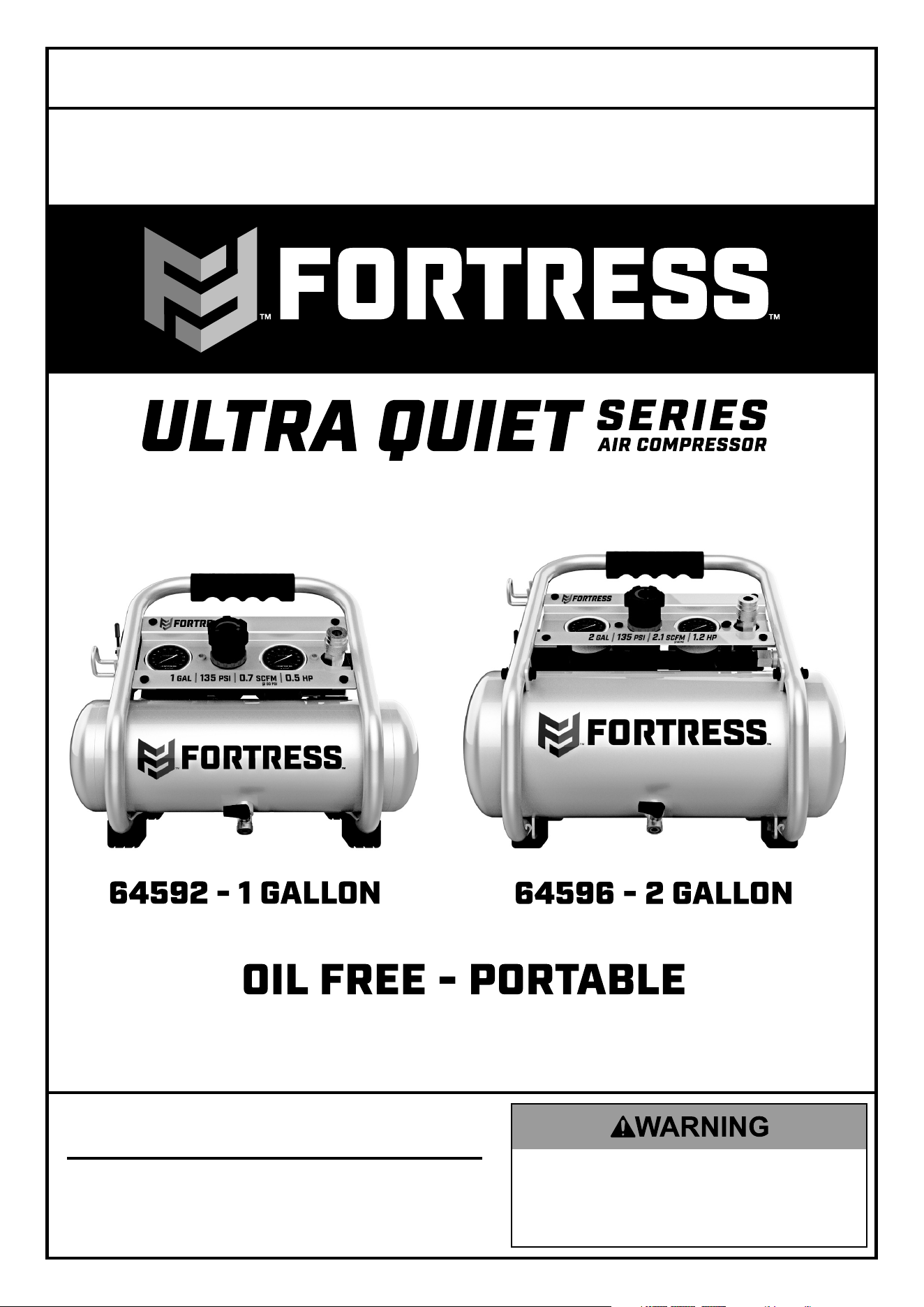
Owner’s Manual & Safety Instructions
Save This Manual Keep this manual for the safety warnings and precautions, assembly,
operating, inspection, maintenance and cleaning procedures. Write the product’s serial number in the
back of the manual near the assembly diagram (or month and year of purchase if product has no number).
Keep this manual and the receipt in a safe and dry place for future reference. 21g
When unpacking, make sure that the product is intact
and undamaged. If any parts are missing or broken,
please call 1-888-866-5797 as soon as possible.
Copyright
©
2021 by Harbor Freight Tools
®
. All rights reserved.
No portion of this manual or any artwork contained herein may be reproduced in
any shape or form without the express written consent of Harbor Freight Tools.
Diagrams within this manual may not be drawn proportionally. Due to continuing
improvements, actual product may differ slightly from the product described herein.
Tools requ ir ed f or a ss em bl y an d se rv ice ma y no t be i nc lu ded.
Read this material before using this product.
Failure to do so can result in serious injury.
SAVE THIS MANUAL.
Page 2 For technical questions, please call 1-888-866-5797. Item 64592 64596
SAFETY OPERATION MAINTENANCEINSTALLATION
Table of Contents
Safety ......................................................... 2
Installation .................................................. 6
Specifications ............................................. 6
Operation .................................................... 7
Maintenance ............................................... 9
Parts List and Diagram .............................. 12
Warranty .................................................... 16
WARNING SYMBOLS AND DEFINITIONS
This is the safety alert symbol. It is used to alert you to potential
personal injury hazards. Obey all safety messages that
follow this symbol to avoid possible injury or death.
Indicates a hazardous situation which, if not avoided,
will result in death or serious injury.
Indicates a hazardous situation which, if not avoided,
could result in death or serious injury.
Indicates a hazardous situation which, if not avoided,
could result in minor or moderate injury.
Addresses practices not related to personal injury.

Page 3For technical questions, please call 1-888-866-5797.Item 64592 64596
SAFETYOPERATIONMAINTENANCE INSTALLATION
IMPORTANT SAFETY INFORMATION
General Safety Warnings
WARNING Read all safety warnings and instructions.
Failure to follow the warnings and instructions may result in electric shock, fire and/or serious injury.
Save all warnings and instructions for future reference.
The warnings, precautions, and instructions discussed in this instruction manual cannot cover all possible
conditions and situations that may occur. It must be understood by the operator that common sense
and caution are factors which cannot be built into this product, but must be supplied by the operator.
1. Work area safety
a. Keep work area clean and well lit.
Cluttered or dark areas invite accidents.
b. Do not operate the Compressor in explosive
atmospheres, such as in the presence
of flammable liquids, gases or dust.
Compressor motors produce sparks
which may ignite the dust or fumes.
c. Keep children and bystanders away
from an operating compressor.
2. Electrical safety
a. Compressor plugs must match the outlet.
Never modify the plug in any way.
Do not use any adapter plugs with grounded
compressors. Standard plugs and matching
outlets will reduce risk of electric shock.
b. Do not expose compressor to rain or wet
conditions. Water entering a compressor
will increase the risk of electric shock.
c. Do not abuse the cord. Never use the
cord for unplugging the compressor.
Keep cord away from heat, oil, sharp edges
or moving parts. Damaged or entangled
cords increase the risk of electric shock.
3. Personal safety
a. Stay alert, watch what you are doing and
use common sense when operating this
compressor. Do not use this compressor
while you are tired or under the influence
of drugs, alcohol or medication. A moment
of inattention while operating a compressor
may result in serious personal injury.
b. Use personal protective equipment.
Always wear ANSI-approved eye
protection during setup and use.
c. Prevent unintentional starting. Ensure the
switch is in the off-position before connecting
to power source or moving the compressor.
4. Compressor use and care
a. Do not use the compressor if the switch
does not turn it on and off. Any compressor
that cannot be controlled with the switch
is dangerous and must be repaired.
b. Disconnect the plug from the power source
before making any adjustments, changing
accessories, or storing the compressor.
Such preventive safety measures reduce the
risk of starting the compressor accidentally.
c. Store an idle compressor out of the reach
of children and do not allow persons
unfamiliar with the compressor or these
instructions to operate it. A compressor is
dangerous in the hands of untrained users.
d. Maintain the compressor. Keep the
compressor clean for better and safer
performance. Follow instructions for
lubricating and changing accessories.
Keep dry, clean and free from oil and grease.
Check for misalignment or binding of moving
parts, breakage of parts and any other
condition that may affect the compressor’s
operation. If damaged, have the compressor
repaired before use. Many accidents are
caused by a poorly maintained compressor.
e. Use the compressor in accordance with
these instructions, taking into account
the working conditions and the work to
be performed. Use of the compressor for
operations different from those intended
could result in a hazardous situation.
5. Service
a. Have your compressor serviced by a
qualified repair person using only identical
replacement parts. This will ensure that the
safety of the compressor is maintained.
Page 4 For technical questions, please call 1-888-866-5797. Item 64592 64596
SAFETY OPERATION MAINTENANCEINSTALLATION
Air Compressor Safety Warnings
1. Risk of fire or explosion - do not spray
flammable liquid in a confined area or towards a
hot surface. Spray area must be well-ventilated.
Do not smoke while spraying or spray where
spark or flame is present. Arcing parts - keep
compressor at least 20 feet away from explosive
vapors, such as when spraying with a spray gun.
2. Risk of bursting - do not adjust regulator higher
than marked maximum pressure of attachment.
3. Risk of injury - do not direct air
stream at people or animals.
4. Do not use to supply breathing air.
5. Do not leave compressor unattended
for an extended period while plugged in.
Unplug compressor after working.
6. Keep compressor well-ventilated.
Do not cover compressor during use.
7. Drain Tank daily and after use. Internal rust causes
tank failure and explosion.
8. Do not remove the valve cover or
adjust internal components.
9. Compressor head gets hot during operation.
Do not touch it or allow children nearby
during or immediately following operation.
10. Do not use the air hose to move the compressor.
11. Release the pressure in the
storage tank before moving.
12. The use of accessories or attachments not
recommended by the manufacturer may
result in a risk of injury to persons.
13. All air line components, including hoses, pipe,
connectors, filters, etc., must be rated for a minimum
working pressure of 150 PSI, or 150% of the
maximum system pressure, whichever is greater.
14. USE OF AN EXTENSION CORD IS NOT
RECOMMENDED. If you choose to use an
extension cord, use the following guidelines:
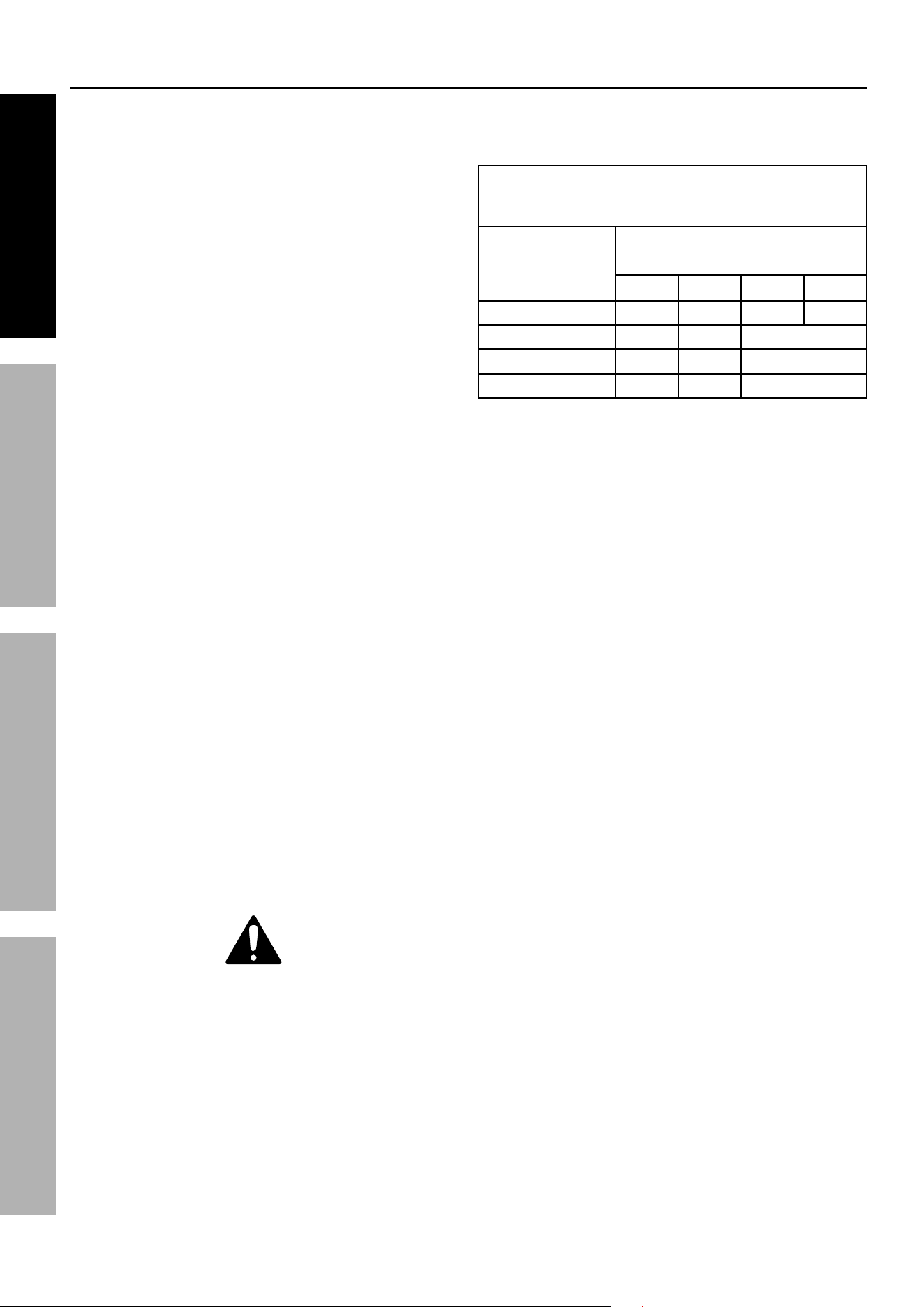
TABLE A: RECOMMENDED MINIMUM WIRE
GAUGE FOR EXTENSION CORDS
(120 VOLT)
NAMEPLATE
AMPERES
(at full load)
EXTENSION CORD
LENGTH
25′ 50′ 10′ 150′
0 – 6 18 16 16 14
6.1 – 10 18 16 Do not use.
10.1 – 12 16 16 Do not use.
12.1 – 16 14 12 Do not use.
a. Make sure your extension cord
is in good condition.
b. Be sure to use an extension cord which
is heavy enough to carry the current your
product will draw. An undersized cord will
cause a drop in line voltage resulting in loss
of power and overheating. Table A shows the
correct size to use depending on cord length
and nameplate ampere rating. If in doubt,
use the next heavier gauge. The smaller
the gauge number, the heavier the cord.
15. Industrial applications must follow OSHA guidelines.
16. Maintain labels and nameplates on the
compressor. These carry important safety
information. If unreadable or missing, contact
Harbor Freight Tools for a replacement.
17. This product is not a toy.
Keep it out of reach of children.
18. People with pacemakers should consult their
physician(s) before use. Electromagnetic fields in
close proximity to heart pacemaker could cause
pacemaker interference or pacemaker failure.
SAVE THESE INSTRUCTIONS.
Page 5For technical questions, please call 1-888-866-5797.Item 64592 64596
SAFETYOPERATIONMAINTENANCE INSTALLATION
Grounding
TO PREVENT ELECTRIC SHOCK AND DEATH
FROM INCORRECT GROUNDING WIRE CONNECTION:
Check with a qualified electrician if you are in doubt as to whether the outlet is
properly grounded. Do not modify the power cord plug provided with the compressor.
Never remove the grounding prong from the plug. Do not use the compressor if the power cord or plug
is damaged. If damaged, have it repaired by a service facility before use. If the plug will not fit the outlet,
have a proper outlet installed by a qualified electrician.
110-120 VAC Grounded Compressors: Compressors with Three Prong Plugs
1. In the event of a malfunction or breakdown,
grounding provides a path of least resistance for
electric current to reduce the risk of electric shock.
This compressor is equipped with an electric
cord having an equipment-grounding conductor
and a grounding plug. The plug must be
plugged into a matching outlet that is properly
installed and grounded in accordance
with all local codes and ordinances.
2. Do not modify the plug provided –
if it will not fit the outlet, have the proper
outlet installed by a qualified electrician.
3. Improper connection of the equipment-grounding
conductor can result in a risk of electric shock.
The conductor with insulation having an outer
surface that is green with or without yellow
stripes is the equipment-grounding conductor.
If repair or replacement of the electric cord or
plug is necessary, do not connect the equipment-
grounding conductor to a live terminal.
4. Check with a qualified electrician or service
personnel if the grounding instructions are
not completely understood, or if in doubt as to
whether the compressor is properly grounded.
5. Use only 3-wire extension cords that have
3-prong grounding plugs and 3-pole receptacles
that accept the compressor’s plug.
6. Repair or replace damaged or
worn cord immediately.
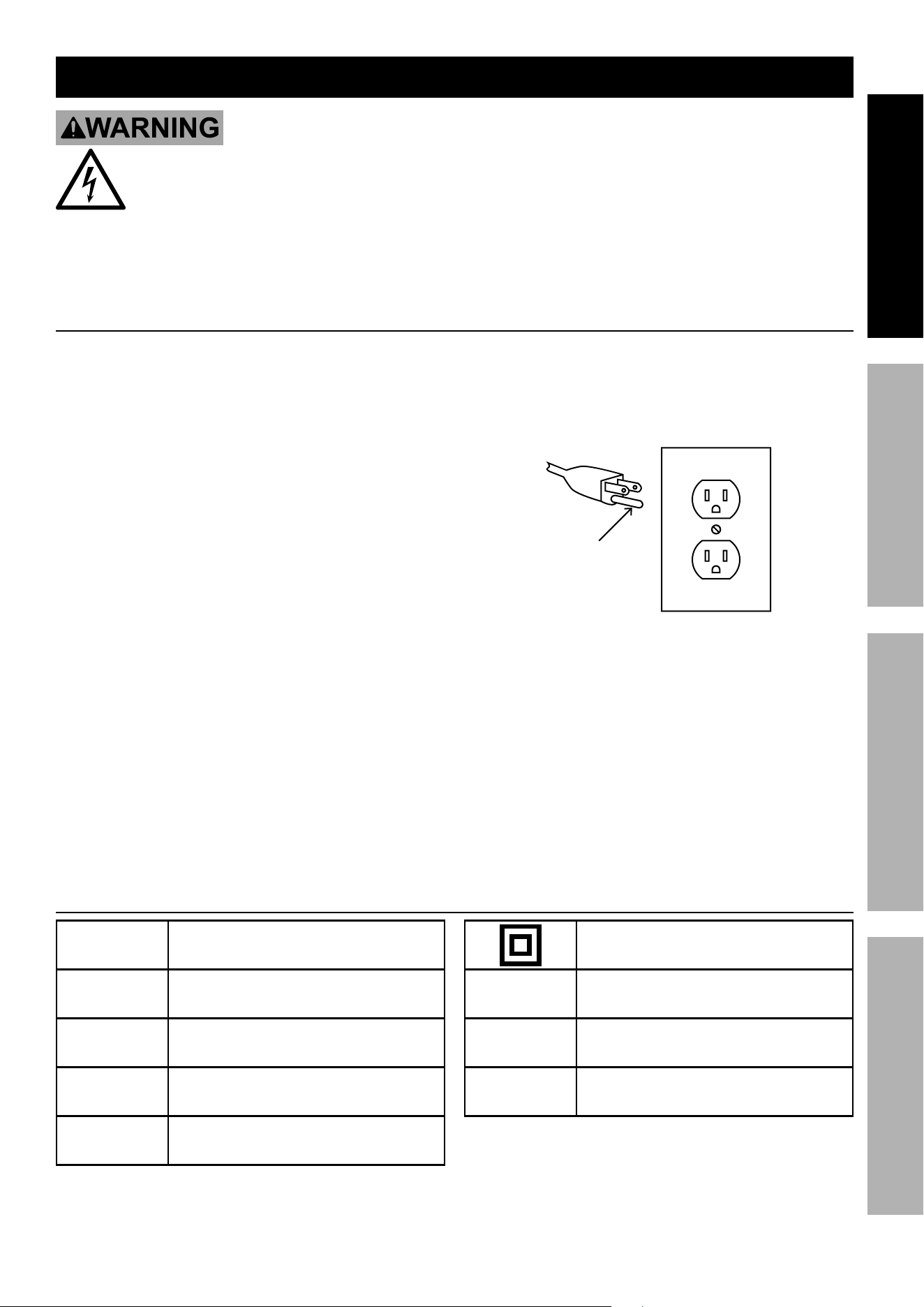
Grounding
Pin
125 VAC 3-Prong Plug and Outlet
(for up to 125 VAC and up to 15 A)
7. This compressor is intended for use on a
circuit that has an outlet that looks like the one
illustrated above in 125 VAC 3-Prong Plug
and Outlet. The compressor has a grounding
plug that looks like the plug illustrated above
in 125 VAC 3-Prong Plug and Outlet.
8. The outlet must be properly installed and grounded
in accordance with all codes and ordinances.
9. Do not use an adapter to connect this
compressor to a different outlet.
Symbology
PSI
Pounds per square inch of pressure
CFM
Cubic Feet per Minute flow
SCFM
Cubic Feet per Minute flow
at standard conditions
NPT
National pipe thread, tapered
NPS
National pipe thread, straight
Double Insulated
V
Volts
~
Alternating Current
A
Amperes
Page 6 For technical questions, please call 1-888-866-5797. Item 64592 64596
SAFETY OPERATION MAINTENANCEINSTALLATION
Specifications
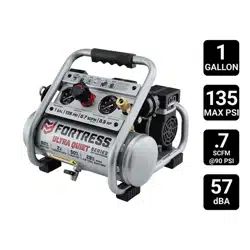
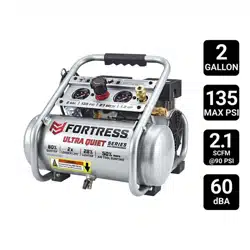
64592 - 1 Gallon 64596 - 2 Gallon
Electrical Rating 120VAC / 60Hz / 2.8A 120VAC / 60Hz / 7A
Air Outlet Size 1/4″ - 18 NPT 1/4″ - 18 NPT
Air Pressure
Shut-off 135 PSI 135 PSI
Restart 105 PSI 105 PSI
Air Tank Capacity 1 Gallon 2 Gallons
Air Flow Capacity 0.7 SCFM @ 90 PSI 2.1 SCFM @ 90 PSI
Sound Level 57 dBA 60 dBA
Installation
Read the ENTIRE IMPORTANT SAFETY INFORMATION section at the beginning of this
manual including all text under subheadings therein before set up or use of this product.
TO PREVENT SERIOUS INJURY FROM ACCIDENTAL OPERATION:
Turn the Power Switch “OFF” and unplug the Air Compressor from its electrical
outlet before assembling or making any adjustments to the Air Compressor.
Note: For additional information regarding the parts listed in the following pages,
refer to the Assembly Diagram near the end of this manual.
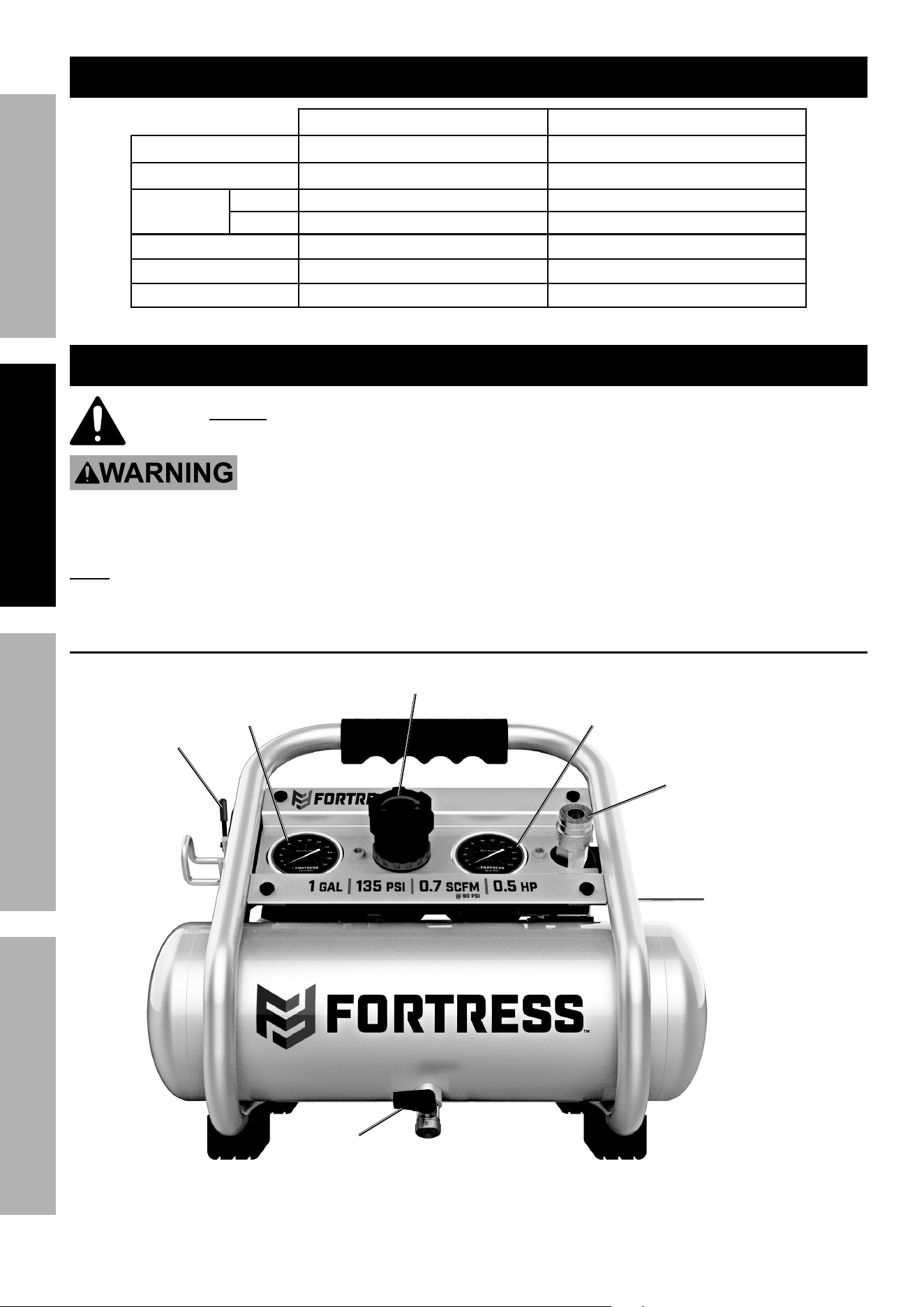
Functions
Drain
Valve
64592 - 1 Gallon and 64596 - 2 Gallon
Power
Switch
Air
Outlet
2nd Air
Outlet
(64596 only)
Tank
Gauge
Outlet
Gauge
Regulator
Page 7For technical questions, please call 1-888-866-5797.Item 64592 64596
SAFETYOPERATIONMAINTENANCE INSTALLATION
Breaking in the Air Compressor
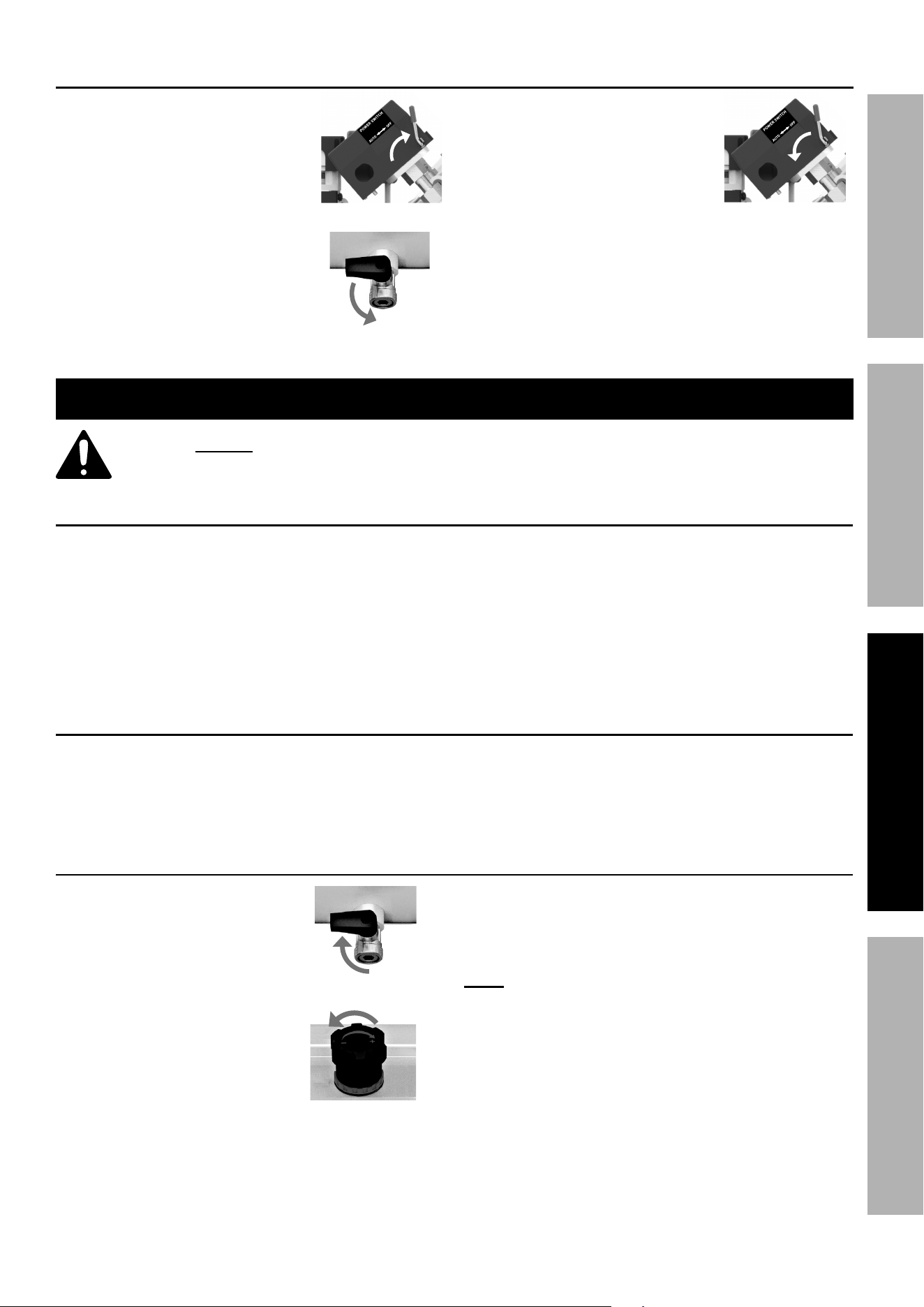
1. Turn Power Switch OFF
and unplug Power Cord.
2. Fully open Drain Valve.
3. Plug in Power Cord.
4. Turn Power Switch to AUTO.
5. Let unit run for 30 minutes. Air will expel freely
through the Drain Valve.
6. Turn Power Switch OFF.
7. Unplug Power Cord and close Drain Valve.
Operating Instructions
Read the ENTIRE IMPORTANT SAFETY INFORMATION section at the beginning of this
manual including all text under subheadings therein before set up or use of this product.
Air Compressor Area Set Up
1. Designate a work area that is clean and well-lit.
The work area must not allow access by
children or pets to prevent injury.
2. Locate the Air Compressor on a flat level surface
to ensure proper pump lubrication and to prevent
damage to the unit. Keep at least 12″ of space
around the unit to allow air circulation.
3. Route the power cord from the Air Compressor
to the grounded wall outlet, along a safe path
without creating a tripping hazard or exposing
the power cord to possible damage.
Air Connection Setup
1. Connect a 1/4″ NPT air hose (sold separately)
to the Air Outlet. The air hose must be long
enough to reach the work area with enough extra
length to allow free movement while working.
2. Consult air tool’s manual for needed accessories.
General Operation
1. Close Drain Valve.
2. Close Regulator.
3. Plug Power Cord into a grounded
120VAC electrical outlet.
4. Turn Power Switch to AUTO.
5. Allow Air Compressor to build up
pressure until it cycles off.
Note: At the beginning of the day’s first use
of the Air Compressor, check for air leaks by
applying soapy water to connections while the
Air Compressor is pumping and after pressure
cut-out. Look for air bubbles. If air bubbles are
present at connections, tighten connections.
Do not use the Air Compressor unless all
connections are air tight, the extra air leaking
out will cause the Air Compressor to operate too
often, increasing wear on the Air Compressor.
Page 8 For technical questions, please call 1-888-866-5797. Item 64592 64596
SAFETY OPERATION MAINTENANCEINSTALLATION
Note: As long as the Power Switch is set to AUTO, the
operation of the Air Compressor is automatic, controlled
by an internal pressure switch. The Air Compressor will
turn on automatically when the air pressure drops to 105
PSI, and will turn off automatically when the
air pressure reaches 135 PSI.
WARNING! TO PREVENT SERIOUS
INJURY AND DEATH FROM
EXPLOSION:
Do not adjust the internal
pressure switch. Any change to the
automatic pressure levels may cause excess pressure to
accumulate, causing a hazardous situation.
6. Make sure the air tool’s throttle or switch is in the
OFF position. Connect the air tool to the air hose.
7. Adjust the Regulator Knob so that the air
output is enough to properly power the tool,
but the output will not exceed the tool’s
maximum air pressure at any time. Turn the
knob clockwise to increase the pressure and
counter-clockwise to decrease pressure. Adjust
the pressure gradually, while checking the
Outlet Pressure gauge to set the pressure.
8. Use the air tool as needed.
9. When finished, turn the Power Switch OFF.
10. Unplug the Air Compressor.
11. Bleed air from the tool then disconnect the tool.
12. Open the tank’s Drain Valve slowly to gradually
release tank pressure and any built-up moisture.
Close the Drain after air and moisture have
drained out. Do not remove the Drain Valve.
13. Clean, then store the Air Compressor indoors.
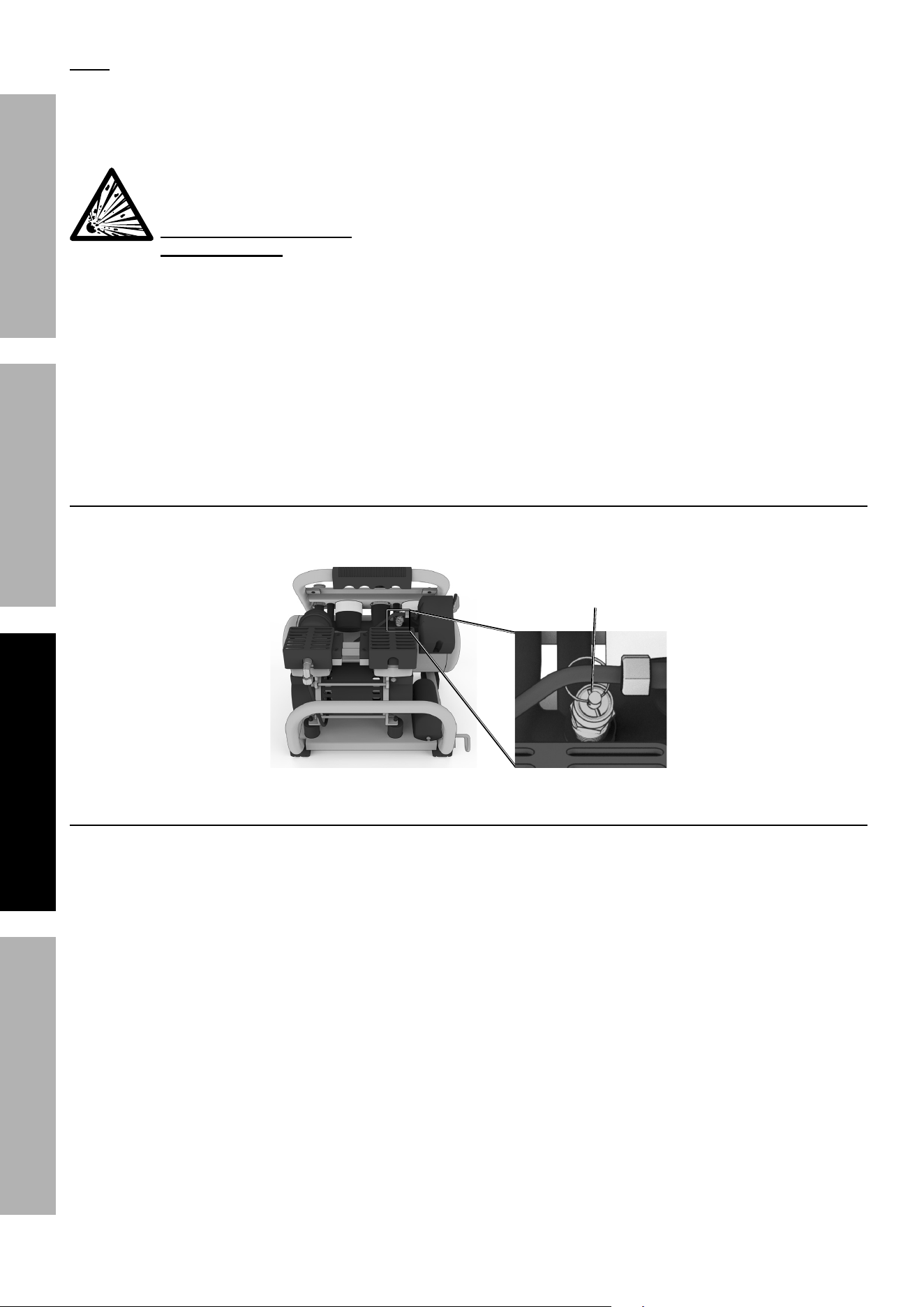
Emergency Depressurization
If it is necessary to quickly depressurize the Air Compressor, turn the Power Switch OFF.
Then, pull on the ring on the Safety Valve to quickly release stored air pressure.
Safety
Valve
Automatic Shut off System
1. If the Air Compressor automatically shuts off
before reaching its normal cutoff pressure:
a. Shut off all tools.
b. Turn Power Switch to OFF position.
c. Unplug Air Compressor.
d. Wait until the Air Compressor
cools down (about 10 minutes).
e. 64592 - 1 Gallon
• Push Reset Button.
• Plug Air Compressor in.
• Turn Power Switch to AUTO.
f. 64596 - 2 Gallon
• Plug Air Compressor in.
• Turn Power Switch to AUTO.
g. Resume operation.
2. Possible causes of repeated automatic
shut off of the Air Compressor are:
a. Using an extension cord that
is too long or narrow;
b. An air leak or open hose causing
the Air Compressor to cycle too
often and build up heat;
c. Turning Air Compressor off and
on again too quickly.
3. Correct any issues before further use to
avoid damage to the Air Compressor.
Page 9For technical questions, please call 1-888-866-5797.Item 64592 64596
SAFETYOPERATIONMAINTENANCE INSTALLATION
Maintenance and Servicing
Procedures not specifically explained in this manual must
be performed only by a qualified technician.
TO PREVENT SERIOUS INJURY FROM ACCIDENTAL OPERATION:
Turn the Power Switch “OFF” and unplug the Air Compressor from its electrical outlet
before performing any inspection, maintenance, or cleaning procedures.
TO PREVENT SERIOUS INJURY FROM AIR COMPRESSOR FAILURE:
Do not use damaged equipment. If abnormal noise or vibration occurs,
have the problem corrected before further use.
Cleaning, Maintenance, and Lubrication
1. BEFORE EACH USE, inspect the general
condition of the air Air Compressor. Check for:
• loose hardware,
• misalignment or binding of moving parts,
• cracked or broken parts,
• damaged electrical wiring, and
• any other condition that may
affect its safe operation.
2. AFTER USE, wipe external surfaces of the
Air Compressor with a clean cloth.
3. WARNING! If the supply cord of this Air
Compressor is damaged, it must be replaced
only by a qualified service technician.
Maintenance Schedule
Following are general guidelines for maintenance checks of the Air Compressor.
Note: The environment in which the Air Compressor is used, and the frequency of use will affect how
often you will need to check the Air Compressor components and perform maintenance procedures.
Daily:
a. Make sure all nuts and bolts are tight.
b. Drain moisture from air tank.
c. Check for abnormal noise or vibration.
d. Check for air leaks.
*
e. Wipe off any oil or dirt from the Air Compressor.
* To check for air leaks, apply soapy water to joints while
the Air Compressor is pressurized. Look for air bubbles.
Weekly:
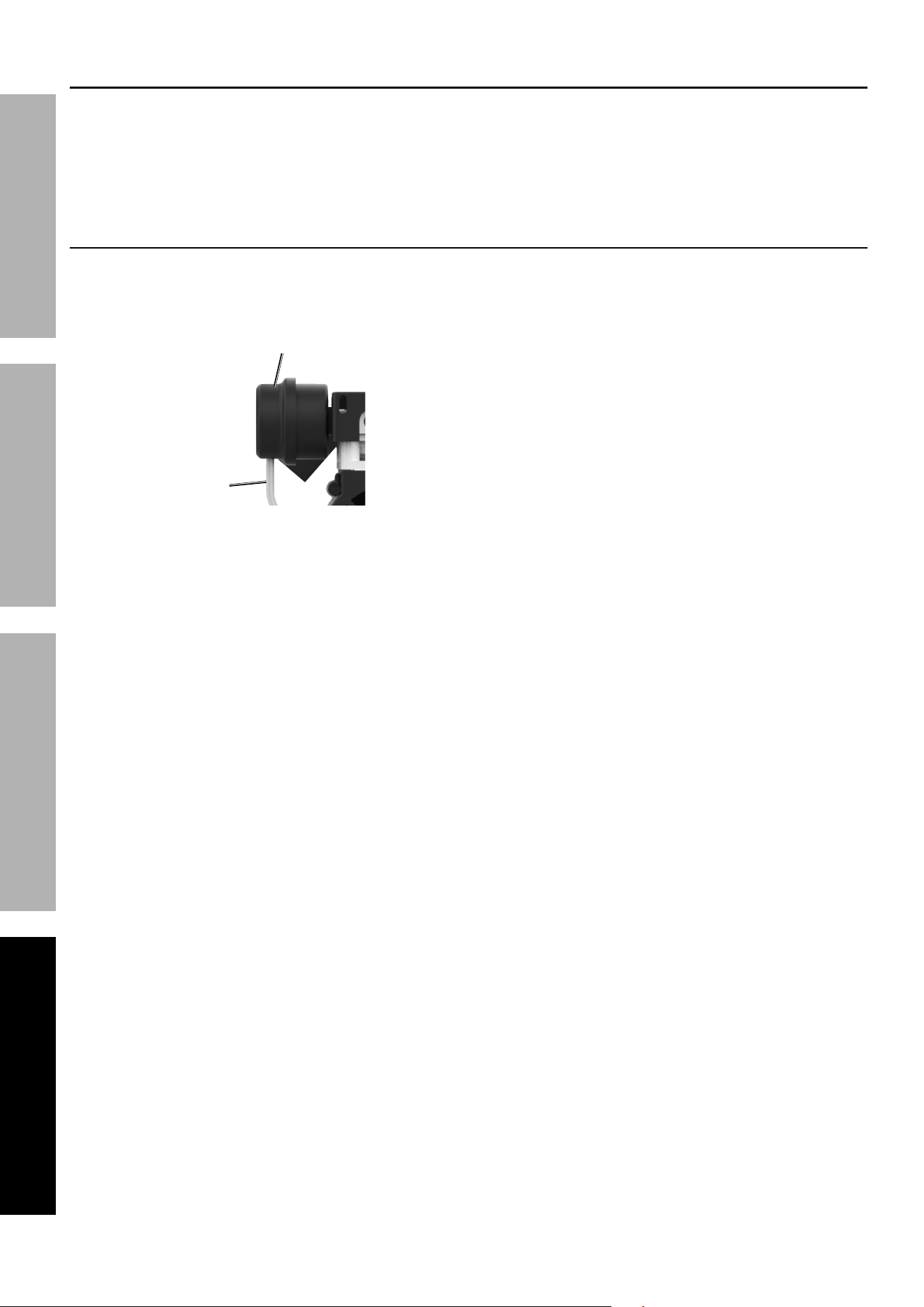
a. Inspect Air Filter.
Monthly:
a. Inspect Safety Valve.
Page 10 For technical questions, please call 1-888-866-5797. Item 64592 64596
SAFETY OPERATION MAINTENANCEINSTALLATION
Draining Moisture from Air Tank
The Moisture Drain is located under the Tank. It must be used daily to release all trapped air and
moisture from the Tank. Doing this will eliminate condensation and prevent tank corrosion.
1. Turn the Power Switch off.
2. Turn the Drain Valve to open it.
3. When all the pressure and moisture is released,
close the Moisture Drain.
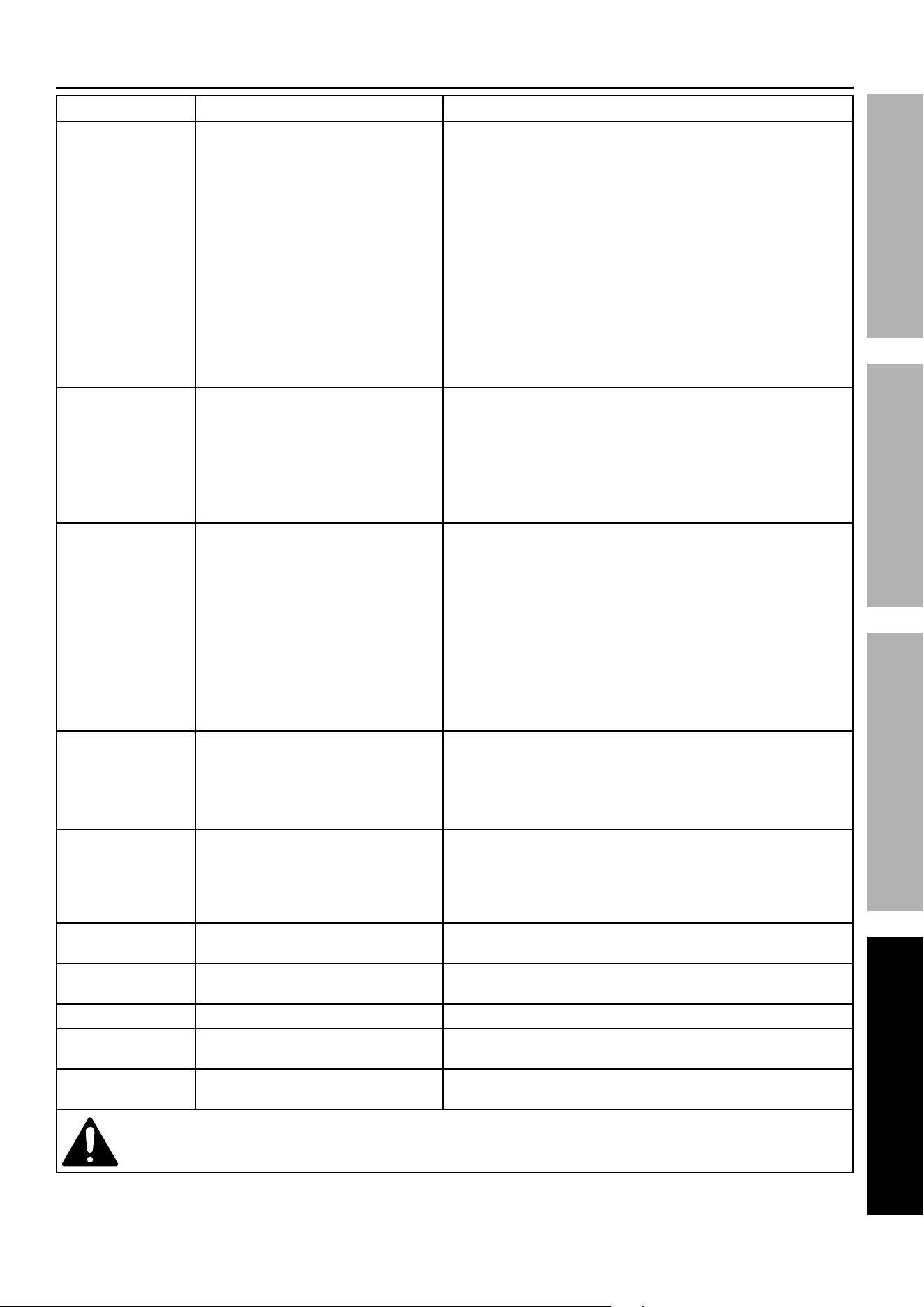
Air Filter Maintenance
1. Remove Cover and Filter. Check
Filter for accumulated dirt.
Air Inlet
Filter Cover
Air Inlet
Filter
Tube
2. Cleaning:
a. To prevent injury from dust and debris,
wear ANSI-approved safety goggles,
NIOSH-approved dust mask/respirator,
and heavy-duty work gloves. In a
well-ventilated area away from bystanders,
use pressurized air (no more than 15 PSI)
to blow dust out of the filter.
b. Replace the clean filter. Replace the Cover,
making sure the Tube is facing down.
3. Replacements:
a. Air Inlet Filter only:
Paper Filter Element 2-1/4″ Outer Diameter.
b. Air Inlet Filter Assembly:
Inlet Filter Silencer Male 1/4″ NPT.
Page 11For technical questions, please call 1-888-866-5797.Item 64592 64596
SAFETYOPERATIONMAINTENANCE INSTALLATION
Troubleshooting
Problem Possible Causes Likely Solutions
Compressor does
not start or restart
1. Tank(s) already pressurized.
2. Power cord not plugged in properly.
3. Incorrect power supply.
4. No power at outlet.
5. Thermal overload switch tripped.
6. Building power supply circuit tripped
or blown fuse.
7. Cord wire size is too small or
cord is too long to properly
power compressor.
8. Compressor needs service.
1. No problem. Compressor will start when needed.
2. Check that cord is plugged in securely.
3. Check that circuit matches compressor requirements.
4. Reset circuit breaker, or have outlet
serviced by a qualified technician.
5. Turn off Compressor and wait for it to cool down.
Press reset button. Resume operation.
6. Reset circuit or replace fuse. Check for low voltage conditions.
It may be necessary to disconnect other electrical appliances
from the circuit or move the compressor to its own circuit.
7. Use larger diameter or shorter extension cord or
eliminate extension cord. See Recommended Wire
Gauge for Extension Cords in Safety section.
8. Have unit inspected by a qualified technician.
Compressor builds
pressure too slowly
1. Incorrect power supply.
2. Working environment too cold.
3. Safety valve leaking.
4. Loose fittings.
1. Check that circuit matches compressor requirements.
2. Move compressor to a warmer location.
3. Listen for air leaking from valve.
If leaking, replace with identical valve with same rating.
DO NOT SEAL OR TAMPER WITH SAFETY VALVE.
4. Reduce air pressure, then check all fittings with a soap solution
for air leaks and tighten as needed. Do not overtighten.
Compressor not
building enough
air pressure
1. Air filter needs cleaning/replacing.
2. Check Valve needs service.
3. Compressor not large enough for
job.
4. Loose fittings.
5. Hose or hose connections
too narrow.
6. High altitude reducing air output.
1. Check inlet filter.
Clean and/or replace as needed.
2. Have technician clean or replace, as needed.
3. Check if accessory CFM is met by Compressor.
If Compressor cannot supply enough
air flow (CFM), use a larger Compressor.
4. Reduce air pressure, then check all fittings with a soap solution
for air leaks and tighten as needed. Do not overtighten.
5. Replace with wider hose and/or hose connections.
6. Higher altitudes require compressors with greater output.
Overheating 1. Air filter needs cleaning/replacing.
2. Unusually dusty environment.
3. Extension cord used.
1. Check inlet filter.
Clean and/or replace as needed.
2. Clean and/or replace filter more often or
move unit to cleaner environment.
3. Eliminate extension cord.
Compressor
starts and stops
excessively
1. Loose fittings.
2. Compressor not large
enough for job.
1. Reduce air pressure, then check all fittings with a soap solution
for air leaks and tighten as needed. Do not overtighten.
2. Check if accessory SCFM is met by Compressor.
If Compressor cannot supply enough
air flow (SCFM), use a larger Compressor.
Excessive noise Loose fittings. Reduce air pressure, then check all fittings with a soap solution
for air leaks and tighten as needed. Do not overtighten.
Moisture in
discharge air
Too much moisture in air. Install inline air filter/dryer, and/or relocate
to less humid environment.
Safety Valve “pops” Safety valve needs service. Pull on the ring on the Safety Valve. If it still pops, replace.
Air leaks from
pump or fittings
Loose fittings. Reduce air pressure, then check all fittings with a soap solution
for air leaks and tighten as needed. Do not overtighten.
Air leaks from tank Defective or rusted tank. Have tank replaced by a qualified technician.
Drain moisture from tank daily to prevent future corrosion.
Follow all safety precautions whenever diagnosing or servicing the compressor.
Disconnect power supply before service.
Page 12 For technical questions, please call 1-888-866-5797. Item 64592 64596
SAFETY OPERATION MAINTENANCEINSTALLATION
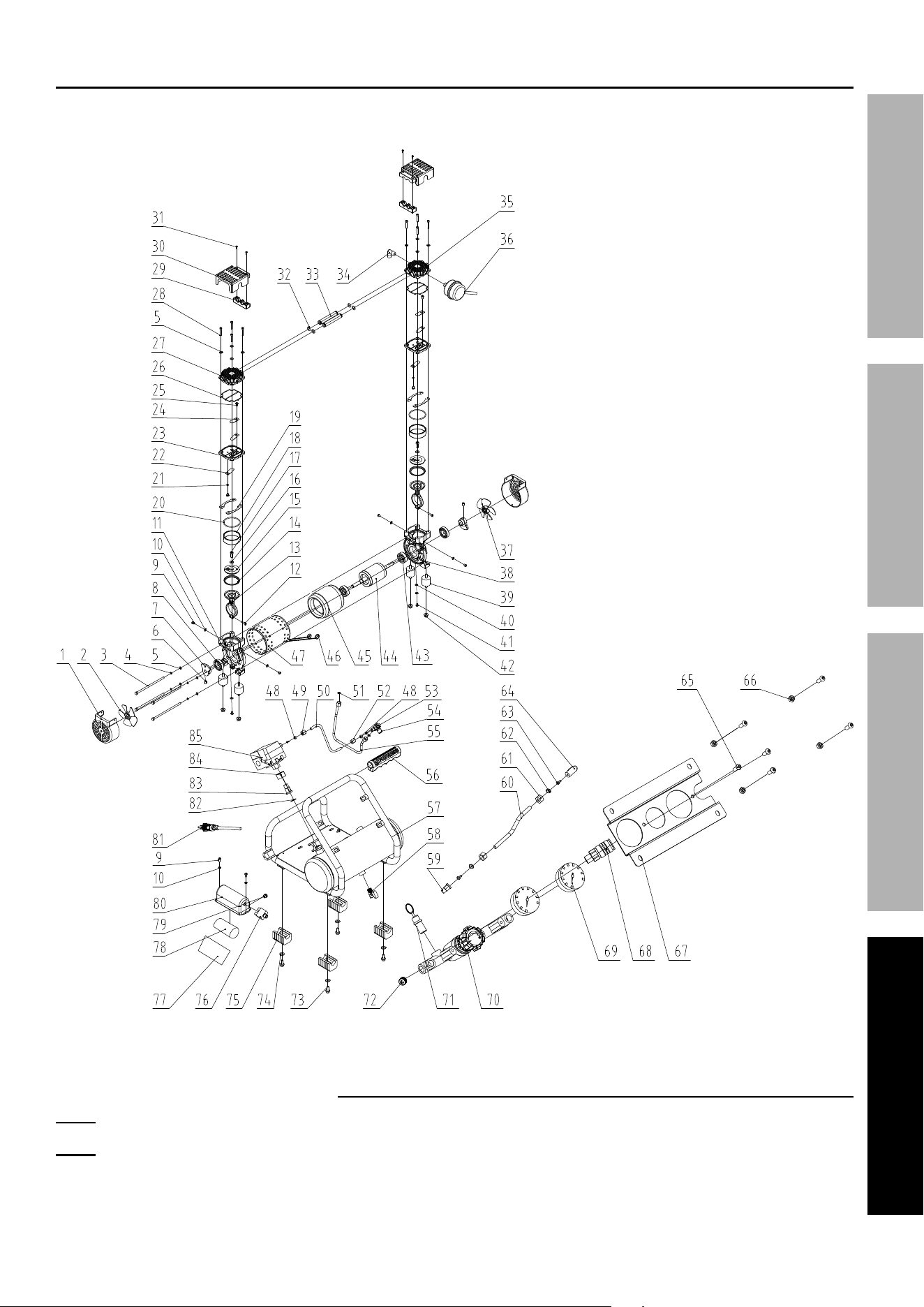
Parts List and Diagram
PLEASE READ THE FOLLOWING CAREFULLY
THE MANUFACTURER AND/OR DISTRIBUTOR HAS PROVIDED THE PARTS LIST AND ASSEMBLY DIAGRAM
IN THIS MANUAL AS A REFERENCE TOOL ONLY. NEITHER THE MANUFACTURER OR DISTRIBUTOR
MAKES ANY REPRESENTATION OR WARRANTY OF ANY KIND TO THE BUYER THAT HE OR SHE IS
QUALIFIED TO MAKE ANY REPAIRS TO THE PRODUCT, OR THAT HE OR SHE IS QUALIFIED TO REPLACE
ANY PARTS OF THE PRODUCT. IN FACT, THE MANUFACTURER AND/OR DISTRIBUTOR EXPRESSLY
STATES THAT ALL REPAIRS AND PARTS REPLACEMENTS SHOULD BE UNDERTAKEN BY CERTIFIED AND
LICENSED TECHNICIANS, AND NOT BY THE BUYER. THE BUYER ASSUMES ALL RISK AND LIABILITY
ARISING OUT OF HIS OR HER REPAIRS TO THE ORIGINAL PRODUCT OR REPLACEMENT PARTS
THERETO, OR ARISING OUT OF HIS OR HER INSTALLATION OF REPLACEMENT PARTS THERETO.
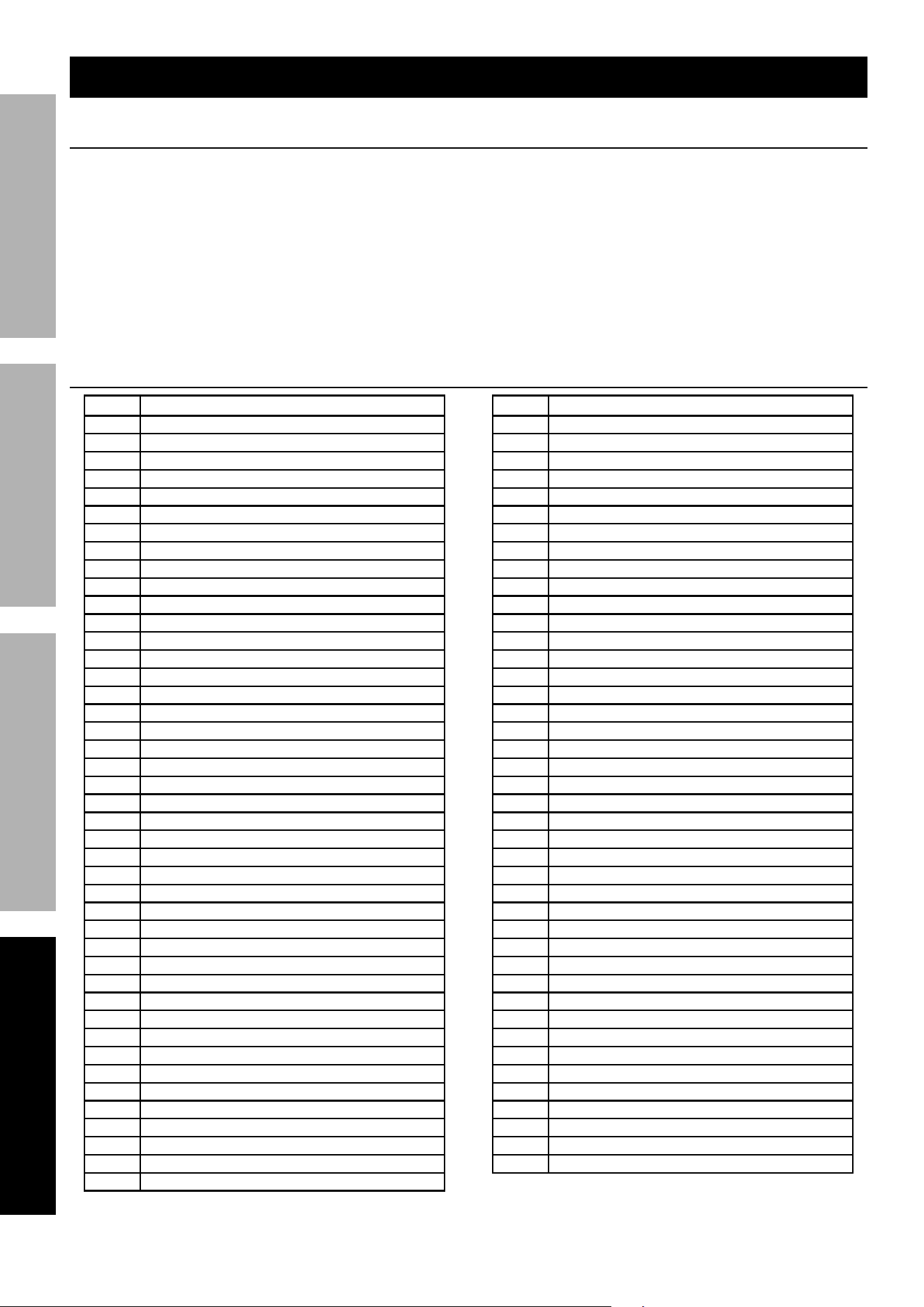
64592 Parts List
Part Description
1 Fan Housing
2 Fan
3 Bolt M5*125
4 Spring Washer Ø5
5 Washer Ø5
6 Bolt M6*10
7 Crank Shaft
8 Bearing
9 Cross Head Bolt M4*8
10 Washer Φ4
11 Crankcase
12 Bolt M4*16
13 Connecting Rod
14 Piston Ring
15 Press Cake
16 Washer Φ6
17 Bolt M6*16
18 Cylinder
19 Adjusting Pad
20 Cylinder Seal
21 Washer Φ4
22 Reed Valve
23 Valve Plate
24 Reed Valve Block
25 Bolt M4*5
26 Cylinder Cap Seal
27 Cylinder Cap
28 Bolt M5*25
29 Pump Cover Press Cake
30 Pump Cover
31 Cross Head Screw ST2.9*13
32 Seal
33 Air Tube
34 Elbow
35 Cylinder Cap
36 Air Filter
37 Fan
38 Crankcase
39 Rubber Cushion
40 Washer
41 Cross Head Bolt M4*12
42 Nut M6
43 Bearing
Part Description
44 Rotor Assembly
45 Stator Assembly
46 Cable Sheath
47 Motor Sleeve
48 Funnel
49 Nut
50 Pipe
51 Washer
52 Nut
53 Sleeve
54 Check Valve
55 Inlet Pipe
56 Handle Grip
57 Tanks Assembly
58 Drain Valve
59 Straight Joint
60 Pipe
61 Nut
62 Funnel
63 Sleeve
64 Elbow
65 Bolt M6*14
66 Nut M6
67 Panel
68 Coupler
69 Pressure Gauge
70 Pressure Regulator Assembly
71 Safety Valve
72 End Cap
73 Bolt M6*16
74 Washer Φ6
75 Rubber Foot
76 Thermal Protector
77 Capacitor Pad
78 Capacitor
79 Cable Clip
80 Capacitor Case
81 Power Cord
82 O-Ring Seal Φ15.5*2
83 Nut
84 Nut
85 Pressure Switch
Page 13For technical questions, please call 1-888-866-5797.Item 64592 64596
SAFETYOPERATIONMAINTENANCE INSTALLATION
64592 Assembly Diagram
Record Product’s Serial Number Here:
Note: If product has no serial number, record month and year of purchase instead.
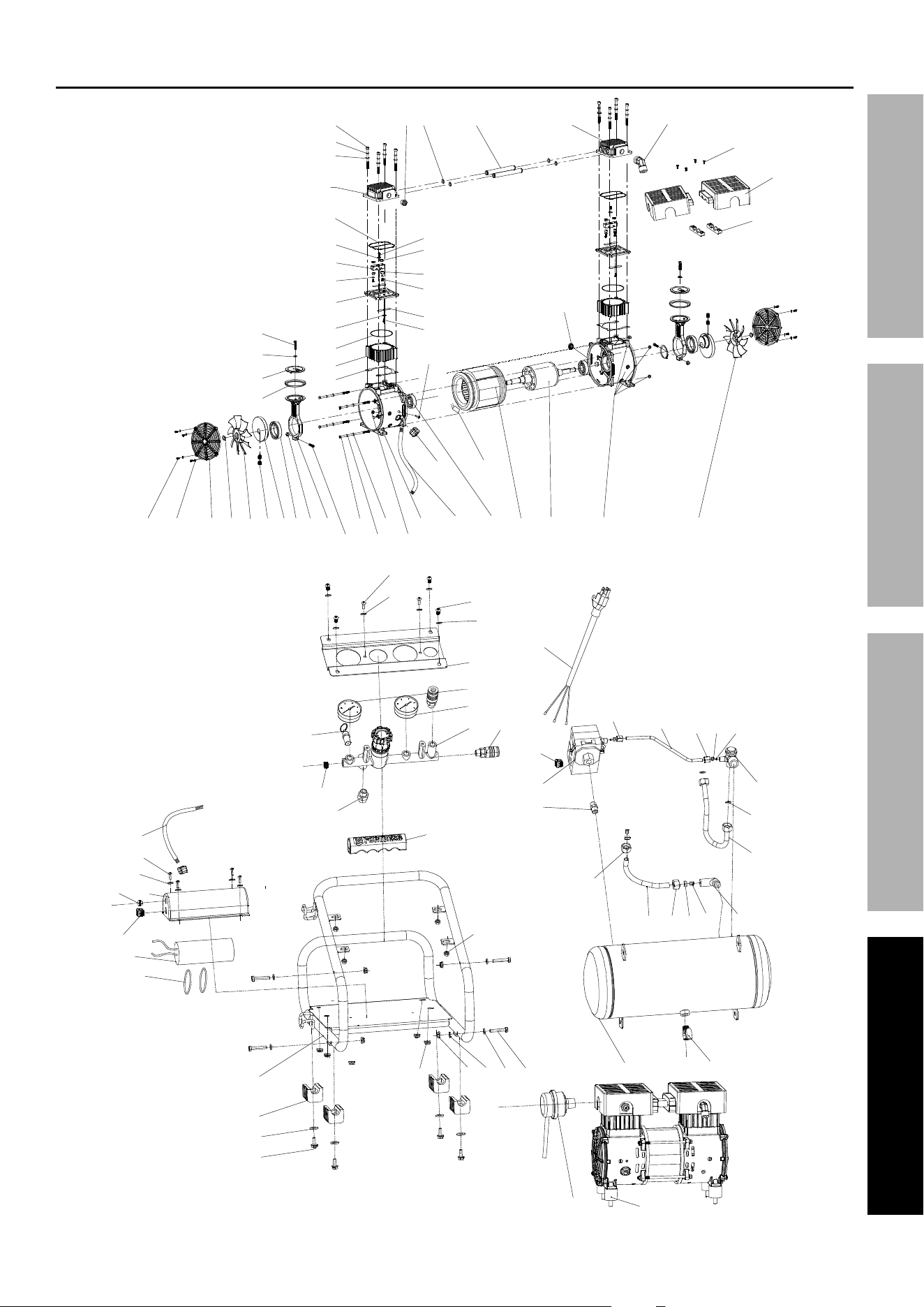
Note: Some parts are listed and shown for illustration purposes only, and are not available individually
as replacement parts. Parts may not be interchangeable. Specify UPC number when ordering:
64592 (1 Gallon): 193175356499
64596 (2 Gallon): 193175356390
Page 14 For technical questions, please call 1-888-866-5797. Item 64592 64596
SAFETY OPERATION MAINTENANCEINSTALLATION
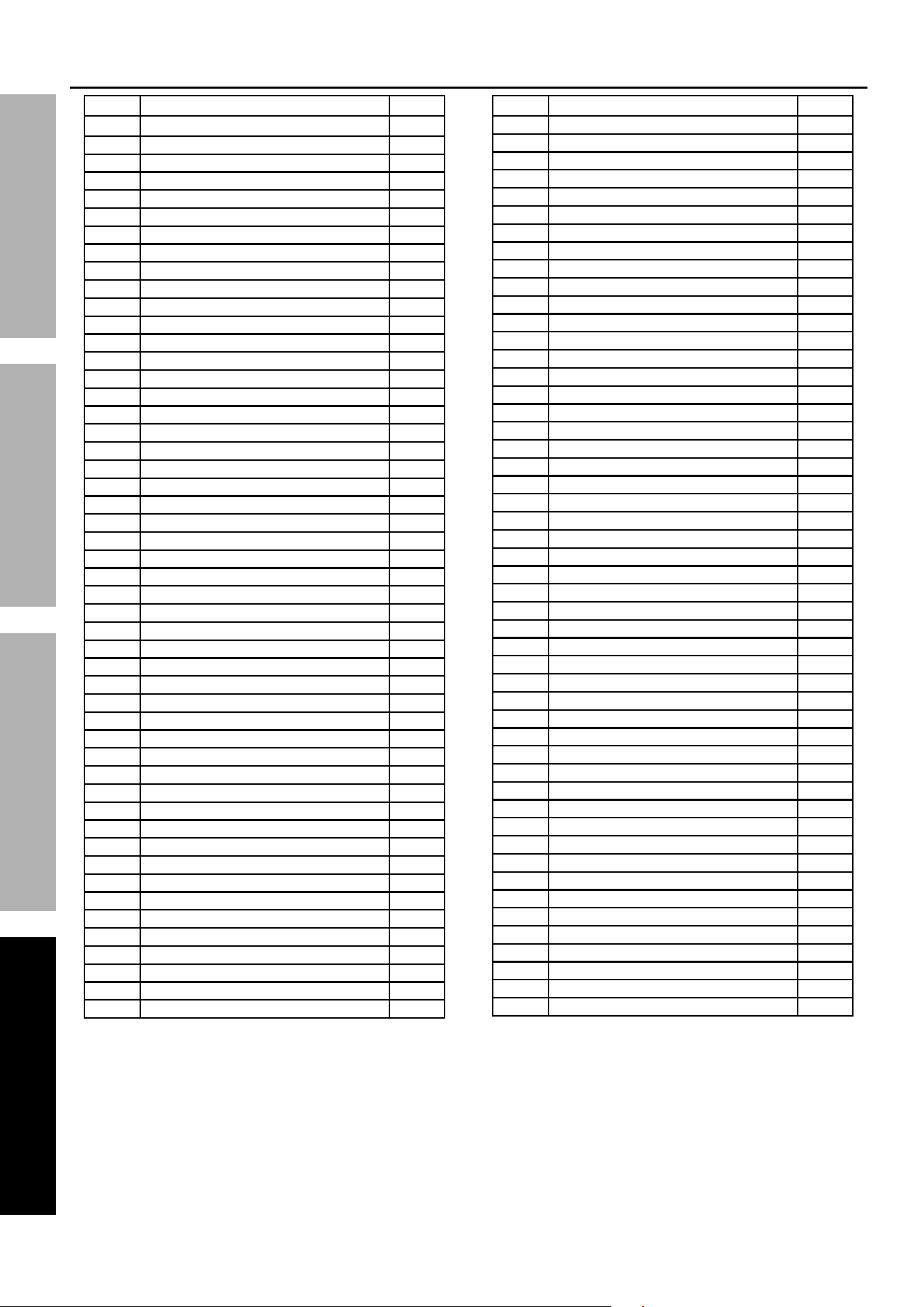
64596 Parts List
Part Description Qty
1 Bolt M4*12 8
2 Washer Φ4 8
3 Fan Cover 2
4 Retainer Ring 2
5 Fan 1
6 Bolt M8*8 4
7 Crankshaft 2
8 Bearing 2
9 Nut M6 2
10 Connecting Rod 2
11 Bolt M6*30 2
12 Bolt M5*117 4
13 Spring Washer Ø5 4
14 Washer Φ5 4
15 Nut M4 1
16 Crankcase 2
17 Wire 1
18 Bearing 2
19 Thermal Protector 1
20 Stator Assembly 1
21 Rotor Assembly 1
22 Nut M5 4
23 Fan 1
24 Piston Ring 2
25 Press Cake 2
26 Washer Φ6 16
27 Bolt M6*16 2
28 Cylinder Gasket 2
29 Cylinder 2
30 Cylinder Seal 2
31 Bolt M4*6 2
32 Reed Valve 4
33 Valve Plate 2
34 Bolt M3*10 4
35 Washer Ø3 4
36 Cushion 4
37 Block Piece 2
38 Nut M3 4
39 Washer Φ4 6
40 Cross Head Bolt M4*8 6
41 Cylinder Cap Seal 2
42 Cylinder Cap 1
43 Spring Washer Ø6 8
44 Bolt M6*55 8
45 Easy Start Valve 1
46 Washer Φ13.5*Φ2 4
47 Air Tube 2
48 Cylinder Cap 1
49 Elbow 1
50 Cross Head Screw 4
Part Description Qty
51 Cylinder Cap Cover 2
52 Cylinder Cap Cover Lock Block 2
53 Bolt M4*12 1
54 Plug 1
55 Cable Clip 5
56 Cushion 4
57 Frame Assembly 1
58 Foot 4
59 Washer Φ6 4
60 Bolt M6*16 4
61 Nut M8 4
62 Nut M6 4
63 Locking Washer Φ6 6
64 Washer Φ6 4
65 Bolt M6*35 4
66 Tank Assembly 1
67 Drain Valve 1
68 Air Filter 1
69 Elbow 1
70 Sleeve 2
71 Funnel 2
72 Nut 2
73 Nylon Pipe 1
74 Inlet Pipe 1
75 Paper Gasket 2
76 Check Valve 1
77 Bushing 2
78 Funnel 2
79 Nut 1
80 Pipe 1
81 Nut 1
82 Pressure Switch 1
83 Joint 1
84 Power Line 1
85 Nut M6 4
86 Handle Grip 1
87 Joint 1
88 End Cap 2
89 Safety Valve 1
90 Coupler 2
91 Pressure Regulator Assembly 1
92 Pressure Gauge 1
93 Pressure Gauge 1
94 Panel 1
95 Bolt M6*16 4
96 Wire 1
97 Capacitor Case 1
98 Rubber End Cap 1
99 Capacitor 1
100 Seal Φ50.5*Φ2.5 2
Page 15For technical questions, please call 1-888-866-5797.Item 64592 64596
SAFETYOPERATIONMAINTENANCE INSTALLATION
64596 Assembly Diagram
48
49
50
51
52
53
23222120
1955
18
95
26
95
26
94
93
89
88
87
86
85
65
66 67
5668
64636261
57
100
99
55
98
97
39
40
96
58
59
60
92
91
90
82
83
72
73 72 71 70 69
74
75
76
81
80
79 7778
55
84
17161 2 3 4 5 6 7 8 12
13 15
14
11
109
4746
45
44
43
26
42
41
40
39
38
37
36
35
34
33
32
92
54
30
29
28
27
26
25
24

Limited 90 Day Warranty
Harbor Freight Tools Co. makes every effort to assure that its products meet high quality and durability standards,
and warrants to the original purchaser that this product is free from defects in materials and workmanship for the
period of 90 days from the date of purchase. This warranty does not apply to damage due directly or indirectly,
to misuse, abuse, negligence or accidents, repairs or alterations outside our facilities, criminal activity, improper
installation, normal wear and tear, or to lack of maintenance. We shall in no event be liable for death, injuries
to persons or property, or for incidental, contingent, special or consequential damages arising from the use of
our product. Some states do not allow the exclusion or limitation of incidental or consequential damages, so the
above limitation of exclusion may not apply to you. THIS WARRANTY IS EXPRESSLY IN LIEU OF ALL OTHER
WARRANTIES, EXPRESS OR IMPLIED, INCLUDING THE WARRANTIES OF MERCHANTABILITY AND FITNESS.
To take advantage of this warranty, the product or part must be returned to us with transportation charges
prepaid. Proof of purchase date and an explanation of the complaint must accompany the merchandise.
If our inspection verifies the defect, we will either repair or replace the product at our election or we may
elect to refund the purchase price if we cannot readily and quickly provide you with a replacement. We will
return repaired products at our expense, but if we determine there is no defect, or that the defect resulted
from causes not within the scope of our warranty, then you must bear the cost of returning the product.
This warranty gives you specific legal rights and you may also have other rights which vary from state to state.
26541 Agoura Road • Calabasas, CA 91302 • 1-888-866-5797