Presence Sensor FP1E User Manual
EN
01
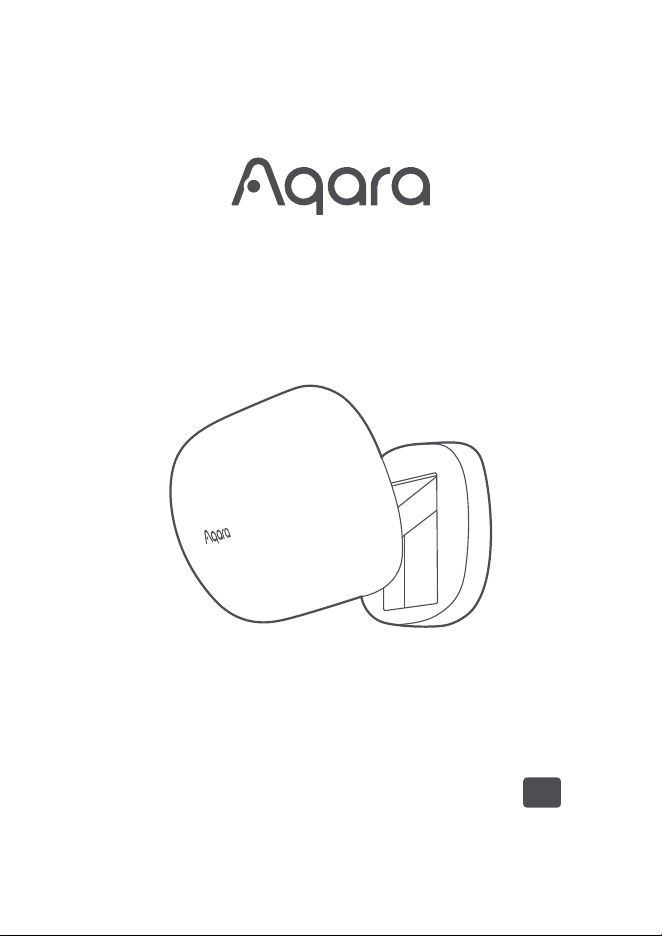
Presence Sensor FP1E is a sensor designed for accurately detecting the presence of human objects in
space. Combining millimeter-wave radar technology with advanced AI algorithms, it features functions
such as spatial background learning, interference source identification, and sensitivity adaptation.
* This device requires use with the Aqara Home app and Aqara Hub
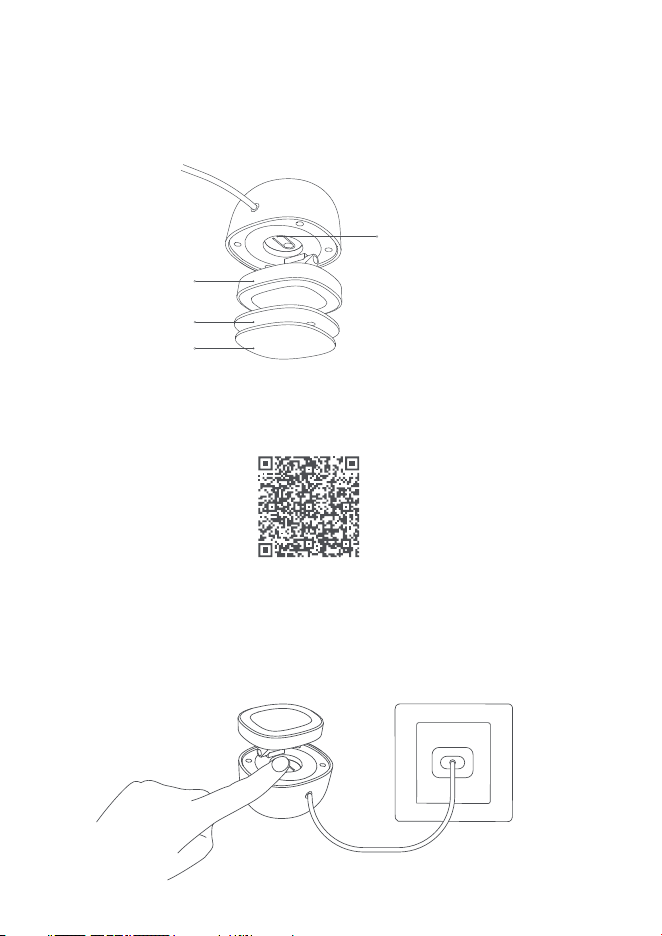
Button / Indicator
Magnetic Mount
Base
Sticker
Product Introduction
1. Before activating the device, please make sure you have the Aqara Home app downloaded and
Aqara hub installed.
2. Power the Presence Sensor FP1E, press and hold the reset button for 5 seconds until the LED
indicator starts blinking, and release it. The device will enter pairing mode.
Quick Setup
Aqara Home App
02
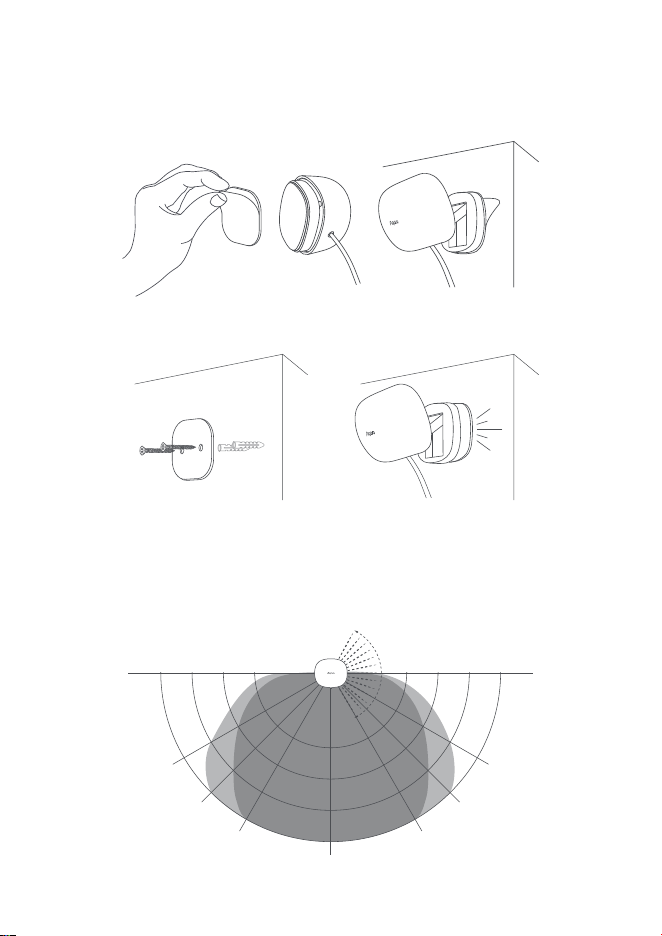
Wall Mounting: When Wall Mounting, the device has a maximum detection distance of 6m, a field of
view (FOV) angle of 120°, and a close-range FOV angle of up to 180°. It can be used for space detection
of up to 35m².
* If the connection fails, please move the device closer to the Hub and try again.
3. Open the Aqara Home app, tap "Home" and then tap "+" in the top-right corner to enter the "Add
Device (Accessory)" page. Select "Presence Sensor FP1E" or scan the installation code on the device
and add it according to instructions.
Radar Detection Range
3m 3m4m 4m5m 5m6m 6m
30°30°
45°45°
60°60°
FOV ���°
0m
6m
A
B
03
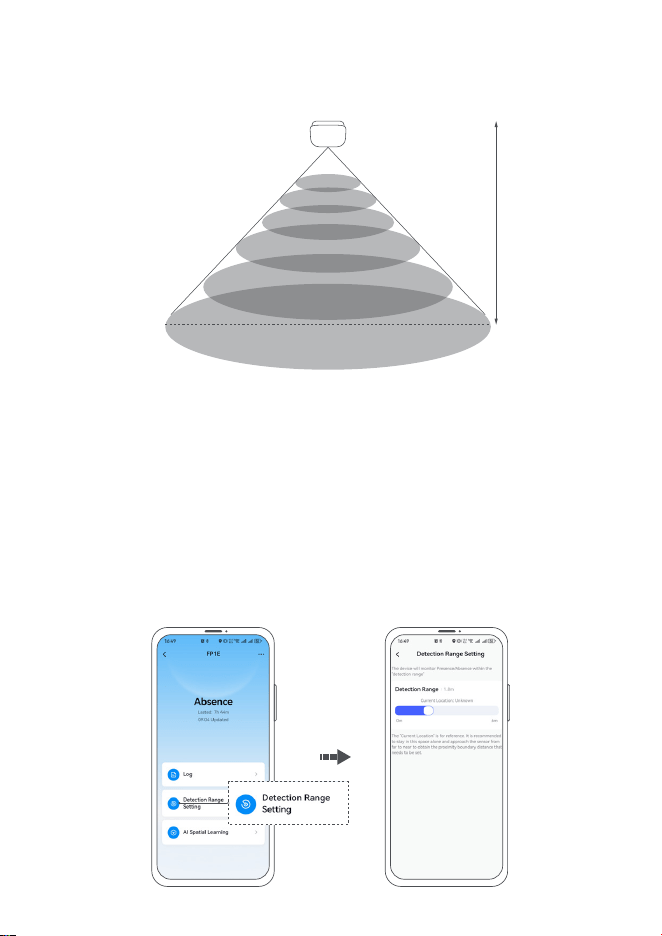
Ceiling-mounting: When the device is installed horizontally downward on a ceiling with a height of
2.8m, the detection area is approximately a circle with a radius of 4 meters below the device, and the
maximum detection space area is approximately up to 50 m².
* The above detection range is theoretical under ideal laboratory conditions. The detection range may vary slightly
depending on the actual space environment, installation height and angle.
The device has a maximum detection range of 6m by default, and supports users to customize the
maximum detection range within 6 meters at intervals of 30 cm to exclude areas that do not need to
be detected.
When setting the detection range, please ensure that there is only one person in the space to ensure
the accuracy of the reference distance. When setting, if there is someone in the space, the current
position will be displayed in real time on the interface as a reference. If there are multiple people, the
current position will be estimated based on the nearest target.
Detection Range Setting
8m
2.8m
04
Note: The distance displayed in the "Current Location" is the straight-line distance from the device to
the point where the energy of the human body is the largest. It is not the actual horizontal distance
between the human body and the device that is strictly and accurately calculated. There may be
errors with the distance perceived by the user. It is only used as a reference when setting the
Detection range boundary. When the Detection range exceeds 6 meters, the "Current Location" will
display "Unknown".
To ensure the accuracy of the detection range setting, it is recommended that the user slowly
approach the device from far to near when setting it, walk to the boundary of the range that needs to
be detection, observe the changes in the current position, and when the current distance is stable, set
the current position distance to the required detection range. Aer setting, compare the presence
status on the homepage to make fine adjustments.
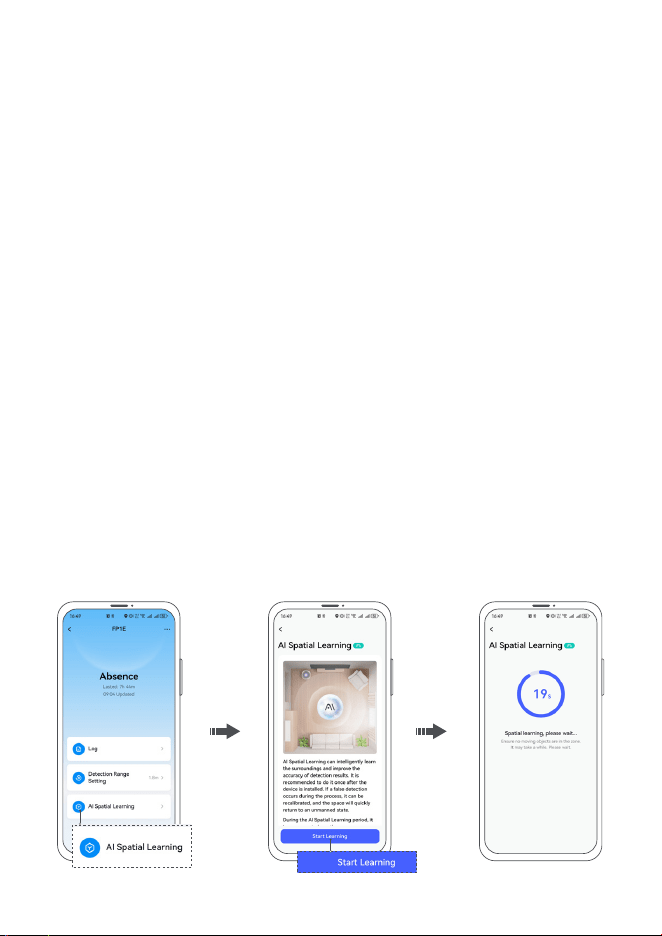
AI spatial learning can intelligently learn the environmental background, eliminate the false alarms of
large areas of glass, metal, mirrors, etc. on the detection results, intelligently adapt to environmental
false alarms sources, and improve the accuracy of detection results.
It is recommended that users actively conduct AI spatial learning aer the device is installed. AI
spatial learning requires that the space be unmanned and takes about 30 seconds. Please wait
patiently.
During use, the device will continue to learn the spatial background through AI to adapt to the
real-time changing spatial environment, making the device more accurate with use.
If, under special circumstances, the user finds that the device mistakenly reports a false presence
status when the space should be absence, an AI spatial learning can be performed immediately to
quickly restore the space to an empty state.
AI Spatial Learning
05
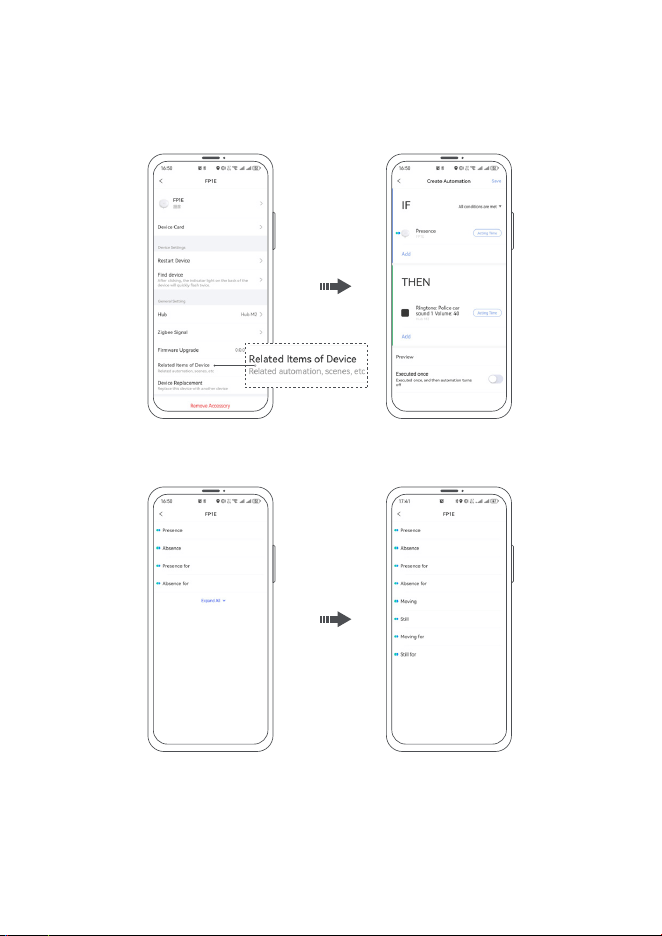
Automation Configuration
Users can simply go to the App "Automation" interface and click "+" in the upper-right corner to add
Automation related to the device.
Recommended Automation Configuration
By referring to the following automation recommendations, you can start using the device immediately
within one minute, complete smart home linkage, and experience the charm of Presence Sensor FP1E.
1. When "Presence", Then "turn on the light";
2. When "Absence for a certain period of time", Then "turn off the lights or the Air conditioning";
3. When "Moving for a certain period of time", Then "adjust the Air conditioning to 25 degrees";
4. When "Still for a certain period of time", Then "push a message (sedentary reminder)".
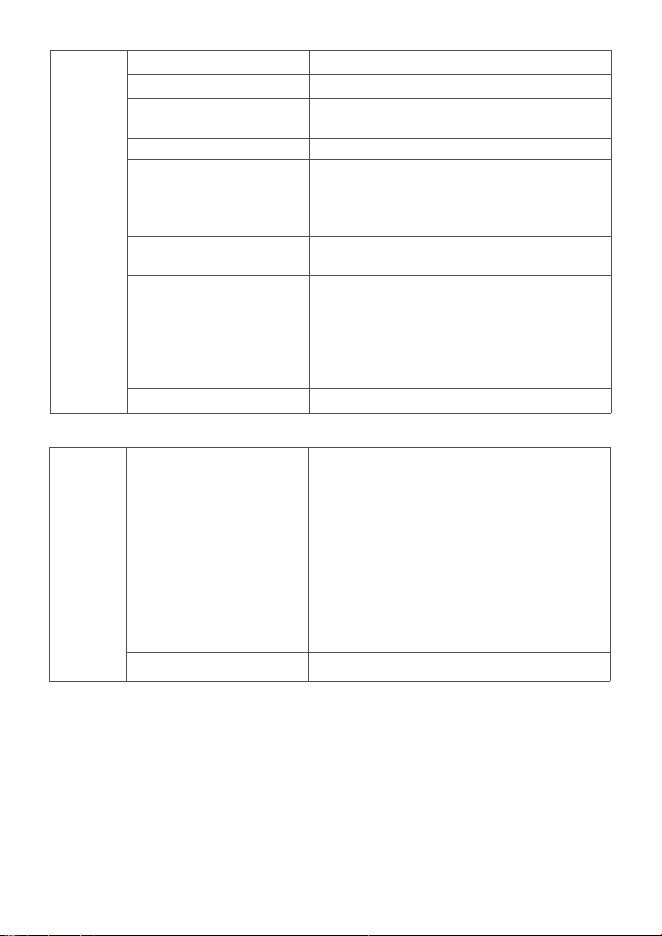
Automation
conditions
Presence
Absence
Presence for (a period of time)
Absence for (a period of time)
Still
Still for (a period of time)
Moving
Moving for (a period of time)
The presence of a person is detected in the space
Space detects no one is present
There are people present and the time exceeds a
certain limit
No one and the time exceeds a certain limit
When there are people in the space and the targets
are in a relatively still state (such as sitting or lying
still, with small movement and displacement), it
can be used as a sedentary reminder.
There are people in the space, and the targets are
in a relatively still state for a certain period of time.
There are people in the space, and the targets are
in a relatively active state (such as walking or
exercising), which can be used to trigger active
scenes such as turning on fresh air, lowering the
Air conditioning temperature, and other related
Automation)
Moving state and exceeding a certain time
Automation
Actions
AI Spatial Learning
Reboot device
It can intelligently learn environmental
background, intelligently adapt to environmental
false alarms sources, and improve the accuracy of
detection results.
It is recommended that users actively conduct an
AI space background learning aer the device is
installed. If, in special circumstances, users find
that the device misidentifies a presence status,
they can also conduct an AI space background
learning immediately, to quickly restore the space
to an empty state.
The device will restart
06
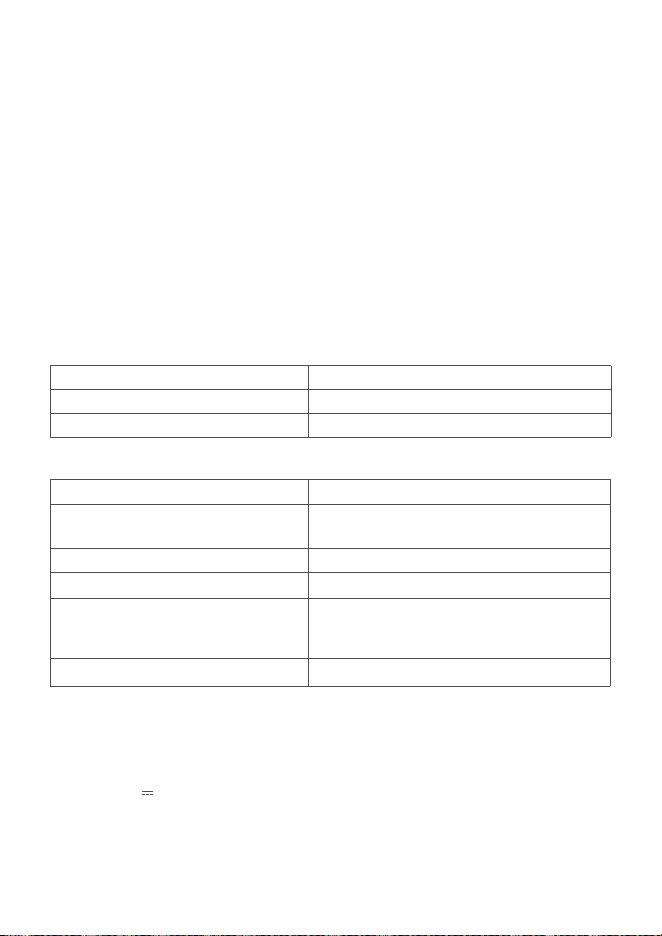
Presence Sensor FP1E
Model: PS-S03D / PS-S03E
Ports: USB-A
Input Power: 5 V 1 A
Made in China
Wireless Protocols: Zigbee
Radar Operation Frequency: 60-61 GHz
Zigbee Operation Frequency: 2405-2480 MHz
Zigbee Maximum Output Power ≤ 13 dBm
Dimensions: 57 × 50 × 37 mm (2.24 × 1.97× 1.46 in.)
Operating Temperature: -10 °C ~ 40 °C (14 °F ~ 104 °F)
Operating Humidity: 0 ~ 95% RH, no condensation
Specifications
Radar Maximum Output Power ≤ 20 dBm (Only applicable to the EU region)
What is in the Box: Presence Sensor FP1E × 1, User Manual × 1, Sticker × 1, Magnetic Mount × 1.
Button Configuration
More Useful Tips
1. It is recommended to install the device facing the front of the human body to make it easier to detect
the micro-movement of human breathing.
2. The detection range of the device can reach 6 meters. It is recommended to configure the detection
range according to actual needs, exclude unnecessary detection areas, and improve detection
accuracy.
3. The time it takes for the device to detect when someone is there and when no one is, is very fast. To
improve the user experience and avoid frequent switching of lights, it is recommended to select "no
one and for more than a certain period of time" instead of "no one" in the Automation conditions.
4. If the device mistakenly identifies an unmanned state as a human being, you can use the AI spatial
background learning function to quickly return to the unmanned state.
5. The device has AI false alarms source identification and continuous spatial self-learning capabilities,
and can become more accurate with use. However, in order to maximize detection accuracy, it is still
recommended to avoid installing the device next to Air conditioning outlets, air purifiers, and fans.
Button Operation
Single Press
Long Press for 5s
Device action
Effective Range Test
Reset/Connect to Network
Indicator Configuration
Indicator status
Blue flashes 2 times
Blue flashes 3 times
Flashes blue once every 2 seconds
Blue flashes 2 times
Blue for 1 second
Device status
Appears when the power is turned on again,
indicating that the power supply is normal
Start Zigbee search
The device is in the Zigbee network search state
1. Zigbee connection and networking is successful
2. Zigbee device search operation is successful
3. Factory reset successful
Zigbee connection failure & networking failure
07
Warnings
Hereby, [Lumi United Technology Co., Ltd] declares that the radio equipment type [Presence
Sensor FP1E, PS-S03D / PS-S03E] are in compliance with Directive 2014/53/EU. The full text of the EU
declaration of conformity is available at the following internet address: https://www.aqara.com/DoC/
EU Declaration of Conformity
WEEE Disposal and Recycling Information
All products bearing this symbol are waste electrical and electronic equipment (WEEE as in
directive 2012/19/EU) which should not be mixed with unsorted household waste. Instead, you
should protect human health and the environment by handing over your waste equipment to a
designated collection point for the recycling of waste electrical and electronic equipment, appointed
by the government or local authorities. Correct disposal and recycling will help prevent potential
negative consequences to the environment and human health.
Please contact the installer or local authorities for more information about the location as well as
terms and conditions of such collection points.
Under normal use of condition, this equipment should be kept a separation distance of at least 20cm
between the antenna and the body of the user.
FCC ID: 2AKIT-PSS03
Federal Communications Commission (FCC) compliance statement:
1. This device complies with part 15 of the FCC Rules. Operation is subject to the following two conditions:
(1) This device may not cause harmful interference, and
(2) This device must accept any interference received, including interference that may cause undesired
operation.
2. Changes or modifications not expressly approved by the party responsible for compliance could void the
user's authority to operate the equipment.
Note: This equipment has been tested and found to comply with the limits for a Class B digital device,
1. This product is NOT a toy. Please keep children away from this product.
2. This product is designed for indoor use only. Do NOT use it in humid environments or outdoors.
3. Beware of moisture, do NOT spill water or other liquids onto the product.
4. Do NOT place this product near a heat source. Do NOT place it in an enclosure unless there is normal
ventilation.
5. Do NOT attempt to repair this product by yourself. All repairs should be performed by an authorized
professional.
6. This product is only suitable for improving the entertainment, convenience of your home life and
reminding you about the device status. If a user violates the product use instructions, the
manufacturer will NOT be liable for any risks and property losses.
08

Manufacturer: Lumi United Technology Co., Ltd.
Address: Room 801-804, Building 1, Chongwen Park, Nanshan iPark, No. 3370, Liuxian Avenue, Fuguang
Community, Taoyuan Residential District, Nanshan District, Shenzhen, China.
Online Customer Service: [www.aqara.com/support](http://www.aqara.com/support)
Email: [email protected]om
pursuant to part 15 of the FCC Rules. These limits are designed to provide reasonable protection
against harmful interference in a residential installation.
This equipment generates, uses and can radiate radio frequency energy and, if not installed and used
in accordance with the instructions, may cause harmful interference to radio communications.
However, there is no guarantee that interference will not occur in a particular installation. If this
equipment does cause harmful interference to radio or television reception, which can be determined
by turning the equipment off and on, the user is encouraged to try to correct the interference by one or
more of the following measures:
-Reorient or relocate the receiving antenna.
-Increase the separation between the equipment and receiver.
-Connect the equipment into an outlet on a circuit different from that to which the receiver is
connected.
-Consult the dealer or an experienced radio/TV technician for help. RF Exposure statement:
This equipment complies with FCC radiation exposure limits set forth for an uncontrolled environment.
This equipment should be installed and operated with a minimum distance of 20 cm between the
radiator and your body. This transmitter must not be co-located or operating in conjunction with any
other antenna or transmitter.
IC: 22635-PSS03
IC NOTICE TO CANADIAN USERS
This device contains license-exempt transmitter(s)/receiver(s) that comply with Innovation, Science
and Economic Development Canada’s license-exempt RSS(s). Operation is subject to the following two
conditions:
(1) This device may not cause interference.
(2) This device must accept any interference, including interference that may cause undesired
operation of the device.
This Class B digital apparatus complies with Canadian ICES‐003.
This device complies with RSS‐247 of Industry Canada. Operation is subject to the condition that this
device does not cause harmful interference.
This equipment complies with IC radiation exposure limits set forth for an uncontrolled environment.
This equipment should be installed and operated with minimum distance of 20 cm between the
radiator and your body. This transmitter must not be co-located or operating in conjunction with any
other antenna or transmitter.
09