F
ast
C
up
®
Start Guide - Compatibility Mode Instructions
TO BE PERFORMED BY QUALIFIED PERSONNEL
CARE and CLEANING
1
2
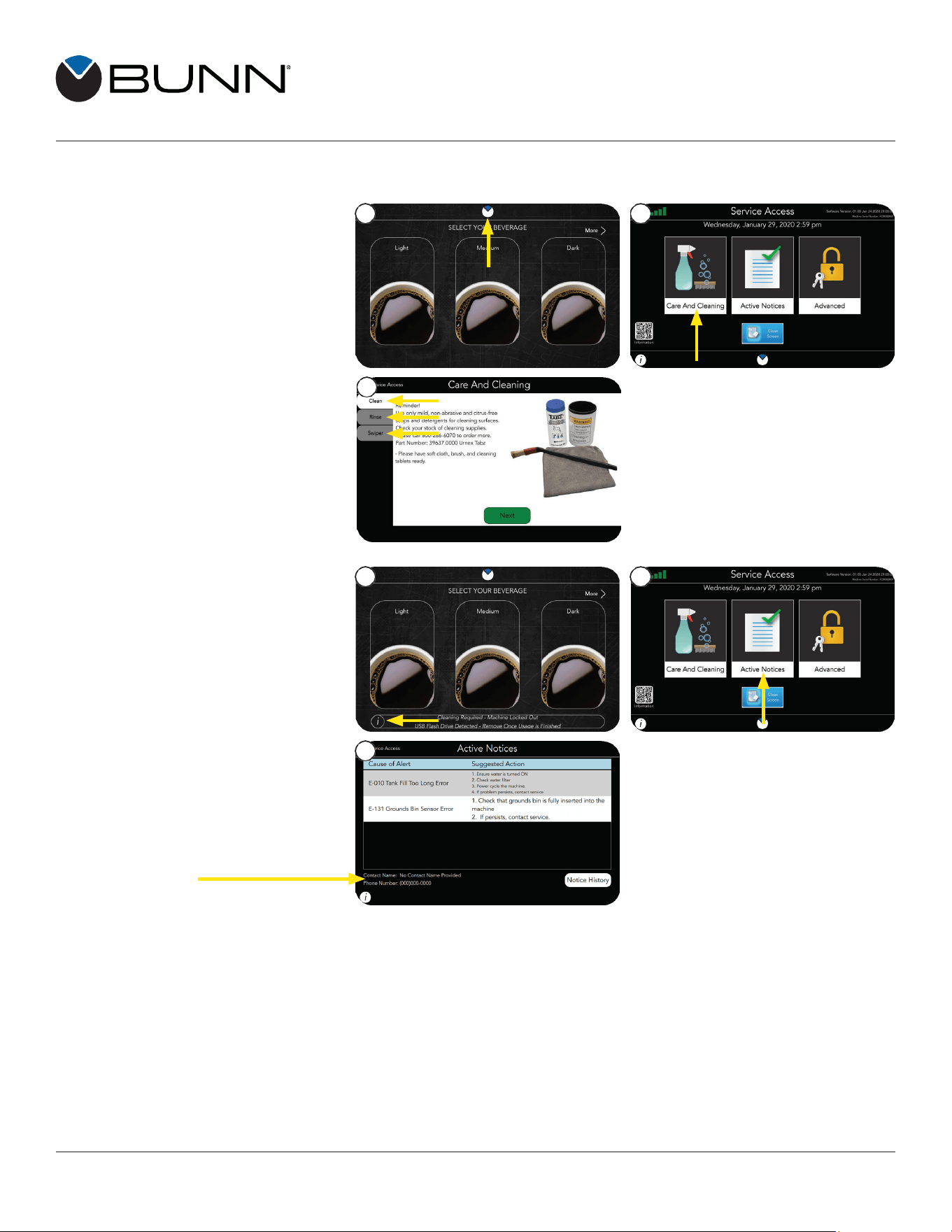
1. Touch and hold the BUNN logo for
a few seconds until the SERVICE
ACCESS screen appears.
2. From the SERVICE ACCESS
screen, press the CARE AND
CLEANING button.
3. Select one of the three cleaning
3
tabs: Clean, Rinse, or Swiper.
Follow the picture prompts to
complete the action.
ACTIVE NOTICES
1. If the “I” button at the bottom of the
screen appears; press it to view
the message.
2. Press the ACTIVE NOTICES
icon from the SERVICE ACCESS
screen to view all the current notices.
3. The ACTIVE NOTICES screen will
3
display suggested actions
for alerts
NOTE: Service Contact
information is also provided
on this screen.
SERVICE CALLS:
For issues regarding service please call 800-420-2866. Please be ready to provide the service agent with the
serial number of the machine.
Bunn-O-Matic Corporation
5020 Ash Grove Drive, Springfield, Illinois 62711 | Phone (217) 529-6601 | Fax (217) 529-6644
58224.0000 A 1/22 © 2022 Bunn-O-Matic Corporation
www.bunn.com
1
2