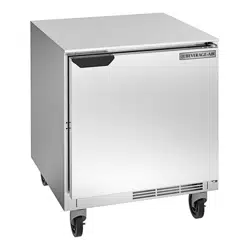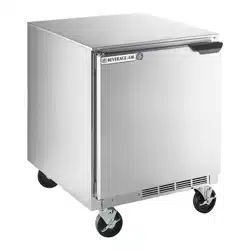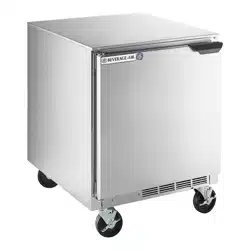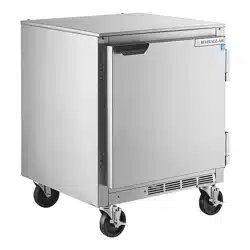
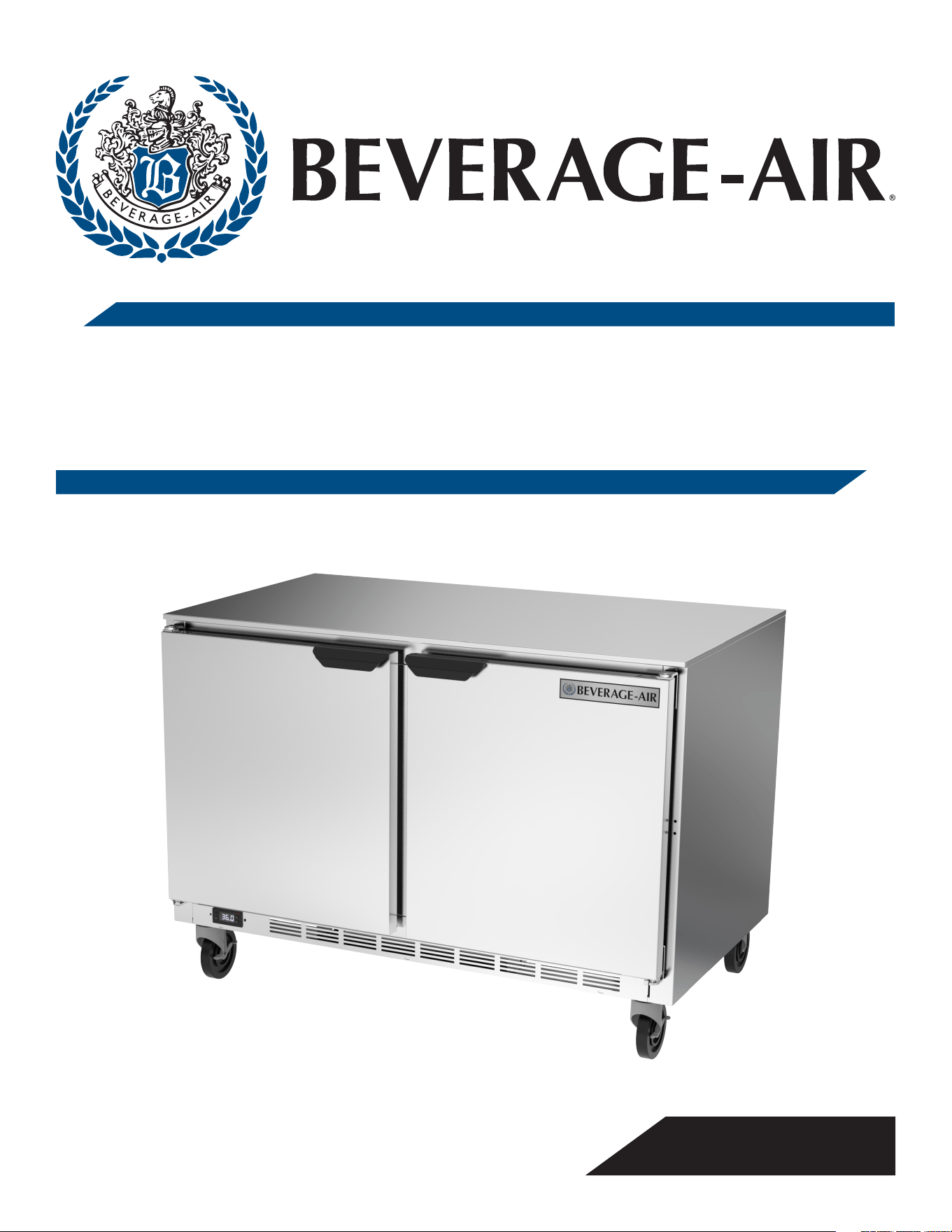
INSTALLATION AND OPERATING INSTRUCTIONS
for all Hydrocarbon
UCR Refrigerators
3779 CHAMPION BLVD, WINSTON-SALEM, NC 27105
Phone: (888) 845-9800 | Fax: (800) 253-5168 | Web: beverage-air.com
809-173A Rev. B. 04/23/2025
SEE BACK COVER FOR
WARRANTY REGISTRATION

User Manual for UCR Refrigerators Beverage-Air
Rev. 04/25Beverage-Air2
WELCOME
Contents
Safety. . . . . . . . . . . . . . . . . . . . . . . . . . . . . . . . . . . . . . . . . . . . . . . . . . . 3
Important Information. . . . . . . . . . . . . . . . . . . . . . . . . . . . . . . . . . . . 4
Product Information .....................................5
Clearance and Placement .................................7
Unpacking and Set Up ....................................8
Electrical ................................................9
Using The Unit - Mechanical Controller ..................... 10
Using The Unit - Danfoss Controller ........................11
Sequence of Operations Refrigerator .................. 12
Using the Unit - Eliwell Controller .........................16
Sequence Of Operations Refrigerator .................17
Cleaning and Maintenance ...............................20
Drawer Cleaning and Maintenance ........................21
Condenser Cleaning ......................................22
Methods For Cleaning Stainless Steel ......................23
Help ....................................................24
For The Service Tech - R290 ..............................25
For The Service Tech - Wiring Diagrams ....................26
Limited Warranty ........................................29
Limited Warranty (continued) .............................30
Important Information
• PLEASE READ THESE INSTRUCTIONS CAREFULLY
BEFORE INSTALLING OR USING, IF RECOMMENDED
PROCEDURES ARE NOT FOLLOWED, WARRANTY
CLAIMS MAY BE DENIED.
• Your warranty registration information is located with
this manual. Please complete the card and submit it to
Beverage-Air within TEN days of installation. Failure
to properly register equipment may limit or void the
warranty.
• Beverage-Air reserves the right to change
specications and product design without
notice. Such revisions do not entitle the buyer to
corresponding changes, improvements, additions, or
replacements for previously purchased equipment.
Thank you for purchasing a Beverage-Air cabinet. This
series has passed our strict quality control inspection and
meets the high standards set by Beverage-Air! You have
made a quality investment that with proper maintenance
will give you many years of reliable service!
Please read the following installation and maintenance
instructions before installing or using your unit.
User Manual for UCR Refrigerators Beverage-Air
Rev. 04/25 Beverage-Air 3
SAFETY
This appliance has been designed with your safety in mind. It has many features to keep you from being harmed. However,
safe operation and maintenance are your responsibilities.
Use: When using this unit, please:
• Move it carefully. If on casters be sure the casters
do NOT run over the power cord.
• Lock the casters when in use.
• Seek help. This machine is heavy! Be sure to move
with enough help to avoid tipping or dropping the
cabinet.
• Prevent children from playing in or on the cabinet.
Persons unable to use this product must be
prevented access.
• Follow all instructions. There are many safety
labels and directions on the unit. Heed them.
• Watch your ngers. There may be pinch points near
the door hinges.
Maintenance
Do NOT:
• Clean a frozen evaporator with a sharp object
• Clean a dirty condenser with a sharp object.
• Store gasoline, kerosene or any other ammable
material near the cabinet.
Do ALWAYS
• Use a Beverage-Air recommended technician certied
to repair R290 equipment.
• Use ONLY Beverage-Air factory service parts. Use of
non OEM parts can be dangerous because of the design
changes needed to safely use R290.
Observe the Caution and Warning notices. They are indicators of
important safety information. Keep this manual for future reference.
Important Information to Add
Record the model number, serial number and the date of installation here for future reference. The model and serial
numbers are on the unit's serial number dataplate, which is located on the left inside wall.
Model Number
Serial Number
Date of Installation
Purchased From
CAUTION
WARNING
CAUTION
CAUTION
User Manual for UCR Refrigerators Beverage-Air
Rev. 04/25Beverage-Air4
IMPORTANT INFORMATION
This unit is intended to be used in a commercial application. That includes bars and restaurants.
If installed in a residence some commercial service companies may not be able to service it on site.
The manufacturer has designed and produced this machine with the nest in materials. The manufacturer assumes no
liability for units that have been altered in any way. Alterations or part substitutions will void the warranty.
Limitations
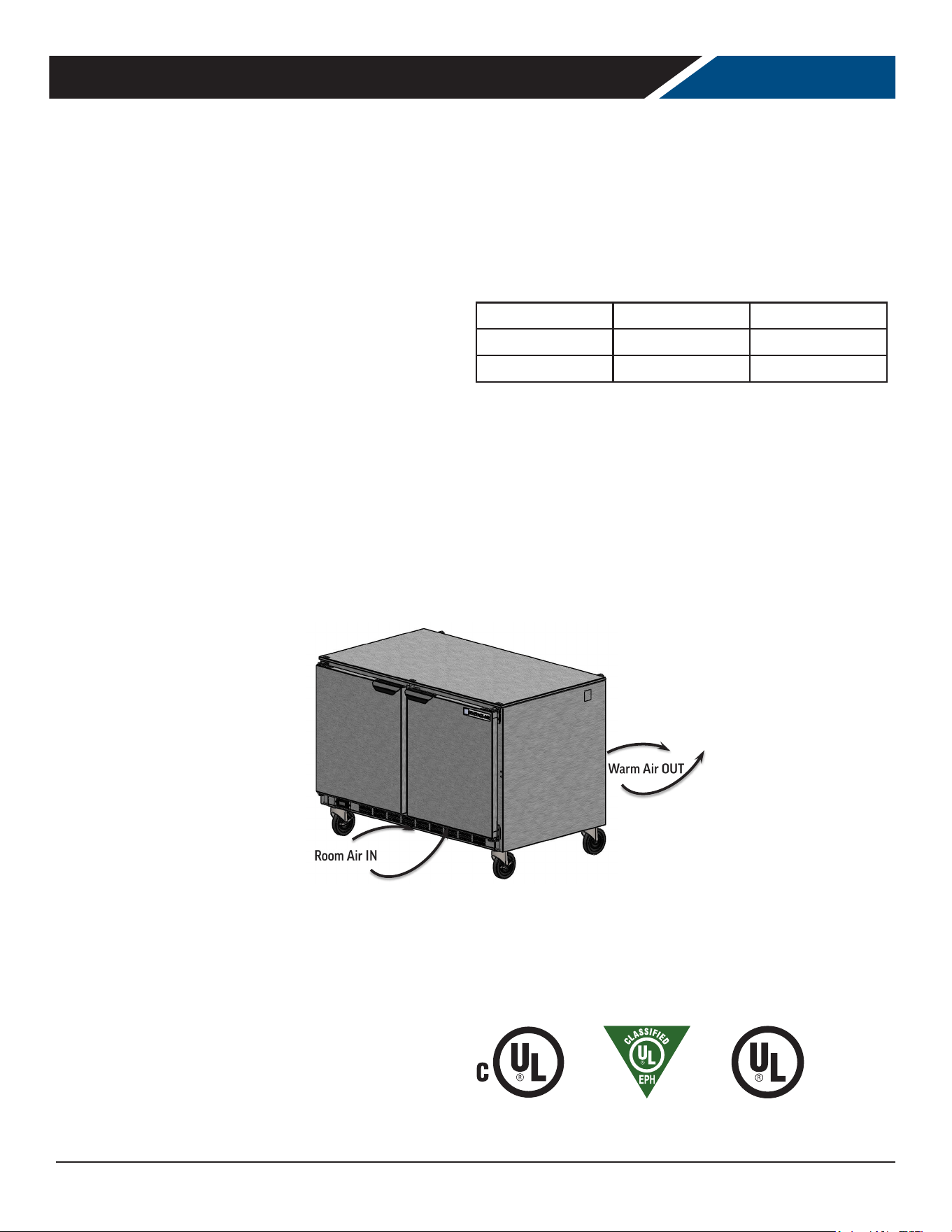
The machine is designed for use indoors in a controlled
environment. It must be kept dry, not overheated or
subjected to excessive cold. May only be connected to
a dedicated electrical circuit. Extension cords are not
permitted.
Minimum Maximum
Voltage 104 127
Room Air Temp 60º F 100º F
Air Flow
Agency Approvals
These marks appear on the dataplate or serial tag, located
in the inside of the left wall. The dataplate also contains
the model and serial numbers as well as electrical
requirements.
User Manual for UCR Refrigerators Beverage-Air
Rev. 04/25 Beverage-Air 5
Model
Cabinet Dimensions
w x d x h (Inches)
Door Type
Door or Drawer
Count
Full Load
Amps
Power Cord
Plug (NEMA)
Refrigerant Type /
Charge g /Charge oz
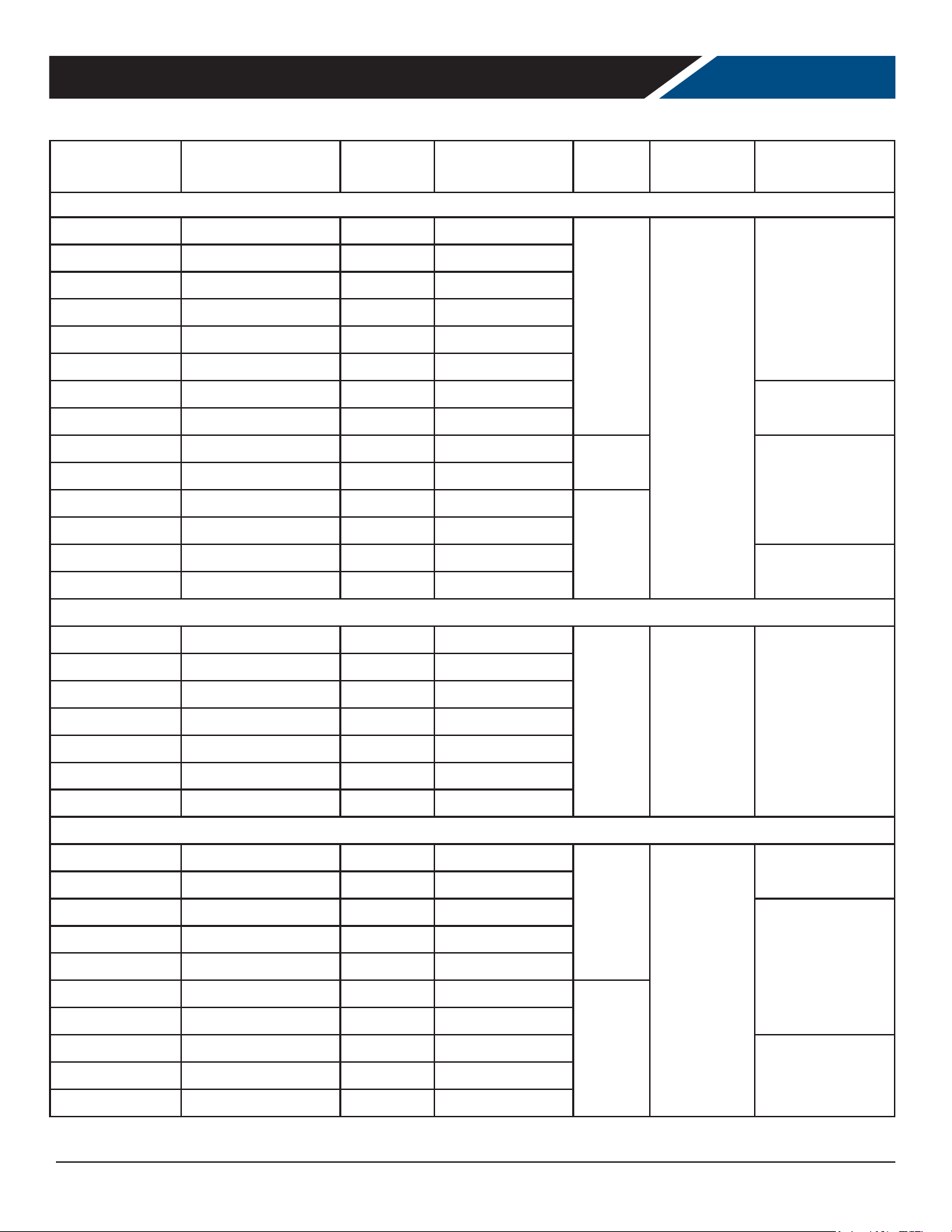
REAR MOUNTED STANDARD DEPTH UNITS WITH DOORS
UCR24AHC 24 x 32 x 34 5/8 Solid 1 Door
2.0
5-15P
R-290 / 60 / 2.12
UCR24AHC-25 24 x 32 x 34 5/8 Glass 1 Door
UCR27AHC 27 x 32 x 34 5/8 Solid 1 Door
UCR27AHC-25 27 x 32 1/2 x 34 5/8 Glass 1 Door
UCR32AHC 32 x 32 x 34 1/2 Solid 1 Door
UCR32AHC-25 32 x 32 5/8 x 34 5/8 Glass 1 Door
UCR36AHC 36 x 32 x 34 5/8 Solid 2 Doors
R-290 / 82 / 2.9
UCR36AHC-25 36 x 32 1/2 x 34 5/8 Glass 2 Doors
UCR48AHC 48 x 32 x 34 5/8 Solid 2 Doors
2.2
R-290 / 110 / 3.9
UCR48AHC-25 48 x 32 1/2 x 34 5/8 Glass 2 Doors
UCR60AHC 60 x 32 x 34 5/8 Solid 2 Doors
3.0
UCR60AHC-25 60 x 32 1/2 x 34 5/8 Glass 2 Doors
UCR72AHC 72 x 32 x 34 5/8 Solid 3 Doors
R-290 / 120 / 4.24
UCR72AHC-25 72 x 32 5/8 x 34 5/8 Glass 3 Doors
REAR MOUNTED SHALLOW DEPTH UNITS WITH DOORS
UCR20HC 20 x 24 1/2 x 31 1/8 Solid 1 Door
2.0
5-15P
R-290 / 60 / 2.12
UCR20HC-25 20 x 25 x 31 1/8 Glass 1 Door
UCR24HC 24 x 30 x 34 5/8 Solid 1 Door
UCR27HC 27 x 30 x 34 1/2 Solid 1 Door
UCR27HC-25 27 x 32 1/2 x 34 5/8 Glass 1 Door
UCR34HC 34 x 24 1/2 x 31 1/8 Solid 2 Doors
UCR34HC-25 34 x 25 1/8 x 31 1/8 Glass 2 Doors
REAR MOUNTED STANDARD DEPTH UNITS WITH DRAWERS
UCRD27AHC-2 27 x 32 1/8 x 34 5/8 Solid 2 Doors
2.0
5-15P
R-290 / 60 / 2.12
UCRD32AHC-2 32 x 32 x 34 5/8 Solid 2 Doors
UCRD36AHC-2 36 x 32 x 34 5/8 Solid 2 Doors
R-290 / 110 / 3.9
UCRD48AHC-2 48 x 32 x 34 5/8 Solid 2 Drawers 1 Door
UCRD48AHC-4 48 x 32 x 34 5/8 Solid 4 Doors
UCRD60AHC-2 60 x 32 x 34 5/8 Solid 2 Drawers 1 Door
3.0
UCRD60AHC-4 60 x 32 x 34 5/8 Solid 4 Drawers
UCRD72AHC-2 72 x 32 x 34 5/8 Solid 2 Drawers 2 Doors
R-290 / 120 / 4.24UCRD72AHC-4 72 x 32 x 34 5/8 Solid 4 Drawers 1 Door
UCRD72AHC-6 72 x 32 x 34 5/8 Solid 6 Drawers
Height includes casters
PRODUCT INFORMATION
User Manual for UCR Refrigerators Beverage-Air
Rev. 04/25Beverage-Air6
Model
Cabinet Dimensions
w x d x h (Inches)
Door Type
Door or Drawer
Count
Full Load
Amps
Power Cord
Plug (NEMA)
Refrigerant Type /
Charge g /Charge oz
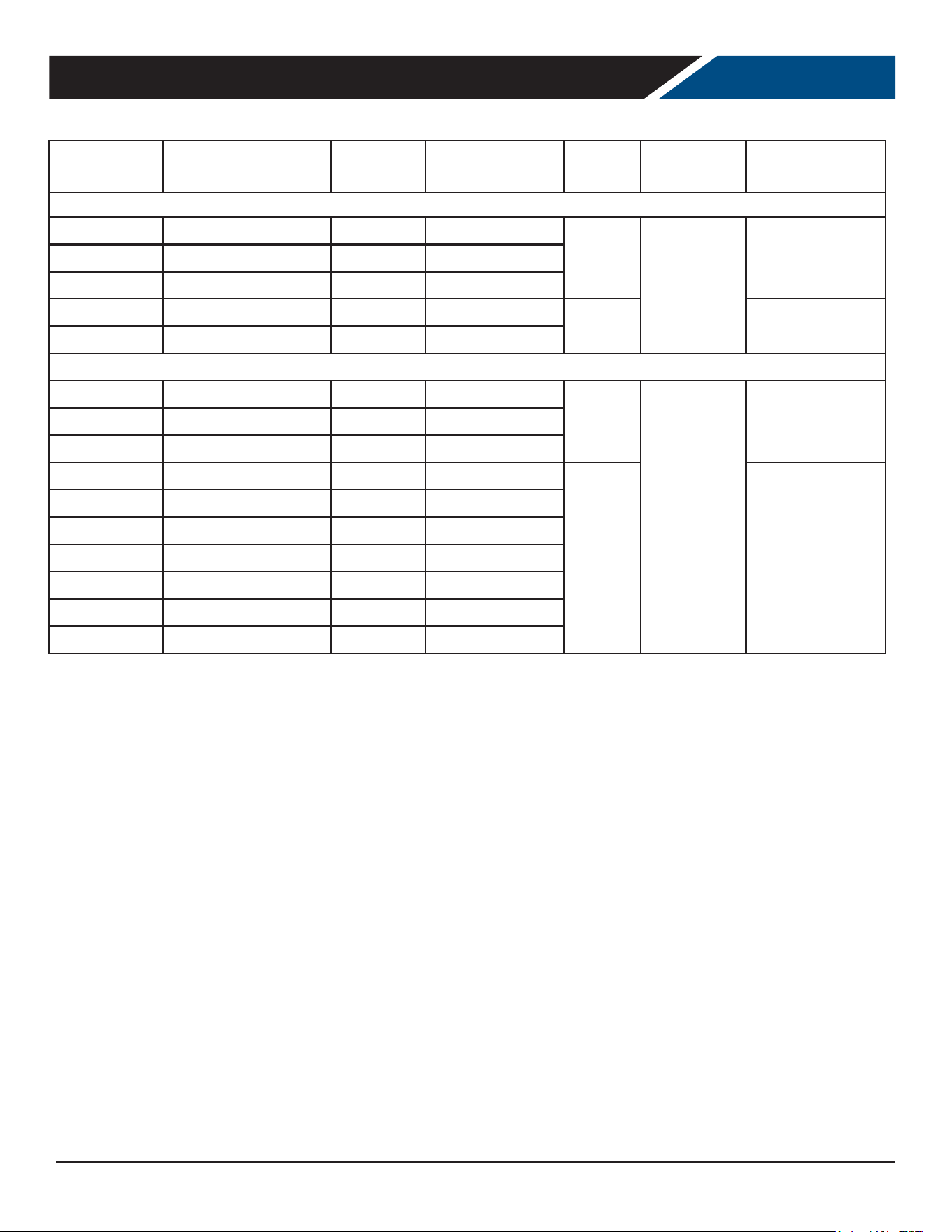
SIDE MOUNTED UNITS WITH DOORS
UCR41AHC 41 X 34 3/4 X 34 1/2 Solid 1 Door
2.0
5-15P
R-290 / 110 / 3.9UCR46AHC 46 x 34 3/4 x 34 1/2 Solid 1 Door
UCR67AHC 67 x 34 3/4 x 34 1/2 Solid 2 Doors
UCR93AHC 93 1/8 x 34 3/4 x 34 1/2 Solid 3 Doors
5.0 R-290 / 140 / 4.94
UCR119AHC 118 7/8 x 34 3/4 x 34 1/2 Solid 4 Doors
SIDE MOUNTED UNITS WITH DRAWERS
UCRD46AHC-2 46 x 34 3/4 x 34 1/2 Solid 2 Drawers
2.0
5-15P
R-290 / 110 / 3.9
UCRD67AHC-2 67 x 34 3/4 x 34 1/2 Solid 2 Drawers/1 Door
UCRD67AHC-4 67 x 34 3/4 x 34 1/2 Solid 4 Drawers
UCRD93AHC-2 93 1/8 x 34 3/4 x 34 1/2 Solid 2 Drawers/2 Doors
5.0 R-290 / 140 / 4.94
UCRD93AHC-4 93 1/8 x 34 3/4 x 34 1/2 Solid 4 Drawers/1 Door
UCRD93AHC-6 93 1/8 x 34 3/4 x 34 1/2 Solid 6 Drawers
UCRD119AHC-2 118 7/8 x 34 3/4 x 34 1/2 Solid 2 Drawers/3 Doors
UCRD119AHC-4 118 7/8 x 34 3/4 x 34 1/2 Solid 4 Drawers/2 Doors
UCRD119AHC-6 118 7/8 x 34 3/4 x 34 1/2 Solid 6 Drawers/1 Door
UCRD119AHC-8 118 7/8 x 34 3/4 x 34 1/2 Solid 8 Drawers
Height includes casters
PRODUCT INFORMATION
• All models will maintain product temperature between 35.5 and 40.5 degrees F. at the factory setting of 38.
0
F.
• All models are 115 volts, 60 Hz AC.
• ALWAYS REFERENCE YOUR EQUIPMENT DATA PLATE AMPS, REFRIGERANT AND REFRIGERANT CHARGE FOR THE
MOST UP TO DATE AND ACCURATE VALUES.
• There are no access valves on the refrigeration system.
User Manual for UCR Refrigerators Beverage-Air
Rev. 04/25 Beverage-Air 7
CLEARANCE AND PLACEMENT
Placement
Consider the following when selecting a location for your Refrigerator:
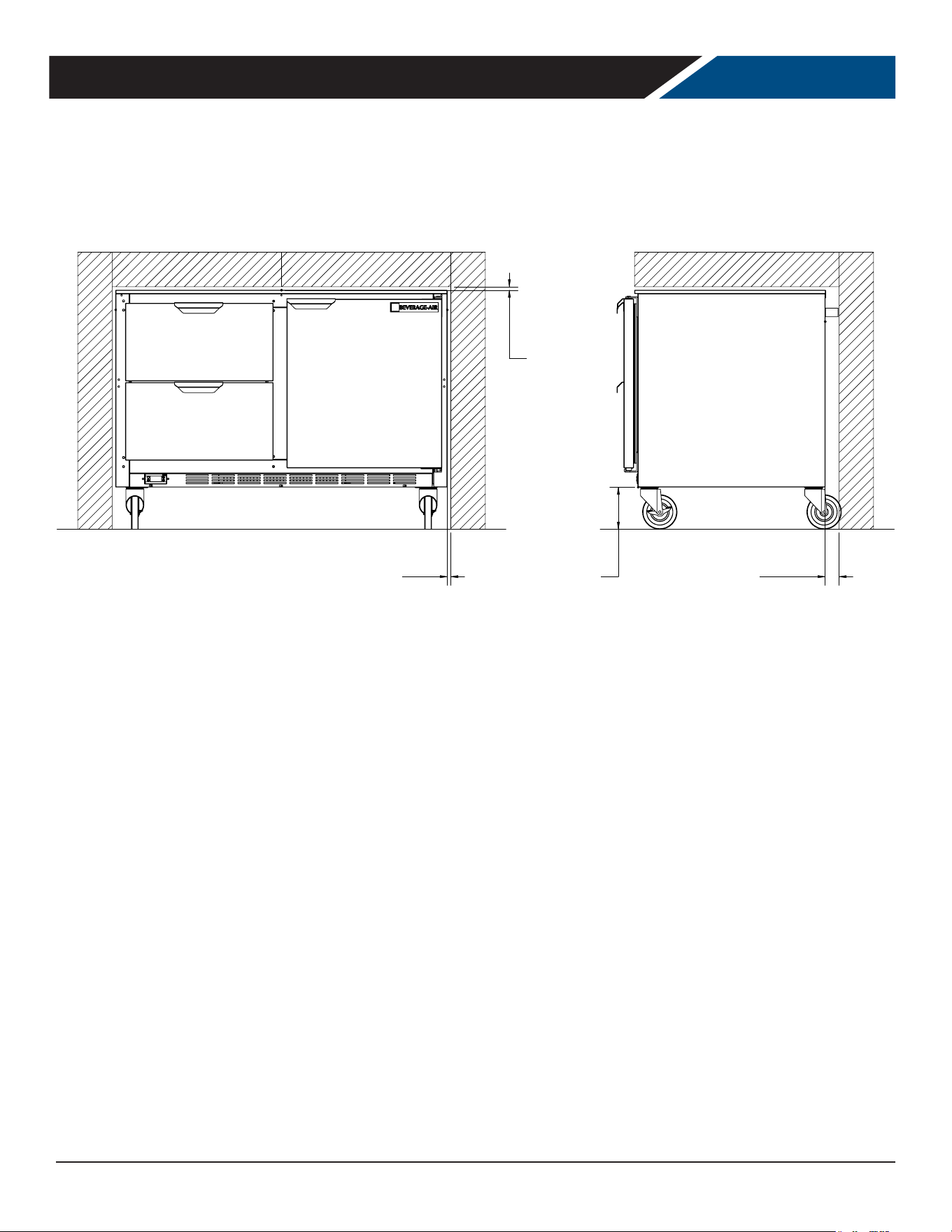
Clearance:
• 0
o
- Top
• 0" - Left
• 0" - Right
• 2" - Rear
• 3" - Below
Floor Load: the oor on which the Refrigerator is located must be even and level, free from vibrations, and strong enough
to support the combined weights of the unit and maximum product load.
Ventilation: Grille area at front must be free and clear of any object or wall.
Power Outlet: Dedicated power outlet is located within the length of the unit's power cord.
0"
LEFT/RIGHT SIDE
MINIMUM
CLEARANCE
0"
TOP
MINIMUM
CLEARANCE
2"
REAR
MINIMUM
CLEARANCE
3"
BOTTOM
MINIMUM
CLAERANCE
User Manual for UCR Refrigerators Beverage-Air
Rev. 04/25Beverage-Air8
UNPACKING AND SET UP
Carefully inspect the shipping carton for damage. This is the only time that shipping damage may be claimed. If damage is
suspected, open the carton immediately and, if there is damage, retain the carton and contact the shipper to make a claim.
Do NOT contact the manufacturer.
Uncrating
Tools Needed: ¾” box wrench, adjustable wrench, level,
at head screw driver, and box cutter.
1. First, remove the cardboard top capping, all clear
tape, and all staples including those at the bottom of
the cardboard carton and skid.
2. Next, start from the top of the carton. Using the box
cutter, carefully make one continuous cut to the
bottom of the skid. Remove cardboard carton and
discard.
3. Then, move unit as close to nal position as possible
before removing the skid.
4. Remove the brackets securing the unit to the skid.
Note: The skid must be removed before the casters or legs
can be attached.
Do NOT tip unit on its front or sides. If tipped onto the
back, unit must not be started for 3 hours.
Skid Removal and Caster Attachment
Tip the unit forward and remove the skid.
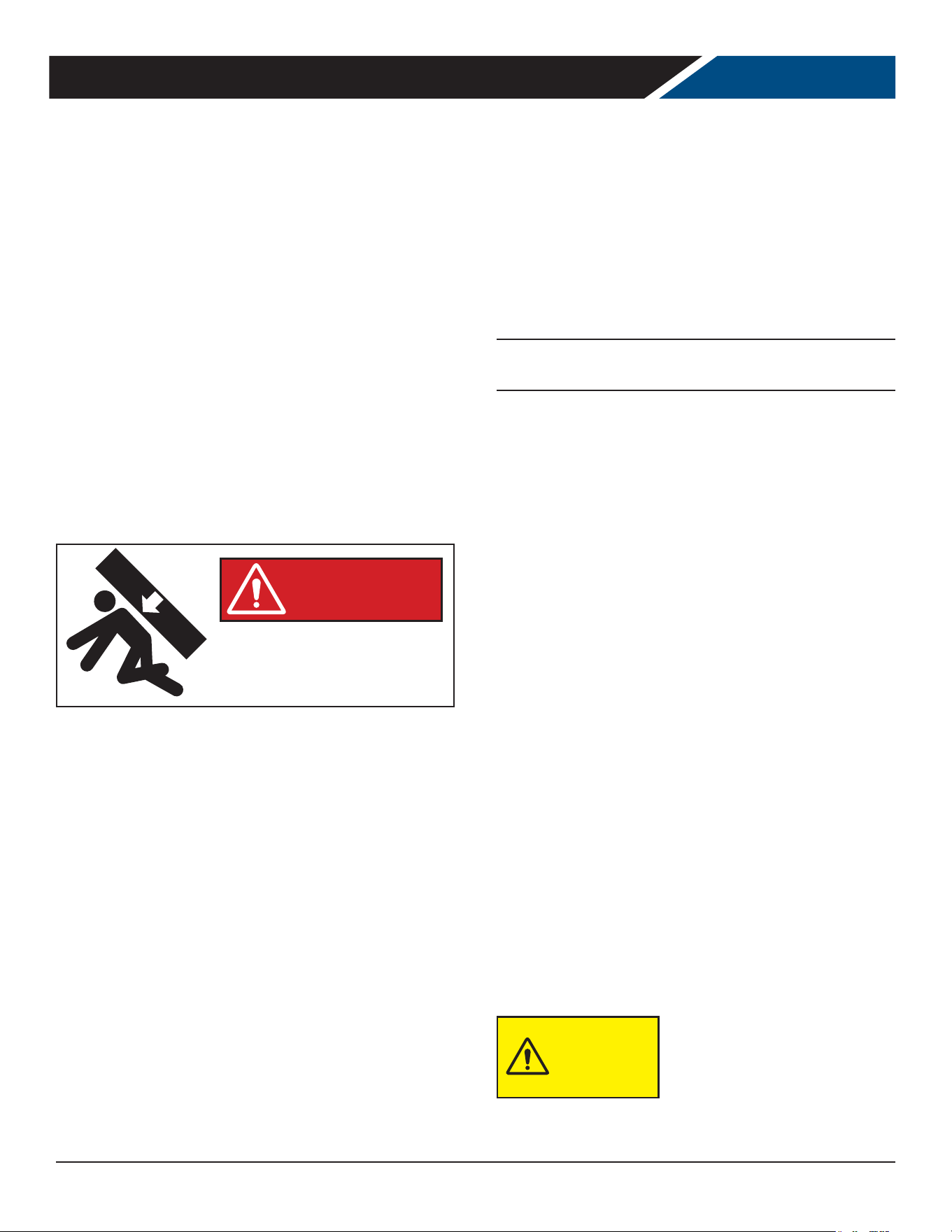
Risk of personal injury.
Unit must be securely supported
while attaching casters or legs.
WARNING
1. Remove the shipping bolts using the ¾” box wrench
while cabinet is held in one direction. Repeat the process
while the cabinet is held in the opposite direction.
2. None of the threads on the leg or caster stem should
be visible once screwed in.
3. Tilt the cabinet in one direction approximately 8” and
block it securely with pieces of 2x4 lumber or other
suitable material.
4. Thread the stem casters or legs into the ½ -13 holes in
the bottom of the cabinet. Tighten by hand as much
as possible. Some models may already have levelers
installed. If so, then the levelers will need to rst be
removed and discarded.
5. Once the caster or leg cannot be turned any further,
use a 3/4 inch wrench to tighten the nut in between
the mounting plate and the wheel of the caster until
snug.
6. Repeat this procedure with unit secured in the
opposite direction so as to access the remaining legs/
casters/levelers
7. If plate casters or legs are installed instead of stem
casters or legs, then repeat step 3 above and secure
the plate with either #14 AB screws, or ¼-20 screws,
depending upon which are required.
8. If levelers are employed, then repeat step 3 above and
thread the leveler in place. Then repeat step 6.
Leveling:
Cabinets must be leveled when installed. Level should be
measured on the headrail.
Failure to level your cabinet may result in door not
sealing, closing correctly, or condensed water draining not
draining properly.
For cabinets with legs, rotate the foot of the leg with an
adjustable wrench to achieve desired height for leveling.
For cabinets with casters, leveling can be achieved by
placing large washers in between the ½’ stud and the
holes located on the bottom of the case.
Do NOT loosen casters to level
the cabinet. Casters MUST be
tightly secured to cabinet for full
strength.
Install or attach any accessories that will be used
Remove any plastic covering the stainless steel.
CAUTION
User Manual for UCR Refrigerators Beverage-Air
Rev. 04/25 Beverage-Air 9
This is a cord-connected unit, and must be connected to its own dedicated power supply. Check the dataplate on the
machine to conrm the voltage and per the dataplate use the correct fuses or HACR circuit breakers.
Note: Do not connect to GFI / GFCI outlets. Connection to that type of outlet can result in product loss due to unsafe
cabinet temperature when GFI device trips from moisture.
Power Cord
This 115 volt model is equipped with a cord and 5-15P plug.
If the power cord becomes damaged, it must be replaced
with the identical cord.
Follow All National and Local Codes
This unit must be grounded. Do not use extension cords
and do not disable or by-pass ground prong on electrical
plug.
Initial Start Up
Plug the power cord into the proper power supply.
The cabinet will soon begin to blow warm air out of the
bottom area, and the inside wall of the cabinet will begin
to become cold.
The cabinet temperature has been set at the factory and
should not need adjustment, however if it was changed,
the standard setting is 38º F.
Cautions
Care must be taken whenever
moving or servicing the unit.
The refrigerant is contained in a
sealed system, but if released it
may be ammable.
ELECTRICAL
CAUTION
IMPORTANT NOTICE
This Cabinet Was Manufactured With
Either A Mechanical Controller, or a
Danfoss™ Or Eliwell™ Brand Electronic
Controller.
Identify Which Controller Is Present
And Refer To The Information For That
User Manual for UCR Refrigerators Beverage-Air
Rev. 04/25Beverage-Air10
Operation is simple, just keep it connected to the correct
power supply and the refrigerator will maintain the
internal temperature it has been set to. Keep the door
closed as much as possible to avoid unnecessary run time.
NOTE: Once the unit has been started and reaches proper
storage temperatures, it may be loaded with product.
No provision is made in the cabinets to quickly pull
a keg of beer down to temperature. Best results are
obtained when a pre-chilled keg is used. Otherwise it
can take several hours to reduce the keg to the desired
temperature.
Adjusting the set temperature lower will NOT cause the
system to lower the temperature faster. When on, the
refrigeration system is always operating at maximum.
The internal fan will remain on when ever the unit is
connected to power.
The compressor and condenser fan motor will only be on
when the controller senses an increase in internal cabinet
temperature passed the set point.
Before making temperature adjustments, allow the unit
to stabilize for 1 hour and verify that a temperature
adjustment is needed. If an adjustment is needed; turn
knob one number and allow the unit to stabilize for 1 hour
before rechecking the cabinet temperature. If additional
adjustment is needed, repeat process to achieve the
desired operation temperature.
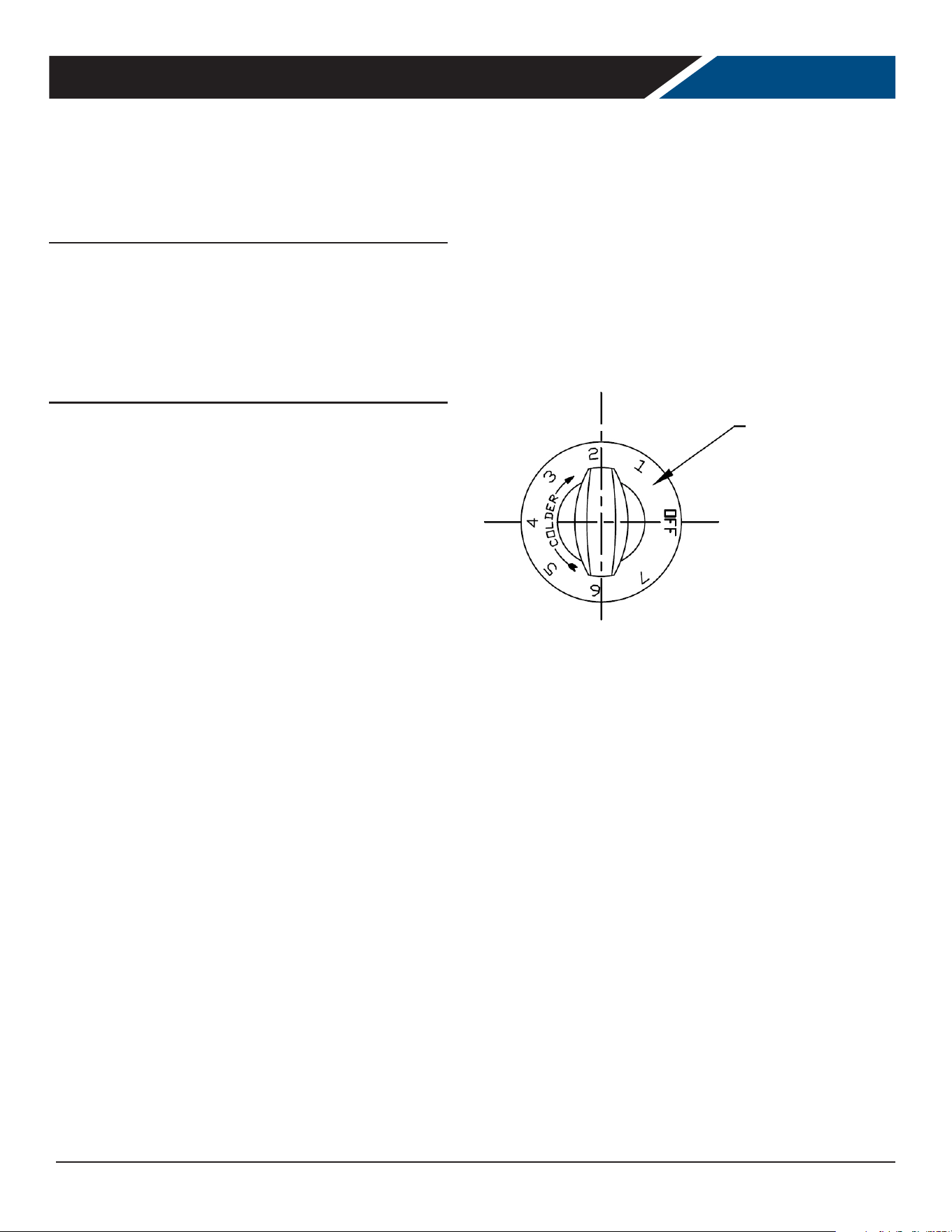
Clockwise = Colder
Counter Clockwise = Warmer
Excessive tampering with temperature control could lead
to service diculties.
* For operation above 3000-ft altitude, have thermostat
adjusted by a qualied technical service representative.
Cautions
Care must be taken whenever moving or servicing the
unit. The refrigerant is contained in a sealed system, but if
released it may be ammable.
USING THE MECHANICAL CONTROLLER
Turn the dial
clockwise to lower
the temperature or
counter clockwise to
raise the temperature.
User Manual for UCR Refrigerators Beverage-Air
Rev. 04/25 Beverage-Air 11
USING THE UNIT - DANFOSS CONTROLLER
User Manual for MMR Refrigerators Beverage-Air
Rev. 12/21Beverage-Air12
38.0
o
F
USING THE UNIT - DANFOSS CONTROLLER
Operation is simple, just keep it connected to the correct
power supply and the refrigerator will maintain the
internal temperature it has been set to. Keep the doors
and / or drawers closed as much as possible to avoid
unnecessary run time.
The controller displays the current internal temperature.
Adjusting the set temperature lower will NOT cause the
system to lower the temperature faster. When on, the
refrigeration system is always operating at maximum.
The temperature was set at the factory at 38
º
F, but
you can adjust it to your own selected temperature. 30
seconds after adjustment, the display automatically
reverts to showing the current temperature.
The Refrigerator will automatically defrost as needed,
there is no set time for defrost. Push and immediately
release the "melting" or defrost button for a manual
defrost.
Note: Holding the defrost button in too long will shut the
controller o .
The internal fan will be on when the compressor is on and
when the doors are closed.
The compressor and condenser fan motor will only be on
when the controller senses an increase in internal cabinet
temperature passed the set point.
If equipped with glass doors, holding the SC button in will
turn the cabinet light on or o .
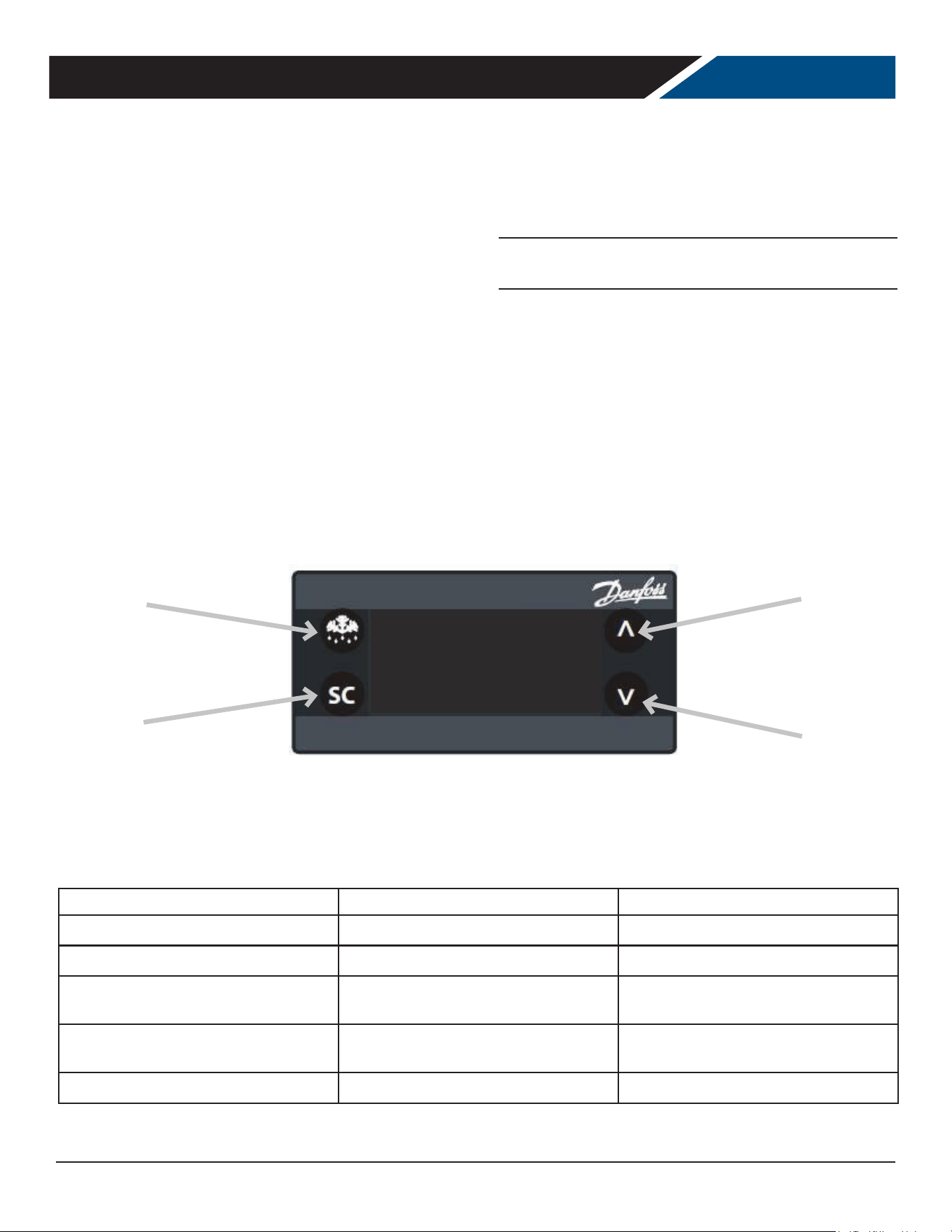
Select
Defrost
Increase
Decrease
In most cases the only thing displayed will be the cabinet temperature. When something other than normal operation has
occurred, a message will be shown.
Message Displayed Why What to do
dEF
Unit is defrosting Nothing. Normal operation.
Hi
Cabinet temperature too warm Con rm doors or drawers are closed.
dOr
Door is open Close door, if message does not
change, call for service.
LEA
Compressor run time too long Check doors closed. If yes, call for
service.
E01, E02, E03, E04
Sensor unplugged or has failed Call for service.
User Manual for UCR Refrigerators Beverage-Air
Rev. 04/25Beverage-Air12
0123ÿ567869ÿ3ÿ5ÿ9ÿ59ÿ923ÿ3
ÿ !"#$%&
'()*(+,(ÿ./ÿ.0(1234.+'ÿ1(/145(123.1
678ÿ:8;:<=8:>?@:ÿ@A8:>?8BÿC>B8Dÿ@Eÿ?78ÿ><:ÿ?8FA8:>?G:8ÿF8>BG:8DÿCHÿ?78ÿA:@C8ÿI@J>?8Dÿ>?ÿ?78ÿ:8?G:Eÿ><:Kÿÿ
LMLNN
OLPQLMRM6 LQRST6ULMOLM6SLVVRSÿTO6ULMLQRST6ULMOLM6SLVVRSÿTO6ULM
OLPQSRWWLS
O@FA:8BB@:ÿ?G:EBÿ
@EÿX78Eÿ?78ÿ><:ÿ
?8FA8:>?G:8ÿ>?ÿ?78ÿ
A:@C8ÿ<Bÿ>C@Y8ÿ?78ÿ
BGFÿ@;ÿ?78ÿB8?ÿA@<E?ÿ
Z[
678ÿO@FA:8BB@:ÿ
O@E?>J?ÿ<Bÿ8E8:=<\8D
O@FA:8BB@:ÿ?G:EBÿ
@]ÿX78Eÿ?78ÿ><:ÿ
?8FA8:>?G:8ÿ>?ÿA:@C8ÿ<Bÿ
8^G>Iÿ?@ÿ@:ÿI8BBÿ?7>Eÿ?78ÿ
B8?ÿA@<E?ÿ_[
678ÿO@FA
:8BB@:ÿ
O@E?>J?ÿ<BÿD8_
8E8:=<\8D
`RSOÿ%%[ÿaÿ68:F<E>Iÿb%c
`RSOÿ%%[ÿaÿ68:F<E>Iÿ
b%c
OLMdRMWRSÿNTM
678ÿO@ED8EB8:ÿN>Eÿ
?G:EBÿ@EÿÿX78Eÿ
?78ÿO@FA:8BB@:ÿ<Bÿ
:GEE<E=
678ÿO@ED8EB8:ÿN>Eÿ
<BÿX<:8DÿD<:8J?IHÿ?@ÿ
?78ÿO@FA:8BB@:eÿE@?ÿ
?7:@G=7ÿ?78ÿJ@E?:@II8:
678ÿO@ED8EB8:ÿN>Eÿ
?G:EBÿ@]ÿX78Eÿ?78ÿ
O@FA:8BB@:ÿ<BÿE@?ÿ
:GEE<E=
678ÿO@ED8EB8:ÿN>Eÿ
<BÿX<:8DÿD<:8J?IHÿ?@ÿ
?78ÿO@FA:8BB@:eÿE@?ÿ
?7:@G=7ÿ?78ÿJ@E?:@II8:
RfTQLST6LSÿ
NTM
678ÿRY>A@:>?@:ÿN>Eÿ
:GEBÿJ@E?<EG@GBIHÿ<Eÿ
:8;
:<=8:>?@:BKÿg78Eÿ
?78ÿGE<?ÿ<BÿAIG==8Dÿ
<Eeÿ?78ÿRY>A@:>?@:ÿ
N>EÿX<IIÿ:GEK
678ÿ8Y>A@:>?@:ÿN>Eÿ<Bÿ
J@EE8J?8DÿD<:8J?IHÿ?@ÿ
<EJ@F<E=ÿA@X8:eÿE@?ÿ
?7:@G=7ÿ?78ÿJ@E?:@II8:
678ÿRY>A@:>?@:ÿN>Eÿ
:GEBÿJ@E?<EG@GBIHÿ<Eÿ
:8;:<=8:>?@:BKÿg78Eÿ?78ÿ
GE<?ÿ<BÿAIG==8Dÿ<Eeÿ?78ÿ
RY>A@:>?@:ÿN>EÿX<IIÿ:GE
678ÿ8Y>A@:>?@:ÿN>Eÿ<Bÿ
J@EE8J?8DÿD<:8J?IHÿ?@ÿ
<EJ@F<E=ÿA@X8:eÿE@?ÿ
?7:@G=7ÿ?78ÿJ@E?:@II8:K
O@ED<?<@E
O@FA:8BB@:
O@ED8EB8:ÿN>E
RY>A@:>?@:ÿ
N>E
V<=7?B
O>C<E8?ÿ68FAÿhÿW8?ÿA@<E?ÿZÿ[LMLMLMLMÿ@:ÿLNN
O>C<E8?ÿ68FA8:>?G:8ÿijÿW8?ÿA@<E?ÿ_ÿ[LNNLNNLMLMÿ@:ÿLNN
¶ÿ¦ÿÿ
»¼½¾¹ÿ
}~ÿ~ÿ¦ÿÿÿ
¦~ÿ~ÿÿÿÿÿ
ÿÿ¦~ÿ
~ÿÿÿÿ
¦~ÿÿ³ÿ
}~ÿ¿~ÿ¥ÿÿ
ªÿ
}~ÿ~ÿ¦ÿÿÿ
¦~ÿ~ÿÿÿÿÿ
ÿÿ¦~ÿ~ÿ
ÿÿÿ¦~ÿÿ
³ÿ
}~ÿ¿~ÿ¥ÿÿ
¬ªÿ
®¯¥ÿ°°©ÿ±ÿ}ÿ
²À³ÿ
®¯¥ÿ°°©ÿ±ÿ}ÿ
²À³ÿ
ÿ
ÿ
ÿ
ÿ
ÿ
ÿ
ÿ
ÿ
¡rpÁyxyrpÿ
¡rÂuvmzzrvÿ
¡rpÁmpzmvÿ
wpÿ
¤Ãwurvwxrvÿ
wpÿ
»y|Äxzÿ
¡wÅypmxÿ¹mÂuÿÆÿlmxÿurypxÿÇÿÈÿ tÿ tÿ tÿ tÿrvÿtÿ
¡wÅypmxÿ¹mÂumvwxovmÿÉÊÿlmxÿurypxÿËÿÈÿ tÿ tÿ tÿ tÿrvÿtÿ
´msvrzxÿ tÿ tÿ tÿ tÿrvÿtÿ
ÿ
ÍÎÏÐÎÑÒÎÿÓÔÿÕÖÎ×ØÙÚÓÑÛÿÜÎÔ×ÚÝÎ×ØÙÓ×ÿ
ÿ
Þßàÿâàãâäåàâæçèâÿèéàâæçàêÿëæêàìÿèíÿçßàÿæäâÿçàîéàâæçïâàÿîàæêïâàìÿëðÿçßàÿéâèëàÿñèòæçàìÿæçÿçßàÿ
âàçïâíÿæäâóÿÿÿ
ÿ
ÿ
ÿ
Õôÿ Õõõÿ
ö÷øù÷úûúüÿ ÷ùûþÿü
0
÷úÿ
ö÷úüþ÷
11
ûþÿ
ÿöü
0
÷úÿ
÷ùûþÿü
0
÷úÿ
ö÷úüþ÷
11
ûþÿ
ÿöü
0
÷úÿ
2
Õ
34
Ü
5
ÍÍÕÜÿ
6
èîéâàêêèâÿçïâíêÿ
èíÿ
7
ßàíÿçßàÿæäâÿ
çàîéàâæçïâàÿæçÿçßàÿ
éâèëàÿäêÿæëè
8
àÿçßàÿ
êïîÿèãÿçßàÿêàçÿéèäíçÿ
9
ÿ
Þßàÿ
6
èîéâàêêèâÿ
6
èíçæòçÿäêÿàíàâåä
àìÿ
6
èîéâàêêèâÿçïâíêÿèããÿ
7
ßàíÿçßàÿæäâÿ
çàîéàâæçïâàÿæçÿéâèëàÿäêÿ
à
ïæñÿçèÿèâÿñàêêÿçßæíÿ
çßàÿêàçÿéèäíçÿ
ÿ
Þßàÿ
6
èîéâàêêèâÿ
6
èíçæòçÿäêÿìà
àíàâåä
àìÿ
6
ÿ
ÿ
ÿÞàâîäíæñÿ
ÿ
6
ÿ
ÿ
ÿÞàâîäíæ
ñÿ
ÿ
2
Õô
5
ôÍ
5
Üÿ
õ
ôÿ
Þßàÿ
6
èíìàíêàâÿ
æíÿ
çïâíêÿèíÿÿ
7
ßàíÿçßàÿ
6
èîéâàêêèâÿäêÿ
âïííäíåÿ
Þßàÿ
6
èíìàíêàâÿ
æíÿäêÿ
7
äâàìÿìäâàòçñðÿçèÿçßàÿ
6
èîéâàêêèâ
ÿíèçÿ
çßâèïåßÿçßàÿòèíçâèññàâÿ
Þßàÿ
6
èíìàíêàâÿ
æíÿ
çïâíêÿèããÿ
7
ßàíÿçßàÿ
6
èîéâàêêèâÿäêÿíèçÿ
âïííäíåÿ
Þßàÿ
6
èíìàíêàâÿ
æí
ÿ
äêÿ
7
äâàìÿìäâàòçñðÿçèÿçßà
ÿ
6
èîéâàêêèâ
ÿíèçÿ
çßâèïåßÿçßàÿòèíçâèññà
âÿ
54
ÕÜ
ÕÜÿ
õ
ôÿ
Þßàÿ
8
æéèâæçèâÿ
æíÿ
âïíêÿòèíçäíïèïêñðÿäíÿ
âàãâäåàâæçèâêóÿÿ
ßàíÿ
çßàÿïíäçÿäêÿéñïååàìÿ
äí
ÿçßàÿ
8
æéèâæçèâÿ
æíÿ
7
äññÿâïíóÿ
Þßàÿ
8
æéèâæçèâÿ
æíÿäêÿ
òèííàòçàìÿìäâàòçñðÿçèÿ
äíòèîäíåÿéè
7
àâ
ÿíèçÿ
çßâèïåßÿçßàÿòèíçâèññàâóÿ
Þßàÿ
8
æéèâæçèâÿ
æíÿ
âïíêÿòèíçäíïèïêñðóÿÿ
ßàíÿçßàÿïíäçÿäêÿ
éñïååàìÿäí
ÿÞßàÿ
8
æéèâæçèâÿ
æíÿ
7
äññÿâïíóÿ
Þßàÿ
8
æéèâæçèâÿ
æí
ÿ
äêÿòèííàòçàìÿìäâàòçñð
ÿ
çèÿäíòèîäíåÿéè
7
àâ
ÿ
íèçÿçßâèïåßÿçßàÿ
òèíçâèññàâóÿ
ÿ
Þßàÿñäåßçÿ
7
äññÿçïâíÿèíÿ
7
ßàíÿçßàÿÿÿÿäêÿ
éâàêêàìÿ
èâÿ
7
ßàíÿ
çßàÿìèèâÿäêÿèéàíàìÿ
7
äçßÿêèñäìÿìèèâê
ÿ
Þßàÿ
äåßçÿ
6
èíçæòçÿäêÿ
àíàâåä
àìÿ
Þßàÿñäåßçÿ
7
äññÿçïâíÿèããÿ
7
ßàíÿçßàÿÿÿÿäêÿ
éâàêêàìÿ
èâÿ
7
ßàíÿçßàÿ
ìèèâÿäêÿòñèêàìÿ
7
äçßÿêèñäìÿ
ìèèâê
ÿ
Þßàÿ
äåßçÿ
6
èíçæòçÿäê
ÿ
ìà
àíàâåä
àìÿ
6
ÿ
ÿ
ÿÞàâîäíæñÿ
!
ÿ
6
ÿ
ÿ
ÿÞàâîäíæ
ñÿ
!
ÿ
ÿ
ÿ
ÿ
ÿ
ÿ
2
ÓÑ
"
ÚÙÚÓÑÿ
×ÎÛÛÓ×ÿ
ÎÑÛÎ×ÿ
×ØÙÓ×ÿ
Ûÿ
User Manual for UCR Refrigerators Beverage-Air
Rev. 04/25 Beverage-Air 13
User Manual for UCR Refrigerators Beverage-Air
Rev. 09/21 Beverage-Air 11
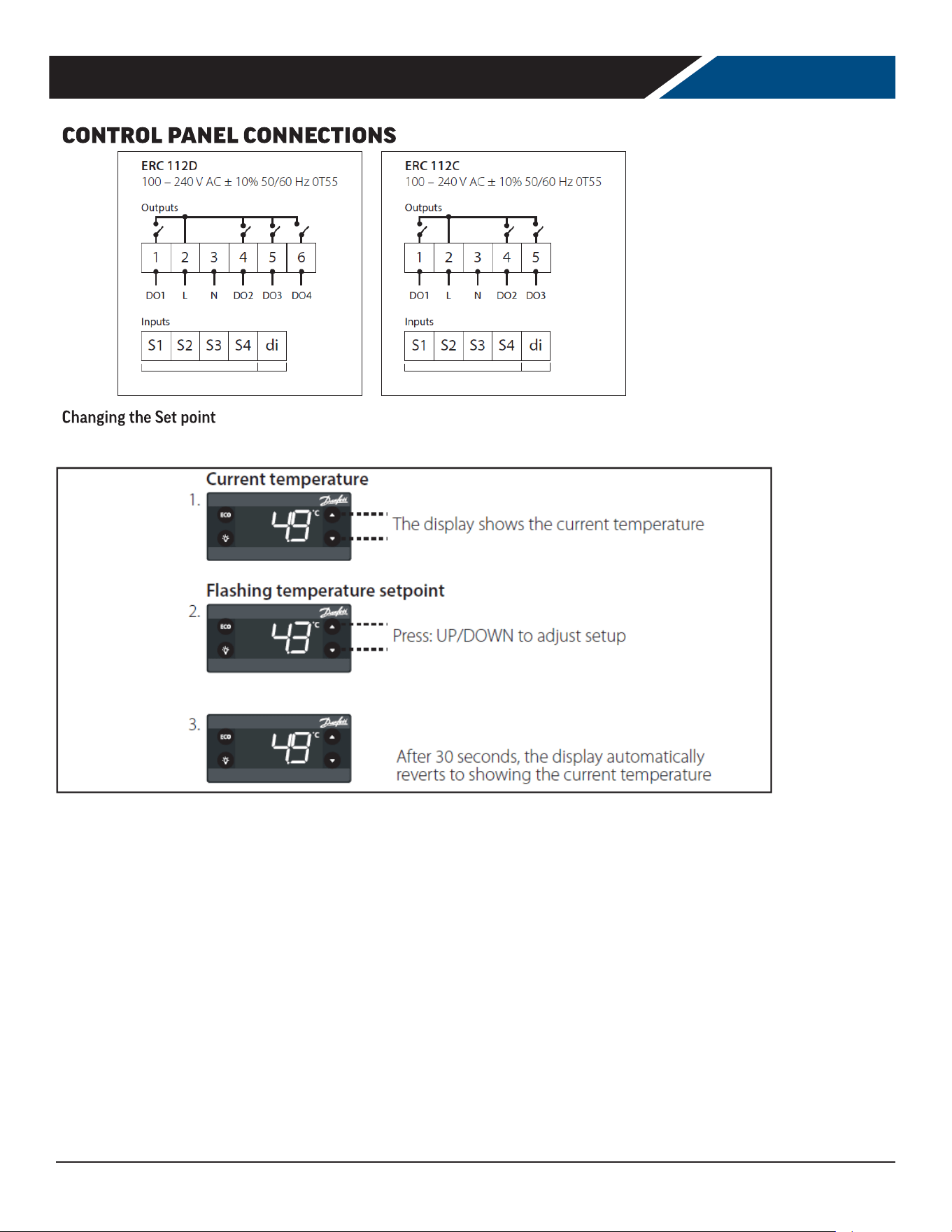
DANFOSS CONTROLLER
Electronic Controller
Control Panel Display
Note: Defrost is manual, LED indicator is inoperative.
Defrost LED Alarm LED
On xed: Defrost active On xed: ALARM Present
O: Defrost is o Flashing: ALARM Silenced
O: No Alarm
Fan LED Compressor LED
On xed:
Fan active
On xed: Compressor active
O:
Fan O
Flashing: Delay, protection or activation blocked
O: No Alarm
Keyboard Functions
UP
Quick press and release
•
Increases Set Point
Long press and release
•
Increases display brightness
DOWN
Quick press and release
•
Decreases Set Point
Long press and release
•
Decreases display brightness
DEFROST (ESC)
Quick press and release
•
Activates manual defrost
Long press and release
•
Controller enter stand-by mode
SET (ENTER)
Quick press and release
•
Toggles lights on/o
Long press and release
•
Toggles display °F/°C
NOTE: When switched on, the instrument panel performs a lamp test for a few seconds.
UP
DOWN
DEFROST (ESC)
SELECT (OK)
Note: When the controller is in a Standby Mode, a blue dot
will be displayed as shown here. To switch out of Standby
Mode, push and hold the Defrost button until the display
reads ON.
.
User Manual for UCR Refrigerators Beverage-Air
Rev. 04/25Beverage-Air14
0123ÿ567869ÿ3ÿÿ9ÿ59ÿ923ÿ223623
ÿ !"!#$%!&'(#)*
User Manual for UCR Refrigerators Beverage-Air
Rev. 04/25 Beverage-Air 15
0123ÿ567869ÿ3ÿÿ223623
ÿ !"#$% &'
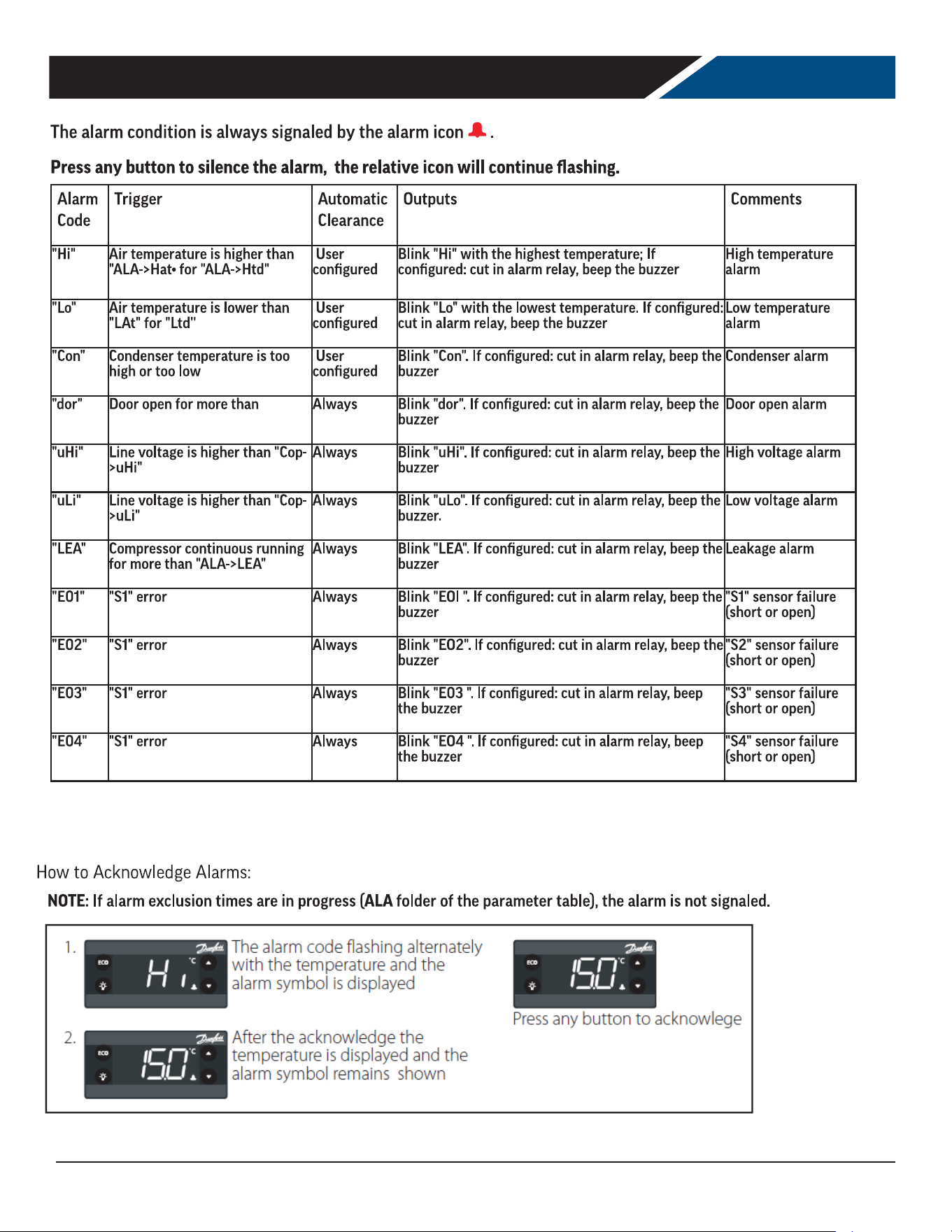
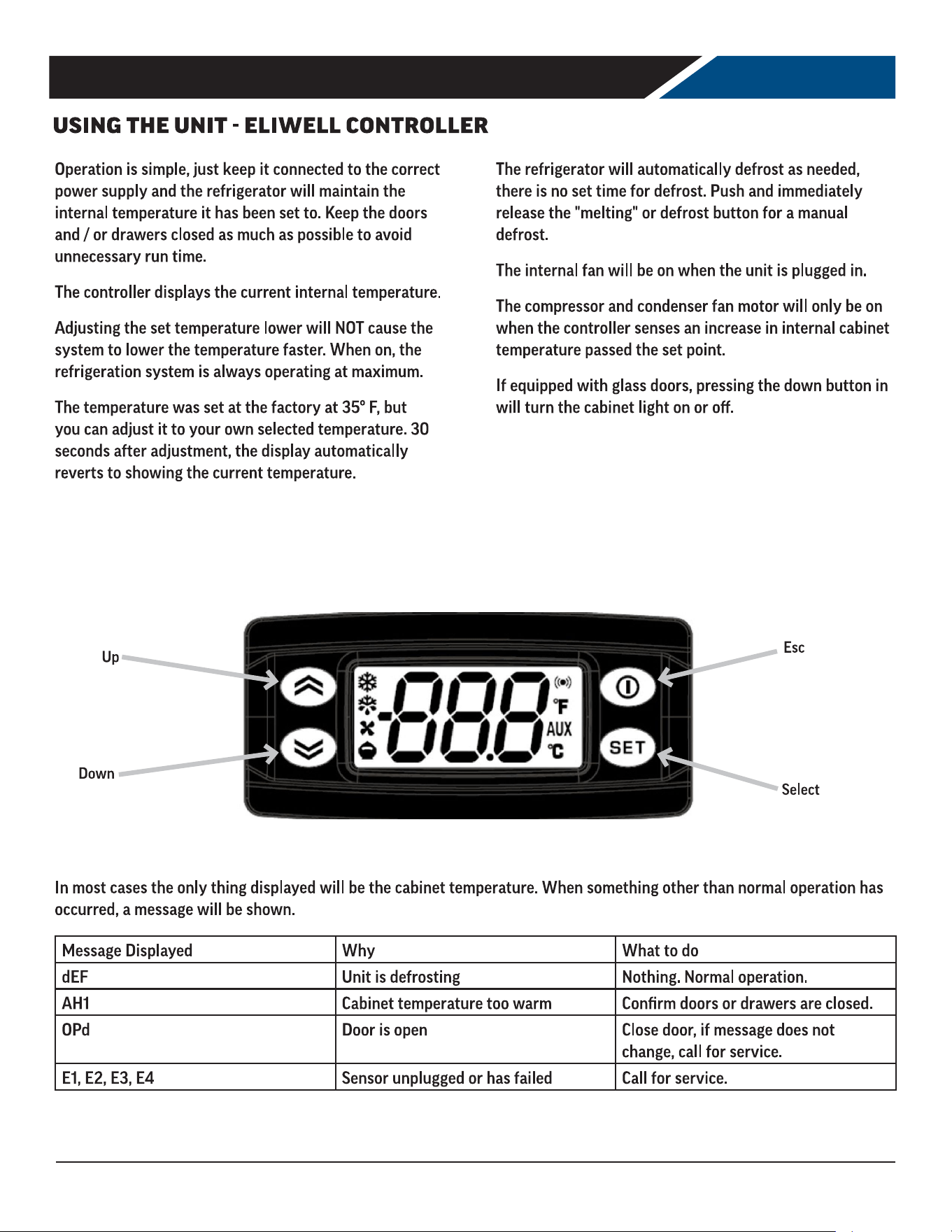
()*+,ÿ./ÿ01023ÿ4561789:;ÿ<9348ÿ024ÿ9;ÿ=2:>2488ÿ?@A@ÿ/:1C42ÿ:/ÿ<D4ÿ=02034<42ÿ<0E14FGÿ<D4ÿ01023ÿ98ÿ;:<ÿ89>;014CH
User Manual for UCR Refrigerators Beverage-Air
Rev. 04/25Beverage-Air16
0123ÿ567869ÿ3ÿÿ9ÿ59ÿ923ÿ223623
ÿ !"!#$%!&'(#)*
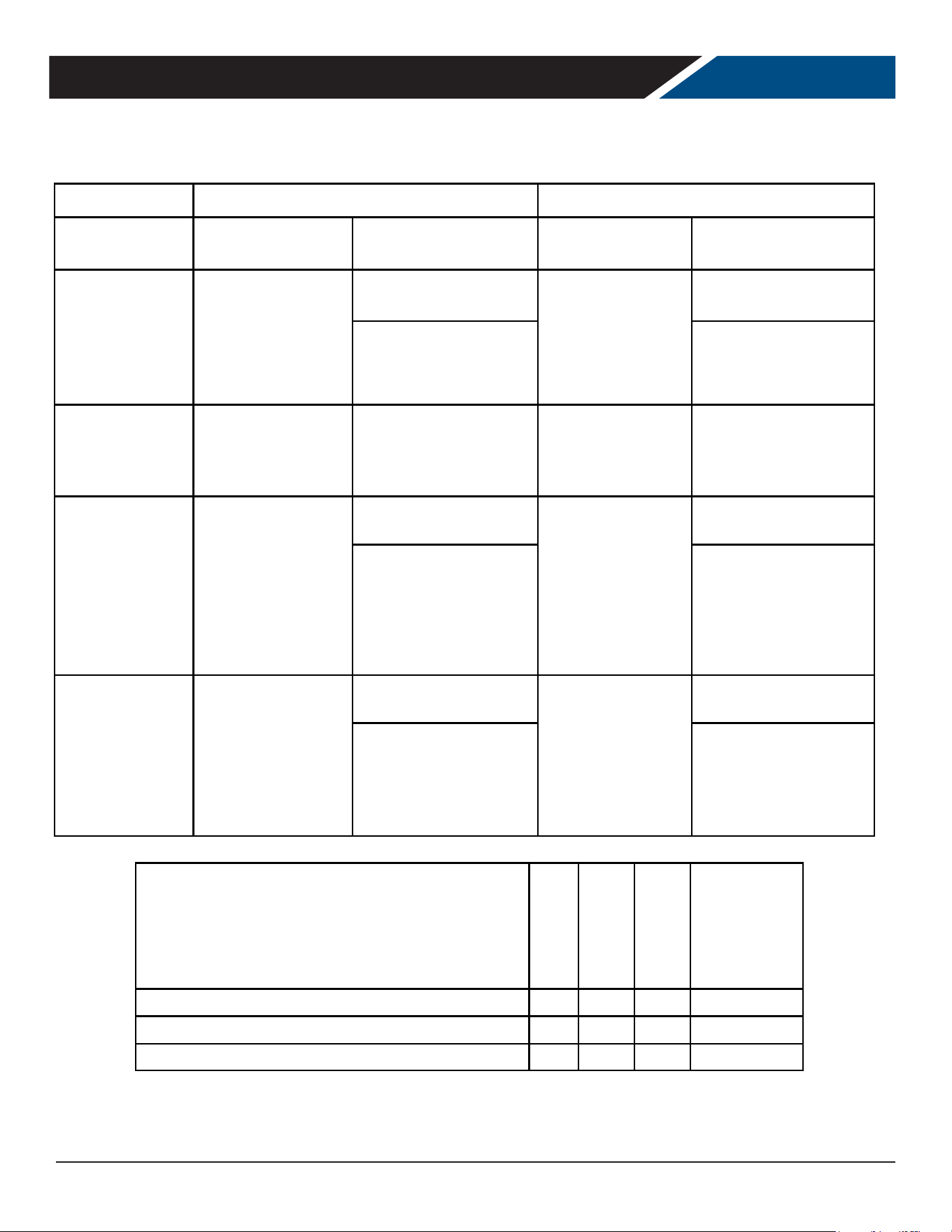
+,-./ÿ123ÿ+.-1ÿ4ÿ35-6355ÿ78.1985539
User Manual for UCR Refrigerators Beverage-Air
Rev. 04/25 Beverage-Air 17
Refrigerator with Eliwell Controlle
r
Beverage-Ai
r
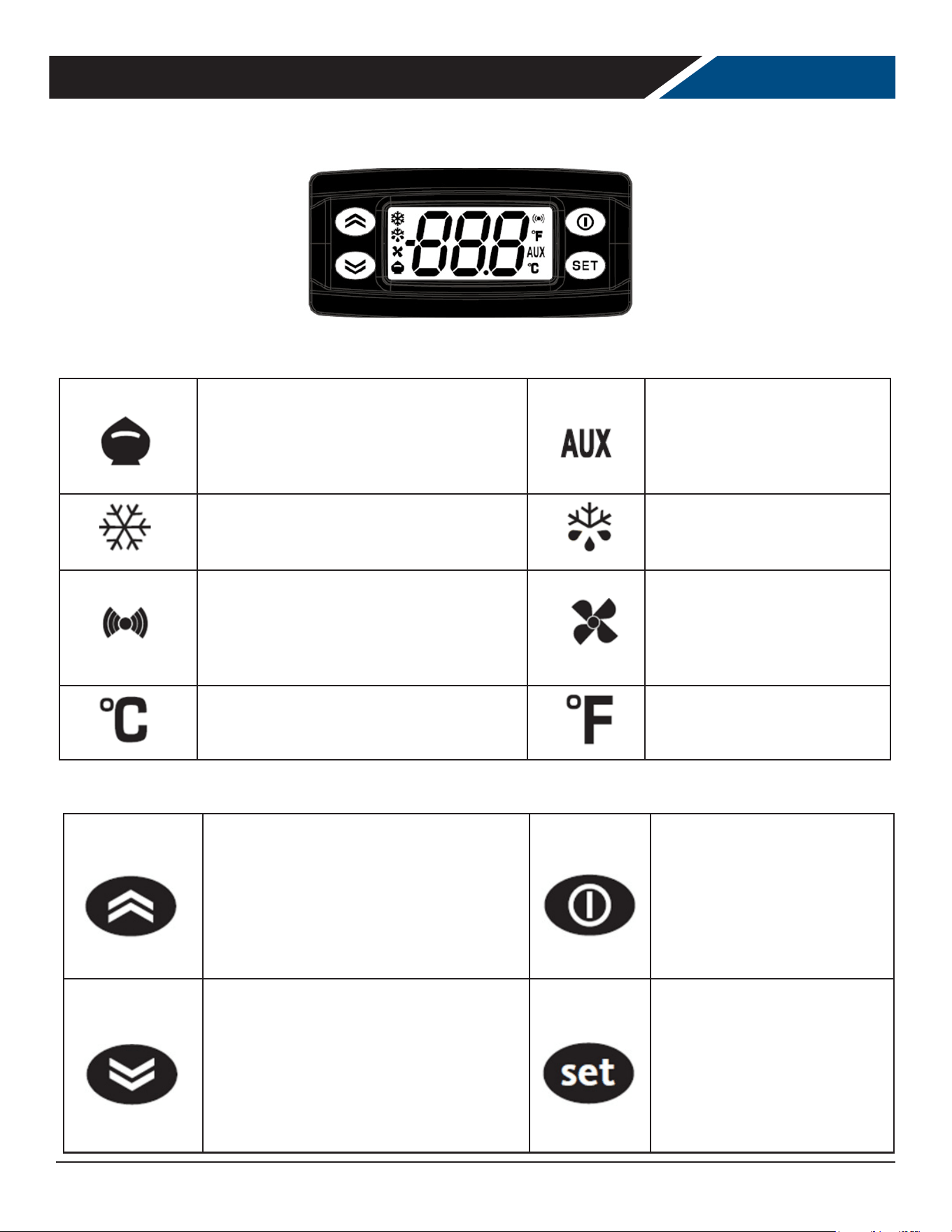
SEQUENCE OF OPERATIONS REFRIGERATOR
The refrigerator operates based on the air temperature measured by the probe located at the return air.
ON OFF
COMPONENT OPERATION
CONTROLLER
ACTION
OPERATION
CONTROLLER
ACTION
COMPRESSOR
Compressor turns on
when the air
temperature at the
probe is above the
sum of the set point
+ 4
The Compressor Contact
is energized
Compressor turns
off when the air
temperature at
probe is equal to
or less than the
set point
The Compressor Contact
is de-energized
(EW+978 - Terminal
#1)
(EW+978 - Terminal #1)
CONDENSER FAN
The Condenser
Fan turns on when
the Compressor is
running
The Condenser Fan is
wired directly to the
Compressor, not throu
g
h
the controller
The Condenser Fan
turns off when the
Compressor is not
running
The Condenser Fan is
wired directly to the
Compressor, not throu
g
h
the controller
EVAP FAN
The Evaporator
Fan turns on when
the unit is
powered on.
The Evaporator Fan is
wired to constant power
The Evaporator Fan
turns off when the
unit is unplugged
or put into standby.
The Evaporator Fan is
wired to constant power
Some models will be
wired to the fan relay
(EW+978 - Terminal
#3)
Some models will be
wired to the fan relay
(EW+978 - Terminal
#3)
LIGHT
The light will turn on
when the down
button is
pressed (or when the
door is opened with
solid doors)
The Light Contact is
energized
The light will turn
off when the down
button is
pressed (or when the
door is closed with
solid doors)
The Light Contact is de-
energized
(Ew+978 – Terminal #2) (Ew+978 – Terminal #2)
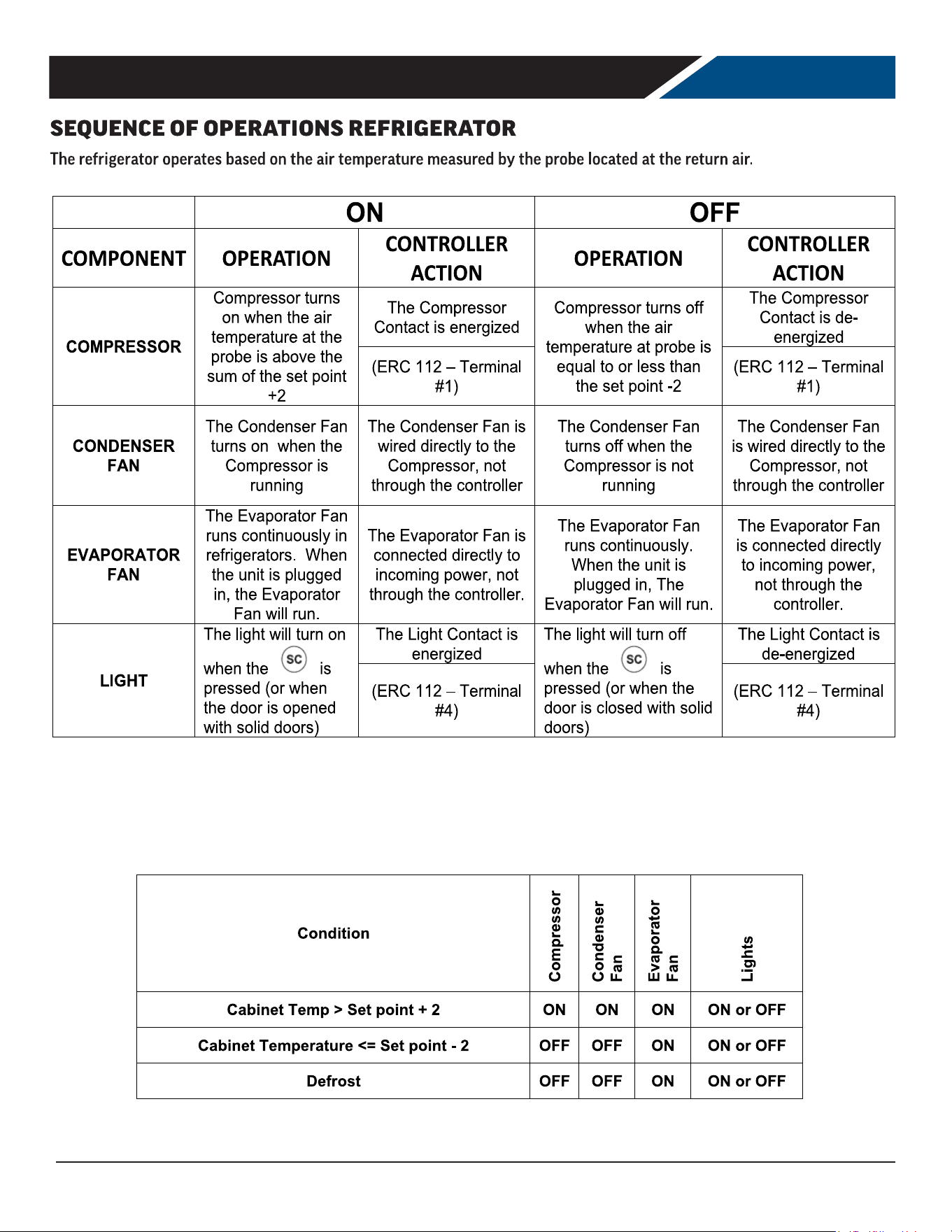
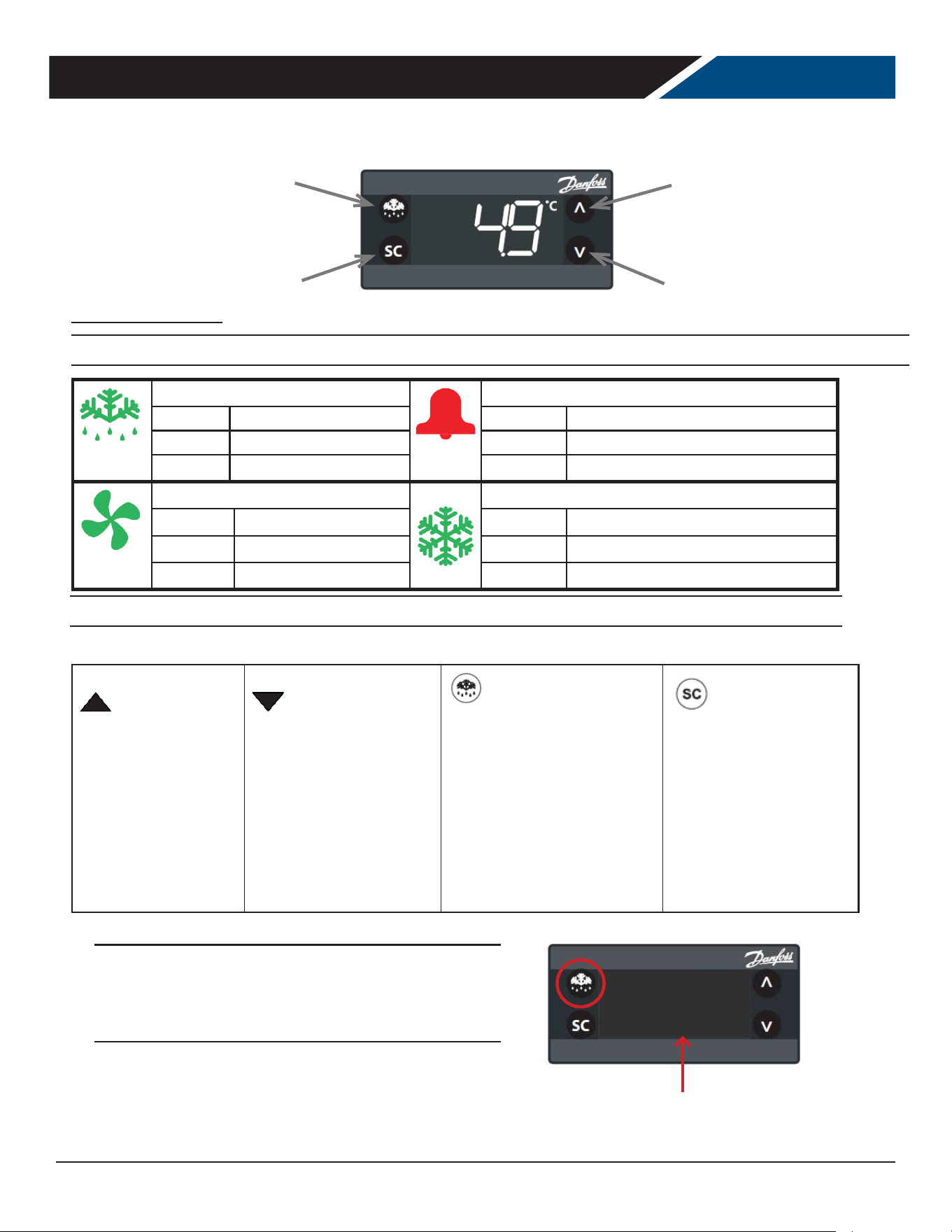
Condition
Compressor
Condenser
Fan
Evaporator
Fan
Lights
Cabinet Temp > Set point + 4 ON ON ON ON or OFF
Cabinet Temperature <= Set point - 4 OFF OFF ON ON or OFF
Defrost OFF OFF ON ON or OFF
Refrigerator with Eliwell Controlle
r
Beverage-Ai
r
User Manual for UCR Refrigerators Beverage-Air
Rev. 04/25Beverage-Air18
Reduced SET / Economy
Permanently on: Energy Saving Mode
Flashing: Reduced Set Mode
Quick Flashing: Access to level 2 parameters
AUX
Permanently on: Aux Active
Flashing: Deep Cooling Cycle Active
Compressor
Permanently On: Compressor Active
Flashing: Delay, protection or blocked start-up
Defrost
Permanently on: Defrost Active
Flashing: Manual or D.I. activation
Alarm
Permanently on: Alarm Active
Flashing: Alarm Acknowledged
Fan
Permanently on: Fans Active
Celsius
Permanently On: ˚C Setting
Fahrenheit
Permanently on: ˚F Setting
Controller Buttons
Up
Press and release
• Scrolls through menu items
• Increases Values
Press for at least 5 seconds
• Activates the manual defrost
Stand-by
Press and release
• Returns to the previous menu
level
• Conrm parameter value
Press for at least 5 seconds
• Activates the stand-by function
Down
Press and release
• Scrolls through menu items
• Decreases values
Press for at least 5 seconds
• Turn light on/o
Set (Enter)
Press and release
• Displays alarms
• Opens the machine status menu
Press for at least 5 seconds
• Opens the programming menu
• Conrms commands
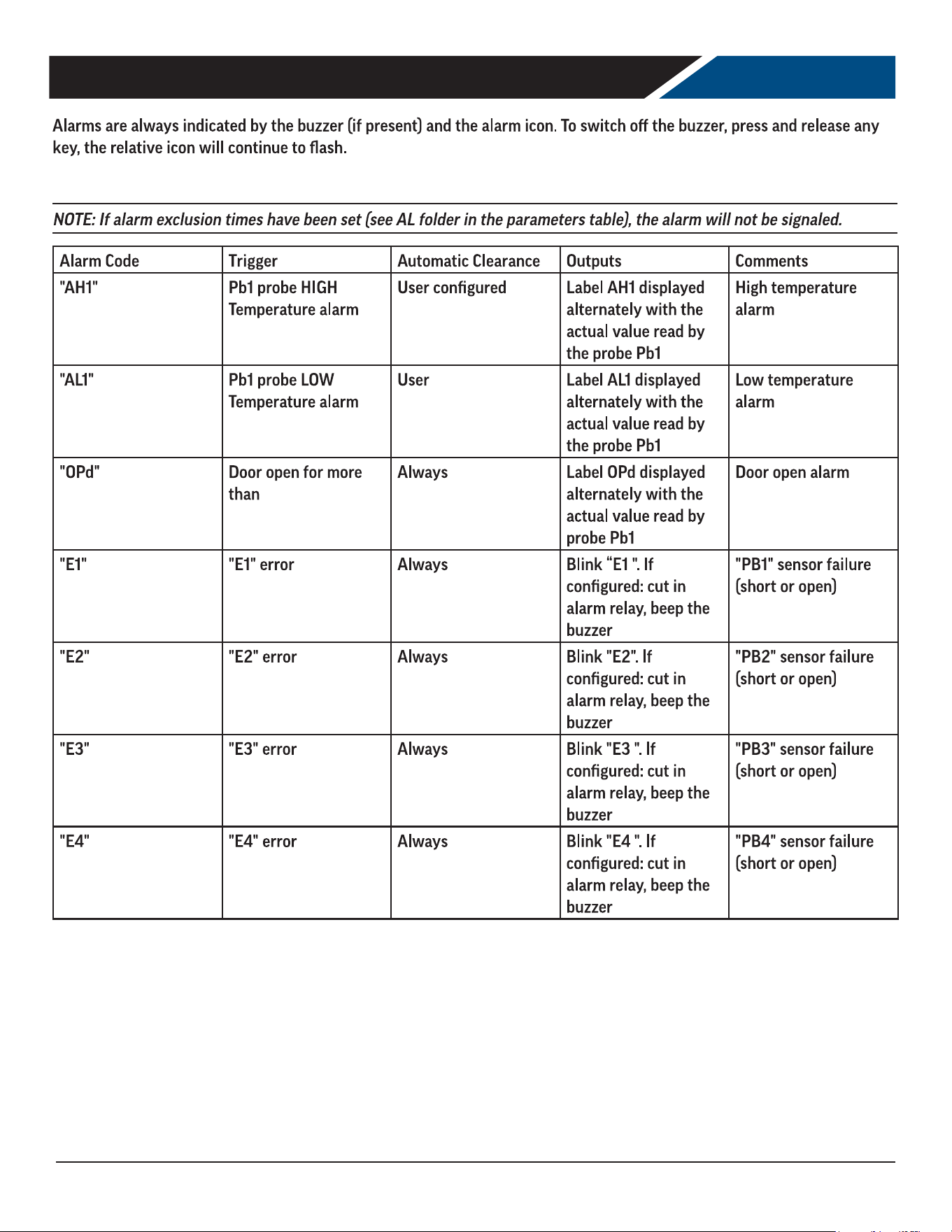
Controller Symbols
User Manual for UCR Refrigerators Beverage-Air
Rev. 04/25 Beverage-Air 19
0123ÿ567869ÿ3ÿÿ9ÿ59ÿ923ÿ223623
ÿ !"!#$%!&'(#)*
User Manual for UCR Refrigerators Beverage-Air
Rev. 04/25Beverage-Air20
CLEANING AND MAINTENANCE
Cleaning Schedule:
Cabinet
Daily wipe down
Weekly interior
Condenser coil
Quarterly cleaning
Gaskets
Daily inspection
Routine maintenance
Annually
Daily Exterior Cleaning
It is much easier to clean on a regular basis than to have to remove stains once they have built up.
1. Wash with a clean sponge and a mild detergent that
does not contain chlorine.
2. Rinse with clean water.
3. Dry with a soft cloth.
4. Polish with a soft cloth, wiping with the grain.
5. Wipe weekly with stainless steel cleaner.
Weekly Interior Cleaning
1. Remove all food, food related items. Store the food at
a safe temperature.
2. Disconnect power to the unit (unplug it or switch the
breaker o).
3. Remove all loose food particles from the inside walls,
oor, door liner and ceiling.
4. Scrub all interior surfaces and door gaskets with a
warm (100
o
F to 110
o
F) detergent solution and a soft
scrub brush.
5. Rinse with clean water and allow to air dry.
6. Restore power.
7. Return food to the unit when it has reached a safe
temperature.
User Manual for UCR Refrigerators Beverage-Air
Rev. 04/25 Beverage-Air 21
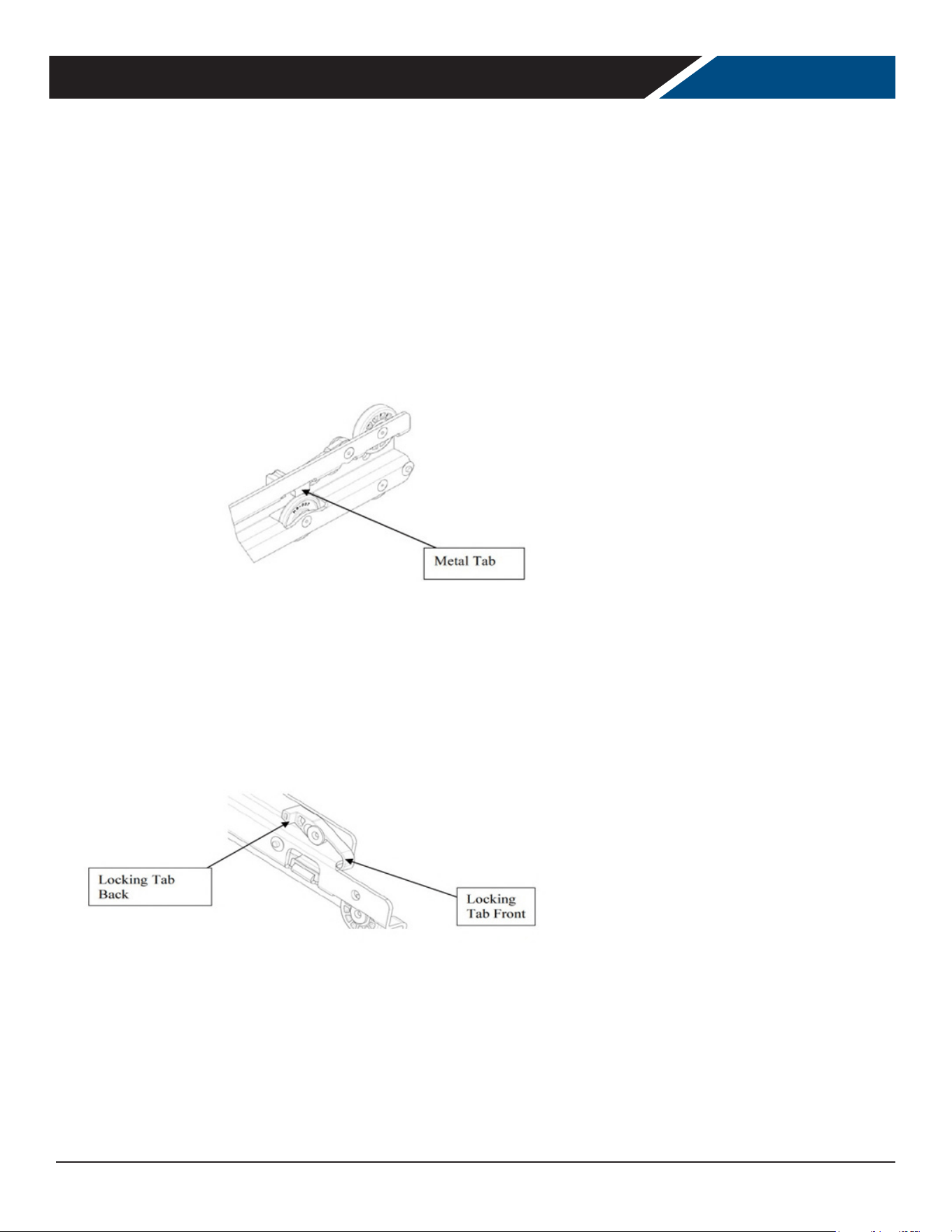
Drawer models are shipped with the drawers already installed in the cabinets. Drawers are designed with slides which
have locking mechanisms to prevent drawers from coming o cabinets during normal opening and closing operations.
See illustration below:
Drawers and slides can be removed from a cabinet for cleaning purposes. To remove a drawer from a cabinet follow these
instructions:
1. Open the drawer to full extension
2. Push the white locking tabs forward on both sides of the drawer
3. Press down the back of the tabs
4. Slide the drawer out of the cabinet
5. To remove the sliding member (Middle slide), press the metal tab up and slide it 6 - To reinstall the sliding member,
press the metal tab up and slide it in
6. To reinstall drawer, push the locking tab forward and press the back of the tab down 8 - Align the drawer slide
members and moving slide members
7. Slide the drawer in and lock the slide by pushing the front of the locking tab down and in
DRAWER CLEANING AND MAINTENANCE
User Manual for UCR Refrigerators Beverage-Air
Rev. 04/25Beverage-Air22
CONDENSER CLEANING
Rotating fan blade can cause
personal injury.
Unplug unit from power supply
before beginning to clean
condenser
CAUTION
Keeping the condenser coil clean is critical to ecient
operation.
The condenser coil is located right behind the back grille
of the cabinet. It should be inspected once a month and
cleaned as required. Vacuum clean all surfaces of the
condenser. Make sure no ns are bent or damaged in the
process. If there are bent ns, carefully straighten them
so that air can ow through the coils. Failure to keep
the condenser coil clean will lead to poor performance,
excessive power consumption and compressor failure
and may result in loss of property. Failure to keep the
condenser coil clean may void the limited warranty.
1. Unplug unit from power supply.
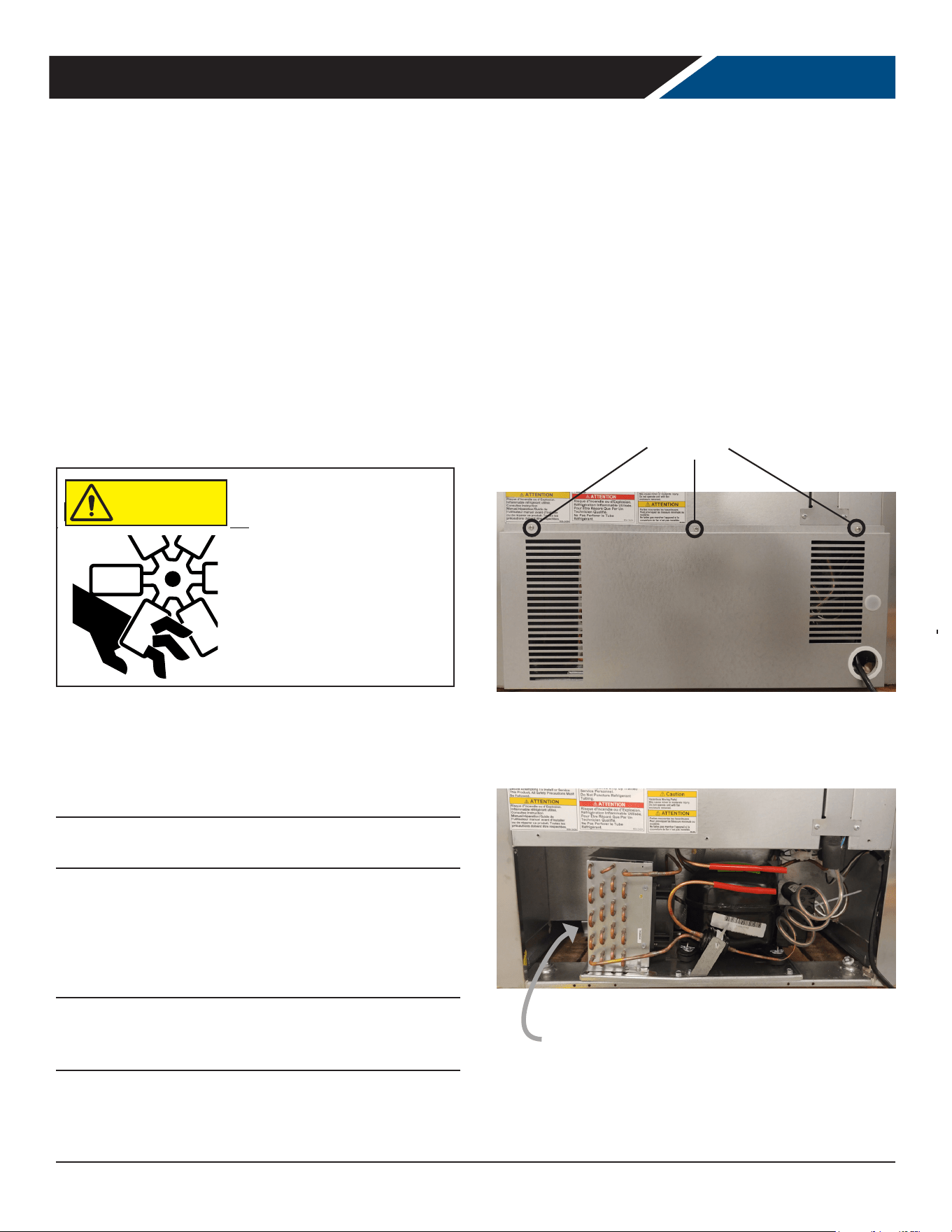
2. Remove the Phillips head screws at the top of the
panel.
3. Once the screws have been removed the you can lower
the panel.
Please note the electrical cord will still be connected to the
panel.
4. Examine condenser surface, if dusty, brush and
vacuum the dust and lint from the surface of the
coil. Brush up and down to avoid damaging the ns.
Use care to not disturb the wires connected to the
controller.
Note: If the coil is greasy, the coil will need to be cleaned
with coil cleaner and that should be left to an experienced
technician.
5. After the condenser is clean, return the grille panel to
the unit.
6. To reinstall the rear panel line up the bottom of the
panel to the bottom of the unit keeping the screw
holes lined up on the panel and on the unit.
7. Reinstall the Phillips head screw.
8.
Note: Air lters are not recommended as they restrict
the ow of cooling air.
Remove This Panel
Remove These
Screws
Condenser Surface
User Manual for UCR Refrigerators Beverage-Air
Rev. 04/25 Beverage-Air 23
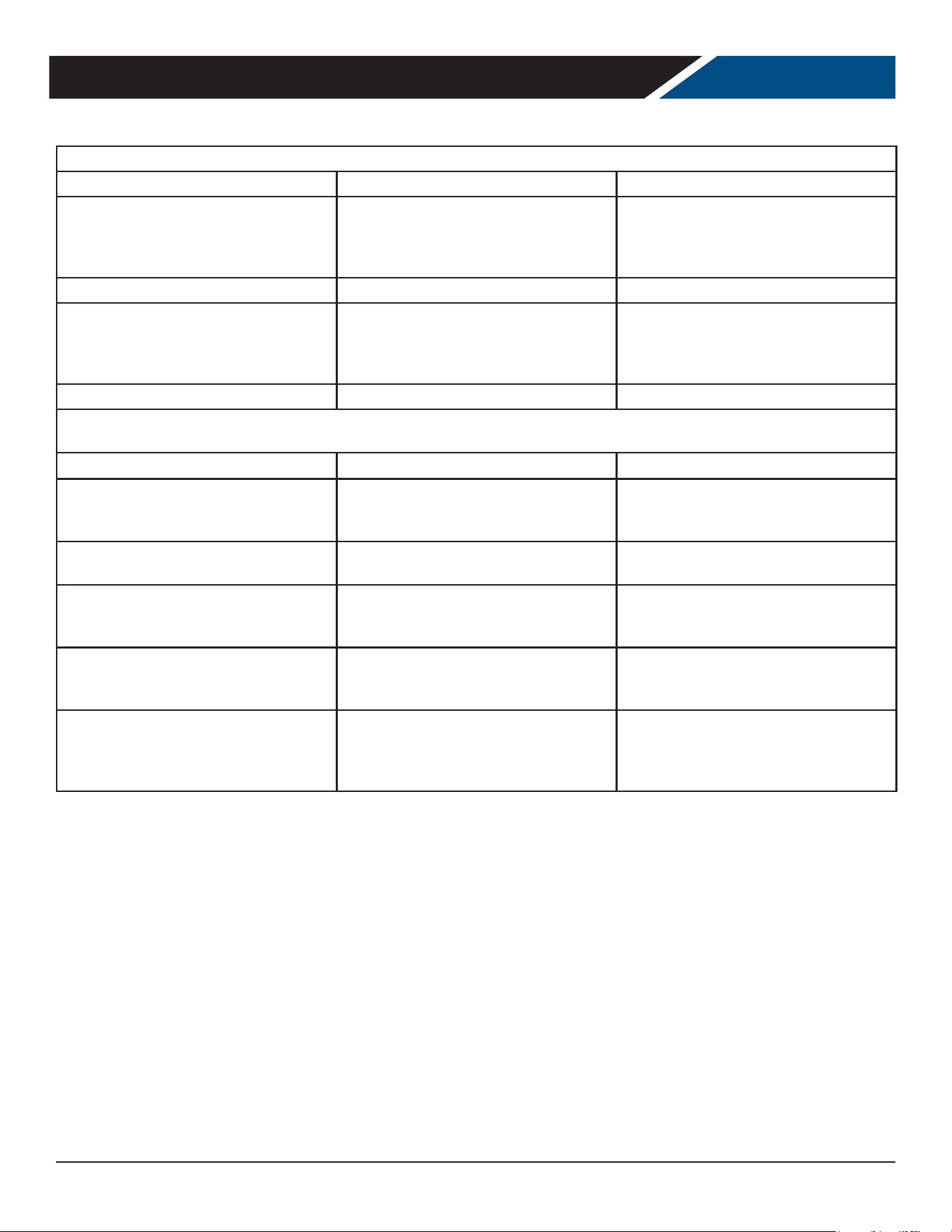
Cleaning Needed Cleaning Agent Method of Application Aect on Finish
Smears and ngerprints
Areal 20, Lac-O-Nu, Lumin Wash
O’Cedar Cream Polish, Stainless
Shine.
Rub with cloth as directed
on the package.
Satisfactory for use on all
nishes.
Provides barrier lm to
minimize prints.
Stubborn Spots and
Stains, Baked-On
Splatter, and Other
Light Discolorations
Allchem Concentrated Cleaner.
Apply with damp sponge or
cloth.
Rub with damp cloth.
Use in direction of polish lines
on No. 4 (polished) nish. May
scratch No.
2 (mill) and Nos. 7 and 8
(polished) nishes.
Samae, Twinkle or Cameo Copper
Cleaner
Rub with damp cloth.
Grade FFF Italian pumice, whiting,
or talc.
Rub with dry cloth.
Liquid NuSteel
Paste NuSteel or DuBois Temp.
Copper’s Stainless Steel Cleaner
Revere Stainless Cleaner
Household cleansers, such as
Old Dutch, Lighthouse, Sunbrite,
Wyandotte, Bab-O, Gold Dust,
Sapolio, Bon Ami, Ajax, or Comet
Grade F Italian Pumice, Steel
Bright, Lumin Cleaner, Zud,
Restore, Sta-Clean, or Highlite.
Penny-Brite or Copper-Brite.
Use small amount of cleaner.
Rub with dry cloth using a
small amount of cleaner.
Apply with damp sponge or
cloth.
Rub with a damp cloth. May
contain chlorine bleaches.
Rinse
thoroughly after use.
Rub with a damp cloth.
Rub with a dry cloth using a
small amount of cleaner.
Heat tint or
discoloration
Penny-Brite or Copper-Brite.
Past NuSteel, DuBois Temp,
or Tarnite. Revere Stainless Steel
Cleaner. Allen Polish, Steel Bright,
Tenacious Deposits,
Rusty Discolorations,
Industrial
Atmospheric Stains Wyandotte,
Bab-O or Zud.
Rub with a dry cloth.
Rub with a dry cloth or stain-
less steel wool.
Apply with damp sponge or
cloth.
Rub with a damp cloth.
Burnt-On Foods and
Grease Fatty Acids,
Milkstone (where
swabbing or rubbing
is not practical)
Easy-O, De-Grease-It, 4 to 6%
hot solution of such agents as
trisodium phosphate or sodium
tripolyphosphate or 5 to 15% caustic
soda solution
Apply generous coating. Allow
to stand for 10-15 minutes.
Rinse.
Repeated application may be
necessary.
Excellent removal, satisfactory
for use on all nishes.
Tenacious Deposits,
Rusty Discolorations,
Industrial
Atmospheric Stains
Oakite No. 33, Dilac Texo 12, Texo NY,
Flash-Klenz, Caddy Cleaner,
Turco Scale 4368 or Permag 57.
Swab and soak with clean
cloth.
Let stand 15 minutes or more
according to directions on
package, then rinse and dry.
Satisfactory for use on all
nishes
Hard Water Spots
and Scale
Vinegar.
5% oxalic acid, 5% sulfamic acid, 5 to
10% phosphoric acid, or Dilac, Oakite
No. 33, Texo 12, Texo N.Y.
Swab or wipe with cloth. Rinse
with water and dry.
Swab or soak with cloth. Let
stand 10-15 minutes. Always
follow with neutralizer rinse,
and dry.
Satisfactory for all nishes.
Satisfactory for all nishes.
Eective on tenacious deposits
or where scale
has built up.
METHODS FOR CLEANING STAINLESS STEEL
User Manual for UCR Refrigerators Beverage-Air
Rev. 04/25Beverage-Air24
HELP
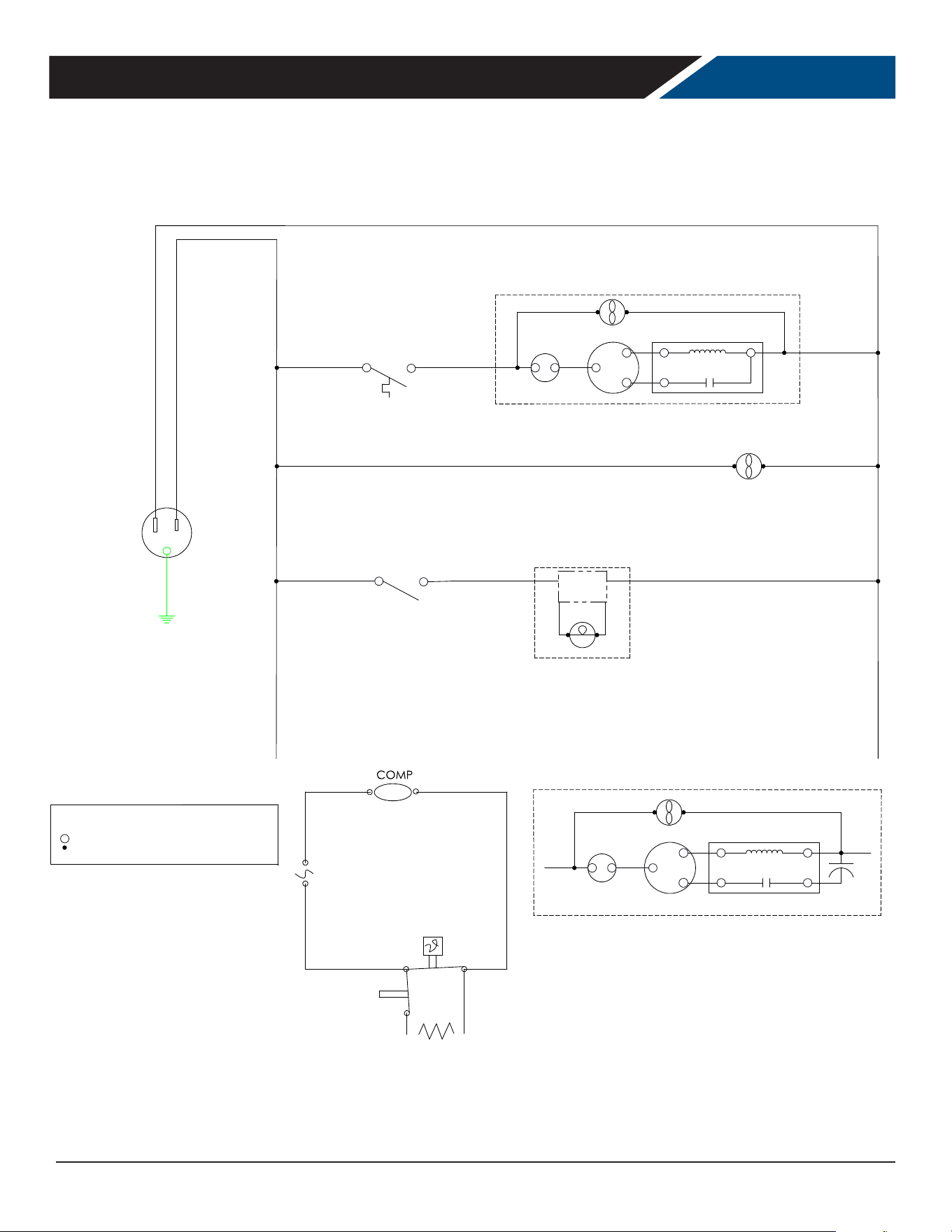
Trouble Diagnosis for the User
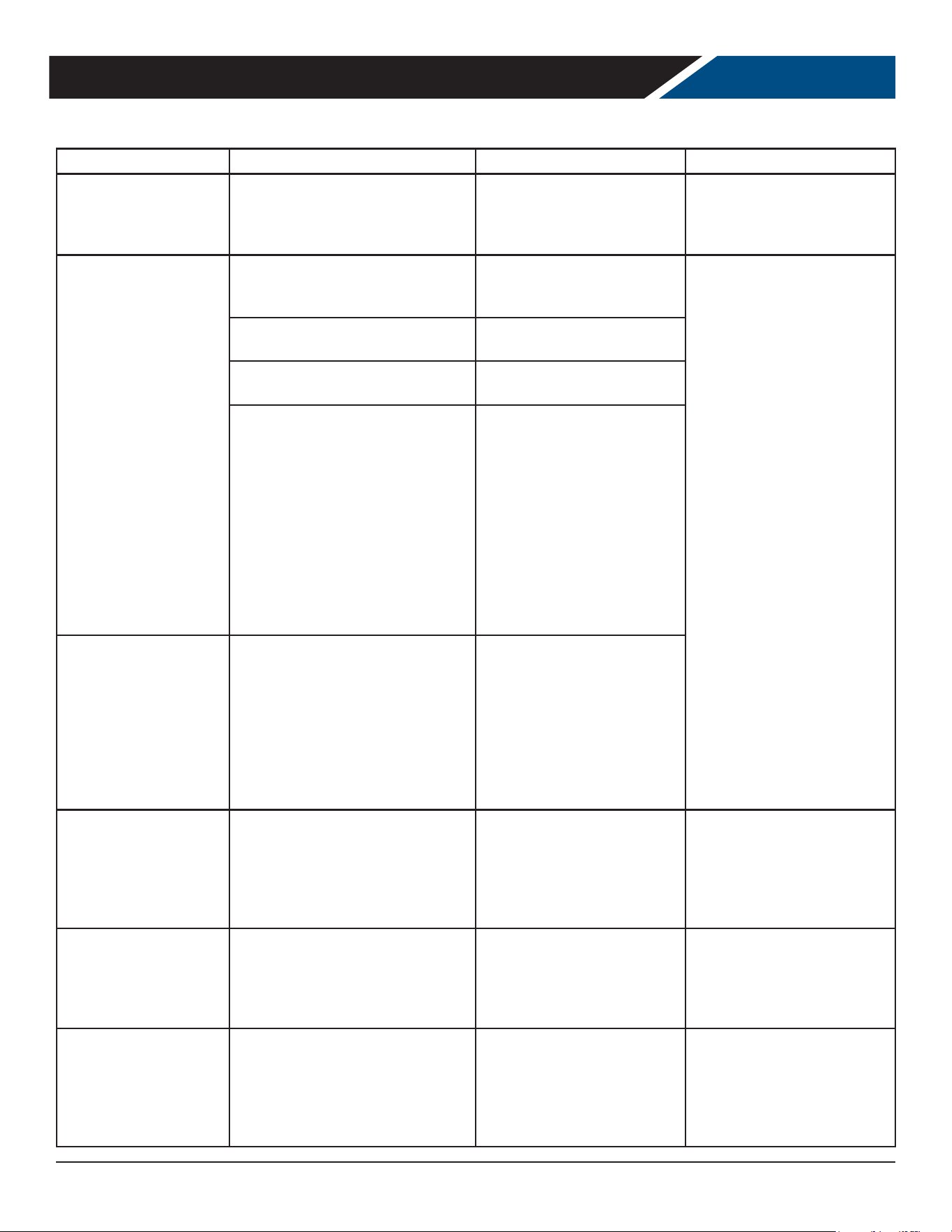
Malfunction Possible Cause Likely Solution
No cooling - unit is silent
Unit not plugged in.
Fuse or circuit breaker tripped.
Power cord plug loose in outlet.
Connect to proper voltage circuit Replace
fuse or reset breaker.
Check outlet for loose connection, replace
as needed
Unit cools but seems to be on all the time Dirty condenser Clean condenser
Space temperature too high
Dirty condenser
Evaporator iced over Unit in high
temperature environment
Clean condenser Defrost unit
Reduce temperature of room
Space temperature too low Temperature control Adjust or replace control
Trouble Diagnosis for the Technician
No cooling - compressor does not hum Temp control stuck in open position Replace temp control.
No cooling - compressor hums but does not
start
Low voltage to unit.
Compressor starting system failure
Check voltage, correct as needed. Check
start relay and start capacitor. See next
step.
No cooling - compressor starts but shuts
o
Compressor start relay failure Compressor
start capacitor failure
Replace relay. Replace capacitor.
No cooling - compressor cycles on and o Overheating weak overload
Clean condenser, check fan motor and
blade. Check refrigerant charge. Replace
overload.
Unit cools but turns on and o frequently
No product in cabinet. Temperature control
defective Refrigeration issue
Fill cabinet Replace control
Have system checked
Makes excessive noise
Tubing rattle Loose parts
Bent or broken fan blade Noisy fan motor
Check tubing for routing Check for loose
components Replace fan blade
Replace fan motor

User Manual for UCR Refrigerators Beverage-Air
Rev. 04/25 Beverage-Air 25
FOR THE SERVICE TECH - R290
Refrigeration service should only be attempted by a trained trade professional certied to work on R290 systems.
Here are some critical service items.
This list does not qualify anyone to service the unit. It is a
reminder and checklist for the service tech. Keep these in
mind for R290 service:
• Wire nuts are NOT to be used when changing an
electrical part.
• The switches in this product are sealed, only exact
replacements may be used.
• The process tubes are to be used for service access.
• Cut out (with tubing cutter) refrigeration components
that are to be replaced. Do NOT un-braze.
• Because R290 can be vented into the air during
service, the venting MUST be in an area free from
ame or spark. It must also be in a well ventilated
area, with a nearby open window or door.
• A sign noting service of a system containing propane
must be attached to the unit during refrigeration
service.
• A combustible gas leak detector must be used to
inform anyone in the area when propane is present in
the air.
Other Information:
Evacuation: It is critical that a refrigeration system be
leak free and internally dry. A thorough evacuation with
a good vacuum pump with a micron gauge attached is the
only way to ensure that the system is dry and ready for a
charge of refrigerant.
Charging: The system is critically charged and the proper
type and amount MUST be weighed in.
Overcharge symptoms: Unit will cool properly but
the suction line temperature will be unusually cold.
Compressor run time will be longer than normal.
Undercharge symptoms: Long run time, poor cooling and
a hot compressor dome are the main symptoms of an
undercharge.
User Manual for UCR Refrigerators Beverage-Air
Rev. 04/25Beverage-Air26
*NOT ALL MODELS*
*NOT ALL MODELS*
L.E.D. LAMP
LAMP
POWER
SUPPLY
1CR
1
RC - RUN CAPACITOR
SC - START CAPACITOR
OL - OVERLOAD
- DANFOSS CONTROLLER TERMINAL
- CONNECTION POINT
- CONTROL RELAY
LEGEND
S.C.
1
OL
M
S
S
R
C
CONDENSER FAN
COMP
2
CURRENT RELAY
COMPRESSOR DETAIL SOME MODELS
M
1
CURRENT RELAY
S
S
R
OL
C
CONDENSER FAN
COMP
COMPRESSOR DETAIL (115V 1PH)
WHITE
BLACK
BLACK
*SEE CONTROLLER DETAIL
EVAP FANS
BLACK
4
3
WHITE
6
43
LIGHT SWITCH
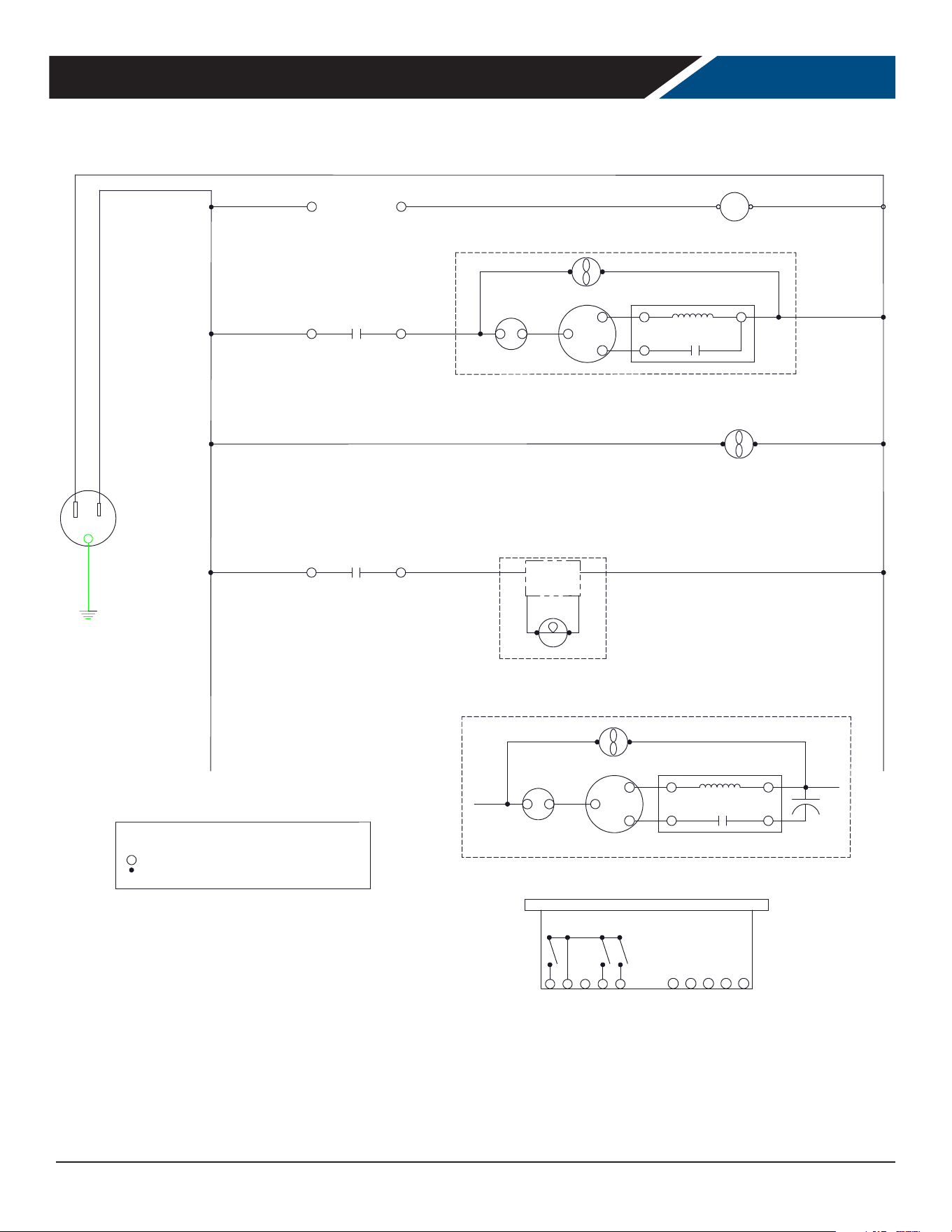
FOR THE SERVICE TECH - WIRING DIAGRAM MECHANICAL CONTROLLER
User Manual for UCR Refrigerators Beverage-Air
Rev. 04/25 Beverage-Air 27
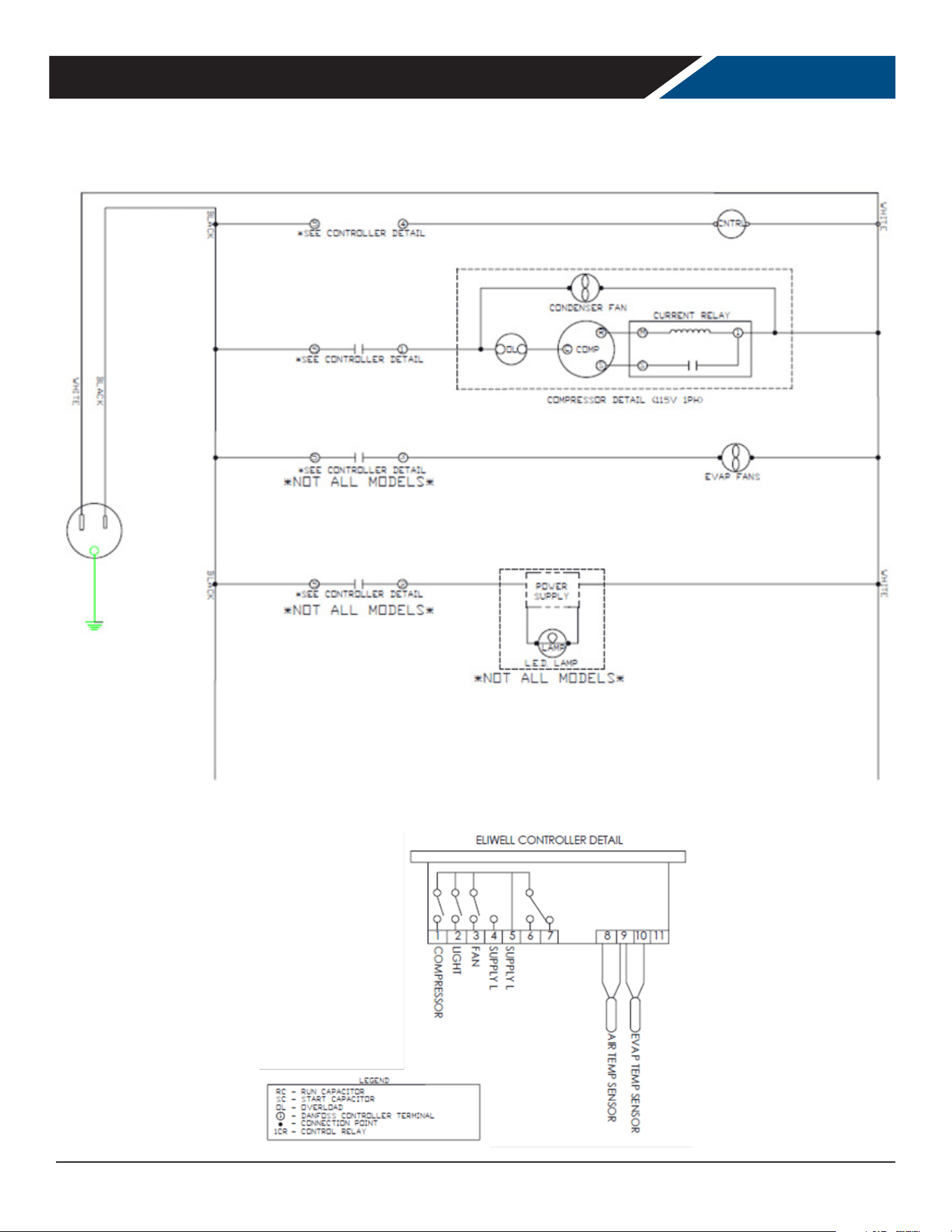
FOR THE SERVICE TECH - WIRING DIAGRAM DANFOSS CONTROLLER
WHITE
2
1
BLACK
EVAP FANS
*SEE CONTROLLER DETAIL
2
3
*SEE CONTROLLER DETAIL
WHITE
BLACK
BLACK
WHITE
COMPRESSOR DETAIL (115V 1PH)
COMP
CONDENSER FAN
C
OL
R
S
S
CURRENT RELAY
1
M
COMPRESSOR DETAIL SOME MODELS
CURRENT RELAY
2
COMP
CONDENSER FAN
C
R
S
S
M
OL
1
S.C.
1
2
3 4
S2
DANFOSS CONTROLLER DETAIL
COMPRESSOR
SUPPLY-L
SUPPLY-N
5
LIGHT (NOT ALL MODELS)
S1
S3 S4
DI
LEGEND
RC - RUN CAPACITOR
SC - START CAPACITOR
OL - OVERLOAD
- DANFOSS CONTROLLER TERMINAL
- CONNECTION POINT
- CONTROL RELAY
1
1CR
AIR SENSOR
2
4
*SEE CONTROLLER DETAIL
POWER
SUPPLY
LAMP
L.E.D. LAMP
*NOT ALL MODELS*
*NOT ALL MODELS*
EVAP SENSOR (NOT ALL MODELS)
CNTRL
User Manual for UCR Refrigerators Beverage-Air
Rev. 04/25Beverage-Air28
FOR THE SERVICE TECH - WIRING DIAGRAM ELIWELL CONTROLLER

User Manual for UCR Refrigerators Beverage-Air
Rev. 04/25 Beverage-Air 29
LIMITED WARRANTY
WARRANTY (Warranty valid in USA and Canada)
SEVEN (7) YEAR PARTS, LABOR AND COMPRESSOR
WARRANTY:
Beverage-Air Corporation warrants to the original
purchaser of Beverage-Air branded equipment,
including all parts thereof, that such equipment is
free from defects in material and workmanship, under
normal use, with proper maintenance, and service as
indicated by Beverage-Air installation and operation
instructions, for a period of SEVEN (7) years from
the date of installation, or eighty-eight (88) months
from the date of shipment from the manufacturer,
whichever is earlier (units shipped from July 1, 2024
are eligible for 7-year warranty). In addition, Beverage-
Air warrants the hermetically/semi-hermetically
sealed compressor (part only) for SEVEN (7) years; not
to exceed eighty-eight (88) months from the date of
shipment from Beverage-Air, provided upon receipt of
the compressor, manufacturer examination shows the
sealed compressor to be defective. This warranty does
not cover freight for the replacement compressor or
freight for the return of the failed compressor.
* Units shipped after 07/01/2024. Previous warranty
applies to units shipped prior.
EXCEPTIONS:
• CT96 and CF3 models carry a ONE (1) year parts
and labor warranty, limited to fteen (15) months
from date of shipment from Beverage-Air. These are
excluded from additional compressor warranty.
• SR/SF (Slate) models carry a TWO (2) year parts and
labor warranty, limited to twenty-seven (27) months
from date of shipment from Beverage-Air.
• BZ, VM, CDR, DPCR, MT and Blast Chillers carry a
THREE (3) year parts and labor warranty; additional
TWO (2) years compressor part only.
• Units installed in Residential applications will be
not covered under this warranty. Units are intended
for Commercial use only.
Also, this compressor-part only warranty does NOT
apply to any electrical controls, condenser, evaporator,
fan motors, overload switch, starting relay, capacitors,
temperature control, lter/drier, accumulator,
refrigeration tubing, wiring harness, labor charges, or
supplies which are covered by the warranty above.
Note: 3rd party extended warranties are not covered by
this warranty statement.
Normal wear parts, as deemed by Beverage-Air, such
as but not exclusive to, light bulbs/lamps and gaskets
are not covered by this warranty. For the purpose of
this warranty, the original purchaser shall be deemed
to mean the individual or company for who the product
was originally installed.
Units that utilize variable speed compressor technology
can experience nuisance tripping on Class A GFCI
outlets which have a trip limit of 4 mA to 6 mA. To
avoid this issue in a location that requires GFCI circuit
protection, Beverage-Air & Victory recommends using a
HUBBELL Model Number GFRST83W 20A Heavy Duty
Hospital Grade Self-Test GFCI Receptacle. Nuisance
tripping not covered under warranty.
Our obligation under this warranty shall be limited to
repairing or replacing, including labor, any part of such
product, which proves thus defective. Beverage-Air
reserves the right to examine any product claimed to
be defective and request photos of the unit prior to
dispatching service. Moisture or water damage is not
covered under warranty. If service is deemed non-
warranty, Beverage-Air reserves the right to bill the end
user for service.
The labor warranty shall be for self-contained units
only and for standard straight time, which is dened
as normal service rate time, for service performed
during normal working hours. All warranty labor will
be covered at standard time. Any service requested
outside of a servicer's normal working hours including
weekends and any additional overtime will be at
the responsibility of the equipment purchaser. Any
part or accessory determined to be defective in the
product should be returned to the company within
thirty (30) days under the terms of this warranty
and must be accompanied by a record of the cabinet
model, serial number, and identied with a return
material authorization number (RMA#) issued by the
manufacturer.
Special installation/applications, including remote
locations, are limited in coverage by this warranty.
Any installation that requires extra work, and/or
travel, to gain access to the unit for service is the sole
responsibility of the equipment purchaser.
Improper operation resulting from factors, including
but not limited to, improper or negligent cleaning
and maintenance, improper installation, low voltage
conditions, inadequate wiring, outdoor use (unless
otherwise specied) and accidental damage are
not manufacturing defects and are strictly the
responsibility of the purchaser.

User Manual for UCR Refrigerators Beverage-Air
Rev. 04/25Beverage-Air30
LIMITED WARRANTY (CONTINUED)
With the exception of Blast Chillers, the product
is designed for maintaining temperature and not
bringing food to a desired temperature and therefore
cannot be held responsible for this function under
warranty. Units must be in a conditioned environment
or warranty will be void. Non-standard use of unit can
also be subject to reduced or voided warranty.
Condensing coils must be cleaned at regular intervals
as a part of preventative maintenance for optimal
performance. Failure to do so is subject to a voided
warranty. Although cleaning requirements vary
in accordance with operation of various products,
Beverage-Air recommends a minimum monthly
cleaning.
NO CLAIMS CAN BE MADE AGAINST THIS WARRANTY
FOR SPOILAGE OF FOOD, PRODUCTS, LOSS OF SALES
OR CONSEQUENTIAL DAMAGES.
THE FOREGOING WARRANTIES ARE EXPRESSLY
GIVEN IN LIEU OF ALL OTHER WARRANTIES,
EXPRESS, IMPLIED, OR STATUTORY, INCLUDING
THE IMPLIED WARRANTIES OF MERCHANTABILITY
AND FITNESS FOR A PARTICULAR PURPOSE,
WHICH ARE HERBY DISCLAIMED, ALL OTHER
OBLIGATIONS OR LIABILITIES ON OUR PART, AND
WE NEITHER ASSUME, NOR AUTHORIZE ANY OTHER
PERSON TO ASSUME FOR US, ANY OBLIGATION OR
LIABILITY IN CONNECTION WITH THE SALE OF SAID
REFRIGERATION UNITS OR ANY PARTS THERE OF.
This warranty shall not be assignable and shall be
honored only in so far as the original purchaser. This
warranty does not apply outside the limits of the
United States of America and Canada, nor does it apply
to any part that has been subject to misuse, neglect,
alteration, accident, or to any damage caused by
transportation, ood, re, acts of terrorism, or acts of
God.
LIMITATION OF LIABILITY:
Beverage-Air Corporation or their aliates shall
not be liable for any indirect, incidental, special or
consequential damages, or losses of a commercial
nature arising out of malfunction equipment or its
parts components thereof, as a result of defects in
material or workmanship.
THE ORIGINAL OWNER'S SOLE AND EXCLUSIVE
REMEDY AND BEVERAGE-AIR'S SOLE AND EXCLUSIVE
LIABILITY SHALL BE LIMITED TO THE REPAIR
OR REPLACEMENT OF PARTS OR COMPONENTS
CONTAINED IN THE EQUIPMENT IDENTIFIED
ABOVE WHICH UNDER NORMAL USE AND SERVICE
MALFUNCTION AS A RESULT OF DEFECTS IN
MATERIAL OR WORKMANSHIP, SUBJECT TO THE
APPLICABLE PROVISIONS AND LIMITATIONS STATED
ABOVE.
Note: Additional Terms and Conditions of sale may
apply. Notice: Specications are subject to change
without notice. Contact Beverage-Air for specic model
agency approval. All prices are ex-works Brookville,
PA. July 1, 2024
User Manual for UCR Refrigerators Beverage-Air
Rev. 04/25
Warranty Registration
Register your product online at beverage-air.com/parts-service or ll out and mail the form below.
Cabinet Model Number: _____________________________________________ Date Of Installation: _________________
Cabinet Serial Number: _____________________________________________
Location Of Product
Business Name: ____________________________________________________
Business Street: ____________________________________________________
Business City: ____________________________________ State: _________ Postal Code:___________
Mail to: Beverage-Air, 3779 Champion Blvd, Winston-Salem, NC 27105