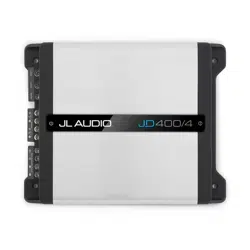

OWNER’S MANUAL
400W 4-Channel Class D Amplifier
Thank you for purchasing a JL Audio amplifier for
your automotive sound system.
Your amplifier has been designed and manufactured to exacting
standards in order to ensure years of musical enjoyment in your vehicle.
For maximum performance, we highly recommend that you have
your new amplifier installed by an authorized JL Audio dealer. Your
authorized dealer has the training, expertise and installation equipment
to ensure optimum performance from this product. Should you
decide to install the amplifier yourself, please take the time
to read this manual thoroughly so as to familiarize yourself
with its installation requirements and setup procedures.
If you have any questions regarding the instructions in this
manual or any aspect of your amplifier’s operation, please contact your
authorized JL Audio dealer for assistance. If you need further assistance,
please contact the JL Audio Technical Support Department
at technical@jlaudio.com/support.
2 JL Audio
PROTECT YOUR HEARING!
We value you as a long-term customer. For
that reason, we urge you to practice restraint in
the operation of this product so as not to damage
your hearing and that of others in your vehicle.
Studies have shown that continuous exposure to
high sound pressure levels can lead to permanent
(irreparable) hearing loss. This and all other
high-power amplifiers are capable of producing
such high sound pressure levels when connected
to a speaker system. Please limit your continuous
exposure to high volume levels.
While driving, operate your audio system in
a manner that still allows you to hear necessary
noises to operate your vehicle safely (horns,
sirens, etc.).
SERIAL NUMBER
In the event that your amplifier requires
service or is ever stolen, you will need to
have a record of the product’s serial number.
Please take the time to enter that number in
the space provided below. The serial number
can be found on the bottom panel of the
amplifier and on the amplifier packaging.
Serial Number:
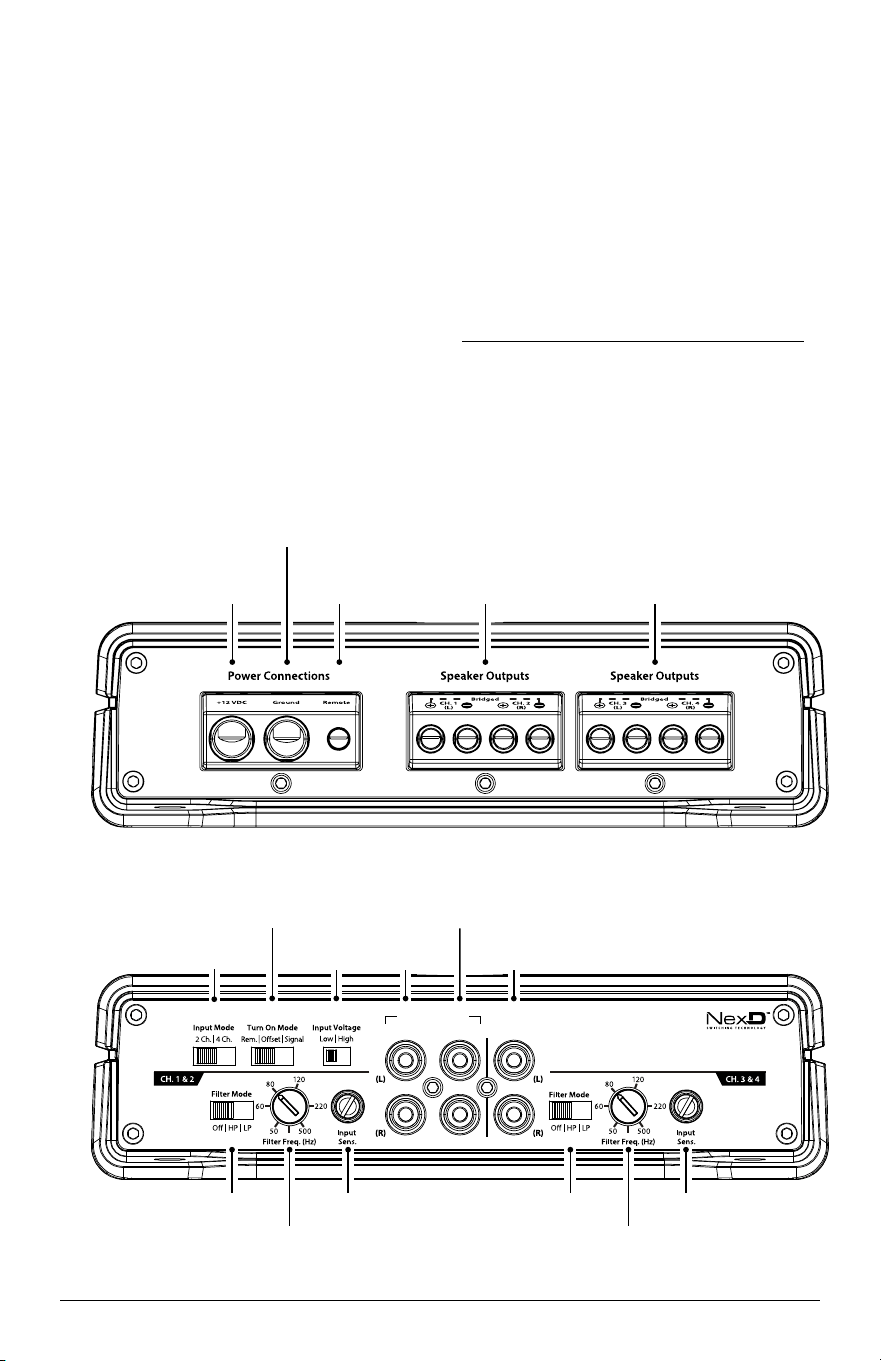
INPUT SECTION PREOUTS
CH . 1& 2 CH. 1&2 (only)CH. 3&4
Clipping
Clipping
CH 1 & CH 2
Input Jacks
(pg. 7)
Left & Right
Output Jacks
(pg. 9)
CH 3 & CH 4
Input Jacks
(pg. 7)
Input
Voltage
(pg. 7)
Turn-On
Mode
(pg. 6)
Filter Mode
(pg. 8-9)
Input Sensitivty
Control
(pg. 8)
Input Sensitivty
Control
(pg. 8)
Filter Mode
(pg. 8-9)
Filter
Frequency
Control
(pg. 8-9)
Filter
Frequency
Control
(pg. 8-9)
Input Mode
(pg. 7)
Remote Turn-On
Connector
(pg. 6)
+12 VDC Power
Connector
(pg. 4-5)
Chassis Ground
Connector
(pg. 5)
CH 1 & CH 2
Speaker Outputs
(pg. 10)
CH 3 & CH 4
Speaker Outputs
(pg. 10)

JD400/4 3
INSTALLATION APPLICATIONS
This amplifier is designed for operation in
vehicles with 12V, negative-ground electrical
systems. Use of this product in vehicles with
positive ground and/or voltages other than 12V
may result in damage to the product and will void
the warranty.
This product is not certified or approved for
use in aircraft. Do not attempt to “bridge” the
outputs of this amplifier with the outputs of a
second amplifier, including an identical one.
PLANNING YOUR INSTALLATION
It is important that you take the time to read
this manual and that you plan out your
installation carefully. The following are some
considerations that you must take into account
when planning your installation.
Cooling Efficiency Considerations:
The outer shell of your JL Audio amplifier
is designed to remove heat from the amplifier
circuitry. For optimum cooling performance,
this outer shell should be exposed to as large a
volume of air as possible. Enclosing the amplifier
in a small, poorly ventilated chamber can
lead to excessive heat build-up and degraded
performance. If an installation calls for an
enclosure around the amplifier, we recommend
that this enclosure be ventilated with the aid of
a fan. In normal applications, fan-cooling is
not necessary.
IMPORTANT!
!
Mounting the amplifier upside down is
strongly discouraged. If mounting the amplifier
under a seat, make sure there is at least 1 inch
(2.5 cm) of space above the amplifier’s outer
shell to permit proper cooling.
Safety Considerations:
Your amplifier needs to be installed in a dry,
well-ventilated environment and in a manner
which does not interfere with your vehicle’s safety
equipment (air bags, seat belt systems, ABS brake
systems, etc.). You should also take the time to
securely mount the amplifier using appropriate
hardware so that it does not come loose in the
event of a collision or a sudden jolt to the vehicle.
Stupid Mistakes to Avoid:
• Check before drilling any holes in your vehicle
to make sure that you will not be drilling
through a gas tank, brake line, wiring harness or
other vital vehicle system.
• Do not run system wiring outside or underneath
the vehicle. This is an extremely dangerous
practice which can result in severe damage to
your vehicle and person.
• Protect all system wires from sharp metal edges
and wear by carefully routing them, tying
them down and using grommets and loom
where appropriate.
• Do not mount the amplifier in the engine
compartment, under the vehicle, on the roof or
in any other area that will expose the amplifier
circuitry to the elements.
WHAT IS INCLUDED
(1) JD400/4 amplifier
(1) 2.5 mm hex wrench
(1) 3 mm hex wrench
(1) Owner's manual
PRODUCT DESCRIPTION
The JD400/4 is a four-channel, full-range
audio amplifier utilizing JL Audio's NexD™ high-
speed switching technology to deliver outstanding
fidelity and efficiency. The JD400/4 can be
operated with a wide variety of source units and
system configurations.
For detailed specifications, please refer to
Appendix B (page 15).
4 JL Audio
TYPICAL INSTALLATION SEQUENCE
The following represents the sequence
for a typical amplifier installation, using an
aftermarket source unit or OEM Interface
processor (like the JL Audio FiX™ 82 or FiX™ 86).
Additional steps and different procedures may
be required in some applications. If you have any
questions, please contact your authorized
JL Audio dealer for assistance.
1) Disconnect the negative battery post
connection and secure the disconnected cable
to prevent accidental reconnection during
installation. This step is not optional.
2) Run copper power wire from the battery
location to the amplifier mounting location,
taking care to route it in such a way that it
will not be damaged and will not interfere
with vehicle operation. See next page for
appropriate wire size.
3) Connect the power wire to the positive battery
post. Fuse the wire with an appropriate fuse
block (and connectors) within 18 inches (45
cm) of wire length from the positive battery
post. This fuse is essential to protect the
vehicle. Do not install the fuse until the
power wire has been securely connected to
the amplifier.
4) Run signal cables and remote turn-on wire (if
available) from the source unit or processor to
the final amplifier mounting location.
5) Run speaker cables from the speaker systems
to the amplifier mounting location.
6) Find a good, solid metal grounding point
close to the amplifier and connect the
negative power wire to it using appropriate
hardware (use of the JL Audio ECS master
ground lug, XB-MGLU is recommended). Use
4 AWG copper wire, no longer than 36 inches
(90 cm) from the amplifier to the ground
connection point. In some vehicles, it may be
necessary to upgrade the battery ground wire.
(See page 5 for important notice).
7)
Securely mount the amplifier using
appropriate hardware.
8) Connect the positive and negative power
wires to the amplifier. A fuse near the
amplifier is not necessary if this is the only
device being run from the fused main power
wire. If the fused main power wire is shared
with other amplifiers or devices, fuse each
amplifier/device within 12 inches (30 cm) of
wire length, via a fused distribution block or
multiple individual fuse blocks/on-board fuses.
9) Connect the remote turn-on wire to the
amplifier or configure the “Turn-On Mode”
switch for automatic turn-on.
10) Connect the input cables to the amplifier.
11) Connect the speaker cables to the amplifier.
12) Carefully review the amplifier’s control
settings to make sure that they are set
according to the needs of the system.
13) Install the power wire fuse (40A for a
single JD400/4) and reconnect the negative
battery post terminal.
14) Turn on the source unit at a low level
to double-check that the amplifier is
configured correctly. Resist the temptation
to crank it up until you have verified the
control settings.
15) Make necessary adjustments to the “Input
Voltage” and “Input Sens.” controls to obtain
the correct overall output and the desired
system balance. See Appendix A (page 14) for
the recommended input sensitivity
setting method.
16) Enjoy the fruits of your labor with your
favorite music.
POWER CONNECTIONS
Before installing the amplifier, disconnect the
negative (ground) wire from the vehicle’s battery.
This will prevent accidental damage to the system,
the vehicle and your body during installation.

JD400/4 5
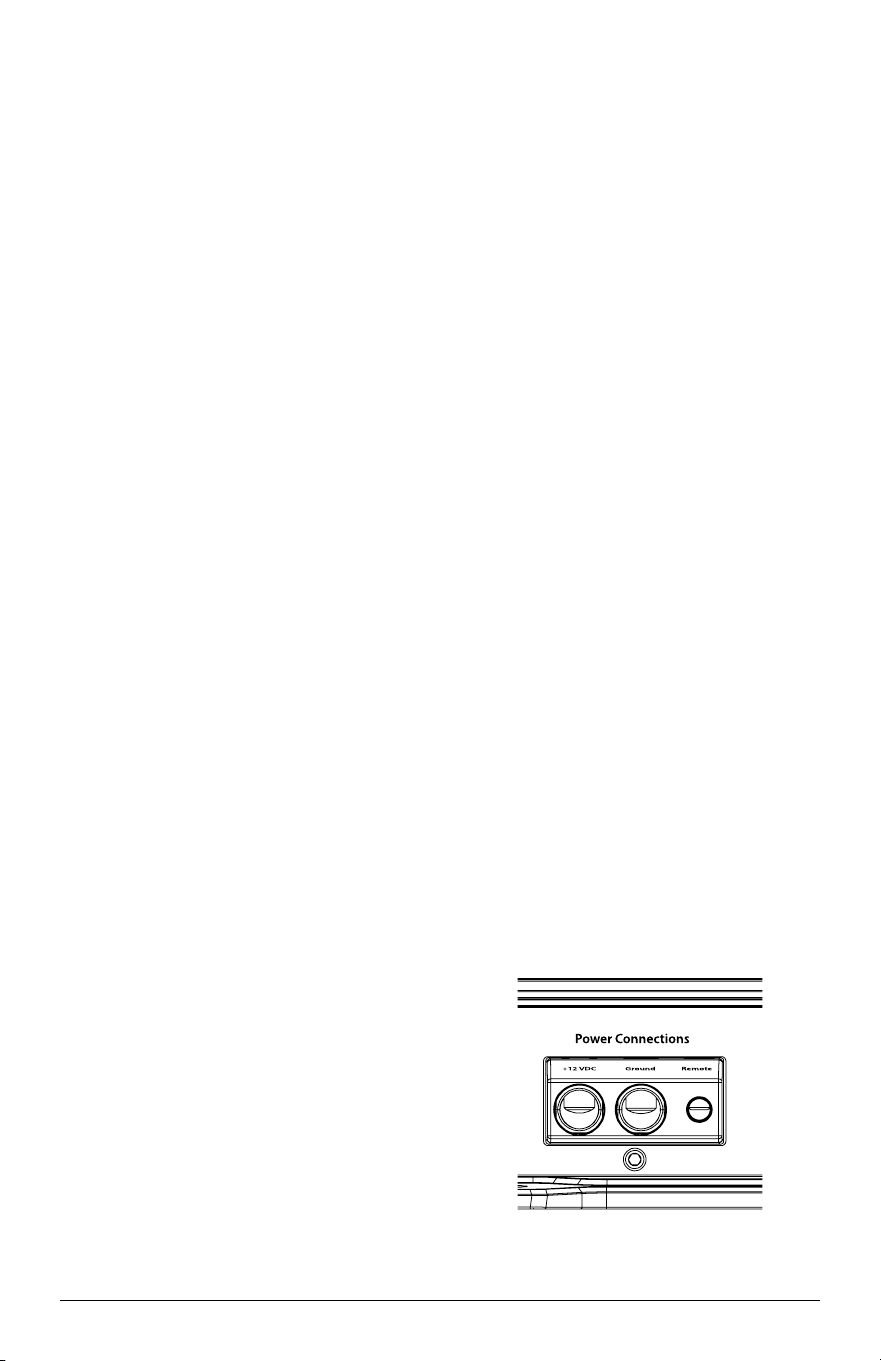
The JD400/4’s “+12 VDC” and “Ground”
connections are designed to accept 4 AWG power
wire. 4 AWG copper wire is a minimum power
wire size for this amplifier.
If you are installing this amplifier with
other amplifiers, use a main power wire that
is appropriately sized for the overall current
demands of all the amplifiers in the system. This
single copper power wire should terminate into
a fused distribution block, mounted as close to
the amplifiers as possible (within 12 inches /
30 cm of wire length). The fused output of the
distribution block will connect to the amplifier
with 4 AWG copper power wire. JL Audio ECS
fused distribution blocks are recommended
(XD-FDBU–2 and XD-FDBU–4).
Note: Smaller AWG numbers mean bigger wire
and vice-versa (1/0 AWG is the largest, 2 AWG is
smaller, then 4 AWG, then 8 AWG, etc.).
To connect the power wires to the amplifier,
first back out the set screw on the top of the
terminal block, using the supplied 3 mm hex
wrench. Strip 1/2 inch (12 mm) of insulation
from the end of each wire and insert the bare
wire into the terminal block, seating it firmly
so that no bare wire is exposed. While holding
the wire in place, tighten the set screw firmly,
taking care not to strip the head of the screw.
The ground connection should be made using
4 AWG copper wire and should be kept as short
as possible, while accessing a solid piece of sheet
metal in the vehicle. The surface of the sheet
metal should be sanded at the contact point to
create a clean, metal-to-metal connection between
the chassis and the termination of the ground
wire. For optimal grounding, we recommend
the use of a JL Audio ECS master ground
lug (XB-MGLU). Alternatively, a sheet metal
screw or bolt can be used with a star washer.
Any wires run through metal barriers (such as
firewalls), must be protected with a high quality
insulating grommet to prevent damage to the
insulation of the wire. Failure to do so may result
in a dangerous short circuit.
IMPORTANT!
!
Only use oxygen-free copper (OFC) wire or
tinned copper wire for your amplifier’s
Power/Ground connections. Copper-clad
aluminum (CCA) wire is not recommended.
IMPORTANT!
!
Many vehicles employ small (10 AWG -
6 AWG) wire to ground the battery to the
vehicle chassis and to connect the alternator’s
positive connection to the battery. To prevent
voltage drops, these wires should be upgraded
to 4 AWG when installing amplifier systems
with main fuse ratings above 60A.
FUSE REQUIREMENTS
It is absolutely vital that the main power
wire(s) to the amplifier(s) in the system be fused
within 18 inches (45 cm) of the positive battery
post connection. If the JD400/4 is the only device
connected to this main wire, use a 40A fuse
(MAXI™ big plastic-body fuse is recommended).
No other fuse is required in this situation.
When running multiple devices from one
main power wire, the main fuse value and rating
of the main power wire must be high enough
for all of the equipment being run from it. Use a
fused distribution block to split the main power
wire feed to each device, with appropriate fusing
and power wire for each device.
6 JL Audio
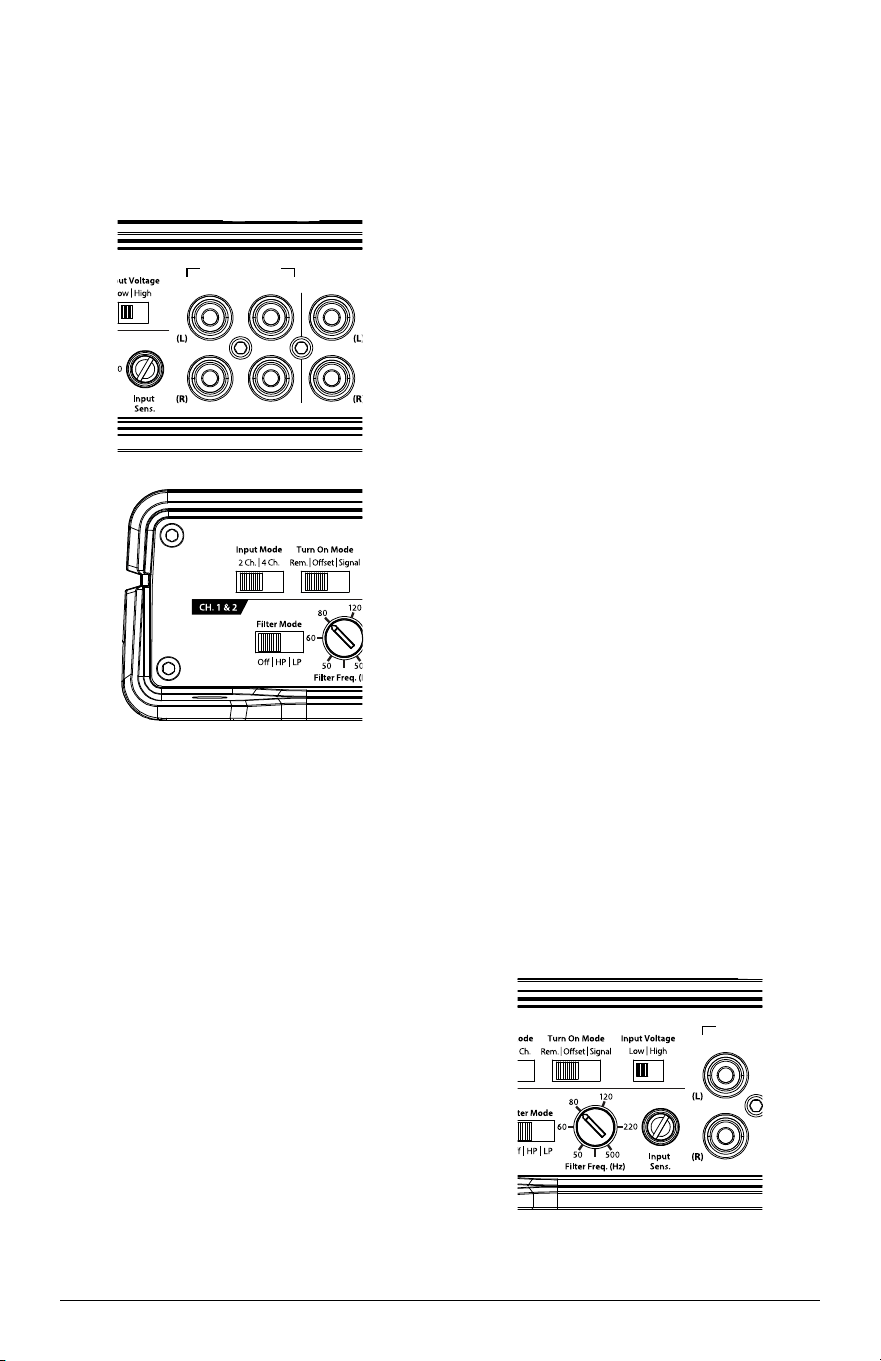
TURN-ON OPTIONS
The JD400/4 can be switched on and off
using one of three methods, determined by the
position of the amplifier’s “Turn-On Mode”
switch. Please read these options and decide
which is best suited for your specific system.
1) +12V Remote turn-on lead
2) DC Offset-Sensing turn-on circuit
3) Signal-Sensing turn-on circuit
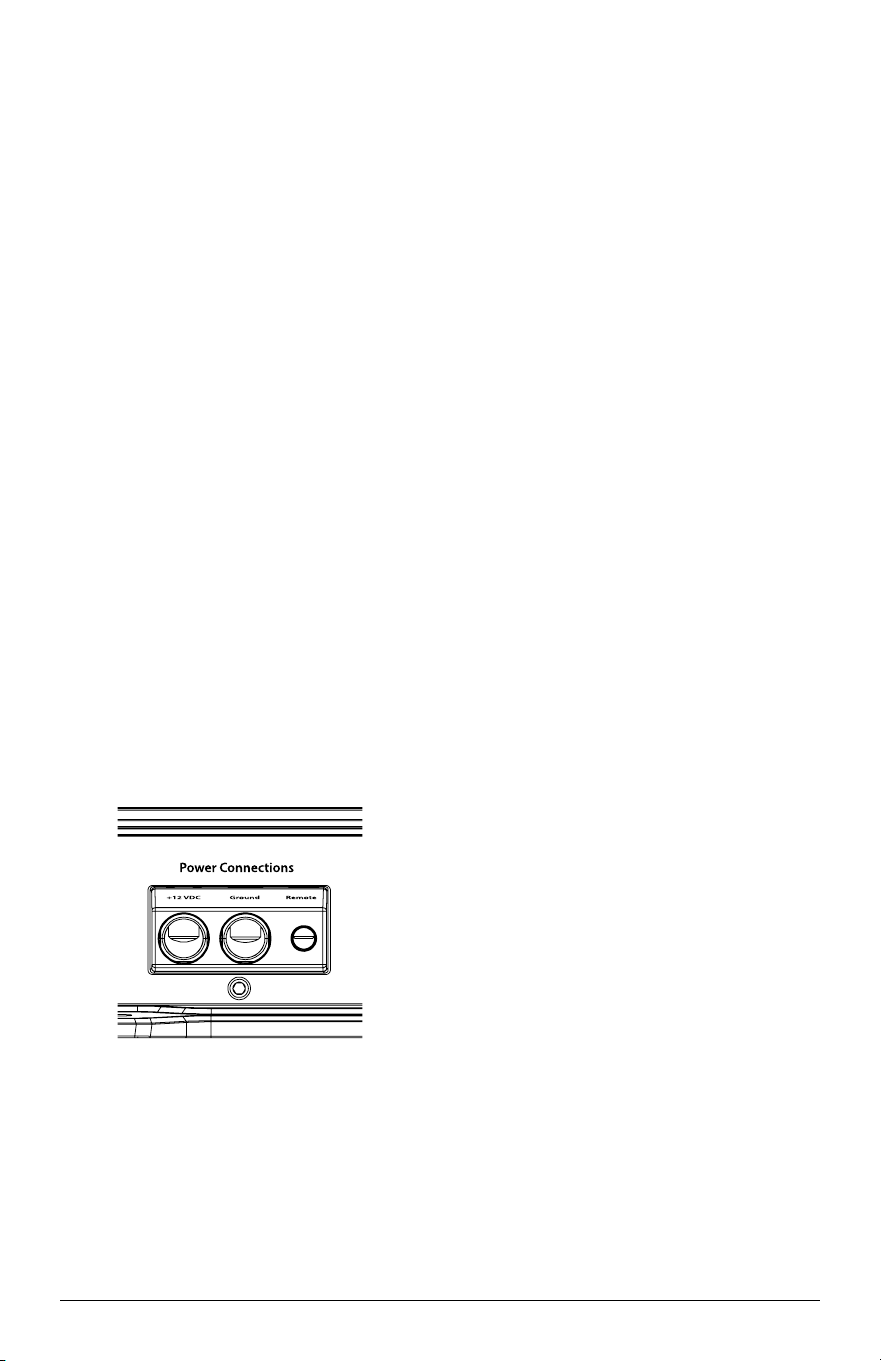
+12V Remote Turn-On: This is the preferred
method for turning the amplifier on/off. The
amplifier will turn on when +12V is present
at its “Remote” input and turn off when +12V
is switched off. This +12V remote turn-on
signal is typically controlled by a source unit
or OEM interface processor’s remote turn-
on wire. The amplifier’s “Remote” turn-on
connector will accept 18 AWG – 12 AWG wire.
To connect the remote turn-on wire to the
amplifier, first back out the set screw on the
top of the terminal block, using the supplied
2.5 mm hex wrench. Strip 1/2 inch (12mm) of
wire and insert the bare wire into the terminal
block, seating it firmly so that no bare wire is
exposed. While holding the wire in the terminal,
tighten the set screw firmly, taking care not to
strip the head of the screw and making sure that
the wire is firmly gripped by the set screw.
If a source unit does not have a dedicated
remote turn-on output, consider one of the
following alternative turn-on options:
These methods are useful when a conventional
+12V remote turn-on signal is not available in a
system. These allow you to operate the amplifier
without having to locate a remote turn-on lead at
the source unit, which can be very useful when
interfacing the amplifier with OEM (factory)
audio systems that do not use conventional +12V
turn-on leads.
Depending on the characteristics of the audio
signal, one of the following methods may work
better than the other. We recommend trying DC
Offset-Sensing first as it does not require a long
delay to turn the system off after the signal is
shut off.
DC Offset-Sensing: The amplifier will turn on
and off by detecting the presence of a very small
DC signal (offset) that is typical in the audio
output of most OEM (factory) source units and
amplifiers. The amplifier will turn on and off in
reaction to the presence or absence of this DC
offset. The sensitivity of this circuit is designed
for high-level (speaker level) signals, not for low-
level (preamp level) signals. The circuit senses
the input signal from the CH. 1 (L) channel
input only.
Signal-Sensing: The amplifier will turn on
and off by detecting the presence of a full-range
audio signal. After approximately 30 seconds,
the amplifier will shut off. The sensitivity of this
circuit is designed for high-level (speaker level)
signals, not for low-level (preamp level) signals.
The circuit is tuned to react to signals at mid-
range frequencies. This prevents false switching
from signals created by moving loudspeakers
that are in parallel with the amplifier’s input
signal. The circuit senses the input signal from
the CH. 1 (L) channel input only.
JD400/4 7
INPUT SECTION
The JD400/4’s input section allows you to send
signals to the amplifier section through the use of
two or four differential-balanced inputs.
Input connections are via two pairs of
traditional RCA-type jacks.
INPUT SECTION PREOUTS
CH . 1& 2 CH. 1&2 (only)CH. 3&4
Clipping
Clipping
INPUT SECTION PREOUTS
CH . 1& 2 CH. 1&2 (only)CH. 3&4
Clipping
Clipping
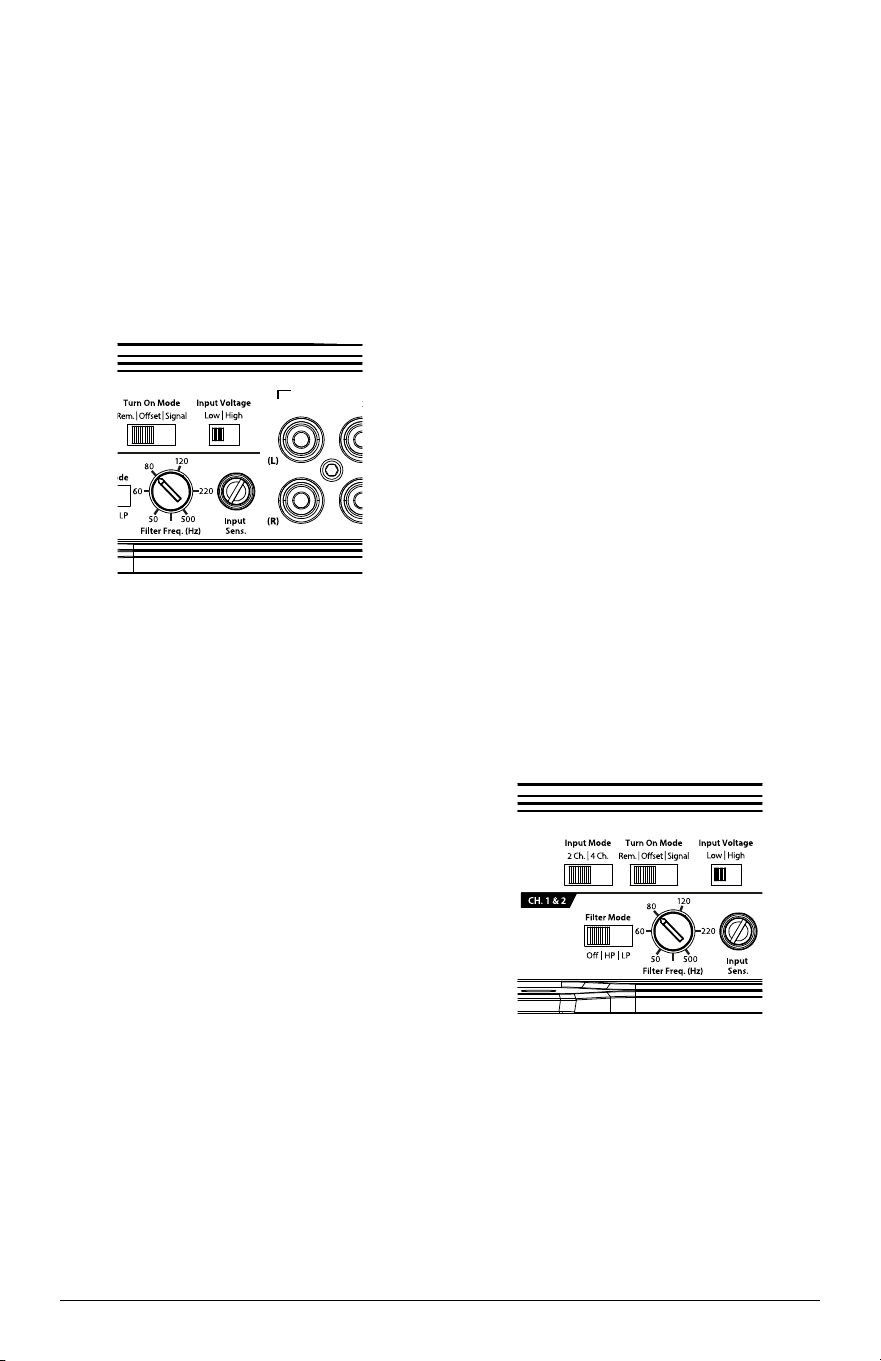
If you wish to send four discrete channels into
the JD400/4, simply use all four inputs and set the
“Input Mode” switch in the “4 Ch.” position.
If you wish to use only two channels of input to
deliver signal to all four amplifier channels, set the
“Input Mode” switch to “2 Ch.” and use only the
inputs to channels 1 and 2. In this mode, channel
3 will operate with the channel 1 signal and
channel 4 will operate with the channel 2 signal.
INPUT VOLTAGE RANGE
A wide range of signal input voltages
can be accommodated by the amplifier’s
input section (200mV – 8V). This wide
range is split up into two sub-ranges,
accessible via the “Input Voltage” switch:
“Low”: for preamp level signals
“High”: for speaker level signals
The “Low” position on the “Input Voltage”
switch selects an input sensitivity range
between 200mV and 2V. This means that the
“Input Sensitivity” rotary control will operate
within that voltage window. If you are using
an aftermarket source unit, with conventional
preamp level outputs, this is the position you
should select.
The “High” position on the “Input Voltage”
switch selects an input sensitivity range between
800mV and 8V for all input channels. This is
useful for certain high-output preamp level
signals as well as speaker-level output from source
units and small amplifiers. To use speaker-level
sources, splice the speaker output wires of the
source unit or small amplifier onto a pair of RCA
cables or plugs or use the JL Audio ECS Speaker
Wire to RCA adaptor (XD-CLRAIC2-SW).
Line output converters are usually not needed
with this amplifier. If you find that the output
cannot be reduced sufficiently with a direct
speaker level signal applied to the amplifier and
the “Input Voltage” switch in its “High” position,
you may use a line output converter (like the
JL Audio LoC-22) or voltage divider to reduce the
signal level.
INPUT SECTION PREOUTS
CH . 1& 2
CH. 1&2 (only)CH. 3&4
Clipping
Clipping
8 JL Audio
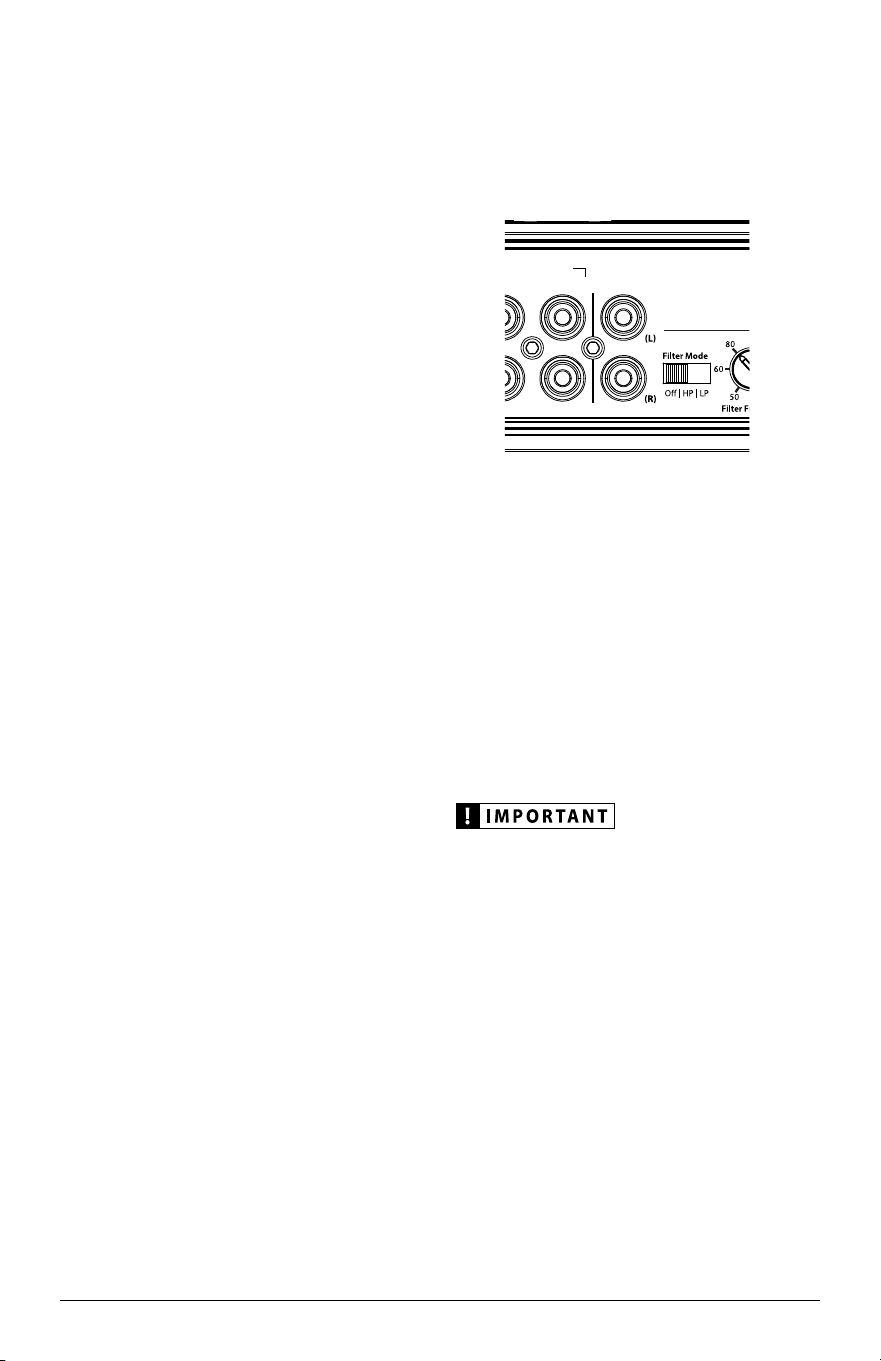
INPUT SENSITIVITY CONTROLS
The “Input Sens.” control is used to match the
source unit’s output voltage to the input stage of
the amplifier for maximum clean output.
Rotating the control clockwise will result
in higher sensitivity (louder for a given input
voltage). Rotating the control counter-clockwise
will result in lower sensitivity (quieter for a
given input voltage). The “Input Sens.” control
is equipped with a LED “Clipping” trim ring to
simplify the input sensitivity setting process.
INPUT SECTION PREOUTS
CH . 1& 2
CH. 1&2 (only)CH. 3&4
Clipping
Clipping
To properly set the amplifier for maximum
clean output, please refer to Appendix A (page
14) in this manual. After using this procedure,
you can then adjust the “Input Sens.” levels
downward if this is required to achieve the
desired system balance.
Do not increase any “Input Sens.” setting for
any channel(s) of any amplifier in the system
beyond the maximum level established during
the procedure outlined in Appendix A (page 14).
Doing so will result in audible distortion and
possible speaker damage.
FILTER CONTROLS
Most speakers are not designed to reproduce
the full range of frequencies audible by the human
ear. For this reason, most speaker systems are
comprised of multiple speakers, each dedicated
to reproducing a specific frequency range. Filters
are used to select which frequency range is sent
to each section of a speaker system. The division
of frequency ranges to different speakers can be
done with passive filters (coils and/or capacitors
between the amplifier outputs and the speakers),
which are acceptable and commonly used
for filtering between mid-range speakers and
tweeters. Filtering between subwoofer systems
and satellite speaker systems is best done with
active filters, which cut off frequency content at
the input to the amplifier. Active filters are more
stable than passive filters and do not introduce
extraneous resistance, which can degrade
subwoofer performance.
The active filter built into each channel
section of the JD400/4 can be used to eliminate
potentially harmful and/or undesired frequencies
from making their way through the amplifier
sections to the speaker(s). This serves to improve
tonal balance and to avoid distortion and possible
speaker failure. Correct use of these filters can
substantially increase the longevity and fidelity of
your audio system.
INPUT SECTION PREOUTS
CH . 1& 2 CH. 1&2 (only)CH. 3&4
Clipping
Clipping
JD400/4 9
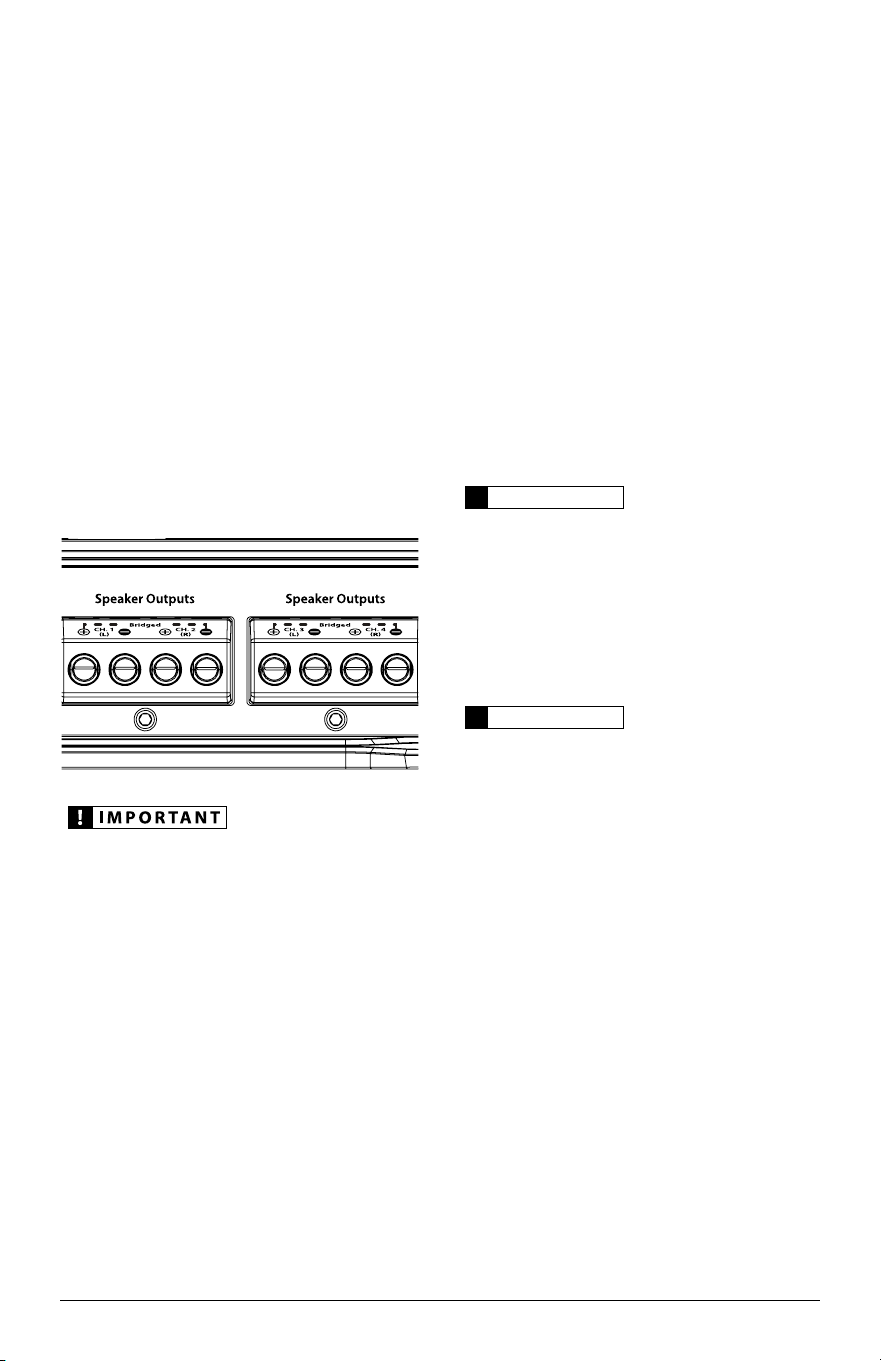
1) “Filter Mode” Controls: The JD400/4
employs 12 dB per octave filters for each
pair of channels. Each of these filters can be
controlled or defeated completely by way of the
three-position “Filter Mode” switches in each
Channel Section:
“Off”: Defeats the filter completely, allowing
the full range of frequencies present at the
inputs to feed these channels. This is useful for
systems utilizing outboard active crossovers
or requiring full-range reproduction from this
channel pair.
“LP” (Low-Pass): Configures the filter to
attenuate frequencies above the indicated filter
frequency, at a rate of 12 dB per octave. This
is useful for connection of subwoofers to one
or more of the JD400/4’s channel pairs in a
bi-amplified system.
“HP” (High-Pass): Configures the filter to
attenuate frequencies below the indicated filter
frequency at a rate of 12 dB per octave. This is
useful for connection of component speakers
or coaxials to one or more of the JD400/4’s
channel pairs in a bi-amplified system.
2) “Filter Freq. (Hz)” The filter frequency
markings surrounding these rotary controls
(one in each Channel Section) are for reference
purposes and are generally accurate to within
1/3 octave or better.
Tuning Hint: If you are using the JD400/4
to drive a subwoofer system (“LP” mode), a
component satellite speaker system (“HP” mode)
or both, 80 Hz is a good baseline “Filter Freq.
(Hz)” setting. After properly adjusting the “Input
Sens.”, as outlined in Appendix A (page 14), you
can fine tune the “Filter Freq. (Hz)” control to
achieve the desired system frequency response.
PREOUTS
The JD400/4 includes a buffered, pass-through
preamp output section, so that additional
amplifiers can be easily added to the system. The
preamp output delivers the same signal that is
connected to the amplifier’s CH. 1&2 inputs.
INPUT SECTION
PREOUTS
CH . 1& 2
CH. 1&2 (only)CH. 3&4
Clipping
Clipping
Note: The preamp output signal is not affected by
the amplifier’s filter controls. If the input signal is
full-range, the preamp output will be full-range.
Note: When the “Input Voltage” switch is in its
“Low” position, the level of the “Preouts” signals
matches the input signal levels (unity gain).
When the “Input Level” switch is in the “High”
position, the level of the input signal is attenuated
–12 dB to produce a line level signal at the
“Preouts”. This ensures a proper line level signal
output under both conditions.
If you plan to use the “Preouts” to feed a stereo
amplifier, you must connect a stereo signal to
the inputs of the amplifier. A mono signal into
the amplifier will result in a mono signal out of
the preamp output.
10 JL Audio
SPEAKER OUTPUTS
The JD400/4’s speaker outputs are designed
to accept 16 AWG - 8 AWG wire. To connect the
speaker wires to the amplifier, first back out the
set screws on the top of the terminal block, using
the supplied 2.5 mm hex wrench. Strip 1/2 inch
(12 mm) of insulation from the end of each wire
and insert the bare wire into the terminal block,
seating it firmly so that no bare wire is exposed.
While holding the wire in place, tighten the set
screw firmly, taking care not to strip the head of
the screw.
Each pair of the JD400/4’s channels is designed
to deliver power into speaker loads equal to or
greater than 2 ohms per channel when using
a “stereo” configuration and speaker loads
equal to or greater than 4 ohms per bridged
pair when using a “bridged” configuration.
Speaker loads below 2 ohms nominal per
channel (or 4 ohms bridged) are not
recommended and may cause the amplifier
to enter a protection mode.
BRIDGING CONSIDERATIONS
Bridging is the practice of combining the
output of two amplifier channels to drive a single
load. When bridged, each channel produces
signals of equal magnitude, but opposite polarity.
The combined output of the two channels
provides twice the output voltage available from
a single channel. The JD400/4 has been designed
for bridging of its channel pairs without the need
for input inversion adaptors.
To bridge a pair of channels, use the
“Left +” and “Right –” speaker connectors only
(the “Left –” and “Right +” remain unused).
When bridged, each channel will deliver
optimum power into a 4 ohm load.
IMPORTANT!
!
When a pair of the JD400/4’s channels are
bridged, they will deliver 200W x 1 into a 4 ohm
load or 150W x 1 into an 8 ohm load. Operating
a pair of bridged channels into a load lower than
4 ohms is not recommended and will cause the
amplifier to enter into protection mode.
IMPORTANT!
!
Any bridged channel pair must be fed by both
Input Channels corresponding to it (Left and
Right). Failure to do so will result in significant
audible distortion.
When a pair of the JD400/4’s channels are
operating in bridged mode, the output will be in
mono (only one channel). This mono channel
can contain right channel only information,
left channel only information or the sum of
the information from both the right and left
channels. In order to achieve one of these options,
configure the inputs to that pair of channels in
one of these two ways:
1) Left Channel Only or Right Channel Only
Information: If you wish to send a left-only
or right-only signal to a pair of the JD400/4’s
channels, use a “Y-Adaptor” to split the single
channel signal into both left (CH. 1&3) and
JD400/4 11
right (CH. 2&4) RCA inputs. This option
is useful when using a pair of the JD400/4’s
channels to drive left channel speakers only
and the other pair of the JD400/4’s channels to
drive right channel speakers only.
2) Left + Right Channel Information:
When bridged and fed by a stereo input, a pair
of the JD400/4’s channels will automatically
combine the left and right channels into a
summed mono (left + right) channel. This
option is useful when using a pair of the
JD400/4’s channels to drive a subwoofer system
or a summed mono center channel.
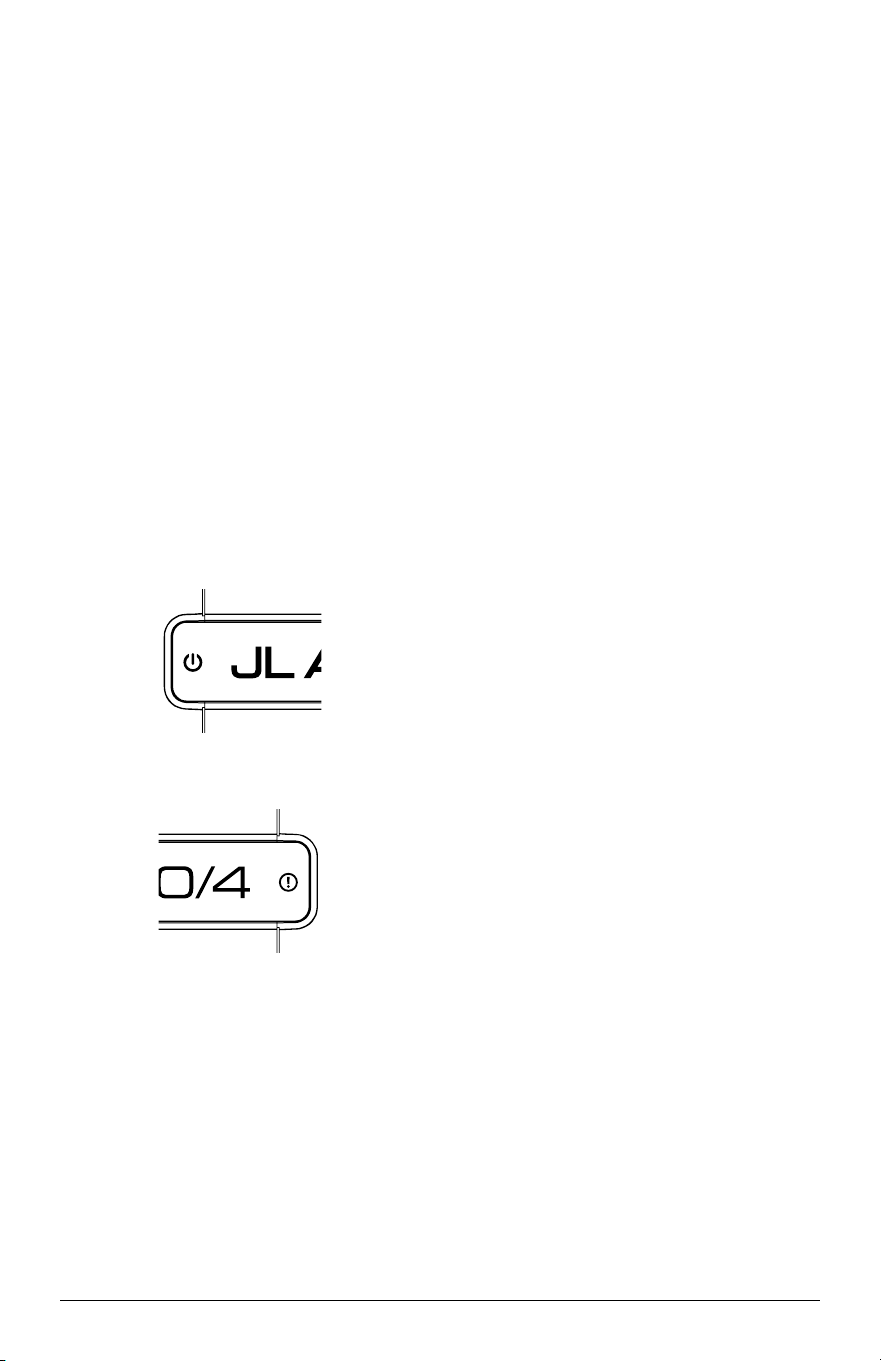
STATUS LEDS / PROTECTION CIRCUITRY
JD amplifiers are equipped with separate
Status and Protection LEDs on the top surface of
the amplifier to indicate the amplifier’s
operating condition.
242 mm
9.50 in
190 mm
7.50 in
53 mm
2.10 in
150 mm
5.90 in
214 mm
8.40 in
INPUT SECTION PREOUTS
CH . 1& 2 CH. 1&2 (only)CH. 3&4
Clipping
Clipping
Status LED
Constant Blue: The amplifier is on.
242 mm
9.50 in
190 mm
7.50 in
53 mm
2.10 in
150 mm
5.90 in
214 mm
8.40 in
INPUT SECTION PREOUTS
CH . 1& 2 CH. 1&2 (only)CH. 3&4
Clipping
Clipping
Protection LED
1) Constant Red: Lights to indicate that the
amplifier has exceeded its safe operating
temperature, putting the amplifier into
a self-protection mode, which mutes the
power output of the amplifier. When its
temperature returns to a safe level, this LED
will turn off and the amplifier will return to
normal operating mode.
2) Flashing/Constant Red: The Protection
LED also illuminates during over-current
conditions. This may result in the LED
flashing as it corresponds to peaks in
music volume. Extended over-current
conditions will cause the LED to illuminate
continuously. During these events, the
amplifier’s output will be muted. Because
the muting behavior may be very short in
duration, it may manifest itself as an audible,
repetitive ticking or thumping noise in the
output. Over-current conditions can be
caused by a speaker impedance lower than
the optimum load impedance range for the
amplifier or a short-circuit in the speaker
wiring. The latter can result from a short
circuit between the positive and negative
speaker wires or between either speaker
wire and the vehicle chassis.
All LEDs Off / Amplifier Shuts Off
Unexpectedly:
The only condition that will shut down an
undamaged JD amplifier completely is if battery
voltage or remote turn-on voltage drops below
10 volts. When this occurs, both LEDs will turn
off. The amplifier will turn back on when voltage
climbs above 11 volts. If this is happening in your
system, have your charging system and power
wiring inspected.
For more information on troubleshooting this
amplifier, refer to Appendix C (pages 16, 17).

12 JL Audio
SYSTEM CONFIGURATIONS
The JD400/4 is a flexible amplifier, well-suited
for a multitude of system configurations. In this
section, the most likely configurations for a system
with a single JD400/4 are explained in detail.
Once you have selected your desired
configuration, you can use the amplifier panel
drawing on pages 18 & 19 to mark the required
switch positions for easy reference.
BI-AMPLIFIED SYSTEMS
Bi-amplified systems are defined as systems
in which separate amplifier channels drive low-
frequency (LF) and high-frequency (HF) speakers
and are separately filtered to send appropriate
frequency ranges to each speaker system.
The most common application of
bi-amplification in mobile audio is to drive a
subwoofer system from one or more amplifiers or
channels and component speakers from separate
amplifiers or channels.
The JD400/4 can be configured to drive a
bi-amplified system by itself or with a separate
subwoofer amplifier.
Bi-Amplified System with one JD400/4
In this configuration, channels 3&4 of the
JD400/4 will drive subwoofers (stereo or bridged)
with low-pass filtering. Channels 1&2 will
drive component speakers in stereo with
high-pass filtering.
Input connection options for a bi-amplified
system with one JD400/4 are as follows:
A) No User Adjustability:
Req uired: a basic source unit or processor
with one pair of stereo outputs.
Inp ut Connections: a single pair of stereo source
unit outputs connected to the “CH 1 (Left)”
and“CH 2 (Right)” inputs of the JD400/4
(select “2 Ch.” on the “Input Mode” switch).
Res ult: the relative level of the LF and HF
channels will be determined by the JD400/4’s
“Input Sensitivity” settings and will not be
user adjustable from the front of the vehicle.
B) Fade Subwoofer Level vs. HF Level
Req uired: a source unit or processor with two
pairs of stereo outputs.
Inp ut Connections: the first stereo pair of source
unit outputs is connected to the “CH 1 (Left)”
and “CH 2 (Right)” inputs of the JD400/4. The
2nd pair of source unit outputs connects to
the “CH 3 (Left)” and “CH 4 (Right)” inputs
(select “4 Ch.” on the “Input Mode” switch).
Res ult: in this mode, the user has the ability to
fade or control the level of the LF channels
relative to the HF channels via the source
unit’s fader control without exceeding the
maximum clean output level set by each
amplifier section’s “Input Sens.” controls.
C) Subwoofer Level Control Only:
Req uired: a source unit or processor with
one pair of stereo outputs and dedicated
subwoofer outputs.
Inp ut Connections: the main stereo pair of
source unit outputs is connected to the
“CH 1 (Left)” and “CH 2 (Right)” inputs
of the JD400/4. The source unit’s dedicated
subwoofer output is connected to the “CH
3 (Left)” and “CH 4 (Right)” inputs (select
“4 Ch.” on the “Input Mode” switch).
Res ult: in this mode, the user has the ability to
control the absolute level of the LF channels
relative to the HF channels.
Set the “Input Sens.” in the “Channel 3 & 4
Controls” section with the source unit’s
subwoofer level control set at 3/4 of full output.
See Appendix A (page 14) for details.
Crossover Setup for Bi-Amplified System
with one JD400/4:
Once the input sections have been configured
appropriately, go to the “Channel 3 & 4
Controls”. Select “LP” (low-pass) on the “Filter
Mode” switch and an appropriate “Filter Freq.”
(80 Hz is a good starting point).
Next, turn your attention to the “Channel 1 &
2 Controls” and select “HP” (high-pass) on the
“Filter Mode” switch and an appropriate “Filter
Freq.” (again, 80 Hz is a good starting point).
After proper adjustment of the “Input Sens.”
controls for both channel pairs using the method
shown in Appendix A (page 14), you can fine
tune filter frequencies and attenuate either
pair of channels to achieve proper balance.

JD400/4 13
MULTI-AMPLIFIER SYSTEMS
Using the “Preamp Outputs” of the
JD400/4, it is easy to configure many
different multi-amplifier systems.
The most common type involves the addition
of a subwoofer amplifier, such as the JD500/1.
Common configurations of such a system are
described as follows.
Bi-Amplified System with one JD400/4 in
four-channel mode and a separate
subwoofer amplifier
This configuration requires that the separate
subwoofer amplifier has a built-in low-pass filter.
(All JL Audio amplifiers have this feature.)
In this configuration, channels 1&2 of the
JD400/4 will drive front component speakers in
stereo with high-pass filtering. Channels 3&4
will drive rear component speakers in stereo, also
with high-pass filtering. The separate amplifier
will drive the subwoofer system with low-pass
filtering (80 Hz is a good starting point).
Here are three possible configuration options:
A) Fade Subwoofer Level vs. HF Level:
Req uired: a source unit or processor with front
and rear pairs of stereo outputs.
Inp ut Connections: one stereo pair of source unit
outputs is connected to the “CH 1 (Left)” and
“CH 2 (Right)” inputs of the JD400/4 (select “2
Ch.” on the “Input Mode” switch). The second
stereo pair of source unit outputs is connected
to the subwoofer amplifier inputs.
Res ult: with this option, the user has the ability to
fade the level of the subwoofer amplifier’s input
relative to the HF channels, but cannot control
front-to-rear fading of the HF channels. The
relative level of the front and rear HF channels
will be fixed by the JD400/4’s
“Input Sensitivity” settings and will not be
user adjustable from the front of the vehicle.
B) Subwoofer Level Control Only:
Req uired: a source unit or processor with left,
right and dedicated subwoofer outputs.
Inp ut Connections: The main stereo pair
of source unit outputs is connected to the
“CH 1 (Left)” and “CH 2 (Right)” inputs of
the JD400/4 (select “2 Ch.” on the “Input
Mode” switch). The source unit’s dedicated
subwoofer output is connected to the
subwoofer amplifier inputs.
Res ult: with this option, the user has the ability
to control the absolute level of the subwoofer
channel relative to the HF channels, but
cannot fade the front and rear HF channels
relative to each other.
Set the subwoofer amplifier’s “Input
Sensitivity” with the source unit’s subwoofer
level control set at 3/4 of full output.
C) Front to Rear HF Fading and Subwoofer
Level Control:
Req uired: a source unit or processor with front
and rear pairs of stereo outputs plus a dedicated
subwoofer output.
Inp ut Connections: one stereo pair of source unit
outputs is connected to the “CH 1 (Left)” and
“CH 2 (Right)” inputs of the JD400/4.
The second stereo pair of source unit outputs
is connected to the “CH 3 (Left)” and “CH 4
(Right)” inputs of the JD400/4 (select
“4 Ch.” on the “Input Mode” switch). The
source unit’s dedicated subwoofer output is
connected to the subwoofer amplifier inputs.
SERVICING YOUR AMPLIFIER
If your amplifier fails or malfunctions, please
return it to your authorized JL Audio dealer so
that it may be sent in to JL Audio for service.
There are no user serviceable parts or fuses inside
the amplifier. The unique nature of the circuitry
in the JL Audio amplifiers requires specifically
trained service personnel. Do not attempt
to service the amplifier yourself or through
unauthorized repair facilities. This will not only
void the warranty, but may result in the creation
of more problems within the amplifier.

14 JL Audio
APPENDIX A:
Input Sensitivity Level Setting
Follow the steps below to adjust the input
sensitivity of each amplifier channel pair, simply
and easily, in just a few minutes to achieve overall
system balance.
Necessary Equipment
• Sine-wave test tone recorded at 0 dBfs reference
level in the frequency range to be amplified
for that set of channels (50 Hz for subwoofer
amplifier models or 1 kHz for a full range
amplifier models). Do not use attenuated test
tones (-10 dB, -20 dB, etc.).
Depending on your type of source unit, the sine-
wave may be played via a CD, USB thumb drive
or portable media player. Make sure to disable
any EQ/DSP modes on your portable media
player during level setting.
The Seven-Step Procedure
1) Disconnect the speaker(s) from the
amplifier’s speaker output connectors.
2) Turn off all processing (bass/treble, loudness,
EQ, etc.) on the source unit, processors (if
used) and amplifier. Set the fader control to
center position and the subwoofer level control
to 3/4 of maximum, if used.
3) Set the “Input Voltage” switch to “Low”. Turn
both “Input Sens.” controls all the way down.
4) Set the source unit volume to 3/4 of full
volume. This will allow for reasonable gain
overlap with moderate clipping at full volume.
5) Verify that you have disconnected the speakers
before proceeding. Play a track with the
appropriate sine wave (within the frequency
range to be amplified at 3/4 source unit volume.
6) Slowly increase the “Input Sens.” control until
the LED “Clipping” trim ring is solidly lit,
indicating maximum, unclipped output. If the
LED “Clipping” trim ring is solidly lit with the
“Input Sens.” control turned all the way down,
set the “Input Voltage” switch to the “High”
position, then slowly increase the “Input Sens.”
control until its LED “Clipping” trim ring is
solidly lit. Perform this step for both “Input
Sens.” controls.
7) Once you have adjusted the amplifier's input
sensitivity for each channel section to its
maximum, unclipped output level, reduce the
source unit’s volume to prevent sudden output
bursts and reconnect the speaker(s). Play
music and adjust the “Input Sens.” controls
downward if the amplifier requires attenuation
to achieve the desired system balance.
Do not increase any “Input Sens.” setting for
any amplifier channel or channel pair in the
system beyond the maximum level established
during this procedure. Doing so will result in
audible distortion and possible speaker damage.
It will be necessary to re-adjust the “Input
Sens.” if any equalizer boost is activated after
setting the amplifier's input sensitivity with this
procedure. This applies to any EQ boost circuit,
including source unit tone controls or EQ circuits.
EQ cuts will not require re-adjustment.

JD400/4 15
APPENDIX B:
JD400/4 Specifications
Amplifier Section:
Amplifier Topology: NexD™ Ultra-High Speed Class D
Power Supply: Unregulated MOSFET switching type
Rated Power at 14.4V with less than
1% THD+Noise (20 Hz - 20 kHz) RMS Method
Stereo, all channels driven:
75W RMS x 4 @ 4 ohms, 100W RMS x 4 @ 2 ohms
Bridged, all channels driven:
150W RMS x 2 @ 8 ohms, 200W RMS x 2 @ 4 ohms
Rated Power @ 12.5V with less than
1% THD + Noise (20 Hz - 20 kHz) RMS Method
Stereo, all channels driven:
60W RMS x 4 @ 4 ohms, 90W RMS x 4 @ 2 ohms
Rated Power Bridged, all channels driven:
120W RMS x 2 @ 8 ohms, 180W RMS x 2 @ 4 ohms
Signal to Noise Ratio:
>104 dB referred to rated power
(A-weighted, 20 Hz-20 kHz noise bandwidth)
>84 dB referred to 1W
(A-weighted, 20 Hz-20 kHz noise bandwidth)
Frequency Response: 12 Hz - 22 kHz (+0, -1 dB)
Damping Factor:
>150 @ 4 ohms per ch. / 50 Hz
>75 @ 2 ohms per ch. / 50 Hz
Input Section:
No. of Inputs: Two Stereo Pairs
Input Type: Differential-balanced with RCA jack inputs
Input Range: 200mV - 8V RMS
Signal Processing:
Filter Type: State-variable, 12 dB/octave Butterworth
with continuously variable cutoff frequency selection
from 50 - 500 Hz.
Configurable as Low-Pass or High-Pass. Defeatable.
Preamp Output: Buffered pass-through type, from
CH. 1&2 inputs.
Power Connections:
Recommended Fuse Value: 40A
Minimum Copper Power/Ground Wire Gauge: 4 AWG
(Note: Do not use Copper Clad Aluminum (CCA) wire.)
Dimensions (LxWxH):
9.50" x 7.50" x 2.10" (242 mm x 190 mm x 53 mm)
Due to ongoing product development, all specifications are subject to
change without notice.

16 JL Audio
“How do I properly set the input sensitivity on my amplifier?”
Please refer to Appendix A (page 14) to set the input sensitivity for
maximum, low-distortion output.
“My amplifier doesn’t turn on.”
Check the fuse, not just visually, but with a continuity meter. It is
possible for a fuse to have poor internal connections that
cannot be found by visual inspection. It is best to take the
fuse out of the holder for testing. If no problem is found with
the fuse, inspect the fuse holder.
Check the integrity of the connections made to each of the
“+12VDC”, “Ground”, and “Remote” terminals. Ensure
that no wire insulation is pinched by the terminal set screw
and that each connection is tight.
Check to make sure there is +12V at the “Remote” connection of the
amplifier. In some cases, the turn-on lead from the source unit
is insufficient to turn on multiple devices and the use of a relay
is required. To test for this problem, jump the “+12VDC” wire
to the “Remote” terminal to see if the amplifier turns on.
“I hear a repetitive ticking or popping sound coming out of the speaker(s).”
Check the speaker wires for a possible short, either between the
positive and negative leads or between either speaker lead
and the vehicle’s chassis ground. If a short is present, you
will experience distorted and/or attenuated output. The
“Protection LED” will turn red in this situation. It may be
helpful to disconnect the speaker wires from the amplifier
and use a different set of wires connected to a test speaker.
Check the nominal load impedance to verify that the amplifier is
driving a load equal to or greater than 2 ohms.
“My amplifier’s output fluctuates when I tap on it or hit a bump.”
Check the connections to the amplifier. Make sure that the
insulation for all wires has been stripped back far enough to
allow a good contact area inside the terminal block.
Check the input connectors to ensure that they all are making good
contact with the input jacks on the amplifier.
APPENDIX C: TROUBLESHOOTING

JD400/4 17
“My amplifier shuts off once in a while, usually at higher volumes.”
Check your voltage source and grounding point. The power supply
of the amplifier will operate with charging system voltages
down to 10V. Shutdown problems at higher volume levels
can occur when the charging system voltage (or remote
turn-on voltage) drops below 10V. These dips can be of very
short duration making them extremely difficult to detect
with a common DC voltmeter. To ensure proper voltage,
inspect all wiring and termination points. It may also be
necessary to upgrade the ground wire connecting the battery
to the vehicle’s chassis and the power wire connecting the
alternator to the battery. Many vehicles employ small (10
AWG - 6 AWG) wire to ground the battery to the vehicle’s
chassis and to connect the alternator to the battery. To
prevent voltage drops, these wires should be upgraded to
4 AWG when installing amplifier systems with main fuse
ratings above 60A. Grounding problems are the leading
cause of misdiagnosed amplifier “failures.”
“My amplifier turns on, but there is no output.”
Check the input signal using an AC voltmeter to measure the
voltage from the source unit while an appropriate test tone is
played through the source unit (disconnect the input cables
from the amplifier prior to this test). The frequency used
should be in the range that is to be amplified by the amplifier
(example: 50 Hz for a sub bass application or 1 kHz for a full
range / high-pass application). A steady, sufficient voltage
(between 0.2 and 8.0-volts) should be present at the output of
the signal cables.
Check the output of the amplifier. Using the procedure explained in
the previous check item (after plugging the input cables back
into the amplifier) test for output at the speaker outputs of
the amplifier. Unless you enjoy test tones at high levels, it is
a good idea to remove the speaker wires from the amplifier
while doing this. Turn the volume up approximately
halfway. 5 volt AC or more should be measured at the
speaker outputs. This output level can vary greatly between
amplifiers but it should not be in the millivolt range with
the source unit at half volume. If you are reading sufficient
voltage, check your speaker connections as explained below.
Check to ensure that the speaker wires are making a good
connection with the metal inside the terminal block. The
speaker wire connectors are designed to accept up to 8 AWG
wire. Make sure to strip the wire to allow for a sufficient
connection with the metal inside the terminal block.
18 JL Audio
INSTALLATION NOTES:
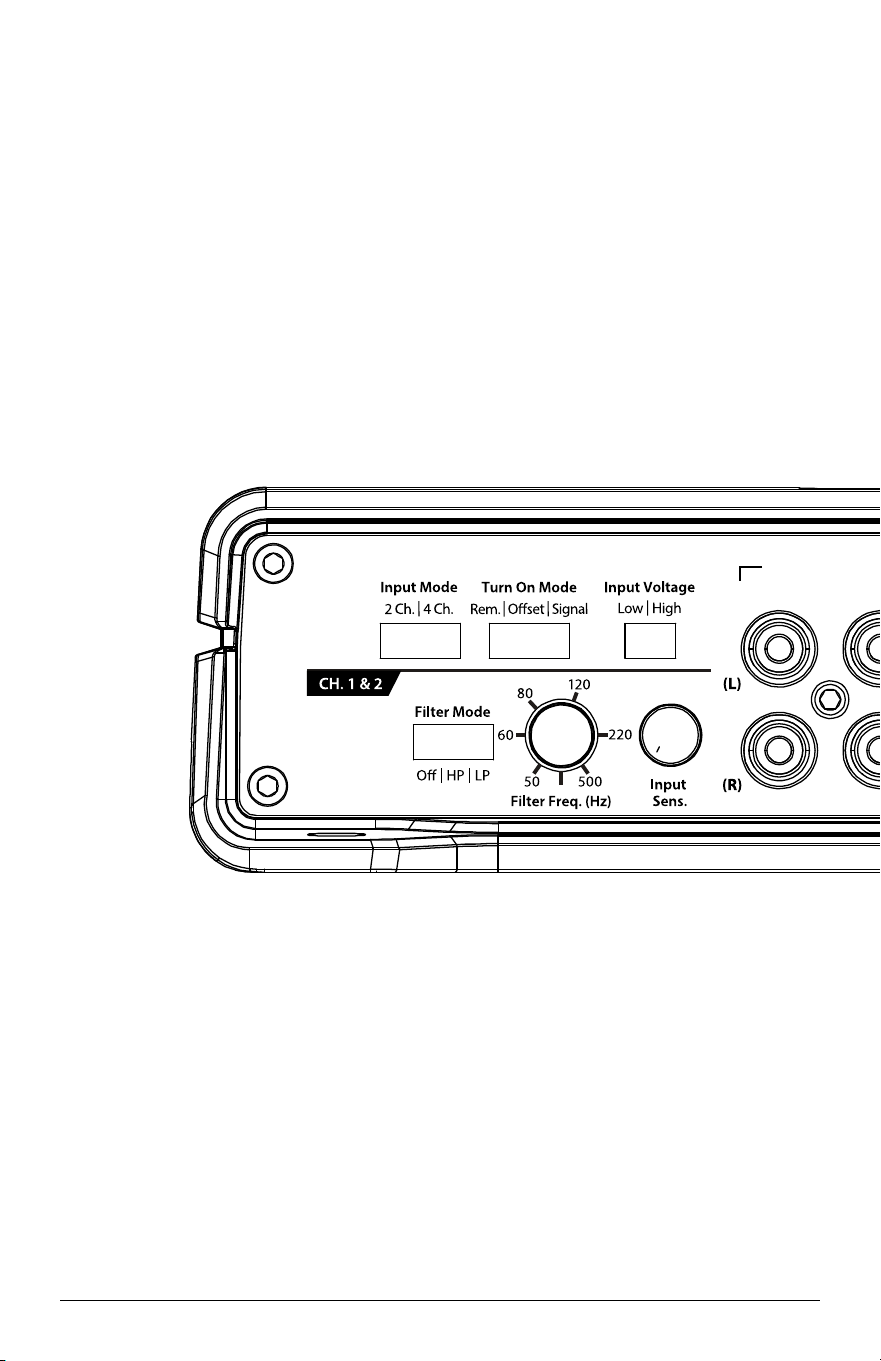
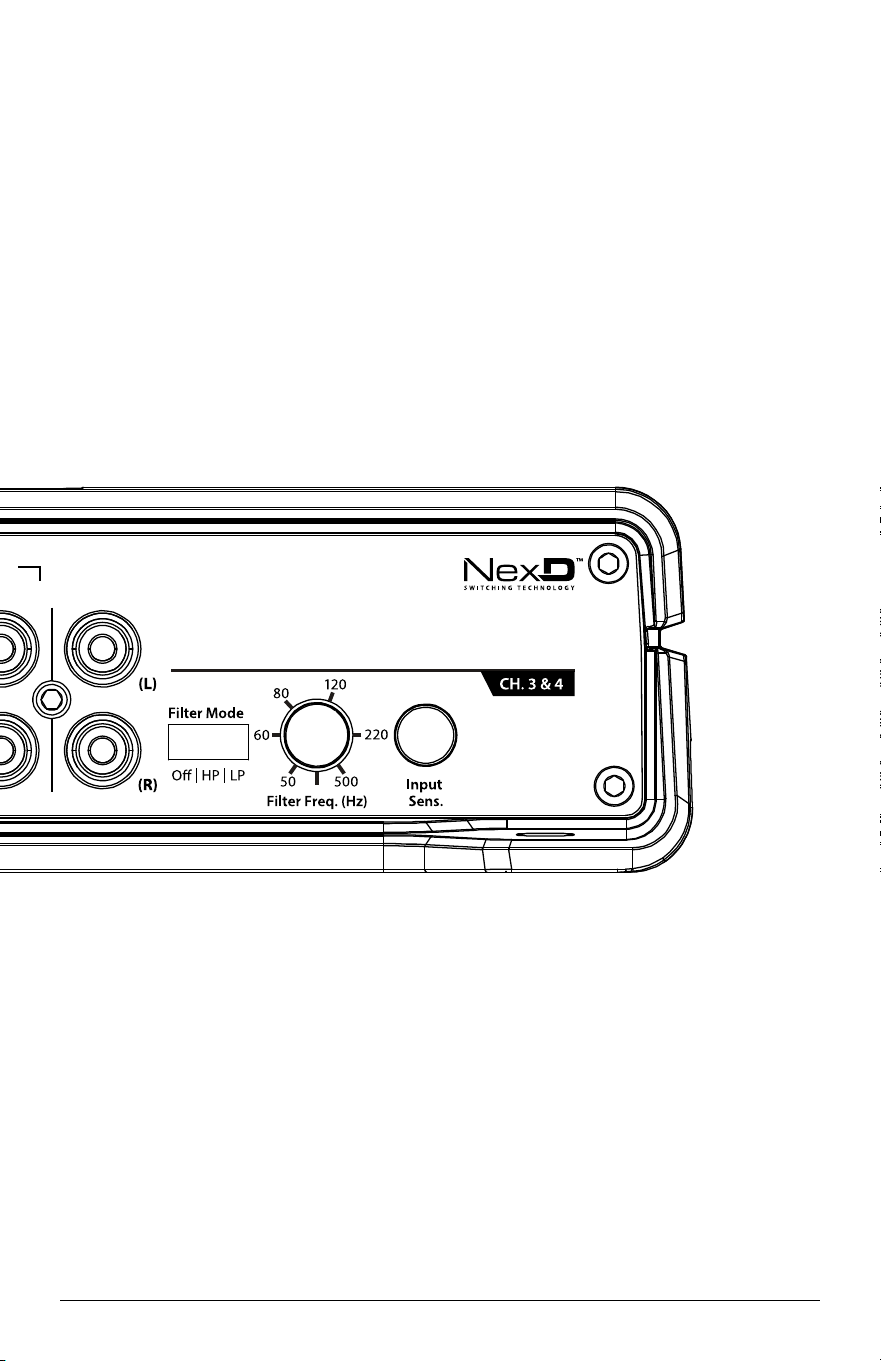
Use this diagram to document your amplifier’s switch and control positions.
INPUT SECTION PREOUTS
CH. 1& 2
CH. 1&2 (only)CH. 3&4
Clipping
Clipping
JD400/4 19
INPUT SECTION
PREOUTS
CH. 1& 2
CH. 1&2 (only)
CH. 3&4
Clipping
Clipping

LIMITED WARRANTY - AMPLIFIERS (USA)
JL AUDIO warrants this product to be free of defects in materials and workmanship for a
period of two (2) years. The warranty is extended to three (3) years total if installation is performed by an
authorized JL Audio dealer using a JL Audio Premium Power Connection System for power wiring.
This warranty is not transferrable and applies only to the original purchaser from an authorized
JL AUDIO dealer. Should service be necessary under this warranty for any reason due to manufacturing
defect or malfunction, JL AUDIO will (at its discretion), repair or replace the defective product with new
or remanufactured product at no charge. Damage caused by the following is not covered under warranty:
accident, misuse, abuse, product modification or neglect, failure to follow installation instructions,
unauthorized repair attempts, misrepresentations by the seller. This warranty does not cover incidental
or consequential damages and does not cover the cost of removing or reinstalling the unit(s). Cosmetic
damage due to accident or normal wear and tear is not covered under warranty.
Warranty is void if the product’s serial number has been removed or defaced.
Any applicable implied warranties are limited in duration to the period of the express warranty as
provided herein beginning with the date of the original purchase at retail, and no warranties, whether
express or implied, shall apply to this product thereafter. Some states do not allow limitations on implied
warranties, therefore these exclusions may not apply to you. This warranty gives you specific legal rights,
and you may also have other rights which vary from state to state.
If you need service on your JL AUDIO product:
All warranty returns should be sent to JL AUDIO ’s Amplifier Service Facility freight-prepaid through
an authorized JL AUDIO dealer and must be accompanied by proof of purchase (a copy of the original
sales receipt). Direct returns from consumers or non-authorized dealers will be refused unless specifically
authorized by JL AUDIO with a valid return authorization number.
Warranty expiration on products returned without proof of purchase will be determined from the
manufacturing date code. Coverage may be invalidated as this date is previous to purchase date. Non-
defective items received will be returned freight-collect. Customer is responsible for shipping charges and
insurance in sending the product to JL AUDIO. Freight damage on returns is not covered under warranty.
For Service Information in the U.S.A. please call
JL Audio Customer Service: (954) 443-1100
9:00 AM – 5:30 PM (Eastern Time Zone)
JL Audio, Inc
10369 North Commerce Pkwy.
Miramar, FL 33025
(do not send product for repair to this address)
International Warranties:
Products purchased outside the United States of America are covered only
by that country’s distributor and not by JL Audio, Inc.
Printed in Taiwan JD400/4-091019