Installed by: __________________________________________________________
Installer Phone: __________________________ Date Installed: __________________
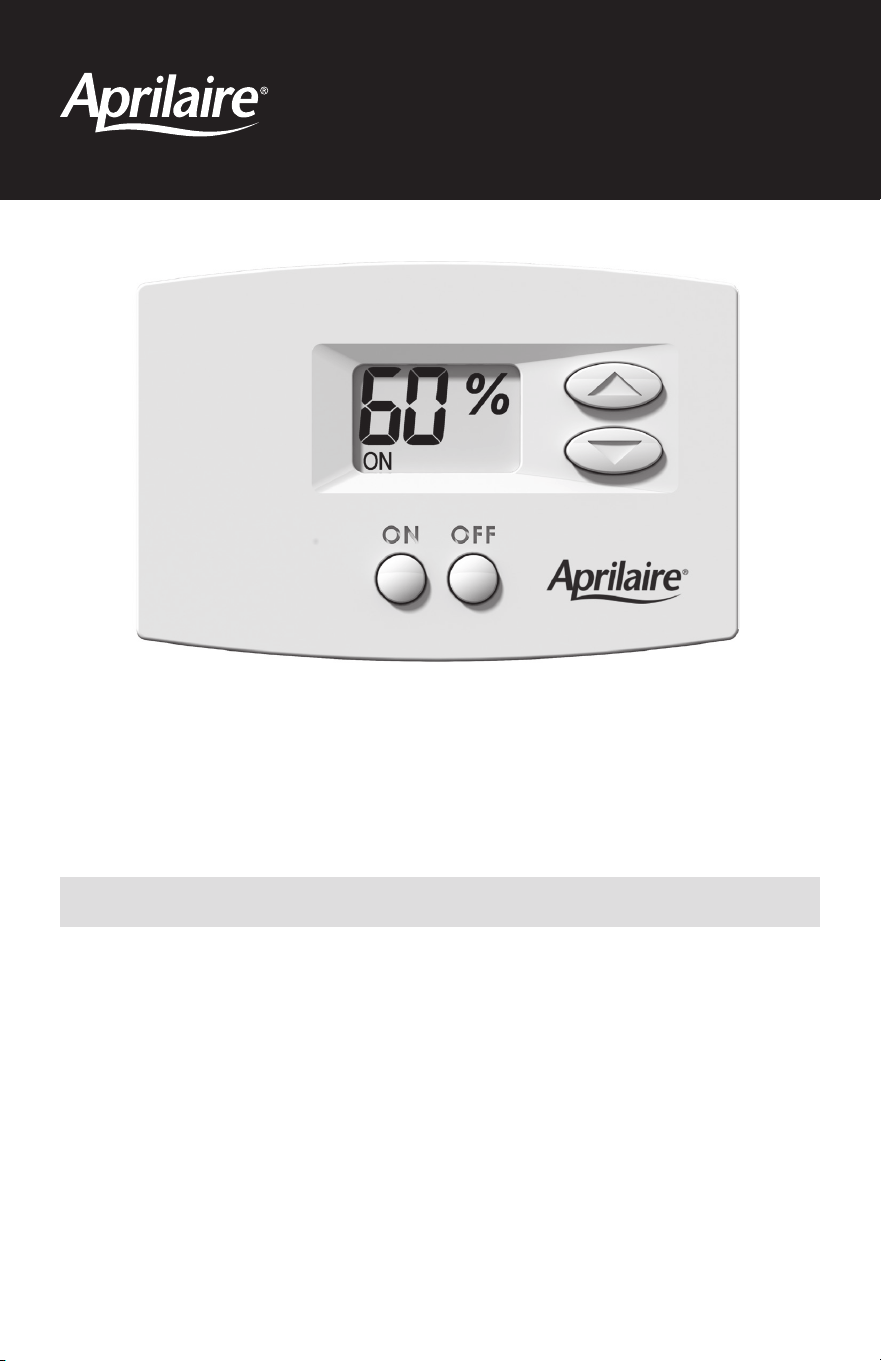
Model 76
Dehumidifier Control
Owner's Manual
PLEASE LEAVE THIS MANUAL WITH THE HOMEOWNER
Thank you for your purchase of the Aprilaire® Model 76 Dehumidifier Control. Your control allows
you to set the relative humidity level for your home and provides control of the dehumidifier from
a convenient living space location. The Model 76 uses an onboard sensor to monitor the relative
humidity in the space in which it is located and displays the measured relative humidity on the
digital display.
The Model 76 can also act as a remote control for your Aprilaire Model 1830, 1850, or 1870
dehumidifier if it is located in an inconvenient or hard to access area. For example, when the
dehumidifier is located in and dehumidifying a crawl space or a basement, the Model 76 can be
installed where you spend most of your time, allowing you to make changes to the setting and to
see what the humidity is in these areas without having to access the dehumidifier.
1
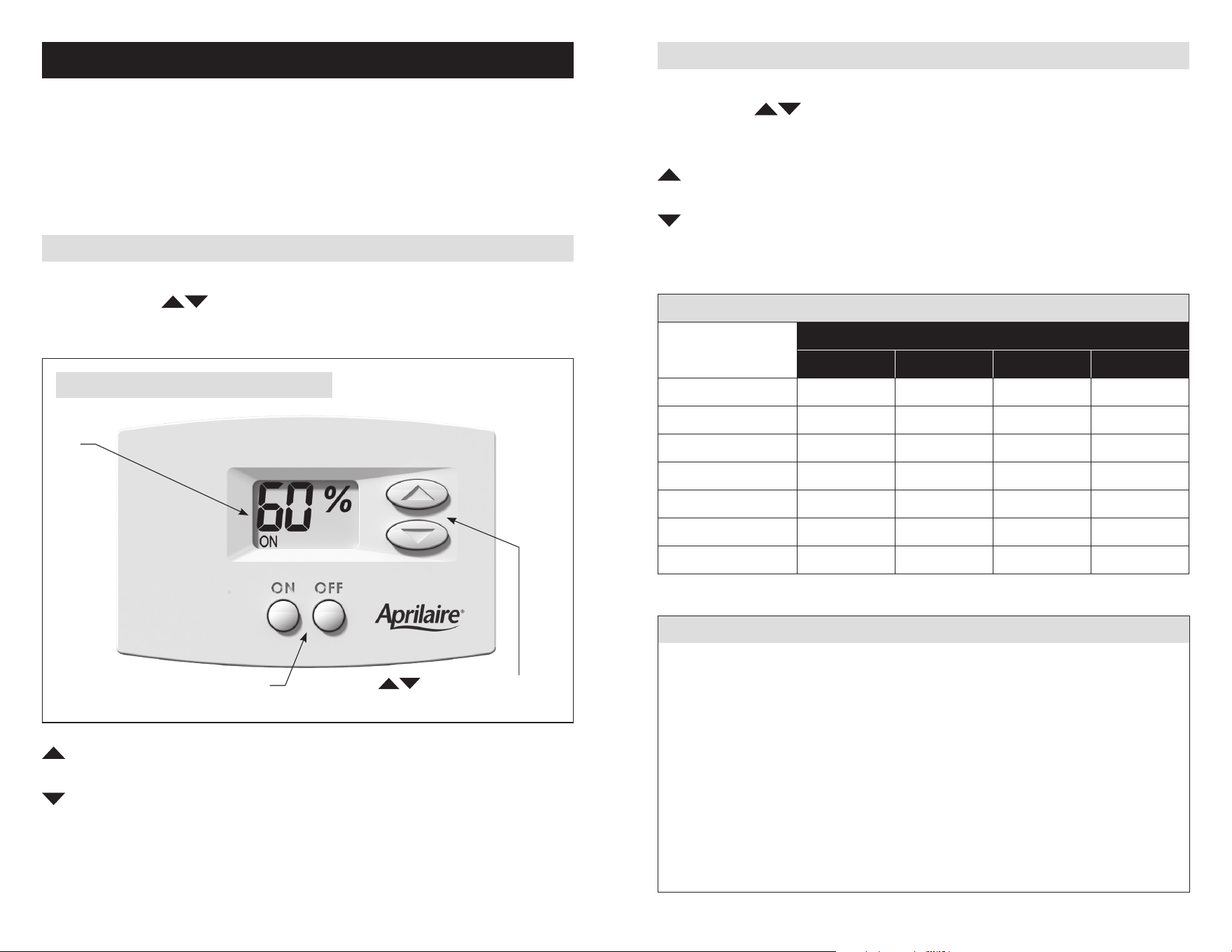
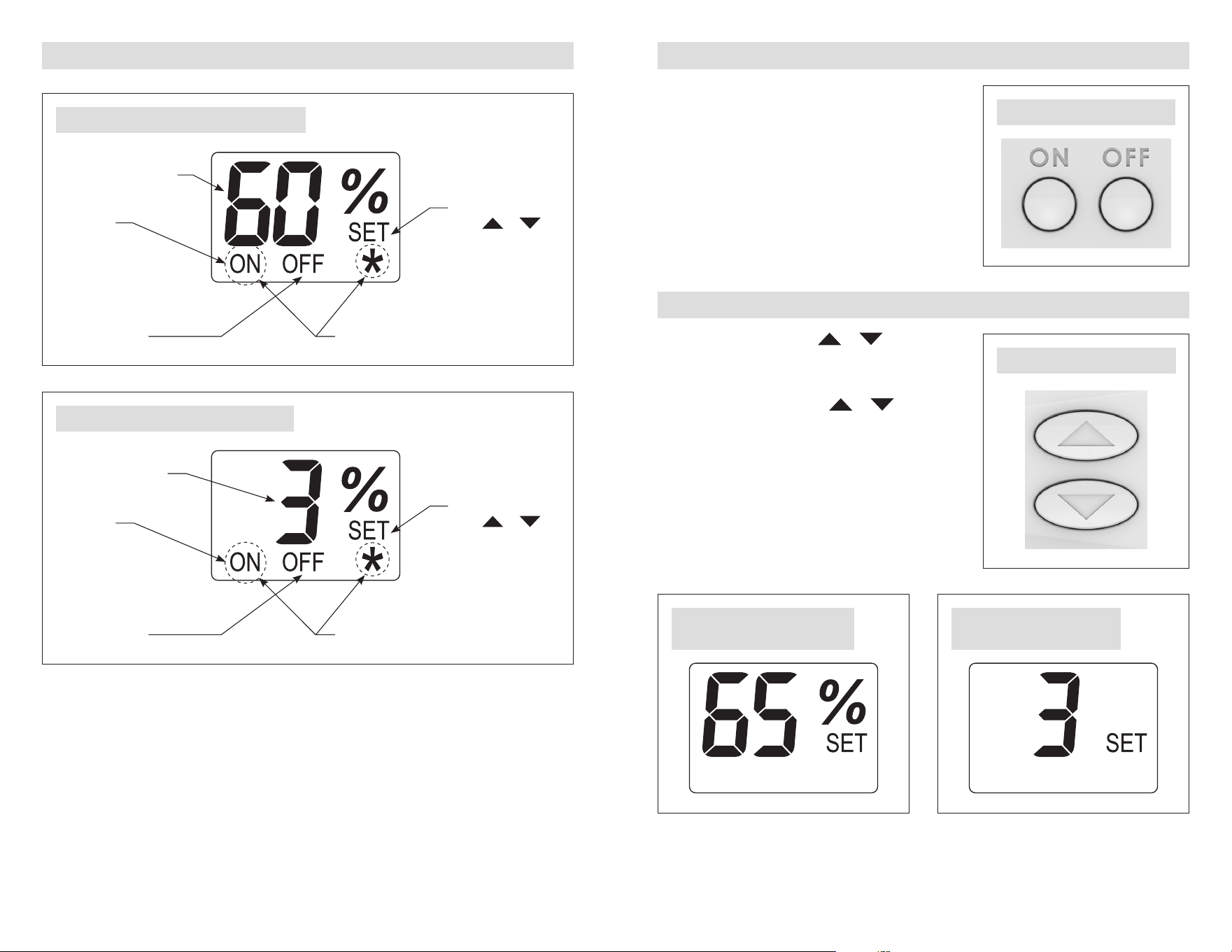
FIGURE 1 – CONTROL DISPLAY AND USER BUTTONS
SETTING THE DESIRED HUMIDITY LEVEL
The control will allow you to set the desired humidity level in your home and can be used to turn
dehumidification On or Off.
The materials in a home act like a sponge, so the moisture in those materials is at the same level
as the air. After drying the air, the materials in the home will release moisture back into the air
until they are again at the same level. As a result, it is not uncommon for the dehumidifier to
operate for an extended period of time when first installed.
EXTERNAL CONTROL
Begin by pressing the ON button and ON will be displayed on the LCD Screen (see LCD display
in FIGURE 1). Use the
buttons to set the control at 59% when first installed. Allow the
dehumidifier to run for 24 hours before deciding if you want to change the humidity setting.
REMOTE CONTROL
Begin by pressing the ON button and ON will be displayed on the LCD Screen (see LCD display in
Figure 1). Use the
buttons to set the control to a dryness level of 3 when first installed.
Allow the dehumidifier to run for 24 hours before deciding if you want to change the dryness
level setting.
Increase the dryness level setting if you prefer the air to be more dry; this will increase the
amount of time that the dehumidifier runs.
Decrease the dryness level setting if you prefer the air to be less dry; this will reduce the
amount of time that the dehumidifier runs.
The dryness level settings can be approximated to relative humidity (%RH) using TABLE 1.
TABLE 1 – %RH (+/-5%) BASED ON DRYNESS LEVEL SETTING & INDOOR TEMPERATURE
Dryness Level Setting
Indoor Temperature (°F)
65 70 75 80
1 84% 71% 60%
2 87% 73% 62% 52%
3 75% 63% 54% 45%
4 65% 55% 46% 39%
5 56% 47% 40% 34%
6 50% 42% 36% 30%
7 43% 36% 31% 26%
Note: This table is for reference only.
ENERGY SAVINGS TIPS
Tip #1: To reduce dehumidifier run time, when using the Model 76 as an external control,
adjust the setting to be as high as is comfortable and when using the Model 76 as a remote
control, adjust the setting to be as low as is required for the space. If it feels clammy or
“smells damp”, change the setting to allow for drier conditions.
Tip #2: When using the Model 76 as an external control, turn the dehumidifier control OFF
when you open your windows, just as you would with air conditioning.
Tip #3: When using the Model 76 as an external control, and if vacating your home for an
extended period in the summer, set the RH at 59% and set your thermostat to as high as you
are comfortable setting it in the cooling mode. Consult with appropriate professionals regarding
the highest temperature that is safe for your pets or possessions. This will keep the humidity at
a controlled level to help prevent mold while minimizing the amount of cooling energy used.
LCD
Display
Mode Buttons – Use to
turn control On/Off.
Buttons – Use to view and
set humidity or dryness level setting.
90-2483
Raise the setting if you prefer the air to be less dry; this will reduce the amount of time
that the dehumidifier runs.
Lower the setting if you prefer the air to be more dry; this will increase the amount of time
that the dehumidifier runs.
32
90-1636
FIGURE 2 – EXTERNAL CONTROL LCD DISPLAY
Blinking ON +
*
: Control Limit Exceeded.
See Control Limits, page 6.
Solid ON:
Control On
Blinking ON:
Dehumidifying
Numbers show
current room humidity
or humidity setting
SET is displayed
when or is
pressed. The value
displayed is the
humidity setting.
See FIGURE 5.
OFF: Control Off
Blinking ON +
*
: Control Limit Exceeded.
See Control Limits, page 6.
Solid ON:
Control On
Blinking ON:
Dehumidifying
SET is displayed
when or
is pressed. The
value displayed is
the dryness level.
See FIGURE 7.
OFF: Control Off
90-2493
FIGURE 3 – REMOTE CONTROL LCD DISPLAY
LCD DISPLAY TURNING CONTROL ON/OFF
• Pressing the ON button will turn on the control.
• Pressing the OFF button will turn off the control.
• The control will continue to display the measured
humidity when OFF.
• The humidity or dryness level setting cannot be
changed when the control is OFF.
CHANGING THE HUMIDITY OR DRYNESS LEVEL SETTING
• The first press of either the
or button
will display the humidity or dryness level setting
on the LCD.
• Each subsequent push of the or buttons
will change the setting by 1% or 1 dryness level.
• If a button is held down, the setting will
continually change by 1% or 1 dryness level every
1/2 second for as long as the button is pressed.
• The control will exit the setting screen 5 seconds
after the last button press/release.
Numbers show remote
location humidity or
dryness level setting
FIGURE 4 – ON/OFF BUTTONS
FIGURE 5 – UP/DOWN BUTTONS
FIGURE 6 – EXTERNAL HUMIDITY
SETTING SCREEN
FIGURE 7 – REMOTE DRYNESS
LEVEL SETTING SCREEN
90-2487
90-2488
90-1637 90-1636
54
HOW DOES THE CONTROL WORK?
EXTERNAL CONTROL
• When the measured humidity is greater than the setting, the control will turn on the
dehumidifier and ON will blink on the LCD display.
• When the measured humidity falls 3% below the setting, the control will turn off the
dehumidifier and ON will stop blinking.
REMOTE CONTROL
• The control sends the dryness level to the dehumidifier.
• Once per Cycle Period (set by your installer in the dehumidifier), the dehumidifier will sample
the air in the area served by the dehumidifier.
• If the dew point of the incoming air is above the dryness level, the dehumidifier will turn on and
ON will blink on the LCD display.
• When the dew point of the incoming air falls below the setting, the dehumidifier will turn off
and ON will stop blinking.
CONTROL LIMITS
The control limits are used to make sure the dehumidifier
does not run when conditions are outside of the operating
limits. Dehumidifiers are not as effective when conditions
are outside of the operating limits. For example, the
dehumidifier will not remove much moisture when
conditions are cool and dry. Control limits allow the
dehumidifier to work efficiently within the operating range
and turn off when conditions are outside of these limits.
EXTERNAL CONTROL – SEQUENCE OF OPERATION
• The dehumidifier will turn off if one of the control limits has been exceeded.
• If the control measures a dew point below 40°F OR a temperature above 99°F, the control
will deactivate the dehumidifier output if actively dehumidifying, the dehumidifier will stop
dehumidifying, and ON and
*
will blink on the LCD screen (see FIGURE 2).
• The control will resume normal operation when conditions fall back within the control limits.
REMOTE CONTROL – SEQUENCE OF OPERATION
• The dehumidifier will turn off if one of the control limits has been exceeded.
• If the dehumidifier measures a temperature below 50°F or above 105°F, the dehumidifier will
stop dehumidifying, and ON and
*
will blink on the LCD screen (see FIGURE 3).
• The control will resume normal operation when conditions in the remote space fall back within
the dehumidifier control limits.
CLEANING THE CONTROL
The surface of the Model 76 Dehumidifier Control can be cleaned with water or a non-abrasive
household cleaner, including glass cleaner. Do not spray any liquid directly onto the control.
Spray water or a cleaner onto a soft cloth and gently wipe the surface of the control.
CONTROL LIMITS
Dew Point
Lower Limit
40°F External Control
Temperature
High Limit
99°F External Control
105°F Remote Control
Temperature
Low Limit
50°F Remote Control
76
Aprilaire.com
P.O. Box 1467
Madison, WI 53701-1467
800.334.6011 F: 608.257.4357
Printed in USA
©2019 Aprilaire – Division of Research Products Corporation
61001719 B2208437A 4.19
LIMITED WARRANTY
Your Research Products Corporation Aprilaire® Dehumidifier Control is expressly warranted for five (5) years from date of
installation to be free from defects in materials or workmanship.
Research Products Corporation’s exclusive obligation under this warranty shall be to supply, without charge, a replacement
for any control which is found to be defective within such five (5) year period and which is returned not later than thirty
(30) days after said five (5) year period by you to either your original supplier or to Research Products Corporation, Madison,
Wisconsin 53701, together with the installation date of the control.
THIS WARRANTY SHALL NOT OBLIGATE RESEARCH PRODUCTS CORPORATION FOR ANY LABOR COSTS AND SHALL NOT
APPLY TO DEFECTS IN WORKMANSHIP OR MATERIALS FURNISHED BY YOUR INSTALLER AS CONTRASTED TO DEFECTS
IN THE CONTROL ITSELF.
IMPLIED WARRANTIES OF MERCHANTABILITY OR FITNESS FOR A PARTICULAR PURPOSE SHALL BE LIMITED IN
DURATION TO THE AFORESAID FIVE YEAR PERIOD. RESEARCH PRODUCTS CORPORATION’S LIABILITY FOR INCIDENTAL
OR CONSEQUENTIAL DAMAGES, OTHER THAN DAMAGES FOR PERSONAL INJURIES, RESULTING FROM ANY BREACH OF
THE AFORESAID IMPLIED WARRANTIES OR THE ABOVE LIMITED WARRANTY IS EXPRESSLY EXCLUDED. THIS LIMITED
WARRANTY IS VOID IF DEFECTS(S) RESULT FROM FAILURE TO HAVE THIS UNIT INSTALLED BY A QUALIFIED HEATING
AND AIR CONDITIONING CONTRACTOR. IF THE LIMITED WARRANTY IS VOID DUE TO FAILURE TO USE A QUALIFIED
CONTRACTOR, ALL DISCLAIMERS OF IMPLIED WARRANTIES SHALL BE EFFECTIVE UPON INSTALLATION.
Some states do not allow limitations on how long an implied warranty lasts or the exclusion or limitation of incidental or
consequential damages so the above exclusion or limitations may not apply to you.
This warranty gives you specific legal rights and you may also have other rights which vary from state to state.
WARRANTY REGISTRATION
Visit us online at www.aprilaire.com to register your Aprilaire product. If you do not have online access, please mail a
postcard with your name, address, phone number, email address, product purchased, model number, date of purchase, and
dealer name and address to: Research Products Corporation, P.O. Box 1467, Madison, WI 53701.
Your warranty registration information will not be sold or shared outside of this company.
8