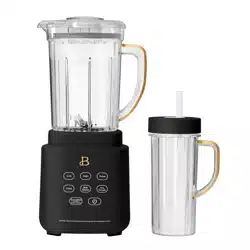

FRONT Cover
Instruction Manual
Manual de instrucciones
PowerExact Blender System
with Patent-Pending PrecisionSense™ Blade technology
Sistema de licuado PowerExact de Beautiful
con tecnología de cuchilla PrecisionSense™ con patente pendiente
19443_19444_19445_19447_19448_BTFL_Walmart_HP_Blender_IM_R5.indd 119443_19444_19445_19447_19448_BTFL_Walmart_HP_Blender_IM_R5.indd 1 2024-01-24 11:56 AM2024-01-24 11:56 AM
The kitchen is my family’s happy
place. It’s where we cook and eat
and bake and laugh and share our
most beautiful moments together.
That’s what inspired the creation
of Beautiful, my new collection
of easy-to-use kitchenware that
you’ll want to keep out on your
kitchen counter. So whether
your kitchen has flour all over
the place from a kid's baking
session or you’re throwing an adult
dinner party, I hope every step will
be simple, delicious and beautiful!
www.beautifulbydrew.com
19443_19444_19445_19447_19448_BTFL_Walmart_HP_Blender_IM_R5.indd 219443_19444_19445_19447_19448_BTFL_Walmart_HP_Blender_IM_R5.indd 2 2024-01-24 11:56 AM2024-01-24 11:56 AM

Section 1: Safety
Important Safeguards ............................................ 4-6
Additional Important Safeguards ................................. 6-7
Notes on the Plug ................................................ 7
Notes on the Cord ................................................ 8
Plasticizer Warning ............................................... 8
Electric Power .................................................... 9
To reset the unit ................................................. 9
Section 2: Instructions
Getting To Know Your PowerExact Blender System
with patent-pending PrecisionSense™ Blade technology* ............ 11
Touch-Activated Display Control Panel ......................... 12-14
Before Using for the First Time .................................. 15
Jar Assembly ..................................................... 15
Operation ..................................................... 16-17
Figures ........................................................17-18
Beautiful PowerExact Blender System Notes ........................ 18
Beautiful Food Prep Tips ......................................... 18
User Maintenance Instructions .................................... 19
Care & Cleaning Instructions ..................................... 19
Storing Instructions ............................................. 19
Troubleshooting .................................................. 20
Warranty ......................................................... 21
Table of Contents
19443_19444_19445_19447_19448_BTFL_Walmart_HP_Blender_IM_R5.indd 119443_19444_19445_19447_19448_BTFL_Walmart_HP_Blender_IM_R5.indd 1 2024-01-24 11:56 AM2024-01-24 11:56 AM

Índice
Sección 1: Seguridad
Medidas importantes de seguridad ............................. 24-26
Medidas importantes de seguridad adicionales .................. 26-27
Notas sobre el enchufe .......................................... 28
Notas sobre el cable ............................................ 28
Advertencia sobre el acabado .................................... 29
Alimentación eléctrica ........................................... 29
Cómo reiniciar el aparato ........................................ 29
Sección 2 Instrucciones
Conozca mejor su sistema de licuado PowerExact con tecnología de
cuchilla PrecisionSense™ de patente pendiente* ................... 31
Panel de control de pantalla de activación táctil ............. 32-35
Antes del primer uso ............................................ 35
Montaje de la jarra ........................................... 35-36
Funcionamiento ................................................ 36-37
Figuras .......................................................... 38
Notas de Beautiful sobre el sistema de licuado PowerExact ....... 39
Consejos de Beautiful para la preparación de alimentos ........... 39
Instrucciones de mantenimiento para el usuario ................... 39
Instrucciones de limpieza y cuidado ........................... 39-40
Instrucciones de almacenamiento .................................. 40
Resolución de problemas ......................................... 41
Garantía ......................................................... 42
19443_19444_19445_19447_19448_BTFL_Walmart_HP_Blender_IM_R5.indd 219443_19444_19445_19447_19448_BTFL_Walmart_HP_Blender_IM_R5.indd 2 2024-01-24 11:56 AM2024-01-24 11:56 AM
Section 1
Safety
1
19443_19444_19445_19447_19448_BTFL_Walmart_HP_Blender_IM_R5.indd 319443_19444_19445_19447_19448_BTFL_Walmart_HP_Blender_IM_R5.indd 3 2024-01-24 11:56 AM2024-01-24 11:56 AM

4
IMPORTANT SAFEGUARDS
When using an electrical appliance, basic safety
precautions should always be followed to reduce the risk
of re, electric shock, and/or injury, including the
following:
1. Read all instructions.
2. To protect against risk of electrical shock do not put
cord, plugs, or appliance in water or other liquid.
3. This appliance is not intended for use by persons
(including children) with reduced physical, sensory
or mental capabilities, or lack of experience and
knowledge, unless they have been given supervision
or instruction concerning use of the appliances by a
person responsible for their safety.
4. Close supervision is necessary when any appliance is
used by or near children.
5. This blender is not a toy. Children should be
supervised to ensure they do not play with the
appliance.
6. To disconnect, press
or any illuminated button to
turn the blender OFF.
7. Unplug from outlet when not in use, before putting on
or taking off attachments and before cleaning. Flashing
light indicates the blender is ready to operate. Avoid
inadverted contact with the touch screen. Avoid any
19443_19444_19445_19447_19448_BTFL_Walmart_HP_Blender_IM_R5.indd 419443_19444_19445_19447_19448_BTFL_Walmart_HP_Blender_IM_R5.indd 4 2024-01-24 11:56 AM2024-01-24 11:56 AM

5
contact with blades or moveable parts.
8. Do not operate any appliance with a damaged cord or plug
or after the appliance malfunctions, or it is dropped,
or has been damaged in any manner. Contact Consumer
Service.
NOTE: DO NOT ATTEMPT TO REPAIR THE UNIT YOURSELF. THIS
WILL VOID THE WARRANTY.
9. The use of attachments, including canning jars, not
recommended by the manufacturer may cause a risk of
injury to persons.
10. Do not use outdoors.
11. Do not let cord hang over edge of table or counter.
12. Do not let cord contact hot surfaces, including the
stove.
13. Blades are sharp. Handle carefully.
14. Do not blend hot liquids.
15. Never use the blender’s blending jar to process
ingredients without the cover and measuring cap
properly locked in place.
16. Never place any blender attachments into a microwave
oven.
17. Keep hands and utensils out of the blending jar while
blending to reduce the risk of severe injury to persons
or damage to the unit.
18. Always operate the blender with its cover in place.
19443_19444_19445_19447_19448_BTFL_Walmart_HP_Blender_IM_R5.indd 519443_19444_19445_19447_19448_BTFL_Walmart_HP_Blender_IM_R5.indd 5 2024-01-24 11:56 AM2024-01-24 11:56 AM

6
19. A scraper or a long-handled spoon may be used ONLY when
the blender is not running.
20. Never add ingredients to the blending jar while the
blender is operating.
21. To reduce the risk of injury, never place cutter-
assembly blades on base without jar properly attached.
SAVE THESE
INSTRUCTIONS
FOR HOUSEHOLD
USE ONLY
ADDITIONAL IMPORTANT
SAFEGUARDS
1. All users of this appliance must read and understand
this instruction manual before operating or cleaning
this appliance.
2. The cord to this appliance should be plugged into a
120V AC electrical outlet only.
3. If this appliance begins to malfunction during use,
immediately press
or any illuminated button
19443_19444_19445_19447_19448_BTFL_Walmart_HP_Blender_IM_R5.indd 619443_19444_19445_19447_19448_BTFL_Walmart_HP_Blender_IM_R5.indd 6 2024-01-24 11:56 AM2024-01-24 11:56 AM

7
to turn the PowerExact Blender System OFF, then
unplug the cord. Do not use or attempt to repair the
malfunctioning appliance. Contact Consumer Service.
4. If this appliance falls or accidentally becomes
immersed in water, unplug it immediately. Do not reach
into the water!
5. Do not use this appliance after it has fallen into or
becomes immersed in water.
6. To reduce the risk of injury to persons or property,
never use this appliance in an unstable position
7. Do not use this appliance for other than its intended
use.
8. Do not use if the blending jar is cracked or chipped.
IMPORTANT: Do not overll beyond the blending jar’s MAX
line.
WARNING: To avoid spills, make sure the cover is
properly locked in place on the jar with the measuring
cap in position before pressing any button.
NOTES ON THE PLUG
This appliance has a polarized plug (one blade is wider
than the other). To reduce the risk of electric shock, this
plug will t in a polarized outlet only one way. If the
plug does not t fully into the outlet, reverse the plug.
If it still does not t, contact a qualied electrician. Do
not modify the plug in any way.
19443_19444_19445_19447_19448_BTFL_Walmart_HP_Blender_IM_R5.indd 719443_19444_19445_19447_19448_BTFL_Walmart_HP_Blender_IM_R5.indd 7 2024-01-24 11:56 AM2024-01-24 11:56 AM

8
NOTES ON THE CORD
a) A short power-supply cord (or detachable power-supply
cord) is to be provided to reduce risks resulting from
becoming entangled in or tripping over a longer cord.
b) Longer detachable power-supply cords or extension cords
are available and may be used if care is exercised in
their use.
c) If a long detachable power-supply cord or extension
cord is used:
1) The marked electrical rating of the detachable power-
supply cord or extension cord should be at least as
great as the electrical rating of the appliance;
2) If the appliance is of the grounded type, the extension
cord should be a grounding- type 3-wire cord; and
3) The longer cord should be arranged so that it will not
drape over the counter top or table top where it can be
pulled on by children or tripped over.
PLASTICIZER WARNING
CAUTION: To prevent Plasticizers from migrating to the
nish of the counter top or table top or other furniture,
place NON-PLASTIC coasters or place mats between the
appliance and the nish of the counter top or table top.
Failure to do so may cause the nish to darken; permanent
blemishes may occur, or stains can appear.
19443_19444_19445_19447_19448_BTFL_Walmart_HP_Blender_IM_R5.indd 819443_19444_19445_19447_19448_BTFL_Walmart_HP_Blender_IM_R5.indd 8 2024-01-24 11:56 AM2024-01-24 11:56 AM

9
ELECTRIC POWER
If the electrical circuit is overloaded with other
appliances, your appliance may not operate properly. It
should be operated on a separate electrical circuit from
other appliances.
TO RESET THE UNIT
Your PowerExact Blender System is equipped with a
Resettable Thermal Protector to protect the motor. If the
motor shuts down, unplug the blender. Let the blender rest
for approximately 20 minutes. Once the resting period
has elapsed, plug the power cord back into the outlet
and continue blending. If your Blender System does not
function properly following this procedure, discontinue
use and contact Consumer Service.
19443_19444_19445_19447_19448_BTFL_Walmart_HP_Blender_IM_R5.indd 919443_19444_19445_19447_19448_BTFL_Walmart_HP_Blender_IM_R5.indd 9 2024-01-24 11:56 AM2024-01-24 11:56 AM
Section 2
Instructions
2
19443_19444_19445_19447_19448_BTFL_Walmart_HP_Blender_IM_R5.indd 1019443_19444_19445_19447_19448_BTFL_Walmart_HP_Blender_IM_R5.indd 10 2024-01-24 11:56 AM2024-01-24 11:56 AM
11
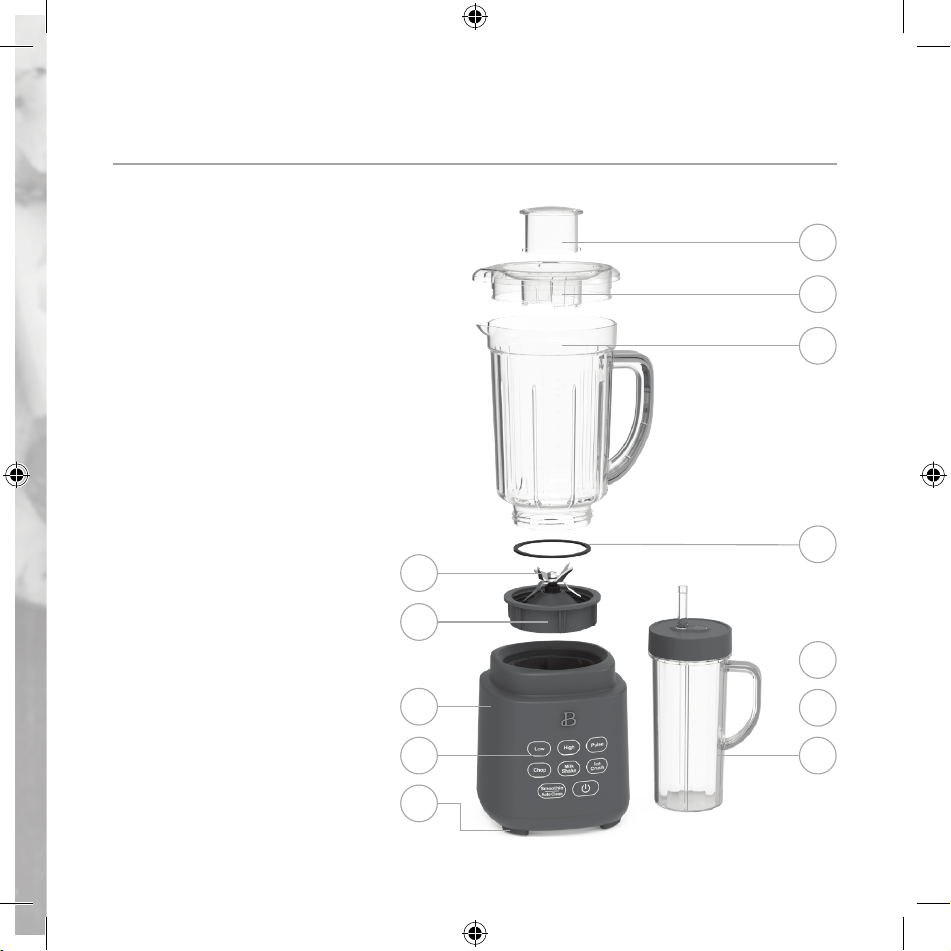
Getting To Know Your PowerExact Blender System with
Patent-pending PrecisionSense™ Blade technology
Product may vary slightly from illustration
2
1. Measuring Cap
2. Jar Cover
3. 50 oz. TritanTM Blender Jar
4. Leak proof ring
5. 6 Tip Stainless Steel Blade
6. Blade Collar
7. Motor Base
8. Touch-Activated Display
Control Panel
9. Non-Skid Feet
10. 2-Prong Plug (not shown)
11. Cord Storage (not shown)
12. To-go 20oz cup with No Drippy
Sippy™ lid
1
2
3
5
6
7
8
9
4
12
10
11
19443_19444_19445_19447_19448_BTFL_Walmart_HP_Blender_IM_R5.indd 1119443_19444_19445_19447_19448_BTFL_Walmart_HP_Blender_IM_R5.indd 11 2024-01-24 11:56 AM2024-01-24 11:56 AM
12
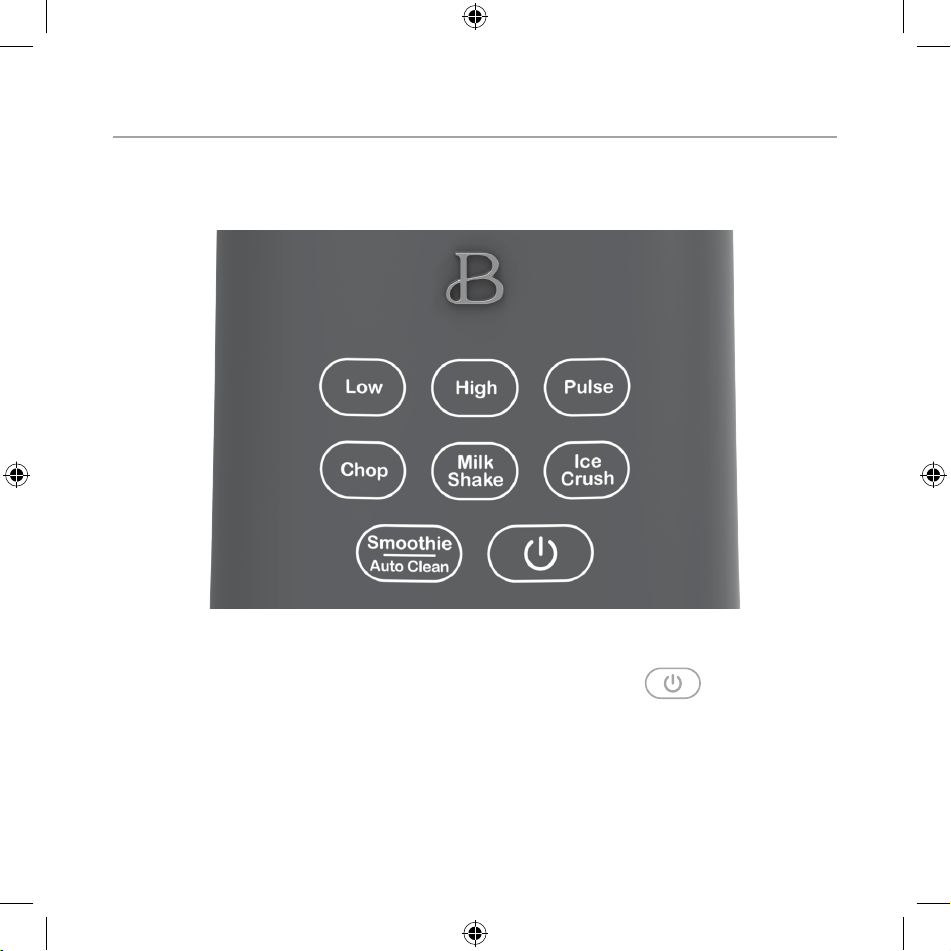
Touch-Activated Display Control Panel
A screen that only shows up when you need it.
LOW, HIGH, PULSE, as well as CHOP, MILKSHAKE, ICE CRUSH and SMOOTHIE/AUTO CLEAN
will illuminate when active and disappear when not in use.
1. LOW
2. HIGH
3. PULSE
4. CHOP
5. MILKSHAKE
6. ICE CRUSH
7. SMOOTHIE/AUTO CLEAN
8.
19443_19444_19445_19447_19448_BTFL_Walmart_HP_Blender_IM_R5.indd 1219443_19444_19445_19447_19448_BTFL_Walmart_HP_Blender_IM_R5.indd 12 2024-01-24 11:56 AM2024-01-24 11:56 AM
13
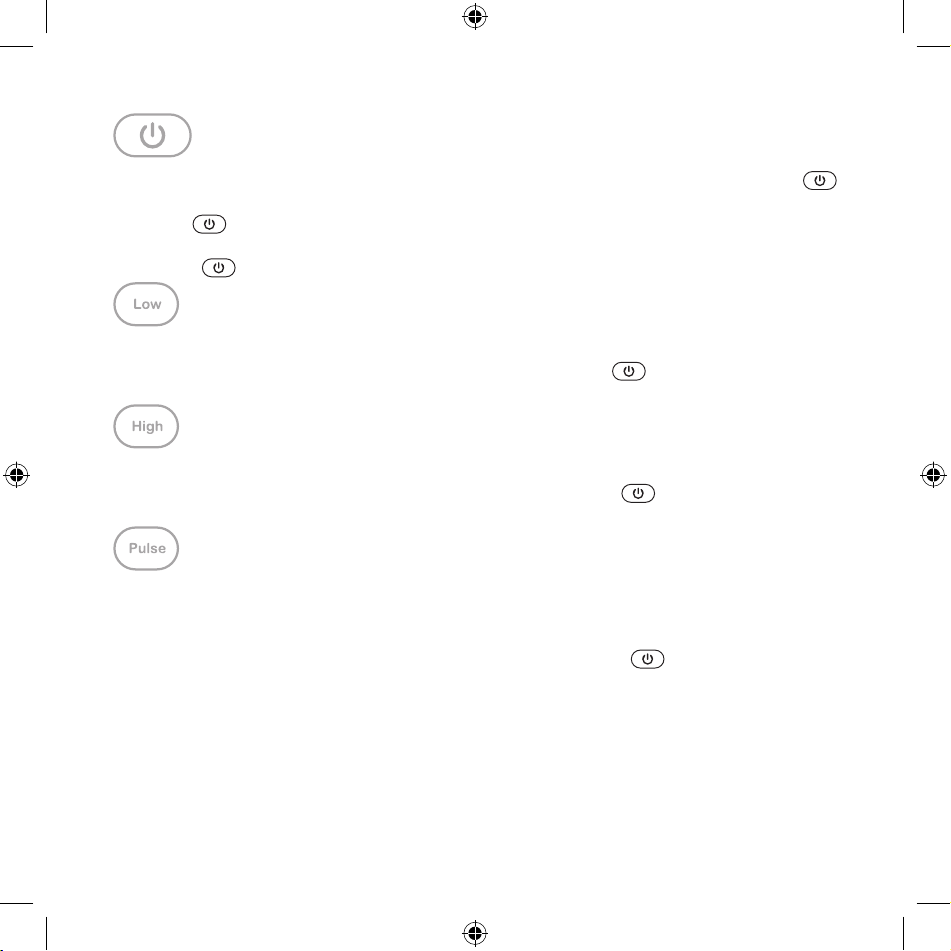
• When the Blender System is plugged in, a tone will sound, the button
will illuminate and then pulse slowly on and off.
• When
is pressed, a tone will sound, and the control panel will
illuminate and remain active for 30 seconds.
• Press
to stop any operation.
• Select LOW to blend ingredients at a lower speed.
• LOW is activated as the button is pressed. Press
button to turn the
Blender System OFF.
• Select HIGH to blend ingredients at a higher speed.
• HIGH is activated as the button is pressed. Press
button to turn the
Blender System OFF.
• Select PULSE to blend ingredients through controlled bursts of power.
• Use PULSE to dislodge ingredients clumped around the blade and at the
bottom of the jar.
• PULSE is activated as the button is pressed. Press
button to turn
the Blender System OFF.
• For best results, time the PULSES to ensure that blades come to a
complete stop before pulsing again.
19443_19444_19445_19447_19448_BTFL_Walmart_HP_Blender_IM_R5.indd 1319443_19444_19445_19447_19448_BTFL_Walmart_HP_Blender_IM_R5.indd 13 2024-01-24 11:56 AM2024-01-24 11:56 AM
14
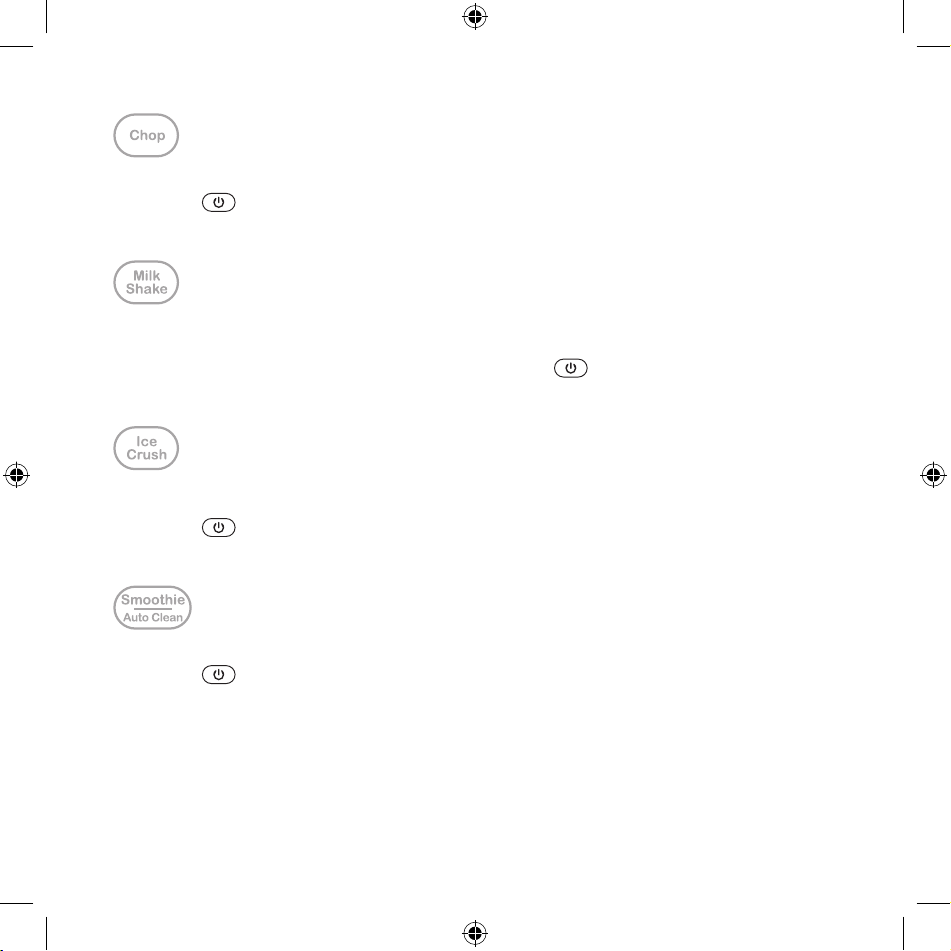
• Chops fresh vegetables into even pieces.
• Press
to turn CHOP OFF.
• CHOP has a xed cycle time and will automatically turn OFF after 42
seconds.
• Blends fresh fruits or syrups with your milk of choice into the perfect
milkshake.
• Press the MILKSHAKE button to begin. Press
to turn MILKSHAKE OFF.
• MILKSHAKE has a xed cycle time and will automatically turn OFF after 40
seconds.
• ICE CRUSH quickly crushes up to 10 ice cubes and is perfect for
preparing frozen desserts or drinks.
• Press
to turn the ICE CRUSH function OFF.
• ICE CRUSH has a xed cycle time and will automatically turn OFF after 55
seconds.
• Blends fresh or frozen fruits and vegetables into the perfect smoothie.
• Press
to turn SMOOTHIE/AUTOCLEAN OFF.
• SMOOTHIE has a xed cycle time and will automatically turn OFF after 60
seconds.
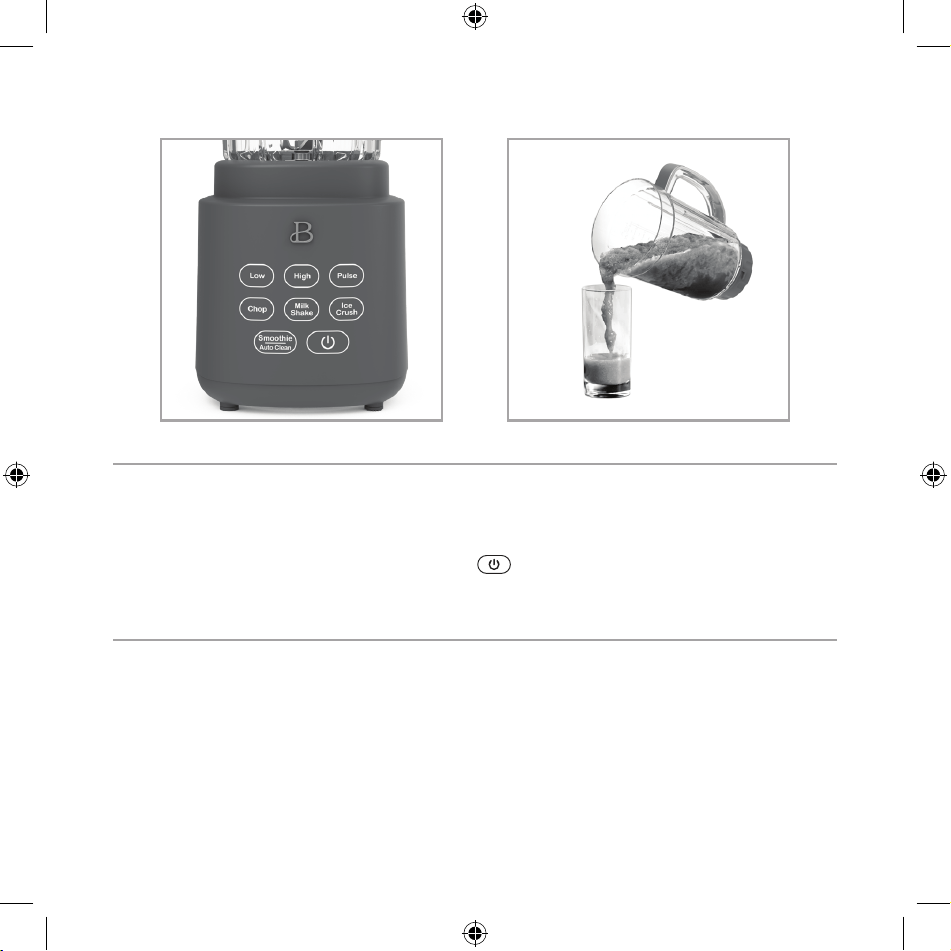
• For thicker blended creations, lift to remove blade collar from the
motor base. Remove the jar cover, and easily pour nished smoothies
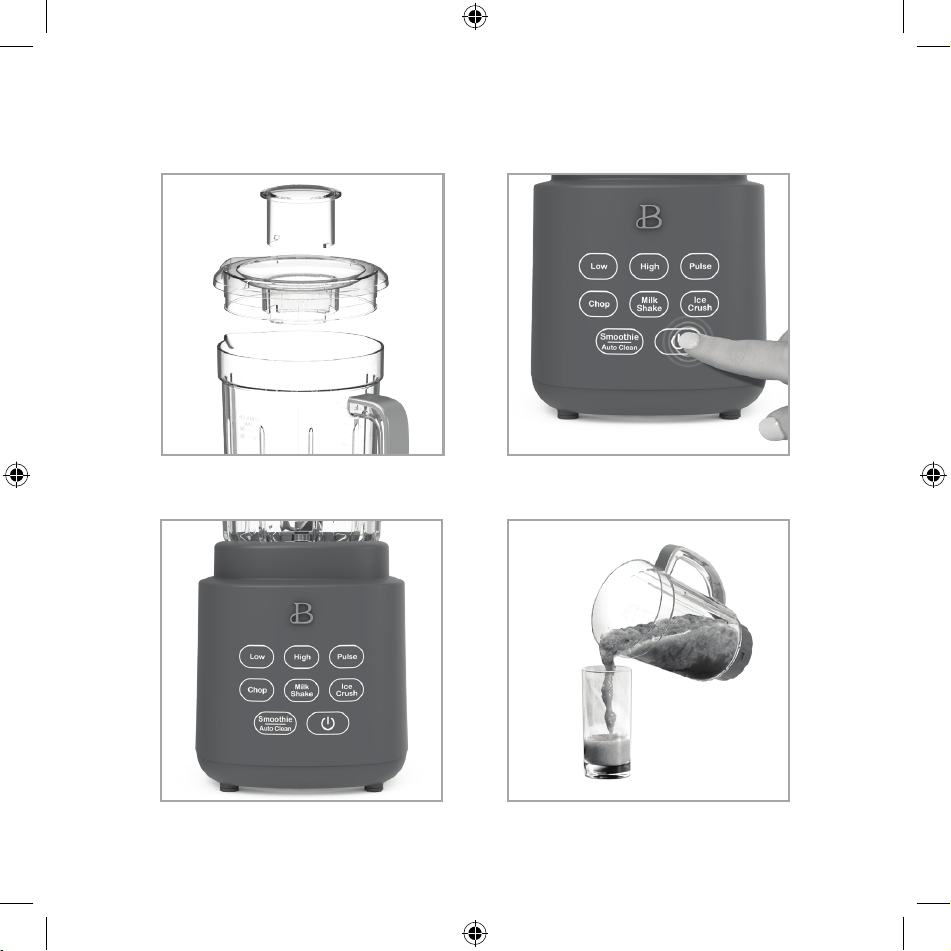
using the blender jar’s extra-wide pouring spout (Figure 4).
• This function can also be used to auto clean your unit, by adding water
and pressing the SMOOTHIE/AUTO CLEAN button.
19443_19444_19445_19447_19448_BTFL_Walmart_HP_Blender_IM_R5.indd 1419443_19444_19445_19447_19448_BTFL_Walmart_HP_Blender_IM_R5.indd 14 2024-01-24 11:56 AM2024-01-24 11:56 AM

15
Before Using for the First Time
1. Carefully unpack the Blender System and remove all packaging materials.
Check the contents to ensure that all attachments (50 oz. blender jar,
cover and measuring cap) and to-go cup with lid and straw are present
and have been received in good condition.
2. Wash the blender jar, cover, measuring cap and to-go cup and lid in
warm, soapy water before rst use. Rinse thoroughly.
WARNING: Do not touch blade. Blending blades are very sharp. Use extreme
care when handling. Failure to do so can result in personal injury.
3. Wipe the motor base with a damp cloth.
WARNING: DO NOT IMMERSE THE MOTOR BASE IN WATER.
Jar Assembly
IMPORTANT! Make sure unit is unplugged while assembling and before you add
ingredients to the jar.
1. To assemble the blade in the main jar, or to-go cup, handle the blade
collar carefully as it is sharp. Place blade collar at the base of the
main jar or top of the to-go cup and screw in a counter-clockwise motion
until it is tightly secured.
2. Always check to be sure the blade collar is securely tted onto the
motor base before use.
3. Add ingredients to the jar.
4. To avoid spills, ensure that the cover is rmly secured to the jar.
Press the cover down on the top portion of the jar until it rests rmly
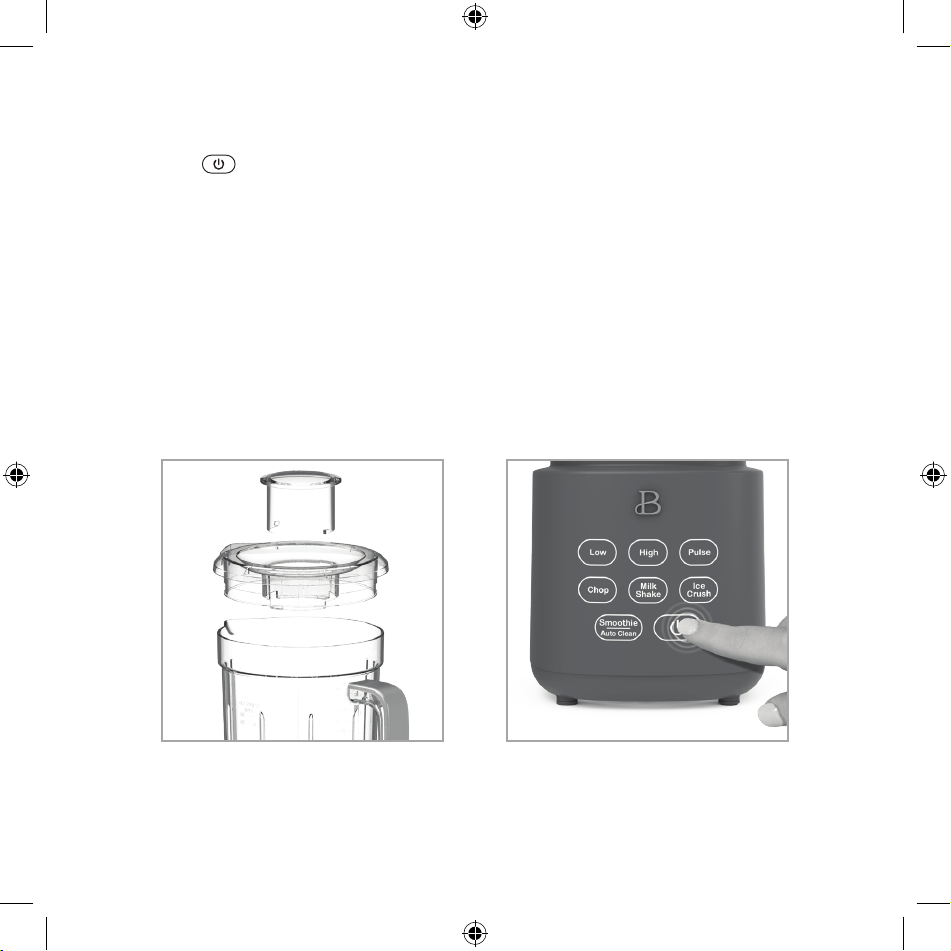
in place. Place the measuring cap into the center of the cover and twist
clockwise to secure it safely in place (Figure 1).
5. Use the cover’s measuring cap to measure and add ingredients before and
while blending.
6. When ready to serve, lift jar to remove blade collar from the motor
base. Remove the jar cover, and use a large spoon or scoop to serve.
19443_19444_19445_19447_19448_BTFL_Walmart_HP_Blender_IM_R5.indd 1519443_19444_19445_19447_19448_BTFL_Walmart_HP_Blender_IM_R5.indd 15 2024-01-24 11:56 AM2024-01-24 11:56 AM

16
Operation
1. Place the motor base on a at, clean, dry countertop or table.
2. Plug the power cord into a 120v ac electrical outlet. A tone will sound.
The will
illuminate and then pulse slowly on and off.
3. Add ingredients to the jar.
WARNING: never overll the jar.
NOTE: when blending, foods or liquids tend to expand as they rise up the
side of the jar. Do not ll jar past its max line.
WARNING: pay close attention while processing. Never operate the drink
station when the jar is empty.
4. Place the blade collar securely onto the motor base.
IMPORTANT: when adding smoothie ingredients to the jar, add liquids and/
or yogurt to the drink station’s blender jar rst. Then layer smaller
chopped ingredients, both fresh and frozen. Larger chunks and ice should
be added last. To avoid spinning blades and ensure a successful, creamy
smoothie, do not try to process too many frozen chunks. Make sure the
measuring cap is in position in the cover.
6. Add the cover onto the jar. Press to seal. Check before blending
(gure 1).
WARNING: to avoid spills, make sure the cover is locked securely before
pressing any preset buttons.
WARNING: do not blend hot liquids.
7. When the pulsing
is pressed, a tone will sound as the control panel
illuminates and remains active for 30 seconds.
8. Press the desired preset button. A tone will sound. The
button
will illuminate and desired preset button will begin to ash. All other
buttons will disappear when not in use. Press the preset button once
more to activate the setting and begin blending (Figure 2).
NOTE: if no buttons are pressed in 30 seconds, the control panel will
darken and the button
will illuminate and begin to pulse.
9. When using the pulse function, the pulse button will illuminate when
pressed. When the
button is pressed, both the PULSE button and the
Blender System will turn off.
19443_19444_19445_19447_19448_BTFL_Walmart_HP_Blender_IM_R5.indd 1619443_19444_19445_19447_19448_BTFL_Walmart_HP_Blender_IM_R5.indd 16 2024-01-24 11:56 AM2024-01-24 11:56 AM
17
10. Milkshake, smoothie, and Ice Crush times and speeds are preset and will
stop automatically when cycles are complete.
11. Press
or any illuminated preset button to stop blending (gure 3).
Check results and if necessary, stir in liquid, water, juice, or stock
to thin food until the desired consistency is reached.
WARNING: do not operate the motor continuously for more than 6 minutes
at a time.
12. After processing food in the jar, pull the cover up and off jar to
remove.
HINT! A small spatula is helpful for removing thicker processed foods.
13. Unplug the Blender System when not in use and before cleaning.
Figure 1 Figure 2
19443_19444_19445_19447_19448_BTFL_Walmart_HP_Blender_IM_R5.indd 1719443_19444_19445_19447_19448_BTFL_Walmart_HP_Blender_IM_R5.indd 17 2024-01-24 11:56 AM2024-01-24 11:56 AM
18
Beautiful PowerExact Blender System Notes
• When using the PULSE function, PowerExact Blender System operation will
STOP when the button is released.
• MILKSHAKE, SMOOTHIE and ICE CRUSH are PRESET and will STOP automatically
when their cycle is complete.
• To interrupt blending, press POWER
or any illuminated PRESET button
to turn the Blender OFF.
Beautiful Food Prep Tips
1. Use organic fruits and vegetables whenever possible.
2. Wash all produce (even organic) thoroughly before removing peels and
skins.
3. Choose USDA Certied Organic
• No additives, no sweeteners, no hydrogenated fats.
• No harmful pesticides.
• Organic farming produces fewer waste products and less pollution.
• Organic foods are arsenic-free.
Figure 4Figure 3
19443_19444_19445_19447_19448_BTFL_Walmart_HP_Blender_IM_R5.indd 1819443_19444_19445_19447_19448_BTFL_Walmart_HP_Blender_IM_R5.indd 18 2024-01-24 11:56 AM2024-01-24 11:56 AM

19
User Maintenance Instructions
This appliance requires little maintenance. It contains no user-serviceable
parts. Any servicing requiring disassembly other than cleaning must be
performed by an authorized service representative.
Care & Cleaning Instructions
WARNING: DO NOT IMMERSE THE POWER BASE, CORD, OR PLUG IN WATER OR OTHER LIQUID.
1. Always unplug the PowerExact Blender System before cleaning.
2. Rinse jar, cover, measuring cap and to-go cup immediately after
processing to prevent food from hardening and to make cleanup easier.
3. To clean the jar, ll with clean, warm water to the MAX line and add a
small amount of liquid dish soap.
4. Press SMOOTHIE/AUTO CLEAN. A tone will sound. The
button will
illuminate and SMOOTHIE/AUTO CLEAN will begin to ash. All other buttons
will disappear. Press Smoothie/Auto Clean once more to activate it.
NOTE: SMOOTHIE/AUTO CLEAN has a xed cycle time and will automatically
turn OFF after 60 seconds.
5. Rinse out the jar’s contents with warm water. Repeat procedure without
soap. Add room temperature water to the PowerExact Blender System’s
blender jar MAX line. Press SMOOTHIE/AUTO CLEAN and run once again.
Place the clean jar upside down on a rack to dry.
6. The TritanTM blender jar is top rack dishwasher safe.
7. Wipe the motor base with a damp cloth or sponge. Dry thoroughly.
Storing Instructions
1. Unplug and clean unit.
2. Store in original box or in a clean, dry place.
3. Never store the PowerExact Blender System while it is hot or plugged in.
4. Never wrap cord tightly around the appliance. Never place any stress on
cord, especially where the cord enters the motor base, as this could
cause the cord to fray and break.
19443_19444_19445_19447_19448_BTFL_Walmart_HP_Blender_IM_R5.indd 1919443_19444_19445_19447_19448_BTFL_Walmart_HP_Blender_IM_R5.indd 19 2024-01-24 11:56 AM2024-01-24 11:56 AM

20
PROBLEM CAUSE SOLUTION
The PowerExact Blender
System motor rotates very
slowly.
Blender jar is
overloaded.
• Remove some food from
the jar and continue
blending. Make sure
ingredients do not
surpass the MAX ll
line.
• Add liquid to the jar
and continue blending.
Ingredients are not mixing
together well.
Heavier ingredients have
fallen to the bottom.
• If necessary, remove
jar and shake
ingredients to
re-distribute. Continue
blending.
• Remove cover and stir
ingredients with a
long-handled spoon.
Continue blending.
• If the purée is still
not blended smooth, it
may be necessary to
add liquid to the jar
and continue blending.
The PowerExact Blender
System has stopped
operating.
The motor is overloaded
and stopped functioning
to prevent damage.
• The PowerExact Blender
System has a resettable
thermal protection.
Unplug the unit and
allow to cool for 20
minutes. Reduce the
load of the jar and
clear any jams.
• Begin blending again
Troubleshooting
19443_19444_19445_19447_19448_BTFL_Walmart_HP_Blender_IM_R5.indd 2019443_19444_19445_19447_19448_BTFL_Walmart_HP_Blender_IM_R5.indd 20 2024-01-24 11:56 AM2024-01-24 11:56 AM

21
Limited Two-Year Warranty
Sensio Inc. dba Made by Gather™
hereby warrants that for a period
of TWO YEARS from the date of
purchase, this product will be free
from mechanical defects in material
and workmanship, and for 90 days in
respect to non-mechanical parts. At
its sole discretion, Sensio Inc. dba
Made by Gather™ will either repair
or replace the product found to be
defective, or issue a refund on the
product during the warranty period.
The warranty is only valid for
the original retail purchaser from
the date of initial retail purchase
and is not transferable.
Keep the original sales receipt,
as proof of purchase isrequired
to obtain warranty validation.
Retail stores selling this product
do not have the right to alter,
modify, or in any way revise the
terms and conditions of the warranty.
Exclusions:
The warranty does not cover normal
wear of parts or damage resulting
from any of thefollowing: negligent
use of the product, use of improper
voltage or current, improper routine
maintenance, use contrary to the
operating instructions, disassembly,
repair, or alteration by anyone
other than qualied Sensio Inc.
dba Made by Gather™ personnel.
Also, the warranty does not cover
Acts of God such as re, oods,
hurricanes, or tornadoes.
Sensio Inc. dba Made by Gather™ shall
not be liable for any incidental or
consequential damages caused by the
breach of any express or implied
warranty. Apart from the extent
prohibited by applicable law, any
implied warranty of merchantability
or tness for a particular purpose
is limited in time to the duration
of the warranty. Some states,
provinces or jurisdictions do not
allow the exclusion or limitation
of incidental or consequential
damages, or limitations on how
long an implied warranty lasts,
and therefore, the above exclusions
or limitations may not apply to you.
The warranty covers specic legal
rights which may vary by state,
province and/or jurisdiction.
19443_19444_19445_19447_19448_BTFL_Walmart_HP_Blender_IM_R5.indd 2119443_19444_19445_19447_19448_BTFL_Walmart_HP_Blender_IM_R5.indd 21 2024-01-24 11:56 AM2024-01-24 11:56 AM

22
How To Obtain Warranty Service
You must contact Customer Service at
our toll-free number: 1-877-775-3564.
A Customer Service Representative
will attempt to resolve warranty
issues over thephone. If the
Customer Service Representative
is unable to resolve the problem,
you will be provided with a case
number and asked to return the
product to Sensio Inc. dba
Made by Gather™ Attach a tag to the
product that includes: your name,
address, daytime contact telephone
number, case number, and description
of the problem.
Also, include a copy of the original
sales receipt. Carefully package
the tagged product with the sales
receipt, and send it (with shipping
and insurance prepaid) to SENSIO
Inc.’s address. Sensio Inc.
dba Made by Gather™ shall bear
no responsibility or liability
for the returned product while
in transit to Sensio Inc.
dba Made by Gather™ Customer
Service Center.
19443_19444_19445_19447_19448_BTFL_Walmart_HP_Blender_IM_R5.indd 2219443_19444_19445_19447_19448_BTFL_Walmart_HP_Blender_IM_R5.indd 22 2024-01-24 11:56 AM2024-01-24 11:56 AM
Sección 1
Seguridad
1
19443_19444_19445_19447_19448_BTFL_Walmart_HP_Blender_IM_R5.indd 2319443_19444_19445_19447_19448_BTFL_Walmart_HP_Blender_IM_R5.indd 23 2024-01-24 11:56 AM2024-01-24 11:56 AM

24
MEDIDAS IMPORTANTES
DE SEGURIDAD
Al utilizar un aparato eléctrico, deben seguirse siempre
las precauciones básicas de seguridad para reducir el
riesgo de que se produzca una lesión, un incendio o una
descarga eléctrica, incluidas las siguientes::
1. Leer todas las instrucciones.
2. Para protegerse de descargas eléctricas, no sumerja el
cable, los enchufes o el aparato en agua u otro líquido.
3. Este aparato no se diseñó para que lo utilicen personas
(incluidos niños) con capacidades físicas, sensoriales
o mentales limitadas, ni con falta de experiencia o
conocimiento, a menos que una persona responsable de
su seguridad los supervise o instruya sobre el uso del
aparato.
4. Es necesaria una estrecha supervisión cuando los niños
utilizan un aparato o si éste se utiliza cerca de ellos.
5. Esta licuadora no es un juguete. Se debe supervisar
a los niños para asegurarse de que no jueguen con el
aparato.
6. Para desconectarla, presione
o cualquier otro
botón iluminado para apagar la licuadora.
7. Desconéctela del tomacorriente cuando no esté en uso,
antes de colocar o quitar los accesorios y antes de
limpiarla. La luz parpadeante indica que la licuadora
19443_19444_19445_19447_19448_BTFL_Walmart_HP_Blender_IM_R5.indd 2419443_19444_19445_19447_19448_BTFL_Walmart_HP_Blender_IM_R5.indd 24 2024-01-24 11:56 AM2024-01-24 11:56 AM

25
está lista para el funcionamiento. Evite el contacto
involuntario con la pantalla táctil. Evite el contacto
con las cuchillas o las piezas móviles.
8. No utilice un aparato con un cable o enchufe dañados,
después de una avería, de una caída o si se dañó de
cualquier manera. Póngase en contacto con Servicio de
Atención al Cliente.
NOTA: NO INTENTAR REPARAR LA UNIDAD POR CUENTA PROPIA.
ESTO ANULARÁ LA GARANTÍA.
9. El uso de accesorios, incluidos tarros de conservas,
que el fabricante no recomiende pueden provocar un
riesgo de lesiones a las personas.
10. No lo utilice en exteriores.
11. No deje que el cable cuelgue del borde de la mesa o
mostrador.
12. No permita que el cable entre en contacto con
supercies calientes, incluida la estufa.
13. Las cuchillas son losas. Manipule con cuidado.
14. No mezcle líquidos calientes.
15. Nunca use la jarra de licuar para procesar ingredientes
si la tapa no está puesta o si la taza medidora no está
bloqueada en su lugar.
16. Nunca coloque ningún accesorio de la licuadora en un
horno de microondas.
17. Mantenga las manos y los utensilios fuera de la jarra
al licuar para reducir el riesgo de lesiones graves a
19443_19444_19445_19447_19448_BTFL_Walmart_HP_Blender_IM_R5.indd 2519443_19444_19445_19447_19448_BTFL_Walmart_HP_Blender_IM_R5.indd 25 2024-01-24 11:56 AM2024-01-24 11:56 AM

26
las personas o daños al aparato.
18. Siempre haga funcionar la licuadora con la tapa puesta.
19. Se puede utilizar una espátula o una cuchara de
mango largo SOLO cuando la licuadora no esté en
funcionamiento.
20. Nunca añada ingredientes en la jarra de licuar mientras
la licuadora está en funcionamiento.
21. Para reducir el riesgo de lesiones, nunca coloque las
cuchillas del conjunto del cortador en la base si la
jarra está mal instalada.
GUARDE ESTAS
INSTRUCCIONES
SOLO PARA USO
DOMÉSTICO
MEDIDAS IMPORTANTES
DE SEGURIDAD
ADICIONALES
1. Todos los usuarios de este aparato deben leer y
19443_19444_19445_19447_19448_BTFL_Walmart_HP_Blender_IM_R5.indd 2619443_19444_19445_19447_19448_BTFL_Walmart_HP_Blender_IM_R5.indd 26 2024-01-24 11:56 AM2024-01-24 11:56 AM

27
entender este manual de instrucciones antes de
utilizarlo o limpiarlo.
2. El cable de este aparato debe conectarse solo a un
tomacorriente de 120V de CA.
3. Si este aparato empieza a funcionar mal mientras se
usa, presione
o cualquier otro botón iluminado de
inmediato para apagar el sistema de licuado PowerExact
y, luego, desenchufe el cable. No use ni intente
reparar el aparato si no funciona correctamente.
Póngase en contacto con Servicio de Atención al
Cliente.
4. Si este aparato cae o por accidente se sumerge en agua,
desenchúfelo inmediatamente. ¡No toque el agua!
5. No utilice este aparato después de que se haya caído o
sumergido en agua.
6. Para reducir el riesgo de lesiones a personas o a la
propiedad, nunca use este aparato en una posición
inestable.
7. No utilice este aparato para otro uso que no sea el
indicado.
8. No lo utilice si la jarra de licuar está agrietada o
rajada.
IMPORTANTE: No llene en exceso la jarra de licuar por
encima de la línea de llenado MAX.
ADVERTENCIA: Para evitar derrames, asegúrese de que la
tapa esté bien colocada en la jarra con la taza medidora
antes de presionar cualquier botón.
19443_19444_19445_19447_19448_BTFL_Walmart_HP_Blender_IM_R5.indd 2719443_19444_19445_19447_19448_BTFL_Walmart_HP_Blender_IM_R5.indd 27 2024-01-24 11:56 AM2024-01-24 11:56 AM

28
NOTAS SOBRE EL ENCHUFE
Este aparato posee un enchufe polarizado (una clavija es
más ancha que la otra). Para reducir el riesgo de descarga
eléctrica, este enchufe encajará en un tomacorriente
polarizado de una sola manera. Si el enchufe no entra
completamente en el tomacorriente, gire el enchufe. Si
aun así no encaja, contacte a un técnico electricista
calicado. No modique el enchufe de ninguna manera.
NOTAS SOBRE EL CABLE
a) Se debe brindar un cable de alimentación corto (o un
cable de alimentación desconectable) para reducir los
riesgos de enredarse o tropezarse con un cable largo.
b) Hay disponibles cables eléctricos desconectables
más largos o cables de extensión, y estos se pueden
utilizar si se tiene cuidado al usarlos.
c) Si se utiliza un cable eléctrico desconectable largo o
un cable de extensión:
1) La clasicación eléctrica marcada en el cable de
alimentación desconectable o cable de extensión deberá
ser al menos igual a la clasicación eléctrica del
aparato;
2) Si el aparato es del tipo con conexión a tierra, el
cable de extensión deberá ser un cable de 3 hilos con
conexión a tierra; y
3) El cable más largo deberá colocarse de manera que
no cuelgue de un mostrador o mesa de donde los niños
pudieran jalarlo o tropezar con él.
19443_19444_19445_19447_19448_BTFL_Walmart_HP_Blender_IM_R5.indd 2819443_19444_19445_19447_19448_BTFL_Walmart_HP_Blender_IM_R5.indd 28 2024-01-24 11:56 AM2024-01-24 11:56 AM

29
ADVERTENCIA SOBRE EL ACABADO
PRECAUCIÓN: Para evitar que el acabado de la encimera o
de la mesa u otros muebles se dañe, coloque posavasos o
manteles individuales que NO SEAN DE PLÁSTICO entre el
electrodoméstico y el acabado de la encimera o de la mesa.
No hacerlo puede provocar el oscurecimiento del acabado,
generar desperfectos permanentes u ocasionar la aparición
de manchas.
ALIMENTACIÓN ELÉCTRICA
Si el circuito eléctrico está sobrecargado con otros
aparatos, este aparato podría no funcionar correctamente.
Debe utilizarse en un circuito eléctrico diferente al de
otros electrodomésticos.
CÓMO REINICIAR EL APARATO
Su sistema de licuado PowerExact cuenta con un protector
térmico reajustable para proteger el motor. Si el motor se
apaga, desenchufe la licuadora. Deje reposar la licuadora
durante aproximadamente 20 minutos. Una vez transcurrido
el periodo de reposo, vuelva a enchufar el cable de
alimentación al tomacorriente y continúe con el proceso de
licuado. Si su sistema de licuado no funciona correctamente
después de realizar este procedimiento, no lo siga usando y
comuníquese con el Servicio de Atención al Cliente.
19443_19444_19445_19447_19448_BTFL_Walmart_HP_Blender_IM_R5.indd 2919443_19444_19445_19447_19448_BTFL_Walmart_HP_Blender_IM_R5.indd 29 2024-01-24 11:56 AM2024-01-24 11:56 AM
30
Sección 2
Instrucciones
2
19443_19444_19445_19447_19448_BTFL_Walmart_HP_Blender_IM_R5.indd 3019443_19444_19445_19447_19448_BTFL_Walmart_HP_Blender_IM_R5.indd 30 2024-01-24 11:56 AM2024-01-24 11:56 AM
31
2
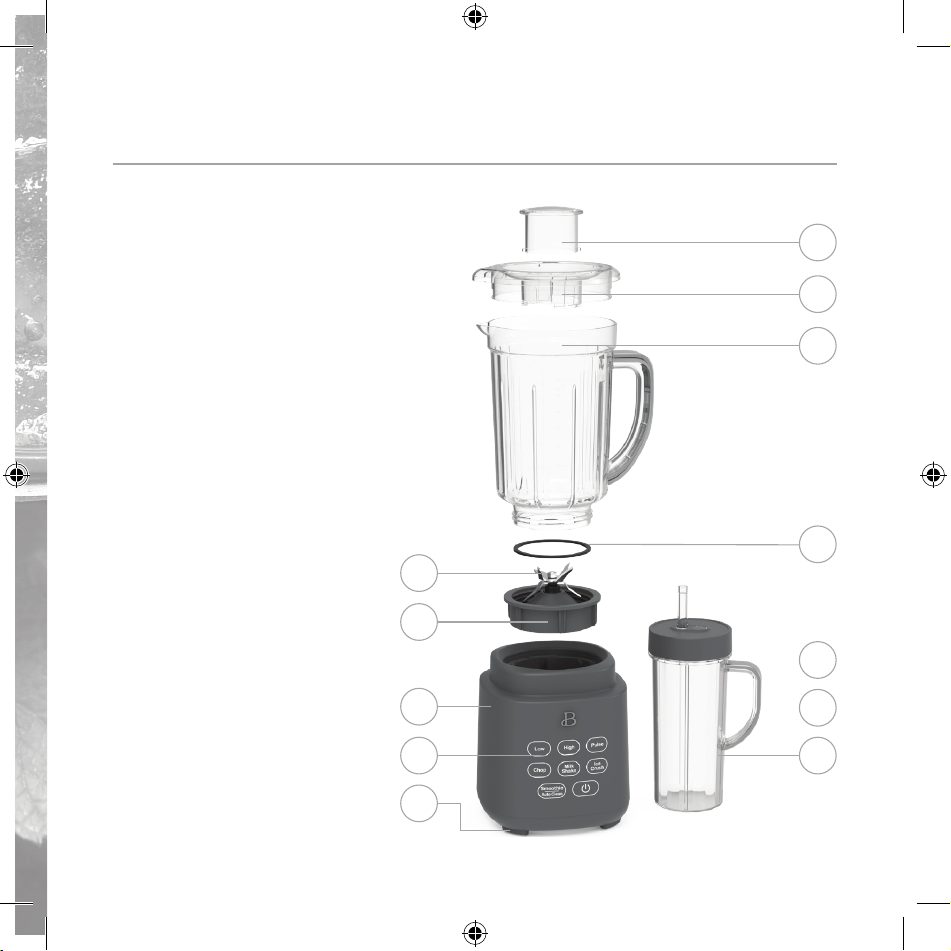
Conozca mejor su sistema de licuado PowerExact con tecnología de
cuchillas PrecisionSense™ de patente pendiente*
El producto puede diferir ligeramente del que aparece en las ilustraciones
1
2
3
5
6
7
8
9
4
12
10
11
1. Taza medidora
2. Tapa de la jarra
3. Jarra de licuado TritanTM
de 50 onzas
4. Anillo a prueba de fugas
5. Cuchilla de acero
inoxidable de 6 puntas
6. Collar de la cuchilla
7. Base del motor
8. Panel de control de
pantalla de activación
táctil
9. Patas antideslizantes
10. Enchufe de 2 clavijas
(no se muestra)
11. Almacenamiento del cable
(no se muestra)
12. Taza portátil de 20 onzas
con tapa antigoteo No
Drippy Sippy™
19443_19444_19445_19447_19448_BTFL_Walmart_HP_Blender_IM_R5.indd 3119443_19444_19445_19447_19448_BTFL_Walmart_HP_Blender_IM_R5.indd 31 2024-01-24 11:56 AM2024-01-24 11:56 AM
32
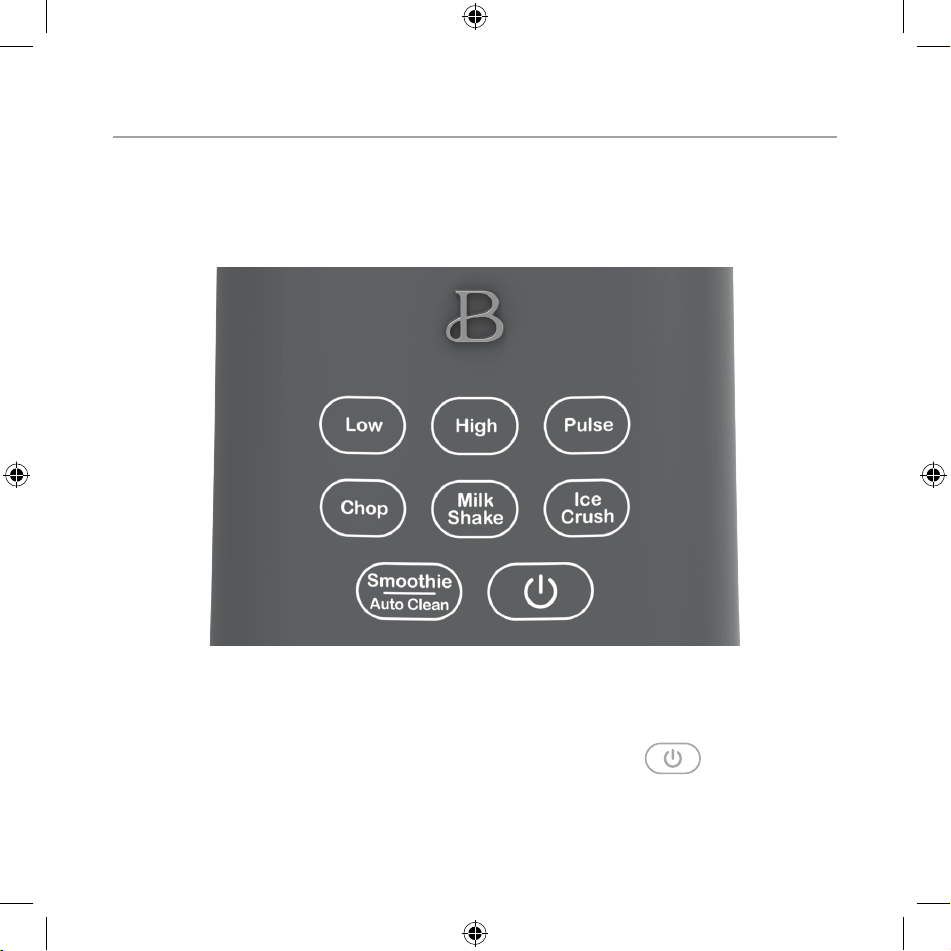
Panel de control de pantalla de activación táctil
Una pantalla que solo aparece cuando la necesita. Tanto los botones LOW
(velocidad baja), HIGH (velocidad alta), PULSE (pulsar) como CHOP (cortar),
MILKSHAKE (malteada), ICE CRUSH (triturar hielo) y SMOOTHIE/AUTO CLEAN (batido/
limpieza automática) se iluminarán cuando estén activos y se apagarán cuando no
estén en uso.
1. LOW (Velocidad baja)
2. HIGH (Velocidad
alta)
3. PULSE (Pulsar)
4. CHOP (Cortar)
5. MILKSHAKE (Malteada)
6. ICE CRUSH
(Triturar hielo)
7. SMOOTHIE/AUTO CLEAN
(batido/limpieza
automática )
8.
19443_19444_19445_19447_19448_BTFL_Walmart_HP_Blender_IM_R5.indd 3219443_19444_19445_19447_19448_BTFL_Walmart_HP_Blender_IM_R5.indd 32 2024-01-24 11:56 AM2024-01-24 11:56 AM
33
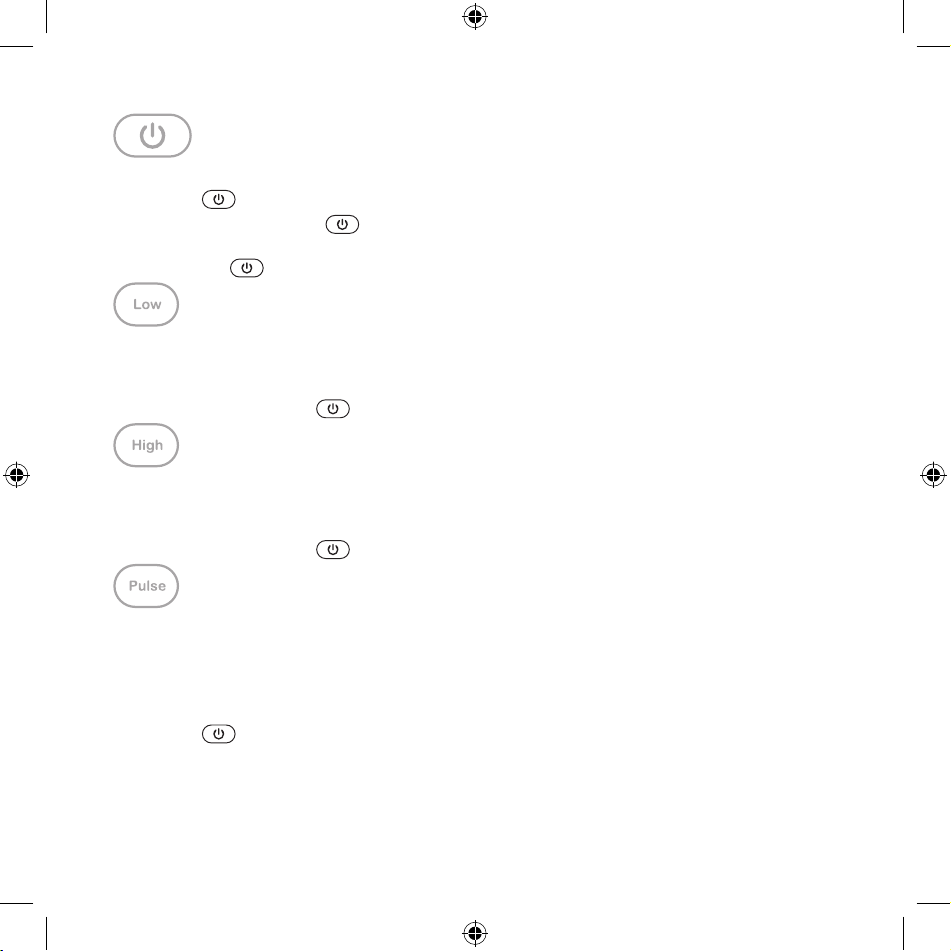
• Cuando el sistema de licuado esté enchufado, se emitirá un sonido, el
botón se encenderá y luego parpadeará lentamente.
• Cuando se presiona
se emitirá un sonido, el panel de control se
iluminará y permanecerá activo durante 30 segundos.
• Presione
para detener cualquier operación.
(velocidad baja)
• Seleccione la función LOW (velocidad baja) para licuar los ingredientes
a baja velocidad.
• La función LOW (velocidad baja) se activa al presionar el botón.
Presione el botón
para apagar el sistema de licuado.
(velocidad alta)
• Seleccione HIGH (velocidad alta) para licuar los ingredientes a alta
velocidad.
• La función HIGH (velocidad alta) se activa al presionar el botón.
Presione el botón
para apagar el sistema de licuado.
• Seleccione PULSE (pulsar) para mezclar los ingredientes mediante ráfagas
controladas de potencia.
• Utilice la función PULSE (pulsar) para eliminar los ingredientes
acumulados alrededor de la cuchilla y en el fondo de la jarra.
• La función PULSE (pulsar) se activa al presionar el botón. Presione el
botón
para apagar el sistema de licuado.
• Para obtener los mejores resultados, cronometre los PULSOS para
asegurarse de que las cuchillas se detengan por completo antes de volver
a pulsar.
19443_19444_19445_19447_19448_BTFL_Walmart_HP_Blender_IM_R5.indd 3319443_19444_19445_19447_19448_BTFL_Walmart_HP_Blender_IM_R5.indd 33 2024-01-24 11:56 AM2024-01-24 11:56 AM
34
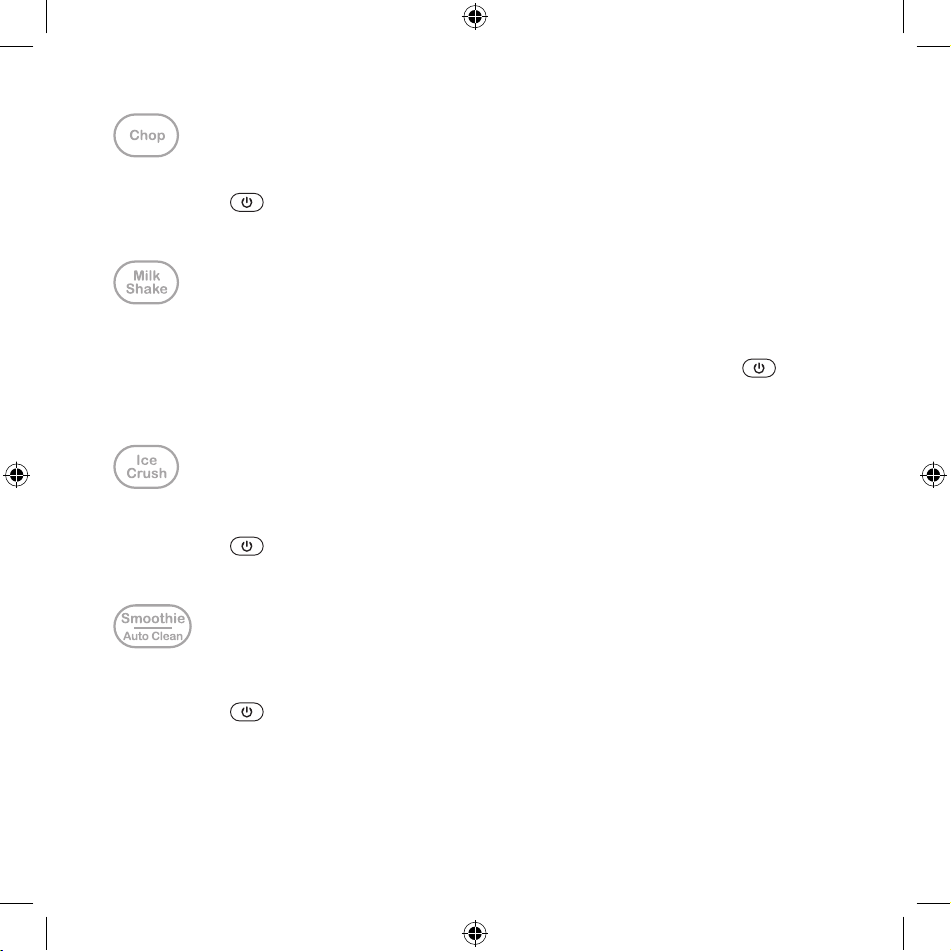
• Corta verduras frescas en trozos uniformes.
• Presione
para apagar la función CHOP (cortar).
• La función CHOP (cortar) tiene un ciclo de funcionamiento jo y se apaga
automáticamente después de 42 segundos.
• Le permite licuar frutas frescas o jarabes con su leche preferida para
preparar sabrosas malteadas.
• Presione el botón MILKSHAKE (malteada) para comenzar. Presione
para
apagar la función MILKSHAKE (malteada).
• La función MILKSHAKE (malteada) tiene un ciclo de funcionamiento jo y
se apaga automáticamente después de 40 segundos.
• La función ICE CRUSH (triturar hielo) le permite triturar hasta 10 cubos
de hielo y es perfecta para preparar postres o bebidas heladas.
• Presione
para apagar la función ICE CRUSH (triturar hielo).
• La función ICE CRUSH (triturar hielo) tiene un ciclo de funcionamiento
jo y se apaga automáticamente después de 55 segundos.
• Combine frutas y verduras frescas o congeladas para obtener el batido
perfecto.
• Presione
para apagar la función SMOOTHIE/AUTOCLEAN (batido/limpieza
automática).
• La función SMOOTHIE/AUTOCLEAN (batido/limpieza automática) tiene un ciclo
de funcionamiento jo y se apaga automáticamente después de 60 segundos.
• Para obtener mezclas más espesas, levante y quite el cuello de la
cuchilla de la base del motor. Retire la tapa de la jarra y vierta los
19443_19444_19445_19447_19448_BTFL_Walmart_HP_Blender_IM_R5.indd 3419443_19444_19445_19447_19448_BTFL_Walmart_HP_Blender_IM_R5.indd 34 2024-01-24 11:56 AM2024-01-24 11:56 AM

35
batidos terminados con facilidad con el pico dispensador extra grande de
la jarra de la licuadora (Figura 4).
• Puede usar esta función para hacer una limpieza automática de su aparato
añadiendo agua y presionando el botón SMOOTHIE/AUTOCLEAN (batido/limpieza
automática).
Antes del primer uso
1. Desempaque con cuidado el sistema de licuado y retire todos los
materiales del embalaje. Compruebe el contenido para asegurarse de que
estén todos los accesorios (la jarra de licuado de 50 onzas, la tapa y
la taza medidora) junto con la taza portátil con tapa y pajita, y estos
estén en buen estado.
2. Antes del primero uso, lave la jarra de licuado, la tapa, la taza
medidora, la taza portátil y la tapa con agua tibia y jabón. Enjuague
bien.
ADVERTENCIA: No toque la cuchilla. Las cuchillas de la licuadora son
muy aladas. Tenga mucho cuidado al manipular. No hacerlo puede causar
lesiones.
3. Limpie la base del motor con un paño húmedo.
ADVERTENCIA: NO SUMERJA LA BASE DEL MOTOR EN AGUA.
Montaje de la jarra
¡IMPORTANTE! Asegúrese de que la unidad esté desenchufada durante el montaje y
antes de agregar los ingredientes a la jarra.
1. Cuando vaya a instalar la cuchilla en la jarra principal o en la taza
portátil, sostenga el cuello de la cuchilla con cuidado ya que tiene
lo. Coloque el cuello de la cuchilla en la base de la jarra principal o
en la parte superior de la taza portátil y gírelo en sentido antihorario
para atornillarlo hasta que quede bien sujetado.
2. Compruebe siempre que el cuello de la cuchilla esté bien colocado en la
base del motor antes de utilizar la jarra.
3. Agregue los ingredientes a la jarra.
4. Para evitar derrames, asegúrese de que la tapa esté bien sujetada a la
jarra. Presione la tapa hacia abajo en la parte superior de la jarra
19443_19444_19445_19447_19448_BTFL_Walmart_HP_Blender_IM_R5.indd 3519443_19444_19445_19447_19448_BTFL_Walmart_HP_Blender_IM_R5.indd 35 2024-01-24 11:56 AM2024-01-24 11:56 AM

36
hasta que quede bien colocada. Coloque la taza medidora en el centro de
la tapa y gírela en sentido horario para jarla bien en su lugar
(Figura 1).
5. Utilice la taza medidora para medir y agregar los ingredientes antes y
durante el licuado.
6. Cuando esté listo para servir, levante la jarra para retirar el cuello
de la cuchilla de la base del motor. Retire la tapa de la jarra y
utilice una cuchara grande o una cuchara para servir.
Funcionamiento
1. Coloque la base del motor sobre una encimera o mesa plana, limpia y
seca.
2. Enchufe el cable de alimentación a un tomacorriente de 120Vde CA.
Se emitirá un sonido. El botón
se encenderá y luego parpadeará
lentamente.z
3. Agregue los ingredientes a la jarra.
ADVERTENCIA: Nunca llene en exceso la jarra.
NOTA: Al licuar, los alimentos o los líquidos tienden a expandirse al
subir por el costado de la jarra. No llene la jarra por encima de la
línea de llenado MAX.
ADVERTENCIA: Preste mucha atención durante el procesamiento. Nunca haga
funcionar la estación de bebidas con la jarra vacía.
4. Coloque el cuello de la cuchilla rmemente en la base del motor.
IMPORTANTE: Cuando agregue los ingredientes para batidos en la jarra,
primero agregue líquidos o yogurt a la jarra de licuado de la estación
de bebidas. Luego, coloque capas de ingredientes picados más pequeños,
tanto frescos como congelados. Los trozos más grandes y el hielo
deben añadirse en último lugar. Para evitar que las cuchillas giren y
para lograr un batido cremoso, no intente procesar demasiados trozos
congelados.
5. Asegúrese de que la taza medidora esté colocada en la tapa.
6. Coloque la tapa en la jarra. Presione para sellar. Compruebe antes de
licuar (Figura 1).
ADVERTENCIA: Para evitar derrames, asegúrese de que la tapa esté bien
19443_19444_19445_19447_19448_BTFL_Walmart_HP_Blender_IM_R5.indd 3619443_19444_19445_19447_19448_BTFL_Walmart_HP_Blender_IM_R5.indd 36 2024-01-24 11:56 AM2024-01-24 11:56 AM

37
cerrada antes de presionar cualquier botón de función preestablecida.
ADVERTENCIA: No mezcle líquidos calientes.
7. Al presionar
, se emitirá un sonido y el panel de control se
encenderá y permanecerá activo durante 30 segundos.
8. Presione el botón PRESET (función preestablecida) deseado. Se emitirá
un sonido. El botón
se encenderá y el botón PRESET (función
preestablecida) deseado comenzará a parpadear. Todos los demás botones
desaparecerán cuando no estén en funcionamiento. Presione el botón PRESET
(función preestablecida) una vez más para activar el ajuste y comenzar a
licuar (Figura 2).
NOTA: Si no se pulsa ningún botón durante 30 minutos, el panel de
control se oscurecerá y el
botón se encenderá y comenzará a
parpadear.
9. Cuando se utiliza la función PULSE (pulsar), el botón PULSE (pulsar) se
encenderá al presionarlo. Cuando el botón
se presione, se apagará el
botón de PULSE (pulsar) y el sistema de licuado.
10. Los tiempos y velocidades de MILKSHAKE (malteada), SMOOTHIE (batido) y
ICE CRUSH (triturar hielo) son valores preestablecidos y se detendrán
automáticamente una vez que termine el ciclo de funcionamiento.
11. Presione
o cualquier botón PRESET (función preestablecida) encendido
para detener el licuado (Figura 3). Compruebe los resultados y, si es
necesario, agregue líquido, agua, jugo o caldo para diluir los alimentos
hasta alcanzar la consistencia deseada.
ADVERTENCIA: No haga funcionar el motor de forma continua durante más de
6 minutos a la vez.
12. Después de procesar los alimentos en la jarra, tire de la tapa hacia
arriba y hacia afuera para retirarla.
¡CONSEJO! Resulta útil utilizar una espátula pequeña para retirar los
alimentos procesados más espesos.
13. Desenchufe el sistema de licuado cuando no esté en uso y antes de
limpiarlo
19443_19444_19445_19447_19448_BTFL_Walmart_HP_Blender_IM_R5.indd 3719443_19444_19445_19447_19448_BTFL_Walmart_HP_Blender_IM_R5.indd 37 2024-01-24 11:56 AM2024-01-24 11:56 AM
38
Figura 1 Figura 2
Figura 4Figura 3
19443_19444_19445_19447_19448_BTFL_Walmart_HP_Blender_IM_R5.indd 3819443_19444_19445_19447_19448_BTFL_Walmart_HP_Blender_IM_R5.indd 38 2024-01-24 11:56 AM2024-01-24 11:56 AM

39
Notas de Beautiful sobre el sistema de licuado PowerExact
• Cuando se utiliza la función PULSE (pulsar), el sistema de licuado
PowerExact se DETENDRÁ al soltar el botón.
• MILKSHAKE (malteada), SMOOTHIE (batido) y ICE CRUSH (triturar hielo) son
funciones preestablecidas y se DETENDRÁN automáticamente cuando nalicen
su ciclo de funcionamiento.
• Para interrumpir el licuado, presione POWER (encendido)
o cualquier
botón PRESET (función preestablecida) encendida para apagar la licuadora.
Consejos de Beautiful para la preparación de alimentos
1. Utilice frutas y verduras orgánicas siempre que sea posible.
2. Lave bien todos los productos (incluso los orgánicos) antes de quitarles
la cáscara y la piel.
3. Elija productos ecológicos certicados por el USDA (Departamento de
Agricultura de los Estados Unidos)
• Sin aditivos, sin edulcorantes, sin grasas hidrogenadas.
• Sin pesticidas dañinos.
• La agricultura orgánica produce menos residuos y menos contaminación.
• Los alimentos orgánicos no contienen arsénico.
Instrucciones de mantenimiento para el usuario
Este aparato requiere poco mantenimiento. No contiene piezas que el usuario
pueda reparar. Cualquier trabajo de reparación que requiera desarmar el aparato
para otros nes que no sean de limpieza debe realizarse por un representante de
servicio autorizado.
Instrucciones de limpieza y cuidado
PRECAUCIÓN: NO SUMERJA LA BASE DEL MOTOR, EL ENCHUFE O EL CABLE EN AGUA NI OTROS
LÍQUIDOS.
1. Siempre desenchufe el sistema de licuado PowerExact antes de limpiarlo.
2. Enjuague la jarra, la tapa, la taza medidora y la taza portátil
inmediatamente después del procesamiento para evitar que la comida se
endurezca y facilitar su limpieza.
19443_19444_19445_19447_19448_BTFL_Walmart_HP_Blender_IM_R5.indd 3919443_19444_19445_19447_19448_BTFL_Walmart_HP_Blender_IM_R5.indd 39 2024-01-24 11:56 AM2024-01-24 11:56 AM

40
3. Para limpiar la jarra, llénela con agua limpia y tibia hasta la línea de
llenado MAX y agregue una pequeña cantidad de jabón líquido para platos.
4. Presione SMOOTHIE/AUTO CLEAN (batido/limpieza automática). Se emitirá
un sonido. El botón
se encenderá y la función SMOOTHIE/AUTO CLEAN
(batido/limpieza automática) comenzará a parpadear. Todos los demás
botones desaparecerán. Presione una vez más la función SMOOTHIE/AUTO
CLEAN (batido/limpieza automática) para activarla.
NOTA: La función SMOOTHIE/AUTO CLEAN (batido/limpieza automática) tiene
un ciclo de funcionamiento jo y se apagará automáticamente después de
60 segundos.
5. Enjuague el contenido de la jarra con agua tibia. Repita el
procedimiento sin jabón. Agregue agua a temperatura ambiente hasta la
línea de llenado MAX de la jarra de licuado del sistema de licuado
PowerExact. Presione el botón SMOOTHIE/AUTO CLEAN (batido/limpieza
automática) y hágalo funcionar de nuevo. Coloque la jarra limpia boca
abajo en una rejilla para que se seque.
6. La jarra de licuado TritanTM puede lavarse en la parte superior del
lavavajillas.
7. Limpie la base del motor con un paño húmedo o una esponja. Seque bien.
Instrucciones de almacenamiento
1. Desenchufe y limpie la unidad.
2. Guárdela en la caja original o en un lugar limpio y seco.
3. Nunca almacene el sistema de licuado PowerExact Blender mientras sigue
caliente o enchufado.
4. Nunca envuelva el cable de forma que quede apretado alrededor del
aparato. No ejerza nunca ninguna presión sobre el cable, en especial en
la zona en la que este ingresa en la base del motor, ya que esto podría
provocar que el cable se deshilache y se rompa.
19443_19444_19445_19447_19448_BTFL_Walmart_HP_Blender_IM_R5.indd 4019443_19444_19445_19447_19448_BTFL_Walmart_HP_Blender_IM_R5.indd 40 2024-01-24 11:56 AM2024-01-24 11:56 AM

41
PROBLEMA CAUSA SOLUCIÓN
El motor del sistema de
licuado PowerExact gira
muy lento.
La jarra de licuado está
sobrecargada.
• Retire un poco de
alimento de la jarra y
siga licuando. Asegúrese
de que los ingredientes
no sobrepasen la línea
de llenado máximo.
• Agregue el líquido a la
jarra y siga licuando.
Los ingredientes no se
mezclan bien.
Los ingredientes más
pesados quedaron en el
fondo.
• Si es necesario, retire
la jarra y sacuda los
ingredientes para que
se distribuyan de nuevo.
Continúe licuando.
• Retire la tapa
y revuelva los
ingredientes con una
cuchara de mango largo.
Continúe licuando.
• Si el batido sigue sin
mezclarse bien, puede
que sea necesario
añadir líquido a la
jarra y seguir licuando.
El sistema de licuado
PowerExact dejó de
funcionar.
El motor se sobrecargó
y dejó de funcionar para
evitar daños.
• El sistema de licuado
PowerExact tiene un
protector térmico
reajustable. Desenchufe
el aparato y deje que
se enfríe durante 20
minutos. Reduzca la
carga de la jarra y
elimine lo que se haya
atascado.
• Comience a licuar de
nuevo.
Solución de problemas
19443_19444_19445_19447_19448_BTFL_Walmart_HP_Blender_IM_R5.indd 4119443_19444_19445_19447_19448_BTFL_Walmart_HP_Blender_IM_R5.indd 41 2024-01-24 11:56 AM2024-01-24 11:56 AM

42
Garantía limitada de dos años
Mediante la presente, Sensio Inc.
dba Made by Gather™. garantiza que,
durante el plazo de DOS AÑOS a partir
de la fecha de compra, este producto
no presentará defectos mecánicos en
el material ni en la mano de obra, y
durante 90 días, no los presentará en
las piezas no mecánicas. A su entera
discreción, Sensio Inc. dba Made by
Gather™ que resulte defectuoso, o
emitirá un reembolso por el producto
durante el plazo de garantía.
Esta garantía es válida únicamente
para el comprador minorista
original a partir de la fecha de
compra minorista inicial y no es
transferible. Conserve el recibo
de compra original, ya que se exige
una prueba de compra para obtener
la validación de la garantía. Las
tiendas minoristas no tienen derecho
a alterar, modicar ni corregir
de ninguna manera los términos y
condiciones de la garantía.
Exclusiones:
La garantía no cubre el desgaste
normal de las piezas ni el daño
ocasionado por cualquiera de las
siguientes causas: uso negligente
del producto, uso de un voltaje o
corriente incorrectos, mantenimiento
de rutina inadecuado, uso
contrario al de las instrucciones
de funcionamiento, desarmado,
reparación o alteración a cargo
de personas que no sean miembros
del personal calicado de Sensio
Inc. dba Made by Gather™ Asimismo,
la garantía no cubre actos de
la naturaleza, como incendios,
inundaciones, huracanes o tornados.
Sensio Inc. dba Made by Gather™
no asumirá responsabilidad por
daños incidentales o resultantes
ocasionados por la violación
de cualquier garantía expresa
o implícita. Salvo en la medida
en que lo prohíban las leyes
aplicables, cualquier garantía
implícita de comerciabilidad o
aptitud para un propósito particular
se limita temporalmente a la
duración de la garantía. Algunos
estados, provincias o jurisdicciones
no permiten la exclusión ni la
limitación de daños incidentales
o resultantes, o limitaciones
sobre la duración de una garantía
implícita y, por lo tanto, es posible
que las exclusiones o limitaciones
mencionadas no le correspondan.
La garantía cubre derechos legales
especícos que pueden variar de
un estado, una provincia o una
jurisdicción a otros.
19443_19444_19445_19447_19448_BTFL_Walmart_HP_Blender_IM_R5.indd 4219443_19444_19445_19447_19448_BTFL_Walmart_HP_Blender_IM_R5.indd 42 2024-01-24 11:56 AM2024-01-24 11:56 AM

43
Cómo obtener el servicio de garantía
Debe comunicarse con el Servicio
de atención al cliente a nuestro
número telefónico gratuito:
1-877-775-3564. Un representante
del Servicio de atención al cliente
intentará resolver los problemas
referidos a la garantía por
teléfono. Si este no puede resolver
el problema, le proporcionarán un
número de caso y le solicitarán que
devuelva el producto a Sensio Inc.
dba Made by Gather™ Adhiera una
etiqueta al producto que incluya:
su nombre, dirección, número
telefónico de contacto durante el
día, número de caso y descripción
del problema. Además, incluya una
copia del recibo de compra original.
Envuelva cuidadosamente el producto
etiquetado con el recibo de compra,
y envíelo (con el envío y el seguro
prepagados) a la dirección de Sensio
Inc. dba Made by Gather™. Sensio
Inc. dba Made by Gather™ no asumirá
obligación ni responsabilidad
alguna por el producto devuelto que
esté en el trayecto hacia el Centro
de servicio al cliente de Sensio
Inc. dba Made by Gather™
19443_19444_19445_19447_19448_BTFL_Walmart_HP_Blender_IM_R5.indd 4319443_19444_19445_19447_19448_BTFL_Walmart_HP_Blender_IM_R5.indd 43 2024-01-24 11:56 AM2024-01-24 11:56 AM

INSIDE back cover
19443_19444_19445_19447_19448_BTFL_Walmart_HP_Blender_IM_R5.indd 4419443_19444_19445_19447_19448_BTFL_Walmart_HP_Blender_IM_R5.indd 44 2024-01-24 11:56 AM2024-01-24 11:56 AM

INSIDE back cover
19443_19444_19445_19447_19448_BTFL_Walmart_HP_Blender_IM_R5.indd 4519443_19444_19445_19447_19448_BTFL_Walmart_HP_Blender_IM_R5.indd 45 2024-01-24 11:56 AM2024-01-24 11:56 AM
BACK Cover
19443_19444_19445_19446_19447_19448_R5
19443_19444_19445_19447_19448_BTFL_Walmart_HP_Blender_IM_R5.indd 4619443_19444_19445_19447_19448_BTFL_Walmart_HP_Blender_IM_R5.indd 46 2024-01-24 11:56 AM2024-01-24 11:56 AM