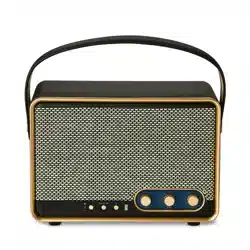
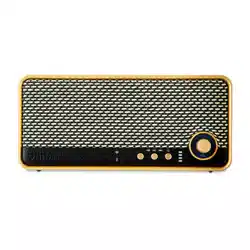
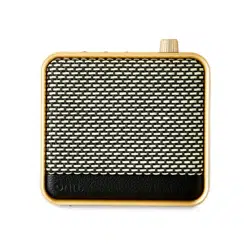
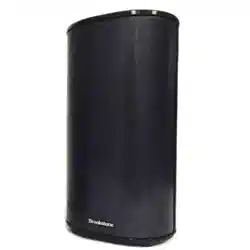
ONN. User Guide Small Wi-fi Speaker
100135446 EN 02282024
Features
• Multi-room Wi-Fi streaming – Play different audio content on different speakers simultaneously
• Bluetooth wireless technology streams audio from all your devices
• Broadcast mode – Stream high quality audio from anywhere in the house without calls or interruptions
• Party Sync modes – Can pair with other onn. speakers
• Apple AirPlay2 multi-room streaming – can pair with other onn. Wi-Fi speakers or AirPlay speakers
• Power sound in portable, compact design
• IP67 Waterproof
• 10W RMS output / 40W peak output (4×RMS)
• Broadcast mode compatible mode: 100135446, 100136627, 100136628
• Up to 15 hours of playtime
• Charging cable: 60cm
Box Contents
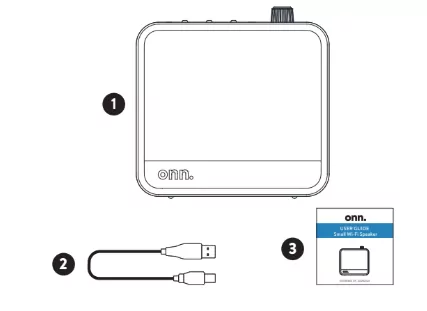
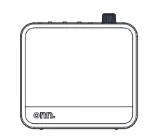
1. Wi-Fi SPEAKER
2. CHARGING CABLE
3. USER GUIDE
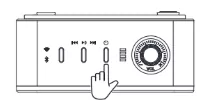
Speaker Overview
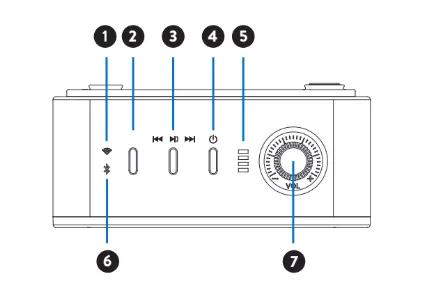
1. Wi-Fi indicator
2. Source button
3. Play button
4. Power button
5. Battery indicator
6. Bluetooth indicator
7. Volume control knob
Safety Precautions
FCC Statement
This equipment has been tested and found to comply with the limits for a Class B digital device, pursuant to Part 15 of the FCC Rules. These limits are designed to provide reasonable protection against harmful interference in a residential installation. This equipment generates uses and can radiate radio frequency energy and, if not installed and used in accordance with the instructions, may cause harmful interference to radio communications. However, there is no guarantee that interference will not occur in a particular installation. If this equipment does cause harmful interference to radio or television reception, which can be determined by turning the equipment off and on, the user is encouraged to try to correct the interference by one or more of the following measures:
-- Reorient or relocate the receiving antenna.
-- Increase the separation between the equipment and receiver.
-- Connect the equipment into an outlet on a circuit different from that to which the receiver is connected.
-- Consult the dealer or an experienced radio/TV technician for help.
This device complies with part 15 of the FCC Rules. Operation is subject to the following two conditions: (1) This device may not cause harmful interference, and (2) this device must accept any interference received, including interference that may cause undesired operation.
⚠️ WARNING
Cancer and Reproductive Harm – www.P65Warnings.ca.gov
Warning: Changes or modifications to this unit not expressly approved by the party responsible for compliance could void the user's authority to operate the equipment.
Need help? We're here for you every day from 7 a.m.– 9 p.m. CST. Give us a call at 1-888-516-2630.
Produced for Walmart Inc., Bentonville, AR 72716
FCC SAR Statement – RF Exposure Compliance
This equipment complies with FCC radiation exposure limits set forth for an uncontrolled environment. End user must follow the specific operating instructions for satisfying RF exposure compliance. This transmitter must not be co-located or operating in conjunction with any other antenna or transmitter.
The portable device is designed to meet the requirements for exposure to radio waves established by the Federal Communications Commission (USA). These requirements set a SAR limit of 1.6 W/kg averaged over one gram of tissue. The highest SAR value reported under this standard during product certification for use when properly worn on the body.
Operation
FIRST TIME SETUP
Device may need to be charged before use.
CAUTION
Only use a USB charging device that is 5V DC output.
1. POWER ON
Press and hold power button for 2 seconds until you hear “power on”.
2. POWER OFF
Press and hold power button for 2 seconds until you hear “power off”.
PAIRING (Bluetooth mode)
One device connect to speaker
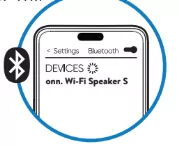
1. When you first power on, this speaker will enter into Wi-Fi mode automatically. X1 press, you will see bluetooth indicator flash.
2. Find “onn. Wi-Fi Speaker S” on your BT device and connect it.
Two devices connect to speaker (multipoint connection)
1. Press and hold source button 2 sec, now you can find it from your 2nd Bluetooth.
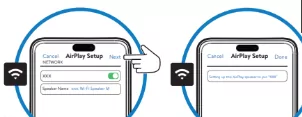
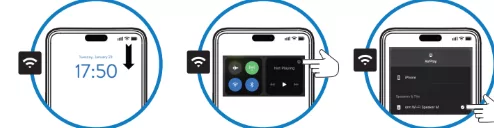
PAIRING (AirPlay mode)
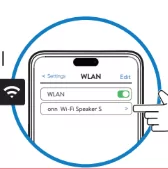
1. When you first power on, this speaker will enter into Wi-Fi mode.
2. Find “onn Wi-Fi Speaker S” from your device in Wi-Fi searching list and select it.
3. Set up to join “XXX”.
4. Select and go to next, it takes 13-15 seconds to join network.
5. Select this speaker from your AirPlay picker list.
PHONE CALLS
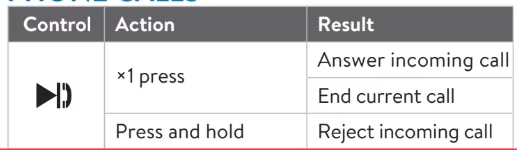
Control — Action — Result
×1 press — Answer incoming call
Press and hold — End current call / Reject incoming call
PLAY MUSIC
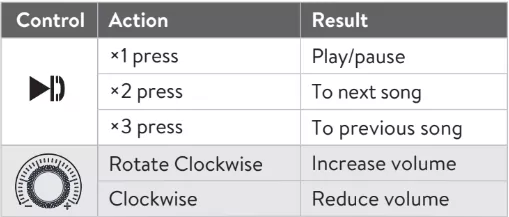
Control — Action — Result
×1 press — Play/pause
×2 press — To next song
×3 press — To previous song
Rotate Clockwise — Increase volume
Rotate Counter‑clockwise — Reduce volume
OTHER OPERATION
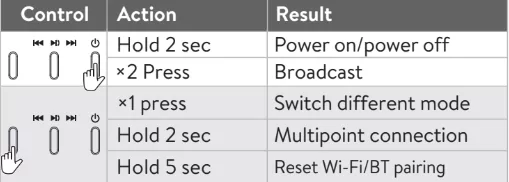
Hold 2 sec — Power on/power off
×2 Press — Broadcast
×1 press — Switch different mode
Hold 2 sec — Multipoint connection
Hold 5 sec — Reset Wi-Fi/BT pairing
BROADCAST
Enter broadcast
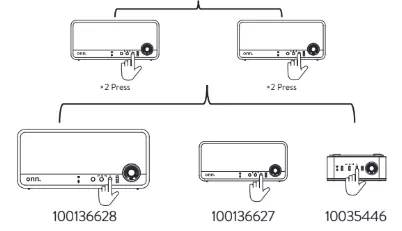
When this speaker connect to a Bluetooth device, ×2 press power button to entry into BIS mode, you will hear “Broadcast”, then ×2 press other speakers, they can connect together.
Exit broadcast
×2 Press power button
*Sync mode compatible mode list: 100135446, 100136627, 100136628
CHARGE
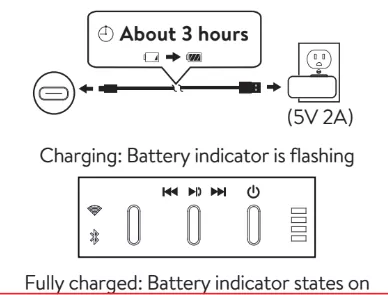
It is recommended that you use the provided charging cable, connect USB-A end to 5V power adapter or other devices, connect USB-C end to the charging port of it.
Note: Device may take up to 3 hours to get fully charged when at 0% battery.
Charging: Battery indicator is flashing
Fully charged: Battery indicator states on
Cleaning & Care
CLEANING
1. Wipe down surface with a light cloth
2. Never use abrasive pads to clean device
3. Avoid using liquids to clean device
Specifications
Weight: 0.701 lb
Product Dimensions (L x W x H): 4.06 x 1.84 x 4.02 inches
Color: Rich black
Troubleshooting
Cannot find "onn. Wi-Fi Speaker M" on Bluetooth device
• Ensure Bluetooth function is activated on Bluetooth device.
• Ensure you have paired your unit with Bluetooth device.
• Ensure this speaker is in Bluetooth mode, press and hold Source button 2s (you hear "Bluetooth Pairing" tone) to enter into Bluetooth pairing.
• Ensure this speaker is in Bluetooth mode, press and hold Source button 5s (you hear "Bluetooth Reset" tone) to clean pairing records and entry Bluetooth pairing.
• Factory Reset: Press and hold Source button and Play button 3s, this speaker will power off. Then power on and enter into Bluetooth mode to pairing.
Cannot find "onn Wi-Fi Speaker M" on Wi-Fi searching list
• Ensure Wi-Fi function is activated on iPhone/iPad/Mac device.
• Ensure this speaker enter into Wi-Fi mode.
• Ensure this speaker is under AirPlay network configuration mode, press and hold Source button 5s (you hear "Wi-Fi Reset" tone) to clean AirPlay network configuration records.
• Factory Reset: Press and hold Source button and Play button 3s, this speaker will power off. Then power on and enter into Wi-Fi mode to pairing.
Cannot find "onn Wi-Fi Speaker M" on AirPlay picker list
• Ensure this speaker is on the same network as iPhone/iPad/Mac device.
• Ensure this speaker connect Wi-Fi successfully, you hear "AirPlay ready" tone and Wi-Fi indicator states on.
• Re-configure the network: Press and hold Source button 5s (you hear "Wi-Fi Reset" tone).
• Factory Reset: Press and hold Source button and Play button 3s, this speaker will power off. Then power on and enter into Bluetooth mode to pairing.
Sound is not produced
• Ensure this speaker is under Bluetooth pairing or AirPlay pairing, and select the correct input source.
• Adjust the volume control knob.
Cannot power on
• Charge battery.
onn. Support
For product assistance WE CAN HELP
📞 1-888-516-2630
7 DAYS/WEEK — 7:00am – 9:00pm CST
THIS GUIDE CONTAINS IMPORTANT SAFETY INFORMATION.
PLEASE READ AND KEEP FOR FUTURE REFERENCE.
Find more at Walmart.com
Manufactured in China for: Walmart, Inc.