© 2014 BARSKA
®
855 Towne Center Drive Pomona, CA 91767
(t) 888.666.6769 | (f) 909.445.8169 | www.barska.com
BC235
User Manual for
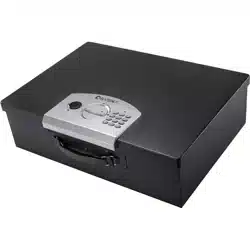
Digital Portable Lock Box
Set Up/Override Key
1. Remove the small plastic black cover to expose the override key
2. Insert the key and turn key to the left to unlock
3. Turn knob to the left to unlock lock box
4. Turn key to the right to lock, remove key, replace black cover
5. Keep override keys outside of the lock box, in a secure place
6. Lift lock box door to open
Batteries
1. Remove battery cover on the inside of the lock box door by
pushing down on the cover in the direction of the arrow to open
2. Insert 4 AA batteries into the battery compartment pay attention
to the polarity of the batteries
3. Replace compartment cover
4. Close lock box door
Low Battery
A steady red light on the indicator means batteries are low
To replace batteries open lock box either by pin code or override
key and repeat steps 1-4 above. Replace old batteries with new
batteries
Note lock box retains last pin code saved
Initial Numeric Pin Code
Note: Lock box retains only one 3-8 digit pin code
1. Input the factory preset pin 159#. Green light will flash
Note: A beep will sound for each key pressed
2. Make sure the override lock is in the lock position. Turn knob
to the left and lift lock box door open
3. Press and hold down the initialization red button on the inside of
the door on the right side of the battery compartment. You will
hear 2 beeps. Release the initialization button
4. Close lock box door. Enter your 3-8 digit pin and press the # to
confirm. Enter your pin number again and press # key again.
5. A green light will indicates a successful save of the pin code.
Red light indicates an unsuccessful repeat steps 1-4
6. Turn knob to the left and lift lock box door to open
Note Be sure to write down this code immediately and store in a
safe place
Changing Numeric Pin Code
To change pin code repeat steps 2-4 above
Opening and Closing Lock Box Door
1. To open lock box, input your pin then press #. Turn the knob to the
left and lift the lock box door
Note: After entering pin, you have 5 seconds to turn the knob
before the mechanism re-locks automatically
2. To close lock box, close door and turn knob to the right to lock
Lockout
If an incorrect PIN is entered, a red light will flash and the lock box
will not open. Entering an incorrect pin 3 times will freeze the
system for 20 seconds
Installing and Removing the Steel Cable
Included with the lock box is a steel cable. That be attached to any
stationary item for increased security
On the inside of the lock box is the internal cable lock. Adjacent to the
lock is the external cable slot with cover (See item H and I). Gently
lift cover of the external cable slot to expose slot
Installing the Cable
1. Push and hold down internal cable lock lever
2. Insert metal end of the cable into the cable slot and release the
internal cable lock lever
3. Slightly tug on the cable to ensure that the cable is securely
attached to the lock box. If cable slips out, repeat steps 1-3
Removing the Cable
1. Push and hold down internal cable lock lever
2. Gently tug on the steel cable to free it from the slot
3. Release the internal cable lock lever
4. Store cable in a safe place
Care and Maintenance
Please keep this manual and override keys in a safe place
(NOT INSIDE OF THE LOCK BOX)
Properly secure the lock box to prevent it from falling and causing
damage or injury
For security purposes, change the factory default code as
soon as possible
DO NOT use any liquid while cleaning the keypad, if necessary use
a damp cloth to clean the keypad
DO NOT place any liquid on top of the safe; a spill on the keypad
may render the safe inoperable
DO NOT over stuff the contents of the lock box or you can damage the
motor mechanism or the contents
DO NOT disassemble the product. For all repairs and
maintenance, contact authorized service center or distributor
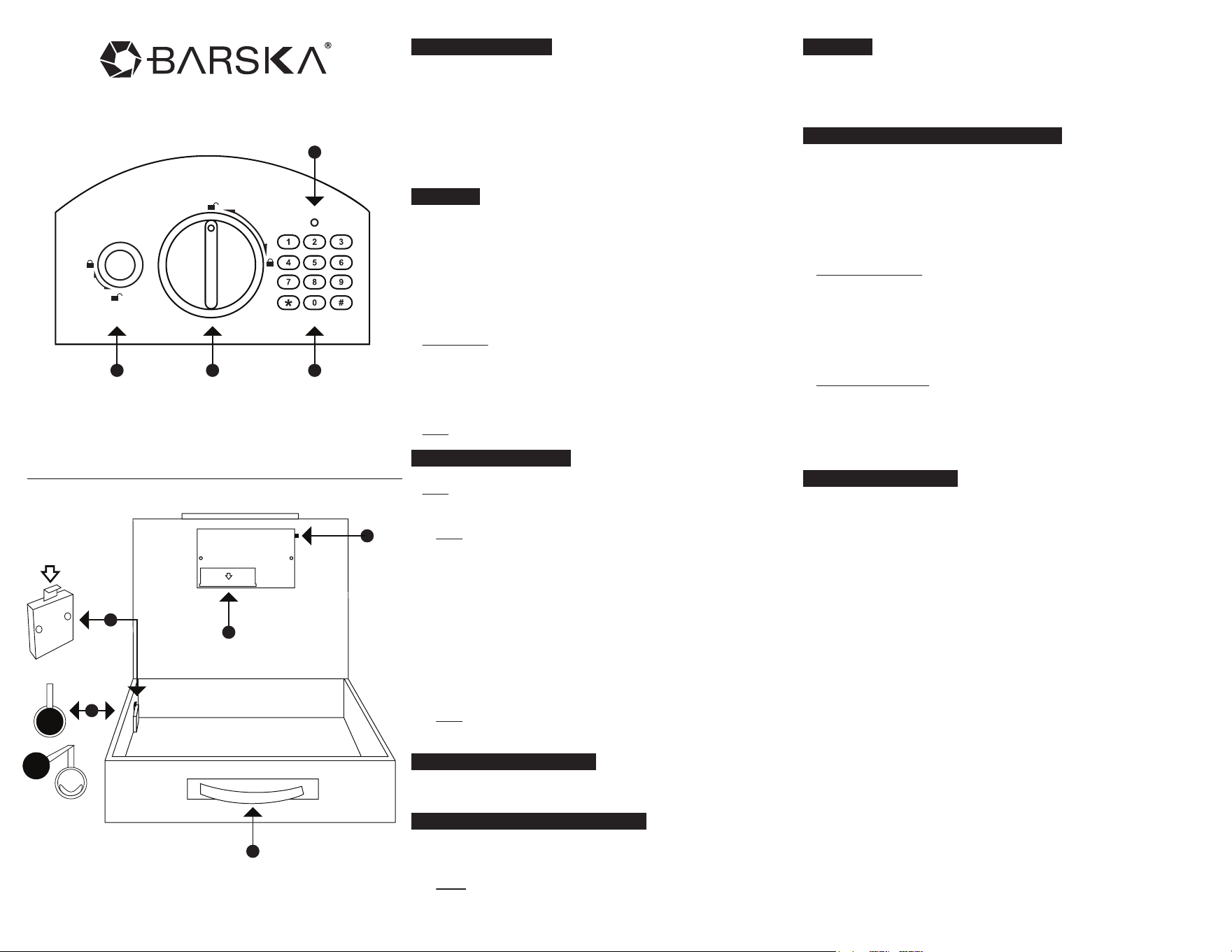
Parts of the Control Panel
C. Key Pad
D. Indicator
See reverse side for more information
A. Override Key and Cover
B. Knob
Parts of the Lock Box
E. Initialization Button
F. Battery Compartment
G. Carrying Handle
H. Internal Cable Lock
I. External Cable Slot
A
E
F
B
G
I
H
C
D
1 YEAR LIMITED WARRANTY
LOCK BOX
BARSKA warrants this new lock box to be free of original defects in
material and/or workmanship under normal use for a period of
twelve (12) months from the date product is received by purchaser.
This warranty does not include damage caused by improper
installation or maintenance. Damage from misuse, abuse, accident
(such as dropping), fire, flood, or acts of nature. Damage from
service or repairs other than those performed by BARSKA. Labor,
cost and shipping charges for the removal and replacement of
defective parts beyond the initial twelve-month warranty period. All
transportation and shipping charges. Removing or altering the seal
under any circumstances will automatically void the warranty.
This warranty is limited to original purchaser and is not transferable.
This warranty applies only to products purchased in the United
States.
Please email [email protected] or call 1.888.666.6769 for Return
Merchandise Number (RMA#) before any returns. The RMA number
must appear on the outside of the shipping package. Product must
be packed carefully and sturdily in its original packaging to prevent
damage in transit and returned freight pre-paid to:
BARSKA OPTICS
Repair Department
Please include all of the following when returning BARSKA products
for service and/or replacement:
1. Please write your complete details (Name, Address, Telephone #,
E-mail address, RMA#, etc.)
2. Purchase receipt or Proof of Purchase. (Original/Copy)
3. A brief explanation of the defect.
4. A Check/Money Order of $30.00 to cover inspection, shipping
and handling.
*Please allow 6-8 weeks for delivery.
BARSKA will examine and test returned product and repair or
replace defective part(s) or units with new part(s) or a new unit if
necessary within the warranty period. Purchaser is required to remit
$30.00 to BARSKA for return shipping and handling at time product
is returned.
If repair is required after warranty period expiration, purchaser will
be charged for replacement parts and return shipping.
BARSKA® shall not be liable for any consequential, incidental
and/or contingent damages whatsoever. We will not pay shipping,
insurance or transportation charges from you to us, or any import
fees, duties and or taxes.This warranty supersedes all previous
BARSKA warranties.
©2014 BARSKA®
BC234 9/14
855 Towne Center Drive
Pomona, CA 91767