USER MANUAL
YD-127
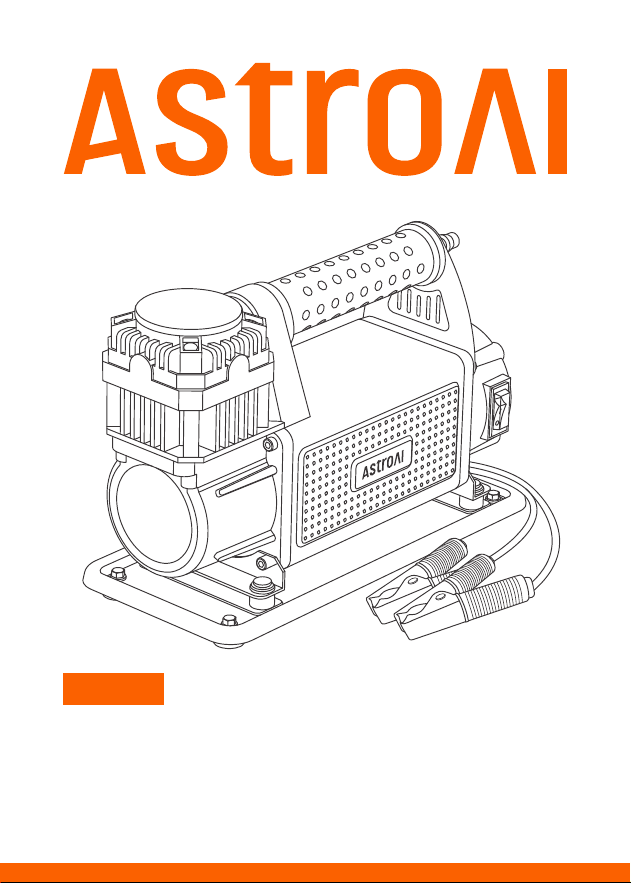
HEAVY-DUTY PORTABLE
AIR COMPRESSOR

INTRODUCTION
Thank you for purchasing the AstroAI Heavy-Duty Portable Air Compressor.
The product features an automatic overheating protection system. Once
the product reaches an unsafe temperature, it will automatically shut o
to protect its circuitry. It also has 4 anti-slip rubber pads to make the
product more stable.
Thank you again for choosing AstroAI, if you have any questions or concerns
regarding your product, please contact us at
Fully read and understand this manual before using this air
compressor.
!
- 02 -

WARNING
Please pay attention to electrical safety when using the product.
Please do not use the product for unintended purposes.
Keep the air compressor away from heat sources, such as a car's
exhaust pipe. Do not use the air compressor around flammable
liquids or gases. Keep the air compressor away from fire, corrosive
liquids and strong magnetic fields.
Check the exterior of the air compressor before use to ensure it is
intact. Do not use it if any parts are damaged.
Do not disassemble or repair the compressor. Any repairs should be
performed by professional technicians.
Risk of electric shock, do not use the air compressor if it is damaged
or if wires are exposed.
Do not overinflate tires. High-pressure air can cause injury.
This product is widely compatible with vehicles, cars, bicycles,
motorcycles, SUVs and more. It is also appropriate for RVs, ATVs,
ORVs and pickup trucks.
The product provides fast inflation in bicycle’s tires, but without
proper monitoring this rapid inflation could cause blown tires. Please
promptly stop the inflation when the pressure reaches the manufac-
turer-recommended value.
The product uses accessories rated at 150 PSI. Abide by the inflation
instruction provided by the tire manufacturer, which can be found on
the tire sidewall. Please contact the manufacturer if you are confused.
- 03 -

Use the product in a dry environment. Do not store the air compressor
in high-temperature or humid environments.
Disconnect the air compressor from all power sources when not in
use.
The exposed components may get hot during operation, please wear
protective gloves to handle the product.
Do not move the air compressor by pulling the air hose or power
cord.
PSI, Bar, kPa and kg/cm² are pressure units, not the pressure levels.
If pressure is below 40 PSI, the compressor’s maximum working
time is 45 minutes. Allow the product to rest for at least 20 minutes
after 45 minutes of continuous use.
During continuous use, the air compressor may get hot. Let it cool
down before storage.
Connect the product to a (DC 12 V) 45 A vehicle battery.
Do not use chemical substances to clean the air compressor. Only
use mild soap and a cloth dipped in hot water to clean the plastic
parts.
Do not let the product work alone without any supervision.
If accessories are missing or damaged when you receive the package,
please contact us.
- 04 -
PACKAGE INCLUDES
DIAGRAM
AstroAI Air Compressor
Rubber Air Hose
Airflow Controller
Air Nozzle Cones
Needle Valve Adapter
Storage Bag
User Manual
× 1
× 1
× 1
× 2
× 1
× 1
× 1
- 05 -
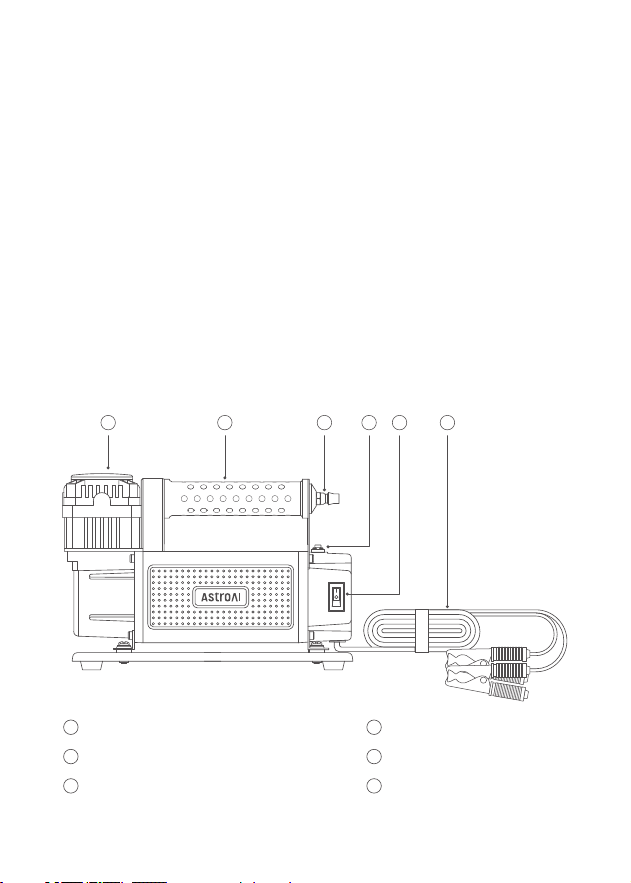
Metal Heat Sink
1
Handle
2
¼" NPT Quick Connector
3
Power Button
5
Power Cord
6
Reset Button
4
1 2 3 4 5 6
- 06 -
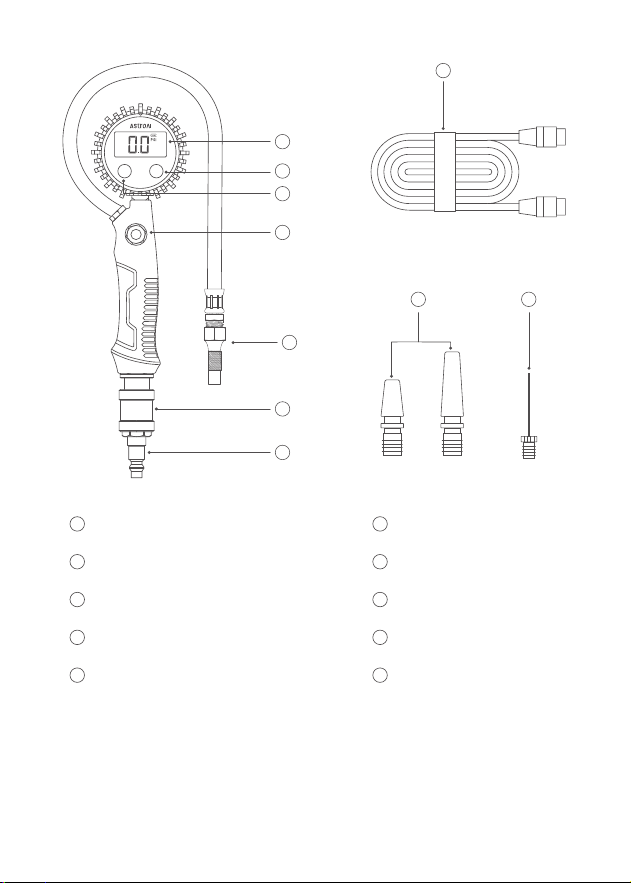
LCD Screen
7
LCD Backlight Button
8
LCD Button
9
Deflate Valve
10
Quick Connector
11
Airflow Valve
12
¼" NPT Quick Connector
13
Rubber Air Hose
14
2×Air Nozzle Cones
15
Needle Valve Adapter
16
14
15 16
7
8
9
10
11
12
13
ON FUNC
Digital Pressure Gauge
PREPARATION
When operating the air compressor, please ensure it is set up in a
safe location.
Place the air compressor on a dry, even surface.
Unpack the package to check if there is any damage. Untie the power
cord at full length.
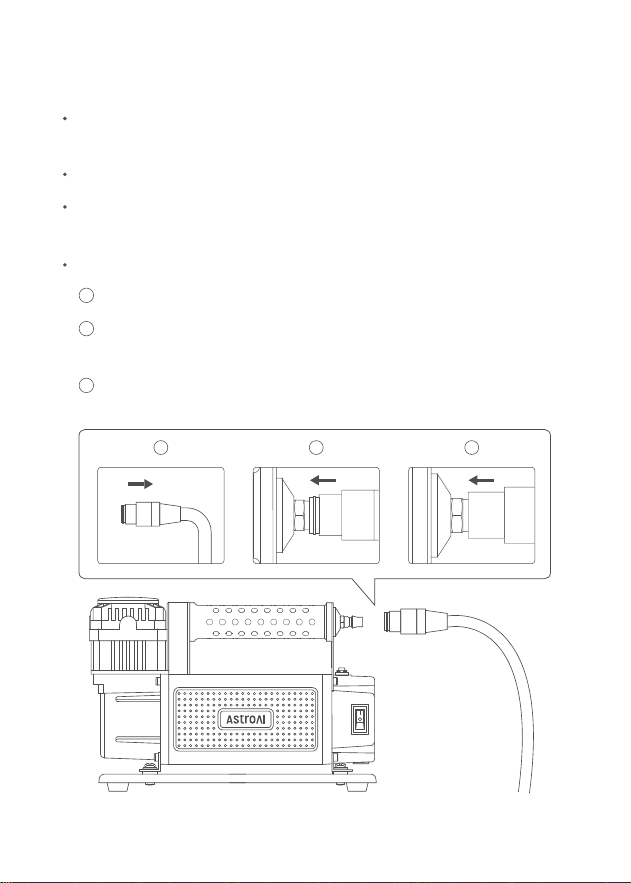
How to connect the ¼" NPT quick connector to the air hose:
Pull down the snap ring backwards.
Connect the ¼" NPT quick connector with the snap ring and secure
them together.
Release the snap ring to secure the connection.
1
2
3
- 07 -
1 2 3
INSTRUCTION
Note: Ensure the airflow controller has sucient power before
using the air compressor.
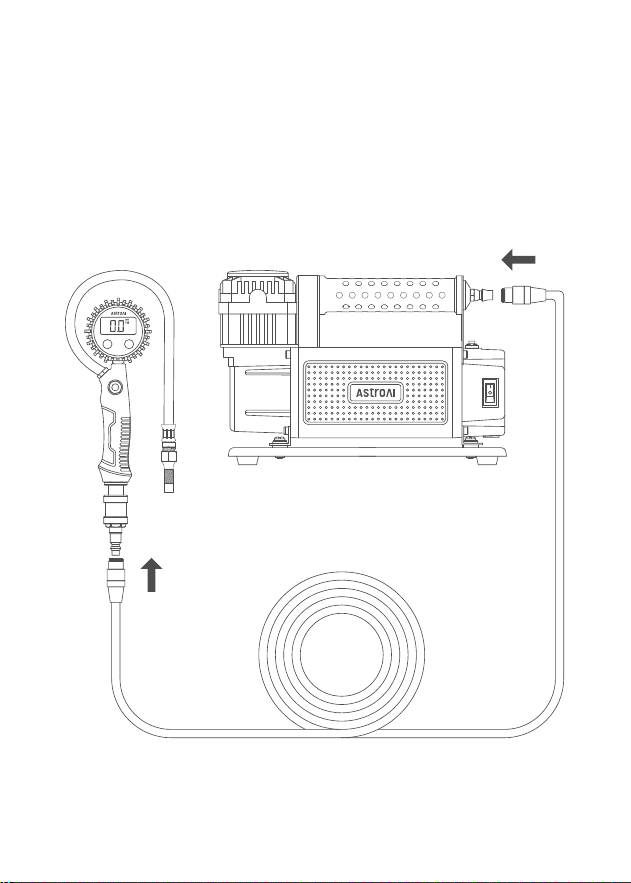
Securely connect the air hose to the ¼" NPT quick connector of the
air compressor, connect the other end of the air hose to the ¼" NPT
quick connector of the airflow controller.
1.
- 08 -
ON FUNC
Digital Pressure Gauge
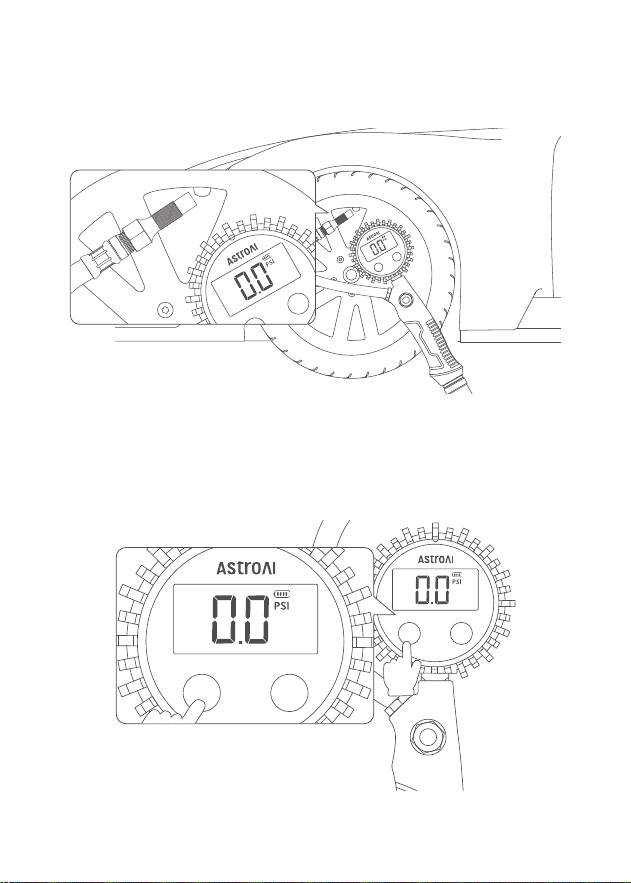
Remove the valve stem cap from the tire stem, then connect the
airflow controller’s quick connector to the valve stem.
2.
Press the LCD Button to turn on the screen. Press it again to choose
the desired unit. 4 options: PSI, Bar, kPa, kg/cm².
(Note: The screen will auto shuto after 1 minute of no operation.)
3.
- 09 -
ON FUNC
Digital Pressure Gauge
ON FUNC
Digital Pressure Gauge
ON FUNC
Digital Pressure Gauge
ON FUNC
Digital Pressure Gauge
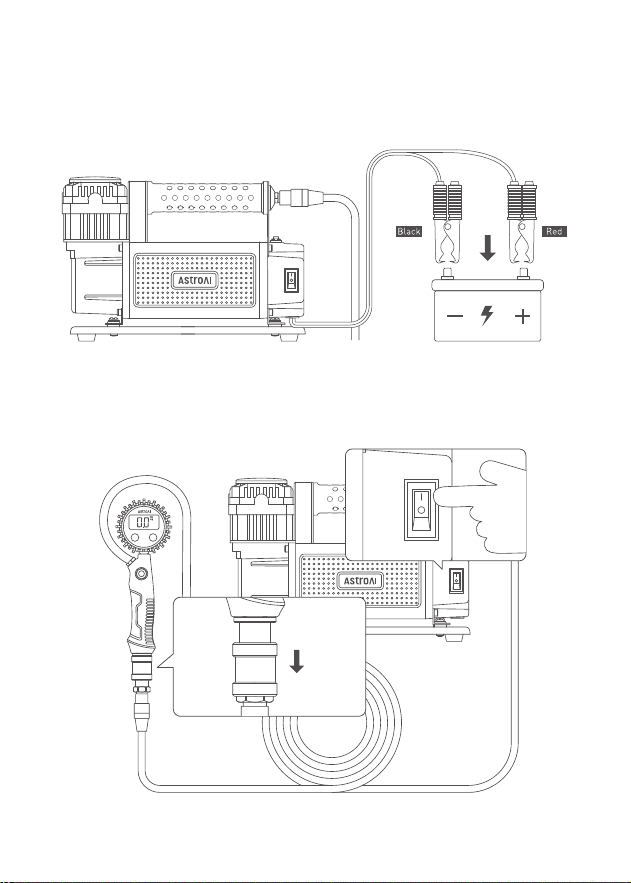
Start the engine, open the hood, then connect the red clamp to the
positive terminal of the vehicle’s 12 V battery, connect the black
clamp to the negative terminal.
4.
Pull the airflow valve downwards and switch the Power Button of
the air compressor to the “I” side to start the air compressor.
5.
- 10 -
ON FUNC
Digital Pressure Gauge
ON FUNC
Digital Pressure Gauge
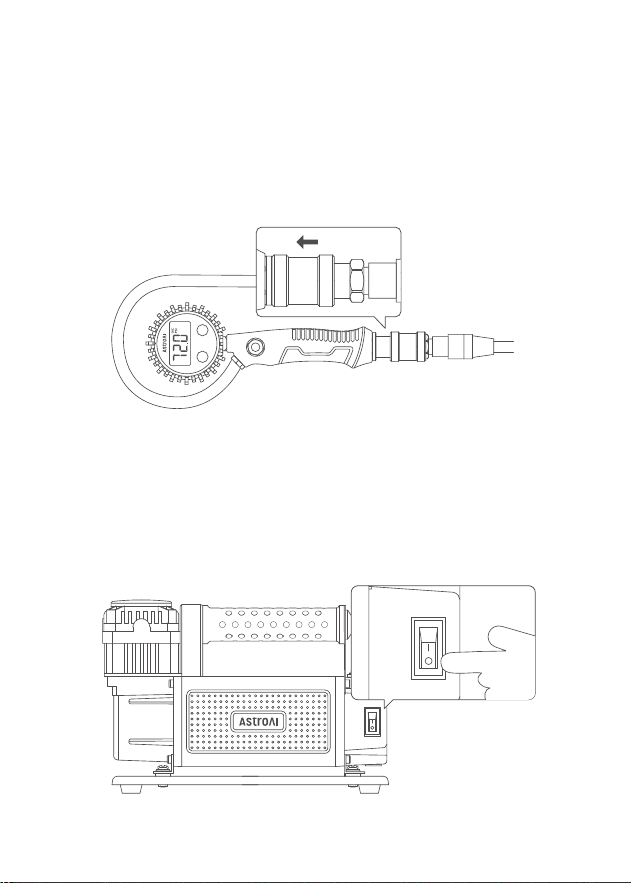
Push the airflow valve upwards to stop the air inflow into the
pressure gauge. Doing this reduces airflow pressure errors and
helps accurately measure the interior pressure value. After getting
the pressure value, pull the airflow valve downwards to continue
inflating (if needed).
(Note: The air compressor continues inflating even if the airflow is
blocked.)
6.
When the pressure reaches the manufacturer-recommended level,
press the Power Button to the “O” side and remove the air hose from
the tire stem.
(Note: Excessive inflation leads to high pressure inside the tires.
Press the Deflate Valve to deflate the tire, and release the button to
stop deflation.)
7.
- 11 -
ON FUNC
Digital Pressure Gauge

TROUBLESHOOTING
Air compressor is working abnormally
The connection between the air nozzle and the tire valve is not
secure.
Insucient battery level of the airflow controller, please promptly
replace the battery.
The Reset Button has not been pressed correctly.
Slow inflation
The connection between the air nozzle and the tire valve is not
secure.
Excessive use will slow the compressor’s inflation rate. Unplug the
compressor and let it cool for at least 20 minutes.
The airflow controller’s battery level is insucient, replace the old
batteries.
Air compressor will not inflate
Ensure the air hose’s ¼" NPT quick connector is securely connected
with the air compressor.
Ensure the airflow controller’s ¼" NPT quick connector is securely
connected to the air compressor.
Ensure the battery clamps are correctly connected to the battery.
The air compressor triggers the overheating protection system,
please cool it down for 20 minutes.
The high current may activate the current protection system; the
maximum current of the product is 45 A.
- 12 -

Air leakage
The connection between the air nozzle and the tire valve is not
secure.
Ensure the air compressor’s ¼" NPT quick connector is properly
connected to the air hose.
Ensure the airflow controller’s ¼" NPT quick connector is properly
connected to the air hose.
The airflow controller’s Deflate Valve is unlocked.
SPECIFICATIONS
Model
Working Voltage
Power Rating
Inflation Speed
Maximum Working Pressure
Display Units
Continuous Operating Time
Air Hose Length
Power Cord Length
Dimensions
YD-127
DC 12 V
540 W
160 L/Min
150 PSI
PSI, Bar, kPa, kg/cm²
45 Mins
26.24 ft (8 m)
6.56 ft (2 m)
13.14 × 8.93 × 5.90 in/
33.4 × 22.7 × 15 cm
- 13 -

2-Year Limited Warranty from AstroAI.
Each AstroAI Portable Air Compressor will be free from defects in material
and workmanship. This warranty does not cover damage from neglect,
misuse, contamination, alteration, accident, or abnormal conditions of
operation or handling.
This warranty covers the original purchaser only and is not transferable.
AstroAI always wants to provide our customers with excellent products
and customer service.
Questions or concerns? We’re happy to help! Please contact us via
RECYCLING
You may dispose of the product when its service life has ended, please
recycle the recyclable parts according to local guidelines.
WARRANTY PERIOD
- 14 -