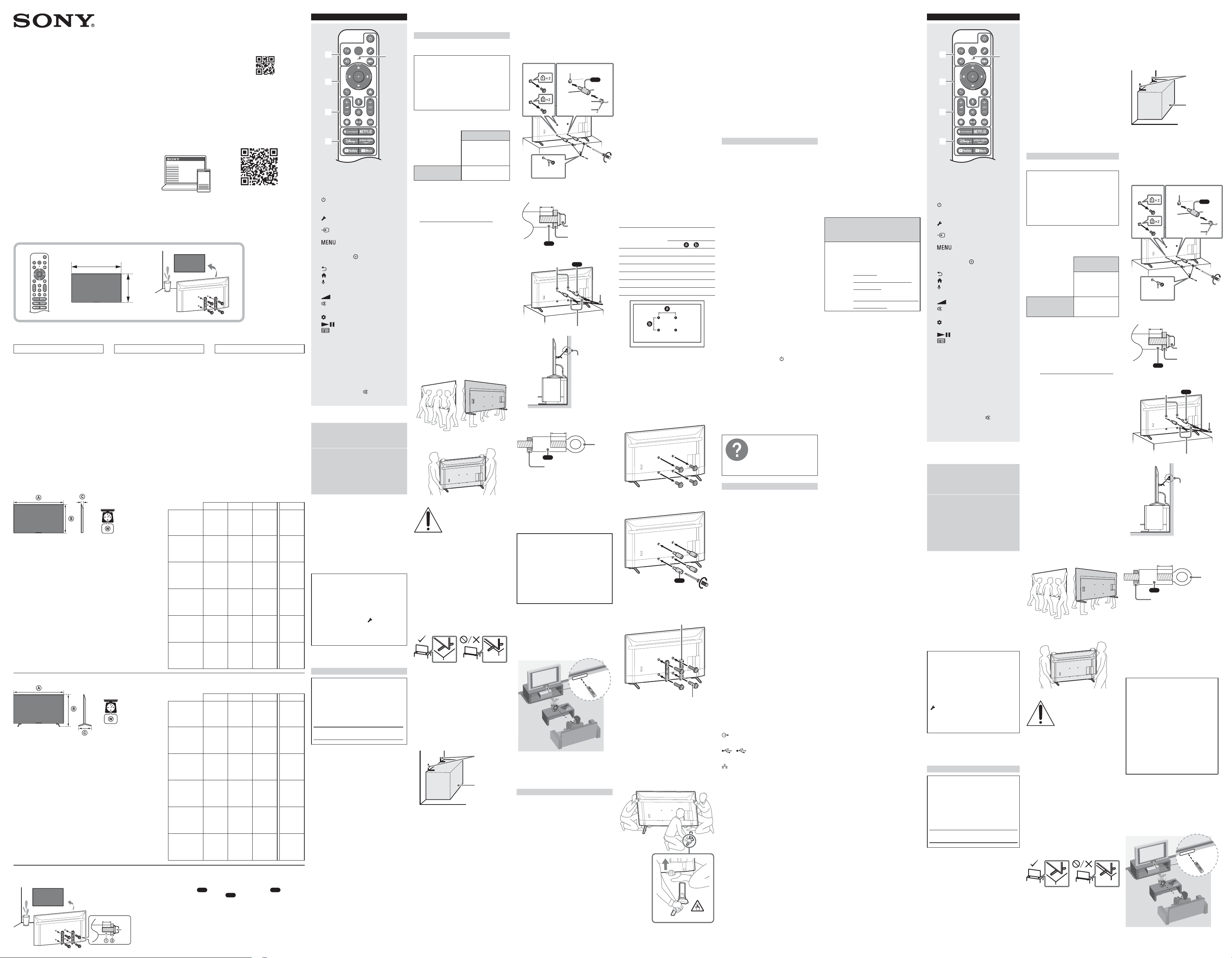
5-049-956-13(1)
•Sonyisnotliableforanydamageorinjury
causedbymishandlingorimproper
installation.
•BesuretostoretheunusedscrewsandTable-
TopStandinasafeplaceuntilyouarereadyto
attachtheTable-TopStand.Keepthescrews
awayfromsmallchildren.
Note
•Readthesuppliedsafetydocumentationfor
additionalsafetyinformation.
*Onlyforlimitedregion/country/model.
Using the optional Wall-Mount Bracket (except
SU-WL855) (not supplied)
ThisTV’sinstructionmanualonlyprovidesthe
stepstopreparetheTVforWall-Mount
installationbeforeitisinstalledonthewall.
YourTVcanbemountedtoawallusinga
suitableWall-MountBracket(notsupplied).If
theTable-TopStandisattachedtotheTV,theTV
mayrequiredetachingtheTable-TopStand;see
“DetachingtheTable-TopStandfromtheTV”.
PreparetheTVfortheWall-MountBracket
beforemakingcableconnections.
For product protection and safety reasons,
Sony strongly recommends that installation
of your TV on the wall be performed by
qualified professionals. Do not attempt to
install it yourself.
•Followtheinstructionguideprovidedwiththe
Wall-MountBracketforyourmodel.Sufficient
expertiseisrequiredininstallingthisTV,
especiallytodeterminethestrengthofthe
wallforwithstandingtheTV’sweight.
•ThescrewsforinstallingtheWall-Mount
BrackettotheTVarenotsupplied.
•Refertothefollowingtableforwall-mount
holepattern.
Model Name
Wall-mount hole
pattern
×
KD-85X77L/85X77CL400×400mm
KD-75X77L/75X77CL300×300mm
KD-65X77L/65X77CL300×300mm
KD-55X77L/55X77CL300×300mm
KD-50X77L200×200mm
KD-43X77L200×200mm
•BesuretostoretheunusedscrewsandTable-
TopStandinasafeplaceuntilyouarereadyto
attachtheTable-TopStand.Keepthescrews
awayfromsmallchildren.
Note
•Readthesuppliedsafetydocumentationfor
additionalsafetyinformation.
•Formoredetailedinformation,visitSony
CustomerSupportwebsite.*
*Onlyforlimitedregion/country/model.
1 RemovethescrewsfromtherearoftheTV.
2 AttachtheWall-MountAttachment(supplied
withtheTV)totherearoftheTV(tomakeit
parallelwiththewall).
VS
1.5N·m
{15kgf·cm}
3 AttachtheWall-MountBracket(notsupplied)
usingthescrews(notsupplied).
Wall-MountBracket
(notsupplied)
Screw
(notsupplied)
Note
•Ifusinganelectricscrewdriver,setthetorque
atapproximately1.5N·m{15kgf·cm}.
•BesuretofastentheWall-MountAttachment
whenattachingthemtotheTV.Useonlyaflat
headscrewdrivertoinstalltheWall-Mount
Attachment.Useofanothertoolmightresult
inovertorqueingtheWall-MountAttachment
anddamagingtheTV.
Detaching the Table-Top Stand from the TV
1 RemoveonesideoftheTable-TopStandata
time.FirmlyholdtheTable-TopStand
securelywithbothhandswhiletheother
peopleliftuptheTV.
2 Repeatthepreviousstepandremovethe
othersideoftheTable-TopStand.
Note
•Threeormorepeoplearerequiredtodetach
theTable-TopStand.
•Becarefulnottouseexcessiveforcewhile
detachingtheTable-TopStandfromtheTV
asitmaycausetheTVsettofallresultingin
personalinjuryorphysicaldamagetotheTV.
•TakecarewhenhandlingtheTable-TopStand
topreventdamagetotheTV.
•BecarefulwhenliftingtheTVastheTable-Top
Standisdetached,theTable-TopStandmay
toppleoverandcausepersonalinjury.
•TakecarewhenremovingtheTable-TopStand
fromtheTVtopreventitfromfallingoverand
damagingthesurfacethattheTVissittingon.
•DonotremovetheTable-TopStandforany
reasonotherthantoinstallcorresponding
accessoriesontheTV.
•BesuretheTVisverticalbeforeturningon.To
avoidunevenpictureuniformitydonotpower
ontheTVwiththeLCDpanelfacingdown.
Troubleshooting
Generaltroubleshootingforissueslike:black
screen,nosound,frozenpicture,TVdoesnot
respond,ornetworkislost,dothefollowing
steps.
1 RestartyourTVbypressingthepowerbutton
ontheremotecontrolforaboutfiveseconds.
Select[Restart]andTVwillrestart.IftheTV
doesnotrecover,tryunpluggingtheAC
powercordthenpressthepowerbuttonon
theTVandreleaseit.Waitfortwominutes,
andplugintheACpowercord.
Or,pressthepowerbuttonontheTVfor
about40secondsuntiltheTVturnsoff.
2 RefertotheHelpmenushownbelow.
3 ConnectyourTVtotheInternetandperform
asoftwareupdate.Sonyrecommendsyouto
keepyourTVsoftwareupdated.Software
updatesprovidenewfeaturesand
performanceimprovements.
4 VisitSonysupportwebsite(information
providedattheendofeachlanguage).
5 Performthefactorydatareset.
When you plug in the TV, the TV may not
be able to turn on for a while even if you
press the power button on the remote
control or the TV.
Ittakestimetoinitializethesystem.Waitfor
aboutoneminute,thenoperateitagain.
How to reset the TV to factory settings
WARNING:Theresetwillclearallofyour
customizedsettingsincludingtheparentallock
setting.
•YoucanresettheTVtofactorysettingsby
selecting[Factorydatareset].Howtoselect
[Factorydatareset],refertotheonlineHelp
Guide.
•Toforcefactorydatareset,unplugtheAC
powercord.Pressandhold
buttononthe
TV,thenplugintheACpowercord.
•Forsecuritypurposes,besuretoremoveall
personalandaccountinformationbefore
discarding,sellingorpassingyourTVto
someoneelseby:unlinking/unregistering,
signingoutofanddeactivatingallnetwork
servicesaswellasfactoryresettheTV.
The remote control does not function.
•Replacethebatteries.
The parental lock password has been
forgotten.
•Enter4357forthePINandenterthenewPIN.
Formoreinformation,referto
theHelpGuide.
Toopenit,select[Settings]t
[Help&Feedback]t[Help]
orselect[Help]intheHome
Menu,if[Help]doesnotexist,
select[Seeall]t[Help].
Specifications
System
TVsystem
Dependingonyourcountry/areaselection/TV
model
NTSC:NationalTelevisionSystemCommittee
ATSC:8VSBTerrestrial
QAMoncable:ANSI/SCTE072000(Doesnot
includeCableCARDfunctionality)
Channelcoverage
Dependingonyourcountry/areaselection/TV
model
Analogterrestrial:2-69/Digitalterrestrial:
2-69
AnalogCable:1-135/DigitalCable:1-135
Panelsystem
LCD(LiquidCrystalDisplay)Panel,LED
Backlight
Speakeroutput(W)
10+10
Wirelesstechnology
ProtocolIEEE802.11a/b/g/n/ac
Bluetooth®Version5.0
Input/Output jacks
CABLE/ANTENNA
75ohmexternalterminalforRFinputs
HDMIIN1/2/3(HDCP2.3-compatible)
Video:
4096×2160p(60Hz)*
1
,4096×2160p(24Hz),
3840×2160p(60Hz)*
1
,3840×2160p(24,
30Hz),1080p(30,60Hz),1080/24p,1080i
(60Hz),720p(30,60Hz),720/24p,480p,480i,
PCFormats*
2
Audio:
IneARC(EnhancedAudioReturnChannel)
mode
RefertotheonlineHelpGuidefordetails.
ExcepteARCmode
TwochannellinearPCM:32/44.1/48kHz
16/20/24bits,DolbyAudio
eARC/ARC(EnhancedAudioReturnChannel/
AudioReturnChannel)(HDMIIN3only)*
3
IneARCmode
RefertotheonlineHelpGuidefordetails.
InARCmode
TwochannellinearPCM:48kHz16bits,Dolby
Audio,DolbyAtmos
DIGITALAUDIOOUT(OPTICAL)
Digitalopticaljack(TwochannellinearPCM:
48kHz16bits,DolbyAudio)
1,2
USBport1and2supportsHighSpeedUSB
(USB2.0)
LAN
10BASE-T/100BASE-TXconnector
(Dependingontheoperatingenvironmentof
thenetwork,connectionspeedmaydiffer.The
communicationrateandqualityarenot
guaranteed.)
HomeNetworksupportedfilesandformats*
2
Power and others
Powerrequirements
110V-240VAC,50/60Hz(U.S.A./Canada
120VAC,60Hz)
Powerconsumption
Inuse(W)
KD-85X77L/85X77CL:342
KD-75X77L/75X77CL:315
KD-65X77L/65X77CL:226
KD-55X77L/55X77CL:191
KD-50X77L:146
KD-43X77L:125
Instandby*
4
*
5
Lessthan0.5Wwith120VACandlessthan
0.5Wwith240VAC
Screensize(measureddiagonally)(Approx.)
(cm/inches)
KD-85X77L/85X77CL:214.8/84.6(85"class)
KD-75X77L/75X77CL:189.3/74.5(75"class)
KD-65X77L/65X77CL:163.9/64.5(65"class)
KD-55X77L/55X77CL:138.8/54.6(55"class)
KD-50X77L:125.7/49.5(50"class)
KD-43X77L:108.0/42.5(43"class)
Displayresolution(horizontal×vertical)(pixels)
3840×2160
Outputrating
500mA(forUSB1/2)
Others
Optionalaccessories
Wall-MountBracket:SU-WL855(except
KD-85X77L/85X77CL/50X77L/43X77L)
Operatingtemperature
0ºC–40ºC/32ºF–104ºF
*1Refertotheonscreenmenutoset[HDMI
signalformat].
*2RefertotheonlineHelpGuidefordetails.
*3ConnectyouraudiosystemtotheHDMIIN3
torouteTVaudiotoyouraudiosystem.
*4Specifiedstandbypowerisreachedafterthe
TVfinishesnecessaryinternalprocesses.
*5Standbypowerconsumptionwillincrease
whenyourTVisconnectedtothenetwork.
Note
•Optionalaccessoriesavailabilitydependson
countries/region/TVmodel/stock.
•Designandspecificationsaresubjectto
changewithoutnotice.
•Subscriptionsforservicesandapplications
mayberequiredandadditionalterms,
conditionsand/orchargesmayapplywhen
usingGoogleAssistant.
•VisitSonywebsiteformoreinformationon
productspecifications.
Licensing Information
•ManufacturedunderlicensefromDolby
Laboratories.
Dolby,DolbyAudio,andthedouble-D
symbolaretrademarksofDolbyLaboratories
LicensingCorporation.
For Your
Convenience
Online Registration:
BesuretoregisteryourTV.
United
States
https://
productregistration.
sony.com
Canada
https://www.sony.ca/
registration
EN
MIC
The remote control shape, layout, availability
and function of remote control buttons may
vary depending on your region/country/TV
model/TV settings.*
1
(Power)
TV:DisplayTVchannellistorswitchto
input.
(Quick settings):DisplayQuick
Settings.
(Input):Displayandselecttheinput
source,etc.
(Control menu):Displaythe
Controlmenu.
/ / / /
:Onscreenmenu
navigationandselection.
(Back)
(Home)
(Google Assistant / Microphone):
UseGoogleAssistant*
2
*
3
.
+ / – (Volume)
(Mute)*
4
CH + / – (Channel)
(Dashboard):DisplayDashboard.
(Guide):Displaythedigitalprogram
guideofTVorCable/Satellitebox*
5
.
App buttons
*1Forotherremotecontrolmodels,referto
theonlineHelpGuidefordetails.
*2Onlyforlimitedregion/country/model/
language.
*3GoogleAssistantrequiresanInternet
connection.
*4Accessibilityshortcutisavailableby
pressingandholding
(Mute).
*5[Cable/Satelliteboxsetup]settingis
required.
About Manuals
Pleaseretainthemanualsforfuturereference.
Paper manual
SetupGuide(ontopoftheproduct)/
ReferenceGuide(thismanual)/Safetyand
RegulatoryBooklet.
Help Guide (On screen Manual)
•Toopenit,select[Settings]t[Help&
Feedback]t[Help]orselect[Help]inthe
HomeMenu,if[Help]doesnotexist,select
[Seeall]t[Help].
•YoucanrefertotheHelpGuidewithyour
smartphone(visitwebsiteprovidedonthe
frontcoverofReferenceGuide).
Readandunderstandthecontentsofthis
manualbeforeoperatingthisproduct.
Note
•Instructionsabout“InstallingtheTVtothe
Wall”areincludedwithinthisTV’sinstruction
manual.
•Readthesuppliedsafetydocumentationfor
additionalsafetyinformation.
•Imagesandillustrationsusedinthesupplied
manualsareforreferenceandmaydifferfrom
theactualproduct.
•Settingmenusaresubjecttochangewithout
noticeduetosoftwareupdates.Forlatest
information,visitSonysupportwebsite.
IMPORTANT - Read the End User Software
License Agreement before using your
Sony product.Usingyourproductindicates
youracceptanceoftheEndUserSoftware
LicenseAgreement.Thesoftwarelicense
agreementbetweenyouandSonyis
availableonlineatSonywebsite(https://
www.sony.net/tv-software-licenses2/)oron
yourproductscreen.Press
(Quick
Settings)ontheremotecontrolandselect
[Settings]t[System]t[About]t[Legal
information]t[Enduserlicense
agreement].
Location of the identification label
LabelsfortheTVModelNo.andPowerSupply
ratingarelocatedontherearoftheTV.
IMPORTANT NOTICE
Owner’s Record
Themodelandserialnumbersarelocatedat
thesideand/orrearoftheTV.Recordthese
numbersinthespacesprovidedbelow.Refer
tothemwheneveryoucalluponyourSony
dealerregardingthisTV.
ModelName
SerialNo.
IMPORTANT NOTICE FOR MEXICO
Operationofthisequipmentissubjecttothe
followingtwoconditions:(1)itispossible
thatthisequipmentordevicemaynotcause
harmfulinterferenceand(2)thisequipment
ordevicemustacceptanyinterference,
includinginterferencethatmaycauseundesired
operation.
Forinformationrelatedtothecertificate
number,refertothepackagelabeland/or
product.
Note:
Thisproductusesthefollowingmodulefor
wirelessfunctionalities:
Model:WBUR56
Brand:FOXCONN
WLAN:
2.4GHz(2.4000GHz–2.4835GHz)
5GHz(5.150GHz–5.850GHz)
Bluetooth®:
2.4GHz(2.4000GHz–2.4835GHz)
Informationfortheremotecontrolwithvoice
commandincludedwiththisproduct:
Model:RMF-TX811U/RMF-TX810U*
Brand:Sony
Note:Usesthefollowingdeviceforwireless
functionalities:
Model:UE878
Brand:UEI
*Toseethemodelnameoftheremotecontrol,
opentheremotecontrolcoverandseethe
labelontheremotecontrol.
Safety Information
Notice for customers in the United States of
America
Supplier’s Declaration of Conformity
TradeName:SONY
Model:KD-85X77L/KD-85X77CL/
KD-75X77L/KD-75X77CL/KD-65X77L/
KD-65X77CL/KD-55X77L/KD-55X77CL/
KD-50X77L/KD-43X77L
ResponsibleParty:SonyElectronicsInc.
Address:16535ViaEsprillo,SanDiego,
CA92127U.S.A.
TelephoneNumber:858-942-2230
Compatible Wall-Mount Bracket Information
UsethefollowingSonyWall-MountBracketwith
yourTVmodel.
SonyTVModelNo.
KD-75X77L/
75X77CL/65X77L/
65X77CL/55X77L/
55X77CL
SonyWall-Mount
BracketModelNo.
SU-WL855*
1
UsewithotherWall-MountBrackets*
2
may
causeinstabilityandcouldresultinproperty
damageorinjury.
*1Onlyforlimitedregion/country/model.
*2ForinstructionsonusingtheWall-Mount
BracketwithyourTVpleasegoto
https://www.sony.com/am/supportfor
yourTVmodelanddownload“Wall-Mount
Bracket”.
To Customers
SufficientexpertiseisrequiredforTV
installations.Besuretosubcontractthe
installationtoaSonydealerorlicensed
contractorandpayadequateattentiontosafety
duringtheinstallation.
Before setting up your TV
SomeTVmodelsarepackagedwithadetached
Table-TopStandsoyoucanmountyourTVto
awallrightaway.See“InstallingtheTVtothe
Wall”ifyouwanttomounttheTVtoawall.If
youarenotmountingtheTVtoawall,youwill
needtoattachtheTable-TopStand(refertothe
SetupGuide).
Besuretoconsiderthefollowingwhilesetting
upyourTV:
•DisconnectallcableswhencarryingtheTV.
•Twoormorepersons(threeormorepersons
for214.8cm(85inches)andaboveTV)are
neededtotransportalargeTVset.
•Correcthandplacementwhilecarryingthe
TVisveryimportantforsafetyandtoavoid
damage.
•WhenhandlingormountingtheTVset,do
notlaydowntheTV(forapplicableTVmodel
only).
KD-85X77L / 85X77CL
KD-75X77L / 75X77CL / 65X77L / 65X77CL /
55X77L / 55X77CL / 50X77L / 43X77L
Securing the TV
Sonystronglyrecommends
takingmeasurestoprevent
theTVfromtopplingover.
UnsecuredTVsmaytopple
andresultinpropertydamage,
seriousbodilyinjuryoreven
death.
Preventing the TV from Toppling
•SecuretheTVtoawalland/orStand.
•Donotallowchildrentoplayorclimbon
furnitureandTVsets.
•AvoidplacingorhangingitemsontheTV.
•NeverinstalltheTVon:
—slippery,unstableand/orunevensurfaces.
—furniturethatcaneasilybeusedassteps,
suchasachestofdrawers.
•InstalltheTVwhereitcannotbepulled,
pushed,orknockedover.
•InstalltheTVsothattheTV’sTable-TopStand
doesnotprotrudeoutfromtheStand(not
supplied).IftheTable-TopStandprotrudesout
fromtheStand,itmaycauseTVsettotopple
over,falldown,andcausepersonalinjuryor
damagetotheTV.
•RouteallACpowercordsandconnecting
cablessothattheyarenotaccessibleto
curiouschildren.
Recommended Measures to Secure the TV
Considerthefollowingmeasureswhensecuring
yourTVtoaStand(notsupplied).
1 SecuretheStandfortheTV.
MakesuretheStandcanadequatelysupport
theweightoftheTV.Usetwoanglebraces
(notsupplied)tosecuretheStand.Foreach
anglebraceusetheappropriatehardwareto:
•Attachonesideoftheanglebracetothe
wallstud.
•AttachtheothersidetotheStand.
Anglebrace
(notsupplied)
Stand
2 SecuretheTVtotheStand.
Usetheoptionalhardwarelistedasfollows
(notsupplied):
•M6machinescrews(screwedintotheTV’s
rearcover).
•Ascreworsimilar(attachittotheStand).
•Ropeorchain(strongenoughtosupport
theweightoftheTV).Makesurethatthere
isnoexcessslackintheropeorchain.
1 2
4
3
VS
(supplied)
Screwholeon
therearcover
M6machinescrew
(notsupplied)
Ropeorchain
(notsupplied)
Screw
(notsupplied)
1.5N·m
{15kgf·cm}
ThelengthoftheM6machinescrewdiffers
dependingontheropeorchaindiameter.
Pleaserefertobelowillustration.
Ropeorchain
10−12(mm)
Screw(M6)
VS
3 AnchortheTVtothewallbyusingbolts,wall
anchorandchain(orrope).
VS
Wall-mountholes
M6eyebolts(notsupplied)
Ropeor
chain(not
supplied)
(supplied)
Wall-anchor
(notsupplied)
PleaserefertobelowillustrationforM6eye
boltlength.
VS
10−12(mm)
M6eye
bolt
TV’srearcover
Note
•YourTVisshippedwithscrewsattachedto
therearoftheTVdependingontheTVmodel.
(Theyarefastenedinthescrewholesforwall
mounting.)Besuretoremovetheuppertwo
screwspriortoanchoringtheTVtoawall.
•SecuringtheTVtotheStandwithoutsecuring
theTVandtheStandtothewallprovides
minimumprotectionagainsttheTVtoppling
over.Forfurtherprotection,besuretofollow
thethreemeasuresrecommended.
The BRAVIA® 4K TV Experience
ThankyouforchoosingSony!Yournew
BRAVIA®TVopensthedoortothe“4KTV
Experience”.Thisdocumentwillhelpyouget
themostoutofyourTV.Pleasetakea
momenttoregisteryourTVat:
U.S.A.:
https://productregistration.sony.com
Canada:
https://www.sony.ca/registration
ThisTVdisplaysallvideoinputsignalsina
resolutionof3840dots×2160lines.
Note
•ForsupportedPCformats,refertotheonline
HelpGuide.
Guidelines for IR Remote Control
•PointyourremotecontroldirectlyattheIR
sensorlocatedonyourTV.
•Makesurethatnoobjectsareblockingthe
pathbetweentheremotecontrolandtheIR
sensoronyourTV.
•Fluorescentlampscaninterferewithyour
remotecontrol;tryturningoffthefluorescent
lamps.
•Ifyouarehavingproblemswiththeremote
control,reinsertorreplaceyourbatteriesand
makesurethattheyarecorrectlyinserted.
Installing the TV to the Wall
Using the optional Wall-Mount Bracket (SU-WL855
only)* (not supplied)
To Customers:
Forproductprotectionandsafetyreasons,Sony
stronglyrecommendsthatinstallationofyour
TVbeperformedbySonydealersorlicensed
contractors.Donotattempttoinstallityourself.
To Sony Dealers and Contractors:
Providefullattentiontosafetyduringthe
installation,periodicmaintenanceand
examinationofthisproduct.
Wall-Mount Bracket Installation
Information
ForinstructionsonWall-MountBracket
installation,seetheInstallationInformation
(Wall-MountBracket)ontheSonyCustomer
SupportwebsiteforyourTVmodelatthe
followingaddress.
https://www.sony.com/am/support
•Followtheinstructionguideprovidedwiththe
Wall-MountBracketforyourmodel.Sufficient
expertiseisrequiredininstallingthisTV,
especiallytodeterminethestrengthofthe
wallforwithstandingtheTV’sweight.
FR
MIC
La forme de la télécommande,
l’agencement, la disponibilité et la fonction
des touches de la télécommande peuvent
varier selon votre région ou pays ou le
modèle/réglages du téléviseur.*
1
(Alimentation)
TV:Affichelalistedescanauxde
télévisionoucommutesurl’entrée.
(Réglages rapides):Affiche
Réglagesrapides.
(Entrée):Permetd’afficheretde
sélectionnerlasourced’entrée,etc.
(Menu Contrôle):Affichele
MenuContrôle.
/ / / /
:Navigationet
sélectiondanslemenuàl’écran.
(Retour)
(Accueil)
(Assistant Google / Microphone):
Utilisezl’AssistantGoogle*
2
*
3
.
+ / – (Volume)
(Sourdine)*
4
CH + / – (Canal)
(Tableau de bord):Affichezle
tableaudebord.
(Guide):Afficheleguidedes
programmesnumériquesdutéléviseur
oudusyntoniseurcâble/satellite*
5
.
Touches de l’application
*1Pourlesautresmodèlesde
télécommande,veuillezvousréférerau
Manueld’aideenlignepourplusde
détails.
*2Uniquementpourcertainesrégions/
pays/modèles/langues.
*3L’AssistantGooglenécessiteune
connexionInternet.
*4Leraccourcid’accessibilitéestdisponible
enmaintenantlatouche
(Sourdine)
enfoncée.
*5Leréglage[Configurationd'un
syntoniseurcâbleousatellite]est
nécessaire.
À propos des manuels
Veuillezconservercesmanuelsàtitrede
référence.
Manuel papier
Manueldeconfiguration(surledessusdu
produit)/Manuelderéférence(leprésent
manuel)/Livretdesécuritéet
réglementation.
Manuel d’aide (manuel à l’écran)
•Pourl’ouvrir,sélectionnez[Paramètres]
t[Aideetcommentaires]t[Aide]ou
sélectionnez[Aide]danslemenu
d’accueil,si[Aide]n’existepas,
sélectionnez[Toutafficher]t[Aide].
•VouspouvezconsulterleManueld’aide
avecvotretéléphoneintelligent(visitezle
siteWebfournisurlapremièrede
couvertureduManuelderéférence).
Veuillezlireetvousassurerdecomprendrele
contenudecemanuelavantd’utiliserce
produit.
Remarque
•Desinstructionspour«Fixerletéléviseurau
mur»sontinclusesdanslemoded’emploi
decetéléviseur.
•Lisezladocumentationdesécuritéfournie
pourplusderenseignementssurl’utilisation
entoutesécurité.
•Lesimagesetillustrationsutiliséesdans
lesmanuelsfournissontfourniesàtitrede
référenceetpeuventdifférerdel’aspectréel
duproduit.
•Lesmenusderéglagepeuventchangersans
préavisenraisondesmisesàjourdulogiciel.
Pourlesdernièresinformations,visitezlesite
Webd’assistancedeSony.
IMPORTANT - Lisez le contrat de licence
logicielle de l’utilisateur final avant
d’utiliser votre produit Sony.Utiliservotre
produitsignifiequevousacceptezles
termesducontratdelicencelogiciellede
l’utilisateurfinal.Lecontratdelicence
logicielleentrevousetSonyestdisponible
enlignesurlesiteWebSony(https://
www.sony.net/tv-software-licenses2/)ou
surl’écrandevotreproduit.Appuyezsur
(Réglagesrapides)surlatélécommande
etsélectionnez[Paramètres]t[Système]
t[Àpropos]t[Renseignements
juridiques]t[Contratdelicence
d'utilisateurfinal].
Emplacement de l’étiquette d’identification
Lesétiquettesindiquantlenumérodemodèle
etlescaractéristiquesnominalesde
l’alimentationdutéléviseursetrouventà
l’arrièredutéléviseur.
AVIS IMPORTANT
Fiche d’identification
Lesnumérosdemodèleetdesériesont
indiquésàl’arrièreet/ousurlecôtédu
téléviseur.Notezcesnumérosdansles
espacesci-dessous.Faites-yréférence
chaquefoisquevousappelezvotre
détaillantSonyausujetdecetéléviseur.
Nomdumodèle
N°desérie
AVIS IMPORTANT POUR LE MEXIQUE
L’exploitationdecetappareilestautorisée
auxdeuxconditionssuivantes:(1)ilfautque
cetéquipementouappareilneprovoque
pasd’interférencesnuisibles,et(2)cet
équipementouappareildoitacceptertoute
interférence,ycomprislesinterférences
pouvantentraînerunfonctionnement
indésirable.
Pourplusd’informationssurlenumérode
certificat,reportez‐vousàl’étiquettede
l’emballageet/ouauproduit.
Remarque:
Ceproduitutiliselesmodulessuivantspour
lesfonctionnalitéssansfil:
Modèle:WBUR56
Marque:FOXCONN
WLAN:
2,4GHz(2,4000GHz–2,4835GHz)
5GHz(5,150GHz–5,850GHz)
Bluetooth®:
2,4GHz(2,4000GHz–2,4835GHz)
Informationconcernantlatélécommandeà
commandevocaleinclusedansceproduit:
Modèle:RMF-TX811U/RMF-TX810U*
Marque:Sony
Remarque:Utilisel’appareilsuivantpourles
fonctionnalitéssansfil:
Modèle:UE878
Marque:UEI
*Pourconnaîtrelenomdumodèledela
télécommande,ouvrezlecouvercledela
télécommandeetconsultezl’étiquettesurla
télécommande.
Consignes de sécurité
Avis pour les clients aux États-Unis d’Amérique
Déclaration de conformité du fournisseur
Appellationcommerciale:SONY
Modèle:KD-85X77L/KD-85X77CL/
KD-75X77L/KD-75X77CL/KD-65X77L/
KD-65X77CL/KD-55X77L/KD-55X77CL/
KD-50X77L/KD-43X77L
Partieresponsable:SonyElectronicsInc.
Adresse:16535ViaEsprillo,SanDiego,
CA92127U.S.A.
Numérodetéléphone:858-942-2230
Information sur le support de fixation murale
compatible
UtilisezlesupportdefixationmuraleSony
ci-dessouscorrespondantaumodèledevotre
téléviseur.
Numérodemodèle
dutéléviseurSony
KD-75X77L/
75X77CL/65X77L/
65X77CL/55X77L/
55X77CL
Numérodemodèle
dusupportde
fixationmuraleSony
SU-WL855*
1
L’utilisationd’autressupportsdefixation
murale*
2
peutprovoquerl’instabilitéde
l’appareiletcauserdesblessuresoudes
dommagesmatériels.
*1Uniquementpourcertainesrégions/pays/
modèles.
*2Pourdesinstructionssurl’utilisationdu
supportdefixationmuraleavecvotre
téléviseur,veuillezaccéderàlapagedu
sitehttps://www.sony.com/am/support
correspondantaumodèledevotre
téléviseurettéléchargerledocument
«Supportdefixationmurale».
Note au consommateur
L’installationdecetéléviseurnécessite
unecertainecompétence.Veillezàconfier
l’installationàundétaillantSonyouàun
entrepreneurautoriséetportezuneattention
particulièreàlasécuritépendantl’installation.
Avant d’installer votre téléviseur
Aveccertainsmodèlesdetéléviseur,le
supportdetablen’estpasfixéafinde
vouspermettredemonterdirectementle
téléviseuraumur.Reportez-vousàla«Fixerle
téléviseuraumur»sivoussouhaitezinstaller
cetéléviseuraumur.Sivousnecomptezpas
installerletéléviseuraumur,vousdevez
installerlesupportdetable(reportez-vousau
Manueldeconfiguration).
Tenezcomptedecequisuitpendant
l’installationdutéléviseur:
•Débrancheztouslescâblesavantde
transporterletéléviseur.
•Deuxpersonnesouplus(troispersonnes
oupluspourlestéléviseursde214,8cm
(85pouces)etplus)sontnécessairespour
transporterungrandtéléviseur.
•Lorsdutransportdutéléviseur,lebon
emplacementdesmainsesttrèsimportant
pourvotresécurité,ainsiquepouréviterde
causerdesdommages.
•Lorsdelamanipulationoudumontage
dutéléviseur,necouchezpasletéléviseur
(pourlesmodèlesdetéléviseursapplicables
uniquement).
KD-85X77L / 85X77CL
KD-75X77L / 75X77CL / 65X77L /
65X77CL / 55X77L / 55X77CL / 50X77L /
43X77L
Fixer le téléviseur
Sonyrecommande
fortementdeprendreles
mesuresnécessairespour
prévenirlebasculementdu
téléviseur.
Destéléviseursquine
sontpasfixéssolidement
peuventbasculeretentraînerdesdommages
matériels,desblessurescorporellesgravesou
mêmemortelles.
Prévenir le basculement du téléviseur
•Fixersolidementletéléviseuràunmuret/ou
àunsupport.
•Nepaslaisserlesenfantsjoueroumonter
surlesmeublesetlestéléviseurs.
•Éviterdeplaceroud’accrocherdesobjetssur
letéléviseur.
•Nejamaisinstallerletéléviseursur:
—dessurfacesglissantes,instableset/ou
inégales.
—unmeublequipeutfacilementservir
d’escalier,commeunecommodeàtiroirs.
•Installerletéléviseuroùilnepeutpasêtre
tiré,pousséourenversé.
•Installezletéléviseurdemanièreàcequele
supportdetabledutéléviseurnedépasse
pasdusupport(nonfourni).Silesupportde
tabledépassedusocle,letéléviseurpourrait
basculer,tomberetcauserdesblessuresou
desdommagesautéléviseur.
•Acheminerlescordonsd’alimentationCAet
lescordonsconnecteursafinqu’ilsnesoient
pasaccessiblesauxenfantscurieux.
Mesures recommandées pour fixer solidement
le téléviseur
Tenezcomptedesmesuressuivanteslorsque
vousfixezvotretéléviseuràunebase(non
fournie).
1 Fixersolidementlabasedutéléviseur.
S’assurerquelabasepeutsupporter
adéquatementlepoidsdutéléviseur.
Utiliserdeuxattachesangulaires(non
fournies)pourfixersolidementlabase.
Avecchaqueattacheangulaire,utiliserla
quincaillerieappropriéepour:
•Fixeruncôtédel’attacheangulaireau
poteaumural.
•Fixerl’autrecôtéàlabase.
Attache
angulaire
(nonfournie)
Base
2 Fixersolidementletéléviseuràlabase.
Utiliserlaquincaillerieoptionnelle
mentionnée(nonfournie):
•VisàmétalM6(visséesurlecouvercle
arrièredutéléviseur).
•Unevisoul’équivalent(lafixeràlabase).
•Unecordeouunechaîne(assezsolide
poursupporterlepoidsdutéléviseur).
Vousassurerqu’iln’yapasdemou
excessifdanslacordeoulachaîne.
1 2
4
3
VS
(fourni)
Troudevissurle
couverclearrière
VisàmétalM6
(nonfournie)
Cordeouchaîne
(nonfournie)
Vis
(nonfournie)
1,5N·m
{15kgf·cm}
LalongueurdesvisàmétalM6diffèreselon
lediamètredelacordeoudelachaîne.
Reportez-vousàl’illustrationci-dessous.
Cordeouchaîne
10−12(mm)
Vis(M6)
VS
3 Fixerletéléviseuraumuravecdesboulons,
undispositifd’ancrageaumuretune
chaîne(ouunecorde).
VS
Trousdemontage
aumur
BoulonsàœilM6(nonfourni)
Cordeou
chaîne
(non
fournie)
(fourni)
Dispositif
d’ancrageaumur
(nonfourni)
Veuillezconsulterl’illustrationci-dessous
pourconnaîtrelalongueurduboulonàœil
M6.
VS
10−12(mm)
Boulonà
œilM6
Couverclearrièredutéléviseur
Remarque
•Àlalivraisondevotretéléviseur,selonle
modèle,lesvissontfixéesàl’arrièredu
téléviseur.(Ellessontfixéesdanslesorifices
servantaumontagemural.)Veillezàretirer
les2visduhautavantdefixerletéléviseur
àunmur.
•Lefaitd’uniquementfixerletéléviseuràla
basesansfixerletéléviseuretlabaseau
murfournituneprotectionminimalecontre
lebasculementdutéléviseur.Pourune
protectionadditionnelle,suivretoutesles
troismesuresrecommandéesci-dessus.
Fonctionnalités de l’expérience télévision
BRAVIA
MD
en 4K
Nousvousremercionsd’avoirchoisiSony!
VotrenouveautéléviseurBRAVIA
MD
estlaclé
d’une«expériencetélévisionen4K».Le
présentdocumentvousaideraàpréparer
votrenouveautéléviseurpourl’utilisation.
Prenezquelquesinstantspourcompléter
l’enregistrementdevotretéléviseurà
l’adressesuivante:
Canada :
https://www.sony.ca/fr/registration
États-Unis :
https://productregistration.sony.com
Cetéléviseuraffichetouslestypesde
formatd’imageenrésolutionde
3840points×2160lignes.
Remarque
•Pourconnaîtrelesformatsdesignalpris
enchargeenprovenanced’unordinateur,
reportez-vousauManueld’aideenligne.
Directives pour la télécommande IR
•Pointezlatélécommandeendirectiondu
capteurinfrarougedutéléviseur.
•Assurez-vousqu’aucunobjetnesetrouve
entrelatélécommandeetlecapteur
infrarouge.
(mm)/(inches/pouces/pulgadas)*
1
(kg)/(lb.)
*
1
KD-85X77L/
85X77CL
1901/
74
7
/
8
1901/
74
7
/
8
1090/
43
1090/
43
73/
2
7
/
8
73/
2
7
/
8
45.8/
100.9
45,8/
100,9
KD-75X77L/
75X77CL
1686/
66
1
/
2
1686/
66
1
/
2
969/
38
1
/
4
969/
38
1
/
4
72/
2
7
/
8
72/
2
7
/
8
30.4/
67
30,4/
67
KD-65X77L/
65X77CL
1462/
57
5
/
8
1462/
57
5
/
8
842/
33
1
/
4
842/
33
1
/
4
71/
2
7
/
8
71/
2
7
/
8
20.4/
45
20,4/
45
KD-55X77L/
55X77CL
1243/
49
1243/
49
721/
28
1
/
2
721/
28
1
/
2
71/
2
7
/
8
71/
2
7
/
8
15.3/
33.8
15,3/
33,8
KD-50X77L
1126/
44
3
/
8
1126/
44
3
/
8
653/
25
3
/
4
653/
25
3
/
4
70/
2
7
/
8
70/
2
7
/
8
12.1/
26.7
12,1/
26,7
KD-43X77L
972/
38
3
/
8
972/
38
3
/
8
567/
22
3
/
8
567/
22
3
/
8
70/
2
7
/
8
70/
2
7
/
8
9.3/
20.5
9,3/
20,5
(mm)/(inches/pouces/pulgadas)*
1
(kg)/(lb.)*
1
KD-85X77L/
85X77CL
1901/
74
7
/
8
1901/
74
7
/
8
1170/
46
1
/
8
1170/
46
1
/
8
453/
17
7
/
8
453/
17
7
/
8
47.8/
105.3
47,8/
105,3
KD-75X77L/
75X77CL
1686/
66
1
/
2
1686/
66
1
/
2
1045/
41
1
/
4
1045/
41
1
/
4
415/
16
3
/
8
415/
16
3
/
8
31.7/
69.9
31,7/
69,9
KD-65X77L/
65X77CL
1462/
57
5
/
8
1462/
57
5
/
8
912/
36
912/
36
334/
13
1
/
4
334/
13
1
/
4
20.7/
45.6
20,7/
45,6
KD-55X77L/
55X77CL
1243/
49
1243/
49
789/
31
1
/
8
789/
31
1
/
8
334/
13
1
/
4
334/
13
1
/
4
15.6/
34.4
15,6/
34,4
KD-50X77L
1126/
44
3
/
8
1126/
44
3
/
8
718/
28
3
/
8
718/
28
3
/
8
267/
10
5
/
8
267/
10
5
/
8
12.3/
27.1
12,3/
27,1
KD-43X77L
972/
38
3
/
8
972/
38
3
/
8
632/
25
632/
25
266/
10
1
/
2
266/
10
1
/
2
9.5/
21
9,5/
21
https://rd1.sony.net/help/tv/
kusltnr1/h_usltn/
Leaestemanualantesdeusarelproducto
Centro de Asistencia de
Sony
https://esupport.sony.com/ES/LA/
Llamealnúmerodeteléfonoqueaparece
ensutarjeta/pólizadegarantía.
Porfavornodevuelvaelproductoala
tiendadondeadquirióelproducto.
Lisezcemanuelavantd’utiliserleproduit
Service à la clientèle Sony
Canada:
https://www.sony.ca/support
États-Unis:
https://www.sony.com/tvsupport
Canada
1.877.899.SONY
États-Unis
1.800.222.SONY
Appelezlenumérodetéléphonequi
apparaîtsurvotrecarte/policede
garantie.
Neretournezpasleproduitaumagasin.
KD-85X77L/85X77CL/75X77L
KD-75X77CL/65X77L/65X77CL
KD-55X77L/55X77CL/50X77L
KD-43X77L
ReferenceGuide
Manuelderéférence
Guíadereferencia
Television
Téléviseur
Televisordigitalacolorcon
pantalladecristallíquido
Readthismanualbeforeusingthisproduct
Sony Customer Support
U.S.A.:
https://www.sony.com/tvsupport
Canada:
https://www.sony.ca/support
UnitedStates
1.800.222.SONY
Canada
1.877.899.SONY
Callthetelephonenumberthatappears
onyourwarrantycard/policy.
Pleasedonotreturntheproducttothe
store.
Wall-MountAttachment
VS
/Accessoiredefixationmurale
VS
/
Sujecióndelsoportedemontajemural
VS
Wall-MountBracket/Supportdefixationmurale/Soportedemontaje
mural
10 – 12 (mm)
M6
©2023SonyCorporationPrintedinMexico
*1(Approx./Environ/Aprox.)
*1(Approx./Environ/Aprox.)
Dimensionsandweight(withoutTable-TopStand)/Dimensionsetpoids(sanssupportdetable)/Dimensionesypeso(sinsoportedesobremesa)
Dimensionsandweight(Table-TopStand)/Dimensionsetpoids(supportdetable)/Dimensionesypeso(soportedesobremesa)
ThelengthofthescrewforWall-MountBracketdiffersdependingontheWall-MountBracketthickness/Lalongueurdesvispourlesupport
defixationmuralediffèreselonl'épaisseurdusupportdefixationmurale/Lalongituddeltornilloparaelsoportedemontajemuralvaría
dependiendodelespesordelsoportedemontajemural
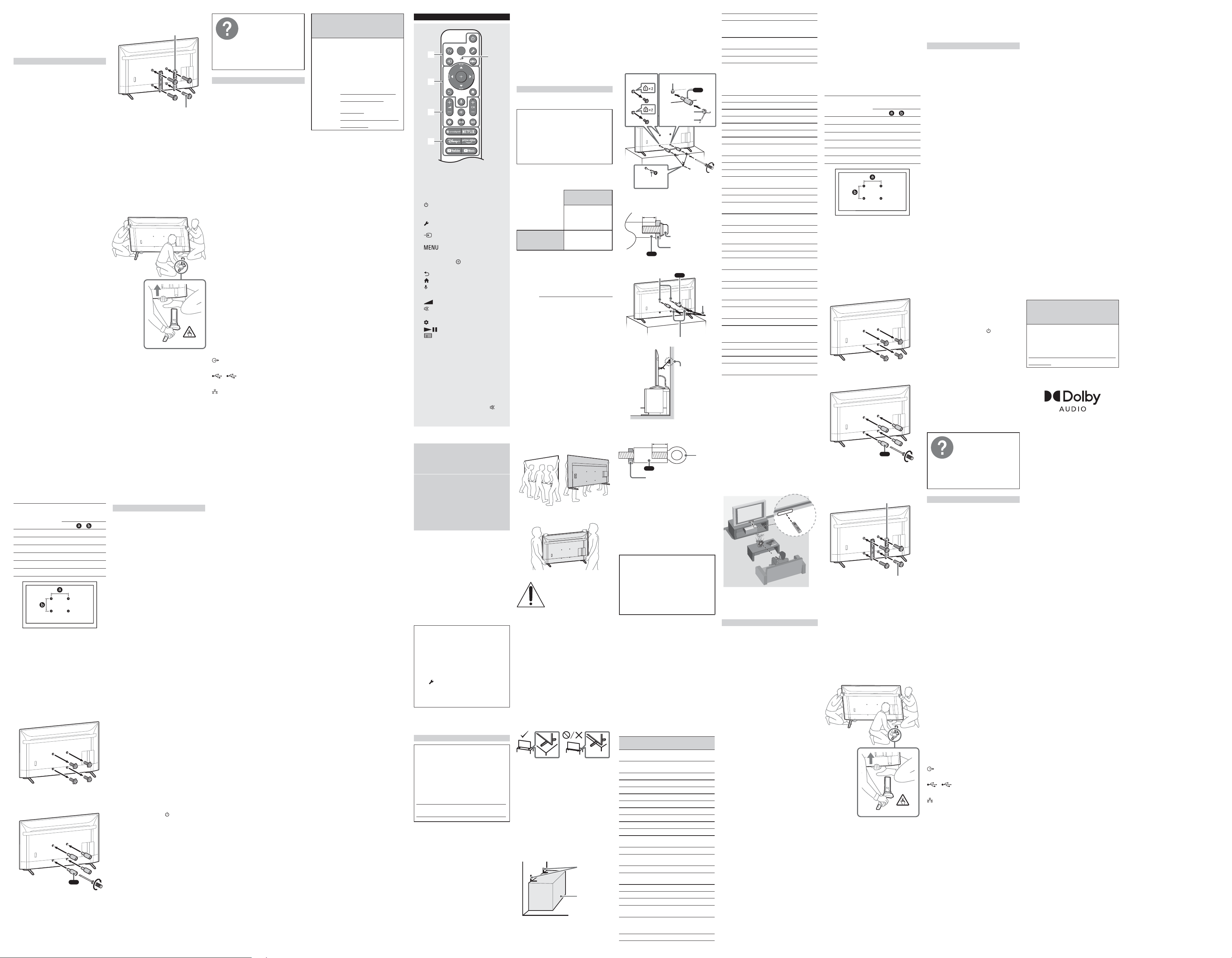
•Leslampesfluorescentespeuventperturber
lefonctionnementdevotretélécommande;
lecaséchéant,éteignezleslampes
fluorescentesdanslapièce.
•Sivouséprouvezdesdifficultésavecla
télécommande,réinsérezouremplacez
lespilesetassurez-vousqu’ellessont
correctementplacéesdanslelogement.
Fixer le téléviseur au mur
Utilisation du support de fixation murale en
option (SU-WL855 uniquement)* (non fournie)
Note au consommateur:
Pourdesraisonsdesécuritéetdeprotection
duproduit,Sonyrecommandevivementde
faireinstallervotretéléviseurpardes
détaillantsSonyoudesinstallateursagréés.
N’essayezpasdel’installervous-même.
À l’attention des détaillants Sony et des
installateurs:
Porteztoutevotreattentionàlasécuritélors
del’installation,l’entretienpériodiqueetla
vérificationdeceproduit.
Informations d’installation du support
de fixation murale
Pourlesinstructionsd’installationdusupport
defixationmurale,consultezlesinformations
d’installation(supportdefixationmurale)sur
lesiteWebd’assistanceàlaclientèledeSony
pourvotremodèledetéléviseur,àl’adresse
suivante.
https://www.sony.com/am/support
•Suivezleguided’instructionsfourni
aveclesupportdefixationmuralepour
votremodèle.Unecertaineexpertise
estnécessairepourl’installationdece
téléviseur,enparticulierencequiconcerne
lasoliditédumurenrelationaveclepoids
del’appareil.
•Sonynesauraitêtretenueresponsable
detoutdommageoudetouteblessure
découlantd’unemauvaiseutilisationou
d’uneinstallationincorrecte.
•Assurez-vousderangerlesvisnonutilisées
etlesupportdetabledansunendroitsûr
jusqu’àcequevoussoyezprêtàfixerle
supportdetable.Gardezlesvishorsdela
portéedesjeunesenfants.
Remarque
•Lisezladocumentationdesécuritéfournie
pourplusderenseignementssurl’utilisation
entoutesécurité.
*Uniquementpourcertainesrégions/pays/
modèles.
Utilisation du support de fixation murale en
option (sauf SU-WL855) (non fournie)
Lemoded’emploidecetéléviseurmontre
uniquementlesétapespermettantde
préparerletéléviseurpourunefixationmurale
avantsoninstallationaumur.
Votretéléviseurpeutêtreinstallésurunmur
avecunsupportdefixationmuraleadapté
(nonfourni).Ilsepeutquelesupportdetable
soitfixéautéléviseur,danscecas,vousdevez
d’aborddémonterlesupportdetabledu
téléviseur;reportez-vousàla«Démonterle
supportdetabledutéléviseur».
Préparezletéléviseurpourl’installationdu
supportdefixationmuraleavantd’effectuerle
raccordementdescâbles.
Pour des raisons de sécurité et de protection
du produit, Sony recommande fortement
que l’installation de votre téléviseur sur le
mur soit effectuée par un professionnel
qualifié. N’essayez pas de l’installer
vous-même.
•Suivezleguided’instructionsfourni
aveclesupportdefixationmuralepour
votremodèle.Unecertaineexpertise
estnécessairepourl’installationdece
téléviseur,enparticulierencequiconcerne
lasoliditédumurenrelationaveclepoids
del’appareil.
•Lesvispourl’installationdusupportde
fixationmuraleautéléviseurnesontpas
fournies.
•Reportez-vousautableausuivantpourle
schémadestrouspourlafixationmurale.
Nom du modèle
Schéma des trous
pour la fixation
murale
×
KD-85X77L/85X77CL400×400mm
KD-75X77L/75X77CL300×300mm
KD-65X77L/65X77CL300×300mm
KD-55X77L/55X77CL300×300mm
KD-50X77L200×200mm
KD-43X77L200×200mm
•Assurez-vousderangerlesvisnonutilisées
etlesupportdetabledansunendroitsûr
jusqu’àcequevoussoyezprêtàfixerle
supportdetable.Gardezlesvishorsdela
portéedesjeunesenfants.
Remarque
•Lisezladocumentationdesécuritéfournie
pourplusderenseignementssurl’utilisation
entoutesécurité.
•Pourdesinformationsplusdétaillées,visitez
lesiteWebduserviceàlaclientèledeSony.*
*Uniquementpourcertainesrégions/pays/
modèles.
1 Retirezlesvisàl’arrièredutéléviseur.
2 Installezl’accessoiredefixationmurale
(fourniavecletéléviseur)àl’arrièredu
téléviseur(demanièreàcequ’ilsoit
parallèleaumur).
VS
1,5N·m
{15kgf·cm}
3 Fixezlesupportdefixationmurale(non
fourni)àl’aidedesvis(nonfournies).
Supportdefixation
murale(nonfournie)
Vis
(nonfournie)
Remarque
•Sivousutilisezunevisseuseélectrique,
réglezlecoupleàenviron1,5N·m
{15kgf·cm}.
•Assurez-vousdebienserrerl’accessoirede
fixationmuralelorsdesoninstallationsurle
téléviseur.Utilisezuniquementuntournevis
platpourinstallerl’accessoiredefixation
murale.L’utilisationd’unautreoutilpourrait
entraînerunserrageexcessifdel’accessoire
defixationmuraleetendommagerle
téléviseur.
Démonter le support de table du téléviseur
1 Retirezunseulcôtédusupportdetableàla
fois.Maintenezfermementlesupportde
tableaveclesdeuxmainspendantque
l’autrepersonnesoulèveletéléviseur.
2 Répétezlesétapesprécédentesetretirez
l’autrecôtédusupportdetable.
Remarque
•Troispersonnesouplussontnécessaires
pourdémonterlesupportdetable.
•Veillezànepasutiliseruneforceexcessive
pourdémonterlesupportdetabledu
téléviseur,carletéléviseurpourraittomber
etprovoquerdesblessuresouendommager
letéléviseur.
•Lorsdelamanipulationdusupportde
table,prenezsoind’éviterd’endommager
letéléviseur.
•Soulevezletéléviseuravecprudence,carle
supportdetablequisedémontepourrait
basculeretprovoquerdesblessures.
•Lorsduretraitdusupportdetabledu
téléviseur,prenezsoind’éviterdelefaire
tomberetd’endommagerlasurfacesur
laquelleestposéletéléviseur.
•N’enlevezpaslesupportdetablepour
aucuneraisonautrequel’installationdes
accessoirescorrespondantssurletéléviseur.
•Assurez-vousqueletéléviseuresten
positionverticaleavantdel’allumer.Pour
éviterdesirrégularitésdel’uniformitéde
l’image,nepasallumerletéléviseuravec
l’écranACLverslebas.
Dépannage
Encasdeproblèmestelsque:écrannoir,
aucunson,imagefigée,aucuneréponsedu
téléviseurouréseauperdu,suivezlesétapes
suivantesdudépannagegénéral.
1 Redémarrezvotretéléviseurenappuyant
surlatouchedemarchedela
télécommandependantenvironcinq
secondes.Sélectionnez[Redémarrer]etle
téléviseurredémarre.Sileproblème
persiste,débranchezlecordon
d’alimentationCA,puisappuyezsurla
touched’alimentationsurletéléviseuret
relâchez-la.Attendezdeuxminuteset
branchezlecordond’alimentationCA.
Sinon,appuyezsurlatouched’alimentation
surletéléviseurpendantenviron
40secondesjusqu’àcequeletéléviseur
s’éteigne.
2 Reportez-vousaumenuAideci-dessous.
3 ConnectezvotretéléviseuràInternetet
effectuezunemiseàjourlogicielle.Sony
vousrecommandedemainteniràjourle
logicieldevotretéléviseur.Lesmisesàjour
logiciellespermettentd’ajouterde
nouvellesfonctionsetd’améliorerles
performances.
4 ConsultezlesiteWebd’assistancedeSony
(informationsindiquéesàlafindechaque
langue).
5 Effectuezunrétablissementdela
configurationpardéfaut.
Lorsque vous branchez le téléviseur, il
est possible que vous ne puissiez pas
allumer le téléviseur immédiatement
même si vous appuyez sur la touche de
marche de la télécommande ou du
téléviseur.
L’initialisationdusystèmeprenddutemps.
Attendezenviron1minute,puisutilisez-le
normalement.
Comment réinitialiser le téléviseur à ses
réglages d’usine
AVERTISSEMENT:Laréinitialisationeffacera
tousvosréglagespersonnalisés,ycomprisle
contrôleparental.
•Vouspouvezréinitialiserletéléviseuraux
réglagesd’usineensélectionnant[Rétablir
configurationpardéfaut].Poursavoir
commentsélectionner[Rétablir
configurationpardéfaut],reportez-vousau
Manueld’aideenligne.
•Pourforcerlerétablissementdela
configurationpardéfaut,débranchezle
cordond’alimentationCA.Appuyez
longtempssurlatouche
dutéléviseuret
branchezlecordond’alimentationCA.
•Pourplusdesécurité,assurez-vousd’effacer
touteslesdonnéesàcaractèrepersonnelet
informationsrelativesàvotrecompteavant
devousdéfairedevotretéléviseuroudele
vendreàuntiers,enprocédantàla
désynchronisation/désinscription,
déconnexionetdésactivationdetousles
servicesderéseauetenrétablissantles
paramètresd’usinedutéléviseur.
La télécommande ne fonctionne pas.
•Remplacezlespiles.
Vous avez oublié le mot de passe du
contrôle parental.
•Entrez4357commeNIP,puisentrezle
nouveauNIP.
Pourplusd’informations,
reportez-vousauManuel
d’aide.
Pourl’ouvrir,sélectionnez
[Paramètres]t[Aideet
commentaires]t[Aide]ou
sélectionnez[Aide]dansle
menud’accueil,si[Aide]
n’existepas,sélectionnez
[Toutafficher]t[Aide].
Spécifications
Système
Systèmedetéléviseur
Selonvotrepays/sélectiondezone/modèle
detéléviseur
NTSC:NationalTelevisionSystem
Committee(Comitédusystèmenationalde
télévision)
ATSC:8VSBterrestre
QAMsurlecâble:ANSI/SCTE072000
(n’inclutpaslafonctionnalitéCableCARD)
Plagesdecanaux
Selonvotrepays/sélectiondezone/modèle
detéléviseur
Analogiqueterrestre:2-69/Numérique
terrestre:2-69
Câbleanalogique:1-135/Câble
numérique:1-135
Systèmedel’écran
ÉcranACL(affichageàcristauxliquides),
RétroéclairageDEL
Puissancedeshaut-parleurs(W)
10+10
Technologiesansfil
ProtocoleIEEE802.11a/b/g/n/ac
Bluetooth®version5.0
Connecteurs d’entrée et de sortie
CABLE/ANTENNA
Borneextérieurede75ohmspourentréesRF
HDMIIN1/2/3(compatibleHDCP2.3)
Vidéo:
4096×2160p(60Hz)*
1
,4096×2160p(24Hz),
3840×2160p(60Hz)*
1
,3840×2160p(24,
30Hz),1080p(30,60Hz),1080/24p,1080i
(60Hz),720p(30,60Hz),720/24p,480p,
480i,formatsOrdinateur*
2
Audio:
EnmodeeARC(EnhancedAudioReturn
Channel)
VeuillezvousréférerauManueld’aideen
lignepourplusdedétails.
SaufmodeeARC
DeuxcanauxlinéairesPCM:32/44,1/48kHz
16/20/24bits,DolbyAudio
eARC/ARC(EnhancedAudioReturnChannel/
AudioReturnChannel)(HDMIIN3
uniquement)*
3
EnmodeeARC
VeuillezvousréférerauManueld’aideen
lignepourplusdedétails.
EnmodeARC
DeuxcanauxlinéairesPCM:48kHz16bits,
DolbyAudio,DolbyAtmos
DIGITALAUDIOOUT(OPTICAL)
Priseoptiquenumérique(Deuxcanaux
linéairesPCM:48kHz16bits,DolbyAudio)
1,2
LesportsUSB1et2prennentenchargela
connectivitéUSBhautevitesse(USB2.0)
LAN
Connecteur10BASE-T/100BASE-TX
(Selonl’environnementdefonctionnement
duréseau,lavitessedeconnexionpeut
varier.Ledébitetlaqualitéde
communicationnesontpasgarantis.)
Fichiersetformatsprisenchargedansle
réseaudomestique*
2
Alimentation et autres
Alimentation
110V−240VCA,50/60Hz(États-Unis/
Canada120VCA,60Hz)
Consommationd’énergie
Encoursd’utilisation(W)
KD-85X77L/85X77CL:342
KD-75X77L/75X77CL:315
KD-65X77L/65X77CL:226
KD-55X77L/55X77CL:191
KD-50X77L:146
KD-43X77L:125
Enveille*
4
*
5
Moinsde0,5Wpourlesmodèles120VCAet
moinsde0,5Wpourlesmodèles240VCA
Tailledel’écran(mesuréeendiagonale)
(Environ)(cm/pouces)
KD-85X77L/85X77CL:214,8/84,6(classe
85po)
KD-75X77L/75X77CL:189,3/74,5(classe
75po)
KD-65X77L/65X77CL:163,9/64,5(classe
65po)
KD-55X77L/55X77CL:138,8/54,6(classe
55po)
KD-50X77L:125,7/49,5(classe50po)
KD-43X77L:108,0/42,5(classe43po)
Résolutiondel’écran(horizontal×vertical)
(pixels)
3840×2160
Puissancedesortie
500mA(pourUSB1/2)
Autres
Accessoiresenoption
Supportdefixationmurale:SU-WL855
(saufKD-85X77L/85X77CL/50X77L/
43X77L)
Températuredeservice
0ºC–40ºC/32ºF–104ºF
*1Reportez-vousaumenuàl’écranpour
régler[FormatdusignalHDMI].
*2VeuillezvousréférerauManueld’aideen
lignepourplusdedétails.
*3Raccordezvotresystèmeaudioau
HDMIIN3pouracheminerl’audioTVvers
votresystèmeaudio.
*4Laconsommationd’énergieenmodede
veilleestobtenuelorsquelesprocessus
internesnécessairesdutéléviseursont
terminés.
*5Laconsommationd’énergieenmodede
veilleaugmentelorsquevotretéléviseurest
connectéauréseau.
Remarque
•Ladisponibilitédesaccessoiresenoption
dépenddesrégions/pays/modèlesde
téléviseurs/stocks.
•Laconceptiondesproduitsetles
caractéristiquestechniquespeuvent
changersanspréavis.
•Desabonnementsauxserviceset
applicationspeuventêtrenécessaireset
desconditionset/oufraissupplémentaires
peuvents’appliquerlorsdel’utilisationde
l’AssistantGoogle.
•VisitezlesiteWebdeSonypourplus
d’informationssurlesspécificationsdu
produit.
Information de licence
•FabriquésouslicencedeDolbyLaboratories.
Dolby,DolbyAudioetlesymboledouble-D
sontdesmarquesdecommercedeDolby
LaboratoriesLicensingCorporation.
Pour votre
commodité
Enregistrement en
ligne :
Faireensortedecompléter
l’enregistrementdevotre
téléviseur.
Canada
https://www.sony.
ca/registration
États-
Unis
https://
productregistration.
sony.com
ES
MIC
La forma del control remoto, la disposición,
la disponibilidad y la función de los botones
del control remoto pueden variar según la
región/país/modelo de TV/configuración
del televisor.*
1
(Alimentación)
TV:Muestraunalistadecanalesde
televisorocambiaaentrada.
(Configuración rápida):Muestra
Configuraciónrápida.
(Entrada):Muestraypermite
seleccionarlafuentedeentrada,etc.
(Menú de control):Despliegael
Menúdecontrol.
/ / / /
:Navegacióny
seleccióndelmenúenlapantalla.
(Atrás)
(Inicio)
(Asistente de Google / Micrófono):
UseelAsistentedeGoogle*
2
*
3
.
+ / – (Volumen)
(Silenciar)*
4
CH + / – (Canal)
(Panel):Paneldevisualización.
(Guía):Muestralaguíade
programacióndigitaldeltelevisoro
Decodificadordecable/satélite*
5
.
Botones de las aplicaciones
*1Paraotrosmodelosdecontrolremoto,
consultelaGuíadeayudaenlíneapara
másinformación.
*2Solopararegiones/países/modelos/
idiomaslimitados.
*3ElAsistentedeGooglerequiereuna
conexiónaInternet.
*4Elaccesodirectoalaaccesibilidadestará
disponiblemanteniendopulsado
(Silenciar).
*5Serequiereelajustede[Configuraciónde
decodificadordecable/satélite].
Acerca de los manuales
Guardelosmanualesparafuturasconsultas.
Manual impreso
Guíadeconfiguración(enlapartesuperior
deesteproducto)/Guíadereferencia(este
manual)/Folletodeinstruccionesde
seguridad.
Guía de ayuda (Manual en pantalla)
•Paraabrir,seleccione[Configuración]t
[AyudayComentarios]t[Ayuda]o
seleccione[Ayuda]enelmenúInicio,si
[Ayuda]noexiste,seleccione[Vertodo]t
[Ayuda].
•PuedeconsultarlaGuíadeayudadesdesu
smartphone(visiteelsitioweb
proporcionadoenlaportadadelaGuíade
referencia).
Leayentiendaelcontenidodeestemanual
antesdeoperaresteproducto.
Nota
•Lasinstruccionessobre“InstalacióndelTV
enlapared”seincluyenconelmanualde
instruccionesdeesteTV.
•Paraobtenerinformaciónadicionalde
seguridad,consulteladocumentaciónde
seguridadqueseproporciona.
•Lasimágeneseilustracionesusadasen
losmanualessuministradossonsolode
referenciaypuedendiferirdelproductoreal.
•Losmenúsdeconfiguraciónestánsujetos
acambiossinprevioavisodebidoalas
actualizacionesdesoftware.Paraobtenerla
informaciónmásreciente,visiteelsitiowebde
soportedeSony.
IMPORTANTE - Lea el Acuerdo de licencia
de software para el usuario final antes de
utilizar su producto Sony.Elusodel
productoindicasuaceptacióndeeste
Acuerdodelicenciadesoftwareparael
usuariofinal.Elacuerdodelicenciade
softwareentreustedySonyseencuentra
disponibleenlíneaenelsitiowebdeSony
(https://www.sony.net/tv-software-
licenses2/)oenlapantalladesuproducto.
Pulse
(Configuraciónrápida)enelcontrol
remotoyseleccione[Configuración]t
[Sistema]t[Acercade]t[Información
legal]t[Acuerdodelicenciadeusuario
final].
Ubicación de la etiqueta de identificación
LasetiquetasqueidentificanelNo.demodeloy
lasCaracterísticasEléctricasseencuentranenla
parteposteriordelTV.
AVISO IMPORTANTE
Registro de propiedad
Elmodeloylosnúmerosdeserieestán
ubicadosenelcostadoy/oenlaparte
posteriordeltelevisor.Anoteestosnúmeros
enlosespaciosqueseproporcionana
continuación.Refiéraseaelloscuando
contacteconsudistribuidorSonyacercade
estetelevisor.
Nombredemodelo
N°deserie
AVISO IMPORTANTE PARA MÉXICO
Laoperacióndeesteequipoestásujetaalas
siguientesdoscondiciones:(1)esposibleque
esteequipoodispositivonocauseinterferencia
perjudicialy(2)esteequipoodispositivodebe
aceptarcualquierinterferencia,incluyendola
quepuedacausarsuoperaciónnodeseada.
Paraconsultarlainformaciónrelacionadaal
númerodelcertificado,refiérasealaetiqueta
delempaquey/odelproducto.
Nota:
Esteproductoutilizaelsiguientemódulopara
funcionalidadesinalámbricas:
Modelo:WBUR56
Marca:FOXCONN
WLAN:
2,4GHz(2,4000GHz–2,4835GHz)
5GHz(5,150GHz–5,850GHz)
Bluetooth®:
2,4GHz(2,4000GHz–2,4835GHz)
Informacióndelcontrolremotoconcomandode
vozincluidoconesteproducto:
Modelo:RMF-TX811U/RMF-TX810U*
Marca:Sony
Nota:Utilizaelsiguientedispositivopara
funcionalidadesinalámbricas:
Modelo:UE878
Marca:UEI
*Paraverelnombredelmodelodelcontrol
remoto,abralacubiertadelcontrolremotoy
consultelaetiquetadelmismo.
Información sobre seguridad
Aviso a los clientes en los Estados Unidos de
América
Declaración de conformidad del proveedor
Nombredelamarca:SONY
Modelo:KD-85X77L/KD-85X77CL/
KD-75X77L/KD-75X77CL/KD-65X77L/
KD-65X77CL/KD-55X77L/KD-55X77CL/
KD-50X77L/KD-43X77L
Parteresponsable:SonyElectronicsInc.
Dirección:16535ViaEsprillo,SanDiego,
CA92127EE.UU.
Teléfono:858-942-2230
Información de compatibilidad del soporte de
montaje de mural
Utiliceelsiguientesoportedemontajemural
SonyespecificadoparasumodelodeTV.
Nºdemodelodel
TVSony
KD-75X77L/
75X77CL/65X77L/
65X77CL/55X77L/
55X77CL
Nºdemodelodel
soportedemontaje
muralSony
SU-WL855*
1
Siseutilizaconotrossoportesdemontaje
mural*
2
podríaquedarinestableyprovocar
dañosalapropiedadolesiones.
*1Solopararegiones/países/modelos
limitados.
*2Paraobtenerinstruccionesacercadelusodel
soportedemontajemuralparasumodelode
TVvisitehttps://www.sony.com/am/support
ydescargue“Soportedemontajemural”.
Información para clientes
Paralainstalacióndeltelevisorespecificado
serequierenconocimientosyexperiencia
suficientes.Asegúresedeobtenerservicios
deinstalacióndeundistribuidorocontratista
autorizadoporSonyydeprestarespecial
atenciónalaseguridaddurantelainstalación.
Antes de configurar su TV
AlgunosmodelosdeTVseentreganconun
soportedesobremesadesmontabledemodo
quepuedainstalarelTVenlapared.Consultela
“InstalacióndelTVenlapared”sideseamontar
suTVenlapared.SidecidenomontarelTV
enlapared,tendráqueinstalarelsoportede
sobremesa(consultelaGuíadeconfiguración).
TengaencuentalosiguientealinstalarelTV:
•Desconectetodosloscablesparatransportar
elTV.
•Paratrasladaruntelevisordegrantamaño
senecesitandosomáspersonas(treso
máspersonasparauntelevisorde214,8cm
(85pulgadas)omás).
•Esmuyimportantelacolocacióncorrectade
lasmanosparatrasladarelTV,porseguridady
paraevitarcualquierdaño.
•CuandomanejeomonteelTV,noacuesteel
TV(soloparaelmodelodeTVaplicable).
KD-85X77L / 85X77CL
KD-75X77L / 75X77CL / 65X77L / 65X77CL /
55X77L / 55X77CL / 50X77L / 43X77L
Fijación del TV
Sonyrecomiendatomar
medidasespecialesparaevitar
queeltelevisorsecaiga.
Lostelevisoresquenoestán
instaladosdemanerasegura
puedencaerseyprovocar
dañosalapropiedad,causar
lesionescorporalesoinclusolamuerte.
Medidas para evitar que se caiga el TV
•InstaleelTVdemodoquequedefijoala
paredobase.
•Nopermitaquelosniñosjueguenose
cuelguendelmuebleodelTV.
•EvitecolocarocolgarobjetosenelTV.
•NoinstalenuncaelTVen:
—superficiesresbaladizas,inestableso
irregulares.
—mueblesquepuedenutilizarsefácilmente
comoescalones,comounacómoda.
•InstaleelTVdondenopuedandeslizarlo,
empujarloohacerlocaer.
•Instaleeltelevisordemaneraqueelsoporte
desobremesadeltelevisornosobresalga
delasuperficiedelamesa.Sielsoportede
sobremesasobresaledelasuperficiedela
mesa,estopodriahacerqueeltelevisorse
caiga,vuelqueyprovoquelesionespersonales
odañosenelTV.
•Coloquetodosloscablesdealimentacióncay
cablesdeconexióndemodoquenoesténal
alcancedelosniños.
Medidas recomendadas para la instalación del TV
Presteatenciónalassiguientesmedidasde
seguridadcuandoinstaleunTVenelsoportede
TV(nosuministrado).
1 Fijelabasedesoportedondeseapoyaráel
TV.
Asegúresedequelabasedesoportetolere
correctamenteelpesodelTV.Utilicedos
soportesenángulo(nosuministrados)para
fijarlabasedesoporte.Paracadasoporteen
ángulo,utiliceelherrajeadecuadoafinde:
•Sujetarunladodelsoporteenánguloala
pared.
•Sujetarelotroladoalabasedesoporte.
Soportesen
ángulo(no
suministrados)
Basede
soporte
2 FijeelTValabasedesoporte.
Utilicelosherrajesopcionalesquese
enumeranacontinuación(nosuministrados):
•EltornillotipoM6(atornilladoalacubierta
traseradelTV).
•Untornillooelementosimilar(sujetadoala
basedesoportedelTV).
•Cuerdaocadena(losuficientementefuerte
paratolerarelpesodelTV).Asegúresede
quenohayademasiadalongitudsobrante
decuerdaocadena.
1 2
4
3
VS
(suministrado)
Orificioparatornilloen
laparteposterior
TornillotipoM6
(nosuministrado)
Cuerdaocadena
(nosuministrada)
Tornillo(no
suministrado)
1,5N·m
{15kgf·cm}
LalongituddeltornilloM6difieresegúnel
grosordecuerdaocadenautilizada.Consulte
lasiguienteilustración.
Cuerdaocadena
10−12(mm)
Tornillo(M6)
VS
3 SujeteelTValaparedmediantepernos,
tornillosdeanclajeycadena(osoga).
VS
Orificiosparamontaje
depared
ArmellasroscadasM6(nosuministrados)
Cuerdao
cadena(no
suminis-
trada)
(suministrado)
Anclaje(no
suministrado)
Observelasiguienteilustraciónparasaberla
longituddelasarmellasroscadasM6.
VS
10−12(mm)
Armellas
roscadas
M6
ParteposteriordelTV
Nota
•JuntoconelTVseincluyentornillosquese
encuentraninstaladosenlaparteposterior
delTVdependiendodelmodelodeTV.(Están
fijadosalosorificiosdelostornillosparael
montajemural.)Asegúresedequitarlosdos
tornillossuperioresantesdeanclarelTVen
lapared.
•FijarelTValsoportesinsujetarcorrectamente
elTVnielsoportealaparednoesgarantía
suficienteparaevitarqueelTVsecaiga.Para
unamayorprotección,sigalastresmedidas
recomendadasanteriormente.
La experiencia de TV BRAVIA® 4K
¡GraciasporelegiraSony!SunuevoTV
BRAVIA®leabrelapuertahaciala“Experiencia
deTV4K”.Estedocumentoleayudaráa
aprovecharsuTValmáximo.RegistresuTV
en:
https://www.sony-latin.com/registro
EsteTVmuestratodaslasseñalesdeentrada
devideoenunaresoluciónde3840puntos×
2160líneas.
Nota
•ParalosformatosdePCcompatibles,consulte
laGuíadeayudaenlínea.
NOT FOR CANADIAN CUSTOMERS. NOT APPLICABLE
IN CANADA, INCLUDING IN THE PROVINCE OF
QUEBEC.
NE S’ADRESSE PAS AUX CONSOMMATEURS
CANADIENS. NON APPLICABLE AU CANADA, Y
COMPRIS LA PROVINCE DE QUÉBEC.
NO ESTÁ DESTINADO PARA CONSUMIDORES
CANADIENSES. NO APLICABLE EN CANADÁ,
INCLUIDA LA PROVINCIA DE QUEBEC.
Referenciadefuncionesy
traducciones
Enestemanualseincluyenciertostérminosen
inglés.Acontinuaciónencontrarásutraducción
yexplicación.
Texto en el
manual
Español
4KImágenesde3840×2160
píxeles
8VSBModulacióndebandalateral
Nivel-8
APPS Aplicaciones
ARCCanaldeRetornodeAudio
ATSCMarcacomercialregistrada*
1
AUDIOOUTSalidadeaudio
AVAudio/Video
BACKVolver
Blu-rayDiscMarcacomercialregistrada*
2
BRAVIASyncMarcacomercialregistrada*
3
caCorrientealterna
CABLE/
ANTENNA
Cable/Antena
CableCARDMarcacomercial*
4
CENTER
SPEAKERIN
Entradadelaltavozcentral
CH+/–Canal+/–
DIGITAL
AUDIOOUT
Salidadeaudiodigital
Disney+DisneyPlus*
5
DISPLAYMostrar
DVRGrabadordevideodigital
eARCCanalderetornodeaudio
mejorado
FCCComisiónFederalde
ComunicacionesdeEstados
UnidosdeAmérica
GUIDEGuíadeprogramación
HDAltadefinición
HDCPProteccióndecontenido
digitaldeanchodebanda
alto
HDMIInterfazmultimediadealta
definición
HELPAyuda
HOMEInicio
ICIdentificadordeIndustry
Canada(departamentodel
gobiernocanadiense),indica
queeldispositivocumple
conciertosestándaresde
radioestablecidos
IN,INPUTEntrada
InternetRedMundialdeInformación
IRInfrarrojo
JUMPAlternadordecanales
L/RIzquierda/Derecha
LANReddeárealocal
LCDPantalladecristallíquido
LE-LANExcentodelicencia-Redde
árealocal
LEDDiodoemisordeluz
MICMicrófono
MUTESilenciador
NTSCComiténacionaldesistema
detelevisión
OPTICALÓptica
PCComputadorapersonal
PCMModulaciónporcodificación
depulsos
PINCódigodeidentificación
Personal
PrimeVideoMarcaregistrada*
5
QAMModulacióndelaamplitud
encuadratura
RECGrabar
REMOTEControlremoto
REMOTEIRINEntradadelcontrolremoto
infrarrojo
RSS EstándardeEspecificaciones
deRadioenCanadá
S-CENTEROUTSalidadelaltavozcentral
S-CENTER
SPEAKERIN
Entradadelaltavozcentral
SmartphoneTeléfonointeligente
SUBTITLE/CCSubtítulos/Desplieguedel
audioenformadetexto
TVTelevisor
TVNEXTGENFormatodeseñalde
televisiónquecumplecon
ATSC3.0
USBPuertoSerialUniversal
VIDEOINEntradadevídeo
VOL+/–Volumen+/–
WLANReddeárealocal
inálambrica
*1ComitédeSistemasdeTelevisiónAvanzada.
*2Medioópticoparaelalmacenamientode
datosdesuperaltaresolución.
*3Tecnologíaquepermitecomunicaciónentre
productosSonypormediodeunaconexión
deHDMI.
*4Proporcionaalosusuariosdecableacceso
acanalescodificadosdigitalmentesinla
necesidaddeusarunreceptordetelevisión
digital.
*5Esunserviciodesuscripcióndetransmisión
devídeoenlínea.Serequiereconexión
aInternet.Esposiblequeelserviciode
transmisiónrequieraunasuscripcióndepago
ynoestédisponibleentodoslospaíses.
Algunas indicaciones para el Control remoto IR
•Apunteelcontrolremotodirectamentehacia
elsensorinfrarrojoquetieneelTV.
•Asegúresedequeningúnobjetoobstruya
lacomunicaciónentreelcontrolremotoyel
sensorinfrarrojodelTV.
•Laslámparasfluorescentespuedeninterferir
conelfuncionamientodelcontrolremoto;se
recomiendaapagarlas.
•Sitieneproblemasconelcontrolremoto,
vuelvaacolocarlasbateríasoreemplácelas.
Instalación del TV en la pared
Uso del soporte de montaje mural (solo
SU-WL855)* (no suministrado)
Información para clientes:
Pormotivosdeseguridadyprotecciondel
producto,Sonyrecomiendaquelainstalacion
deltelevisorenlaparedsearealizadapor
profesionalescalificados.Notratedeinstalarlo
ustedmismo.
Información para distribuidores de Sony y
contratistas:
Presteatenciónalaseguridaddurantela
instalación,elmantenimientoperiódicoyla
inspeccióndeesteproducto.
Información para la instalación del
soporte de montaje mural
Paraobtenerinstruccionesparalainstalación
delsoportedemontajemural,consultela
informacióndeinstalación(Soportedemontaje
mural)correspondienteasumodelodetelevisor
enelSitiowebdeatenciónalclientedeSony.
https://www.sony.com/am/support
•Sigaelmanualdeinstrucciones
proporcionadoconelsoportedemontaje
muralparasumodelo.Serequiereexperiencia
suficienteenlainstalacióndeesteTV,
especialmenteparadeterminarlafortalezade
laparedquesoportaráelpeso.
•Sonynosehaceresponsablepordañoso
lesionescausadosporunamanipulación
indebidaounainstalaciónincorrecta.
•Guardelostornillosnoutilizadosyelsoporte
desobremesaenunlugarsegurohastaque
estélistoparafijarlo.Mantengalostornillos
fueradelalcancedelosniñospequeños.
Nota
•Paraobtenerinformaciónadicionalde
seguridad,consulteladocumentaciónde
seguridadqueseproporciona.
*Solopararegiones/países/modeloslimitados.
Uso del soporte de montaje mural (excepto
SU-WL855) (no suministrado)
ElmanualdeinstruccionesdelTVsolo
proporcionalospasosparaprepararelTVpara
lainstalaciónenlaparedantesdequeseinstale
enlapared.
SuTVsepuedemontarenlaparedconun
soportedemontajemuraladecuado(no
suministrado).ParaalgunosmodelosdeTVde
mayortamaño,esnecesariodesmontarel
soportedesobremesa;consultela
“Desinstalacióndelsoportedesobremesadel
TV”.
PrepareelTVparaelsoportedemontajemural
antesdeconectarloscables.
Por motivos de seguridad y protección del
producto, Sony recomienda que la instalación
del televisor en la pared sea realizada por
profesionales calificados. No trate de
instalarlo usted mismo.
•Sigaelmanualdeinstrucciones
proporcionadoconelsoportedemontaje
muralparasumodelo.Serequiereexperiencia
suficienteenlainstalacióndeesteTV,
especialmenteparadeterminarlafortalezade
laparedquesoportaráelpeso.
•Nosesuministranlostornillosparainstalarel
soportedemontajemuralalTV.
•Consultelasiguientetablaparaconocerel
patróndeorificiosdemontajemural.
Nombre de modelo
Patrón de orificios
de montaje mural
×
KD-85X77L/85X77CL400×400mm
KD-75X77L/75X77CL300×300mm
KD-65X77L/65X77CL300×300mm
KD-55X77L/55X77CL300×300mm
KD-50X77L200×200mm
KD-43X77L200×200mm
•Guardelostornillosnoutilizadosyelsoporte
desobremesaenunlugarsegurohastaque
estélistoparafijarlo.Mantengalostornillos
fueradelalcancedelosniñospequeños.
Nota
•Paraobtenerinformaciónadicionalde
seguridad,consulteladocumentaciónde
seguridadqueseproporciona.
•Paraobtenerinformaciónmásdetallada,visite
elsitiowebdeCentrodeasistenciadeSony.*
*Solopararegiones/países/modeloslimitados.
1 RetirelostornillosdelapartetraseradelTV.
2 Coloquelasujecióndelsoportedemontaje
mural(provistoconelTV)alaparteposterior
delTV(paraqueestéparaleloalapared).
VS
1,5N·m
{15kgf·cm}
3 Fijeelsoportedemontajemural(no
suministrado)utilizandolostornillos(no
suministrados).
Soportedemontaje
mural(nosuministrado)
Tornillo
(nosuministrado)
Nota
•Siutilizaundestornilladoreléctrico,ajusteel
pardeaprieteaaproximadamente1,5N·m
{15kgf·cm}.
•Asegúresedesujetarelsoportedemontaje
muralalfijarloalTV.Utilicesolamenteun
destornilladordecabezaplanaparainstalarla
sujecióndelsoportedemontajemural.Eluso
deotraherramientapuedecausarelexceso
deajustedelpardeaprieteenlasujecióndel
soportedemontajemuralydañarelTV.
Desinstalación del soporte de sobremesa del TV
1 Retireunladodelsoportedesobremesaala
vez.Sostengafirmementeelsoportede
sobremesaconambasmanosydeforma
seguramientrasotraspersonaslevantanel
TV.
2 Repitaelpasoanterioryretireelotroladodel
soportedesobremesa.
Nota
•Serequierentresomáspersonaspara
desmontarelsoportedesobremesa.
•Tengacuidadodenoaplicardemasiada
fuerzaaldesmontarelsoportedesobremesa
delTVyaquepuedecausarqueelTVsecaiga
ycauselesionespersonalesodañosfísicos
alTV.
•Tengacuidadoalmanipularelsoportede
sobremesaparaevitardañosenelTV.
•TengacuidadoallevantarelTVyaqueel
soportedesobremesadesmontadosepuede
caerycausarlesionespersonales.
•Tengacuidadoalretirarelsoportede
sobremesadelTVparaevitarquesecaigay
dañelasuperficieenlaqueseapoyaelTV.
•Noquiteelsoportedesobremesaporningún
motivo,exceptoparainstalarlosaccesorios
adicionalesparasuTV.
•AsegúresedequeelTVestéenlaposición
verticalantesdeencenderlo.Paraevitar
deformacionesdelaimagennoencienda
elTVconlapantallaLCDapuntandohacia
abajo.
Solución de problemas
Paralasolucióndeproblemasengeneral
como:pantallanegra,ausenciadesonido,
imagencongelada,elTVnorespondeose
pierdelared,realicelossiguientespasos.
1 VuelvaaencenderelTVpulsandoelbotón
deencendidoenelcontrolremotodurante
aproximadamentecincosegundos.
Seleccione[Reiniciar]yelTVsereiniciará.Si
elTVnoserecupera,intentedesenchufarel
cabledealimentacióndeca.Luegopulseel
botóndeencendidoenelTVysuéltelo.
Esperedurantedosminutos,yenchufeel
cabledealimentacióndeca.
O,pulseelbotóndeencendidoenelTV
duranteaproximadamente40segundos
hastaqueelTVseapague.
2 ConsulteelmenúAyudaquesemuestraa
continuación.
3 ConecteelTVaInternetyrealiceuna
actualizacióndesoftware.Sony
recomiendaquemantengaactualizadoel
softwaredelTV.Lasactualizacionesde
softwareproporcionannuevasfuncionesy
mejorasderendimiento.
4 VisiteelsitiowebdesoportedeSony
(informaciónsuministradaalfinalencada
idioma).
5 Realiceelrestablecimientodela
configuracióndefábrica.
Al conectar el TV, es posible que el TV no
pueda encenderse durante un cierto
tiempo aunque pulse el botón de
encendido del control remoto o del TV.
Elsistematardauntiempoeninicializarse.
Espereaproximadamenteunminutoyvuelva
aintentarlo.
Cómo restablecer el TV a los ajustes de
fábrica
ADVERTENCIA:Elrestablecimientoborrará
todassusconfiguracionespersonalizadas
incluyendolaconfiguracióndecontrol
parental.
•PuederestablecerelTValosajustesde
fábricaalseleccionar[Restablecerconfig.de
fábrica].Cómoseleccionar[Restablecer
config.defábrica],consultelaGuíadeayuda
enlínea.
•Paraforzarelrestablecimientodela
configuracióndefábrica,desenchufeel
cabledealimentacióndeca.Pulsey
mantengapulsadoelbotón
enelTV,
luegoenchufeelcabledealimentaciónde
ca.
•Parapropósitosdeseguridad,asegúresede
borrartodalainformaciónpersonalyde
cuentasantesdedesechar,vendero
entregarsuTVaotrapersonamediante:la
desvinculación/anulacióndelregistro,
desconexióndelasesiónydesactivaciónde
todoslosserviciosderedasícomotambién
elrestablecimientodelmododefábricadel
TV.
El control remoto no funciona.
•Reemplacelasbaterías.
Se olvidó la contraseña de control
parental.
•Ingrese4357comoPINeingreseelnuevo
PIN.
Paraobtenermás
información,consultela
Guíadeayuda.
Paraabrir,seleccione
[Configuración]t[Ayuday
Comentarios]t[Ayuda]o
seleccione[Ayuda]enel
menúInicio,si[Ayuda]no
existe,seleccione[Vertodo]
t[Ayuda].
Especificaciones
Sistema
SistemadeTV
Segúnlaseleccióndepaís/área/modelodeTV
NTSC:Comitédelsistemadetelevisión
nacional
ATSC:8VSBterrestre
QAMporcable:ANSI/SCTE072000(No
incluyelafuncionalidadCableCARD)
Coberturadecanales
Segúnlaseleccióndepaís/área/modelodeTV
Terrestreanalógico:2-69/Terrestredigital:
2-69
Cableanalógico:1-135/Cabledigital:1-135
Sistemadelpanel
PanelLCD(pantalladecristallíquido),con
retroiluminaciónLED
Salidadebocinas(W)
10+10
Tecnologíainalámbrica
ProtocoloIEEE802.11a/b/g/n/ac
Bluetooth®versión5.0
Tomas de entrada/salida
CABLE/ANTENNA(Cable/Antena)
Terminalexternade75ohmsparaentrada
deseñalderadiofrecuencia
HDMIIN1/2/3(EntradaHDMI1/2/3)
(CompatibleconHDCP2.3)
Video:
4096×2160p(60Hz)*
1
,4096×2160p
(24Hz),3840×2160p(60Hz)*
1
,3840×
2160p(24,30Hz),1080p(30,60Hz),
1080/24p,1080i(60Hz),720p(30,60Hz),
720/24p,480p,480i,FormatosdePC*
2
Audio:
EnelmodoeARC(Canalderetornodeaudio
mejorado)
ConsultelaGuíadeayudaenlíneaparamás
información.
ExceptoelmodoeARC
PCMlinealdedoscanales:32/44,1/48kHz
16/20/24bits,DolbyAudio
eARC/ARC(Canalderetornodeaudio
mejorado/Canalderetornodeaudio)(solo
HDMIIN3)*
3
EnelmodoeARC
ConsultelaGuíadeayudaenlíneaparamás
información.
EnelmodoARC
PCMlinealdedoscanales:48kHz16bits,
DolbyAudio,DolbyAtmos
DIGITALAUDIOOUT(OPTICAL)
Tomaópticadigital(PCMlinealdedos
canales:48kHz16bits,DolbyAudio)
1,2
LospuertosUSB1y2soncompatiblescon
USBdealtavelocidad(USB2.0)
LAN
Conector10BASE-T/100BASE-TX
(Segúnelentornodefuncionamientodela
red,lavelocidaddelaconexiónpuedeser
diferente.Nosegarantizanlavelocidadde
comunicaciónylacalidad.)
Archivosyformatoscompatiblesconlared
doméstica*
2
Alimentación y otras especificaciones
Requisitosdealimentación
ca110V−240V50/60Hz(EE.UU./Canadá
ca120V60Hz)
Consumodepotencia
Enuso(W)
KD-85X77L/85X77CL:342
KD-75X77L/75X77CL:315
KD-65X77L/65X77CL:226
KD-55X77L/55X77CL:191
KD-50X77L:146
KD-43X77L:125
Enespera*
4
*
5
Menosde0,5Wconca120Vymenosde
0,5Wconca240V
Tamañodepantalla(medidodiagonalmente)
(Aprox.)(cm/pulgadas)
KD-85X77L/85X77CL:214,8/84,6(Clase85")
KD-75X77L/75X77CL:189,3/74,5(Clase75")
KD-65X77L/65X77CL:163,9/64,5(Clase65")
KD-55X77L/55X77CL:138,8/54,6(Clase55")
KD-50X77L:125,7/49,5(Clase50")
KD-43X77L:108,0/42,5(Clase43")
Resolucióndelmonitor(horizontal×vertical)
(píxeles)
3840×2160
Clasificacióndesalida
500mA(paraUSB1/2)
Otros
Accesoriosopcionales
Soportedemontajemural:SU-WL855
(exceptoKD-85X77L/85X77CL/50X77L/
43X77L)
Temperaturadefuncionamiento
0ºC–40ºC/32ºF–104ºF
*1Consulteelmenúenlapantallaparaajustar
[FormatodeseñalHDMI].
*2ConsultelaGuíadeayudaenlíneapara
másinformación.
*3ConecteelsistemadeaudioaHDMIIN3
paraconectarelaudiodelTValsistema
deaudio.
*4Laenergíaenmododeesperaespecificada
sealcanzadespuésdequeelTVterminalos
procesosinternosnecesarios.
*5Elconsumodepotenciaenesperase
incrementarácuandosuTVestéconectado
alared.
Nota
•Ladisponibilidaddelosaccesorios
opcionalesdependerádelospaíses,
regiones,modelodelTVydelasexistencias.
•Eldiseñoylasespecificacionesestánsujetos
acambiossinprevioaviso.
•ElusodelAsistentedeGooglepodría
requerirsuscripcionesaserviciosy
aplicacionesyestarsujetoatérminos,
condicionesy/ocargosadicionales.
•VisiteelsitiowebdeSonyparaobtenermás
informaciónsobrelasespecificacionesdel
producto.
Información de licencias
•FabricadoconlaautorizacióndeDolby
Laboratories.
Dolby,DolbyAudioyelsímbolodedoble
DsonmarcascomercialesdeDolby
LaboratoriesLicensingCorporation.
Para su
conveniencia
Registro en línea:
Registresutelevisoren:
https://www.sony-latin.com/
registro