B
Read all instructions before using this storage device
WARNING
See reverse side for more information.
01/15
BC414
D
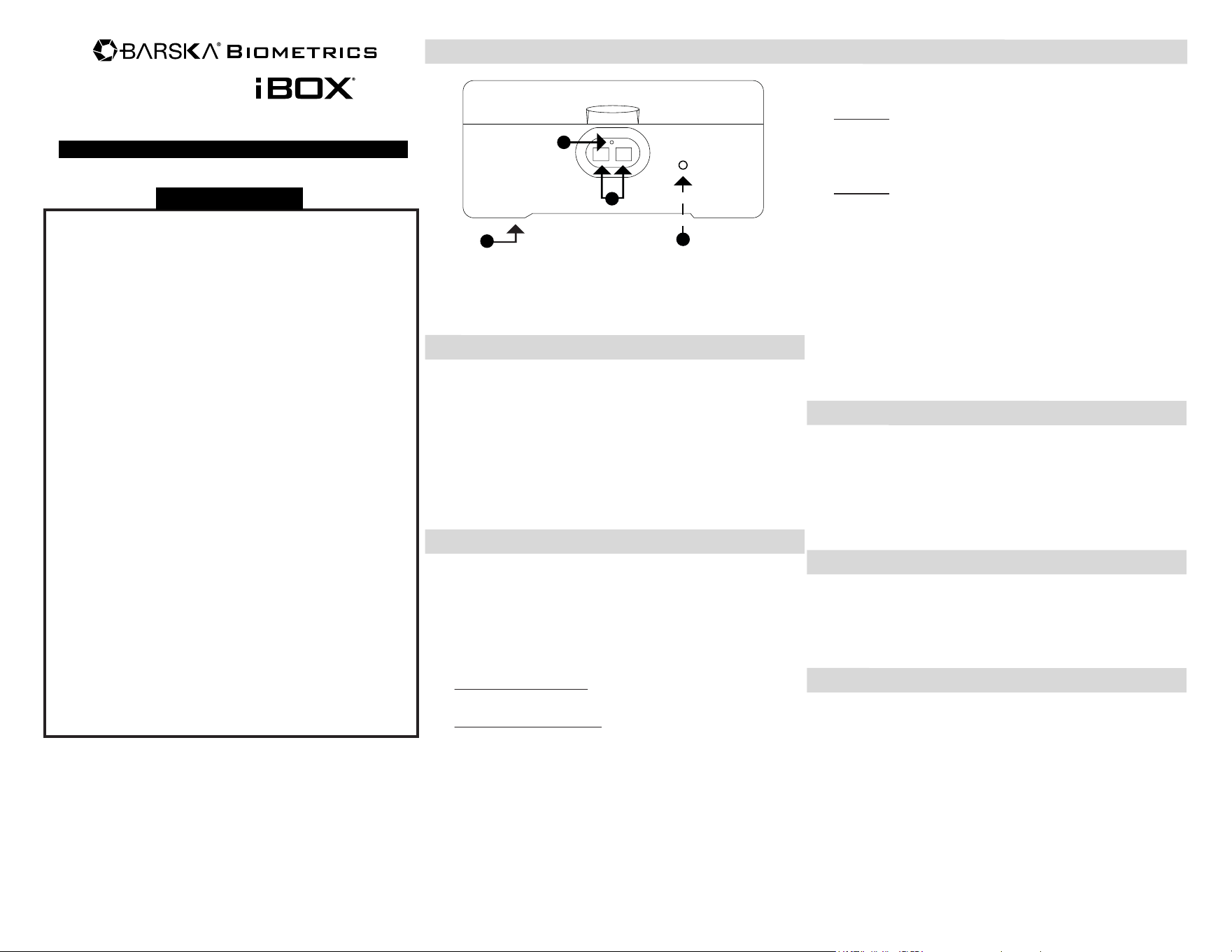
A. Battery Compartment
(Underneath)
B. Indicator Light
- New storage device is in factory default mode, ANY
fingerprint can open the storage device. Only successful
registration of fingerprint can terminate Factory
Default Mode.
- Default mode will allow any finger to access the storage
device but when accessing the storage device the red
indicator light will flash and several beeps will be heard. If
this happens storage device is still in factory default
mode; please register a fingerprint.
- Register at least two different fingerprints and test a few
times before closing the storage device.
- Storage Device must remain upright when operating.
Failure to do so might cause bolts to get stuck even with
accepted fingerprint.
- Avoid leaving storage device door open and unattended it
will allow unauthorized individuals to add their fingerprints
and/or reprogram the storage device, gaining full access
to the storage device and the contents.
- Test the security and performance of the storage device
every 6 months.
- Operation Temperature: 32˚F – 113˚F (0˚C – 45˚C)
Operation Humidity: 45% – 85% RH
- Only use Alkaline batteries. Do not mix old and
new batteries.
C. Fingerprint Scanners
D. Initialization Button
(Inside)
A
INSTALL BATTERIES
The Battery Compartment is located underneath the storage
device.
1. Remove Battery Compartment Cover by loosening the two
screws that are securing it.
2. Insert 4 AA Alkaline batteries and restore battery cover
and screws.
NOTE: Do not mix old and new batteries.
OPERATIONAL INFORMATION
- Initialization Button is located on the inside of the
storage device.
- Storage device retains 2 master fingerprints and
118 user fingerprints.
- Master fingerprint is required to register additional
user fingerprints.
- Successful Registration: 2 beeps will be heard and green
indicator light flashes.
- Unsuccessful Registration: 2 quick beeps are heard and
red indicator light flashes then registration has failed; please
repeat registration process.
MASTER FINGERPRINT REGISTRATION
There are 2 methods to register Master Fingerprints.
Method 1
Place both desired master fingers on the Fingerprint Scanners
simultaneously and hold until 2 beeps are heard and green
Indicator Light flashes.
Method 2
1. Register 1st master fingerprint:
With a small pin like tool press Initialization Button, place
desired master finger on Fingerprint Scanner that lights up
and hold until 2 beeps are heard and green Indicator
Light flashes.
2. Register 2nd master fingerprint:
With a small pin like tool press Initialization Button, place
1st master finger on the Fingerprint Scanner that lights up,
1 beep will be heard, then place desired 2nd master finger
on Fingerprint Scanner and hold until 2 beeps are heard
and green Indicator Light flashes.
TEST MASTER FINGERPRINTS
With the storage device closed, place a registered master finger
on Fingerprint Scanner. Storage device should open and green
Indicator Light will flash. Test both master fingerprints.
If storage device opens and red Indicator Light is seen then
storage device is still in factory default mode. Please follow
steps under MASTER FINGERPRINT
REGISTRATION again.
USER FINGERPRINT REGISTRATION
With a small pin like tool press Initialization Button and place a
master finger on the Fingerprint Scanner that lights up, 1 beep
will be heard, then place desired user finger on Fingerprint
Scanner and hold until 2 beeps are heard and green Indicator
Light flashes.
TEST REGISTERED USER FINGERPRINT
With the storage device closed, place a registered finger on
Fingerprint Scanner. Storage device should open and green
Indicator Light will flash. If storage device does not open
registration failed, please follow steps under USER
FINGERPRINT REGISTRATION again.
C
Dual Biometric Secure Storage Device
User Manual for
PARTS OF THE STORAGE DEVICE
© 2014 BARSKA®
855 Towne Center Drive | Pomona, CA 91767
Storage Device
1 YEAR LIMITED WARRANTY
BC408 11/14
(t) 888.666.6769 | (f) 909.445.8169 | www.barska.com
BARSKA warrants this new device to be free of original defects in
material and/or workmanship under normal use for a period of twelve
(12) months from the date product is received by purchaser. This
warranty does not include damage caused by improper installation or
maintenance. Damage from misuse, abuse, accident (such as
dropping), normal wear and tear, fire, flood, or acts of nature.
Damage from service or repairs other than those performed by
BARSKA. Labor, cost and shipping charges for the removal and
replacement of defective parts beyond the initial twelve-month
warranty period. All transportation and shipping charges. Removing
or altering the seal under any circumstances will automatically void
the warranty.
This warranty is limited to original purchaser and is not transferable.
This warranty applies only to products purchased in the
United States.
Please email [email protected] or call 1.888.666.6769 for Return
Merchandise Number (RMA#) before any returns. The RMA number
must appear on the outside of the shipping package. Product must
be packed carefully and sturdily in its original packaging to prevent
damage in transit and returned freight pre-paid to:
BARSKA OPTICS
Repair Department
855 Towne Center Drive
Pomona, CA 91767
Please include all of the following when returning BARSKA products
for service and/or replacement:
1. Please write your complete details (Name, Address,
Telephone #, E-mail address, RMA#, etc.)
2. Purchase receipt or Proof of Purchase. (Original/Copy)
3. A brief explanation of the defect.
4. A Check/Money Order of $30.00 to cover inspection, shipping
and handling.
*Please allow 6-8 weeks for delivery.
BARSKA will examine and test returned product and repair or
replace defective part(s) or units with new part(s) or a new unit if
necessary within the warranty period. Purchaser is required to remit
$30.00 to BARSKA for return shipping and handling at time product
is returned. If repair is required after warranty period expiration,
purchaser will be charged for replacement parts and return shipping.
BARSKA® Optics shall not be liable for any consequential, incidental
and/or contingent damages whatsoever. We will not pay shipping,
insurance or transportation charges from you to us, or any import
fees, duties and or taxes. This warranty supersedes all previous
BARSKA® Optics warranties.
OPEN/CLOSE DOOR
Open: Place registered fingerprint on Fingerprint Scanner and
hold until door opens.
Close: Close lid of the storage device.
SOUND OPTION
To turn the sound on/off, with a small pin like tool press and hold
the Initialization Button for about 10 seconds until a beep is heard
and green Indicator Light flashes.
DOOR OPEN ALARM
If sound is on, alarm will activate after storage device door is open
for 1 minute.
If sound is off, alarm will not activate.
DELETE ALL STORED FINGERPRINTS RESET TO
FACTORY DEFAULT MODE
1. With storage device door opened, remove Battery Compartment
Cover by loosening the two screws that are securing it.
2. With a small pin like tool press and hold the initialization Button
while you hold the Battery Compartment in place until 2 beeps
are heard and green light flashes.
3. All fingerprints are now reset and storage device is in factory
default mode. Replace two screws securing the Battery
Compartment Cover.
NOTE: Any fingerprint can open the storage device. Red Indicator
Light will be seen when accessing the storage device.
LOW BATTERY WARNING
When accessing the storage device, an alarm sound goes off but
access is granted. This means batteries are low and should be
replaced immediately.
Note: If batteries are too low storage device will not work properly.
Please test storage device every 6 months to ensure product is
working properly.
NOTE: Do not mix old and new batteries.
COMMON ISSUES
Storage device lets me in
but I see red indicator light.
Storage device makes an
alarm when accepting
fingerprint.
Storage device does not
work, or open.
Storage device has
no sound.
Storage device door
cannot close.
Storage device is in factory
default mode register master
fingerprint.
Bolt is currently locked, place
finger on fingerprint scanner
to unlock storage device.
Sound is off, with a tool
press and hold the
initialization button.
Storage device is low
on battery, change
the batteries.
Issue Solution
CARE AND MAINTENANCE
- To maximize the security and performance of the storage device,
keep Fingerprint Scanner clean; use a dry cloth to remove any
smudges or prints off the Fingerprint Scanner after each use.
- Test registered fingerprints every 6 months.
- Keep liquids away from the control panel. Spills on the control
panel will cause damage and possibly electric shock.
- Secure storage device in a proper area to prevent from falling
and causing damage or injury.
- DO NOT disassemble the product. For all repairs, contact
BARSKA Customer Service.
- DO NOT use chemicals or cleaning agents to clean the
storage device.