WIRELSEEKIT
Statement
Thank you for purchasingour product!Thisquickuserguide will talk about main usages of the
product.Moreinformationcanbefoundonourwebsiteandthehelpcenter.Thisuserguidemay
containinaccuratecontentduetohardwareandsoftwareupgrade.Itissubjecttochangewithout
previousnotice.
SafetyCaution
1.Pleasedonotputanyfluidcontainerontheproduct.
2.Pleaseusetheproductinventilatedenvironmentandpreventblockingthevents.
3.Pleaseuseincludedpowersupplywiththeproducttopreventdamagetotheproduct.
4.Please use the product under its standard working temperature and humidity.(advisedin this
manualor
distributor’swebsite)
5.DustonPCBmaycauseshortcircuit.ItissuggestedtocleanthedustonPCBtimelytomakethe
productworkproperly.
6.Pleaseobeytheregulationandpolicyinyourcountryandareaduringtheinstallationofthis.
BeforeInstallation
Thisproduct mayrequire cabling, we suggestto test all products&partsbeforeinstallationand
cabling.
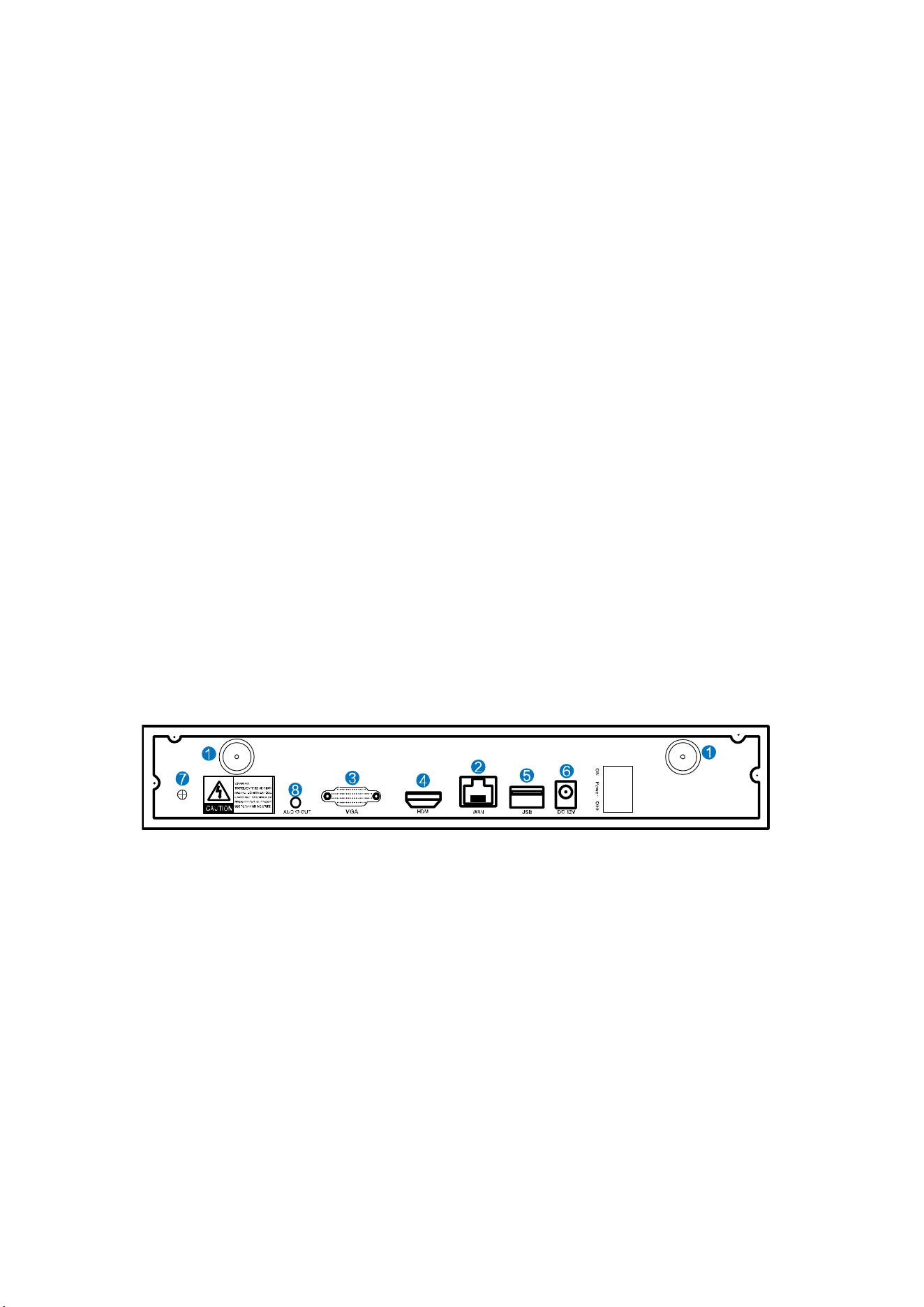
NVR
1、WIFIAntennaPorts:DoubleantennastoWIFIrange
2、WANPort:ConnectyourNVRtoInternet
3、VGAPort:ForviewingonVGAmonitor
4、HDMIPort:ForviewingonHDTV
5、USBPorts:Formouseandbackup
6、PowerInput
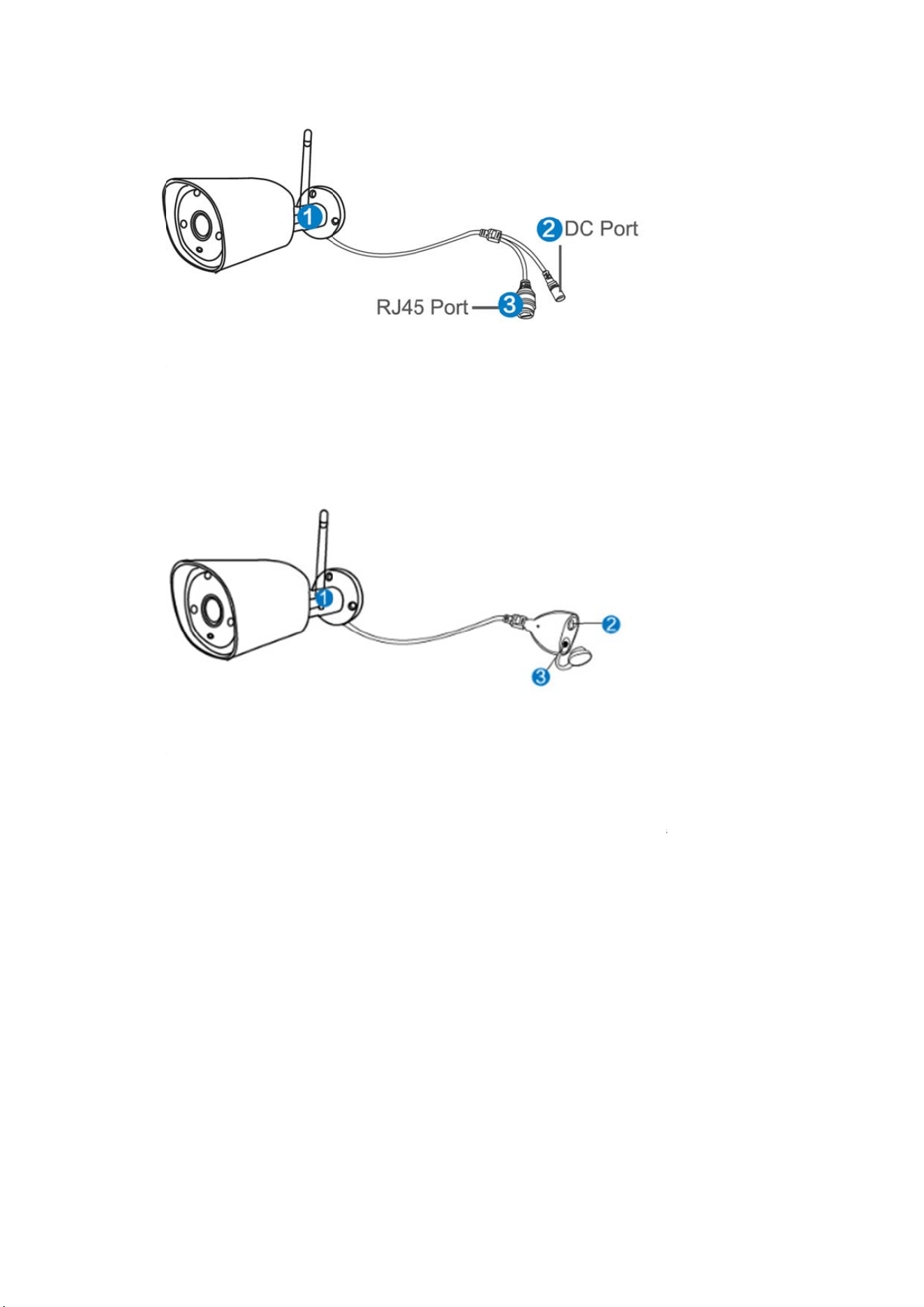
IPC
1. IPCwithRJ45connector
①
W
②D
C
③R
J
alre
a
con
n
2. I
P
①
W
②D
C
③R
e
mat
c
Ins
t
W
IFIantenna
:
CPort:input
J
45Port:for
a
dy matche
d
n
ection,plea
P
Cwithout
W
IFIantenna
:
CPort:input
e
set button
:
c
hing‐code
m
t
allation
I
:
WiFiconne
c
power12V
1
matchingco
d
d
code befo
r
serefertoh
o
RJ45conn
e
:
WiFiconne
c
power12V
1
:
press reset
m
ode.
I
nstructio
c
tionwithN
V
1
A;
d
eandwire
d
r
e leaving f
a
o
wtoaddIP
e
ctor
c
tionwithN
V
1
A;
button for
1
n
OfWIFI
V
R;
d
connection
a
ctory. If us
e
cameraasb
e
V
R;
1
0 seconds
t
NVRKIT
betweenIP
C
e
rs need to
e
low.
t
o restore f
a
andNVR.O
u
re‐match c
o
a
ctory settin
g
u
rWIFINVR
o
de or use
w
g and enter
KITis
w
ired
into
No
t
Wir
onl
y
Se
t
Jus
t
mo
n
1、
I
2、
C
3、
P
4、
P
5、
W
6、
P
the
s
In t
h
and
Def
a
Tips
mo
u
HD
the
t
e:
eless NVR
c
y
connecte
d
t
upTheS
y
This syste
m
t
like a des
k
n
itorwith
V
I
nstallanten
n
C
onnectasc
r
P
lugtheNVR
P
lugcamera
s
W
ithinsecon
P
lugthemou
s
ystem.
h
eOSyouc
a
allsettings.
a
ultID:admi
:Toprotec
t
u
se→GotoS
y
Install
system may
c
an’t be c
o
d
bynetwo
r
y
stem
m
is standa
k
top PC, n
e
V
GAorHD
M
n
asforcame
r
r
eentothe
N
topower(u
s
s
topower(u
s
ds,youshou
se(included)
a
n findfulles
t
nPassword:
t
your privac
y
y
stemSetup
→
not include
o
nnected t
o
r
kcable.
lone with
e
e
ed to hoo
k
M
Iinputsh
o
r
asandthe
N
N
VRviaitsH
D
ebigger12V
s
esmaller12
V
ldseecamer
toanUSBp
o
t
functionali
t
none(mean
s
y
,please set
→
SystemAd
hard disk d
e
o
WIFI rout
e
e
mbedded
k
a screen
t
o
uldworkf
o
N
VR;
D
MIorVGAp
V
2Apowera
d
V
1Apower
a
r
a’simages
o
rtonbacko
f
t
ies includin
g
sleavingthe
your passw
o
min →User
e
pending on
e
r wireless
l
Linux Ope
r
t
o the NVR
o
rit.
ort(HDMIan
d
apter);
a
dapters);
onthescree
f
NVR.Yous
h
g
live view, r
e
passworde
m
o
rdat earlie
s
Managemen
t
he kit you
s
y at prese
n
r
ating Syst
e
to entert
h
d
VGAcable
n;
h
allthenbea
e
cord,playb
a
m
pty,justcli
c
s
tconvenien
c
t
tosetpass
w
s
elected. the
n
t. They ca
e
m in the
N
h
e OS. Any
notincluded
a
bletoopera
t
a
ck, video b
a
c
klogin)
c
e.Right clic
w
ord.
NVR works
n
be
N
VR.
TV ,
);
t
eon
a
ckup
kthe
most
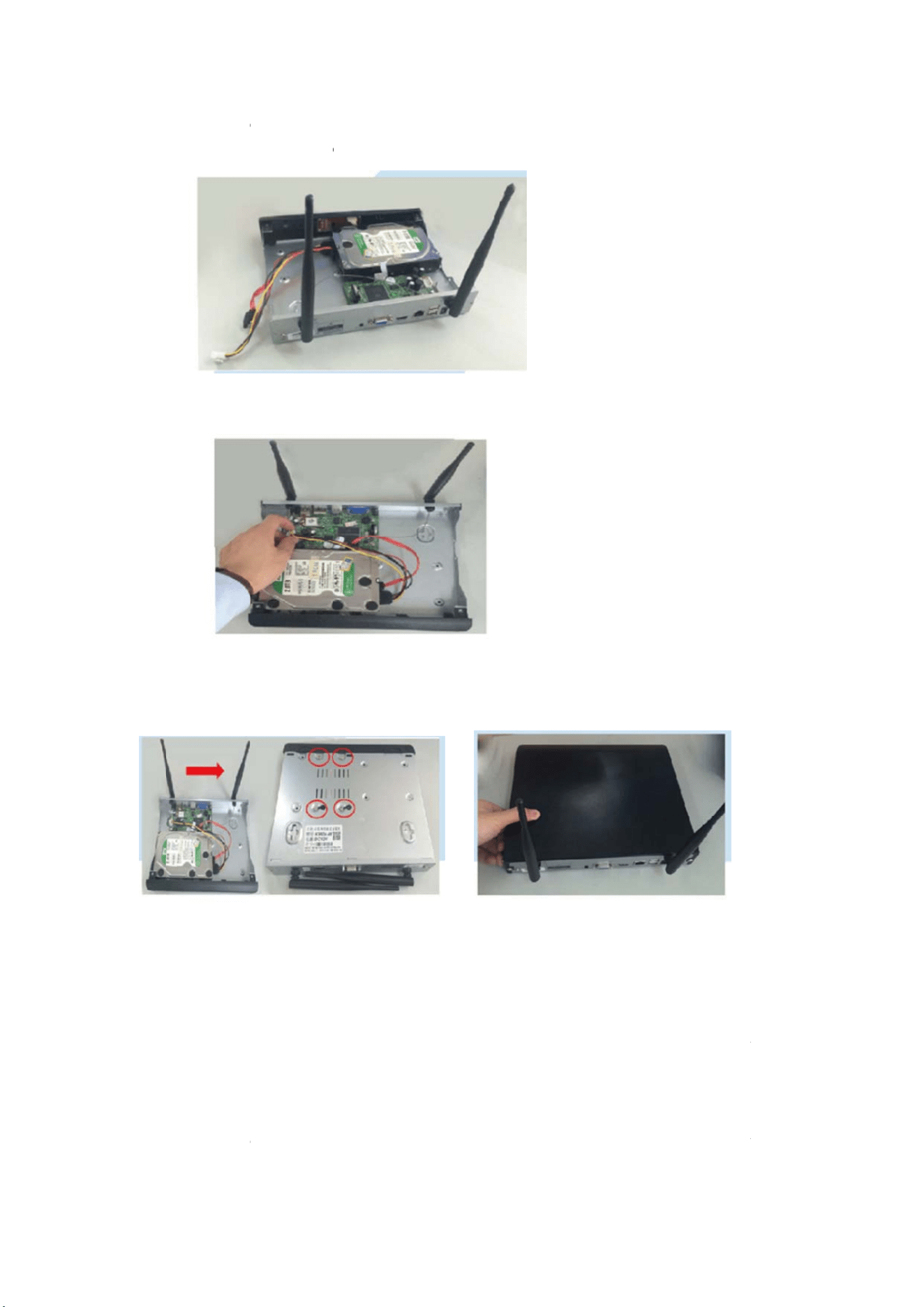
3.5"
1、
U
2、
C
HD
D
3、
h
driv
e
hol
e
Not
e
Re
c
Rec
o
1、
T
Set
u
cor
n
tim
e
2、
M
Set
u
SATAHDD
o
U
nplugyour
C
onnectthe
D
(asshown).
h
olding the
h
e
withtheh
o
e
sandassem
e
:NewHD
D
Togetbe
c
ordVide
o
o
rdvideois
v
T
ime Record
i
u
p→Record
n
er(forexam
p
e
.Thelistwill
M
otion Rec
o
u
p→Record
o
r2.5"SATA
H
NVRfromp
o
SATA power
h
ard drive a
n
o
lesonthe
N
blethecove
r
D
havetobe
f
tterWIFIsig
n
o
v
eryeasyon
c
i
ng: Setup p
e
setup→Rec
o
p
le“1”as
p
turntored.
o
rding: Only
d
setup→Rec
o
H
DD
o
wer,unscre
w
anddataca
n
d the DVR
,
N
VR.usinga
p
r
.
f
ormattedb
e
n
al,ithadbe
t
c
amerasyste
e
riod of tim
e
o
rd Plan.Cli
c
p
ictureshow
s
d
etect motio
o
rd Plan.Clic
k
w
andremov
e
blesfrom th
,
gently turn
p
hillipsscre
w
e
forerecordi
n
t
terplaceth
e
m.
e
of recordin
g
c
k “time”
a
s
),pressand
o
n and then
s
k
“motion”
e
thetopcov
e
e
NVRtoth
e
it over and l
w
driver,scre
w
n
g.
e
NVRinope
g
on NVR G
U
a
nd put m
o
dragthemo
u
s
tart recordi
n
and put m
o
e
r.
e
correspond
ine up the
h
w
theprovide
n
areaandh
i
U
I .Right clic
k
o
use icon o
n
u
setotheri
g
n
g.Right clic
k
o
use icon o
n
ingportson
h
oles on the
e
dscrewsint
o
i
ghposition.
k
mouse→S
y
n
the uppe
r
g
httochoos
e
k
mouse→S
y
n the uppe
r
your
hard
o
the
y
stem
r
left
e
the
y
stem
r
left
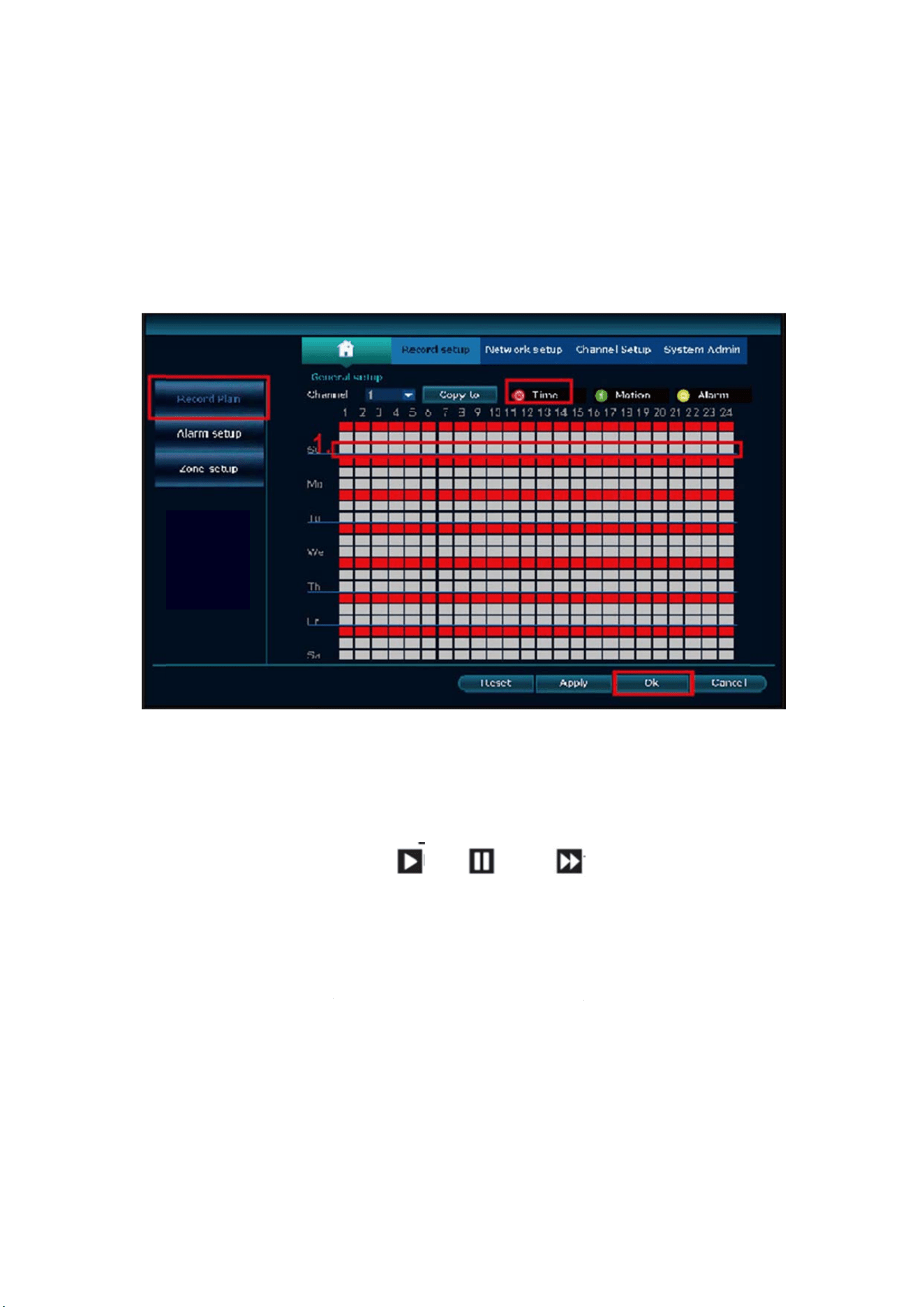
cor
n
tim
e
3、
A
“A
l
sho
w
Not
e
hou
r
rec
o
Vi
d
Ste
p
clic
k
Wa
r
1.
2.
3.
4.
5.
n
er(forexam
p
e
.Thelistwil
l
A
larm recor
d
l
arm”and
p
w
s),pressan
d
e
: Users can
r
s*7daysre
o
rding.
d
eoPlayb
a
p
s:right clik
m
k
search→th
e
r
mprompt:
IIIustrationf
o
Playfile:Ch
o
oftherecor
d
Video backu
theUflashd
Timeline: Cli
number“2
”
Onthetimel
p
le“1”as
p
l
turntogre
e
d
ing: Right
p
ut mouse
d
dragthem
o
setup any
p
cording.Wh
e
a
ck
m
ouse in m
a
e
ncanview
p
o
rplayback
b
o
osetherec
o
d
ing,click“
p
p: Choose t
h
isk,click“v
ck “date”
a
”
showninp
inewithrec
o
p
ictureshow
s
e
n.
click mouse
icon on t
h
o
usetotheri
p
eriod of tim
e
nNVRdete
c
a
in menu→
V
p
laybackfile.
b
utton:
o
rding filein
p
lay”topla
y
h
e recording
i
deobackup
”
a
nd “time
”
i
cture;
o
rdingfile,lef
t
s
),pressand
e
→System
S
h
e upper l
e
i
ghttochoos
m
e they wan
t
c
tsharddisk,
t
V
ideo playb
a
play,
filelist,asn
u
y
torecordin
g
file in file li
s
”
tobackup
t
”
at left bot
t
t
clickthem
o
dragthemo
u
S
etup→Rec
o
e
ft corner(f
o
ethetime.T
,for exampl
e
t
hedefaults
a
ck→choose
pause:
u
mber“1”
s
g
file;
s
t,as numbe
r
t
hefile;
om to chec
k
o
use,theca
n
u
setotheri
g
rd setup→
R
o
r example
helistwilltu
e
0:00:00‐23:
e
ttingwillb
e
date,chann
e
fastforward
s
hownin pic
r
“1”show
n
k
the timelin
e
playbackth
e
g
httochoos
e
R
ecord Plan
“1”as pi
c
rntoyellow.
59:59,That’
e
24hours*7
e
l,record m
o
*2,*4,*8;
c
ture.Choos
e
n
in picture.i
e
of recordi
n
e
file.
e
the
.Click
c
ture
s 24
days
de→
e
one
nsert
n
g, as
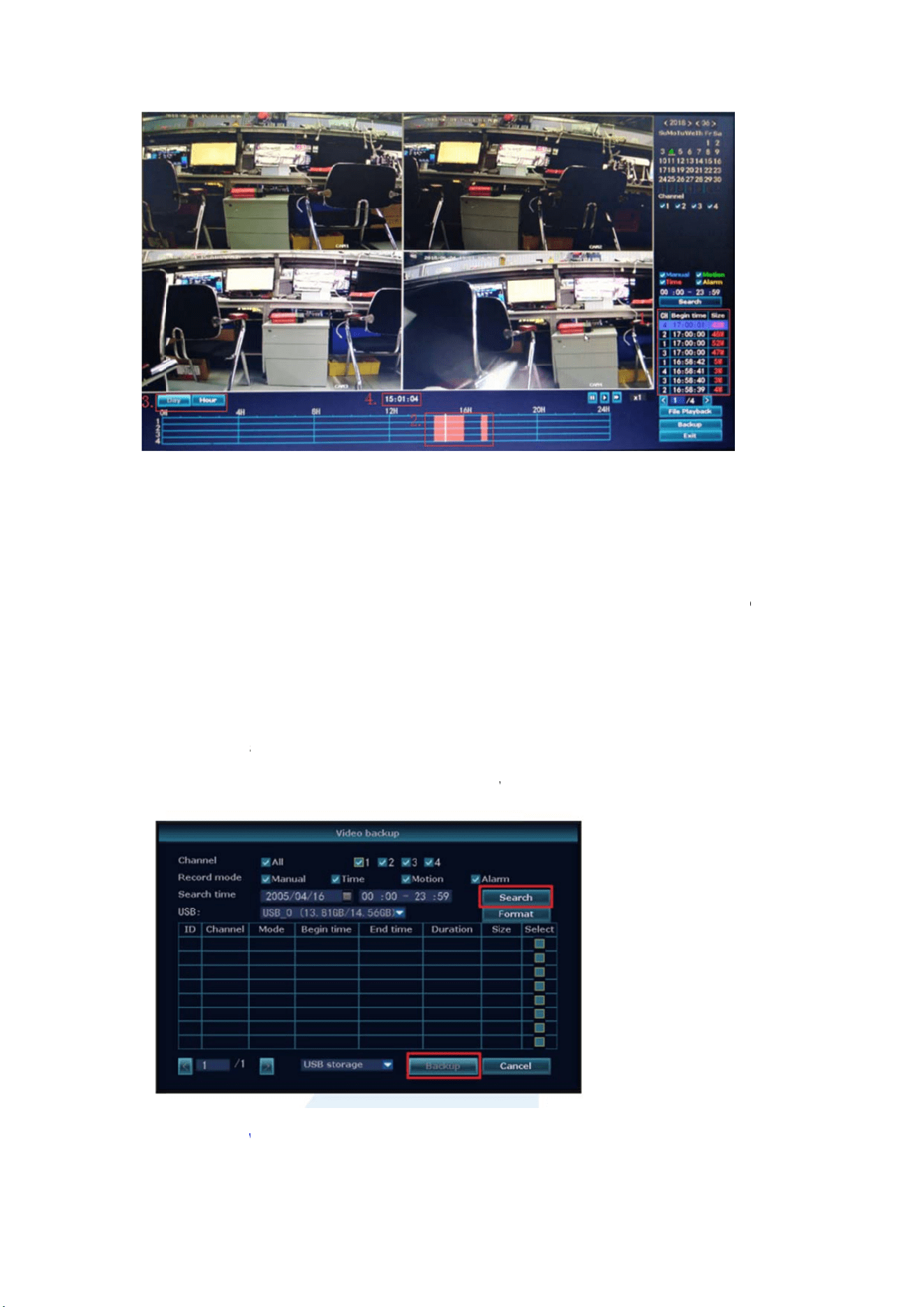
Vi
d
Us
e
1、
2
bac
k
rec
o
pac
k
2、
1
mo
d
flas
h
Vi
e
1、
W
d
eoBacku
e
Udiskt
o
2
USBports:
k
up→choose
o
rdingfileon
k
edonehou
r
1
USBport:R
i
d
e→setupse
a
h
diskwithin
e
wOnPC
V
W
henyourP
p
o
copyvid
e
PlugUflash
d
backupcha
n
thelist→vid
r
pertime.)
i
ghtclickon
m
a
rchingtime
reminding1
V
iaIE(Int
e
Cisinsame
L
e
o,soeas
y
d
iskintothe
n
nel→choos
e
e
obackup(s
m
ainmenu
→
→
search→c
h
minute,the
n
e
rnetExp
L
ANwiththe
y
andcon
v
USBportof
N
e
videomod
e
upport32G
U
→
videobacku
h
ooserecor
d
n
thesystem
w
lorer)
NVR(norm
v
enient!
N
VR.Rightcli
e
→setupsea
U
flashdisk
a
p→choose
b
d
ingfileont
h
w
illbackupr
e
a
llymeanst
h
ckonmain
m
r
chingtime
→
a
tmax.Reco
r
b
ackupchann
elist→vide
o
e
cordingfile
h
eyareconn
e
m
enu→Vide
o
→
search→ch
o
r
dingfileis
n
el→choose
v
o
backup,ins
e
toUflashdi
s
e
ctedtothe
s
o
o
ose
v
ideo
e
rtU
s
k.
s
ame
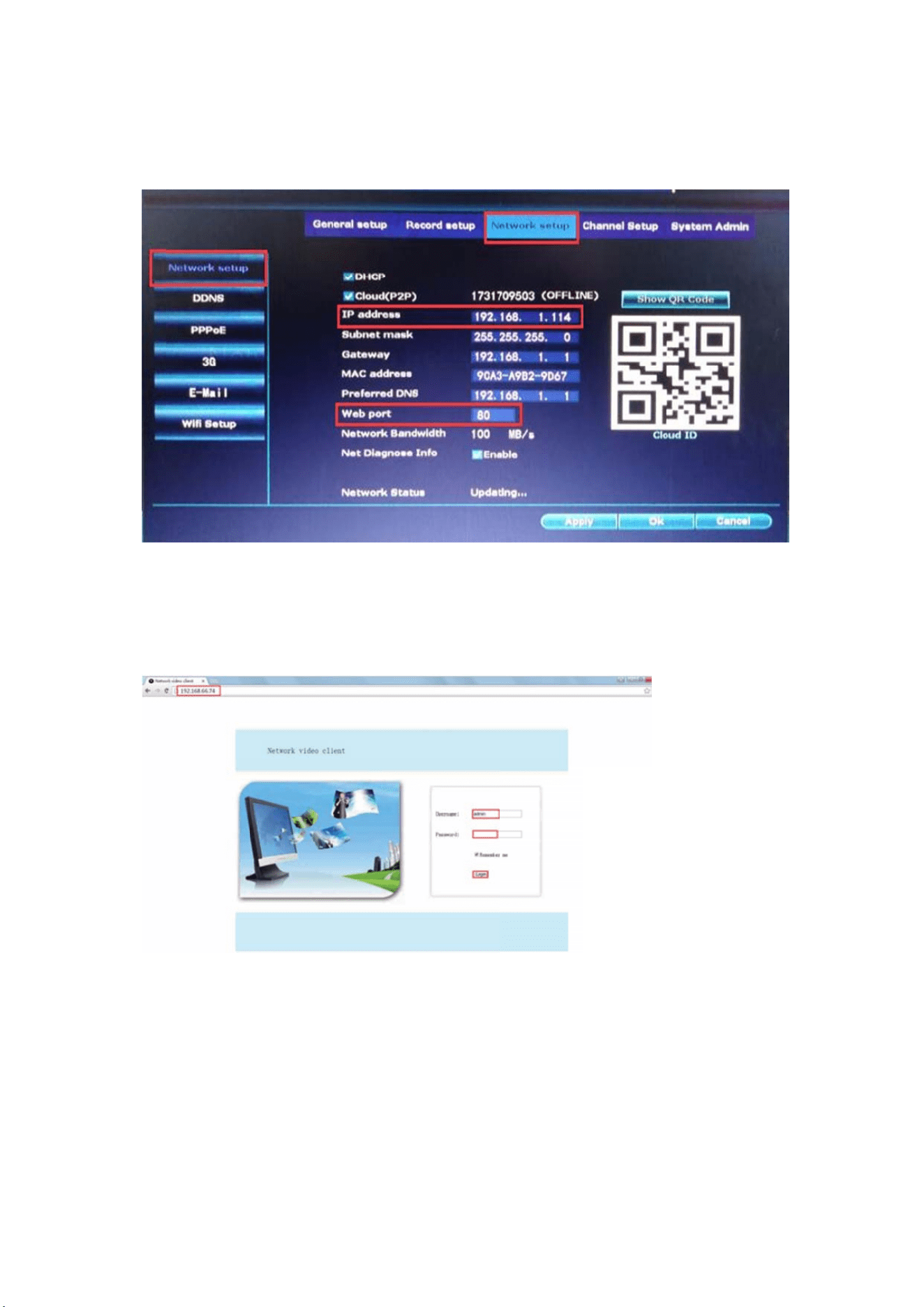
rou
t
Ste
p
Net
w
Ste
p
WE
B
add
r
2、
W
cam
Ste
p
Ste
p
(De
v
“ON
t
er)
p
1.Find the I
w
orkSetup).
p
2.Enterthe
N
B
port80ha
s
r
essintheb
r
W
hen your
P
erasfromyo
p
1.Openyo
u
p
2.InputDev
v
ice ID can
LINE”,defaul
P address a
n
N
VR’sIPa
d
s
beenchang
r
owser,fore
x
P
C is out of
urofficePC)
.
u
rInternetE
x
iceID,User
n
be found at
tUsername
n
d port# of
y
d
dressinyou
r
ede.g.to10
x
ample:http
:
local area
n
Accesswith
D
x
plorer(IE)br
o
n
ameandpa
s
the right b
is“admin”,
a
y
our NVR(IP
r
IEbrowser
f
0
0,you’llne
:
//192.168.1
.
n
etwork wit
h
DeviceClou
d
o
wserandvi
s
s
swordtolo
g
b
ottom corn
e
a
nddefaultP
a
address can
f
orexample:
e
dtoaddn
e
.
7:100).
h
the NVR(F
o
d
ID
s
it:www.e‐s
e
g
in.
e
r of the N
V
a
sswordise
m
be found i
n
http://192.1
wportnum
b
o
r example:
e
enet.com.
V
R monitor,
m
pty.)
n
System Set
1
.1.7(Ifthed
e
b
erwhenin
p
view your
h
status shoul
up→
e
fault
p
utIP
h
ome
d be

Vi
e
1、
D
Use
r
sea
r
Not
e
2、
A
Run
(fi
n
Ca
m
get
b
Tips
e
wOnM
o
D
ownloadth
e
r
scanusece
r
ch“IPPro
3
e
:ForIOSsys
t
A
ddtheNVR
theAPP“IP
P
n
d it the N
V
m
era),User n
a
b
acktoyour
:ifyou’vese
t
o
bile
e
APP“IPPR
O
llphonetos
c
3
.0”onAPP
t
em,itrequir
e
systemtoy
o
P
RO”,login
w
V
R’s Networ
k
a
me(default
devicelist→
C
t
apassword
O
3.0”
c
antheQRc
o
s
toreorGoo
g
e
sIOS8.0ve
r
o
urAPPdevic
w
ithyouracc
o
k
setup, or r
username
i
C
lickthedev
i
onyourNV
R
o
debelowt
o
glePlaythe
n
r
sionorabo
v
c
elist
o
untorchoo
s
r
ight bottom
i
s“admin”)a
n
i
cetoviewt
h
R
system,ple
a
o
installthe
A
installtheA
v
e.Forandroi
d
s
eTrial→Clic
corner on
s
n
d password
h
ecameras.
a
seupdatey
o
A
PPfreeofc
h
PP.
d
,android4.
4
k“+”to “
A
s
creen),Desc
r
(
default ise
m
o
urpasswor
d
h
arge,oruser
4
orabove.
Adddevice
b
r
iption(e.g.
H
m
pty)→Sub
m
d
onAPPtov
scan
b
yID”
H
ome
m
itto
iew.
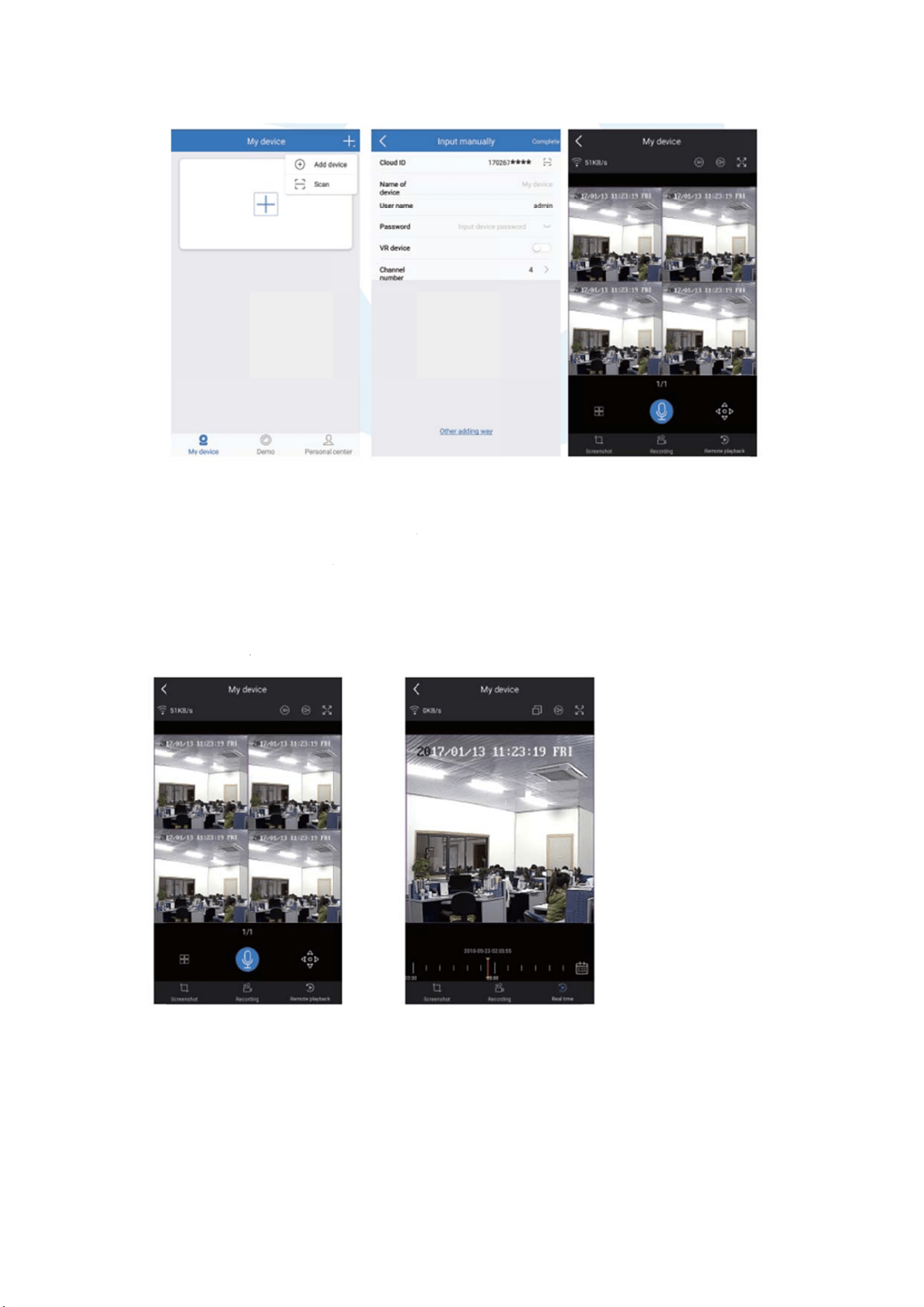
Pla
In t
h
rem
CH.
Tips
sug
g
&n
e
M
E
M
e
ybackOn
h
e IP PRO A
P
oteplaybac
k
:Videosinp
g
esttoplayb
a
e
tworkcondi
t
E
NU‐DO
W
e
nubar
Mobiles
P
P,while v
i
k
menu. The
A
laybackare
H
a
ckinLAN.
R
t
ion.
W
hat
ewing live v
A
PPautoma
t
H
D@realtim
e
R
emoteplay
b
v
ideo of the
t
icallyplayb
a
ewhichreq
u
b
ackoutofL
A
system, clic
k
a
ckcamera1
u
iresverygo
o
A
Nmaynot
k
Playback, y
,you cans
w
o
dtransmissi
1
00%work
d
y
ou will ente
w
itch channel
i
onconditio
n
d
uetoconne
r the
sthe
n
.We
ction

Clic
k
me
n
Spli
t
cam
Vid
e
Syst
Vid
e
Vid
e
Col
o
Ma
n
Vol
u
Set
u
Fast
Wifi
Adj
u
Exit
Sy
s
Clic
k
alls
e
Lan
g
Tim
e
Dis
p
HD
D
Syst
Syst
Use
r
Res
t
k
rightbutto
n
n
uorreturn.
t
screen: ch
a
era.
e
oManage:
m
emsetup:al
e
oplayback:
e
obackup:b
a
o
radjust:adj
n
ualrecord:
s
u
me:Adjust
v
u
pWizard:st
e
Network:s
h
add:addIP
u
stchannel:
a
System:log
o
s
temSetu
k
rightbutto
n
e
ttingsrelat
e
Generalset
g
uage
e
p
layresolutio
D
informaion
Systemad
m
emversion
emmainten
a
r
andpassw
o
t
oretodefau
n
youcanen
t
a
nge status
o
m
anageIPca
lsystemsett
i
playbackrec
o
a
ckuprecord
usttheimag
e
s
hortcuttoc
h
v
olumeofau
d
e
pbystepg
u
h
ortcuttone
t
camerasint
o
a
djusttheor
d
o
ut,reboot,
c
p
n
→ChooseS
y
e
dtothissys
t
up(Thisena
b
n
m
in(Thisena
b
a
nceincludin
o
rdmanage
m
ltsettings
t
erthemain
o
f live view.
Y
merasandN
V
ngs.
o
rdedvideos
edvideos.
e
settingofe
h
angethere
c
d
iocameras(
w
u
ideof1stti
m
t
worksettin
g
o
NVRchann
e
d
eroftheN
V
losescreen
o
y
stemsetup
;
t
em.
b
lesyoutose
b
lesyoutos
e
gsystemup
g
m
ent
menu;click
Y
ou can cho
o
V
Rchannels.
s
.
achcamera.
c
ordsettings
.
worksonlyf
o
m
egenerals
e
g
s.
e
lswirelessly.
V
Rchannels.
o
utputands
h
;
youthens
h
e
t)
e
t)
g
rade
rightbutton
o
se to view
m
.
o
raudiocam
e
e
ttings.
h
utdownth
e
h
allenterth
e
againyouca
m
ultiple cam
e
e
ras).
e
system.
menuthat
e
nexitthecu
e
ras or any
s
e
nablesyou
t
rrent
s
ingle
t
odo
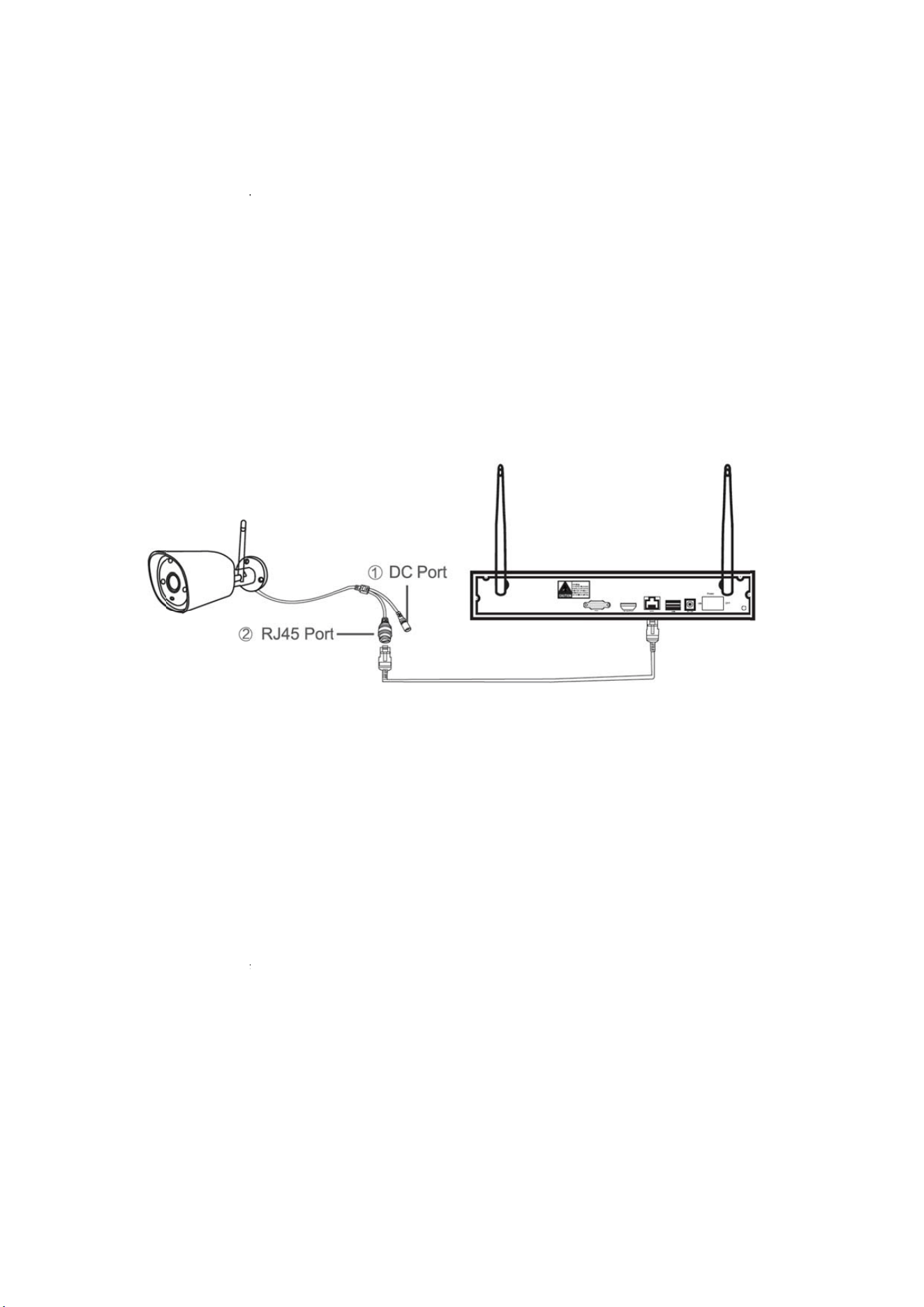
Syst
Rec
o
All
Ma
n
Ad
d
Bef
o
po
w
of t
h
con
n
Ste
p
→
m
aut
o
Ste
p
ca
m
①
NV
R
②
10
s
net
w
Ste
p
clic
k
No
t
will
cod
emlog
Recordset
u
o
rdplanfor
e
Networkse
t
networkrel
a
Channelse
t
n
agechannel
s
d
wireles
s
o
releavingf
a
w
ered.Anyw
a
h
is range, th
n
ectcamera
s
p
1:plugN
V
m
atch‐code
o
matically.
p
2: wirele
s
m
erawitho
u
for camera
R
,matchco
forcamera
s
econds to
w
orkcable
.
p
3:when
y
k
“Exit”to
f
t
es:forca
m
last 10 mi
emodelag
u
p(Thisenabl
e
achchannel
t
up(Thisena
a
tedsettings
t
up(Thisena
b
s
andcamer
a
s
camera
a
ctory,NVRk
a
y,thereisra
ey can’t be
c
s
andNVR,a
s
V
Randca
m
interface,
s
s camera
h
u
tRJ45con
n
with RJ45
deautoma
t
withoutRJ
get in ma
t
.
y
oucanfin
d
f
inish.
m
erawitho
u
nuets. Aft
e
ain.
esyoutoset
videodetec
t
blesyoutos
e
b
lesyoutos
e
a
s
itisalready
m
ngelimitatio
c
onnected t
o
picturesho
w
m
erastopo
w
NVR will
h
as two ki
n
n
ector,thei
r
connector,
t
ically,non
45connec
t
t
ch code m
d
IPaddres
s
u
tRJ45con
n
e
r 10 minu
e
t
)
t
ion
e
t)
e
t)
m
atchedco
d
o
nfortheWI
o
NVR wirele
w
edbelow:
w
er,after
N
search ca
n
ds, includ
i
rwaytom
a
,
after star
t
eedtorest
o
t
or,afterst
a
odel, it wil
s
ofcamer
a
n
ector,its
p
e
ts, please
e,theimag
e
FIsignalfro
m
ssly. Then u
s
N
VRstart,ri
mera und
e
i
ng camera
a
tchcodea
s
t
, use net
w
o
re.
a
r,holdthe
l match co
d
a
onscreen
,
p
rocessof
g
restore ca
m
willcomeo
u
m
NVR.Whe
n
s
ers can use
g
htclickm
o
e
r matchin
with RJ45
s
below:
ork cable t
bottomlin
d
e automa
t
,
matching
c
g
ettinginto
m
era to ge
t
utwhenthe
n
camerasar
e
network ca
b
o
use→Wifi
n
g code m
connector
t
o connect
eofcamer
a
t
ically, no
n
codecomp
matching
c
t
into mat
c
kitis
e
out
b
le to
add
odel
and
with
a
for
n
eed
lete,
c
ode
c
hing
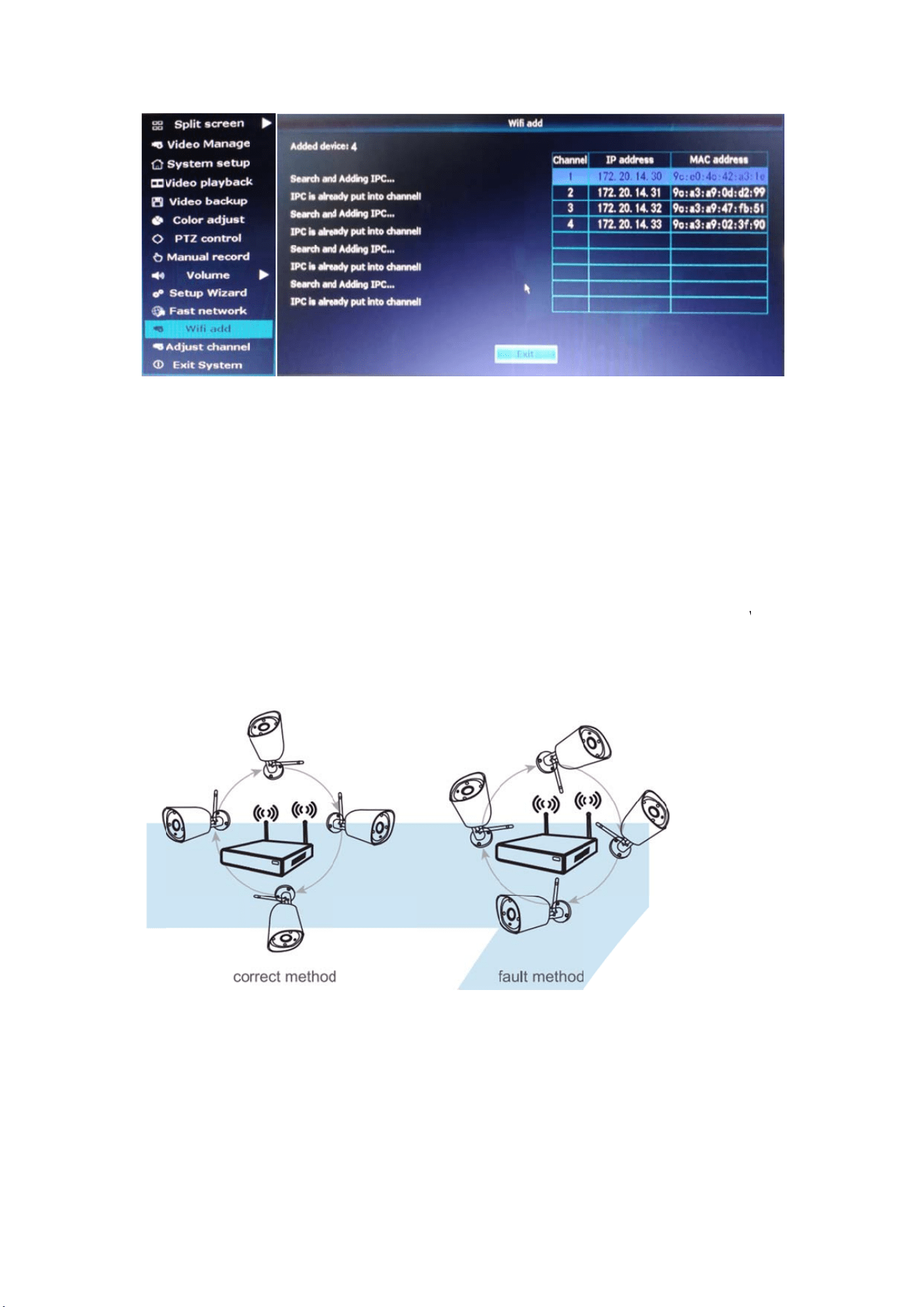
Ex
t
Wir
e
cha
r
met
1、
WIF
aro
u
Acc
o
ove
r
2、
Inst
a
t
endWIFI
e
less connec
t
r
acter of WI
hodscanbe
a
Position
Irangeislik
e
u
ndtheWIFI
o
rdingtothe
r
laporparall
e
UseAnt
e
a
llationmet
h
Range
t
ion is easy
a
FI, the WIFI
a
ppliedtob
y
TheAnte
n
e
anapplean
d
range.Ante
n
signaltrans
m
e
ltoNVRWI
e
nnaExte
n
h
odofanten
n
a
nd conveni
e
signal will
d
y
passobstacl
e
n
naCorr
e
d
theantenn
n
naofNVRs
h
m
issionchar
a
FIrange,as
p
n
sionCor
d
n
aextension
e
nt, butit’
s
d
ecrease w
h
e
sandexten
e
ctly
aofNVRisi
n
h
ouldbeput
a
cterofante
n
p
icturessho
w
dtoprol
o
cord
s
notunivers
h
en going th
dWIFIrange
n
thecenter
o
straightup,
n
na,theant
e
w
edbelow:
o
ngWIFI
d
al applicatio
n
rough some
.
o
fit.WIFIsig
n
i
fnot,WIFIs
i
nnaofcame
r
d
istance
n. Because
o
obstacles.
S
nalisstrong
ignalwillbe
w
rasshould
o
f the
S
ome
all
w
eak.
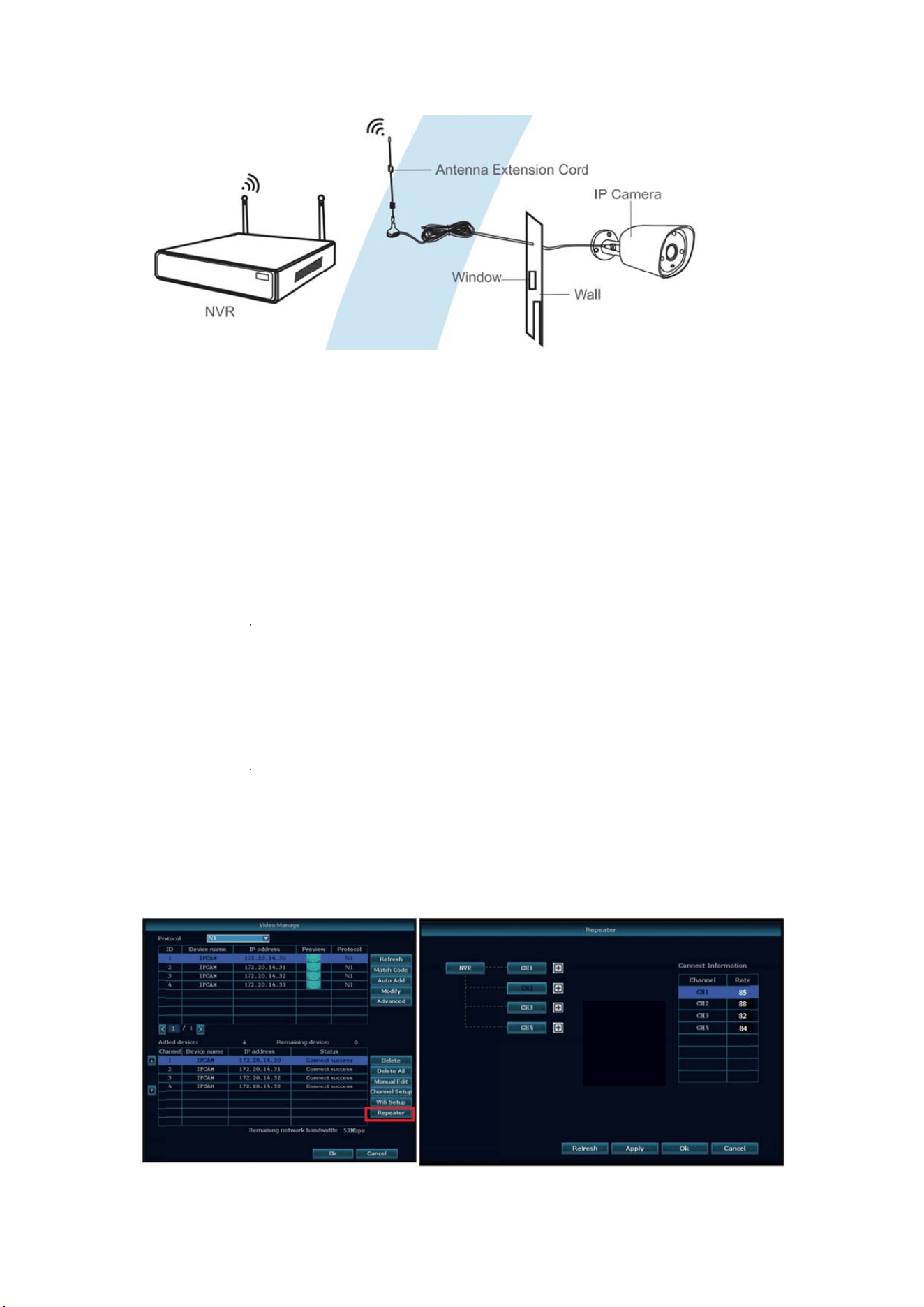
Not
e
and
thr
o
Se
t
tra
n
Not
e
1. R
e
dist
a
2. O
dist
a
3. R
e
ran
g
Re
p
Ste
p
e
s:WhenWI
F
subtitute a
n
o
ughandsim
p
t
upcasca
n
sferdist
a
e
:
e
peaterfunc
t
a
ncebyrepe
a
nlywhenth
e
a
ncewillbe
e
e
peaterfunc
t
g
e.Userscan
p
eaterSe
t
p
1:Rightclic
F
Isignalisno
n
tenna exte
n
p
lyitwhere
W
dingcon
n
a
nce
t
ioncan’t
s
a
ters‐‐WIFI
e
repeaterca
e
xtended.
t
ionand3m
chooseone
a
t
up
konNVR’S
G
tstrongeno
u
n
sion cord.
D
W
IFIsignalis
n
ectionin
s
trengthen
W
cameras.
merasandr
e
etersantenn
a
ccordingto
G
UI,leftclic
k
u
ghagainst
w
D
rill a hole
o
strong.
n
areason
W
IFIsignalfor
e
peatedcam
e
n
aextension
c
realsituatio
n
k
“videoma
w
alls,usersca
o
n the wall
ablesolu
t
wirelessNV
R
e
rasareposi
t
c
ordaretwo
n
.
nagement”
→
ntakeoffth
e
to let the e
t
ion,exte
n
R
kit,butcan
t
ionedcorre
c
methodsto
e
→
thenleft
c
e
originalan
t
e
xtension co
r
n
dwifisi
g
extendthe
c
tly,WIFI
e
xtendWIFI
c
lick“repea
t
enna
r
d go
g
nal
t
er”
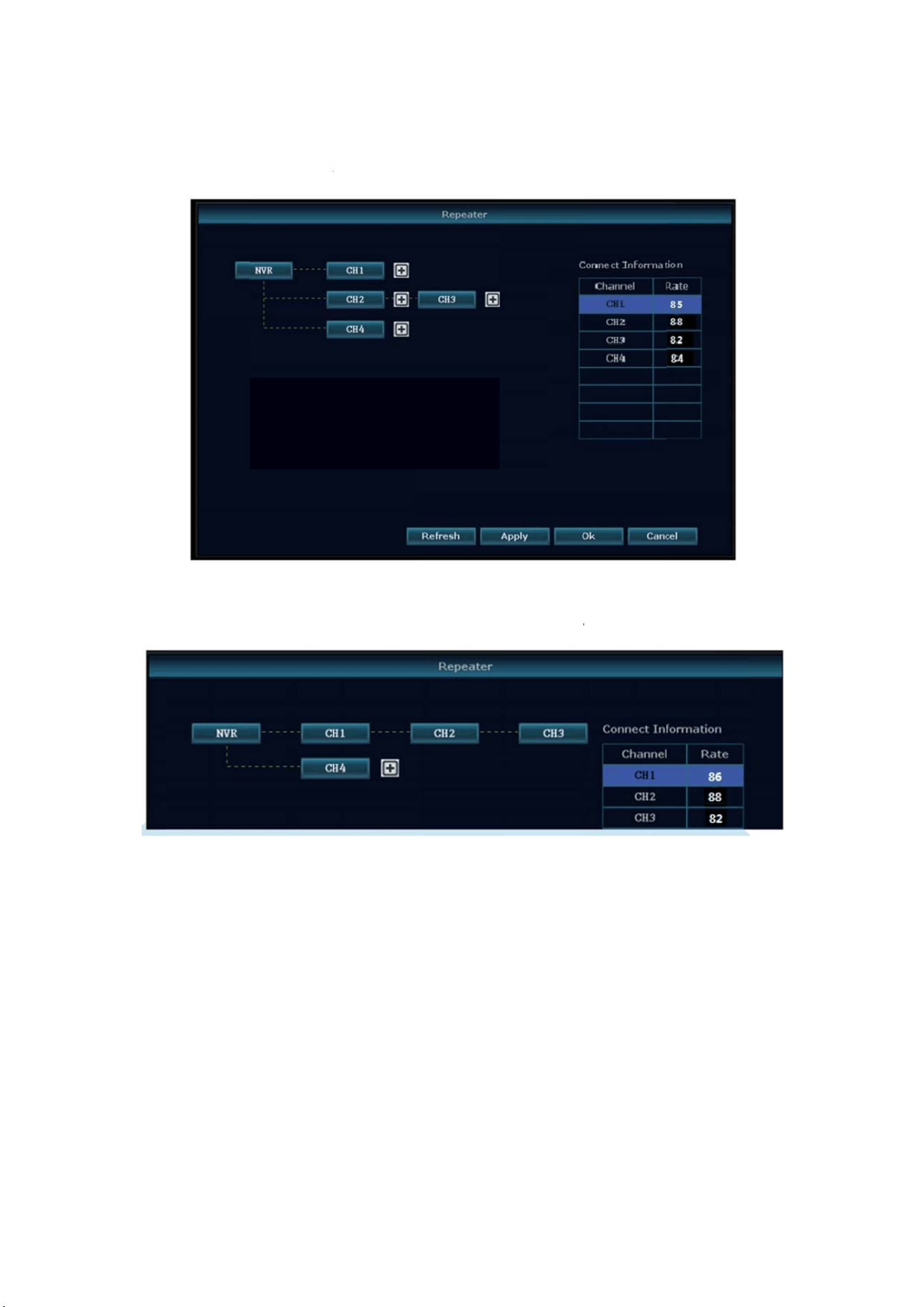
Ste
p
Asp
Ste
p
isc
o
Ste
p
p
2:Addrepe
p
ictureshow
n
p
3:Aspictur
e
o
nnectedto
N
p
4:Click“A
ater
n
below,clic
k
e
shownbel
o
N
VRthrough
pply”andt
h
k
icon+besid
e
o
w,itmeans
IPC3.IPC3is
h
enclick“r
e
eschannel3
,
IPC1isconn
e
connectedt
o
e
fresh”to
c
,
chooseoth
e
e
ctedtoNVR
o
NVRdirectl
y
c
heckifthes
e
e
rchannel.
throughIPC
2
y
.
e
ttingissucc
e
2
andIPC3.I
P
essful.
P
C2
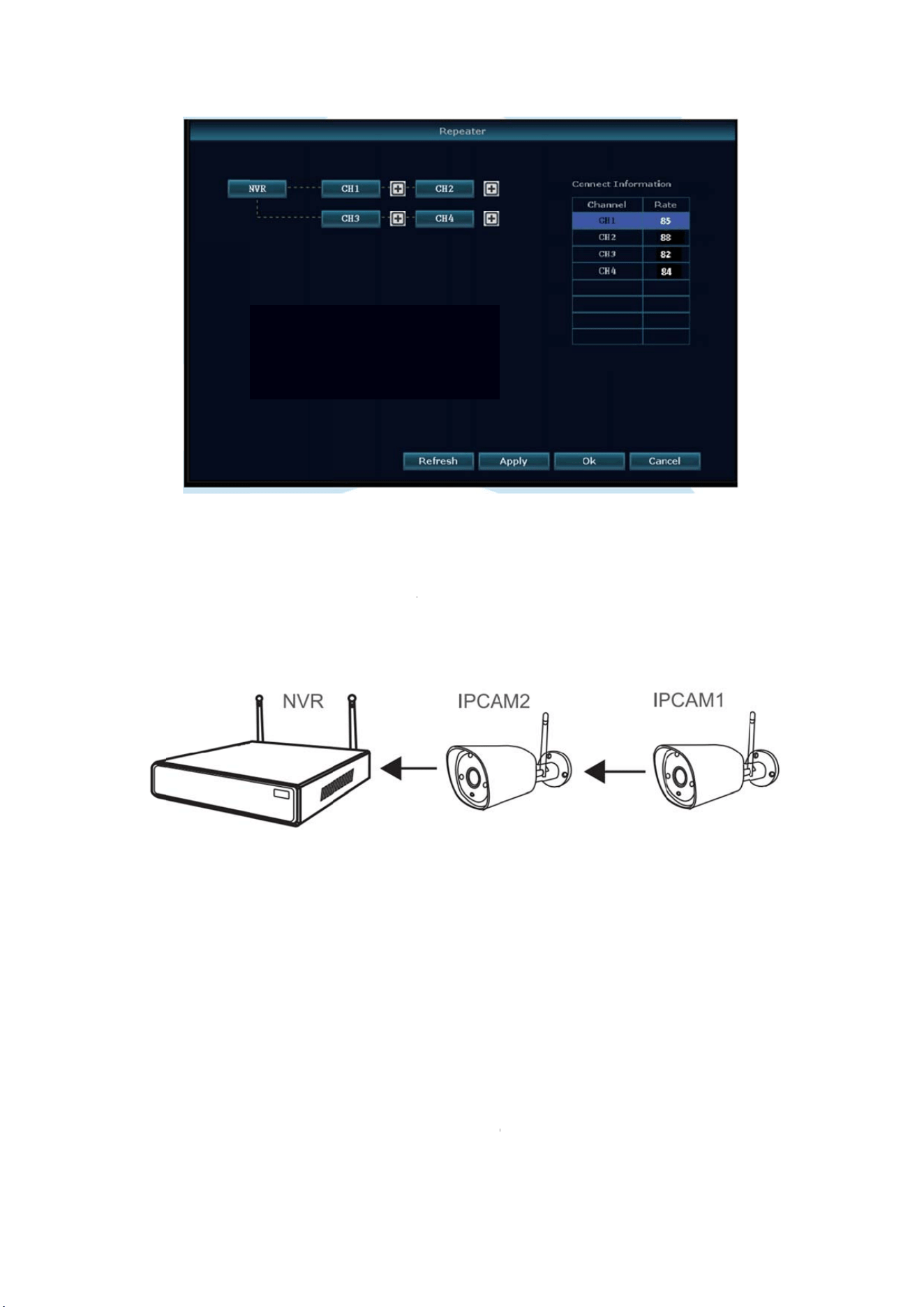
De
l
Mo
v
Ap
p
Asp
IPC
A
setu
wa
N
o
De
v
A.A
c
B.D
o
te
m
C.E
v
l
eteRepe
a
v
ethemous
e
p
lication
E
p
ictureshow
n
A
M2betwee
n
u
pIPCAM1re
rning
o
tes:
v
icewillnoti
n
c
cident;negli
o
not confo
m
peratureTo
o
v
erbemaint
a
a
ter
e
totargeted
E
xample
n
above,whe
n
themwith
s
peatedbyIP
n
guaranteei
gence;disast
e
rm to the
e
o
hightorto
o
a
inedbyoth
e
channels,lef
t
nIPCAM1is
s
trongWIFIs
C
AM2,andt
h
fcausedby
b
e
r;mis‐oper
a
e
nvironment
o
low,lightni
n
e
rcenterwhi
f
tclicktodel
e
putsomewh
e
ignal,users
c
h
eninstallIP
b
elowreaso
n
a
tion.
and conditi
o
n
gstroke.ec
t
i
chnotbelon
e
te,andthe
n
e
reisoutof
N
c
anputIPCA
M
CAM1tothe
n
:
o
ns,such as
t
.
gtothereal
click “App
l
N
VRWIFIra
n
M
1closeto
N
presuppose
d
power impr
factory.
ly” and “
O
n
ge,andther
N
VRandpow
e
d
place.
r
oper, worki
n
O
K”.
eis
e
rit,
n
g

D.
G
FC
C
FC
C
This
con
d
any
FC
C
This
pur
s
agai
radi
a
ma
y
inte
r
inte
r
off
a
foll
o
‐Re
o
‐In
c
‐Co
n
con
n
‐Co
n
FC
C
This
envi
bet
w
CA
U
The
unit
aut
h
G
oodsalread
y
C
RADIATI
C
device com
d
itions: (1) t
h
interference
C
Complia
equipment
h
s
uanttopart
nstharmful
i
a
teradiofre
q
y
cause harm
r
ference will
r
ferencetor
a
a
nd on, the
o
wingmeasu
r
o
rientorrel
o
c
reasethese
p
n
nect the eq
n
ected.
n
sultthedea
l
C
Radiati
o
equipment
ronment. T
h
w
eentherad
U
TION!
Federal Co
m
not expres
s
h
oritytoope
r
y
soldmore
t
ONNOR
M
plies with P
a
h
is device m
a
received,in
c
nceState
h
asbeentes
t
15oftheF
C
i
nterference
q
uencyener
g
ful interfere
n
not occur
i
a
dioortelev
i
user is enc
o
r
es:
o
catetherec
e
p
arationbet
w
uipment int
o
l
eroranexp
e
o
nExposu
complies
w
h
is equipme
n
iator&your
b
m
munication
s
s
ly approve
d
r
atetheequi
p
t
han12mon
t
M
a
rt 15 of th
e
a
y not cause
c
ludinginterf
e
ment
t
edandfou
n
CRules.The
s
inaresident
g
yand,ifnot
n
ce to radio
i
n a particul
a
i
sionrecepti
o
o
uraged to t
r
e
ivinganten
n
w
eentheeq
u
o
an outlet o
e
riencedradi
reState
m
w
ith FCC rad
n
t should be
b
ody.
s
Commissio
n
d
by the pa
r
p
ment.
t
hs.
e
FCC Rules.
e
harmful int
e
e
rencethat
m
n
dtocomply
s
elimitsare
t
ialinstallati
o
t
installedan
d
communica
t
ar installati
o
o
n,whichca
n
r
y to correc
t
n
a.
u
ipmentand
o
n a circuit d
i
o/TVtechni
c
m
ent:
iation expo
s
installed an
d
n
warns the
r
ty responsi
b
Operation is
e
rference, a
n
m
aycauseun
withtheli
m
designedto
o
n.Thisequi
p
d
usedinac
c
t
ions. Howev
o
n. If this e
q
n
bedetermi
t
the interfe
r
receiver.
ifferent fro
m
c
ianforhelp.
s
ure limits s
d
operated
w
user that ch
b
le for com
p
subject to
t
n
d (2) this d
e
desiredoper
itsforaClas
p
rovidereas
o
p
mentgener
a
ordancewit
h
e
r, there is
n
uipment do
e
nedbyturni
n
r
ence by on
e
that to whi
c
e
t forth for
w
ith minimu
a
nges or m
o
p
liance coul
d
t
he followin
g
e
vice must a
c
r
ation.
s
sBdigitald
e
o
nableprote
a
tesusesan
d
h
theinstruc
t
n
o guarante
e
e
s cause ha
r
n
gtheequip
e
or more o
ch the recei
v
an uncont
r
m distance
2
o
di
f
ications t
o
d
void the
u
g
two
c
cept
e
vice,
ction
d
can
t
ions,
e
that
r
mful
m
ent
f the
v
er is
r
olled
2
0cm
o
the
u
ser’s