
11
DE’LONGHI
COOKING
INSTALLATION and SERVICE INSTRUCTIONS
USE and CARE INSTRUCTIONS
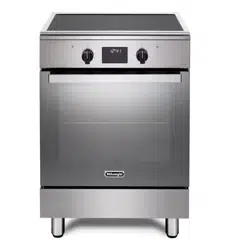
DEF1407INDSS
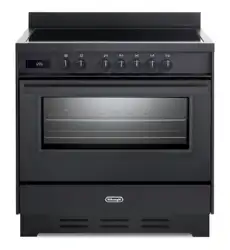
DEF1407INDMB
INDUCTION COOKERS
distributed by
Able Appliances Pty Ltd.

22
Dear Customer,
Thank you for having purchased and given your preference
to our product.
The safety precautions and recommendations reported
below are for your own safety and that of others. They
will also provide a means by which to make full use of the
features oered by your appliance.
Please keep this booklet in a safe place. It may be useful
in future, either to yourself or to others in the event that
doubts should arise relating to its operation.
This appliance must be used only for the task it
has explicitly been designed for, that is for cooking
foodstus. Any other form of usage is to be considered
as inappropriate and therefore dangerous.
The manufacturer declines all responsibility in the
event of damage caused by improper, incorrect or
illogical use of the appliance or be faulty installation.
PRODUCT LABEL
This appliance has been designed and constructed in accordance with the following
codes and specications:
AS/NZS 60335.1
Household and similar electrical appliances - Safety General
requirements
AS/NSZ 60335.2.6
Safety Particular requirements for stationary cooking ranges, hobs,
ovens and similar appliances
AS/NZS CISPR 14.1 Electromagnetic Compatibility Requirements

33
IMPORTANT SAFETY PRECAUTIONS AND RECOMMENDATIONS
IMPORTANT: This appliance is designed and manufactured
solely for the cooking of domestic (household) food and is
not suitable for any non domestic application and therefore
should not be used in a commercial environment.
The appliance guarantee will be void if the appliance is used
within a non domestic environment i.e. a semi commercial,
commercial or communal environment.
Read the instructions carefully before installing and using
the appliance.
■ This appliance has been designed and manufactured in
compliance with the applicable standards for the household
cooking products and it fullls all the safety requirements shown
in this manual, including those for surface temperatures.
Some people with sensitive skin may have a more pronounced
temperature perception with some components although these
parts are within the limits allowed by the norms.
The complete safety of the appliance also depends on the correct
use, we therefore recommend to always pay a extreme attention
while using the product, especially in the presence of children.
■ After having unpacked the appliance, check to ensure that it is
not damaged and that the oven door closes correctly.
In case of doubt, do not use it and consult your supplier or a
professionally qualied technician.
■ Packing elements (i.e. plastic bags, polystyrene foam, nails,
packing straps, etc.) should not be left around within easy reach
of children, as these may cause serious injuries.
■ Some appliances are supplied with a protective lm on steel and
aluminium parts. This lm must be removed before using the
appliance.
■ IMPORTANT: The use of suitable protective clothing/gloves is
recommended when handling or cleaning this appliance.

44
■ Do not attempt to modify the technical characteristics of
the appliance as this may become dangerous to use. The
manufacturer declines all responsibility for any inconvenience
resulting from the inobservance of this condition.
■ Do not operate your appliance by means of an external timer or
separate remote-control system.
■ Do not carry out cleaning or maintenance operations on the
appliance without having previously disconnected it from the
electric power supply.
■ WARNING: Ensure that the appliance is switched o before
replacing the oven lamp to avoid the possibility of electric shock.
■ Do not use a steam cleaner because the moisture can get into
the appliance therefore making it unsafe.
■ Do not touch the appliance with wet or damp hands (or feet).
■ Do not use the appliance whilst in bare feet.
■ If you should decide not to use this appliance any longer (or
decide to substitute another model), before disposing of it, it
is recommended that it be made inoperative in an appropriate
manner in accordance to health and environmental protection
regulations, ensuring in particular that all potentially hazardous
parts be made harmless, especially in relation to children who
could play with unused appliances.
■ The various components of the appliance are recyclable. Dispose
of them in accordance with the regulations in force in your country.
If the appliance is to be scrapped, remove the power cord.
■ After use, ensure that the knobs are in the o position.
■ Children less than 8 years of age shall be kept away unless
continuously supervised.
■ This appliance can be used by children aged from 8 years and
above and persons with reduced physical, sensory or mental
capabilities or lack of experience and knowledge if they have
been given supervision or instruction concerning use of the
appliance in a safe way and understand the hazards involved.
Children shall not play with the appliance. Cleaning and user
maintenance shall not be made by children without supervision.

55
■ The manufacturer declines all liability for injury to persons or
damage to property caused by incorrect or improper use of the
appliance.
■ WARNING: During use the appliance and its accessible parts
become hot; they remain hot for some time after use.
– Care should be taken to avoid touching heating elements (on
the hob and inside the oven).
– The door is hot, use the handle.
– To avoid burns and scalds, young children should be kept
away.
■ Make sure that electrical cables connecting other appliances in
the proximity of the cooker cannot come into contact with the hob
or become entrapped in the oven door.
■ WARNING: Unattended cooking on a hob with fat or oil can be
dangerous and may result in re. NEVER try to extinguish a re
with water, but switch o the appliance and then cover ame e.g.
with a lid or a re blanket.
■ WARNING: Danger of re: do not store items on the cooking
surfaces.
■ DO NOT MODIFY THIS APPLIANCE.
■ THIS APPLIANCE SHALL NOT BE USED AS A SPACE HEATER.
■ Do not place or leave empty pans on the glass ceramic hob.
■ Do not allow heavy or sharp objects to drop on the glass ceramic
hob.
■ Do not scratch the hob with sharp objects. Don’t use the hob as
a work surface.
■ WARNING: If the hob is cracked or otherwise damaged by falling
objects etc., disconnect the appliance from the electrical power
supply to avoid the possibility of electric shock and call Customer
Service.
■ WARNING: When correctly installed, your product meets all
safety requirements laid down for this type of product category.
However special care should be taken around the rear or the
underneath of the appliance as these areas are not designed or

66
intended to be touched and may contain sharp or rough edges,
that may cause injury.
■ FIRST USE OF THE OVEN - it is advised to follow these
instructions:
– Furnish the interior of the oven as described in the chapter
“USE AND CARE”.
– Switch on the empty oven on max to eliminate grease from the
heating elements.
– Disconnect the appliance from the electrical power supply, let
the oven cool down and clean the interior of the oven with a
cloth soaked in water and neutral detergent; then dry carefully.
■ CAUTION: Do not use harsh abrasive cleaners or sharp metal
scrapers to clean the oven door glass since they can scratch the
surface, which may result in shattering of the glass.
■ Do not line the oven walls or base with aluminium foil. Do not place
baking trays or the drip tray on the base of the oven chamber.
■ Do not cover the hob with aluminium foils.
■ FIRE RISK! Do not store ammable material in the oven or in the
storage compartment.
■ Always use oven gloves when removing the shelves and food
trays from the oven whilst hot.
■ Do not hang towels, dishcloths or other items on the appliance or
its handle – as this could be a re hazard.
■ Clean the oven regularly and do not allow fat or oils to build up in
the oven base or tray. Remove spillages as soon as they occur.
■ Do not stand on the cooker or on the open oven door.
■ Always stand back from the appliance when opening the oven
door to allow steam and hot air to escape before removing the
food.
■ SAFE FOOD HANDLING: Leave food in the oven for as short
a time as possible before and after cooking. This is to avoid
contamination by organisms which may cause food poisoning.
Take particular care during warmer weather.
■ WARNING: Take care NOT to lift the cooker by the door handle.

77
■ CAUTION: The cooking process has to be supervised. A short
term cooking process has to be supervised continuously.
■ The appliance must not be installed behind a decorative door in
order to avoid overheating.
■ The oven accessories (e.g. oven wire rack) must be tted
correctly as indicated at page 17 - 18.
■ IMPORTANT NOTE: The oven shelves (for some products one
shelf only is provided) have not been designed to place the food
directly on the shelf itself. When cooking, always place the food
in special containers or use specic materials suitable for the
food contact.
■ If the power supply cable is damaged, it must be replaced only
by an authorized service agent in order to avoid a hazard.
■ If the appliance is not tted with a supply cord and a plug, or with
other means for disconnection from the supply mains having a
contact separation in all poles that provide full disconnection under
overvoltage category III conditions, means for disconnection
must be incorporated in the xed wiring in accordance with the
wiring rules.
■ WARNING: The appliance and its accessible parts become hot
during use.
Care should be taken to avoid touching heating elements.
Children less than 8 years of age shall be kept away unless
continuously supervised.
■ WARNING: Use only hob guards designed by the manufacturer
of the cooking appliance or indicated by the manufacturer of the
appliance in the instructions for use as suitable or hob guards
incorporated in the appliance. The use of inappropriate guards
can cause accidents.
■ INDUCTION HOBS:
– Metallic objects such as knives, forks, spoons and lids should
not be placed on the hob surface since they can get hot.
– Do not use metallic kitchen utensils (e.g. ladles). It is preferable
to use plastic or wood kitchen utensils.
– Please use pans of recommended size (see minimum pan
diameter recommended). It is not advisable to use pans

88
smaller than the cooking zone. The pans have to be placed in
the centre of the cooking zone.
– Do not use defective pans or pans with a curved bottom.
– Please use suitable pans marked for induction cooking.
– Please keep your distance from the electromagnetic elds by
standing 5-10 cm from the cooking zones. When possible use
the rear cooking zones.
– Magnetic objects (e.g. credit cards, oppy disks, memory
cards) and electronic instruments (e.g. computers) should not
be placed near the induction hob.
– The heating of magnetic tins is forbidden! Closed tins may
explode by exceeding pressure while heating. There is a
burning risk with open tins as well, because the integrated
temperature protection will not work correctly.
– IMPORTANT WARNING: The induction hob complies with
European Standards for domestic cooking appliances.
Therefore it should not interfere with other electronic units.
Persons with cardiac pacemakers or any other electrical
implants must check with their doctor if they can use an induction
cooking system (and check any possible interferences with
the implants).

99
INSTALLATION
CAUTION:
■ This appliance must be installed in accordance with these installation instructions.
■ This appliance shall only be serviced by authorised personnel.
■ This appliance is to be installed only by an authorised person in compliance
with the current electrical regulations and in observation of the instructions
supplied by the manufacturer.
Failure to comply with this condition will render the guarantee invalid.
■ Incorrect installation, for which the manufacturer accepts no responsibility, may
cause personal injury of damage.
■ Always disconnect the appliance from mains power supply before carrying out
any maintenance operations or repairs.
LOCATION
■ The cooker can be installed in a cabinet (Fig. 1).
■ The cooker must be installed no less than 50 mm away from any side wall which
exceed the height of the cooktop.
■ Installing the cooker above a plinth without tting the adjustable feet: In that case the
cooker stands directly above the plinth; make sure you provide safety measures to
keep it in place.
Revise the installation dimensions accordingly considering that the feet have the
following measures: min 85 mm - max 135 mm.
■ The appliance must be housed in heat resistant units.
■ The walls of the units must be capable of resisting temperatures of 50 °C above
room temperature.
■ Do not install the appliance near inammable materials (e.g. curtains).
■ If you stand the cooker on a pedestal, make sure you provide safety measures
to keep it in place.
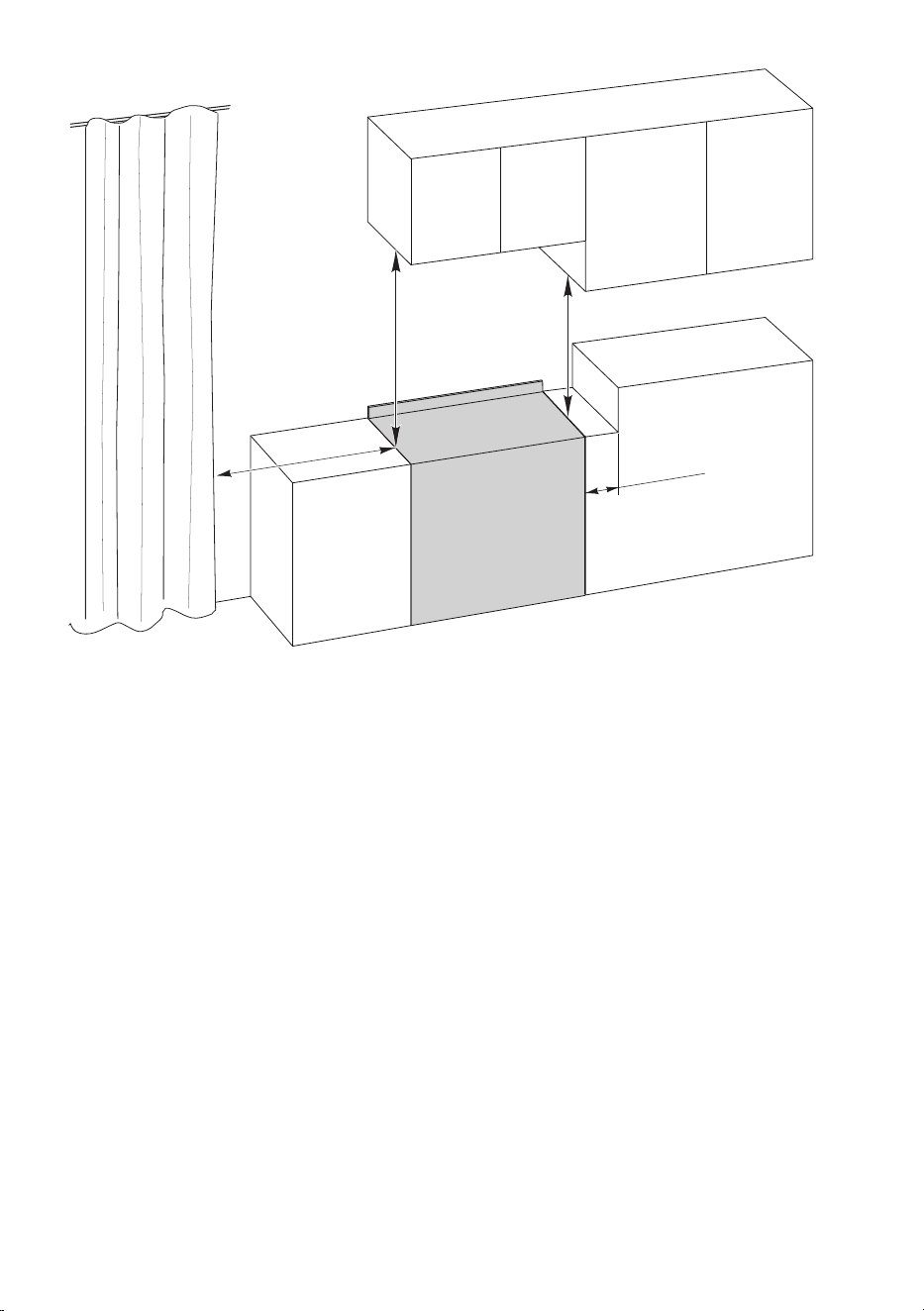
1010
50 mm
650 mm
500 mm
450 mm
Figure 1
C
ooker overall dimensions [mm]
■ height: min 892.5 - max 942.5
■ width: 900
■ depth: 600
1111
210 - 260
mm (*)
(*) Depending on
feet adjustment
18.5 mm
18.5 mm
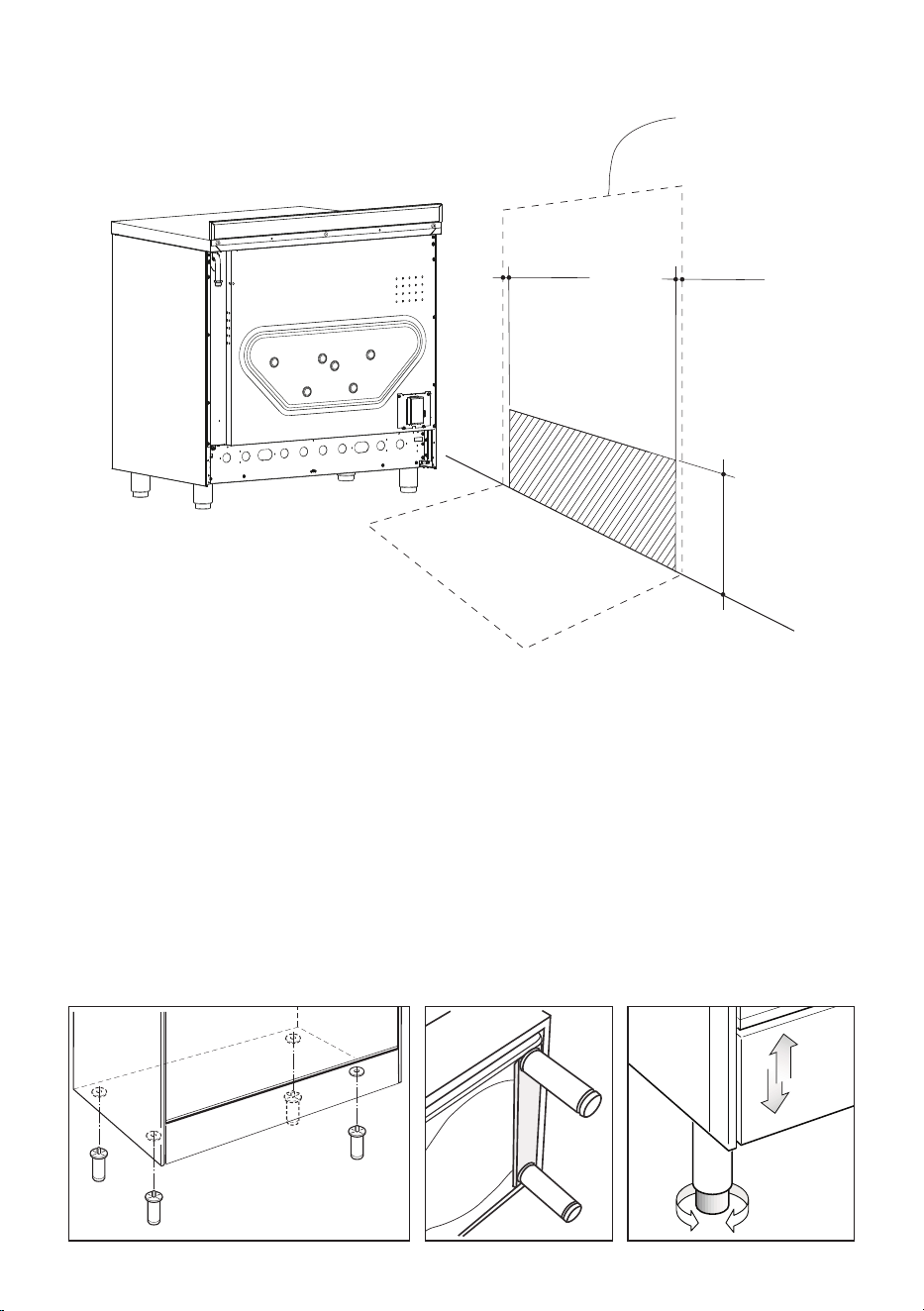
LOCATING THE AREA FOR ELECTRICAL CONNECTION
Figure 2
FITTING THE ADJUSTABLE FEET
The adjustable feet must be tted to the base of the cooker before use (gs. 3, 4).
Rest the rear of the cooker on a piece of the polystyrene packaging exposing the base for
the tting of the feet.
Fit the no. 4 (four) legs by screwing them tight into the support base as shown in gure 4.
LEVELLING THE COOKER
The cooker may be levelled by screwing the lower ends of the feet IN or OUT (g. 5).
Figure 4 Figure 5Figure 3
Dotted line showing
the position of
the cooker when
installed
1212
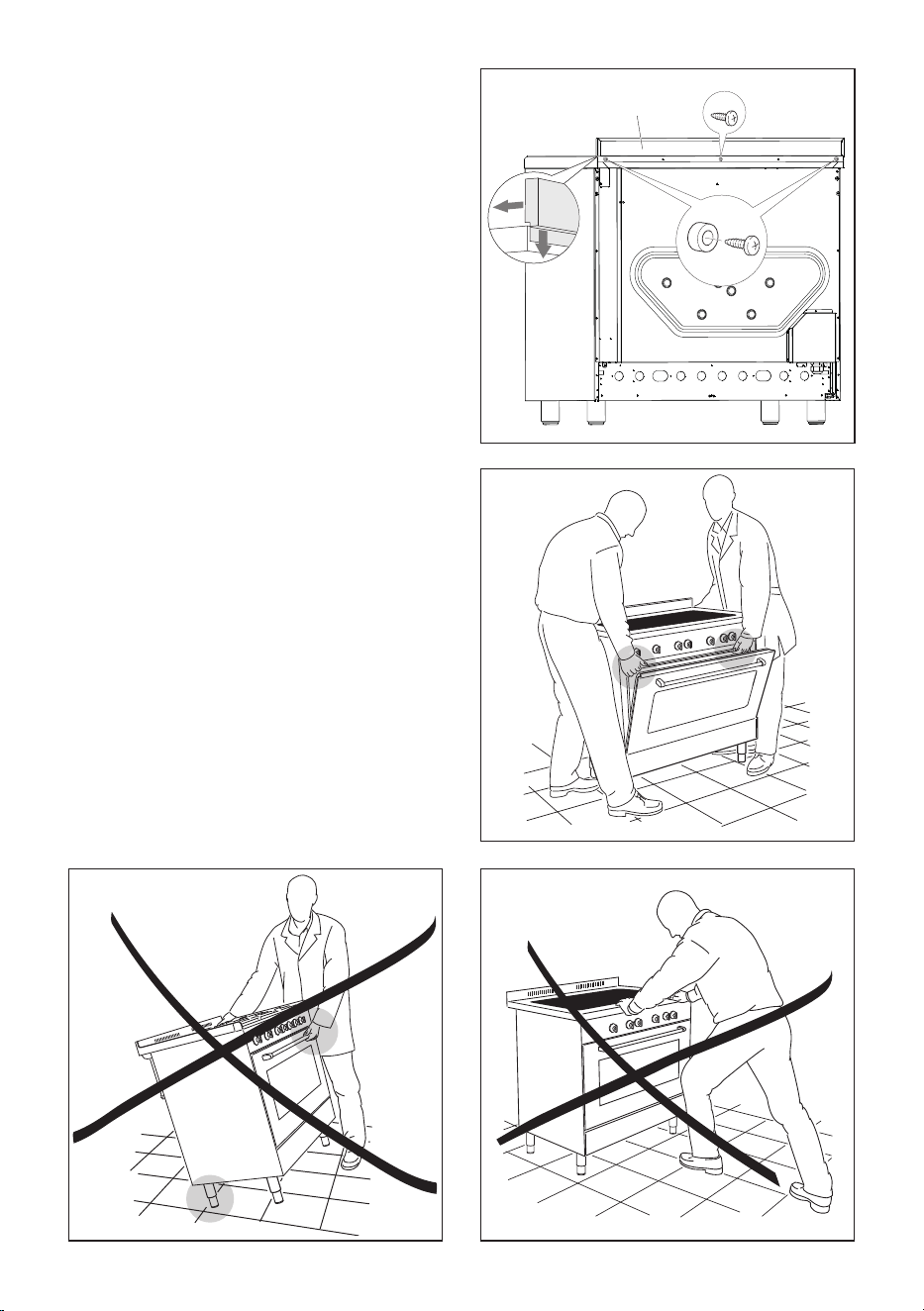
MOVING THE COOKER
WARNING: When raising cooker to upright
position always ensure two people carry
out this manoeuvre to prevent damage to
the adjustable feet (g. 6b).
WARNING - Be careful: Do not lift the
cooker by the door handle when raising to
the upright position (g. 6c).
WARNING: When moving cooker to its
nal position DO NOT DRAG (g. 6d). Lift
feet clear of oor (g. 6b).
Figure 6b
Figure 6dFigure 6c
FIXING THE BACKGUARD
Before installing the cooker, assemble the
backguard “C” (g. 6a).
■ The backguard “C” can be found
packed at the rear of the cooker.
■ Before assembling remove any
protective lm/adhesive tape.
■ Remove the two spacers “A” and the
screw “B” from the rear of the cooktop.
■ Assemble the backguard as shown in
g. 6a and x it by screwing the central
screw “B” and the spacers “A”.
C
B
A
Figure 6a
1313
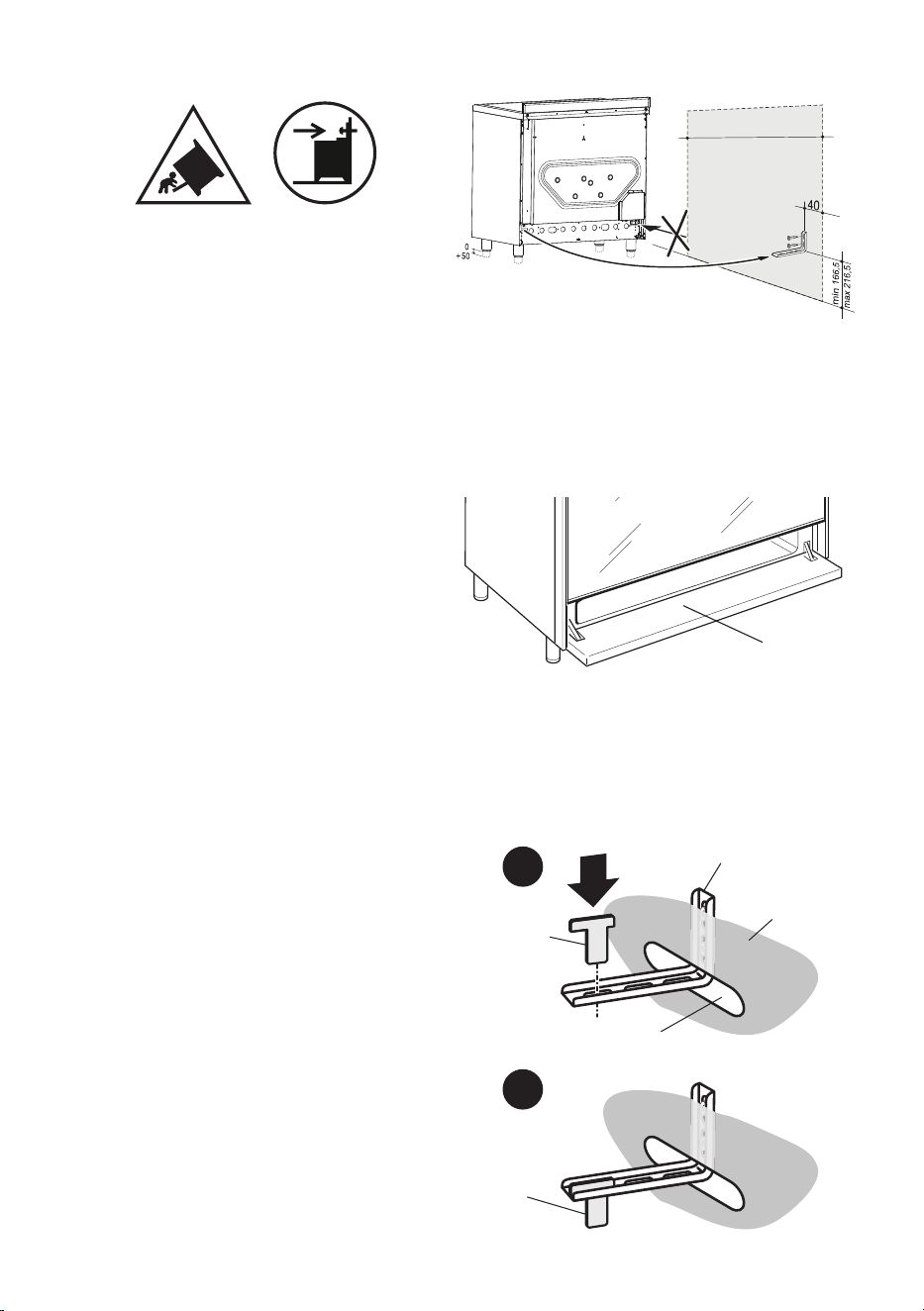
ANTI-TILT BRACKET
Important!
To restrain the appliance and prevent it
tipping accidentally, t a bracket to its
rear to x it securely to the wall. Make
sure you also t the supplied lock pin to
the anti-tilt bracket.
If installing the cooker above a plinth
(without tting the adjustable feet),
revise the installation dimensions
accordingly considering that the feet
have the following measures: min
85 mm - max 135 mm.
To t the anti-tilt bracket:
1. After you have located where the
cooker is to be positioned, mark on the
wall the place where the two screws
of the anti-tilt bracket have to be tted.
Please follow the indications given in
g. 7.
2. Drill two 8 mm diameter holes in
the wall and insert the plastic plugs
supplied.
Important!
Before drilling the holes, check that
you will not damage any pipes or
electrical wires.
3. Loosely attach the anti-tilt bracket with
the two screws supplied.
4. Move the cooker to the wall and adjust
the height of the anti-tilt bracket so
that it can engage in the slot on the
cooker’s back, as shown in g. 7.
5. Tighten the screws attaching the anti-
tilt bracket.
6. Push the cooker against the wall so
that the anti-tilt bracket is fully inserted
in the slot on the cooker’s back.
7. Access the bracket and t the lock pin:
■ Open the pivoting panel (g. 8).
■ Fit the lock pin through the
bracket, as shown (g. 9).
■ Close the pivoting panel.
min 220
max 245
(depending on feet adjustment)
450
450
0
+ 25
900 mm
Pivoting
panel
Lock pin
correctly
tted
Lock pin
Slot on the
cooker’s back
Cooker’s
back
Anti-tilt bracket
attached on the
rear wall
1
2
min 220
max 245
(depending on feet adjustment)
450
450
0
+ 25
900 mm
Pivoting
panel
Lock pin
correctly
tted
Lock pin
Slot on the
cooker’s back
Cooker’s
back
Anti-tilt bracket
attached on the
rear wall
1
2
Figure 7
Figure 8
Figure 9
900 mm
1414
900mm
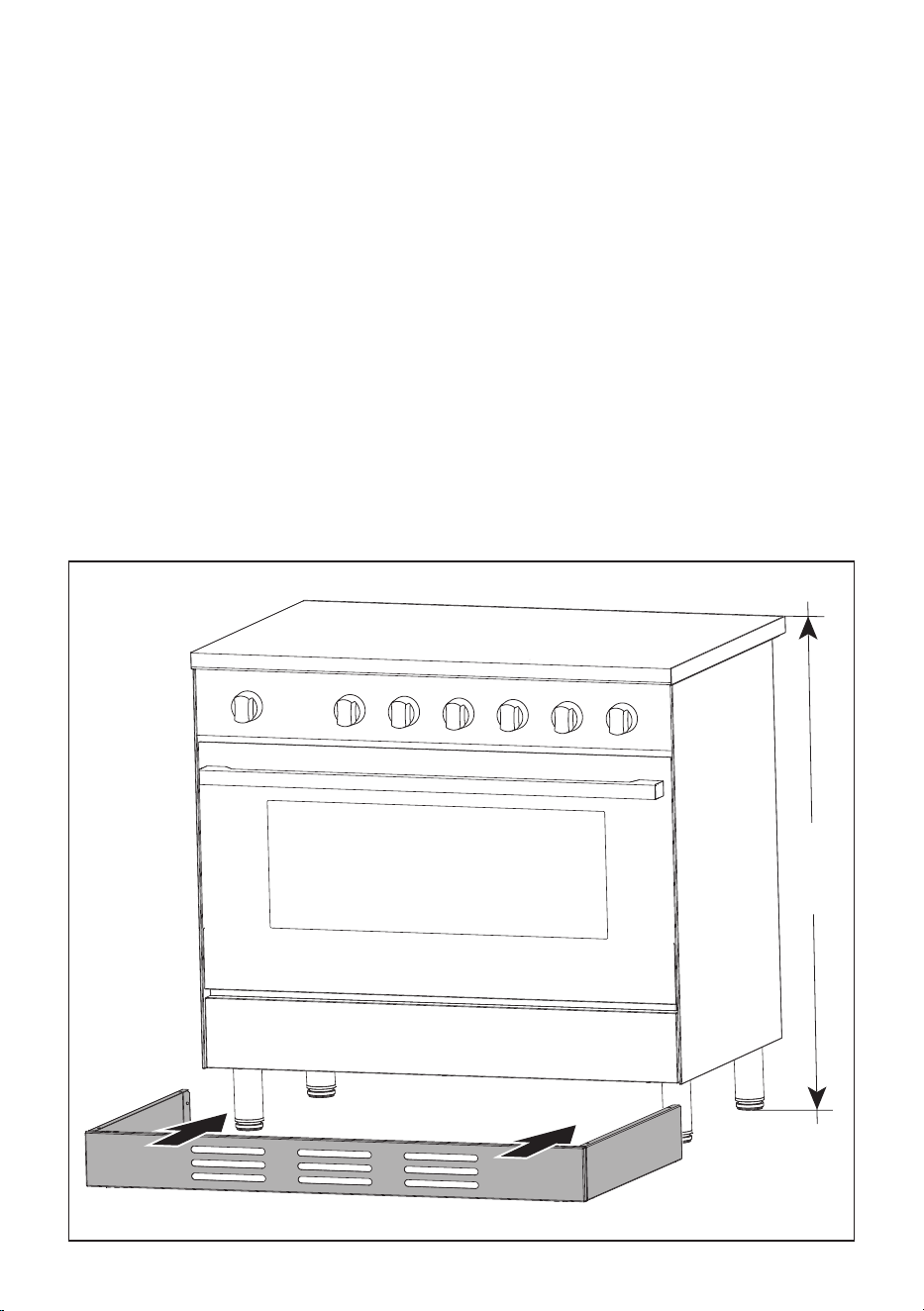
BOTTOM METAL PLINTH
A metal plinth can be tted at the bottom of the appliance to cover the feet.
This plinth is supplied with the appliance in a separate kit and it shall be tted as indicated
in the instruction sheet supplied with the kit itself.
IMPORTANT: This bottom metal plinth is suitable only for cooker height=900 mm.
Figure 10

1515
ELECTRICAL REQUIREMENTS
■ The appliance must be connected to the mains checking that the voltage corresponds
to the value given in the rating plate and that the electrical cable sections can withstand
the load specied on the plate.
■ A suitable disconnection switch must be incorporated in the permanent wiring, mounted
and positioned to comply with the local wiring rules and regulations. The switch must
be of an approved type installed in the xed wiring and provide a 3 mm air gap contact
separation in all poles in accordance with the local wiring rules.
In Australia and New Zealand, a switch of the approved type with a 3 mm air gap must
be installed in the active (phase) conductor of the xed wiring.
■ The switch must always be accessible.
■ The power supply cable must not touch the hot parts and must be positioned so that it
does not exceed 50 °C above ambient.
■ To connect the cooker to the mains electricity supply, do not use adapters, reducers or
branching devices as they can cause overheating and burning.
■ This cooker must be connected to a suitable double pole control unit adjacent to the
cooker. No diversity can be applied to this control unit.
■ This cooker must be connected to electrical supply using V105 insulated cable.
In New Zealand, this appliance must be connected to the electrical supply using a
cable tted with an appropriately rated plug. The plug must be compatible with the
socket-outlet tted to the nal subcircuit in the xed wiring that is intended to supply
the appliance.
■ Once the appliance has been installed, the switch or socket must always be accessible.
■ If the supply cord is damaged it must be replaced by the manufacturer or it’s Service
Agent or a similarly qualied person in order to avoid a hazard.
N.B. The connection of the appliance to earth is mandatory.
If the installation requires alterations to the domestic electrical system call a qualied
electrician. He should also check that the domestic electrical system is suitable for the
power drawn by the appliance.
Replacing the power cord must be done by a qualied electrician in accordance with
the instructions supplied by the manufacturer and in compliance with established
electrical regulations.
1616
CONNECTION OF THE POWER SUPPLY CABLE
Important! The appliance must be connected to the electricity supply only by an
authorised person.
To connect the feeder cable to the cooker it is necessary to carry out the following operations:
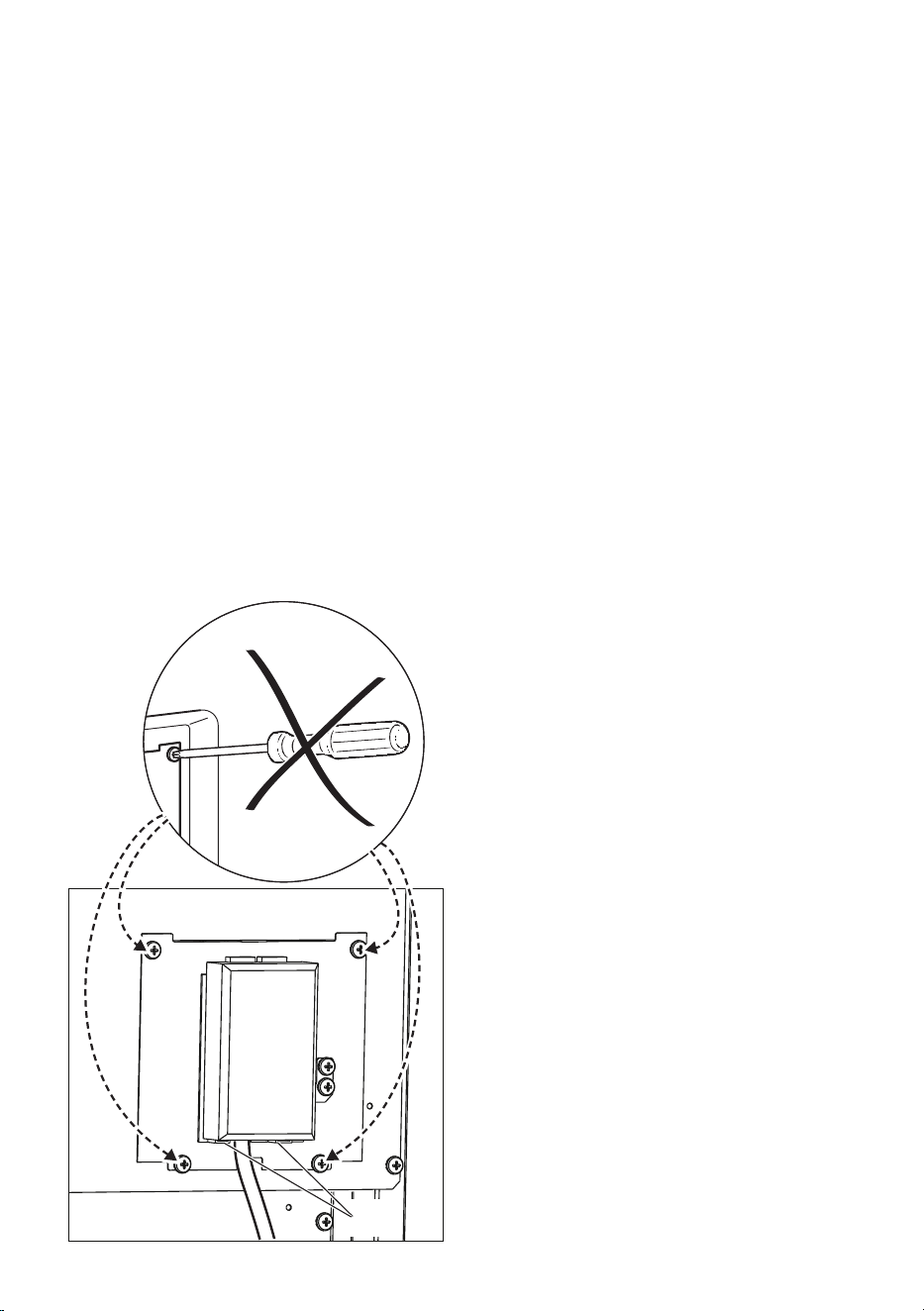
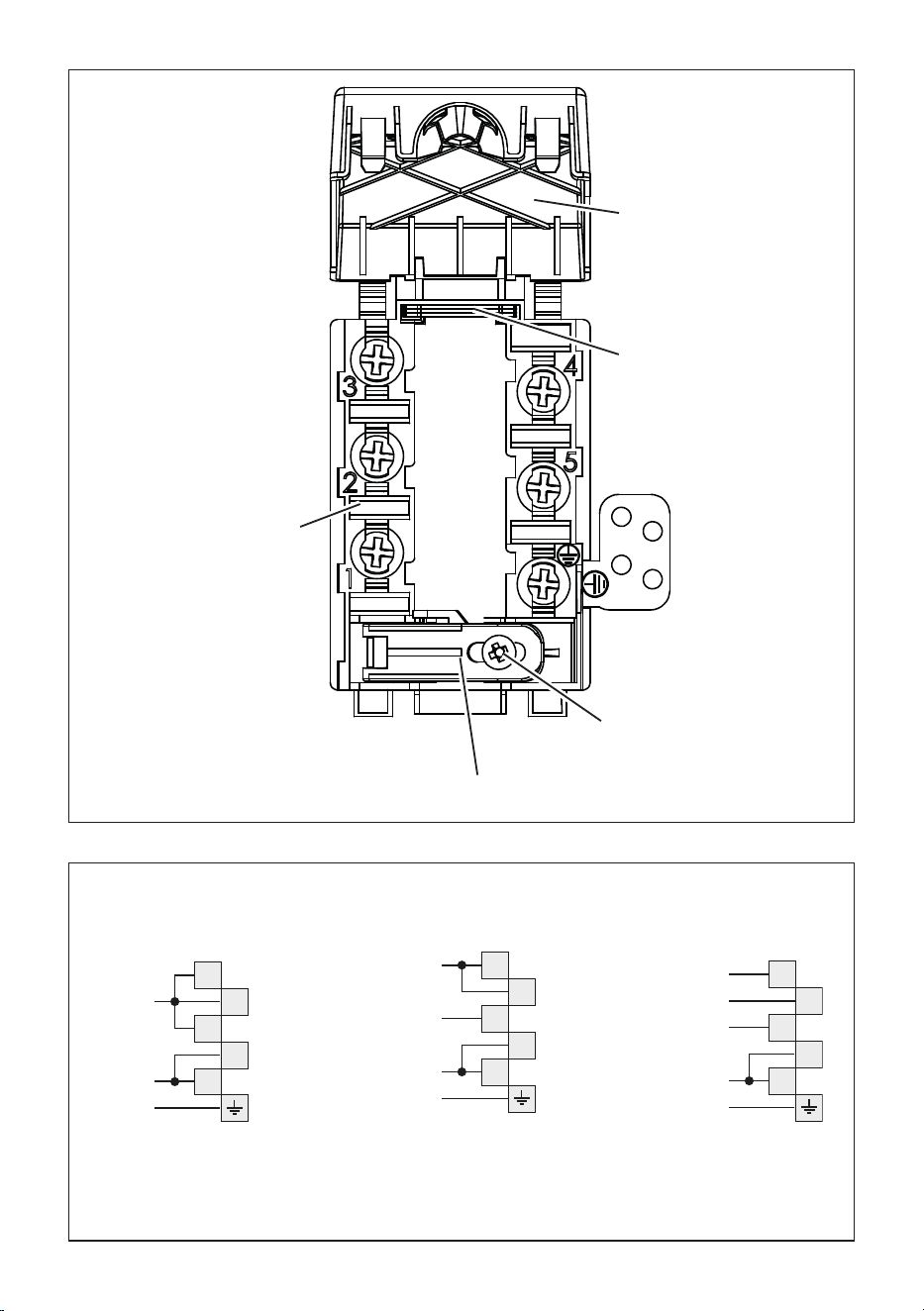
■ Unhook the terminal board cover by inserting a screwdriver into the two hooks “A” (g.
11).
■ Unscrew the screw “D” and open completely the cable clamp “E” (g. 12).
■ Position the U bolts “F” onto terminal board “G” (g. 12) according to the diagrams in
g. 13.
■ Connect the phase, neutral and earth wires to terminal board “G” according to the
diagrams in g. 13.
■ Strain the feeder cable and block it with cable clamp “E” (by screwing screw “D”).
■ Close the terminal block cover (check the two hooks “A” are correctly hooked, g 11).
NOTE: The earth conductor must be left about 3 cm longer than the others.
IMPORTANT: To connect the power supply cable DO NOT unscrew the screws xing
the cover plate behind the terminal block.
If the supply cord (not supplied with the appliance) is damaged, it must be replaced
by the manufacturer or its service agent or a similarly qualied person in order to
avoid a hazard.
VOLTAGE AND POWER
CONSUMPTION
■ 220-240/380-415 V 3N, 50-60 Hz
9200 W - 40 A (@230V)
FEEDER CABLE SECTION (USE
A TYPE OF CABLE ACCORDING
TO THE APPLICABLE LOCAL
REGULATIONS)
220-240 V ac 3 x 6 mm
2
(*)
380-415 V 3N ac 5 x 1,5 mm
2
(*)
380-415 V 2N ac 4 x 4 mm
2
(*)
(*) Connection with wall box connection.
A
Figure 11
1717
PE
N (L
2
)
L
1
230 V
1
2
3
4
5
1
2
3
4
5
1
2
3
4
5
PE
PE
400 V 3N
400 V 2N
N
L
1
L
2
N
L
1
L
3
L
2
220-240 V ac 380-415 V 2N ac 380-415 V 3N ac
D
E
F
G
C
Figure 12
Figure 13
C
F
G
D
E
1818
USE AND CARE
CAUTION:
■ This appliance must be used only for the task it has explicitly been designed for, that
is for domestic cooking of foodstus. Any other form of usage is to be considered as
inappropriate and therefore dangerous.
■ Do NOT place combustible materials or products on this appliance at any time.
■ Do NOT use or store ammable materials in the appliance storage compartment or
near this appliance.
■ WARNING: Accessible parts will become hot when in use. To avoid burns and scalds,
young children should be kept away.
■ Do NOT spray aerosols in the vicinity of this appliance while it is in use.
■ Do NOT modify this appliance.
USING THE OVEN FOR THE FIRST TIME
To eliminate traces of grease in manufacture it is necessary to preheat the oven as
indicated in the chapter “COOKING WITH MULTIFUNCTION OVEN”.
To t the oven accessories operate as follows:
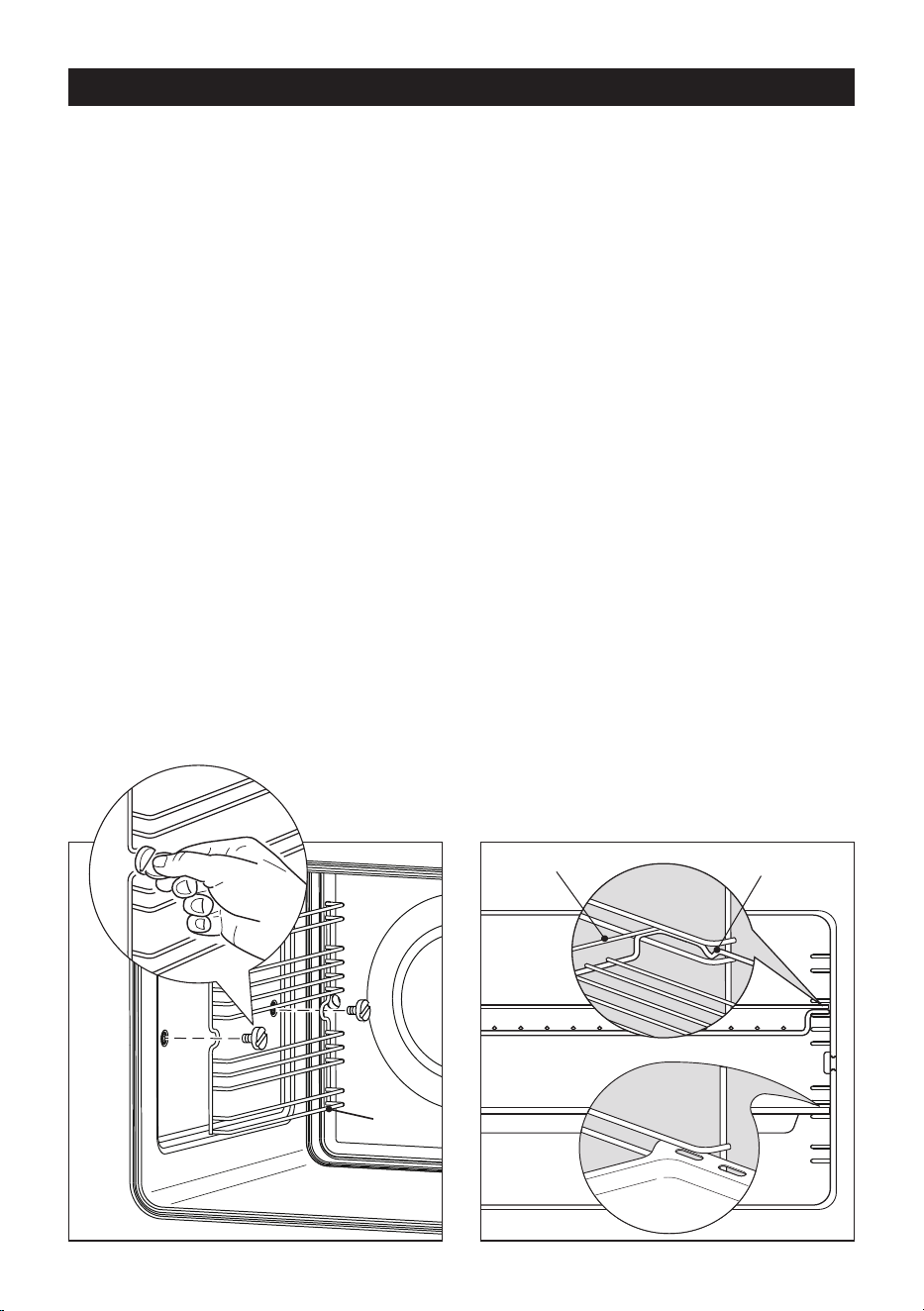
■ Assemble the wire racks “G” to the oven walls using the 2 screws (fig. 14).
■ Slide in, on the guides, the shelf and the tray (fig. 15).
The rack must be fitted so that the safety notch, which stops it sliding out, faces the
inside of the oven; the guard rail shall be at the back.
■ To dismantle, operate in reverse order.
Guard rail Stop notch
Figure 15Figure 14
G
1919
Fig. 4.3
TELESCOPIC SLIDING SHELF SUPPORTS
The telescopic sliding shelf supports make it safer and easier to insert and remove the
oven shelf and tray.
They stop when they are pulled out to the maximum position.
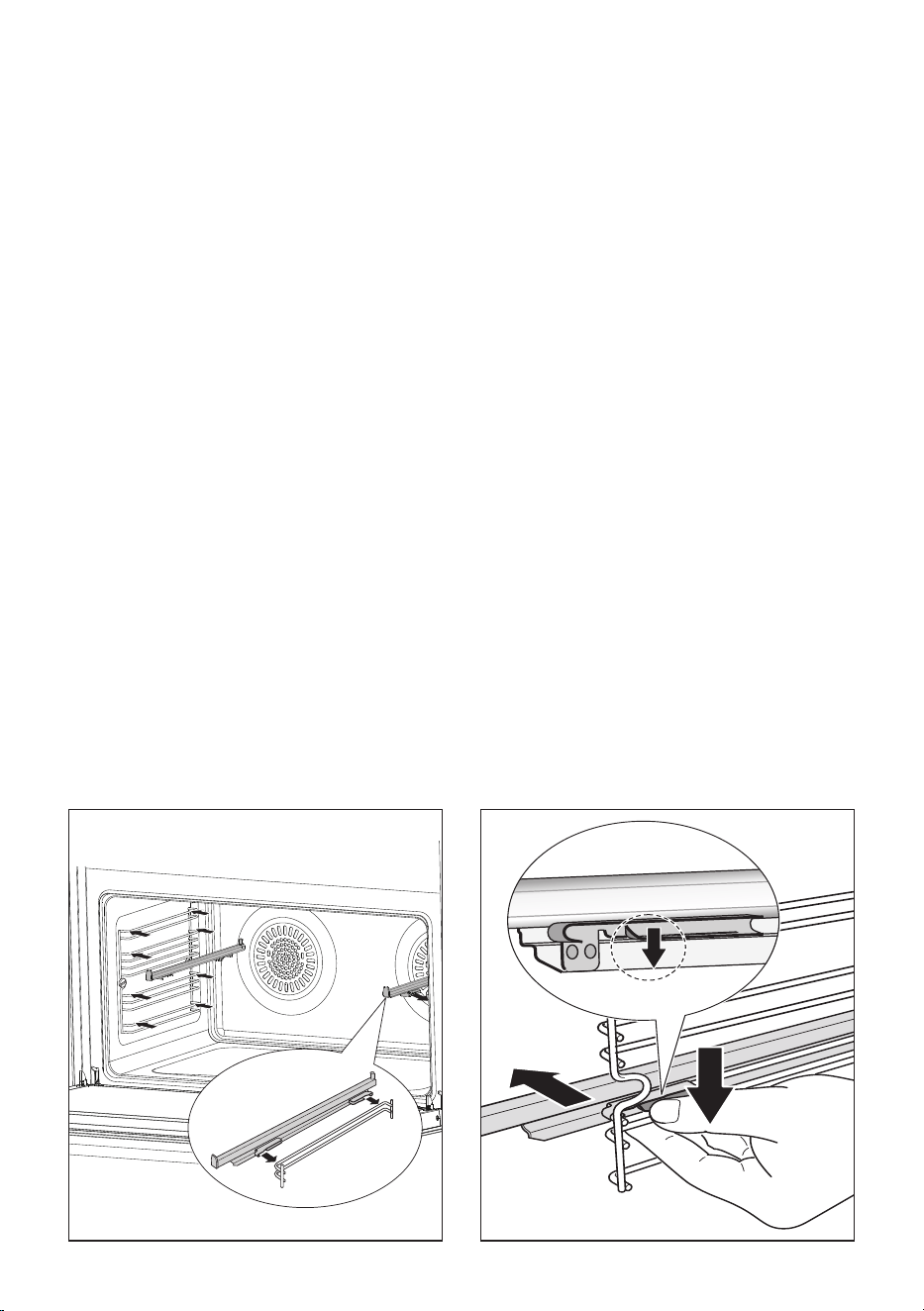
Important! When tting the sliding shelf supports, make sure that you t:
■ The slides to the top wire of a rack. They do not t on the lower wire.
■ The slides so that they run out towards the oven door.
■ Both sides of each pair of shelf slides.
■ Both sides on the same level.
To x the sliding shelf supports onto the side racks:
■ Screw the side racks onto the oven wall (g. 14).
■ Fit the sliding shelf supports onto the top wire of a rack and press (gs. 16, 17). You
will hear a click as the safety locks clip over the wire.
To remove the telescopic sliding shelf supports:
■ Remove the side racks by unscrewing the xing screws (g. 14).
■ Lay down the sliding shelf support and side racks, with the telescopic sliding shelf
support underneath.
■ Find the safety locks. These are the tabs that clip over the wire of the side rack (arrow
“1” in g. 17).
■ Pull the safety locks away from the wire to release the wire (arrow “2” in g. 17).
Cleaning the sliding shelf supports:
■ Wipe the supports with a damp cloth and a mild detergent only.
■ Do not wash them in the dishwasher, immerse them in soapy water, or use oven
cleaner on them.
1
2
1
Figure 17Figure 16
2020
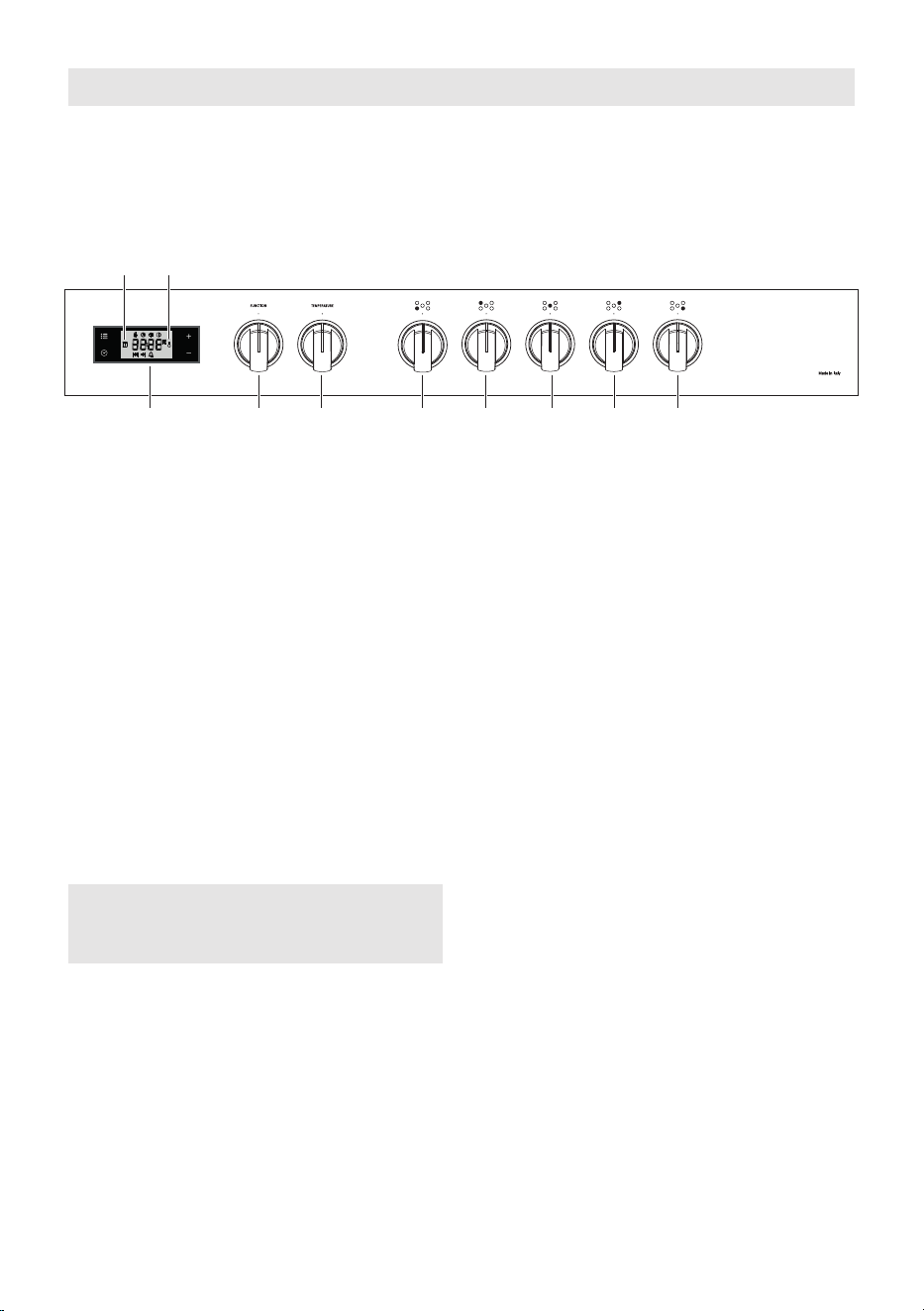
CONTROLS DESCRIPTION
1. Front right cooking zone control knob
2. Rear right cooking zone control knob
3. Central cooking zone control knob
4. Rear left cooking zone control knob
5. Front left cooking zone control knob
6. Oven function selector control knob
7. Oven temperature control knob
8. Electronic clock/programmer “Touch-controls”
Pilot lamp:
9. Oven temperature indicator
10. Oven on indicator
NOTE:
The knob and symbols may vary.
Figure 18
CONTROL PANEL
5 4 3 2 1768
910
Note:
Your appliance has been tted with a cooling fan to achieve optimum eciency of the
controls and to ensure lower surface temperatures are maintained.
When the oven/hob is operating the cooling fan motor switches ON/OFF depending on
temperature.
Depending on cooking temperatures and times, the cooling fan may run on even after
appliance has been switched o. The duration of this time is dependent on previous
cooking temperature and duration.
2121
2 2
1 1
3
4
5
5
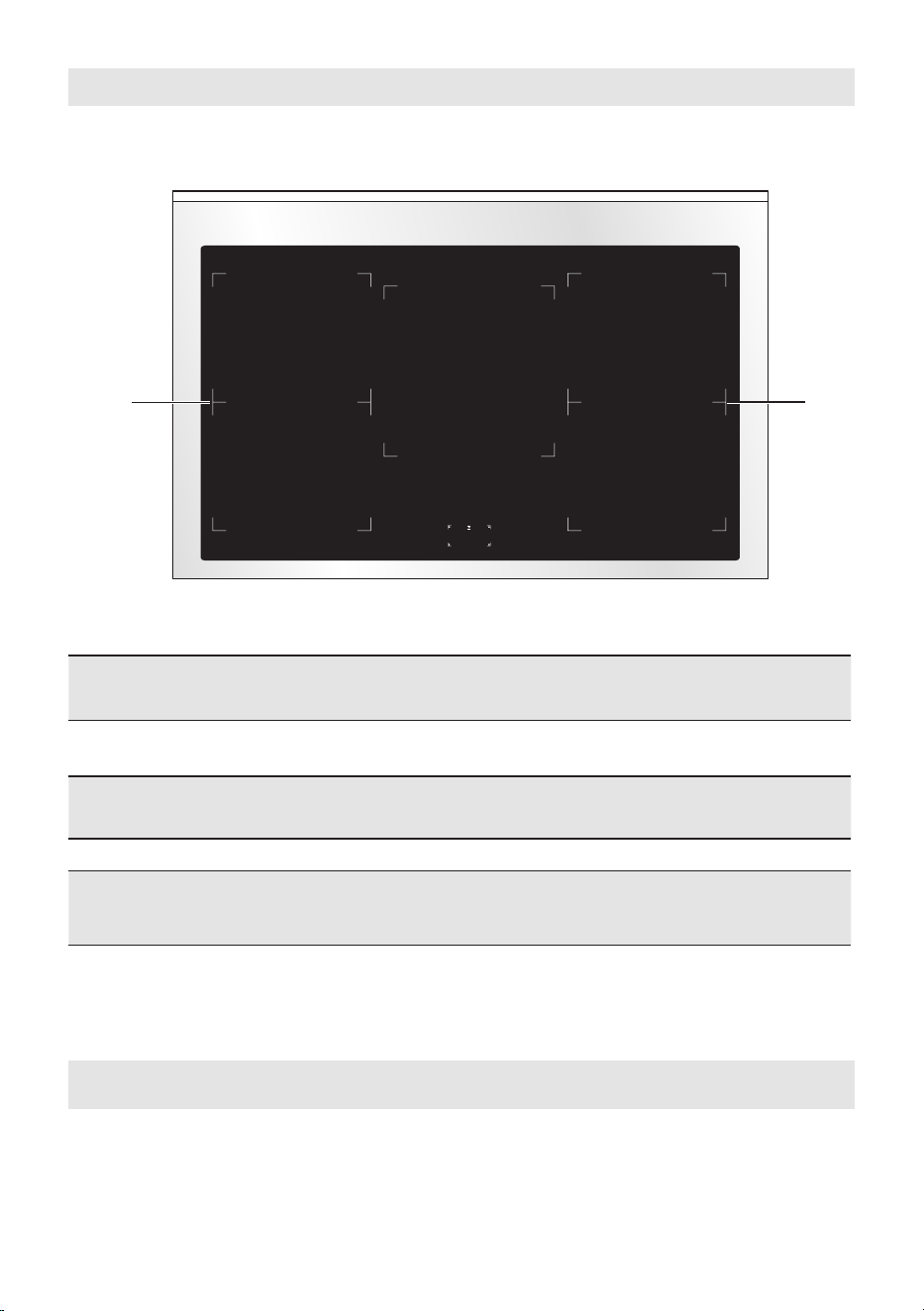
Caution! Do not cover the hob with aluminium foils.
Attention:
Detach the appliance from the mains if the ceramic glass is cracked and contact the After-
Sales Service.
Metallic objects such as knives, forks, spoons and lids should not be placed on the hob
surface since they can get hot.
1. Induction cooking zone Multizone
Normal Power: 1600 W
Booster Power: 1850 W
2. Induction cooking zone Multizone
Normal Power: 2100 W
Booster Power: 3000 W
3. Induction cooking zone Ø 250 mm
Normal Power: 2300 W
Booster Power: 3000 W
4. Cooking zones display
5 . “ B r i d g e ” f u n c t i o n : w h e n e n a b l e d , c o o k i n g z o n e s 1 a n d 2 w o r k t o g e t h e r a s a
single zone - 3700 W maximum.
Note:
The Nominal and Booster Power may change depending on the size and material of the
pan set on the cooking zone.
COOKING HOB
Figure 19
2222
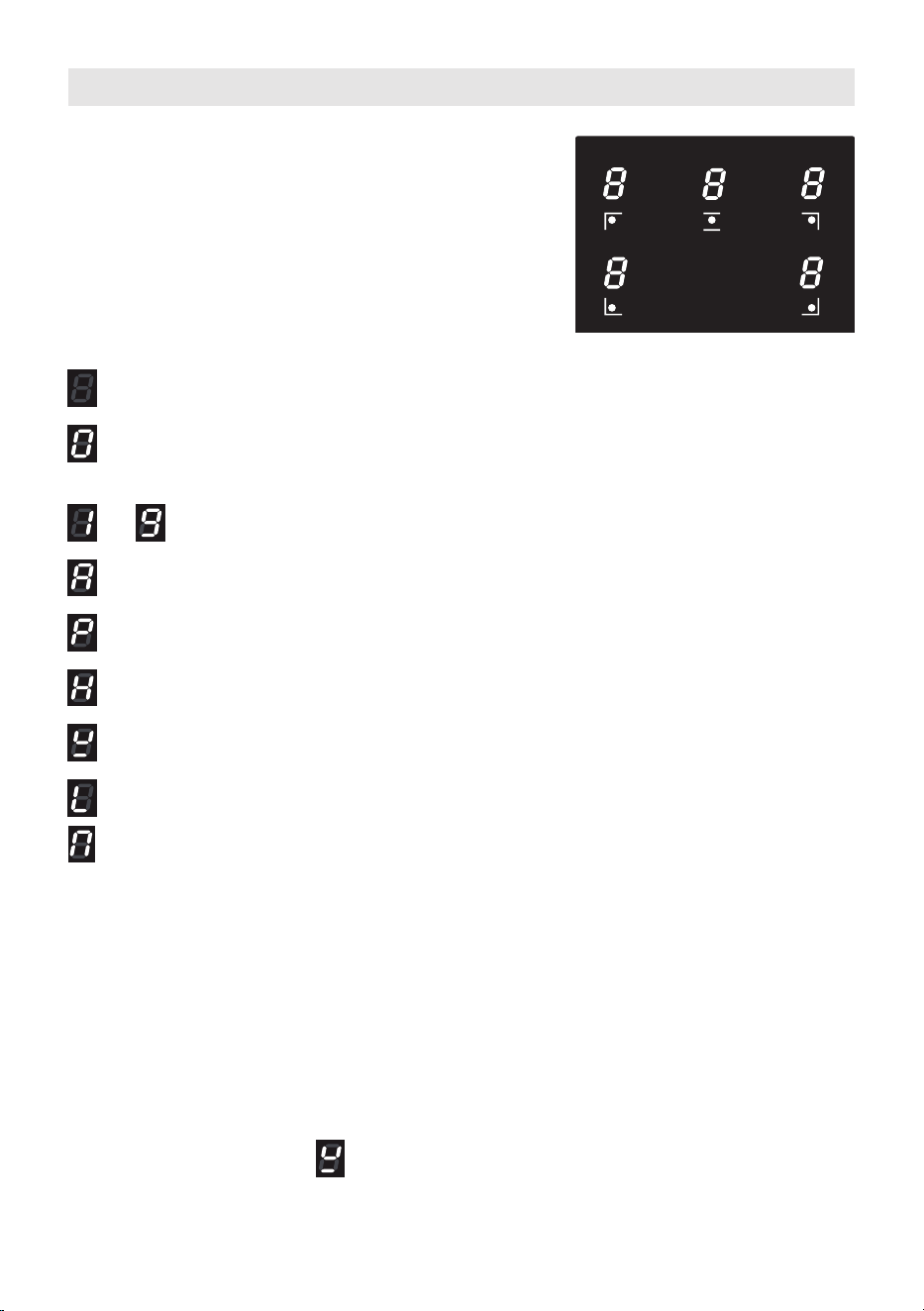
The ceramic hob is tted with induction
cooking zones.
These zones are marked on the ceramic
surface, and
are controlled by separate
knobs positioned on the control panel.
In the front central area of the hob, the
cooking zones display indicates:
INDUCTION COOKING SYSTEM
When your induction hob is switched on and a cooking zone has been selected, the
electronic circuits produce induced currents that instantaneously heat the bottom of the
pan which then transfers this heat to the food.
Cooking takes place with hardly any energy loss between the induction hob and the food.
Your induction hob operates only if a correct pan with the right features is placed on a
cooking zone. Please refer to “COOKWARE/COFFEE POT FOR INDUCTION COOKING”.
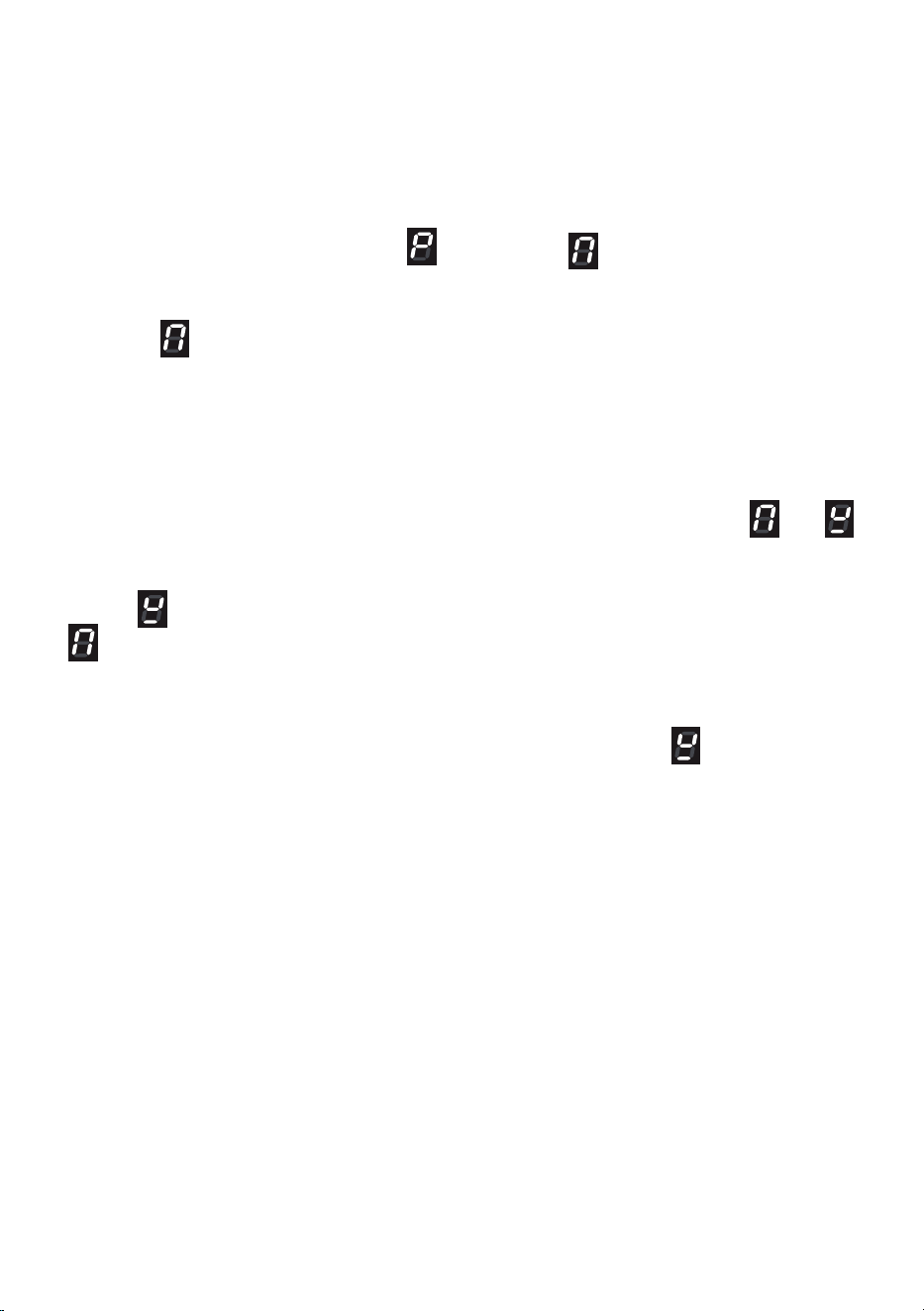
If the pan detection symbol appears on the display, your pan is not suitable and your
induction hob will not operate After 10 minutes without detecting any pan, the cooking zone
switches O automatically and can only be switched On after the control knob has been
returned into “0” (O) setting.
= Cooking zone O (not activated)
= Cooking zone On (activated but not operating).
If all the zones are in zero setting, the display switches o automatically
(cooking zones O) after about 10 seconds.
÷
= Power levels
= “Fast heating” function
= “Booster” function
= Remaining heat indicator
= Pan detection indicator
= Childlock safety
= “Bridge” function
Note: each lit gure refers to the relevant cooking zone
HOW TO USE THE COOKING HOB
Figure 20

2323
If the induction cooktop emits a humming noise when a zone is used on a high power level,
this phenomenon is normal as it is caused by the induction cooking technology.
The noise should weaken or disappear completely when the power level is decreased.
REMAINING HEAT INDICATORS
When the temperature of a cooking zone is still hot, the relevant remaining heat
indicator lights up on the display to alert you of the hot surface.
Avoid touching the hob surface over the cooking area. Please pay special attention to
children.
When the is lit on the display, it is still possible to start cooking again; just turn the
control knob to the required power level.
COOKWARE/COFFEE POT FOR INDUCTION COOKING
The induction cooking system OPERATES ONLY if using correct cookware suitable for
induction cooking (normally identied by an induction symbol on the bottom of the cookware/
coee pot). The use of not suitable cookware may cause damage to the appliance.
The bottom of the pan/coee pot has to be ferromagnetic to generate the electromagnetic
eld necessary for the heating process (meaning a magnet has to stick to the bottom of the
pan/coee pot).
Pans/coee pots made from the following materials are not suitable:
• glass, wood, porcelain, ceramic, stoneware;
• pure stainless steel, aluminium or copper without magnetic bottom.
To check if a pan/coee pot is suitable or not:
• Test the bottom of the pan/coee pot with a magnet: if the magnet sticks, the pan is suitable.
• If a magnet is not available pour a small amount of water inside the pan/coee pot and
place the pan on a cooking zone. Switch on the cooking zone: if the cooking zone display
shows alternately the set power level and , the pan/coee pot is not suitable .
Important: Do not use pots/coee pot adaptors; this could cause an overheating and
possible damage to the appliance.
Important note: the cooking zones will not operate if the pan/coee pot diameter is too
small. To correctly use the cooking zones follow the indications given in the following table.
Induction cooking zone
Minimum pan diameter recommended
(referred to the bottom of the pan)
Multizone (unBridged) 120 mm
Multizone Bridged 230 mm
Cooking zone Ø 250 mm 145 mm

2424
IMPORTANT: Some cookware available on the market is not of good quality or has an
eective ferromagnetic area which is much smaller than the diameter of the pan itself.
Avoid using this cookware because the induction cooktop may not function properly or may
be damaged.
Pay attention: The pan/coee pot shall always be centered over the middle of the cooking
zone.
Pay attention: If using a grill pan do not select the maximum level for a too long time, the
pan may become deformed due to the excessive heat. Always use pans with thick bottom.
It is possible to use oversized pans/coee pots but its bottom shall not touch the other
cooking zone.
Always use pans/coee pots with thick, completely at bottom.
Do not use pans/coee pots with concave or convex bottom; these could cause overheating
of the cooking zone.
Note: Some types of pans/coee pots could cause noise when used on an induction
cooking zone.
The noise does not mean any failure on the appliance and does not inuence the cooking
operation.
2525
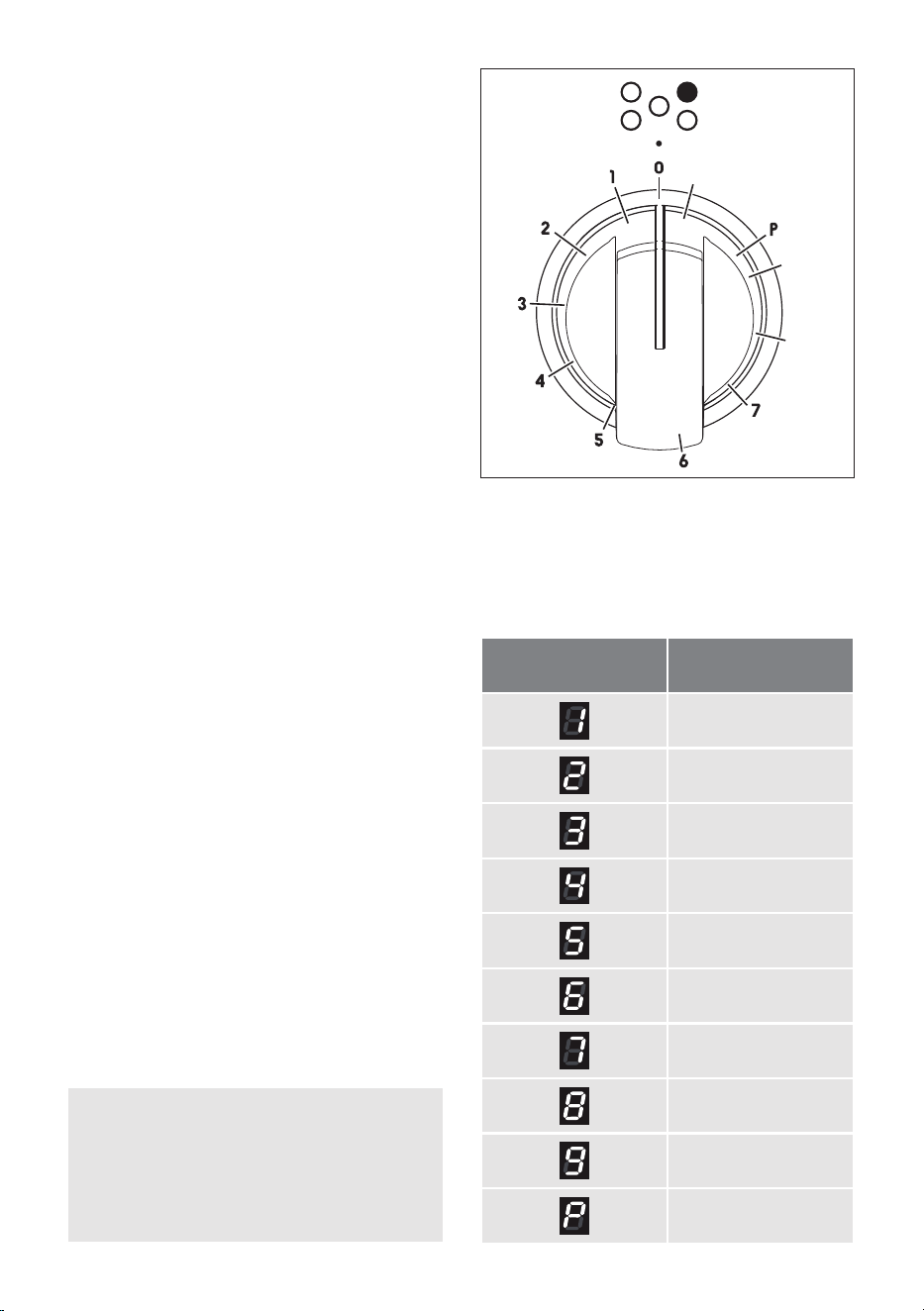
OPERATION TIME LIMIT OF
COOKING ZONES
Each cooking zone is automatically
switched O after a maximum preset time
if no operation is performed.
The maximum preset time limit depends
on the set power level, as illustrated in this
schedule.
Each operation on the cooking hob by
using the knob will reset the maximum
operation time at its initial value.
Power level of
Cooking zones
Operation
time limit
360 minutes
360 minutes
300 minutes
300 minutes
240 minutes
90 minutes
90 minutes
90 minutes
90 minutes
10 minutes
CONTROL KNOBS
Each cooking zone is adjusted by a
separate control knob positioned on the
control panel and the operation is controlled
by the electronic system.
If a cooking zone is not turned O the
electronic system automatically switches it
O after a pre-set time which depends on
the power setting.
8
9
A
NOTES:
The knobs and symbols may vary.
The symbols may be printed on the
knob itself.
Figure 21

2626
EXAMPLES OF COOKING POWER SETTING
0
Cooking zone not operating
1 to 2
Melting
Reheating
Sauces, butter, chocolate, gelatine
Dishes prepared beforehand
2 to 3
Simmering
Defrosting
Rice, pudding, sugar syrup
Dried vegetables, sh, frozen products
3 to 4
Steam Vegetables, sh, meat
4 to 5
Water
Steamed potatoes, soups, pasta,
fresh vegetables
6 to 7
Medium cooking
Simmering
Meat, lever, eggs, sausages
Goulash, roulade, tripe
7 to 8
Cooking Potatoes, fritters, wafers
9 to P
Frying, roasting
Boiling water
Steaks, omelettes, fried dishes
Water
1 ÷ 9 POWER LEVEL
Turn the knob clockwise to set the desired power level between 1 (minimum) and 9
(maximum).
The power level can be modied at any time by turning the knob clockwise or anti-clockwise
to a dierent setting.
The cooking zone display shows the selected level.
2727
“BRIDGE” FUNCTION (EXTENDABLE MAXI ZONE)
This function can be used to link the two zones 1 and 2 in “Bridge” mode, to create an
extended maxi zone which is ideal for large rectangular pans or specialist sh cookware.
To enable this function:
• Turn both control dials for the selected cooking zones clockwise to the highest heat
setting 9.
• Turn both dials simultaneously to and hold until appears in the cooking zone
displays and the displays stop ashing.
• The front cooking zone display will show the heat setting. The rear cooking zone will
show .
• The power level can be changed at any time by selecting front cooking zone and then
setting the new level.
• To disable the “Bridge” function turn both control dials back to "0"
If no pan is detected
If no pan is detected on rear cooking zone the front cooking zone display shows the
selected setting and the rear cooking zone display will alternate between the and
(CAUTION! the front cooking zone will operate at the selected setting).
If no pan is detected on front cooking zone the front cooking zone display shows the
symbol and the rear cooking zone display will alternate between selected setting and
(CAUTION! The rear cooking zone will operate at the selected setting).
If after 10 minutes no pan is detected:
• the bridging function will switch o.
• the cooking zone without a detectable pan will continue to show
• the remaining cooking zone will continue cooking at the selected heat setting.
2828
“FAST HEATING” FUNCTION
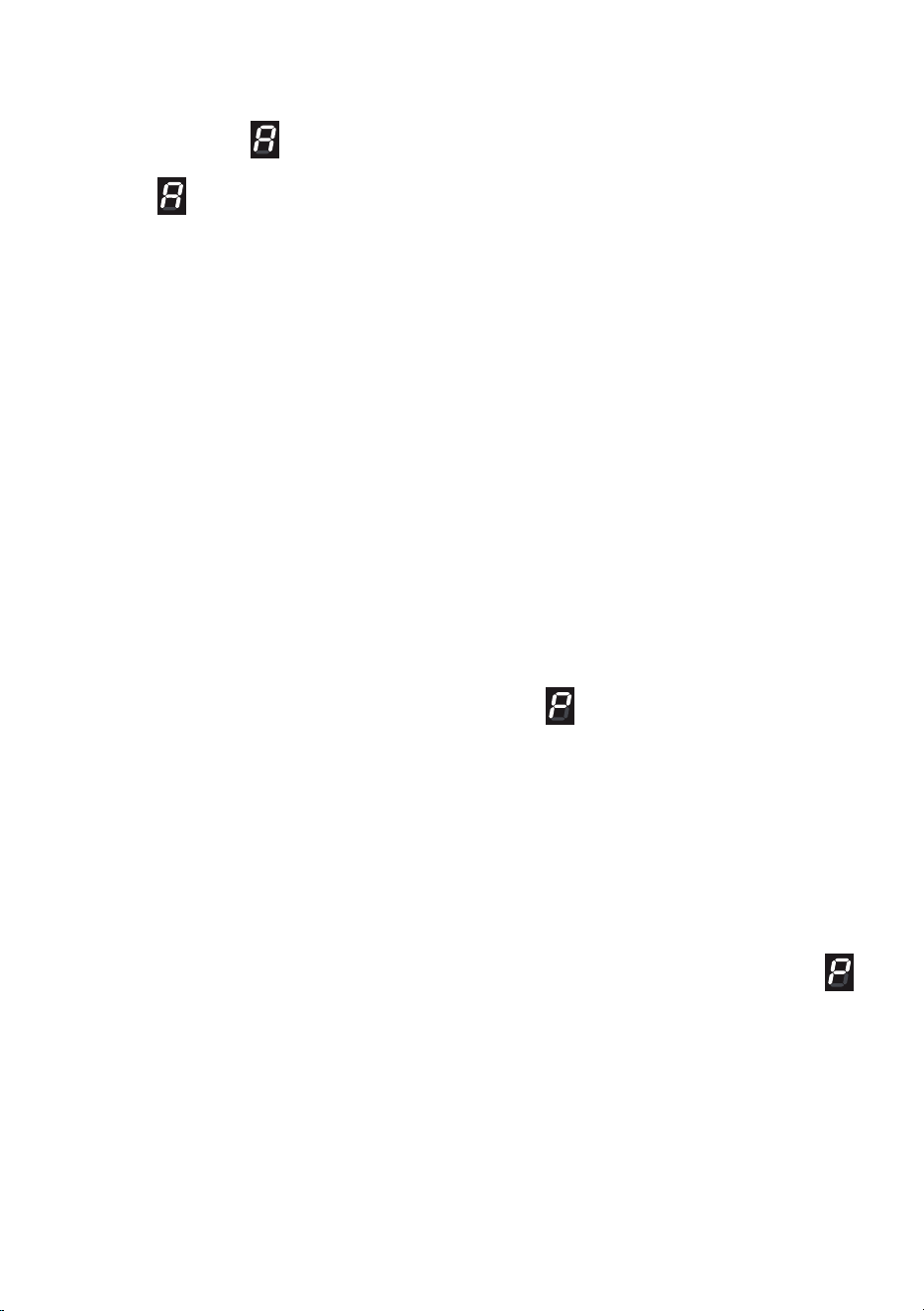
Turn the control knob anti-clockwise to the A setting and then release the knob (after the
“beep”); the relative symbol lights up on the cooking zone display. Within 10 seconds
turn the knob to the desired power level (between 1 and 9); once a setting has been
selected, and the chosen power level will ash in alternation on the control panel
display.
This function allows the cooking zone to operate at the maximum power (100%) for a time
proportional to the selected power level; after this time the cooking zone will operate at the
selected level.
This function is available on all the cooking zones.
While this function is operating it is possible, at any time, to increase the selected power
level but it is not possible to decrease the power; by turning the knob anti-clockwise to a
lower level the function will be disabled.
The function will be disabled also by turning the knob to the “0” (O) position or by selecting
the “Booster” function.
Note: If removing the pan from the cooking zone before the programme has been completed,
the “Fast heating” function will be completed with the remaining time if the pan is put back
on the cooking zone within 10 minutes.
“BOOSTER” FUNCTION
Turn the control knob clockwise to set the maximum power level (9), then turn clockwise
again to the "P" setting and release the knob (after the “beep”); the control knob returns to
the maximum setting (9) automatically and the relative symbol lights up on the cooking
zone display.
The “Booster” program is now operative.
This function allows the cooking zone to operate at the Booster maximum power (above
the nominal power) for maximum 10 minutes; it could be used, for example, to rapidly heat
up large amount of water.
To disable this function turn the knob anti-clockwise to a lower power level or to the “0”
(O).
The “Booster” is also disabled by turning the knob again to the "P" setting; in this case the
cooking zone operates at the power level 9.
Note: if a cooking zone is still hot, it is not possible to use the “Booster” function and
will ash if you try to activate. The cooking zone is automatically set to the maximum power
level (9).
The “Booster” function is always limited to a maximum of 5 minutes. You can activate the
“Booster” function again after 5 minutes.
IMPORTANT NOTES: The “BOOSTER” function is not suitable for use with non water
based cooking.
Do not use this function for heating oil (e.g. deep fat frying).
2929
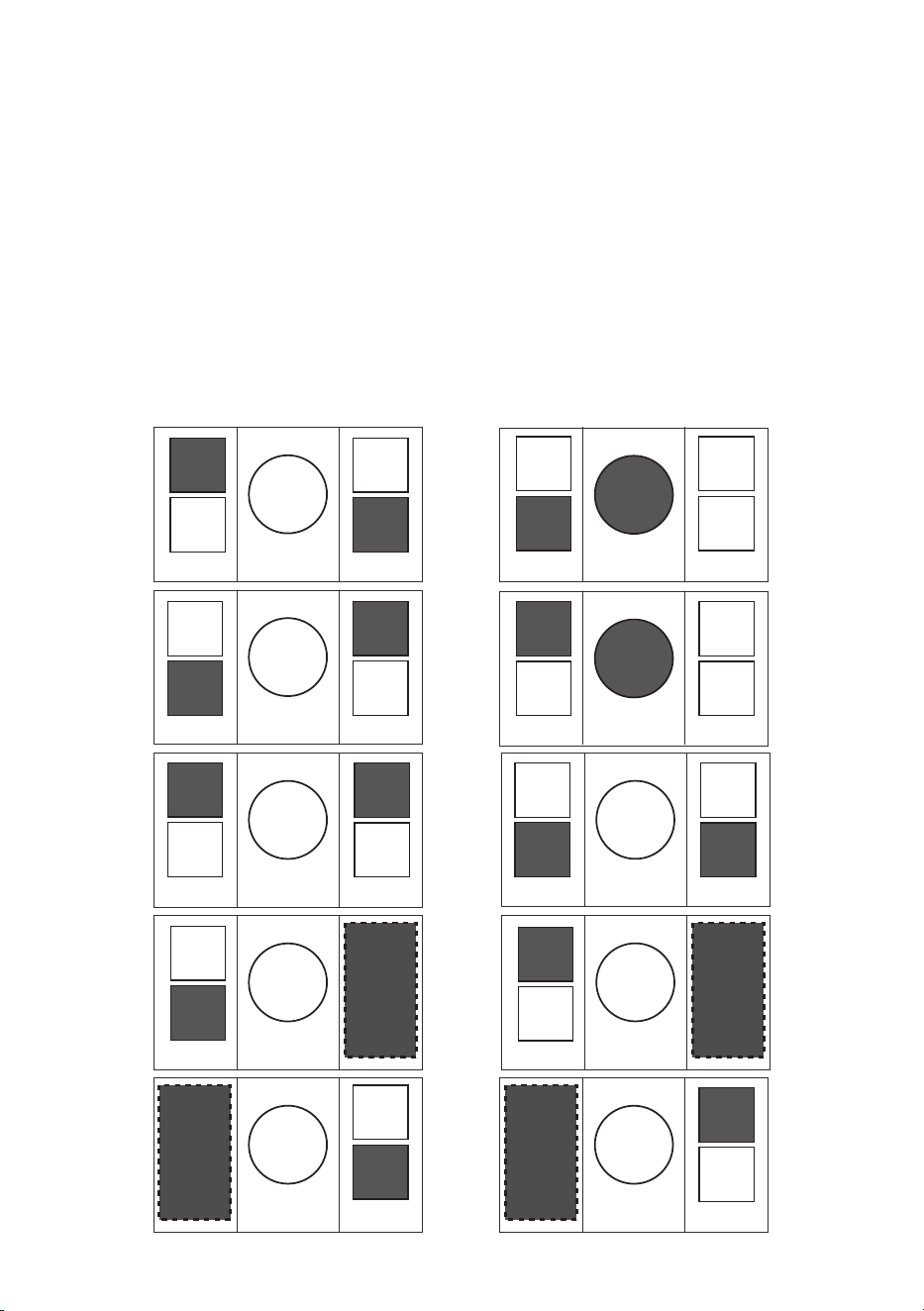
Important:
• You can set two cooking zones for the "Booster" function at the same time, as per
gure 21.
• It is not possible to set more than two cooking zones (i.e. 3, 4, 5) for the "Booster"
function at the same time.
• If you try to set the "Booster" function for a conguration which is not possible (e.g.
"Booster" function already set for two zones), the electronics automatically manage
the maximum allowed power level for the zone being set (gure ashing for a few
seconds on the display).
P
P
P
P
P P
P
P
P
P
P
P
P
P
P
P
P
P
P
P
Figure 22
3030
MAXIMUM USABLE POWER FOR THE COOKING
ZONES
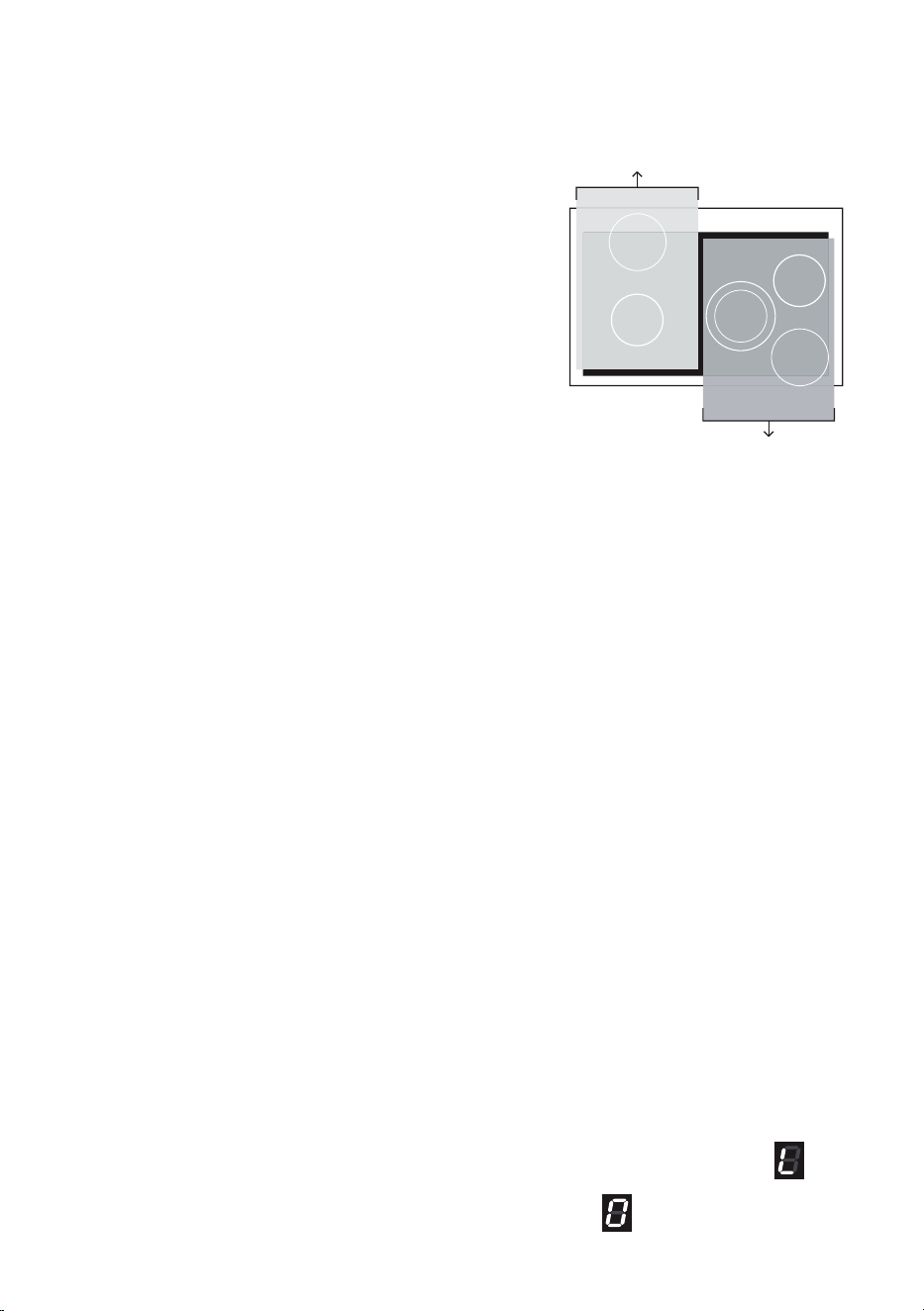
The induction cooktop is divided in two areas to manage
the maximum usable power:
• left zones (area 1);
• central & right zones (area 2).
The two areas can be used at the same time but the
maximum total power per each one is 3700 W.
Should the cooking zones of one area require more than
3700 W, the power of the zone being set is automatically
reduced, by the electronics, to the remaining power
available.
If this occurs, the cooking zone will display a ashing
gure for a few seconds before automatically displaying
the new power level.
THERMAL PROTECTIONS
The induction hob is tted with safety devices to protect the electronic system and to protect
each cooking zone from overheating.
In case of overheating, one of the following automatic functions could be started by the
electronic system:
• “Booster” program deleted and power reduced;
• one or more cooking zone switched O;
• cooling fan motor of the induction unit switched on.
CHILDLOCK SAFETY
When not using the induction hob, set the childlock safety to prevent children from
accidentally switching on the cooking zones.
Ensure all cooking zones are switched O, then turn the control knobs of the left cooking
zones simultaneously to the left ( A setting) and hold the knobs in this position until lights
up on the cooking zones display; then release the knobs.
To deactivate the childlock repeat the same procedure until
lights up on the cooking
zones display; then release the knobs.
Area 2
Area 1
3131
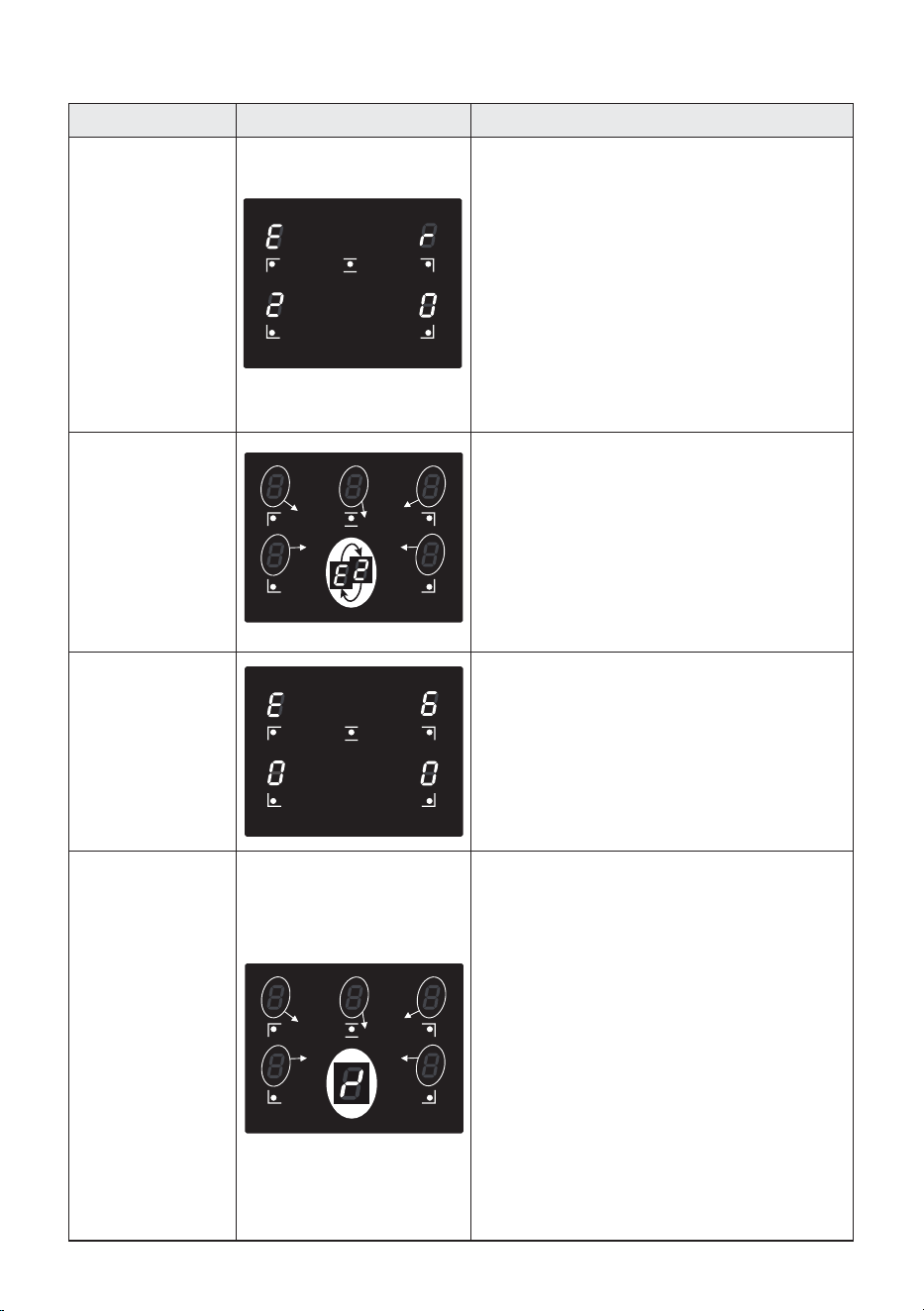
Error code Example What to do
Erxx
or Ex (not E2 or
EH)
or
display
not operative
1. Switch o the cooker and disconnect it
from the mains.
2. Wait for about 1 minute, then reconnect
the cooker and turn on the cooking zones.
3. Wait for about 1 minute and if the error
message does not appear again the
cooking zones can be used.
4. If the error message does not disappear
repeat step from 1 to 3.
5. If the problem continues do not use the
induction hob (only use the oven) and
contact your Authorised Service Centre.
E2
or
EH
E and 2 alternating for one or more cooking
zones.
This indicates an overheating of the cooking
zone/s.
1. Switch o the cooking zone/s and leave
to cool.
2. If the problem continues do not use the
induction hob (only use the oven) and
contact your Authorised Service Centre.
E6
or
display
not operative
The cooker has been incorrectly connected.
The appliance shall be connected to the
appropriate power supply by a qualied
technician.
Symbol
as per
side
gure
This indicates an incorrect operation of one or
more cooking zone control knob.
1. Turn the cooking zone control knobs to
the “0” (O) position, then switch o the
cooker and disconnect it from the mains.
2. Wait for about 1 minute, then reconnect
the cooker and turn on the cooking zones.
3. Wait for about 1 minute and if the error
message does not appear again the
cooking zones can be used.
4. If the error message does not disappear
repeat step from 1 to 3.
5. If the problem continues do not use the
induction hob (only use the oven) and
contact your Authorised Service Centre.
ERROR CODES ON THE COOKING ZONES DISPLAY
3232
ADVICE FOR SAFE USE OF THE
HOB
• Before switching on make sure that you
have the correct knob for the hotplate
chosen. It is advisable to put the pan on the
hotplate before switching on and to take it
away after switching o.
• Use cookware with at and even bottoms.
Uneven bottoms can scratch the glass
ceramic surfaces. Be careful that the
bottom is clean and dry.
• Do not leave wet or damp lids on the hob.
• The glass-ceramic surface and pans must
be clean. Carefully eliminate any food
remains (especially containing sugar), dirt
etc. with the aid of a cleansing agent.
• Make sure that the handles of cookware do
not stick out over the edge of the cooker, to
avoid them being knocked over by accident.
This also makes it more dicult for
children to reach the cooking vessels.
• Do not lean over the cooking zones when
they are switched on.
• Do not drop heavy or sharp objects on the
glass ceramic cooktop. If the surface is
broken or damaged unplug the cooktop
and contact the after-sales service.
• Do not put aluminium foil or plastic objects
on the cooking zones when they are hot.
• Follow the cleaning instructions carefully.
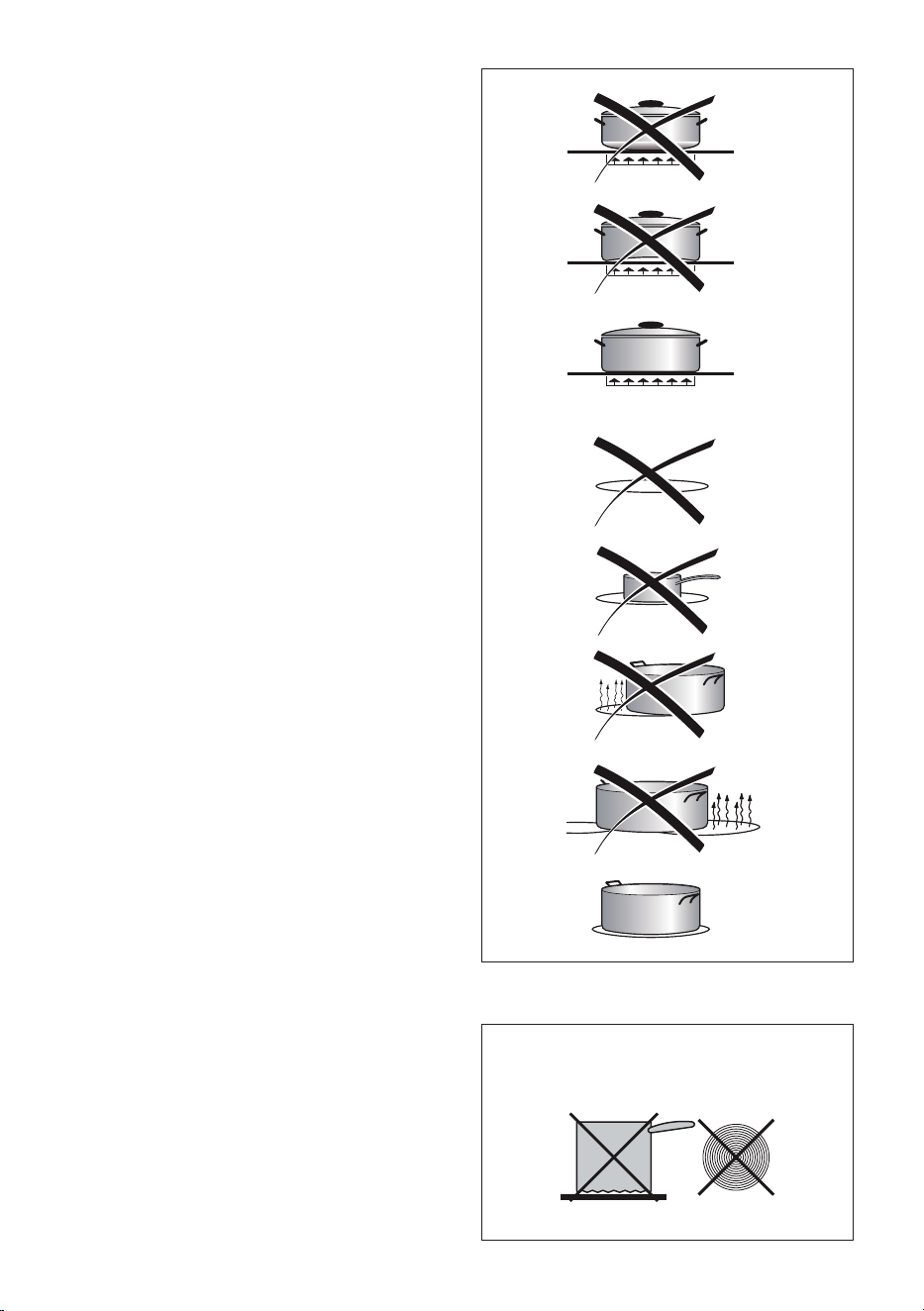
DO NOT USE PANS WITH ROUGH
CIRCULAR MACHINED BASE.
Figure 23
Figure 24

3333
GENERAL FEATURES
As its name indicates, this is an oven
that presents particular features from an
operational point of view.
In fact, it is possible to insert 10 dierent
programs to satisfy every cooking need.
The 10 positions, thermostatically
controlled, are obtained by the following
heating elements:
■ Bottom element
■ Top element
■ Grill element
■ Circular elements
NOTE: When using the oven for the rst
time, in order to eliminate any traces of
substances or odours left over from the
production process, switch the oven on
and run it empty (without the accessories,
which should be washed separately),
keeping the installation environment
suciently ventilated:
■ for 60 minutes in the position
(thermostat in maximum temperature);
■ for 30 minutes in the position
(thermostat in maximum temperature);
■ for 15 minutes in the position
(thermostat in position 225 °C).
OPERATING PRINCIPLES
Heating and cooking in the
MULTIFUNCTION oven are obtained in the
following ways:
a. by normal convection
The heat is produced by the upper and
lower heating elements.
b. by forced convection
The fans suck in the air contained in
the oven mue, which send it through
the circular heating elements and then
send it back through the mue.
Before the hot air is sucked back again
by the fans to repeat the described
cycle, it envelops the food in the
oven, provoking a complete and rapid
cooking.
It is possible to cook several dishes
simultaneously.
c. by semi-forced convection
The heat produced by the upper and
lower heating elements is distributed
throughout the oven by the fans.
d. by radiation
The heat is irradiated by the infra-red
grill element.
e. by radiation and ventilation
The irradiated heat from the infra-red
grill element is distributed throughout
the oven by the fans.
f. by ventilation
The food is defrosted by using the fans
only function without heat.
Smells and fumes produced during this
burn o process are not a cause of alarm.
Adequate ventilation should however be
provided in the room where the appliance is
installed, e.g. by opening a window.
When the oven has cooled down
completely, disconnect the appliance from
the electrical power supply and clean
the inside of the oven as described in
“CLEANING AND MAINTENANCE”.
COOKING WITH MULTIFUNCTION OVEN
Attention: The oven door becomes
very hot during operation.
Keep children away.
WARNING: The door is hot, use the
handle.
During use the appliance becomes
hot. Care should be taken to avoid
touching heating elements inside
the oven.
Do not line the oven walls or oor
with aluminium foil. Do not place
any trays on the base of the oven
chamber.
RISK OF IRREPARABLE DAMAGE
TO THE ENAMEL.
3434
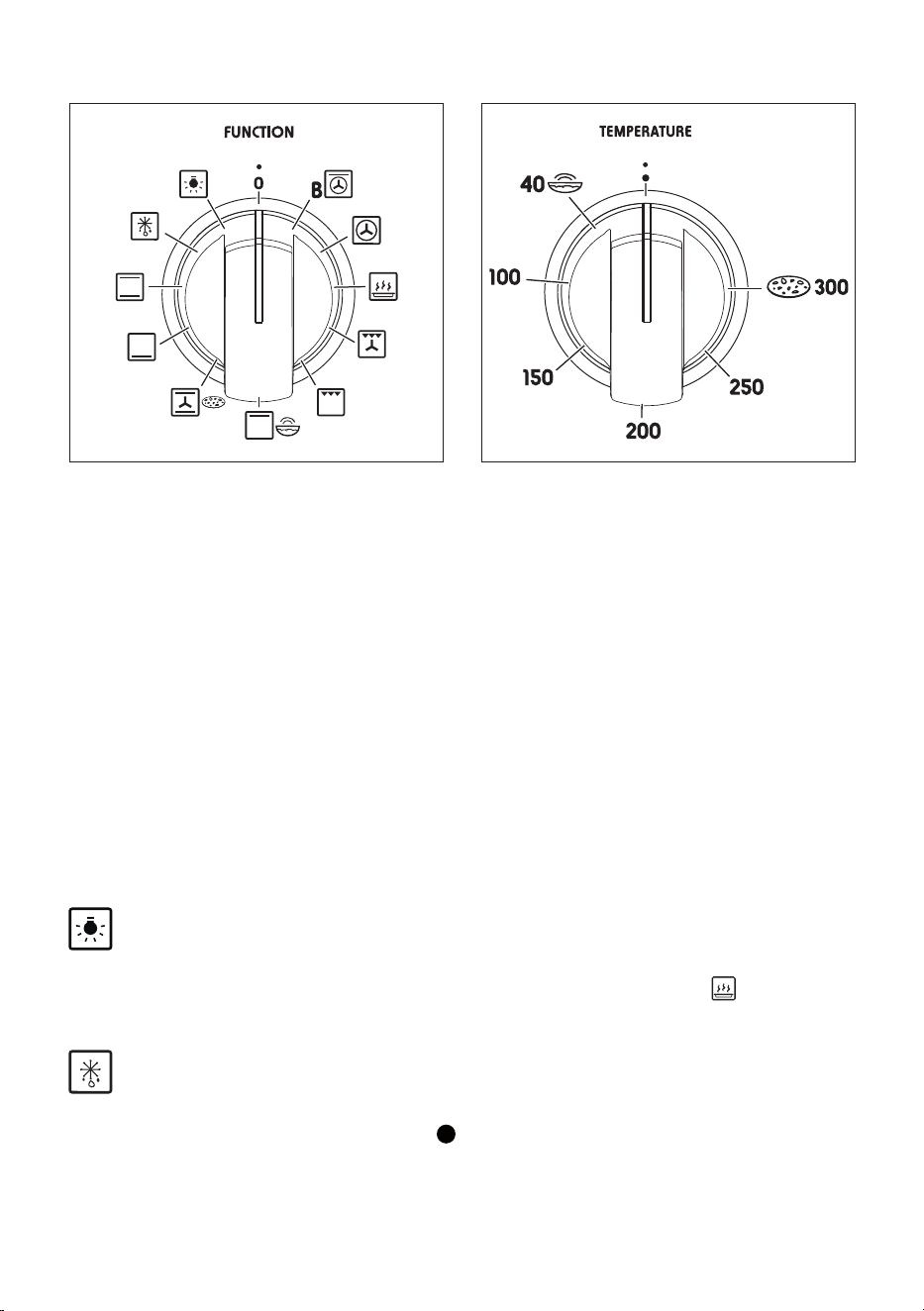
THERMOSTAT KNOB (g. 26)
To turn on the heating elements of the oven, set the function selector knob on the desired
program and the thermostat knob onto the desired temperature.
To set the temperature, it is necessary to make the control panel indicator meet the chosen
number on the knob.
The elements will turn On/O automatically according to the energy need which is
determined by the thermostat.
The oven temperature indicator (on the electronic clock) will illuminate when the oven is
switched on and turns o when the oven reaches the correct temperature.
The temperature indicator will cycle on and o during cooking.
FUNCTION SELECTOR KNOB (g. 25)
Rotate the knob clockwise to set the oven for one of the following functions:
OVEN LIGHT
By turning the knob onto this setting we light the oven cavity.
The oven remains alight while any of the functions is on (except function ).
DEFROSTING FROZEN FOODS
Only the oven fans are on.
To be used with the thermostat knob on “ ” because the other positions have no eect.
The defrosting is done by simple ventilation without heat.
Recommended for:
To rapidly defrost frozen foods; 1 kilogram requires about one hour.
The defrosting times vary according to the quantity and type of foods to be defrosted.
Figure 25 Figure 26

3535
TRADITIONAL CONVECTION COOKING
The upper and lower heating elements are switched on.
The heat is diused by natural convection and the temperature must be regulated between
50°C and the maximum temperature with the thermostat knob.
It is necessary to preheat the oven before introducing the foods to be cooked.
Recommended for:
For foods which require the same cooking temperature both internally and externally, i. e.
roasts, spare ribs, meringue, etc.
LOWER HEATING ELEMENT
In this position only the lower element is switched on.
Heat is distributed by natural convection.
The temperature must be regulated between 40 °C and 225 °C maximum with the
thermostat knob.
Recommended for:
To complete cooking of dishes that require higher temperature at the bottom.
CONVECTION COOKING WITH VENTILATION - PIZZA FUNCTION
The upper and lower heating elements and the fans turn on.
The heat coming from the top and bottom is diused by forced convection.
The temperature must be regulated between 40 °C and the maximum temperature with the
thermostat knob.
Recommended for:
For foods of large volume and quantity which require the same internal and external degree
of cooking; for i.e.: rolled roasts, turkey, legs, cakes, pizza, etc.
UPPER HEATING ELEMENT - LEAVENING FUNCTION
In this position only the upper element is switched on.
Heat is distributed by natural convection.
The temperature must be regulated between 40 °C and the maximum position with the
thermostat knob.
Recommended for:
To complete cooking of dishes that require higher temperature at the top.
GRILLING
The infra-red heating element is switched on.
The heat is diused by radiation.
Use with the oven door closed and the thermostat knob must be regulated between
40 °C and 225 °C maximum.
Note: It is recommended that you do not grill for longer than 60 minutes at any one
time.
Attention: The oven door becomes very hot during operation. Keep children away.
Recommended for:
Intense grilling action for cooking with a broiler; browning, crisping, “au gratin”, toasting, etc.

3636
VENTILATED GRILL COOKING
The infra-red ray grill and the fans are on.
The heat is mainly diused by radiation and the fans then distribute it throughout the oven.
Use with the oven door closed and the thermostat knob must be regulated between
40 °C and 225 °C maximum.
It is necessary to preheat the oven for about 5 minutes.
For correct use see chapter “GRILLING AND AU GRATIN”.
Note: It is recommended that you do not grill for longer than 60 minutes at any one time.
Attention: The oven door becomes very hot during operation. Keep children away.
Recommended for:
For grill cooking when a fast outside browning is necessary to keep the juices in, i. e. veal
steak, steak, hamburger, etc.
ECO FUNCTION (ENERGY SAVING)
The circular elements and the fans are on.
The heat is diused by forced convection.
This function reduces the appliance’s energy consumption, it is therefore particularly
benecial for the gentle cooking of small quantities of food on a single shelf.
It is not necessary to preheat the oven and use with the oven door closed.
Cooking times may be longer than standard functions.
Do not use this function to preheat the oven.
Recommended for:
Foods that require gentle cooking. To keep foods hot after cooking. To slowly heat already
cooked foods.
HOT AIR COOKING
The circular elements and the fans are on.
The heat is diused by forced convection and the temperature must be regulated between
40 °C and the maximum temperature with the thermostat knob.
It is not necessary to preheat the oven.
Cooking temperature may be reduced for fan assisted ovens
Recommended for:
For foods that must be well done on the outside and tender or rare on the inside, i. e.
lasagna, lamb, roast beef, whole sh, etc.
BOOSTER - HOT AIR COOKING WITH UPPER HEATING ELEMENT
This special function allows a fast pre-heating of the cavity by a combination of the heating
elements (the upper element, one fan element and the fan motors).
Set the thermostat knob to the desired temperature; when the pre-heating temperature has
been reached, the oven temperature indicator (on the electronic clock) switches o.
VERY IMPORTANT NOTE: This special function must be operated without food
inside the oven cavity.

3737
COOKING ADVICE
The external parts of the appliance
become hot during operation.
Keep children well out of reach.
STERILIZATION
Sterilization of foods to be conserved, in
full and hermetically sealed jars, is done in
the following way:
a. Set the switch to position .
b. Set the thermostat knob to position
185 °C and preheat the oven.
c. Fill the dripping pan with hot water.
d. Set the jars onto the dripping pan
making sure they do not touch
each other and the door and set the
thermostat knob to position 135 °C.
When sterilization has begun, that is, when
the contents of the jars start to bubble, turn
o the oven and let cool.
REGENERATION
Set the switch to position and the
thermostat knob to position 150 °C.
Bread becomes fragrant again if wet with
a few drops of water and put into the
oven for about 10 minutes at the highest
temperature.
ROASTING
To obtain classical roasting, it is necessary
to remember:
■ that it is advisable to maintain a
temperature between 180 and 200 °C.
■ that the cooking time depends on the
quantity and the type of foods.
SIMULTANEOUS COOKING OF
DIFFERENT FOODS
The MULTIFUNCTION oven set on
position and gives simultaneous
heterogeneous cooking of dierent foods.
Dierent foods such as sh, cake and meat
can be cooked together without mixing the
smells and avours.
This is possible since the fats and vapors
are oxidized while passing through the
electrical element and therefore are not
deposited onto the foods.
The only precautions to follow are:
■ The cooking temperatures of the
dierent foods must be as close to as
possible, with a maximum dierence
of 20 °C - 25 °C.
■ The introduction of the dierent dishes
in the oven must be done at dierent
times in relation to the cooking times
of each one.
The time and energy saved with this type of
cooking is obvious.
USE OF THE GRILL
Preheat the oven for about 5 minutes.
Introduce the food to be cooked, positioning
the rack as close to the grill as possible.
The dripping pan should be placed under
the rack to catch the cooking juices and
fats.
Grilling with the oven door closed.
Do not grill for longer than 60 minutes at
any one time.
CAUTION: The oven door becomes very
hot during operation. Keep children well
out of reach.
GRILLING AND “AU GRATIN”
Grilling may be done using the grill +
fan setting , in this setting the hot air
completely surrounds the food that is to
be cooked, to give a more even and rapid
cooking process.
Set the temperature knob between 40 °C
and 225 °C maximum, preheat the oven,
then simply place the food on the grid.
Close the door until grilling is complete.
Adding a few dabs of butter before the end
of the cooking time gives the golden “au
gratin” eect.
Grilling with the oven door closed.
Do not grill for longer than 60 minutes at
any one time.
CAUTION: The oven door becomes very
hot during operation. Keep children well
out of reach.

3838
OVEN COOKING
To cook, before introducing the food, preheat
the oven to the desired temperature.
When the oven has reached the desired
temperature, introduce the food, control
the cooking time and tum o the oven
5 minutes before the theoretical time to
recuperate the stored heat.
COOKING EXAMPLES
Temperatures are approximate as they
vary depending on the quality and amount
of food.
Remember to use ovenproof dishes and to
adjust the oven temperature during cooking
if necessary.
DISH TEMPERATURE
Lasagne 220°C
Baked pasta 220°C
Pizza 225°C
Creole rice 225°C
Baked onions 190°C
Spinach crêpes 185°C
Potatoes baked in milk 185°C
Stued tomatoes 180°C
Cheese soué 170°C
Roast veal 180°C
Grilled veal chops 210°C
Chicken breasts with tomato 180°C
Grilled chicken - roast chicken 190°C
Veal loaf 175°C
Roast beef 170°C
Fillet of sole 175°C
Aromatic hake 170°C
Beignets 160°C
Ring cake 150°C
Plum tart 170°C
Jam tartlets 160°C
Sponge cake 170°C
Sweet dough 160°C
Sweet pus 170°C
Plain sponge cake 170°C

3939
PIZZA STONE
Pizza Stone, the baking stone that retains the moisture from the dough and distributes
heat evenly, is made with materials that can reach and maintain high temperatures. Ideal
accessory for cooking pizza, bread and focaccia.
■ PIZZA FUNCTION
1. Place the pizza stone on an oven grid. Insert the grid on the rst level of the side
rack, counting from the bottom.
2. Turn on and preheat the oven with the stone inside. Select the pizza function
and set the temperature to 300 °C. Now preheat for at least 30 minutes. Do not
preheat the oven with the turbo/booster function.
3. Once the oven has reached 300 °C, place the pizza on the pizza stone.
4. After cooking, leave the stone in the oven to cool completely.
■ CLEANING THE PIZZA STONE
Once the pizza stone has cooled down, clean it with a soft damp cloth, avoiding direct
contact with water.
If necessary, use a metal spatula or knife to remove any food residues before cleaning
with the cloth.
The stone is made of porous material, so do not wash it with detergents.
Do not wash in a dishwasher.
With use, dark patches may appear on the pizza stone: these have no eect on the
quality of cooking.
LEAVENING FUNCTION
The leavening function cuts the time it takes for your dough to rise.
Put the dough in an oven-proof container and place the container on an oven grid on the
third level.
Turn the switch knob to the leavening function and set the thermostat to 40 °C. See
corresponding icons.
Leave the dough to rise in the oven until it reaches twice its original volume.
Leavening times may vary according to dough type and room temperature.

4040
RECOMMENDED COOKING TEMPERATURE
Food °C °F
Gas
Mark
Shelf
Position*
Cooking
Time (approx)
CAKES
Victoria sandwich 190 375 5 2 or 3 20-25 mins
Small cakes/buns 190 375 5 1 and 2 15-20 mins
Madeira cake 180 350 4 2 or 3 20 mins
Fruit cake 170 325 3 3 1
3/4
hours
Rich fruit cake 150 300 2 3 or 4 2
1/2
hours
Scones 225 425 8 - 9 2 8-10 mins
PASTRY
Pu 225 425 8 - 9 2 10-20 mins
Short crust 200 400 6 2 20-30 mins
Plate tarts 200 - 210 400 - 410 6 1 or 2 30-35 mins
Quiches and ans 200 - 210 400 - 410 6 1 or 2 40-45 mins
YEAST
Bread loaf 225 425 7 - 8 2 35-55 mins
Bread rolls 220 425 7 1 or 2 15-20 mins
Pizza dough 230 450 8 2 20 mins
ROAST MEAT
Beef – Medium 190 375 5 2 or 3 20 mins/lb + 20 mins
Lamb 190 375 5 2 or 3
25-30 mins/b + 25 mins
Pork 190 - 200 375 - 400 5 - 7 2 or 3 30 mins/lb + 30 mins
Veal 190 375 5 2 or 3 30 mins/b + 30 mins
Chicken 190 375 5 2 or 3 30 mins/b + 30 mins
Turkey up to 10lb 180 350 4 2 or 3
18-20 mins/b + 20 mins
Stews/casseroles 150 - 170 300 - 325 2 - 3 2 or 3 1
1/2
2 hours
N.B. For fan ovens reduce the temperature
by 10 - 20 °C. For any dish taking one hour
or over to cook, reduce the cooking time by
10 minutes per hour.
* Shelf positions have been counted from
the top of the oven to the base.
A fan oven creates more even temperature
throughout, therefore the shelf positions
are not as critical.
4141
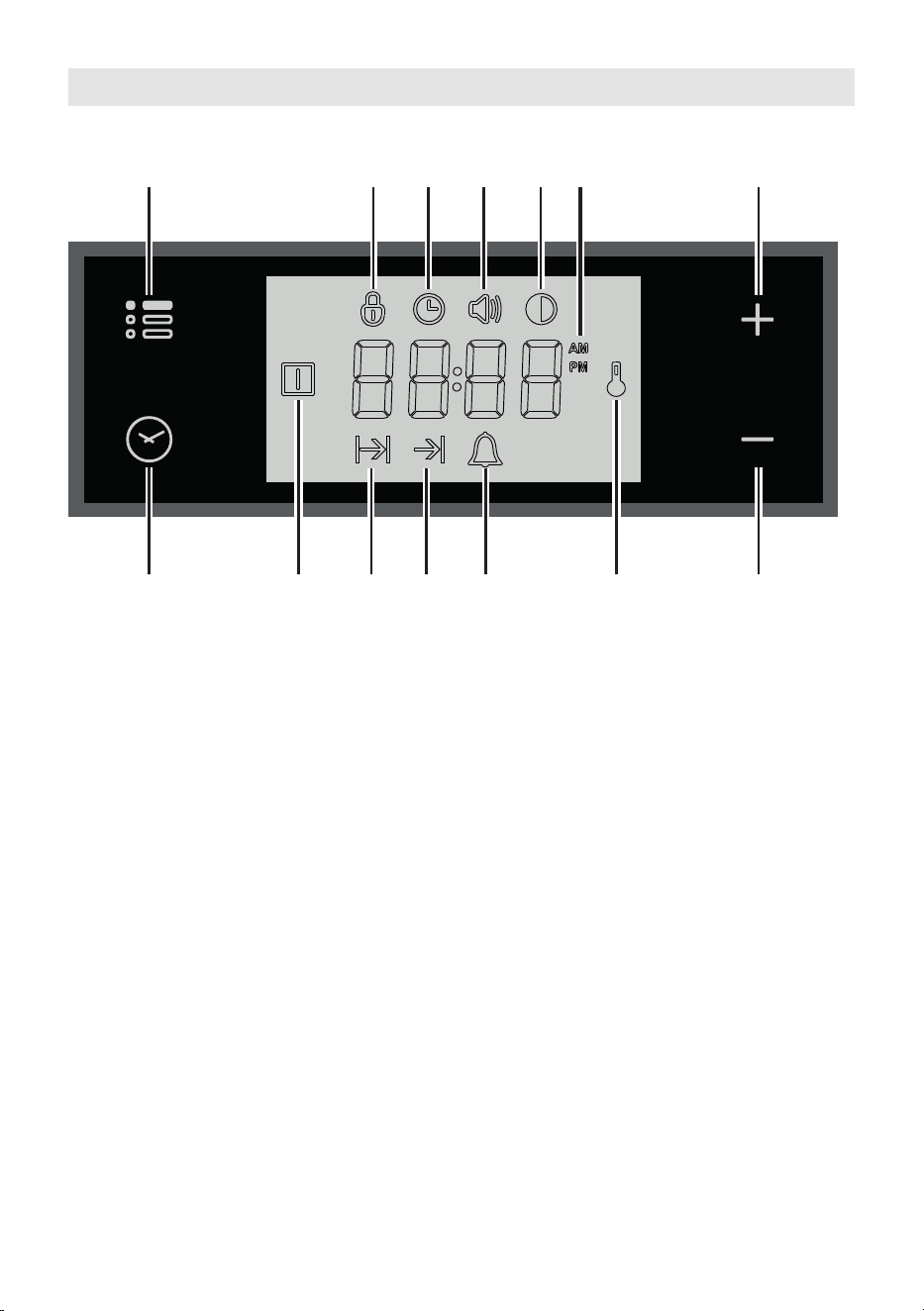
11 12
14 13
1 2 3 4 5
10 9 8 7 6
Description of display symbols:
1. Oven on
2. Cooking time
3. End of cooking time
4. Timer
5. Oven temperature
6. AM/PM time format
7. Screen brightness
8. Acoustic signal volume
9. Time of day setting
10. Programmer ‘touch’ control panel key lock
Description of the ‘touch control’ panel symbols:
11. Program selection
12. Digit backward setting for all functions
13. Digit forward setting for all functions
14. Menu selection
IMPORTANT NOTE: When using the timer and during a semi-automatic or automatic
cooking, the countdown of the function with less time remaining prevails on the display.
ATTENTION - MOST IMPORTANT:
ELECTRONIC PROGRAMMER DISPLAY CLEANING
Strictly follow the information indicated in the chapter "CLEANING AND
MAINTENANCE".
ELECTRONIC CLOCK “TOUCH-CONTROL”
Figure 27
4242
“TOUCH-CONTROL” KEYS
The “touch-control” keys shall be operated by the ngers (just by touching the key).
When using touch controls it is best to use the ball of your nger rather than the tip.
Program and menu selection: after starting the procedure, the selection is automatically
deactivated after approx. 5 seconds from the last touch on the display.
SETTING THE CLOCK
When connecting for the rst time, or after a power failure, the word “OFF” ashes on the
display and the “ ” symbol is lit. Adjust the time touching the “+” or “―” key.
Important: The oven does not operate, in manual cooking, without rst having set
the clock.
To change the time with the appliance already installed, touch the " " key for more than
2 seconds, then touch it again until the “ ” symbol ashes. Then adjust the time, within
5 seconds, using the “+” or “―”.
Important: It is not possible to adjust the clock if a cooking program is in progress.
USING THE TIMER
You can use the timer at any time, even when the oven is not in use.
ATTENTION - MOST IMPORTANT: This is only an alarm that DOES NOT switch o
the oven or grill.
REMEMBER TO TURN OFF THE OVEN/GRILL MANUALLY.
The timer can be set for a maximum time of 23 hours and 59 minutes.
1. To set the timer, with the appliance already connected, touch the
" " key (several times) until the “ ” symbol ashes on the display. Set the time
(increase in minutes) within 5 seconds using the “+” or “―”. key. At the end of the
adjustment the display shows the countdown.
2. At the end of the count, the timer starts beeping and the “ ”symbol ashes on the
display. Touch any key to turn o the acoustic signal that would otherwise stop after
7 minutes.
3. Turn the oven o manually (switch and thermostat knobs in the o position) if you do
not wish to continue with manual cooking.
To reset the timer in operation at any time:
1A. Only timer function active (no semi-automatic or automatic cooking in progress): touch
the " " key for 3 seconds.
1B. With semi-automatic or automatic cooking in progress: touch the key several times
" " until the “ ” symbol ashes on the display. Then touch the “―” key within 5
seconds until " 00:00 " appears on the display.
2. The time of day is shown on the display.
4343
SEMI-AUTOMATIC COOKING
This is used to automatically switch o the oven after the desired cooking time has elapsed.
Check the clock shows the correct time.
The semi-automatic cooking program can be set for a maximum period of 10 hours.
1. Select the function and temperature (function and temperature knobs). The oven will
come on.
2. Touch the " " key until the " " symbol ashes on the display. Set the cooking time
(increase in minutes - consider the preheating time, if necessary) within 5 seconds
using the “+” or “―”. At the end of the adjustment the display shows the countdown.
3. At the end of the count the oven turns o, the timer starts beeping, the " " symbol
ashes and the word “End” appears on the display.
4. Turn the temperature and function knobs to the o position.
5. Touch the " " key to deactivate the acoustic signal (which otherwise will stop after
7 minutes) and to return the programmer to manual mode (the time is shown on the
display). If instead the acoustic signal is deactivated with one of the other keys, after
deactivation also touch the " " key to return the programmer to manual mode (the
time is shown on the display).
To cancel the semi-automatic cooking program at any time:
1A. Only semi-automatic cooking function active (no timer in use): touch the " " key for
3 seconds, the " " symbol and the word “End” are shown on the display.
1B. With active timer: touch the " " key several times until the " " symbol ashes.
Then touch the “―” key within 5 seconds until " 00:00 " appears on the display,
replaced after a few seconds by the " " symbol and the word “End”.
2. Touch the " " key again to return the programmer to manual mode (the time of day
is shown on the display). If cooking is nished turn the temperature and function knobs
to the o position, otherwise continue cooking and then remember to turn the oven o
manually.
AUTOMATIC COOKING
Use automatic cooking to automatically turn the oven on, cook, and then turn the oven o.
Check the clock shows the correct time.
1. Select the function and temperature (function and temperature knobs). The oven will
come on.
2. Decide the cooking time considering the preheating time, if necessary, and set it as
described above in the “SEMI-AUTOMATIC COOKING” chapter.
3. Touch the " " key several times until the " " symbol appears on the display. Then
set the time at which you want the oven to turn o, touching the “+” or “―” key.
4. If the cooking is not started immediately, the display shows the current time of day
and the " " and " " symbols. The oven turns o but now it is set for automatic
operation.
• To check the cooking time, touch the " " key once, the " " symbol ashes.
• To check the turn-o time, touch the key several times until the symbol
ashes.
4444
To cancel the automatic cooking program at any time, proceed as described in the “SEMI-
AUTOMATIC COOKING” chapter.
Turn the temperature and function knobs to the o position, otherwise continue cooking
and then remember to turn the oven o manually.
ATTENTION - VERY IMPORTANT (AUTOMATIC OR SEMI-AUTOMATIC COOKING):
If a very short power interruption occurs, the oven keeps the programming.
If the interruption is instead longer than a few tens of seconds, the automatic cooking
is cancelled. In this case, turn the temperature and function knobs to the o position
and restart programming if necessary.
USER PREFERENCES SETTINGS
PROGRAMMER ‘TOUCH CONTROL’ PANEL KEY LOCK
This function is used to prevent the accidental touch of the programmer selection keys and
to avoid unintentionally activating or modifying its functions.
The key lock can be activated at any time, with a cooking in progress or with the oven o.
To lock:
• Touch the " " key for more than 2 seconds until the " " indicator light starts
ashing. Then touch the “+” key to activate the key lock, the word "On", appears on
the display, wait a few seconds until the operation is completed. When this function is
active, the " " indicator light is on.
To unlock:
• Touch the " " key for more than 2 seconds until the " " indicator light starts
ashing. Then touch the “―” key to deactivate the key lock, the word "OFF" appears
on the display, wait a few seconds until the operation is completed. When this function
is not active, the " " indicator light is o.
ACOUSTIC SIGNAL TONE SETTING
It is possible to select three sound tones.
• Touch the " " key for more than 2 seconds, then touch the same key several times
until the " " symbol ashes.
• Touch the “+” or “―”; key; the display shows the tone set (“b-01”, “b-02” or “b-03”).
• The last tone displayed remains active.

4545
SCREEN BRIGHTNESS SETTING
It is possible to select three brightness levels.
• Touch the " " key for more than 2 seconds, then touch the same key several times
until the " " symbol ashes.
• Touch the “+” or “―”; key; the display shows the brightness set (“d-01”, “d-02” or
“d-03”).
• The last brightness displayed remains active.
TIME FORMAT
It is possible to choose the 24 hour or 12 hour clock format.
• To activate the 12 hour format, touch the “+”, key for more than 5 seconds until the
" " or " " symbol is activated.
• To activate the 24 hour format, touch the “+”, key for more than 5 seconds until the
" " or " " symbol is deactivated.

4646
CLEANING AND MAINTENANCE
GENERAL ADVICE
■ Before you begin cleaning, you must ensure that the appliance is switched o
and disconnected from the electrical power supply.
■ Important: The use of suitable protective clothing/gloves is recommended when
handling or cleaning of this appliance.
■ Important: The manufacturer declines all liability for possible damage caused by
the use of unsuitable products to clean the appliance.
■ It is advisable to clean when the appliance is cold and especially when cleaning the
enamelled parts.
■ Avoid leaving alkaline or acidic substances (lemon juice, vinegar, etc.) on the surfaces.
■ Avoid using cleaning products with a chlorine or acidic base.
■ Clean the surfaces with a damp cloth and using neutral, non-aggressive detergents.
Complete the cleaning with a dry, clean cloth.
IMPORTANT: Never use abrasive products (e.g. certain type of sponges) and/or
aggressive products (e.g. caustic soda, detergents containing corrosive substances)
that could irreversibly damage the surfaces.
■ Do not use a steam cleaner because the moisture can get into the appliance thus
make it unsafe.
■ Do not use harsh abrasive cleaners or sharp metal scrapers to clean the oven
door glass since they can scratch the surface, which may result in shattering of
the glass.
■ Under no circumstances should any external covers be removed for servicing or
maintenance except by suitable qualied personnel.
WARNING! When correctly installed, your product meets all safety requirements
laid down for this type of product category. However special care should be taken
around the rear or the underneath of the appliance as these areas are not designed or
intended to be touched and may contain sharp or rough edges, that may cause injury.
4747
Do not place or leave empty pans on
the glass ceramic hob.
Do not allow heavy or sharp objects to
drop on the glass ceramic hob.
Do not scratch the hob with sharp
objects. Don’t use the hob as a work
surface.
WARNING: If the hob is cracked or
otherwise damaged by falling objects
etc., disconnect the appliance from the
electrical power supply to avoid the
possibility of electric shock and call
Customer Service.
Figure 28
CLEANING THE CERAMIC HOB
• Before you begin cleaning make sure that the appliance is switched o.
• Remove spillages and other types of incrustations.
• Dust or food particles can be removed with a damp cloth.
• If you use a detergent, please make sure that it is not abrasive or scouring. Abrasive
or scouring powders can damage the glass surface of the hob.
• All traces of the cleaner have to be removed with a damp cloth.
• Dust, fat and liquids from food that has boiled over must be removed as soon as
possible. If they are allowed to harden they become increasingly dicult to remove.
This is especially true in the case of sugar/syrup mixtures which could permanently pit
the surface of the hob if left to burn on it.
• It is highly recommended to keep o the hob any article which can melt: plastic,
aluminium foil, sugar, sugar syrup mixtures etc.
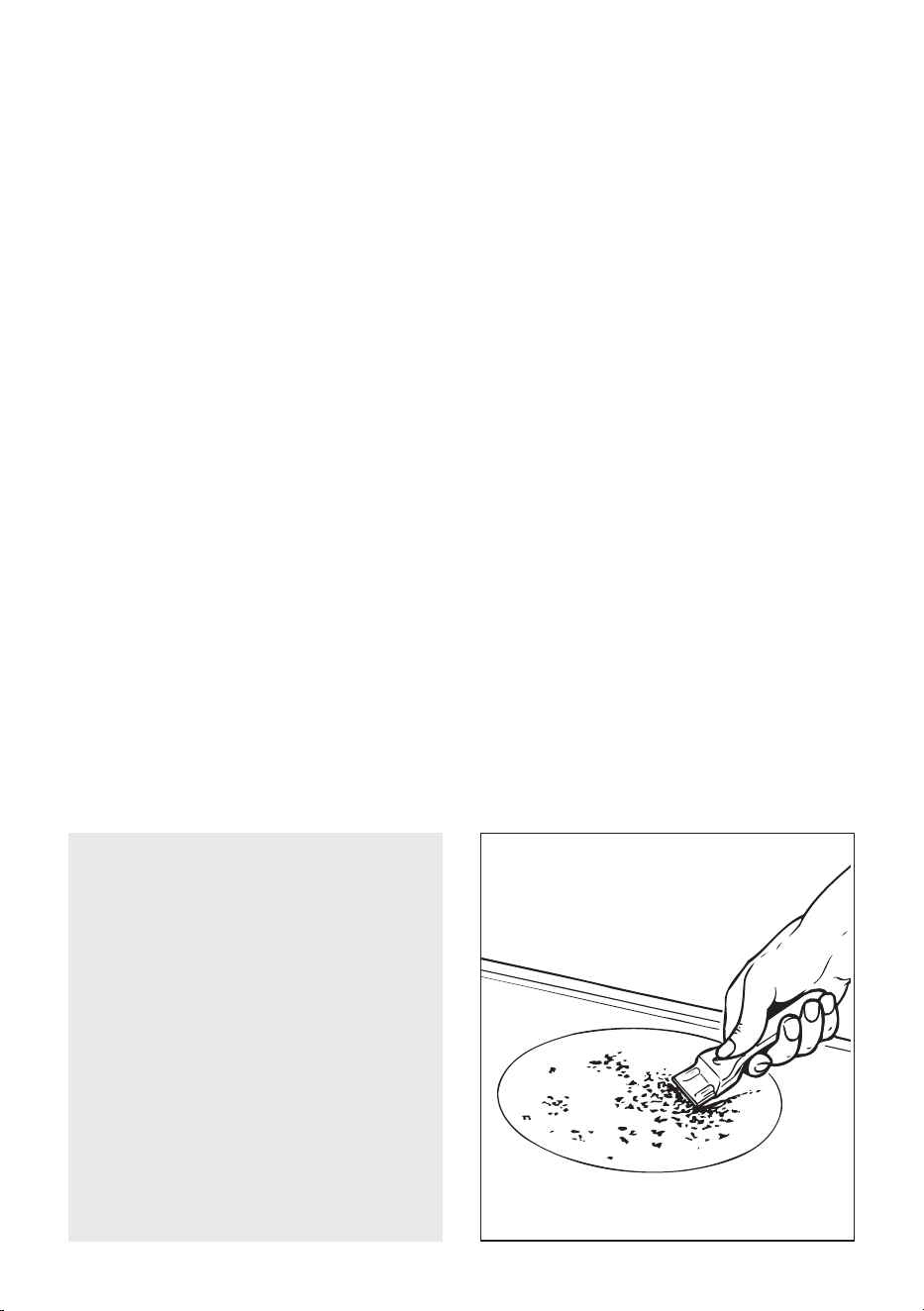
• If any of these products has melted on the ceramic surface, you should remove it
immediately (when the surface is still hot) by using a suitable scraper to avoid any
permanent damage to the surface of the hob.
• Avoid using any knife or sharp utensil since these can damage the ceramic.
• Do not use steel wool or an abrasive sponge which could scratch the surface in an
irreparable way
ATTENTION: MOST IMPORTANT!
If cleaning the glass ceramic hob using a special tool (i.e. scraper) take extra care to
avoid damage to the seal at the edges of the glass ceramic surface.
4848
ENAMELLED PARTS
All the enamelled parts must be cleaned with a sponge and soapy water or other non-
abrasive products.
Dry preferably with a microbre or soft cloth.
Acidic substances like lemon juice, tomato sauce, vinegar etc. can damage the enamel if
left too long.
STAINLESS STEEL, ALUMINIUM PARTS, PAINTED AND SILK-SCREEN
PRINTED SURFACES
Clean using an appropriate product. Always dry thoroughly.
IMPORTANT: these parts must be cleaned very carefully to avoid scratching and abrasion.
You are advised to use a soft cloth and neutral soap.
CAUTION: Do not use abrasive substances or non-neutral detergents as these will
irreparably damage the surface.
INSIDE OF OVEN
The oven should always be cleaned after use when it has cooled down.
The cavity should be cleaned using a mild detergent solution and warm water.
Suitable proprietary chemical cleaners may be used after rst consulting with the
manufacturers recommendations and testing a small sample of the oven cavity.
Abrasive cleaning agents or scouring pads/cloths should not be used on the cavity surface.
NOTE: The manufacturers of this appliance will accept no responsibility for damage caused
by chemical or abrasive cleaning.
Do not store ammable material in the oven.
Let the oven cool down and pay special attention no to touch the hot heating
elements inside the oven cavity.
GRILL HEATING ELEMENT
■ The heating element is self-cleaning and does not require maintenance.
ELECTRONIC PROGRAMMER DISPLAY CLEANING
Clean the programmer display using a soft cloth, warm water and neutral soap, or a soft
cloth with a liquid detergent (non-abrasive).
When cleaning, be careful to move the cloth in one direction only.
Then wipe the display with a damp cloth and dry it with a soft cloth.
IMPORTANT: DO NOT use chlorine-based or acid-based cleaning products, abrasive
products or non-neutral detergents as they may cause irreparable damage to the
surface. DO NOT spray cleaning liquids directly on the programmer display.
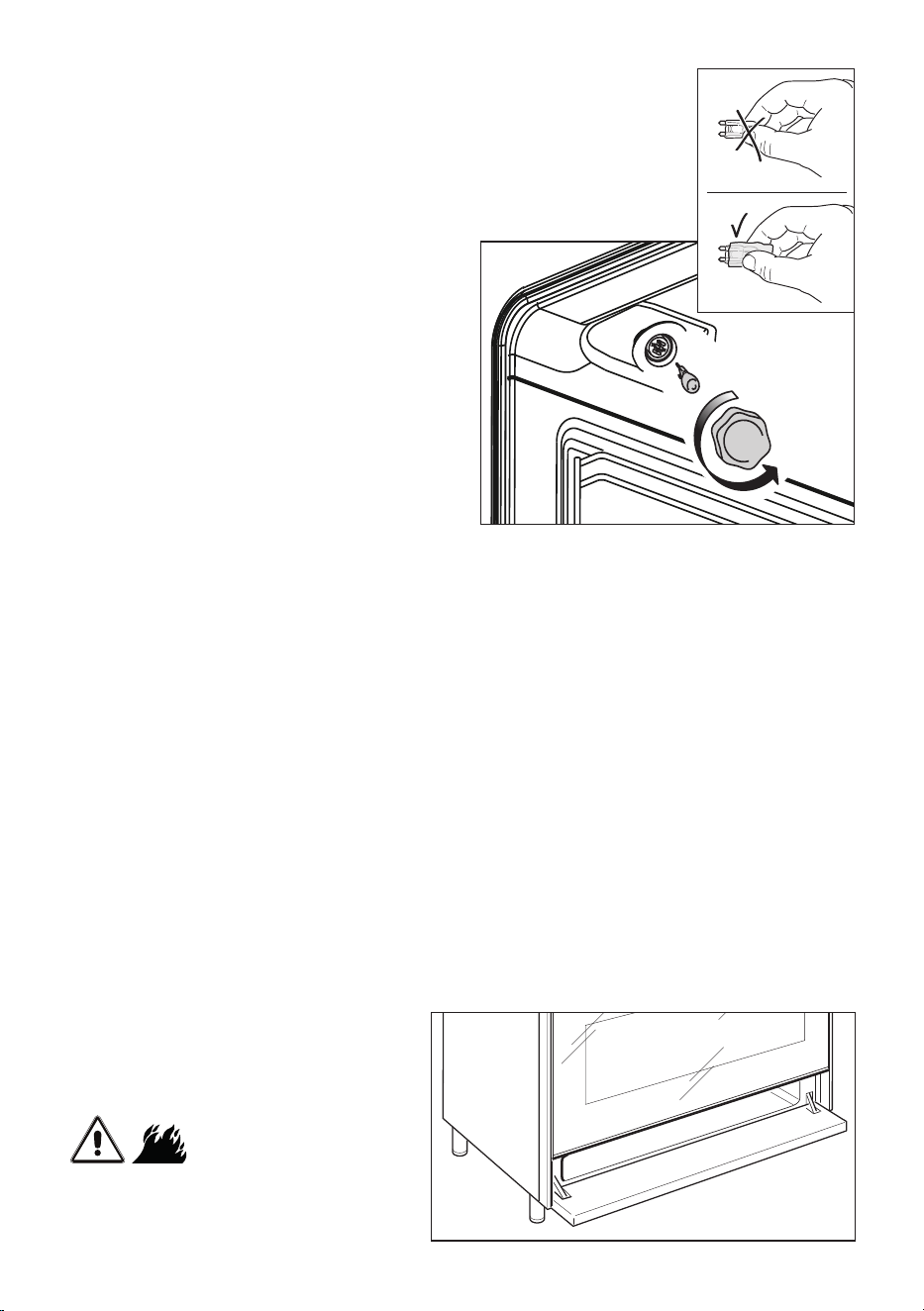
4949
Figure 30
Figure 29
REPLACING THE OVEN LAMPS
WARNING: Ensure that the appliance is
switched o before replacing the lamp
to avoid the possibility of electric shock.
■ Let the oven cavity and the heating
elements cool down.
■ Switch o the electrical supply.
■ Remove the protective cover (g. 29).
■ Replace the halogen lamp with a new
one suitable for high temperatures
having the following specications:
220-240 V or 230-240 V, 50 Hz and
same power (check watt power as
stamped in the bulb itself) of the
replaced lamp.
IMPORTANT WARNING: Never
replace the lamp with bare hands;
contamination from your ngers
can cause premature failure.
Always use a clean cloth or gloves.
■ Ret the protective cover.
NOTE: Oven bulb replacement is not
covered by your guarantee.
The intended purpose of the lamp, tted
on this appliance, is to illuminate the oven
cavity and thus help the user to better
monitor the food while cooking. This
lamp is not suitable for other usage (e.g.
environments lighting).
This product contains a light source of
energy eciency class G.
WRONG
CORRECT
STORAGE COMPARTMENT
The storage compartment is
accessible through the pivoting panel
(g. 30).
Do not store
ammable material in the storage
compartment.
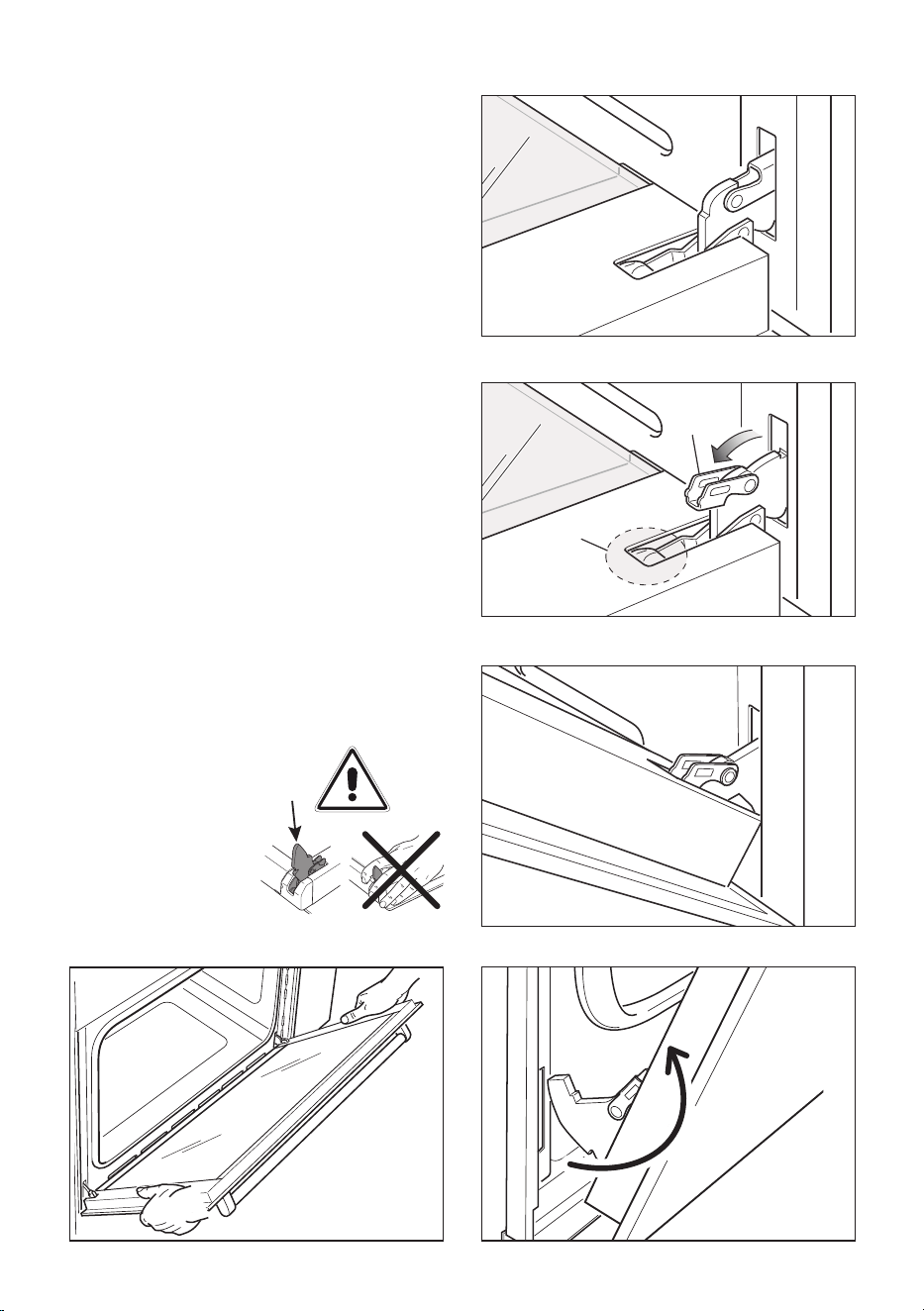
5050
REMOVING THE OVEN DOOR
■ Take care, the oven door is heavy. If
you have any doubts, do not attempt
to remove the door.
■ Make sure the oven and all its parts
have cooled down. Do not attempt to
handle the parts of a hot oven.
The oven door can easily be removed as
follows:
■ Open the door to the full extent (g.
31a).
■ Open the lever “A
”
completely on the
left and right hinges (g. 31b).
■ Hold the door as shown in g. 31d.
■ Gently close the door until left and right
hinge levers “A
”
are hooked to part “B
”
of the door (gs. 31b, 31c).
■ Withdraw the hinge hooks from their
location following arrow “C
”
(g. 31e).
■ Rest the door on a soft surface.
Figure 31d
Figure 31a
Figure 31b
Figure 31c
Figure 31e
Important!
Always keep a safe distance from the door
hinges, paying special attention to the
position of your hands.
If the door hinges are
not correctly hooked,
they could unhook
and close suddenly
and unexpectedly
with risk of injury.
B
A
C
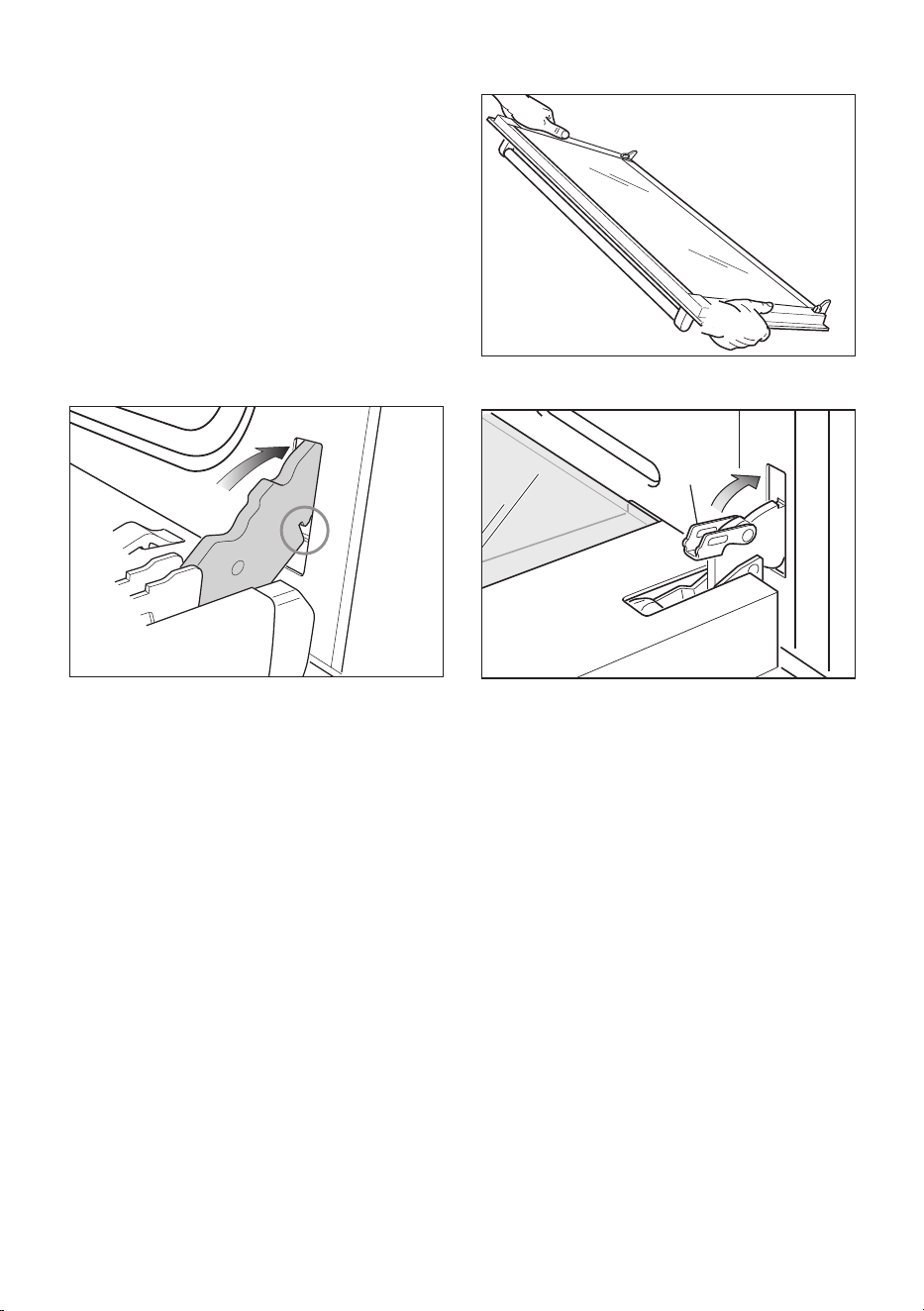
5151
REFIT THE DOOR
1. Hold the door rmly (g. 32a).
2. Insert the hinge tongues into the slots,
making sure that the groove drops into
place as shown in the gure 32b.
3. Open the door to its full extent.
4. Fully close the levers “A” on the left
and right hinges, as shown in the
gure 32c.
5. Close the door and check that it is
properly in place.
Figure 32a
Figure 32b
Figure 32c
A

5252
SERVICE AND MAINTENANCE
SERVICING THE APPLIANCE
Service may be obtained by contacting our Customer Service Centre to locate the nearest
Authorised Able Appliances Service Agent (Able Appliances Pty Ltd.).
Servicing shall be carried out only by authorized personnel.
The appliance shall not be modied.
TROUBLESHOOTING
If you experience a problem with your oven, check the following points before calling our
Customer Service Centre for assistance.
1. The power is switched on.
2. The controls are switched on.
3. Both the fuse and the mains fuse are intact.
Should you still require assistance please contact our Customer Service Centre for your
nearest Authorised Able Appliances Service Agent.
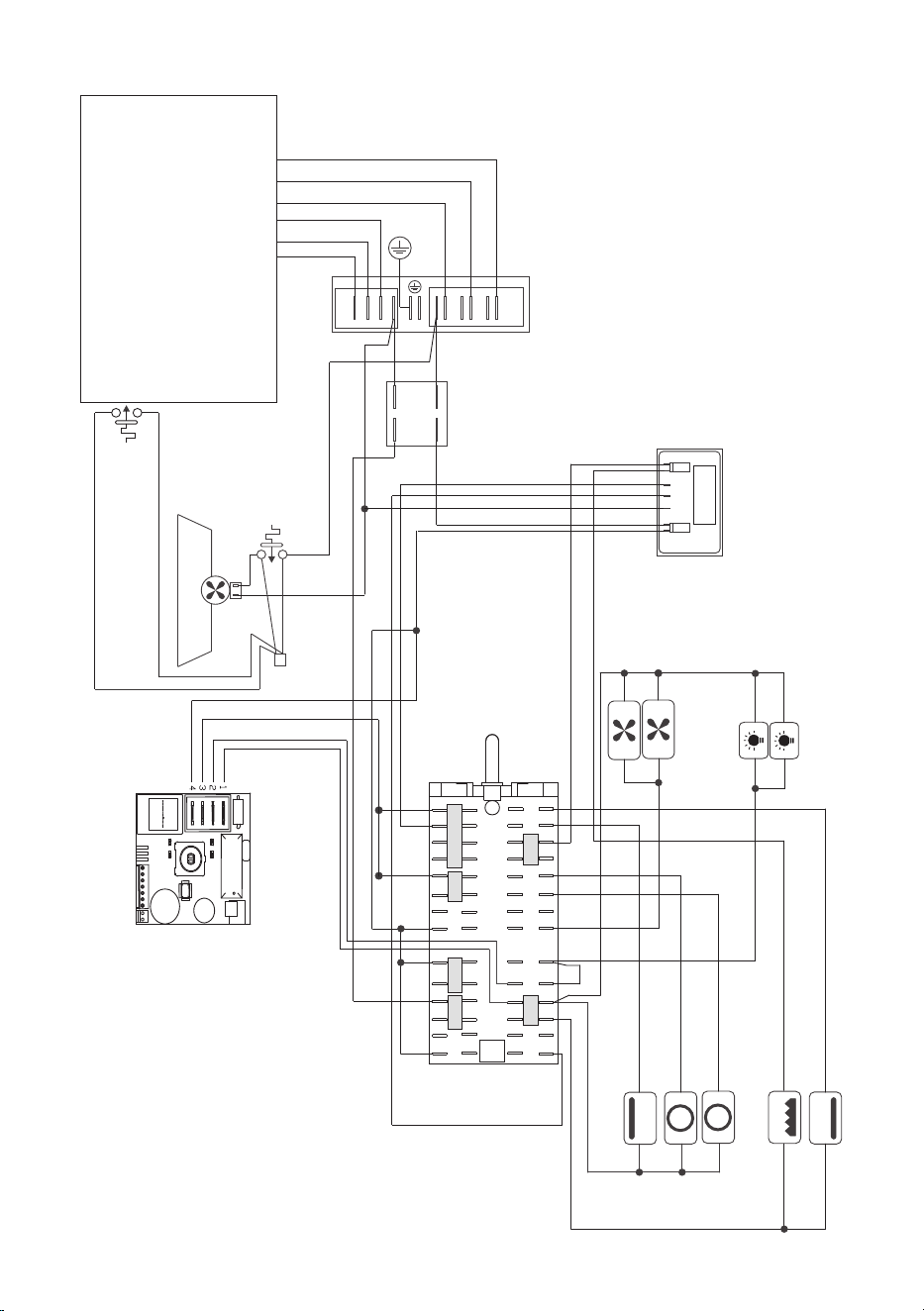
5353
ELECTRIC DIAGRAM
Figure 33
1
6
4
3 8
2 7
5 10
5a 6a
1a 2a
3a
4a 7a
8a 10a
12
11
14
12a 13a
11a
14a
15
15a
13
N
L
Terminal block
Testing
block
Cooling fan motor
Induction hob
Thermal overload (NO)
Oven
switch
Electronic thermostat
Oven
lamps
Thermal
overload
Thermal
overload
(NO)
Oven top heating element
Oven bottom
heating element
Oven grill heating element
Oven circular
heating elements
Oven fan
motors
Oven programmer
Earth
connection
1P1
2P2
1
1A
J8 J7 N
OKIDA
2A 2

5454

5555

5656
www.delonghicookingappliances.com.au
Cod. 1106733 - ß1
Descriptions and illustrations in this booklet are given as simply indicative.
The manufacturer reserves the right, considering the characteristics of the
models described here, at any time and without notice, to make eventual necessary
modifications for their construction or for commercial needs.