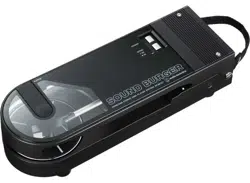

AT-SB727
WirelessStereoDiscPlayerSystem
UserManual
English

1
Safetyprecautions
Althoughthisproductwasdesignedtobeusedsafely,failingtouseitcorrectlymayresultinanaccident.Toensure
safety,observeallwarningsandcautionswhileusingtheproduct.
Importantinformation
Warning
Topreventfireorshockhazard,donotexposethisapparatustorainormoisture.
Donottouchthemovingparts.
Caution
Donotexposethisapparatustodripsorsplashes.
Toavoidelectricshock,donotopenthecabinet.
Referservicingtoqualifiedpersonnelonly.
Donotexposethisapparatustoexcessiveheatsuchassunshine,fireorthelike.
Donotsubjectthisapparatustostrongimpact.
Donotplaceanyobjectsfilledwithliquids,suchasvases,onthisapparatus.
Topreventfire,donotplaceanynakedflamesources(suchaslightedcandles)onthisapparatus.
Donotinstallthisapparatusinaconfinedspacesuchasabookcaseorsimilarunit.
Installthisapparatusonlyintheplacewhereventilationisgood.
Cautionsforrechargeablebattery
Theproductisequippedwitharechargeablebattery(lithiumionbattery).
Ifbatteryfluidgetsintoeyes,donotrubthem.Rinsethoroughlywithcleanwatersuchastapwaterandconsulta
doctorimmediately.
Ifbatteryfluidleaks,donottouchfluidwithbarehands.Iffluidremainsinsidetheproduct,itmaycausemalfunction.
Ifbatteryfluidleaks,contactyourlocalAudio-Technicadealer.
Iffluidgetsinyourmouth,garglethoroughlywithcleanwatersuchastapwaterandconsultadoctor
immediately.
Ifyourskinorclothingcomesincontactwithfluid,immediatelywashtheaffectedskinorclothingwithwater.If
youexperienceskinirritation,consultadoctor.

Safetyprecautions
2
Toavoidleakage,generationofheatorexplosion:
Neverheat,disassembleormodifythebattery,nordisposeofitinafire.
Donotattempttopiercewithanail,hitwithahammerorsteponthebattery.
Donotdroptheproductorsubjectittostrongimpact.
Donotgetthebatterywet.
Donotuse,leaveorstorethebatteryinthefollowingplaces:
Areaexposedtodirectsunlightorhightemperaturesandhumidity
Insideofacarundertheblazingsun
Nearheatsourcessuchasheatregisters
ChargeonlywiththeincludedUSBcabletoavoidmalfunctionorfire.
Dangerofexplosionifbatteryisincorrectlyreplaced.Replaceonlywiththesametype.
Whentheproductisdisposedof,thebuilt-inrechargeablebatteryneedstobediscardedproperly.Alwaysconsider
theenvironmentalissuesandfollowlocalregulationswhendisposingofbatteries.
Abatterysubjectedtoextremelylowairpressurethatmayresultinanexplosionortheleakageofflammableliquid
orgas.
ForcustomersintheUSA
FCCNotice
Warning
ThisdevicecomplieswithPart15oftheFCCRules.Operationissubjecttothefollowingtwoconditions:(1)Thisdevice
maynotcauseharmfulinterference,and(2)thisdevicemustacceptanyinterferencereceived,includinginterference
thatmaycauseundesiredoperation.
Caution
Youarecautionedthatanychangesormodificationsnotexpresslyapprovedinthismanualcouldvoidyourauthorityto
operatethisequipment.
Note:ThisequipmenthasbeentestedandfoundtocomplywiththelimitsforaClassBdigitaldevice,pursuanttopart
15oftheFCCRules.Theselimitsaredesignedtoprovidereasonableprotectionagainstharmfulinterferenceina
residentialinstallation.Thisequipmentgenerates,usesandcanradiateradiofrequencyenergyand,ifnotinstalledand
usedinaccordancewiththeinstructions,maycauseharmfulinterferencetoradiocommunications.However,thereis
noguaranteethatinterferencewillnotoccurinaparticularinstallation.Ifthisequipmentdoescauseharmful
interferencetoradioortelevisionreception,whichcanbedeterminedbyturningtheequipmentoffandon,theuseris
encouragedtotrytocorrecttheinterferencebyoneormoreofthefollowingmeasures:
–Reorientorrelocatethereceivingantenna.
–Increasetheseparationbetweentheequipmentandreceiver.
–Connecttheequipmentintoanoutletonacircuitdifferentfromthattowhichthereceiverisconnected.
–Consultthedealeroranexperiencedradio/TVtechnicianforhelp.
Thistransmittermustnotbeco-locatedoroperatedinconjunctionwithanyotherantennaortransmitterusedinother
systems.

Safetyprecautions
3
RFExposureInformation
FCCRFExposurerequirements:ThehighestSARvaluereportedunderthisstandardduringproductcertificationforuse
nexttotheheadwiththeminimumseparationdistanceof0mmis0.05W/Kg.
Thistransmittermustnotbecollocatedoroperatinginconjunctionwithanyotherantennaortransmitter.
ThisEUTiscompliancewithSARforgeneralpopulation/uncontrolledexposurelimitsinICRSS-102andhadbeentested
inaccordancewiththemeasurementmethodsandproceduresspecifiedinIEEE1528andIEC62209.Thisequipment
shouldbeinstalledandoperatedwithminimumdistance0mmbetweentheradiatorandyourbody.Thisdeviceandits
antenna(s)mustnotbeco-locatedoroperatinginconjunctionwithanyotherantennaortransmitter.
TheISEDSARvalueis0.05W/Kg.
Contact
ResponsibleCompany:Audio-TechnicaU.S.,Inc.
Address:1221CommerceDrive,Stow,Ohio44224,USA
Tel:330-686-2600
ForcustomersinCanada
ISEDstatement
CANICES-003(B)/NMB-003(B)
Thisdevicecontainslicence-exempttransmitter(s)/receiver(s)thatcomplywithInnovation,ScienceandEconomic
DevelopmentCanada’slicence-exemptRSS(s).Operationissubjecttothefollowingtwoconditions:
(1)Thisdevicemaynotcauseinterference.
(2)Thisdevicemustacceptanyinterference,includinginterferencethatmaycauseundesiredoperationofthedevice.
ThisdevicecomplieswithRSS-102radiationexposurelimitssetforthforanuncontrolledenvironment.
Thisequipmentshouldbeinstalledandoperatedwithminimumdistanceof20cmbetweentheradiator&yourbody.

4
Notesonuse
Besuretoreadtheconnecteddevice’susermanualbeforeuse.
Minimizethevolumeonyourdevicebeforeconnectingtheproduct.
Donotsubjecttheproducttostrongimpact.
Donotstoretheproductindirectsunlight,nearheatingdevices,orinhot,humid,ordustyplaces.Additionally,do
notallowtheproducttogetwet.
Theproductshouldbepositionedonaflat,levelsurfaceandnotinstalledvertically,etc.
Donottouchtherecordorattempttomovetheproductwheninuse.
Whennotinuse,removetherecordandstorethe45RPMadapterandtonearmunderthecover.Also,attachthe
providedprotectortothecartridge.
Whencarryingtheproduct,holdthecarryinghandlefirmlyanddonotgraspthecover.
Donottouchthestylusofthecartridgewithyourfinger.
Donotallowthecartridge'sstylustobumpagainsttheplatterortheedgeoftherecord.
Withlong-termuse,theproductmaybecomediscoloredduetoultravioletlight(especiallydirectsunlight)andwear.
MakesuretoholdtheplugwhenconnectinganddisconnectingtheUSBchargingcable.TheUSBchargingcable
maybecomeseveredoranaccidentmayoccurifyoupullonthecableitself.
Wheninuse,donotattempttoconnectordisconnecttheUSBchargingcable.
WhenyouarenotusingtheUSBchargingcable,disconnectitfromtheproduct.
Ifyouusetheproductnearanelectronicdeviceortransmitter(suchasamobilephone),unwantednoisemaybe
heard.Inthiscase,movetheproductawayfromtheelectronicdeviceortransmitter.
IfyouusetheproductnearaTVorradioantenna,noisemaybeseenorheardinthetelevisionorradiosignal.Inthis
case,movetheproductawayfromtheTVorradioantenna.
Ensurethattheplugisinsertedallthewaytothebase.
Toprotectthebuilt-inrechargeablebattery,chargeitatleastonceevery6months.Iftoomuchtimepassesbetween
charges,thelifeoftherechargeablebatterymaybereduced,ortherechargeablebatterymaynolongerbeabletobe
charged.
Chargetheproductinawell-ventilatedplace(10to35°C(50to95°F))awayfromdirectsunlight.Otherwise,the
batterymaydeteriorate,possiblyresultinginshorterperiodsofcontinuoususeorfailuretocharge.
Ifthebatteryrunsoutsoonafterchargingtheproduct,therechargeablebatterymayhavereachedtheendofits
servicelife.Ifthisisthecase,therechargeablebatterywillneedtobereplaced.(Batteryreplacementmustbe
performedbyaprofessionalinsomecountriesandregions.)
ThisproductcanbeusedonlyinthecountrieswherecertifiedorwhereitcomplieswiththeRadioLawofthecountry
inquestion.Itcannotbeusedincountriesotherthanthoseinwhichitissold.

5
ForamorecomfortableBluetoothcommunication
experience
Theeffectivecommunicationrangeofthisproductvariesdependingonobstructionsandradiowaveconditions.Fora
moreenjoyableexperience,pleaseusetheproductascloseaspossibletotheBluetoothdevice.Tominimizenoiseand
sounddisruptions,avoidplacingyourbodyorotherobstaclesbetweentheproduct’santennaandtheBluetoothdevice.
6
Partnamesandfunctions
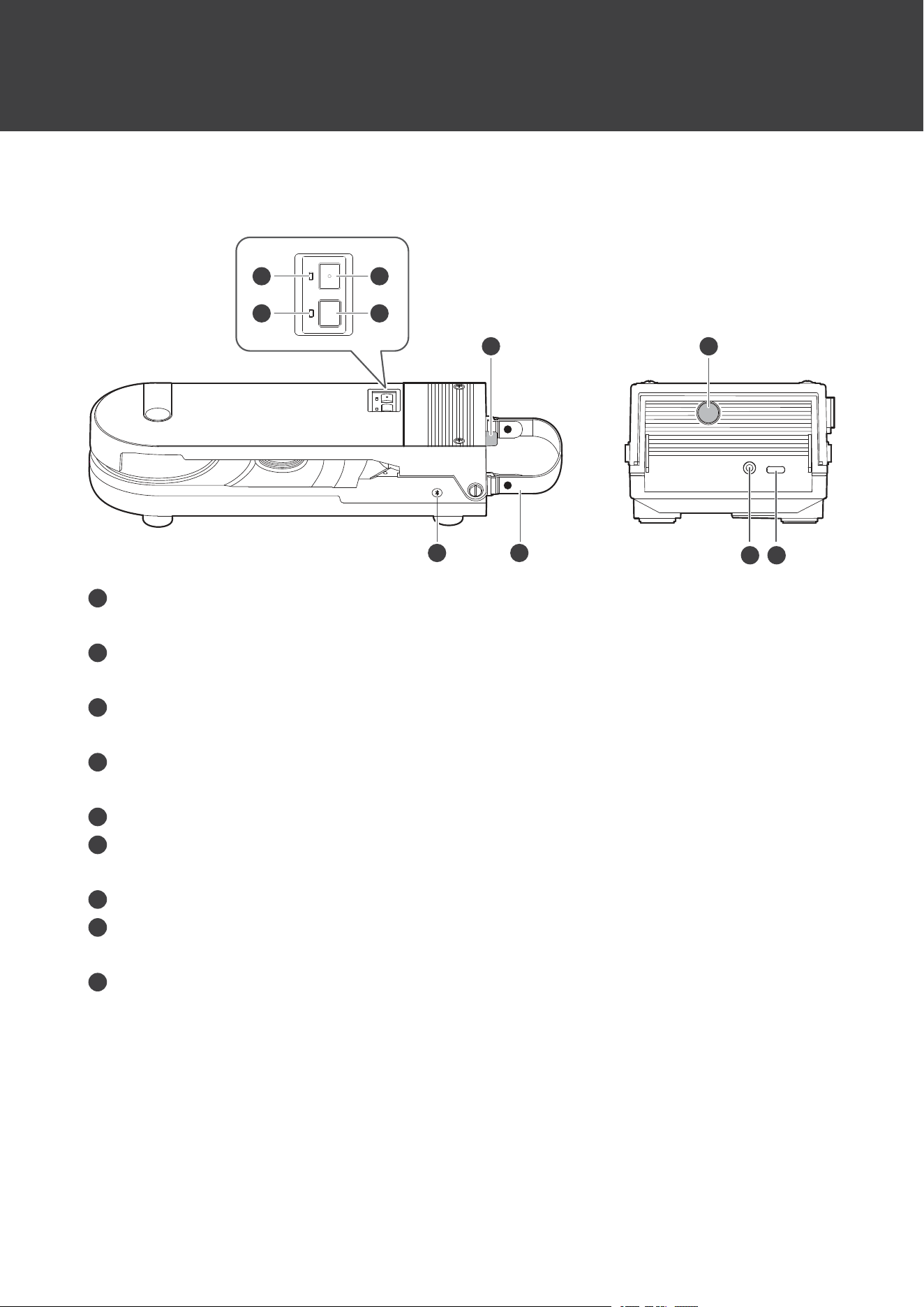
Mainunit
9
5
8
6 7
2
1
3
4
5
1
Powersupplyindicatorlamp
Lightsorflashesinwhitewhenthepowerturnson.
2
Speedindicatorlamp
Turnsoffwhentheplatterspeedis33-1/3RPMandlightsinwhitewhen45RPM.
3
Powersupplybutton
Turnspoweronandoff.
4
Platterspeedbutton
Selecttheplatterspeed(33-1/3or45RPM).
5
Tonearmfixingscrew
6
Wirelessfunctionbutton
UsedtoconnecttheproductwithBluetoothdevices.
7
Carryinghandle
8
Stereolineoutputterminal
ConnecttheRCAaudiocable.
9
Chargingterminal
ConnecttheUSBchargingcable.
Partnamesandfunctions
7
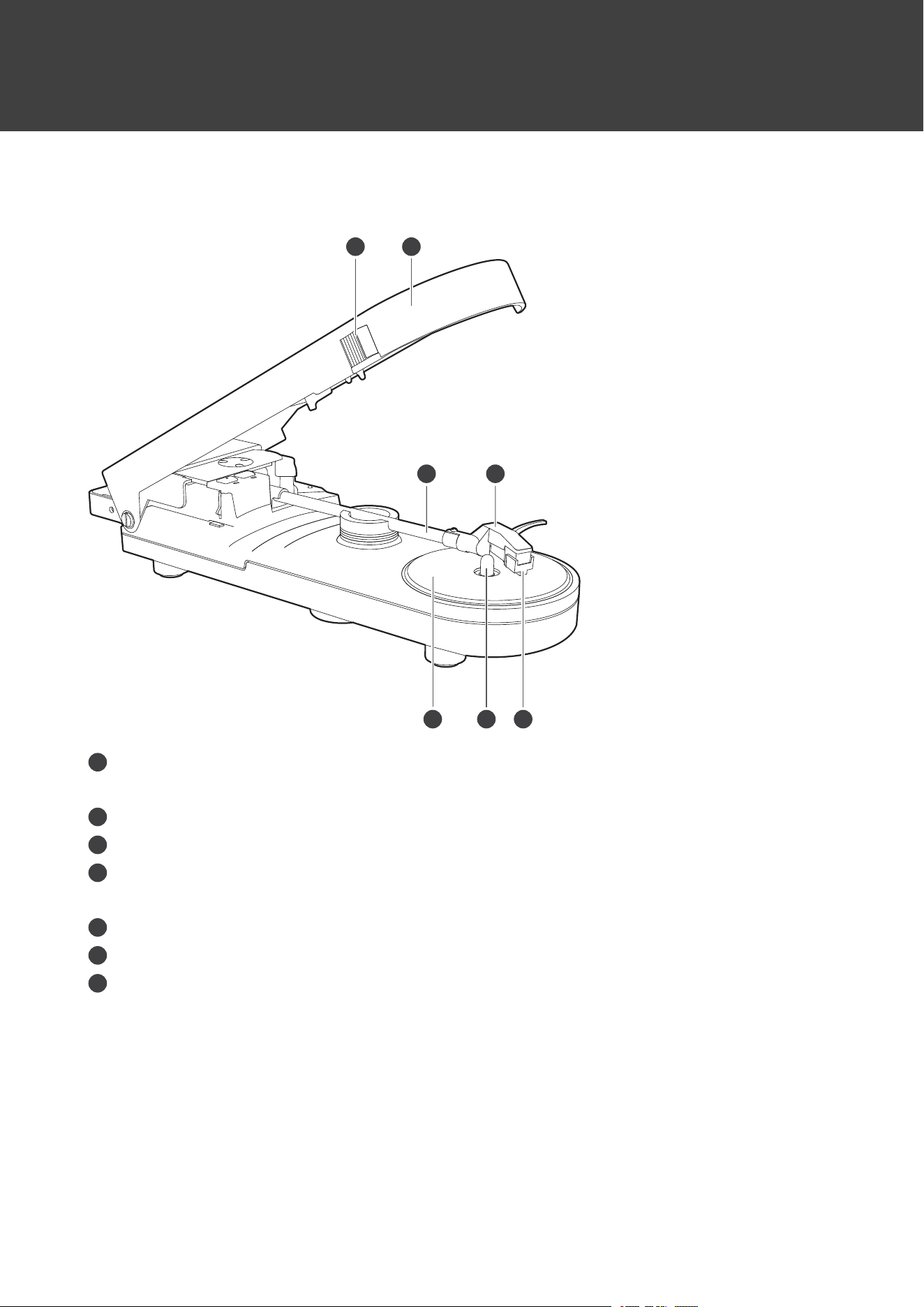
Mainunit(withcoveropen)
3 4
5 6 7
21
1
Openbutton
Slidetoopenthecover.
2
Cover
3
Tonearm
4
Headshellandcartridge
Thecartridgeisattachedtotheheadshell.
5
Platter
6
Spindle
7
Protector
Partnamesandfunctions
8
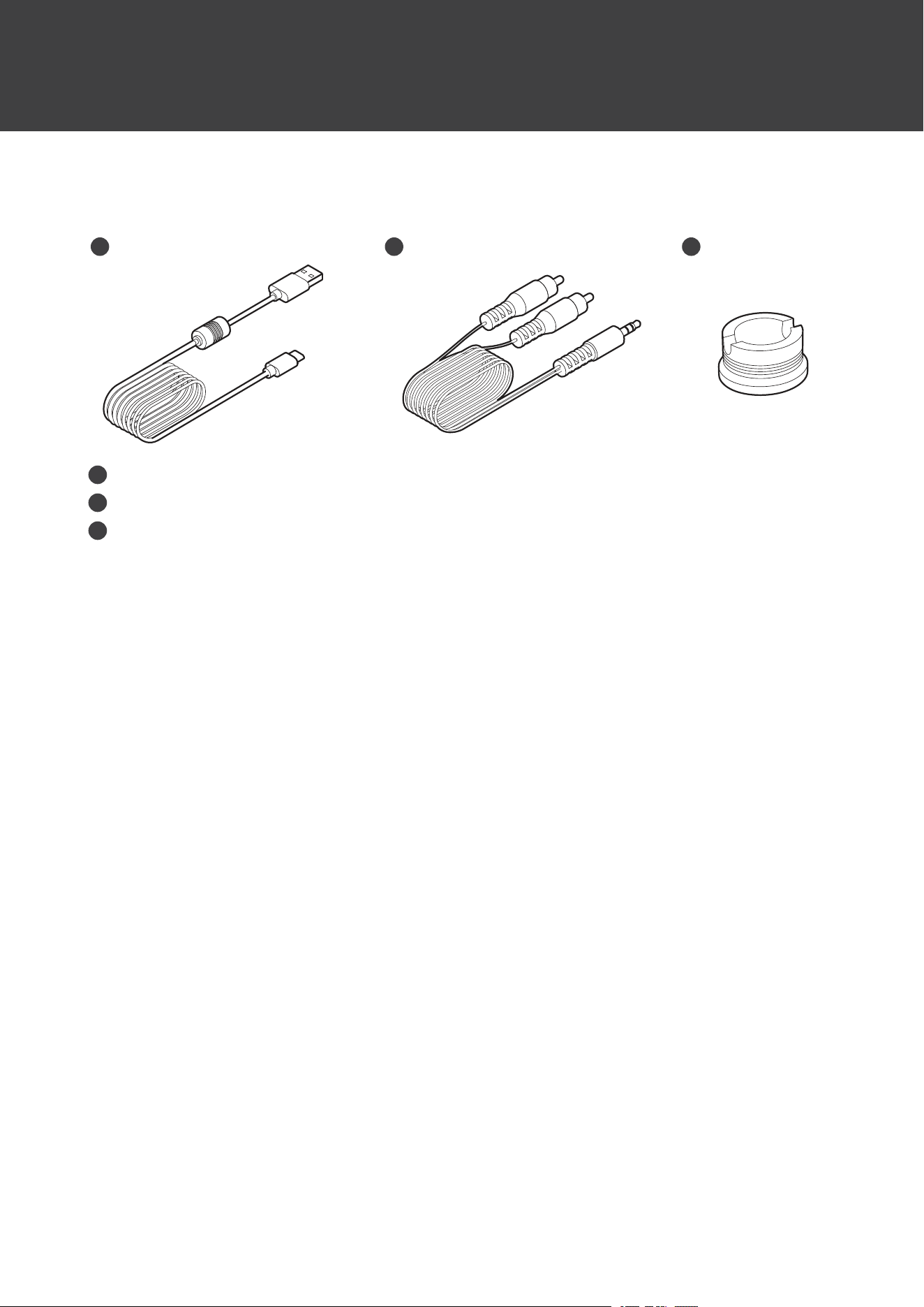
Accessories
3
21
1
USBchargingcable(Approx.1.5m(4.9'),USBType-A/USBType-C
™
)
2
RCAaudiocable(Approx.1.2m(3.9'))
3
45RPMadapter
9
Preparationforuse
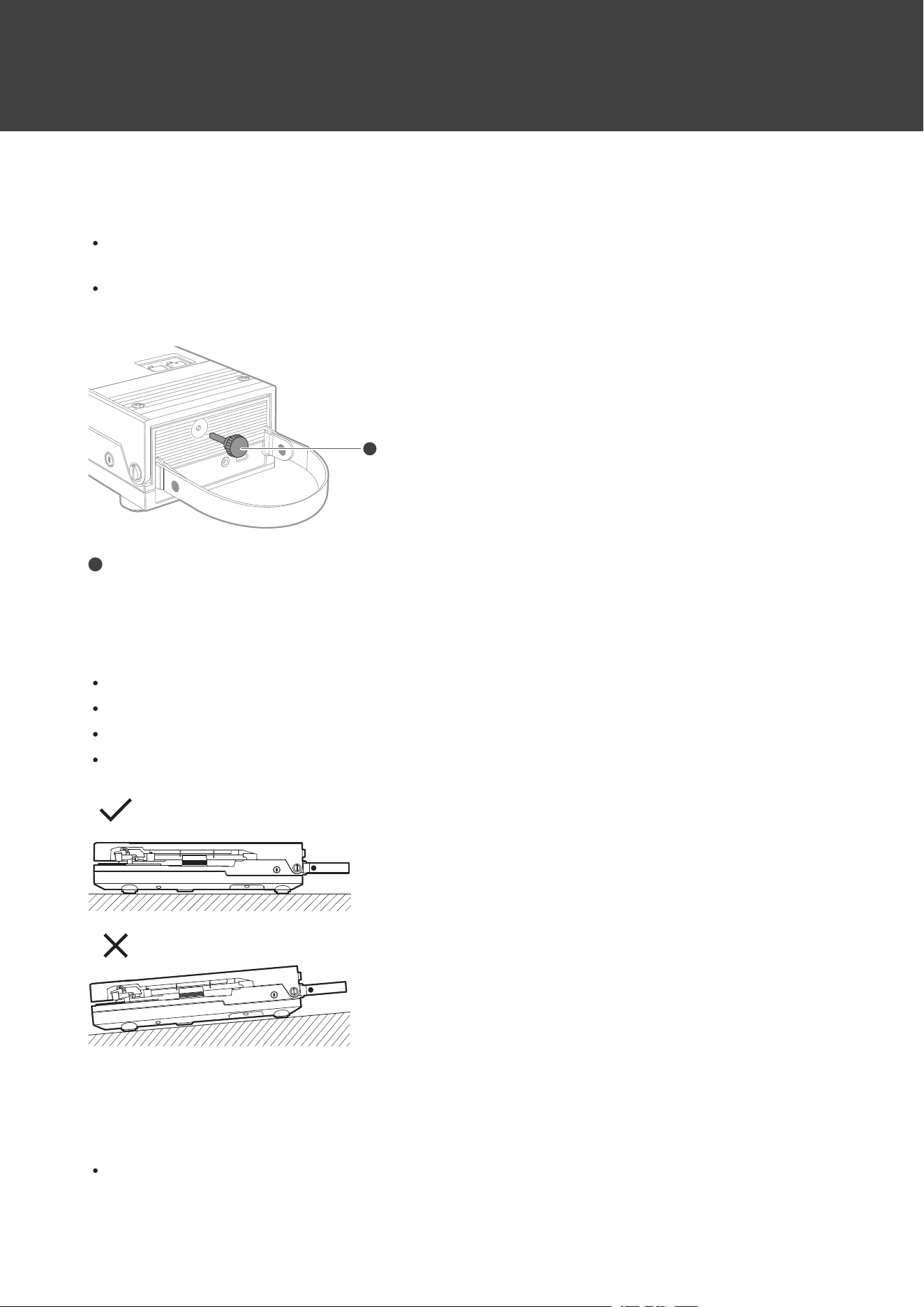
Removingthetonearmfixingscrew
Whenpurchased,theproductincludesascrewforfixingthetonearm.Removethefixingscrewbeforeusingthe
product.
Safelystoretheremovedscrewandreinstallitwhentransportingtheproductforrepairsintheeventofa
malfunction,etc.
1
1
Tonearmfixingscrew
Settinguptheturntable
Positiontheproductonalevelsurface.Donotattempttouseitinaverticalposition,etc.
Toavoidtheeffectsofvibrationsandacousticpressure,donotmounttheproductnexttosuchitemsasspeakers.
Theproductmaypickupradiostaticifplacednexttoaradio.Therefore,trytokeeptheproductawayfromradios.
Iftheproductisnearequipment(cellphone,etc.)thatemitsstrongradiowaves,noisemayoccur.
Charging
Fullychargethebatterywhenusingforthefirsttime.
Preparationforuse
10
Whentherechargeablebatteryisrunninglow,thecolorofthepowersupplyindicatorlampwillchangetored.
Chargethebatteryassoonaspossible.
Ittakesabout12hoursmaximumtochargethebatteryfully.(Thistimemayvarydependingonusageconditions.)
Chargetheproductinawell-ventilatedplace(10to35°C(50to95°F))awayfromdirectsunlight.Otherwise,the
batterymaydeteriorate,possiblyresultinginshorterperiodsofcontinuoususeormayfailtocharge.
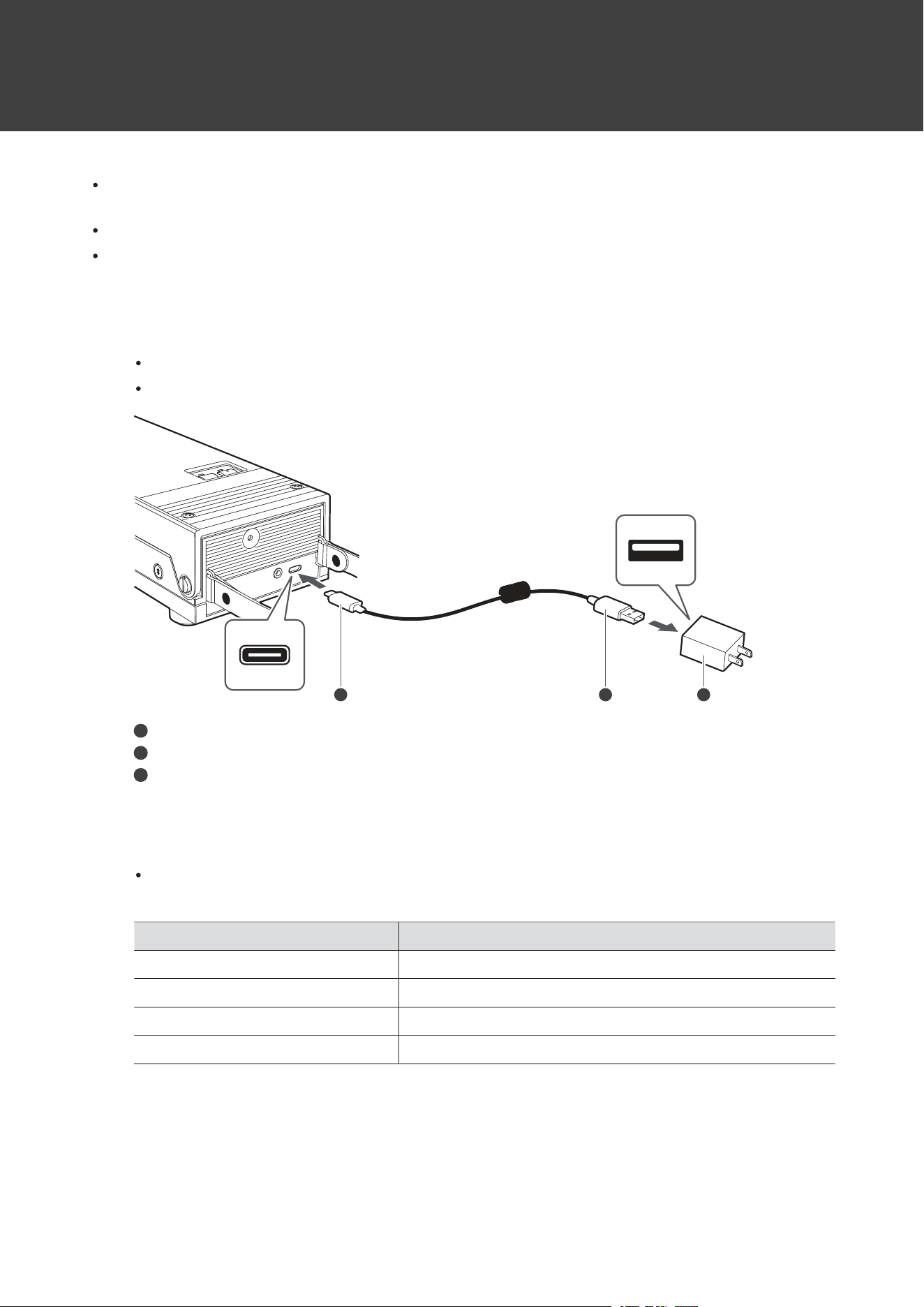
1
ConnecttheincludedUSBcable(USBType-Cside)totheproduct’schargingterminal.
TheincludedUSBcableisdesignedforexclusiveusewiththeproduct.DonotuseanyotherUSBcable.
WheninsertingtheUSBcableintotheUSBpoweradapterorchargingterminal,insertitdirectly(horizontally).
1 2 3
1
USBType-C
2
USBType-A
3
USBpoweradapter(soldseparately)
2
ConnecttheincludedUSBcabletoacommerciallysoldUSBpoweradapterandplugitintoanoutlet
tostartcharging.
Whilecharging,thepowersupplyindicatorlamplights/flashesasfollows.(Itmaytakeseveralsecondsforthe
powersupplyindicatorlamptolight.)
PowersupplyindicatorlampStatus
Nochange(white)Charging/Chargingcomplete(powerON)
FlashingredCharging(powerOFF)
OffChargingcomplete(powerOFF)
FlashingredquicklyChargingerror
3
Whenchargingiscomplete,disconnecttheUSBpoweradapterfromtheoutlet.
4
DisconnecttheUSBcablefromtheproduct’schargingterminal.
Preparationforuse
11
Whencharging,makesuretousetheincludedUSBcable.Theproductmaynotchargewithcablesother
thantheincludedUSBcable.
Placingarecord
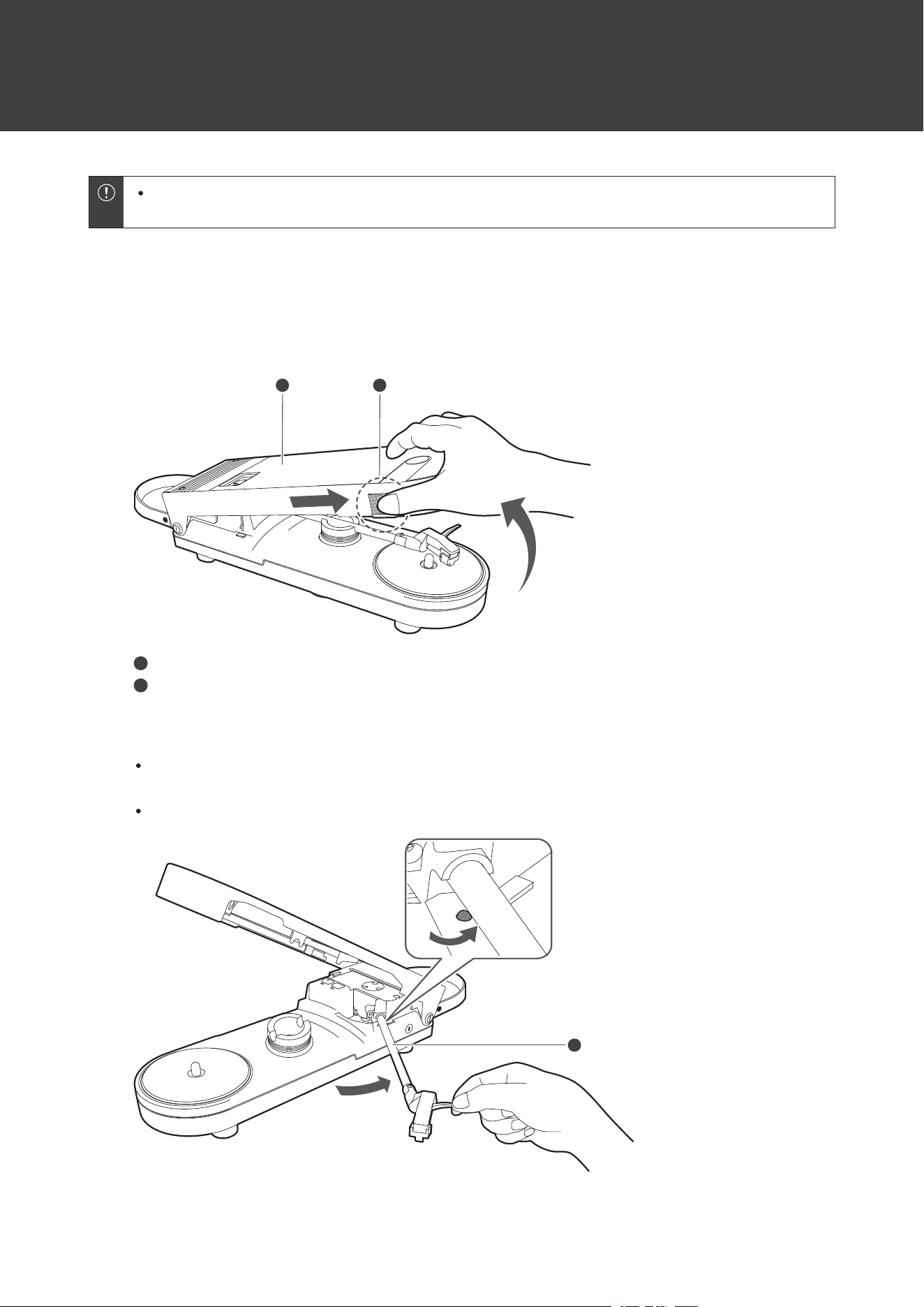
1
Slidetheopenbuttonforwardandopenthecover.
1 2
1
Cover
2
Openbutton
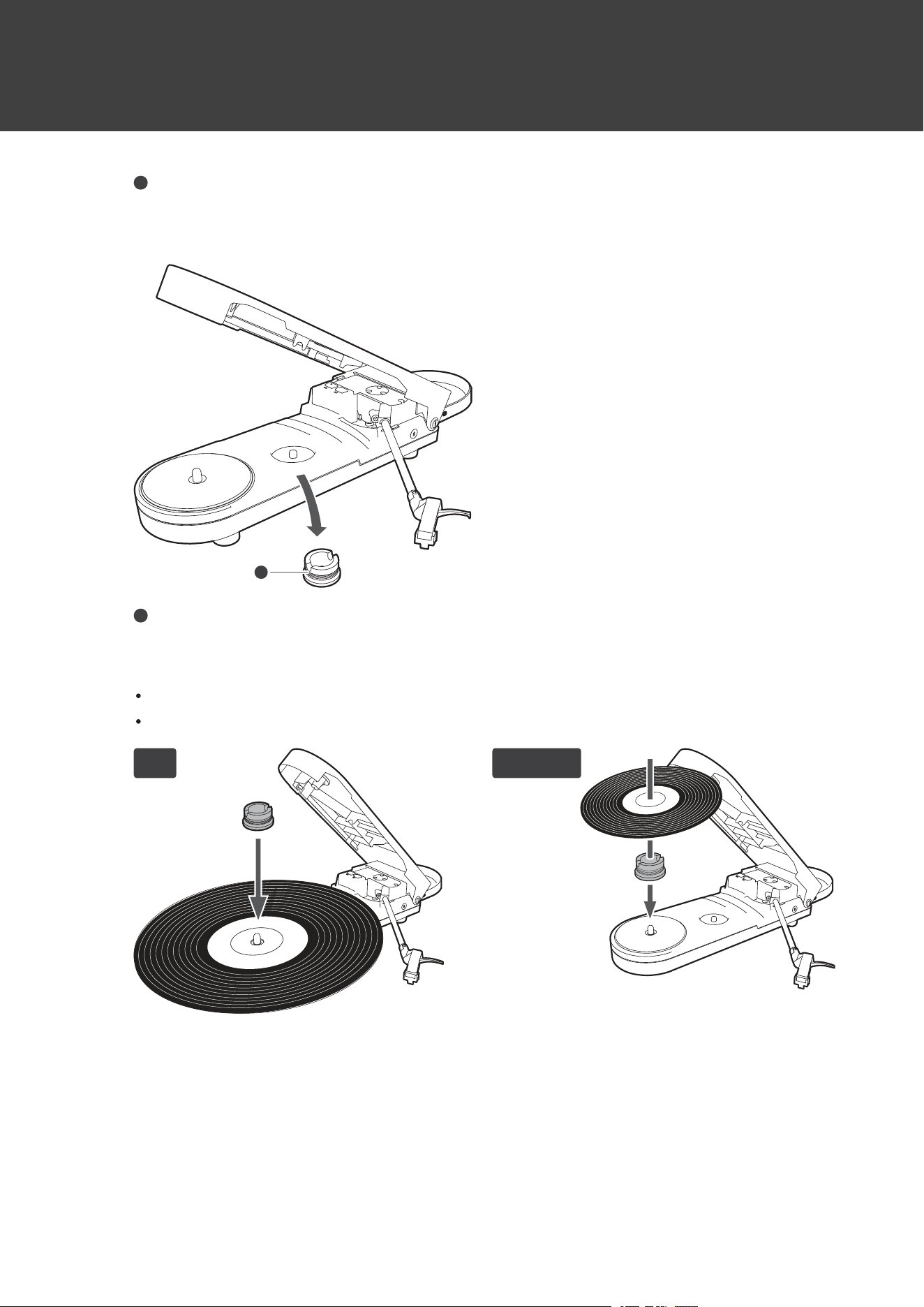
2
Pulloutthetonearmuntilaclickisheard.
Dothiswhilethepowerisoff.Turningthepoweronbeforemovingthetonearmwillcausetheplattertostart
rotating.
Becarefulnottodamagethecartridge’sstylustip,theplatter,ortherecord.
1
Preparationforuse
12
1
Tonearm
3
Removethe45RPMadapter.
1
1
45RPMadapter
4
Placetherecordontheplattersothatthecenterholealignswiththespindle.
Placethe45RPMadapterabovetherecordwhenplayingLPrecords.
Placethe45RPMadapterbelowtherecordwhenplaying45RPMrecords.
LP 45 RPM
5
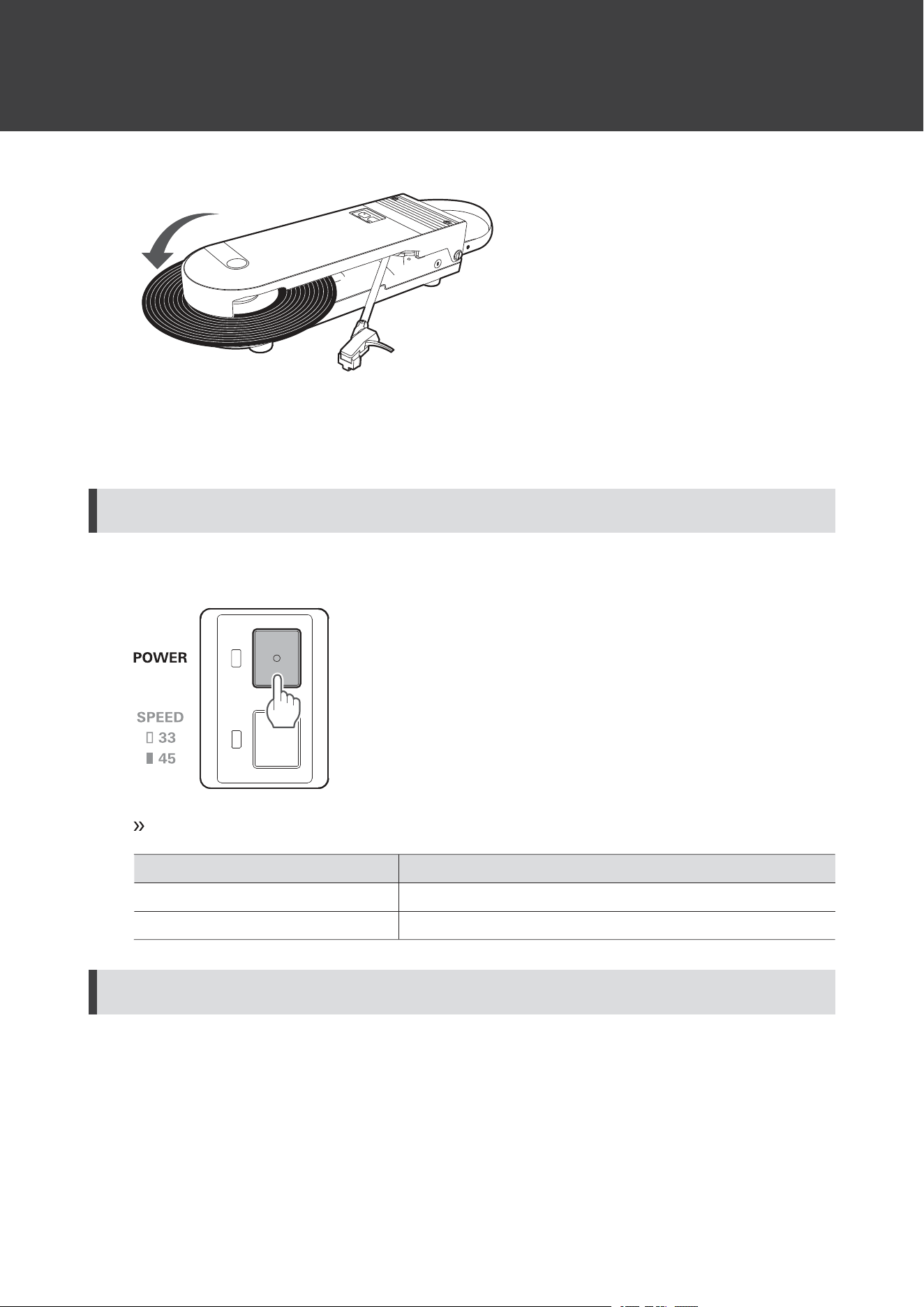
Closethecover.
Preparationforuse
13
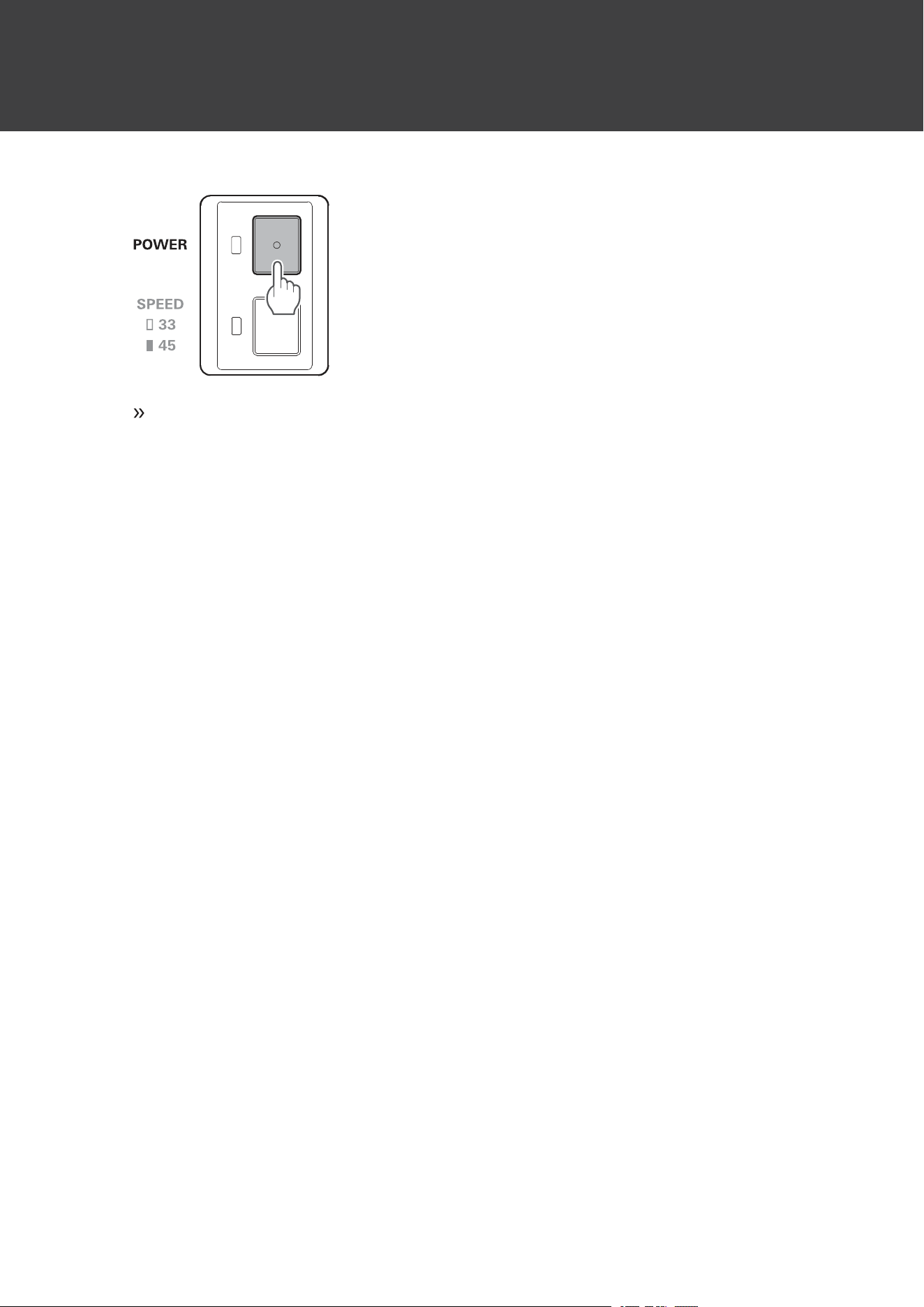
PowersupplyON/OFF
Turningontheproduct
1
Pressthepowersupplybutton.
Thepowerturnsonandthepowersupplyindicatorlamplights/flashesasfollows:
PowersupplyindicatorlampStatus
LightsinwhitePowerON(RCAaudiocableconnected)
FlashingwhitePowerON(RCAaudiocablenotconnected)
Turningofftheproduct
1
Pressthepowersupplybutton.
Preparationforuse
14
Thepowerturnsoffandthepowersupplyindicatorlampturnsoff.
15
Wireless/wiredconnections
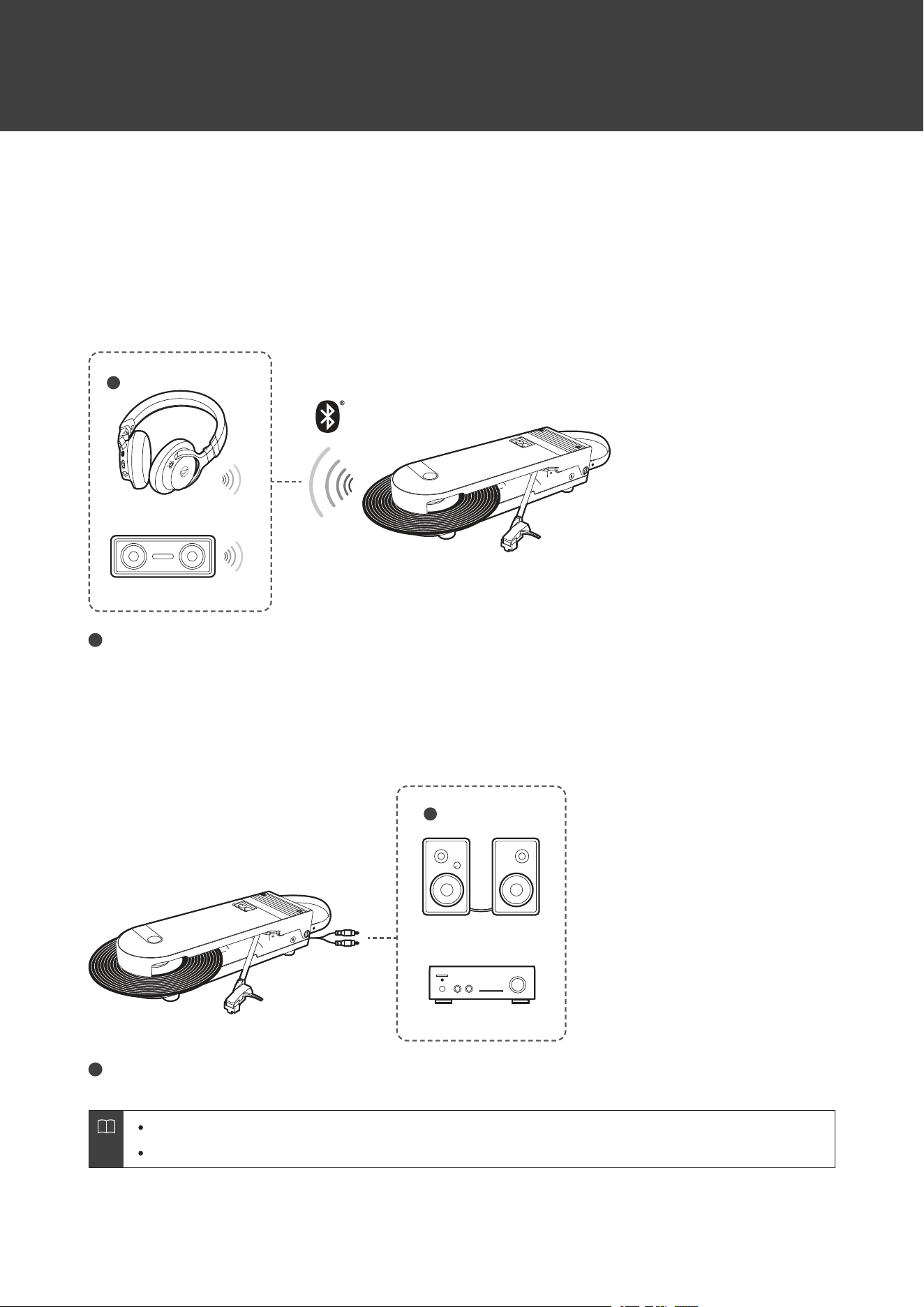
Dependingonwherethisproductisused,itcanbeconnectedwirelesslyusingBluetoothorconnectedtodevicessuch
asactivespeakersusingtheRCAaudiocable.
Wirelessconnections
FordetailsonwirelessconnectionsusingBluetooth,referto"Usingwirelessconnections"(p.16).
1
1
Wirelessheadphonesorwirelessspeaker
Wiredconnections
FordetailsonwiredconnectionsusingRCAaudiocables,referto"Usingwiredconnections"(p.18).
1
1
Activespeakersoramplifier
Volumecannotbeadjustediftheconnectedspeakers,etc.,donothaveavolumeadjustmentfunction.
ConnectingtheRCAaudiocableswhileconnectedviaBluetoothwillswitchtoawiredconnection.

16
Usingwirelessconnections
ThisproductsupportsBluetoothconnections.ItcanbeconnectedwithBluetooth-supportingdevicessuchas
headphonesandspeakers(hereinafter,“Bluetoothdevices”).
Aboutpairing
ToconnecttheproducttoaBluetoothdevice,theproductneedstopair(register)withthedevice.Oncetheyarepaired,
youdonotneedtopairthemagain.
However,youwillneedtopairagaininthefollowingcases:
IftheproductisdeletedfromtheBluetoothdevice’sconnectionhistory.
Iftheproductissentoutforrepair.
Iftheproduct’spairinghistoryisreset.
If9ormoredevicesarepaired.
(Theproductcanbepairedwithupto8devices.Whenyoupairwithanewdeviceafterpairingwith8devices,
pairinginformationforthedevicewiththeoldestconnectiondatewillbeoverwrittenbytheinformationforthenew
device.)
PairingaBluetoothdevice
ReadtheusermanualfortheBluetoothdevice.
PlacetheBluetoothdevicewithin1m(3.3')oftheproducttoperformpairingcorrectly.
NotethatAudio-TechnicacannotguaranteetheoperationofconnectedBluetoothdevices.
DisconnecttheRCAaudiocable.
1
Turnontheproduct.
2
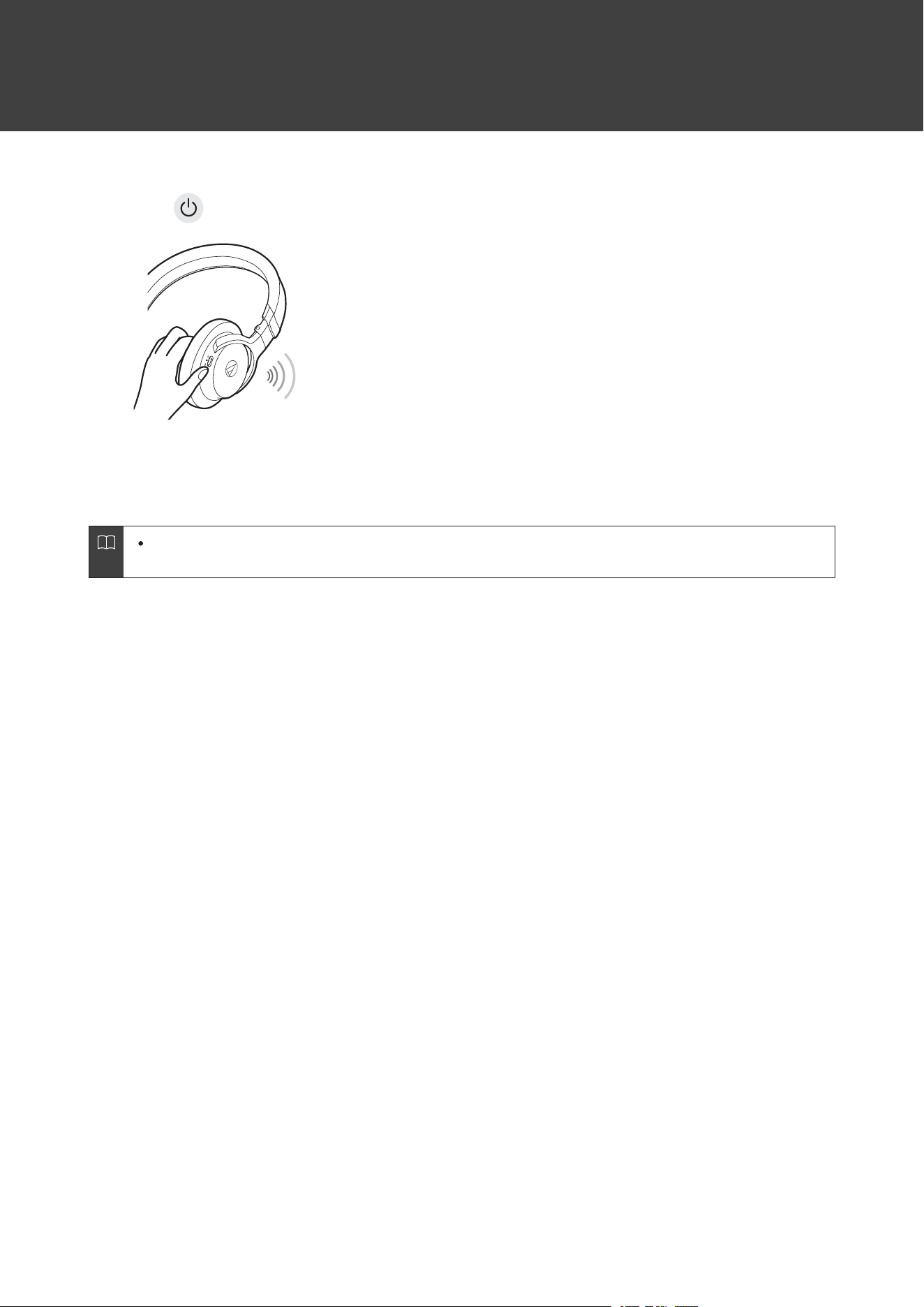
Pressandholdtheproduct’swirelessfunctionbutton(forabout2seconds).
Theproductwillstartsearchingfordevicesandthepowersupplyindicatorlampwillstartflashingquicklyin
white.
3
SettheBluetoothdevice(Bluetooth-supportingdevicessuchasheadphonesandspeakers)tothe
pairingmode.
Usingwirelessconnections
17
O NO N
4
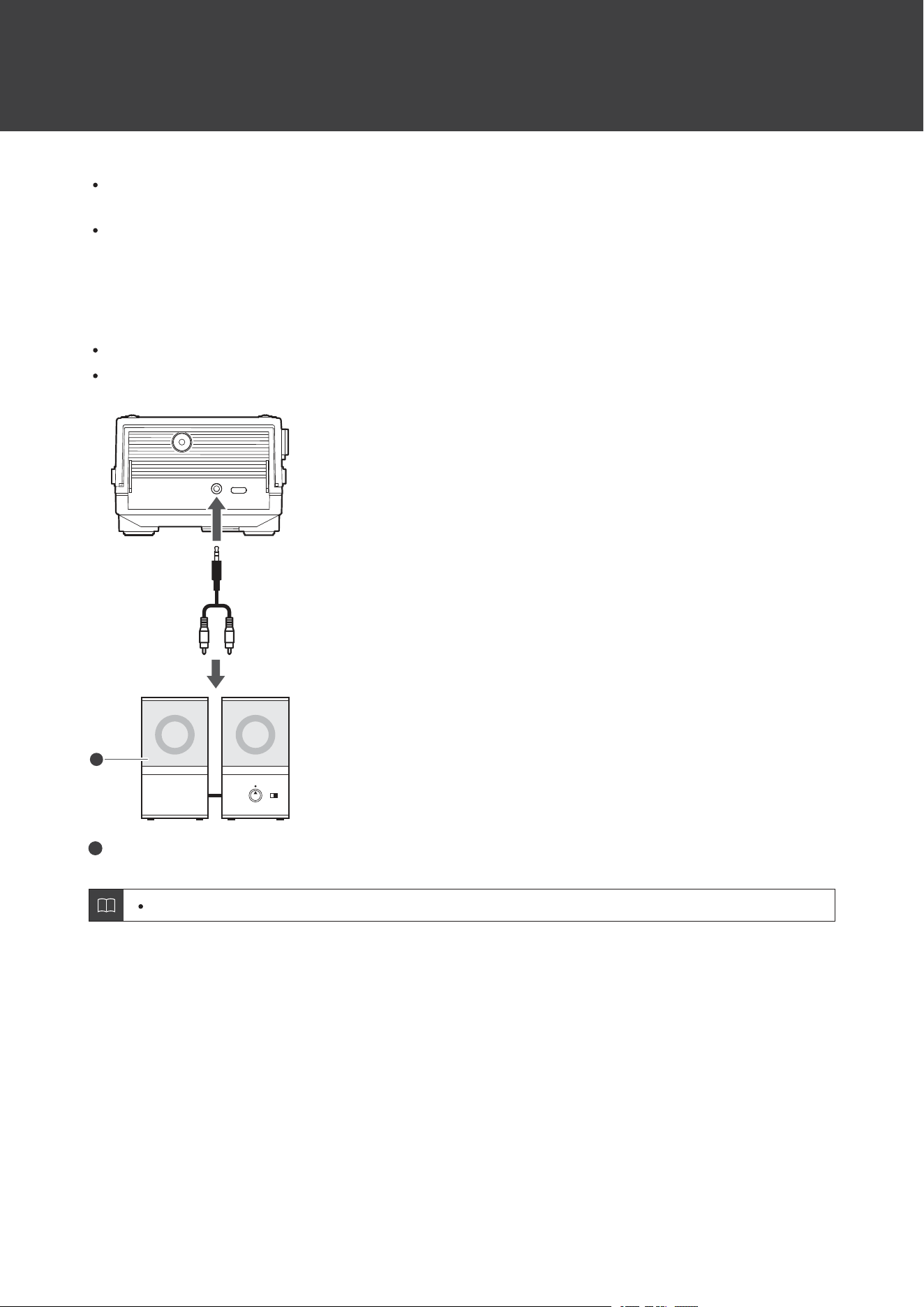
Oncepaired,thepowersupplyindicatorlampwillchangetoslowlyflashinginwhite.
Theproduct’spairingmodewillautomaticallyendafteracertainperiodoftime(about60seconds).If
pairingcannotbecompletednormally,trypairingagainusingthesameprocedure.
18
Usingwiredconnections
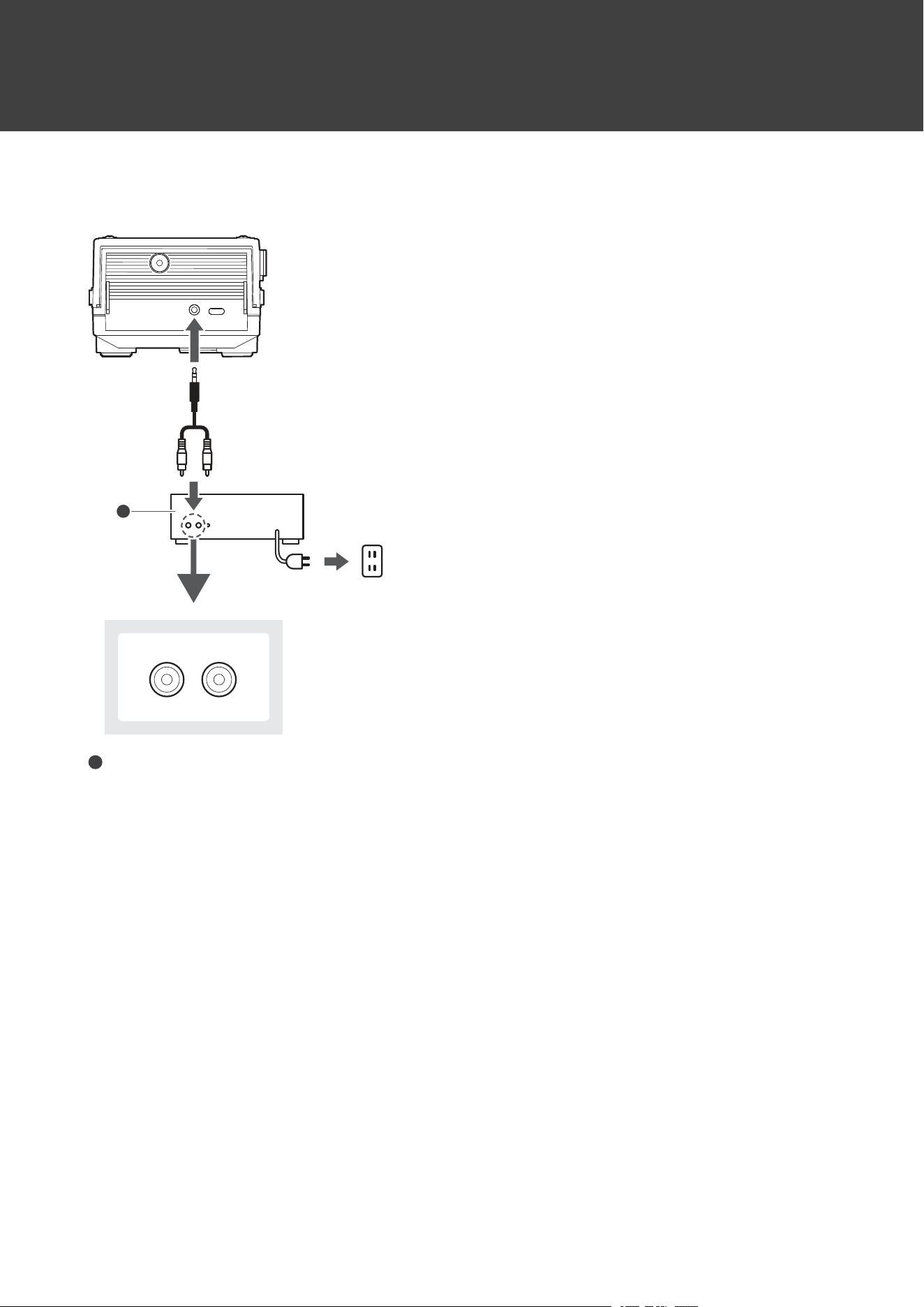
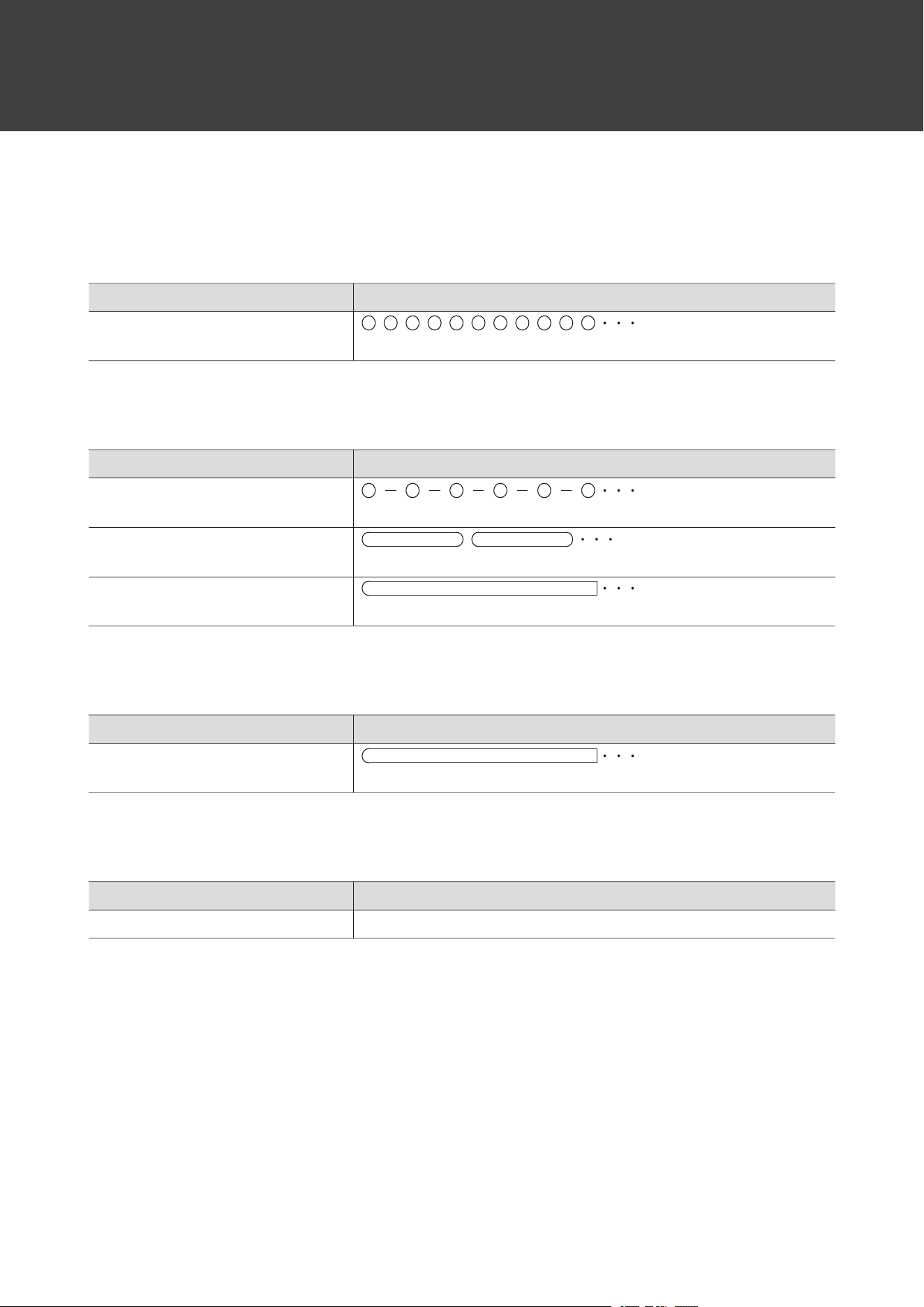
ConnecttheRCAaudiocabletotheinputjacksoftheconnectableequipmentyouareusing(amplifier,receiver,
activespeakers,soundcard,etc.).
TheRCAaudiocable’sredplugisfortheright(R)channel,andthewhiteplugisfortheleft(L)channel.
Connectingtoactive(built-inamplifier)speakers
Useactivespeakerswhendirectlyconnectingthisproducttospeakers.
Someactivespeakersmayneedtobeconnectedusingconversioncables,etc.
1
1
Activespeakers
Volumecannotbeadjustediftheconnectedspeakers,etc.,donothaveavolumeadjustmentfunction.
Usingwiredconnections
19
Connectingtoconnectableequipment(amplifiers,etc.)
AUX
L R
1
1
Connectableequipment(amplifier,etc.)
20
Powersupplyindicatorlampdisplay
Thepowersupplyindicatorlampoftheproductindicatestheproduct’sstatusasexplainedbelow.
Pairing
StatusPowersupplyindicatorlampdisplaypattern
Searchingfordevices
Flashingwhitein0.5-secondintervals
Connecting(wireless)
StatusPowersupplyindicatorlampdisplaypattern
Waitingtobeconnected
Flashingwhitein1-secondintervals
Connecting
Flashingwhite(graduallylightingup)
Disconnecting
Lightsinwhite
Connecting(wired)
StatusPowersupplyindicatorlampdisplaypattern
RCAaudiocableconnected
Lightsinwhite
Batterylevel
StatusPowersupplyindicatorlampdisplaypattern
BatterylevelislowWhiteinthepairingorconnectionstatusturnsred.
21
Usingtheproduct
Playingarecord
Lowerthevolumeoftheamplifier,activespeakers,etc.,sufficiently.
1
Placearecordontheplatter,turnonthepower,andconnectwiththeequipment.
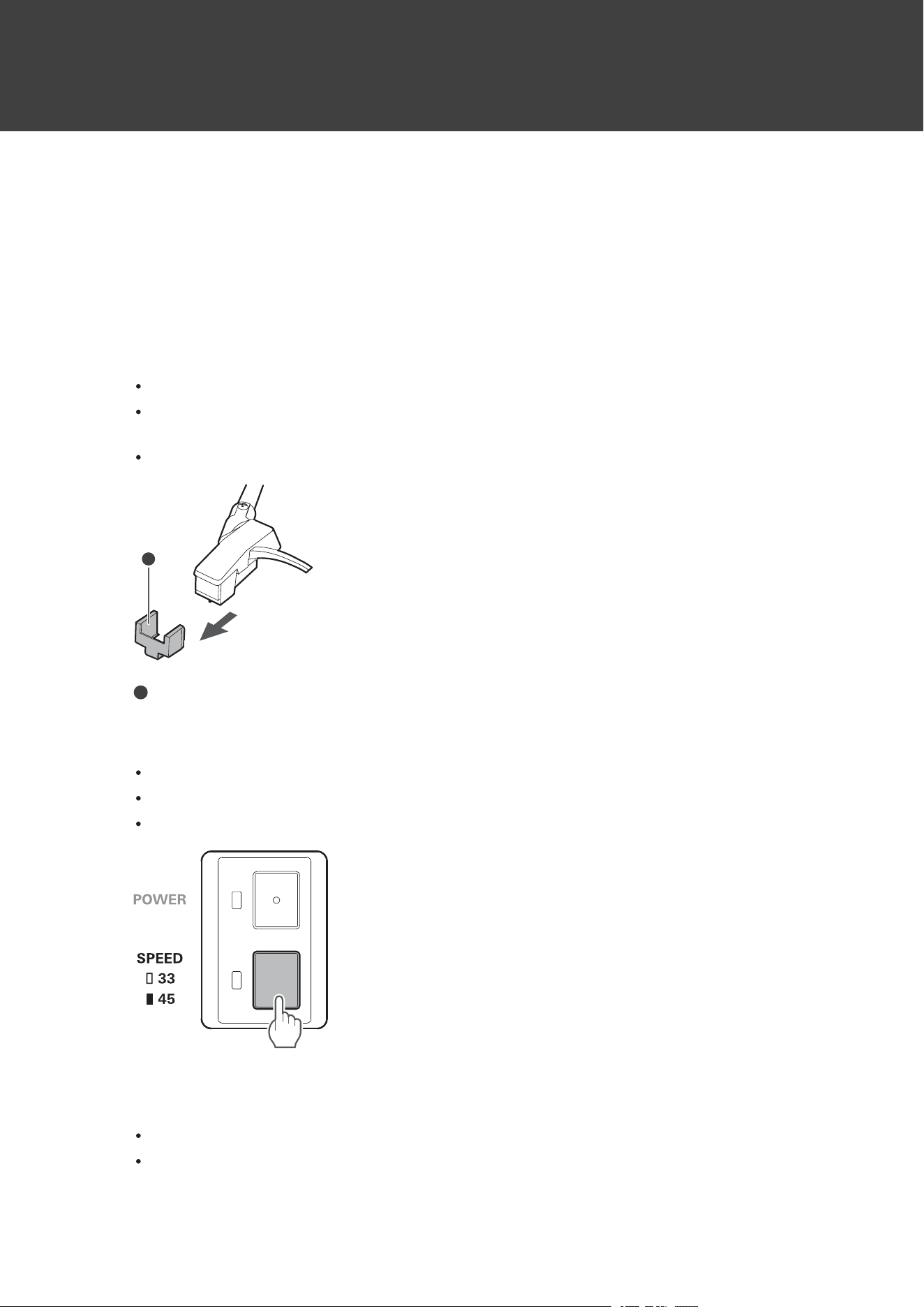
2
Removethecartridge’sprotector.
Pulltheprotectorstraightforwardtoremoveit.
Applyingadownwardforcemaycausethestylustocomeoffthebody.Onlylowvolumeisoutputifthestylus
hascomeoff,orisabouttocomeoff,soreferto"Replacingthestylus"(p.25)toreattachthestyluscorrectly.
Takecarenottolosetheprotector.
1
1
Protector
3
Selectthespeedbypressingtheplatterspeedbutton.
Select“33”toplay33-1/3-RPMrecordsor“45”toplay45-RPMrecords.
Thespeedindicatorlampwillturnoffwhen“33”isselected.
Thespeedindicatorlampwilllightinwhitewhen“45”isselected.
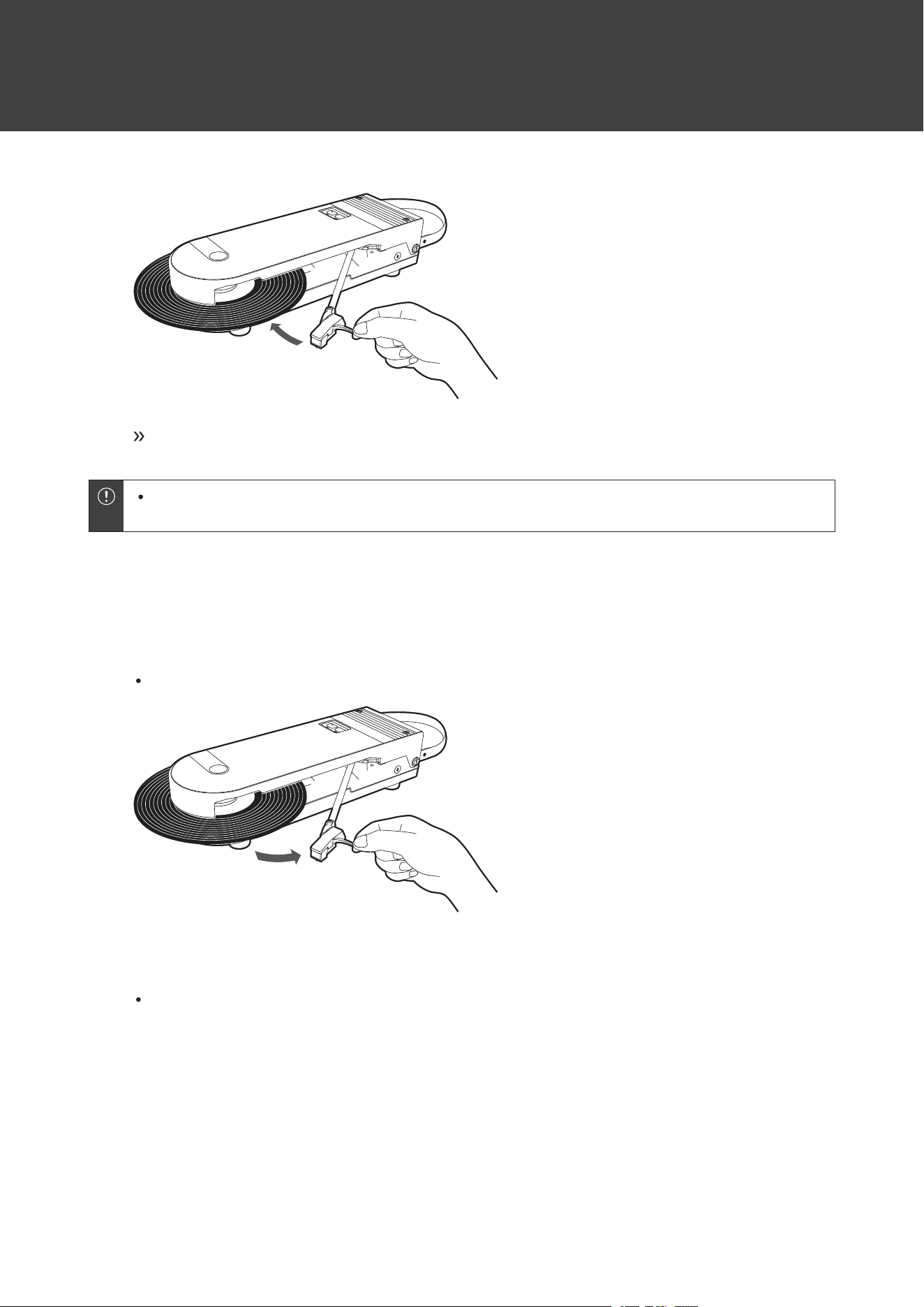
4
Movethestylustipovertherecord.
Movingthetonearmwillcausetheplattertostartrotating.
Gentlylowerthestylustipontotherecord.
Usingtheproduct
22
Musicwillbeplayedbackontheconnectedequipment.
Iftherecordiswarpedsignificantly,itmayinterferewiththeproductandpreventplayback.Because
warpagemaycausetheproducttomalfunction,donotattempttoplaywarpedrecords.
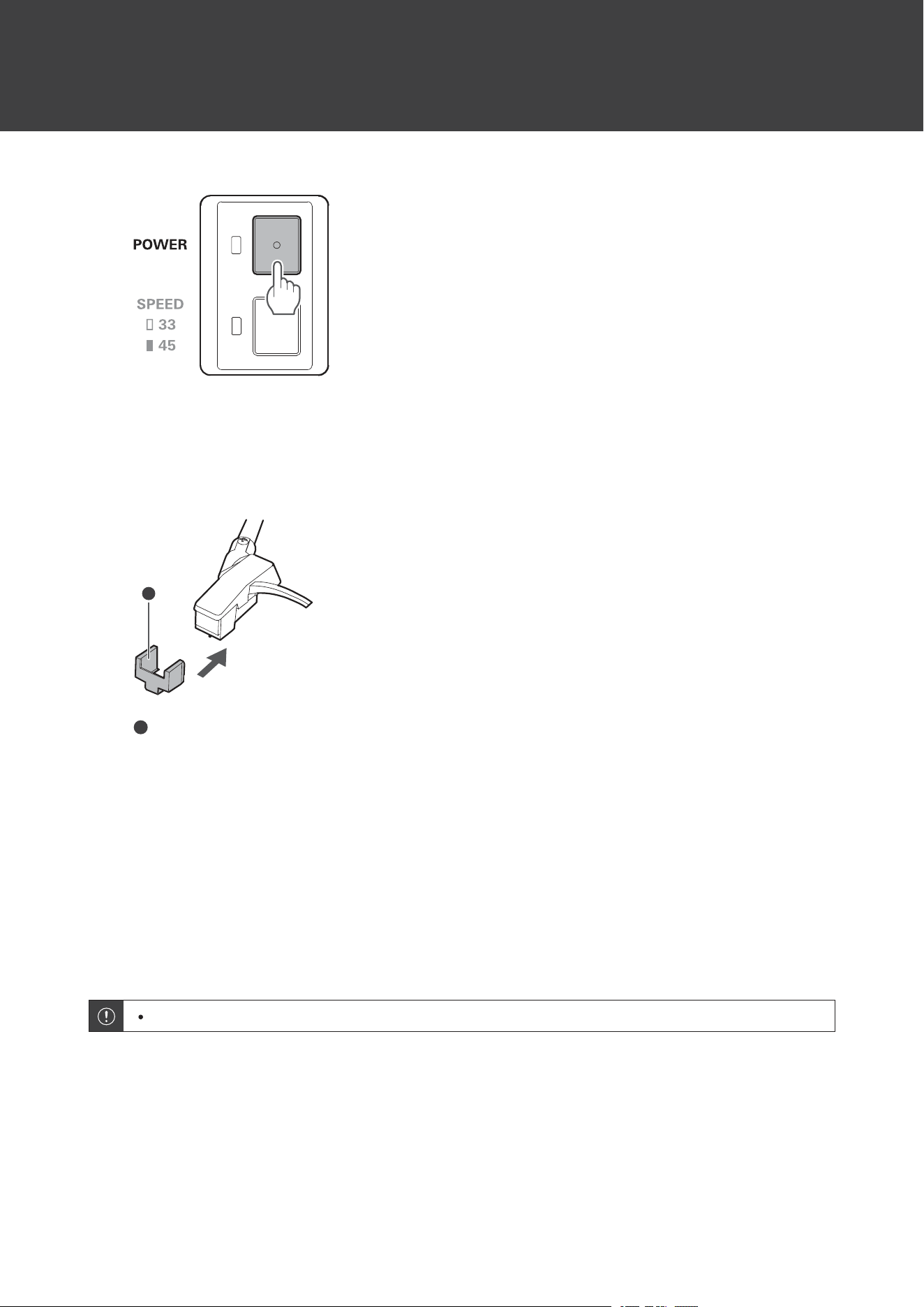
Stoppingrecordplayback
1
Gentlyliftthestylustipfromtherecordandpullthetonearmoutuntilaclickisheard.
Theplatterwillstoprotating.
2
Turnoffthepower.
Thepowersupplyindicatorlampturnsoff.
Usingtheproduct
23
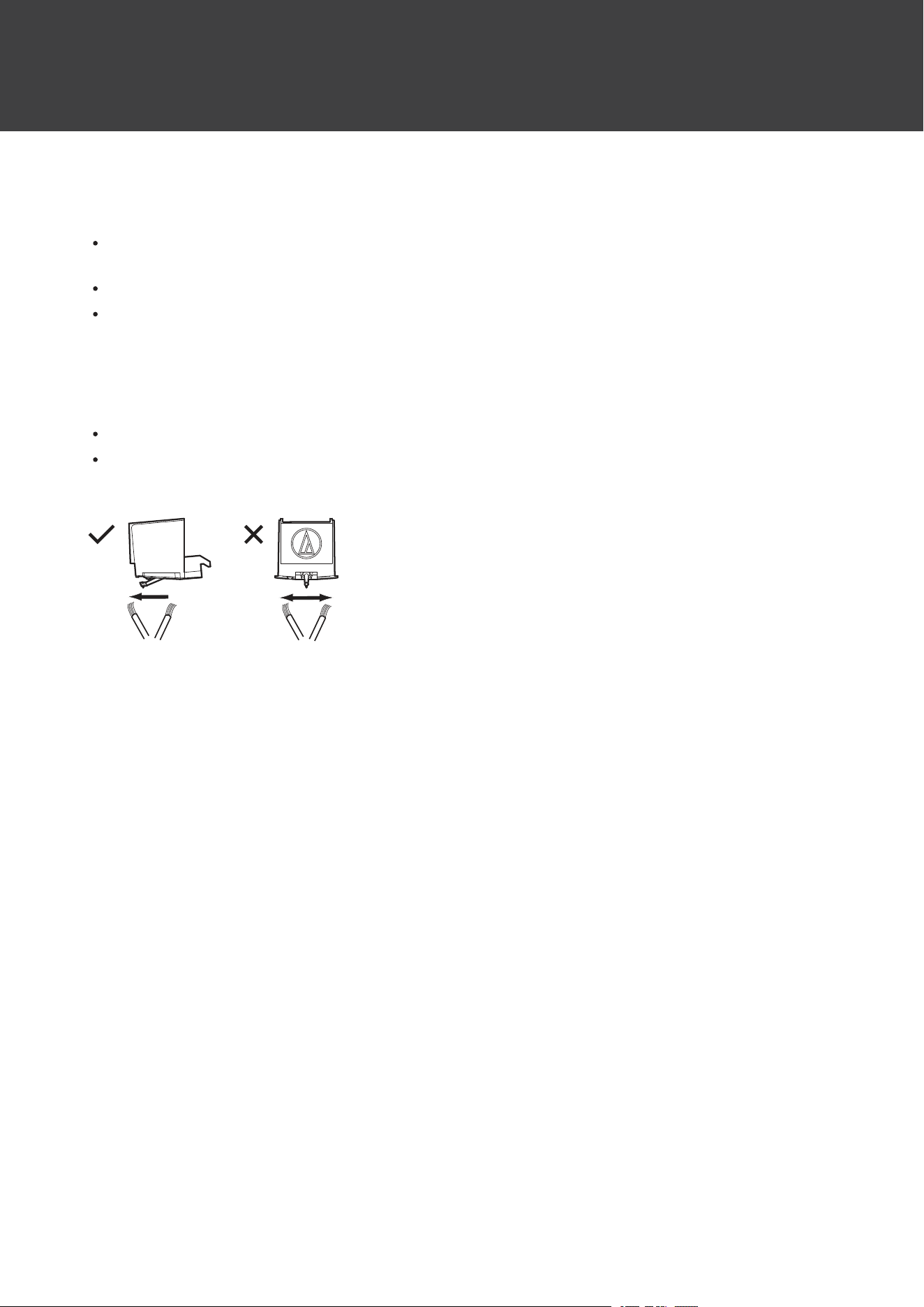
3
Openthecoverandremoveboththe45RPMadapterandrecord.
4
Mounttheprotectorontothecartridge.
1
1
Protector
5
Returnthe45RPMadaptertoitsoriginalpositionandstorethetonearm.
6
Closethecover.
Autopowerofffunction
Theproductautomaticallyturnsoffafter30minutesofarecordnotbeingplayed.
Thepowermaynotautomaticallyturnoffdependingonthesizeoftherecordlabel,etc.
24
Care
Turntablebody
Whentheturntablebodyisdirtyordusty,firstturnoffthepowersupply,andthenwipeoffthedirtanddustwitha
soft,drycloth.
Donotusealcohol,benzenes,thinners,etc.
Whenstoringtheproductforalongtime,wraptheequipmentinplastic;donotallowittobecomedamp.
Stylustip
Ifdirtandgrimearestucktothestylustip,cleanitwithacommerciallysoldbrush.
Werecommendusingastyluscleaner(soldseparately)ifthestylustipisconsiderablydirty.Cleanthestylustipby
movingthebrushfromthereartothefrontofthestylustip.
25
Replacingthestylus
Removingthestylus
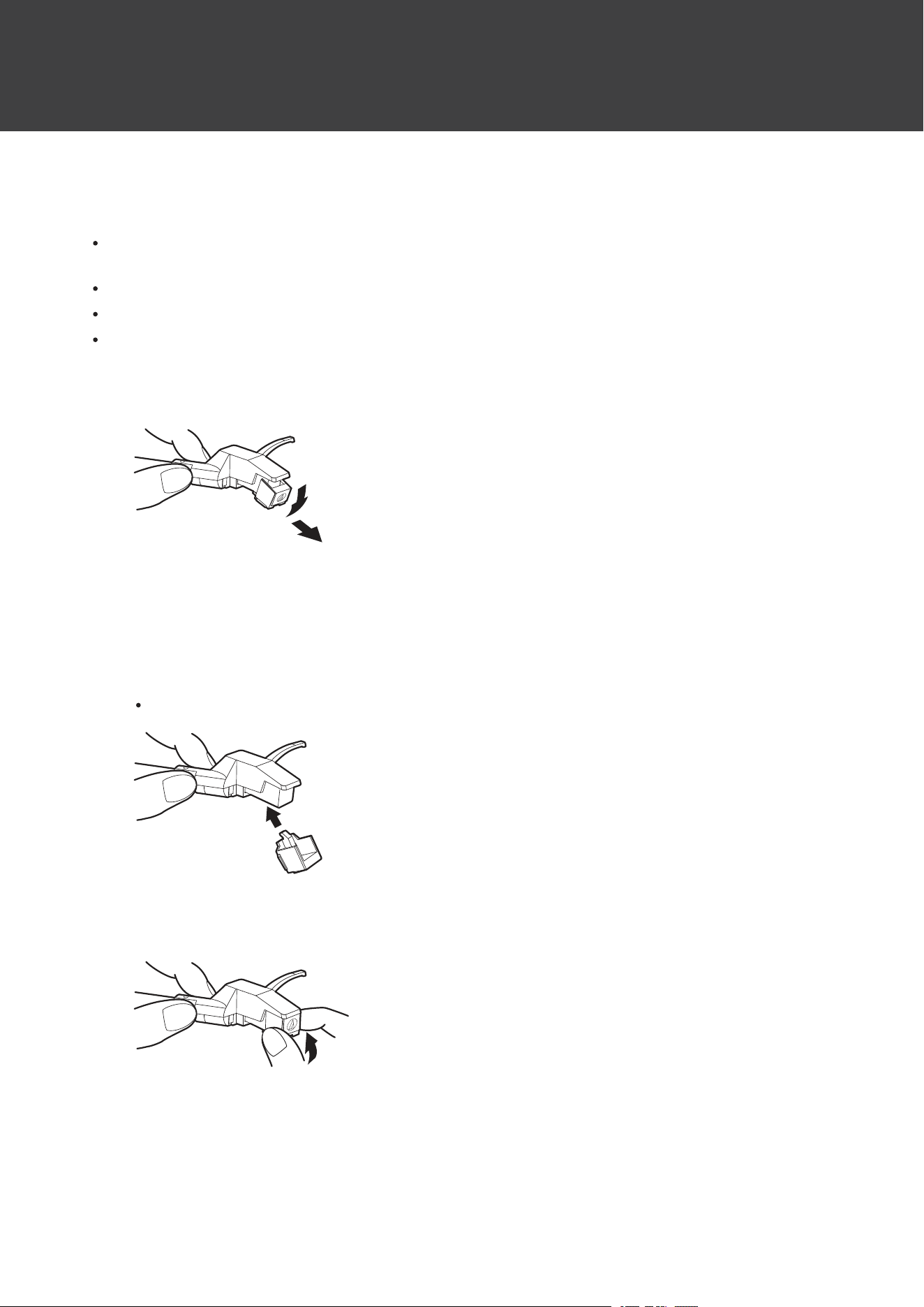
Inadditiontothedeteriorationofsoundquality,recordsmayalsobedamagedasthecartridge’sstylustipwears
down.
Asaruleofthumb,replacethestylusafter400hoursofuse.
Makesuretoturnofftheproduct.
Firmlyholdtheheadshellandcartridgewhenreplacingthestylus.
1
Pushdownthestylusintheforwarddirectiontorotatethefrontofthestylustip.
Installinganewreplacementstylus
1
Mountthenewreplacementstylustothecartridge.
Alignthestyluswiththecartridgeandpushitupfromthebottom.
2
Holdthecartridgebodyandpressuponthereplacementstylusuntilitclicksintoplace.
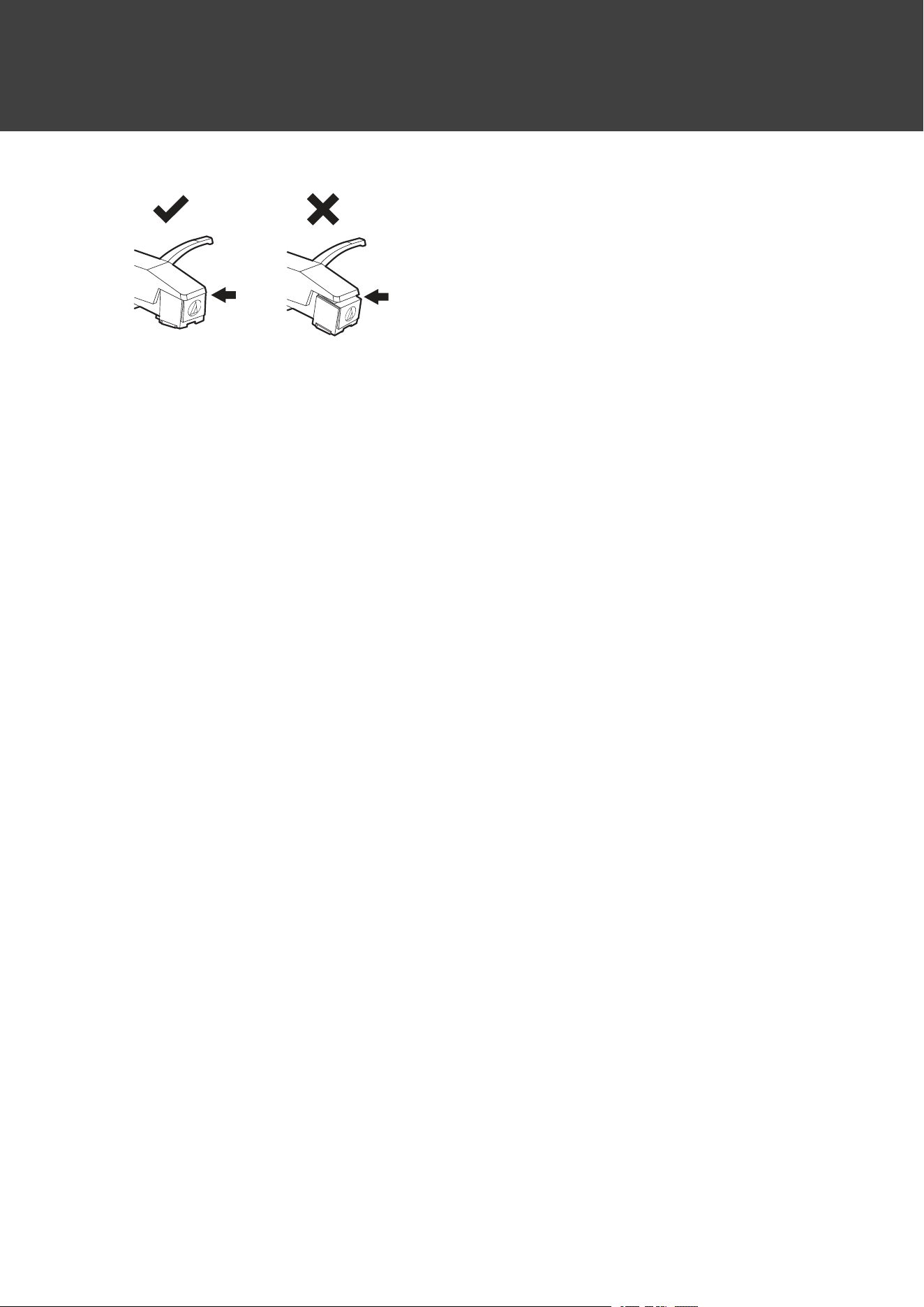
3
Confirmthatthereisnogapbetweentheheadshellandcartridge.
Replacingthestylus
26

27
Whentheturntableismoved
Theturntablecannotbemovedwhileinuse.
Beforemoving,removetherecordandstorethetonearmand45RPMadapter.
Holdthecarryinghandlefirmly.
Donotswingtheturntable.
Installthetonearmfixingscrewwhentransporting.
28
Resetting
Iftheproductdoesnotconnecttoadevice
Ifpairingcannotbecancelledorisnotsuccessful,youcanusepairingmodetoperformpairingagain.
1
TurnontheproductwiththeRCAaudiocabledisconnected.
2
Pressandholdthewirelessfunctionbutton(forabout2seconds).
Theproduct’spowersupplyindicatorlampwillchangetoflashinginwhitequicklyandyouwillbe
abletopairwithyourdesiredBluetoothdevice.
Ifpairingcannotbecompletednormally,resetthepairinghistoryandtrypairingagainusingthesame
procedure.
Resettingthepairinghistory
Ifpairingisnotsuccessful,resetthepairinghistory.
1
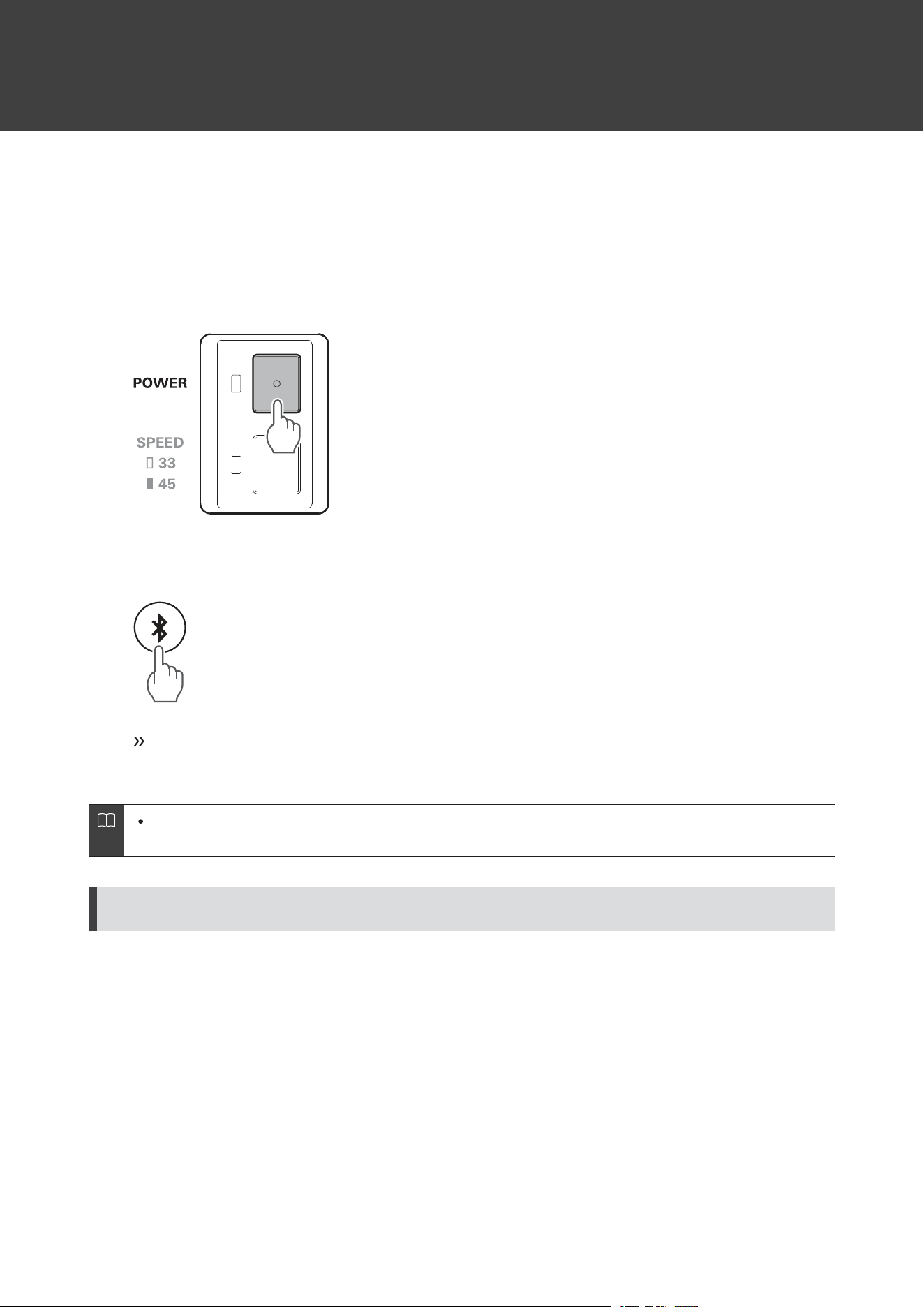
Withtheproductturnedoff,connecttheUSBcabletochargetheproduct.
2
Pressandholdthewirelessfunctionbutton(forabout10seconds).
Resetting
29
Thepowersupplyindicatorlampwillflashtwiceandthepairinghistorywillbereset.
Iftheproductoperatesabnormally(reset)
Resettheproduct.
Resettingdoesnotchangeanyofyoursettings(suchaspairinginformation).
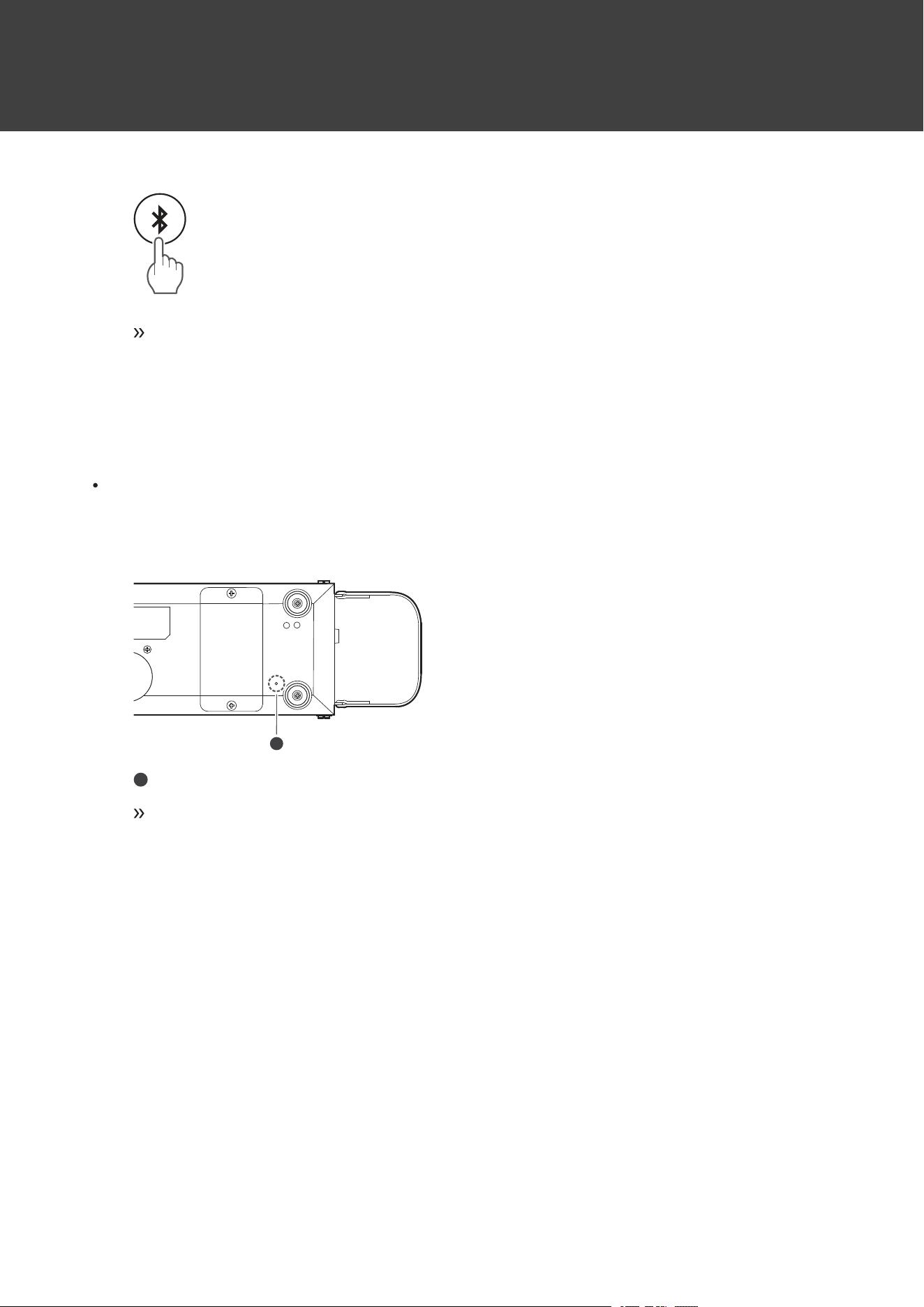
1
Presstheresetbuttononthebottomoftheproductwithapapercliporotherthinobject.
1
1
Resetbutton
Resetiscomplete.
30
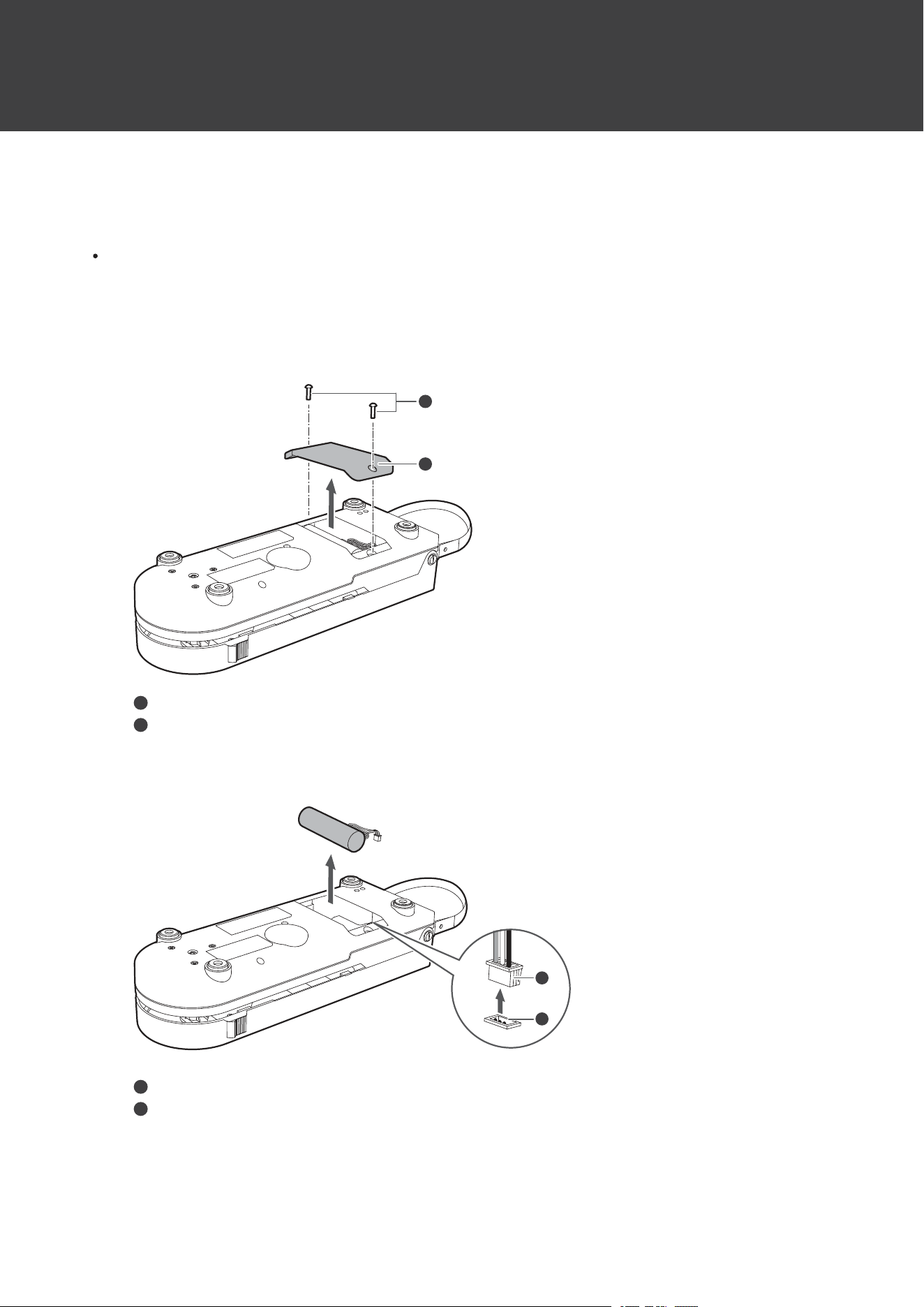
Replacingtherechargeablebattery
Iftheproduct’susagetimeisshorteventhoughithasbeensufficientlycharged,therechargeablebatterymayhave
reachedtheendofitsservicelife.Ifthisisthecase,youwillneedtoreplacetherechargeablebatterybypurchasinga
newone.RechargeablebatteriescanbepurchasedfromyourlocalAudio-Technicadealer.
Replacementmustbeperformedbyaprofessionalincountrieswherereplacementrechargeablebatteriesarenot
sold.PleasecontactyourlocalAudio-Technicadealer.
1
RemovethetwoscrewsonthebottomoftheproductusingacommerciallysoldPhillips-head
screwdriverandremovethebatterycover.
1
2
1
Screws
2
Batterycover
2
Removetherechargeablebatteryfromtheproductandremovetheplugfromtheconnector.
1
2
1
Plug
2
Connector
3
Firmlyinserttheplugofthenewrechargeablebatteryintotheconnectorandinstalltherechargeable
battery.
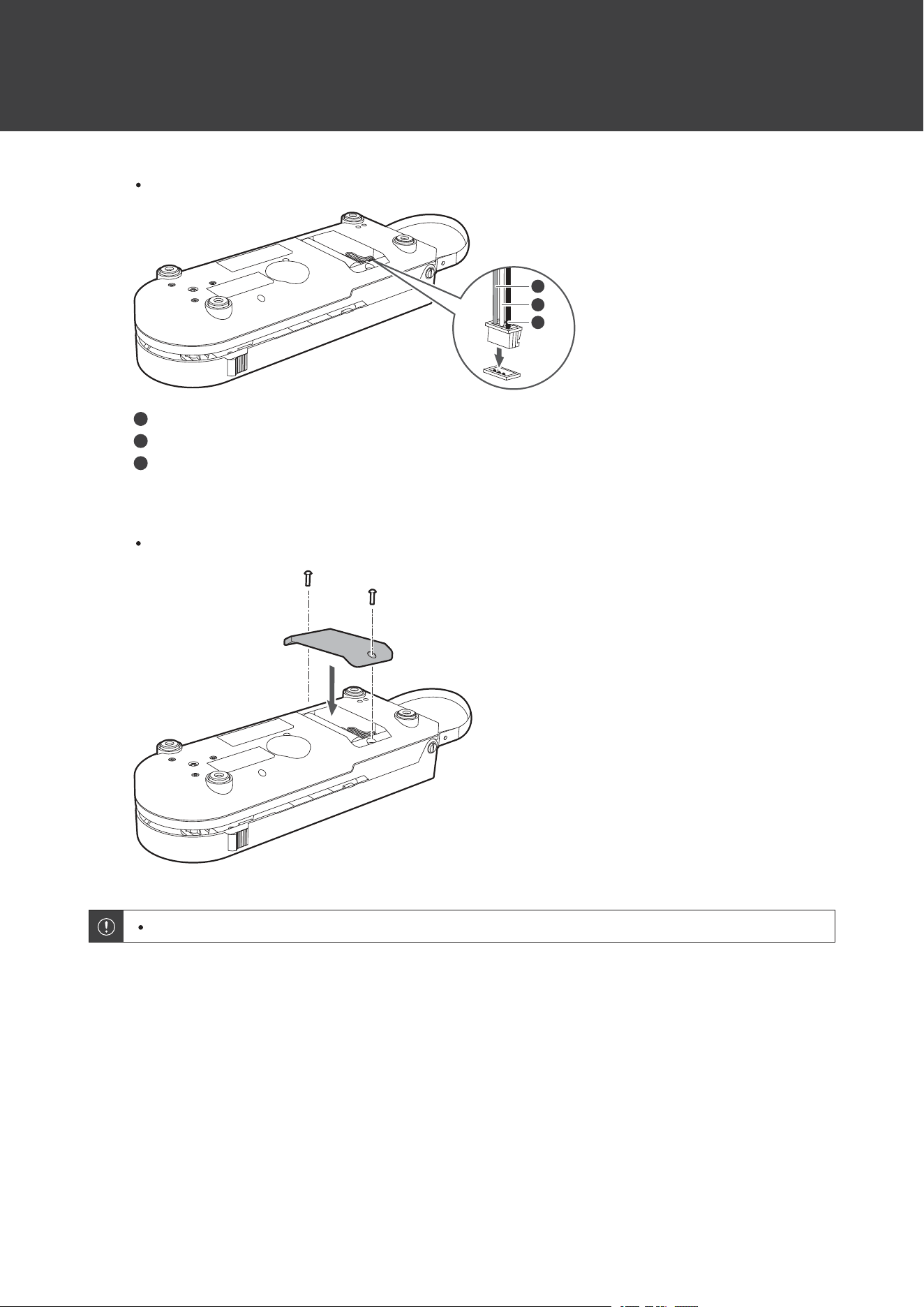
Replacingtherechargeablebattery
31
Payattentiontothecolorsoftheplugcables.
1
2
3
1
Red
2
Yellow
3
Black
4
Reinstallthebatterycoverandscrews.
Takecaretopreventthecableoftherechargeablebatteryfrombeingcaughtbythebatterycover.
Replacetherechargeablebatteryonlyafterconfirmingthattheproducthasbeenturnedoff.

32
Troubleshooting
Powerisnotsupplied
Chargetheproduct.
Theplatterturnsbutnosoundisheard/Soundisfaint
Arethefunctionsettingsandinputforconnectedequipment(amplifier,etc.)selectedcorrectly?Check
whetherthesettingsfortheconnectedequipmentarecorrect.
Isthestylusdamaged?Checkthestylusandreplaceit,ifnecessary.
Isthestylusplacedcorrectlyonthebodyofthecartridge?Checkthecartridgeandadjustit,ifnecessary.
Thestylusskips
Istherecordwarped?Checktherecord.
Istherecordscratched?Checktherecord.
Thereishowling
Istheproductpickingupexcessivevibrationsfromthefloor,surfacesofthewalls,ornearbyspeakers?
Decreasethevibrationsormounttheproductonasurfacethatisnotsubjecttotheeffectsofvibrations.
Istheproductmountedonanunstablesurface?Checkwhetherthesurfaceonwhichtheproductismounted
issuitable.
Thereisnoisewhentherecordisplaying
Istheredustonthecartridge’sstylustip?Ifdustisstucktothestylustip,cleanitwithacommerciallysold
brush.
Thesoundwhentherecordisplayingiseithertoofastortooslow
Arethespeedsettingsfortheproductcorrect?Usetheplatterspeedbuttontoselectthecorrectspeedfor
thetypeofrecordbeingplayed.
Unabletopair
ConfirmthattheBluetoothdevicecommunicatesusingVer.2.1+EDRorhigher.
PlacetheproductandtheBluetoothdevicewithin1m(3.3')ofeachother.
Troubleshooting
33
WhenswitchingtoanewBluetoothdevice,youmaynotbeabletopairbecausethepreviouslyconnected
Bluetoothdevicecannotbedisconnected.Insuchcases,pressandhold(about2seconds)thewireless
functionbutton.Theproductwillswitchtothe“searchingfordevices”stateandyouwillbeabletopairwith
yourdesiredBluetoothdevice.
ResetthepairinghistorybetweentheBluetoothdeviceandtheproductbeforepairingwiththeproduct
again.
Nosoundisheard/Soundisfaint(whenconnectedviaBluetooth)
TurnonthepoweroftheproductandtheBluetoothdevice.
TurnupthevolumeontheBluetoothdevice.
MoveawayfromobstaclesbetweentheproductandtheBluetoothdevice,suchaspeople,metal,orwalls,
andplacetheproductanddeviceclosertogether.
Soundisdistorted/Noiseisheard/Soundcutsout
Turndownthevolumeontheconnecteddevice.
Keeptheproductawayfromdevicesthatemitradiowavessuchasmicrowavesandwirelessrouters.
KeeptheproductawayfromTVs,radios,anddeviceswithbuilt-intuners.Thesedevicescanalsobeaffected
bytheproduct.
TurnofftheequalizersettingsoftheBluetoothdevice.
MoveawayfromobstaclesbetweentheproductandtheBluetoothdevice,suchaspeople,metal,orwalls,
andplacetheproductanddeviceclosertogether.
Theproductcannotbecharged/Chargingtakesalongtime
CheckwhethertheproductandUSBpoweradapterareconnecteddirectlyandnotviaaUSBhub,etc.
SecurelyconnecttheincludedUSBcableandchargetheproduct.
Chargetheproductinawell-ventilatedplace(10to35°C(50to95°F))awayfromdirectsunlight.
FordetailsabouthowtooperateyourBluetoothdevice,refertothedevice’susermanual.
34
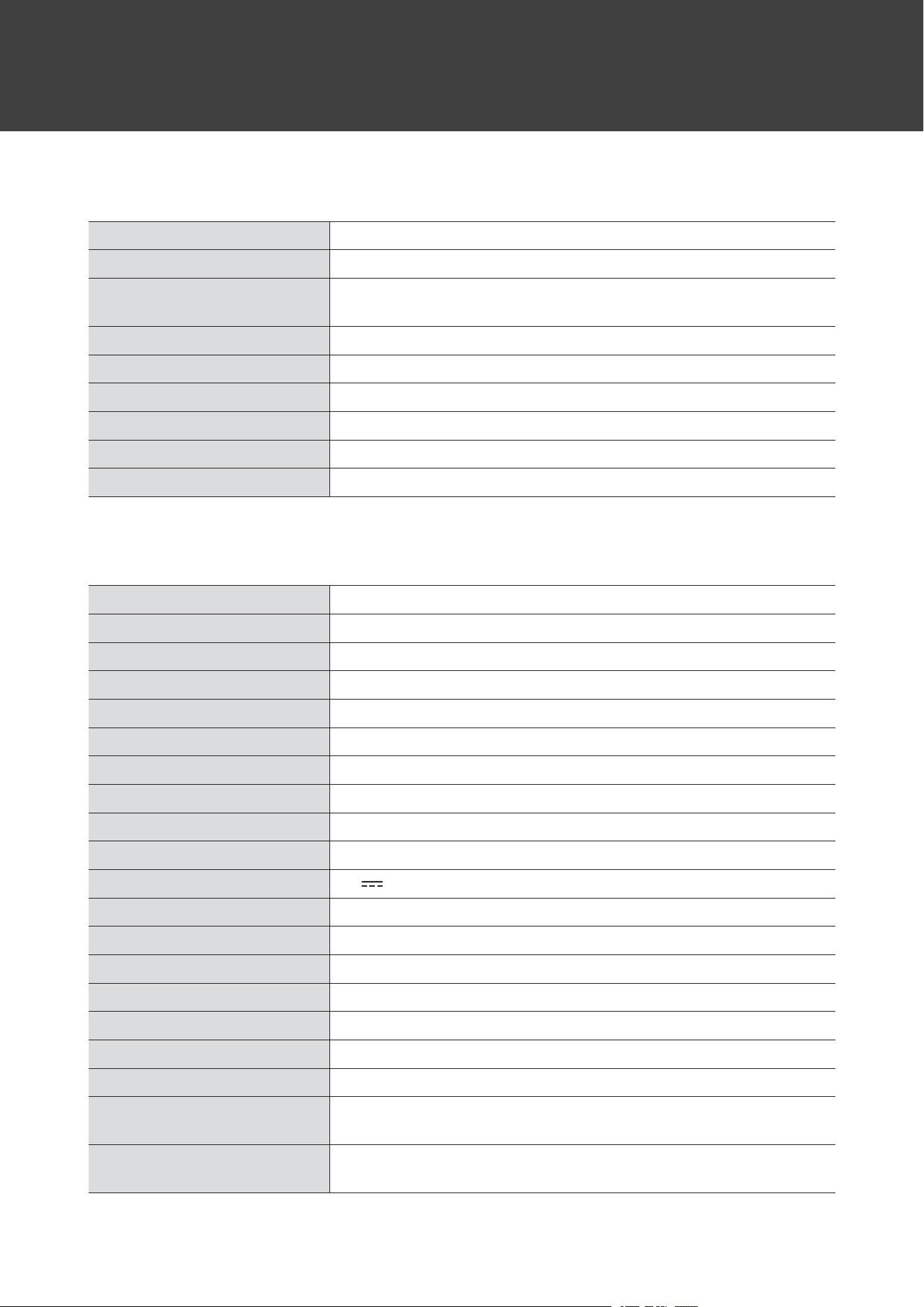
Specifications
Communicationspecifications
Communicationsystem
Bluetoothversion5.2
MaximumRFoutput
10mWEIRP
Maximumcommunication
range
Lineofsight-approx.10m(33')
Frequencyband
2.402GHzto2.480GHz
Modulationmethod
GFSK,Pi/4DQPSK,8DPSK
Spreadspectrummethod
FHSS
CompatibleBluetoothprofiles
A2DP,AVRCP
Supportedcodec
SBC
Transmissionband
20to20,000Hz
Mainunit
Powersupply
DC3.6Vlithiumionbattery
Drivemethod
Beltdrive
Motor
DCservomotor
Speeds
33-1/3RPM,45RPM
Turntableplatter
Aluminum
Wowandflutter
<0.25%(WTD)at3kHz
Signal-to-noiseratio
>50dB(DIN-B)
Cartridgemodel
VMstereocartridge
Outputlevels
150mVnominalat1kHz,5cm/sec(Nophono-output)
PhonoPre-ampgain
36dBnominal,RIAAequalized
Chargingspecifications
5V
0.5A
Powerconsumption
1.5W(whencharging)
Chargingtime
Approx.12hours
[1]
Operatingtime
Approx.12hours
[1]
Inputjack
USBType-Cjack
Dimensions
100mm(3.9”)×290mm(11”)×70mm(2.8”)(W×D×H)
Weight
Approx.900g(32oz)
Operatingtemperature
5°Cto40°C(41°Fto104°F)
Accessories
USBchargingcable(1.5m(4.9'),USBType-A/USBType-C),RCAaudio
cable,45RPMadapter
Replacementstylus(sold
separately)
ATN3600L
[1]Thefiguresabovedependonoperatingconditions.

Specifications
35
Forproductimprovement,theproductissubjecttomodificationwithoutnotice.

36
Trademarks
TheBluetooth
®
wordmarkandlogosareregisteredtrademarksownedbyBluetoothSIG,Inc.,andanyuseofsuch
marksbyAudio-TechnicaCorporationisunderlicense.Othertrademarksandtradenamesarethoseoftheir
respectiveowners.
USBType-C
™
isatrademarkofUSBImplementersForum.

株式会社オーディオテクニカ
〒194-8666東京都町田市西成瀬2-46-1
www.audio-technica.co.jp
Audio-TechnicaCorporation
2-46-1Nishi-naruse,Machida,Tokyo194-8666,Japan
www.audio-technica.com
©2023Audio-TechnicaCorporation
GlobalSupportContact:www.at-globalsupport.com
162900580-02-01ver.12023.03.01