英
USER MANUAL
A22 Voice Recoder
Thank you for purchasing our music player.
Please read the manual carefully before using the device.

Contents
English
01-06
Deutsch
07-12
Français
13-18
Italiano
19-24
25-30
Español
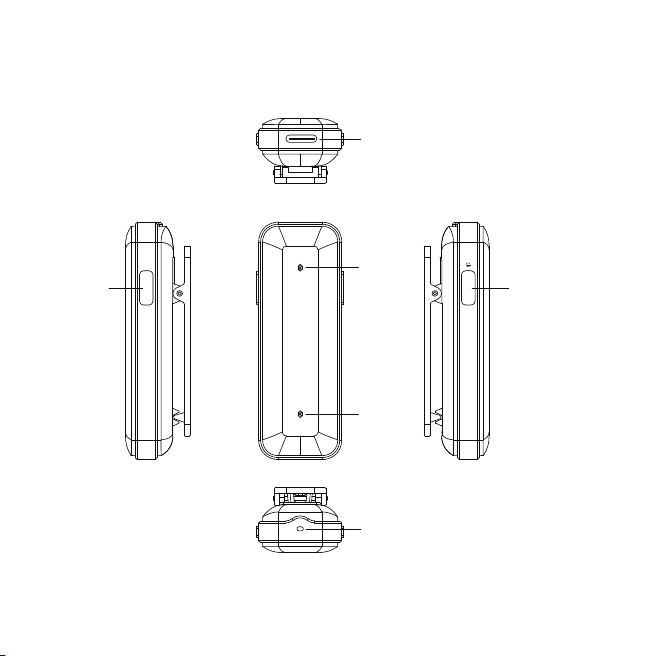
Instruction of Buttons
REC
Mic
01
REC
USB C Port
Indicator
ON/OFF
Mic
Pre-use preparation
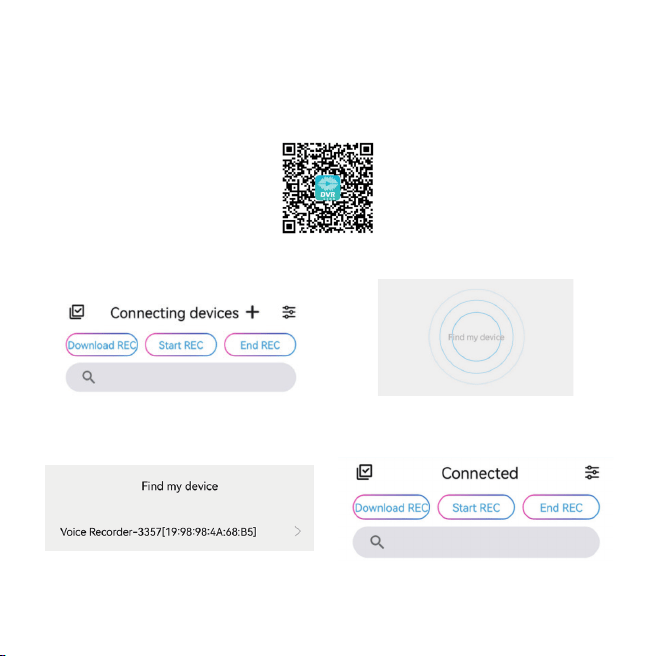
This voice recorder can be used alone or Bluetooth with the APP DVR Link .
Follow the steps to use the APP.
1.Scan the QR code and open it in browser, download and install the APP.
2.Connect with the Bluetooth.
① ②
③ ④
02
Charging
Bluetooth
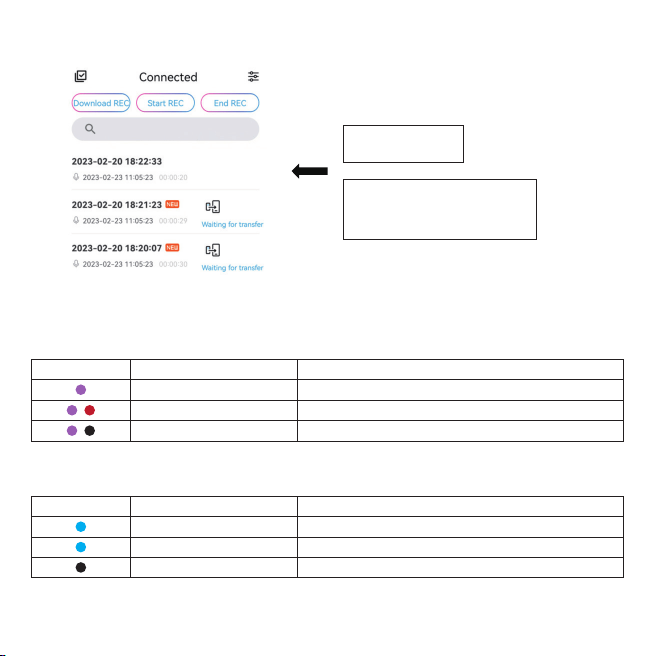
3. Transfer recording files from the voice recorder to your mobile phone.
When low power, the device will turn off automatically, please charge the device in time.
Long press the power button about 8 seconds to reset the Bluetooth, the indicator flashes blue.
03
Transferred!
Tap Waiting for transfer to
transfer the recording files.
LED Color
Blinking mode Machine Status
Blinking
Blinking
Always on-light off
Less than 10% power
While recording, less than 10% power
Charging-fully charged
LED Color
Blinking mode Machine Status
Blinking
Always on
Light off
Bluetooth connecting
Bluetooth connected
Sleep (after three minutes without any operations)
Recording
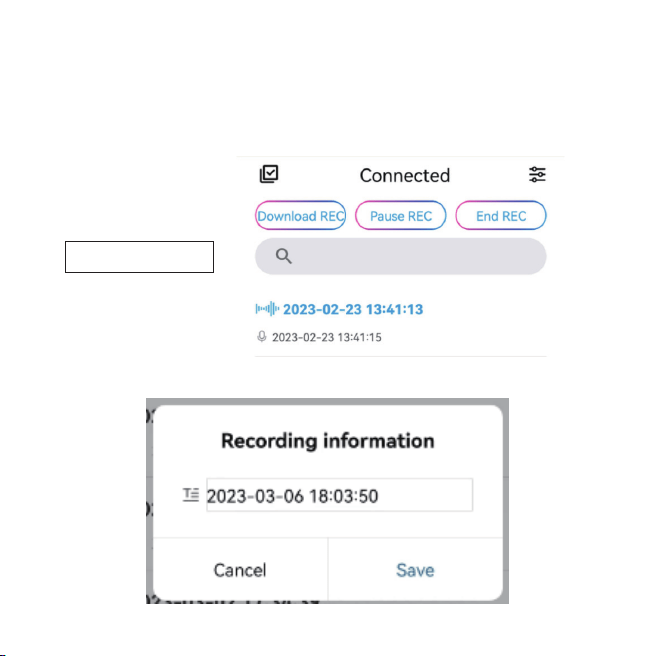
1.When using the device individually
Long press the REC button, the indicator flashes red to start a recording.
While recording, long press the REC button, the indicator turns from red to blue to pause the recording.
2.When using the APP
When connected with the APP, select Start REC to start a recording.
Select End REC and confirm Save to finish and save a recording.
04
Recording in progress
Troubleshooting
1.Cannot connect with the APP DVR Link.
Make sure you’ve turned on the device.
Reset the Bluetooth.
2.No response from the voice recorder.
If there is no operations over 3 minutes, the device turns off automatically, so you might mistaken it
as no response, simply long press the power button to turn on it
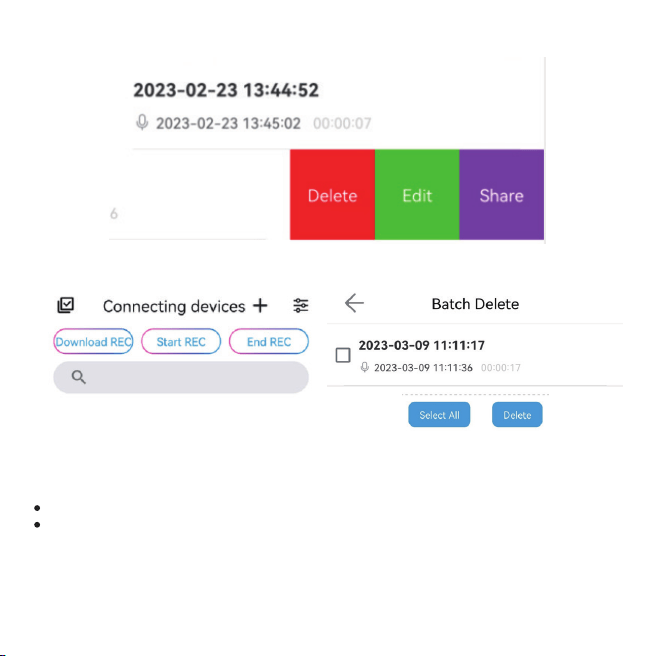
Swipe left on the recording file, select Edit to rename the recording, and select Share to share.
Select delete to delete a single file or tap the icon to batch delete.
05

Troubleshooting
3.Cannot turn on the device.
The battery may have run out, please charge it and try again.
06
Size
CPU
Bluetooth
Recording Format
REC Bit Rate
REC Distance
Mobile Phone OS
Computer OS
Battery
Max. Internal Memory Recording time
Full Charged Recording time
Working Temperature
60*21.5*17mm (include the back clip)
ATS2837, dual core 240MHZ, CK802 + 400MHZ 32bit DSP
Bluetooth 5.0
WAV
256Kbps
≤3 meters
Above Android 5.0 / Above IOS 9.0
Above WINDOWS XP/VISTA/ 7
250mAh
≈400 hours
≈11 hours
-10°C~55°C (14°F~131°F)
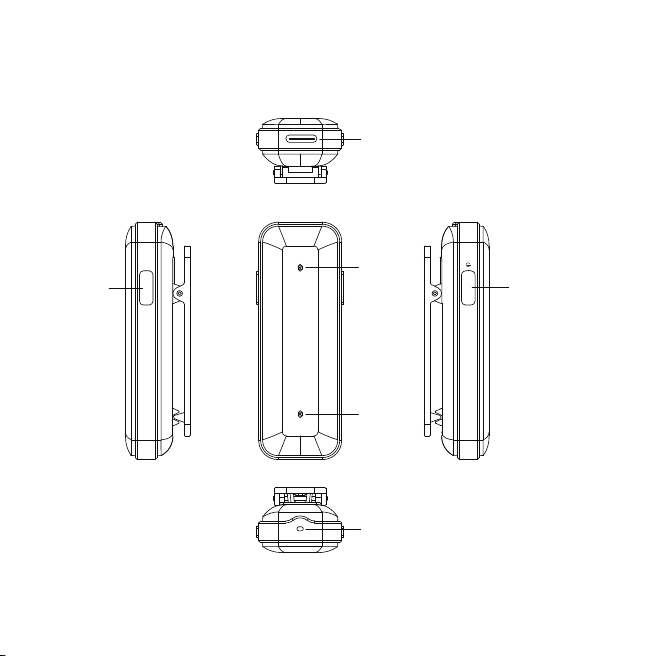
Anweisung von Knöpfen
Aufnahme
Mikro
07
REC
USB-C-Anschlu
Indikator
An/Aus
Mikro
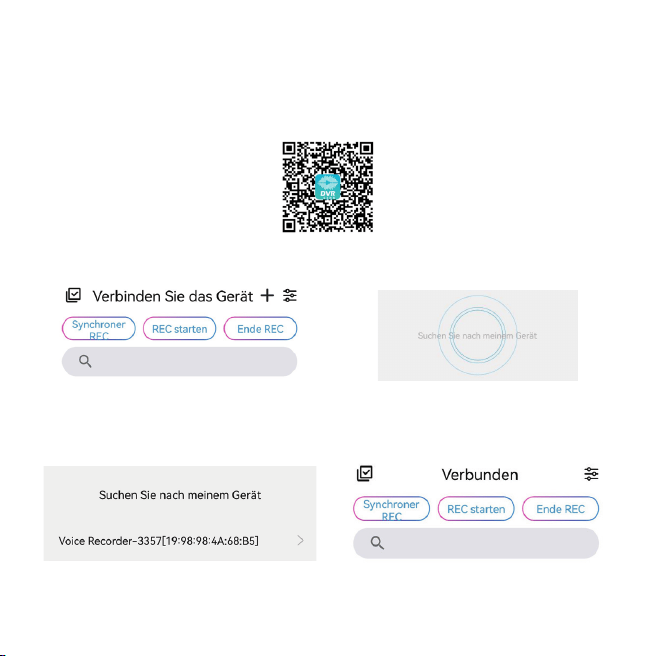
Vorbereitung vor dem Gebrauch
Dieses Diktiergerät kann allein oder über Bluetooth mit der APP DVR Link verwendet werden.
Befolgen Sie die Schritte, um die APP zu verwenden.
1.Scannen Sie den QR-Code und öffnen Sie ihn im Browser, laden Sie die APP.
2.Verbinden Sie sich mit dem Bluetooth.
① ②
③ ④
08
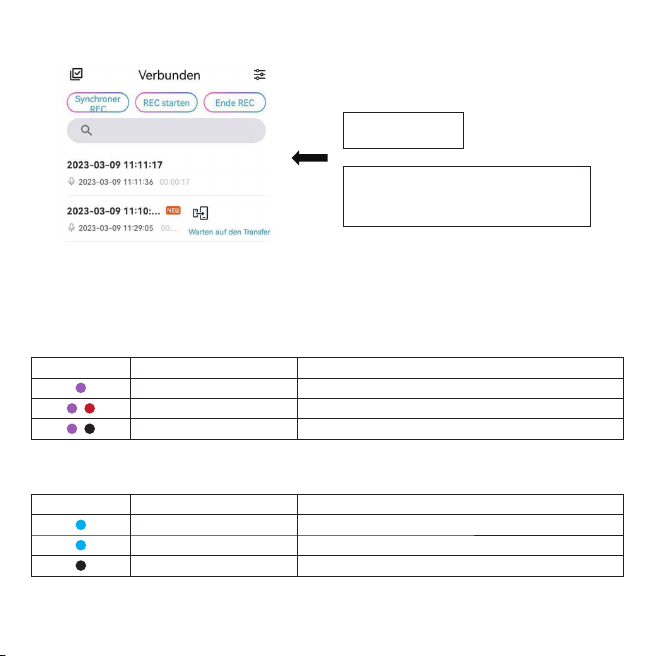
Laden
Bluetooth
3. Übertragen Sie Aufnahmedateien vom Diktiergerät auf Ihr Mobiltelefon.
Bei geringer Leistung schaltet sich das Gerät automatisch aus, bitte laden Sie das Gerät rechtzeitig
auf.
Halten Sie den Netzschalter ca. 8 Sekunden lang gedrückt, um Bluetooth zurückzusetzen, die
Anzeige blinkt blau.
09
Übertragen!
Tippen Sie Warten auf den Transfer,
um die Aufnahmedateien zu übertragen.
LED-Farbe
Blinkmodus Maschinenstatus
Blinken
Blinken
Immer an – Licht aus
Weniger als 10 % Leistung
Während der Aufnahme weniger als 10 % Leistung
Aufladen - voll aufgeladen
LED-Farbe
Blinkmodus Maschinenstatus
Blinken
Immer auf
Licht aus
Bluetooth-Verbindung
Bluetooth verbunden
Schlaf (nach drei Minuten ohne Bedienung)
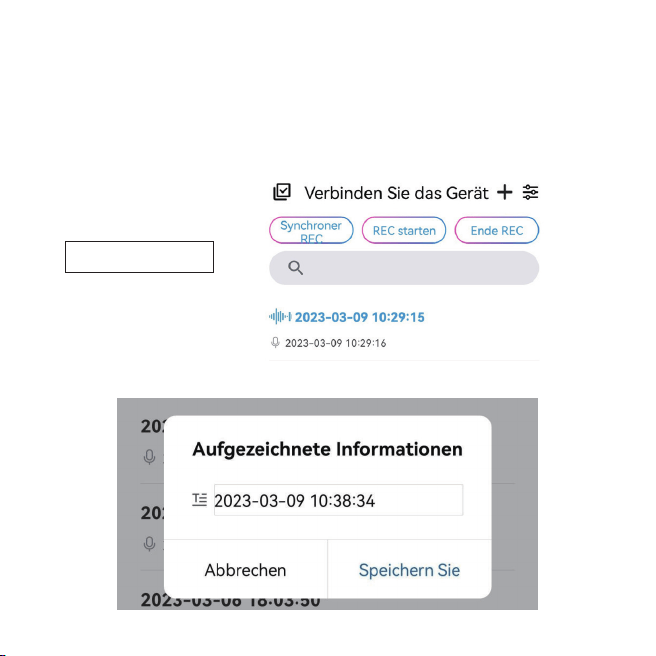
Aufzeichnung
1.Bei Einzelnutzung des Gerätes
Drücken Sie lange die REC-Taste, die Anzeige blinkt rot, um eine Aufnahme zu starten.
Drücken Sie während der Aufnahme lange auf die REC-Taste, die Anzeige wechselt von rot auf blau,
um die Aufnahme anzuhalten.
2.Bei Verwendung der APP
Wenn Sie mit der APP verbunden sind, wählen Sie REC starten, um eine Aufnahme zu starten.
Wählen Sie Ende REC und bestätigen Speichern Sie, um die Aufnahme zu speichern.
10
Aufnahme läuft
Fehlerbehebungt
1.Es kann keine Verbindung mit dem APP DVR Link hergestellt werden.
Stellen Sie sicher, dass Sie das Gerät eingeschaltet haben.
Setzen Sie das Bluetooth zurück.
2.Keine Antwort vom Diktiergerät.
Wenn länger als 3 Minuten keine Bedienung erfolgt, schaltet sich das Gerät automatisch aus, sodass
Sie es möglicherweise mit „keine Reaktion“ verwechseln könnten. Drücken Sie einfach lange auf die
Ein/Aus-Taste, um es einzuschalten.
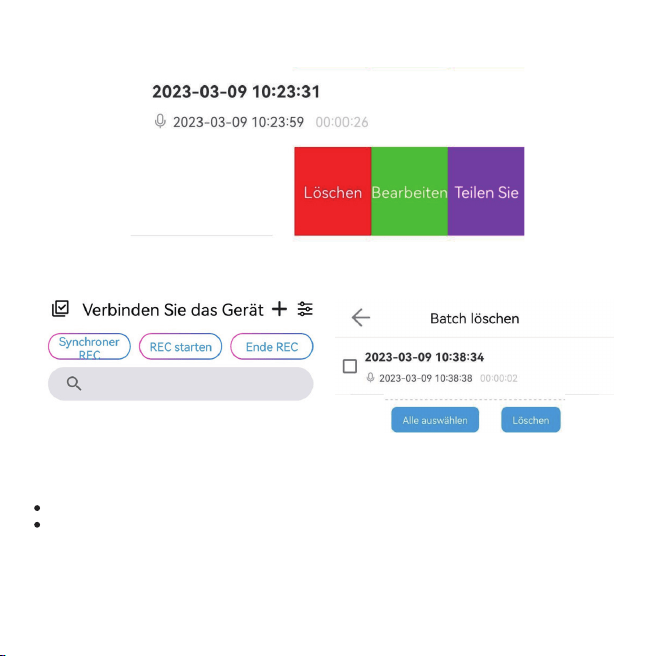
Wischen Sie auf der Aufnahmedatei nach links, wählen Sie Bearbeiten aus, um die Aufnahme
umzubenennen, und wählen Sie Teilen Sie, um sie zu teilen.
Wählen Sie Löschen, um eine einzelne Datei zu löschen, oder tippen Sie auf das Symbol, um eine
Stapellöschung durchzuführen.
11

Spezifikationen
3.Das Gerät kann nicht eingeschaltet werden.
Der Akku ist möglicherweise leer. Bitte laden Sie ihn auf und versuchen Sie es erneut.
12
Größe
Zentralprozessor
Bluetooth
Aufnahmeformat
REC-Bitrate
REC-Entfernung
Mobiltelefon-Betriebssystem
Computer-Betriebssystem
Batterie
Max. Interner Speicher Aufnahmezeit
Voll aufgeladene Aufnahmezeit
Arbeitstemperatur
60 * 21,5 * 17 mm (einschließlich des hinteren Clips)
ATS2837, Dual-Core 240 MHz, CK802 + 400 MHz 32-Bit-DSP
Bluetooth 5.0
.WAV
256 Kbit/s
≤3 Meter
Über Android 5.0 / Über iOS 9.0
Über WINDOWS XP/VISTA/7
250mAh
≈400 Stunden
≈11 Stunden
-10°C~55°C (14°F~131°F)
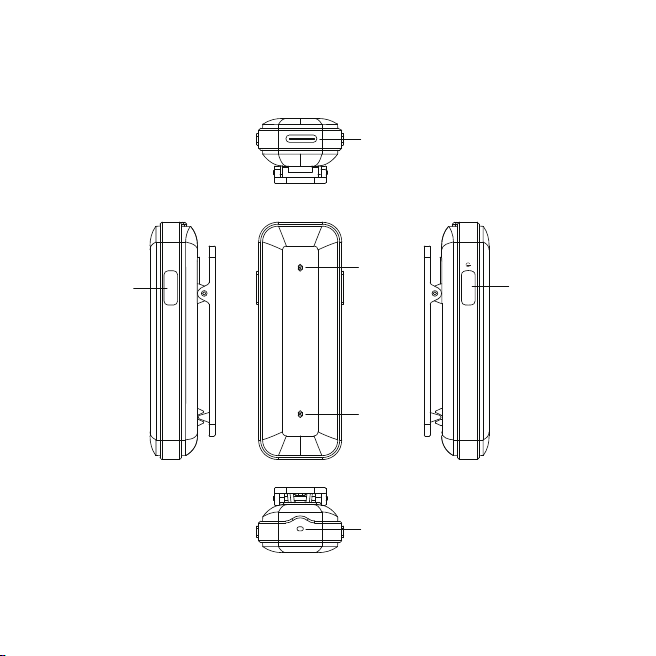
Instruction des boutons
Enregistrement
Micro
13
REC
Port USB-C
Indicateur
Marche/Arrêt
Micro
Préparation avant utilisation
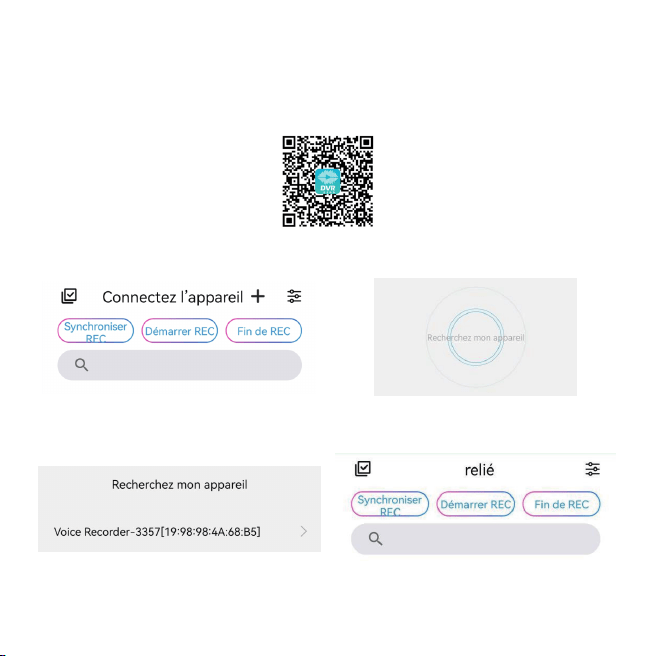
Cet enregistreur vocal peut être utilisé seul ou en Bluetooth avec l'APP DVR Link.
Suivez les étapes pour utiliser l'APP.
1.Scannez le code QR et ouvrez-le dans le navigateur, téléchargez et installez l'APP.
2.Connectez-vous avec le Bluetooth.
① ②
③ ④
14
Mise en charge
Bluetooth
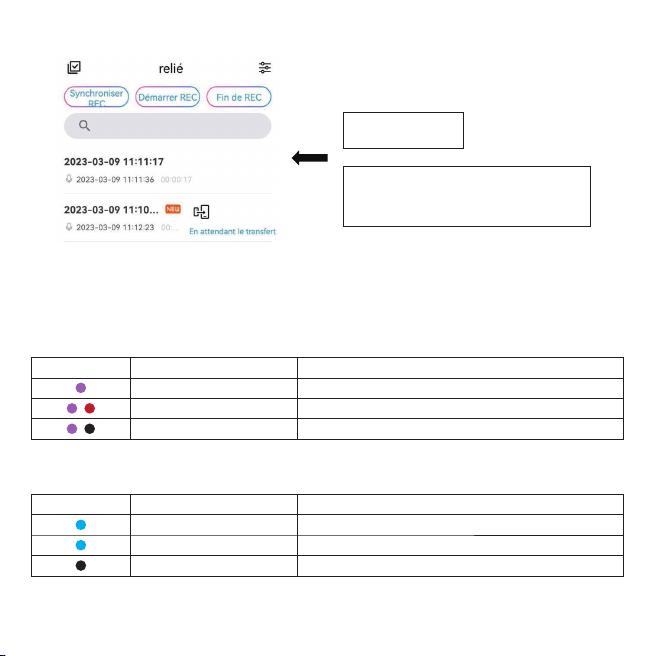
3. Transférez les fichiers d'enregistrement de l'enregistreur vocal vers.
Lorsque la puissance est faible, l'appareil s'éteint automatiquement, veuillez charger l'appareil à
temps.
Appuyez longuement sur le bouton d'alimentation pendant environ 8 secondes pour réinitialiser le
Bluetooth, le voyant clignote en bleu.
15
Transféré!
Appuyez sur En attente de transfert
pour transférer les fichiers
d'enregistrement.
Couleur de la LED
Mode clignotant État de l'appareil
Clignotant
Clignotant
Toujours allumé-éteint
Moins de 10% de puissance
Pendant l'enregistrement, moins de 10 % de puissance
Chargement-complètement chargé
Couleur de la LED
Mode clignotant État de l'appareil
Clignotant
Toujours activé
Lumière éteinte
Connexion Bluetooth
Bluetooth connecté
Sommeil (après trois minutes sans aucune opération)
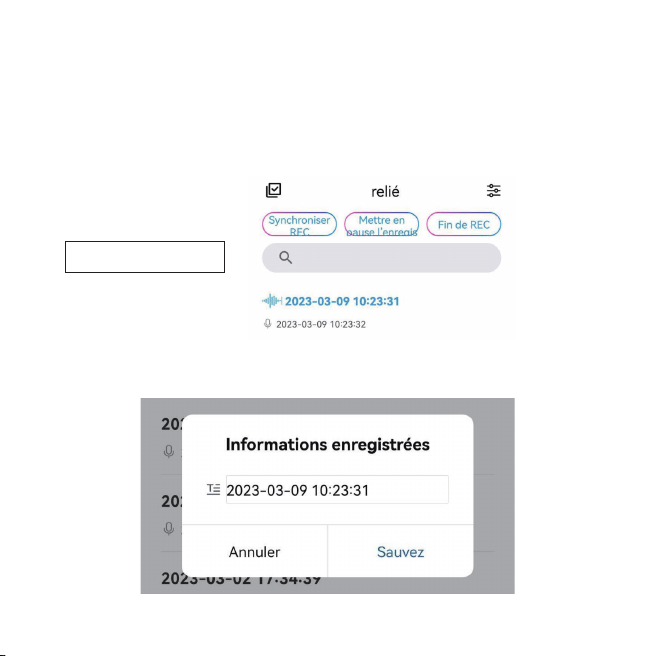
Enregistrement
1.Lors de l'utilisation de l'appareil individuellement
Appuyez longuement sur le bouton REC, le voyant clignote en rouge pour démarrer un enregistrement.
Pendant l'enregistrement, appuyez longuement sur le bouton REC, l'indicateur passe du rouge au
bleu pour mettre l'enregistrement en pause.
2.Lors de l'utilisation de l'APP
Une fois connecté à l'APP, sélectionnez Démarrer REC pour démarrer un enregistrement.
Sélectionnez Fin de REC et confirmez Sauvez pour terminer et sauvegarder un enregistrement.
16
Enregistrement en cours
Dépannaget
1.Impossible de se connecter avec l'APP DVR Link.
Assurez-vous d'avoir allumé l'appareil.
Réinitialisez le Bluetooth.
2.Aucune réponse de l'enregistreur vocal.
S'il n'y a aucune opération pendant 3 minutes, l'appareil s'éteint automatiquement, vous pouvez donc
le confondre avec une absence de réponse, appuyez simplement longuement sur le bouton
d'alimentation pour l'allumer.
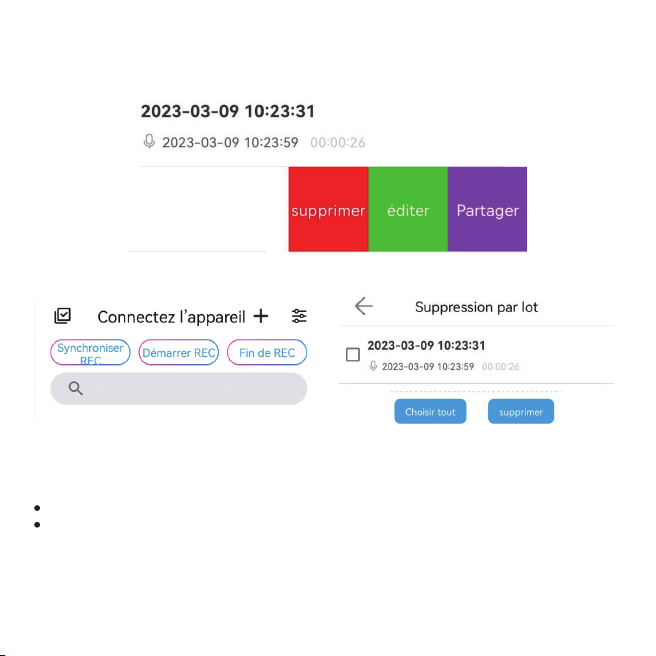
Balayez vers la gauche sur le fichier d'enregistrement, sélectionnez Éditer pour renommer
l'enregistrement, puis sélectionnez Partager pour partager.
Sélectionnez supprimer pour supprimer un seul fichier ou appuyez sur l'icône pour supprimer par lots.
17

Spécifications
3.Impossible d'allumer l'appareil.
La batterie est peut-être épuisée, veuillez la charger et réessayer.
18
Taille
CPU
Bluetooth
Format d'enregistrement
Débit binaire d'enregistrement
Distance REC
Système d'exploitation de téléphone portable
Système d'exploitation de l'ordinateur
Batterie
Max. Durée d'enregistrement de la mémoire interne
Temps d'enregistrement complètement chargé
Température de fonctionnement
60*21.5*17mm (inclure le clip arrière)
ATS2837, double cœur 240MHZ, CK802 + 400MHZ 32bit DSP
Bluetooth 5.0
.WAV
256Kbps
≤3 mètres
Au-dessus d'Android 5.0 / Au-dessus d'IOS 9.0
Au-dessus de WINDOWS XP/VISTA/7
250mAh
≈400 heures
≈11 heures
-10°C~55°C (14°F~131°F)
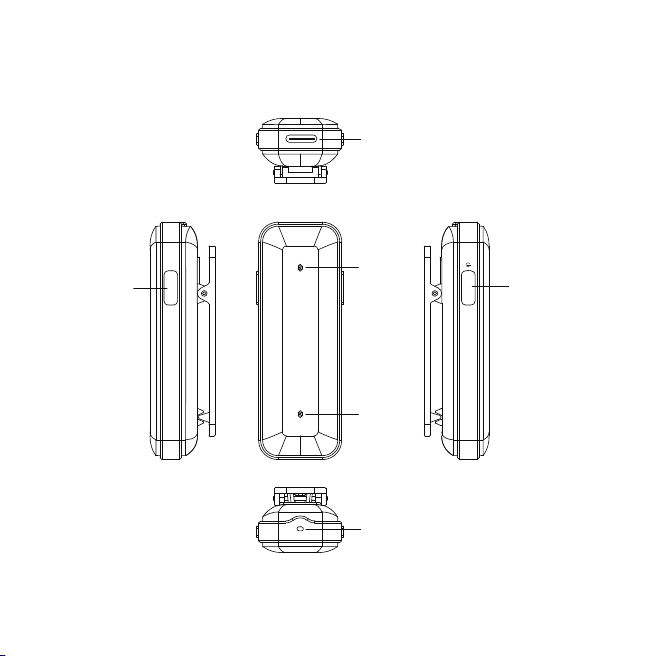
Istruzione dei pulsanti
Registrazion
Micro
19
REC
Porta USB C
Indicatore
Acceso/Spento
Micro
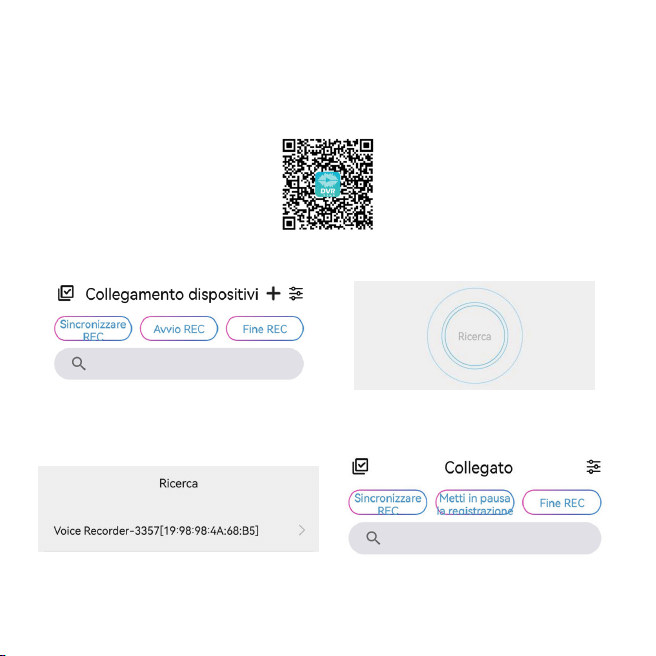
Preparazione prima dell'uso
Questo registratore vocale può essere utilizzato da solo o Bluetooth con APP DVR Link.
Segui i passaggi per utilizzare l'APP.
1.Scansiona il codice QR e aprilo nel browser, scarica e installa l'APP.
2.Connettiti con il Bluetooth.
① ②
③ ④
20
Ricarica
Bluetooth
3. Trasferisci i file di registrazione dal registratore vocale al tuo telefono
In caso di bassa potenza, il dispositivo si spegnerà automaticamente, caricare il dispositivo in tempo.
Premere a lungo il pulsante di accensione per circa 8 secondi per ripristinare il Bluetooth, l'indicatore
lampeggia in blu.
21
Trasferito!
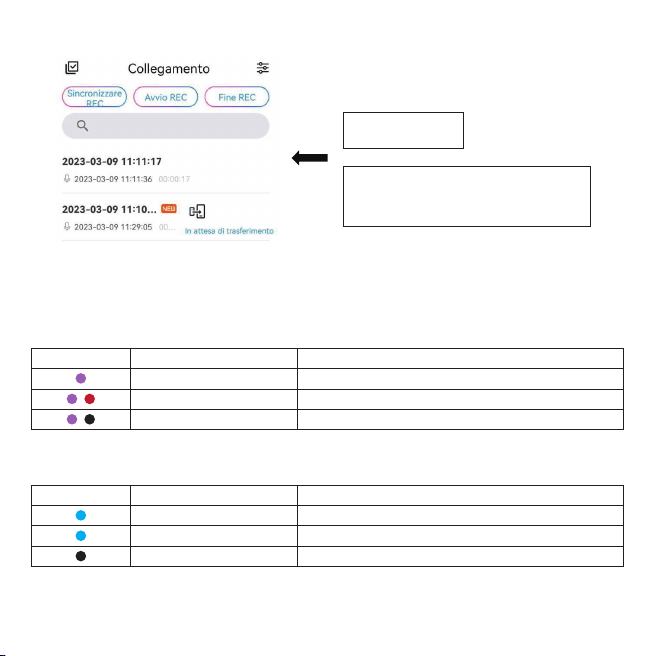
Tocca In attesa di trasferimento per
trasferire i file di registrazione.
Colore LED
Modalità lampeggiante Stato macchina
Lampeggiante
Lampeggiante
Sempre acceso-spento
Potenza inferiore al 10%.
Durante la registrazione, meno del 10% di potenza
Ricarica completamente carica
Colore LED
Modalità lampeggiante Stato macchina
Lampeggiante
Sempre acceso
Luci spente
Connessione Bluetooth
Bluetooth connesso
Sonno (dopo tre minuti senza alcuna operazione)
Registrazione
1.Quando si utilizza il dispositivo singolarmente
Premere a lungo il pulsante REC, l'indicatore lampeggia in rosso per avviare una registrazione.
Durante la registrazione, premere a lungo il pulsante REC, l'indicatore passa dal rosso al blu per
mettere in pausa la registrazione.
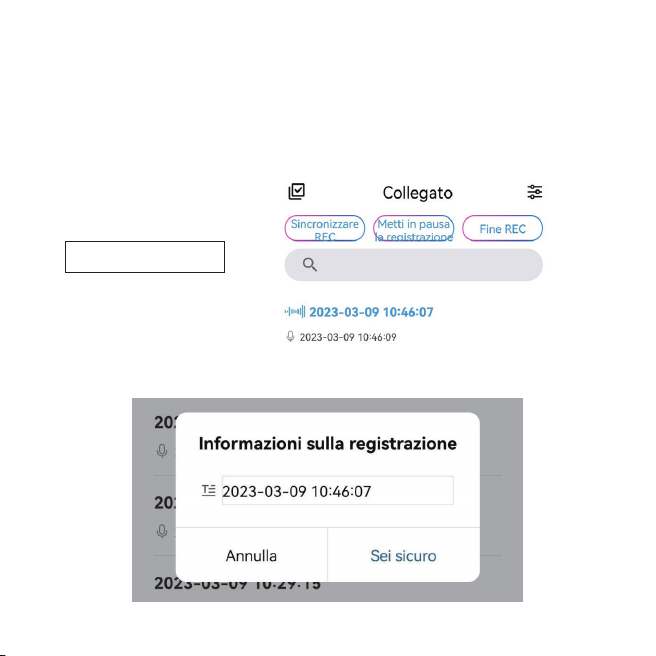
2.Quando si utilizza l'APP
Quando sei connesso all'APP, seleziona Avvio REC per avviare una registrazione.
Selezionare Fine REC e confermare Risparmiare per terminare e salvare una registrazione.
22
Registrazione in corso
Risoluzione dei problemi
1.Impossibile connettersi con APP DVR Link.
Assicurati di aver acceso il dispositivo.
Ripristina il Bluetooth.
2.Nessuna risposta dal registratore vocale.
Se non ci sono operazioni per più di 3 minuti, il dispositivo si spegne automaticamente, quindi
potresti scambiarlo per nessuna risposta, basta premere a lungo il pulsante di accensione per
accenderlo.
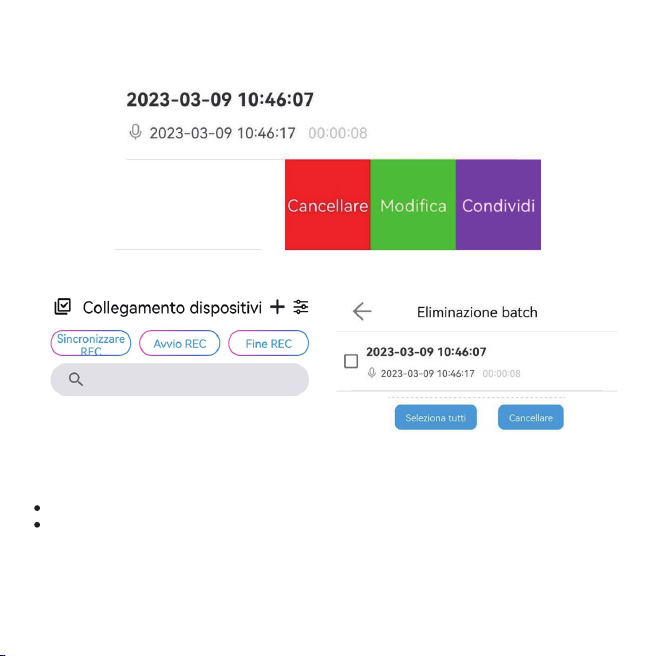
Scorri verso sinistra sul file della registrazione, seleziona Modifica per rinominare la registrazione e
seleziona Condividi per condividerla.
Selezionare Cancellare per eliminare un singolo file o toccare l'icona per eliminazione in batch.
23

Specifiche
3.Impossibile accendere il dispositivo.
La batteria potrebbe essere scarica, caricarla e riprovare.
24
Misurare
processore
Bluetooth
Formato di registrazione
Velocità in bit REC
REC Distanza
Sistema operativo del telefono cellulare
Sistema operativo del computer
Batteria
Massimo. Memoria interna Tempo di registrazione
Tempo di registrazione completamente carico
Temperatura di lavoro
60*21.5*17mm (includere la clip posteriore)
ATS2837, dual core 240MHZ, CK802 + 400MHZ 32bit DSP
Bluetooth 5.0
.WAV
256Kbps
≤3 metri
Sopra Android 5.0 / Sopra IOS 9.0
Sopra WINDOWS XP/VISTA/7
250mAh
≈400 ore
≈11 ore
-10°C~55°C (14°F~131°F)
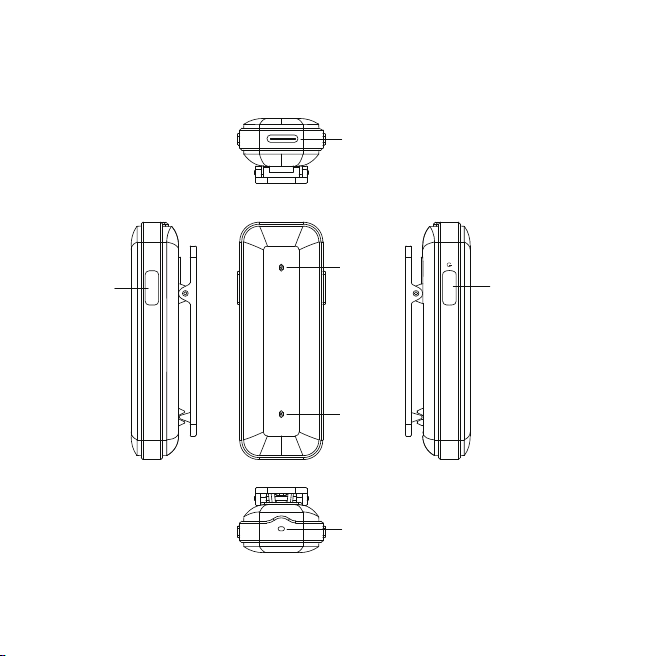
Instrucción de botones
Grabación
Micró
25
REC
Puerto USB C
Indicador
Encendido/Apagado
Micró
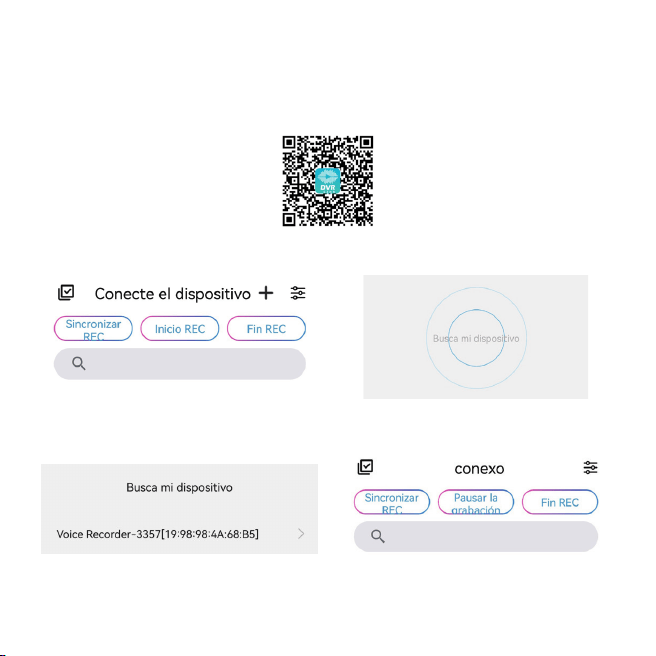
Preparación previa al uso
Esta grabadora de voz se puede usar sola o por Bluetooth con la APP DVR Link.
Sigue los pasos para usar la APP.
1.Escanee el código QR y ábralo en el navegador, descargue e instale la aplicación.
2.Conéctese con el Bluetooth.
① ②
③ ④
26
Cargando
Bluetooth
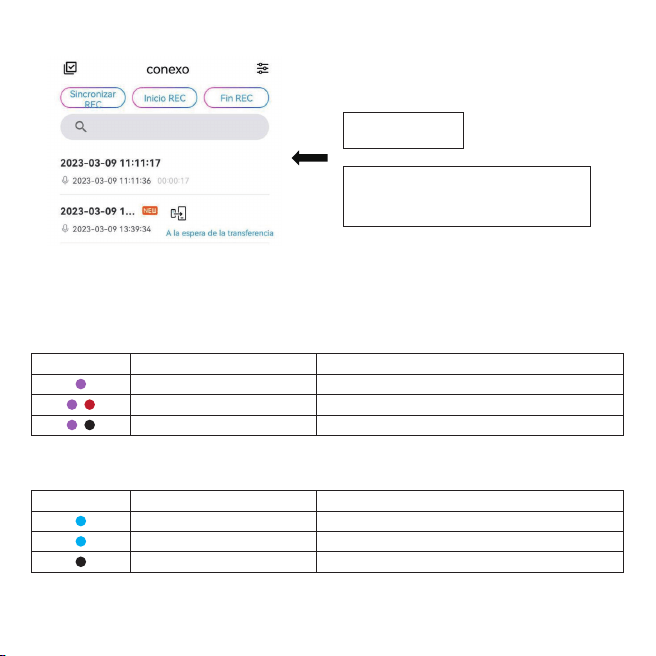
3. Trasferisci i file di registrazione dal registratore vocale al tuo telefono
Cuando tenga poca energía, el dispositivo se apagará automáticamente, cargue el dispositivo a
tiempo.
Mantenga presionado el botón de encendido unos 8 segundos para restablecer el Bluetooth, el
indicador parpadea en azul.
27
Transferido!
Toque A la espera de la transferencia
para transferir los archivos de
grabación.
Color LED
Modo intermitente Estado de la máquina
Parpadeo
Parpadeo
Siempre encendido-luz apagada
Menos del 10% de potencia
Durante la grabación, menos del 10 % de potencia
Cargando-completamente cargado
Color LED
Modo intermitente Estado de la máquina
Parpadeo
siempre encendido
Luz apagada
Conexión Bluetooth
Bluetooth conectado
Dormir (después de tres minutos sin ninguna operación)
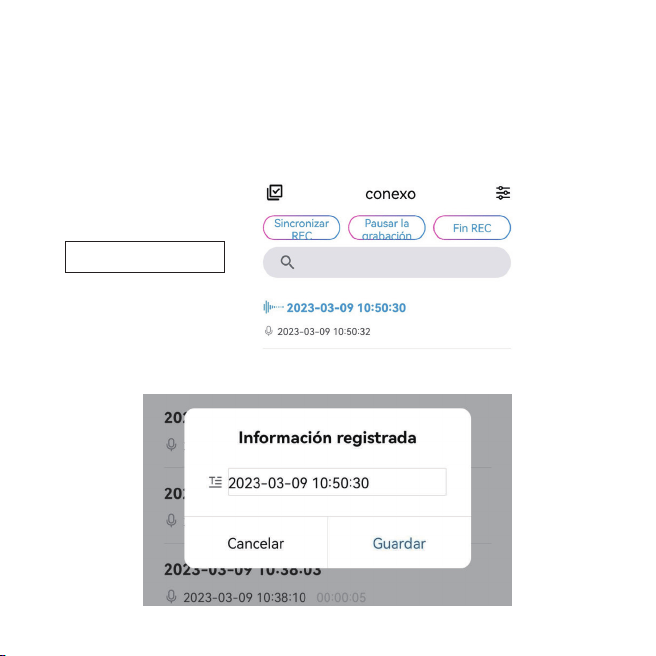
Grabación
1.Al usar el dispositivo individualmente
Mantenga presionado el botón REC, el indicador parpadea en rojo para iniciar una grabación.
Mientras graba, mantenga presionado el botón REC, el indicador cambia de rojo a azul para pausar
la grabación.
2.Al usar la aplicación
Cuando esté conectado con la aplicación, seleccione Inicio REC para iniciar una grabación.
Seleccione Fin REC y confirme Guardar para finalizar y guardar una grabación.
28
Grabación en progreso
Solución de problemas
1.No se puede conectar con la APP DVR Link.
Asegúrate de haber encendido el dispositivo.
Restablece el Bluetooth.
2.No hay respuesta de la grabadora de voz.
Si no hay operaciones durante 3 minutos, el dispositivo se apaga automáticamente, por lo que
puede confundirlo con ninguna respuesta, simplemente mantenga presionado el botón de encendido
para encenderlo.
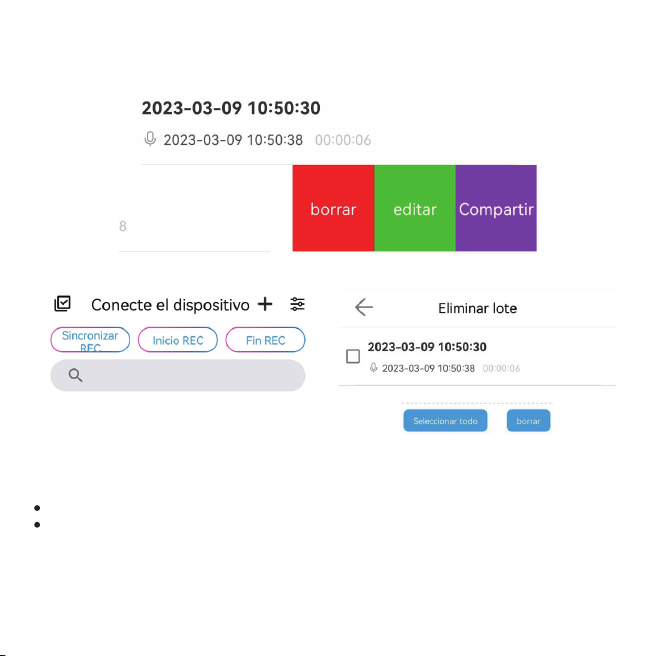
Deslice el dedo hacia la izquierda en el archivo de grabación, seleccione Editar para cambiar el
nombre de la grabación y seleccione Compartir para compartir.
Seleccione borrar para eliminar un solo archivo o toque el icono para Eliminación masiva.
29

Especificaciones
3.No se puede encender el dispositivo.
Es posible que se haya agotado la batería, cárguela y vuelva a intentarlo.
30
Tamaño
CPU
Bluetooth
Formato de grabación
Tasa de bits REC
Distancia REC
Sistema operativo del teléfono móvil
SO de la computadora
Batería
Máx. Memoria interna Tiempo de grabación
Tiempo de grabación con carga completa
Temperatura de trabajo
60*21,5*17mm (incluye el clip trasero)
ATS2837, doble núcleo 240 MHz, CK802 + 400 MHz 32 bits DSP
Bluetooth 5.0
.WAV
256Kbps
≤3 metros
Por encima de Android 5.0 / Por encima de IOS 9.0
Por encima de WINDOWS XP/VISTA/7
250mAh
≈400 horas
≈11 horas
-10°C~55°C (14°F~131°F)