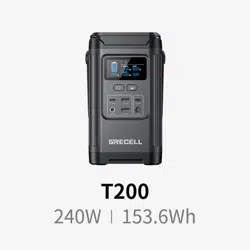
T200
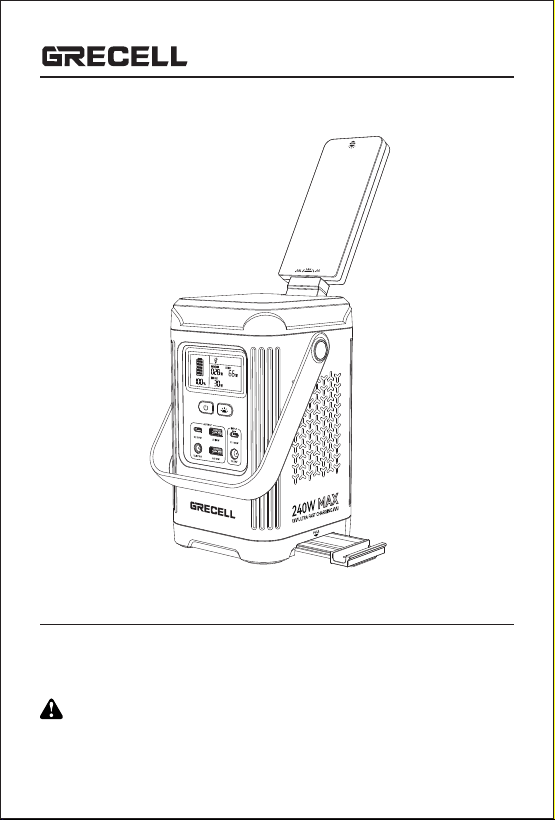
USER MANUAL
Thank you for purchasing GRECELL portable power station.
For the best performance and safety purposes, please read this manual carefully before
use. Please keep this manual for further reference.
CHARGE FIRST!
Before using your new Power Station T200 or after storing it for more than 3 months,
plug it into a suitable power outlet until it is fully charged. Then you can start your exciting
journey with it. Highly recommend to charge T200 when battery indicate less than 20%.
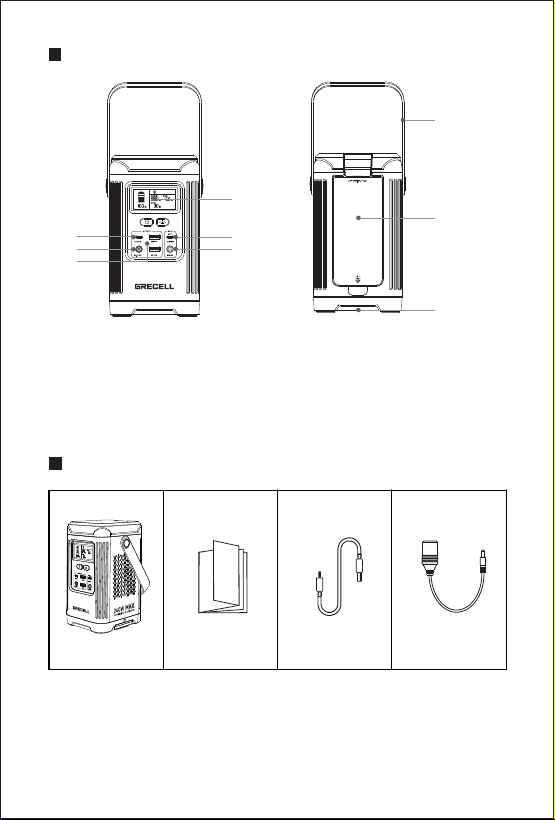
PRODUCT FUNCTION DESCRIPTION
- 1 -
LCD Screen Display
USB-C Output / Input
DC 7909 Input
USB-C Output
DC 5525 Output
1.
2.
3.
4.
5.
USB-A Output
Silicone Handle
LED Light
Phone Tablet Stand
6.
7.
8.
9.
7
8
9
4
5
6
1
2
3
ACCESSORY LIST
T200 Power Station
User Manual
USB-C
Charging Cable
12V Car
Charger Cable
- 2 -
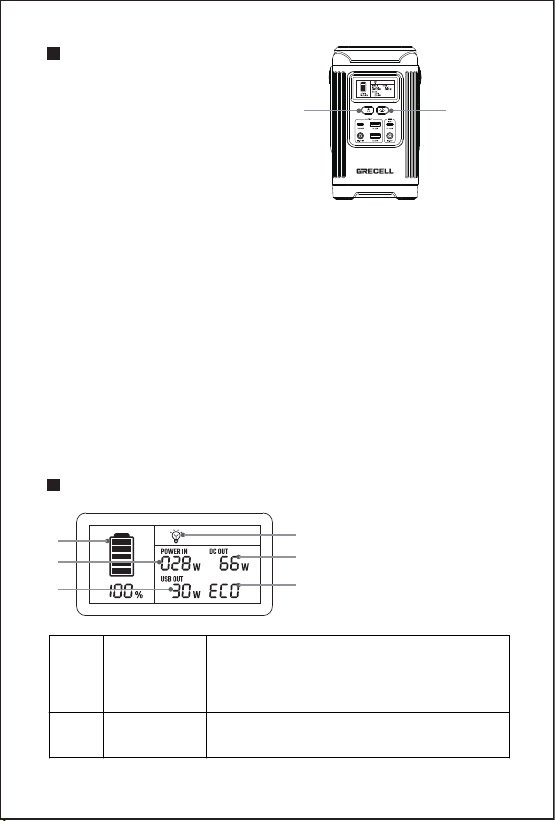
BUTTON FEATURE
A: Power ON/OFF
B: LED Light
●
●
Button A: Power ON/OFF
Press A to turn on the power. At the same time, the LCD will light up, and
the USB and DC 5525 output will turn on.
Press the A button again to turn off the power.
Button B: LED Light
Using the step cycle sequence, short press: First reading light (50%),
second reading light (100%), third flash, fourth SOS, fifth off, and long
press 1.5S to turn off all lights.
Note:
This feature is available whether or not the power on/off button is
activated.
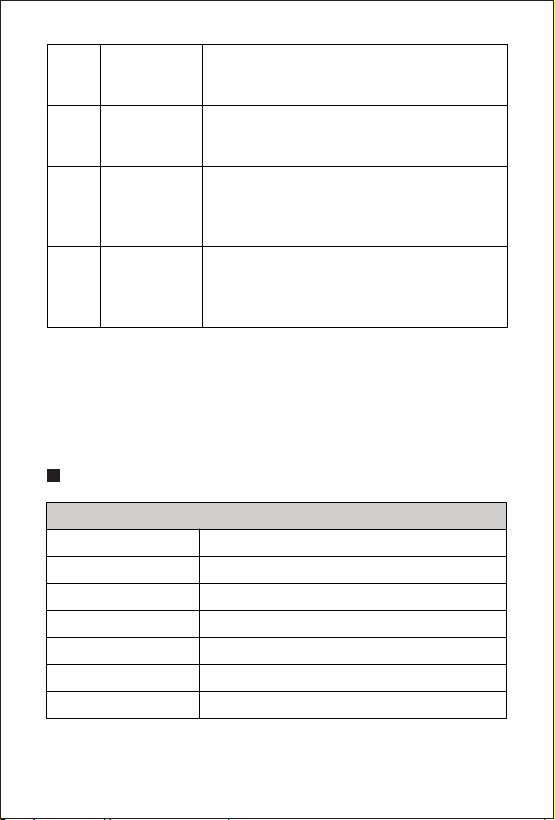
LCD FEATURES
C: Battery Level Indicator
D: Power Input
E: LED Light
F: DC Output
G: USB Output
H: ECO
C
G
D
F
H
E
C
Battery Level
Indicator
When the power switch is turned on, the
power icon shows the current product
power, and each bar represents the 20%
power range.
D
Power Input
When charging, the "POWER IN" icon lights
up and displays the charging power.
A B
- 3 -
Note:
Charging: The power indicator fills from bottom to top, stays solid when full,
and flashes intermittently while charging.
Discharging: The power indicator depletes from top to bottom, stays on at
full power, and turns off when the power drops below the current level.
E
LED Light
The light is on, and the bulb icon is lit.
(In ECO mode, it will enter sleep mode after
8 hours of illumination.)
F
DC Output
After the power button A is turned on, the
USB OUT icon and DC OUT icon light up
and display the total DC power output.
G
H
USB Output
When the power button A is turned on, the
USB OUT icon and DC OUT icon light up
and display the total power used by the
USB output.
USB Output
ECO 8-hour hibernation mode. Press A
Power ON/OFF and B LED Light for 2
seconds to enable or disable ECO
hibernation mode.
GENERAL SPECIFICATIONS
General Specs
Battery Type Lithium Iron Phosphate
12.8V, 12Ah/153.6Wh
≈2kg
208mm*116mm*116mm
14 to 104℉ (-10 to 40℃)
32 to 104℉ (0 to 40℃)
-4 to 113℉ (-20 to 45℃)
Rated Capacity
Net Weight
Product Size
Operating Temp
Charging Temp
Storage Temp
- 4 -
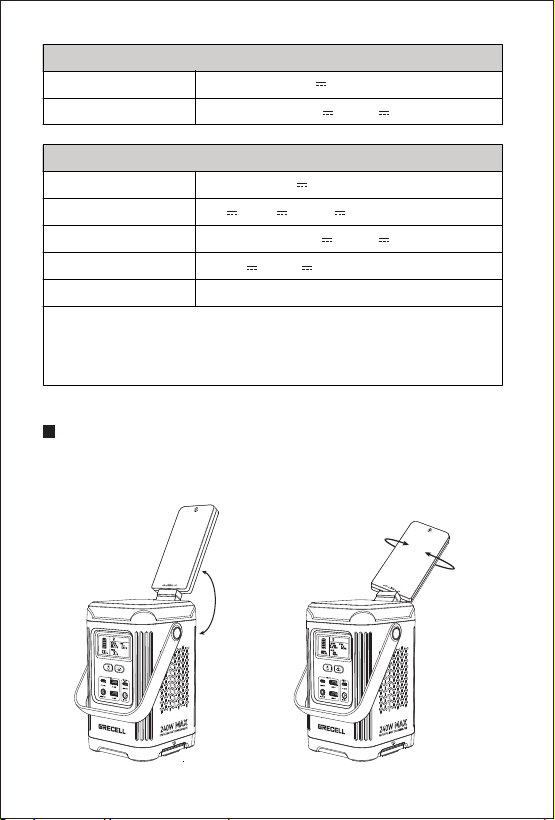
PRODUCT FEATURES
Flippable up and down, supporting 180-degree adjustment.
Supports 270-degree rotation.
Input
DC/PV Input DC 7909, 12V-26V 8A, 100W Max
5V/9V/12V/15V/20V 3A, 20V 5A, 100W Max
USB-C1 Input
Output
DC Output DC5525, 12.8V 8A
5V 3A, 9V 2A, 12V 1.5A, 18W Max
5V/9V/12V/15V/20V 3A, 20V 5A, 100W Max
5V/9V 3A, 12V 2.5A, 30W Max
3W
USB-A Output×2
USB-C1 Output×1
USB-C2 Output×1
LED Light
USB-C1/C2 + USB-A1/A2 + DC Output, Total 240W Max
USB-C1+USB-C2+USB-A1 Output, Total 115W Max
USB-C1+USB-C2+USB-A2 Output, Total 148W Max
USB-C1+DC Output, Total 200W Max
180°
180°
90°
- 5 -
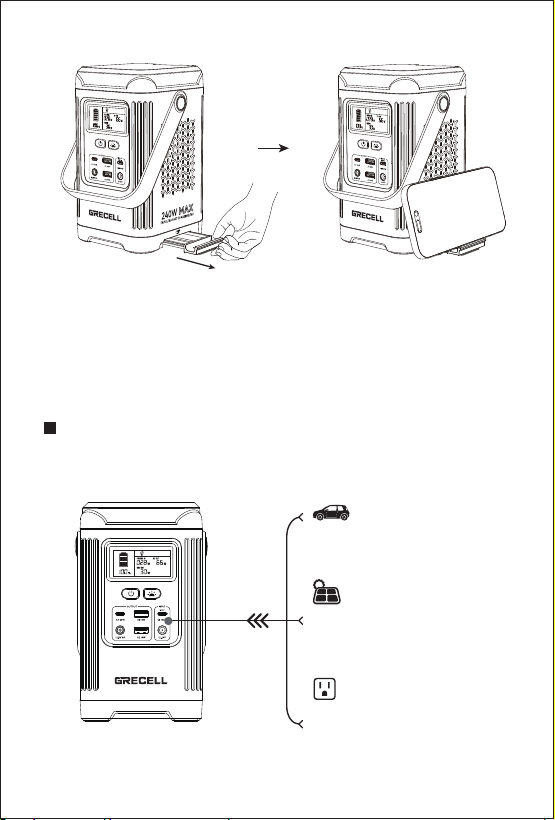
HOW TO CHARGE
From USB-C1 Charging
100W, 1.8-2.8 hours
(Depending on charger plug)
From Solar Panel PV Charging
100W, 1.7-4.4 hours
(Depending on Solar Conditions)
12V Car Charging
96W, adout 1.8-3 hours
Do not connect device via ac output port while charge the T200.
Recommend to disconnect the T200 when fully charged.
Phone stand function
PULL
- 6 -
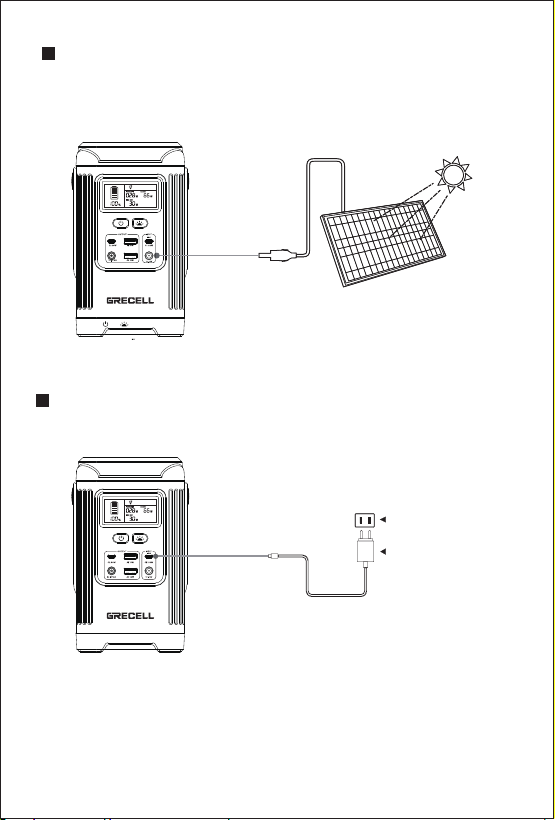
SOLAR PV CHARGING
Supports 60W/100W solar panel charging at DC12-26V. Charging time
depends on sunlight intensity, so please place as many solar panels in
direct sunlight as possible.
(Not Included)
CHARGE USING THE USB-C PORT
Charge your device using the provided charging cable.about 1.8-2.8 hours.
AC Outlet
AC Adapter
- 7 -
WHAT IT POWERS
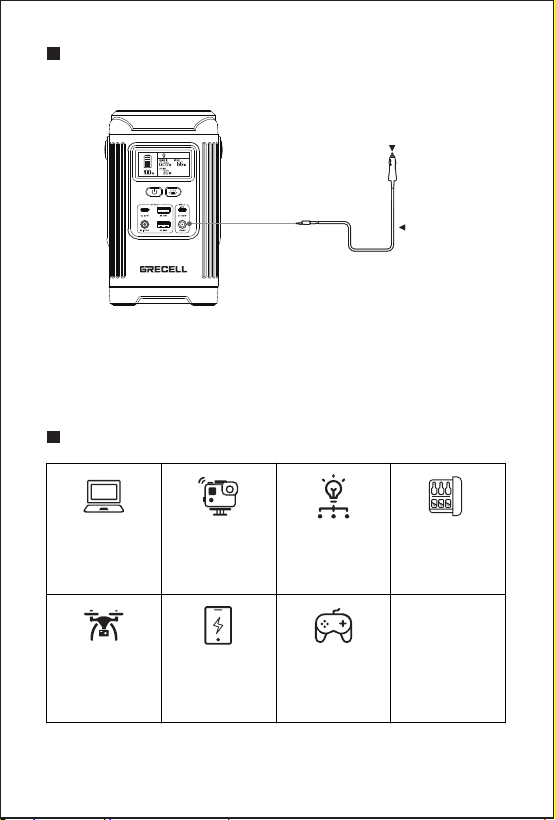
12V CAR CHARGING
Charge with car charging cable. It takes 1.8-2.9 hours to fully charge.
Cigarette Lighter Plug
Car Charger
Note:
Do not use the USB-C1 port and DC7909 port to charge the portable power
station at the same time, or charge with solar PV input and car port at the
same time!
+MORE
Laptops
(41.4Wh)
Around
3.2 Recharges
Mini Fridge
(40W)
Around
3.3 hours
Drone
(89.2Wh)
Around
1.5 Recharges
phone
(10Wh)
Around
13.1 Recharges
Game Console
(16Wh)
Around
8.2 Recharges
camera
(5.9Wh)
Around
22.1 Recharges
Floodlight
(3W)
Around
43.5 hours

OPERATING INSTRUCTIONS
- 8 -
Power output attention:
The device does not discharge:
(1) Check whether the connecting wire has been inserted in right place.
(2) Check whether the total output power exceeds the rated output power.
(3) Check whether the temperature of the equipment is too high.
The device is not charging:
(1) Confirm that the AC socket on the wall and the charging cable are fully
inserted into the input terminal.
(2) The device cannot be charged immediately after it is discharged.
Please put it aside for an hour and try again, because it may enter the
over-temperature protection.
TROUBLESHOOTING
Maintenance:
Check as needed. If the T200 Series power station cannot working regularly,
please charge and discharge it every 3 months under normal temperature to
keep the service life.
Regularly check all ports and wall chargers for any debris, dirt, damage, and
corrosion.
PRODUCT MAINTENANCE
Overload protection and short circuit protection:
The USB-A/USB-C/DC 5525 output port is activated only when the main
switch button is pressed.
When activated, the output is active, and the LCD display will open and
provide details about the charging output.
When no output is activated, the LCD screen will turn off automatically.
●
●
●
●
●
If the output port is overloaded or shorted, the T200 will automatically shut
down the output. But the LCD screen is still on.
Please insert the charging cable that meets the specifications.
The output port automatically recovers.
●
●
●

- 9 -
Equipment cleaning:
STORAGE
Note: To avoid the risk of electric shock, do not use metal objects to
clean the ports.
Do not disassemble the device privately.
Do not cover the equipment with towels, clothes or other items. Regularly
observe the side vents for dust and foreign matter, and clean them
according to the cleaning procedures specified in the manual.
●
●
If it will be stored for more than 1 month, please charge it to 50% capacity
and keep it indoors at normal temperature.
The maximum storage time shall not exceed 6 months.
Please keep it away from direct sunlight.
Excessive temperature will lead to reduced service life, overheating, and
fire.
Extremely cold conditions below the specified storage range can also
impair the performance and service life of the equipment.
Please keep away from corrosive chemicals and gases.
After taking it out of storage, perform a visual inspection to ensure that the
appearance of the equipment and all accessories are qualified.
Check the vents on the intake and exhaust sides to make sure they are
free of foreign objects.
●
●
●
●
●
●
●
●
Please make sure that the device is disconnected from all input power and
output devices.
Wipe with a clean, dry, non-soft cotton cloth.
Remove all any foreign objects, dirt or other obstructions on the vents on
both sides.
While cleaning foreign objects in the side vents, do not allow debris, dirt or
other blockage to enters the equipment.
Do not use corrosive cleaners or solvents.
Do not use compressed air to clean the side cooling vents, as it will cause
foreign particles to enter the interior and cause a short circuit.
●
●
●
●
●
●

- 10 -
The warranty for the T200 Series does not apply to:
(1) Any product that is modified, misused, abused, accidentally damaged,
or used for purposes other than normal consumer use as authorized in
the current product literature.
(2) Any product purchased through an online auction house.
(3) Additionally, the warranty for the T200 Series does not cover the
battery cell unless it is fully charged by you within seven days after
purchasing the product and at least every six months thereafter.
(4) The warranty of T200 Series does not apply to 1) any product that is
modified, misused, abused, damaged by accident, or used for anything
other than normal consumer use as authorized in current product
literature or 2) any product purchased through an online auction house.
The warranty of T200 Series does not apply to the battery cell unless
the battery cell is fully charged by you within seven days after your
purchase the product and at least every 6 months thereafter.
Exclusions
Note
A photovoltaic panel as input for charging the internal battery shall be
provided with an inverter and/or a charge controller in accordance with UL
1741 or UL 62109-1; The external power supply shall be a power source in
accordance with the Standard UL 60950-1 and CAN/CSA C22.2 No. 60950-1,
or UL 1310 and No. 1, CAN/CSA C22.2 No. 223, or No.1, CAN/CSA C22.2
No. 223;
A vehicle adapter that complies with the enclosure and input contacts
requirements in the Standard for Vehicle Battery Adapters, UL 2089, and
Power Supplies, CAN/CSA C22.2 No. 107.1. The connector plug shall
IMPORTANT SAFETY INSTRUCTIONS
The T200 Series power station meets all legal requirements for the
transportation of dangerous goods.
The capacity of the lithium battery pack exceeds 100Wh. According to
international standards, if the power station is transported by air, it must be
transported in accordance with IATA standard packaging.
The instructions and labeling requirements of the International Air
transport association and related declarations must be completed.
●
●
●

- 11 -
incorporate a fuse or other protective device having a current rating not
greater than 15A.
INSTRUCTIONS PERTAINING TO RISK OF FIRE, ELECTRIC SHOCK,
OR INJURY TO PERSONS.
IMPORTANT SAFETY INSTRUCTIONS
1. WARNING – When using this product, basic precautions should always
be followed, including the following:
a) Read all the instructions before using the product.
b) To reduce the risk of injury, close supervision is necessary when the
product is used near children.
c) Do not put fingers or hands into the product.
d) Use of an attachment not recommended or sold by power pack
manufacturer may result in a risk of fire, electric shock, or injury to persons.
e) To reduce the risk of damage to the electric plug and cord, pull the plug
rather than the cord when disconnecting the power pack.
f) Do not use a battery pack or appliance that is damaged or modified.
Damaged or modified batteries may exhibit unpredictable behavior
resulting in fire, explosion, or risk of injury.
g) Do not operate the power pack with a damaged cord or plug, or a
damaged output cable.
h) Do not disassemble the power pack, take it to a qualified service person
when service or repair is required. Incorrect reassembly may result in a risk
of fire or electric shock.
i) To reduce the risk of electric shock, unplug the power pack from the
outlet before attempting any instructed servicing.
j) WARNING – RISK OF EXPLOSIVE GASES.
1) To reduce the risk of battery explosion, follow these instructions and
those published by the battery manufacturer and manufacturer of any
equipment you intend to use in the vicinity of the battery. Review cautionary
marking on these products and on engines.
k) PERSONAL PRECAUTIONS
1) Have plenty of fresh water and soap nearby in case battery acid contacts
skin, clothing, or eyes.
2) Wear complete eye protection and clothing protection. Avoid touching
eyes while working near the battery.
3) If battery acid contacts skin or clothing, wash immediately with soap and
water. If acid enters the eye, immediately flood the eye with running cold
water for at least 10 minutes and get medical attention immediately.
4) NEVER smoke or allow a spark or flame in the vicinity of the battery or
engine.

- 12 -
FCC Note
Any changes or modifications not expressly approved by the party responsible
for compliance could void the user's authority to operate the equipment.
NOTE: This equipment has been tested and found to comply with the limits
for a Class B digital device, pursuant to Part 15 of the FCC Rules. These
limits are designed to provide reasonable protection against harmful
interference in a residential installation. This equipment generates, uses
and can radiate radio frequency energy and, if not installed and used in
accordance with the instructions, may cause harmful interference to radio
communications. However, there is no guarantee that interference will not
occur in a particular installation.
If this equipment does cause harmful interference to radio or television
reception, which can be determined by turning the equipment off and on,
the user is encouraged to try to correct the interference by one or more of
the following measures:
-- Reorient or relocate the receiving antenna.
-- Increase the separation between the equipment and receiver.
-- Connect the equipment into an outlet on a circuit different
from that to which the receiver is connected.
-- Consult the dealer or an experienced radio/TV technician for help.
The device has been evaluated to meet general RF exposure requirement.
The device can be used in portable exposure condition without restriction.
5) Be extra cautious to reduce the risk of dropping a metal tool onto the
battery. It might spark or short-circuit battery or other electrical parts that
may cause an explosion.
l) When charging the internal battery, work in a well-ventilated area and do
not restrict ventilation in any way.
m) Under abusive conditions, liquid may be ejected from the battery; avoid
contact. If contact accidentally occurs, flush with water. If liquid contacts
eyes, additionally seek medical help. Liquid ejected from the battery may
cause irritation or burns.
n) Do not expose a power pack to fire or excessive temperature. Exposure
to fire or temperature above 130°C may cause an explosion. The
temperature of 130°C can be replaced by the temperature of 265°F.
o) Have servicing performed by a qualified repair person using only
identical replacement parts. This will ensure that the safety of the product is
maintained. SAVE THESE INSTRUCTIONS.

- 13 -
Disposal/Recycle
Do not place equipment and its accessories in the trash. Items must
be properly disposed of in accordance with local regulations.
See www.epa.gov for additional information.
All GRECELL products come with a full 2-year limited warranty from the date
of purchase (accessories excluded). It will be out of guarantee if damaged
due to incorrect use or force majeure.
Warranty