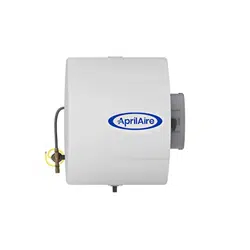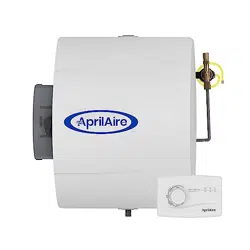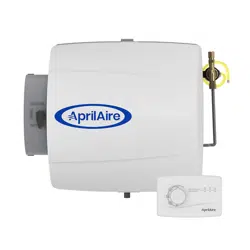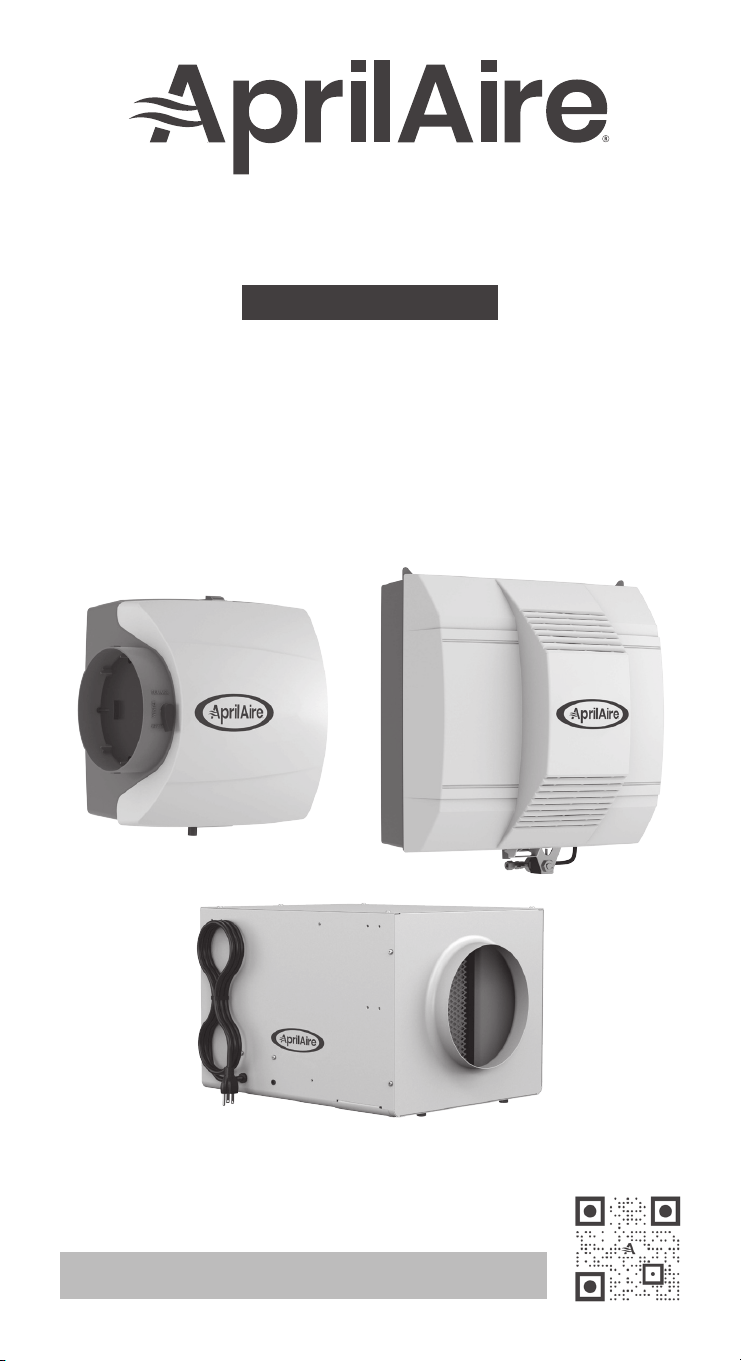
Humidier
OWNER’S MANUAL
Models 300, 400,
400M, 500, 500M, 600,
600M, 700, & 700M
Product Info &
Digital Manual
READ AND SAVE THESE INSTRUCTIONS

TABLE OF CONTENTS
INTRODUCTION . . . . . . . . . . . . . . . . . . . . . . . . . . . . . . . . . . . . . . . . . . . . . . . . . . . . . . . . . . . 3
PRINCIPLE OF OPERATION . . . . . . . . . . . . . . . . . . . . . . . . . . . . . . . . . . . . . . . . . . . . . . . . 4
OPERATING INSTRUCTIONS – MODELS 400, 500, 600 & 700. . . . . . . . . . . . 6
Automatic Digital Humidier Control Indicator Lights . . . . . . . . . . . . . . . 6
Blower Activation . . . . . . . . . . . . . . . . . . . . . . . . . . . . . . . . . . . . . . . . . . . . . . . . . . . . . . 6
Automatic Mode . . . . . . . . . . . . . . . . . . . . . . . . . . . . . . . . . . . . . . . . . . . . . . . . . . . . . . .7
Manual Mode. . . . . . . . . . . . . . . . . . . . . . . . . . . . . . . . . . . . . . . . . . . . . . . . . . . . . . . . . . 8
OPERATING INSTRUCTIONS – MODELS 400M, 500M, 600M & 700M . . . 11
Check the Humidier Operation – Manual Humidier Control . . . . . 11
OPERATING INSTRUCTIONS – MODEL 300 . . . . . . . . . . . . . . . . . . . . . . . . . . . . . . . 12
Check the Humidier Operation – Manual Digital
Humidier Control. . . . . . . . . . . . . . . . . . . . . . . . . . . . . . . . . . . . . . . . . . . . . . . . . . . . . 12
ADDITIONAL INFORMATION FOR ALL MODELS. . . . . . . . . . . . . . . . . . . . . . . . . . . . 13
EFFECT OF WATER CHARACTERISTICS . . . . . . . . . . . . . . . . . . . . . . . . . . . . . . . . . . . 13
ANNUAL MAINTENANCE . . . . . . . . . . . . . . . . . . . . . . . . . . . . . . . . . . . . . . . . . . . . . . . . . .14
ANNUAL SUMMER SHUTDOWN . . . . . . . . . . . . . . . . . . . . . . . . . . . . . . . . . . . . . . . . . . . 14
PERIODIC PREVENTATIVE MAINTENANCE . . . . . . . . . . . . . . . . . . . . . . . . . . . . . . . .15
REQUIRED MAINTENANCE INSTRUCTIONS
Model 300 . . . . . . . . . . . . . . . . . . . . . . . . . . . . . . . . . . . . . . . . . . . . . . . . . . . . . . . . . . . . .16
Models 400 & 400M . . . . . . . . . . . . . . . . . . . . . . . . . . . . . . . . . . . . . . . . . . . . . . . . . . . 17
Models 500, 500M, 600 & 600M. . . . . . . . . . . . . . . . . . . . . . . . . . . . . . . . . . . . . . .18
Models 700 & 700M. . . . . . . . . . . . . . . . . . . . . . . . . . . . . . . . . . . . . . . . . . . . . . . . . . . .19
LIMITED WARRANTY . . . . . . . . . . . . . . . . . . . . . . . . . . . . . . . . . . . . . . . . . . . . . . . . . . . . . 20
WARNING
• ELECTRIC SHOCK HAZARD: 120 volts may cause serious injury from
electric shock. Disconnect electrical power and water before
servicing. Leave power and water disconnected until service is
completed.
• RISK OF SCALDING. Water temperature over 125°F (52°C) can cause
severe burns and scald instantly. Shut off the hot water supply
before disconnecting or tapping into any hot water supply line.
CAUTION
SUDDEN OPERATION MAY CAUSE PERSONAL INJURY OR PROPERTY
DAMAGE. Turn the humidier control to OFF or lowest setting before
servicing.
2
INTRODUCTION
When humidity is properly controlled within a home, it provides
effective virus protection. Air that’s too dry can lead to conditions
that allow airborne viruses to thrive and proliferate. By adding
humidity to dry air, the amount of time a virus can survive in the
air drops drastically. By maintaining balanced humidity between
40% and 60%, year round, you can reduce the airborne incidence of
health concerns like bacteria, viruses, and dust mites.
While balanced humidity exists between 40% and 60%, it’s important
to remember that outdoor temperature and other home factors will
impact what relative humidity level is attainable and recommended
for your house. Talk with your AprilAire Healthy Air Professional to
learn more.
Your humidier will require periodic maintenance to assure
continued peak performance. See page 14 to obtain service parts
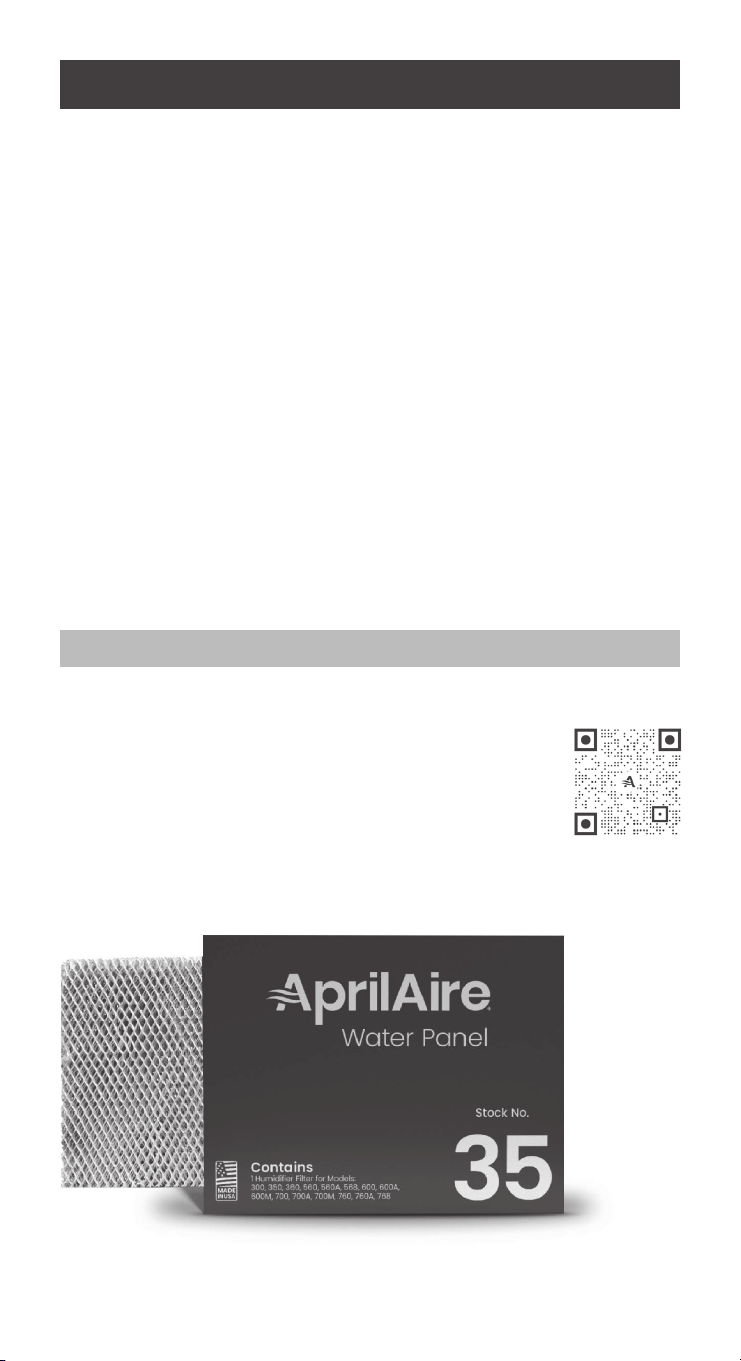
and/or replacement Water Panels®.
Please take a few minutes and read this booklet. This will familiarize
you with the benets you will receive from the equipment you just
purchased and help you understand the routine maintenance that
will be required.
REGISTER YOUR HUMIDIFIER
Register your product at aprilaire.com/warranty or
by using the QR code, to receive important updates
and notications, and to streamline the process in the
unlikely event you le a claim.
Purchase only genuine AprilAire Water Panels to
maintain peak performance. For more information,
visit our website at aprilaire.com.
Register Your
Humidier
3

PRINCIPLE OF OPERATION
Your new AprilAire Humidier uses evaporation to add moisture back
to warm, dry air in the home. Evaporative humidiers do not heat the
water themselves, but instead use the HVAC system’s heat (excluding
Model 300), drawn through a water panel, to turn the water into
vapor.
The Model 300 must use hot supply water, up to 140°F (60°C), as a
heat source for evaporation to occur, independent from an HVAC
system. Hot supply water is recommended for all AprilAire Evaporative
Humidiers to maximize their effectiveness.
Except for Model 300, the AprilAire Humidier is designed to operate
in conjunction with the heating, ventilating, air conditioning (HVAC)
system fan. When the humidier control calls for humidity and the
HVAC system fan is operating, water ows to the distribution tray
located inside the humidier. The water is uniformly distributed across
the tray where it ows down through a system of outlets over the
Water Panel. Dry, hot air is moved through the moisture-laden Water
Panel where natural evaporation takes place. The now-humidied air
carries moisture in vapor form and circulates throughout the home.
With bypass Models 400, 500, and 600 Series, HVAC system air is
moved from the supply duct through the humidier into the return
duct. 700 Series models and the Model 300 have a built-in fan which
draws air through the Water Panel.
The correct water ow is maintained by an orice provided with
each humidier. When the humidier is operating (excluding 400
Series), there will be a small, steady stream of water to the drain,
which ushes away most of the trouble‑causing minerals.
Do not use the saddle valve to regulate the water ow. It is designed
to be completely open or closed.
The minerals and solid residue not trapped by the replaceable Water
Panel are ushed down the drain in the Models 300, 500, 500M, 600,
600M, 700, and 700M. This is the most effective and least expensive
method to dispose of trouble-causing minerals. The drain also
eliminates the problems caused by stagnant water.
Trouble-free performance and minimum maintenance are assured
by the design features of the AprilAire Humidier. All humidier
housing parts that come in contact with water are non-metal and
will never rust or corrode. Neither heat nor water will affect them
under normal operating conditions.
4

The Water Panel, designed especially for uniform, high evaporation,
and the scale control insert (which encases the Water Panel),
effectively traps mineral deposits which are often the cause of
damage to working parts in ordinary humidiers. The Water Panel is
the heart of the humidier and must be in good condition to assure
high capacity trouble‑free performance. It should be changed at
least annually with the exception of Models 400 and 400M which
should be changed at least twice per heating season.
The distribution tray incorporates a synthetic fabric liner that is
designed to deliver water uniformly over the entire top surface of the
Water Panel, provided the humidier is mounted level. It is normal
for some mineral deposits to form in the distribution tray as it dries
out between humidication cycles. These deposits can actually
help distribute water in the tray, but if they block the openings, they
should be removed as described in the PERIODIC PREVENTATIVE
MAINTENANCE section of this manual.
Your Digital Humidier Control works in conjunction with your HVAC
system to control the operation of the humidier. The control senses
indoor RH and outdoor temperature and automatically adjusts the
operation time of the humidier to provide the optimum humidity
level in the home.
The Automatic Control can be set to turn on the HVAC blower when
humidity is required. Plumbing the humidier to hot water is required
for this mode of operation.
The digital readout on the control displays the RH level inside the
cold air return duct. RH is a measure of the amount of moisture in
the air as a percentage of what the air can hold. Warm air can hold
more moisture than cold air can.
The control has lights which indicate humidier operation, when the
Water Panel needs to be replaced and when service is required. See
OPERATING INSTRUCTIONS for more information.
There are many humidiers on the market. They all add moisture with
varying degrees of efciency. None, however, offer the features, design,
and performance incorporated into your new AprilAire Humidier.
5

OPERATING INSTRUCTIONS –
MODELS 400, 500, 600 & 700
The Automatic Digital Humidier Control (ADHC) offers two modes
of operation, Automatic or Manual. An explanation of both modes
follows. (See FIGURE A on page 7 for Automatic mode. See FIGURE B
on page 8 for Manual mode.)
When in the Automatic mode, this system offers the following benets:
• You will always receive the optimal amount of humidity so
that your home and its furnishings are always protected from
the damaging effects of excess condensation or low humidity
during the heating season. The control automatically adjusts your
home’s RH based on the outdoor temperature, increasing the time
maximum comfort is maintained.
• Simple operation with few adjustments. The control eliminates the
need to manually adjust the control when outdoor temperature
changes.
AUTOMATIC DIGITAL HUMIDIFIER CONTROL INDICATOR LIGHTS
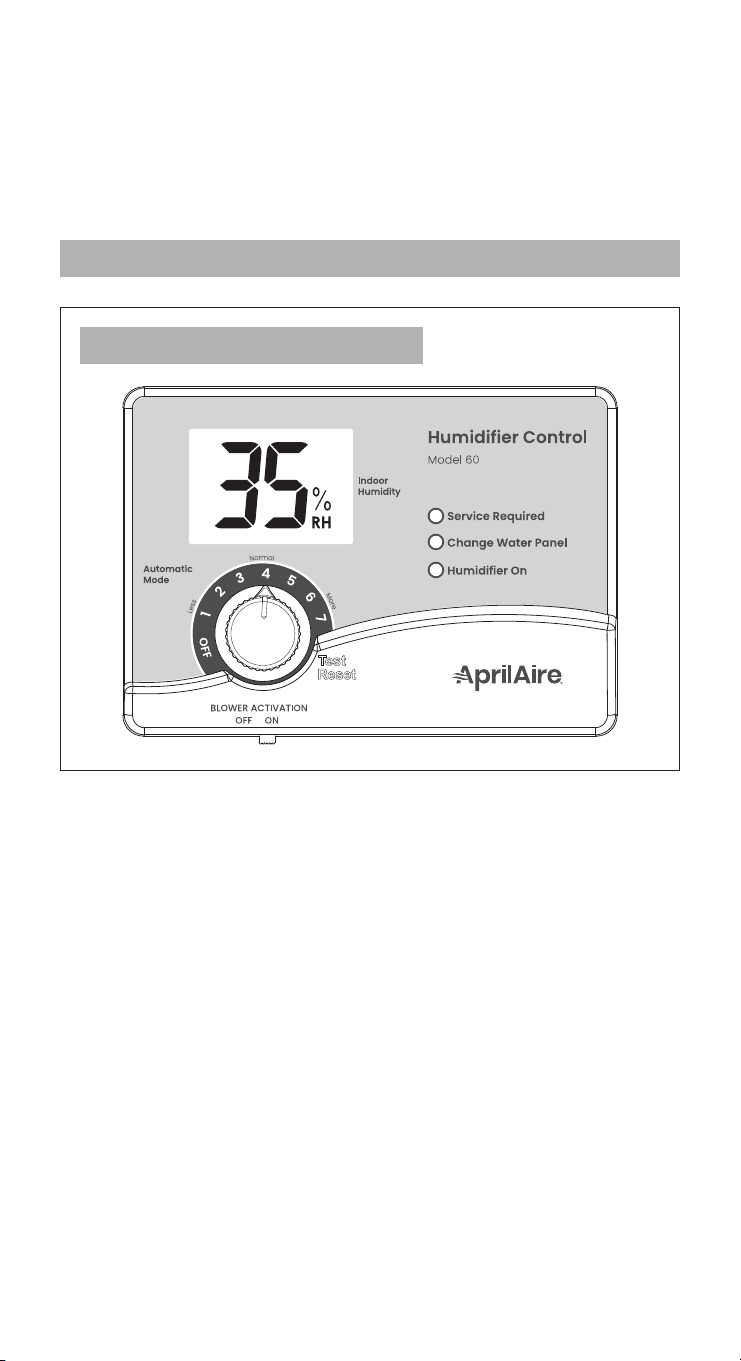
Service Required: The red light indicates that the humidier is not
operating normally and that service is required.
Change Water Panel: The yellow light indicates that it is time to
change the Water Panel in the humidier. Refer to the ANNUAL
MAINTENANCE section for instructions on changing the Water Panel
or call your HVAC contractor for service.
Humidier On: The green light indicates that the humidier is actively
adding healthy humidity to your home.
BLOWER ACTIVATION
The BLOWER ACTIVATION switch is set to the ON position to allow the
humidier control to activate the HVAC system fan for maximum
humidication. For this setting the Models 500, 600 and 700 must be
connected to hot water.
This function will operate in two ways:
1. If the HVAC system has been idle for one hour, the humidier
control will activate the HVAC system fan to sample the air for 3
minutes. If the RH is lower than the set point, the humidier control
will activate the humidier and keep the fan running.
2. If the RH set point has not been reached by the end of a call for
heat, the control will continue to operate the humidier and the
HVAC system fan.
6
Your AprilAire Digital Humidier Control is installed in the cold air
return duct. During the rst heating season, your humidier control
needs to be set initially to match your home’s condition. Please follow
these steps when adjusting your control (refer to FIGURE A).
1. Turn the dial setting knob to 5, which is within the normal range.
During the next 24-48 hours it may be necessary to adjust the dial
for more or less humidity, depending on your personal comfort
and home’s requirements. Refer to TABLE 3: Operation Guide.
2. During the coldest portion of the rst heating season, minor
adjustments may be necessary. This is dependent upon your
home’s construction. Refer to TABLE 3: Operation Guide.
The RH in your home will now be accurately controlled to meet your
needs and should not need further adjustment during future heating
seasons. Make note of the dial setting in the event you temporarily
move the knob to OFF when performing annual maintenance of your
AprilAire Humidier.
90-1235
FIGURE A: ADHC (AUTOMATIC MODE)
AUTOMATIC MODE
Once blower activation mode is initiated, the humidier and
HVAC system fan will continue to operate for 2 hours or until the
humidication set point is reached.
When the BLOWER ACTIVATION switch is in the OFF position, the
humidier control will only operate the humidier if the HVAC system
fan or heat is on AND if the RH is lower than the set point.
7
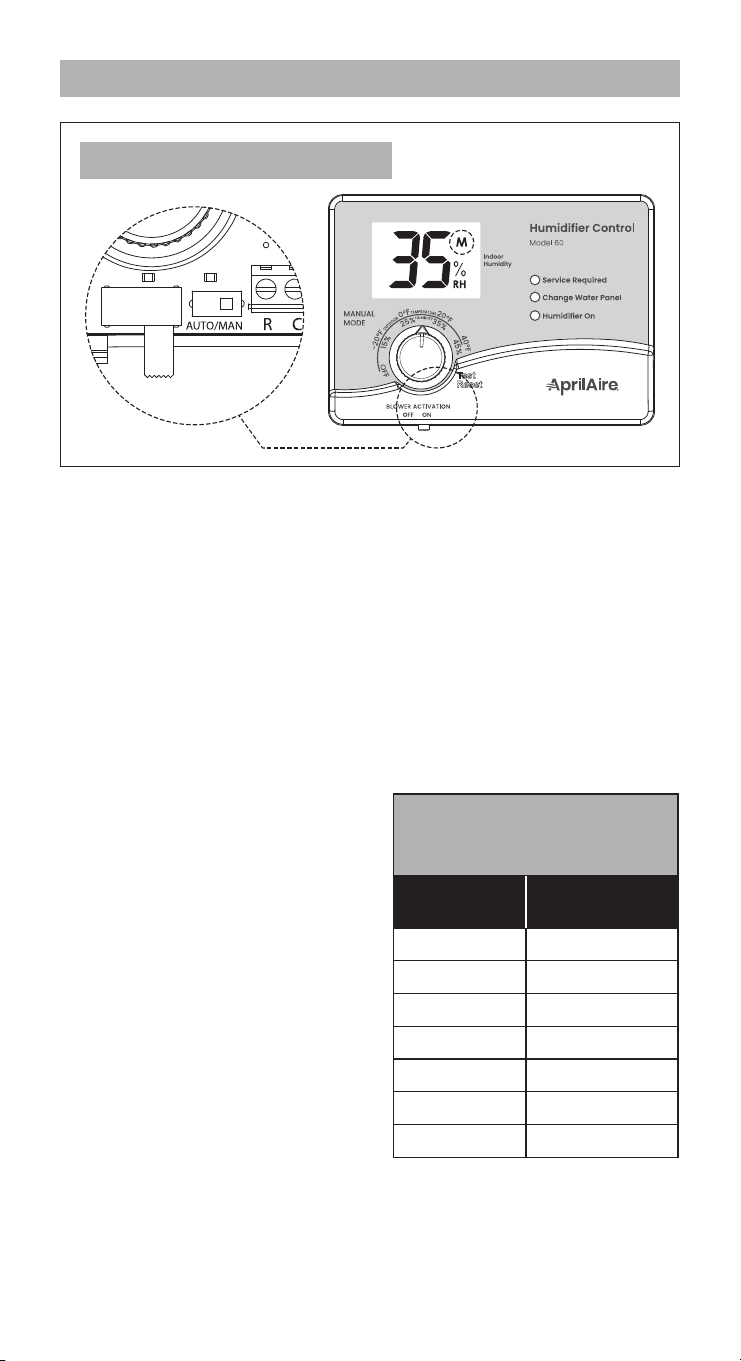
MANUAL MODE
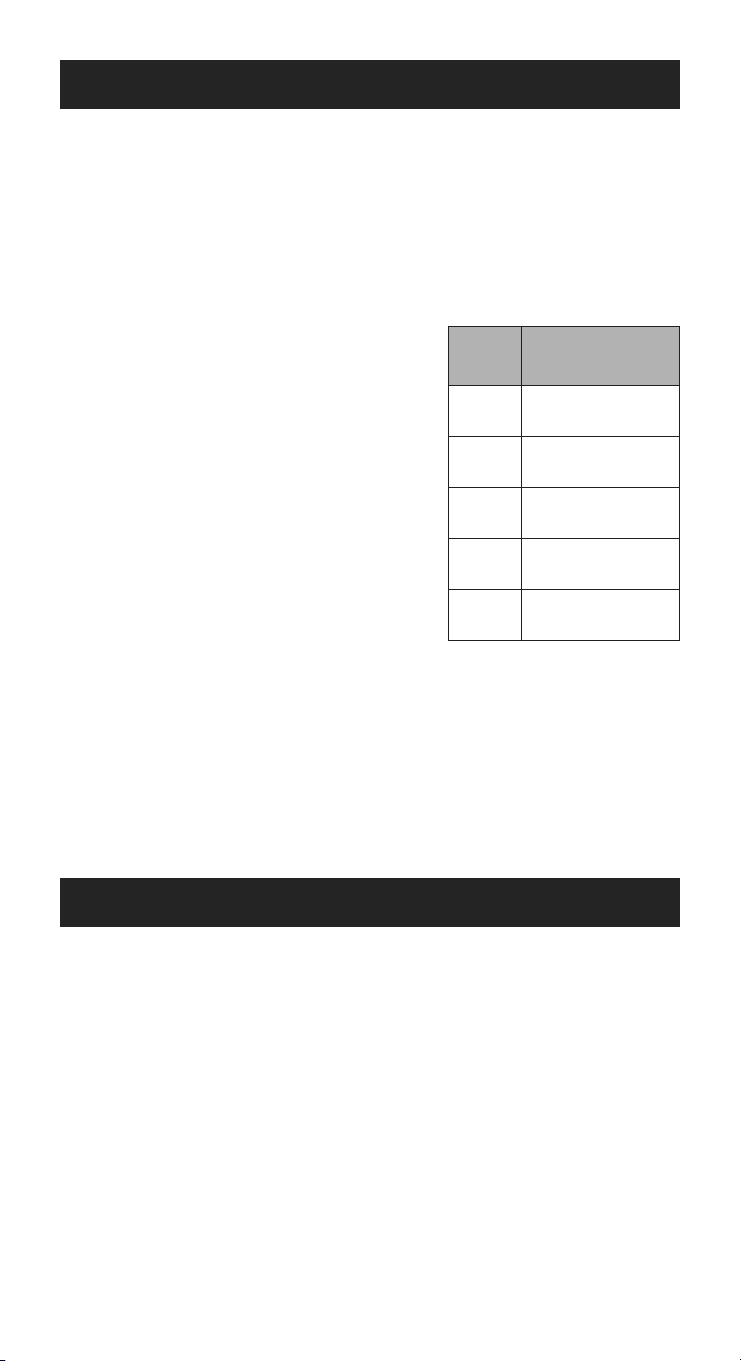
When installed in the Manual mode (see FIGURE B – internal switch
in MAN position and M in the display), it is important to anticipate
a drop in outdoor temperature and reduce the setting accordingly
to avoid excessive condensation. For example, with an outdoor
temperature of 20°F the correct setting will be 35% RH. If the
temperature is expected to fall to 0°F, then reduce the setting to 25%
several hours prior to the temperature change.
See TABLE 1 for the recommended settings. These settings, which
are based on years of research, represent a compromise between
RH levels that would be most desirable for comfort and humidity
levels that are suitable for protection of your home and to avoid
condensation on your windows.
For example, a wintertime
indoor RH of 50% may be
considered ideal for comfort, but
unfortunately, it probably would
result in condensation, which can
cause damage to your home.
Observing the recommended RH
levels on your humidier control
is an important safeguard.
Condensation of water on the
inside surface of windows in the
form of fogging or frost is usually
an indication of too much humidity.
This same condensation can
occur in other areas in your home,
possibly resulting in damage.
90-1236
FIGURE B: ADHC (MANUAL MODE)
TABLE 1: OUTDOOR
TEMPERATURE/INDOOR
RELATIVE HUMIDITY
Outside
Temperature
Recommended
RH
+40°F 45%
+30°F 40%
+20°F 35%
+10°F 30%
0°F 25%
-10°F 20%
-20°F 15%
8
CHANGE WATER PANEL INDICATOR
The control keeps track of humidier operation time. The yellow
Change Water Panel light ashes after a preset amount of running
time has elapsed. This running time is preset by the installer based
on the humidier model and water hardness.
Refer to the ANNUAL MAINTENANCE section for instructions on
changing the Water Panel or call your HVAC contractor for service.
TEST/RESET
The Test/Reset feature allows the humidier operation to be checked
even if there is no call for humidity.
1. The HVAC system fan must be running for the humidier to
function. Make a heat or fan call at your thermostat.
2. Set the knob to Test/Reset. Make sure the water saddle valve is
open and that there is electricity to the humidier.
3. The humidier will only operate for 1 minute in test mode.
4. Reduce the humidier control setting to the recommended inside
RH, depending on the outside temperature. DO NOT LEAVE IN
TEST MODE AS HUMIDIFIER WILL NOT OPERATE AFTER 1 MINUTE HAS
ELAPSED.
ADDITIONAL INFORMATION
Your humidier is a precision system that will accurately maintain the
RH in your home. For every 2°F change in outdoor temperature, the
Digital Humidier Control will automatically adjust the indoor RH by 1%.
The Automatic Digital Humidier Control will accurately control the
humidity in your home to a maximum of 45% RH.
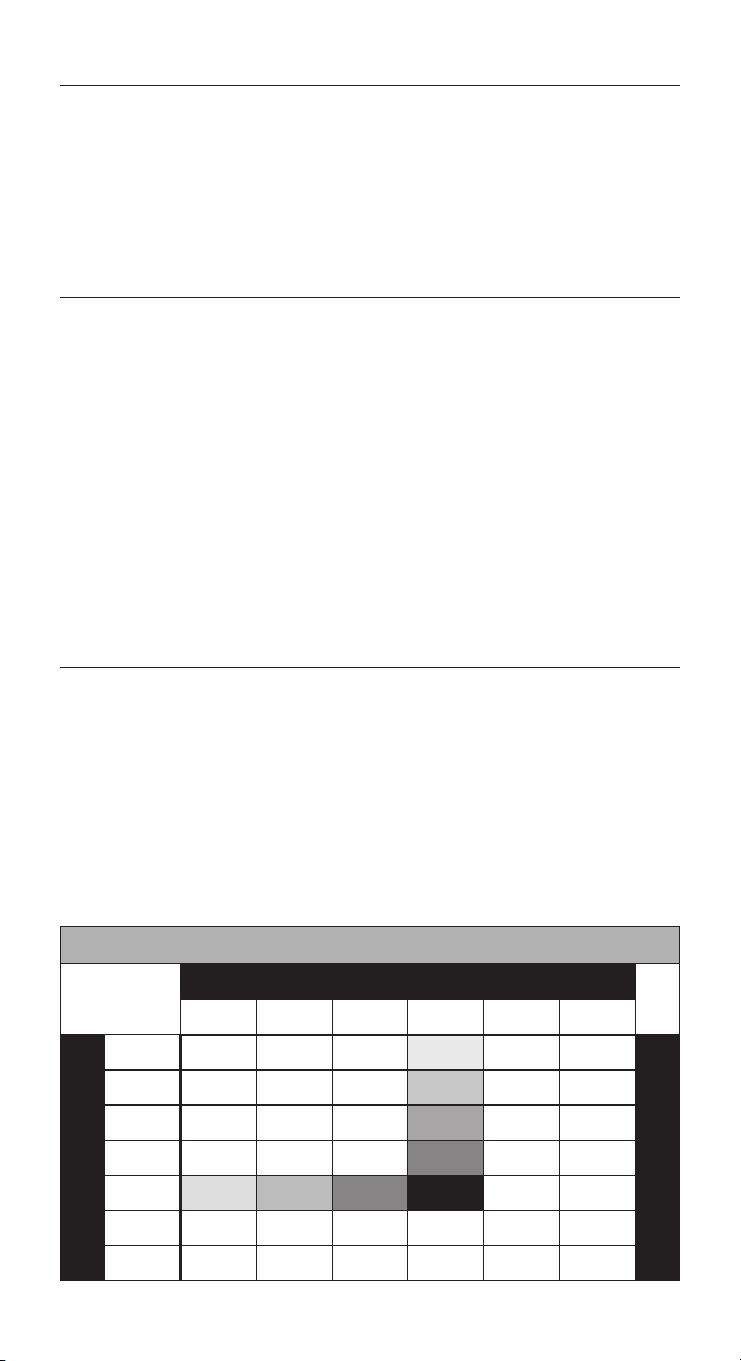
The RH values in TABLE 2 are targets based on outdoor temperature
and the Automatic Digital Humidier Control setting. The actual RH
may vary due to conditions in the home (cooking, showering, etc.).
TABLE 2: % RELATIVE HUMIDITY GUIDE
Outdoor Temperature (°F)
‑10°F 0°F 10°F 20°F 30°F 40°F
Dial Setting
1 10% 10% 10% 15% 20% 25%
Relative Humidity (%)
2 10% 10% 15% 20% 25% 30%
3 10% 15% 20% 25% 30% 35%
4 15% 20% 25% 30% 35% 40%
5 20% 25% 30% 35% 40% 45%
6 25% 30% 35% 40% 45% 45%
7 30% 35% 40% 45% 45% 45%
TABLE 1: OUTDOOR
TEMPERATURE/INDOOR
RELATIVE HUMIDITY
Outside
Temperature
Recommended
RH
+40°F 45%
+30°F 40%
+20°F 35%
+10°F 30%
0°F 25%
-10°F 20%
-20°F 15%
9
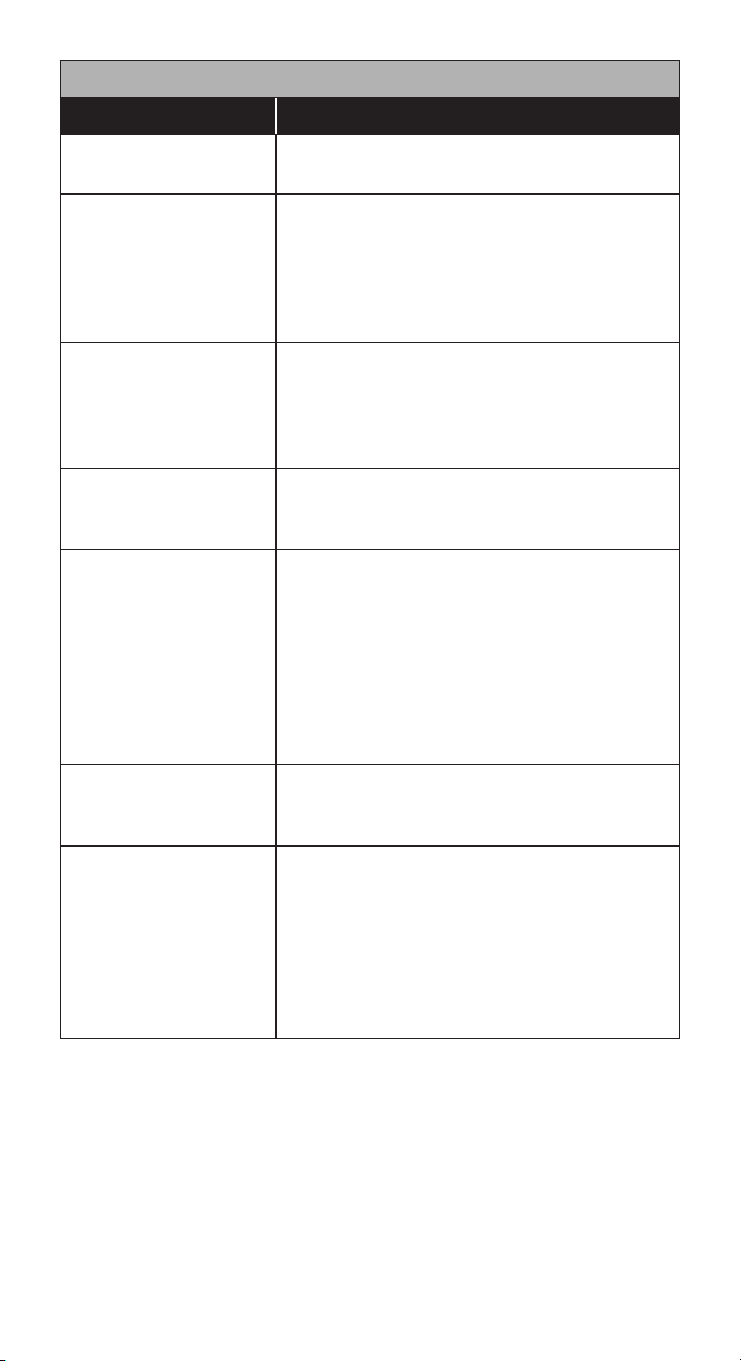
TABLE 3: OPERATION GUIDE
Condition Solution
Condensation on
windows.
Reduce the setting on the control dial by
1 increment.
Lack of humidity.
Increase the setting on the control dial
by 1 increment. If the humidier control is
already at the maximum setting of 7, set
the BLOWER ACTIVATION switch to ON. The
humidier must be plumbed to hot water
when using the Blower Activation feature.
Humidier does not
operate. (Solenoid
does not “click” when
control is moved to
Test/Reset position.)
Turn dial to Test/Reset. Make certain HVAC
system fan is operating. If unit still does
not operate, consult your HVAC contractor
or contact Technical Support.
Humidier won’t
shut off.
Turn dial to OFF. If unit continues to
operate, consult your HVAC contractor or
contact Technical Support.
Test mode.
System operation is checked by setting
the knob to Test/Reset. Make certain
HVAC system fan is operating. Humidier
will operate for one minute. If the control
knob is left in the Test/Reset position, after
1 minute the display will ash the software
revision level, e.g., r3. NOTE: Placing the
knob in Test/Reset resets the Water Panel
change timer.
Red Service
Required light
ashes (FIGURE A).
Note the error code on the display (E1,
E2, E3 or E4) and consult your HVAC
contractor or contact Technical Support.
Yellow Change
Water Panel light
ashes (FIGURE A).
Refer to ANNUAL MAINTENANCE on page
14 for instructions on changing the Water
Panel, or call your HVAC contractor for
service. After the Water Panel is replaced,
turn the control knob to the Test/Reset
position until the green Humidier On
light ashes, to reset the Water Panel
change timer.
10
OPERATING INSTRUCTIONS –
MODELS 400M, 500M, 600M & 700M
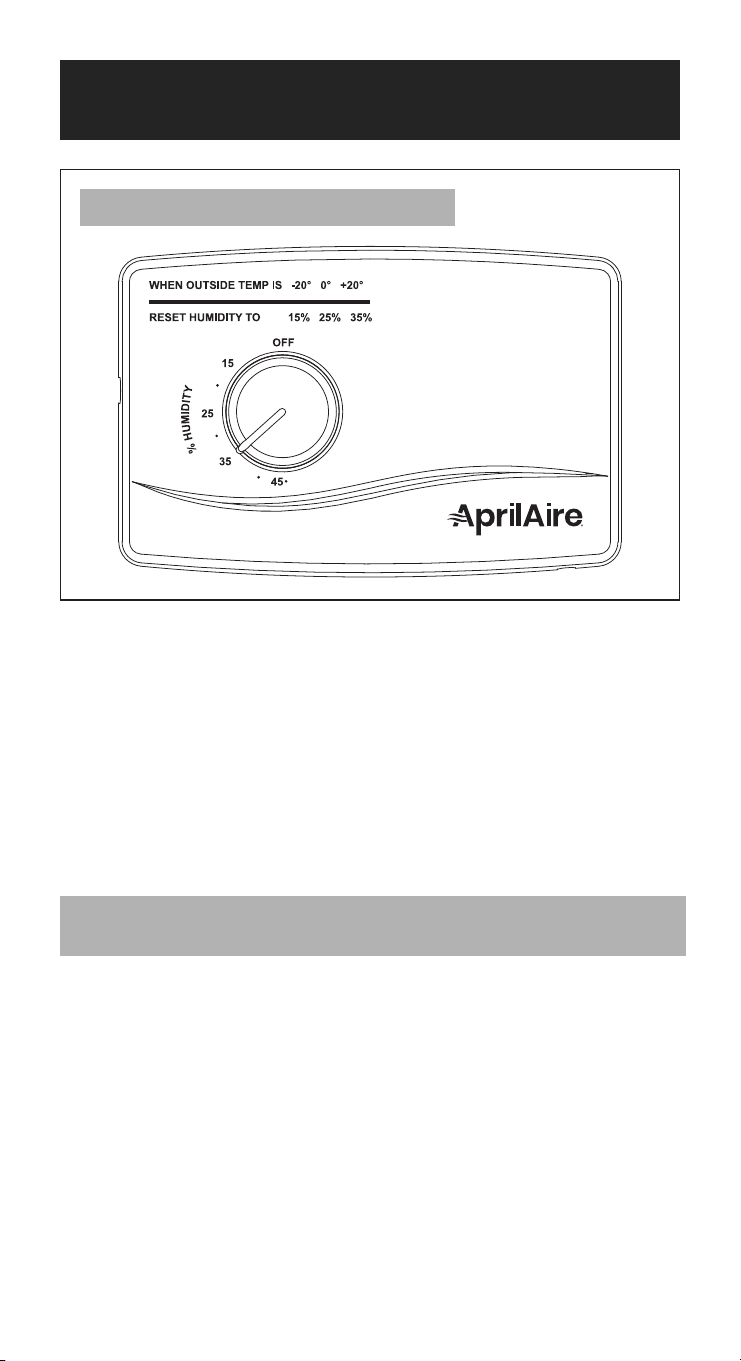
Your AprilAire Humidier is controlled by a Manual Humidier Control
(see FIGURE C). The Manual Humidier Control is installed either in
the cold air return duct or on an interior wall of the home. With the
Manual Humidier Control, it is important to anticipate a drop in
outdoor temperature and reduce the RH set point accordingly to
avoid excessive condensation, just as with the Digital Humidier
Control installed in Manual mode (see page 8).
To determine the indoor RH, slowly turn the knob clockwise and
counterclockwise and listen for 2 clicks. The indoor RH is within the
range of the 2 clicks.
CHECK THE HUMIDIFIER OPERATION –
MANUAL HUMIDIFIER CONTROL
1. The HVAC system fan must be running for the humidier to
function. Make a heat or fan call at your thermostat.
2. Set the knob to the highest RH set point, make sure that the water
saddle valve is open and that there is electricity to the humidier.
3. Return control knob to the desired RH set point.
90-1237
FIGURE C: MANUAL HUMIDIFIER CONTROL
11
OPERATING INSTRUCTIONS – MODEL 300
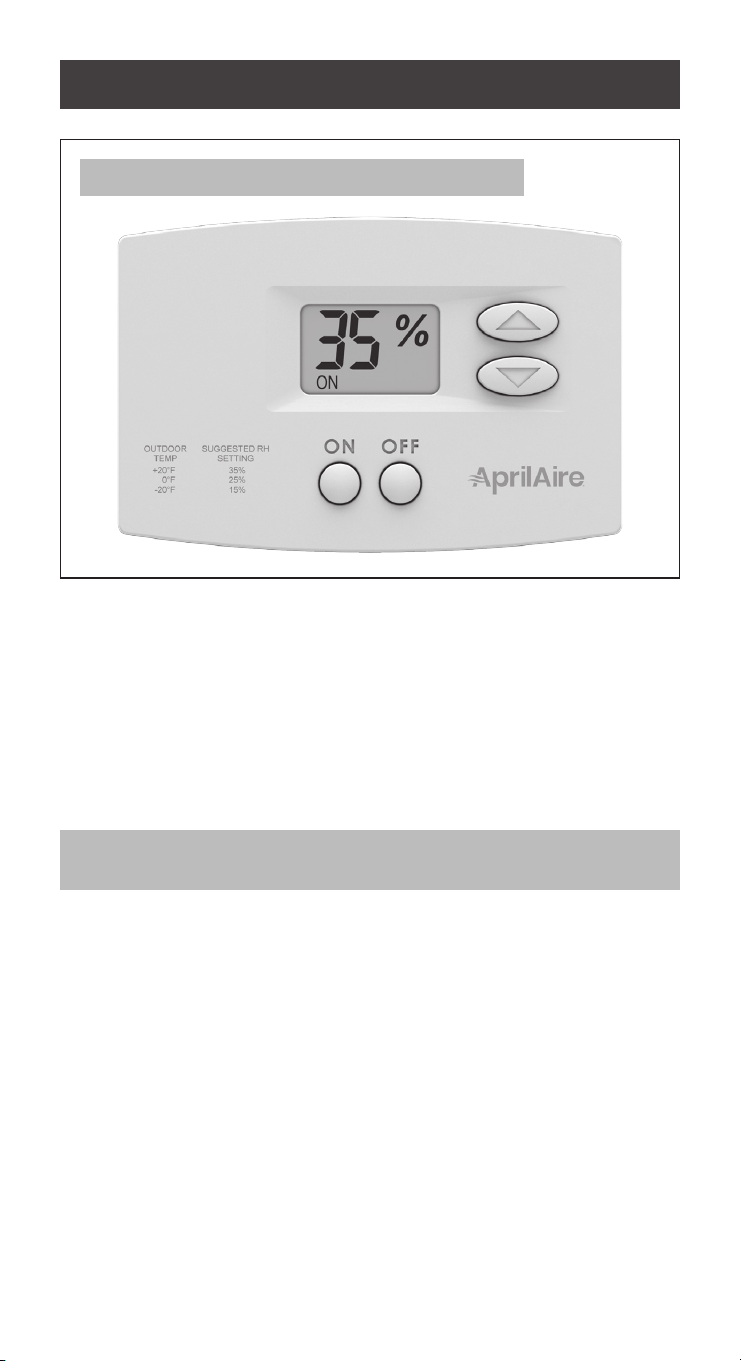
Your AprilAire Humidier is controlled by a Manual Digital Humidier
Control (see FIGURE D). The Manual Digital Humidier Control is
installed on an interior wall of the home. Just as with the Manual
Humidier Control, it is important to anticipate a drop in outdoor
temperature and reduce the RH set point accordingly to avoid
excessive condensation (see page 8).
The Manual Digital Humidier Control will continuously display
indoor RH%.
CHECK HUMIDIFIER OPERATION –
MANUAL DIGITAL HUMIDIFIER CONTROL
Press the ON button. ON will appear on the display, but it does not
necessarily mean the humidier is running. Several conditions must
be met:
1. The control and humidier must be powered.
2. The RH level in the conditioned space must be below the set point.
Raise the set point if necessary.
Once functionality has been established, set the control to the
desired relative humidity.
FIGURE D: MANUAL DIGITAL HUMIDIFIER CONTROL
12

ADDITIONAL INFORMATION FOR ALL MODELS
Be sure to keep replace dampers closed when not in use. They
provide an excellent escape route for heat, as well as humidity.
On occasion, indoor moisture producing activities such as clothes
drying, cooking, showers, etc., may raise the RH level higher than
it should be, even though the AprilAire Humidier is not operating.
Telltale indications are condensation or frost on cold surfaces
such as windows, doors, walls, etc. If such condensation persists
for several hours, your home should be ventilated to dissipate the
potentially damaging excess moisture.
EFFECT OF WATER CHARACTERISTICS
Your humidier is designed to operate using hot, cold, hard, or
mechanically softened water. Hot supply water, up to 140°F (60°C), is
required for the Model 300 or when using other AprilAire Evaporative
Humidiers in a heat pump application. It is recommended for all
models and applications to ensure maximum performance.
Water contains varying amounts of minerals. The residue remaining
as a result of hard water evaporation is primarily calcium and
magnesium components and is usually quite hard, scaly, and dense.
Residue from softened water tends to be soft and uffy and has a
greater volume than hard water deposits. In either case, the service
life of a Water Panel will be the same. The Water Panel should be
changed at least once a year with the exception of Models 400 and
400M which should be changed at least twice per heating season.
In the drain-equipped models, most of the mineral solids are ushed
down the drain.
WARNING
RISK OF SCALDING. Water temperature over 125°F (52°C) can cause
severe burns and scald instantly. Shut off the hot water supply before
disconnecting or tapping into any hot water supply line.
13
ANNUAL MAINTENANCE
For best performance, we recommend that you replace the
Water Panel in your AprilAire Humidier at least annually with the
exception of Models 400 and 400M which should be changed at
least twice per heating season.
The Change Water Panel indicator light (Digital Control only) will blink
when it is time to change your Water Panel. See individual model
instructions for additional maintenance.
To purchase a new Genuine AprilAire
Water Panel or other service parts:
• Call the installer of your AprilAire
Humidier. This information is often
found on your equipment.
• Call your HVAC contractor.
• Use our Find a Pro tool at aprilaire.com.
• If none of the above is successful and
you still need information, contact
Technical Support at 800.334.6011.
If your humidier is equipped with an
Automatic Digital Humidier Control with
a Change Water Panel indicator, follow
the steps below after replacing the Water Panel.
1. Make a heat call at your thermostat to turn on the HVAC system
fan.
2. Turn the control knob past 7 to the Test/Reset position. It will click
into place, and the Humidier On light will start to blink.
3. Turn the control knob back to its original RH setpoint.
ANNUAL SUMMER SHUTDOWN
For Models 400, 400M, 500, 500M, 600 and 600M close the bypass
damper, which is a part of the humidier, by turning the damper
handle from WINTER to SUMMER.
Humidier Control:
• Automatic Digital Humidier Control in Automatic mode (see
FIGURE A): No adjustment is necessary.
• Automatic Digital Humidier Control in Manual mode (see
FIGURE B): Set the knob to the OFF position.
• Manual Humidier Control (see FIGURE C): Set the knob to the OFF
position.
• Manual Digital Humidier Control (see FIGURE D): Lower the RH set
point to OFF.
UNIT
WATER PANEL
PART NUMBER
300 35
400 45
500 10
600 35
700 35
14
PERIODIC PREVENTATIVE MAINTENANCE
NOTE: Periodic inspection and preventative maintenance of your total
heating system is important for efcient and safe operation. Your
HVAC contractor can service your humidier when they service your
HVAC system.
All models have a distribution tray above the Water Panel, which
should be inspected annually and cleaned of excess mineral deposits.
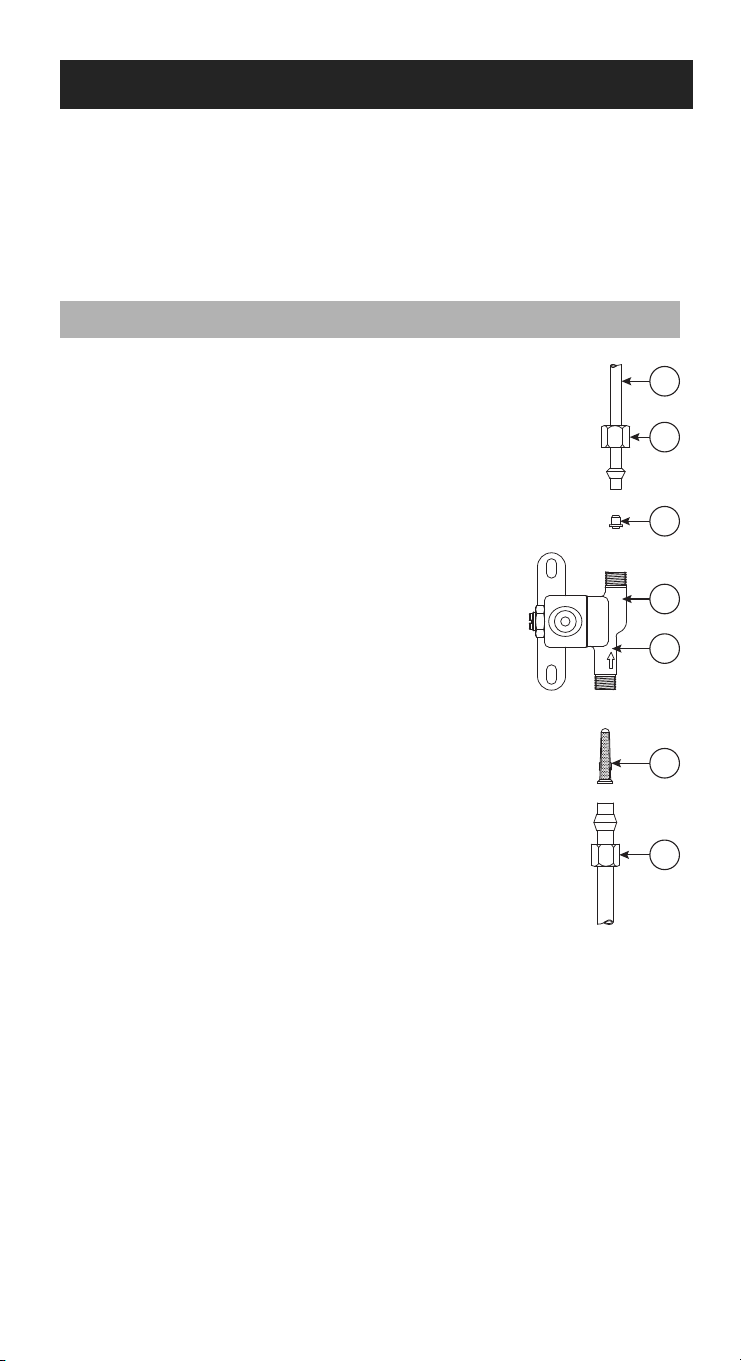
A. WATER FEED TUBE
B. OUTLET
COMPRESSION
NUT
C. ORIFICE
D. SOLENOID VALVE
E. INLET
F. INLINE STRAINER
G. INLET
COMPRESSION
NUT
WATER LINE INSPECTION AND SERVICE INSTRUCTIONS
1. Disconnect electrical power to the HVAC
system and shut off water supply.
2. Disconnect the water line at the inlet
compression nut.
3. Remove the in-line strainer from inside the inlet
side of the valve by using a small nail or wire.
4. Flush the in-line strainer clean or replace with a
new strainer, Part No. 4004.
5. Reconnect the inlet water line. Double wrench
to prevent leaking.
6. Disconnect the water feed tube at the outlet
compression nut.
7. Inspect the water feed tube by gently exing
it and looking for cracks or signs of wear.
Replace tube if it is cracked, brittle, or has been
damaged.
8. Remove the orice from the water feed
tube and make sure the small opening is
unplugged.
9. Replace the orice with Part No. 4231 (yellow) or
4232 (blue), by model, if missing or damaged,
and reconnect the water feed tube. Double
wrench to prevent leaking.
10. Remove the drain line from the bottom of the
humidier. If necessary, ex it to loosen any
mineral deposits or blockages.
11. Flush the drain line with water under pressure
to clear it of any debris, and slip it back onto
the drain tting. If drain line does not ow
properly, replace it.
12. Inspect the drain line to make sure it has a
constant downward slope and is not attened
or blocked.
13. Turn on water supply and reconnect electrical
power to the HVAC system.
A
B
C
D
E
F
G
90-1053
15
A
B
C
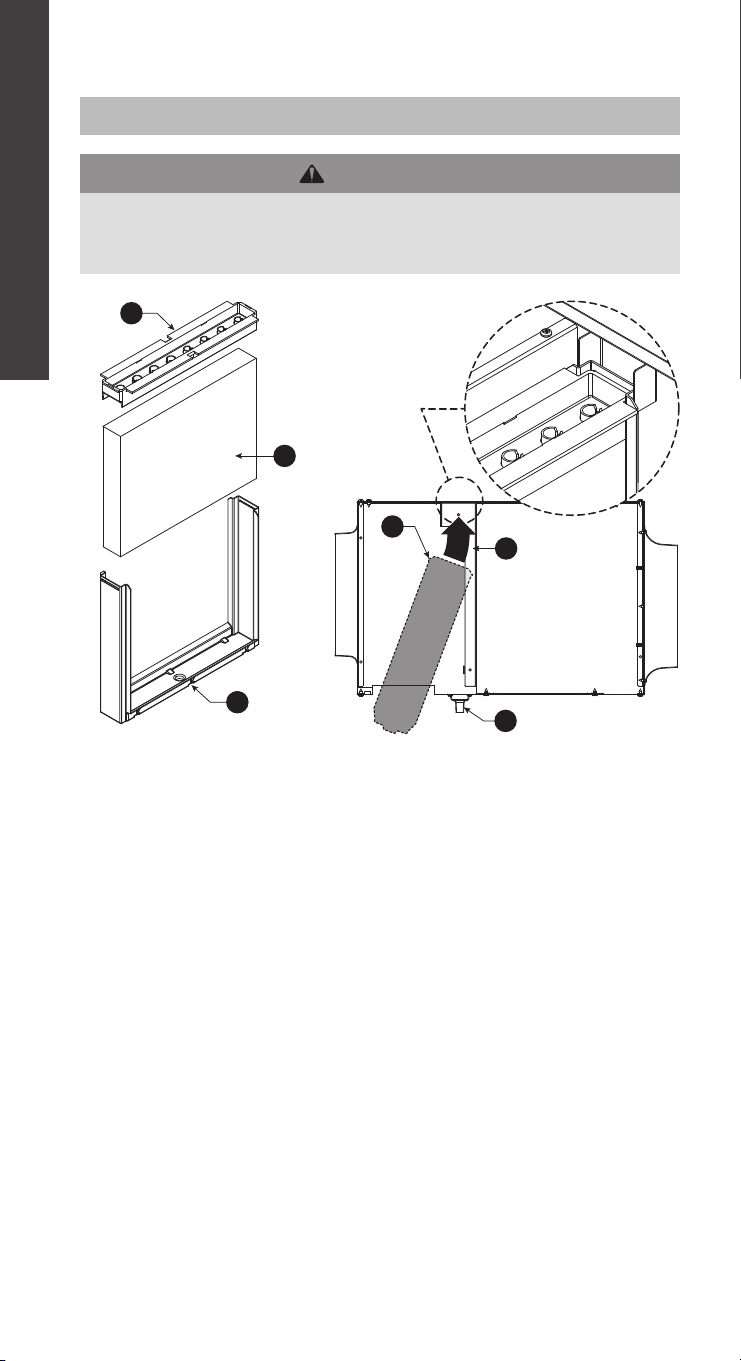
1. Turn Manual Digital Humidier Control off.
2. Disconnect electrical power and turn off water supply.
3. Unscrew knobs to Wet Pack assembly access panel.
4. Lift the Wet Pack assembly (D) then swing out and slide forward out of the humidier
housing.
5. To remove the distribution tray (A) from Water Panel (B), push down on tray and pull out
scale control insert (C). Clean the “V” openings of the tray. Lightly scrape out or brush
off any mineral deposits, being careful not to stretch or loosen the synthetic fabric liner.
Soaking the tray in vinegar or a lime-removing agent is helpful when trying to remove
stubborn mineral deposits.
6. Slide the Water Panel (B) out from the scale control insert (C) and dispose of the Water
Panel. Clean the scale control insert of mineral deposits. Replace with a genuine
AprilAire Water Panel 35. Slide the Water Panel back into the scale control insert and
snap the distribution tray (A) back into the scale control insert.
7. Inspect the plastic feed tube by gently exing it and looking for cracks or signs of wear.
Replace tube if it is cracked, brittle or has been damaged.
8. Remove the drain line from the drain spud (F) at the bottom of the humidier and ex
it to loosen any mineral deposits or blockage. Then ush it with water under pressure. If
it does not properly clear, replace it. Slip the drain line back onto the drain spud. Make
sure the drain line has a constant downward slope and is not attened or blocked.
9. Reinstall Wet Pack assembly (D) as shown in gure. Insert into the humidier housing to
align with guiding anges (E) and ensure t with drain spud (F).
10. Reconnect electrical power and turn on water supply.
11. Turn on Manual Digital Humidier Control and check system operation.
12. Set Manual Digital Humidier Control to its original setting.
D
E
F
90-2600
90-2601
90-2602
MODEL 300
REQUIRED MAINTENANCE INSTRUCTIONS
APRILAIRE HUMIDIFIER MODEL 300
WARNING
ELECTRIC SHOCK HAZARD: 120 volts may cause serious injury from
electric shock. Disconnect electrical power and water before servicing.
Leave power and water disconnected until service is completed.
A. Distribution Tray
B. Water Panel 35
C. Scale Control Insert
D. Wet Pack
E. Flange
F. Drain Spud
16
I
L
F
K
J
C
G
H
E
B
A
D
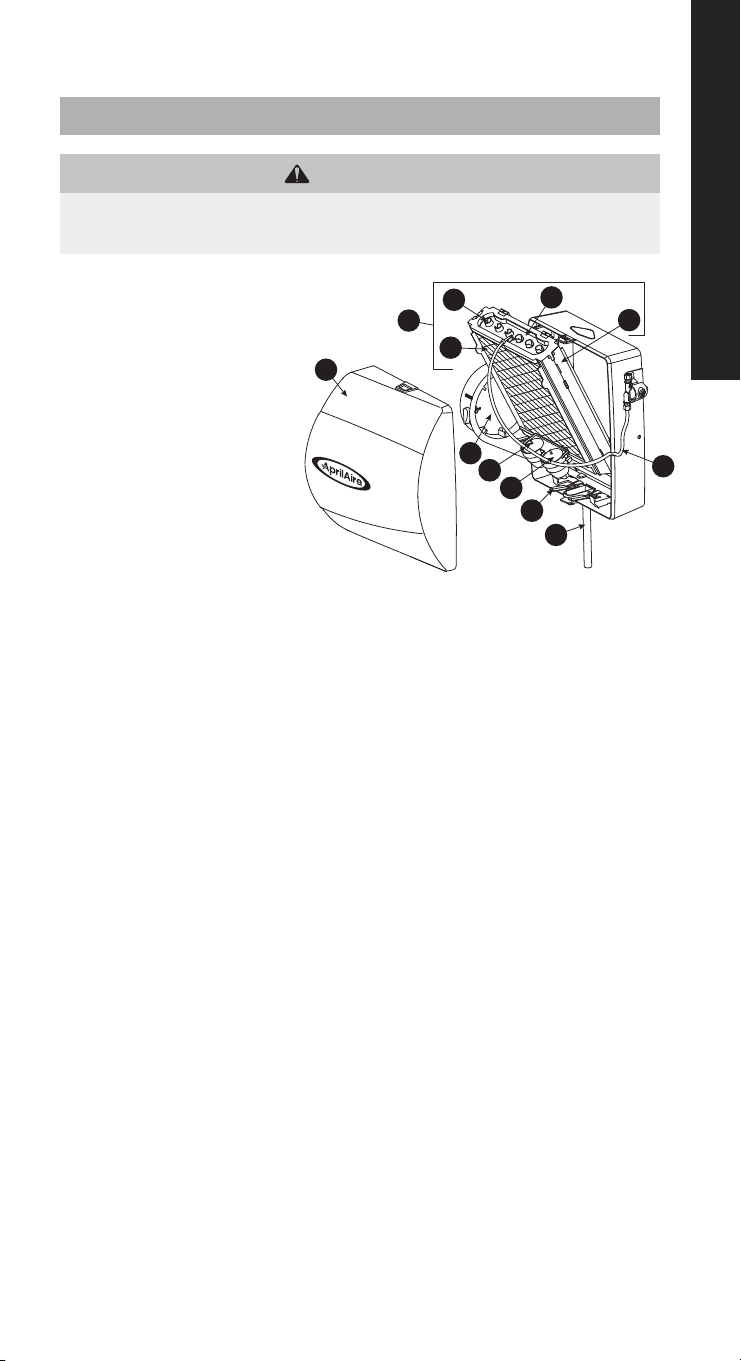
A. Front Cover
B. Feed Tube
C. Bypass Damper
D. Water Panel Evaporative
Assembly
E. Distribution Tray
F. “V” Notches
G. Water Panel 45
H. Scale Control Insert/Float
Chamber
I. Overow Drain Line
J. Float Cover
K. Float
L. Water Level Sensor Assembly
1. Note humidier control set point and turn dial to the OFF position.
2. Turn off water supply. Turn the bypass damper (C) to the SUMMER position.
3. Press the tabs in the latches on the top and bottom of front cover (A) and pull cover off
base with both hands.
4. Carefully pull the plastic feed tube (B) out of the distribution tray (E) at the top of the Water
Panel evaporative assembly (D). Tip the Water Panel evaporative assembly forward and
lift it out of the humidier. Do not tip the Water Panel evaporative assembly more than
needed to clear the housing to avoid over-bending the water level sensor assembly (L).
5. Unsnap the distribution tray (E) from the scale control insert (H). Lightly scrape out or
brush off any mineral deposits, being careful not to stretch or loosen the synthetic fabric
liner. Soaking the tray in vinegar or a lime-removing agent is helpful when trying to
remove stubborn mineral deposits.
6. Slide the used Water Panel (G) out of the scale control insert/oat chamber and dispose
of the Water Panel.
7. Remove the oat cover (J) and inspect the oats (K) and oat chamber for mineral build-
up. Remove deposits as needed from oats, oat chamber and scale control insert. Wash
the parts with a disinfecting cleaner. Reassemble the oats and oat cover. Make sure
stems of both oats extend through openings in oat cover and that oats move freely
up and down.
8. Inspect the plastic feed tube (B) by gently exing it and looking for cracks or signs of wear.
Replace tube if it is cracked, brittle, or has been damaged.
9. Slide a new genuine AprilAire Water Panel 45 (G) into the scale control insert/oat
chamber (H). Snap the distribution tray (E) back on the scale control insert (H).
10. Reinstall the Water Panel evaporative assembly (D) into the humidier. Take care not to
over-bend the water level sensor assembly. Push the top of the Water Panel evaporative
assembly rmly back until it snaps into place.
11. Push the end of the feed tube back rmly into the distribution tray. Replace the front cover.
12. Under normal operation the overow drain line (I) will never have water in it. However,
inspect it for mineral deposits and replace if necessary. Make sure the drain line has a
constant downward slope and is not attened or blocked.
13. Turn on the water supply. Return bypass damper to appropriate position.
14. Check system operation:
Manual Humidier Control (Model 400M): With the HVAC system fan operating, turn up
humidier control and check system operation.
Automatic Digital Humidier Control (Model 400): (Automatic or Manual mode) Check
system operation and reset Change Water Panel indicator by setting the knob to Test/
Reset. With HVAC system fan operating and thermostat calling for heat, humidier will
operate for one minute. DO NOT LEAVE IN TEST MODE AS HUMIDIFIER WILL NOT OPERATE.
15. Set humidier control dial to its original set point.
90-1077
MODEL 400 SERIES
REQUIRED MAINTENANCE INSTRUCTIONS
APRILAIRE HUMIDIFIER MODELS 400 & 400M
CAUTION
SUDDEN OPERATION MAY CAUSE PERSONAL INJURY OR PROPERTY DAMAGE.
Turn the humidier control to OFF or lowest setting before servicing.
17
H
B
I
C
A
D
E
F
G
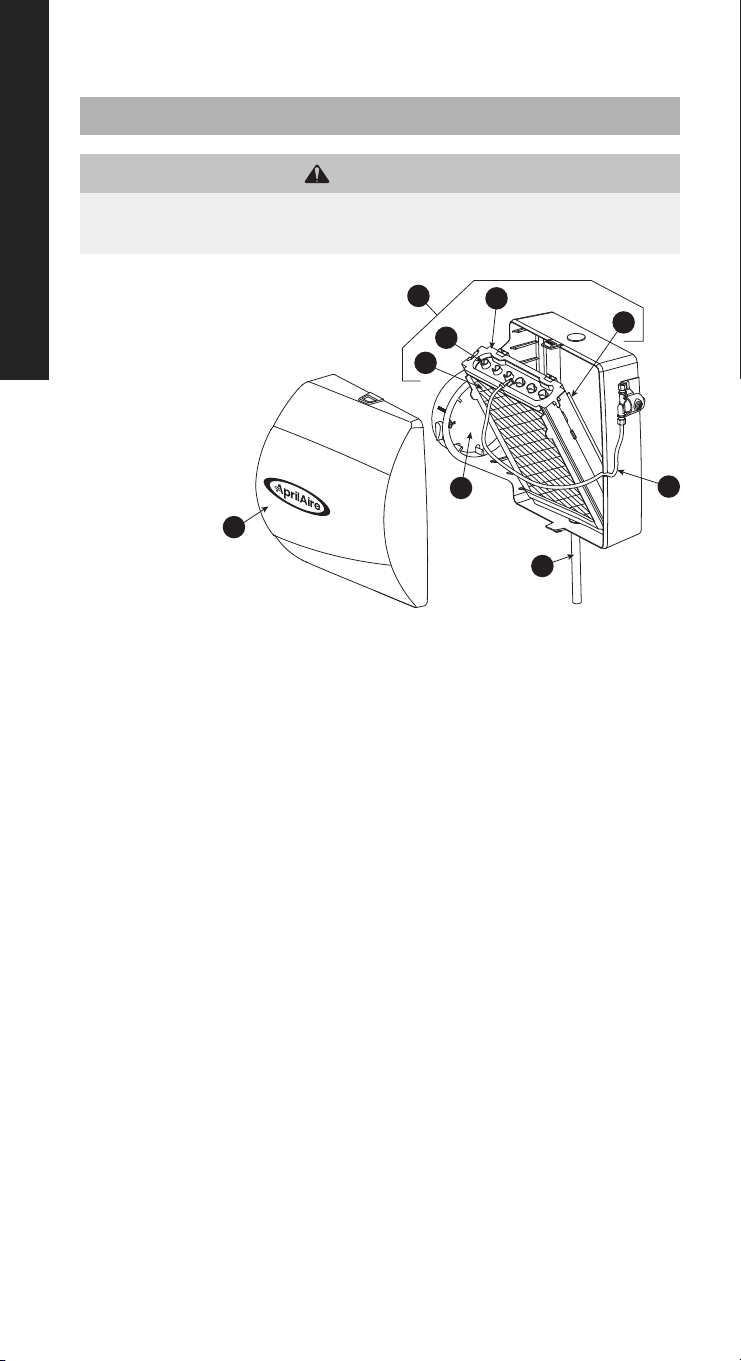
1. Note humidier control set point and turn dial to the OFF position.
2. Turn off water supply. Turn the bypass damper (C) to the SUMMER position.
3. Press the tabs in the latches on the top and bottom of front cover (A) and pull cover
off base with both hands. Set aside.
4. Carefully pull the plastic feed tube (B) out of the distribution tray (E) at the top of the
Water Panel evaporative assembly (D). Pull this assembly out by grasping at top and
tipping out.
5. Unsnap the distribution tray (E) from the scale control insert (H). Lightly scrape out or
brush off any mineral deposits, being careful not to stretch or loosen the synthetic
fabric liner. Soaking the tray in vinegar or a lime-removing agent is helpful when
trying to remove stubborn mineral deposits.
6. Slide the Water Panel (G) out from the scale control insert (H) and dispose of the
Water Panel. Clean the scale control insert of mineral deposits. Replace the Water
Panel (Water Panel 35 for Models 600 & 600M and Water Panel 10 for Models 500 &
500M) with a new genuine AprilAire Water Panel. Slide the Water Panel back into the
scale control insert with the colored spot up and snap the distribution tray (E) back
into place.
7. Inspect the plastic feed tube (B) by gently exing it and looking for cracks or signs of
wear. Replace tube if it is cracked, brittle, or has been damaged.
8. Reinstall the Water Panel evaporative assembly (D) into the humidier by tting its
drain into the round receptacle at the base of the humidier. Push the assembly in
at the top until it snaps into place. Push the end of the feed tube back rmly into the
distribution tray and replace the front cover.
9. Remove the drain line (I) from the bottom of the humidier. If applicable, ex it to
loosen any mineral deposits or blockage. Then ush it with water under pressure. If it
does not properly clear, replace it. Slip drain line back onto the drain tting. Make sure
the drain line has a constant downward slope and is not attened or blocked.
10. Turn on the water supply. Return bypass damper to appropriate position.
11. Check system operation:
Manual Humidier Control (Models 500M & 600M): With the HVAC system fan
operating, turn up humidier control and check system operation.
Digital Humidier Control (Models 500 & 600): (Automatic or Manual mode) Check
system operation and reset Change Water Panel indicator by setting the knob
to Test/Reset. With HVAC system fan operating and thermostat calling for heat,
humidier will operate for one minute. DO NOT LEAVE IN TEST MODE AS HUMIDIFIER WILL
NOT OPERATE.
12. Set humidier control dial to its original set point.
A. Front Cover
B. Feed Tube
C. Bypass Damper
D. Water Panel Evaporative
Assembly
E. Distribution Tray
F. “V” Notches
G. Water Panel
H. Scale Control
Insert
I. Drain Line
REQUIRED MAINTENANCE INSTRUCTIONS
APRILAIRE HUMIDIFIER MODELS 500, 500M, 600 & 600M
CAUTION
SUDDEN OPERATION MAY CAUSE PERSONAL INJURY OR PROPERTY DAMAGE.
Turn the humidier control to OFF or lowest setting before servicing.
90-1076
MODEL 500 & 600 SERIES
18
C
D
E
B
H
I
A
G
F
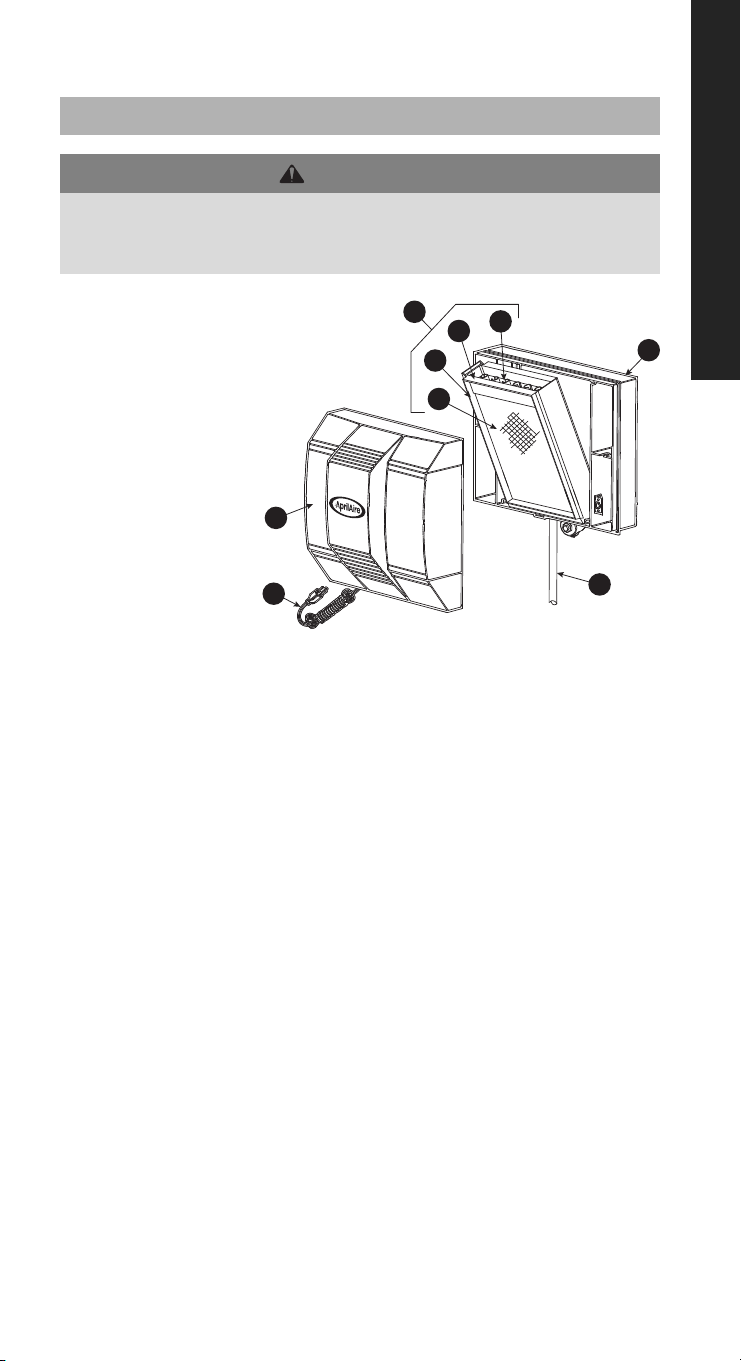
A. Humidier Cover Assembly
B. Base Assembly
C. Water Panel Evaporative Assembly
D. Distribution Tray
E. “V” Notches
F. Water Panel 35
G. Scale Control Insert
H. Drain Line
I. Power Cord
1. Note humidier control set point and turn dial to the OFF position.
2. Disconnect electrical power and turn off water supply.
3. Unlatch humidier front cover assembly (A) from base assembly (B) at the bottom of
the cover, lift, and set aside.
4. Pull out the Water Panel evaporative assembly (C) by grasping at the top and tipping out.
5. Unsnap the distribution tray (D) from the scale control insert (G). Lightly scrape out or
brush off any mineral deposits, being careful not to stretch or loosen the synthetic fabric
liner. Soaking the tray in vinegar or a lime-removing agent is helpful when trying to
remove stubborn mineral deposits.
6. Slide the Water Panel (F) out from the scale control insert (G) and dispose of the Water
Panel. Clean the scale control insert of mineral deposits. Replace with a genuine
AprilAire Water Panel 35. Slide the Water Panel back into the scale control insert with the
colored spot up and snap the distribution tray (D) back into place.
7. Inspect the plastic feed tube by gently exing it and looking for cracks or signs of wear.
Replace tube if it is cracked, brittle, or has been damaged.
8. Reinstall the Water Panel evaporative assembly (C) into the humidier by tting its drain
into the round receptacle at the base of the humidier. Push the assembly in at the top
between the retaining ribs that hold the assembly in place in a vertical position.
9. Remove the drain line (H) from the bottom of the humidier. If applicable, ex it to loosen
any mineral deposits or blockage. Then ush it with water under pressure. If it does not
clear, replace it. Slip drain line back onto the drain tting. Make sure the drain line has a
constant downward slope and is not attened or blocked.
10. Reinstall front cover assembly (A) by hooking at the top of the base assembly (B) and
latching at the bottom.
11. Reconnect electrical power (I) and turn on the water supply.
12. Check system operation:
Manual Humidier Control (Model 700M): With the HVAC system fan operating, turn up
humidier control and check system operation.
Digital Humidier Control (Model 700): (Automatic or Manual mode) Check system
operation and reset Change Water Panel indicator by setting the knob to Test/Reset.
With HVAC system fan operating and thermostat calling for heat, humidier will operate
for one minute. DO NOT LEAVE IN TEST MODE AS HUMIDIFIER WILL NOT OPERATE.
13. Set humidier control dial to its original set point.
NOTE: The motor is permanently lubricated and does not need to be oiled.
REQUIRED MAINTENANCE INSTRUCTIONS
APRILAIRE HUMIDIFIER MODELS 700 & 700M
WARNING
ELECTRIC SHOCK HAZARD: 120 volts may cause serious injury from
electric shock. Disconnect electrical power and water before servicing.
Leave power and water disconnected until service is completed.
90-1075
MODEL 700 SERIES
19

LIMITED WARRANTY
Terms of Coverage
Your AprilAire® Humidier is expressly warranted to be free from defects in materials or workmanship
for ve (5) years from date of purchase.
What Is Covered
The exclusive obligation of AprilAire under this Limited Warranty shall be, at the sole discretion of
AprilAire, to supply, without charge, a replacement for any component or product which is found
to be defective. A defective part will be replaced pursuant to this Limited Warranty with a genuine
AprilAire part. A defective product will be replaced pursuant to this Limited Warranty with a new
AprilAire product of equal or similar features and functionality if the original product has been
discontinued or is no longer available.
Not Covered by the Limited Warranty
• Consumable or maintenance products, such as, but not limited to: Air Filters, Evaporative Humidier
Water Panels, Steam Canisters, or Steam Humidier Electrode Wires.
• Labor charges, shipping costs, removal fees, service fees, or reinstallation costs.
• Damage caused by misuse, abuse, or improper installation due to failing to install the product
in accordance with the instructions provided.
• Damage to HVAC equipment caused by improper installation(s) or misapplication installation(s).
• Modications, changes, repurposing, or alterations to the AprilAire product.
• Extended warranties or satisfaction guarantees offered by third parties.
• Cosmetic damage or normal wear and tear, including, but not limited to: scratches, peeling nish,
or dents that do not impede the mechanical functionality of the product.
• Damage caused by acts of nature, including but not limited to: re, collision, ood, wind, power
surge, lighting strike, or mold.
• Damage caused during transit.
• Damage caused during installation due to failure to follow local, state, or federal laws, statutes,
codes, or ordinances.
• Defects in materials furnished by the installer.
Limit of Liability
IMPLIED WARRANTIES OF MERCHANTABILITY OR FITNESS FOR A PARTICULAR PURPOSE SHALL BE LIMITED IN
DURATION TO THE AFOREMENTIONED EXPRESS WARRANTY PERIOD. APRILAIRE LIABILITY FOR INCIDENTAL
OR CONSEQUENTIAL DAMAGES, OTHER THAN DAMAGES FOR PERSONAL INJURIES, RESULTING FROM
ANY BREACH OF THE AFOREMENTIONED IMPLIED WARRANTIES OR THE ABOVE LIMITED WARRANTY IS
EXPRESSLY EXCLUDED. THIS LIMITED WARRANTY IS VOID IF DEFECT(S) RESULT(S) FROM FAILURE TO INSTALL
THE PRODUCT ACCORDING TO THE APRILAIRE INSTALLATION INSTRUCTIONS. IF THE LIMITED WARRANTY
IS VOID DUE TO MISAPPLICATION OR IMPROPER INSTALLATION, ALL DISCLAIMERS OF IMPLIED WARRANTIES
SHALL BE EFFECTIVE UPON INSTALLATION.
Some states do not allow limitations on how long an implied warranty lasts or the exclusion or
limitation of incidental or consequential damages, so the above limitation(s) may not apply to
your situation. This Limited Warranty gives you specic legal rights, and you may also have other
rights which vary from state to state.
Register Your AprilAire® Product
Thank you for choosing AprilAire. Register your product at aprilaire.com/warranty
to receive important updates and notications, and to streamline the process in
the unlikely event you le a claim.
Your warranty registration information will not be sold or shared outside of this
company.
Make a Warranty Claim
For questions regarding the Limited Warranty or to initiate a claim, contact AprilAire Customer
Service at 1.800.334.6011 Monday through Friday, 7:00 a.m. – 5:00 p.m. Central Time.
At the sole discretion of AprilAire, you may be required to: return the product not later than thirty
(30) days after the warranty period to the place of purchase or (if directed) to AprilAire, contact
a professional contractor to provide warranty service, submit a product for testing related to a
warranty claim, and/or send pictures of the original product with the serial number (if applicable)
to AprilAire Technical Support for inspection as a condition to reviewing a claim and/or receiving
a replacement product under this Limited Warranty.
AprilAire® is a registered trademark and division of Research Products Corporation.
B2209190D • 10015434 • 09.23
© 2023 AprilAire | aprilaire.com | 800.334.6011
AprilAire reserves the right to change specications without notice.