1
USEPHOENIX.COM | 800-533-7533
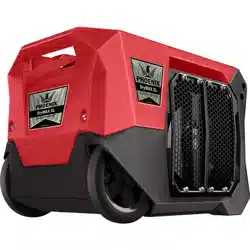
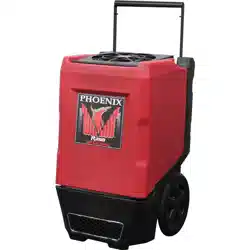
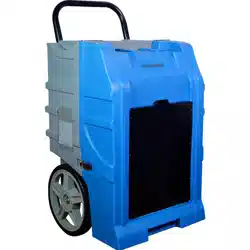
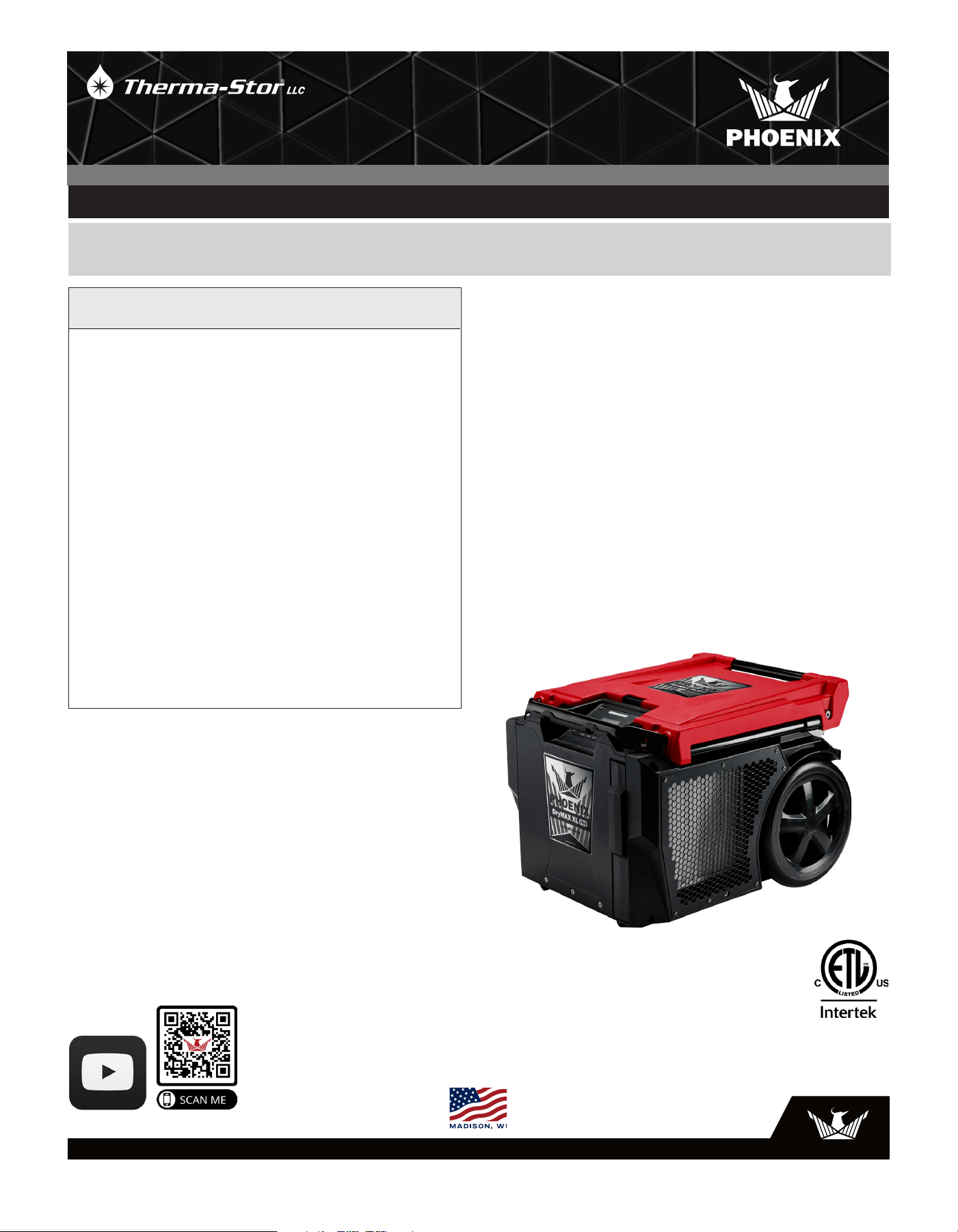
The Phoenix DryMAX XL PRO LGR Dehumidifier
• Two position handle with 12” wheels - great on stairs
• 140 PPD at AHAM (80F/60%RH)
• 7.4 Amps
• Extended handle dolly - Locks in with AirMAX and
Focus II
• Onboard USB to power DryPHONE for remote
monitoring
• Add two AA batteries for built-in connection to DryLINK
Asset Manager (no tag needed)
• Stacking and nesting for space savings
• Lockable cover to secure DryPhone
• Easily serviceable
• Patented five coil design
• Data log inlet and outlet temperature and relative
humidity using Bluetooth
• DryLINK Enabled
The Phoenix DryMAX XL Pro is the solution to the one
common issue with horizontal dehumidifiers: the difficulty of
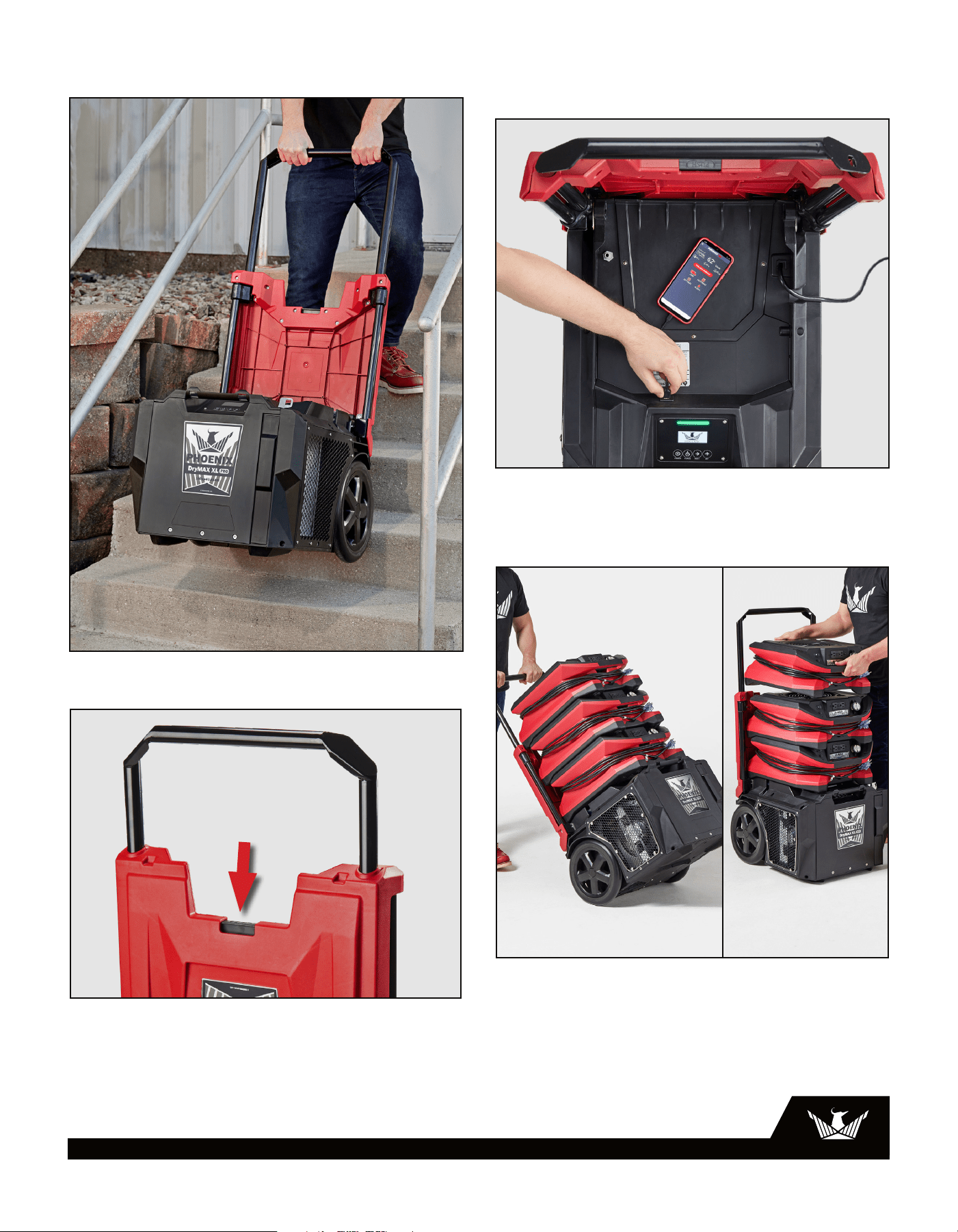
moving them up and down stairs. The unit features a unique
two-position handle that can be adjusted to a 42” position for
flat ground maneuvering, and a 50” position to make it even
easier to transport the unit up and down stairs than upright
dehumidifiers. Additionally, the handle can be used like a
dolly. Our AirMAX, AirMAX BLE, and Focus II air movers can be
securely transported with the DryMAX XL Pro as they interlock
with the top of the unit.
This dehumidifier is our most advanced model, equipped
with onboard USB power for our DryPHONE, enabling remote
monitoring. You can add two AA batteries to the display board
to establish a connection to the DryLINK Asset Manager,
even when the unit is unplugged. This eliminates the need to
purchase an asset tracking beacon. Moreover, it logs the inlet
and outlet temperature and relative humidity readings 96
times per day and can store 30 days’ worth of readings.
TS-2047
1/24 Rev. C
Phoenix DryMAX XL PRO
Part No. 4043000 (Red)
4043060 (Blue)
4043010 (Green)
Patent: thermastor.com/patents
Installation, Operation & Service Instructions
– READ AND SAVE THESE INSTRUCTIONS –
OWNER’S MANUAL
DRYMAX XL PRO | XL LGR DEHUMIDIFIER
4201 LIEN RD. • MADISON, WI 53704
Specifications subject to change without notice.
2
USEPHOENIX.COM | 800-533-7533
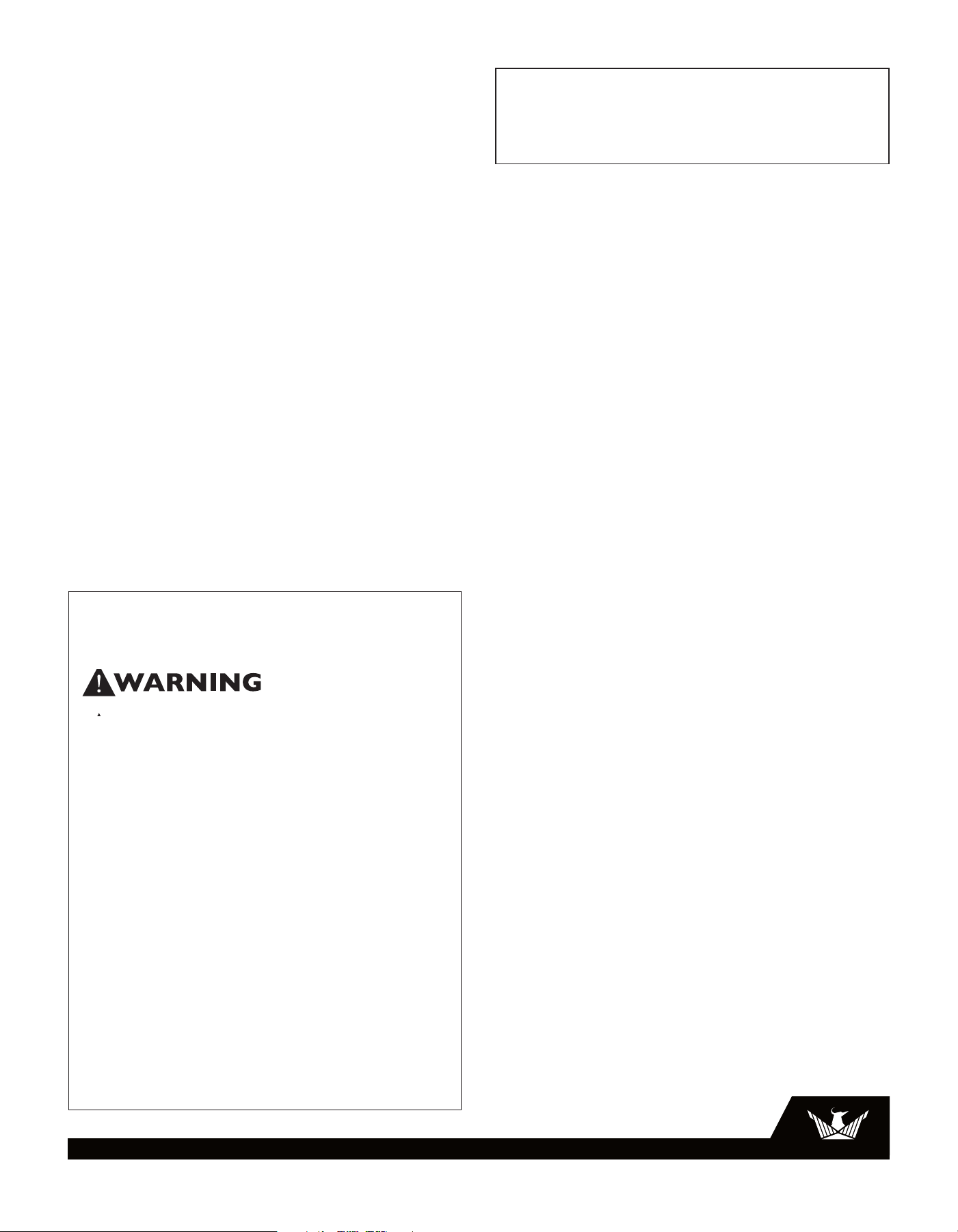
50” Handle Position for Stairs
Stack and dolly air movers
Onboard USB for
remote monitoring
‘Push’ button to extend handle
Photos in Use
3.1
3
USEPHOENIX.COM | 800-533-7533
Table of Contents
Introduction ...............................................................................1
Photos is Use ............................................................................. 2
1. Safety Certifications .........................................................3
2. Specifications ....................................................................3
3. Operation ............................................................................3
3.1 Transporting ................................................................3
3.2 Electrical Requirements ............................................. 4
3.3 Control Panel ..............................................................4
3.3.1-3.3.23 How to use ......................................... 4-8
3.4 Ducting .........................................................................8
4. Maintenance ......................................................................8
4.1 Air Filter .......................................................................8
4.2 Storage and Freeze Protection .................................8
5. Service ................................................................................8
5.1 Running Diagnostics .................................................. 8
5.1.1-5.1.7 Diagnostic Mode ...............................8-10
5.2 Technical Description ............................................. 10
5.3 Troubleshooting ................................................. 10-11
5.3.1-5.3.4 Troubleshooting .............................. 11-13
5.4 Batteries for Asset Manager .................................. 13
6. Options & Accessories .................................................. 13
7. Wiring Diagram ............................................................... 14
8. Service Parts ................................................................... 15
1 Safety Certifications
The Phoenix DryMAX XL Pro conforms to unified standard UL
60335-2-40.
2 Specifications
Part No. 4043000 (Red)
4043060 (Blue)
4043010 (Green)
Power 7.4 amps, 110-120 VAC, Grounded
Water 140 pints/day @ AHAM (80°F, 60% RH)
Removal
Blower 300 CFM
Refrigerant 1 lb, 5 oz. R-410A
Charge
Operating 33°F to 105°F
Range
Filters: 12” x 14” x 1” Pleated Media MERV-10
(Part #4038558)
Duct
Options Outlet – 1 x 14” Lay-Flat
Cord Length
25 ft
Warranty Five years;
1st year 100% of parts and labor
2nd-3rd year pump parts only
2nd-5th year refrigeration parts only
Dimensions
Unit Shipping
Width 20” 23”
Height 18” 20”
Depth 25.4” 29”
Weight 85 lbs 90 lb
Patent: thermastor.com/patents
3 Operation
Place dehumidifier inside structure, place condensate
hose into a drain, or a very large container, and turn on. To
decrease drying times, make sure all windows and doors
are closed to the outside and seal off the wet area from any
unaffected areas.
3.1 Transporting
The Phoenix DryMAX XL Pro features a high-impact
structural foam housing which protects the unit. It is
recommended the units are properly secured for transport.
The Phoenix DryMAX XL Pro must always be on its base
when transported by vehicle. To extend handle to the 42”
and 50” handle position, use the ‘push’ button (see photo
3.1 on page 2).
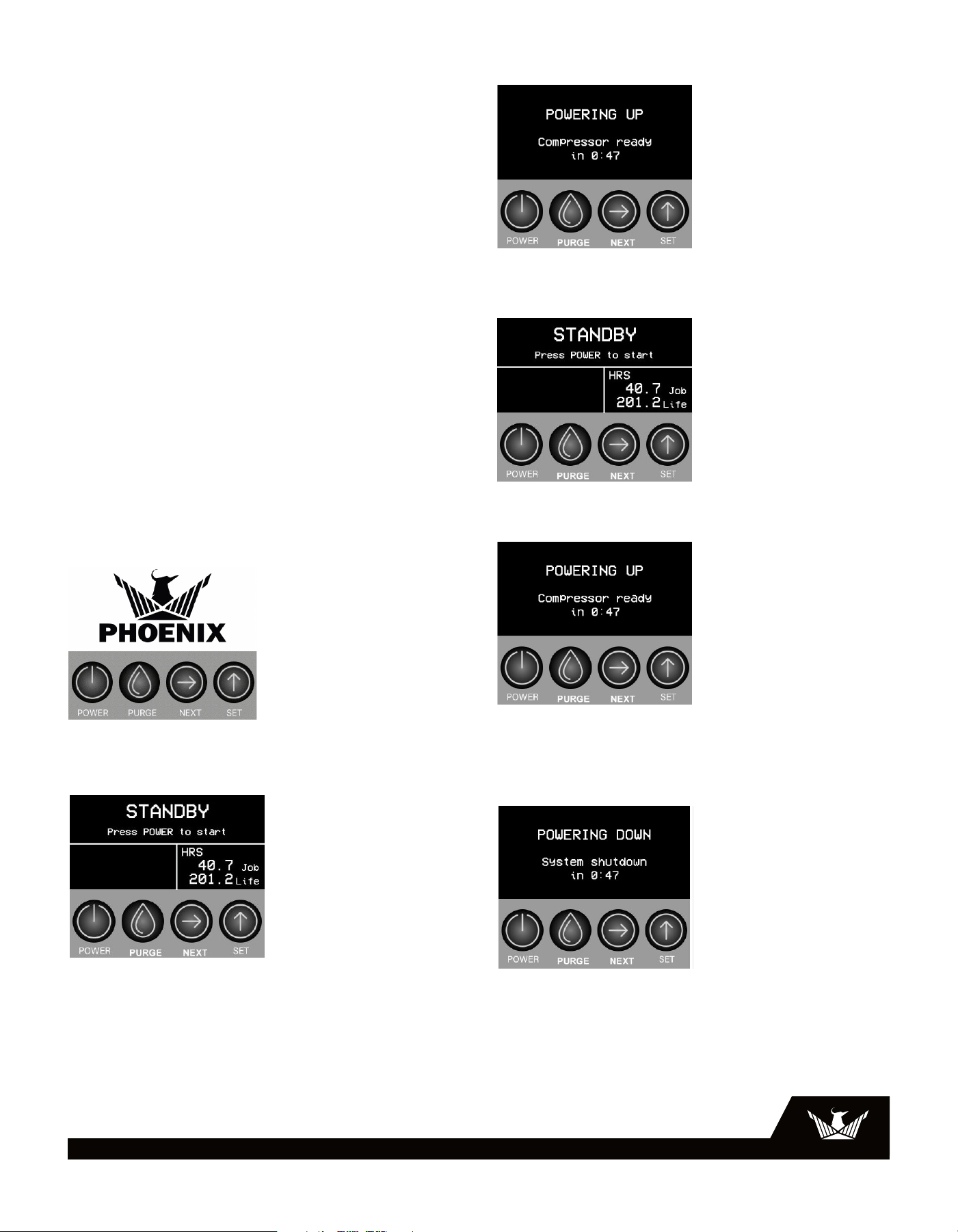
Read the operation and maintenance instructions
carefully before using this unit. Proper adherence to these
instructions is essential to obtain maximum benefit from
your Phoenix DryMAX XL Pro dehumidifier.
• This appliance is not intended for use in elevations over
2,000 m (6,562 ft.).
• It is designed to be used INDOORS ONLY.
• If used in a wet area, plug it into a GROUND FAULT
INTERRUPTER.
• DO NOT use the Phoenix DryMAX XL Pro as a bench or
table.
• It must always be used in the horizontal position.
• Never operate a unit with a damaged power cord. If
the power cord is damaged, it must be replaced by the
manufacturer, its service agent, or a similarly qualified
person in order to avoid a hazard.
• Do not unplug the unit by pulling on the cord. Grasp the
plug firmly and pull it out of the wall socket or power
receptacle.
• This appliance is not intended for use by persons
(including children) with reduced physical, sensory
or mental capabilities, or lack of experience and
knowledge, unless they have been given supervision or
instruction concerning use of the appliance by a person
responsible for their safety.
• The appliance shall be installed in accordance with
national wiring regulations.
• Please allow one foot of clearance for the inlet and outlet
of the unit.
4
USEPHOENIX.COM | 800-533-7533
3.2 Electrical Requirements
The Phoenix DryMAX XL Pro plugs into a common grounded
outlet on a 15 amp circuit. It draws 7.4 amps at 80°F, 60%
RH. If used in a wet area, a ground fault interrupter (GFI)
is required. If an extension cord is required, it must have a
minimum of 14 gauge conductors if 25 feet long or less and
12 gauge conductors if greater than 25 feet long.
3.3 Control Panel
When presented with Control Panel Selection Boxes in the
control panel the black box with the white lettering will be
the active selection.
Control Panel Key
Light Bar
Green Pulsing = The system is running correctly but the
compressor is off.
Green = The system is running normally and the
compressor is on.
Blue = The system is running normally but the unit is in
defrost.
Red = Unit error, press ‘NEXT’ for more info.
3.3.1 Startup
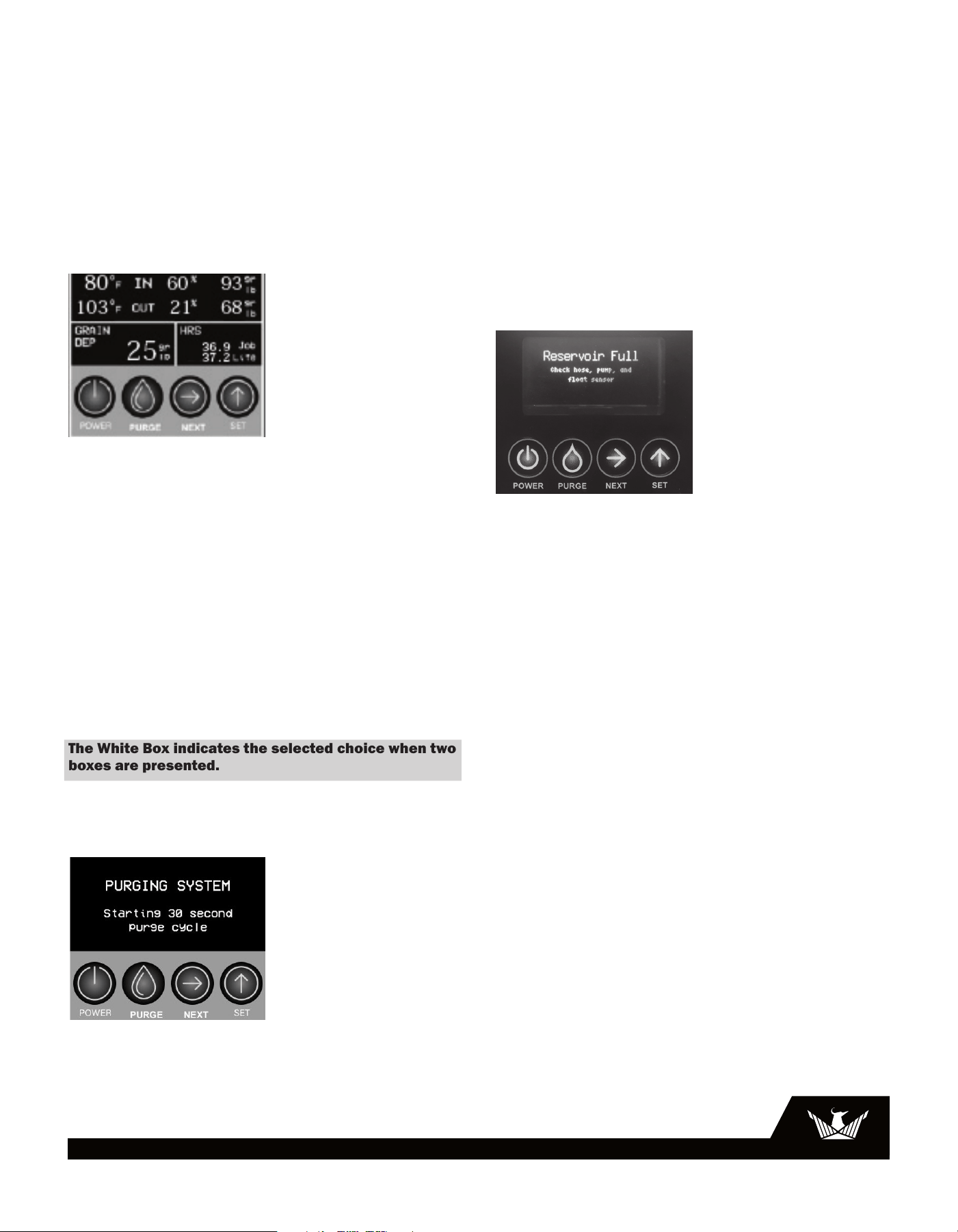
When the unit is plugged in you will see the Phoenix logo
followed by the Standby Screen
3.3.2 Plugged In - Standby Mode
When plugged in but without pushing the power button, the
display will communicate to the user that the machine is
in Standby mode and ready to be powered on. In Standby
Mode, the display will also show the current job and life
hours on the fourth line.
Light Bar = Off
The Powering Up screen allows the compressor time to
acclimate before starting up.
Light Bar = Green
3.3.3 Power Button
When the dehumidifier is plugged in it will enter stand-by
mode.
Press the button to turn the dehumidifier on. The unit will
begin the Powering Up sequence and you will see this
screen:
Press and hold the Power button to turn the dehumidifier
off. The dehumidifier will go through a powering-down cycle.
The default shut-down time is three minutes plus 20
seconds for a final purge. The shutdown time can be
changed be scrolling through the menu to this screen.
***IMPORTANT***
• Unplugging the unit without running the shutdown
sequence will allow water to remain in the unit after use.
• Tilting the unit more than 70 degrees on the handle side or
more than 20 degrees on the non-handle side may result in
water spillage.
• Tilting the unit without running the final purge may result in
water spillage.
5
USEPHOENIX.COM | 800-533-7533
3.3.4 PURGE Button
During normal operation the pump automatically cycles
when the reservoir is full.
Press the button to remove condensate manually from the
reservoir.
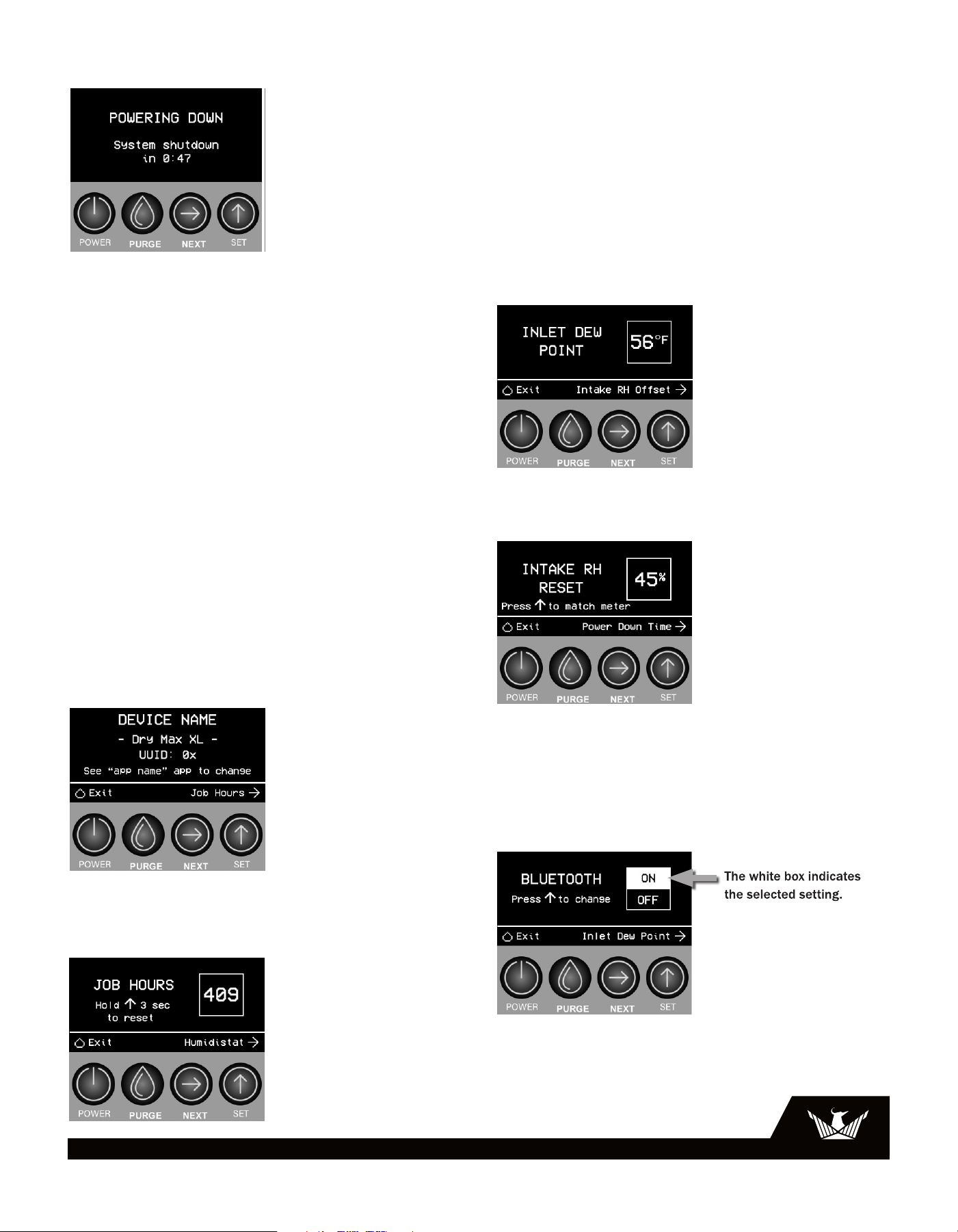
3.3.5 Dashboard
Dashboard while in Humidistat Mode
When the machine is dehumidifying the unit will display:
• Inlet = Temperature and RH/Grains
• Outlet = Temperature and RH/Grains
• Hours = Job hours and Life hours
• Grain Depression/Gram Depression =
Grains/Grams per pound value will automatically be
displayed with the RH SetPoint
Light Bar = On
Color = Green
3.3.6 Navigation
Press the NEXT key to advance to the next screen or to enter
a value
Press the SET key to scroll through available values.
The White Box indicates the selected choice when two
boxes are presented.
Press the Purge key to return to the dashboard
3.3.7 Purging
Press the PURGE button to purge the machine.
The display will communicate to the user that the machine
is purging on the fourth line of the dashboard and show a
20 second countdown timer. This will momentarily replace
grain depression until the machine has finished purging.
The display will also communicate to the user that the
machine is auto purging in the fourth line of the dashboard
and show a 20 second countdown timer.
3.3.8 Condensate Removal
The Phoenix DryMAX XL Pro is equipped with an internal
condensate pump to remove the water that is condensed
during dehumidification. This allows the condensate to be
pumped up to 20 feet with the attached hose. If the
condensate must be pumped more than 20 feet above the
unit, a second pump must be added to relay the condensate.
The condensate pump automatically purges when the
reservoir is full. Use the PURGE button to manually remove
condensation.
For help with the “Reservoir full: check float, pump, and
hose” error see section 5.3 Troubleshooting
3.3.9 Defrosting
The display will communicate to the user that the machine
is defrosting on the fourth line of the dashboard. This will
momentarily replace grain depression until the machine has
finished defrosting.
Light Bar = On
Color = Blue
3.3.10 Defrost Cycle
If the low side refrigerant temperature drops due to
excessive frost formation on the evaporator coil and below
the temperature set point, the thermistor activates the PLC
and Status Light Indicator. The compressor is cycled off and
on by the thermistor temperature measurement. The air
mover will continue to run, increase speed to normal, and
cause air to flow through the evaporator coil and melt the
ice when the compressor is off. When the air temperature
and/or humidity increases, the evaporator temperature
will rise and the thermistor will end the defrost cycle at the
temperature set point.
Color Blue = On
6
USEPHOENIX.COM | 800-533-7533
3.3.11 Shut Down Sequence/Power Down time
Press the Set button to adjust the Power Down Time in one
minute increments ranging from 3 – 20 minutes.
The Power Down Time allows the blower to run to remove
water from the coil and to allow the evaporator to acclimate
to the ambient conditions. At the end of the shutdown time
the unit will automatically purge to remove any remaining
water.
The proper shutdown is dependent on conditions. Increasing
your shutdown time will help ensure there is no residual
water in the unit.
***IMPORTANT***
• Unplugging the unit without running the shutdown
sequence will allow water to remain in the unit after use.
• Tilting the unit more than 70 degrees on the handle side or
more than 20 degrees on the non-handle side may result in
water spillage.
• Tilting the unit without running the final purge may result in
water spillage.
Scrolling Through the Menus
3.3.12 Device Name The following information is displayed
on this screen:
Device Name = You can change this on the DryLINK
App
UUID = The unique identifier for the Bluetooth Radio
3.3.13 Job Hours
Press and hold the key for three seconds to reset the job
hours from any screen.
The life hours are fixed and cumulative from the first use.
3.3.14 Quiet Mode
Press the Set button to enable Quiet Mode. In Quiet Mode
the CFM will be reduced to 225 which is 75% of the
maximum CFM. When power cycled the unit always defaults
to Quiet Mode OFF. *ATTENTION*: Reduced air flow could
cause the unit to enter defrost.
3.3.15 Inlet Dew Point
The screen displays the ambient dew point.
3.3.16 RH Calibration
The Intake RH Reset allows you to calibrate the DryMAX to
match your favorite meter. Use the Set Key to increase the
reading on the screen with your meter.
Push the Set and Next keys at the same time to lower the
number on the Intake RH Reset.
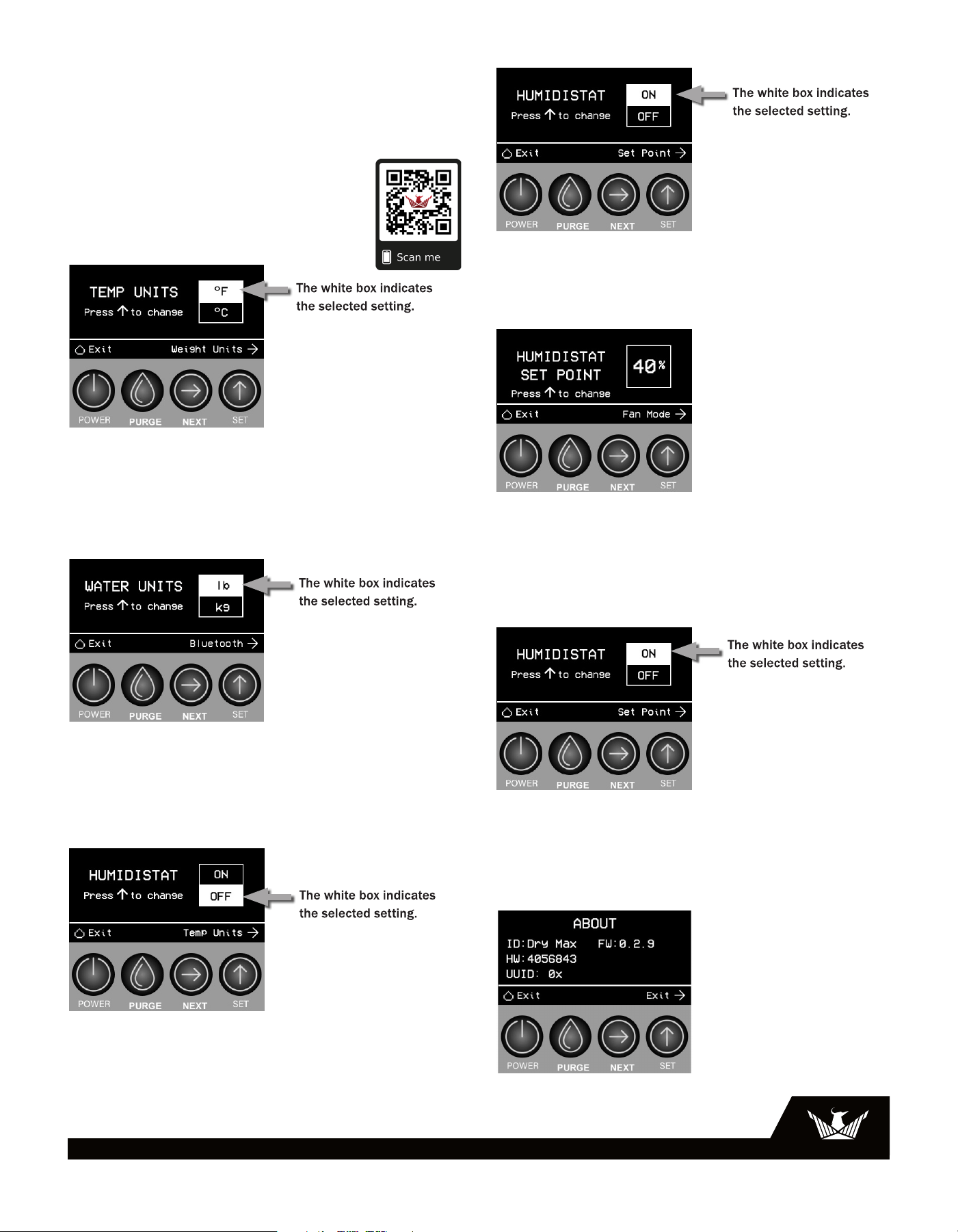
3.3.17 Bluetooth
7
USEPHOENIX.COM | 800-533-7533
The Bluetooth functionality comes from the factory set to
“On”. In the on position the DryMAX XL Pro is capable of
transmitting data and receiving commands using the
Phoenix DryLINK app or other compatible apps.
For further information see the DryLINK Quick Start Guide or
use the QR code to go to our website.
QR Code to take you to the DryLINK web page.
3.3.18 Temperature Units
Press the Set button to toggle the temperature units
between F° and C°
Press the Next button to confirm selection and advance to
the next screen.
3.3.19 Water Units
Press the Set button to toggle the humidity units between
RH, grains, and g/Kg. This will affect the readout on the
right of the home screen on lines one and two which show
the inlet and outlet conditions.
3.3.20 Humidistat Mode
The default mode is Humidistat “Off”
Press the Set button to toggle the Humidistat Mode On/Off.
Press the Next button to advance to the next screen. If
Humidistat mode is enabled, then proceed to Humidistat Set
point. Else, proceed to Humidity Units.
3.3.21 Humidistat Set Point
Press the Set button to adjust the set point RH% in 5%
increments ranging from 20% RH to 80% RH and then
looping back to 20% RH.
Press the Next button to confirm selection and advance to
the next screen.
3.3.22 Humidistat Fan Mode
Press the Set button to toggle the Humidistat Fan mode
from Always On to Auto.
Press the Next button to confirm selection and advance to
the next screen.
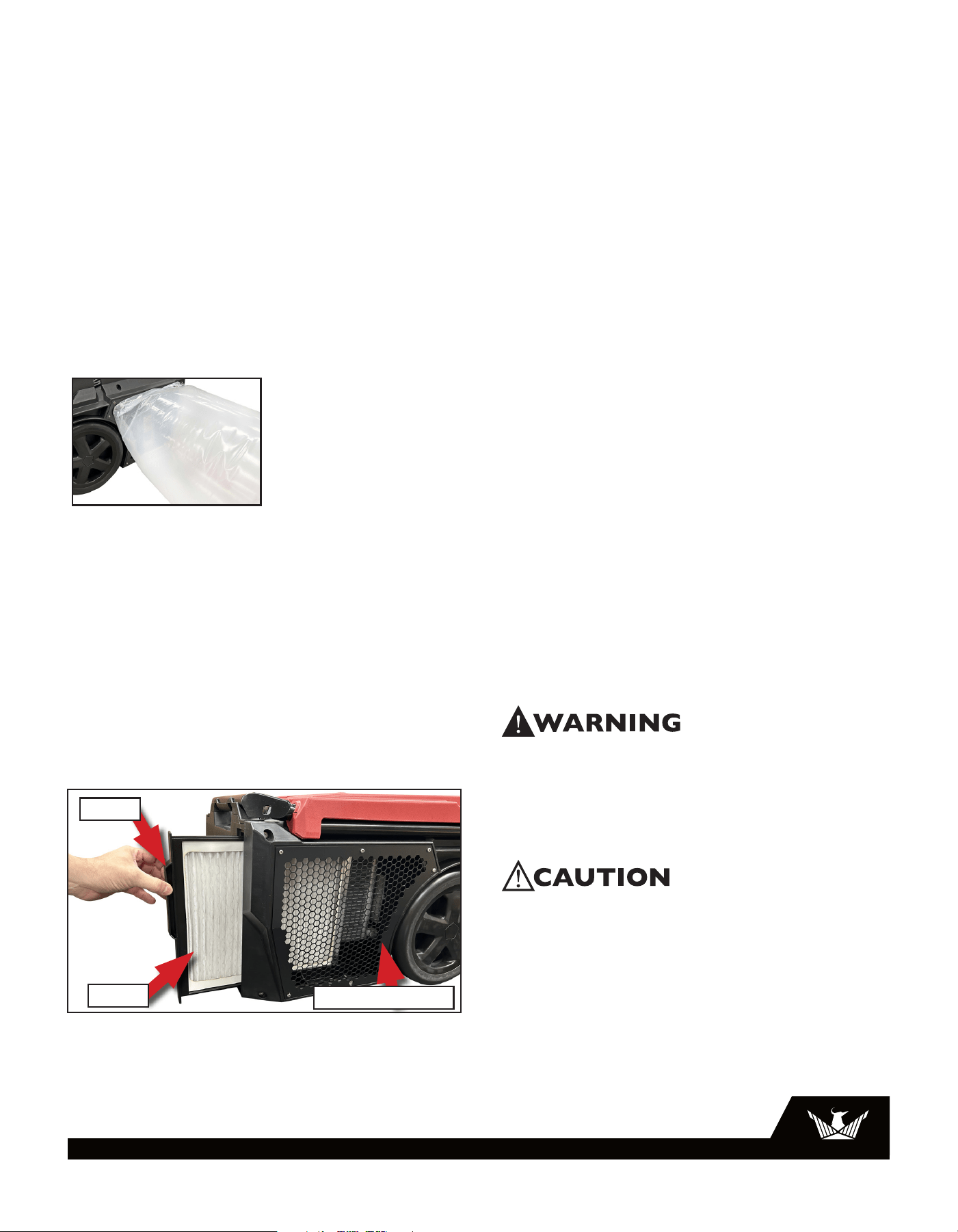
3.3.23 About
8
USEPHOENIX.COM | 800-533-7533
The about screen provides the following information:
VIHW: Part Number for the Display Board
VIFW: Firmware Version on the Display Board
PWHW: Part Number for the Power Board
PWFW: Firmware Version on the Power Board
UUID: The unique identifier for the Bluetooth Radio
3.4 Ducting
Wire duct collars are supplied to allow one 14” lay-flat duct
to be attached to the Phoenix DryMAX XL Pro outlet. Lay-flat
plastic ducting is available; see section 6 Options and
Accessories. To attach ducting to the wire duct collar, put the
plastic duct end through the collar center and roll the duct
end outward so that it overlaps the outside of the collar. The
duct and collar may then be quickly attached to the Phoenix
DryMAX XL Pro by snapping the collar over the exhaust tabs.
4 Maintenance
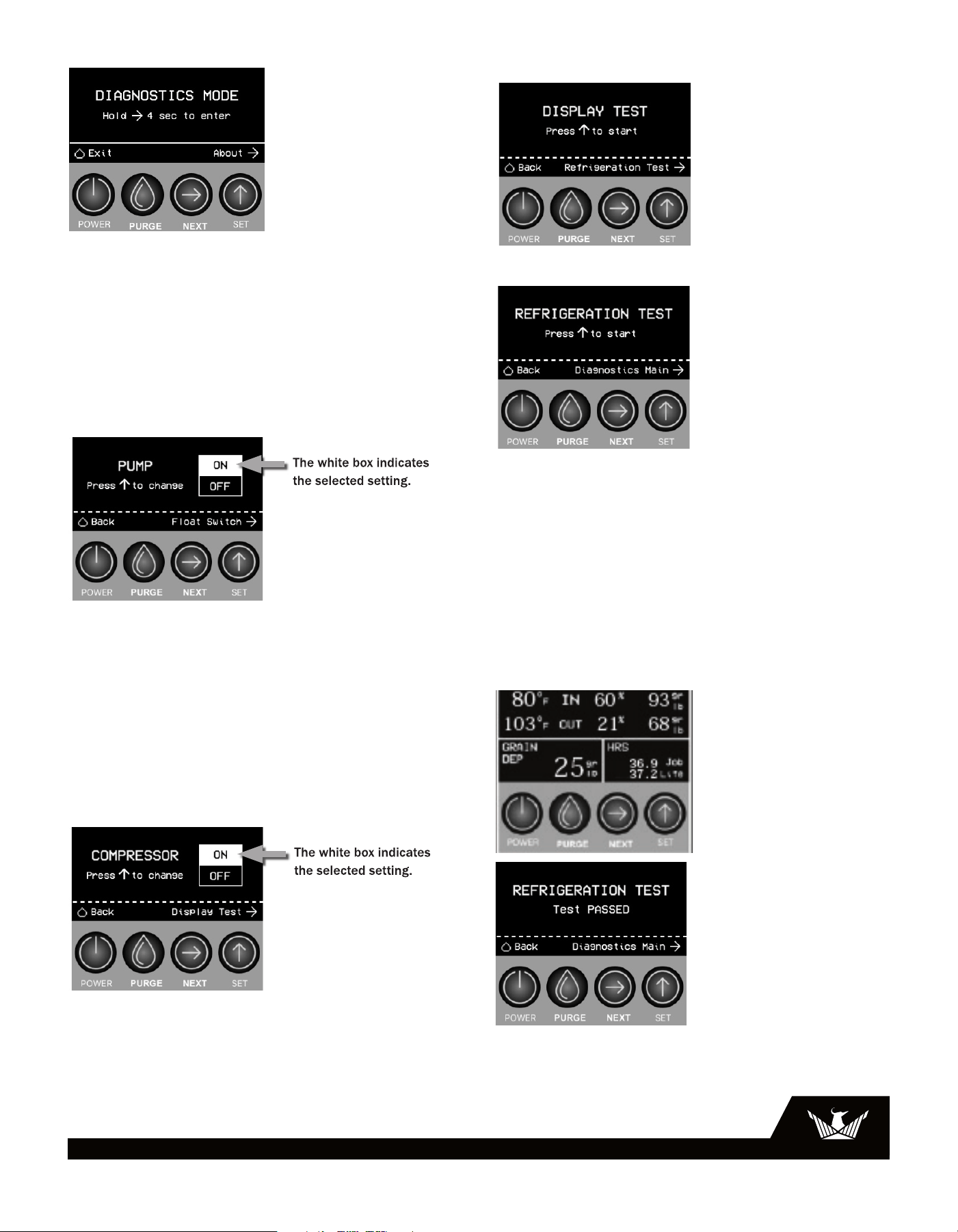
4.1 Air Filter
The Phoenix DryMAX XL Pro
is equipped with a pleated
media air filter that must be checked regularly. The standard
filter is a MERV-10 high efficiency filter. Operating the unit
with a dirty filter will reduce the dehumidifier’s capacity and
efficiency and may cause the compressor to cycle off and on
unnecessarily. The filter can generally be vacuumed clean
several times before needing replacement. Replacement
filters can be ordered from the manufacturer or purchased
locally if available IMPORTANT: DO NOT operate the unit
without the filter or with a less effective filter as the coils
inside the unit could become clogged and require
disassembly to clean.
1. Slide the filter holder out using the handle
2. It is not necessary to completely remove the filter holder
to change the filter
3. Carefully replace the filter in the air flow direction
4. Slide the filter holder back into position
Filter
4.2 Storage and Freeze Protection
There are two issues to consider when the Phoenix DryMAX
XL Pro is stored between uses and both pertain to water
trapped in the unit. The first is biological growth and the
second is damage caused by freezing. The effects of the
trapped water can be greatly reduced if precautions are
taken to remove as much as possible before storage.
1. Use the pump PURGE button to reduce the water level in
the reservoir.
2. Stretch the hose flat to drain it completely. Raise one
end above your head and spool hose while draining
water out the other end.
3. To reduce biological growth flush the unit with a
bio-fungicide that is approved for use with copper,
aluminum and polyethylene. To flush:
a. Run the hose to a drain.
b. Plug in the unit but do not turn it on.
c. Remove the air filter. Slowly pour a quart of the
antimicrobial through the heat exchanger
d. Hold in the pump purge switch to reduce the water
level in the reservoir.
e. Flush with water.
4. If the unit will be exposed to freezing temperatures,
after purging, take off the upper housing and pour 1 cup
(8oz) of a propylene glycol based anti-freeze through
the heat exchanger. It will flow down into the pump
reservoir. Do NOT purge the solution out of the unit.
5. Dirty filters should be changed prior to long term
storage to prevent biological growth on the filter.
5 Service
WARNING: Servicing the Phoenix DryMAX XL Pro with its
high pressure refrigerant system and high voltage circuitry
presents a health hazard which could result in death, serious
bodily injury, and/or property damage. Only qualified service
people should service this unit.
CAUTION: Do not operate unit without the top cover in place.
5.1 Running Diagnostics
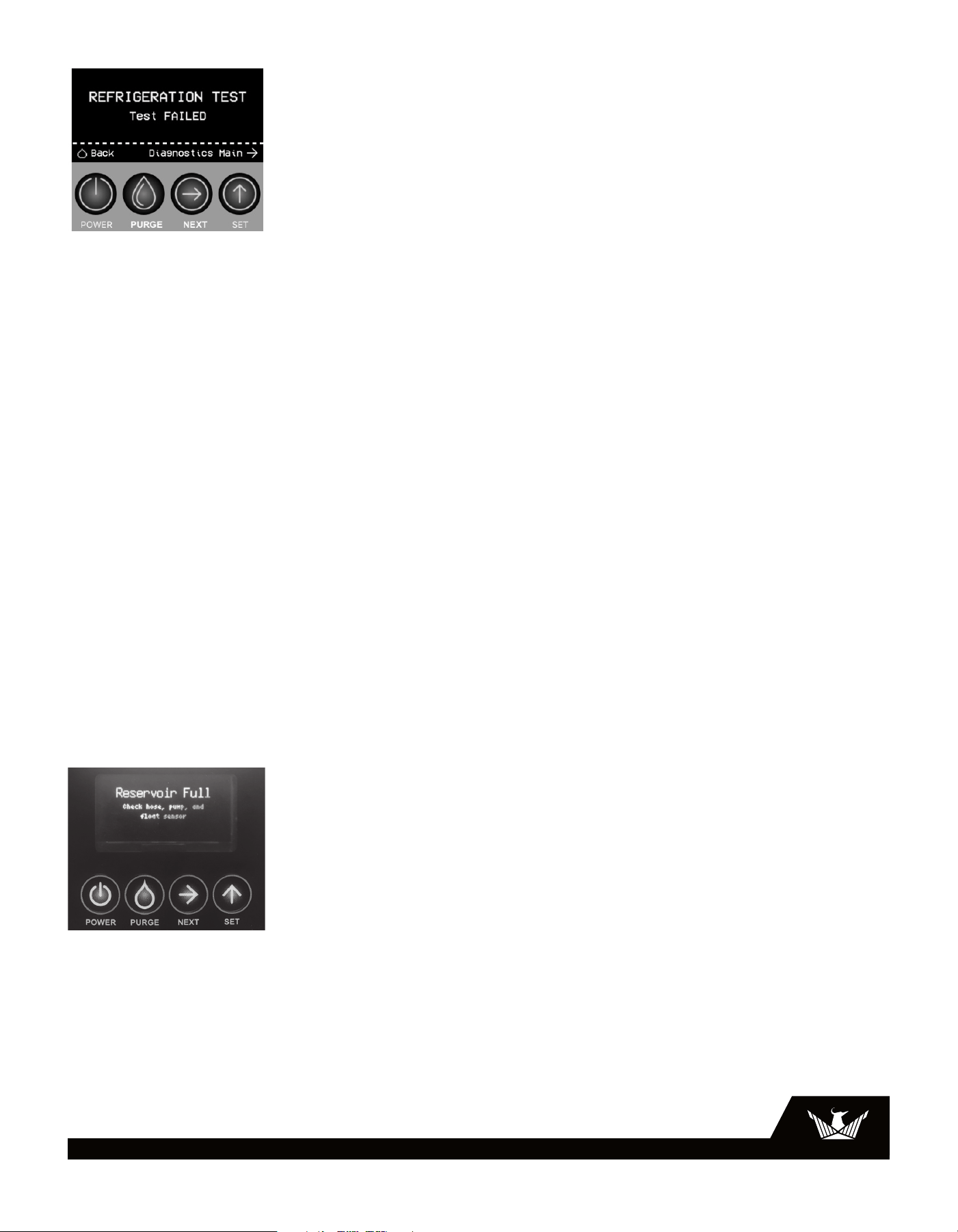
5.1.1 Diagnostic Mode
Contact Phoenix Tech Support for help with
Diagnostic Mode - 800.533.7533.Diagnostics mode is
used by our technical support team to help diagnose
problems
Handle
Air flow direction
9
USEPHOENIX.COM | 800-533-7533
4.2 Storage and Freeze Protection
There are two issues to consider when the Phoenix DryMAX
XL Pro is stored between uses and both pertain to water
trapped in the unit. The first is biological growth and the
second is damage caused by freezing. The effects of the
trapped water can be greatly reduced if precautions are
taken to remove as much as possible before storage.
1. Use the pump PURGE button to reduce the water level in
the reservoir.
2. Stretch the hose flat to drain it completely. Raise one
end above your head and spool hose while draining
water out the other end.
3. To reduce biological growth flush the unit with a
bio-fungicide that is approved for use with copper,
aluminum and polyethylene. To flush:
a. Run the hose to a drain.
b. Plug in the unit but do not turn it on.
c. Remove the air filter. Slowly pour a quart of the
antimicrobial through the heat exchanger
d. Hold in the pump purge switch to reduce the water
level in the reservoir.
e. Flush with water.
4. If the unit will be exposed to freezing temperatures,
after purging, take off the upper housing and pour 1 cup
(8oz) of a propylene glycol based anti-freeze through
the heat exchanger. It will flow down into the pump
reservoir. Do NOT purge the solution out of the unit.
5. Dirty filters should be changed prior to long term
storage to prevent biological growth on the filter.
5 Service
WARNING: Servicing the Phoenix DryMAX XL Pro with its
high pressure refrigerant system and high voltage circuitry
presents a health hazard which could result in death, serious
bodily injury, and/or property damage. Only qualified service
people should service this unit.
CAUTION: Do not operate unit without the top cover in place.
5.1 Running Diagnostics
5.1.1 Diagnostic Mode
Contact Phoenix Tech Support for help with
Diagnostic Mode - 800.533.7533.Diagnostics mode is
used by our technical support team to help diagnose
problems
Press the Next button for 3 seconds to enter Diagnostic
Mode. This action can also be performed at any time while
the machine is powered on.
If Alerts are active, press the Next button to advance to the
next screen. Otherwise, press the Next button again to return
to the Dashboard.
5.1.2 Diagnostic Mode - Pump
Press the Set button to toggle the Pump On/Off.
Press the Next button to advance to the next screen.
5.1.3 Diagnostic Mode - Float Switch
This display will communicate to the user the current status
of the Float Switch.
Press the Next button to advance to the next screen.
The float switch will be “Up” or “Down”.
5.1.4 Diagnostic Mode - Fan
Press the Set button to toggle the Fan On/Off.
Press the Next button to advance to the next screen.
5.1.5 Diagnostic Mode - Compressor
Press the Set button to toggle the Compressor On/Off.
Press the Next button to advance to the next screen.
5.1.6 Diagnostic Mode - Display Test
Press the Set button to start the Display test.
5.1.7 Diagnostic Mode - Refrig. Test
The display will communicate to the user the following
information during a Refrigeration Test:
Inlet = Temperature and RH/Grains
Outlet = Temperature and RH/ Grains
Hours = Life hours only.
Evaporator Coil = Temperature
Countdown timer = 20 minutes
Once the 20 minute countdown timer has expired, the
display will automatically advance to show the refrigeration
test results. The display will communicate to the user either
“Refrig. test passed” or “Refrig. test failed”.
10
USEPHOENIX.COM | 800-533-7533
Press the Next button to return to the first diagnostic test or
press and hold the Next button for 3 seconds to return to the
Dashboard.
5.2 Technical Description
The Phoenix DryMAX XL Pro uses a refrigeration system
similar to an air conditioner’s to remove moisture from
incoming air and to add heat to the air that is discharged.
Hot, high pressure refrigerant gas is routed from the
compressor to the condenser coil. The refrigerant is cooled
and condensed by giving up its heat to the air that is about
to be discharged from the unit. The refrigerant liquid then
passes through a filter/drier and capillary tubing which
cause the refrigerant pressure and temperature to drop. It
next enters the evaporator coil where it absorbs heat from
the incoming air and evaporates. The evaporator operates
in a flooded condition, which means that all the evaporator
tubes contain liquid refrigerant during normal operation. A
flooded evaporator should maintain constant pressure and
temperature across the entire coil, from inlet to outlet. The
mixture of gas and liquid refrigerant enter the compressor
after leaving the evaporator coil. The compressor evacuates
the cool refrigerant gas from the accumulator and
compresses it to a high pressure and temperature to repeat
the process.
5.3 Troubleshooting
Reservoir Full: Check Float, Pump, and Hose Error
If the float is up for 60 seconds the status bar will turn
red and the screen will display “Reservoir full: check float,
pump, and hose”. To clear this error the float must go down.
Make sure the condensate hose is not kinking or blocked,
make sure the float can go up and down freely. If you
cannot resolve this error call tech support at 800-533-7533.
If left on, the unit will try to pump every eight minutes.
No dehumidification, control does not light up and unit
will not turn on from power button.
1. Unit unplugged or no power to outlet
2. Defective control board
3. Loose connection in internal wiring
Some dehumidification, air mover runs continuously
but compressor only runs sporadically.
1. Unit is in defrost cycle, DEFROST light on
2. Defrost thermistor defective or loose
3. Loose connection in compressor circuit
4. Defective compressor overload
5. Defective compressor
6. Defective control board
7. Upper housing is not sealed to lower housing
No dehumidification, air mover runs but compressor
does not.
1. Bad connection in compressor circuit
2. Safety float switch closed, check pump reservoir
3. Defective compressor capacitor
4. Defective compressor overload
5. Defective compressor
6. Defective control board
Air mover does not run. Compressor runs briefly but
cycles on and off.
1. Loose connection in blower circuit
2. Obstruction prevents impeller rotation
3. Defective air mover
Unit removes some water but not as much as
expected.
1. Air temperature and/or humidity have dropped
2. Humidity and/or temperature measurement is out of
calibration
3. Defective defrost thermistor
4. Defective humidity sensor
Unit runs but does not pump water.
1. Hose kinked or plugged
2. Pump motor defective
3. Pump check valve plugged
4. Bad connection in pump circuit
5. Hose disconnected internally
6. Float switch
11
USEPHOENIX.COM | 800-533-7533
Unit pumps water automatically but not when PURGE
button is pushed.
1. Bad connection in PURGE button circuit
2. Defective control board
Evaporator coil frosted continuously, low
dehumidifying capacity.
1. Defrost thermistor loose or defective
2. Low refrigerant charge
3. Dirty air filter or restricted air flow
4. Upper housing is not sealed to lower housing
Compressor runs with POWER button OFF.
1. Defective control board
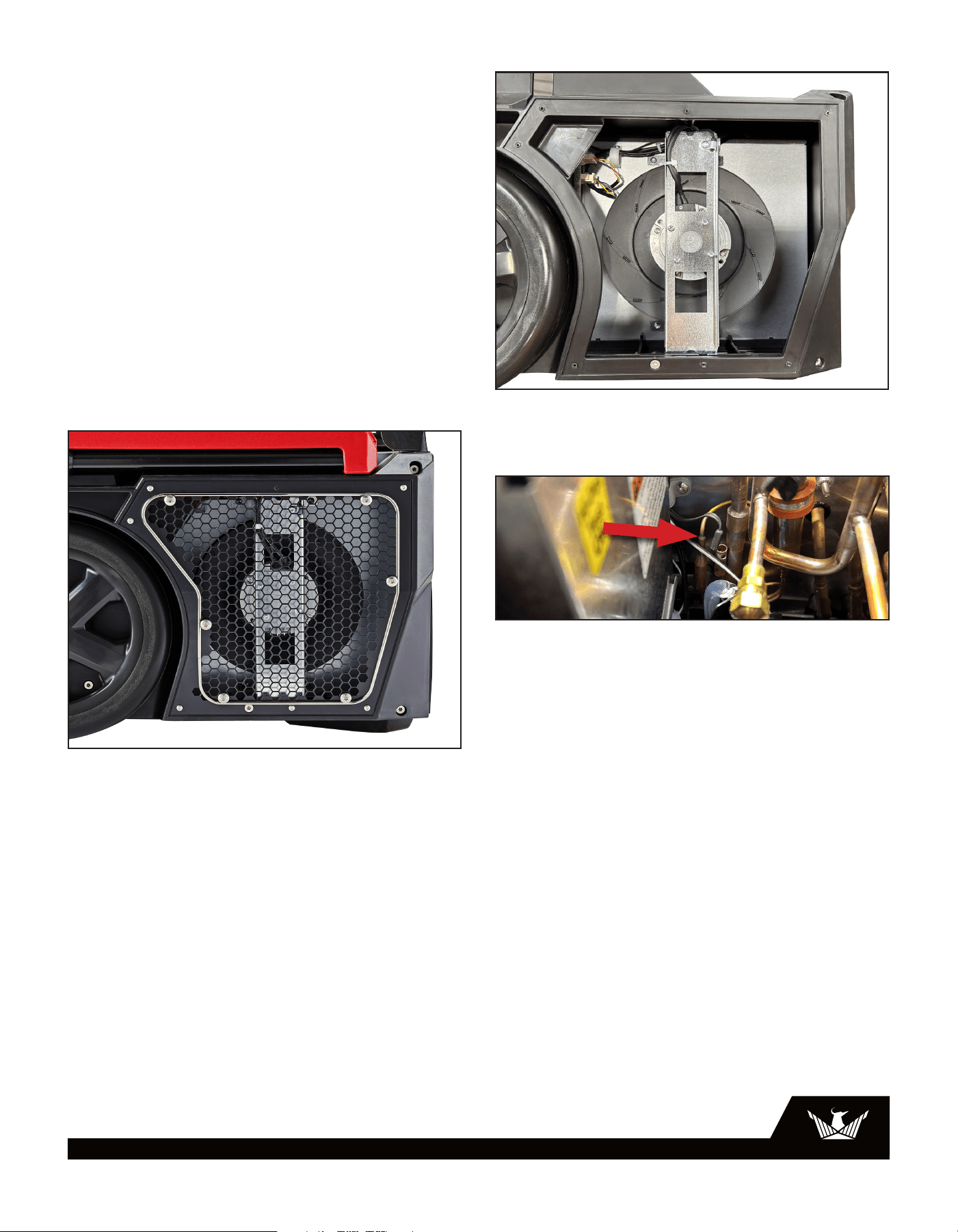
5.3.1 Air Mover
The air movement is created by an impeller.
If defective, the complete assembly must be replaced.
1. Unplug power cord
2. Remove the exhaust grill
3. Disconnect the two impeller leads
4. Remove the impeller bracket
5. Remove the four screws holding the impeller to the
mounting plate
6. Reassemble the new impeller using the above
procedure in reverse
5.3.2 Thermistor Probe
A thermistor is used to sense the temperature of the
evaporator coil. It is inserted into the evaporator suction
tube sensor pot. To replace the thermistor probe:
1. Unplug the dehumidifier
2. Remove the access housing
3. Pull thermistor probe up and out of sensor pot
4. Remove electrical box cover (T20 Torx)
5. Unthread thermistor probe wire from harness
6. Unplug thermistor probe connector on control board
7. Reassemble thermistor probe and dehumidifier using
the above procedure in reverse
5.3.3 Condensate Pump
The internal condensate pump removes water that collects
in the reservoir.
To replace the condensate pump:
1. Unplug the unit
2. Remove the access housing
3. Unplug the pump hose and electrical connector
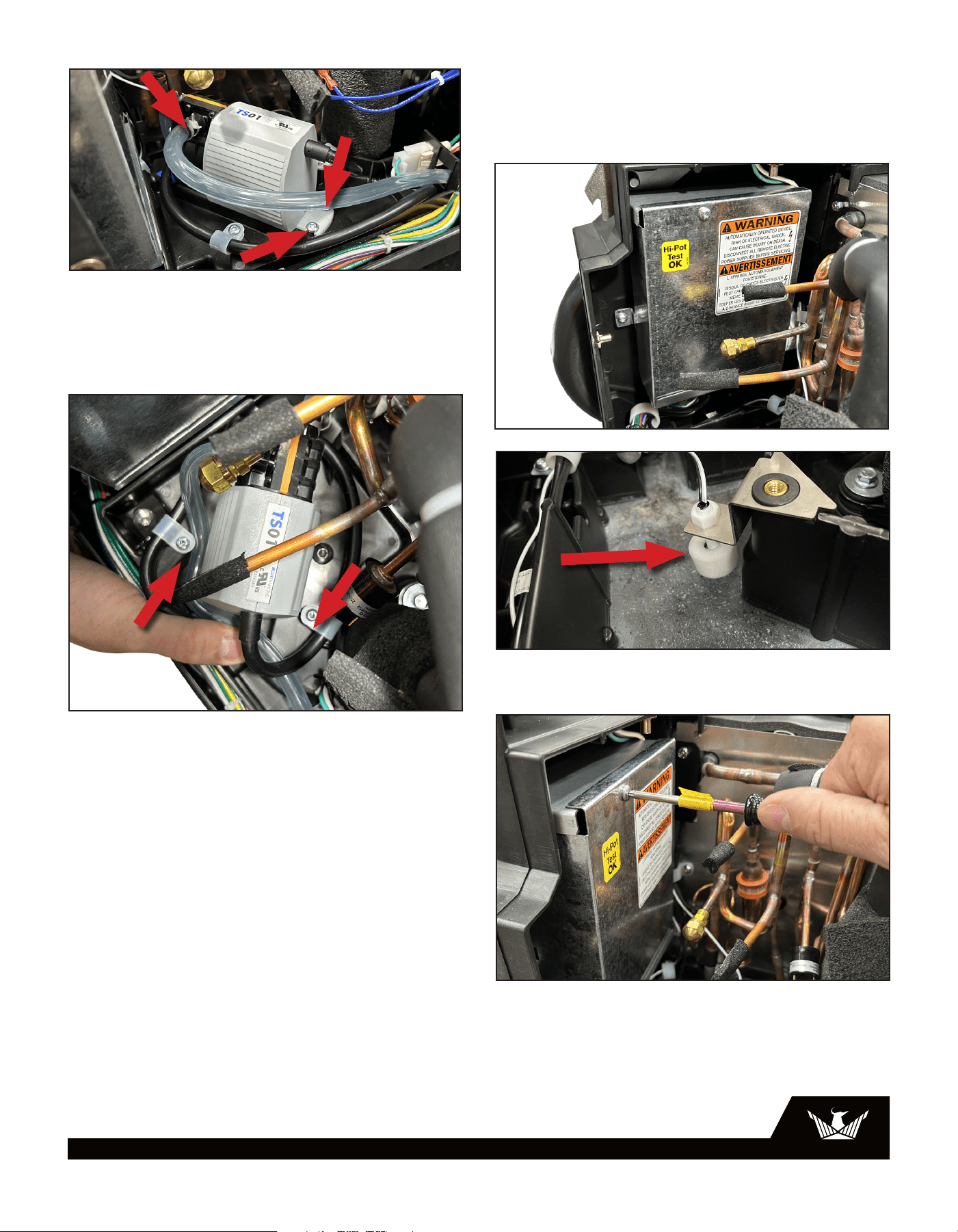
12
USEPHOENIX.COM | 800-533-7533
2. Remove access housing
3. Remove Pump Cover
4. Check to see that the float moves freely. If the float
needs to be replaced proceed to step 5
5. Open the electrical box cover(T20 Torx)
4. Remove pump
a. Using pliers, compress and remove spring hose
clamps to detach hoses from pump.
b. Remove 4 - T-20 torx screws holding pump and
pump cord clamps.
5. Remove pump by lifting up and out of the tabs on the
front side of the pump.
6. Check the float switch bracket is mounted correctly
7. Reinstall in reverse order
5.3.4 Float Switch
The float safety switch activates the pump when the water
rises too high in the condensate reservoir. The float switch
also turns off the compressor until the water level lowers
and disengages the switch.
***IMPORTANT*** - If the float switch is stuck in the up
position for more than 60 seconds, a reservoir full error will
occur.
The possible causes of this error are as follows:
• Broken pump
• Blockage on hose
• Mechanical binding of the float switch
To replace the float switch:
1. Unplug the unit
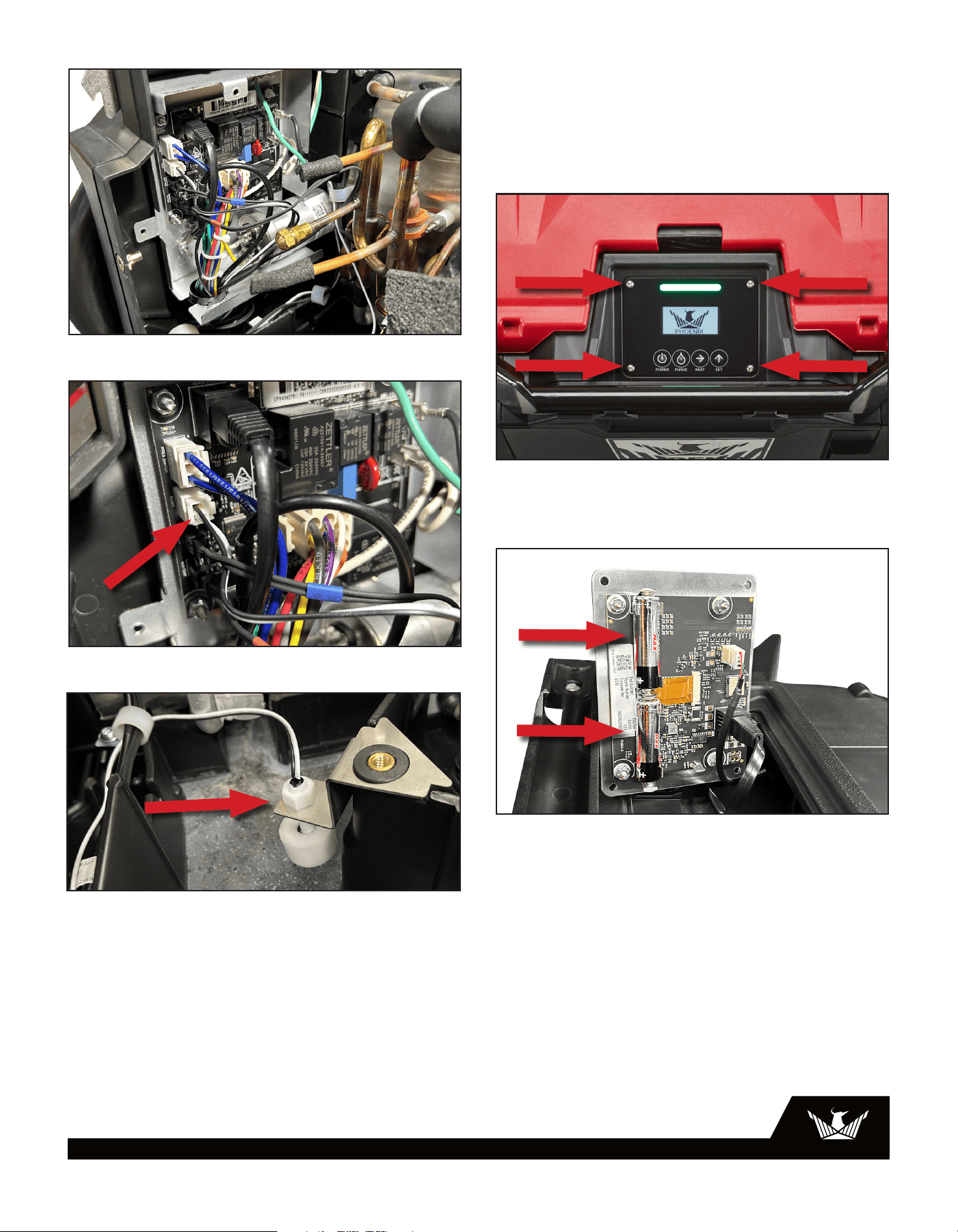
13
USEPHOENIX.COM | 800-533-7533
6. Unplug the Float switch wires from the control board
7. Unscrew the float switch from the bracket
8. Replace the float switch
5.4 Batteries for DryLINK Asset Manager
In order to enable the bulit-in connection to DryLINK Asset
Manager, you must add two AA batteries to the user
interface.
1. Unscrew the four screws securing the user interface.
2. Insert two AA batteries into the designated battery slots.
Then, reattach the user interface and secure it by tightening
the four screws back into place.
6 Options & Accessories
4038558 Air Filter, Pleated, 12” x 14” x 1” MERV 10
4024936 Phoenix Lay Flat 14” Round x 250’
14
USEPHOENIX.COM | 800-533-7533
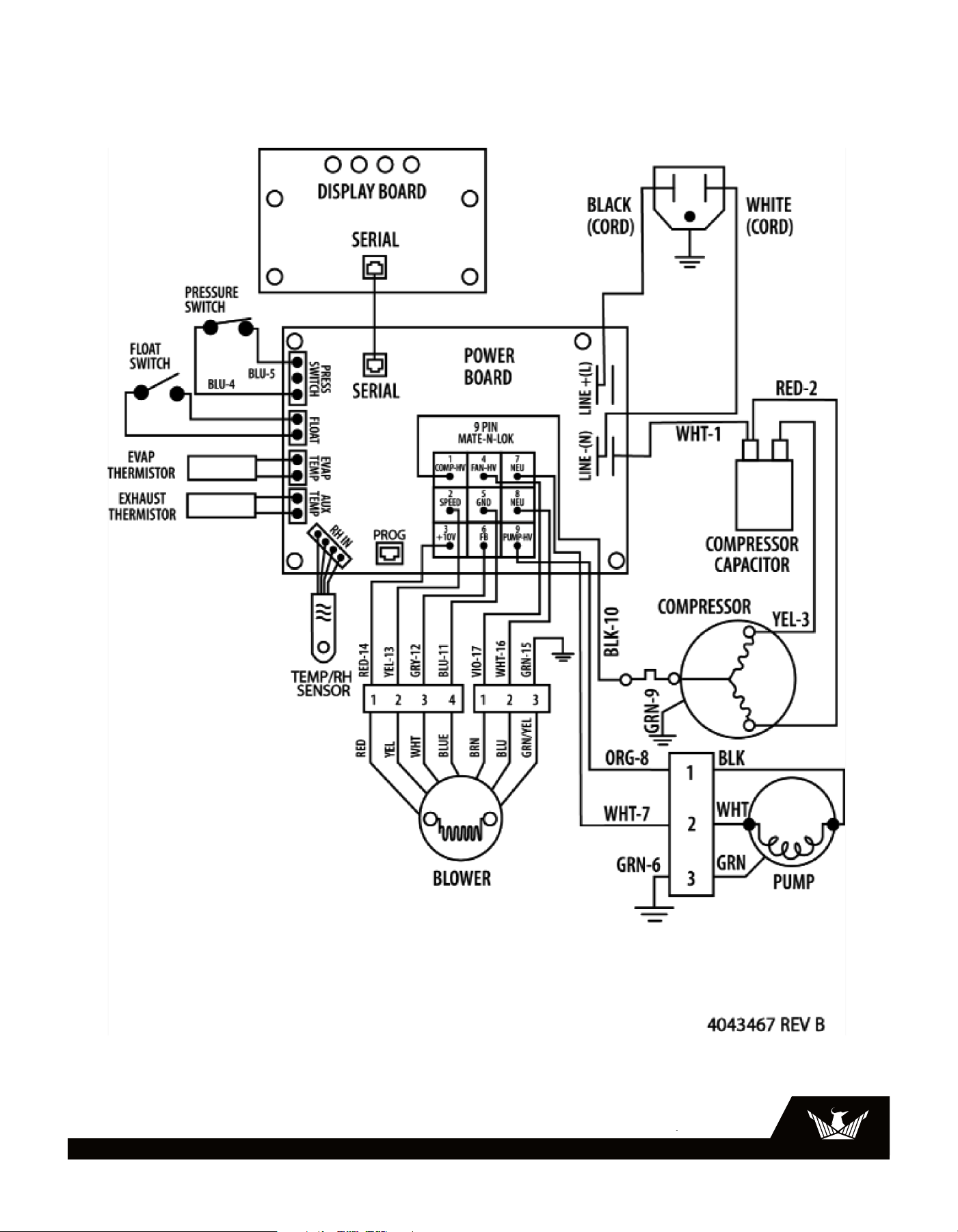
7 Wiring Diagram
15
USEPHOENIX.COM | 800-533-7533
* For compressor and coil issues please contact
Phoenix Technical Support –608-237-8400.
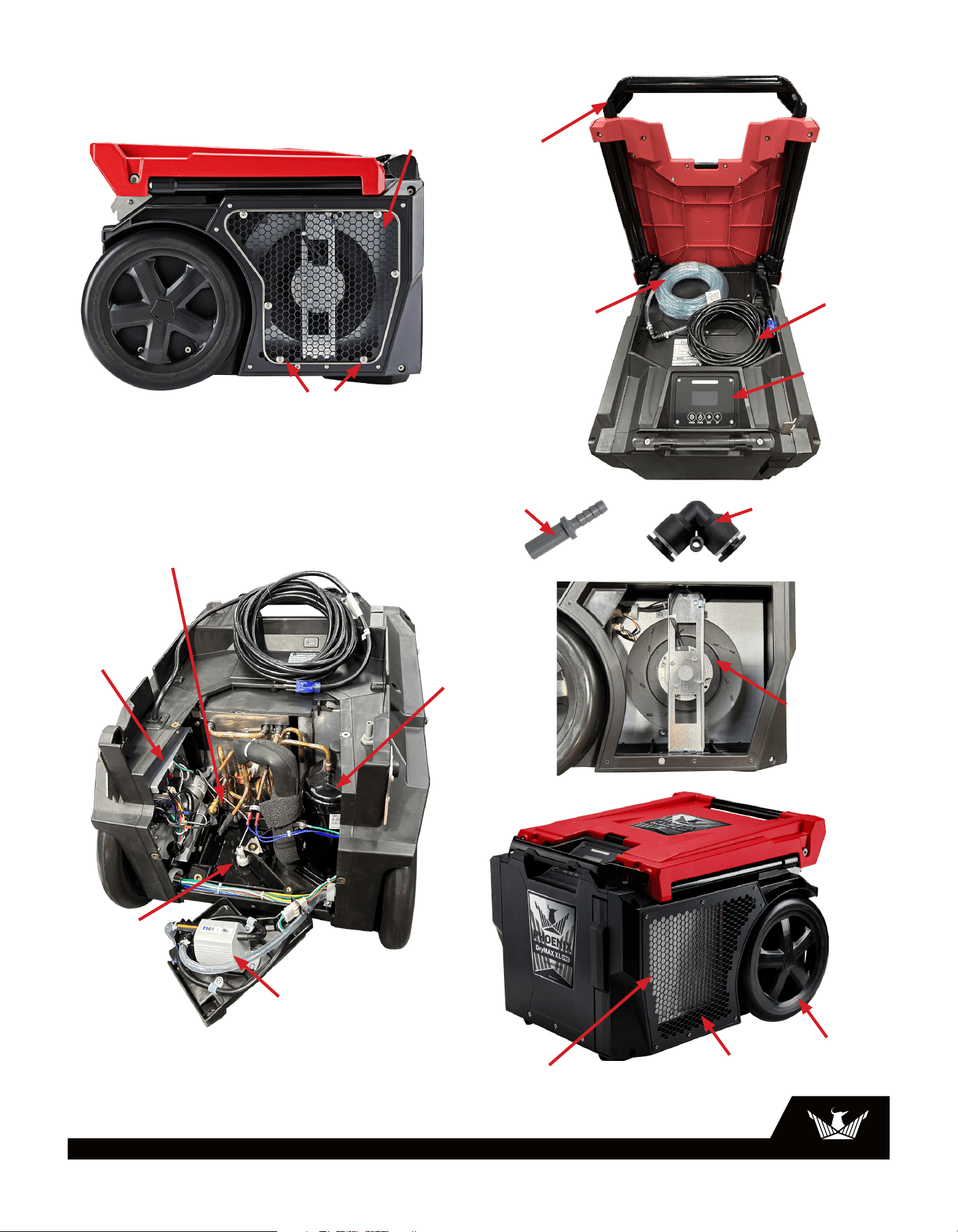
8 Service Parts
4039532-01
Condensate Pump
4037719
Float Switch
4035407
Compressor
4039296-02
Evap Coil Pack
4039251 or 4041731
Inlet Grill
4039853
Duct Ring 10”
4039854
Duct Ring 14”
Not Pictured
4038742-01—8” Rubber Wheel or
4041598 — Le/ Wheel Assembly
4039252 or
4041732
Outlet Grill
4039619 or 4041613
Handle Weldment
4038785
Latch Weldment
4038558
Filter 12x14x1
4038462-18
Upper Housing Red
4038462-19
Upper Housing Blue
4038462-11
Lower Housing Black
4038908-01
DC Power Supply
4034716-06
Evap Thermistor
4036848
Humidity/Temp Sensor
4038559
Impeller
4038174
Control Board
4037038
Power Cord
4024916
Condensate Hose
4026307
Insert Coupling on Unit .38
4043208
Insert Coupling
on Hose .25
4043209
Body Coupling
on Hose .25
4041599
Right Wheel Assembly
4042758
User Interface
4043254
Condesate Hose
4043519
Cord
4043047
Handle
4043038
Inlet Grill
4038558
Filter
4026851
12” Wheel
4039769-01
Condensate Pump
4037719
Float Switch
4043039
Outlet Grill
4043469
Duct Ring
4042066-02
Impeller
4043209
Stem to barb
adapter
4043208
Push-to-connect
elbow
4042751
Power Board
4043445
Compressor
4043317-02 (Defrost)
4043317-01 (Exhaust)
Thermistor
16
USEPHOENIX.COM | 800-533-7533
Warrantor:
Therma-Stor LLC
4201 Lien Rd.
Madison, WI 53704
Telephone: 1-800-533-7533
Who Is Covered: This warranty extends only to the original end-user of the Phoenix DryMAX XL
dehumidifier and may not be assigned or transferred.
Year One: Therma-Stor LLC warrants that, for one (1) year the Phoenix DryMAX XL dehumidifier will operate
free from any defects in materials and workmanship, or Therma-Stor LLC will, at its option, repair or replace
the defective part(s), free of any charge.
Year(s) Two Through Three: Therma-Stor LLC further warrants that for a period of five (3) years, the
condensate pump of the Phoenix DryMAX BLE dehumidifier will operate free of any defects in material or
workmanship, or Therma-Stor LLC, at its option, will repair or replace the defective part(s), provided that all
labor and transportation charges for the part(s) shall beborne by the end-user.
Year(s) Two Through Five: Therma-Stor LLC further warrants that for a period of five (5) years, the condenser,
evaporator, and compressor of the Phoenix DryMAX XL dehumidifier will operate free of any defects in
material or workmanship, or Therma-Stor LLC, at its option, will repair or replace the defective part(s),
provided that all labor and transportation charges for the part(s) shall be borne by the end-user.
Year(s) One Through Seven: Materials and workmanship of the housing are covered.
End-User Responsibilities: Warranty service must be performed by a Servicer authorized by Therma-Stor
LLC. If the end-user is unable to locate or obtain warranty service from an authorized Servicer, he should
call Therma-Stor LLC at the above number and ask for the Therma-Stor Service Department, which will then
arrange for covered warranty service. Warranty service will be performed during normal working hours.
The end-user must present proof of purchase (lease) upon request, by use of the warranty card or other
reasonable and reliable means. The end-user is responsible for normal care. This warranty does not cover any
defect, malfunction, etc. resulting from misuse, abuse, lack of normal care, corrosion, freezing, tampering,
modification, unauthorized or improper repair or installation, accident, acts of nature or any other cause
beyond Therma-Stor LLC’s reasonable control.
Limitation and Exclusions: If any Phoenix DryMAX XL Dehumidifier part is repaired or replaced, the new part
shall be warranted for only the remainder of the original warranty period applicable thereto (but all warranty
periods will be extended by the period of time, if any, that the Phoenix DryMAX XL Dehumidifier is out of
service while awaiting covered warranty service).
UPON THE EXPIRATION OF THE WRITTEN WARRANTY APPLICABLE TO THE Phoenix DryMAX XL DEHUMIDIFIER
OR ANY PART THEREOF, ALL OTHER WARRANTIES IMPLIED BY LAW, INCLUDING MERCHANTABILITY AND
FITNESS FOR A PARTICULAR PURPOSE, SHALL ALSO EXPIRE. ALL WARRANTIES MADE BY THERMA-STOR LLC
ARE SET FORTH HEREIN, AND NO CLAIM MAY BE MADE AGAINST THERMA-STOR LLC BASED ON ANY ORAL
WARRANTY. IN NO EVENT SHALL THERMA-STOR LLC, IN CONNECTION WITH THE SALE, INSTALLATION, USE,
REPAIR OR REPLACEMENT OF ANY Phoenix DryMAX XL DEHUMIDIFIER OR PART THEREOF BE LIABLE UNDER
ANY LEGAL THEORY FOR ANY SPECIAL, INDIRECT OR CONSEQUENTIAL DAMAGES INCLUDING WITHOUT
LIMITATION WATER DAMAGE (THE END-USER SHOULD TAKE PRECAUTIONS AGAINST SAME), LOST PROFITS,
DELAY, OR LOSS OF USE OR DAMAGE TO ANY REAL OR PERSONAL PROPERTY.
Some states do not allow limitations on how long an implied warranty lasts, and some do not allow the
exclusion or limitation of incidental or consequential damages, so one or both of these limitations may not
apply to you.
Legal Rights: This warranty gives you specific legal rights, and you may also have other rights which vary from
state to state.
LIMITED WARRANTY
DRYMAX XL PRO | XL LGR DEHUMIDIFIER
4201 LIEN RD. • MADISON, WI 53704