

en Table of contents
You can find additional information and explanations online.
Scan the QR code on the title page.
Table of contentsTable of contents
1 Safety ........................................................................ 2
2 Avoiding material damage ..................................... 4
3 Environmental protection and saving energy ...... 5
4 Suitable cookware ................................................... 5
5 Familiarising yourself with your appliance .......... 6
6 Before using for the first time ................................ 7
7 Basic operation ....................................................... 7
8 FlexInduction ........................................................... 8
9 Extended FlexInduction .......................................... 9
10 MoveMode ............................................................. 9
11 Time-setting options ........................................... 10
12 PowerBoost ......................................................... 11
13 PanBoost .............................................................. 11
14 Keep-warm function ............................................ 11
15 Transfer settings ................................................. 11
16 PerfectFry Sensor ............................................... 12
17 Childproof lock ................................................... 12
18 Wipe protection ................................................... 13
19 Individual safety switch-off ................................ 13
20 Basic settings ..................................................... 13
21 Cookware test ..................................................... 14
22 HomeConnect ................................................... 15
23 Hob-based hood control .................................... 17
24 Cleaning and servicing ...................................... 18
25 Troubleshooting ................................................. 19
26 Disposal ............................................................... 20
27 Declaration of Conformity .................................. 20
28 Customer Service ............................................... 21
29 Test dishes .......................................................... 21
Safety 1 Safety
Observe the following safety instructions.
1.1 General information
¡ Read this instruction manual carefully.
¡ Keep the instructions, the appliance and the
product information safe for future reference
or for the next owner.
¡ Do not connect the appliance if it has been
damaged in transit.
1.2 Intended use
Only a licensed professional may connect ap-
pliances without plugs. Damage caused by in-
correct connection is not covered under the
warranty.
The appliance can only be used safely if it is
correctly installed according to the safety in-
structions. The installer is responsible for en-
suring that the appliance works perfectly at its
installation location.
Only use this appliance:
¡ To prepare meals and drinks.
¡ Under supervision. Never leave the appli-
ance unattended when cooking for short
periods.
¡ in private households and in enclosed
spaces in a domestic environment.
¡ Up to an altitude of 4000m above sea level.
Do not use the appliance:
¡ With an external timer or a separate remote
control. This does not apply if operation with
appliances included in EN 50615 is
switched off.
If you wear an active implantable medical
device (e.g. a pacemaker or defibrillator),
check with your doctor that it complies with
Council Directive 90/385/EEC of 20th June
1990, EN 45502-2-1 and EN 45502-2-2, and
that it has been chosen, implanted and pro-
grammed in accordance with VDE-AR-E
2750-10. If these conditions are satisfied, and
if, in addition, non-metal cooking utensils and
cookware with non-metal handles are used, it
is safe to use this induction hob as intended.
2

Safety en
1.3 Restriction on user group
This appliance may be used by children aged
8 or over and by people who have reduced
physical, sensory or mental abilities or inad-
equate experience and/or knowledge,
provided that they are supervised or have
been instructed on how to use the appliance
safely and have understood the resulting
dangers.
Do not let children play with the appliance.
Children must not perform cleaning or user
maintenance unless they are at least 15 years
old and are being supervised.
Keep children under the age of 8 years away
from the appliance and power cable.
1.4 Safe use
WARNING‒Risk of fire!
Leaving fat or oil cooking on an unattended
hob can be dangerous and may lead to fires.
Never leave hot oil or fat unattended.
Never attempt to extinguish a fire using wa-
ter; instead, switch off the appliance and
then cover with a lid or a fire blanket.
The cooking surface becomes very hot.
Never place flammable objects on the cook-
ing surface or in its immediate vicinity.
Never place objects on the cooking surface.
The appliance will become hot.
Do not keep combustible objects or aerosol
cans in drawers directly underneath the hob.
Hob covers can cause accidents, for example
due to overheating, catching fire or materials
shattering.
Do not use hob covers.
After every use, switch off the hob using the
main switch.
Do not wait until the hob turns off automatic-
ally as there are no longer any pots and
pans on it.
Food may catch fire.
The cooking process must be monitored. A
short process must be monitored continu-
ously.
WARNING‒Risk of burns!
The appliance and its parts that can be
touched become hot during use, particularly
the hob surround, if fitted.
Caution should be exercised here in order to
avoid touching heating elements.
Young children under 8 years of age must
be kept away from the appliance.
Hob guards may cause accidents.
Never use hob guards.
The appliance becomes hot during operation.
Allow the appliance to cool down before
cleaning.
Metal objects on the hob quickly become very
hot.
Never place metal objects (such as knives,
forks, spoons and lids) on the hob.
WARNING‒Risk of electric shock!
Improper repairs are dangerous.
Repairs to the appliance should only be car-
ried out by trained specialist staff.
Only use genuine spare parts when repairing
the appliance.
If the power cord or the appliance power
cable of this appliance is damaged, it must
be replaced with a special power cord or
special appliance power cable, which is
available from the manufacturer or its Cus-
tomer Service.
If the power cord of this appliance is dam-
aged, it must be replaced by trained special-
ist staff.
If the appliance or the power cord is damaged,
this is dangerous.
Never operate a damaged appliance.
If the surface is cracked, you must switch off
the appliance in order to prevent a possible
electrical shock. To do this, switch off the
appliance via the fuse in the fuse box rather
than at the main switch.
Never pull on the power cord to unplug the
appliance. Always unplug the appliance at
the mains.
If the appliance or the power cable is dam-
aged, immediately switch off the fuse in the
fuse box.
Call customer service.
Page21
An ingress of moisture can cause an electric
shock.
Do not use steam- or high-pressure cleaners
to clean the appliance.
The insulation on cables of electrical appli-
ances may melt if it touches hot parts of the
appliance.
Never bring electrical appliance cables into
contact with hot parts of the appliance.
If metallic objects come into contact with the
fan that is located on the underside of the hob,
this may cause an electric shock.
Do not store long, pointed metallic objects in
the drawers below the hob.
3
en Avoiding material damage
WARNING‒Risk of injury!
Saucepans may suddenly jump due to liquid
between the saucepan base and the hotplate.
Always keep hotplates and saucepan bases
dry.
Never use icy-cold cookware that has been
in the freezer.
When cooking in a bain marie, the hob and
cooking container could shatter due to over-
heating.
The cooking container in the bain marie
must not directly touch the bottom of the wa-
ter-filled pot.
Only use heat-resistant cookware.
An appliance with a cracked or broken surface
can cause cuts.
Do not use the appliance if it has a cracked
or broken surface.
WARNING‒Risk of suffocation!
Children may put packaging material over their
heads or wrap themselves up in it and suffoc-
ate.
Keep packaging material away from chil-
dren.
Do not let children play with packaging ma-
terial.
Children may breathe in or swallow small
parts, causing them to suffocate.
Keep small parts away from children.
Do not let children play with small parts.
Avoiding material damage2 Avoiding material damage
This is where you can find the most common causes of damage and tips on how to avoid them.
Damage Cause Measure
Stains Unsupervised cooking process. Monitor the cooking process.
Stains, blisters Spilled food, especially food with a high
sugar content.
Remove immediately with a glass scraper.
Stains, blisters or frac-
tures in the glass
Defective cookware, cookware with melted
enamel or cookware with copper or alu-
minium base.
Use suitable cookware that is in a good condi-
tion.
Stains, discolouration Unsuitable cleaning methods. Only use cleaning agents that are suitable for
glass ceramic, and only clean the hob when it
is cold.
Blisters or fractures in
the glass
Knocks or falling cookware, cooking ac-
cessories or other hard or pointed objects.
When cooking, do not hit the glass or let ob-
jects fall onto the hob.
Scratches, discoloura-
tion
Rough cookware bases or moving the cook-
ware on the hob.
Check the cookware. Lift the cookware when
moving it.
Scratches Salt, sugar or sand. Do not use the hob as a work surface or stor-
age space.
Damage to the appli-
ance
Cooking with frozen cookware. Never use frozen cookware.
Damage to the cook-
ware or the appliance
Cooking without contents. Never place or heat empty cookware on a hot
cooking zone.
Glass damage Melted material on the hot cooking zone or
hot pot lid on the glass.
Do not place greaseproof paper or aluminium
foil nor plastic containers or pot lids on the
hob.
Overheating Hot cookware on the control panel or on the
frame.
Never place hot cookware on these areas.
ATTENTION
A fan is located on the underside of this hob.
If a drawer is located on the underside of the hob, do
not store any small or pointed objects, paper or tea
towels in it. These objects may be sucked in and
damage the fan or impair the cooling.
There must be a clearance of at least 2cm between
the contents of the drawer and the fan entry point.
4
Environmental protection and saving energy en
Environmental protection and saving energy3 Environmental protection and saving energy
3.1 Disposing of packaging
The packaging materials are environmentally compatible
and can be recycled.
Sort the individual components by type and dispose
of them separately.
3.2 Saving energy
If you follow these instructions, your appliance will use
less energy.
Select the cooking zone to match the size of your pan.
Centre the cookware on the hob.
Use cookware whose base diameter is the same dia-
meter as the hotplate.
Tip: Cookware manufacturers often give the upper dia-
meter of the saucepan. It is often larger than the base
diameter.
Unsuitable cookware or incompletely covered cook-
ing zones consume a lot of energy.
Cover saucepans with suitable lids.
Cooking without a lid consumes considerably more
energy.
Lift lids as infrequently as possible.
When you lift the lid, a lot of energy escapes.
Using a glass lid
You can see into the pan through a glass lid without
having to lift it.
Use pots and pans with flat bases.
Uneven bases increase energy consumption.
Use cookware that is suitable for the quantity of food.
Large items of cookware containing little food need
more energy to heat up.
Cook with only a little water.
The more water there is in the cookware, the more
energy that is required to heat it up.
Turn down to a lower power level early on.
If you use an ongoing power level that is too high,
you will waste energy.
Suitable cookware4 Suitable cookware
Cookware that is suitable for induction cooking must
have a ferromagnetic base, i.e. it must be attracted by a
magnet. The base must also match the size of the cook-
ing zone. If cookware is not detected on a cooking
zone, place this on the cooking zone with the next smal-
lest diameter.
4.1 Size and characteristics of the cookware
To be able correctly detect the cookware, you must take the size and the material of the cookware into consideration.
All cookware bases must be perfectly flat and smooth.
Use Cookware test to check whether the cookware is suitable.
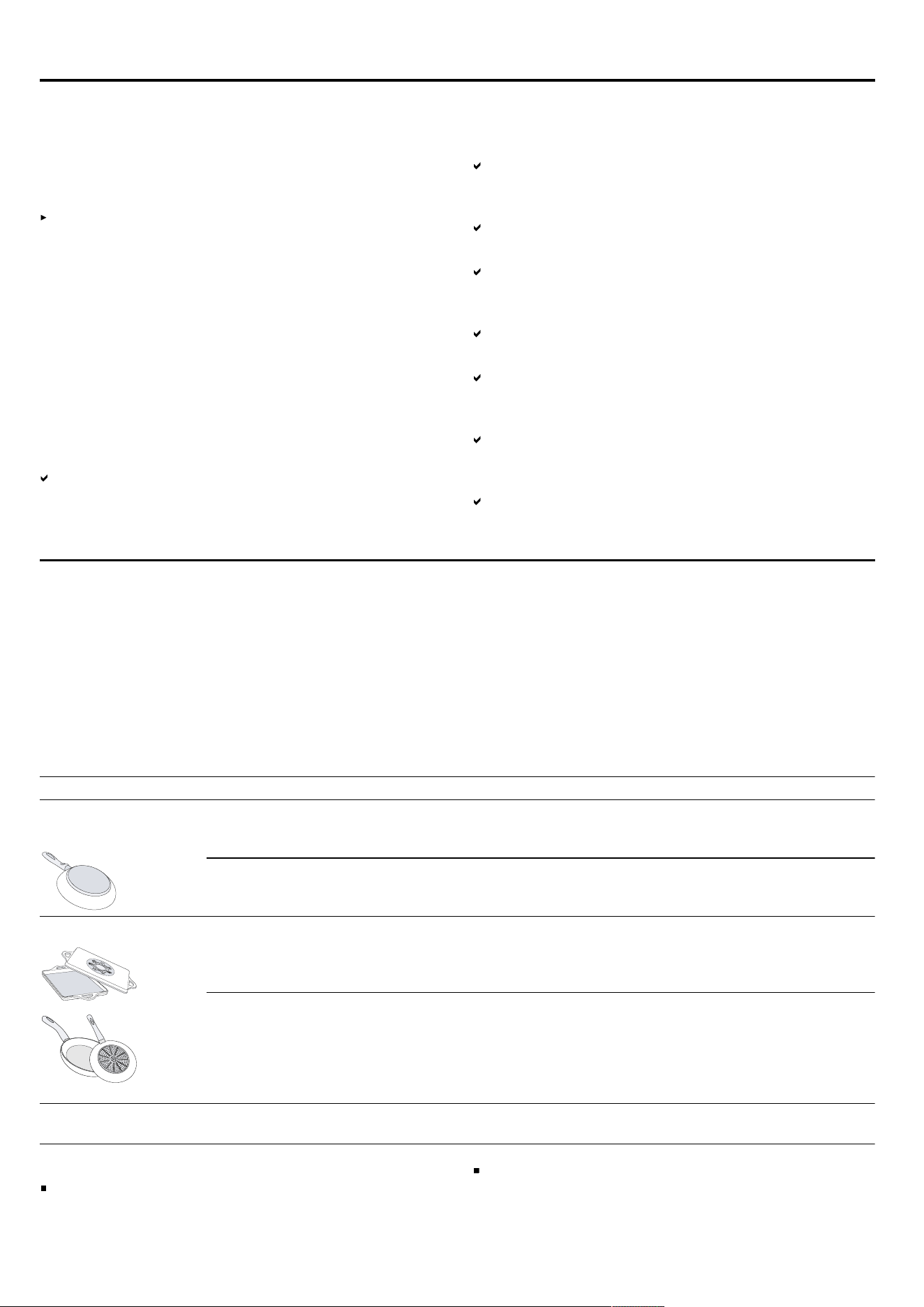
Cookware Materials Properties
Recommended cook-
ware
Stainless steel cookware in a sandwich
design that distributes the heat well.
This cookware distributes the heat evenly,
heats up quickly, and ensures that it can be
detected easily.
Ferromagnetic cookware made of enamelled
steel, cast iron or special induction cookware
made of stainless steel.
This cookware distributes the heat evenly,
heats up quickly, and ensures that it can be
detected.
Suitable The base is not fully ferromagnetic. If the ferromagnetic area is smaller than the
base of the cookware, only the area that is fer-
romagnetic heats up. As a result, the heat is
not distributed evenly.
Cookware bases that contain aluminium. These cookware bases reduce the ferromag-
netic area, which means that less power is
emitted to the cookware. This cookware may
not be sufficiently detected or may not be de-
tected at all, and therefore does not heat suffi-
ciently.
Not suitable Cookware made from normal thin steel,
glass, clay, copper or aluminium.
Notes
Do not use adapter plates between the hob and the
cookware.
Do not heat up empty cookware and do not use
cookware with a thin base, as this may become very
hot.
5
en Familiarising yourself with your appliance
Familiarising yourself with your appliance5 Familiarising yourself with your appliance
5.1 Cooking with induction
In comparison to conventional hobs, induction techno-
logy brings with it a series of changes and has a num-
ber of benefits such as time savings when cooking and
frying, energy savings as well as greater ease of clean-
ing and care. It also offers improved heat control as the
heat is generated directly in the cookware.
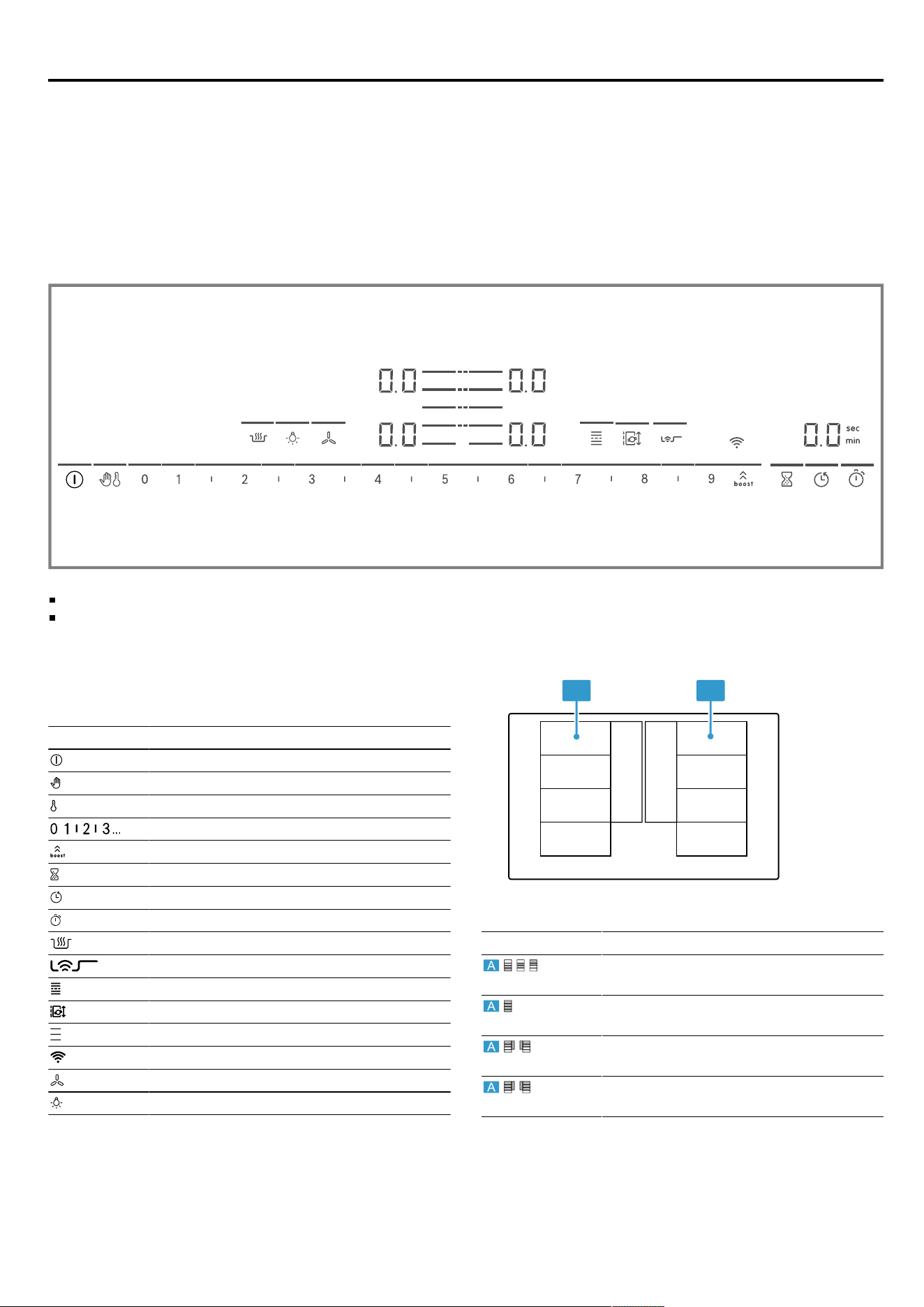
5.2 Control panel
Individual details, such as colour and shape, may differ from the figure.
Notes
Always keep the control panel clean and dry.
Do not place any cookware near the displays or
sensors. The electronics may overheat.
Touch buttons
When you switch on the hob, the symbols for the con-
trols available at this time light up.
Sensor Function
Main switch
Wipe protection
Childproof lock
Settings range
PowerBoost / PanBoost
Timer
Switch-off timer
Count-up timer
Keep-warm function
PerfectFry Sensor
FlexInduction
MoveMode
Select a cooking zone
Wi-Fi
Hob-based hood control
Hood light
Depending on the status of the hob, the displays for the
cooking zones and the various activated and available
functions also light up.
5.3 Distribution of the cooking zones
The specified power has been measured with the stand-
ard pots, which are described in IEC/EN 60335-2-6. The
power may vary depending on the size of the cookware
or cookware material.
A A
Area Highest power level
Power level 9
PowerBoost
2200W
3700W
Power level 9
PowerBoost
3300W
3700W
Power level 9
PowerBoost
2600W
3700W
Power level 9
PowerBoost
3300W
3700W
5.4 Cooking zone
Before you start cooking, check whether the size of the
cookware fits the cooking zone that you want to use for
cooking:
6

Before using for the first time en
Area Cooking zone type
Single-circuit cooking zone
Flex Zone
"FlexInduction", Page8
/ Extended FlexZone
"Extended FlexInduction", Page9
5.5 Residual heat indicator
The hob has a residual heat indicator for each cooking
zone. Do not touch the cooking zone if the residual heat
indicator is lit.
Display Meaning
The cooking zone is hot.
The cooking zone is warm.
Before using for the first time6 Before using for the first time
Observe the following recommendations.
6.1 Initial cleaning
Remove any leftover packaging from the hob surface
and wipe the surface with a damp cloth. You can find a
list of recommended detergents on the official website
www.bosch-home.com
.
More information on care and cleaning.
Page18
6.2 Cooking with induction
In comparison to conventional hobs, induction techno-
logy brings with it a series of changes and has a num-
ber of benefits such as time savings when cooking and
frying, energy savings as well as greater ease of clean-
ing and care. It also offers improved heat control as the
heat is generated directly in the cookware.
6.3 Cookware
You can find a list of recommended cookware on the of-
ficial website
www.bosch-home.com
.
Further information on suitable cookware.
Page5
6.4 Setting Home Connect
When you first switch on the appliance, you are promp-
ted to set up your home network. The symbol lights
up for a few seconds on the display panel.
To begin setting up the connection, touch the sensor
and proceed in accordance with the information given in
the section entitled . To exit initial set-up, touch any
sensor.
"HomeConnect ", Page15
Basic operation7 Basic operation
7.1 Switching on the hob
Touch .
An audible signal sounds. The symbols for the cook-
ing zones and the currently available functions light
up. . . lights up next to the cooking zones.
The hob is ready for use.
ReStart
If you switch the appliance on within four seconds of
switching it off, the hob operates with the settings that
were previously set.
7.2 Switching the hob off
Touch until the displays go out.
All cooking zones are switched off.
Note: If all of the cooking zones are switched off for
longer than 20seconds, the hob is automatically
switched off.
7.3 Setting the power level in the cooking
zones
The cooking zone has 17 power levels, which are dis-
played from to with intermediate values. Select the
best power level for the food and the planned cooking
process.
1.
Touch the symbol for the cooking zone you require.
The . display gets brighter.
2.
Select the required power level in the settings area.
The power level has been set.
Note: If no cookware is placed on the cooking zone or
the pot is not suitable, the selected power level flashes.
After a certain period of time, the cooking zone switches
itself off.
QuickStart
If you place cookware on the hob before you switch it
on, the cookware is detected when you switch on and
the corresponding cooking zone is selected automat-
ically. Select the power level in the next 20 seconds,
or the hob switches itself off.
Changing the power level and switching off the
cooking zone
1.
Select the cooking zone.
2.
Select the required power level in the settings range
or set it to . .
The cooking zone's power level changes or the cook-
ing zone switches itself off and the residual heat in-
dicator appears.
7
en FlexInduction
7.4 Cooking recommendations
The table shows which power level ( ) is suitable for
which food. The cooking time ( ) may vary depend-
ing on the type, weight, thickness and quality of the
food. To preheat, set power level 8–9.
Melting
Butter, honey, gelatine 1-2 -
Heating and keeping warm
Boiled sausages
1
3-4 -
Defrosting and heating
Spinach, frozen 3-4 15-25
Poaching, simmering
Potato dumplings
1
4.5-5.5 20-30
Whisked sauces, e.g. Béarnaise
sauce, Hollandaise sauce
3-4 8-12
Boiling, steaming, braising
Rice, with double the volume of
water
2.5-3.5 15-30
Unpeeledboiled pots 4.5-5.5 25-35
Pasta
1
6-7 6-10
Soups 3.5-4.5 15-60
Vegetables 2.5-3.5 10-20
Stew in a pressure cooker 4.5-5.5 -
Stewing
Pot roast 4-5 60-100
Goulash
2
3-4 50-60
Braising/frying with a small
amount of fat
1
Escalope, plain or breaded 6-7 6-10
Steak (3 cm thick) 7-8 8-12
Poultry breast (2 cm thick) 5-6 10-20
Hamburgers (2 cm thick) 6-7 10-20
Fish and fish fillet, breaded 6-7 8-20
Prawns and scampi 7-8 4-10
Sautéing fresh vegetables and
mushrooms
7-8 10-20
Frozen dishes, e.g. stir-fries 6-7 6-10
Omelette (cooked one after the
other)
3.5-4.5 3-10
Deep-frying, 150–200g per
portion in 1–2l oil, deep-fat
fried in portions
1
Frozen products, e.g. chips,
chicken nuggets
8-9 -
Vegetables, mushrooms,
breaded, beer-battered or tem-
pura
6-7 -
Small baked items, e.g. dough-
nuts, battered fruit
4-5 -
FlexInduction8 FlexInduction
The flexible cooking zone allows you to position cook-
ware of any shape or size any way you like. It consists
of four inductors that work independently of each other.
When the flexible cooking zone is in use, only the area
that is covered by cookware is activated.
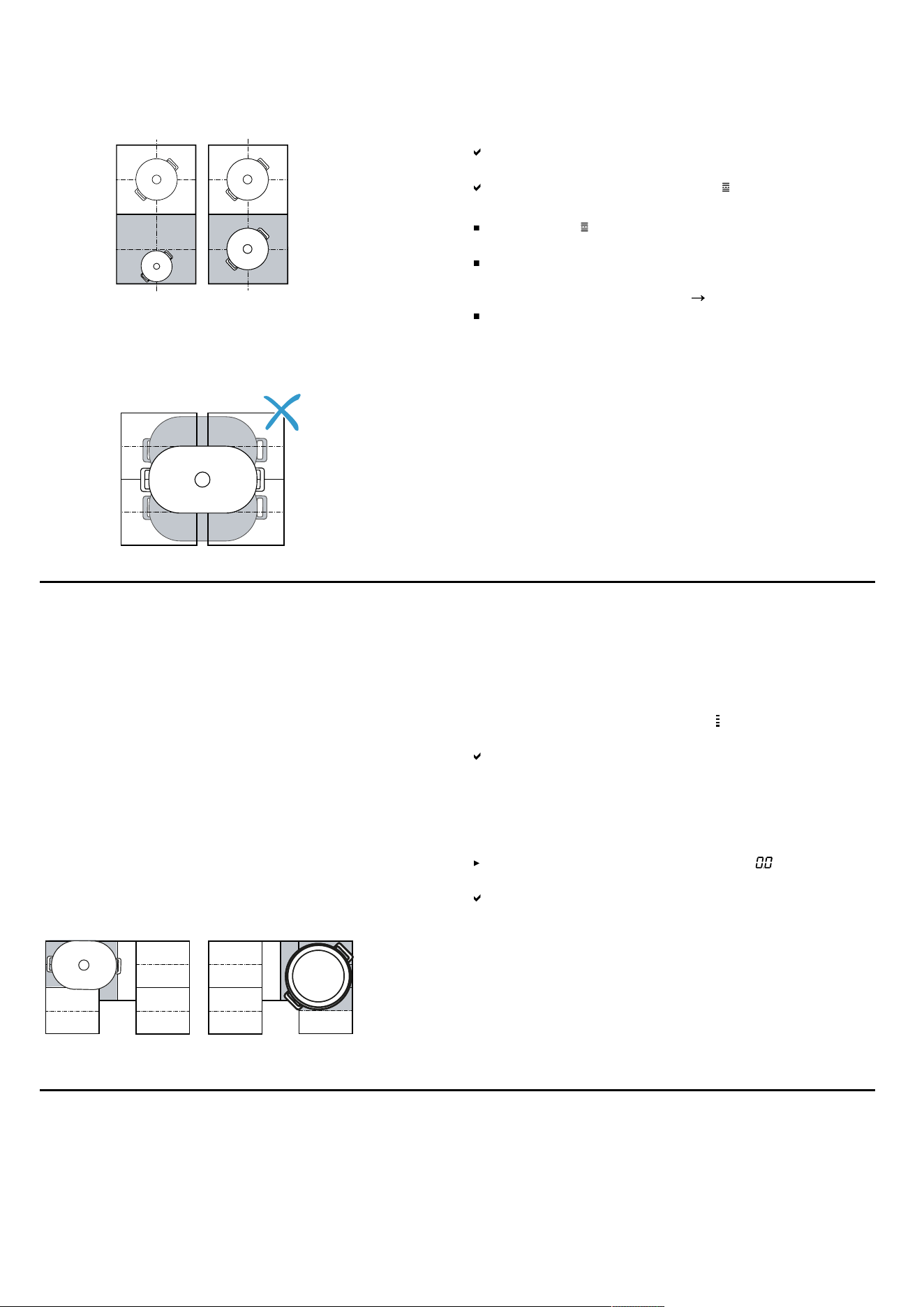
8.1 Positioning the cookware
The flexible cooking zone can be configured in two
ways, depending on which cookware is used. In order to
guarantee good thermal detection and heat distribution,
we recommend positioning the cookware in the centre,
as shown in the figures.
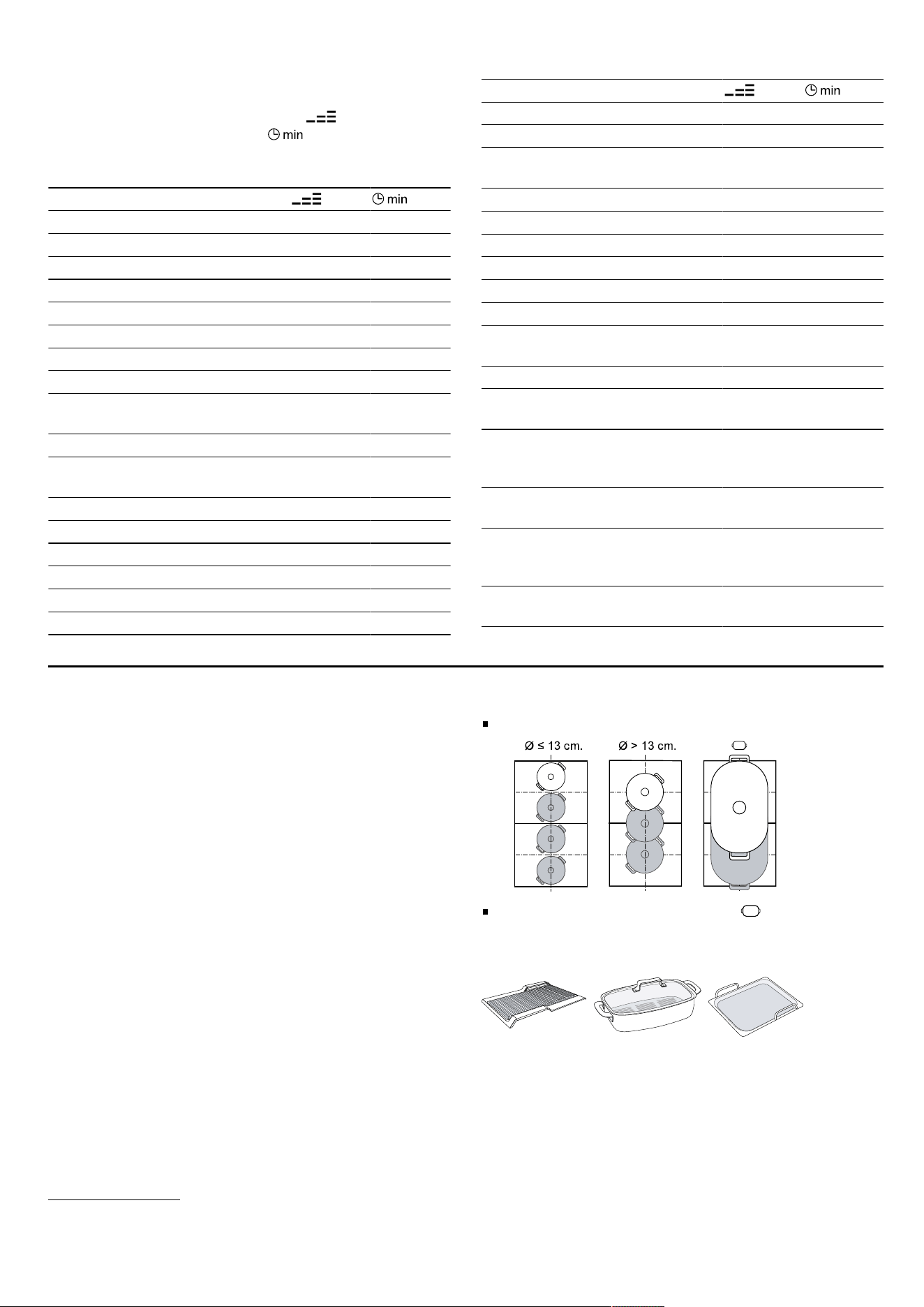
As a connected cooking zone
Recommended for cooking with just one item of cook-
ware.
Position the cookware depending on the size:
Recommended oblong cookware :
As two separate cooking zones
Recommended for cooking with two items of cookware.
1
Without lid
2
Preheat to power level 8 - 8.5
8
Extended FlexInduction en
You can use the front and rear zone independently of
one another, and set a separate power level for each
zone.
Caution
Do not place cookware in the middle between the right
and left zones. The cooking zones are not activated cor-
rectly and you do not achieve a good cooking result.
8.2 Switching on FlexInduction
1.
Place the cookware on the cooking zone.
2.
Select the cooking zone.
The cooking zones split or connect automatically de-
pending on the size and position of the cookware.
The FlexZone is connected and lights up.
Notes
By touching , you can manually change the settings
for the cooking zone.
You can change the default configuration of the flex-
ible cooking zone. You can find out how to do this in
the "Basic settings" section.
Page13
If you move or lift the cookware from an active con-
nected cooking zone, an automatic search starts.
Each item of cookware that is found within the cook-
ing zone during this search is heated at the previ-
ously selected power level.
Extended FlexInduction9 Extended FlexInduction
With the extended cooking zone, you can cook with lar-
ger cookware or position long cookware sideways on.
The extension always switches on in conjunction with
one of the two flexible cooking zones. You cannot
switch the extension on separately.
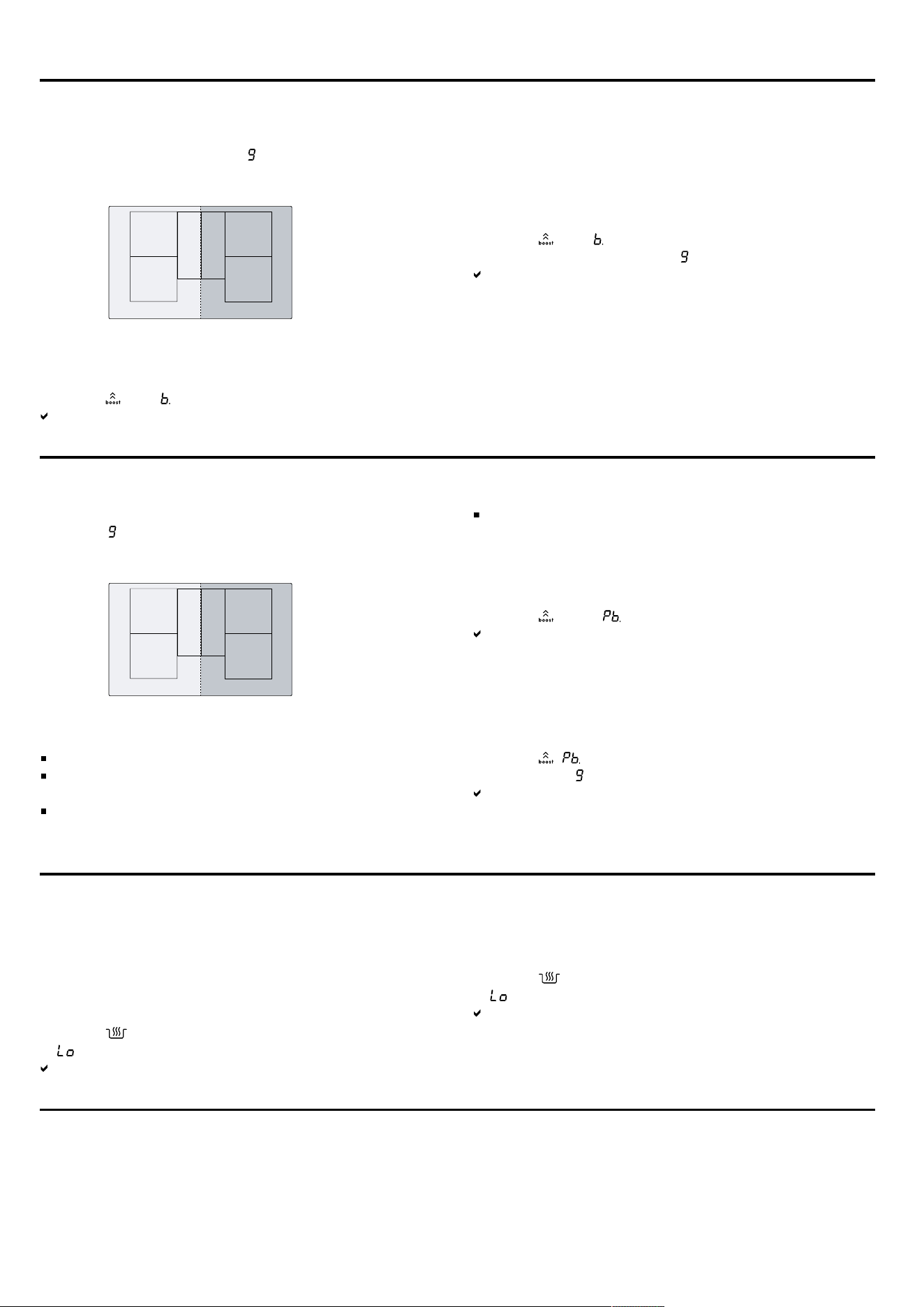
9.1 Position the cookware according to
weight and size
Position the cookware in the middle over the rear part of
the flexible cooking zone and its extension.
Depending on the size of the cookware and the covered
cooking surface, you can switch on the flexible cooking
zone as two separate cooking zones or as one connec-
ted cooking zone:
9.2 Activating Extended FlexInduction
1.
Place the cookware on the flexible cooking zone so
that it covers the extension.
2.
Select the cooking zone and the power level. The dis-
plays for the cooking zone and for the extended
zone light up.
The zone is activated.
Note: If the display does not light up, lift the cookware
and place it back on the cooking zone.
9.3 Deactivating Extended FlexInduction
Select the cooking zone and set it to in the set-
tings range.
The function has been deactivated.
MoveMode10 MoveMode
You can use this function to change the power level of
an item of cookware by simply sliding it forwards or
backwards in the flexible cooking zone. The zone is di-
vided into three areas with different power levels.
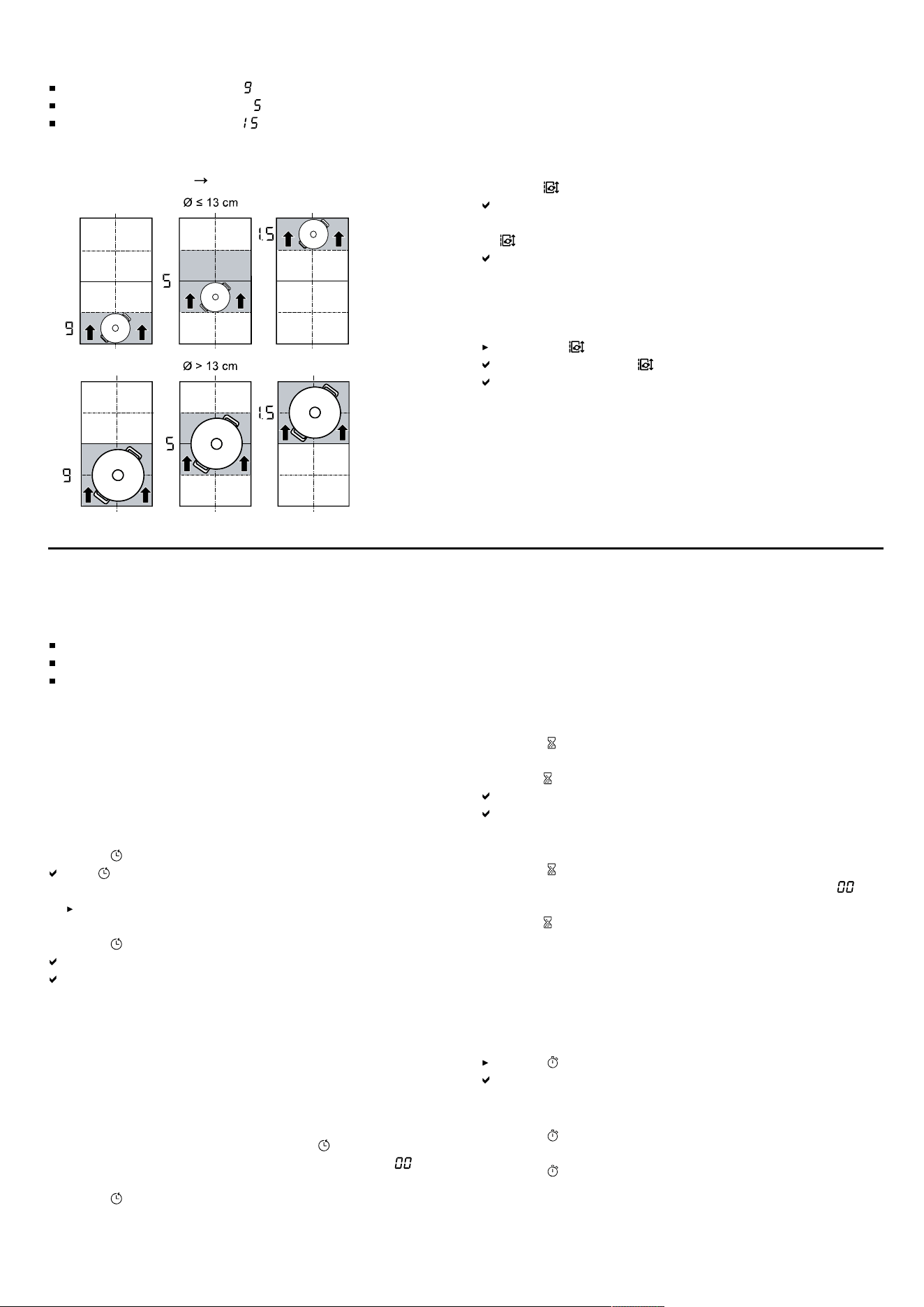
10.1 Positioning and moving the cookware
Only use one item of cookware. The cooking area de-
pends on the cookware used, as well as its size and po-
sitioning.
Each cooking area has a preset power level:
9
en Time-setting options
Front area = power level
Middle area = power level
Rear area = power level .
You can change the standard setting of the preset
power levels. You can find out how to do this in the "Ba-
sic settings" section
Page13
.
10.2 Activating MoveMode
Requirement: Only place one item of cookware on a
flexible zone.
1.
Select one of the two cooking zones in the flexible
zone.
2.
Press .
The power level in the area in which the cookware is
located lights up in the cooking zone display next to
.
The function is switched on.
Note: You can change the power levels during cooking.
10.3 Deactivating MoveMode
Touching
The display beside switches off.
The function has been deactivated.
Time-setting options11 Time-setting options
Your hob has various functions for setting the cooking
time:
Switch-off timer
Timer
Count-up timer
11.1 Switch-off timer
Allows you to program a cooking time for one or more
cooking zones. Once the time has elapsed, the cooking
zone is automatically switched off.
Switching on Switch-off timer
1.
Select the cooking zone and the power level.
2.
Press .
The indicator for the hotplate will light up.
3.
Set the time on the control panel.
To set a cooking time of less than 10 minutes, al-
ways touch 0 before you select the required value.
4.
Press to confirm.
The cooking time begins to count down.
Once the cooking time has elapsed, the cooking
zone switches itself off and an audible signal sounds.
Note: If a cooking time has been programmed in a
cooking zone in which the PerfectFry Sensor is activ-
ated, the programmed cooking time will start to count
down as soon as the selected temperature level has
been reached.
Changing or switching off Switch-off timer
1.
Select the cooking zone and touch .
2.
In the settings area, change the time or set to to
delete the time.
3.
Press to confirm.
11.2 Timer
Enables the activation of a timer of 0–99 minutes. This
function can be used independently of the cooking
zones and other settings. It does not automatically
switch off the cooking zones.
Switching on Timer
1.
Touch .
2.
Set the desired time on the control panel.
3.
Press to confirm.
The time will begin to elapse.
An audible signal sounds once the time has elapsed.
Changing or switching off the Timer
1.
Touch .
2.
In the settings range, change the time or set to to
delete the time.
3.
Press to confirm.
11.3 Count-up timer
The stopwatch function displays the time that has
elapsed since activation.
Switching on Count-up timer
Touch .
The time will begin to elapse.
Switching off Count-up timer
1.
Touch . The stopwatch stops. The timer displays re-
main lit.
2.
Touch . The displays go out.
10
PowerBoost en
PowerBoost12 PowerBoost
You can use this function to heat up large volumes of
water more quickly than with .
This function is available for all cooking zones, provided
the other cooking zone in the same group is not in use.
12.1 Switching on PowerBoost
1.
Select the cooking zone.
2.
Touch . The display lights up.
The function is switched on.
Note: You can also switch on this function when cook-
ing with a connected FlexZone.
12.2 Switching off PowerBoost
1.
Select the cooking zone.
2.
Touch . The display goes out and the cooking
zone switches back to the power level.
The function has been deactivated.
Note: In certain circumstances, this function may switch
itself off automatically in order to protect the electronic
elements inside the hob.
PanBoost13 PanBoost
You can use this function to heat up pans more quickly
than with .
This function is available for all cooking zones, provided
the other cooking zone in the same group is not in use.
13.1 Recommended applications
Do not place a lid on the pan.
Never leave pans unattended when they are heating
up.
Only use cold pans.
Use pans with a completely flat base. Do not use
pans with a thin base.
13.2 Switching on PanBoost
1.
Select the cooking zone.
2.
Touch twice. lights up.
The function is switched on.
Note: You can also switch on this function when cook-
ing with a connected FlexZone.
13.3 Switching off PanBoost
1.
Select the cooking zone.
2.
Touch . goes out and the cooking zone switches
back to the power level.
The function has been deactivated.
Note: To avoid high temperatures, this function automat-
ically switches itself off after 30 seconds.
Keep-warm function14 Keep-warm function
You can use this function to melt chocolate or butter
and to keep meals warm.
14.1 Switching on Keep-warm function
1.
Select the required cooking zone.
2.
Touch within the next 10 seconds.
lights up.
The function is switched on.
14.2 Switching off Keep-warm function
1.
Select the cooking zone.
2.
Touch .
goes out.
The function has been deactivated.
Transfer settings15 Transfer settings
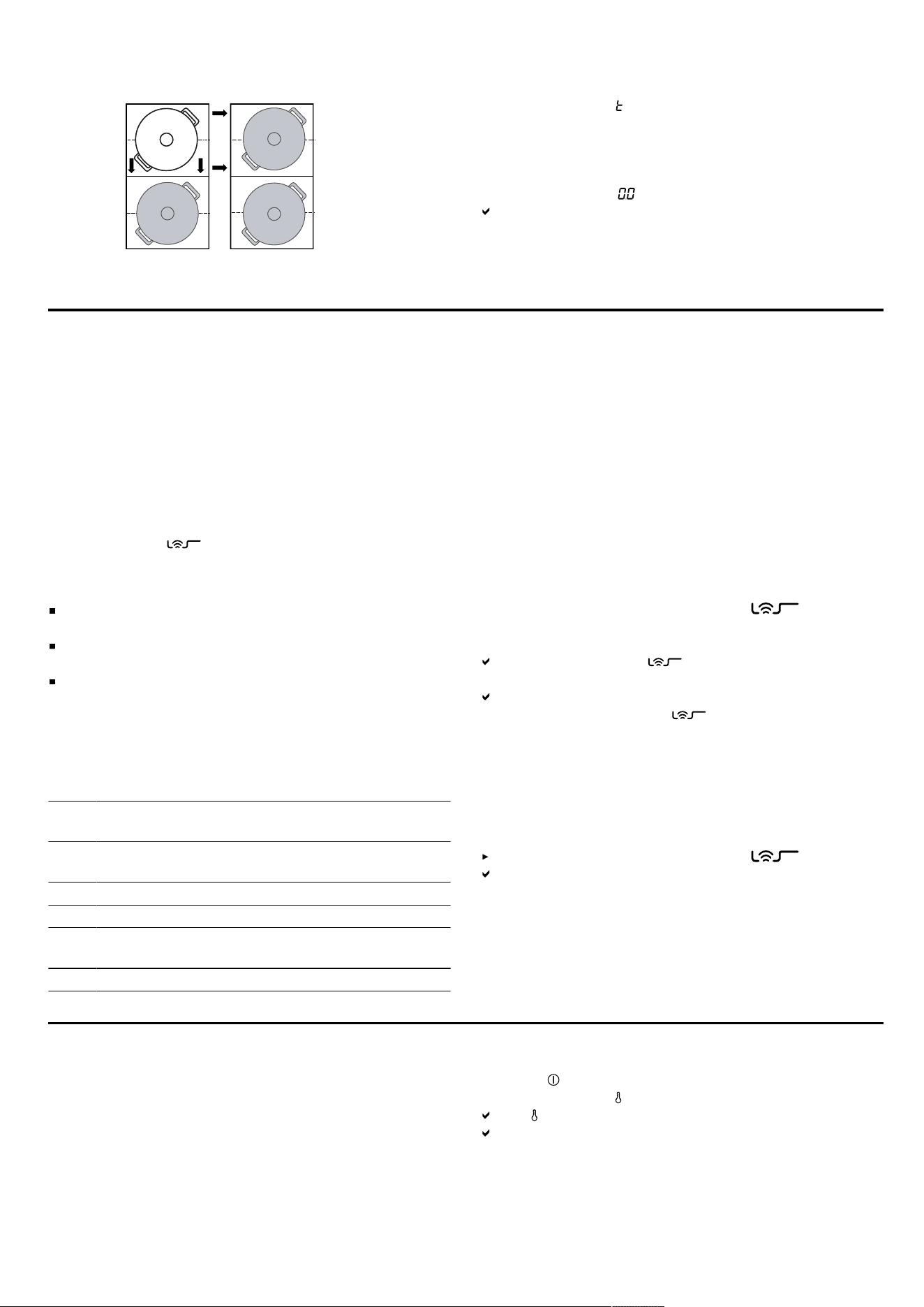
You can use this function to transfer the power level and
the programmed cooking time from one cooking zone
to another.
15.1 Transfer settings
Requirement: Move the cookware to a cooking zone
which is not switched on, which you have not yet preset
and on which no other cookware has been placed.
11
en PerfectFry Sensor
1.
Move the cookware. The cookware is detected and the previously selected
power level and flash alternately on the display for
the new cooking zone.
2.
Select the new cooking zone to implement the set-
tings.
The appliance sets the power level for the original
cooking zone to .
The settings are transferred to the new cooking zone.
Note: If you place a new item of cookware on a different
cooking zone before you have confirmed the settings,
you can use this function for both items of cookware.
PerfectFry Sensor16 PerfectFry Sensor
Suitable for cooking or reducing sauces, pancakes or
frying eggs with butter, for frying vegetables or steaks
up to the required level of boiling, and for keeping the
temperature under control.
Instead of frequently adjusting the power level during
cooking, select the required target temperature once at
the start. The sensors under the glass ceramic measure
the temperature of the cookware and keep this constant
throughout the entire cooking process.
This function is available on all cooking zones marked
with this symbol .
16.1 Advantages
The temperature is automatically kept constant
without you having to change the power level.
Oil does not overheat. This prevents the food from
burning.
The cooking zone only continues heating for as long
as this is necessary to maintain the temperature. This
saves energy.
16.2 Temperature levels
Temperature levels for preparing meals.
Leve
l
Temper-
ature
Functions
1 120ºC Boiling and reducing sauces, fry veget-
ables
2 140ºC Searing in olive oil or butter
3 160ºC Frying fish and coarse foods
4 180ºC Deep-fat frying breaded, frozen and
grilled food
5 215ºC High-temperature grill and griddle plate
16.3 Recommended cookware
Special cookware has been developed for this function,
which delivers the best results.
The recommended cookware is available from customer
service, specialist retailers or our online shop
www.bosch-home.com
.
Note: You can also use other cookware. Depending on
the composition of the cookware, the achieved temper-
ature may differ from the selected temperature level.
16.4 Switching on the PerfectFry Sensor
1.
Place empty cookware on the cooking zone.
2.
Select the cooking zone and touch .
3.
Within the next 10 seconds, select the required tem-
perature setting on the control panel.
The functions starts. flashes until the set target
temperature is reached.
Once the target temperature has been reached, a
signal tone sounds and stops flashing.
4.
Add the frying fat and then the food to the frying pan.
Note: If you need to cook with more than 250ml oil,
add the oil and wait a few seconds before you add the
food.
16.5 Switching off PerfectFry Sensor
Select the cooking zone and touch .
The function has been deactivated.
16.6 Recommendations for cooking with
PerfectFry Sensor
The enclosed documentation contains a table with re-
commendations for cooking with PerfectFry Sensor.
Childproof lock17 Childproof lock
The hob is equipped with a childproof lock. This pre-
vents children from switching on the hob.
17.1 Switching on Childproof lock
Requirement: The hob must be switched off.
1.
Touch .
2.
Touch and hold for 4 seconds.
The display lights up for 10seconds.
The hob is locked.
12
Wipe protection en
17.2 Switching off Childproof lock
1.
Touch .
2.
Touch and hold for 4 seconds.
The lock is released.
17.3 Automatic childproof lock
You can also activate the childproof lock automatically
every time the hob is switched off.
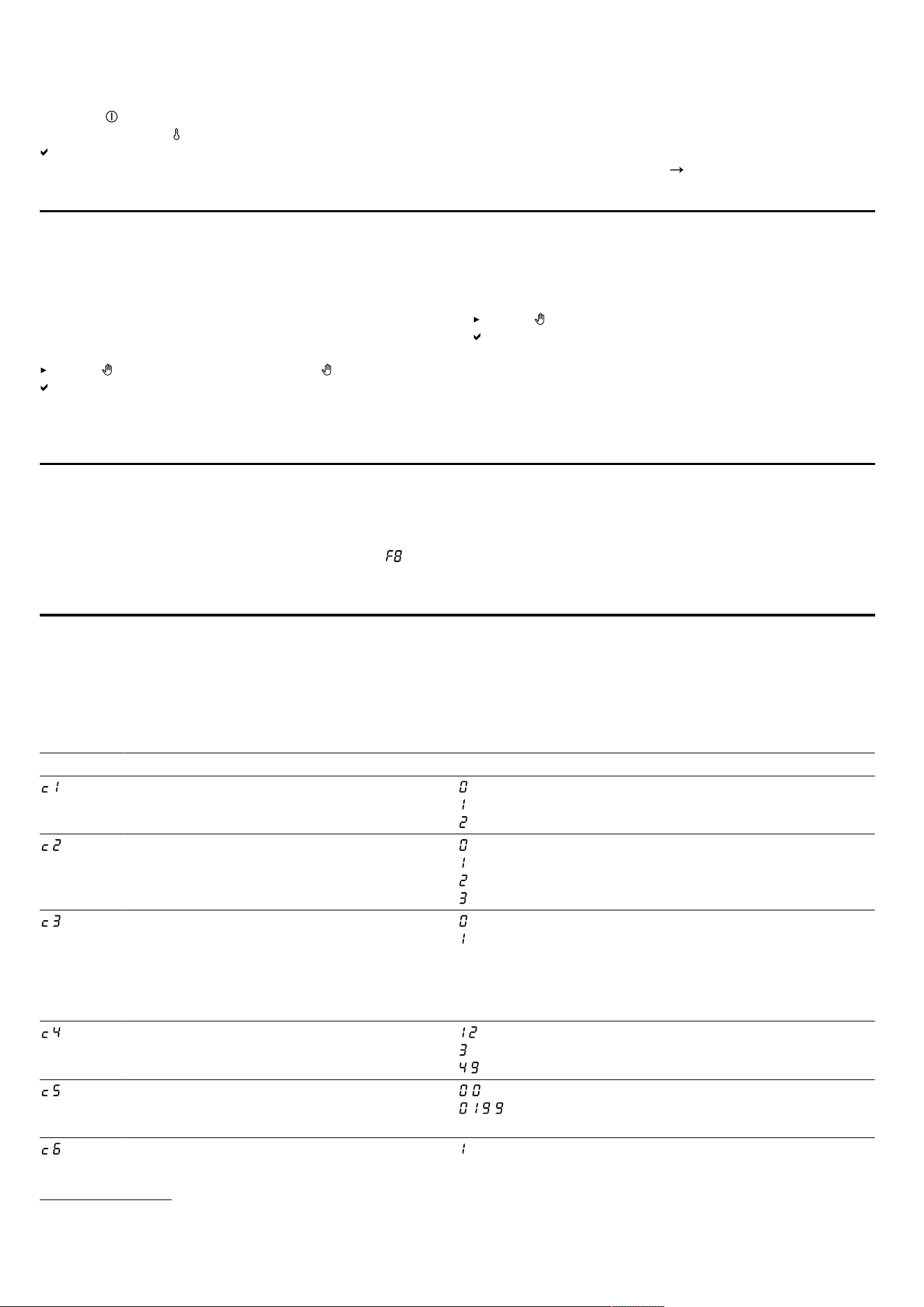
You can find out how to switch the function on and off in
the "Basic settings" section
Page13
.
Wipe protection18 Wipe protection
Allows the control panel to be locked for cleaning so
that the settings are not inadvertently adjusted.
The lock has no effect on the main switch.
18.1 Switching on Wipe protection
Press . A warning tone sounds and lights up.
The control panel remains locked for 35seconds. A
signal tone sounds 5 seconds before the appliance is
switched off.
18.2 Switching off Wipe protection
To switch off the function early:
touch .
The control panel is unlocked.
Individual safety switch-off19 Individual safety switch-off
The safety function is activated if one cooking zone is in
operation for an extended period and you do not
change any settings. The cooking zone displays and
switches itself off.
The time from 1 to 10 hours depends on the selected
power level.
Press any button to switch on the cooking zone.
Basic settings20 Basic settings
You can configure the basic settings for your appliance
to meet your needs.
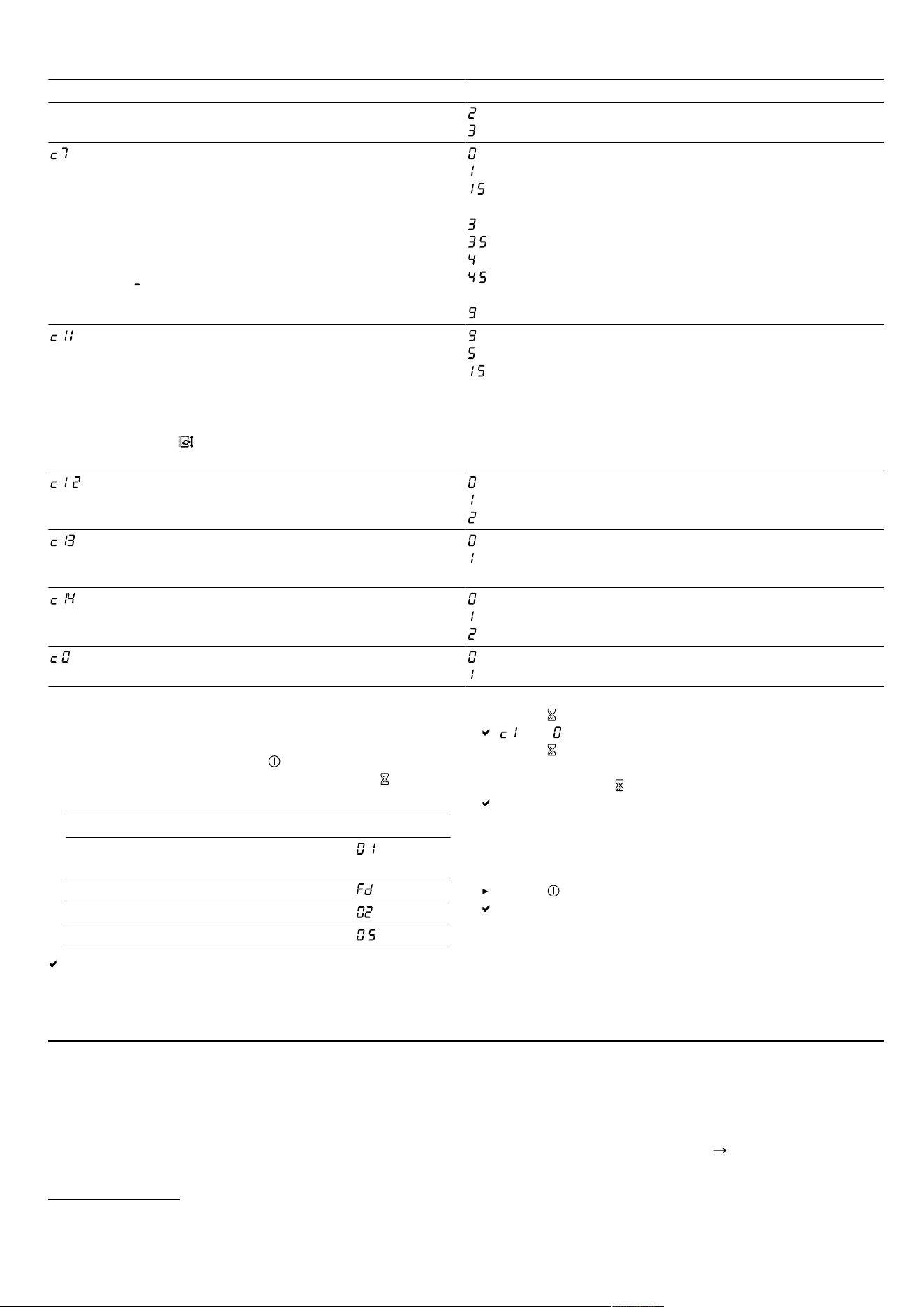
20.1 Overview of the basic settings
Display Setting Value
Childproof lock - Manual.
1
Automatic.
– Switched off.
Signal tones – Confirmation and fault signals are switched off.
– Only the fault signal is switched on.
– Only the confirmation signal is switched on.
– All signal tones are switched on
1
.
Energy consumption display
Shows the total energy consumption between
switching the hob on and off in kWh.
The accuracy of the display depends on vari-
ous factors such as the voltage quality of the
power supply.
– Switched off.
1
– Switched on.
Select the setting in accordance with the
height about sea level:
2
- - Decrease.
- Basic setting.
- - Increase.
Automatic switch-off of the cooking zones. – switched off.
1
- - minutes until the appliance switches off automat-
ically.
Duration of the timer end signal tone – 10seconds
1
1
Factory setting
2
The function is not available in this model.
13
en Cookware test
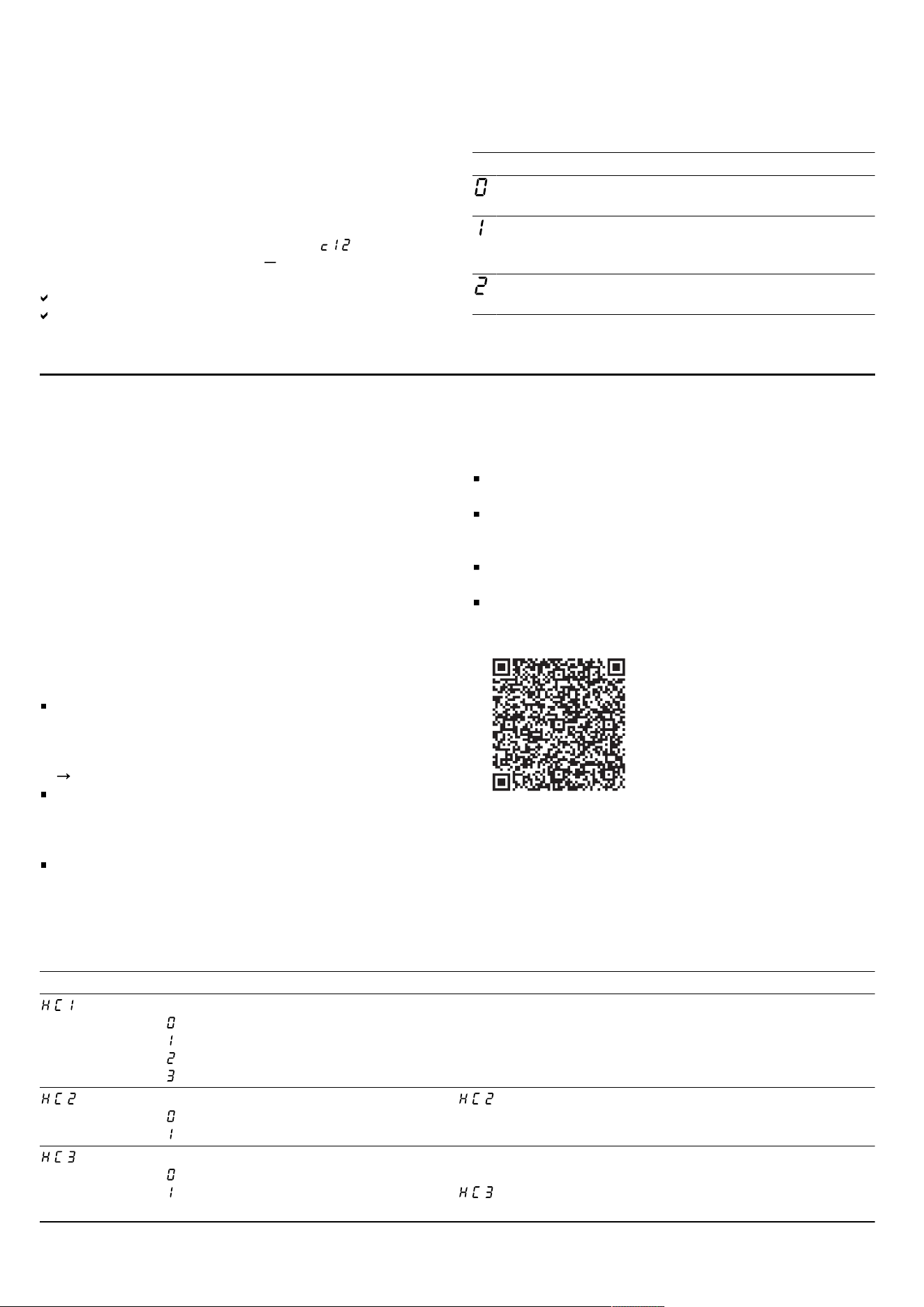
Display Setting Value
– 30seconds
- 1 minute
Power limitation
Enables the total power of the hob to be lim-
ited, if necessary, based on the conditions of
your electrical installation. The available set-
tings depend on the maximum power of the
hob (see rating plate). If the function is active
and the hob has reached the set power limit,
is displayed and you cannot select a higher
power level.
– Switched off. Maximum power of the hob
1
.
- 1000 W. Lowest power setting.
. - 1500 W.
...
- 3000 W. Recommended for 13 A
. - 3500 W. Recommended for 16 A.
- 4000 W.
. - 4500 W. Recommended for 20 A.
...
- Maximum power of the hob.
MoveMode
Allows you to change the preset power levels
for the three cooking areas of the flexible
cooking zone.
Select one of the two cooking zones, set the
required power level in the settings area and
touch to confirm the new power level and
select the next cooking zone.
- Preset power level for the front cooking zone.
- Preset power level for the middle cooking zone.
. - Preset power level for the rear cooking zone.
Cookware test
You can use this function to test the quality of
the cookware.
- Not suitable.
- Not optimal.
- Suitable.
FlexInduction
Change the switch-on mode for the Flex
Zone.
- As two independent cooking zones.
1
- As a connected cooking zone.
Connect the wireless cooking sensor to the
hob.
2
- Connected correctly.
- Not connected correctly due to a transmission error.
- Not connected correctly due to a cooking sensor fault.
Restoring factory settings - Individual settings
1
.
- Factory settings.
20.2 To go to the basic settings
Requirement: The hob must be switched off.
1.
To switch on the hob, touch .
2.
Within the next 10 seconds, press and hold for 4
seconds.
Product information Display
Directory for the technical after-sales
service (TK)
Production number
Production number 1 .
Production number 2 .
The first four displays provide the product informa-
tion. To call up the individual displays, touch the con-
trol panel.
3.
Touch to access the basic settings.
and light up as a presetting.
4.
Touch repeatedly until the desired setting appears.
5.
Select the required setting in the settings area.
6.
Touch and hold for 4seconds.
The settings are saved.
20.3 Discarding changes to the basic
settings
Touch .
All changes are discarded and not saved.
Cookware test21 Cookware test
The quality of the cookware has a major influence on
the speed and the result of the cooking process.
You can use this function to test the quality of the cook-
ware.
Before the test, ensure that the size of the cookware
base corresponds to the size of the cooking zone being
used.
Access is via the basic settings.
Page13
1
Factory setting
2
The function is not available in this model.
14
HomeConnect en
21.1 Carrying out Cookware test
As a single cooking zone, the flexible cooking zone is
set in such a way that only the individual item of cook-
ware is checked.
1.
At room temperature, place the cookware with ap-
prox.200ml water in the centre of the cooking zone
that best fits the base of the cookware in terms of
size.
2.
Call up the basic settings and select .
3.
Touch the settings area. The display flashes in the
cooking zones.
The test is running.
After 10 seconds, the result appears in the cooking
zone displays.
21.2 Checking the result
You can see what the result means for the quality and
speed of the cooking process in the following table.
Result
The cookware is not suitable for the cooking zone
and therefore does not heat up.
The cookware is taking longer to heat up than ex-
pected and cooking is not progressing as well as it
ought to.
The cookware is heating up correctly and cooking is
progressing well.
To activate this function, touch the settings range.
HomeConnect 22 HomeConnect
This appliance is network-capable. Connecting your ap-
pliance to a mobile device lets you control its functions
via the HomeConnect app, adjust its basic settings and
monitor its operating status.
The HomeConnect services are not available in every
country. The availability of the HomeConnect function
depends on the availability of HomeConnect services in
your country. You can find information about this at:
www.home-connect.com
.
The HomeConnect app guides you through the entire
login process. Follow the instructions in the HomeCon-
nect app to configure the settings.
Tip: Please also follow the instructions in the
HomeConnect app.
Notes
Please note the safety precautions in this instruction
manual and make sure that they are also observed
when operating the appliance via the HomeConnect
app.
"Safety", Page2
Operating the appliance on the appliance itself al-
ways takes priority. During this time it is not possible
to operate the appliance using the HomeConnect
app.
In networked standby mode, the appliance requires a
maximum of2W.
22.1 Setting up HomeConnect
Requirements
The appliance is connected to the power supply and
is switched on.
You have a mobile device with a current version of
the iOS or Android operating system, e.g. a smart-
phone.
The appliance is receiving signals from the WLAN
home network (Wi-Fi) at its installation location.
The mobile device and the appliance are within range
of your home network's Wi-Fi signal.
1.
Scan the following QR code.
You can install the HomeConnect app and connect
your appliance via the QR code.
2.
Follow the instructions in the HomeConnect app.
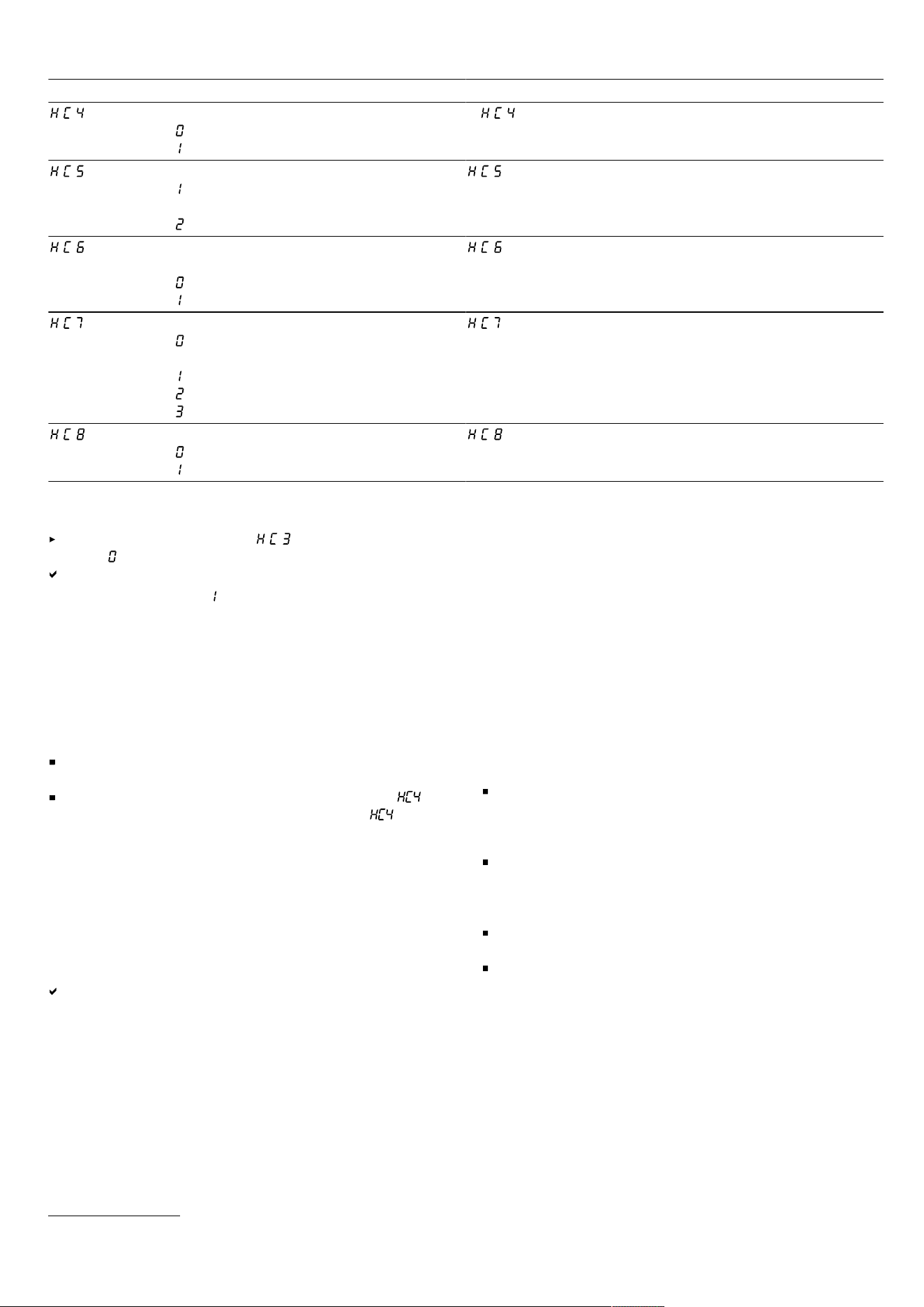
22.2 Overview of the HomeConnect settings
You can adjust the settings and network settings for HomeConnect by going to your hob's basic settings.
Setting Selection or display Additional information
Network connection
– Not connected/disconnect network
– Connect automatically
– Connect manually
– Connected
Log on the hob in the Wi-Fi home network (Wi-Fi) or dis-
connect from the network
Connection to app
– Not connected
– Connect
is only displayed if the hob is connected to the
home network.
Connection to the Wi-Fi
– Wireless module switched off
– Wireless module switched on
If Wi-Fi has been activated, you can use the HomeCon-
nect functions.
is only displayed if the hob has been previously con-
nected to a network.
15
en HomeConnect
Setting Selection or display Additional information
Set using the app
– Switched off
– Switched on
1
If is switched off, only the hob's operating statuses
are displayed in the HomeConnect app.
Software update
– Update available and ready to in-
stall
– Start installation
is only displayed if a software update is available.
Controlling remote access by after-
sales service
– Not authorised
– Authorised
is only displayed if after-sales service is attempting
to connect to the hob. After granting access, you can ter-
minate this at any time.
Display Wi-Fi signal strength
– Not connected to the WLAN home
network (Wi-Fi)
– Signal strength 1 (poor)
– Signal strength 2 (moderate)
– Signal strength 3 (good)
is only displayed if there is a connection to the
WLAN home network (Wi-Fi).
Connection to HomeConnect server
– Not connected
– Connected
is only displayed if there is a connection to the
WLAN home network (Wi-Fi).
22.3 Switching off the network connection
Access the basic settings, and then select the
value .
The connection to the Wi-Fi is deactivated.
Note: Select the value to reactivate the network con-
nection.
22.4 Changing settings via the
HomeConnect app
You can use the HomeConnect app to change the set-
tings for the cooking zones and send them to the hob.
Requirements
The hob is connected to the Wi-Fi and to the
HomeConnect app.
To use the HomeConnect app to set the hob,
must be switched on in the basic settings. is
switched on on delivery. If the option for the transmis-
sion of settings has been deactivated, only the hob's
operating statuses are displayed in the HomeCon-
nect app.
1.
Select the setting in the HomeConnect app and send
it to the hob.
Follow the instructions in the HomeConnect app.
Settings that you send from the HomeConnect app to
the hob must be confirmed on the hob.
As soon as cooking settings are transmitted to a
cooking zone, the display starts to flash, depending
on the setting.
2.
To confirm the setting, press the hotplate display for
the required cooking zone.
3.
To discard the setting, touch any other touch field on
the hob.
22.5 Software update
Your appliance's software can be updated using the
software update function, e.g. for the purposes of optim-
isation, troubleshooting or security updates.
To do this, you must be a registered HomeCon-
nectuser, have installed the app on your mobile device
and be connected to the HomeConnectserver.
As soon as a software update is available, you will be
informed via the HomeConnectapp and will be able to
start the software update via the app. Once the update
has been successfully downloaded, you can start in-
stalling it via the HomeConnectapp if you are in your
home network (Wi-Fi). The HomeConnectapp informs
you once installation is successful.
Notes
The software update consists of two steps.
– The first step is the download.
– The second step is the installation on your appli-
ance.
You can continue to use your appliance as normal
while updates are downloading. Depending on your
personal settings in the app, software updates can
also be set to download automatically.
Installation takes a few minutes. You cannot use your
appliance during installation.
We recommend that you install security updates as
soon as possible.
22.6 Remote diagnostics
Customer Service can use Remote Diagnostics to ac-
cess your appliance if you contact them, have your ap-
pliance connected to the HomeConnect server and if
Remote Diagnostics is available in the country in which
you are using the appliance.
Tip: For further information and details about the avail-
ability of Remote Diagnostics in your country, please
1
Factory setting
16

Hob-based hood control en
visit the service/support section of your local website:
www.home-connect.com
.
22.7 Data protection
Please see the information on data protection.
The first time your appliance is registered on a home
network connected to the Internet, your appliance will
transmit the following types of data to the HomeCon-
nect server (initial registration):
Unique appliance identification (consisting of appli-
ance codes as well as the MAC address of the in-
stalled Wi-Fi communication module).
Security certificate of the Wi-Fi communication mod-
ule (to ensure a secure data connection).
The current software and hardware version of your
appliance.
Status of any previous resetting to factory settings.
This initial registration prepares the HomeConnect func-
tions for use and is only required when you want to use
the HomeConnect functions for the first time.
Note: Please note that the HomeConnect functions can
only be utilised with the HomeConnect app. Information
on data protection can be retrieved in the HomeCon-
nect app.
Hob-based hood control23 Hob-based hood control
If the hob and the extractor hood are HomeConnect-
compatible, connect the appliances in the HomeCon-
nectapp. To do this, connect the two appliances to
HomeConnect and follow the instructions in the app.
Notes
Using the controls on the extractor hood always takes
priority. It is not possible to use the hob-based hood
control during this time.
You can only connect to the extractor hood via the
HomeConnect app.
23.1 Resetting HomeConnectsettings
If you have problems connecting your appliance to the
WLAN home network (Wi-Fi) or if you want to log your
appliance onto a different WLAN home network (Wi-Fi) ,
you can reset the HomeConnect settings.
Note: If you reset the HomeConnect settings, the con-
nection to any extractor hood will also be terminated.
1.
Press and hold for 4seconds.
The display will show the product information.
2.
Touch repeatedly until the display alternately shows
and .
3.
Set the value on the control panel.
23.2 Controlling the extractor hood via the
hob
In the basic settings for your hob, you can adjust the be-
haviour of your extractor hood depending on whether
the hob or individual cooking zones are switched on or
off.
You can select other settings using the controls on the
hob.
Setting the fan
1.
Touch .
2.
Select a fan setting on the control panel.
You can choose between the levels 1, 2 and 3.
To select an intensive setting, touch 4 or 5 on the
control panel. Alternatively, you can repeatedly touch
until the required intensive setting is displayed.
Switching off the fan
Select the fan setting 0 on the control panel.
Switching on automatic mode
Press and hold until the display shows .
The fan will start automatically when steam is pro-
duced.
Switching off automatic mode
Press and hold until goes out.
Automatic mode will also end if you select a different
fan setting.
Setting the hood lighting
You can switch the hood lighting on and off using the
control panel of the hob.
1.
To switch the lighting on, touch .
2.
To switch the lighting off, touch again.
23.3 Overview of the hood control settings
In the basic settings for your hob, you can adjust the behaviour of your extractor hood depending on whether the hob
or individual cooking zones are switched on or off.
Setting
1
Selection Description
Connection between hob and extractor hood
– Not connected/disconnected
– No function
– Connected to WLAN home network (Wi-Fi)
– Connected to WLAN and extractor hood
-
1
Depending on the appliance specifications
17
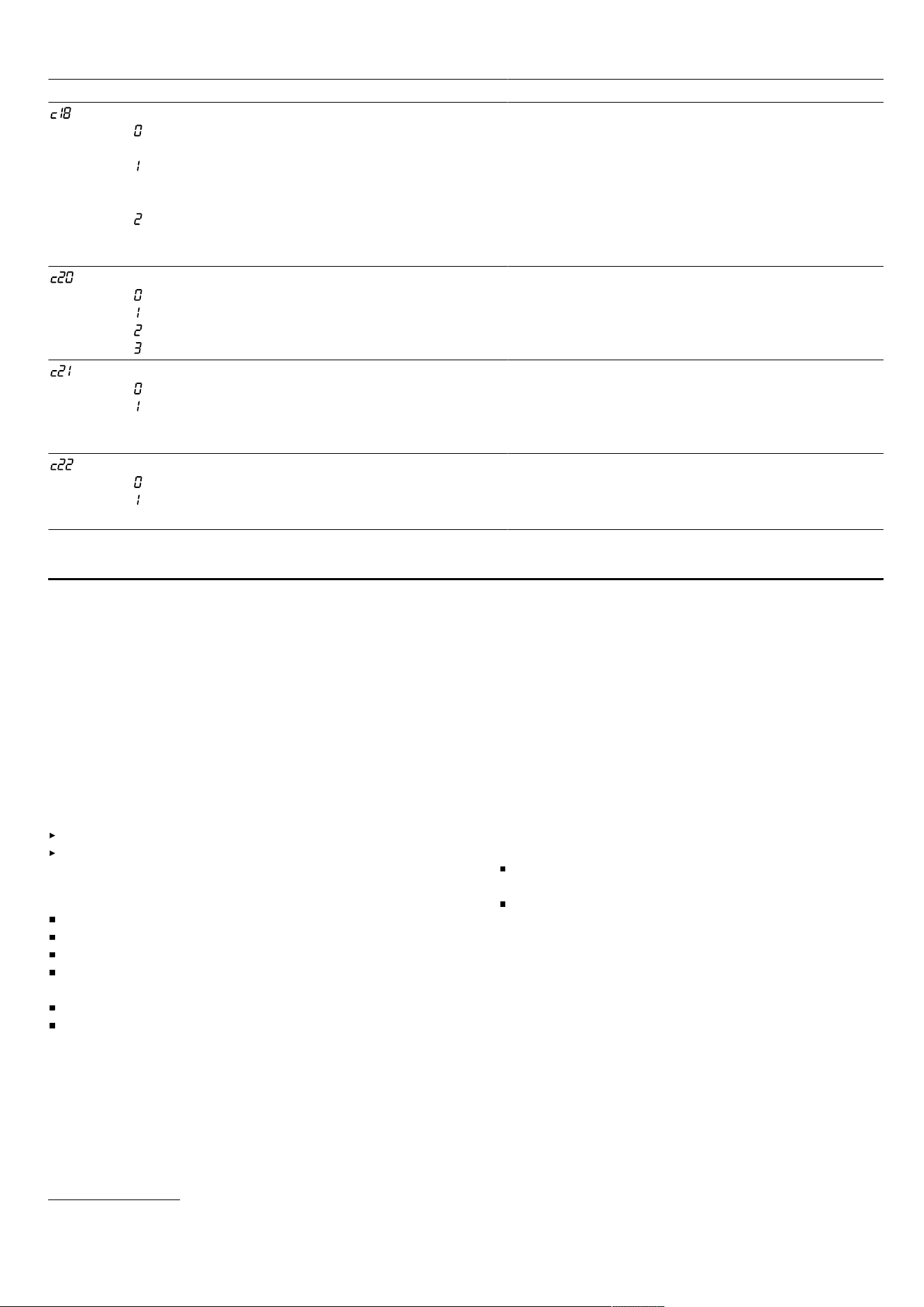
en Cleaning and servicing
Setting
1
Selection Description
Automatic fan start-up
– Switched off. The extractor hood must be
switched on manually, if required.
– Switched on in automatic mode
2
. In automatic
mode, the extractor hood switches itself on when
one of the cooking zones is switched on.
– Switched on in manual mode. The extractor
hood is switched on at a specified setting when a
cooking zone is switched on.
The display shows this setting only when the appli-
ance has been connected to the extractor hood.
Fan run-on
– Fan switches off when the hob is switched off.
– Switched on in automatic mode
2
– Switched on with standard fan run-on
– No change to the settings
Setting for whether and how the fan is to run on
after switching off the hob.
The display shows this setting only when the appli-
ance has been connected to the extractor hood.
Switching the light on automatically
– Switched off
– Switched on
2
The light switches itself on when the hob is
switched on.
The display shows this setting only when the appli-
ance has been connected to the extractor hood.
Switching the light off automatically
– Switched off
2
– The light switches itself off when the hob is
switched off.
The display shows this setting only when the appli-
ance has been connected to the extractor hood.
Cleaning and servicing24 Cleaning and servicing
To keep your appliance working efficiently for a long
time, it is important to clean and maintain it carefully.
24.1 Cleaning products
You can obtain suitable cleaning products and glass
scrapers from customer service, the online shop or a re-
tailer.
ATTENTION
Unsuitable cleaning products may damage the surfaces
of the appliance.
Never use unsuitable cleaning products.
Do not use cleaning products while the hob is still
hot. This may cause marks on the surface.
Unsuitable cleaning products
Undiluted detergent
Detergent intended for dishwashers
Abrasive cleaning products
Aggressive cleaning products such as oven spray or
stain remover
Abrasive sponges
High-pressure or steam jet cleaners
24.2 Cleaning the hob
Clean the hob after every use to stop cooking residues
from getting burnt on.
Requirement: The hob must be cold. Do not allow the
hob to cool down if it has sugar stains, rice starch,
plastic or aluminium foil on it.
1.
Remove heavy soiling using a glass scraper.
2.
Clean the hob with a cleaning agent for glass
ceramic.
Follow the cleaning instructions on the packaging of
the cleaning agent.
Tips
You can achieve good cleaning results using a
special sponge for glass ceramic.
If you keep the base of the cookware clean, the
hob surface remains in a good condition.
24.3 Cleaning profiles
Clean the profiles if they are dirty or stained after use.
Note: Do not use a glass scraper.
1.
Clean using warm soapy water and a soft cloth.
Wash new sponge cloths thoroughly before use.
2.
Dry with a soft cloth.
1
Depending on the appliance specifications
2
Factory setting (may vary according to model)
18
Troubleshooting en
Troubleshooting25 Troubleshooting
You can rectify minor faults on your appliance yourself. Read the troubleshooting information before contacting after-
sales service. This will avoid unnecessary costs.
WARNING‒Risk of injury!
Improper repairs are dangerous.
Repairs to the appliance should only be carried out by trained specialist staff.
If the appliance is defective, call Customer Service.
"Customer Service", Page21
WARNING‒Risk of electric shock!
Improper repairs are dangerous.
Repairs to the appliance should only be carried out by trained specialist staff.
Only use genuine spare parts when repairing the appliance.
If the power cord or the appliance power cable of this appliance is damaged, it must be replaced with a special
power cord or special appliance power cable, which is available from the manufacturer or its Customer Service.
If the power cord of this appliance is damaged, it must be replaced by trained specialist staff.
25.1 Warnings
Notes
If appears in the displays, press and hold the
sensor for the respective cooking zone and read the
fault code.
If the fault code is not listed in the following table, dis-
connect the hob from the power supply and wait
30seconds before reconnecting it. If this display ap-
pears again, contact Customer Service and specify
the exact fault code.
If an error occurs, the appliance does not switch to
low power mode.
In order to protect the appliance's electronic parts
from overheating or surge currents, the hob may tem-
porarily reduce the power level.
25.2 Information on the display panel
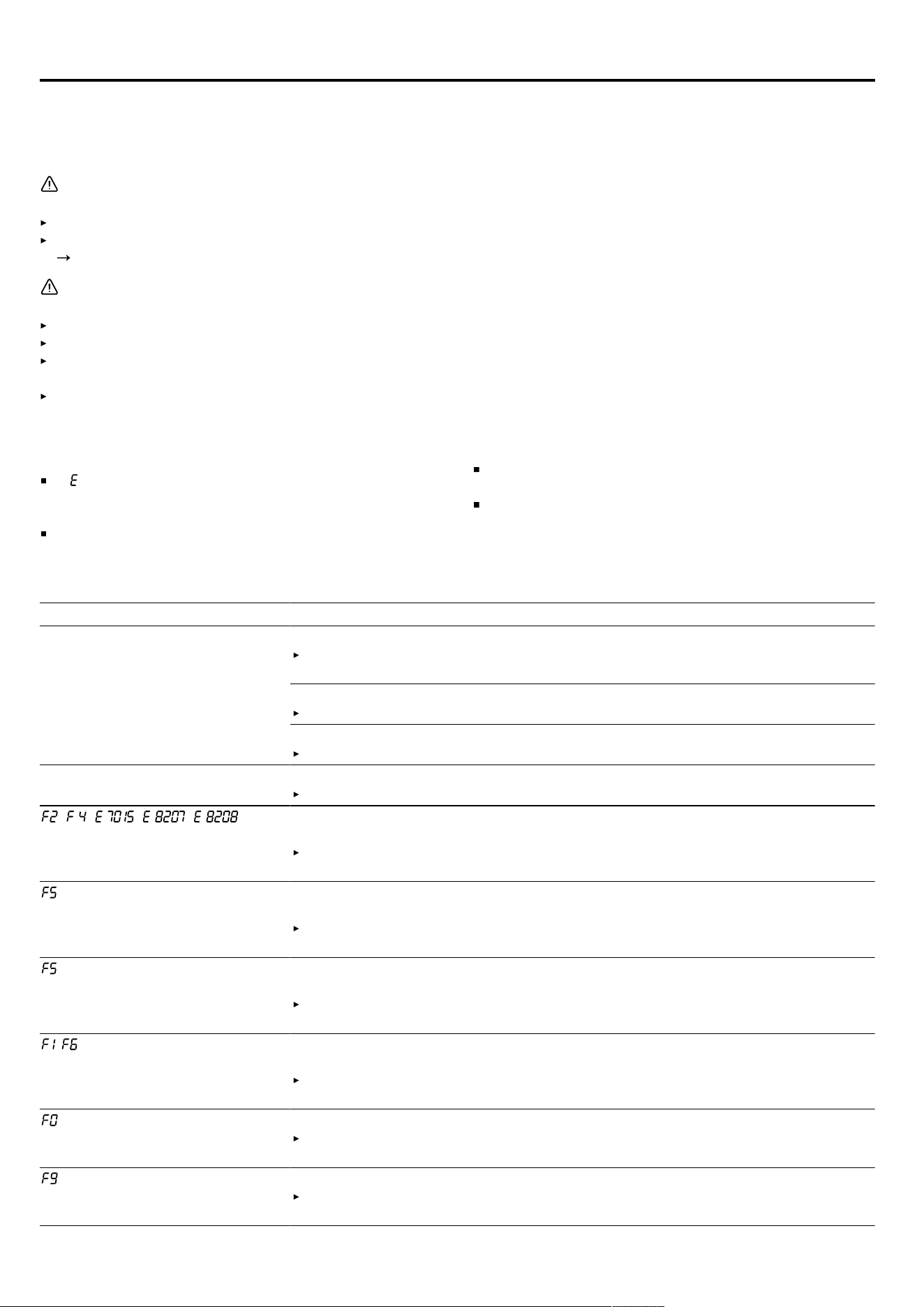
Fault Cause and troubleshooting
No displays light up. The power supply has been disconnected.
Use other electrical appliances to check whether there has been a power fail-
ure.
The appliance has not been connected as shown in the circuit diagram.
Connect the appliance in accordance with the circuit diagram.
Electronics fault
If you are unable to rectify the fault, inform the technical after-sales service.
The displays flash. The control panel is wet or an object is covering it.
Dry the control panel or remove the object.
, , , , The electronics have overheated and one or all of the cooking zones have been
switched off.
Wait until the electronics have cooled down sufficiently. Then touch any button
on the control panel.
+ power level and audible sig-
nal
There is hot cookware in the vicinity of the control panel. This may cause the
electronics to overheat.
Remove the cookware. The fault display goes out shortly afterwards. You can
continue to cook.
and signal tone There is hot cookware in the vicinity of the control panel. The cooking zone has
been switched off to protect the electronics.
Remove the cookware. Wait a few seconds. Touch any button. When the fault
display goes out, you can continue cooking.
/ The cooking zone has overheated and has been switched off to protect the work
surface.
Wait until the electronics have cooled down sufficiently before switching the
cooking zone back on.
Transfer settings is not activated.
Touch any button to confirm the fault display. You can continue to cook as nor-
mal without using the Transfer settings function. Contact customer service.
The extended FlexZone does not switch on.
Touch any sensor to confirm the fault display. You can use the remaining cook-
ing zones to continue cooking. Contact the technical after-sales service.
19
en Disposal
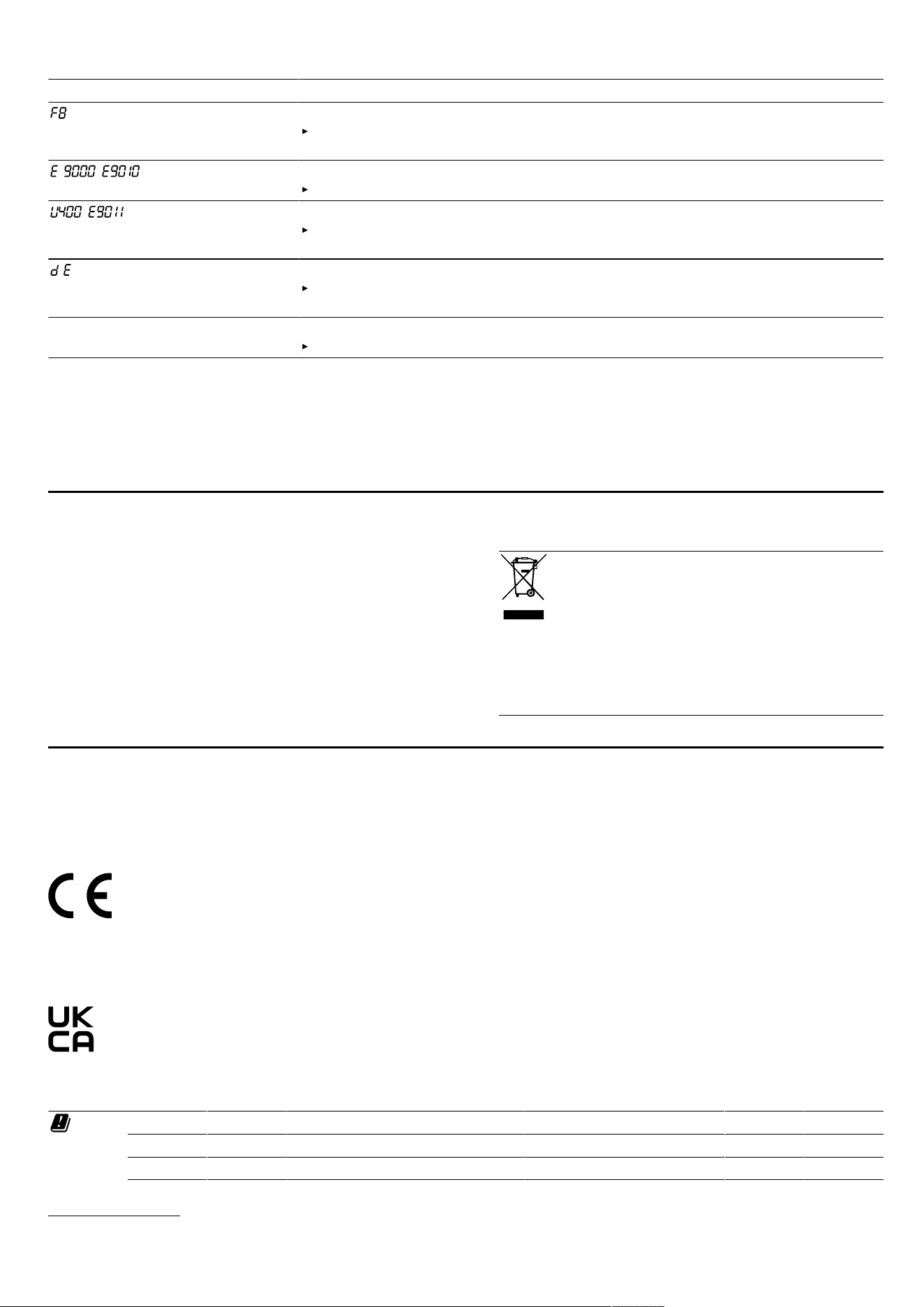
Fault Cause and troubleshooting
The cooking zone has been operating continuously for an extended period.
Individual safety switch-off is switched on. Touch any button to switch off the
display so that you can set the cooking zone.
/ The operating voltage is incorrect and outside of the normal operating range.
Contact your energy supplier.
/ The hob is not connected correctly.
Disconnect the hob from the mains. Connect the hob in accordance with the
circuit diagram.
Demo mode is activated.
Disconnect the hob from the mains. Wait for 30 seconds and connect the hob.
Touch any sensor in the next threeminutes. Demo mode is deactivated.
HomeConnect is not working
properly.
Different causes are possible.
Go to
www.home-connect.com
.
25.3 Normal noises from your appliance
An induction hob may sometimes cause noises or vibra-
tions, such as buzzing, crackling, hissing noises, fan
noises or rhythmic noises.
Disposal26 Disposal
26.1 Disposing of old appliance
Valuable raw materials can be reused by recycling.
1.
Unplug the appliance from the mains.
2.
Cut through the power cord.
3.
Dispose of the appliance in an environmentally
friendly manner.
Information about current disposal methods are avail-
able from your specialist dealer or local authority.
This appliance is labelled in accordance
with European Directive 2012/19/EU
concerning used electrical and elec-
tronic appliances (waste electrical and
electronic equipment - WEEE).
The guideline determines the framework
for the return and recycling of used ap-
pliances as applicable throughout the
EU.
Declaration of Conformity27 Declaration of Conformity
BSH Hausgeräte GmbH hereby declares that the appliance with Home Connect functionality conforms to the basic
requirements and other relevant provisions of Directive 2014/53/EU.
A detailed RED Declaration of Conformity can be found online at
www.bosch-home.com
among the additional docu-
ments on the product page for your appliance.
Hereby, BSH Hausgeräte GmbH declares that the appliance with HomeConnect functionality is in compliance with
relevant statutory requirements.
1
A detailed Declaration of Conformity can be found online at
www.bosch-home.co.uk
among the additional documents
on the product page for your appliance.
1
2.4 GHz band (2400–2483.5MHz): Max. 100mW
5-GHz band (5150–5350MHz + 5470–5725MHz): max. 50mW
BE BG CZ DK DE EE IE EL ES
FR HR IT CY LI LV LT LU HU
MT NL AT PL PT RO SI SK FI
1
Only applies to Great Britain
20

Customer Service en
SE NO CH TR IS UK (NI)
5GHz WLAN (Wi-Fi): For indoor use only.
AL BA MD ME MK RS UK UA
5GHz WLAN (Wi-Fi): For indoor use only.
27.1 Statement of Compliance for Great
Britain
Product type
This statement of compliance covers the products de-
scribed in this information for use whose model identi-
fier group is seen on the title page. The full model identi-
fier is made up of the characters before the slash in the
product number (E no.) which can be found on the rat-
ing plate. Alternatively, you can also find the model iden-
tifier in the first line of the UK Energy Label.
Name and address of manufacturer
BSH Hausgeräte GmbH, Carl-Wery-Strasse 34, 81739
München, Germany
This statement of compliance is prepared by the manu-
facturer.
The manufacturer, BSH Hausgeräte GmbH deems that it
has complied with
provision 5.1-1 of ETSI EN 303 645 v2.1.1 and,
where relevant, provision 5.1-2 of ETSI EN 303 645
v2.1.1;
provision 5.2-1 of ETSI EN 303 645 v2.1.1;
provision 5.3-13 of ETSI EN 303 645 v2.1.1.
Support period
BSH Hausgeräte GmbH will provide security updates
that are necessary to maintain the main functions free of
charge until at least 28/02/2034.
Customer Service28 Customer Service
Function-relevant genuine spare parts according to the
corresponding Ecodesign Order can be obtained from
Customer Service for a period of at least 10 years from
the date on which your appliance was placed on the
market within the European Economic Area.
Note: Under the terms of the manufacturer's warranty
the use of Customer Service is free of charge.
Detailed information about the warranty period and the
warranty conditions in your country is available via the
QR code on the enclosed document on service con-
tacts and warranty conditions, from our customer ser-
vice or on our website.
If you contact Customer Service, you will require the
product number (E-Nr.) and the production number (FD)
of your appliance.
You can find the contact details for our customer ser-
vice via the QR code on the enclosed document on ser-
vice contacts and warranty conditions or on our website.
You can find the information required as per Regula-
tions (EU) 66/2014 and (EU) 2023/826 online at
www.bosch-home.com
on the product and service
pages for your appliance, in the area of user manuals
and additional documents.
28.1 Product number (E-Nr.) and production
number (FD)
You can find the product number (E-Nr.) and the pro-
duction number (FD) on the appliance's rating plate.
The rating plate can be found:
on the appliance certificate.
on the lower section of the hob.
The product number (E no.) can also be found on the
glass ceramic. You can also display the customer ser-
vice index (KI) and the production number (FD) in the
basic settings.
Page13
Make a note of your appliance's details and the Cus-
tomer Service telephone number to find them again
quickly.
Test dishes29 Test dishes
These recommended settings are intended for test insti-
tutes to facilitate the testing of our appliances. The tests
were carried out using our cookware sets for induction
hobs. If required, these accessory sets can be pur-
chased at a later point from specialist retailers, or
through our technical after-sales service or our online
shop.
29.1 Melting the chocolate coating
Ingredients: 150 g dark chocolate (55% cocoa).
16 cm saucepan without lid
– Boiling: Power level 1.5
29.2 Heating and keeping lentil stew warm
Recipe in accordance with DIN 44550
Initial temperature 20°C
Heating up without stirring
16 cm saucepan with lid, amount: 450g
– Heating up: Duration 1 min. 30 sec., power level 9
– Simmering: Power level 1.5
20 cm saucepan with lid, amount: 800g
– Heating up: Duration 2 min. 30 sec., power level 9
– Simmering: Power level 1.5
21

en Test dishes
29.3 Heating and keeping lentil stew warm
E.g.: Lentil diameter 5–7 mm. Initial temperature 20 °C
Stir after heating for 1 minute
16 cm saucepan with lid, amount: 500g
– Heating up: Duration approx. 1 min. 30 sec., power
level 9
– Simmering: Power level 1.5
20 cm saucepan with lid, amount: 1kg
– Heating up: Duration approx. 2 min. 30 sec., power
level 9
– Simmering: Power level 1.5
29.4 Béchamel sauce
Milk temperature: 7 °C
16 cm saucepan without lid, ingredients: 40 g butter,
40 g flour, 0.5 l milk with 3.5% fat content and a
pinch of salt
Preparing Béchamel sauce
1.
Melt the butter, stir in the flour and salt, and heat up
the mixture.
Heating up: Duration 6 min., power level 2
2.
Add the milk to the roux and bring to the boil, stirring
continuously.
Heating up: Duration 6 min. 30 sec., power level 7
3.
Once the Béchamel sauce comes to the boil, leave it
on the cooking zone for a further two minutes.
Simmering: Power level 2
29.5 Cooking rice pudding with the lid on
Milk temperature: 7 °C
1. Heat the milk until it starts to rise up. Heat up without
a lid. Stir after heating for 10 min.
2. Set the recommended power level and add rice,
sugar and salt to the milk.
The cooking time, including heating up, is approx. 45
minutes.
16 cm saucepan, ingredients: 190g short-grain rice,
90g sugar, 750ml milk with 3.5% fat content and 1 g
salt
– Heating up: Duration approx. 5 min. 30 sec., power
level 8.5
– Simmering: Power level 3
20 cm saucepan, ingredients: 250g short-grain rice,
120g sugar, 1l milk with 3.5% fat content and 1.5 g
salt
– Heating up: Duration approx. 5 min. 30 sec., power
level 8.5
– Simmering: Power level 3, stir after 10 minutes
29.6 Cooking rice pudding without a lid
Milk temperature: 7 °C
1. Add the ingredients to the milk and heat the mixture
up while stirring continuously.
2. Once the milk has reached approx. 90°C, select the
recommended power level and leave it to simmer on a
low heat for approx. 50minutes.
16 cm saucepan without lid, ingredients: 190g short-
grain rice, 90g sugar, 750ml milk with 3.5% fat con-
tent and 1 g salt
– Heating up: Duration approx. 5 min. 30 sec., power
level 8.5
– Simmering: Power level 3
20 cm saucepan without lid, ingredients: 250g short-
grain rice, 120g sugar, 1l milk with 3.5% fat content
and 1.5 g salt
– Heating up: Duration approx. 5 min. 30 sec., power
level 8.5
– Simmering: Power level 2.5
29.7 Cooking rice
Recipe in accordance with DIN 44550
Water temperature: 20°C
16 cm saucepan with lid, ingredients: 125g long-
grain rice, 300 g water and a pinch of salt
– Heating up: Duration approx. 2 min. 30 sec., power
level 9
– Simmering: Power level 2
20 cm saucepan with lid, ingredients: 250g long-grain
rice, 600 g water and a pinch of salt
– Heating up: Duration approx. 2 min. 30 sec., power
level 9
– Simmering: Power level 2.5
29.8 Roasting a pork loin
Initial temperature of the loin: 7°C
24cm pan without lid, ingredients: 3 pork loins, total
weight approx. 300g, 1cm thick, and 15g sunflower
oil
– Heating up: Duration approx. 1 min. 30 sec., power
level 9
– Simmering: Power level 7
29.9 Preparing crêpes
Recipe in accordance with DIN EN 60350-2
24 cm pan without lid, ingredients: 55 ml batter per
crêpe
– Heating up: Duration 1 min. 30 sec., power level 9
– Simmering: Power level 7
29.10 Deep-fat frying frozen chips
Pot dia. 20 cm without lid: ingredients: 2 l sunflower
oil. For each frying time: 200 g frozen chips, 1 cm
thick.
– Heating up: Power level 9, until the oil temperature
reaches 180 °C.
– Simmering: Power level 9
22

Thank you for buying a
Bosch Home Appliance!
Register your new device on MyBosch now and profit directly from:
• Expert tips & tricks for your appliance
• Warranty extension options
• Discounts for accessories & spare-parts
• Digital manual and all appliance data at hand
• Easy access to Bosch Home Appliances Service
Free and easy registration – also on mobile phones:
www.bosch-home.com/welcome
Looking for help?
You'll find it here.
Expert advice for your Bosch home appliances, help with problems
or a repair from Bosch experts.
Find out everything about the many ways Bosch can support you:
www.bosch-home.com/service
Contact data of all countries are listed in the attached service directory.
BSH Hausgeräte GmbH
Carl-Wery-Straße 34
81739 München, GERMANY
www.bosch-home.com
A Bosch Company
Valid within Great Britain:
Imported to Great Britain by
BSH Home Appliances Ltd.
Grand Union House
Old Wolverton Road
Wolverton, Milton Keynes
MK12 5PT
United Kingdom
*9001788646*
9001788646 (050731) REG25
en