quality • reliability • performancequality • reliability • performance
OWNER’S MANUALOWNER’S MANUALOWNER’S MANUALOWNER’S MANUAL

2
Welcome to the Kirby
®
family! Thank you for your purchase of a Kirby
®
Home Cleaning System.
It’s not just a vacuum; it is a complete home cleaning system!
Read this manual carefully before using the Kirby
®
Home Cleaning System. If you have
questions, contact an independent authorized Kirby
®
Distributor.
This manual is available online in a selection of languages. Please visit www.kirby.com
to view a manual in an alternate language.
Or, contact The Kirby Company:
consumer@kirby.com
United States: 1-800-494-8586 (M-F, 8:00AM - 5:00 PM EST)
Australia: 1-800-781-556
Balkans: 0800-328-1247
Canada: 1-800-494-8586
Commonwealth of Independent States: +7 495 374 72 82
Europe: 00-800-5472-9272
Far East: 0800-328-1247
Middle East: 0800-328-1247
Russia: 7800500-51-46 or 7495374-72-82
Scandinavia: 80014747, 0200895477, or 0800-328-1247
South Africa: 0800-203-222 or 0800-983-044
United Kingdom: 0800-328-1247
Consumer Relations
The Kirby Company
1920 West 114th Street
Cleveland, OH 44102
For parts and supplies:
www.kirby.com (where available)
imd@kirby.com
United States: 1-800-437-7170 (M-F, 8:00AM - 5:00 PM EST)
Australia: 1-800-781-556
Balkans: 0800-328-1247
Canada: 1-800-437-7170
Commonwealth of Independent States: +7 495 374 72 82
Europe: 00-800-5472-9272
Far East: 0800-328-1247
Middle East: 0800-328-1247
Russia: 7800500-51-46 or 7495374-72-82
Scandinavia: 80014747, 0200895477, or 0800-328-1247
South Africa: 0800-203-222 or 0800-983-044
United Kingdom: 0800-328-1247
Kirby
®
, Avalir 2
®
, Kirby Micron Magic
®
, Tech Drive
®
, and Mini Em-Tor
®
are registered trademarks of Kirby Opco, LLC.
Visit our welcome page at www.kirby.com/welcome/.
We’ve put all of the information you need to get the most out of your
Kirby
®
Home Cleaning System in one convenient location.

43
TABLE OF CONTENTS
Parts of the Kirby
®
Home Cleaning System ................................................................................................6
Getting Started ......................................................................................................... 11
Assembling the Unit ......................................................................................................................................11
Power Switch .................................................................................................................................................12
Disposable Filter Bag ...................................................................................................................................13
Moving the Unit with the Power Off ...........................................................................................................14
Locking the Upright Handle ........................................................................................................................15
Lift The Unit .................................................................................................................................................... 16
Belt Lifter........................................................................................................................................................ 16
Outer Permanent Bag & Mini Em-Tor
®
Collector .....................................................................................18
Upright & Portable Cleaner ....................................................................................... 19
Upright Cord Management ........................................................................................................................19
Adjusting the Cleaning Height ................................................................................................................... 20
Tech Drive
®
Power Assist .............................................................................................................................20
Converting to a Portable Cleaner ..............................................................................................................21
Cleaning Carpeted Stairs ...........................................................................................................................22
Cleaning a Mattress .................................................................................................................................... 22
Canister Cleaner and Attachments .............................................................................22
Attach the Hose to Convert to a Canister Cleaner ..................................................................................22
Installing Attachments on the Hose ........................................................................................................... 24
Blower/Inflator ........................................................................................................................................... 26
Portable Sprayer ......................................................................................................................................... 27
Portable Shampooer ................................................................................................................................... 29
Optional Accessories .................................................................................................30
Zippbrush .....................................................................................................................................................30
Multi-Surface Shampoo System: Carpets .................................................................................................31
Multi-Surface Shampoo System: Hard Floors .........................................................................................38
Miracle Shine Kit .........................................................................................................................................45
Tile & Grout Kit .............................................................................................................................................48
Hard Floor Pad ............................................................................................................................................50
Turbo Accessory ...........................................................................................................................................51
Maintenance .............................................................................................................53
Troubleshooting ........................................................................................................58
4
READ THIS MANUAL BEFORE
USING THIS PRODUCT. FAILURE
TO FOLLOW THE INSTRUCTIONS AND
SAFETY PRECAUTIONS IN
THIS MANUAL CAN RESULT IN
PERSONAL INJURY. INTENDED
FOR HOUSEHOLD USE ONLY.
Operating Instructions are available by contacting
The Kirby Company or online at www.kirby.com
Certified by:
UL LLC as a double
insulated appliance.
Outside North America:
Certified by national
test authorities as
appropriate.
Kirby
®
Model and Optional Accessories:
Avalir 2
®
: Model G10D
2930**and 2950**Multi-Surface Shampoo System
2931**and 2951**Floor Care System
2935**Zippbrush
2932**Turbo Accessory System
Avalir 2
®
: Model G10E Sentria 220/240 Volt
Avalir 2
®
: Model G10E 220/240 Volt
Avalir 2
®
: Model G10IL 220/240 Volt
Avalir 2
®
: Model G10J 110 Volt
Avalir 2
®
: Model G10B1 127 Volt
Avalir 2
®
: Model G10B2 220 Volt
CE DECLARATION OF CONFORMITY
We, Kirby
®
, declare under our sole responsibility that, where applicable,
the Kirby
®
Model G10E Vacuum Cleaner is in conformity with the
following standards or standardized documents.
IEC 60335-1 (EN 60335-1), IEC 60335-2-2 (EN 60335-2-2),
EN 55014-1, EN 55014-2, EN 61000-3-2, EN 61000-3-3, EN 50366
and EN 62233 in accordance with the regulations including the
Low Voltage Directive 2006/95/EC and EMC Directive 2004/108/EC
CE 95
1920 West 114
th
Street • Cleveland, OH 44102 • U.S.A.

65
Important Safety Instructions
Overview of Safety Guidelines and Your Responsibilities:
•Your safety and the safety of others depend on you thoroughly reading and
understanding this manual. If you have questions or do not understand the
information presented in this manual, please contact The Kirby Company.
•Most vacuum-related incidents are caused by failure to observe basic safety
rules or precautions. You must be alert to potential hazards.
•The Kirby Company cannot anticipate every possible circumstance that might
involve a potential hazard. Therefore, the warnings in this manual may not be
all inclusive. If a tool, procedure, work method or operating technique that is not
specifically recommended by The Kirby Company is used, you must ensure that
the product will not be damaged or be made unsafe by the operation, mainte-
nance or repair procedures that you choose.
WARNING – To reduce the risk of fire, electric shock, or injury:
•ALWAYS unplug before cleaning or servicing.
•NEVER leave appliance unattended when plugged in.
•NEVER use outdoors or on wet surfaces.
•NEVER use with damaged power cord or plug. If appliance is not working as it
should, has been dropped, damaged, left outdoors or dropped into water, return
it to a Kirby
®
authorized service center for qualified inspection.
•NEVER run appliance over cord, pull or carry by cord, use cord as a
handle, close a door on cord, or pull cord around sharp edges or corners.
•KEEP cord away from heated surfaces.
•NEVER unplug by pulling on cord. To unplug, grasp the plug, not the cord.
•NEVER handle plug or appliance with wet hands.
•Use only as described in this manual. Use only Kirby
®
’s recommended attachments.
•DO NOT put any object into openings. Do not use with any opening blocked;
keep openings free of dust, lint, hair or anything that may reduce airflow.
•Keep hair, loose clothing, fingers and all parts of body away from openings and
moving parts.
•Keep motor shaft free from lint, hair and debris build-up.
•NEVER use to pick up flammable or combustible liquids, such as gasoline, or use
in areas where they may be present.

6
•Turn off all controls before unplugging.
•Use extra care when cleaning on stairs.
•Do not allow to be used as a toy. Close attention is necessary when used by or
near children.
o Keep all Kirby
®
chemicals out of reach of children. These chemicals may cause
irritation or discomfort if swallowed or placed in the eyes.
o In accordance to IEC (International Electrotechnical Commission) 60335-1:
This appliance can be used by children aged from 8 years and older, and
by persons with reduced physical, sensory or mental capabilities or lack
of experience and knowledge if they have been given supervision or
instruction concerning use of the appliance in a safe way and understand
the hazards involved. Children should be supervised to ensure that they do
not play with the appliance. Cleaning and user maintenance shall not be
made by children without supervision.
•Use only Kirby
®
cleaning solutions intended for use with the Multi-Surface
Shampoo System. See the Kirby
®
Home Cleaning Products section of the manual.
•Do not pick up anything with the Kirby
®
Home Cleaning System that is burning or
smoking, such as cigarettes, matches, or hot ashes.
•Do not use without the dust bag and/or filters correctly in place.
WARNING In the State of California:
This product contains chemicals known to the State of California to cause cancer
and birth defects or other reproductive harm.
Safety Symbols and Warning Levels
This is the safety alert symbol. It is used to alert you to potential personal
injury hazards.
Attention! Become alert! Your safety may be at risk.
NOTICE Indicates a situation that may result in property-related damage.
This is the information symbol. It is used to indicate product usage tips.
SAVE THESE INSTRUCTIONS.

87
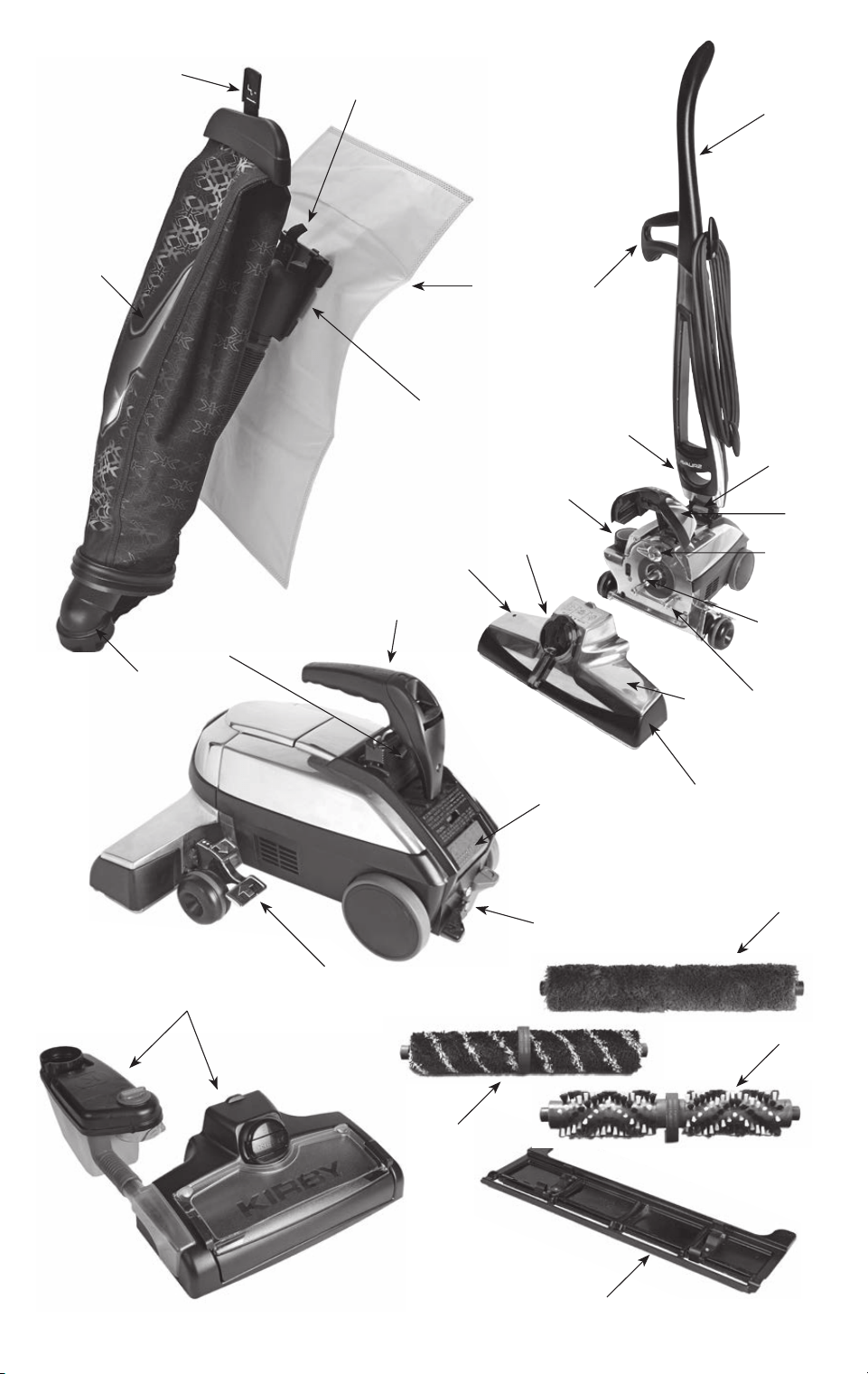
PARTS OF THE KIRBY
®
HOME CLEANING SYSTEM
No. Part
1 Outer Permanent Bag
2 Bag Release Button
3 Bag Support Strap
4 Disposable Filter Bag
5 Top Adaptor
6 Mini Em-Tor
®
Collector
7 Brush Roll Performance Indicator Light
8 Belt Lifter
9 Air Exhaust Port
10 Lower Carrying Grip
11 Upper Carrying Grip
12 Upright Handle
13 Handle Tilt Latch Lever
14 Headlight Hood
15 Accessory Lock
16 Motor Shaft
17 Attaching Bar
18 Power Nozzle
19 Bumper
20 Power Switch
21 Tech Drive
®
Power Assist Pedals
22 Toe-Touch Control Pedals
23 Handle Release Button
Accessories & Attachments
24 Multi-Surface Shampoo System (optional)
25 Rotary Mop (optional)
26 Miracle Shine Mop (optional)
27 Tile & Grout Brush Roll (optional)
28 Hard Floor Pad (optional)
8
4
9
8
3

109
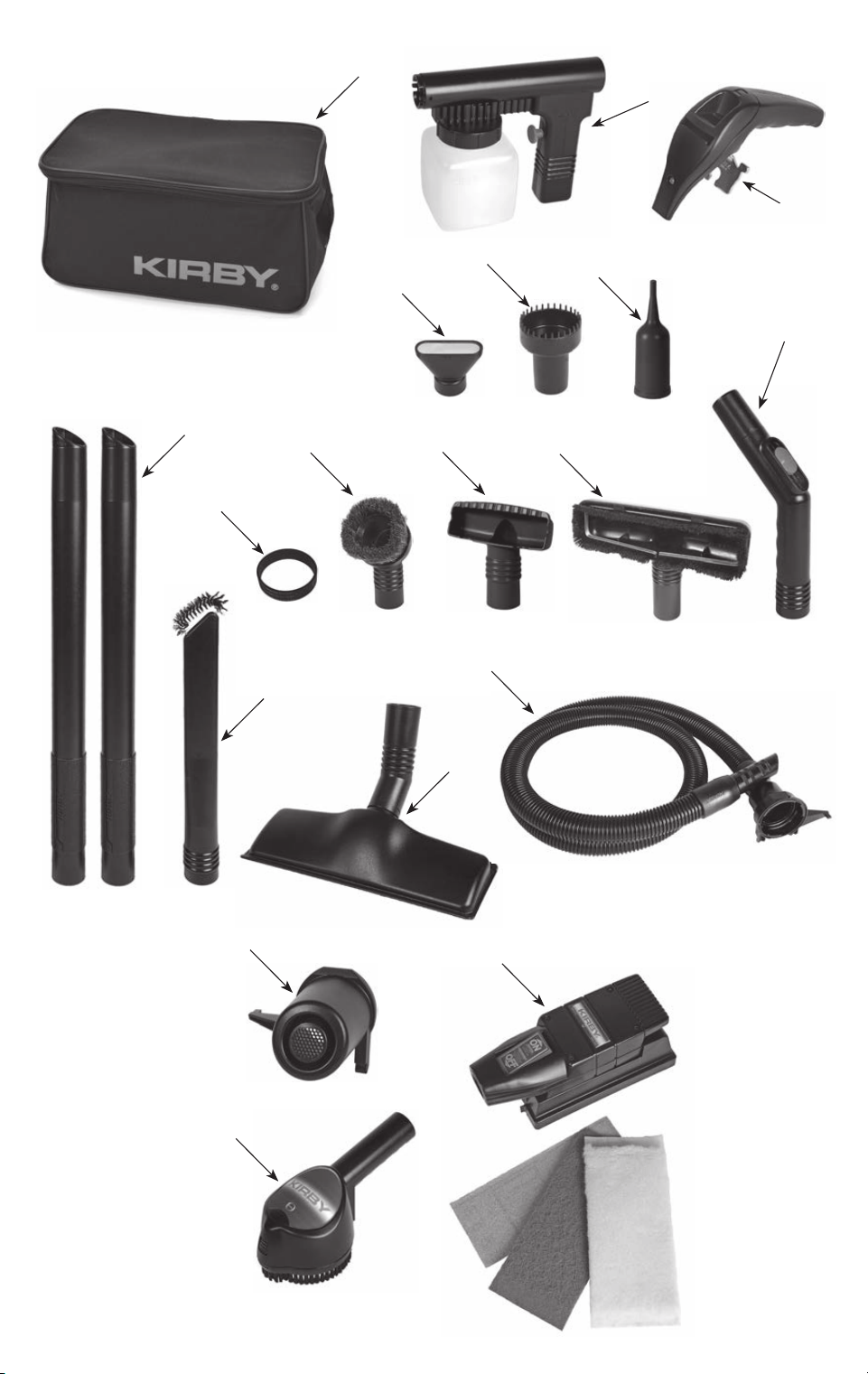
ACCESSORIES & ATTACHMENTS
No. Part
29 Attachment Kaddy
30 Portable Sprayer
31 Portable Carry Handle
32 Portable Shampooer Cap
33 Utility Tool
34 Inflator/Deflator Tool
35 Extension Tubes
36 Replacement Belt
37 Duster Brush
38 Upholstery Nozzle
39 Wall and Ceiling Brush
40 Suction Control Grip
41 Crevice Tool
42 Surface Nozzle
43 Attachment Hose
44 Air Intake Guard
45 Zippbrush (optional)
46 Turbo Accessory (optional)
10
1211
12
GETTING STARTED
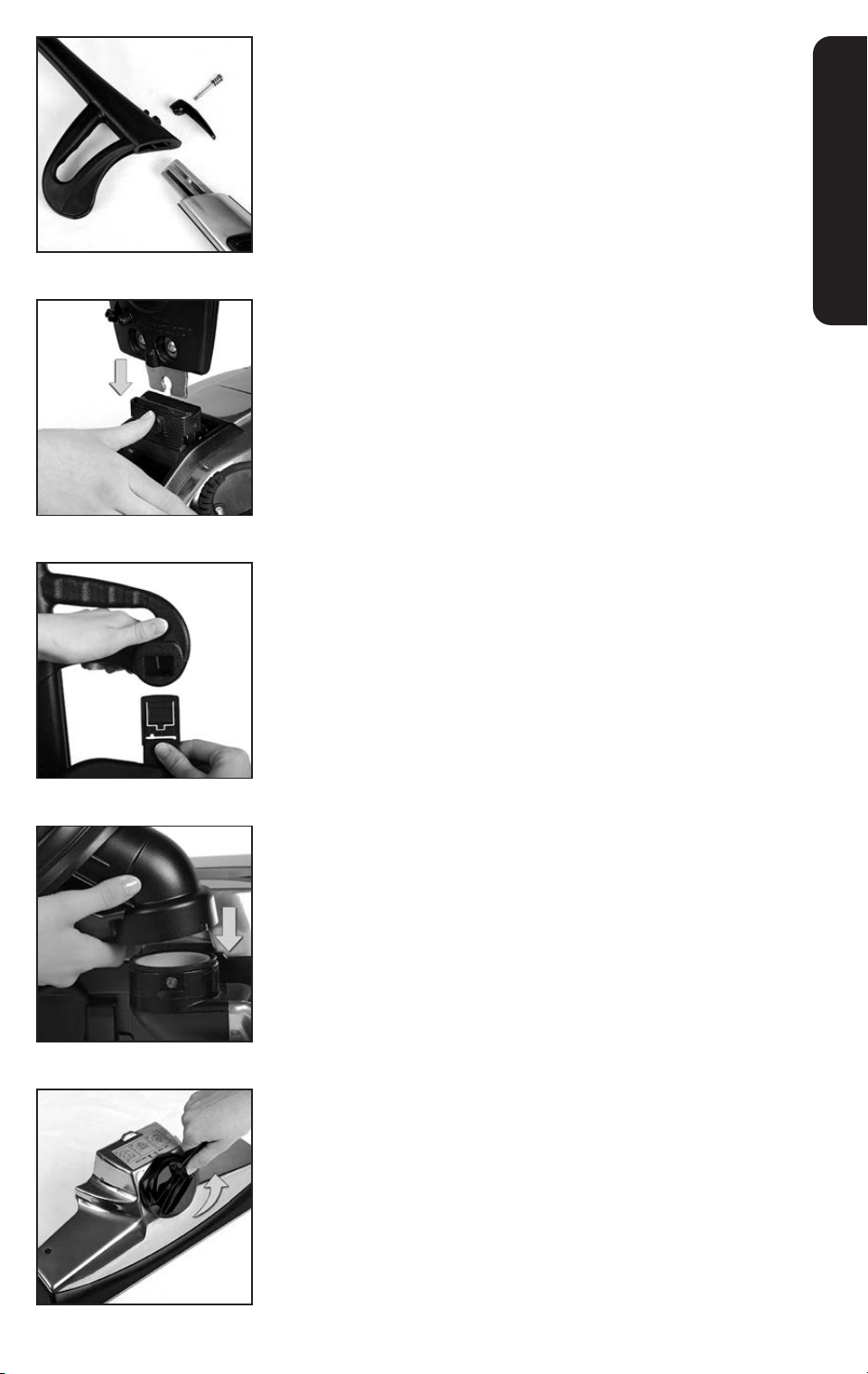
Assembling the Unit
1
Assemble the Upright Handle by sliding the two pieces
together. Screw in the cord hook and spring to secure.
2
Push the base of the Upright Handle into the connection on the
top of the unit.
3
Attach the Bag Latch Tab on the Outer Permanent Bag to the
Upright Handle.
4
With the arrows lined up, slide the Mini Em-Tor
®
collector on to
the Air Exhaust Port. Rotate it toward the unit to lock in place.
5
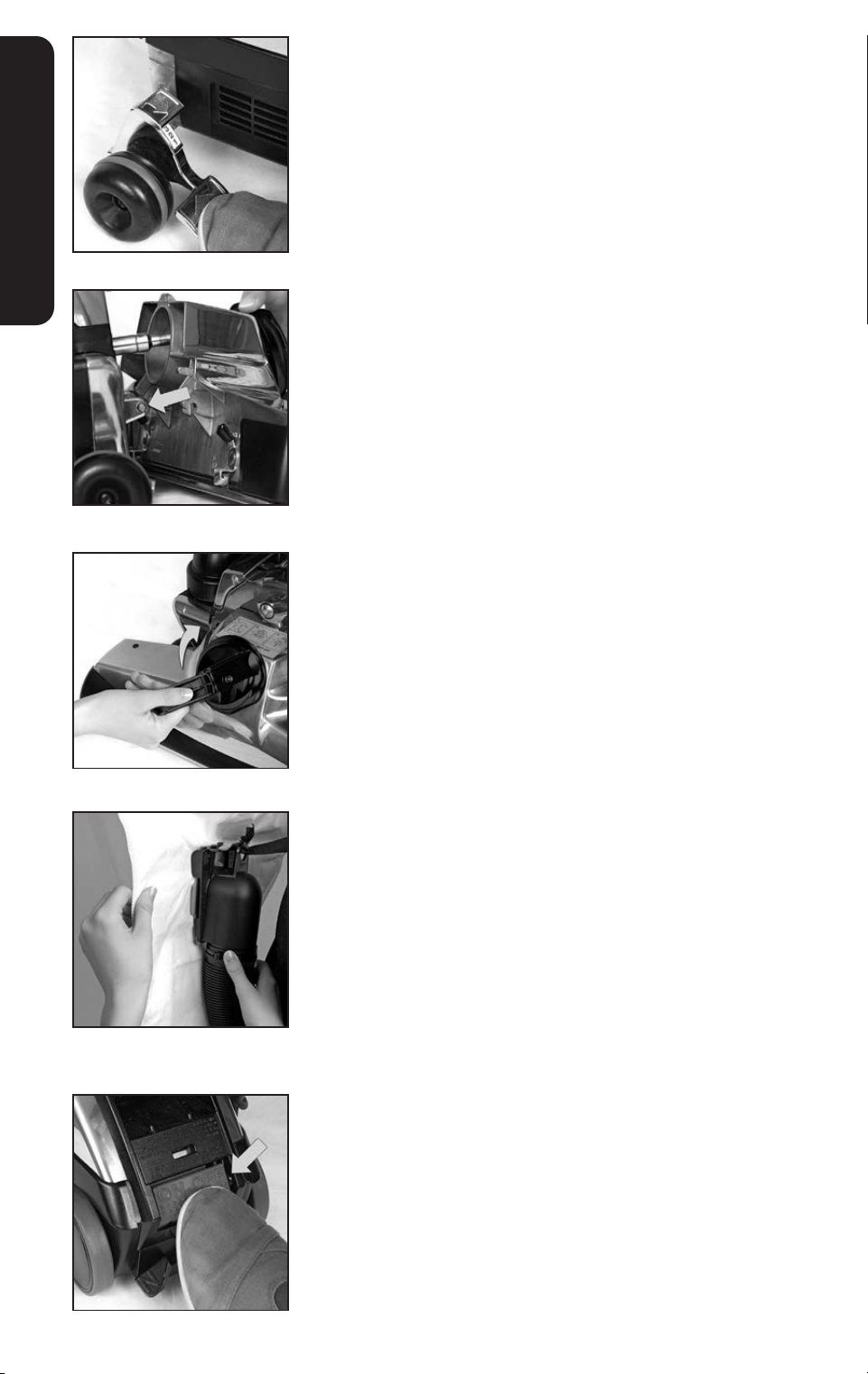
Flip out the handle on the Belt Lifter on the Power Nozzle. Turn
it counterclockwise until the red arrows line up. The hook should
catch and stretch the Belt inside the Power Nozzle.
1413
GETTING STARTED
6
Press the bottom pedal on the Toe-Touch Control all the way
down to raise the front of the unit. Raise the Headlight Hood.
7
Rest the two hooks on the back of the Power Nozzle on the
Attaching Bar on the front of the unit. Press the Power Nozzle
against the unit and secure with the Accessory Lock.
8
Flip out the handle on the Belt Lifter and use it to turn the Belt
Lifter clockwise until the green arrows line up. This will engage
the belt so the Brush Roll will spin. See page 17. Lower the
Headlight Hood.
9
Install a Disposable Filter Bag before vacuuming. See page 13.
Power Switch
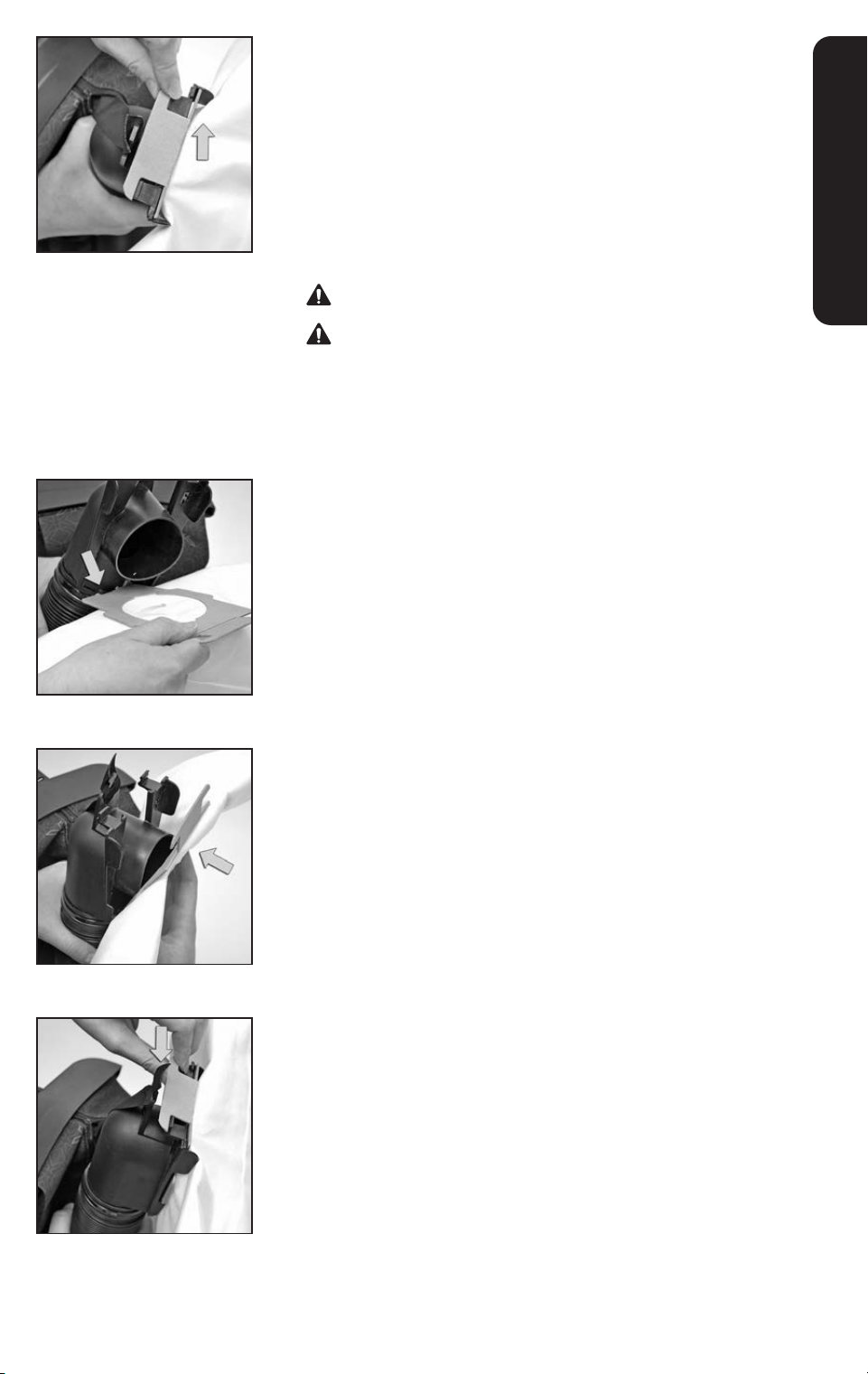
Press the Power Switch at the rear of the unit to turn it on or off.
14
GETTING STARTED
Disposable Filter Bag
For best performance, use only genuine Kirby
®
Disposable Filter Bags
and replace them when dirt reaches the FULL line. A Disposable Filter
Bag must be installed before vacuuming.
To Remove a Used Disposable Filter Bag:
1
Turn the unit off. Unplug the power cord from the wall outlet.
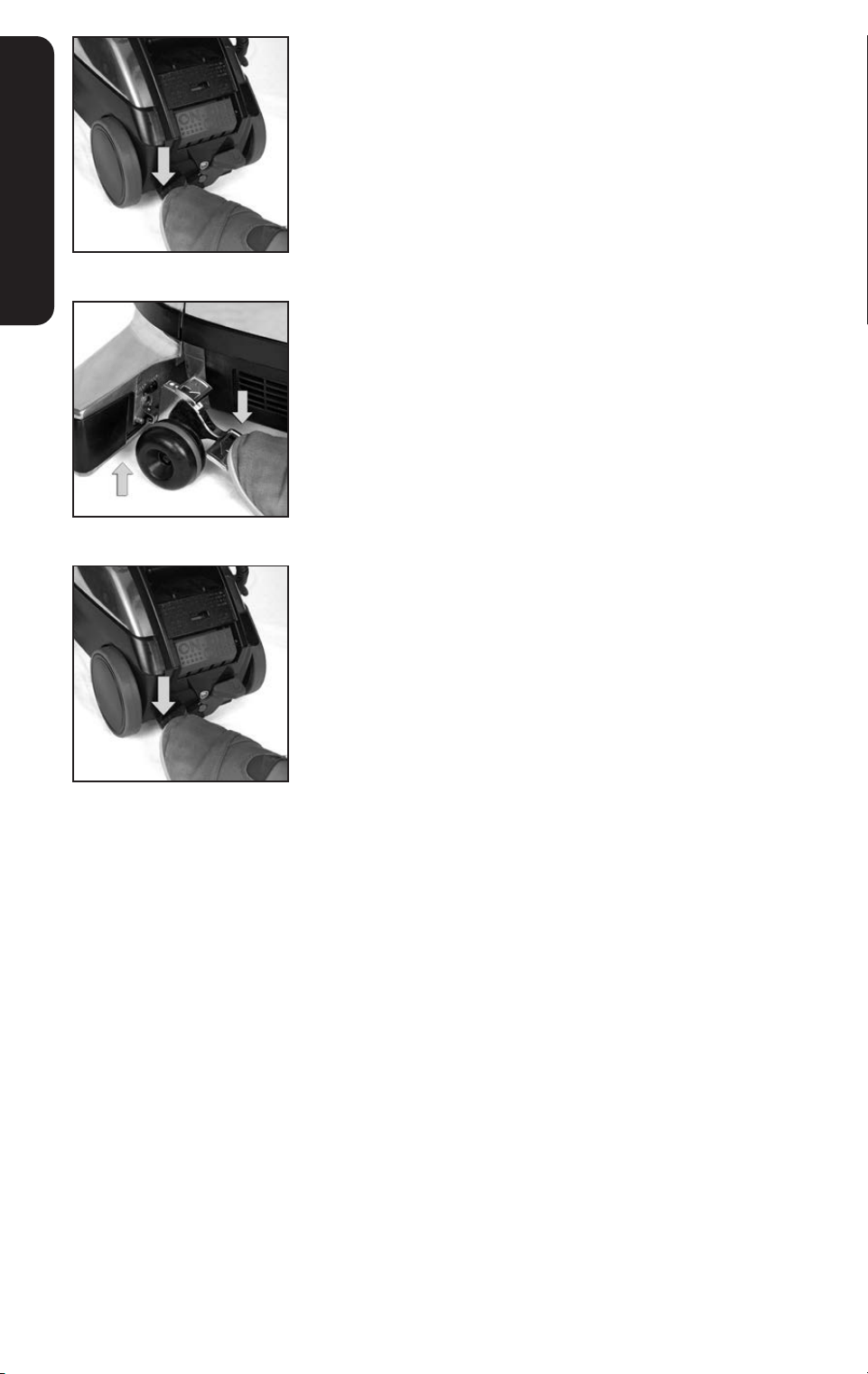
Unzip the Outer Permanent Bag. Flip up the cardboard tab that
attaches the Disposable Filter Bag and pull it away.
Do not use as a vacuum cleaner without filter bag in place.
Before changing the Disposable Filter Bag, unplug the
power cord from wall outlet and be sure that the motor and
fan have stopped.
To Install a New Disposable Filter Bag:
2
With the Outer Permanent Bag unzipped and the Top Adaptor
pulled out, rest the cardboard faceplate of the Disposable Filter
Bag against the bottom of the Top Adaptor.
3
Pivot the cardboard faceplate up against the flat surface of the
Top Adaptor.
4
Bend and press the tab at the top of the cardboard face plate
onto the Top Adaptor to secure.
5
Check to make sure the Bag Support Strap is connected
through the small hole of the Top Adaptor and that it is secured
over the stud.
6
Insert the Disposable Filter Bag into the Outer Permanent Bag
and close the zipper.
1615
GETTING STARTED
Moving the Unit with the Power Off
Tech Drive
®
power assist makes it easy to push or pull the unit when
the motor is on. Tech Drive
®
power assist should be put in neutral
before moving the unit when the motor is off.
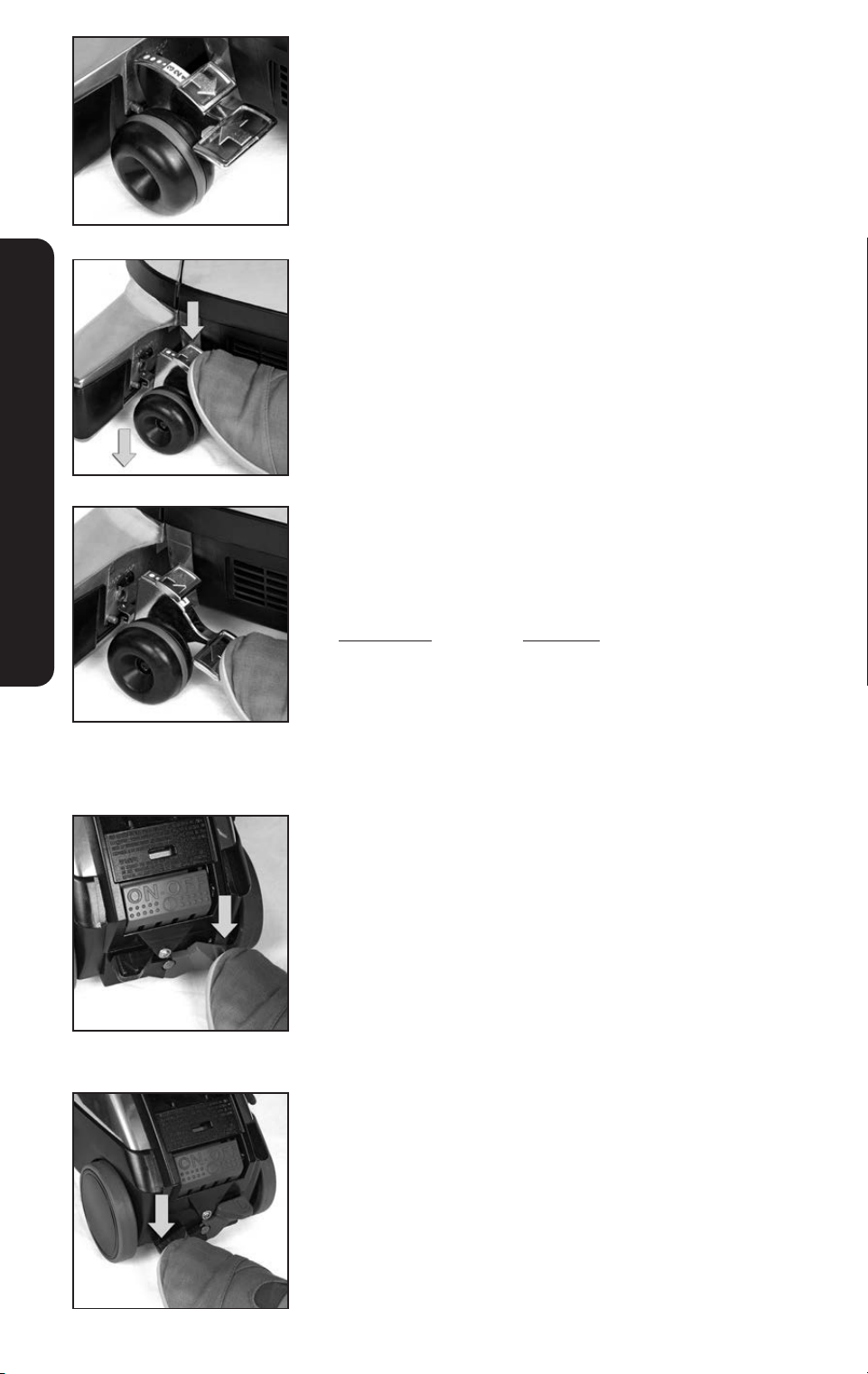
1
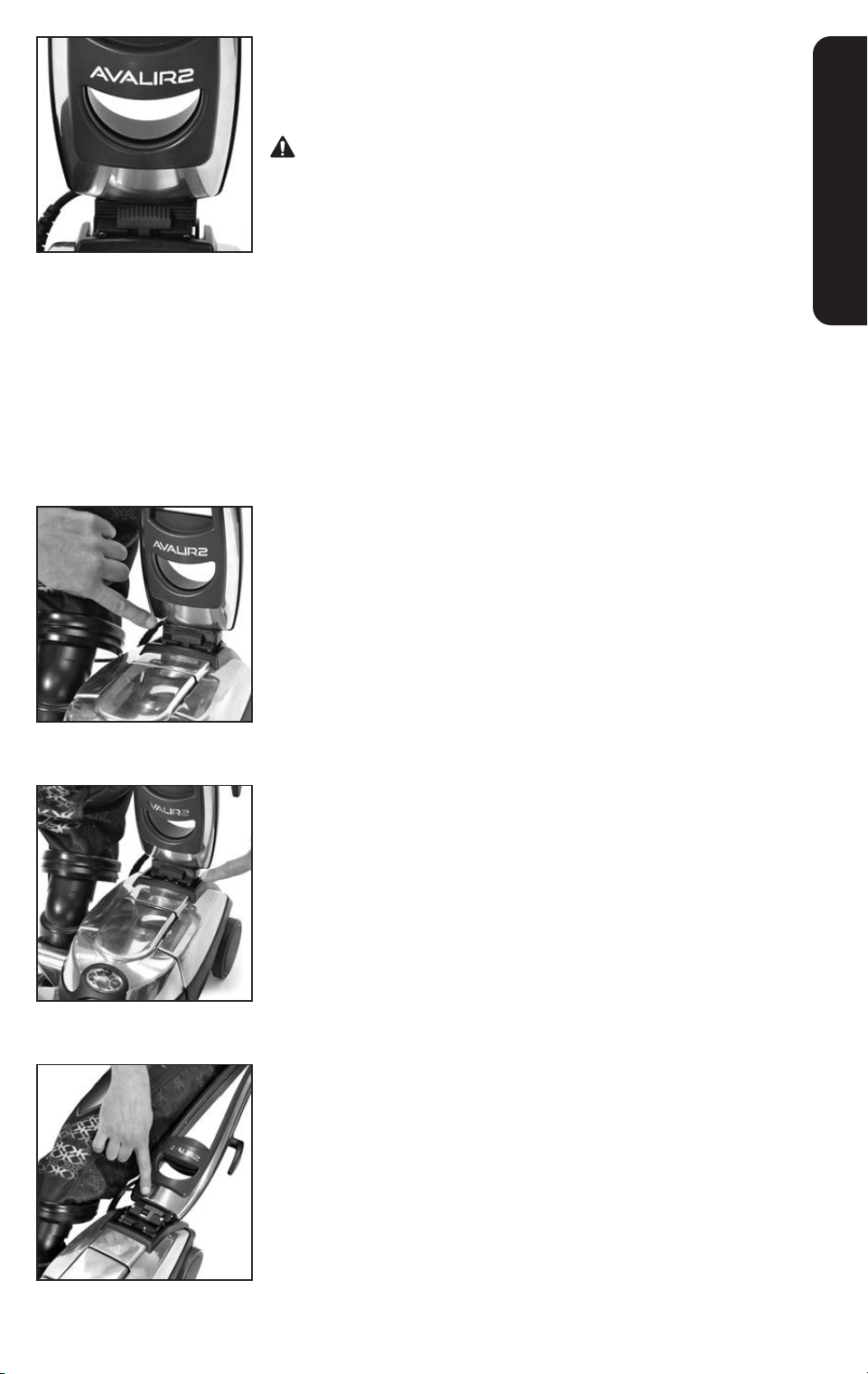
Raise the front of the unit by pressing the bottom pedal on the
Toe-Touch Control down.
2
Put Tech Drive
®
power assist in neutral by pushing the left “N”
neutral pedal down.
16
GETTING STARTED
Locking the Upright Handle
This unit has a Handle Tilt Latch Lever which locks the upright handle
for carrying and storage.
Firmly grasp the handle BEFORE unlocking the Handle Tilt
Latch Lever.
For vacuuming:
The Handle Tilt Latch Lever should be unlocked in the center
position for vacuuming.
NOTICE Property Damage Risk. Unlock the Handle Tilt Latch Lever
before pulling backwards. Failure to follow this notice could result in
damage to the floor.
For carrying:
Move the Handle Tilt Latch Lever away from the bag to lock the
base in place when the unit is lifted off the floor.
For lifting over a door threshold:
Move the Handle Tilt Latch Lever toward the bag and push down
on the locked Upright Handle to raise the front of the unit over a
door threshold or throw rug.
Optional Storage Method:
Lower the Upright Handle to a horizontal position near the floor
and move the Handle Tilt Latch Lever away from the bag to lock the
Upright Handle in place. Stand the unit up onto its Bumper and lean
it against a wall for storage.
1817
GETTING STARTED
Lift The Unit
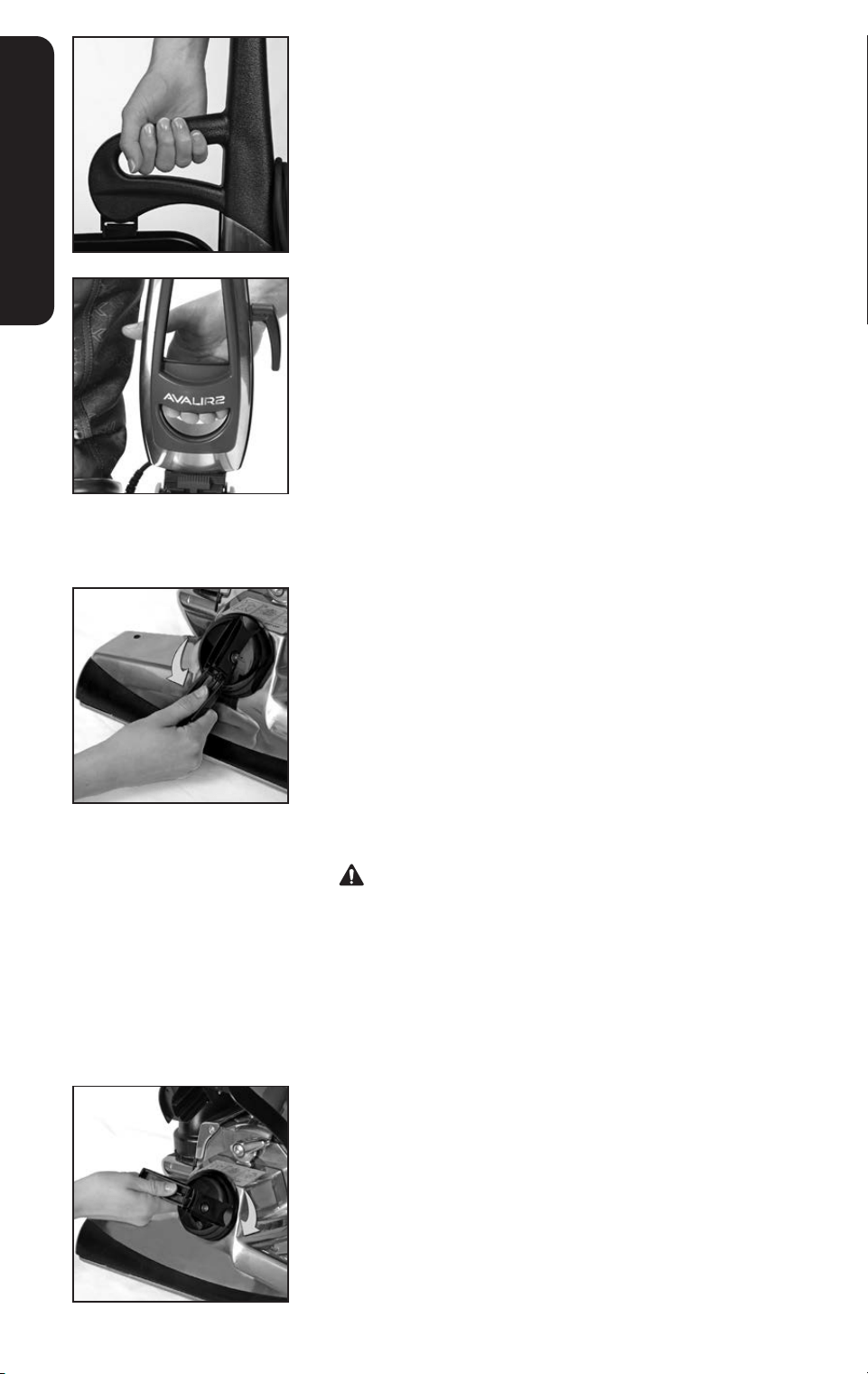
Move the Handle Tilt Latch Lever away from bag to lock the base in
place. Use the handle on the bag arm to lift the unit.
Or, use the Lower Carrying Grip in the center of the handle to
lift the unit.
Belt Lifter
The Belt Lifter rotates a hook inside the Power Nozzle that lifts and
lowers the belt on to the Motor Shaft. It is used to:
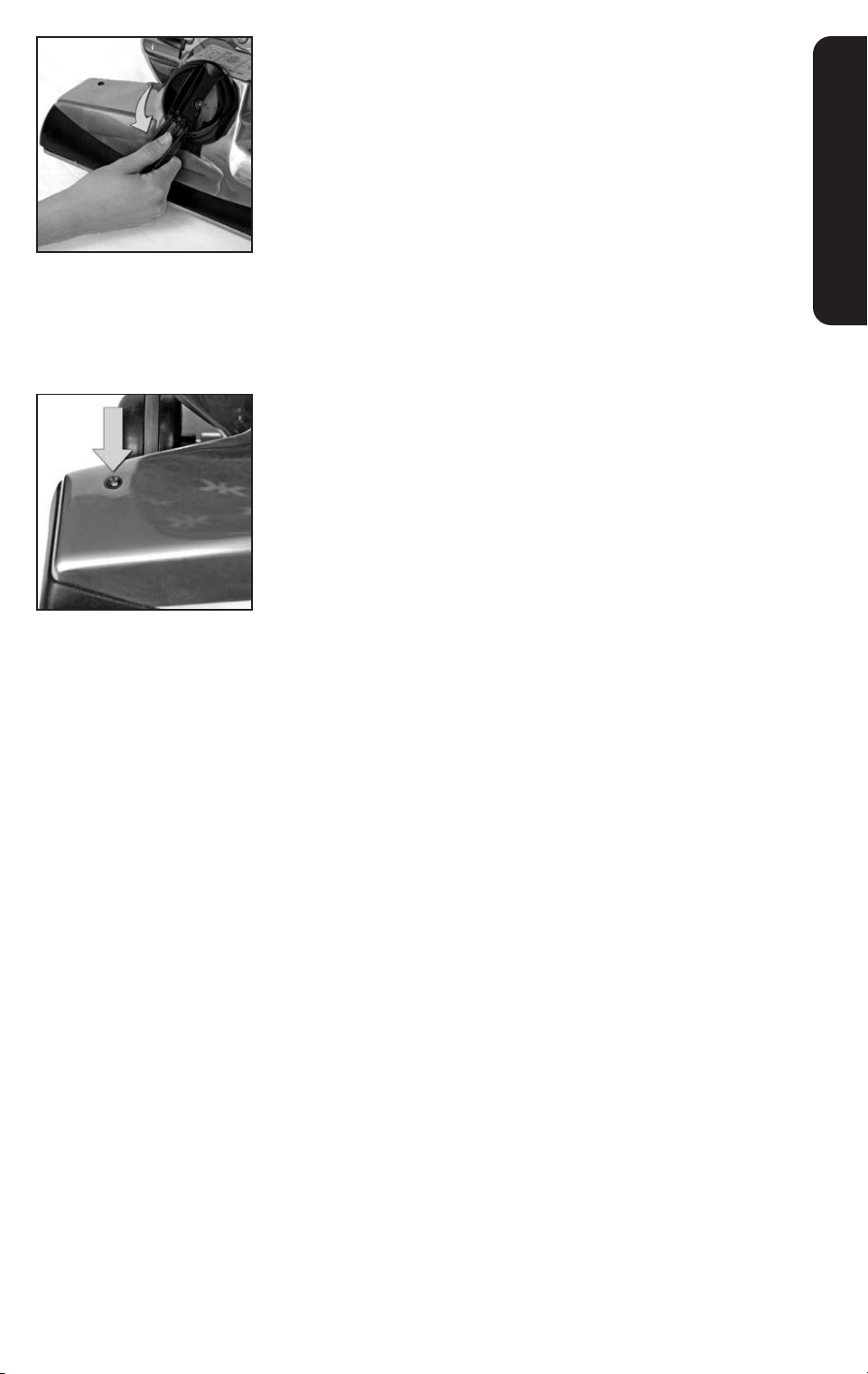
1
Disengage the Brush Roll:
Turn the unit off. Raise the Headlight Hood. Flip out the handle
on the Belt Lifter. Use it to turn the Belt Lifter counterclock-
wise until the red arrows line up. Close the handle. Close the
Headlight Hood.
In this position, the Brush Roll will not spin during vacuuming.
Do not turn Belt Lifter when unit is on.
NOTICE Property Damage Risk. Re-engage the Brush Roll prior to
storage so that it is not stretched on the Belt Lifter hook. Failure to
follow this notice could result in damage to the belt.
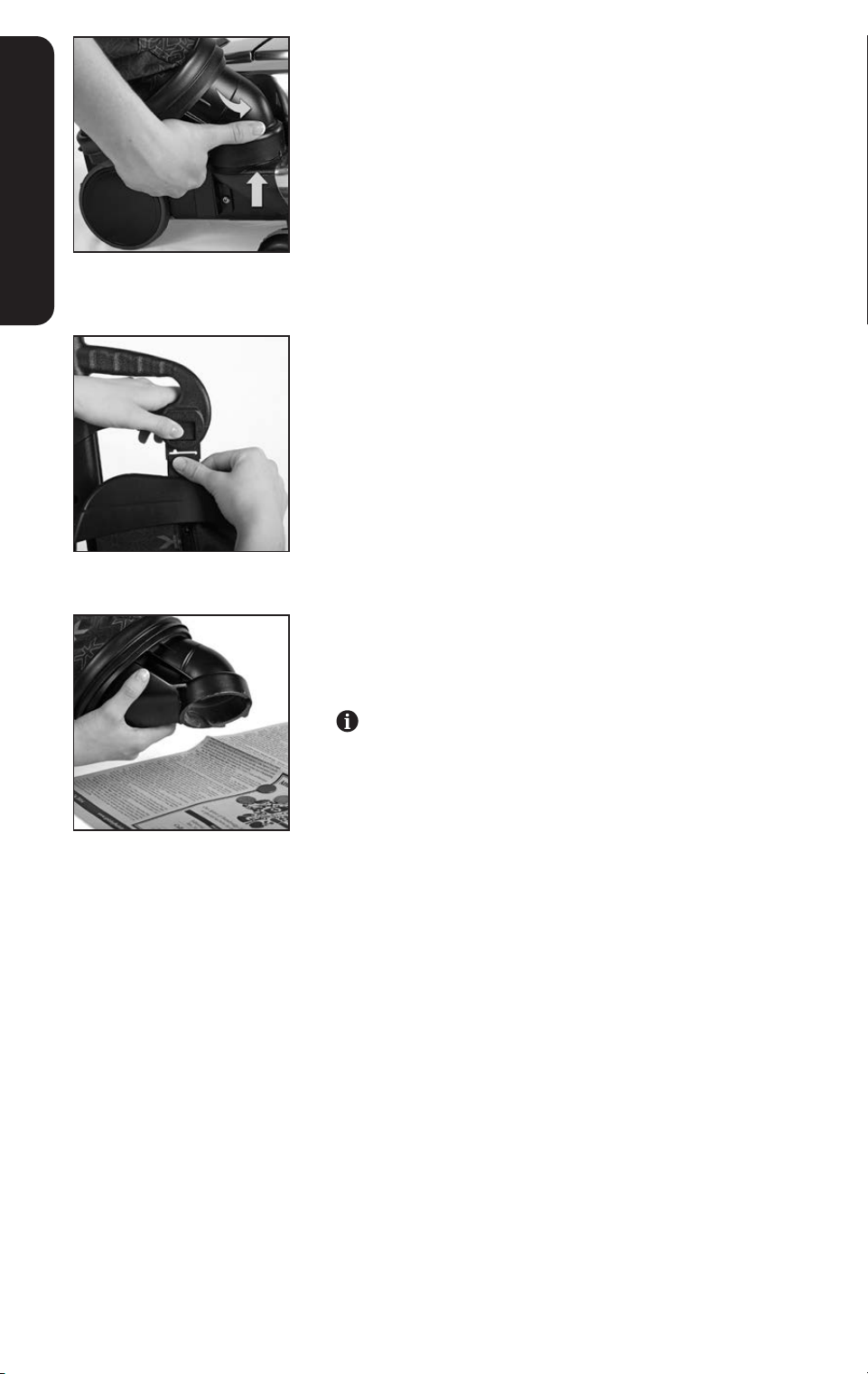
2
Engage the Brush Roll:
Turn the unit off. Raise the Headlight Hood. Flip out the handle
on the Belt Lifter. Use it to turn the Belt Lifter clockwise until
the green arrows line up. Close the handle. Close the
Headlight Hood.
In this position, the Brush Roll will spin when vacuuming.
18
GETTING STARTED
Straight Suction Cleaning
Disengage the Brush Roll to use straight suction cleaning to
vacuum hard floors, throw rugs and delicate carpets.
When using straight suction cleaning on bare floors, lower the
Power Nozzle as close as possible to the floor without touching
the floor.
Put Tech Drive
®
power assist in neutral when cleaning hard floors.
For additional protection of hard floors, use the optional Hard Floor
Pad. See page 50.
Brush Roll Performance
Indicator Light
The Brush Roll Performance Indicator Light, located on the top of the
Power Nozzle turns on when the Brush Roll is spinning.
If the Brush Roll Performance Indicator Light flashes intermittently
or does not come on, the belt may not be engaged properly or the
belt may need to be replaced. See page 53.
2019
GETTING STARTED
Removing the Outer Permanent Bag
and the Mini Em-Tor
®
Collector
The Mini Em-Tor
®
collector holds large, heavy particles that do not
reach the Disposable Filter Bag.
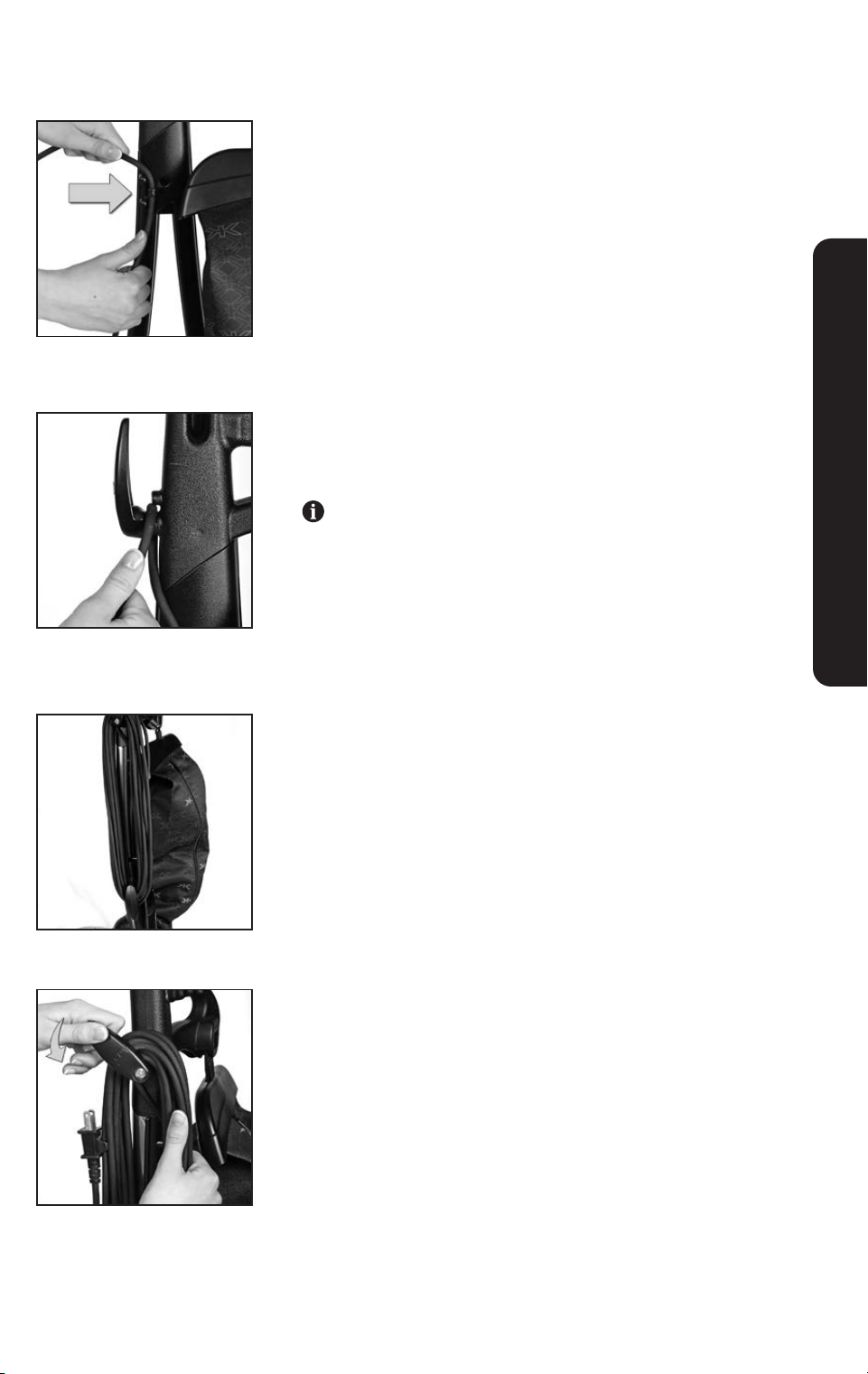
1
Grasp the base of the Mini Em-Tor
®
collector and rotate it away
from the unit and lift it off.
2
Remove the top of the Outer Permanent Bag from the unit by
pressing the Bag Release Button.
3
Position the opening of the Mini Em-Tor
®
collector over a
newspaper and shake it to remove particles. Reattach the Mini
Em-Tor
®
collector when complete.
Lock the Mini Em-Tor
®
collector securely in place or the unit
will not operate. (It will not turn on).
NOTICE Property Damage Risk. Do not intentionally vacuum up
heavy objects such as coins. Failure to follow these warnings could
result in damage to the fan.
20
Upright Cord Management
A series of holders keeps the cord attached to the Upright Handle.
1
Attach the cord by snapping it into the holders located at the
base and side of the Upright Handle.
2
With the upper cord hook in the up position, wrap the cord
toward the rear of the unit and slide the cord under the holder
on the hook.
Electrical cord can only be inserted or removed from this
holder when the upper cord hook is in the up position. The
upper cord hook is designed to lock the cord in place when
it is turned down.
3
For storage, wrap the cord around the upper and lower
cord hooks.
4
Rotate the upper cord hook down to release the cord for use.
The first loop will remain in the holder.
UPRIGHT & PORTABLE CLEANER
2221
Adjusting the Cleaning Height
The Toe-Touch Control, located over the front wheel, raises and
lowers the Power Nozzle. The numbered settings are for carpet
and floors. The dotted settings are for accessories and other
cleaning needs.
1
Turn the unit on. Press the Toe-Touch Control Upper Pedal
as often as necessary to lower the Power Nozzle to its
lowest setting.
2
Press the Toe-Touch Control Lower Pedal one notch at a time to
raise the Power Nozzle to the desired height.
Listen for the click with each raised notch. Count the clicks to the
desired setting.
Raise Unit Purpose
Lowest position Recommended: Carpets
1 Click up Optional: Deep Pile Carpeting
2 Clicks up Optional: Long Fiber Carpeting
3 Clicks up Recommended: Pet Hair Removal
4+ Clicks up Hose and Attachments
Tech Drive
®
Power Assist
Tech Drive
®
power assist makes it easy to push or pull the unit when
the motor is on.
1
Turn Tech Drive
®
power assist on by pressing down on the side
of the pedal marked D for drive. This eliminates most of the
effort required to move the unit when the unit is turned on.
2
Put Tech Drive
®
power assist in neutral by pressing down on the
side of the pedal marked ”N” for neutral. This makes it easier to
push or pull the unit when the motor is turned off.
NOTICE Property Damage Risk. Put Tech Drive
®
power assist
in neutral before vacuuming soft tile or hard floors. Failure to
follow this warning could result in damage to the floor.
UPRIGHT & PORTABLE CLEANER
22
UPRIGHT & PORTABLE CLEANER
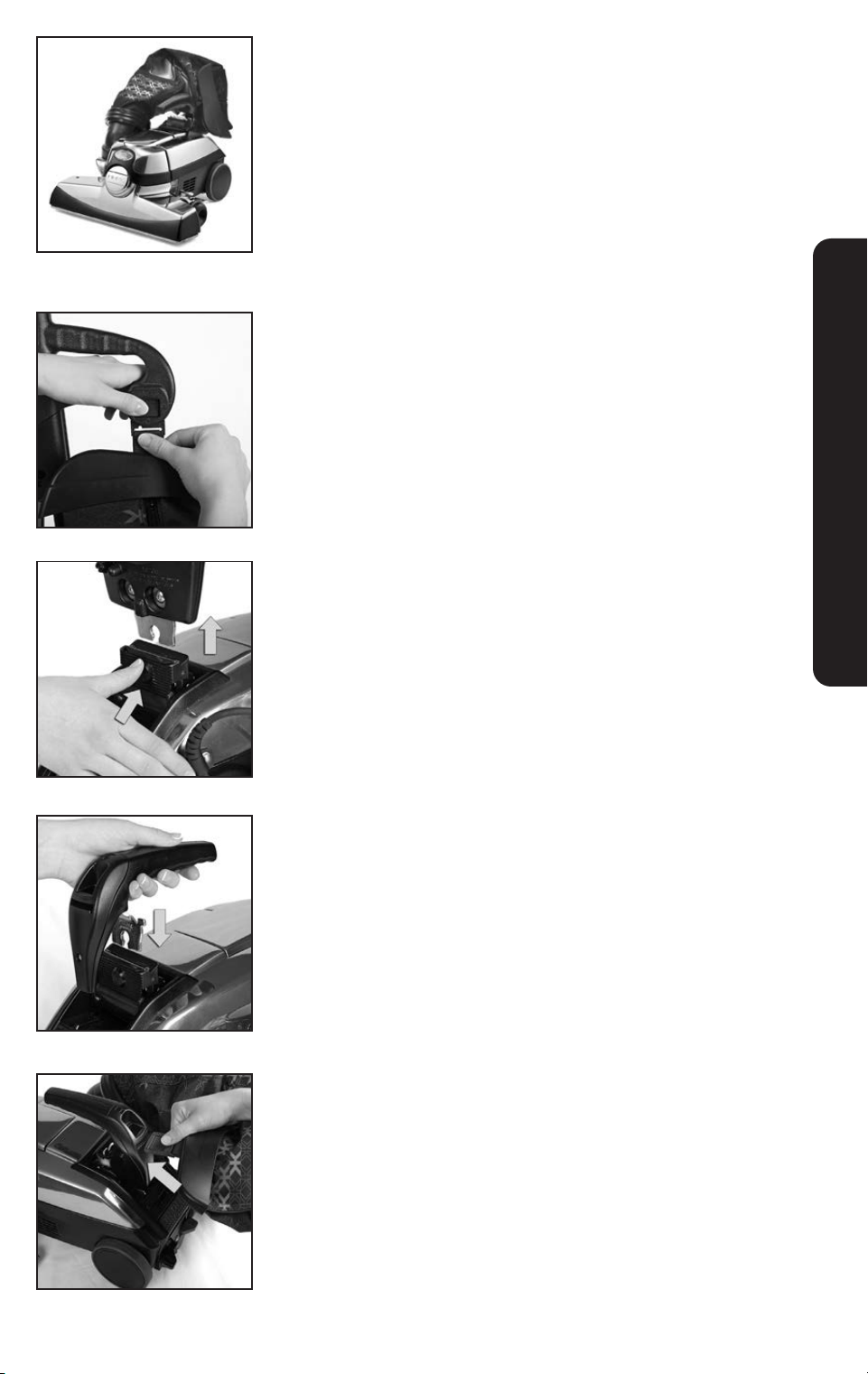
Converting to a Portable Cleaner
The Portable Cleaner provides the full power of an upright
vacuum with a shorter handle for convenient cleaning of stairs
and mattresses.
1
Turn off and unplug the unit. Put Tech Drive
®
power assist in
neutral. Release the Outer Permanent Bag from the unit by
pressing the Bag Release Button.
2
Remove the cord from the Upright Handle. Push the Handle
Release Button at the base of the Upright Handle and pull the
Upright Handle straight up and out of the slot. (Bag not shown
for clarity)
3
Insert the Portable Handle into the slot where the Upright
Handle was connected.
4
Bend the Outer Permanent Bag in half and insert the Bag Latch
Tab into the slot on the Portable Handle, with zipper facing up.
NOTICE Property Damage Risk. Do not use the Portable
Cleaner on upholstered furniture. Failure to follow this warning
could result in damage to the furniture.
2423
UPRIGHT & PORTABLE CLEANER
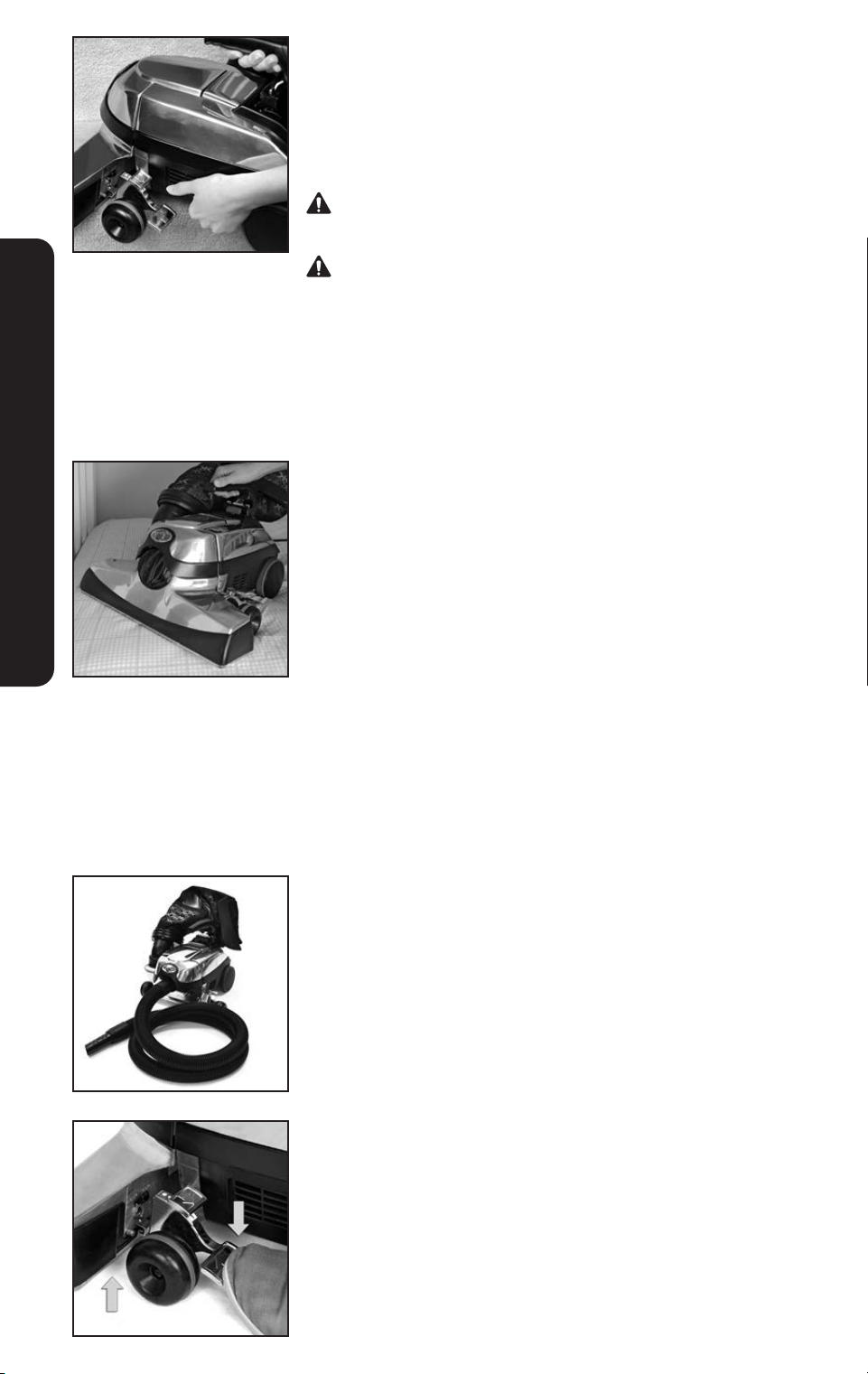
Cleaning Carpeted Stairs with
the Portable Cleaner
Put Tech Drive
®
power assist in neutral by pressing down on the left
“N” Neutral pedal. Place the unit on a carpeted step, supporting
the rear of the unit. Turn the unit on after it is in place.
Keep hair, loose clothing/jewelry, fingers, and all parts of body
away from the unit openings and moving parts while operating.
Tech Drive
®
power assist pedal should be in the neutral position
when vacuuming stairs.
Cleaning a Mattress with the
Portable Cleaner
Leave the sheet or mattress cover on the bed when vacuuming to
protect the mattress from snags.
Put Tech Drive
®
power assist in neutral by pressing down on the
left “N” Neutral pedal. Disengage the Brush Roll by lifting the
Headlight Hood and turning the Belt Lifter counterclockwise until the
red arrows line up. Lower the Headlight Hood. Place the unit on the
mattress. Turn the unit on after it is in place.
NOTICE Property Damage Risk. Disengage Brush Roll, put Tech
Drive
®
power assist in neutral, and leave sheet on mattress. Failure
to follow these warnings may result in damage to the mattress.
Remove the Power Nozzle:
Attach the Hose to Convert to
a Canister Cleaner
Use the unit as a canister cleaner with the hose and attachments for
dusting and cleaning high or small areas.
1
With the unit off and unplugged, press the bottom Toe-Touch
Control pedal all the way down.
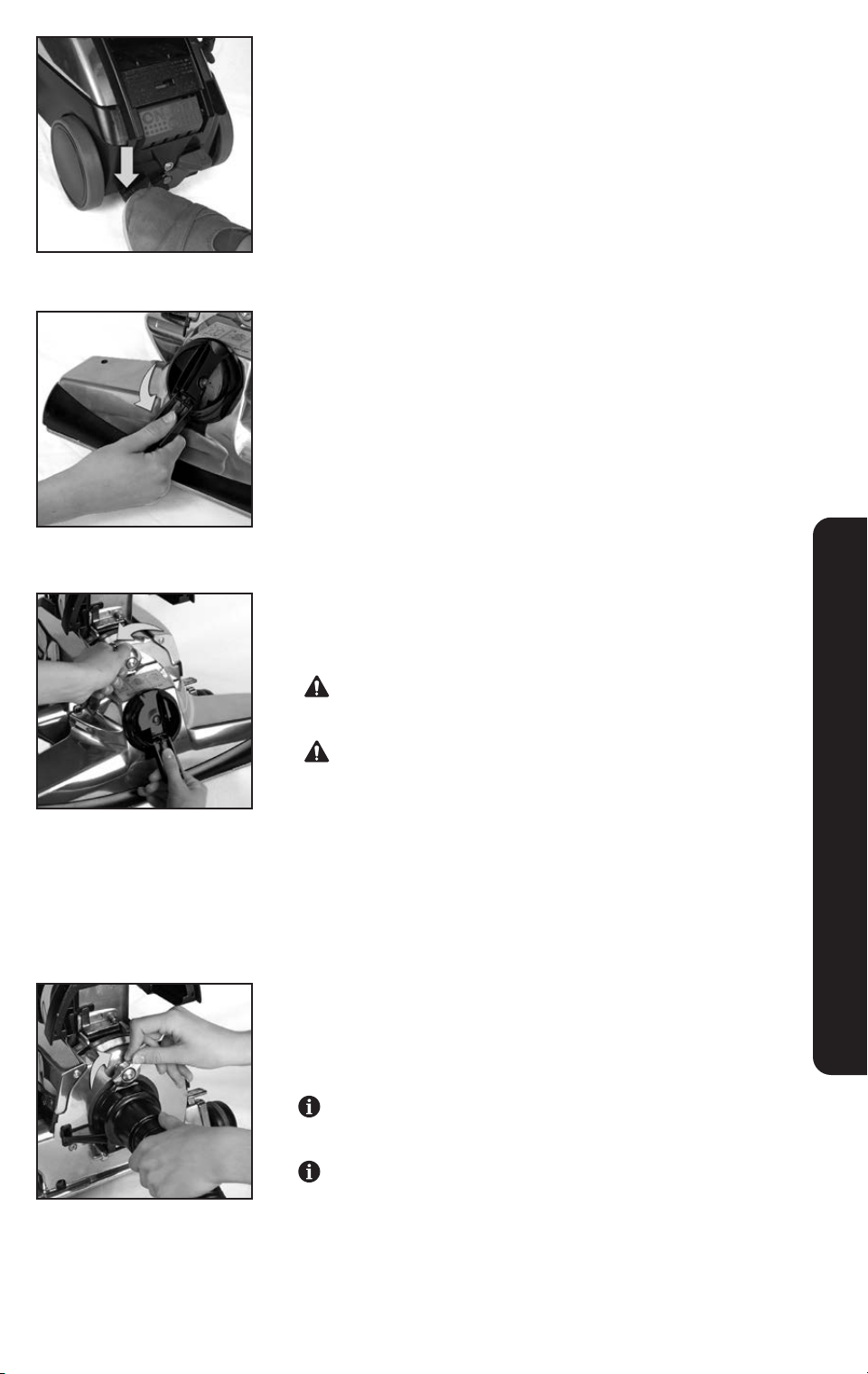
24
2
Put Tech Drive
®
power assist in neutral by pressing down on the
left “N” Neutral pedal.
3
Raise the Headlight Hood. Flip out the handle on the Belt Lifter.
Use it to turn the Belt Lifter counterclockwise until the red arrows
line up.
4
Turn the Accessory Lock counterclockwise to release the Power
Nozzle. Lift the Power Nozzle away. Clean any lint, hair or
debris from the Motor Shaft.
Motor shaft may be hot. Allow to cool before touching or
removing lint, hair or debris.
Keep Motor Shaft free from lint, hair, and debris build up.
Failure to follow these warnings may result in damage to
the Attachment Hose as well as bodily injury.
5
Place the hooks of the Attachment Hose over the Attaching Bar.
Push the opening of the Attachment Hose up against the unit.
Turn the Accessory Lock clockwise to lock in place. Lower the
Headlight Hood. Turn unit on.
The Upright Handle or the Portable Handle may be used
with the Attachment Hose.
If the unit will not turn on after connecting the Attachment
Hose, see page 58.
CANISTER CLEANER AND ATTACHMENTS
2625
Installing Attachments on the Hose
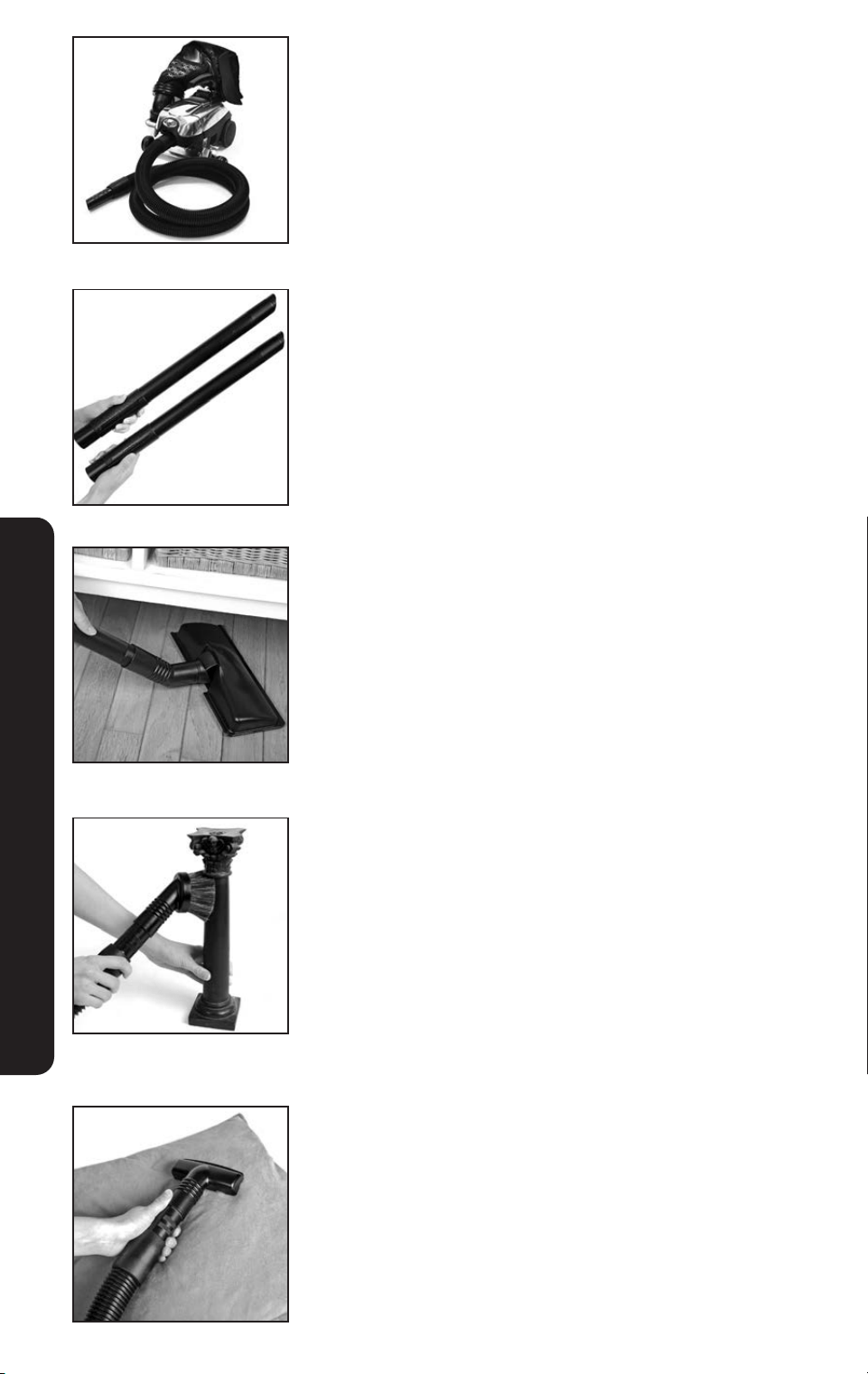
To attach tools to the hose, push lightly while twisting the smaller
end of the hose into the tool.
Extension Tubes
Attach one or two Extension Tubes for extended reach.
Surface Nozzle
Use on bare floors and under low furniture.
Duster Brush
Remove dust from contoured or irregular surfaces.
NOTICE Property Damage Risk. Do not use Duster Brush on
television screens. Failure to follow these warnings may result in
property damage.
Upholstery Nozzle
Clean upholstered furniture, carpeted steps, and clothing. Clean the
inside of cars.
CANISTER CLEANER AND ATTACHMENTS
26
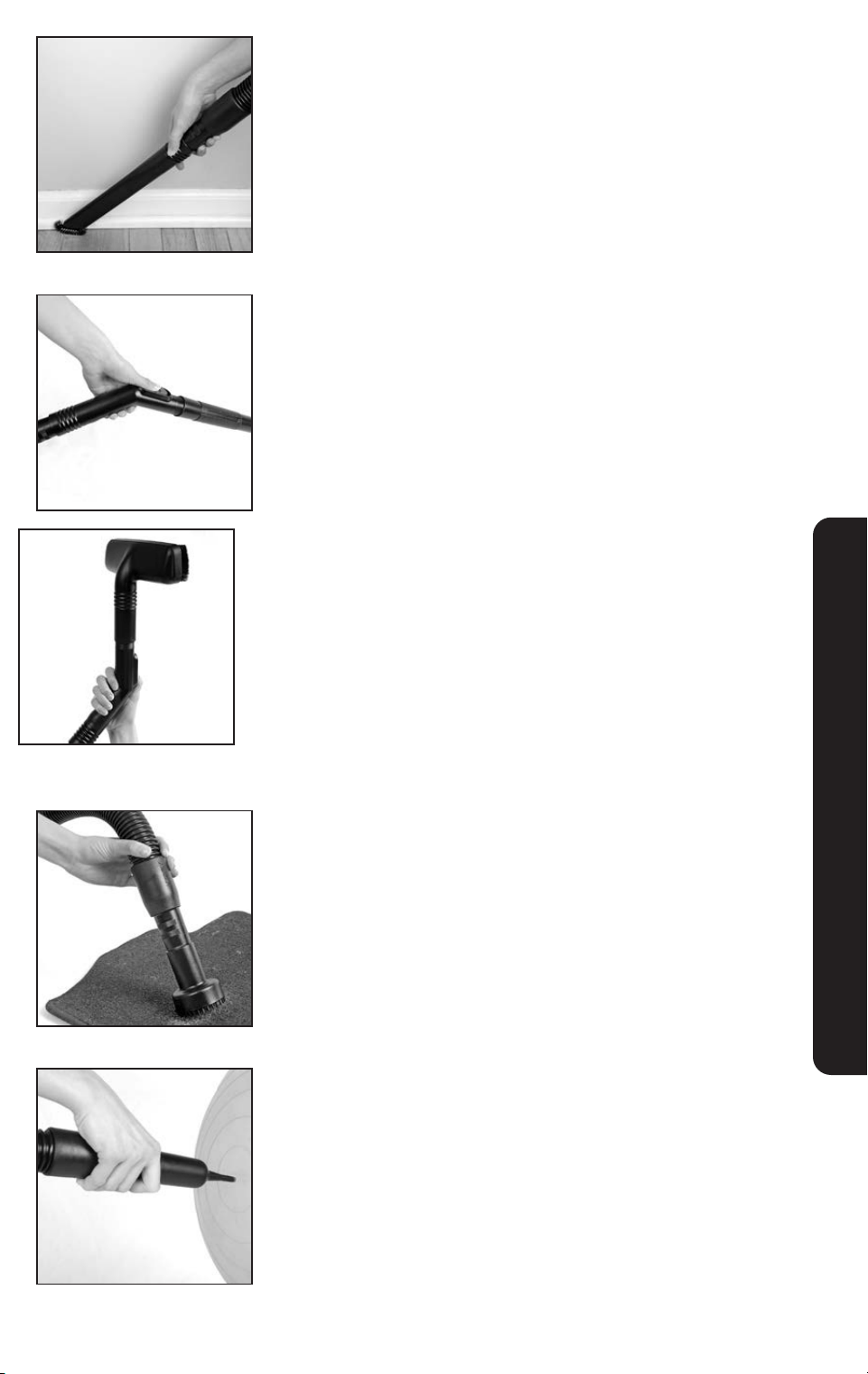
Crevice Tool with Removable Brush
Use the Crevice Tool with the brush to remove dirt from corners,
button tufts, radiator coils and sliding window tracks.
Remove the brush to clean cracks, crevices, corners, grooves and
narrow openings.
Suction Control Grip
Slide the valve on the Suction Control Grip to adjust the level
of suction.
Use the Suction Control Grip at the beginning of the Extension
Tubes to reach down.
Wall and Ceiling Brush
Attach the Wall and Ceiling Brush to the Suction Control Grip to
provide the proper angle to vacuum walls and ceilings.
To vacuum the top of door frames, ledges, or books on a shelf,
rotate the Wall & Ceiling Brush 180°.
Utility Tool
Use to clean car floor mats.
Inflator/Deflator Tool
Use as a Deflator Tool to clean small places or to deflate air-filled
toys or mattresses.
To use as an Inflator Tool, see page 26.
NOTICE Property Damage Risk. Use the Inflator/Deflator tool for
60 second bursts with a brief rest period between bursts. Failure
to follow these warnings could cause the motor to overheat and
damage the fan blades.
CANISTER CLEANER AND ATTACHMENTS
2827
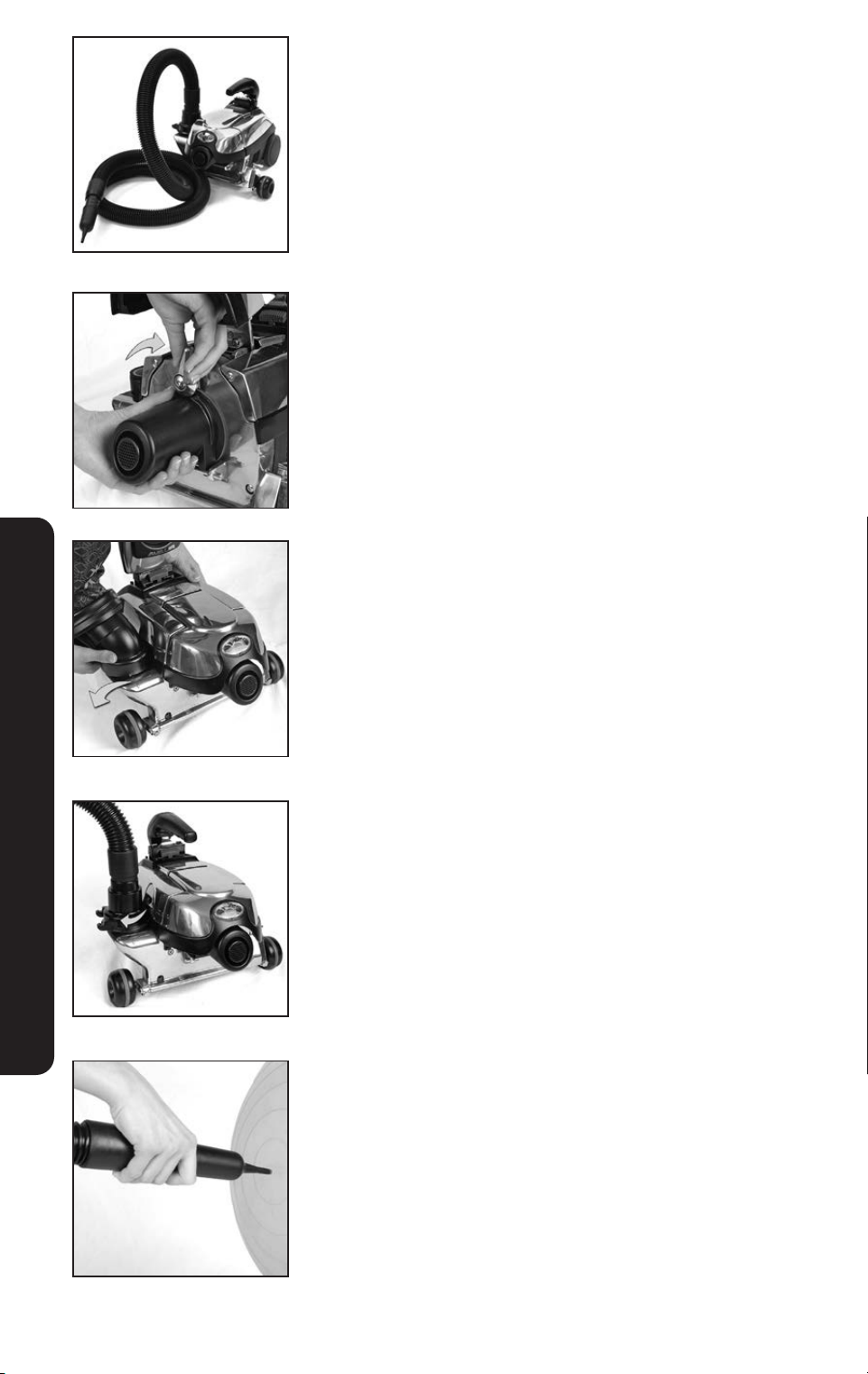
Blower/Inflator
Convert the Kirby
®
system to a blower by attaching the hose to the
Exhaust Port.
1
Remove the Power Nozzle. See Page 22. Place the hooks on
the back of the Air Intake Guard over the Attaching Bar on the
front of the unit. Push the Air Intake Guard up against the unit
and turn the Accessory Lock clockwise to secure.
2
Remove the Outer Permanent Bag. Press the Bag Release
Button to remove the top. Then, grasp the base of the Mini
Em-Tor
®
collector and rotate it away from the unit and lift off.
3
Connect the Attachment Hose to the Air Exhaust Port. Line up
the arrow on the large end of the Attachment Hose with the
arrow on the Air Exhaust Port. Twist the Attachment Hose
clockwise to lock in place.
4
Attach the Inflator/Deflator Tool. Use it to inflate toys, air
mattresses or any other low-pressure inflatable items up to 1
p.s.i. (pounds per square inch of air pressure). If the unit will not
operate after converting to the blower mode, see page 58.
NOTICE Property Damage Risk. Use the Inflator/Deflator tool
for 60 second bursts with a brief rest period between bursts.
Failure to follow these warnings could cause the motor to over-
heat and damage the fan blades.
CANISTER CLEANER AND ATTACHMENTS
28
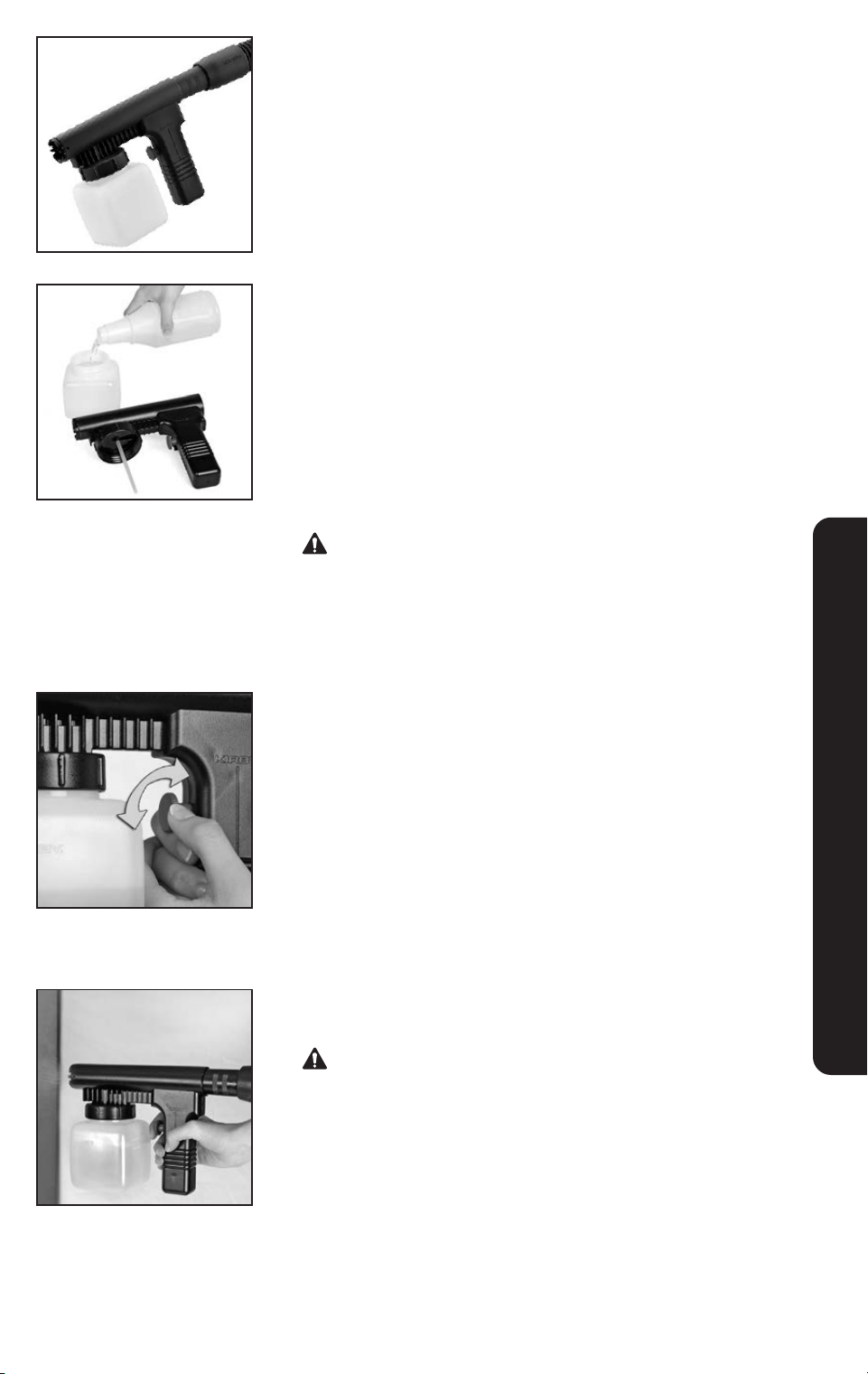
Portable Sprayer
The Portable Sprayer is only used in the blower mode.
See page 26. It is used to spray water-based liquids.
1
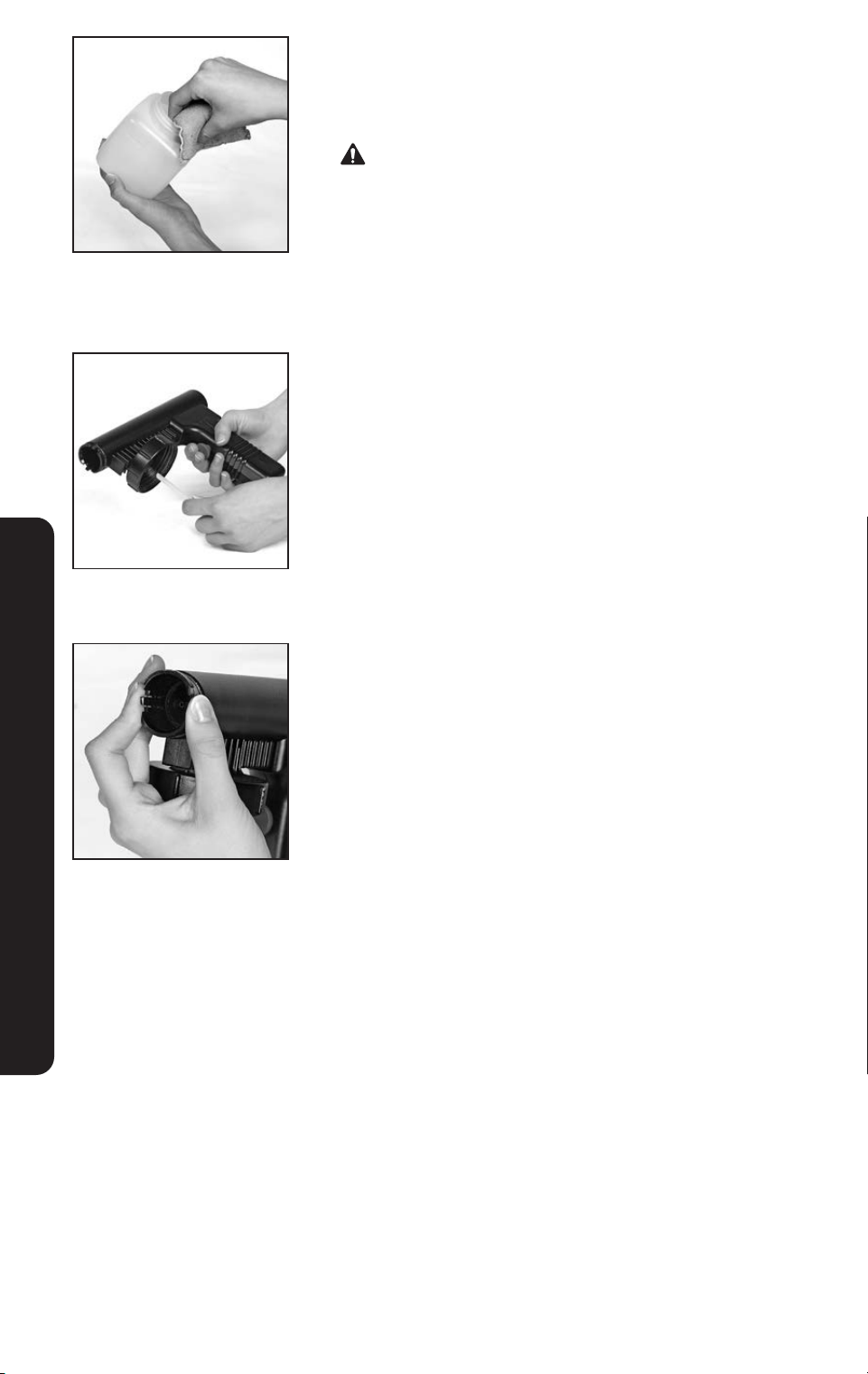
Set up the Portable Sprayer. Unscrew the jar and fill it ¾ full
with non-flammable liquid.
Make sure the dip tube is attached to the Portable Sprayer
before screwing the jar on tightly. Attach the Portable Sprayer
to the end of the Attachment Hose.
NOTICE Property Damage Risk. Use less solution in the
jar if the Portable Sprayer must be tilted during use.
Failure to follow these warnings could result in spilled fluid and
property damage.
Never use oil or solvent based paint or other
flammable or combustible liquids in the sprayer.
2
Hold the Portable Sprayer horizontally. Turn the unit on.
Squeeze the trigger to spray the solution onto a newspaper to
check the spray pattern. Turn the control on the trigger to adjust
the spray pattern.
3
Squeeze the trigger fully and use slow, sweeping motions
when spraying.
Do not use pesticides or chemical products in the Portable
Sprayer that may affect or damage the human respiratory
system, eyes or skin.
CANISTER CLEANER AND ATTACHMENTS
3029
CANISTER CLEANER AND ATTACHMENTS
Cleaning the Portable Sprayer
1
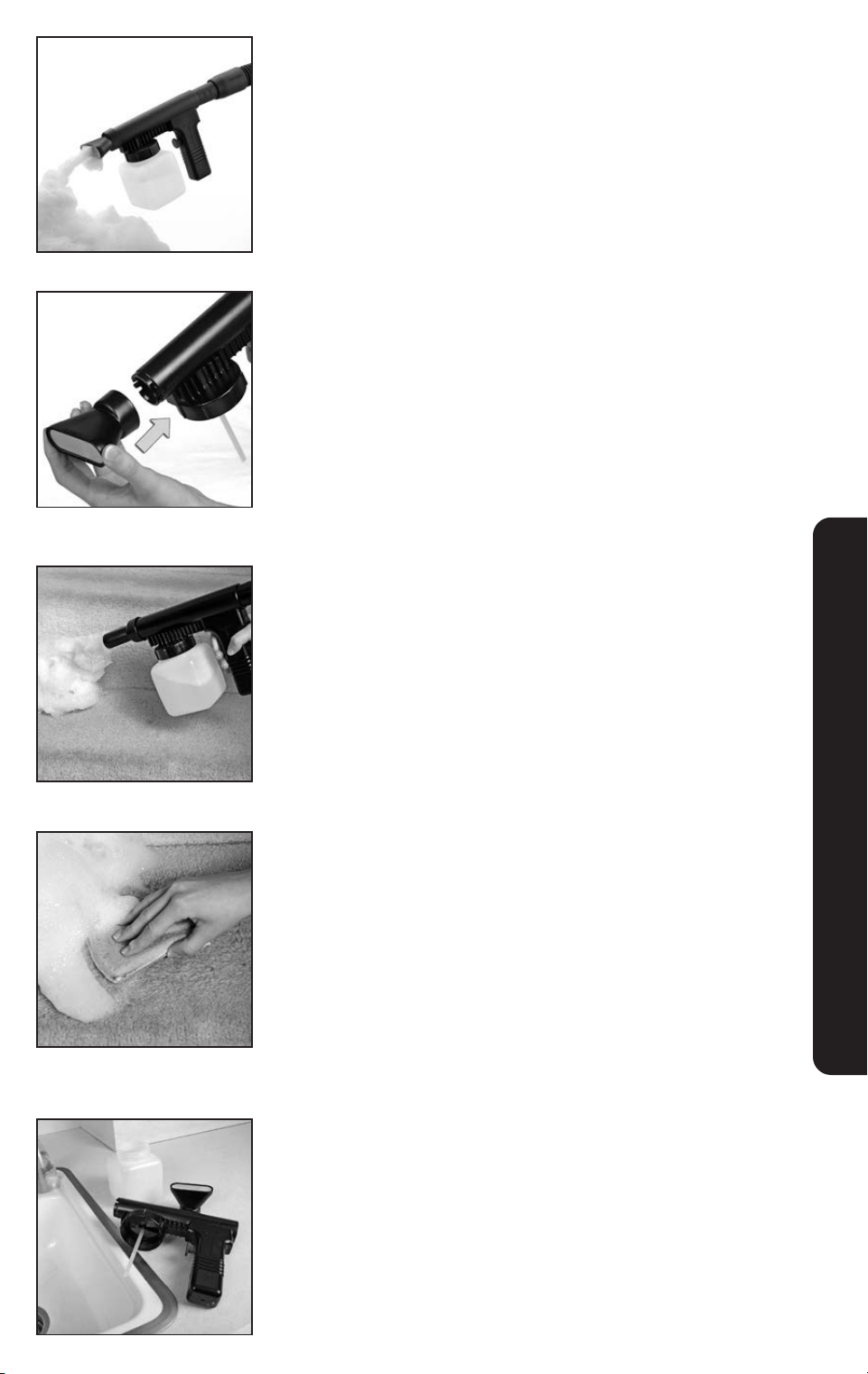
Clean the Portable Sprayer immediately after use. Empty the
jar. ONLY clean with warm soapy water.
Never clean the Portable Sprayer with flammable
cleaning fluids.
2
Remove and wash the dip tube. (Make sure to reinstall it
after cleaning)
3
Press the two latches on the front of the nozzle jet, pull it out,
and thoroughly rinse. Fill the jar with water, reattach and spray
water until clear.
30
CANISTER CLEANER AND ATTACHMENTS
Portable Shampooer
The Portable Shampooer is used to shampoo steps and small
areas that can not be cleaned with the full-sized Multi-Surface
Shampoo System.
1
Vacuum the surface to be cleaned.
2
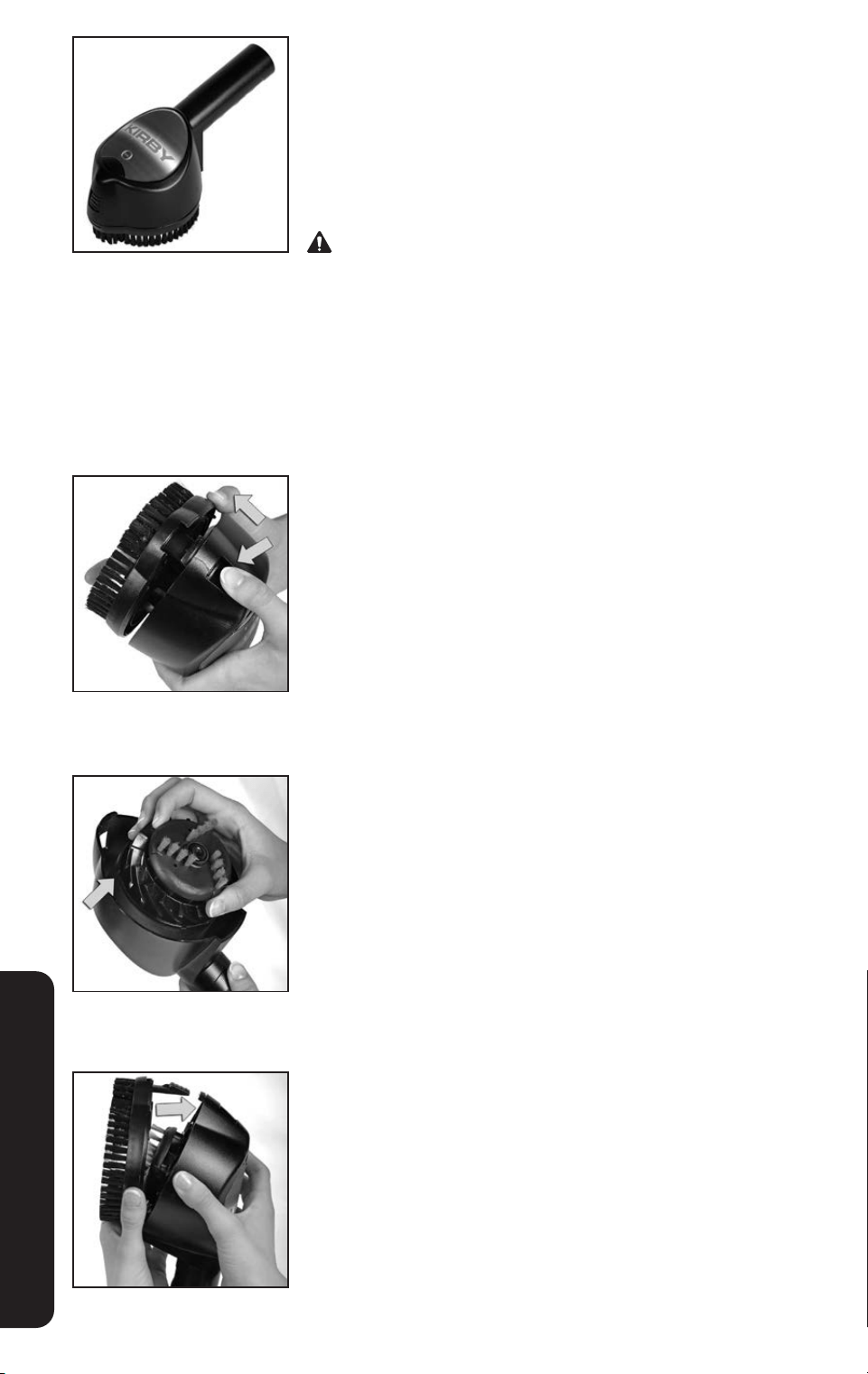
Assemble the Portable Shampooer in the same manner as
the Portable Sprayer. See page 27. Fill jar to the first line with
water. Add Kirby
®
Carpet Shampoo until the liquid reaches the
second line on the jar.
3
Attach the Portable Shampooer cap to the end of the
Portable Sprayer.
4
Turn the unit on and pull the trigger to make suds.
Turn the control on the trigger to adjust the suds volume.
5
Spray suds directly onto the surface being cleaned. Work suds
into the surface with a soft clean brush or sponge until they dis-
appear. Allow the surface to dry completely and then vacuum
to remove the dry residue which contains dirt and grime.
NOTICE Property Damage Risk. Do not use the Portable
Shampooer on delicate upholstery fabrics such as silk, brocade
or velvet. If in doubt, try a test patch. Let the test patch dry and
then check it before shampooing further.
6
Thoroughly clean the Portable Shampooer after use.
See page 28.
3231
Zippbrush
The Zippbrush can be used for vacuuming upholstery and
carpeted steps. It can be used to clean automotive interiors.
For best results, do not press down heavily on the Zippbrush. Allow
it to rotate at maximum speed by gently moving it over the surface
being cleaned.
Keep hair, loose clothing/jewelry, fingers, and all parts of body
away from spinning Zippbrush. Keep brush flat against surface
being cleaned as the brush can throw particles outward.
NOTICE Do not use Zippbrush on delicate fabrics. Failure to follow
this warning could result in property damage.
Clean the Zippbrush after use:
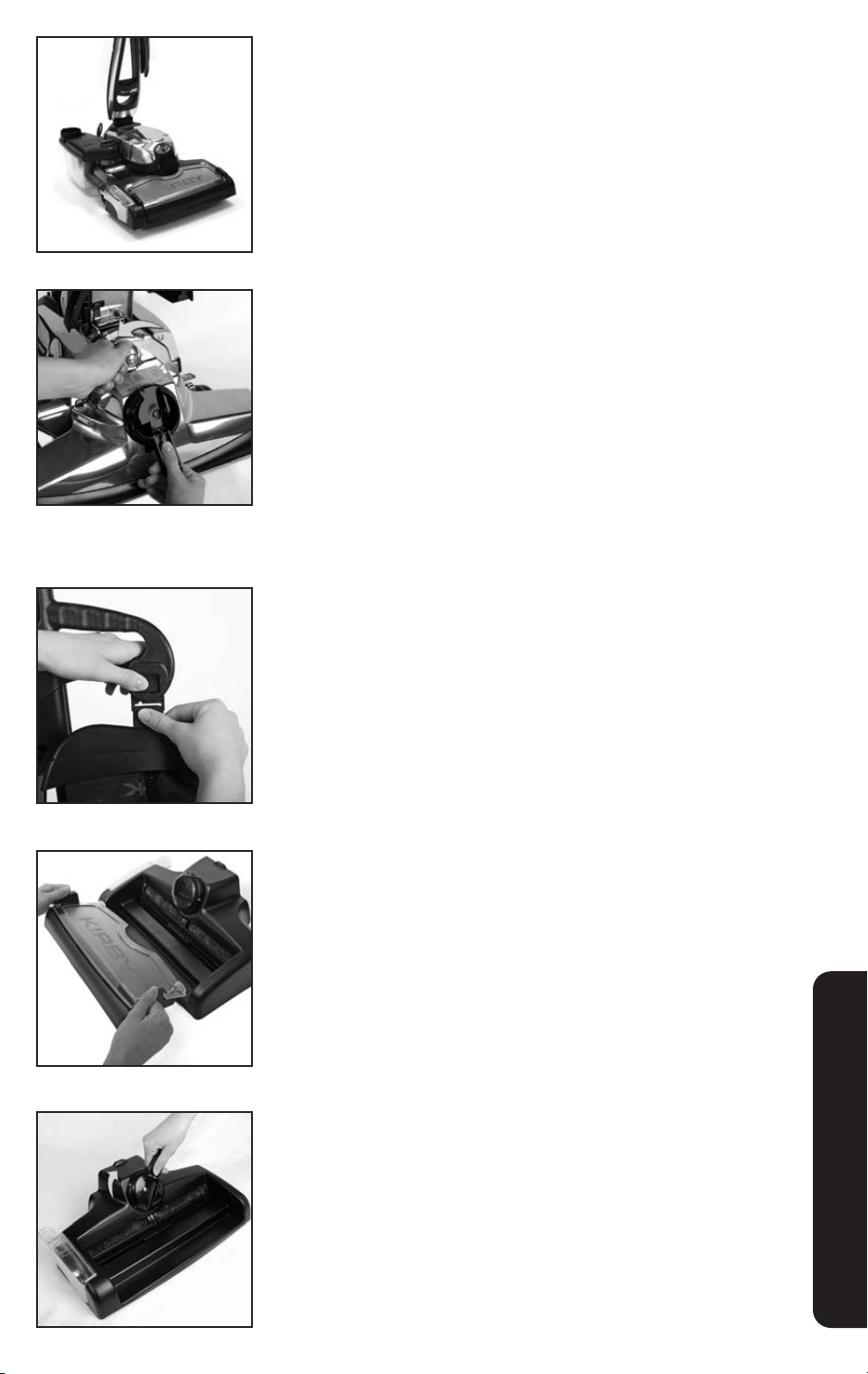
1
Remove the Zippbrush from the hose. Press the button on the
front of the brush to release the outer brush ring.
2
Lift the turbine out of the tool and remove any particles or lint
from the turbine and tool cavity.
3
Place the turbine back in the tool and turn it until the tabs drop
into the slots. Snap the brush ring back into place.
OPTIONAL ACCESSORIES
32
Multi-Surface Shampoo System
The Multi-Surface Shampoo System is used for the shampooing of
carpets and the cleaning of hard surface floors.
Converting to a Shampoo System
for Carpets
Maintain the cleanliness of carpets by shampooing regularly. Clean
spots and high traffic areas more frequently. Vacuum carpet thor-
oughly before shampooing.
1
Remove the Power Nozzle. See page 22.
2
Remove the Outer Permanent Bag. See page 18.
3
Lift and remove the Waste Tray from the Multi-Surface
Shampoo System.
4
When shampooing carpets, the carpet brush roll must be used.
If the carpet brush roll is already inserted, skip to step #8.
If necessary, insert the carpet brush roll. Using the handle, turn
the Multi-Surface Shampoo System Nozzle Belt Lifter clockwise
until the green arrows line up.
OPTIONAL ACCESSORIES
3433
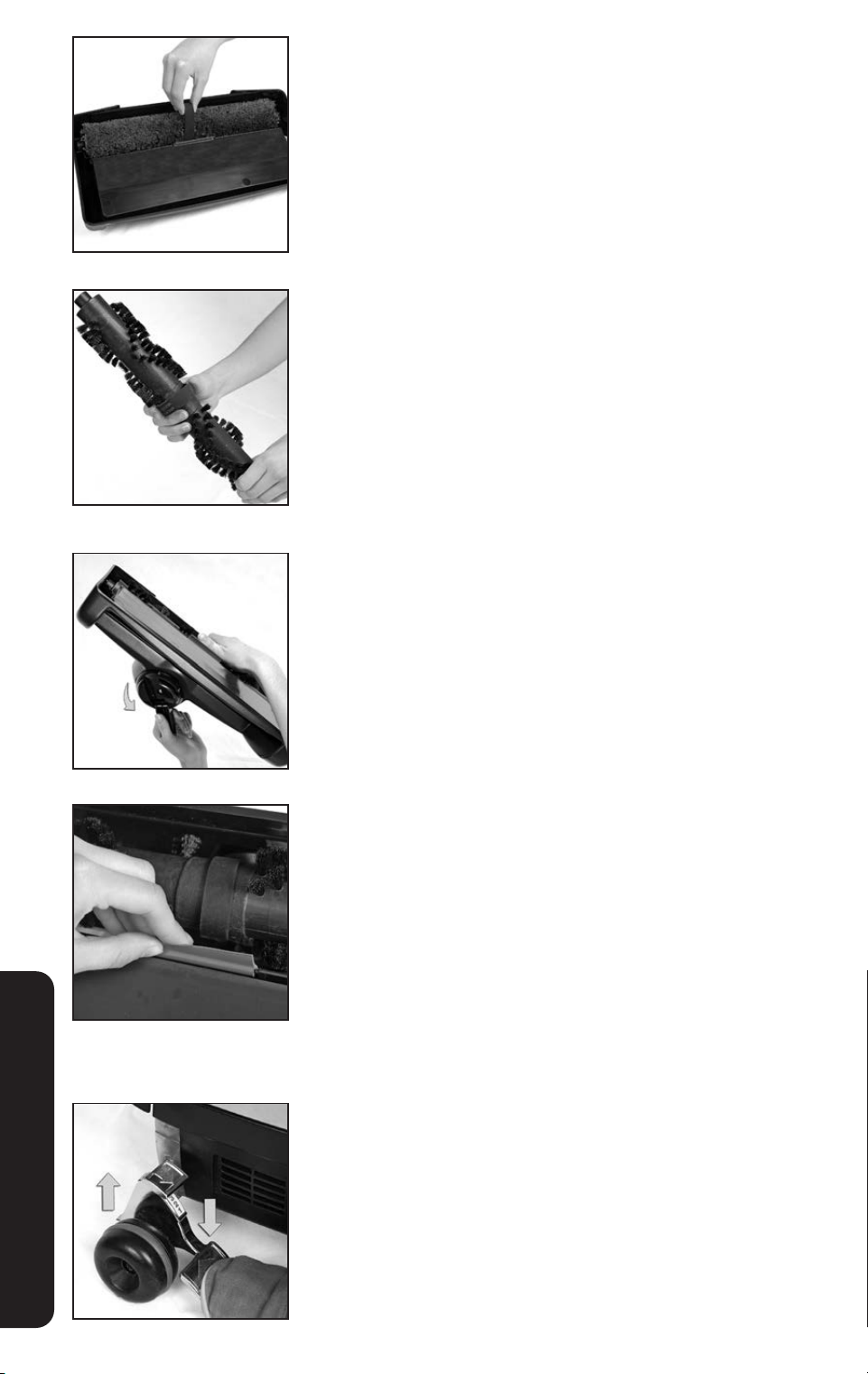
5
Turn the Multi-Surface Shampoo System over and pull up on
the Belt to loosen and remove the Rotary Mop.
6
Slide the Belt from the Multi-Surface Shampoo System over the
center of the carpet brush roll and insert it into the Multi-Surface
Shampoo System.
7
Turn the Multi-Surface Shampoo System over. While pushing
up on the belt with your finger, use the handle on the Belt Lifter
to turn it counterclockwise until the red arrows line up. The Belt
Lifter Hook will catch and stretch the belt.
8
Check to make sure that the baffle strip is in place on the
bottom of the Multi-Surface Shampoo System. Insert the baffle
strip if necessary with flat side facing the brush roll.
NOTICE Property Damage Risk. Make sure the baffle strip is in
place on the Multi-Surface Shampoo System before using on
carpet. Failure to do so may result in property damage.
9
Press the Toe-Touch Control Bottom Pedal all the way down to
raise the front of the unit.
OPTIONAL ACCESSORIES
34
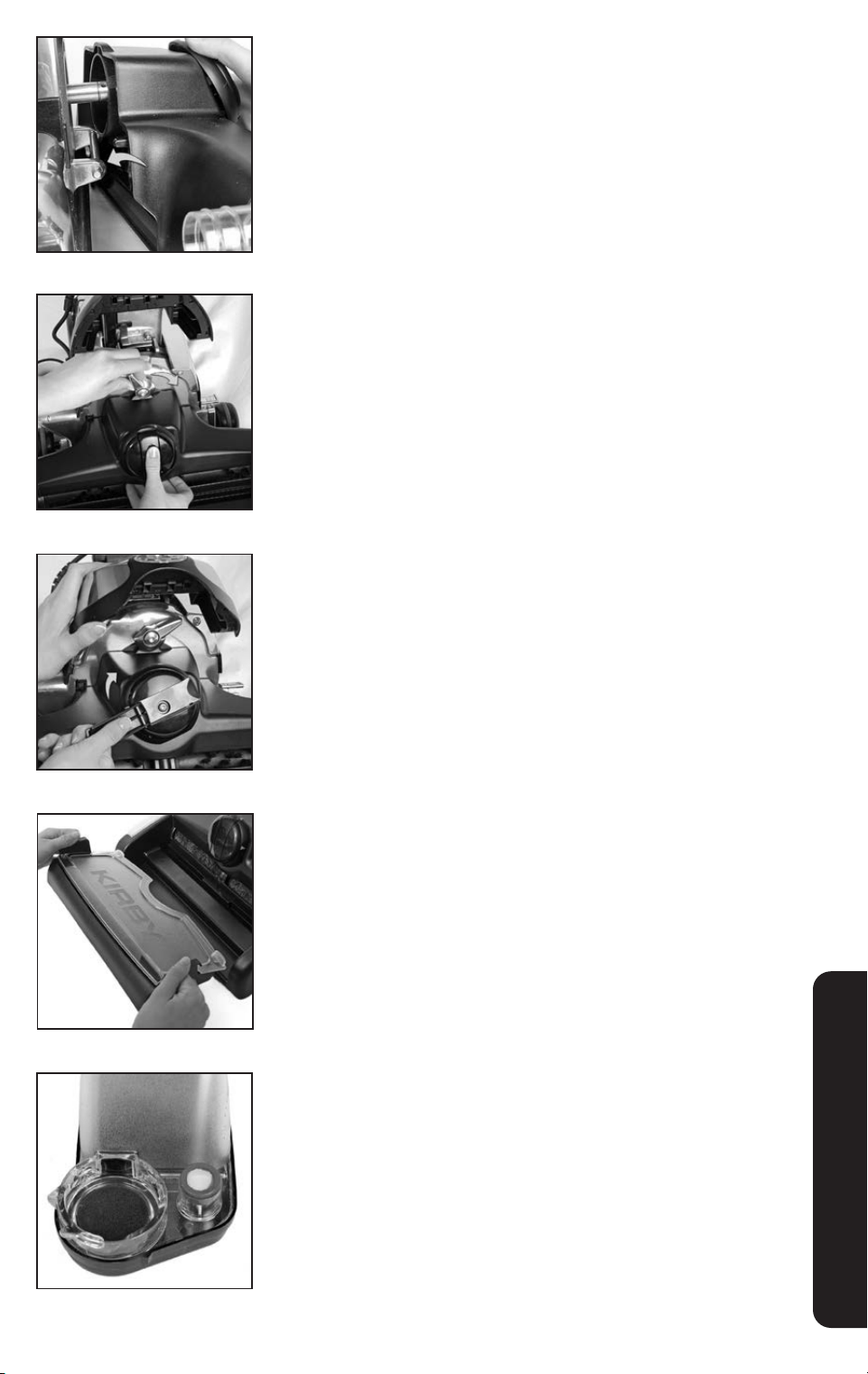
10
Connect the hooks on the rear of the Multi-Surface Shampoo
System to the Attaching Bar.
11
Push the Multi-Surface Shampoo System up against the unit
and turn the Accessory Lock clockwise to lock in place.
12
Use the handle on the Multi-Surface Shampoo Nozzle Belt
Lifter to turn it clockwise until the green arrows line up. Lower
the Headlight Hood.
13
Insert the Waste Tray.
14
On the Shampoo Tank, check that the Suds Screen and foam
sponge are in place. If they are not in place, proper foaming
will not occur.
OPTIONAL ACCESSORIES
3635
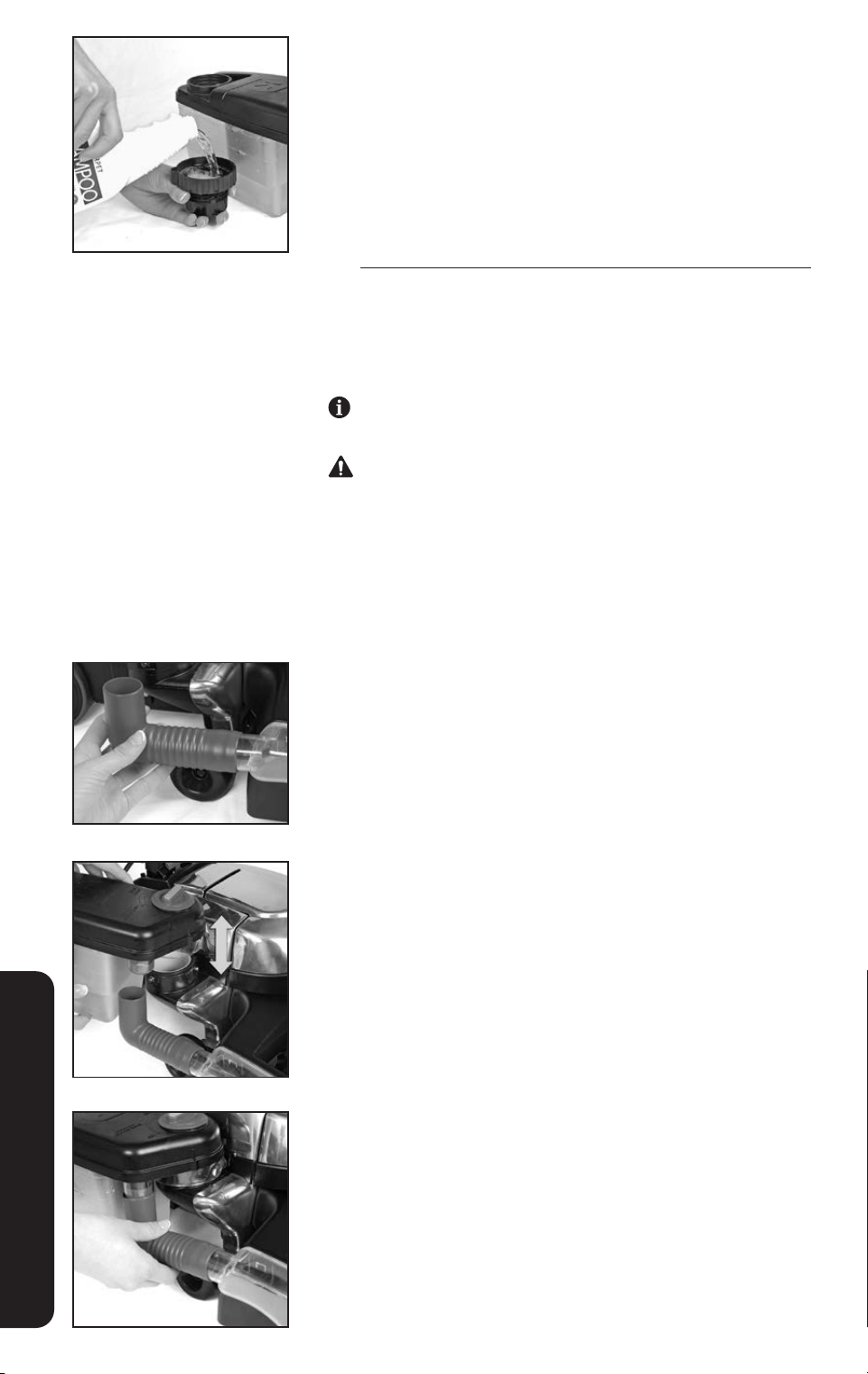
15
The Shampoo Tank should be filled or emptied at a sink.
Unscrew the large cap from the top of the Shampoo Tank.
Turn the Suds Control Valve to OFF. Fill the tank with warm
water (not hot) according to the chart below.
Use the large cap from the top of the Shampoo Tank to
measure Carpet Shampoo, not the cap from the shampoo
bottle. Do not use more than the appropriate number of
capfuls of shampoo as over foaming will occur.
AREA WATER SHAMPOO
Small 1st Line on Shampoo Tank 1 Capful
Medium 2nd Line on Shampoo Tank 2 Capfuls
Large 3rd Line on Shampoo Tank 3 Capfuls
Replace the large cap on the Shampoo Tank.
One tankful of solution filled to the third line will clean a large
carpet area about 10 x 12 feet in size (3 x 3.5 m).
Use only Kirby
®
cleaning solutions, such as Kirby
®
Carpet
Shampoo, intended for use with this product. Failure to
follow this warning could result in injury due to internal
component damage.
16
Firmly connect the elbow hose to the Multi-Surface
Shampoo Nozzle.
17
Taking care to avoid spilling liquid on the unit or the floor,
place the opening in the bottom of the Shampoo Tank over
the Air Exhaust Port.
Rotate the Shampoo Tank toward the unit to lock it in place.
18
Connect the elbow hose to the bottom of the Shampoo Tank.
OPTIONAL ACCESSORIES
36
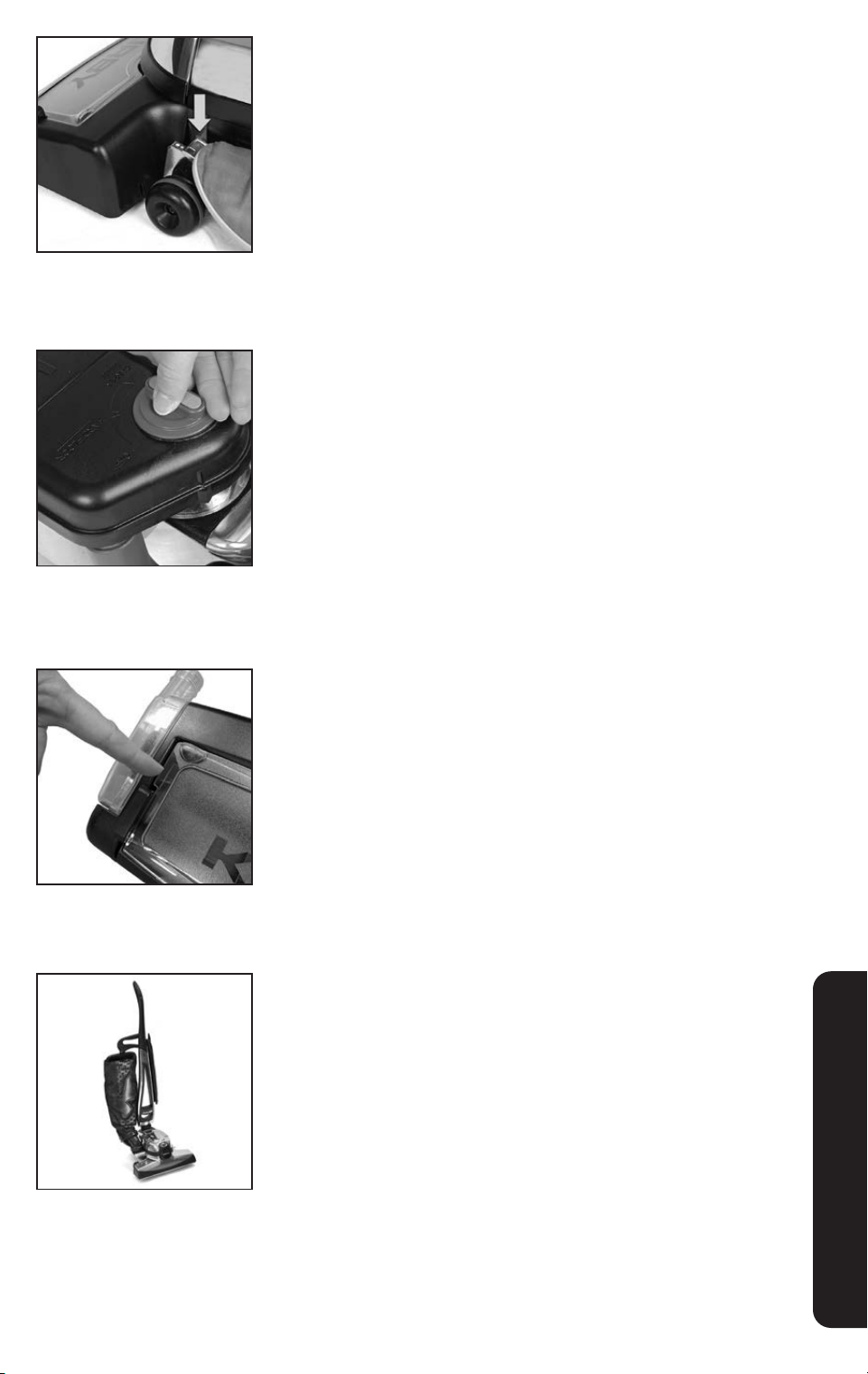
Shampooing Carpets
1
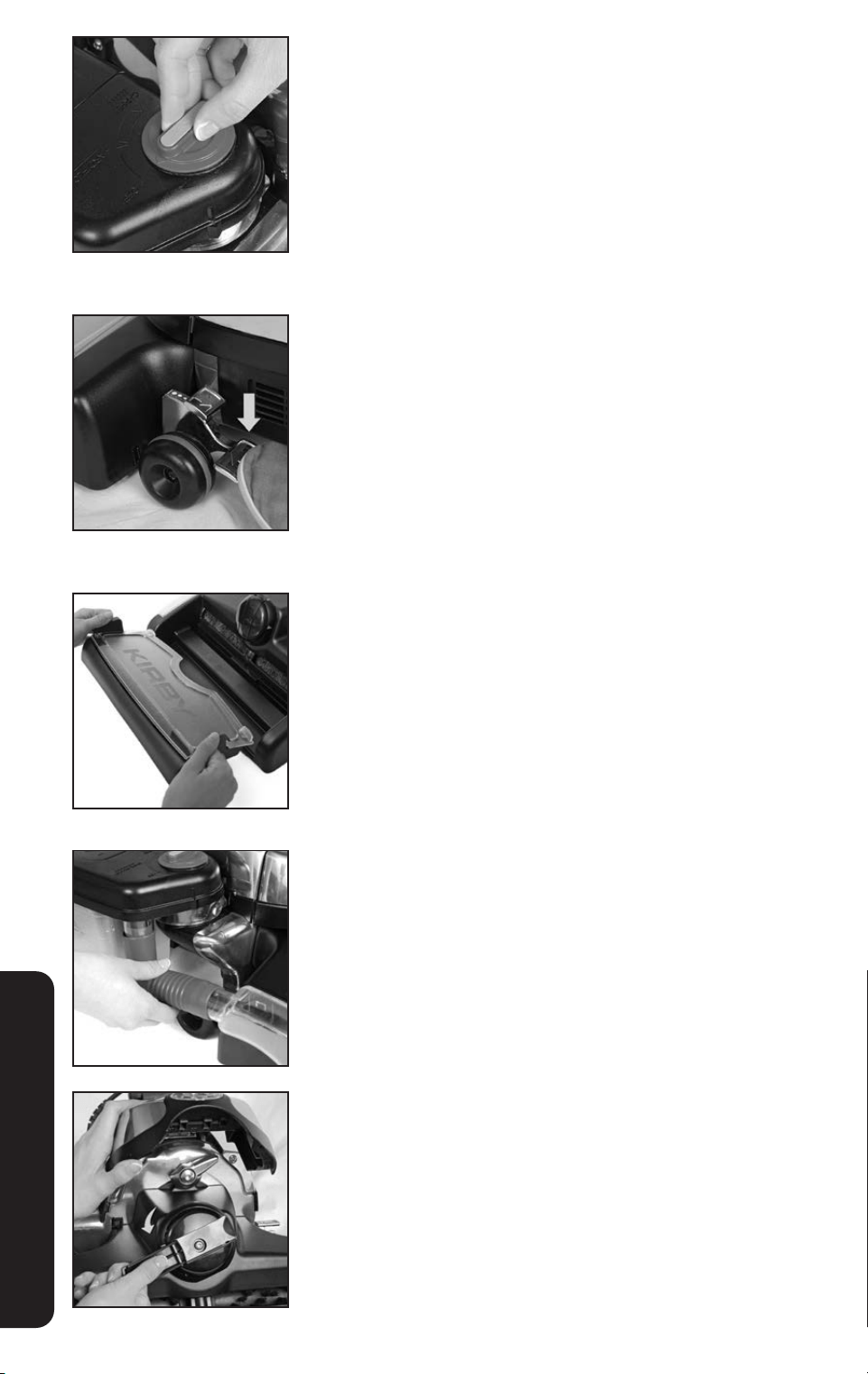
Step on the upper pedal of the Toe-Touch Control until the
Multi-Surface Shampoo System is at its lowest position.
2
Turn the Suds Control Valve to the Carpet Setting. Turn the unit
on. As the unit is moved back and forth, foam will release and
the brush will work it into the carpet. For ease of cleaning,
shampoo smaller sections of the carpet at a time.
3
Turn the Suds Control Valve to the off position. Go back over
the shampooed carpet in multiple directions to thoroughly work
all of the shampoo into the carpet.
4
If necessary, empty the Waste Tray during shampooing. Check
the indicators on the edge of the Waste Tray Cover. When
liquid begins to fill the area below the indicators, it is time to
empty the Waste Tray.
Turn off the unit. Lift the Waste Tray and carry to a sink to
empty. Replace the Waste Tray before turning the system back
on and resuming shampooing.
5
Allow carpet to dry completely. Convert the unit to an upright
vacuum. Vacuum to remove the dry residue which contains dirt
and grime.
OPTIONAL ACCESSORIES
3837
Cleaning The Multi-Surface
Shampoo System
1
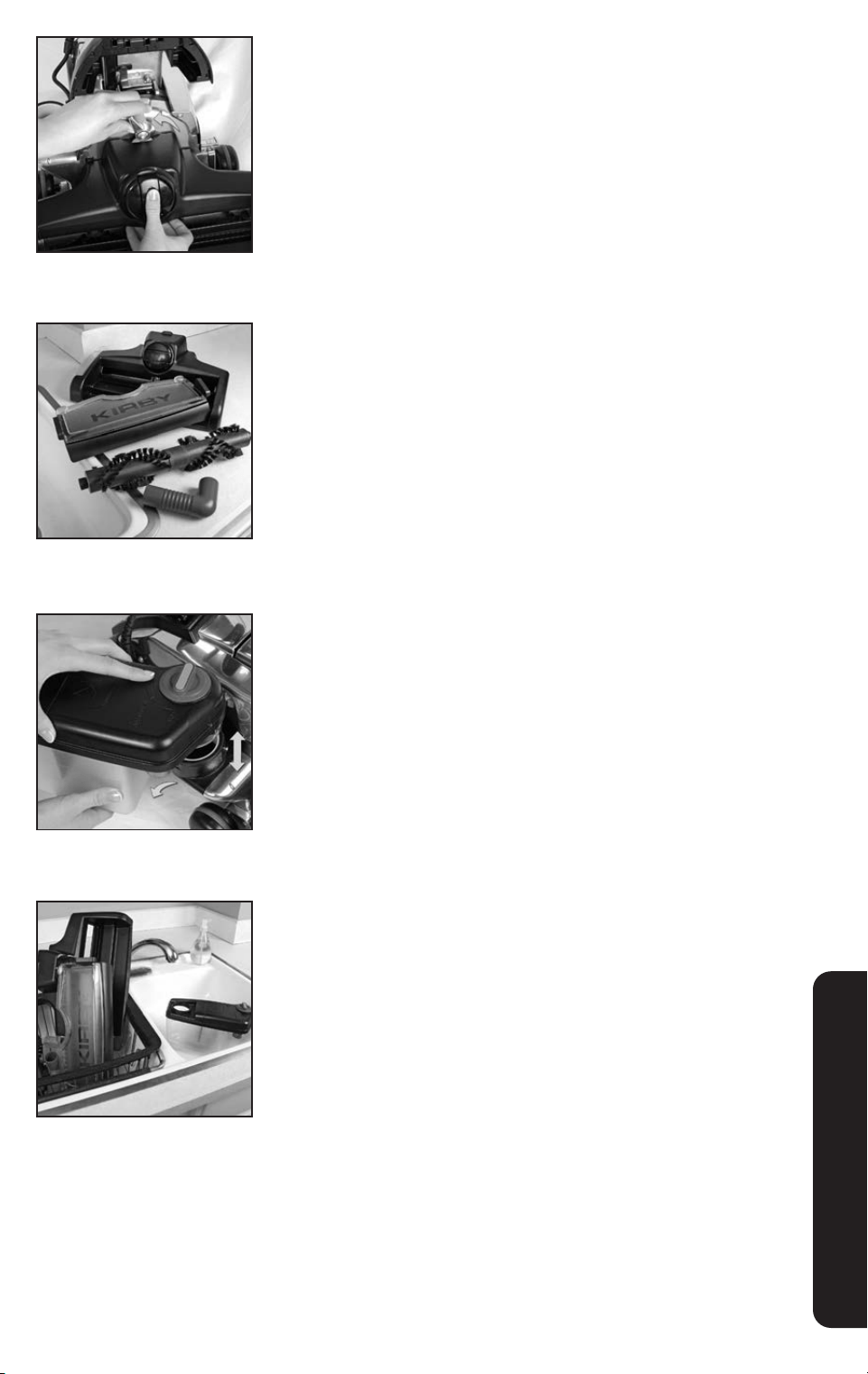
Turn the Suds Control Valve to the off position.
2
Push the Toe-Touch Control Bottom Pedal all the way down to
raise the nozzle and tray. Let the unit run for several seconds to
allow any remaining shampoo and water to spin off the brush.
Turn the unit off and unplug it.
3
Lift the Waste Tray and carry to a sink to empty. Thoroughly
rinse all parts of the tray and set aside to dry.
4
Remove the hose from the bottom of the Shampoo Tank.
5
Raise the Headlight Hood. Turn the Belt Lifter counterclockwise
until the red arrows line up.
OPTIONAL ACCESSORIES
38
6
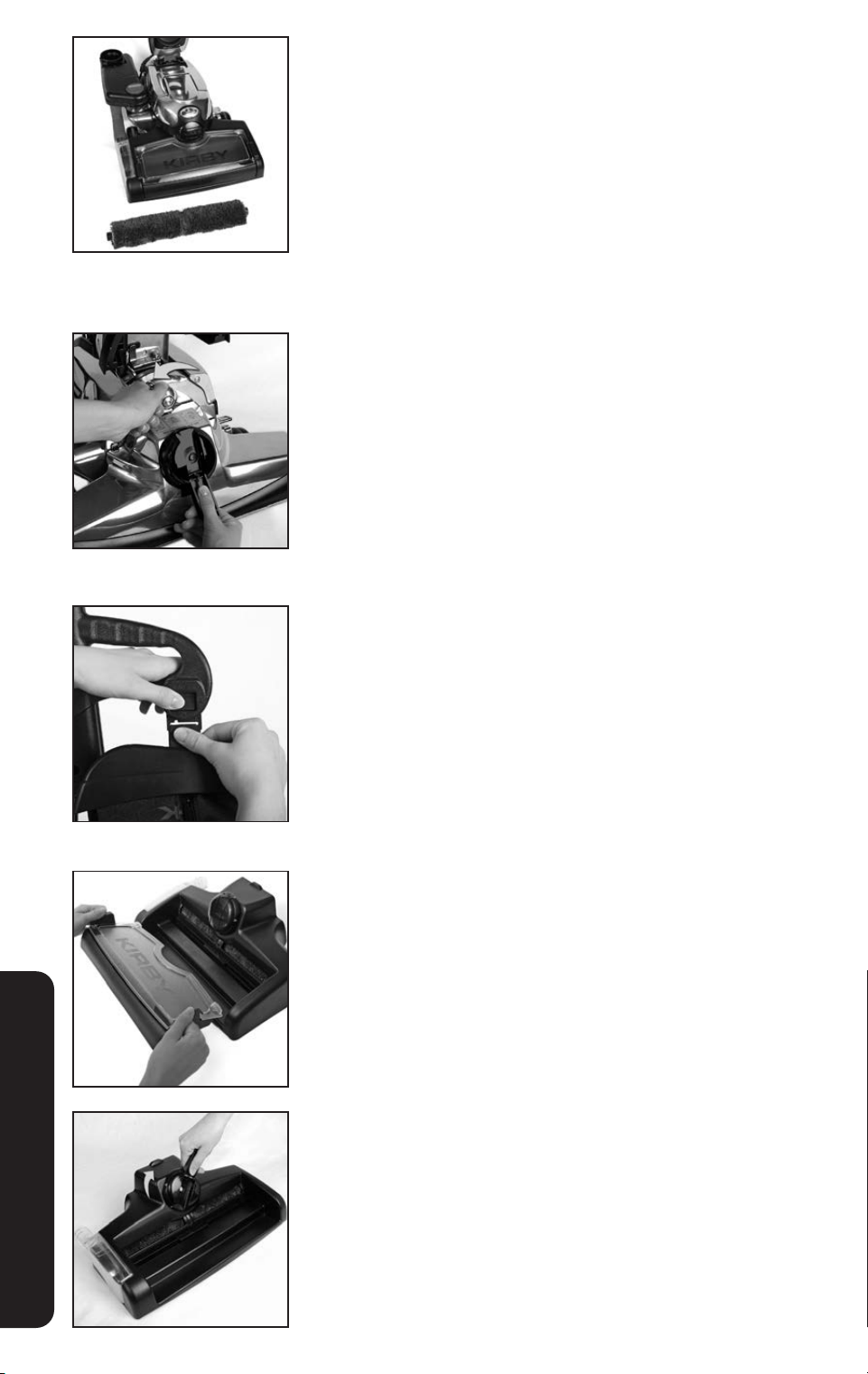
Turn the Accessory Lock counterclockwise. Lift off the Multi-
Surface Shampoo System and carry it to the sink.
7
Rinse all areas of the Multi-Surface Shampoo System, and
remove any lint from brush tufts. Shake excess water from the
unit. Allow all parts to dry thoroughly.
8
Rotate the Shampoo Tank away from the unit and lift off.
9
At the sink, discard any remaining liquid in the Shampoo Tank.
Remove and clean the Suds Screen Cap, tank cap and sponge
filter. Rinse out the Shampoo Tank with cold water and replace
the Suds Screen Cap, tank cap and sponge filter. Allow all
parts to dry thoroughly before reassembling.
OPTIONAL ACCESSORIES
4039
Multi-Surface Shampoo System:
Hard Floors
The Multi-Surface Shampoo System can be used to clean hard
floors by inserting the Rotary Mop and cleaning with Kirby
®
Hard
Floor Cleaner. Before cleaning hard floors, vacuum or sweep the
floor to remove large debris.
Converting to a Cleaner for Hard Floors
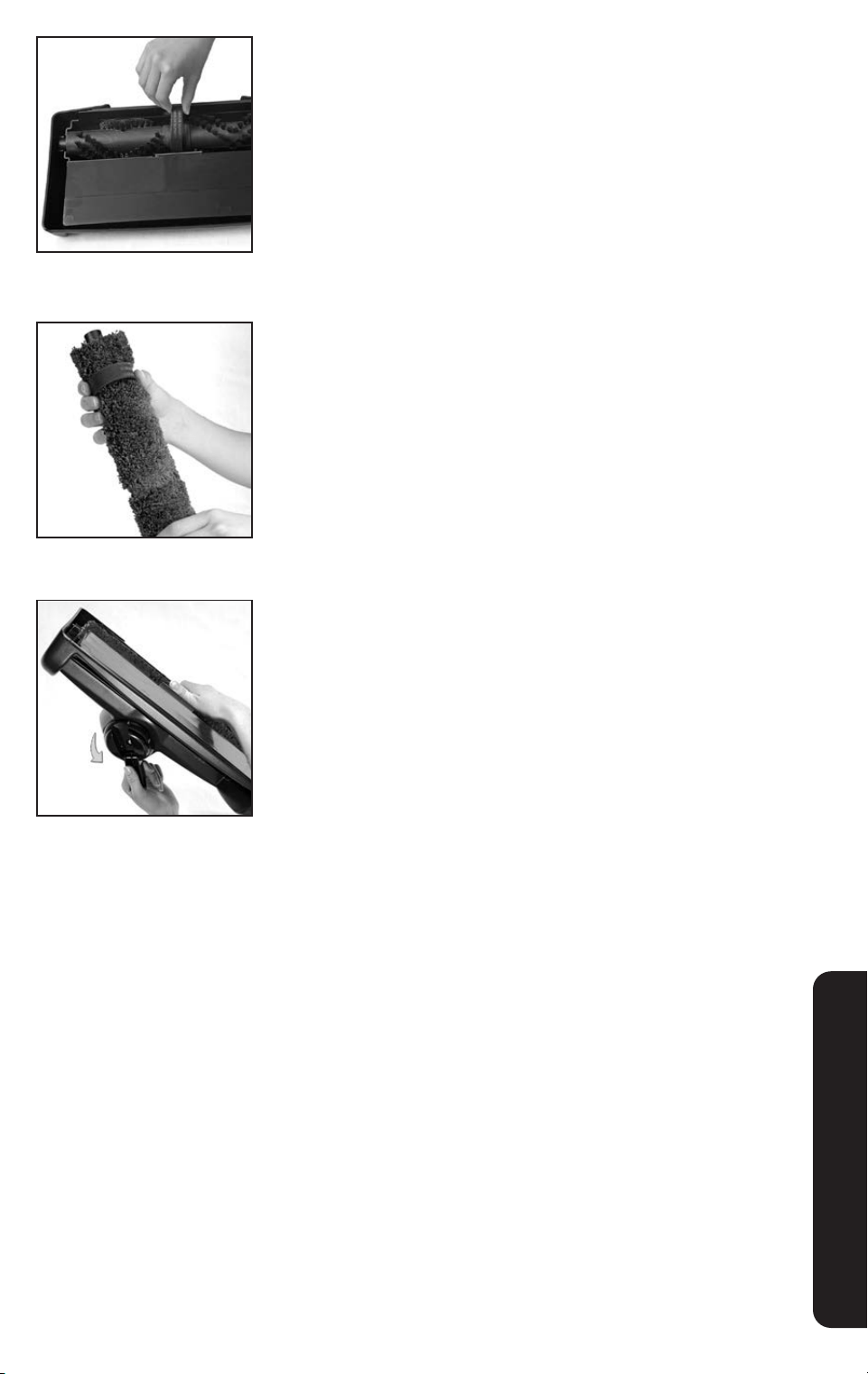
1
Remove the Power Nozzle. See page 22.
2
Remove the Outer Permanent Bag. See page 18.
3
Lift and remove the Waste Tray from the Multi-Surface
Shampoo System.
4
When cleaning hard floors, the Rotary Mop must be used. If the
Rotary Mop is already inserted, skip to step #8. If necessary,
remove the carpet brush roll and insert the Rotary Mop. Using
the handle, turn the Multi-Surface Shampoo System Nozzle
Belt Lifter clockwise until the green arrows line up.
OPTIONAL ACCESSORIES
40
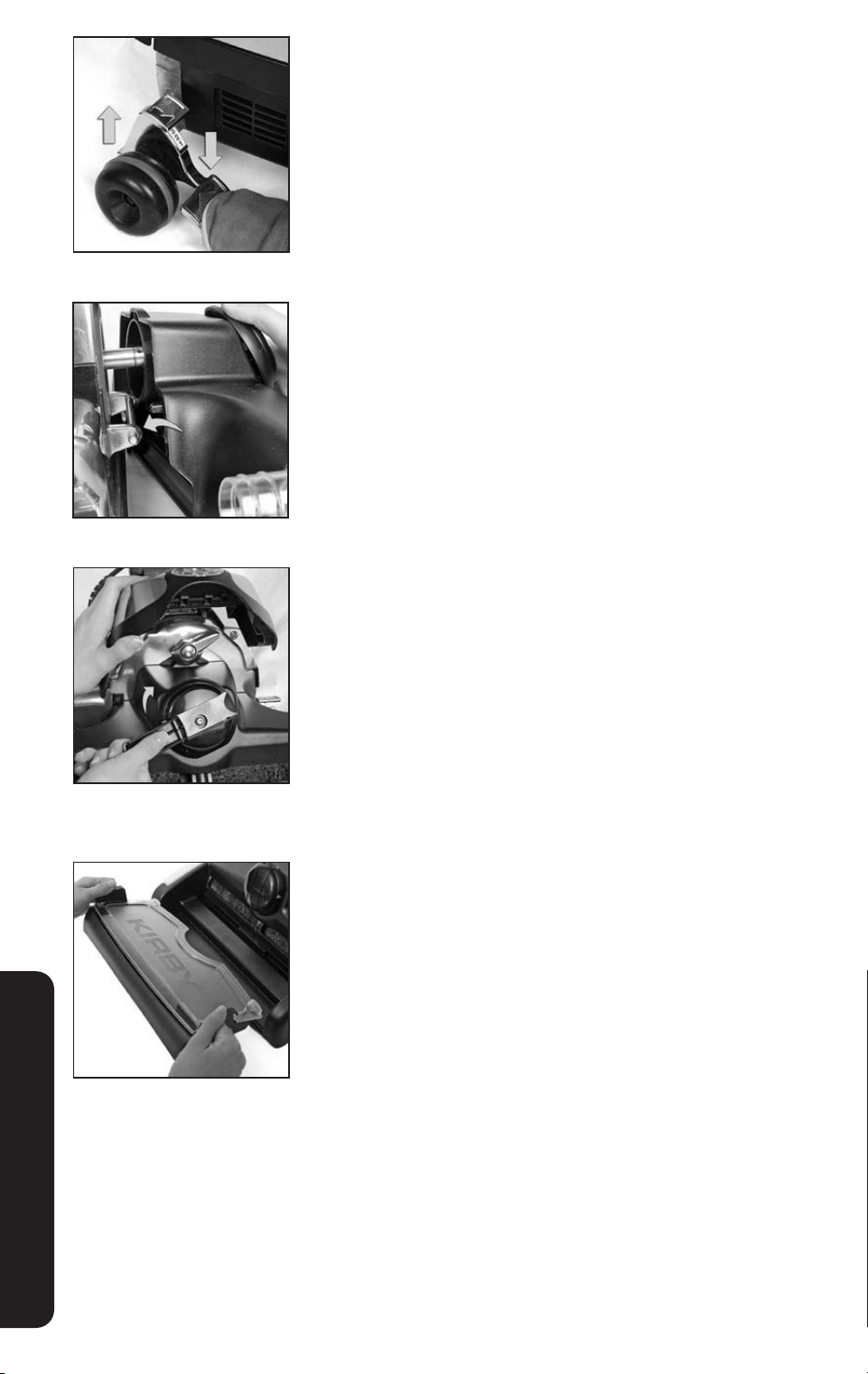
5
Turn the Multi-Surface Shampoo System over and pull up on
the belt to loosen and remove the Carpet Shampoo BrushRoll.
6
Slide the Belt from the Multi-Surface Shampoo System over the
center of the Rotary Mop and insert it into the Multi-Surface
Shampoo System.
7
While pushing up on the belt with your finger, use the handle on
the Belt Lifter to turn it counterclockwise until the red arrows line
up. The Belt Lifter Hook will catch and stretch the belt.
OPTIONAL ACCESSORIES
4241
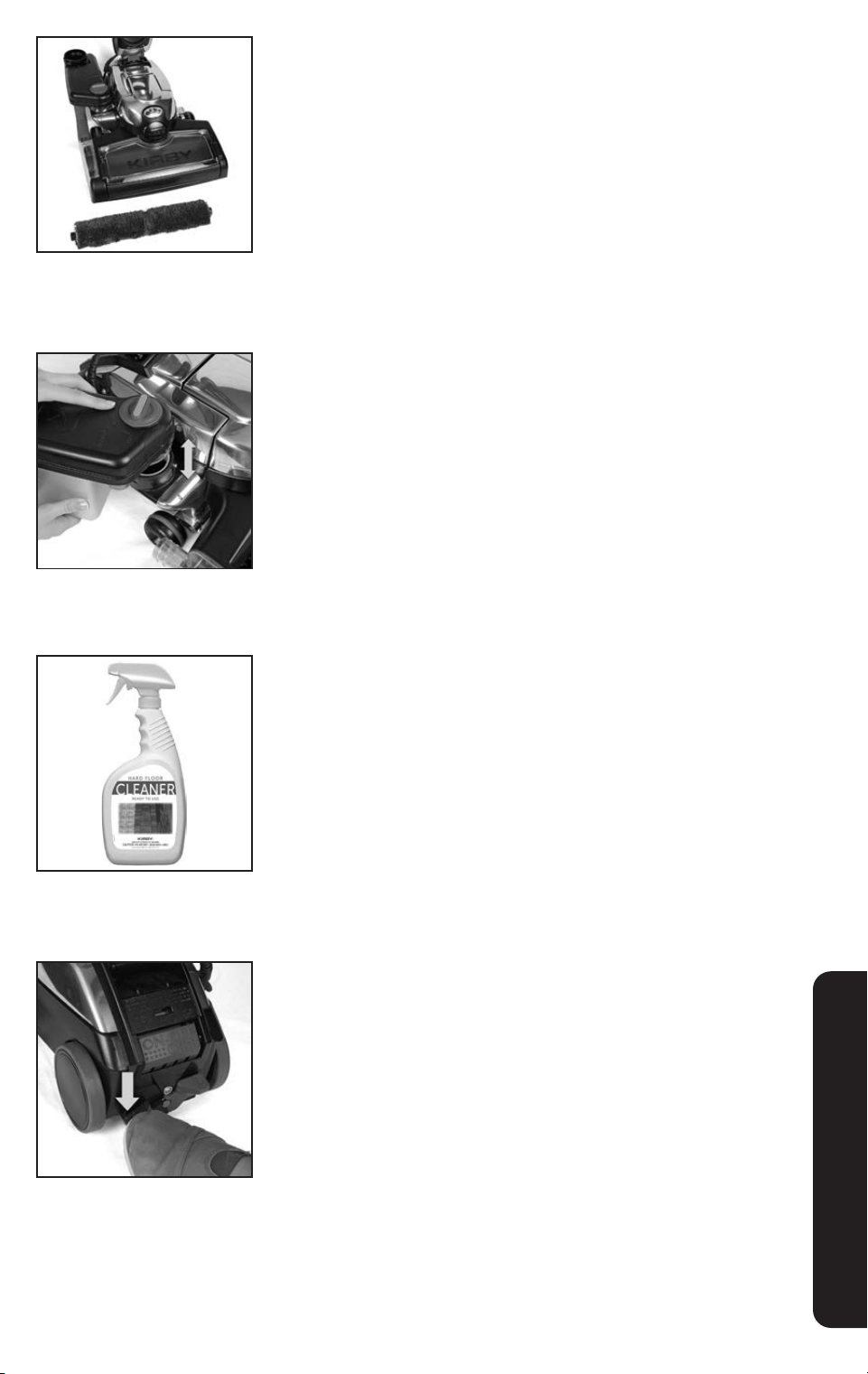
8
Press the Toe-Touch Control Bottom Pedal all the way down to
raise the front of the unit.
9
Connect the hooks on the rear of the Multi-Surface Shampoo
System to the Attaching Bar.
10
Push the Multi-Surface Shampoo System up against the unit
and turn the Accessory Lock clockwise to lock in place.
Use the handle on the Shampoo Nozzle Belt Lifter to turn
it clockwise until the green arrows line up. Lower the
Headlight Hood.
11
Insert the Waste Tray.
OPTIONAL ACCESSORIES
42
Cleaning Hard Floors
Always use a small amount of liquid when cleaning hard floors.
Never let liquid sit on hard floors. Do not use on unsealed floors.
Always follow floor manufacturer’s recommended cleaning
instructions. Failure to follow these warnings could result in
property damage.
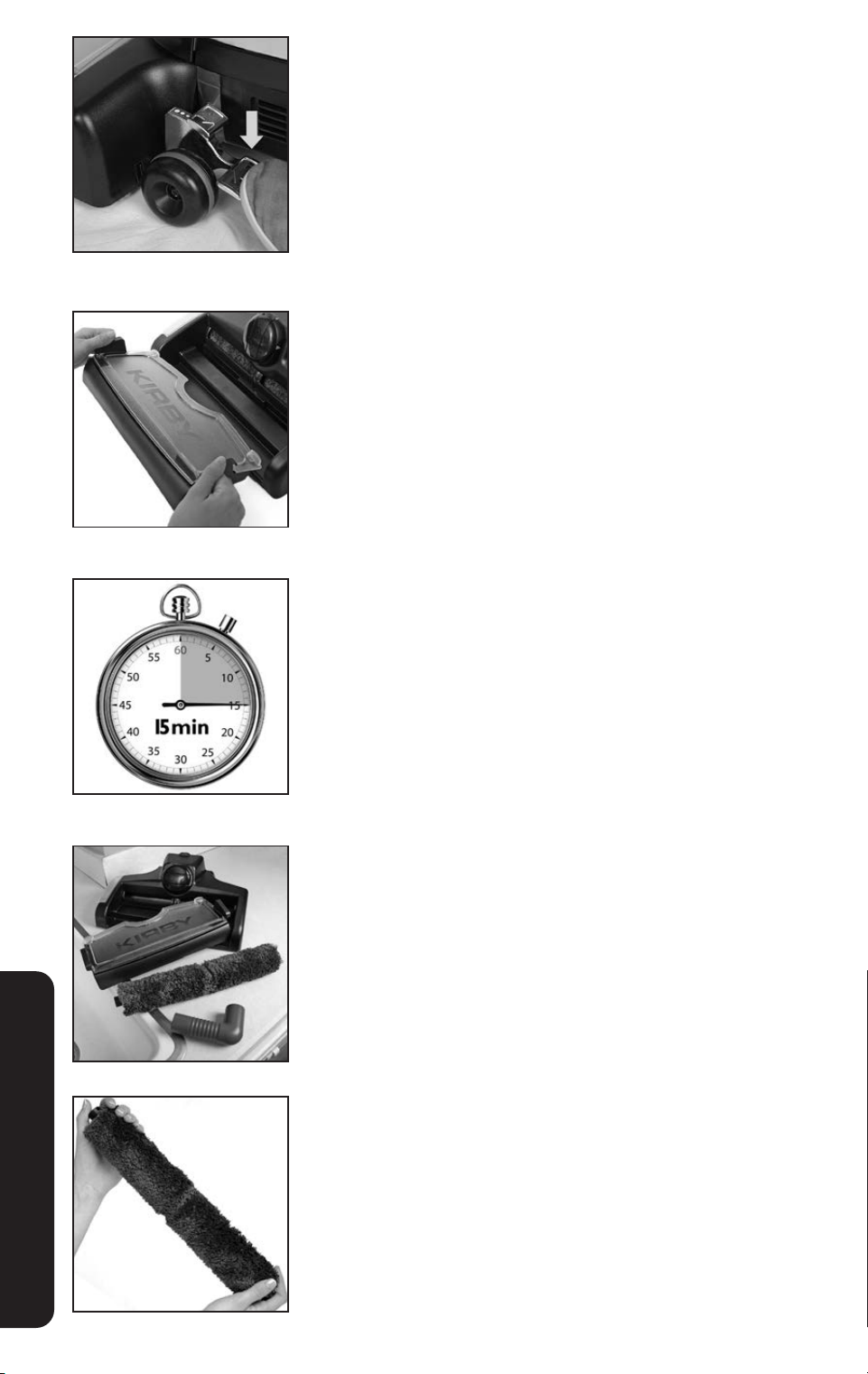
Clean Hardwood or Laminate Floors
1
Attach the empty Shampoo Tank to the Air Exhaust Port.
It is not necessary to attach the elbow hose.
2
Spray a fine mist of Kirby
®
Hard Floor Cleaner Ready to Use on
a small area of the floor. Do not over-wet floor.
3
Put Tech Drive
®
power assist in neutral and turn the cleaner on.
OPTIONAL ACCESSORIES
4443
4
Press the Toe Touch Control Upper Pedal repeatedly until the
Rotary Mop contacts the floor. Move the Kirby
®
system over the
area to be cleaned. Spray additional cleaner as needed.
5
If necessary, empty the Waste Tray during shampooing. Check
the clear indicators on the edge of the Waste Tray Cover. When
liquid begins to fill the area below the indicators, it is time to
empty the Waste Tray.
Turn off the unit. Lift the Waste Tray and carry to a sink to empty.
Replace the Waste Tray before shampooing.
6
Allow the floor to dry completely. If necessary, use a towel to
wipe up excess fluid.
7
Clean the Multi-Surface Shampoo System thoroughly.
Allow all parts, especially the Rotary Mop, to dry thoroughly
before storage.
8
Over time, the Rotary Mop fibers will wear down. Replace the
Rotary Mop regularly for best cleaning results.
OPTIONAL ACCESSORIES
44
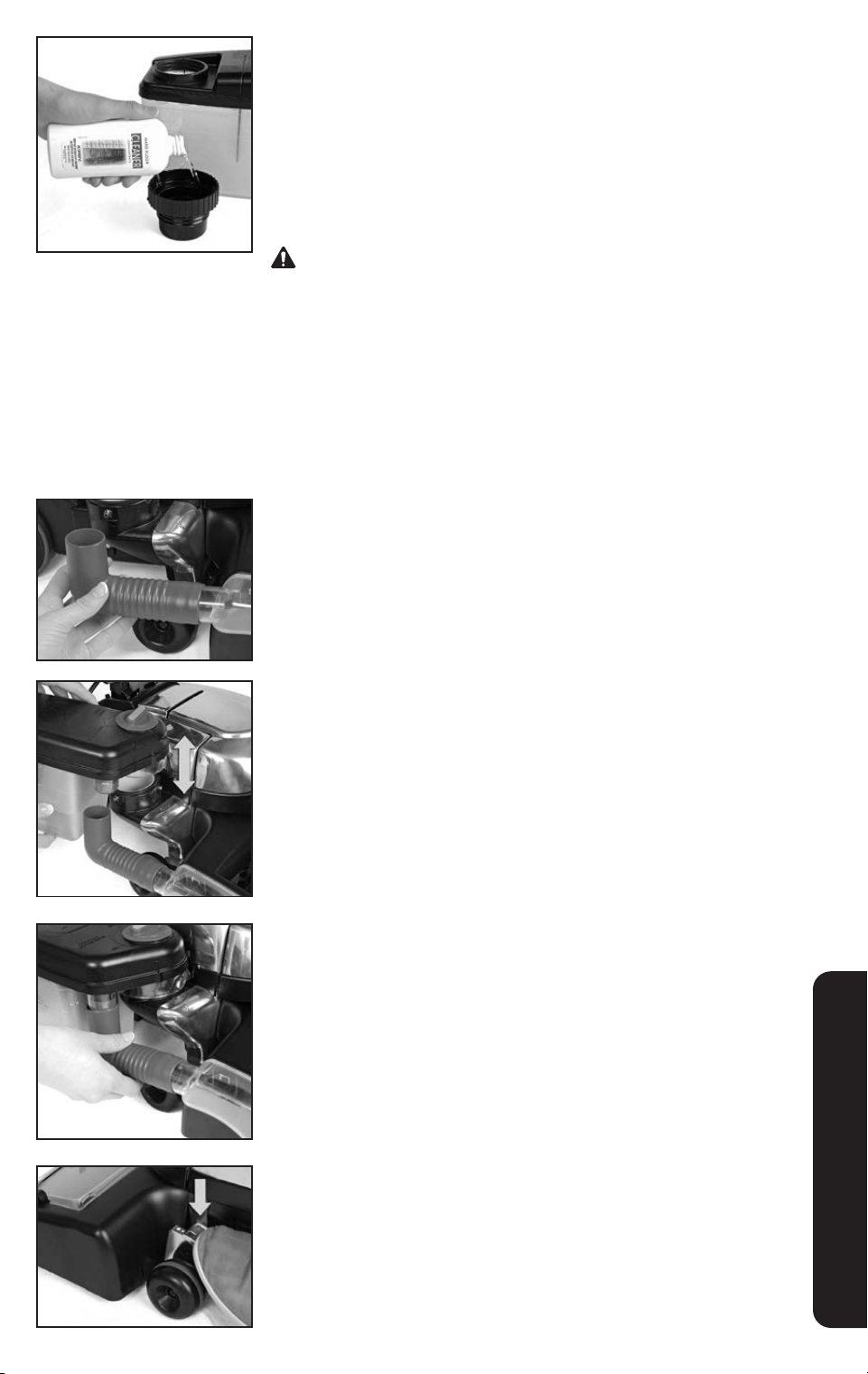
Clean Vinyl or Tile Floors
1
Fill the Shampoo Tank with warm water to the first line. Add one
tank cap full of Kirby
®
Hard Floor Cleaner Concentrate.
Using the large cap from the top of the tank, pour one capful of
Kirby
®
Hard Floor Cleaner into the Shampoo Tank. Do not use
more, as over-foaming will result.
Replace the large cap on the Shampoo Tank.
Use only Kirby
®
cleaning solutions, such as Kirby
®
Hard Floor
Cleaner Concentrate, intended for use with this product. Failure
to follow this warning could result in injury due to internal
component damage.
2
Firmly connect the elbow hose to the Multi-Surface
Shampoo Nozzle.
3
Taking care to avoid spilling liquid on the unit or the floor, place
the opening in the bottom of the Shampoo Tank over the Air
Exhaust Port.
Rotate the Shampoo Tank toward the unit to lock it in place.
4
Connect the elbow hose to the bottom of the Shampoo Tank.
5
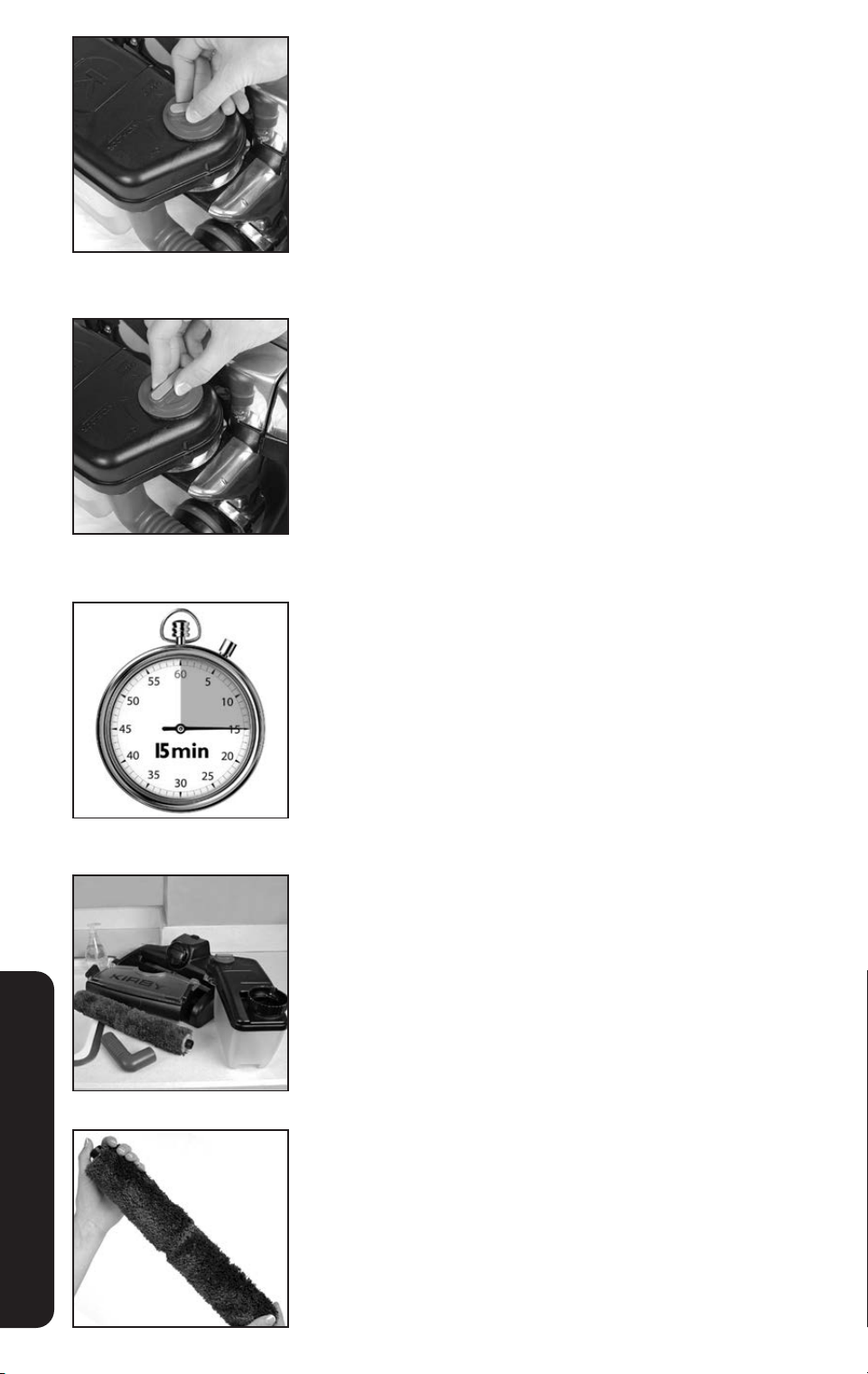
Press the Toe-Touch Control Upper Pedal repeatedly until the
Rotary Mop contacts the floor.
OPTIONAL ACCESSORIES
4645
6
Turn the Suds Control Valve clockwise to the Hard Floor Setting.
Put Tech Drive
®
power assist in neutral. Turn the unit on. As the
unit is moved back and forth, cleaning solution will release and
the Rotary Mop will scrub the floor.
7
Turn the Suds Control Valve to the OFF position. Go back
over the floor to thoroughly clean the floor and to pick up
excess solution.
8
If necessary, use a towel to wipe up excess fluid.
Allow the floor to dry completely.
9
Clean the Multi-Surface Shampoo System thoroughly.
Allow all parts, especially the Rotary Mop, to dry thoroughly
before storage.
10
Over time, the Rotary Mop fibers will wear down. Replace
the Rotary Mop regularly for best cleaning results.
OPTIONAL ACCESSORIES
46
Miracle Shine Kit
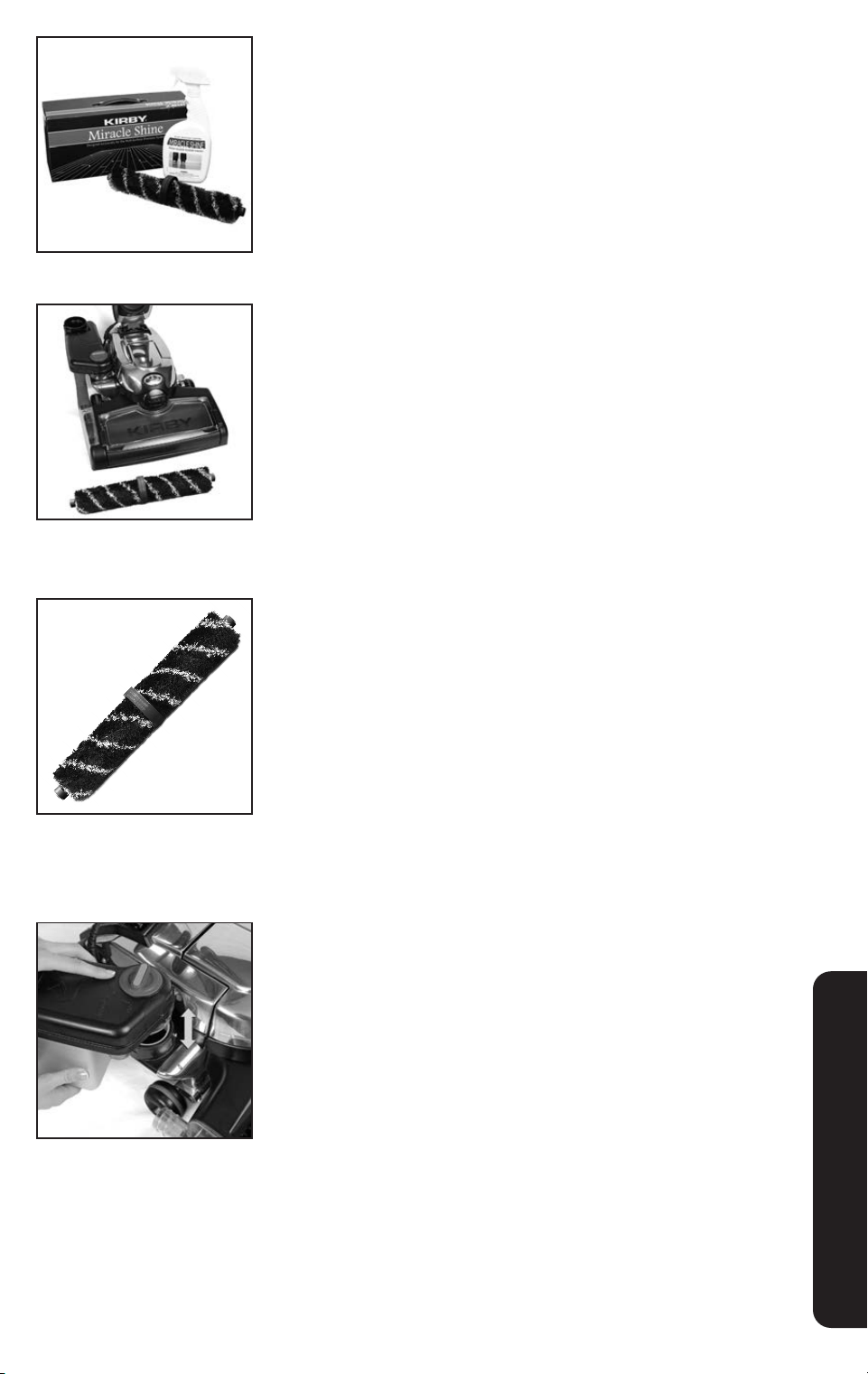
Bring a high gloss to hard surface floors with the Miracle Shine kit.
1
Vacuum the floor and/or clean with the Multi-Surface
Shampoo System for Hard Floors before applying Kirby
®
Miracle Shine. Allow floor to dry completely.
2
Convert the Kirby
®
system to a cleaner for hard floors
(p. 38). Instead of using the Rotary Mop, insert the striped
Miracle Shine Mop.
3
Attach the empty Shampoo Tank to the Air Exhaust Port. It is not
necessary to attach the elbow hose. This setting allows airflow
through the system.
OPTIONAL ACCESSORIES
4847
5
Make sure Tech Drive
®
power assist is in neutral and turn the
cleaner on.
6
Press the Toe-Touch Control Upper Pedal repeatedly until the
Miracle Shine Mop contacts the floor. Immediately move the
cleaner over the sprayed area to spread the Miracle Shine in
an even layer. For best results, only go over the area with one
or two quick passes; additional passes of the Kirby
®
system may
cause streaks. Spray additional solution as needed.
4
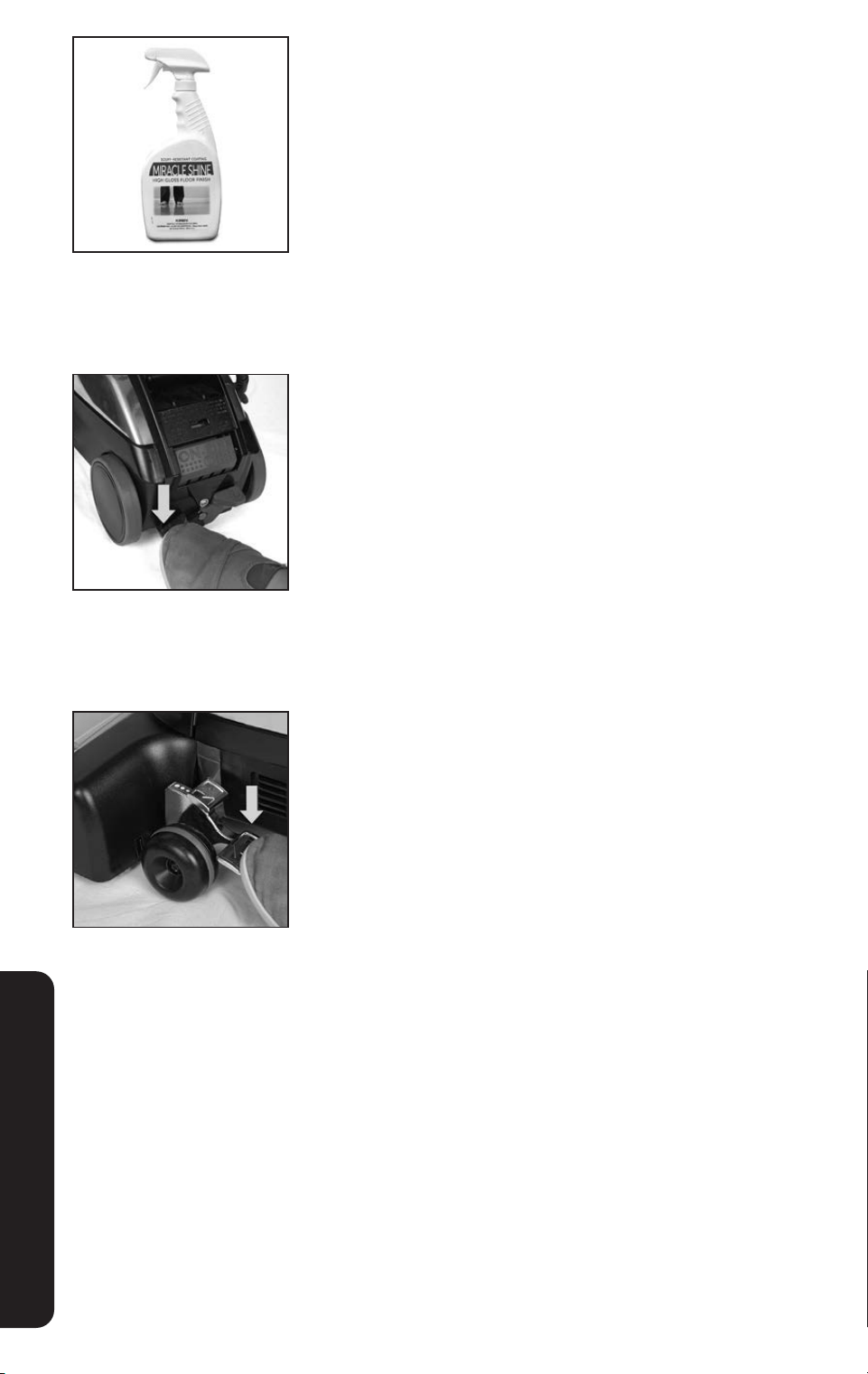
Working in small sections, lightly spray Kirby
®
Miracle Shine
directly on the floor.
NOTICE Test Kirby
®
Miracle Shine in an inconspicuous area of
floor prior to full application.
OPTIONAL ACCESSORIES
48
7
Allow floor to completely dry before walking on surface.
8
Disassemble and clean all parts of the Multi-Surface Shampoo
System using a mixture of 50% ammonia and 50% water to
remove any build up of Kirby
®
Miracle Shine. Allow parts to
dry before storage. If necessary, wipe off bottom of the Kirby
®
system with soft rag dampened with a mixture of 50% ammonia
and 50% water
9
Re-apply Kirby
®
Miracle Shine as needed to maintain a
glossy shine.
OPTIONAL ACCESSORIES
5049
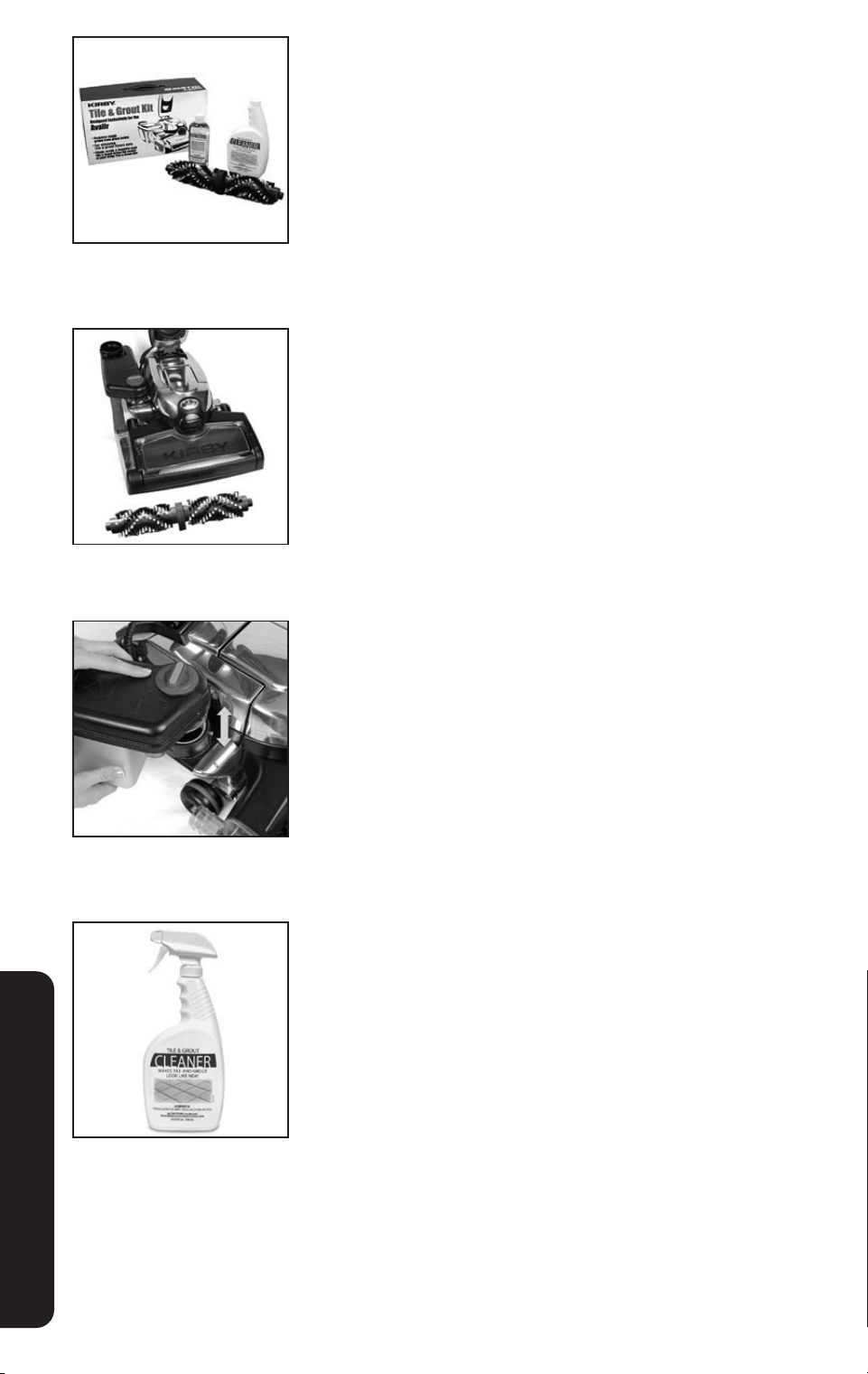
Tile & Grout Kit
Clean, scrub and beautify your tile and grout floors.
1
Convert the Kirby
®
system to a cleaner for hard floors (p. 38).
Instead of using the Rotary Mop, insert the Tile & Grout
Brush Roll.
2
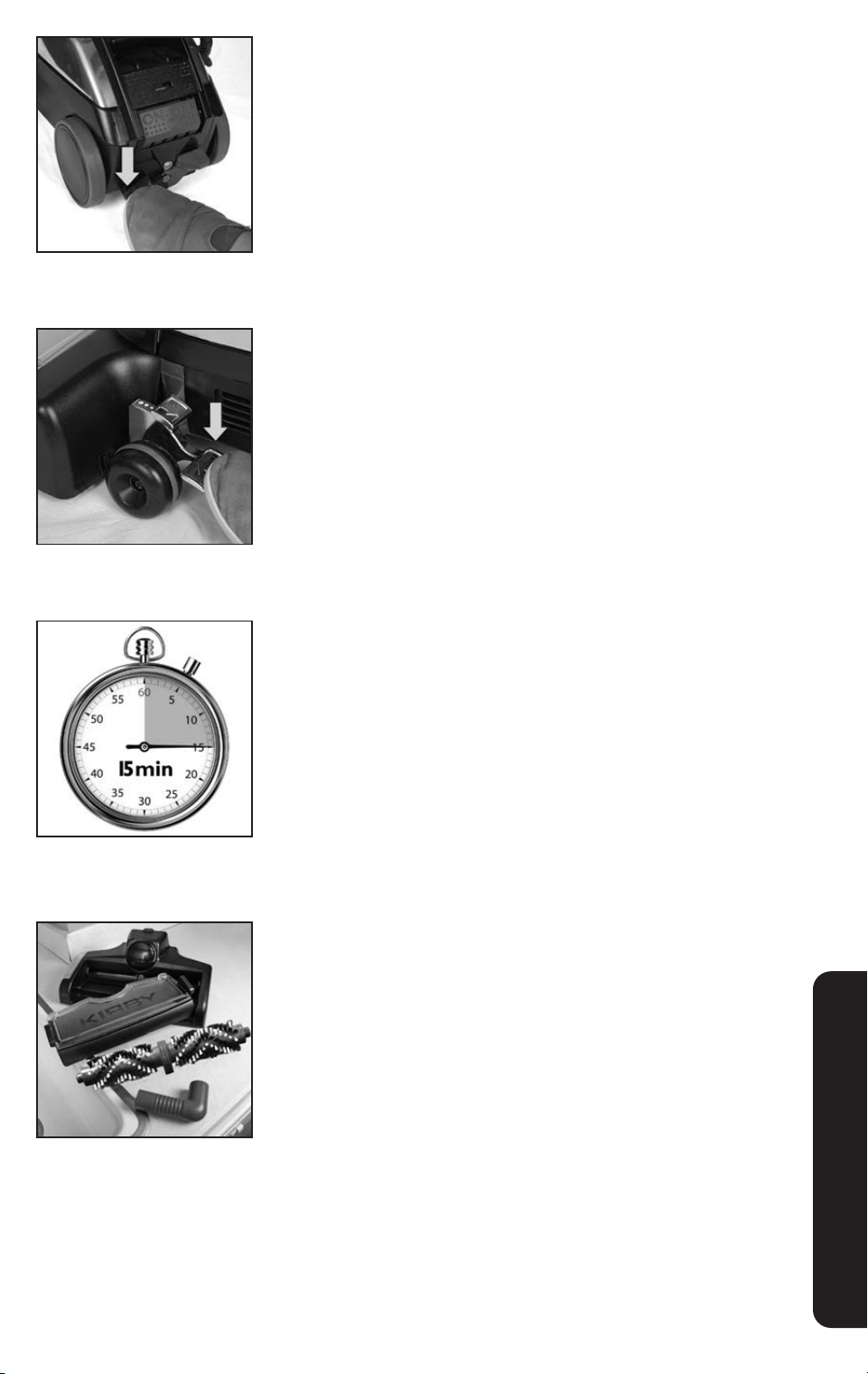
Attach the empty Shampoo Tank to the Air Exhaust Port. It is not
necessary to attach the elbow hose. This setting allows airflow
through the system.
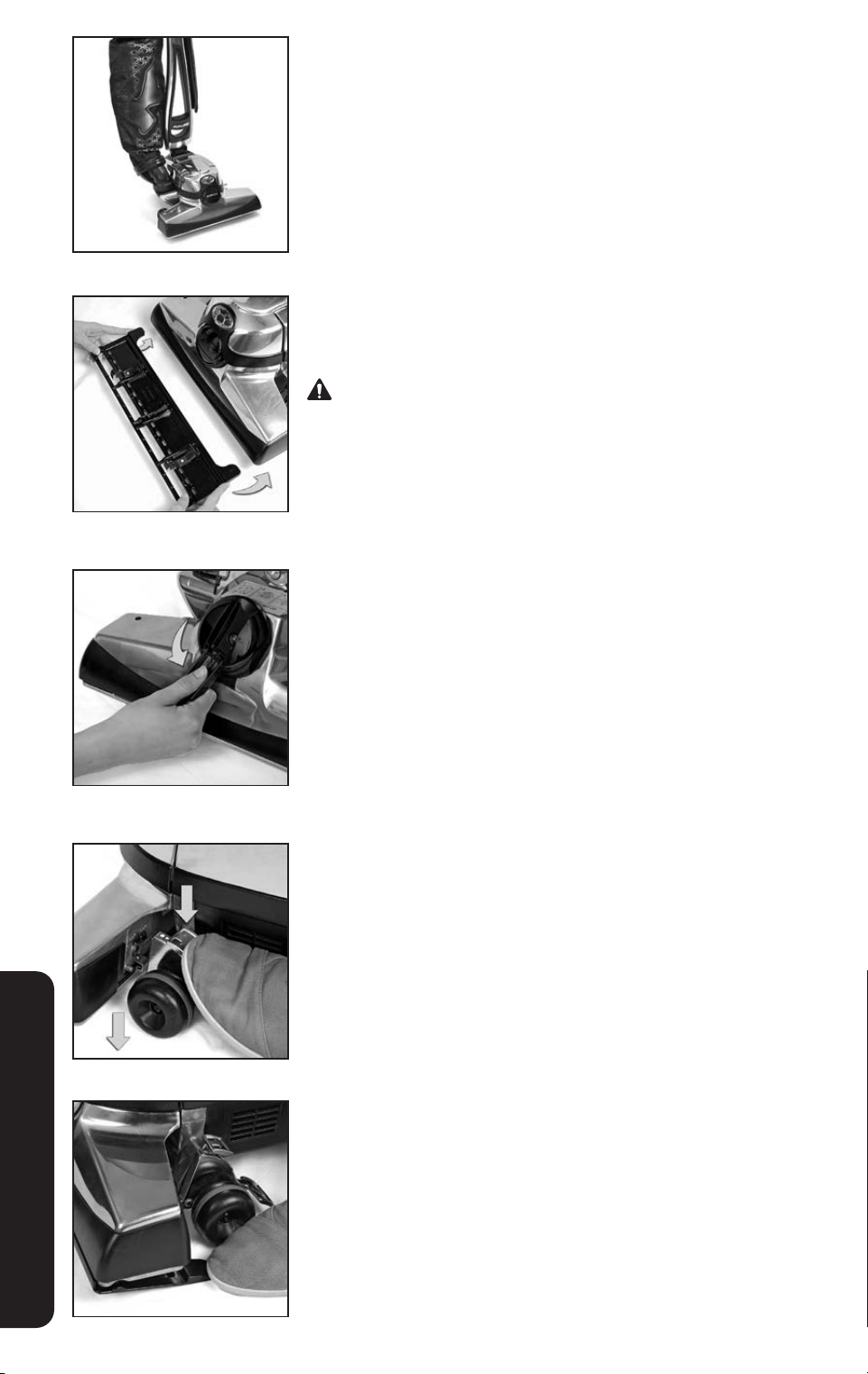
3
Working in small sections, lightly apply Kirby
®
Tile & Grout Pre-
Treat directly to discolored or stained grout lines. Spray Kirby
®
Tile & Grout Cleaner directly on the floor.
NOTICE Test Kirby
®
Tile & Grout Cleaner in an inconspicuous
area of floor prior to full application.
OPTIONAL ACCESSORIES
50
4
Make sure Tech Drive
®
power assist is in neutral and turn the
cleaner on.
6
Allow floor to completely dry before walking on surface.
7
Disassemble and rinse parts of the Multi-Surface Shampoo
System. Allow parts to dry before storage.
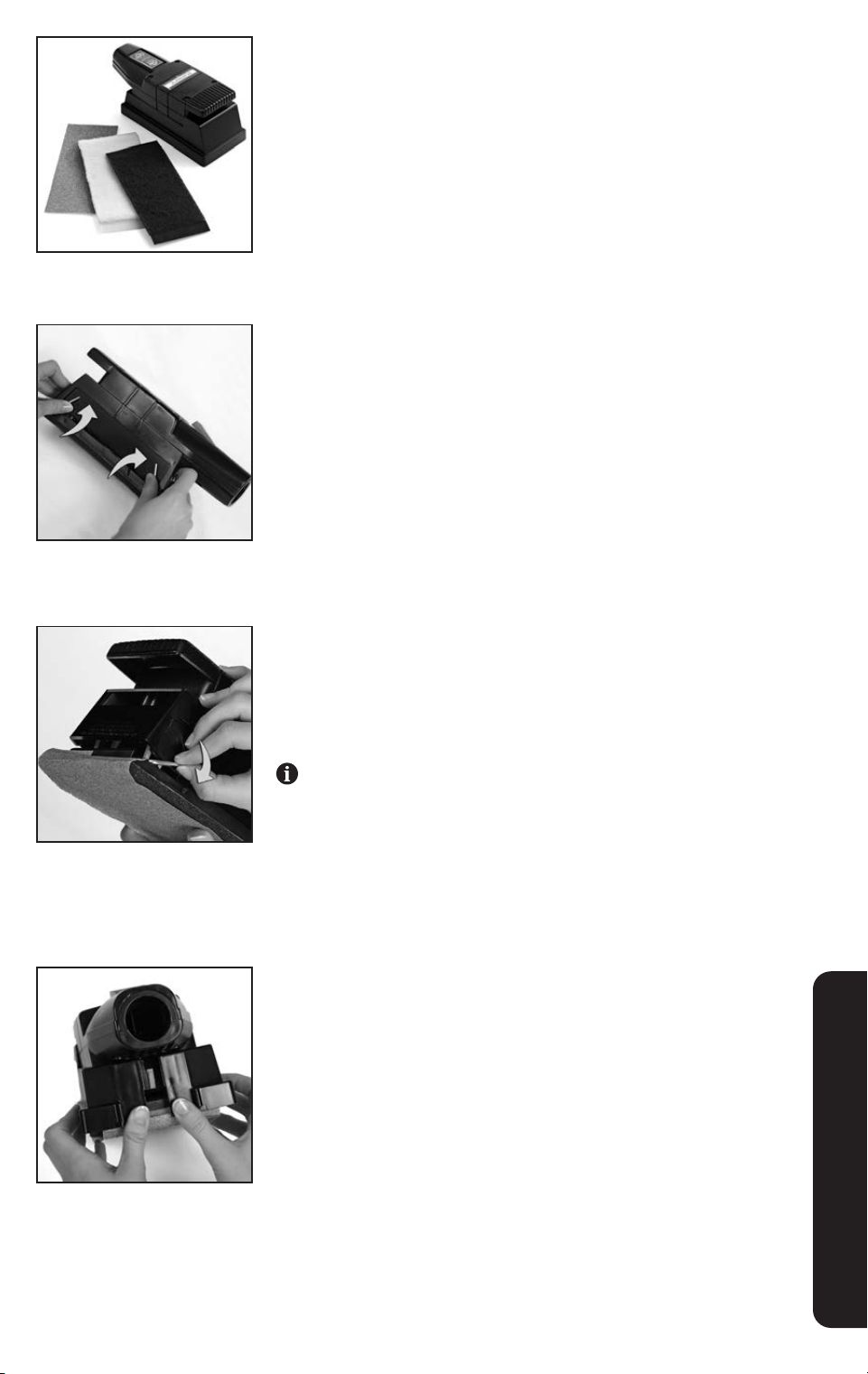
5
Press the Toe Touch Control Upper Pedal repeatedly until
the Tile and Grout brush roll contacts the floor. Move the
cleaner over the area to be cleaned. Spray additional
cleaner as needed.
OPTIONAL ACCESSORIES
5251
Hard Floor Pad
For additional floor protection from possible scratches, the optional
Hard Floor Pad can be used when vacuuming bare floors.
NOTICE For use on dry floors only.
1
Turn the unit off. Step on the bottom pedal of the Toe-Touch
Control to raise the Power Nozzle. Slide the Hard Floor Pad
under the nozzle and press up until the clips lock in place.
Turn unit off, unplug power cord from wall outlet, and be sure
the motor and nozzle brush have stopped before attaching the
Hard Floor Pad.
2
Turn the Belt Lifter counterclockwise until the red arrows line up
to convert the unit to a straight suction cleaner.
3
Put Tech Drive
®
power assist in neutral. Lower the Power Nozzle
and vacuum the floor.
4
To remove the Hard Floor Pad, raise the Power Nozzle and step
down on the tabs at the back of the Hard Floor Pad.
OPTIONAL ACCESSORIES
52
Turbo Accessory
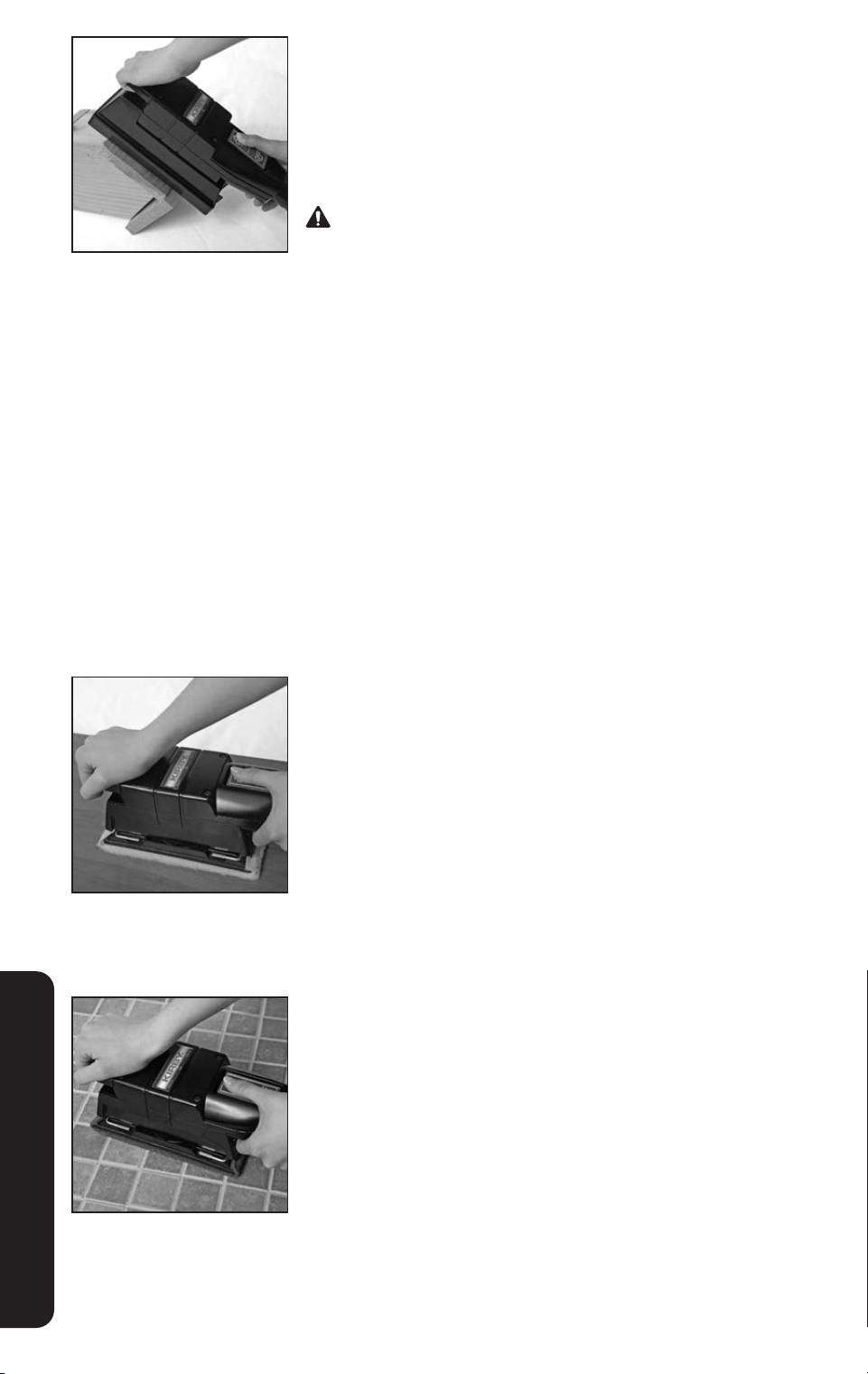
The Turbo Accessory can be used as a sander, a polisher, or for
scouring. The Turbo Accessory is used with the hose on the front of
the unit.
Turbo Sanding
1
Assemble the Turbo Sander. First, unsnap the sander dust
shroud and lift off.
2
Rotate the clamp levers on the side of the Turbo Accessory up.
Slide a sheet of sandpaper into the front clamp and lock the
lever. Tightly wrap the sandpaper around the bottom of the
Turbo Accessory, tuck the end into the rear clamp, and lock
in place.
Three grades of sandpaper come with the Turbo Accessory.
Each piece is a standard 1/3 sheet. Use fine paper for a
smooth finish and coarse paper to clear rough surfaces.
3
With the Turbo Accessory on a level surface, reattach the
sander dust shroud with the opening to the rear. Insert the
Attachment Hose.
OPTIONAL ACCESSORIES
5453
OPTIONAL ACCESSORIES
4
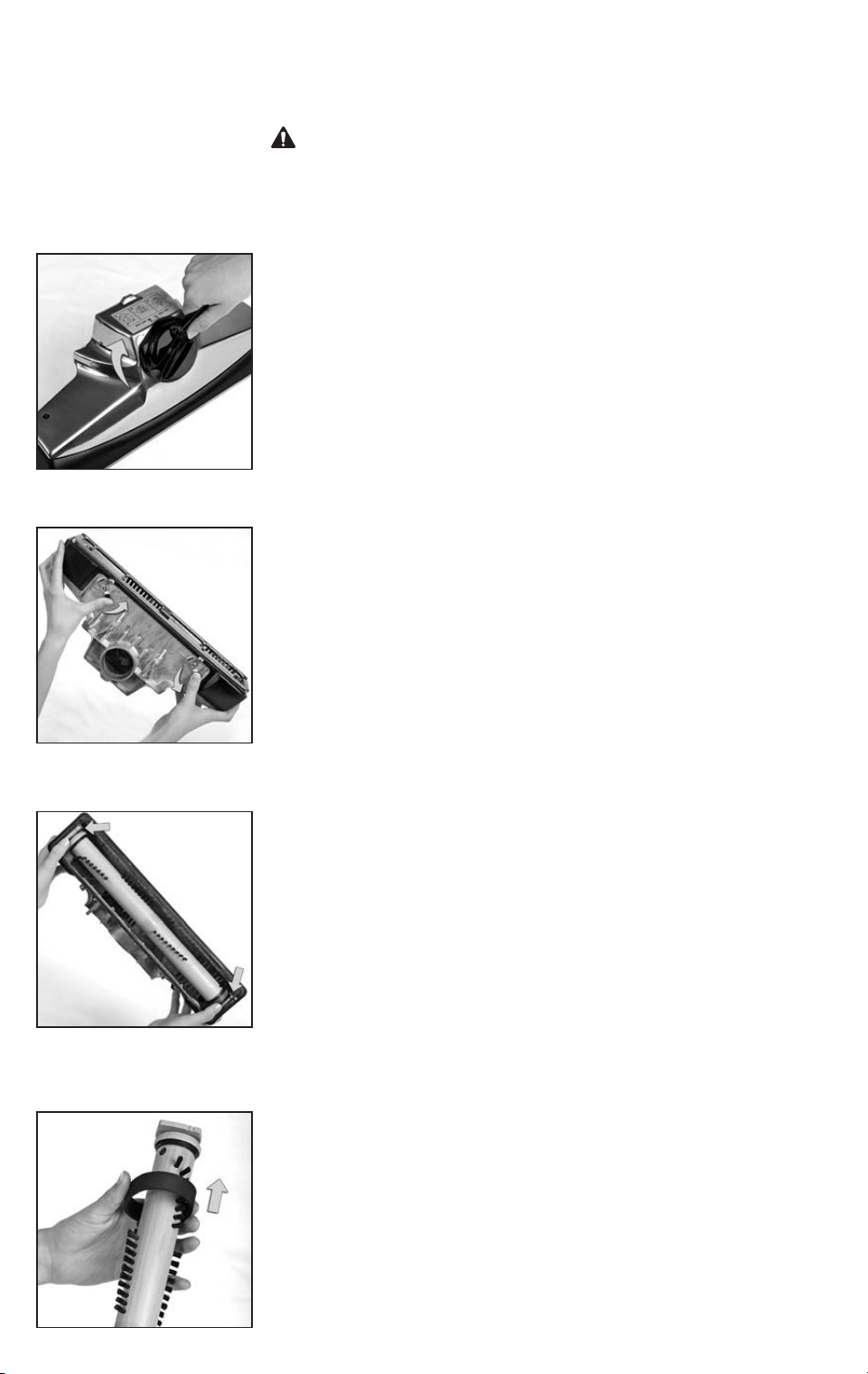
Grip the Turbo Accessory at the front and rear and turn the
Kirby
®
system on. Press the button on the top of the Turbo
Accessory to turn on.
While applying light pressure, move it over the surface slowly.
Allow the Turbo Accessory to do the work. Don’t force it or lean
heavily on it.
Sanding can result in an explosive mixture of fine dust and air.
Use sanding machine only in well-ventilated area.
•Never leave a dust bag unattended with sanding dust.
•Never empty the contents of the dust bag into a fire.- Replace
the dust bag when the bag is 1/3 full and empty the bag each
time you finish using the machine.
•Be sure no metal objects, such as tacks, nails, etc. are sticking
up from the surface. They can damage the sandpaper and the
Turbo Accessory. Always use a hammer and punch to counter-
sink all nails before sanding. Hitting a nail while sanding can
cause sparks and create an explosion or fire.
•Always wear safety glasses.
Turbo Polishing
Attach the synthetic lamb’s wool pad using the same procedure as
attaching sandpaper. Do not reattach the dust shroud. It is not used
for polishing.
Use Turbo Accessory for polishing tabletops, paneling, and large
flat surfaces.
Turbo Scouring
Attach the webbed nylon scouring pad using the same procedure
as attaching sandpaper. Do not reattach the dust shroud. It is not
used for scouring.
Use Turbo Accessory for scouring hard surfaces such as ceramic
tile. Do not use on painted surfaces.
54
MAINTENANCE
ALWAYS turn off the unit and unplug it from the wall outlet prior
to doing any maintenance.
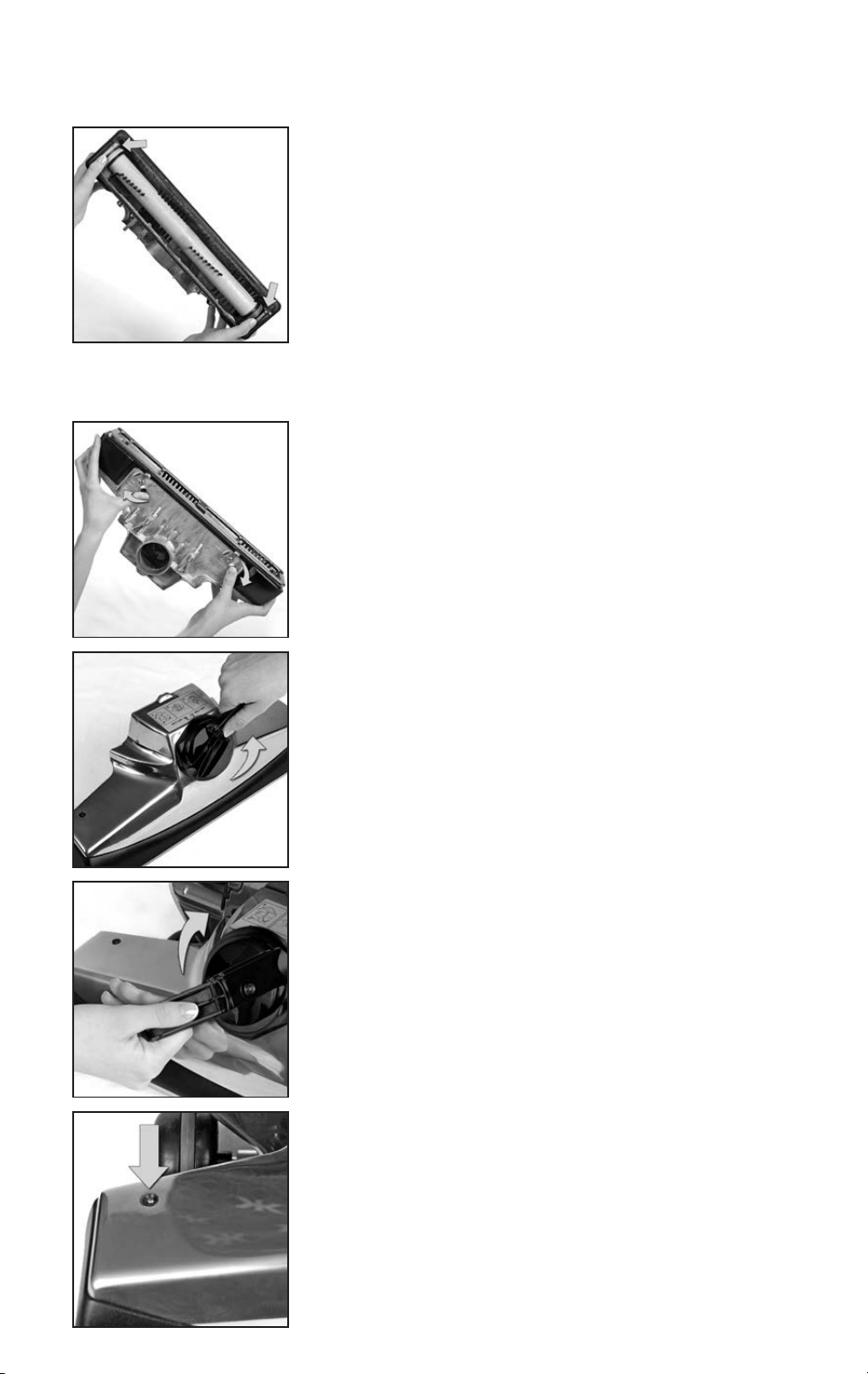
Changing the Power Nozzle Belt
1
After removing the Power Nozzle, turn the Belt Lifter clockwise
until the green arrows line up.
2
Unlock the Rug Plate by unhooking the two latches on the
rear of the Power Nozzle. Pull on the rear edge of the Rug Plate
to remove.
3
Note the bristle height setting which is marked on the end of the
Brush Roll before lifting out the Brush Roll. See page 55.
4
Slide off the old belt and replace with a new one.
5655
MAINTENANCE
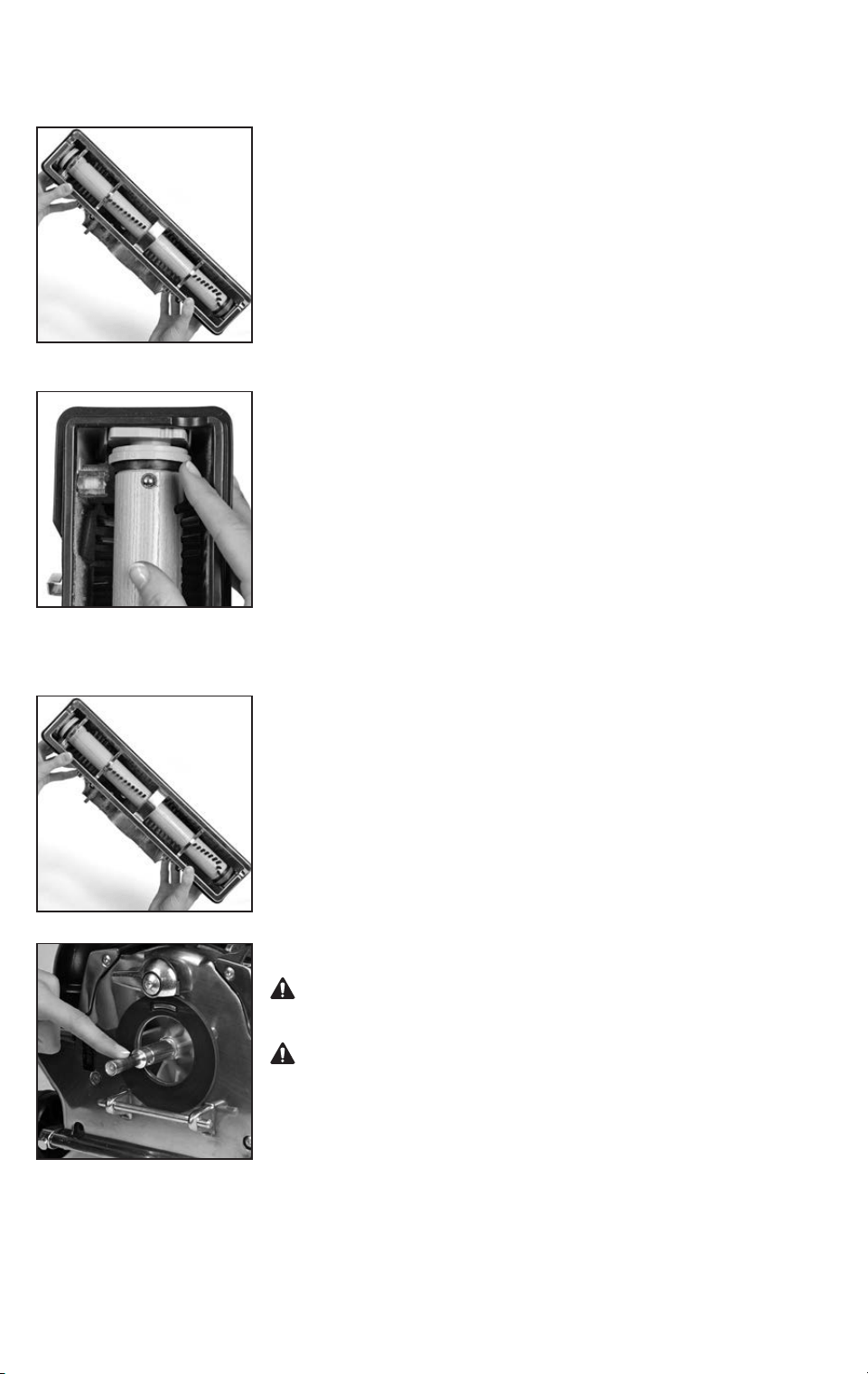
5
Make sure the numbers on the Brush Roll end caps are the same
on both sides before inserting it into the Power Nozzle.
Place the belt and Brush Roll back into the Power Nozzle. One of
the Brush Roll ends is larger than the other. The Brush Roll will only
fit in the Power Nozzle one way.
Center the belt on the Brush Roll.
NOTICE Property Damage Risk. Use only genuine Kirby
®
replacement parts. Failure to follow this warning could result in
property damage.
6
Place the Rug Plate on the front of the Bumper first and then pull
it over the rear. Secure it in place with the two latches.
7
Turn the Belt Lifter counterclockwise until the red arrows line up.
The belt should catch on the hook inside the nozzle. Reattach
the Power Nozzle to the unit.
8
Turn the Belt Lifter clockwise until the green arrows line up.
9
Turn the unit on and check that the Brush Roll Indicator Light is
on. This means that the brush roll is spinning.
56
MAINTENANCE
Adjusting the Brush Roll Height
1
The Brush Roll height is adjustable. The bristles, which wear
down after long periods of use, can be extended.
Follow the directions for changing the Power Nozzle belt on
page 53. When the brush has been removed, select the Brush
Roll height.
2
Rotate the Brush Roll ends to the desired setting: 1, 2 or 3
notches. Make sure the setting is the same on both ends.
The greater the number of notches, the further the bristles
are extended.
Reinsert the Brush Roll and attach the Rug Plate.
Service Tips
Keep the entire Brush Roll and belt track clear of lint, string, hair
and other fibers. This will allow the Brush Roll to perform at its
fullest potential.
Keep Motor Shaft free from lint, hair and debris built-up.
Motor shaft may be hot. Allow to cool before touching or
removing lint, hair or debris.
Keep Motor Shaft free from lint, hair, and debris build up.
Failure to follow these warnings may result in damage to the
Attachment Hose as well as bodily injury.

5857
Belt and Brush Roll Replacement
See detailed instructions on page 53.
Wheel Wear and Replacement
Kirby
®
wheels are made with a pliable tread that is designed to prevent carpet wear and damage
to floors. After extended periods of use, the tread on the wheels will wear out and the wheels will
need to be replaced.
Check the wheel treads. If any of the plastic wheel is showing through the tread, contact an
authorized Kirby
®
Distributor to replace the wheels.
Cord Replacement
If the electrical cord becomes cut or frayed, DO NOT USE THE UNIT.
Contact an authorized Kirby
®
Distributor for replacement.
The new replacement cord should be attached to the unit first before it is plugged into
the wall outlet.
Headlight Replacement
If one or more of the LED lights in the Headlight burn out, contact an authorized Kirby
®
Distributor
for replacement.
MAINTENANCE

58
Servicing a Double Insulated Appliance
In a double insulated appliance, two systems of insulation are provided instead of a grounding.
No grounding means is necessary, nor should a means for grounding be added to the appliance. A
double insulated appliance is marked with the words “DOUBLE INSULATED” (U.S.A. and Canada).
The symbol may also be marked on the appliance.
Servicing a double insulated appliance requires extreme care and knowledge of the system and
should be done only by qualified service personnel.
Replacement parts for this double insulated model must be genuine Kirby
®
parts for maintenance
of safety and protection of warranty.
DANGER Electric Shock Hazard.
•Always unplug before servicing.
•NEVER use with a damaged plug.
•If appliance is not working as it should, has been dropped, damaged, left outdoors, or
dropped into water, return it to an authorized Kirby
®
Distributor. Failure to follow these warn-
ings will result in death or serious injury.
MAINTENANCE

6059
The motor does not turn on.
1. Make sure the Power Cord is plugged into an outlet and that the outlet has power.
2. Make sure the cord is fully inserted into the unit.
3. Check the Power Cord for damage. If it is damaged, have it replaced by an authorized
Kirby
®
Distributor.
4. Make sure that an attachment or accessory is properly mounted on the front of the unit. The unit
will not run without the Power Nozzle, Attachment Hose or Air Intake Guard properly in place.
5. The unit will not run without one of the following properly mounted to the Air Exhaust Port: Mini
Em-Tor
®
collector, Attachment Hose or Multi-Surface Shampoo Tank.
The unit is not picking up dirt.
1. Check to see if the Brush Roll is turning when the unit is on by looking at the green Brush
Roll Indicator Light. If the light is not on, the Brush Roll is not turning freely, the belt is slipping
(stretched), broken or not engaged. The belt may need to be replaced.
2. Make sure that the Power Nozzle height is adjusted to place the brush in contact with the
carpet. Use the Toe-Touch Control to adjust the height. See page 20.
3. If the brush is turning, and the brush is in contact with the carpet, check for bristle wear and
adjust the brush roll height if necessary. See page 55.
4. Check the disposable filter bag to see if it is full. If it is, replace with a new filter bag.
5. Check the fill tube and air exhaust port for clogging.
The unit is difficult to push.
1. If the motor is off, make sure Tech Drive
®
power assist pedal is in neutral before pushing the unit.
2. If the motor is on, put the Tech Drive
®
power assist pedal in drive to make the unit easier to push.
Do not use Tech Drive
®
power assist on hard surface floors.
3. Adjust the height of the Power Nozzle if necessary.
TROUBLESHOOTING

60
There is a smell of burning rubber when using the unit.
1. Check to see if the Brush Roll is turning when the unit is on by looking at the green Brush Roll
indicator light. If the light is not on, then the Brush Roll may be stalled due to threads around the
ends. Unplug the unit. Then, remove the Brush Roll and make sure it rotates freely at both ends.
2. The belt may not be fully engaged or disengaged. Make sure the green arrows or red arrows on
the Belt Lifter match up fully.
3. If a slipping belt has deposited a black residue on the Motor Shaft, remove it gently using steel
wool or sandpaper and replace the belt.
The Outer Permanent Bag or the Disposable Filter Bag has an
unpleasant smell.
1. Replace the Disposable Filter Bag. See page 13.
2. Place a few drops of Odorific II
®
on a cotton ball and toss it in the Outer Permanent Bag.
3. Check for debris in the Mini Em-Tor
®
.
4. It is not recommended to wash the outer cloth bag.
The Multi-Surface Shampoo System does not produce foam when
cleaning carpets.
1. Make sure the Suds Control Valve on the Shampoo Tank is turned clockwise to the
Carpet position.
2. Remove the elbow hose and check that the small suds screen is properly seated in the bottom
opening of the Shampoo Tank.
3. Remove the Shampoo Tank from the unit and check that the foam filter is in place on the bottom of
the large opening that connects to the Exhaust Port.
4. Use only Kirby
®
Carpet Shampoo. Verify that the proper mixture of water and Kirby
®
Carpet
Shampoo has been used in the tank. See page 34.
5. In addition, for proper cleaning, make sure the belt is engaged, and that the baffle strip is inserted
correctly on the bottom of the tray. See page 32.
Need additional assistance?
Your local independent authorized distributorship is available to assist you.
Or, contact The Kirby Company:
consumer@kirby.com
1-800-494-8586 (United States and Canada)
TROUBLESHOOTING

6261
NOTICE Only use genuine Kirby
®
cleaning products with the Kirby
®
Home Cleaning System.
Failure to follow this warning could result in property damage.
WARNING – To reduce the risk of fire and electric shock due to internal component
damage, use only Kirby
®
cleaning solutions, such as Kirby
®
Hard Floor Cleaner Concentrate and
Kirby
®
Carpet Shampoo in the Multi-Surface Shampoo System.
CARPET CLEANING PRODUCTS
Carpet Shampoo
Deep-cleans carpets and rugs. Carpet-safe and non-toxic.
Multi-Purpose Spot Remover
Spray on stain and blot with a clean, white cloth.
Pre-Treatment for Heavy Traffic Areas
Spray on heavily-soiled areas a few minutes prior to shampooing.
Kirby
®
Foam
Use to clean carpeted stairs, auto floor mats, and other hard-to-reach places.
Brightening Oxygen Additive
Add to Kirby
®
Carpet Shampoo to brighten light colored carpets.
CLEANING PRODUCTS FOR PET OWNERS
Carpet Shampoo for Pet Owners
Neutralizes pet stains and odors while it cleans.
Pet Stain and Odor Remover
Cleans occasional accidents quickly.
HOME FRAGRANCE PRODUCTS
HomeFresh Room and Carpet Freshener
Sprinkle on carpets then vacuum after a few minutes for a fresh, pleasant smell.
Odorific II
®
Deodorizer
Deodorize trash cans and damp corners. A few drops will leave a fresh scent in the vacuum bag.
KIRBY
®
HOME CLEANING PRODUCTS
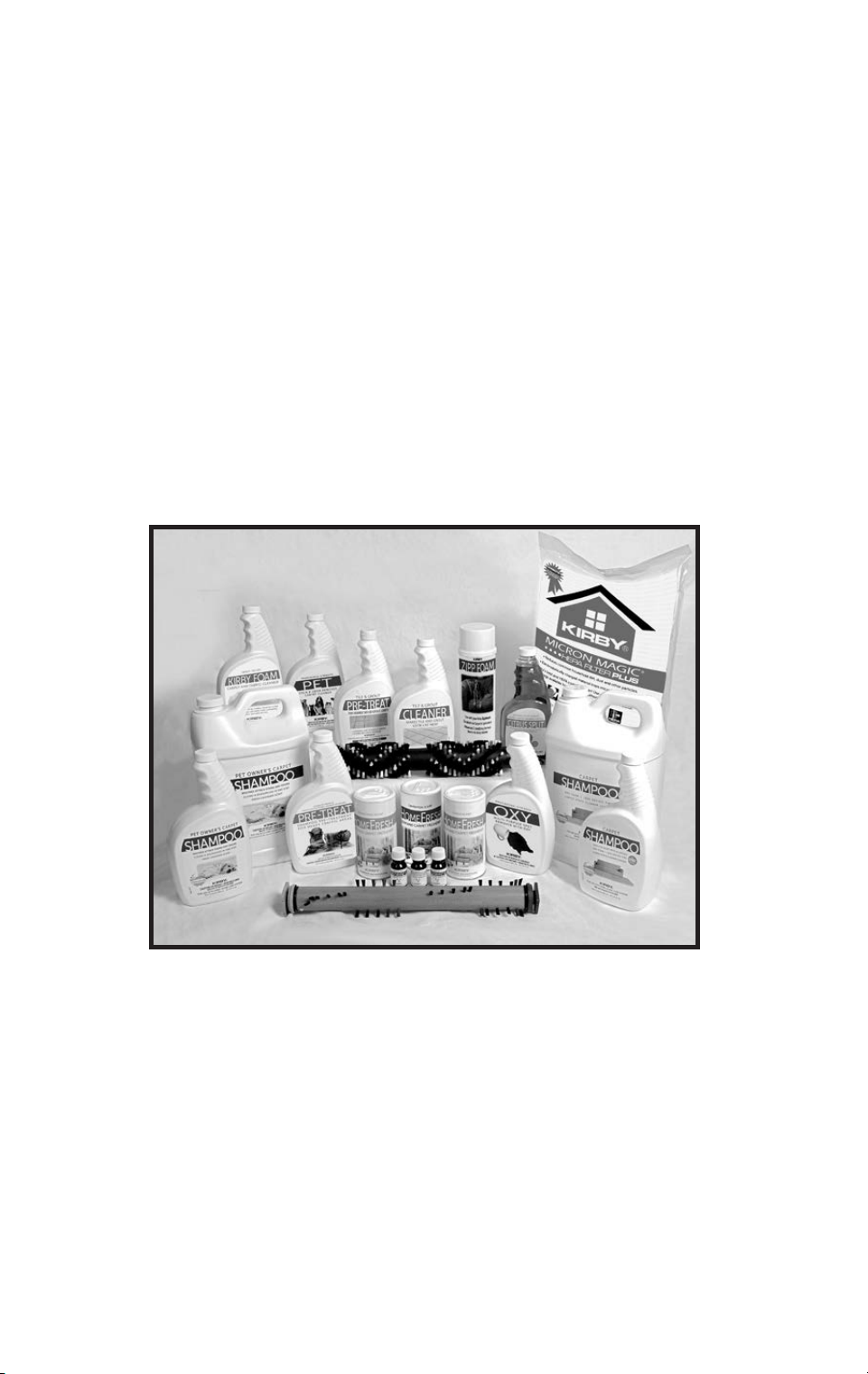
62
HARD SURFACE PRODUCTS
Citrus Split Adhesive Remover
Removes labels and sticky residue.
Hard Floor Cleaner
Gently loosens dirt and grime on hard floor surfaces.
Tile & Grout Pre-treat and Cleaner
Tile & Grout Pre-treat penetrates deep stains in grout lines. Tile & Grout Cleaner cleans and
beautifies tile floors.
Miracle Shine
Bring a durable, high gloss to hard surface floors.
Kirby
®
Home Cleaning Products are available from your authorized Kirby
®
Distributor, online at www.kirby.com (where available), or by calling:
United States: 1-800-437-7170 (M-F, 8:00AM - 5:00 PM EST)
Australia: 1-800-781-556
Balkans: 0800-328-1247
Canada: 1-800-437-7170
Commonwealth of Independent States: +7 495 374 72 82
Europe: 00-800-5472-927
Far East: 0800-328-1247
Middle East: 0800-328-1247
Russia: 7800500-51-46 or 7495374-72-82
Scandinavia: 80014747, 0200895477, or 0800-328-1247
South Africa: 0800-203-222 or 0800-983-044
United Kingdom: 0800-328-1247
Product offerings may vary by location.
KIRBY
®
HOME CLEANING PRODUCTS

6463
A
Accessory Lock ............... 23
Assembling the Unit
.............11
Attaching Bar
.................23
Attachments
..................24
Attachment Hose .......... 24
Crevice Tool ..............25
Duster Brush ..............24
Extension Tubes ........... 24
Inflator/Deflator Tool ......25
Suction Control Grip .......25
Surface Nozzle ...........24
Upholstery Nozzle.........24
Utility Tool................25
Wall and Ceiling Brush .....25
Zippbrush ................30
B
Bag
Attaching .................11
Removing ................ 18
Bag Release Button
............ 18
Bag Support Strap
............ 13
Belt Lifter
.................... 16
Belts
Changing ................53
Blower
......................26
Brush Roll
Disengage ............... 16
Engage .................. 17
Brush Roll Height
..............55
Adjusting.................55
Brush Roll Performance
Indicator Light............. 17
C
Canister Cleaner ..............22
Carrying
Lower Grip ............... 16
Upper Grip............... 16
Cleaning Height
Adjusting.................20
Cleaning Products
.............60
Cord Management
............ 19
Crevice Tool
..................25
D
Disposable Filter Bag .......... 13
Duster Brush
..................24
E
Extension Tubes ...............24
H
Handle Tilt Latch Lever ......... 15
Hard Floor Pad
...............50
Hose
........................24
Attaching ................ 24
I
Inflator/Deflator Tool ..........25
L
Lift the System ................ 16
Locking the Handle
............ 15
M
Maintenance .................53
Changing the Belt .........53
Mattress Cleaning
.............22
Mini Em-Tor
®
Collector ......... 18
Miracle Shine Kit
..............45
Moving the System
Power Off ................ 14
Multi-Surface Shampoo System
Tank..................... 33
Waste Tray . . . . . . . . . . . . . . . 31
Multi-Surface Shampoo System
Carpeting ................ 31
Multi-Surface Shampoo System
Hard Floors............... 38
O
Optional Accessories .......... 31
Outer Permanent Bag
.......... 18
P
Portable Cleaner.............. 21
Cleaning a Mattress .......22
Cleaning Stairs............22
Portable Shampooer
...........29
Portable Sprayer
..............27
Power Nozzle
Removing ................22
Power Switch
................. 12
R
Rotary Mop ..................38
S
Straight Suction Cleaning....... 17
Suction Control Grip
...........25
Surface Nozzle
...............24
T
Tech Drive
®
Power Assist .......20
Toe-Touch Control
Lower Pedal ..............20
Upper Pedal..............20
Tile & Grout Kit
...............48
Troubleshooting
...............58
Turbo Accessory
.............. 51
Turbo Polishing............ 52
Turbo Sanding ............ 51
Turbo Scouring............52
U
Upholstery Nozzle ............24
Upper Cord Hook
............. 19
Upright Cleaner
...............20
Upright Handle
Assembling................11
Locking .................. 15
Utility Tool
...................25
W
Wall and Ceiling Brush.........25
Z
Zippbrush....................30
INDEX

64
Made under one more of the following patents and design registrations.
Other patents and design registrations pending.
United States
7794516
D600868
D672104
D762,992
D778,624
D780,390
D789,632
9713411
Australia
334155
334156
2008207570
2 010 2124 9 5
3 61319
362355
3 61351
Benelux
38610-00
Canada
1275 85
1378 81
2638641
2742137
D
Kirby®162067
D
Kirby®162071
D
Kirby®162068
China
ZL200830142963
ZL200930237374.5
ZL201130007059
ZL200910000791.7
ZL201210007469.9
ZL201210007467.X
ZL201210006915.4
ZL201210007473.5
ZL201530091045.X
ZL201530090954.1
ZL201530090953.7
Europe (design)
001020341
002669291-0001
002671248-0001
002671248-0002
002671248-0003
002669689-0001
EPO
210 8 2 9
France
20106183
Germany
69304847
402010006532.8
602008015293.6
Italy
98546
502012902063113
Japan
1414 6 93
Korea
30-0679500
30-0679501
0822516
0829774-0001
0829774-0002
0829774-0003
0830022
New Zealand
4 112 8 8
570620
420040
420041
420039
Russia
73673
2378973
812 34
99653
98535
100549
South Africa
A2008/01498
A2008/07360
A2010/01540
A2015-00655
A2015/00654
A2015-00653
Spain
2108297
United Kingdom
2108297
Other patents pending
Patent List 10/1/2020

65
P/N 260017 Rev. E - English Printed in U.S.A. ©2021 Kirby Opco, LLC
Have a Question? Need Assistance?
Your local independent authorized distributorship is available to answer any questions
regarding your purchase or the operation of your Kirby
®
Home Cleaning System.
Or, contact The Kirby Company:
consumer@kirby.com
United States: 1-800-494-8586 (M-F, 8:00AM - 5:00 PM EST)
Australia: 1-800-781-556
Balkans: 0800-328-1247
Canada: 1-800-494-8586
Commonwealth of Independent States: +7 495 374 72 82
Europe: 00-800-5472-9272
Far East: 0800-328-1247
Middle East: 0800-328-1247
Russia: 7800500-51-46 or 7495374-72-82
Scandinavia: 80014747, 0200895477, or 0800-328-1247
South Africa: 0800-203-222 or 0800-983-044
United Kingdom: 0800-328-1247
Consumer Relations
The Kirby Company
1920 West 114th Street
Cleveland, OH 44102
For parts and supplies:
www.kirby.com (where available)
imd@kirby.com
United States: 1-800-437-7170 (M-F, 8:00AM - 5:00 PM EST)
Australia: 1-800-781-556
Balkans: 0800-328-1247
Canada: 1-800-437-7170
Commonwealth of Independent States: +7 495 374 72 82
Europe: 00-800-5472-9272
Far East: 0800-328-1247
Middle East: 0800-328-1247
Russia: 7800500-51-46 or 7495374-72-82
Scandinavia: 80014747, 0200895477, or 0800-328-1247
South Africa: 0800-203-222 or 0800-983-044
United Kingdom: 0800-328-1247

66
quality • reliability • performancequality • reliability • performance
For assistance, contact your local authorized Distributor.For assistance, contact your local authorized Distributor.
Kirby Opco, LLC Kirby Opco, LLC
1920 West 1141920 West 114
thth
Street, Cleveland, OH 44102, U.S.A. Street, Cleveland, OH 44102, U.S.A.
U.S.A./Canada Parts & Supplies: U.S.A./Canada Parts & Supplies: 1-800 -437-71701-80 0 - 437-7170 imd@kirby.com imd@kirby.com
Consumer Relations: Consumer Relations: 1-800-494-85861-800-494-8586 consumer@kirby.com consumer@kirby.com
Australia: Australia: 1-800-781-5561-800-781-556
Balkans: Balkans: 0800-328-12470800-328-1247
Canada: Canada: 1-800 - 437-7170 1-80 0 - 437-7170
Commonwealth of Independent States: Commonwealth of Independent States: +7 495 374 72 82 +7 495 374 72 82
Europe: Europe: 00 800 547 292 7200 800 547 292 72
Far East: Far East: 0800-328-12470800-328-1247
Middle East: Middle East: 0800-328-12470800-328-1247
Russia: Russia: 8 800 500 51 46 or +7 495 374 72 828 800 500 51 46 or +7 495 374 72 82
Scandinavia: Scandinavia: 80014747 or 020089547780014747 or 0200895477
South Africa: South Africa: 0800-203-222 or 0800-983-044 0800-203-222 or 0800-983-044
United Kingdom: United Kingdom: 0800-328-12470800-328-1247
www.kirby.comwww.kirby.com