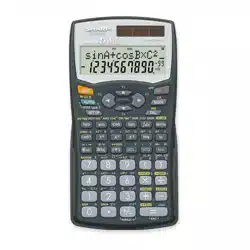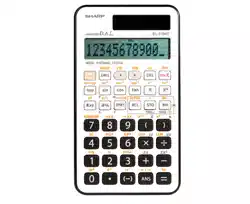

ENGLISH
SHARP
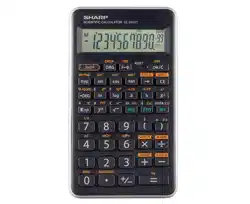
SCIENTIFIC CALCULATOR
MODEL EL-510RT
OPERION MANUAL
22ASC(TINSKA328EHCA)
INTRODUCTION
About the calculation exemples (including some formulas and
tables), refer ta the calculation examples sheet. Refer to the number
on the right of each tille on the manuel for use. After reading this
manual, store it in a convenient location for future reference.
Operational Notes
1. Do not carry the calculator in the back pocket of slacks or trousers.
2. Do not subject the calculator ta extreme temperatures.
3. Do not drop it or apply excessive force.
4. Clean only with a soft, dry cloth. Avoid using a rough cloth or
anything else that may cause scratches.
5. Do not use or store the calculator where fluids can splash onto il.
6. This product, including accessories, may change due to upgrading
without prior notice.
♦ Press the RESET switch (on the back), with the tip of a ball-point
pen or similar object, only in the following cases. D
o
not use an
abje w
i
lh
a
br
e
ab
l
e
o
r sha t
i
p
Note that pressing the RESET
switch erases all data stored in memory.
When using for the first lime
• After replacing the battery
• To clear all memory contents
• When an abnormal condition occurs and all keys are inoperative.
If service should be required on this calculator, use only a SHARP
servicing dealer, SHARP approved service facility, or SHARP repair
seice where available.
SHARP will not be liable nor responsible for any incidental or
consequential economic or propey damage caused by misuse
and/or malfunctions of this product and its peripherals, unless such
liability is acknowledged by law.
DISPLAY
Mantissa
Exponent
(During actual use not all symbols are displayed al the same lime.)
+/+
Appears when the entire equation cannot be displayed.
Press �/ ta see the remaining (h idden) se ction.
2ndF
Appears when � is pressed, indicating that the functions
shown in orange are enable.
lndicates that �� or () has been
pressed, and entry (recall) of memory contents and recall
of statistics can be performed.
HYP
lndicates that � has been pressed and the hyperbolic
functions are enabled. If � are pressed, the
symbols "2ndF HYP" appear, indicating that in verse
hyperbolic functions are enabled.
FIX/SCI/ENG
:
lndicates the notation used to display a value and
changes each lime � � are pressed.
DEG/RAD/GRAD:
lndicates angular units and changes each lime
� is pressed.
: Appears when statistics mode is selected.
M
lndicates that a numerical value is stored in the independent memory.
1Y1r1 $
:
Appears when the results of coordinate conversions are displayed.
BEFORE USING THE CALCULATOR
Key Notation Used in this Manual
ln this manual, key operations are described as follows:
x
2
To specify x
2
: �
�
Ta specify p:
�
Functions that are printed in orange above the key require
�to be pressed first before the key. Numbers are not
shown as keys, but as ordinary numbers.
Power On and O
Press � to turn the calculator on, and � to turn il off.
Editing the Equation
• Press � or ta move the cursor. Vou can also return ta the
equation after gettin g an ans wer by pressing (�)-
• If you need to delete a number, move the cursor to the number you
wish to delete then press �-If the cursor is located al the right
end of an equation, the � key will function as a back space key.
• If you need ta insert a number, move the cursor ta the place immediately
after where you wish to insert the number then enter the number.
Clearing Methods
There are three clearing methods as follows:
Clearing
Entry
M"
1
x,v,r,0"
2
ope ration
(Display)
STAT, ANS
�
�
RESET
O : Clear x : Retain
1
lndependent memory M.
0
0
0
0
0
0
2
Temporary memories (X, V, r, 0), statistical data, and last answer
memory.
Priority Levels in Calculation
This calculator peorms operations according ta the following priority:
Fractions (1r4, etc.)® Functions preceded by their argument (x-
1
,
x
2
, n!, etc.) @ Y
X
, x © lmplied multiplication of a memory value
(2V, etc.) Functions followed by their argument (sin, cos, etc.)
@ lmplied multiplication of a function (2sin30, etc.)
nCr, nPr, GCD, LCM @x, + ® +
,
-
@ =
,
M+
,
M-
,
⇒M
,
►DEG, ►RAD, ►GRAD, DATA, CD,->
r0,
->
xy
and other calculation ending instruction
• If parentheses are used, parenthesized calculations have precedence
over any other calculations.
INITIAL SETUP
Mode Selection
Normal mode: ��
Used ta perform arithmetic operations and function calculations.
Statistics mode: ��
Used to periorm statistical calculations.
When executin g mode selection, tempora memories, st atistical data and
last answer memory will be cleared even when reselectin g the same mode.
Selecting the Display Notation and Decimal Places
The calculator has four display notation systems for displaying calculation
res ults. When FIX, SCI, or ENG symbol is displayed, the number of decimal
plac es can be set ta any value betwee n O and 9.
Displayed values will be reduced ta the corresponding number of digits.
100000+3=
[Floating point] �1000003 33'333.33333
➔[Fixed decimal point] � �
33'333.33333
[TAB setto2]
��2
33'333.33
➔[SClentific notation] ��
3.33x10
4
➔(ENGineering notation] ��
33.33x10
3
➔[Floating point]
�� 33'333.33333
• If the value for floating point system does not fit in the following range,
the calculator will display the result using scientific notation system:
0.000000001 s lxl s 9
999
9
99999
Determination of the Angular Unit
ln this calculator, the following
three angular units can be specified.
/DEG (
0
)
{ Press � \
GRAD (g) RAD (Radians)
SCIENTIFIC CALCULATIONS
• Press � � ta select the normal mode.
• ln each example, press to clear the display.
• If the FIX, SCI, or ENG indicator is displayed, clear the indicator by
pressing� �-
Arithmetic Operations/Constant Calculations
[1]
• The closi ng parenthes is just before D or� may be omitted.
• The addend becomes a constant. Subtraction and division are
performed in the same manner. The multiplicand becomes a constant.
• When performing calculations usi ng const ants, constants will be displayed
as K.
Functions
[
2
]
Refer ta the calculation examples of each function.
Random Numbers
A pseudo-random number with three significant digits can be generated
by press ing � � �- To generate the next random number, press
�-Vou can periorm this function in the normal and statistics modes.
• Random numbers use memory V. Each random number is generated on the
basis of the value stored in memo V (pseudo-random number series).
Angular Unit Conversions
[3]
Each lime � � are presse d, the angular unit changes in se quence.
Memo Calculations [4]
This calculator has four temporary memories (X, V, r, 0), one
indepen dent memory (M) and one last answer memo (ANS).
lndependent memory and temporary memories are only available in the
normal mode.
[Temporary memories (X, Y, r, 0)]
Press and a variable key to store a value in memory.
Press and a variable key to recall the value from that memory.
To place a variable in an equation, press �� and a variable key.
Use of or � � will recall the value stored in memo using up
ta 14 digits.
[lndependent memory (M)]
ln addition ta all the features of temporary memories, a value can be
added ta or subtracted from an existing memo value.
[Last answer memory (ANS)]
The calculation result obtained by pressing � or any other calculation
ending instruction is automatically stored in the last answer memo.
Chain Calculations
[5]
This calculator allows the previous calculation result ta be used in the
following calculation. The previous calculation result will not be recalled
after entering multiple instructions.
Fraction Calculations [6]
This calculator performs arithmetic operations and memory calculations
using fractions, and conversion between a decimal number and a
fraction.
• If the nu mber of digits ta be displayed is greater than 10, the number is
converted ta and displayed as a decimal number.
Time, Decimal and Sexagesimal Calculations
[7]
Conversion bet ween decimal and se xages imal numbers can be peormed.
ln addition, the four ba sic arithmetic op erations and memory calculations can
be carried out using the sexagesimal system.
Coordinate Conversions [8]
• Before performing a calculation, select the angular unit.
l Pj,,l
f ;.))"0
)
�-------x-----i X �
o
X
Rectangular coordinate
Polar coordinate
• The calculation result is automatically stored in memories (X, V, r, 0).
Calculating the Greatest Common Divisor (GCD}
What is the GCD of 24 and 36?
24 �
36
12.
Calculating the Least Common Multiple (LCM}
What is the LCM of 15 and
9
? �15�
9
45.
STATISTICAL CALCULATIONS
[9l
Press � � to select statistics mode.
The following statistics can be obtained:
X
Mean of samoles f x data)
sx
Sample standard deviation ( x data)
ŒX
Population standard deviation ( x data)
n
Number of samoles
Ex
Sum of samoles ( x data)
Ex'
Sum of squares of samples (x data)
Entered data are kept in memo until � � or � �
are pressed. Before entering new data, clear the memory contents.
IData Entry]
Da�
Da � quency� (Ta enter multiples of the same data)
[Data Correction]
Correction prier ta pressing �:
Delete incorrect data with �
Correction a fier pressing �:
Press to confirm the latest ent and press � to delete it.
Statistical Calculation Formulas
[1
0
]
ln the statistical calculation formulas, an error will occur when:
• the absolute value of the intermediate result or calculation result is
equal ta or greater than 1 x 10
100
.
• the denominator is zero.
• an attempt is made ta take the square root of a negative number.
ERROR AND CALCULATION RANGES
Errors
An error will occur if an operation exceeds the calculation ranges, or if
a mathematically illegal operation is attempted.
When an errer occurs, pressing� (or ) automatically moves
the cursor back to the place in the equation where the errer occurred.
Edit the equation or press �to clear the equation.
Error Codes and Error Types
Syntax errer (Error 1 ):
• An attempt was made ta pe orm an invalid operation.
Ex. 2��
Calculation error (Error 2):
The absolute value of an intermediate or final calculation result
equals or exceeds 1
o
100
.
An attempt was made ta divide by O.
The calculation ranges were excee ded while peorming calculations .
Depth errer (Errer 3):
The available nu mber of buffers was excee ded. (There are 10 buffers*
for numeric values and 24 buffers for calculation instructions).
"5 buffers in STAT mode.
Equation tao long (Error 4):
• The equation exceeded ils maximum input buller (159 characters).
An equ ation must be shorter than 15
9
characters.
Calculation Ranges [11]
• Within the ranges specified below, this calculator is accurate ta ±1 in the
least significant digit of the mantissa. When peoring continuous calculations
(including chain calculations), err
o
rs accumulate leading to reduced accura.
(This is the same for , x-y, &, ln, etc., where continuous calculations are
performed internally.)
• Calculation ranges
±10-
9
9
-±9.9
9
9
9
9
9
9
9
9 x 10
99
and
o
.
If the absolute value of an ent or a final or intermediate result of a calculation
is less than 10-
9
9
, the value is considered to be Oin calculations and in the display.
BATTERY REPLACEMENT
Notes on Batte Replacement
lmproper handling of batteries can cause electrolyte leakage or explosion.
Be sure ta obsee the following handling rules:
• Make sure the new battery is the correct type.
• When installing, orie nt the bae properly as indicate d in the calculator.
• The bae is facto-installed before shipment, and may be exhausted
before il reaches the service life stated in the specifications.
When to Replace the Bae
If the display has poor contrast or nothing appears on the display even
when � is pressed in dim lighting, il is lime ta replace the battery.
Caution
• An exhausted batte le in the calculator may leak and damage the calculator.
•
���r��
0
u� �l���
i
���
e
i:�����
1
�Zsh
n
�;�
n
�1!�n
e
!:1����d
esult
immediately consulta doctor.
• Should fluid from a leaking battery came in contact with your skin
or clothes, immediately wash with clean water.
• If the product is not ta be used for some lime, ta avoid damage to
the unit from a leaking battery, remove it and store in a safe place.
• Do not leave an exhausted battery inside the product.
• Keep batteries out of the reach of children.
• Explosion risk may be caused by incorrect handling.
• Do not throw batteries into a fire as they may explode.
Replacement Procedure
(Fig. 1)
1. Turn the power off by pressing� �-
ij
2. Remove one screw. (Fig. 1)
�
3. Lift the battery caver to remove.
V
4. Remove the used battery by prying il out with �
0
°
a ball-point pen or other similar pointed
\
device. (Fig. 2)
(Fig
.
2)
s1de Is facing up.
�
5. l�sta_ll one_ new battery. Make sure the "+"
�
l.
6. Replace the cover and screw.
0
7. Press the RESET switch (on the back).
\
0
• Make sure that the display appears as shown below. If the display
does not appear as shown, remove the battery, reinstall il, and
check the display once again.
0.
Automatic Power O Function
This calculator will turn itself off ta save batte power if no key is pressed
for approximately 1 O minutes.
SPECIFICATIONS
Calculations:
Internai calculations:
Pending operations:
Power source:
Operating lime :
(varies according ta
use and other factors)
Operating temperature:
External dimensions:
Weight :
Accessories :
HARD CASE
Scientific calculations , statistical calculations, etc.
Mantissas of up ta 14 digits
24 calculations 10 numeric values
(5 numeric values in STAT mode)
Built-in solar cells
1.5V=(DC):Backup battery
(Alkaline battery (LR1130) X 1)
Approx. 3000 heurs when continuously
displaying 55555 al 25
°
C (77
°
F), using the
alkaline battery only
0
°
C -40
°
C (32
°
F -104
°
F)
76 mm (W) x 135 mm (D) x 10 mm (H)
3" (W) x 5-5/16" (D) x 13/32" (H)
Approx. 66 g (0.15 lb) (including battery)
Battery x 1 (installed), operation manual,
calculation examples, and hard case
t
'
D
t
SHARP
SHARP CORPORATION
EL510RT(Y12
)
-1
SHARP
EL-510RT
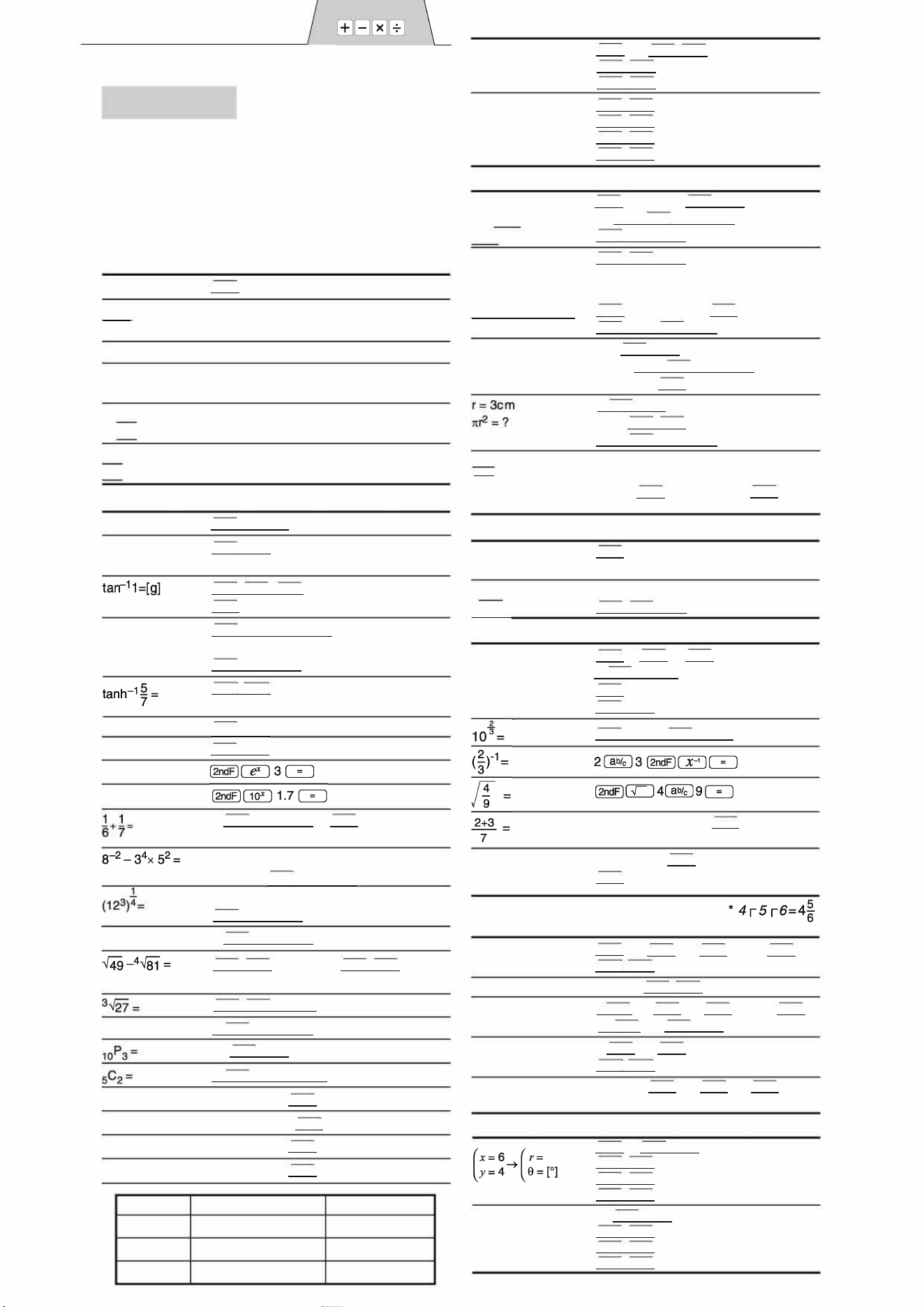
CALCULION EXAMPLES
EXEMPLES DE CALCUL
[3]
90
°
➔ [rad]
➔[g]
➔[
0
1
sin-
1
O.8 = [
0
]
➔ [rad]
➔[g]
➔[
0
1
[4]
(
ON/C)
90 (2ndFl[DRG►)
(2ndFl[DRG►)
( 2ndF l[DRG►)
(2ndFI[ sin-
1
)
0.8 �
(2ndFl[DRG►)
(2ndFl[DRG►)
(2ndFl[DRG►I
1.56327
100.
90.
.130135
0.92918
59.033446
53.130135
22ASC(TINSZA32
7
EHCA)
24+(8x2)=
(ON/C)
8
2
( srn)
24 [
RCLJ
�
16.
1.5
80.
[1]
45+285+3=
18+6
=
15-8
[ ON/C J
45 285 3 �
140.
18
6
1
s
8 � 3.85719
42x(-5)+12O=
42 S 120 � -
90.
(5x1)+(4x1)= S 34
34+57=
45+57=
68x25=
68x4O=
[2]
sin6O[
0
]=
cos
�
[rad]=
(cash 1.5 +
sinh 1.5)
2
=
ln 20 =
log 50 =
e
3
=
10
1
.
7
=
8
3
=
4! =
5OOx25%=
120+400=?%
5OO+(5OOx25%)=
4OO-(4OOx3O%)=
DEG
RAD
GRAD
3
�
1•250•000.
34 57 �
45
�
68 25 �
40
�
91.
102.
1'700.
2'0.
[
ON/C
)�6O
�
0.86603
1 DRG )
4
�
o.7071061
1 DRG)[2ndF) 1 tan-
1
)
1 �
50.
[DRG)
[ON/C)
�
1.5
�
�
1.
s
[2ndF)��
20.085692
[2ndFl[ahypJ
�
5
1 �
o.8979734
[2ndF)
20 �
2.995
[2ndF)
50 �
1.6989004
20.08553692
50.118336
6 [2ndF)� 7 (2ndF)
�� 0.3093809
8 2 3
4
5 [2ndFJ�� -2'.984375
12 3 4
[2ndFJ��
6.44191
8
[2ndF)��
512.
[2ndFI[ r J
49 4 [2ndFI[ J
81�
[2ndF
I
[ "r )27�
4[2ndF)
�
10 [2ndF)�
3
�
5[2ndF)2 �
500 25 [ 2ndF)
120 400 [ 2ndF J
500 25 [ 2ndF)
400 30 [ 2ndF)
e = sin-
1
x, e = tan-
1
x
-90090
-2
8
2
-100 e 100
e = cos
-
1
x
00180
o e
00200
4.
3.
24.
720.
10.
125.
30.
625.
280.
(8x2)x5=
$15Ox3:M1
+)$25O:M2 =M1+25O
-)M2x5%:Discount
tal=M
$1= 110
26,51O=$?
$2,75O=?
24
4+6
= 2.4 ... (A)
3x (A)+6O+(A)=
[5]
6+4=ANS
ANS+S
44+37=ANS
✓ANS
=
[6]
1 4
b
3
2
+
s
=
[
a
c]
➔[a.]
➔ [d/c]
2
1.25
+
5
=
[
a
.x
]
➔[a�
]
[7]
12
°
39' 18.05"
➔ [10]
123.678 ➔ [60]
3h3Om45s +
6h45m36s = [60 ]
3h45m -
1.69h = [60]
( RCL
I
5 �
(
ON/C)[ STO )
15O3 �
25O�
( RCL)
5 (2ndF)
[2ndF)[ RCL )
o.
450.
250.
35.
665.
110 [ STO )
26510
[ RCL
I
�
2750
[
RCL J �
110.
241.
3'500.
3[srn)
[ 2ndF l[HA)
[2ndF)��
3.
28.233388
24
4
6
�
2.4
3
[ANS)
60 [
ANS J �
32.2
[ON/C)
6 4 �
5�
4437 �
(2ndFl[r )�
1 ON/C
1
3 1 ab/c 1 1 1 ab/c ) 2
10.
15.
81.
9.
4[ab) 3�
4
r
5
r
6
*
[ ab/c )
4.833333333
[2ndFJ�
29
r
6
[2ndFJ�2[ able )3�
4.18834
2 3
[ ab
1 7
�
1.25 2
[ ab/e )
5 �
[ able J
1
r
1
r
2
2
r
3
5
r
7
1.65
1
r
13
r
20
[ON/C)
12 [M'S) 39 (M'S) 18.05 [M'S)
[2ndFl[-□EG)
12.65501389
123.678 [2ndF) [-DEG)
123
°
40'40.8"
3[ M'S)
30 [ M'S J 45 [ M'S) 6 [ M
'
S)
45[M'S)
36 [M'S)� 10
°
16'21."
3 [ M'S) 45 [ M'S) 1.69 �
[2ndFl[-□EGJ
2
°
3'36."
sin62
°
12'24" = [1 O]
� 62 [ M'S) 12
1
M
'
S
1
24 1 M'S)
[8]
(
r=14
(
x=
e = 36[
0
]
➔
y=
� 0.884635235
[ON/CJ
6 [2ndFJ� 4
[ 2ndF
I[
TO
J
[2ndFl[•I
[2ndF) [•)
14 [2ndF)� 36
[ 2ndF li xy )
[2ndFI[•)
[2ndFI[•)
r7.211102551
e 33.69006
r 7.211102551
X 11.323
Y 8.8993532
X 11.323792
EL510RT(Y12)-1
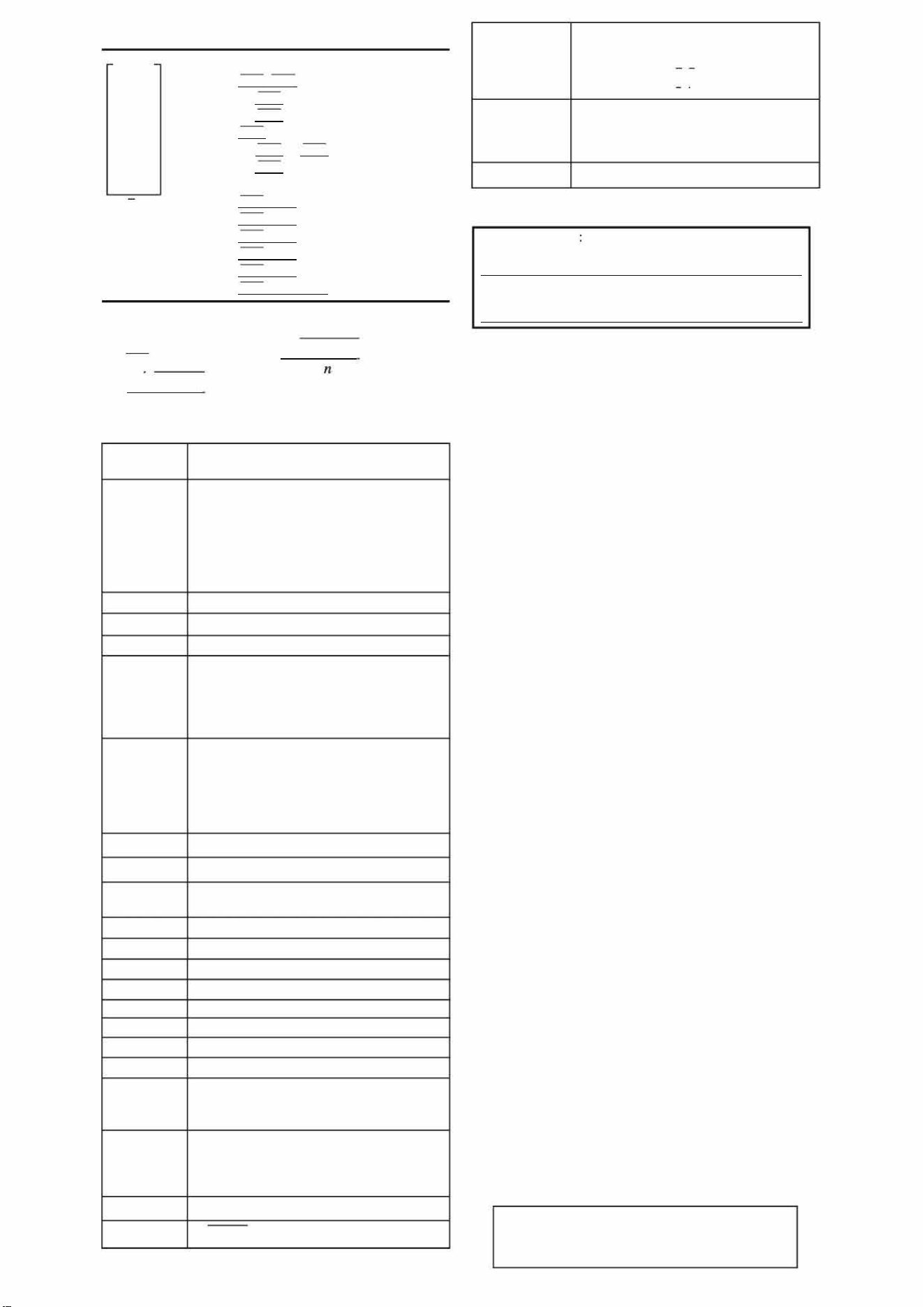
[
9
]
D
95
80
80
75
75
75
50
=
�
=
SX=
s
x
2
=
[10]
x
=
�
x
n
[2ndF] [MODE]
95
[D
A]
80 [DATA]
[DATA]
75 [FRQ(, il
3
[DATA]
50
[D
A]
[ RCL]
[RCL]
[RCL]�
[RCL]�
[RCL]�
[2ndF]��
ax =
o.
n=
1.
n=
2.
n=
3.
n=
6.
n=
7.
75.71428571
12.371148
0.
41'200.
13.36301
1.5714286
✓-�x
2
-
2
sx = -
n-1
J
u
2
-
2
u
= x1 + x2 +
•
•
•
+ Xn
Y = x1
2
+ x2
2
+
•••
+ Xn
2
[11]
Function
Fonction
sinx, cosx,
tan x
sin-
1
x, cos-
1
x
tan-
1
x,
ln x, log x
y
x
1
o
x
sinh x, cash x
,
tanh x
sinh-
1
x
cosh-
1
x
tanh-
1
x
x
2
x-
1
n!
nPr
n
Cr
DEG, D
0
M'S
x
,
y
➔ r,
0
Dynamic range
Plage dynamique
DEG:
1
X
1
< 10
10
(tan x:
1
x
1
* 90 (2n-1))*
RAD:
1 X
1 <
X 10
10
180
(tan x :
1
x
1
* � (2n-1 ))*
GRAD:
l
x
1 <
x 10
10
9
(tan x:
1
x
1
* 100 (2n-1))*
1
X
1
1
1
X
1
< 10
1
0
0
10 -99 X< 10
100
•
y
>
0:
•
y
=
0:
•
y
< 0:
-1O
100
<x
log
y
< 100
0 <x < 10
100
1
x
=
n (0 <
1
x
1
< 1: x
=
2n-1 , x * O)*,
-10
100
<x log
I
Y
1
< 100
•
y
>
0:
-
10
100
< i log
y
< 100
(
x * 0)
•
y
=
0:
O<x< 1O
100
X
=
2n-1
•
y
< 0:
(0 <
1
x
1
< 1 :
=
n, x * O)*,
X
-10
100
<
}
log
I
Y
1
< 100
-10
100
<X 230. 258509 2
-10
100
<X< 100
1
X
1
230 .258509 2
l
x
l
<10
5o
1x<1
o
so
1
X
1
< 1
l
x
l
<1
o
so
1 X 1 < 2.15443469X1 Q
33
0 X< 10
100
1 X
1 < 10
10
0
(
x
0)
O n69*
O r n 9999999999*
< 10
100
(n-r)!
0 r n 9999999999*
O r 69
< 10
100
(n-r)!
0
°
0'0.00001 "
1
X
1
< 10000
°
✓
x
2 +
y
2
< 10
100
O
r<1O
1
0
0
r
, 0 ➔ x
,
y
DEG:
1
0
1
< 10
10
RAD:
1
0
1 <
1
�
0
X 10
10
GRAD :
1
0
1
<
1
l X 10
10
DEG➔RAD,
DRG►
GRAD➔DEG:
l
x
l
<1O
100
RAD➔ GRAD:
l
x
l
<
�
x
1
o
•a
2
nGC
D
n
,
nLCMn
O < n<1O
10
•
* (n, r: integer / entier)
For Canada only
For warranty information, please see
http://www.sharp.csupport-product-downloads.aspx
Pour le Canada seulement :
Pour en lire plus sur la garantie, visitez le
http://www.sharp.ca/support-product-downloads.aspx
SHARP
SHARP CORPORATION
EL51
0
RT(Y12)-2