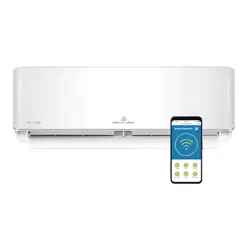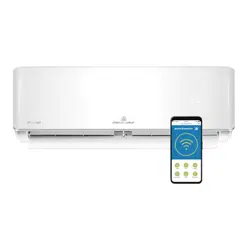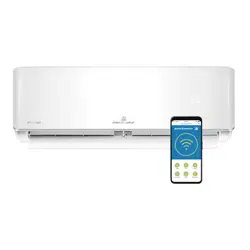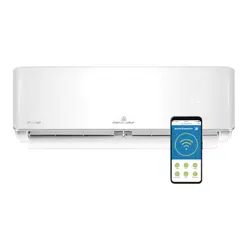
Inverter Air Conditioner
User Manual
KSV25HWJ, KSV35HWJ, KSV50HWJ,
KSV71HWJ, KSV90HWJ,
KSD25HWJ, KSD35HWJ, KSD50HWJ,
KSD71HWJ, KSD90HWJ
IMPORTANT NOTE:
Thank you for purchasing our air conditioner. Please read this manual carefully before operating your new air conditioning unit.
Make sure to save this manual for future reference.
2 Contents
Congratulations and thank you for choosing our Inverter split
system room air conditioner. We are sure you will
nd
your new air conditioner a pleasure to use. Before you use the air
conditioner, we recommend that you read through
the entire user manual, which provides the description of
the air conditioner and its functions.
To avoid the risks that are always present when you use an electrical
appliance, it is important that the air conditioner
is installed correctly and that you read the safety instructions
carefully to avoid misuse and hazards.
We recommend that you keep this instruction booklet
for future reference and pass it on to any future owners.
Conditions of use
This appliance is intended to be used in household and similar
applications such as :
• staff kitchen areas in shops, of
es and other working
environments.
• farm houses.
• by clients in hotels, motels and other residential type
environments.
• bed and breakfast type environments.
This air conditioner is designed for and intended to be used in
normal domestic applications only.
Record model and serial number here:
Model number: ..................................................................................
Serial number: ...................................................................................
ENVIRONMENTAL TIPS
environment
Information on disposal for users
• Most of the packing materials are recyclable.
Please dispose of those materials through your local
recycling depot or by placing them in appropriate collection
containers.
• If you wish to discard this air conditioner, please contact your
local authorities and ask for the correct method
of disposal.
Safety Instructions
Warnings ..........................................................................................3
Product Description
Installation Drawing .........................................................................5
Remote Controller Specifications
..................................................6
Operating Instructions
Handling the Remote Controller....................................................7
Buttons and Functions ...................................................................8
Remote Screen Indicators...............................................................9
How to Use Basic Functions...........................................................10
How to use Advanced Functions...................................................13
Airflow Directional Control.............................................................17
Operating Temperature ................................................................18
Care and maintenance
Before Maintenance.......................................................................19
Cleaning the Unit ............................................................................19
Cleaning the Air Filter and Air Freshening Filter .......................19
Preparation for Extended Non-operation .................................... 20
Pre Season Inspection ................................................................... 20
Troubleshooting Tips
Troubleshooting Tips .....................................................................21
Warranty .......................................................................................25
Congratulations Contents
R32 refrigerant warning
This product uses R32 d uoromethane refrigerant, which is
able gas class 2.2 according according to
AS/NZS 5149 and must be handled by a refrigeration
mechanic with appropriate Australian refrigerant handling
licence.
CAUTION: Risk of fire
3
Safety Instructions
Meanings of symbols used in this manual are shown below:
WARNING
warning
This symbol indicates information concerning your personal safety
or information on how to avoid damaging the air conditioner
TIPS & INFORMATION
important
This symbol indicates tips and information about use of the
appliance
ENVIRONMENTAL TIPS
environment
This symbol indicates tips and information about economical and
ecological use of the appliance
TIPS & INFORMATION
important
• Contact an authorised installer for installation of this unit.
• Installation work must be performed in accordance with the
national wiring standards by authorised personnel only.
• This air conditioner may need to be installed on it's own
separate circuit. Please refer to AS/NZS3000 and local wiring
regulations for requirements.
• Contact an authorised service technician for repair or
maintenance of this unit.
• This appliance is not intended for use by persons (including
children) with reduced physical, sensory or mental capabilities,
or lack of experience and knowledge, unless they have
been given supervision or instruction concerning use of the
appliance by a person responsible for their safety.
• Children should be supervised to ensure that they do not play
with the air conditioner.
• If the system is to be moved to another location or disposed
of, only a suitably qualified person is permitted to undertake
such work.
• Take care not to catch fingers on the fan blade when adjusting
vertical louvres.
• This air conditioner uses R32 refrigerant.
• Do not use this air conditioner for non-specified special
purposes ( e.g. preserving precision devices, food, pets, plants,
and art objects). Usage in such a manner could damage your
property.
• Always insert the filters securely. Clean the filters every
3 months, or as required.
Safety Instructions
WARNING
warning
• Do not use means to accelerate the defrosting process or to
clean, other than those recommended by the manufacturer.
• Do not store the appliance in a room with continuously
operating ignition sources (for example open flames, an
operating electric heater or an operating gas appliance with a
continuously lit pilot flame).
• Do not pierce or burn any part of the air conditioner.
• Be aware that the refrigerant is odourless and any gas leak is
not detectable by smell.
• Ensure the unit is properly connected to the power. Excess
heat generation caused by incorrect connection may result in
an electric shock or fire.
• Do not operate or stop the unit by switching on or off at the
power source. This may cause an electric shock or fire due to
excess heat generation.
• Do not operate with wet hands or in damp environment. This
may cause an electric shock.
• Always ensure that the unit is correctly earthed.
No earthing may cause electric shock.
• Do not allow water to run into electric parts. It may cause
failure of the unit or electric shock.
• Use a correctly rated circuit breaker or fuse. There is risk of fire
or electric shock.
• Disconnect the power if strange sounds, smells,
or smoke come from the unit. It may cause fire and
electric shock.
• Do not drink water drained from the air conditioner. It may
contain contaminants that could make you sick.
• Do not open the unit during operation. It may cause
electric shock.
• Ventilate room before operating the air conditioner if there has
been or may have been a flammable gas leak from another
appliance. It may cause an explosion, fire and burns.
• Do not disassemble or modify unit. It may cause failure and
electric shock.
• When the air filter is to be removed, do not touch the metal
parts of the unit. It may cause an injury.
• Do not clean the air conditioner with water. Water may
enter the unit and degrade the insulation. It may cause
an electric shock.
• Ventilate the room well when used together with a stove
or other combustion heating device. An oxygen shortage
may occur.
• Exposure of direct airflow to occupants, pets or plants for an
extended period of time could be a health hazard.
4
Important S
afety Instructions
Troubleshooting
You'll nd many answers to common problems in the chart
of troubleshooting tips on page 21. If you review the chart of
Troubleshooting Tips rst, you may not need to call for service.
Service
For repair and maintenance, contact your authorised
service dealer.
Refer to the contact numbers in the warranty section on the back
page of this manual.
Safety Instructions
WARNING
warning
• Do not place obstacles around air inlets or inside of
air outlet. It may cause failure of appliance or accident.
• Turn off at the main power switch if the unit will not be used for
a long period of time. It may cause failure of the unit or re.
• Do not use strong chemical cleaners such as detergents,
abrasive cleaners or thinners, as they may damage the
appliance causing scratches, discolouration or deteriorate the
surface nish. Use a soft cloth for cleaning.
• Where the air conditioner is installed on an external wall
bracket ensure that the installation bracket of the outdoor
appliance is not damaged due to prolonged exposure. If
bracket is
damaged, the unit may fall and damage may occur.
• Use caution when unpacking and installing. Sharp edges could
cause injury.
• If water enters the unit, turn the unit off and disconnect the
power, contact a qualied service technician.
5
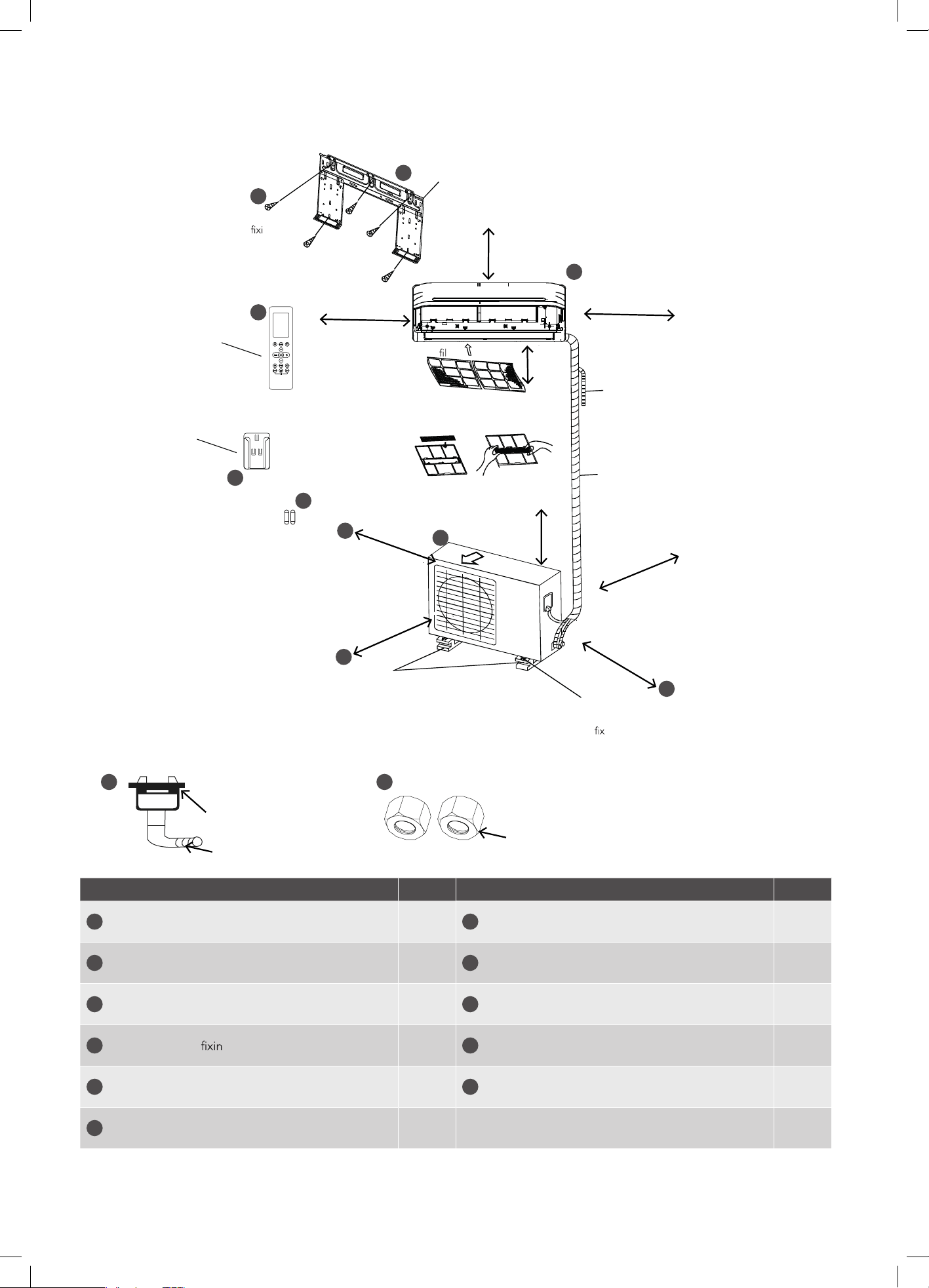
Installation Drawing
NOTE: Appearance of outdoor unit and indoor unit may differ from some models. The actual shape shall prevail.
Air conditioner Qty. Qty.
1
Indoor unit
1
7
Battery (AAA 1.5V)
2
2
Outdoor unit
1
8
Drain elbow & seal 1
3
Indoor unit mounting plate
1
9
Flare nuts 2
4
Mounting plate g screws, ST3.9x25 5 or 8*
10
Installation Manual 1
5
Remote controller 1
11
User manual 1
6
Remote controller holder
1
* 9kW models have 8 screws, other models have 5 screws.
Installation plate ng screw
ST3.9x25(5)
Remote
control
2x AAA batteries
In sites with poor drainage, use block bases
for outdoor unit. Adjust its height until the
unit is leveled. Otherwise, water leakage or
pooling of water may occur.
Where there is a danger of the
unit falling, use foot bolts to
.
Allow two of A, B and
C directions to be free
from obstructions.
Wrapping tape (wrap the
insulation pipe with the tape
from bottom to top)
30cm or more
30cm or more
15cm or more
12cm or more
12cm or more
Air
ter
60cm or more
200cm or more
3
4
5
6
7
A
1
B
8 9
C
Additional drain pipe
Installation Drawing
Fig. 1
Seal
Drain elbow
Flare nuts
60cm
or more
2
Air outlet
200cm
or more
Before screwing the
remote controller holder
to the wall, make sure
that control signals are
properly received by
indoor unit.
6
Rated voltage
AAA 3.0V( Dry batteries R03/LR03×2)
Signal receiving range 8m
Environment -5°C~60°C(23°F~140°F)
Model RG10B(E)/BGEF
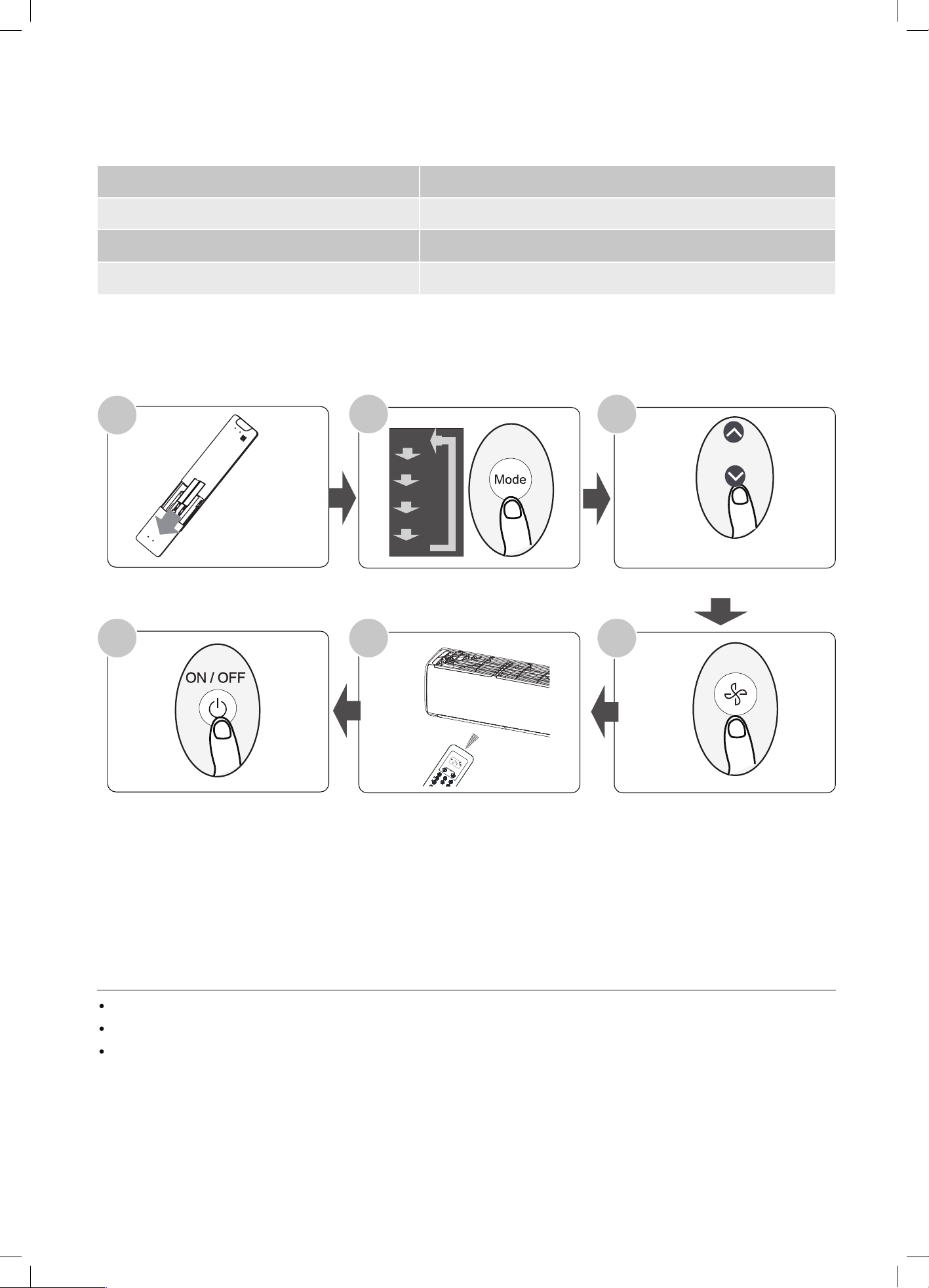
Quick Start Guide
FIT BATTERIES
POINT REMOTE TOWARD UNIT
PRESS POWER BUTTON
SELECT MODE
SELECT TEMPERATURE
SELECT FAN SPEED
1
6
2
5 4
My Mode
Follow Me
LED Turbo
Ioniser
Swing
Timer
SelfClean
Mode
On/Off
Fan
Sleep
AUTO
COOL
DRY
HEAT
FAN
HIGH
MED
LOW
SET TEMPERATURE
3
AUTO
COOL
DRY
HEAT
FAN
NOT SURE WHAT A FUNCTION DOES?
Refer to the How to Use Basic Functions (Page 10) and How to Use Advanced Functions (Page 13) sections of this manual for
a detailed description of how to use your air conditioner.
SPECIAL NOTE
Button designs on your unit may differ slightly from the example shown.
If the indoor unit does not have a particular function, pressing that function’s button on the remote control will have no effect.
When there are wide differentces between “Remote controller Manual” and “USER’S MANUAL” on function description, the
description of “USER’S MANUAL” shall prevail.
Remote Controller Specications
Remote Controller Specifications
7Handling the Remote Controller
Battery Notes
Battery Disposal
Handling the Remote Controller
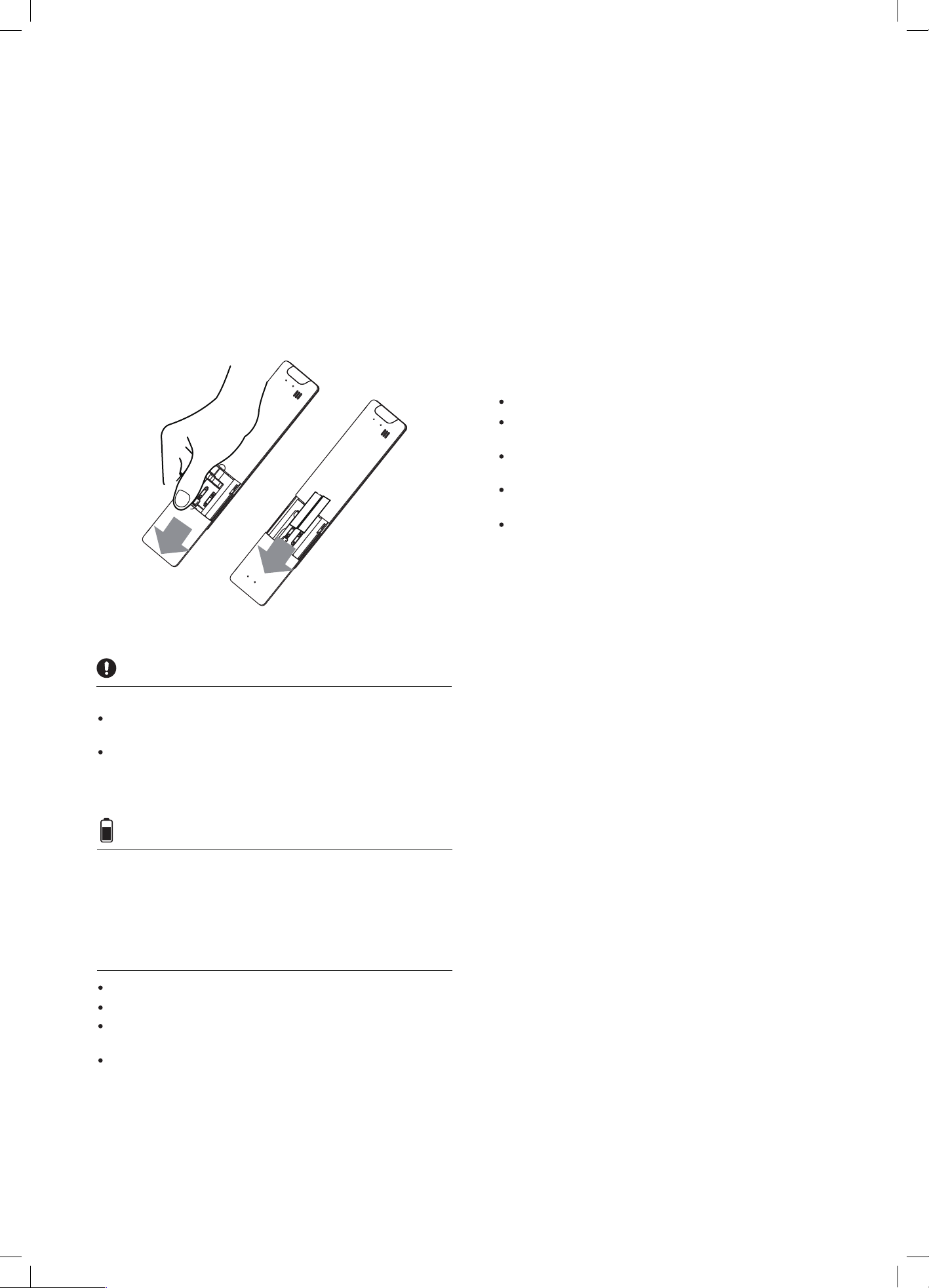
Inserting and Replacing Batteries
Your air conditioning unit may come with two batteries(some
units). Put the batteries in the remote control before use.
1. Slide the back cover from the remote control downward,
exposing the battery compartment.
2. Insert the batteries, paying attention to match up the (+)
and (-) ends of the batteries with the symbols inside the
battery compartment.
3. Slide the battery cover back into place.
For optimum product performance:
Do not mix old and new batteries, or batteries of
different types.
Do not leave batteries in the remote control if you don’t
plan on using the device for more than 2 months.
Do not dispose of batteries as unsorted municipal waste.
Refer to local laws for proper disposal of batteries.
NOTES FOR USING REMOTE CONTROL
The device could comply with the local national regulations.
This equipment has been tested and found to comply with the
limits for a Class B digital device, pursuant to part 15 of the
FCC Rules. These limits are designed to provide reasonable
protection against harmful interference in a residential
installation. This equipment generates, uses and can radiate
radio frequency energy and, if not installed and used in
accordance with the instructions, may cause harmful interfer-
ence to radio communications. However, there is no guarantee
that interference will not occur in a particular installation. If this
equipment does cause harmful interference to radio or
television reception, which can be determined by turning the
equipment off and on, the user is encouraged to try to correct
the interference by one or more of the following measures:
Reorient or relocate the receiving antenna.
Increase the separation between the equipment and
receiver.
Connect the equipment into an outlet on a circuit different
from that to which the receiver is connected.
Consult the dealer or an experienced radio/TV technician
for help.
Changes or modications not approved by the party
responsible for compliance could void user’s authority to
operate the equipment.
TIPS FOR USING REMOTE CONTROL
The remote control must be used within 8 meters of the unit.
The unit will beep when remote signal is received.
Curtains, other materials and direct sunlight can interfere
with the infrared signal receiver.
Remove batteries if the remote will not be used more than 2
months.
8 Buttons and Functions
Buttons and Functions
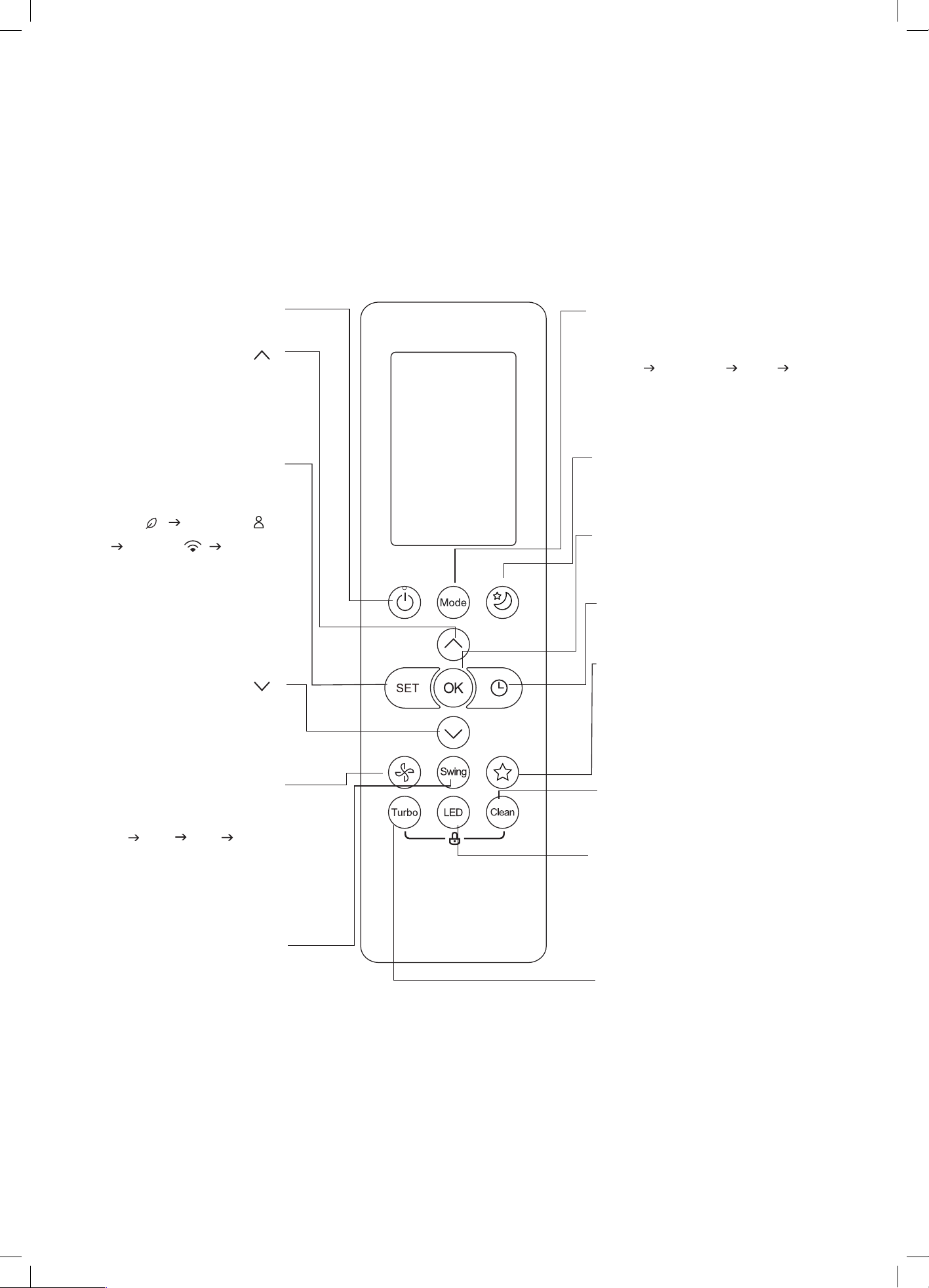
Before you begin using your new air conditioner, make sure to familiarize yourself with its remote control. The following is a brief
introduction to the remote control itself. For instructions on how to operate your air conditioner, refer to the
How to Use Basic
Functions
section of this manual.
ON/OFF
SET
Turns the unit on or off.
CLEAN
LED
Turbo
SWING
TEMP
Starts and stops the horizontal
louver movement. Hold down
for 2 seconds to initiate vertical
louver auto swing feature.
Enables unit to reach preset
temperature in shortest possible
time.
Scrolls through operation
functions as follows:
The selected symbol will ash
on the display area, press the
OK button to conrm.
NOTE: "Fresh" mode is not
applicable to the models in
Australia.
Fresh( )
Follow Me( )
AP mode( ) Fresh...
Used to start/stop the Self Clean
function.
Used to restore the current
settings or resume previous
settings.
FAN SPEED
TEMP
Turns indoor unit’s LED display
and air conditioner buzzer on
and off (model dependent),
which create a comfortable and
quiet environment.
Selects fan speeds in the
following order:
AUTO LOW MED HIGH
NOTE: Holding this button down
for 2 seconds will activate Silence
feature.
MODE
Scrolls through operation modes
as follows:
AUTO COOL DRY HEAT FAN
NOTE: HEAT mode is not supported
by the cooling only appliance.
SLEEP
Saves energy during sleeping hours
OK
Used to conrm the selected functions
TIMER
Set timer to turn unit on or off
SHORTCUT
Model: RG10B(E)/BGEF
Increases temperature
in 1˚C(1˚F) increments.
Max. temperature is
30˚C(86˚F).
Decreases temperature
in 1˚C(1˚F) increments.
Min. temperature is
17˚C(62˚F).
9Remote Screen Indicators
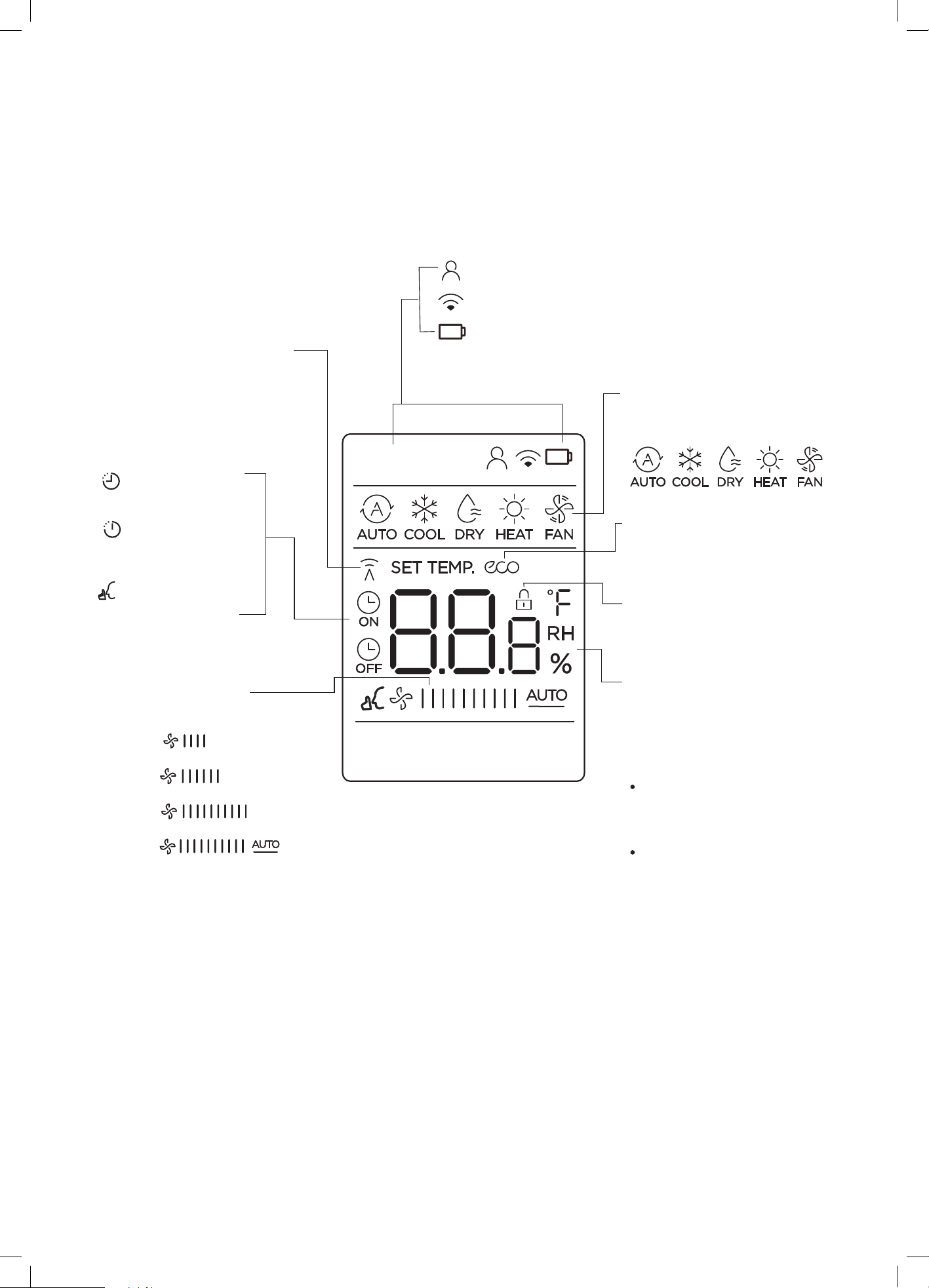
Transmission Indicator lights up
when remote sends signal to
indoor unit
MODE
display
ECO
display(some units)
LOCK display
Follow me feature display
Wireless control feature display
Low battery detection display(If ashes)
Displays the current mode,
including:
TIMER ON display
ON
OFF
TIMER OFF display
Silence feature
display
Displays when ECO
feature is activated
Displays when LOCK feature
is activated.
Remote Screen Indicators
Information are displayed when the remote controller is power up.
FAN SPEED display
Displays selected fan speed:
LOW
MED
HIGH
AUTO
This fan speed can not be adjusted
in AUTO or DRY mode.
NOTE:
During the actual operation, only the relevant function symbols are shown in the display window.
Temperature/Timer/Fan speed
display
Displays the set temperature
by default, or fan speed or
timer setting when using
TIMER ON/OFF functions.
This display is blank when
operating in FAN mode.
Temperature range:
17-30˚C/62-86˚F
(20-28˚C)
(Model Dependent)
Timer setting range:
0-24 hours
10 How to Use Basic Functions
ATTENTION! Before operation, please ensure
the unit is plugged in and power is available.
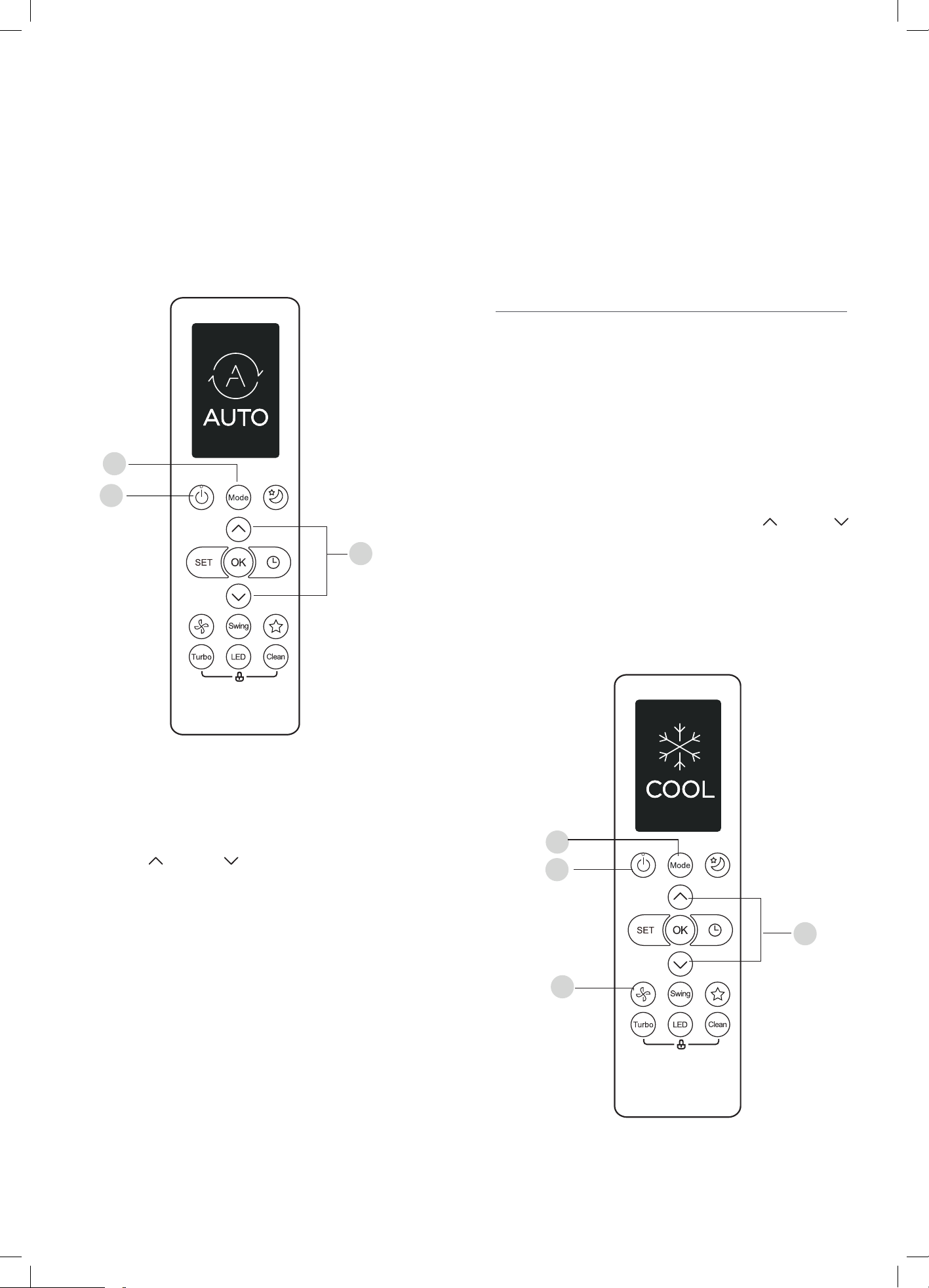
AUTO Mode
In AUTO mode, the unit will automatically select the COOL,
FAN, or HEAT operation based on the set temperature.
1. Press the MODE button to select AUTO.
2. Set your desired temperature using the TEMP or TEMP
button.
3. Press the ON/OFF button to start the unit.
NOTE: FAN SPEED can’t be set in AUTO mode.
COOL Mode
Basic operation
1
3
2
1
3
2
4
2. Set your desired temperature using the
TEMP or TEMP button.
4. Press the ON/OFF button to start the unit.
1. Press the MODE button to select COOL mode.
3. Press FAN button to select the fan speed:
AUTO, LOW, MED or HIGH.
SETTING TEMPERATURE
The operating temperature range for units
is 17-30°C (62-86°F)/20-28 C.
You can increase or decrease the set temperature in 1°C (1°F)
increments.
How to Use Basic Functions
11
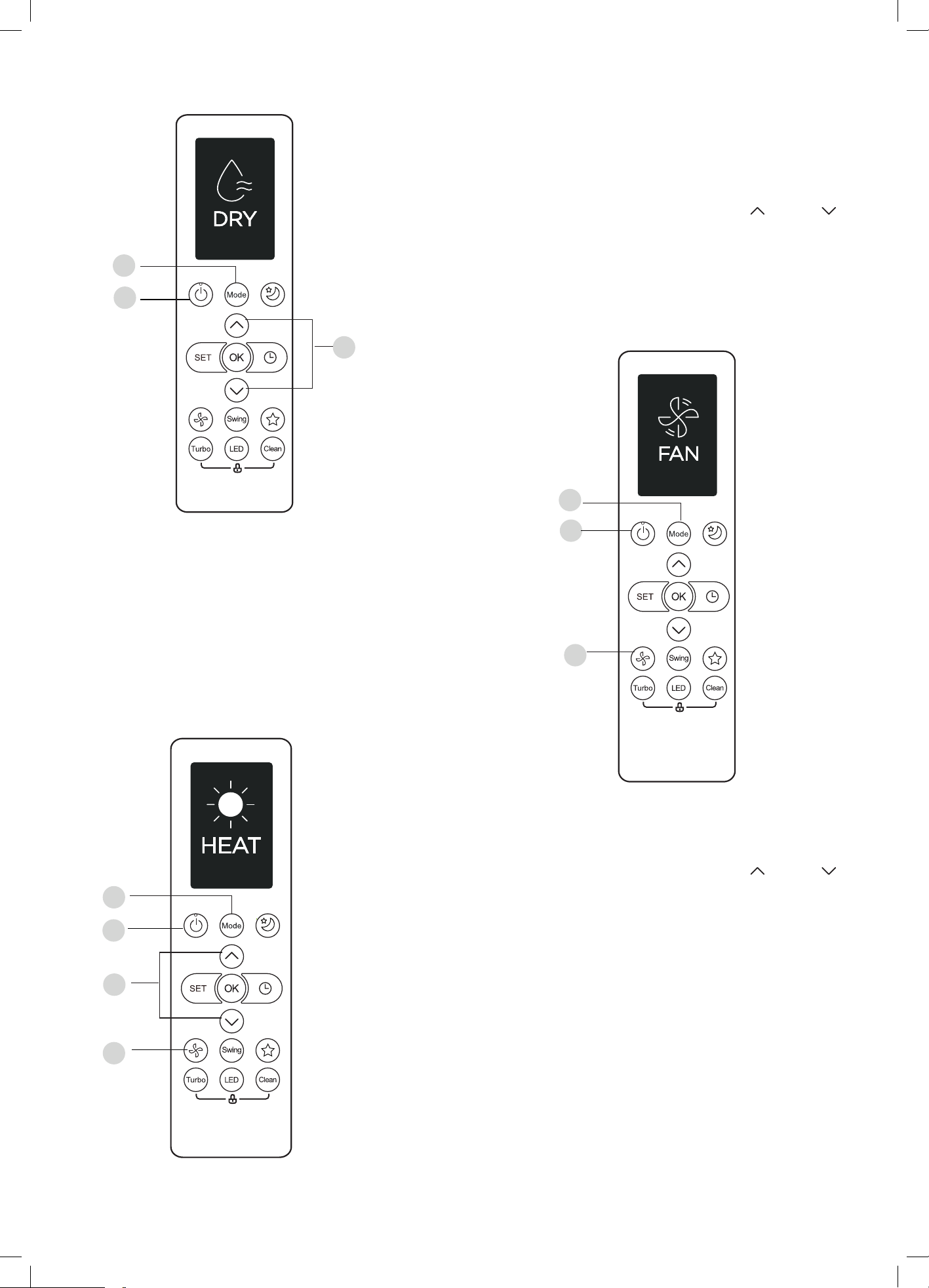
1. Press the MODE button to select FAN mode.
2. Press FAN button to select the fan speed:
AUTO, LOW, MED or HIGH.
3. Press the ON/OFF button to start the unit.
1. Press the MODE button to select DRY.
2. Set your desired temperature using the TEMP or TEMP
button.
3. Press the ON/OFF button to start the unit.
1. Press the MODE button to select HEAT mode.
2. Set your desired temperature using the TEMP or TEMP
button.
3. Press FAN button to select the fan speed:
AUTO, LOW, MED or HIGH.
4. Press the ON/OFF button to start the unit.
1
3
2
4
1
3
2
1
3
2
DRY Mode (dehumidifying)
NOTE: FAN SPEED cannot be changed in DRY mode.
HEAT Mode
NOTE: As outdoor temperature drops, the performance of
your unit’s HEAT function may be affected. In such instances,
we recommend using this air conditioner in conjunction with
other heating appliances.
FAN Mode
NOTE: You can’t set temperature in FAN mode.
As a result, your remote control’s LCD screen
will not display temperature.
How to Use Basic Functions
12
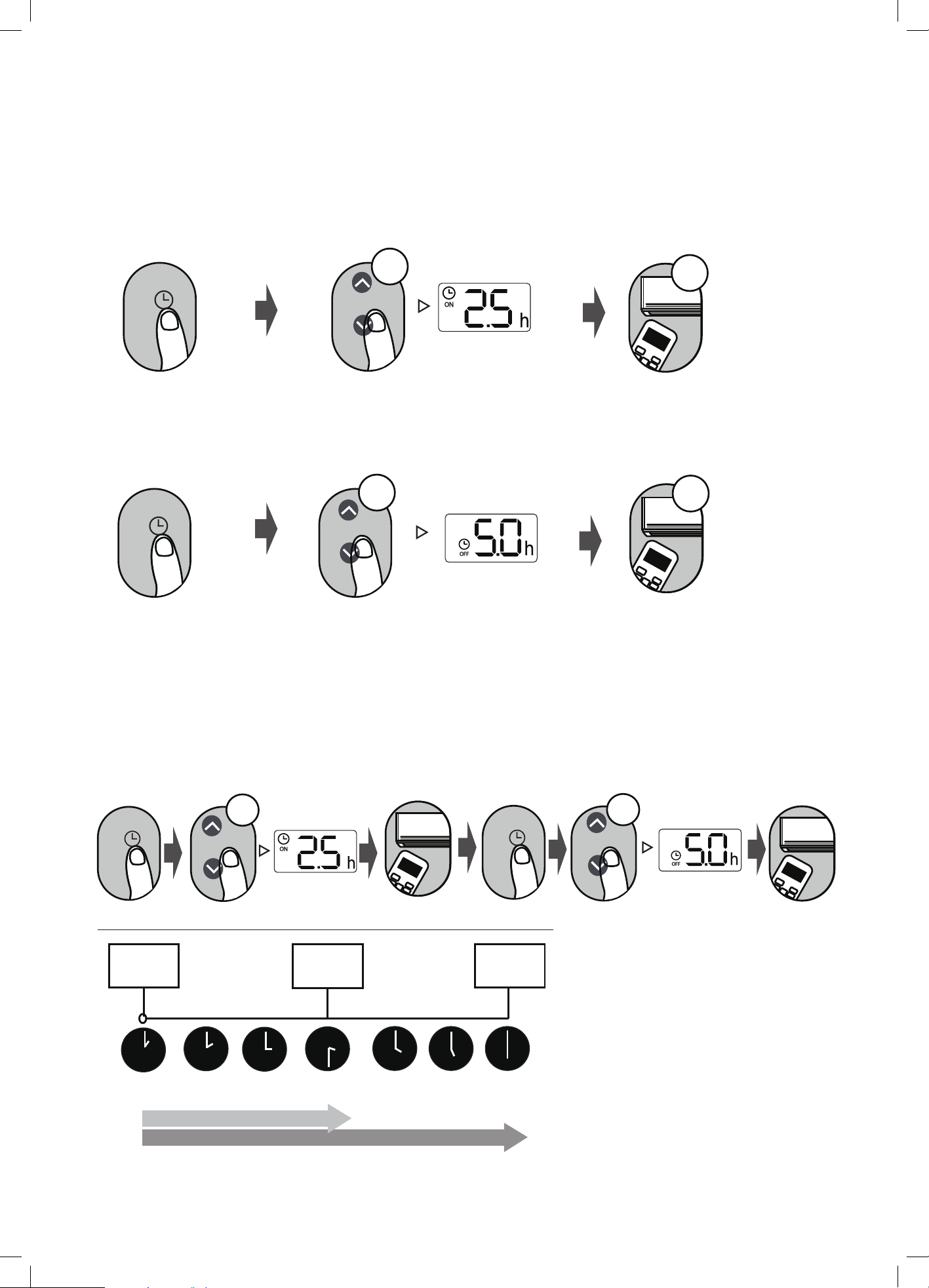
Setting the TIMER
TIMER ON/OFF - Set the amount of time after which the unit will automatically turn on/off.
TIMER ON setting
TIMER OFF setting
TIMER ON & OFF setting (example)
Press TIMER button to initiate
the ON time sequence.
Press Temp. up or down button for
multiple times to set the desired
time to turn on the unit.
Press Temp. up or down button for
multiple times to set the desired
time to turn off the unit.
NOTE:
1. When setting the TIMER ON or TIMER OFF, the time will increase by 30 minutes increments with each
press, up to 10 hours. After 10 hours and up to 24, it will increase in 1 hour increments. (For example,
press 5 times to get 2.5h, and press 10 times to get 5h,) The timer will revert to 0.0 after 24.
2. Cancel either function by setting its timer to 0.0h.
Point remote to unit and wait 1sec,
the TIMER ON will be activated.
Press TIMER button twice to
initiate the OFF time sequence.
Point remote to unit and wait 1sec,
the TIMER OFF will be activated.
Current
time 1PM
2:00PM
4PM 5PM
6PM
Timer starts
Unit turns
ON
Unit turns
OFF
2.5 hours later
5 hours later
3:30PM
Example: If current timer is 1:00PM,
to set the timer as above steps, the
unit will turn on 2.5h later (3:30PM)
and turn off at 6:00PM.
ON/OFF
M
ODE
F
AN
SHORT
CUT
TIMER ON
TIMER OF
F
TEMP
S
L
E
EP
1sec
ON/OFF
M
ODE
F
AN
SHORT
CU
T
TI
M
E
R
O
N
TIMER OF
F
TEMP
S
L
E
EP
ON/O
FF
MODE
F
AN
SHOR
T
CUT
TI
M
E
R
O
N
TIMER OF
F
TEM
P
S
L
EEP
ON/OFF
M
ODE
F
AN
SHORT
CUT
TIMER ON
TIMER OF
F
TEMP
S
L
E
EP
1sec
x5
xn
xn
x10
xn
Keep in mind that the time periods you set for both functions refer to hours after the current time.
TIMER
TIMER
TIMER
TIMER
3:00PM
How to Use Basic Functions
13
How to Use Advanced Functions
How to Use Advanced Functions
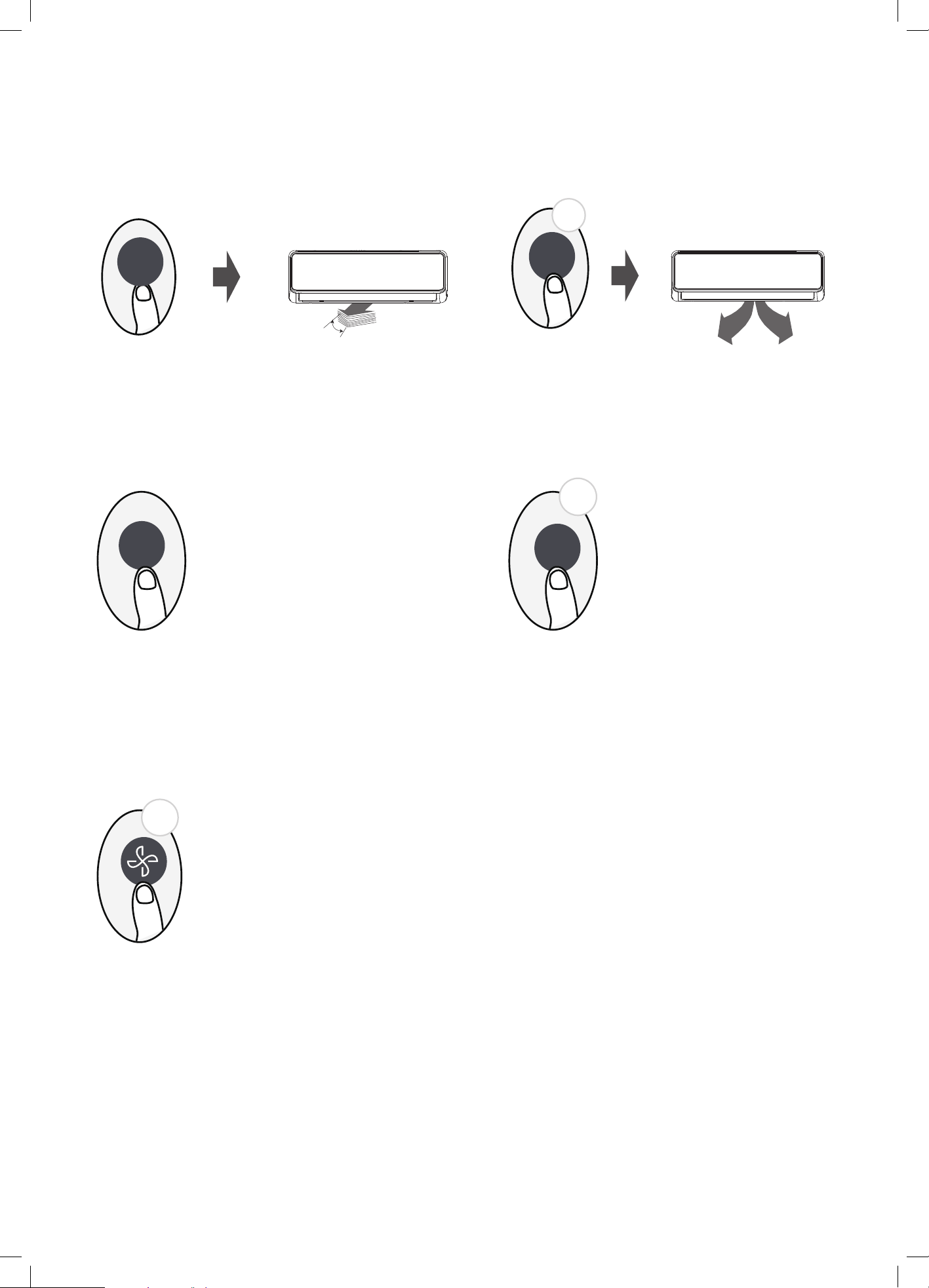
SWING function
LED DISPLAY
Press Swing button
The horizontal louver will swing up and down
automatically when pressing Swing button.
Press again to make it stop.
Keep pressing this button more than 2 seconds,
the vertical louver swing function is activated.
(some models)
2s
Keep pressing this button more than 5 seconds,
the indoor unit will display the actual room
temperature. Press more than 5 seconds again
will revert back to display the setting temperature.
Press this button to turn on and turn off
the display on the indoor unit.
Press LED button
Press this button more than
5 seconds (some models)
Keep pressing Fan button for more than 2 seconds to activate/disable Silence function(some models).
Due to low frequency operation of compressor, it may result in insufcient cooling and heating capacity.
Press ON/OFF, Mode, Sleep, Turbo or Clean button while operating will cancel silence function.
SILENCE function
Swing
LED
5s
LED
Swing
2s
14 How to Use Advanced Functions
FP function
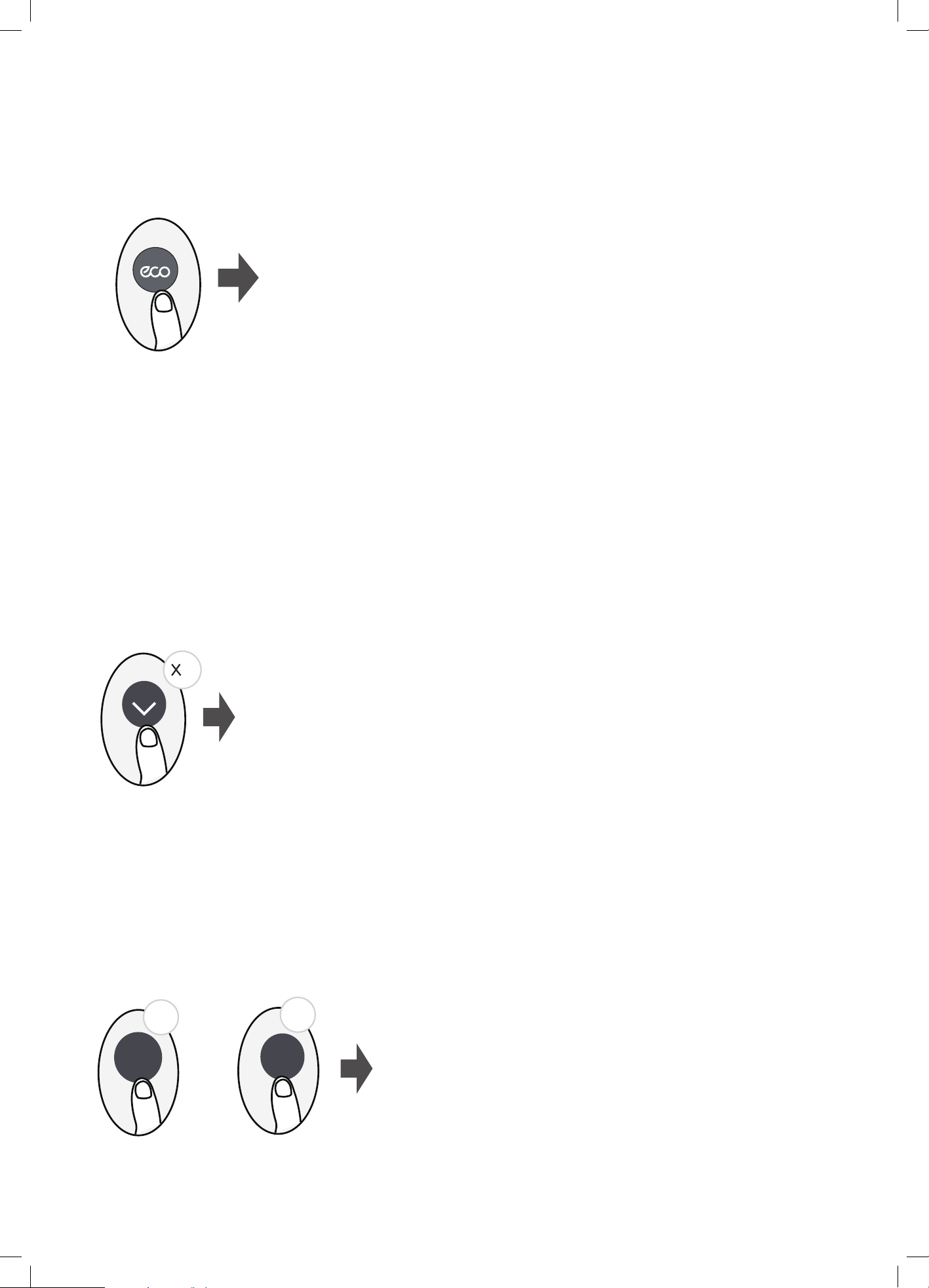
ECO function
LOCK function
Under cooling mode, press this button, the remote controller will adjust the temperature automatically to 24°C/75°F, fan speed of
Auto to save energy (only when the set temperature is less than 24°C/75°F). If the set temperature is above 24°C/75°F, press the ECO
button, the fan speed will change to Auto, the set temperature will remain unchanged.
NOTE:
Pressing the ECO button, or modifying the mode or adjusting the set temperature to less than 24°C/75°F will stop ECO operation.
Under ECO operation, the set tmeperature should be 24°C/75°F or above, it may result in insufcient cooling. If you feel uncomfortable,
just press the ECO button again to stop it.
Clean
Press ECO button to enter the energy efcient mode.
NOTE: This function is only available under COOL mode
.
ECO operation:
5s
5s
Turbo
The unit will operate at high fan speed (while
compressor on) with temperature automatically
set to 8°C/46°F.
NOTE: This function is for heat pump air conditioner only.
2
+
Press together Clean button and Turbo button at the same time more than
5 seconds to activate Lock function. All buttons will not response except
pressing these two buttons for two seconds again to disable locking.
Press ECO button
(some models)
Press this button 2 times during one second under HEAT Mode and setting temperature of 17°C/62°F or 20°C/68°F (for models
RG10B10(E)/BGEF, RG10A11(E)/BGEF) to activate FP function.
Press On/Off, Sleep, Mode, Fan and Temp. button while operating will cancel this function.
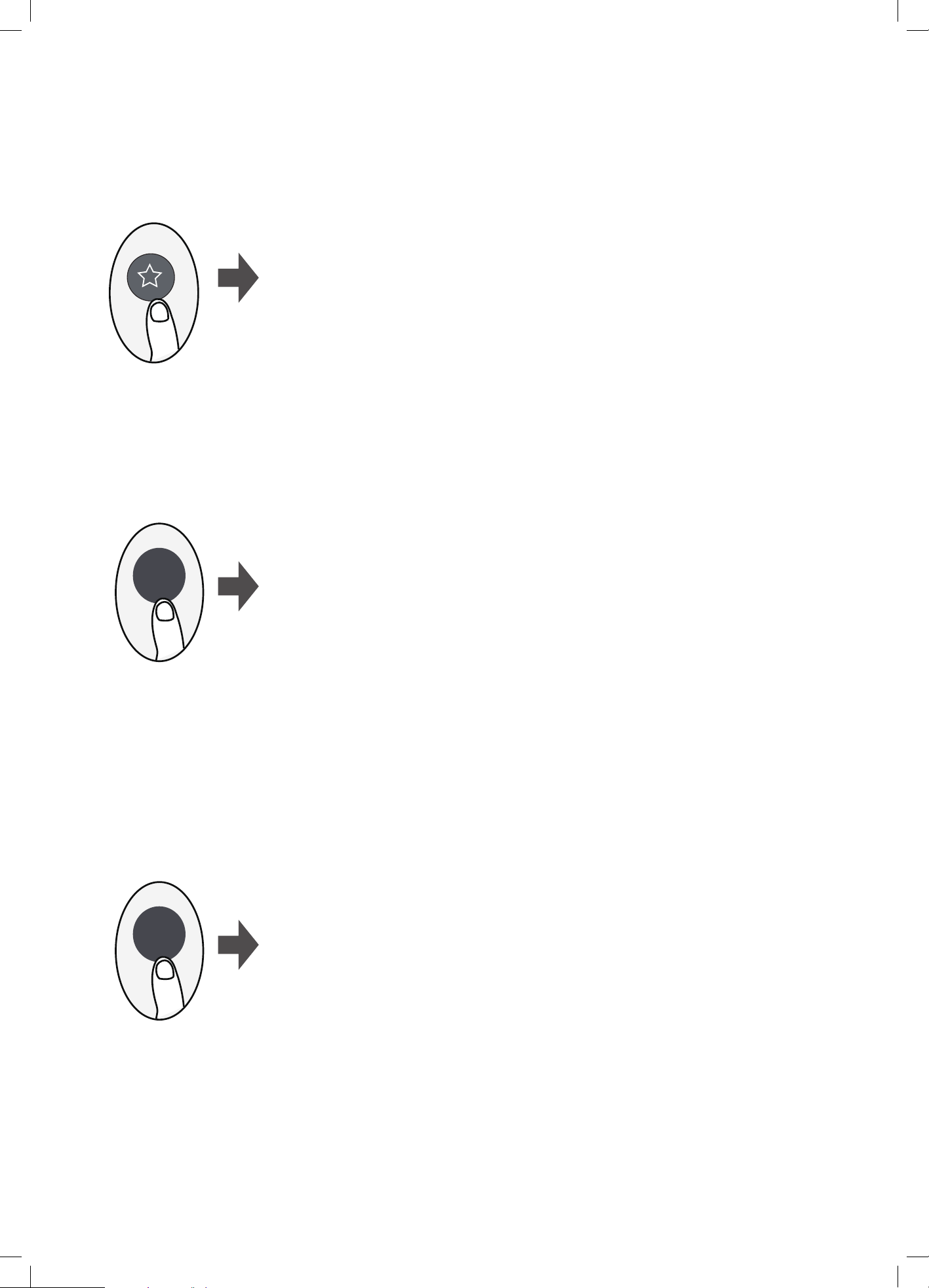
Turbo
CLEAN function
SHORTCUT function
Push this button when remote controller is on, the system will automatically
revert back to the previous settings including operating mode, setting
temperature, fan speed level and sleep feature (if activated).
If pushing more than 2 seconds, the system will automatically restore the
current operation settings including operating mode, setting temperature,
fan speed level and sleep feature (if activated ).
Airborne bacteria can grow in the moisture that condenses around heat exchanger
in the unit. With regular use, most of this moisture is evaporated from the unit.
By pressing the CLEAN button, your unit will clean itself automatically. After cleaning,
the unit will turn off automatically. Pressing the CLEAN button mid-cycle will cancel
the operation and turn off the unit. You can use CLEAN as often as you like.
.
NOTE:
You can only activate this function in COOL or DRY mode.
Refer to User manual for further detail on this function.
Press SHORTCUT button
(some models)
Press CLEAN button
Clean
TURBO function
When you select Turbo feature in COOL mode, the unit will blow cool air
with strongest wind setting to jump-start the cooling process.
Press TURBO button
15How to Use Advanced Functions
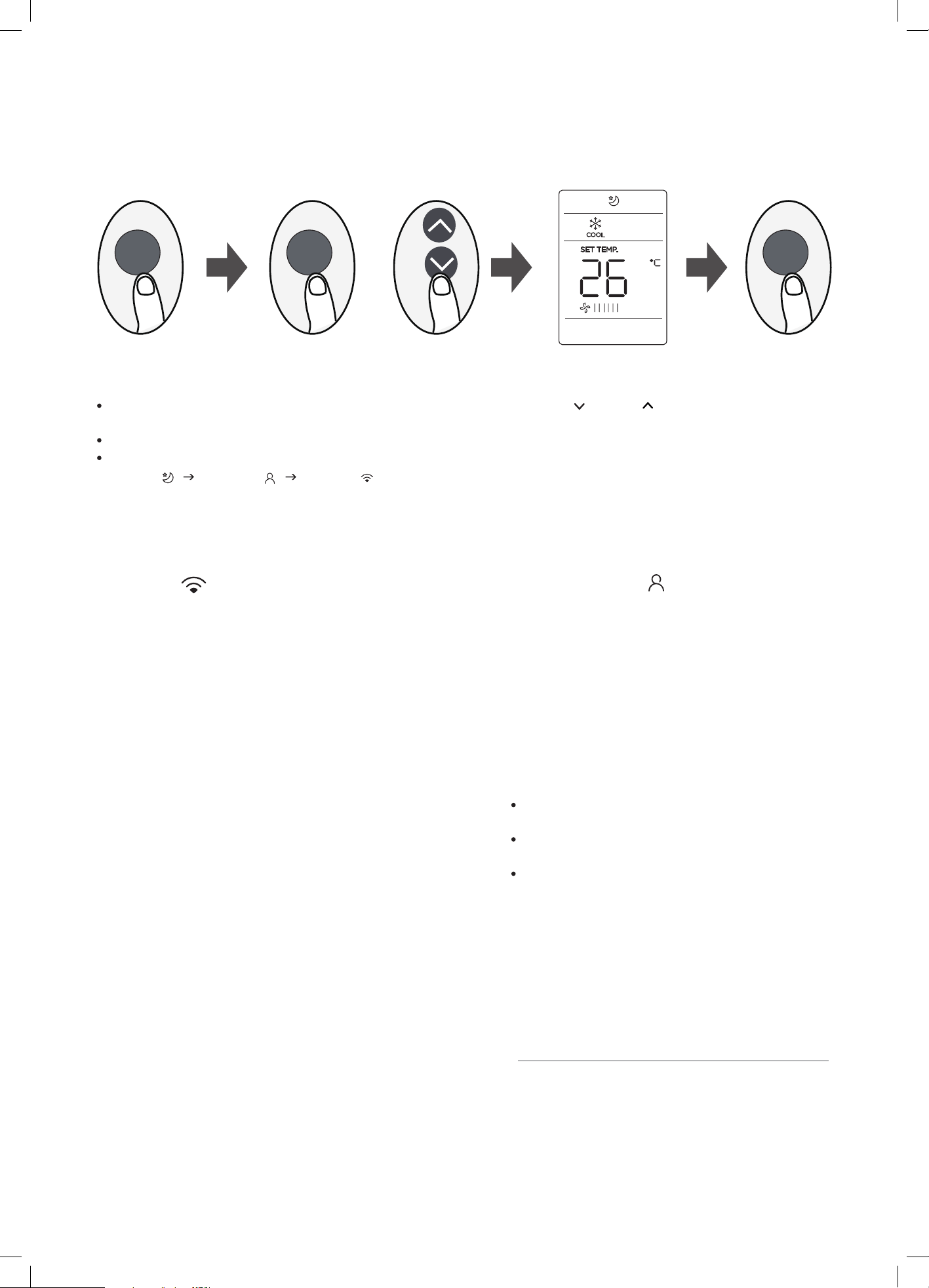
Press the SET button to enter the function setting, then press SET button or TEMP or TEMP button to select the desired
function. The selected symbol will ash on the display area, press the OK button to conrm.
To cancel the selected function, just perform the same procedures as above.
Press the SET button to scroll through operation functions as follows:
Sleep*( ) Follow Me ( ) AP Mode ( )
[ * ]: If your remote controller has Sleep button, you can not use the SET button to select Sleep feature.
16 How to Use Advanced Functions
SET function
or
SET SET OK
Follow me function( ) :
The FOLLOW ME function enables the remote control to
measure the temperature at its current location and send
this signal to the air conditioner every 3 minutes interval.
When using AUTO, COOL or HEAT modes, measuring
ambient temperature from the remote control(instead of
from the indoor unit itself) will enable the air conditioner
to optimize the temperature around you and ensure
maximum comfort.
NOTE: Press and hold Turbo button for seven seconds to
start/stop memory feature of Follow Me function.
AP function( ) (some units) :
conguration. For some units, it doesn’t
work by pressing the SET button. To enter
the AP mode, continuously press the LED
button seven times in 10 seconds.
If the memory feature is activated, “On” displays for
3 seconds on the screen.
If the memory feature is stopped, “OFF” displays for
3 seconds on the screen.
While the memory feature is activated, press the
ON/OFF button, shift the mode or power failure will
not cancel the Follow me function.
The design and specifications are subject to change
without prior notice for product improvement. Consult
with the sales agency or manufacturer for details.
CR274-RG10(E)
16117000A3734
3 2021.10.18
Choose AP mode to do wireless network
WARNING
caution
• Do not operate the air conditioner for long periods with the
air ow direction set downward in cooling or dehumidifying
mode. Otherwise, condensation may occur on the surface of
the horizontal louver causing moisture to drop on to the oor
or on furnishings.
• After a quick restart, the horizontal louver may remain static for
approximately 10 seconds.
• Open angle of the horizontal louver should not be set too
small, as COOLING or HEATING performance may be reduced
due to restricted air ow area.
• Do not move the vertical (up/down) louver manually, otherwise
the vertical louver will be out of sync. But if this happens,
please cease operating, switch off power for a few second
s,
then restart the air conditioner.
Optimal operation
To achieve optimal performance, please note the following:
• Adjust the air ow direction correctly so that it is not towards
people.
• Adjust the temperature to achieve moderate comfort levels.
Excessively low or high temperature waste energy.
• Improve performance by keeping windows and doors closed.
• Limit energy usage (run time) by using the TIMER function.
• Do not put any object near air inlet or air outlet, as the
efciency of the air conditioner may be reduced and may
cause the air conditioner to stop running.
• Inspect and clean the lters every 3 months or as required.
Ensure that the lters are co
rrectly inserted after cleaning.
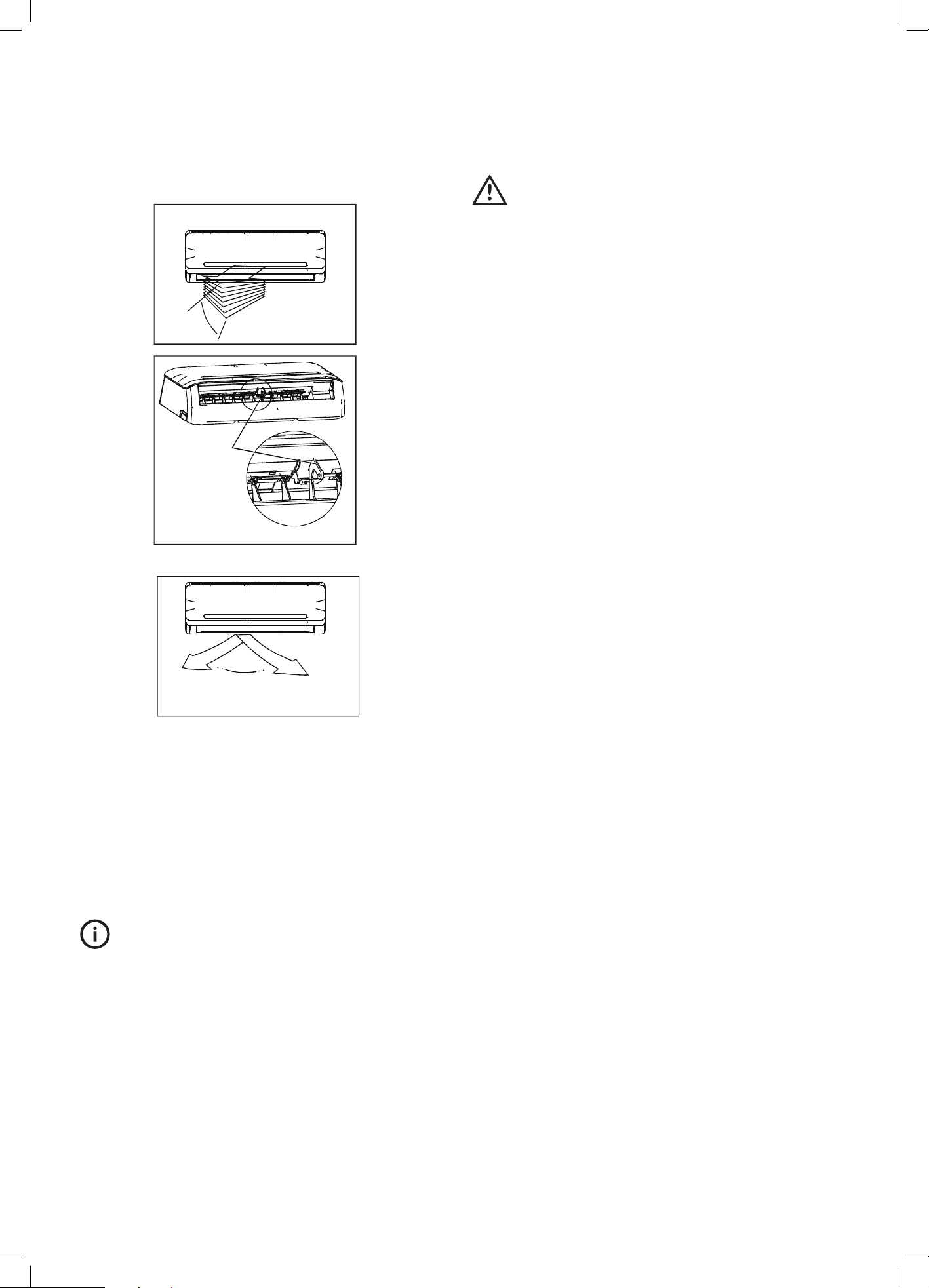
The direction of airow can be adjusted for maximum comfort.
Adjusting vertical air ow (Up/Down)
The vertical airow direction is controlled by using the remote
control. This can be set to a xed direction or to automatically
swing up and down for even air distribution. Refer to Remote
Control section page 9 for operation details .
Adjusting horizontal air ow (Left/Right)
• The airow can be directed horizontally (left to right) by
manually adjusting the deector rod.
TIPS & INFORMATION
important
Do not put your ngers into the panel of the blower and suction
side. The high-speed fan inside may cause injury.
Airflow Directional Control
Range
Deector rod
Range
17
Airflow Di
rectional Control
Manual operation
caution
• This switch is used for testing purposes only. Please do not use
it unless necessary.
• To restore the remote controller operation, use the remote
controller directly.
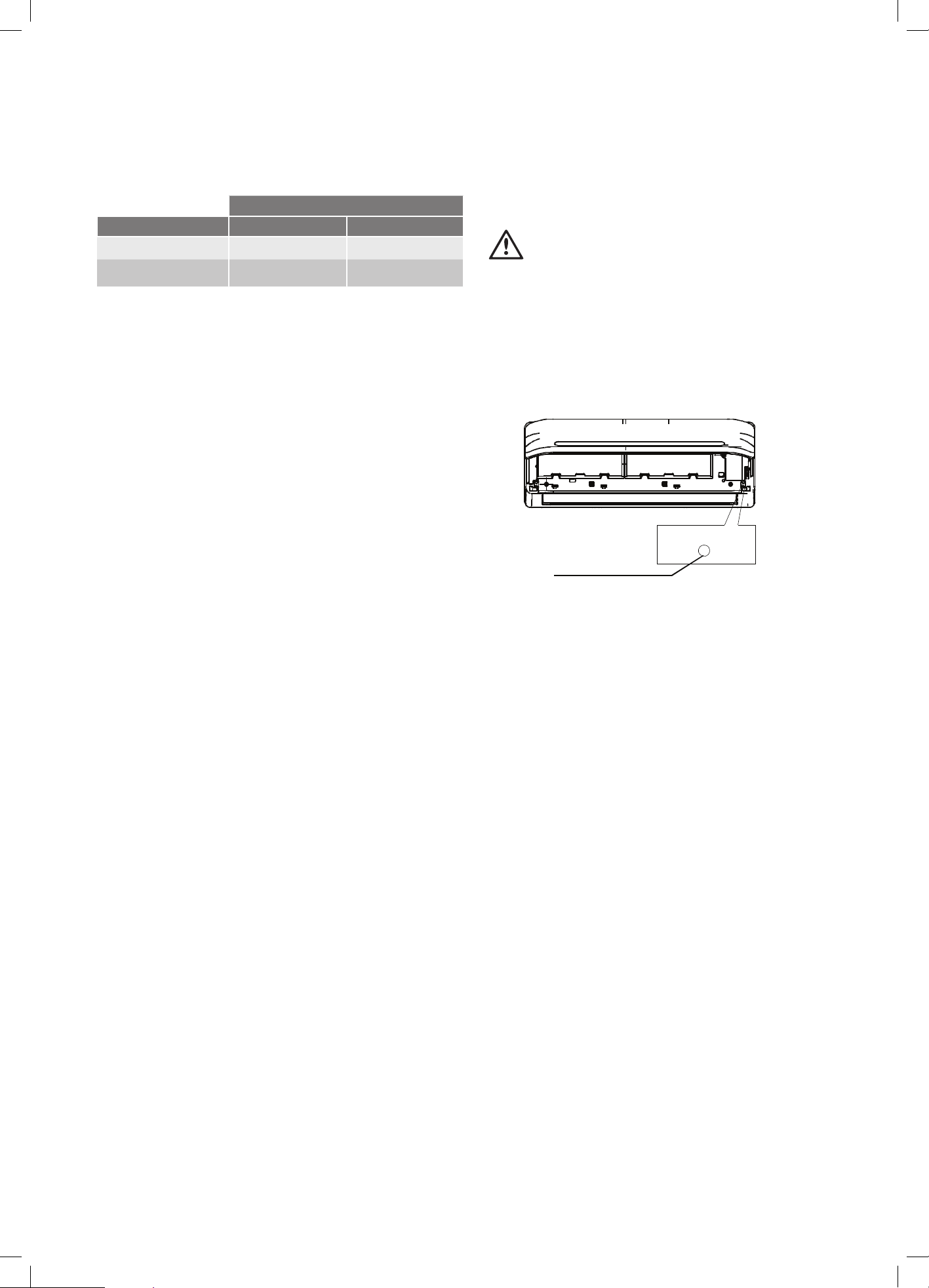
This air conditioner is equipped with a manual switch to allow
operation should the remote control fail to work. It can be accessed
by opening the front panel.
Manual switch
AUTO/COOL
NOTE: The unit must be turned off before operating the manual
control button. If the unit is operational, continue pressing the
manual control button until the unit is off.
• Open the front panel until it locks. There is a "click" when the
mechanism engages.
• One press of the manual control switch will lead to the forced
AUTO operation. Press the switch twice within 5 seconds to
operate in forced COOL mode, “FC” will be shown on the
display. After about 30 minutes operation in forced COOL
mode, the air conditioner will switch to AUTO mode and “FC”
will be replaced with AUTO mode set temperature of “24”
on the display.
• Close the panel after manual operation has been started.
• Press the button again while the air conditioner is running to
turn off.
Operating Temperature
Mode
Temperature Cooling operation Heating operation
Room temperature 17°C – 32°C 0°C – 30°C
Outdoor temperature
0°C – 50°C -15°C – 30°C
The Air conditioner temperature can be set between the range of
17°C to 30°C.
NOTE:
1. Optimum performance will be achieved within these operating
temperatures. If air conditioner is used outside of the above
conditions, certain safety protection features might come into
operation and cause the unit to function abnormally.
2. If the air conditioner runs for a long time in cooling mode
and the humidity is high (over 80%) , condensed water may
18
Operating T
emperature
drip out of the indoor unit. Please set the vertical air ow
louvre to its maximum angle (vertically to the oor), and set
HIGH fan mode.
Before maintenance
• Turn the system off before cleaning. To clean, wipe with a soft,
dry cloth. Do not use bleach or abrasives.
NOTE: Power supply must be disconnected before attempting to
clean or service.
WARNING
warning
Servicing shall only be performed as recommended by the
equipment manufacturer. Maintenance and repair requiring the
assistance of other skilled personnel shall be carried out under
the supervision of the person competent in the use of ammable
refrigerants. For more details, please refer to the Information on
servicing in the installation manual.
• Do not use a chemically treated cloth or duster to clean
the unit.
• Do not use benzine, thinner, polishing powder, or similar
solvents for cleaning. These may cause the plastic surface to
crack or deform.
• Never use water hotter than 40°C to clean the front panel, it
could cause deformation or discoloration.
Cleaning the unit
Wipe the unit with a soft dry cloth only. If the unit is very dirty, wipe
it with a cloth soaked in warm water.
Cleaning the air lter and air freshening lter
A clogged air lter reduces the efciency of this unit. Please clean
the lter every 3 months, or as required..
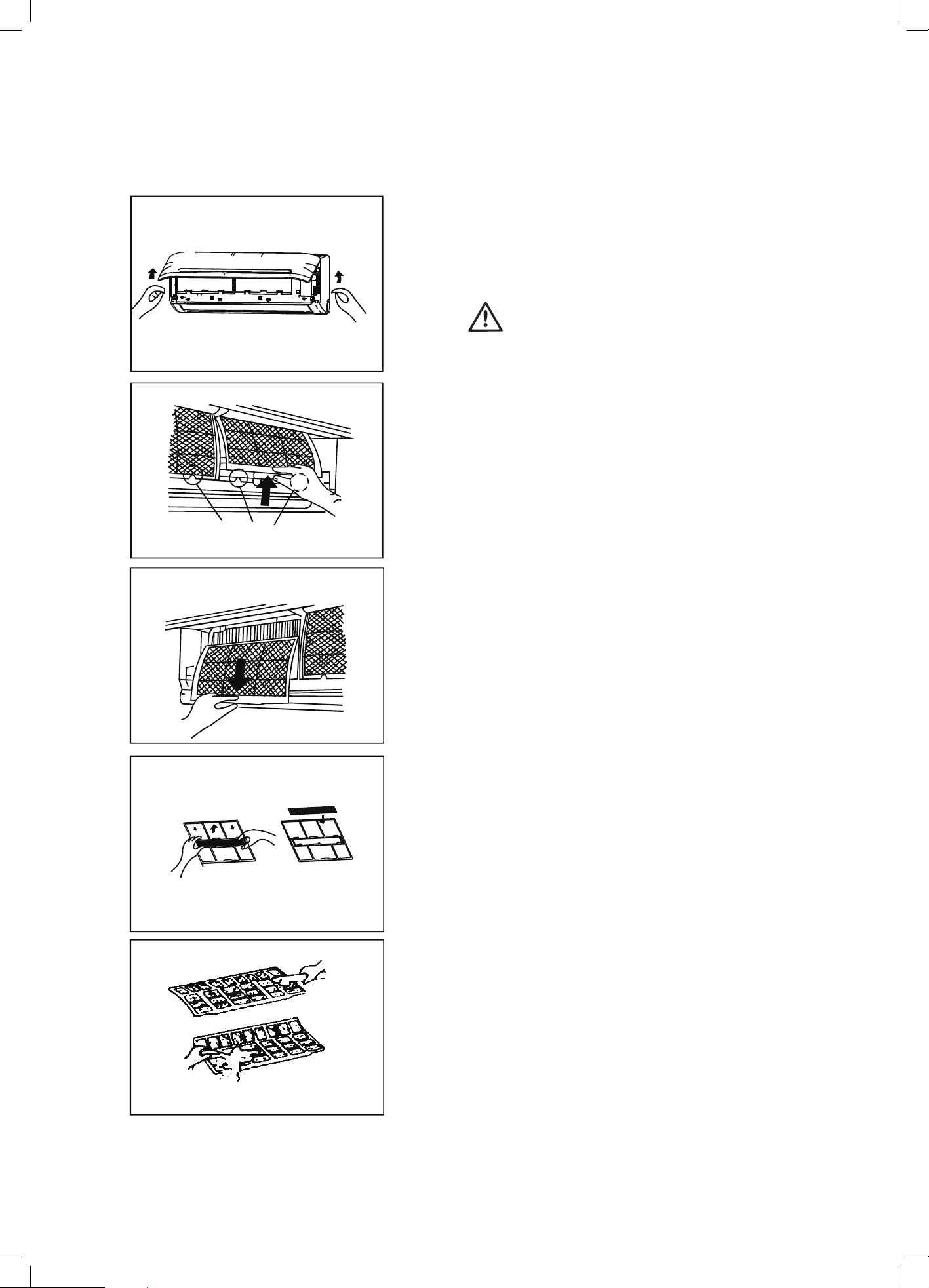
1. Open the front panel by carefully lifting both ends at the
same time. At a certain angle, a clicking sound is heard and it
becomes self-supporting. For some models, please use the
suspension bars to prop up the panel.
2. Use the tab provided to move the lter rst up a little, then
slightly towards you. Now extract the lter by gently drawing
downwards.
3. Unclip the small air freshening lter from the large air lter.
Clean it with vacuum, and replace it occasionally.
4. Clean the large air lter with soapy water. Rinse with fresh
water. Shake off excess water and dry it up in cool place,
replace it occasionally.
Care and Maintenance
Filter tab
Air freshening lter
19
Care and Maintenance
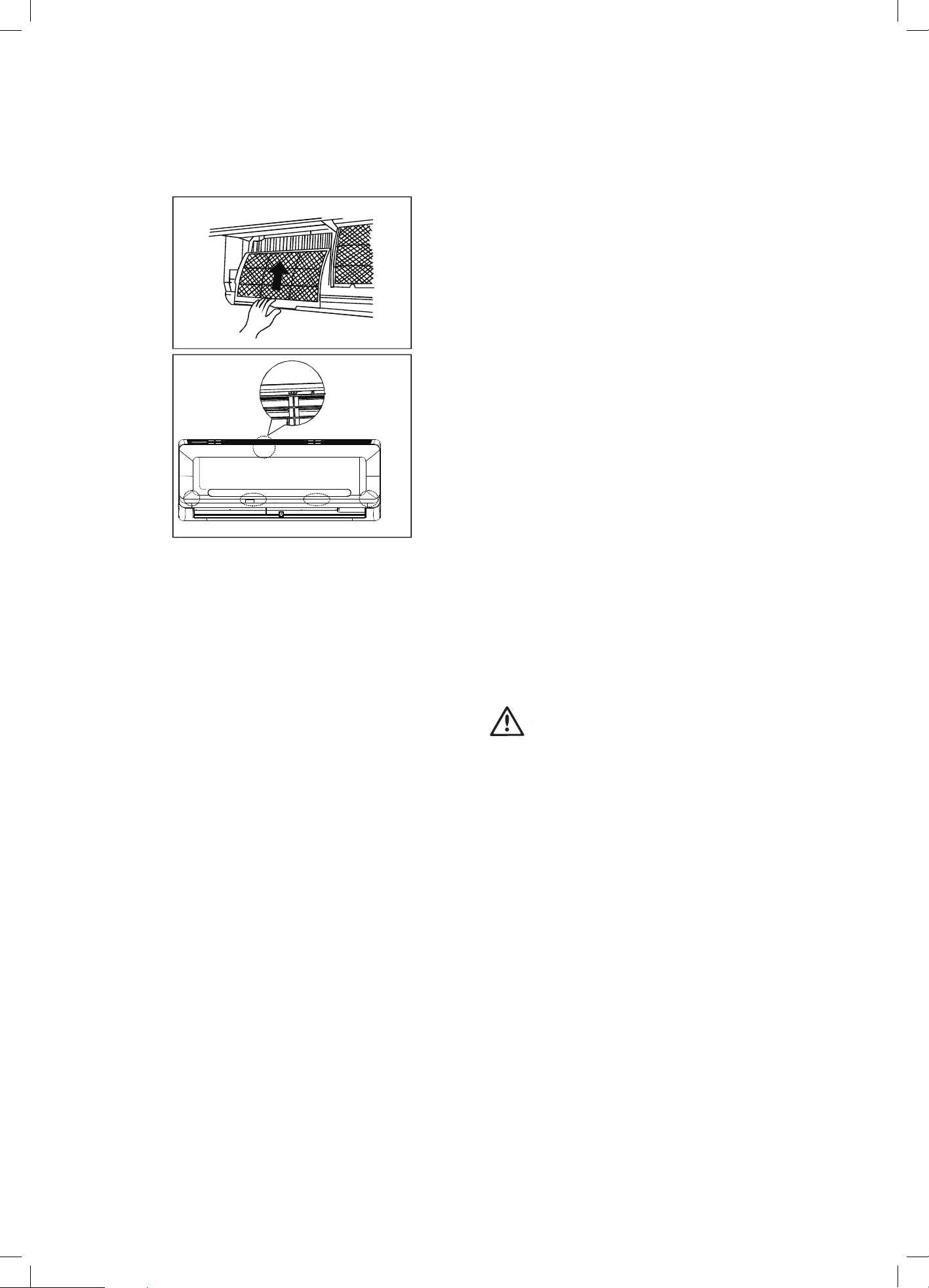
5. After the lters are dry, ret the small lters onto the large
air lter.
6. Re-insert the lters back into the unit following the reverse
order as described in steps 1 & 2.
7.
Preparation for extended non-operation
If you plan not to use unit for a long time, perform the following:
1. Clean the indoor unit and lters.
2. Operate the fan for about half a day to dry the inside
of the unit.
3. Stop the air conditioner and disconnect power.
4. Remove the batteries from the remote controller. The outdoor
unit requires periodic maintenance and cleaning. Do not
attempt to do this yourself. Contact your dealer or service
provider.
Pre-season inspection
• Damaged or disconnected wires.
• Clean the in
door unit and lters.
• Check water or oil leaks.
• Check that the outdoor unit is clear of leaves, rubbish and
other objects that may block the air inlet or outlet.
• Check if the remote control batteries are at, replace as
required.
WARNING
warning
• Do not touch the metal parts of the unit when removing the
lter. Injuries can occur when handling sharp metal edges.
• Do not use water to clean inside the air conditioner. Exposure
to water can destroy the insulation, leading to possible electric
shock.
• When cleaning the unit, rst make sure that the power and
circuit breaker are turned off.
• Do not wash air lter with hot water at more than 40°C . Shake
off moisture completely and dry it in the shade. Do not expose
it directly to the sun, it may shrink.
Care and Maintenance
Panel
buckles
20
Care and Maintenance
Close the front panel. Make sure the buckles are correctly
located and the panel is completely closed.
Troubleshooting
Symptom Cause
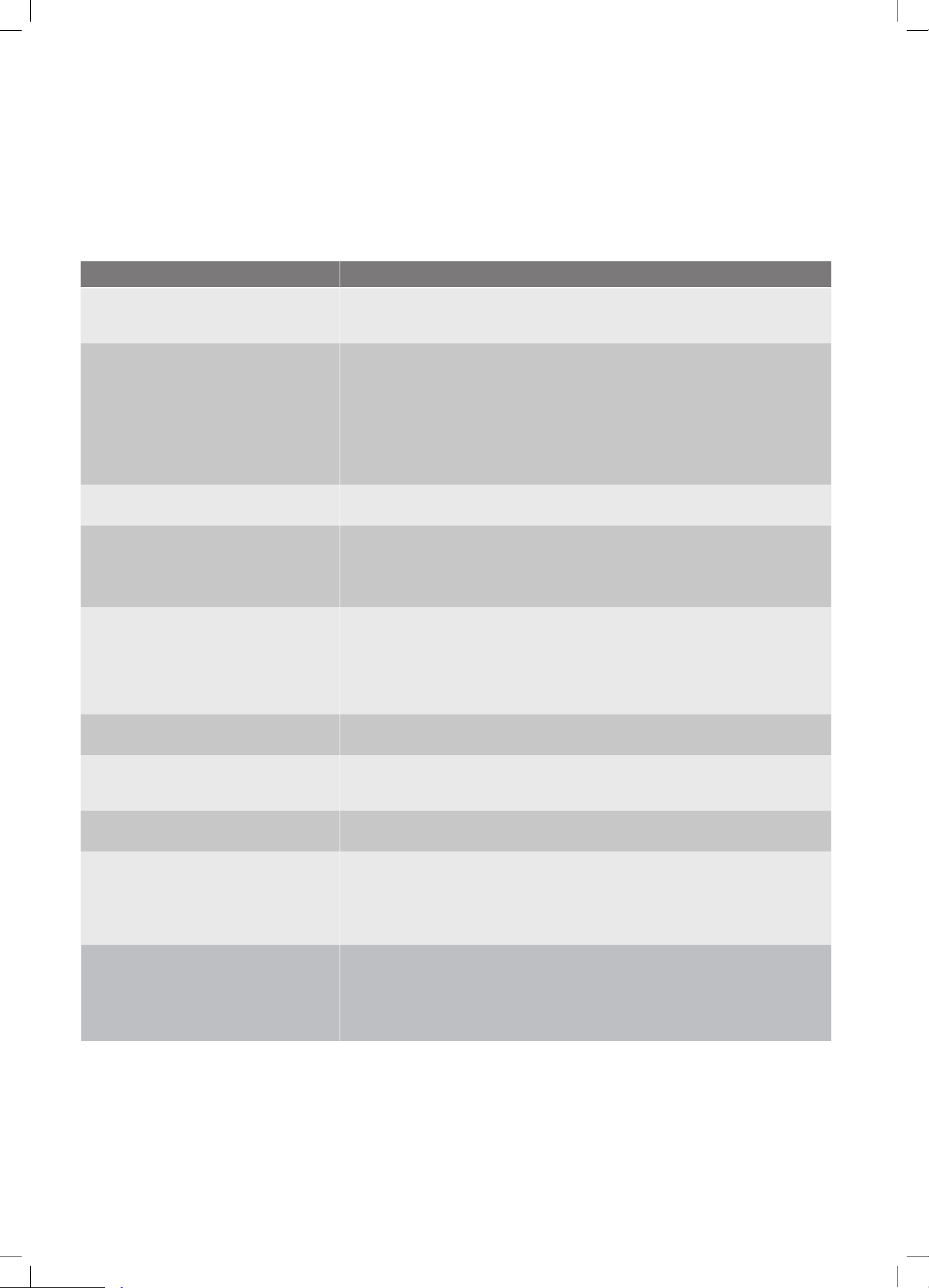
Operation is delayed after restart To prevent blowout of the fuse, the compressor will not operate while the protection
circuit is working for about 3 minutes after sudden OFF/ON operation of the power
supply, this is normal operation and designed to protect the compressor.
Fan speed changes from off, to very slow and
then normal
Automatically happens in heating mode :
• prevents cold air blowing onto occupants when the heating operation is start,
• perform automatic defrosting operation,
• perform low temperature heating operation
Heating operation stops suddenly and
defrost-light blinks
In HEAT mode, the indoor unit temporarily stops for maximum of 10 minutes to perform
the automatic defrosting operation.
Mist coming out of the indoor unit In COOL mode, a mist generated by condensation formed with sudden cooling process
may be emitted.
Mist may generate due to moisture generated from defrosting process when the air
conditioner restarts in HEAT mode operation after defrosting
Low volume sounds are emitted by the air
conditioner
Hissing sound-- during operation or immediately after stopping the air conditioner,
refrigerant owing sound may be heard.
Squeaking sound-- normal expansion and contraction of plastic and metal parts caused
by temperature change during the operation.
Rushing air-- when louver resets its position.
Dust discharges from the unit May occur when air conditioner is used for the rst time or has not been used for a long
time.
Emits a peculiar odour
Various smells generated from interior textile, furniture, or cigarette smoke absorbed
into the air conditioner may be emitted. If not the case call an authorised service
contractor.
Changes to fan only while cooling or heating
mode
Room temperature reaches the temperature setting of the remote control. If not the
case call your suitable contractor.
Operation is erratic, unpredictable or
unresponsive
Interference from cell phone towers and remote boosters may cause the unit to
malfunction
Disconnect the power and then re-connect.
Press the ON/OFF button on the remote controller to restart operation.
NOTE: If the problem is not resolved, please contact a local dealer
or the nearest customer service center. Be sure to inform them of
the detailed malfunctions and unit model number.
Troubleshooting tips
The following events may occur during normal operation, and may
not indicate malfunction
21
Troubleshooting
Error code D1, D2 or D3 appears.
This is normal operation of the DRED function initiated by your power provider to
minimise demand on the power grid. Please contact your power provider for more
details, This relates to the following models only: KSD25HWJ, KSD35HWJ,
KSD50HWJ, KSD71HWJ, KSD90HWJ.
Troubleshooting
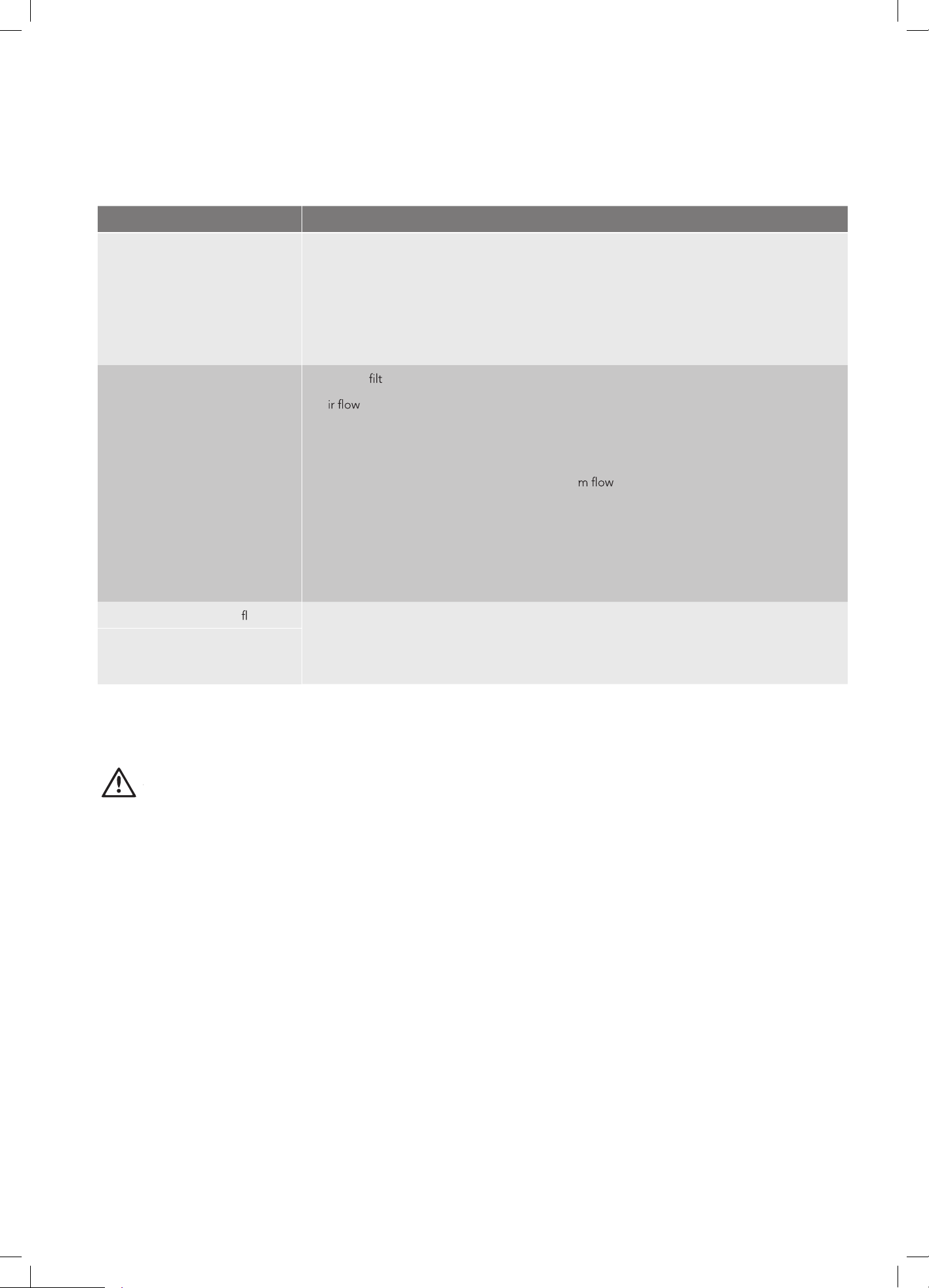
Symptom
Diagnostic
Unit will not operate
Is there a power failure?
Has a switch been turned off, a circuit breaker tripped or a fuse blown?
Is the timer operating?
Are the batteries used in the remote controller exhausted?
Are the batteries used in the remote controller loaded properly?
Poor cooling or heating
performance
Are the air
ers dirty?
Is a
unrestricted in & out of indoor & outdoor units?
Are the temperature and mode settings correct?
Are the windows or doors left opened?
Is fan speed on high and louvers allowing maximu
?
Is direct or strong sunlight shinning into the room in cooling operation?
Are there other heating apparatus or computers operating, or too many people in the room in
cooling operation?
Is the QUIET function is activated? Under QUIET operation, noise reduction is prioritized and
the air-conditioning performance may become lower.
Indicator lamps continue
ashing
The unit may stop operation or continue to run in a safety condition.
Error code appears in the
indoor unit, such as: E0,E1,E2....
P1,P2,P3.....or F1, F2,F3.....
Before you call for or request servicing, troubleshoot a problem by performing following checks:
If the problem persists even if you perform these checks or
diagnostics, immediately stop operation and contact the authorized
service center. Be sure to inform them of the detailed malfunctions
and
unit model number.
WARNING
caution
In the case of ANY of the following, turn off the unit
immediately
• Power cord is damaged or abnormally warm.
• Burning odours are smelled.
• Loud or abnormal sounds are heard.
• A power fuse blows or a circuit breaker trips frequently.
• Water or other objects fall into or out of the unit.
Do not attempt to correct these items yourself. Contact
a authorized service provider.
22
Troubleshooting
Wait for about 10 minutes, the fault may be removed automatically, if not, switch the
power supply to the air conditioner off and on. If the problem still exists, then switch
off the power and contact the nearest customer service center.
Notes
2
3Notes
Notes
2
4 Notes
2
5Warranty
AUSTRALIA
phone: 1300 363 640
fax: 1800 350 067
email: customercar[email protected]
web: kelvinator.com.au
NEW ZEALAND
phone: 0800 436 245
fax: 0800 225 088
email: customercar[email protected]
web: kelvinator.co.nz
For more information on all Kelvinator
appliances, or for dimension and installation
information, call into your retailer, phone or email
our customer care team or visit our website:
Kelvinator. We are part of the Electrolux Family.
To add a touch of professional inspiration to
your home, visit electrolux.com.au
© 20 Electrolux Home Products Pty Ltd.
ABN 51 004 762 341
KMAN_Hottom Extension_Factory_Wi_
April 2022