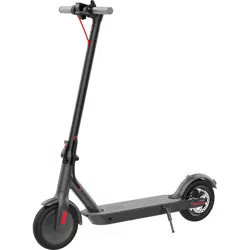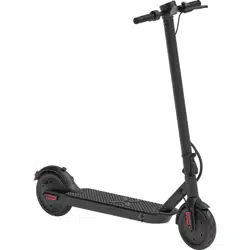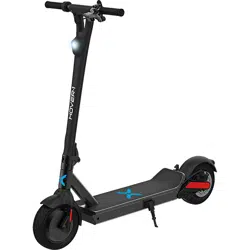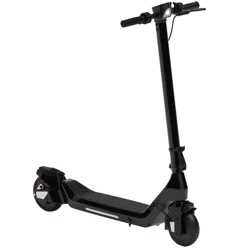
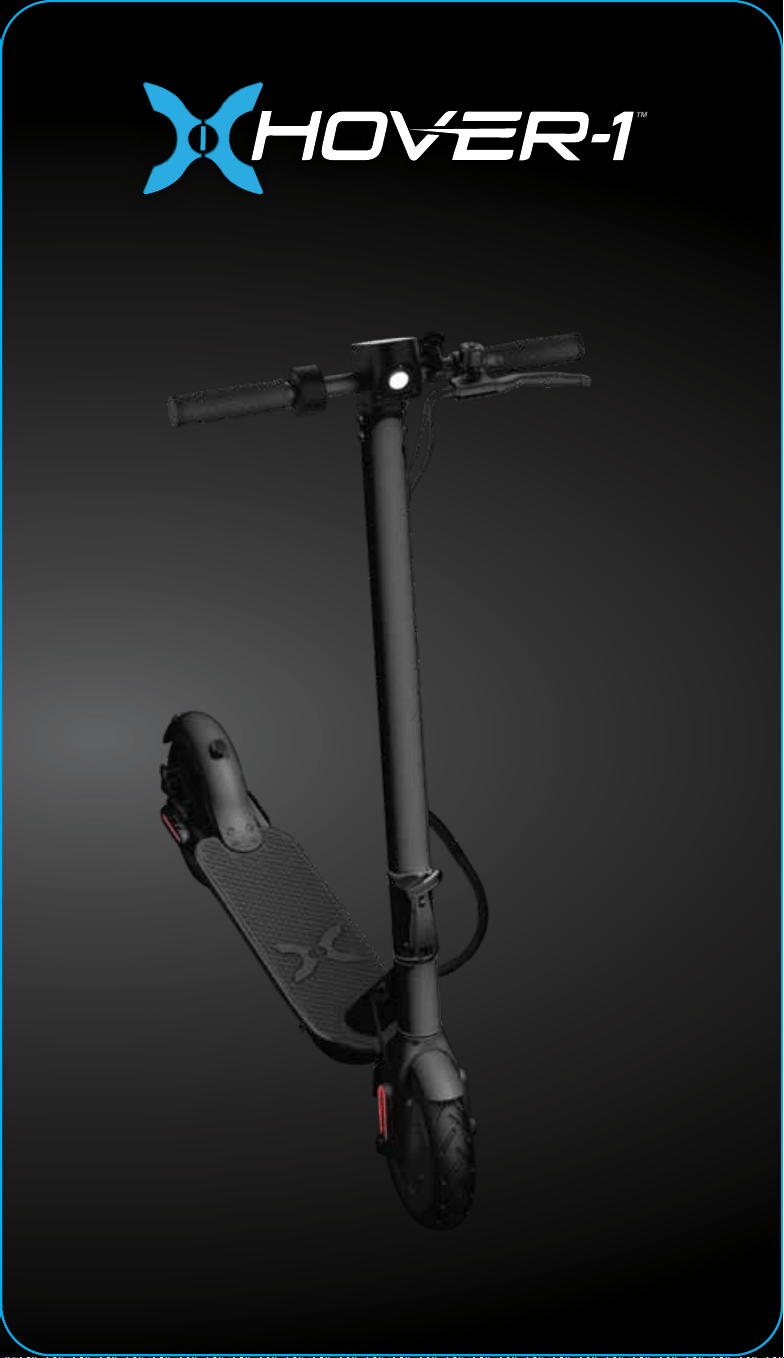
ELECTRIC FOLDING SCOOTER
OPERATION MANUAL
H1-JNY2
Journey 2.0
HELMETS
SAVE
LIVES!
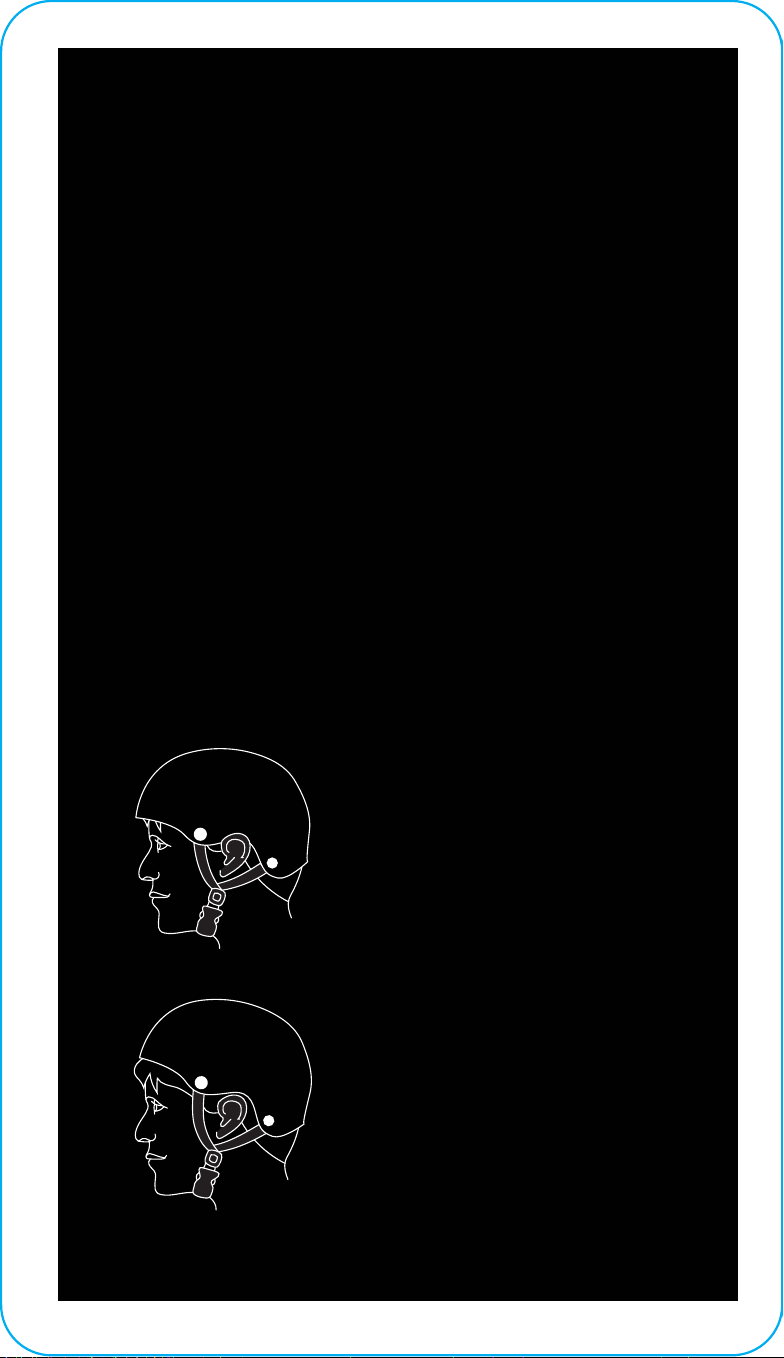
Always wear a properly fitted helmet that
complies with CPSC or CE safety standards
when you ride your E-Scooter.
Correct Fit:
Make sure your helmet
covers your forehead.
Incorrect Fit:
Forehead is exposed and
vulnerable to serious
injury.
1
WARNING
As with all mechanical devices, the Hover-1 Journey
2.0 is subject to wear and tear. Dierent materials
and components may react to wear or tear in
dierent ways. If the design life of a component has
been exceeded, it may suddenly fail, possibly
causing injuries to the rider. Any form of crack,
scratch, or change of coloring in highly stressed
areas indicate that the life of the component has
been reached and it should be replaced. Do not ride
in an abusive manner.
In this manual, the CAUTION sign indicates a
hazardous situation which, if not avoided, can cause
minor or moderate injury.
CAUTION
WARNING
In this manual, the WARNING sign indicates a
hazardous situation which, if not avoided, can cause
serious injury or death.
Great care should be taken with the Hover-1 Journey
2.0 when folding and unfolding it. Moving and
folding parts can cut skin or pinch if mishandled.
DO NOT RIDE YOUR HOVER-1 JOURNEY 2.0
WITHOUT THE STEERING COLUMN, FOLDING
HINGE, AND HANDLEBARS SECURELY LOCKED IN
PLACE.
WARNING
2

PLEASE READ THE OPERATION MANUAL
THOROUGHLY.
Failure to follow the basic instructions and safety precautions listed
in the operation manual can lead to damage to your Journey 2.0,
property damage, serious bodily injury, or death.
Thank you for purchasing the Hover-1 Journey 2.0. Please read all
instructions carefully before using it and retain this manual for future
reference.
• To avoid collisions, falls, and loss of control, please learn how to ride
the Journey 2.0 safely.
• You can learn how to ride the Journey 2.0 by reading the operation
manual and watching videos.
• All users are responsible for any consequences caused by violating
warning contents or proper operations. Hover-1 can not be held liable.
ATTENTION
1. Use only the supplied charger from Hover-1 with this E-Scooter.
2. The operating temperature range of the charger is 32°F - 104°F
(0°C - 40°C).
3. The operating temperature range of the Journey 2.0 is 32°F - 104°F
(0°C - 40°C).
4. Do not ride on icy or slippery surfaces.
5. Read the operation manual and warning labels before riding.
6. Store the Journey 2.0 in a dry, ventilated environment.
7. When transporting the Journey 2.0, avoid violent crashes or impact.
WARNING
3

PLEASE READ THE OPERATION MANUAL
THOROUGHLY.
Failure to follow the basic instructions and safety precautions listed
in the operation manual can lead to damage to your Journey 2.0,
property damage, serious bodily injury, or death.
Thank you for purchasing the Hover-1 Journey 2.0. Please read all
instructions carefully before using it and retain this manual for future
reference.
• To avoid collisions, falls, and loss of control, please learn how to ride
the Journey 2.0 safely.
• You can learn how to ride the Journey 2.0 by reading the operation
manual and watching videos.
• All users are responsible for any consequences caused by violating
warning contents or proper operations. Hover-1 can not be held liable.
ATTENTION
1. Use only the supplied charger from Hover-1 with this E-Scooter.
2. The operating temperature range of the charger is 32°F - 104°F
(0°C - 40°C).
3. The operating temperature range of the Journey 2.0 is 32°F - 104°F
(0°C - 40°C).
4. Do not ride on icy or slippery surfaces.
5. Read the operation manual and warning labels before riding.
6. Store the Journey 2.0 in a dry, ventilated environment.
7. When transporting the Journey 2.0, avoid violent crashes or impact.
LOW TEMPERATURE WARNING
Low temperatures will aect the lubrication of moving parts inside the
Journey 2.0, increasing internal resistance. Additionally, the discharge
capacity and capacity of the battery will be significantly decreased.
Use caution when riding the Journey 2.0 in cold temperatures (below
40°F/4°C). Doing so may increase the risk of mechanical failures of the
E-Scooter, which may lead to damage to your device, property damage,
serious bodily injury, and even death.
SAFETY INSTRUCTIONS
• Keep the E-Scooter away from heat sources, direct sunlight, humidity,
water, and any other liquids.
• Do not operate the E-Scooter if it has been exposed to water, moisture,
or any other liquids to prevent electric shock, explosion, and/or injury to
yourself and damage to the E-Scooter.
• Do not use the E-Scooter if it has been dropped or damaged in any
way.
• Repairs to electrical equipment should only be performed by the
manufacturer. Improper repairs void the warranty and may place the
user at serious risk.
• Do not puncture or harm the exterior surface of the E-Scooter in any
way.
• Keep the device free from dust, lint, etc.
• Do not use this E-Scooter for anything other than its intended use or
purpose. Doing so may damage the E-Scooter or lead to property
damage, injury, or death.
• Do not expose the batteries to excessive heat such as direct sunlight or
an open flame.
• Do not allow hands, feet, hair, body parts, clothing, or similar articles to
come in contact with moving parts, wheels, or the drivetrain while the
Journey 2.0 is running.
4

• Do not operate or allow others to operate the Journey 2.0 until the user
understands all instructions, warnings, and safety features described in this
manual.
• Check with your doctor if you have a medical condition that could aect
your ability to use the Journey 2.0.
• Persons with head, back, neck ailments, or prior surgeries
to those areas of the body are not recommended to use
the Journey 2.0.
• Do not operate if you are pregnant or have a heart condition.
• Persons with any mental or physical conditions that may make them
susceptible to injury or impair their physical or mental capabilities to
recognize, understand, and perform all of the safety instructions and
assume the hazards inherent in operation should not use the Journey
2.0.
Please keep your serial number on file for warranty claims as well as proof
of purchase. our serial number is stamped on the bottom of the
E-Scooter platform. Record the serial number in the designated area of
the “WARRANTY” section of this manual in the event that your Journey
2.0 is lost or stolen.
Prolonged exposure to UV rays, rain, and the elements may damage the
enclosure materials. Store indoors when not in use.
Devices are not intended for use at elevations greater than 2,000 meters
above sea level.
WARNING – Risk of Fire – No User Serviceable Parts.
WARNING
SERIAL NUMBER
5

Operating the Journey 2.0 without following the contents of this manual
may lead to damage to your Journey 2.0 E-Scooter or bodily injury.
PACKAGE CONTENTS
• Hover-1 Journey 2.0
• Operation Manual
• Charger
• Charging Cable
• Air Pump
• The first rule of safe riding is to use common sense.
• Dierent localities and countries have dierent laws about riding electric
transportation devices on public roads. You should check with local oicials
to ensure you are complying with local traic law requirements.
• Hover-1 is not liable for tickets or violations given to riders who do not
follow local laws and regulations.
• For your safety, always wear a helmet that meets CPSC or CE safety
standards. In the event of an accident, a helmet can protect you from
serious injury and in some cases, death.
INTRODUCTION
SAFETY PRECAUTIONS
6
• Obey all local traic laws. Obey red and green lights, one-way streets, stop
signs, pedestrian crosswalks, etc.
• Ride with traic, not against it.
• Ride defensively; expect the unexpected.
• Give pedestrians the right-of-way.
• Do not ride too close to pedestrians. Alert them if you intend to pass them
from behind.
• Slow down at all street intersections and look to the left and right before
crossing.
• If you are riding your E-Scooter in low-visibility conditions, ensure your LED
headlight is turned on, and that you are wearing bright, reflective clothing.
• Do not ride above your skill level. Ensure you have had enough practice
with all functions and features of your Journey 2.0.
• Do not ride too fast – with increased speed comes increased risk. If you
are moving at a higher speed, small bumps can create strong impacts,
leading to a higher risk of injury.
• Do not ride with pets.
• Before stepping on your Journey 2.0, make sure it is placed flat on level
ground.
WARNING
When you ride in low-visibility conditions
such as fog, dusk, or night, you might be
diicult to see, which could lead to a
collision. To increase your level of safety, be
sure to wear bright, reflective clothing when
riding in low-visibility conditions.
7

• Do not try to open or modify your Journey 2.0 E-Scooter. Doing so voids
the manufacturer warranty and may cause your Journey 2.0 to fail, resulting
in injury or death.
• Do not use the Journey 2.0 in a manner that would put people or property
in danger.
• If you are riding near other riders, be sure to maintain a safe distance
between each other to prevent collisions.
• Be sure to keep your feet on the Journey 2.0 at all times. Moving your feet
o your Journey 2.0 while driving is dangerous and may cause the Journey
2.0 to stop suddenly or veer sideways.
• Do not operate the Journey 2.0 while under the influence of drugs or
alcohol.
• Do not operate the Journey 2.0 when you are restless or sleepy.
• Use your best judgment to keep yourself out of dangerous situations with
your Journey 2.0.
• Do not ride your Journey 2.0 o of curbs, ramps, or attempt to operate in
a skate park, empty pool, or in any way similar to a skateboard. Misuse of
your Journey 2.0 voids the manufacturer warranty and may lead to injury or
damage.
• Do not abuse your Journey 2.0. Doing so can damage your unit and cause
failure to the operating system, which may lead to injury. Physical abuse,
including dropping your Journey 2.0, voids the manufacturer warranty.
• Do not operate in or near puddles of water, mud, sand, stones, gravel,
debris, or near rough and rugged terrain.
• The Journey 2.0 can be used on paved surfaces that are flat and even. If
you encounter uneven pavement, lift your Journey 2.0 over and past the
obstruction.
• Do not ride in inclement weather: snow, rain, hail, sleet, on icy roads, or in
extreme heat or cold.
• Bend your knees when riding on bumpy pavement to absorb the shock
and vibrations. This will help you keep your balance.
• If you are unsure if you can safely ride on a specific terrain, step o and
carry your Journey 2.0. Always be on the side of caution.
8

WARNING
Proper use of your brake is vital to ensure safe, eicient
stopping. To avoid misuse and potential injury, do not apply
sudden or excessive force to your brakes. Apply your brakes
gradually and give yourself enough room to come to a
complete stop safely.
• Do not attempt to ride over bumps or objects greater than ½ inch even
when prepared and bending your knees.
• Pay attention. Look where you are riding and be conscious of the road
conditions, people, property, and objects around you.
• Do not operate the Journey 2.0 in crowded areas.
• Operate your Journey 2.0 with extreme caution when indoors, especially
around people, property, and narrow spaces.
• Do not operate the Journey 2.0 while talking, texting, or looking at your
phone.
• Do not ride your Journey 2.0 where it is not permitted.
• Do not ride your Journey 2.0 near motor vehicles or on public roads.
• Do not travel up or down steep hills.
• The Journey 2.0 is intended for use by a single individual, DO NOT attempt
to operate the Journey 2.0 with two or more people.
• Do not carry anything while riding the Journey 2.0.
• Individuals with lack of balance should not attempt to operate the Journey
2.0.
• Young children and the elderly should not operate the Journey 2.0.
• At higher speeds, always take longer stopping distances into
consideration.
• Do not attempt to jump on or o your Journey 2.0.
• Do not attempt any stunts or tricks with your Journey 2.0.
9

WARNING
There may be additional risk of injury if you use your
E-Scooter incorrectly. This includes, but is not limited to:
• Jumping your E-Scooter
• Riding over debris or obstacles
• Performing stunts
• Riding o-road
• Riding fast
• Racing other riders
• Riding in an unusual manner
The aforementioned examples add stress to each part of
your E-Scooter and can lead to long term damage of the
device. Damage to your E-Scooter can lead to an accident
or increase your risk of injury. To decrease your risk of injury,
use your E-Scooter correctly.
• Do not ride the Journey 2.0 in dark or poorly lit areas.
• Do not ride the Journey 2.0 near or over potholes, cracks, or uneven
pavement or surfaces.
• Do not operate your Journey 2.0 o-road.
• Do not turn sharply, especially at high speeds.
• Do not exceed the maximum weight limit of 264 lbs (120 kg).
• Avoid driving the Journey 2.0 in unsafe places, including areas with
flammable gas, steam, liquid, dust, or fibers that could cause fire and
explosion accidents.
• Do not operate near swimming pools or other bodies of water.
• Maintain a safe braking distance during wet conditions.
10
• To avoid damage to the Journey 2.0’s internal circuitry, do not expose it to
liquid, moisture, or humidity.
• Do not use abrasive cleaning solvents to clean the Journey 2.0.
• Do not expose the Journey 2.0 to extremely high or low temperatures, as
this will shorten the life of the device, destroy the battery, and/or distort
certain plastic parts.
• Do not dispose of the Journey 2.0 in fire as it may explode or combust.
• Do not let the Journey 2.0 come into contact with sharp objects, as this
will cause scratches and damage.
• Do not let the Journey 2.0 fall from high places, as doing so may damage
the internal circuitry.
• Do not attempt to disassemble the Journey 2.0.
• Use only the charger provided by Hover-1.
• Use only the manufacturer’s authorized replacement parts.
CARE & MAINTENANCE
WARNING
To reduce the risk of injury, adult supervision is
required. Never use in roadways, near motor vehicles,
on or near steep inclines or steps, swimming pools, or
other bodies of water. Always wear shoes, and never allow
more than one rider at a time.
WARNING
Avoid using water or other liquids for cleaning. If water or
other liquids enter the Journey 2.0, it will cause permanent
damage to the internal components.
WARNING
Users who disassemble the Journey 2.0 without permission
from Hover-1 will void the warranty.
11

BATTERY SPECIFICATIONS
Battery Type: Rechargeable lithium-ion battery
Charge Time: Up to 5 hours
Battery Voltage: 36Vdc
Battery Capacity: 6Ah
Working Temperature: 32°F - 104°F
Charging Temperature: 32°F - 104°F
Storage Time: 1 year
Storage Temperature: 32°F - 104°F
Storage Humidity: 5% - 95%
BATTERY MAINTENANCE
• The lithium-ion battery is built into the device. Do not disassemble the
device to remove the battery or attempt to separate it from the device.
• When charging the device, only use the enclosed charging cable.
• Do not connect or attach the device or the battery to a power supply plug
or directly to a car’s cigarette lighter.
• Do not place the device or batteries near a fire, or into direct sunlight. Heating
the device and/or the battery can cause additional heating, breaking, or
ignition of the battery inside the device.
• Do not continue charging the battery if it does not recharge within the
specified charging time. Doing so may cause the battery to become hot,
rupture, or ignite.
• To preserve natural resources, please recycle or dispose of batteries
properly. This product contains lithium-ion batteries. Local, state, or federal
laws may prohibit disposal of lithium-ion batteries in ordinary trash. Consult
your local waste authority for information regarding available recycling
and/or disposal options.
BATTERY CARE / MAINTENANCE
WARNING
Failure to follow the safety precautions
listed on the following page could lead
to serious bodily injury or death.
12
• Do not attempt to modify, change, or replace your battery.
• Do not use your device if the battery begins to emit odor, overheats, or
begins to leak.
• Do not touch any leaking materials or breathe fumes emitted.
• Do not allow children and animals to touch the battery.
• The battery contains dangerous substances, do not open the battery, or
insert anything into the battery.
• Only use the charger provided by Hover-1.
• Do not attempt to charge the device if the battery has discharged or
emits any substances. In that case, immediately distance yourself from the
battery in case of fire or explosion.
WARNING
SEEK IMMEDIATE MEDICAL ASSISTANCE IF
YOU ARE EXPOSED TO ANY SUBSTANCE
THAT IS EMITTED FROM THE BATTERY.
13
H1-JNY2
33.73 lbs (15.3 kgs)
264 lbs (120 kg)
Up to 16 mph (25 km/h)
Up to 16 miles (25 km)
15°
Lithium-ion
300W brushless motor
36Vdc
6Ah
AC 100V-240V, 50 Hz/60 Hz
(42.5in. x 18.1in. x 18.4in.)
(108cm x 46cm x 46.9cm)
(42.5in. x 18.1in. x 44.4in.)
(108cm x 46cm x 112.8cm)
Air-filled tires
8.5” front & rear
Electronic brake & rear disc brake
COMING DATA CO LTD
CP4215
Model:
Net Weight:
Max Supported Weight:
Max Speed:
Max Range:
Max Incline Angle:
Battery Type:
Rated Motor Power:
Battery Voltage:
Battery Capacity:
Power Requirement:
Folding Size:
Open Size:
Tire Type:
Tire Size:
Brake Type:
Charger Manufacturer:
Charger Model:
SPECIFICATIONS
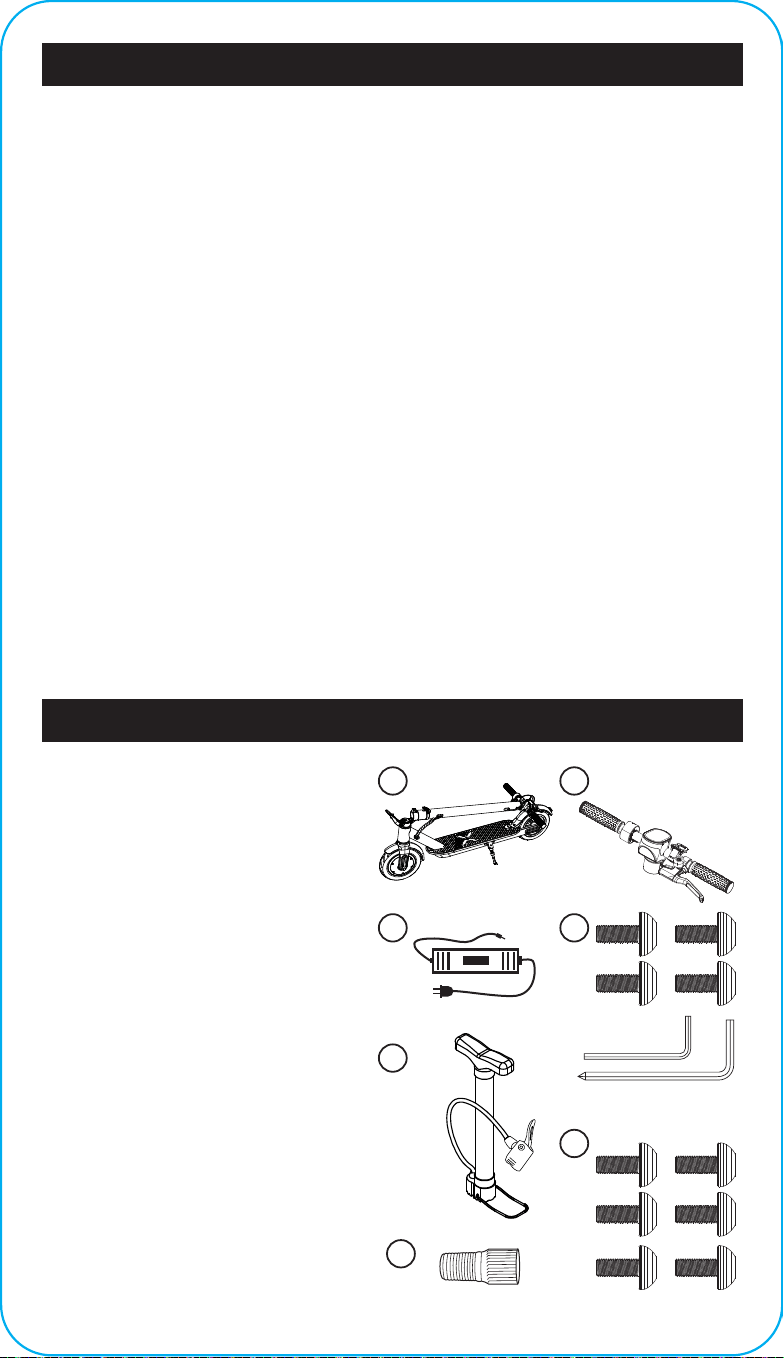
PARTS LIST
A. Journey 2.0 E-Scooter
B. Handlebar Assembly
C. Charger + Charging Cable
D. Hex Keys & Bolts
E. Air Pump
F. 6 Spare Bolts
G. Front tire air pump connector
14
B
C
E
D
F
G
A
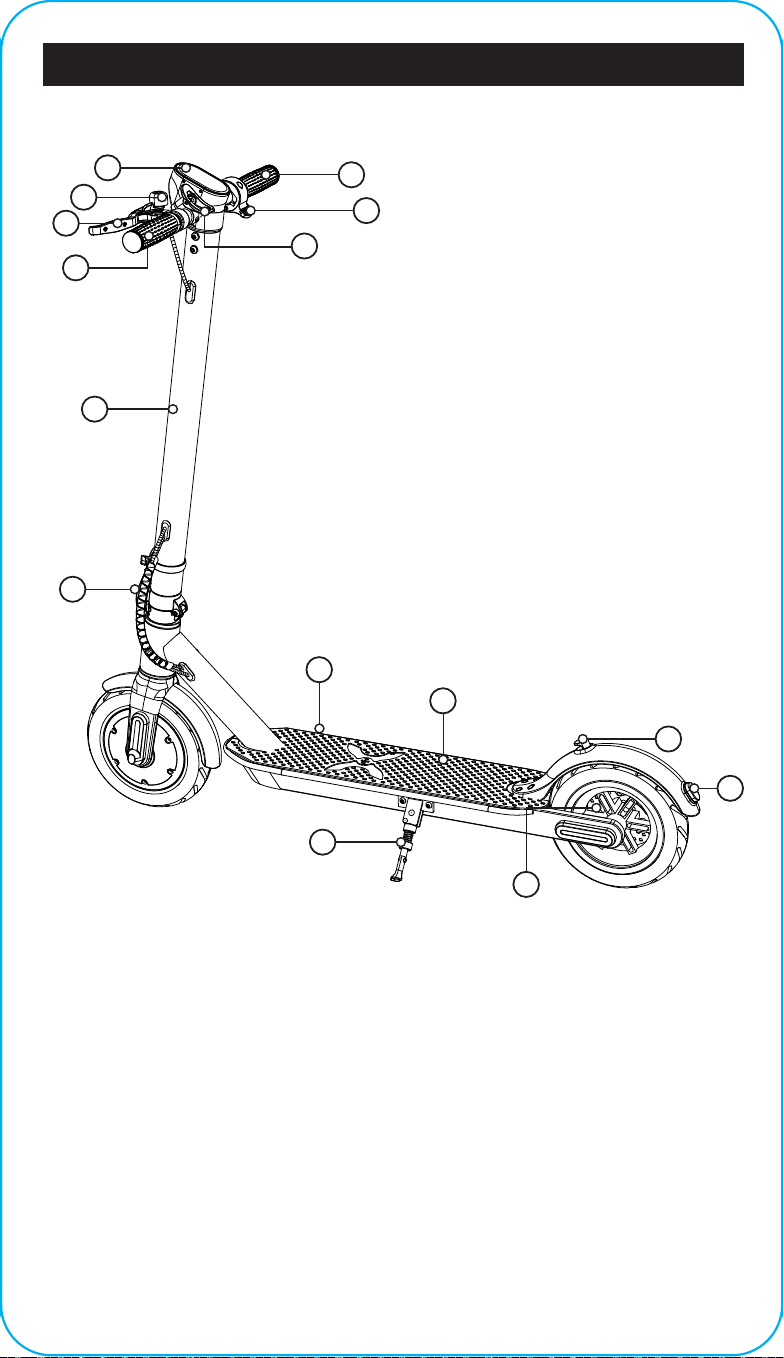
HOVER-1 JOURNEY 2.0 DIAGRAM
FEATURES/PARTS
1. LED Display
2. Bell
3. Brake Handle
4. Handlebar (L)
5. Handlebar (R)
6. Throttle
7. Folding Clip
8. Steering Column
9. Folding Hinge
10. Charging Port
11. Foot Deck
12. Kickstand
13. Folding Hook
14. Brake Light
15. Rear Disc Brake
15
3
2
4
8
1
12
15
7
6
13
9
14
10
11
5
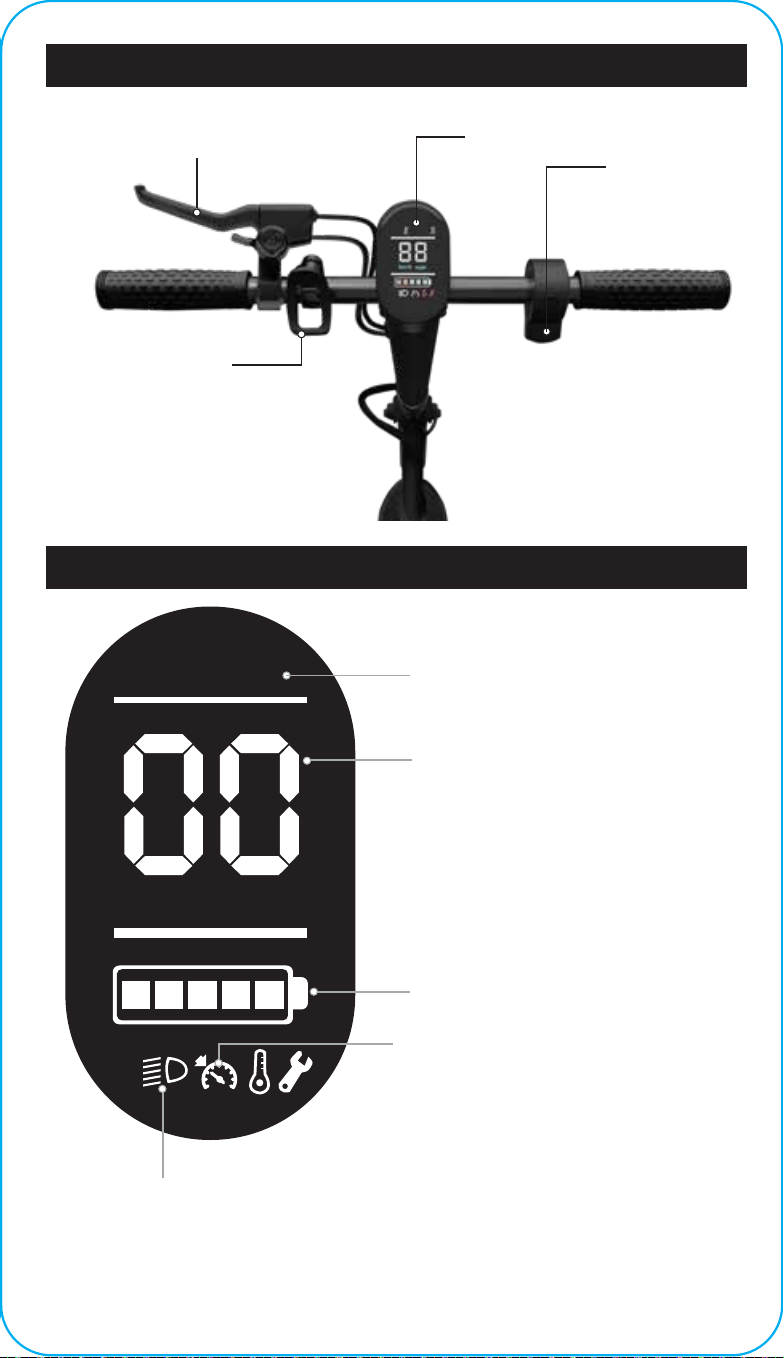
HOVER-1 JOURNEY 2.0 DIAGRAM
LED DISPLAY
LED DISPLAY
BRAKE HANDLE
FOLDING
CLIP
THROTTLE
mphkm/h
E S
SPEEDOMETER
Displays your current speed in km/h or
mph.
Displays the current speed mode when
toggled. While powered on, press the
power button twice to switch between
high and low speed mode:
1 - Low speed mode (Max speed 9 mph)
2 - High speed mode (Max speed 16 mph)
Press the power button 3 times to switch
between mph and km/h
Indicates high speed mode
is activated.
HIGH SPEED MODE
BATTERY INDICATOR
Displays your current battery level.
CRUISE CONTROL ICON
To activate cruise control, long press the
throttle down for 8 seconds while riding at
a constant speed above 3 mph. You will
hear a beep and the cruise control
indicator will light up on the LED display
indicating that it is activated. Press the
throttle down once or squeeze the brake
handle to cancel cruise control.
HEADLIGHT ICON
Indicates the headlight is activated.
Press the power button once to tun
the headlight on or o.
16
PLEASE READ THE FOLLOWING INSTRUCTIONS CAREFULLY
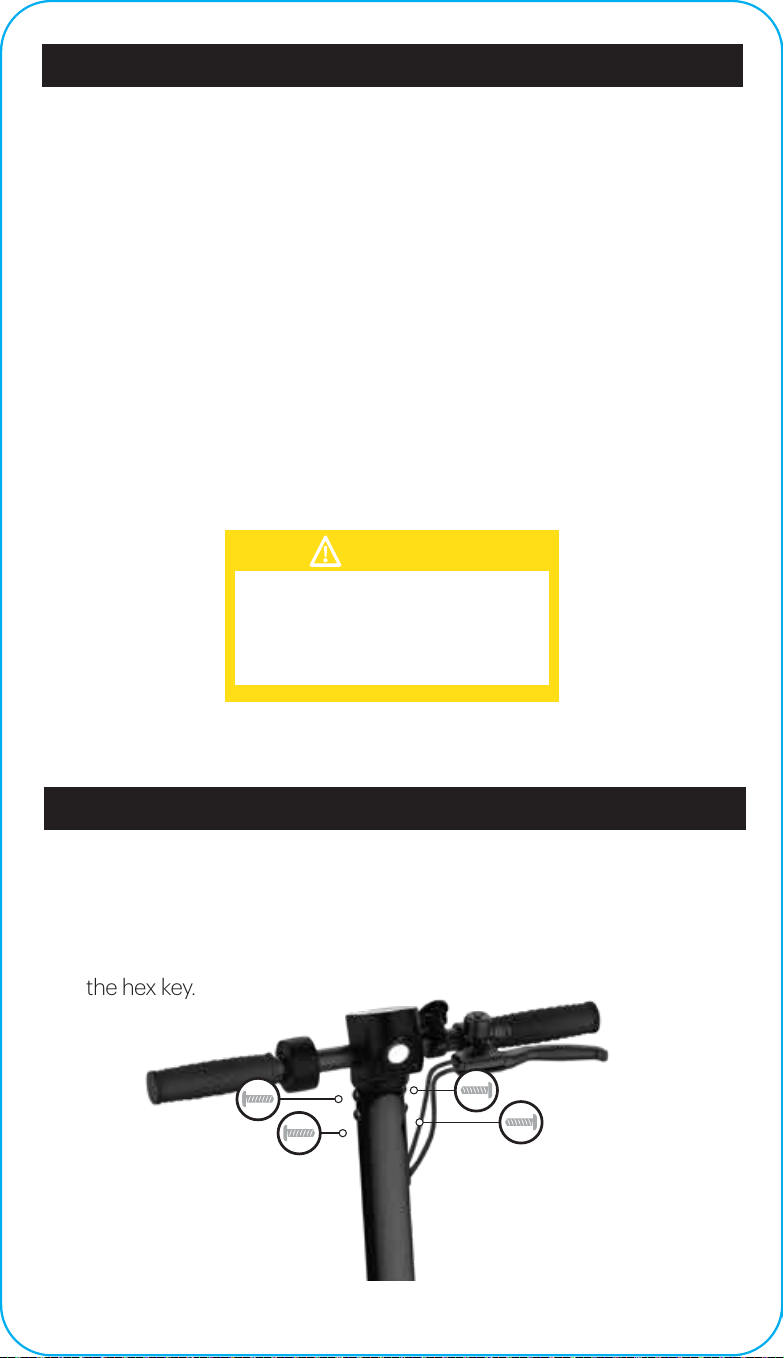
ATTACHING THE HANDLEBAR ASSEMBLY
Attach the handlebar assembly by placing it into the steering column,
aligning the front and back bolt holes, and tightening the 4 bolts into place
with the hex key.
• Ensure that the charging port is clean and dry.
• Make sure that there is no dust, debris or dirt inside the port.
• Plug the charger into a grounded wall outlet.
• Connect the cable with the power supply (100V-240V; 50 Hz/60 Hz).
• Align and connect the 1-pin charging cable into the charging port of the
Journey 2.0 (DO NOT FORCE OR BEND THE CHARGING CABLE AS IT
MAY CAUSE THE PRONGS TO BEND OR BREAK).
• The charging indicator light on the charger itself should change to red,
indicating that your device is now being charged.
• When the red indicator light on your charger changes to green, then your
device is fully charged.
• After fully charging your Journey 2.0, unplug the charger from your device
and from the power outlet.
Only use the included charging
cable and charger to charge your
Journey 2.0. Using any other charger
may damage your Journey 2.0.
CAUTION
CHARGING YOUR JOURNEY 2.0
ASSEMBLING YOUR JOURNEY 2.0
17
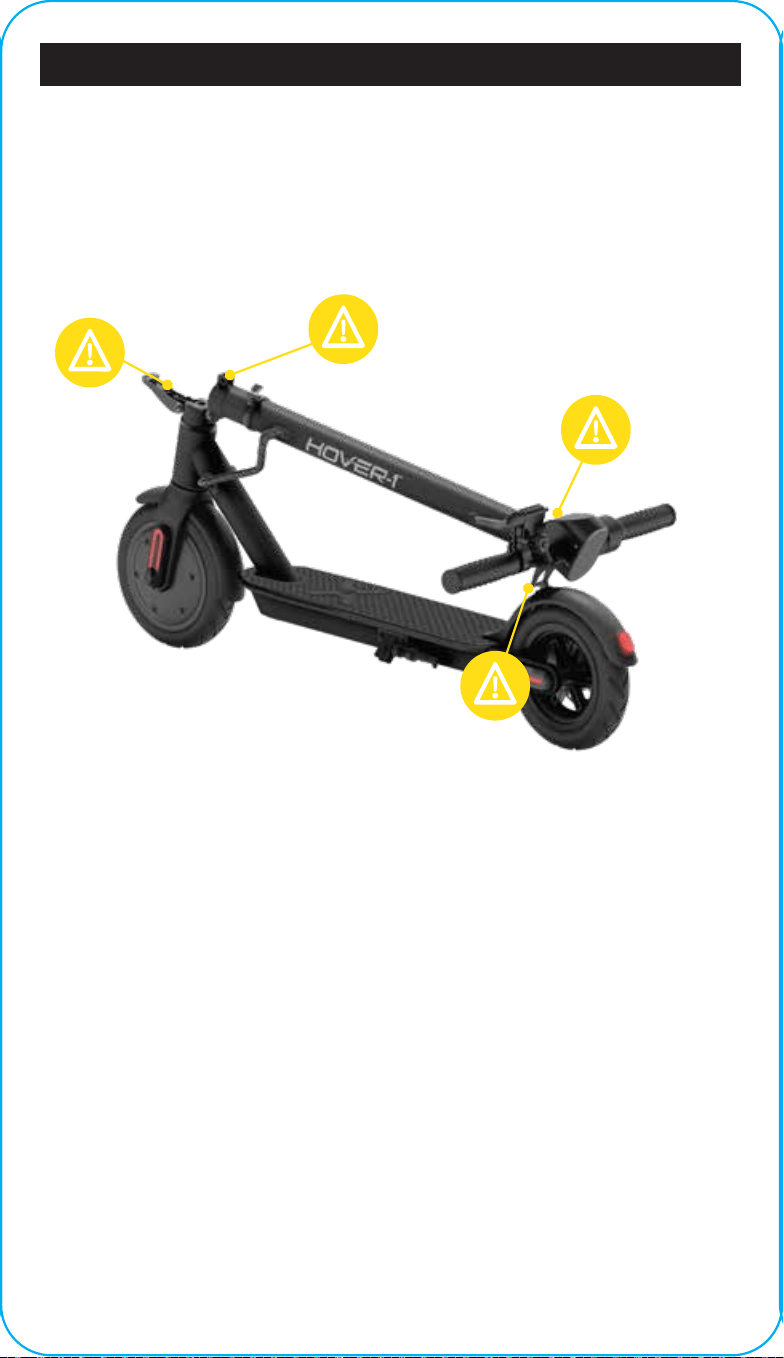
Some parts of your Journey 2.0 can injure you if mishandled. Moving and
folding parts can cut skin. Clamps and pivoting parts such as brake levers
can pinch. When folding and unfolding your Journey 2.0, please watch for
pinch points where injury may be sustained. Do not leave your hand in
these areas during the folding or unfolding process.
PINCH POINTS
18
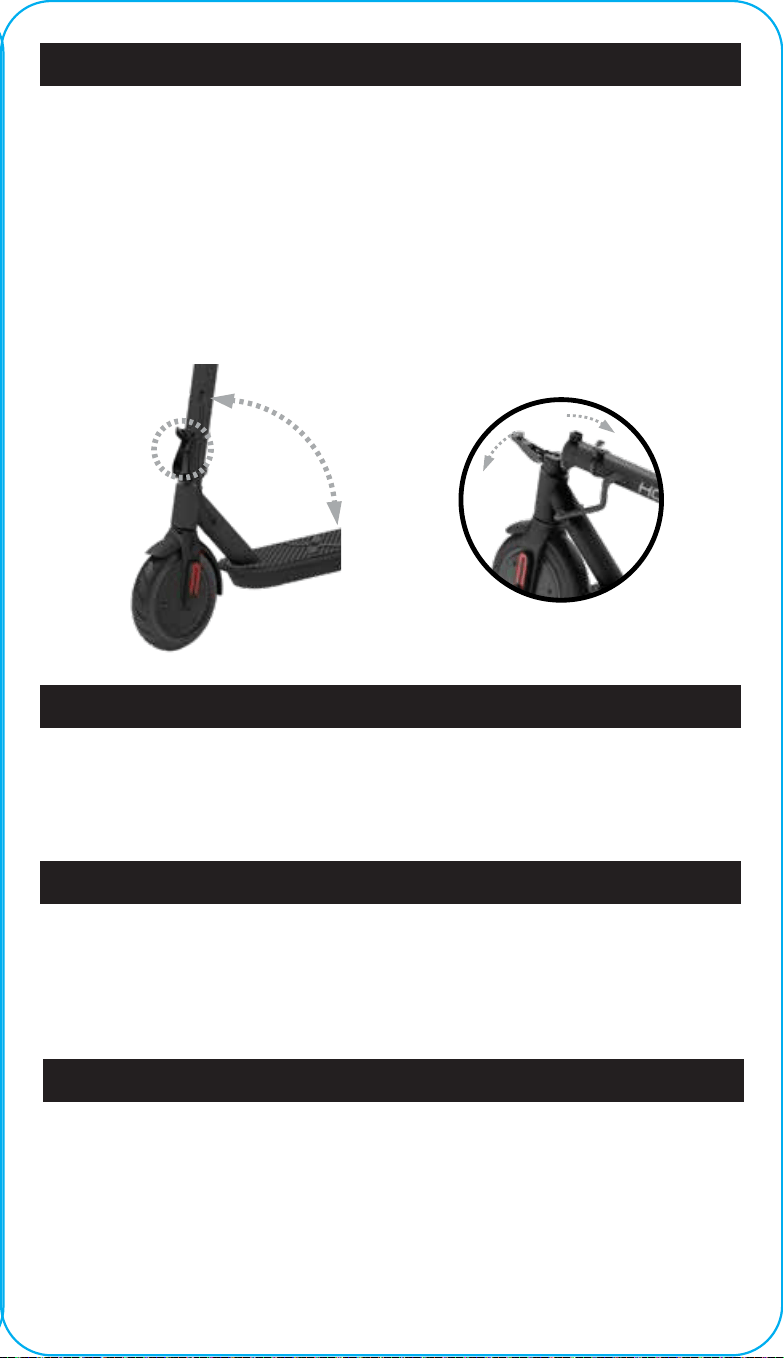
To fold your Journey 2.0, push the folding hinge release button and pull the
folding hinge down. Push the steering column down to the rear fender. Find
the folding clip on the left handlebar and align the opening with the folding
hook protruding from the rear fender to lock them together. Your Journey
2.0 should be locked in a folded position.
To unfold your Journey 2.0, pull on the bottom edge of the folding clip to
unlock the steering column. Raise the steering column until it is pointing
straight up. Pull the folding hinge up and press it against the steering
column to ensure it is securely locked.
To activate high speed mode, ensure the Journey 2.0 is powered on and not
in motion. Press the power button twice. The high speed mode indicator
should light up on your display to indicate it is activated.
To activate cruise control, long press the throttle down for 8 seconds
while riding at a constant speed above 3 mph. You will hear a beep
and the cruise control indicator will light up on the LED display
indicating that it is activated. Press the throttle down once or squeeze
the brake handle to cancel cruise control.
For safety reasons, the Journey 2.0 will not accelerate unless it is already
moving at least 3 mph (1.8 km/h). You must push o the ground with your
foot to get the Journey 2.0 moving, then press the throttle to ride it.
KICK TO START
FOLDING & UNFOLDING
HIGH SPEED MODE
CRUISE CONTROL
RELEASE FOLDING HINGE TO
FOLD STEERING COLUMN
19
FOLDING
HINGE
R
A
I
S
E
O
R
L
O
W
E
R

Before each use, the E-Scooter operator shall perform the
pre-operation checks as specified below:
• The area that the unit is to be operated in is safe and suitable for safe
operation.
• The braking system is functioning properly.
• All safety labels are in place and understood by the operator.
• Any and all axle guards, chain guards, or other covers and guards
supplied by the manufacturer are in place and in serviceable condition.
• The tires are in good condition, inflated properly, and have suicient tread
remaining.
It is important that you fully understand all the functions of your Journey 2.0
E-Scooter. If these functions are not used correctly, you will not have full
control of your Journey 2.0.
Practice using the Journey 2.0 at slower speeds in a flat, open area before
taking it out into public areas.
PRE-RIDE CHECKLIST
Ensure that your Journey 2.0 is in proper working order each time you ride.
If a part of the Journey 2.0 does not function correctly, please contact our
Customer Support Center.
• Ensure the battery is fully charged before riding your E-Scooter.
• Please wear all appropriate safety and protective gear before operating
your E-Scooter.
• Make sure to wear comfortable clothes and flat, closed-toe shoes when
operating your E-Scooter.
BEFORE RIDING
WARNING
Any Journey 2.0 E-Scooter that does not
work properly can cause you to lose
control and fall. Do not ride a Journey 2.0
with a part that is damaged. Replace the
damaged part before riding.
20

FAILURE TO FOLLOW ANY OF THE FOLLOWING SAFETY
PRECAUTIONS MAY LEAD TO DAMAGE TO YOUR DEVICE, DAMAGE
TO PROPERTY, VOID YOUR MANUFACTURER WARRANTY, AND MAY
CAUSE SERIOUS BODILY INJURY OR DEATH.
OPERATING YOUR DEVICE
Make sure the device is fully charged before the first use. Before turning on
your Journey 2.0 E-Scooter, ride it like a normal kick scooter to get
comfortable with the device before using it with the motor.
When you are comfortable riding the E-Scooter, power it on. For the motor
to activate, you must first push o the ground with your foot to get the
E-Scooter moving, then press the throttle down with your thumb.
To slow down, disengage the throttle and squeeze the brake handle to
engage the disc brake. The brake is pressure-sensitive, so a tighter squeeze
will result in more stopping power. Do not attempt to stop suddenly as this
may lead to injury or damage to your brake discs.
Use the handlebars to turn the Journey 2.0 in the desired direction.
The Journey 2.0 can be operated manually if you do not wish
to use the motor.
As you get comfortable on the E-Scooter, you will notice it becomes easier
to maneuver. Remember at higher speeds, it is necessary to shift your
weight when making turns to maintain your stability.
Prepare to brace yourself if you encounter bumps or uneven surfaces. If
necessary, dismount your Journey 2.0 and carry it to a safe operating surface.
RIDING YOUR JOURNEY 2.0
WARNING
Do not turn sharply or at high speeds. Do not
turn or ride quickly along slopes, as it may
cause injury.
21
SPEED AND WEIGHT LIMITATIONS
Speed and weight limits are set for your own safety. Please abide by the
limits listed here in the manual.
• Maximum Speed: 16 mph
• Maximum Supported Weight: 264 lbs
OPERATING RANGE
The Journey 2.0 can travel up to 16 miles on a fully charged battery under
ideal riding conditions. The following are some of the major factors that will
aect the operating range of your device:
• Terrain: Operating range is highest when riding on a smooth, flat surface.
Riding uphill and/or on rough terrain will reduce the operating range
significantly.
• Weight: A lighter user will have a higher operating range than a heavier
user.
• Ambient Temperature: Please ride and store the E-Scooter in
recommended temperatures. This will preserve operating range, battery
life, and the overall performance of your device.
• Speed and Riding Style: Maintaining a moderate and consistent speed
while riding yields maximum range. Traveling at high speeds for extended
periods of time, frequent starts and stops, and idling will decrease
operating range.
WARNING
Riding the Journey 2.0 while exceeding
the weight limit may increase the
possibility of injury or product damage.
WARNING
Proper use of your brake is vital to ensure
safe, eicient stopping. To avoid misuse
and potential injury, do not apply sudden
or excessive force to your brake. Apply the
brake gradually and give yourself enough
room to come to a complete stop safely.
22

If a system error occurs or an improper operation is performed while
riding your Journey 2.0, the device will alert the user in a variety of
ways.
The following are common occurrences that will produce safety alerts.
These notices should not be ignored and appropriate action should be
taken to correct any improper operation, failure, or errors.
• Prohibited riding surfaces (uneven, too steep, unsafe, etc.)
• Battery voltage is too low.
• The E-Scooter is still charging.
• The E-Scooter is overheating, or the motor temperature is too high.
• When the battery is about to run out of power, the battery icon will
flash.
• If any or both tires are blocked, the device will stop after 10 seconds.
• When the battery level has depleted below protection mode, the motor
will power o after 15 seconds.
• If a high discharge current is produced during use (such as riding up a
steep slope for a long period of time), the motor will shut o after 15
seconds.
SAFETY ALERTS
23

NOTE: This equipment has been tested and found to comply with the limits
for a Class B digital device, pursuant to Part 15 of the FCC Rules. These
limits are designed to provide reasonable protection against harmful
interference in a residential installation. This equipment generates, uses,
and can radiate radio frequency energy and, if not installed and used in
accordance with the instructions, may cause harmful interference to radio
communications. However, there is no guarantee that interference will not
occur in a particular installation. If this equipment does cause harmful
interference to radio or television reception, which can be determined by
turning the equipment o and on, the user is encouraged to try to correct
the interference by one or more of the following measures:
• Reorient or relocate the receiving antenna.
• Increase the separation between the equipment and receiver.
• Connect the equipment into an outlet on a circuit dierent from that to
which the receiver is connected.
• Consult the dealer or an experienced radio/TV technician for help.
Changes or modifications not expressly approved by the party responsible
for compliance could void the user's authority to operate the equipment.
This device complies with Part 15 of the FCC Rules. Operation is subject to
the following two conditions:
(1) This device may not cause harmful interference, and (2) this device must
accept any interference received, including interference that may cause
undesired operation.
FCC STATEMENT
24

For warranty information, please visit us at www.hover-1.com
WARRANTY & ERROR CODES
Aix Serial Number Label Here:
Manufacturer: DGL Group, Ltd.
2045 Lincoln Highway, Edison, NJ 08817
Error codes
Error E1- Motor hall failure
Error E2 - MOS tube failure
Error E3 - Brake failure
Error E4 - Throttle failure
Error E6 - Controller/instrument communication failure
Error E5 - Under voltage protection
Error E7 - Overvoltage protection
Error E9 - Blocking fault
UL2272 Compliant
Tested and certified to UL2272 Safety Standard by UL Solutions
The purchaser and rider of this product are responsible for knowing
obeying all state and local regulations regarding the use of this
product. It is highly encouraged that you read and follow the product
instructions including all safety precautions and use protective gear.
NYC consumers, please review fire safety info available here:
https://www.nyc.gov/site/fdny/codes/reference/lithium-ion-battery-
safety.page
25

@RideHover1
@RideHover1
@Hover1Rideables
www.Hover-1.com