13
PLACE SETTINGS
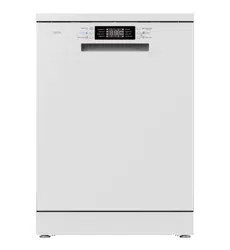
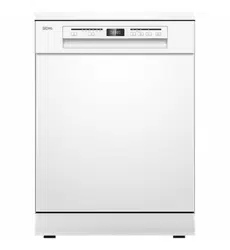
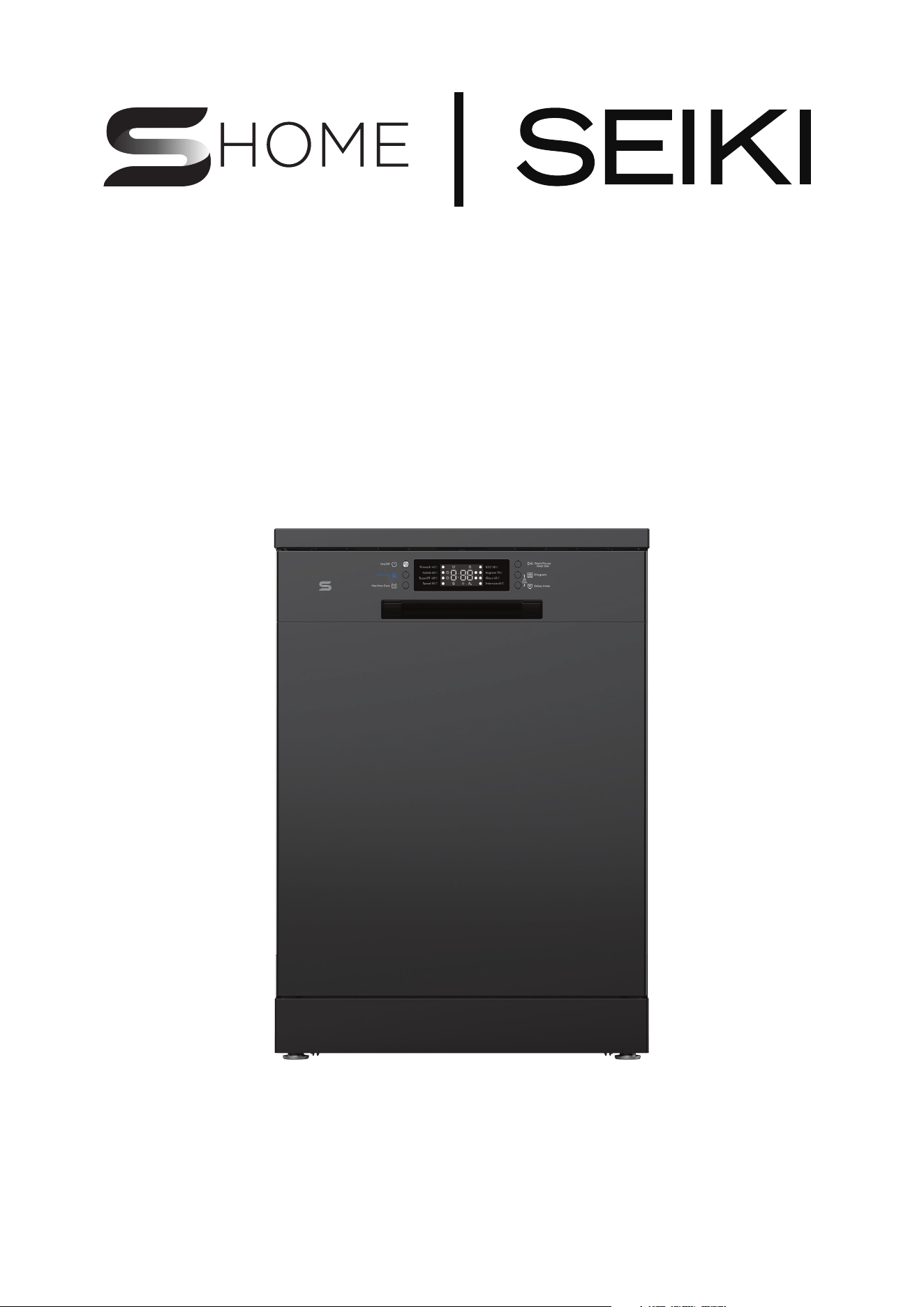
DISHWASHER - STAINLESS STEEL
SC-1300AU6DSS
INSTRUCTION
MANUAL
Please read this manual carefully before using, and keep it for future reference.


General Safety 4
Product Overview 9
Getting Started 14
Installation 15
Operations 22
Cleaning and Maintenance 33
FAQs 37
Specifications 42
CONTENTS
4
Read this manual thoroughly before you start using the appliance.
The safety precautions instructions reduces the risk of fire, electric shock and
injury when correctly complied to.
Please follow all instructions and take notice of all warnings.
ELECTRICAL SAFETY
• Voltage: Plug the appliance to a 220-240V, 50Hz, properly earthed power
outlet, it must be in good working order.
• Power connection: Do not use an adaptor or an extension cord.
Plug the power plug directly into a separate power point that cannot be
accidentally turned o, and that is easily accessible so you can switch it o
if needed.
• Power cord: Do not kink or damage the power supply cord. Make sure it is
behind the appliance so no one can step on or place anything on the power
supply cord or against it. A damaged power plug may overheat and cause a fire.
• Damaged cord: Do not use a cord that shows cracks or damage. Any damage
to the cord may cause a short circuit, fire and/or electric shock.
Contact our support centre on info@ayonz.com for advice
• Disconnection: Never pull the power cord to unplug appliance. Grip the plug and
pull straight out from the power point.
• Electrical work: If the installation of this appliance requires any electrical work,
make sure it is carried out by an electrician.
Pay close attention to messages that follow this safety alert symbol or the words
DANGER, WARNING or CAUTION. These words will be used to alert you of
potential hazards that and injure you and others. Following these instruction will
tell you how to reduce the chance of injury and the possible dangers if
instructions aren’t followed.
This symbol indicates when there is a serious risk of
injury if you do not pay attention to the warnings.
WARNING
CAUTION
This symbol indicates when to be careful to
avoid a serious risk of injury to oneself or
damage to property.
IMPORTANT INFORMATION
GENERAL SAFETY

5
WARNING
• Make sure that transport packaging is removed from the rear of the appliance.
Do not overload the appliance with too many dish.
• Appliance must not be installed behind a lockable door, a sliding door or a door
with a hinge on the opposite side to that of the appliance, in such a way that
a full opening of the appliance door is restricted.
To reduce risk of fire, electric shock or injury, always follow these basic precautions
and accident prevention measures when using this appliance, including the below:
NOTE: This appliance should be installed by an authorized technician else
warranty will be void.
INSTALLATION
• The product is heavy, be careful when moving it. To avoid back or other
injury, have 2 people lift or mechanical aid when installing.
• When unboxing, thoroughly inspect the appliance carefully for any
damage. If there is any damage, do not install the appliance. Contact our
support centre on info@ayonz.com for advice.
• While installing the appliance make sure that the power cord is not bent
or flattened.
• Make sure to remove all packaging materials such as foams and tapes
before installing the appliance.
• Make sure if the machine is to be placed on carpet that the ventilation openings
in the base are not obstructed
• Install the appliance on a flat level and stable ground.
GENERAL SAFETY INSTRUCTIONS (Cont.)

6
GENERAL SAFETY INSTRUCTIONS (Cont.)
USAGE CONDITIONS AND RESTRICTIONS
• Supervision over children is to ensure that they do not play with the
appliance. Never allow them to use, play with or crawl inside the appliance.
Cleaning and maintenance must not be done by children.
• This appliance is not to be used by persons (including children) with reduced
physical, sensory or mental capabilities, or lack of experience and knowledge,
unless they are being supervised or been given instructions on how to use of the
appliance in a safe way and understand the hazards with using this
appliance incorrectly. Children being supervised not to play with the appliance
• Only for indoor domestic use only. It is not to be used for industrial or
commercial use.
• Do not use this product for anything other than its intended purpose, and only
use it as described in this manual. Do not attempt to alter or modify
this appliance.
• In the process of a hot wash, the door window can become hot. Make sure not to
touch it or that no children or pets come into contact with the door window.
• Make sure that there is no hard, sharp objects such as coins, safety pins, bra
wires, nails or screws can cause damage to the appliance.
• Damage or malfunction caused from foreign objects is not covered by your
warranty to the appliance.
• Do not operate this appliance outdoors.
• Incorrect use can result in property damage, injury or death. We assume no
liability for misuse of the appliance or noncompliance with these instructions.
• Do not block any ventilation openings. Ensure that vents are not covered
by anything.
• Do not use this product for anything other than its intended purpose, and only
use it as described in this manual. Do not attempt to alter or modify
this appliance.
• This appliance is intended to be used in household and similar applications such
as:
– Sta kitchen areas in shops, oces and other working environments;
– Farm houses;
– By clients in hotels, motels and other residential type environments;
– Ded and breakfast type environments;
– Areas for communal use in blocks of flats or in launderettes.

7
GENERAL SAFETY INSTRUCTIONS (Cont.)
CLEANING AND MAINTENANCE
• Before cleaning or maintenance, always unplug the appliance from the power
socket. Make sure you pull by the plug, not the cord as this can damage the
power cord and cause a hazard.
• Only the filter requires regular cleaning, everything else is non user-serviceable
parts. Do not try to repair, disassemble or modify the appliance.
• Check and clean the lint filter on a regular basis
• Service: Never try to repair, modify or replace any part of the appliance, unless
this manual says you can do so. All other servicing is to be done by a qualified
technician, or contact our support centre on info@ayonz.com for advice.
• Only load items that are suitable for the appliance.
• Do not place any open source flames on the appliance such as candles, etc..
• The door/window will be hot after a long cycle, be sure not to touch the window
and to keep children away from the appliance.
• The appliance must not be supplied through an external switching device, such
as a timer, or connected to a circuit that is regularly switched on and o by a
utility.
• Incorrect use can result in property damage, injury or death. We assume no
liability for misuse of the appliance or noncompliance with these instructions.
8
GENERAL SAFETY INSTRUCTIONS (Cont.)
CAUTION
• Do not use the appliance if industrial chemicals have been used for cleaning.
• Do not place any objects on the top of this machine.
• If this machine will be idle for an extended period of time, such as during
holidays, please turn o the faucet and unplug this machine.
• Do not use liquid detergent or bleach (e.g. chlorine bleach or oxygen bleach ) to
wipe or smear the surface of this machine. Otherwise, the surface of this machine
may be corroded, discolored or damaged.
• Do not touch the water discharged from the appliance as it may be hot.
• if the drain and inlet pipes are frozen in winter, please thaw them before use.
• Do not put your hands, feet or metal objects under or behind this machine.
• Do not place the drain hose under the appliance during installation.
• There is no need to pre-rinse iteams under running water, and this unnecessarily
increases water and energy consumption.
• Washing in a dishwasher generally uses less water and energy than washing by
hand.
WARNING:
Never stop a dishwasher before the end of the drying cycle unless all items are
quickly removed and spread out so that the heat is dissipated.
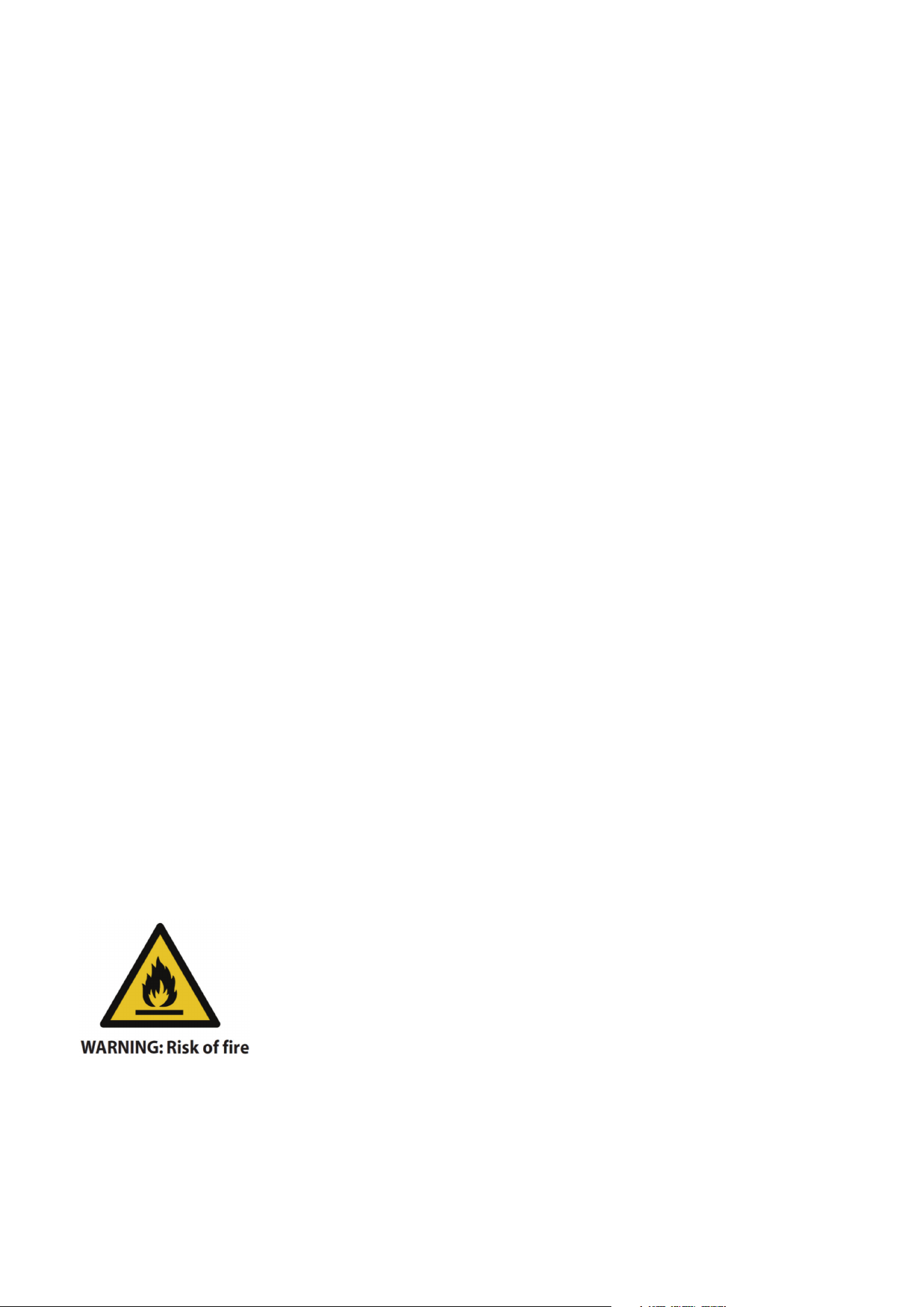
This symbol alerts you to take care as oil-aected items
can ignite, especially when exposed to heat, such as in a
dishwasher. The items become warm, causing an oxidation
reaction in the oil. Oxidation causes heat. If the heat cannot
escape, the items can become hot enough to catch fire. Piling,
stacking or storing oil-aected items can prevent heat from
escaping and so it will create a fire hazard.
9
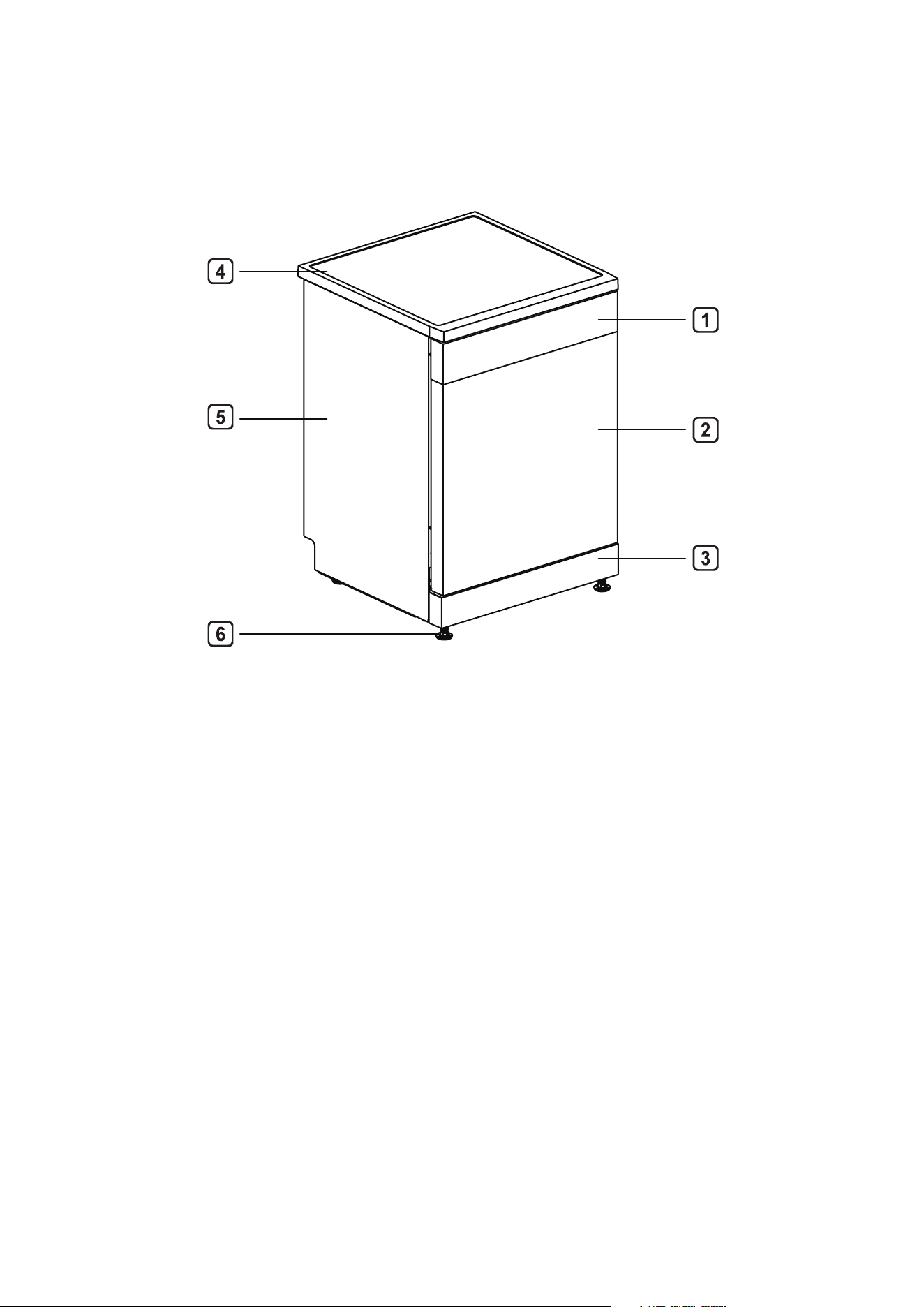
1. Control Panel
2. Door
3. Kick-proof plate
4. Top Cover
5. Side Plate
6. Feets
EXTERIOR TRIM PARTS
PRODUCT OVERVIEW
10
PRODUCT OVERVIEW (Cont.)
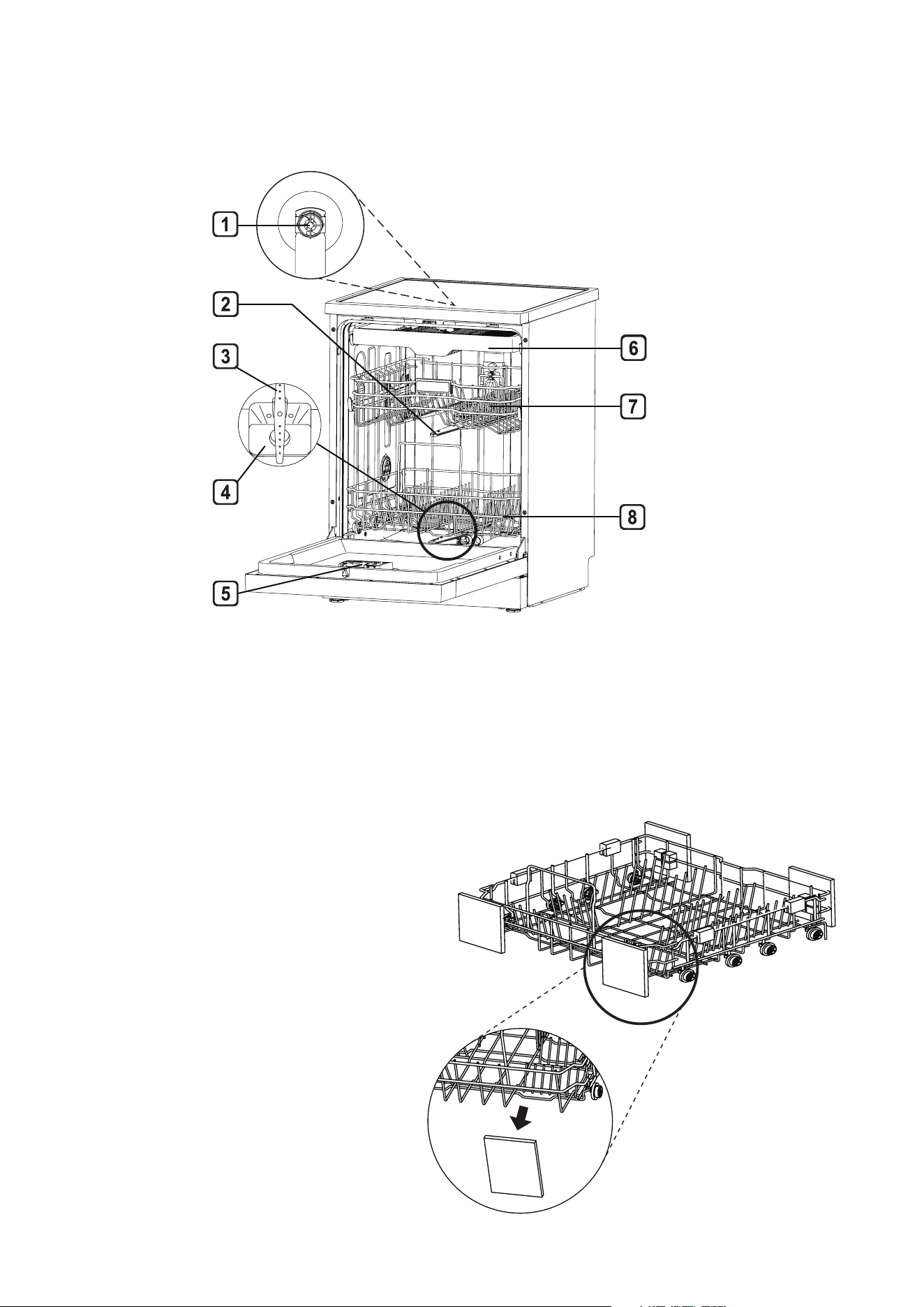
INTERIOR TRIM PARTS
1. Top wash impeller
2. Middle spray arm
3. Lower spray arm
4. Filter assembly
5. Detergent and Rinse
aid dispenser
6. Cultery rack
7. Upper dish rack
8. Lower dish rack
NOTE
• Place the cutlery basket in
the lower dish rack. For best
performance, please install along the
middle, as shown in the picture of
interior trim parts.
• Please remove all packaging
materials from the outside and
inside of the dishwasher before
installing.
11
PRODUCT OVERVIEW (Cont.)
CONTROL PANEL
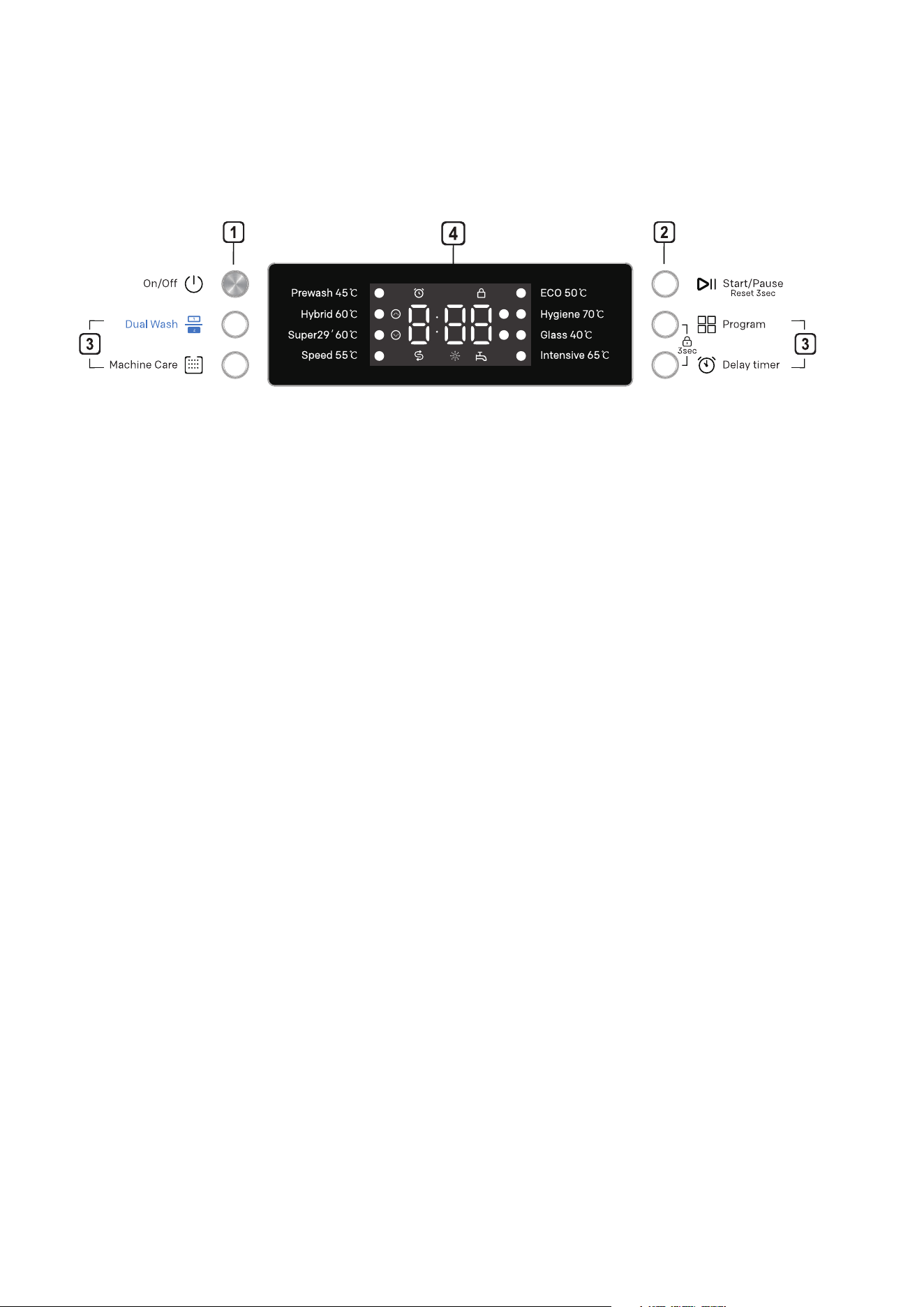
1. ON/OFF: Turn ON/OFF the power supply. Press this button to cut off the
power supply ater the program is completed.
2. START/PAUSE: Press this button to start the operation. Press this button to
pause during operation, and press it again to continue the operation. Long
Press for 3 seconds to cancel the program and drain water.
3. PROGRAM: Press this button to select the program you want.
• Delay Timer: Press this button to set the delay time. This function can
delay the start time of the program selected. Each time you press this
button, the delay time will increase by one hour. The setting range of delay
time is 1-24hours, and the single adjustment range is 1 hour. You may
press it to cancel after 24hours. During the delay time, you may cancel the
delay time by opening the door and long pressing the Delay timer button.
At this time, it will return to the state of no delay timer selected. The delay
time shown on the panel is the time when the program finishes.
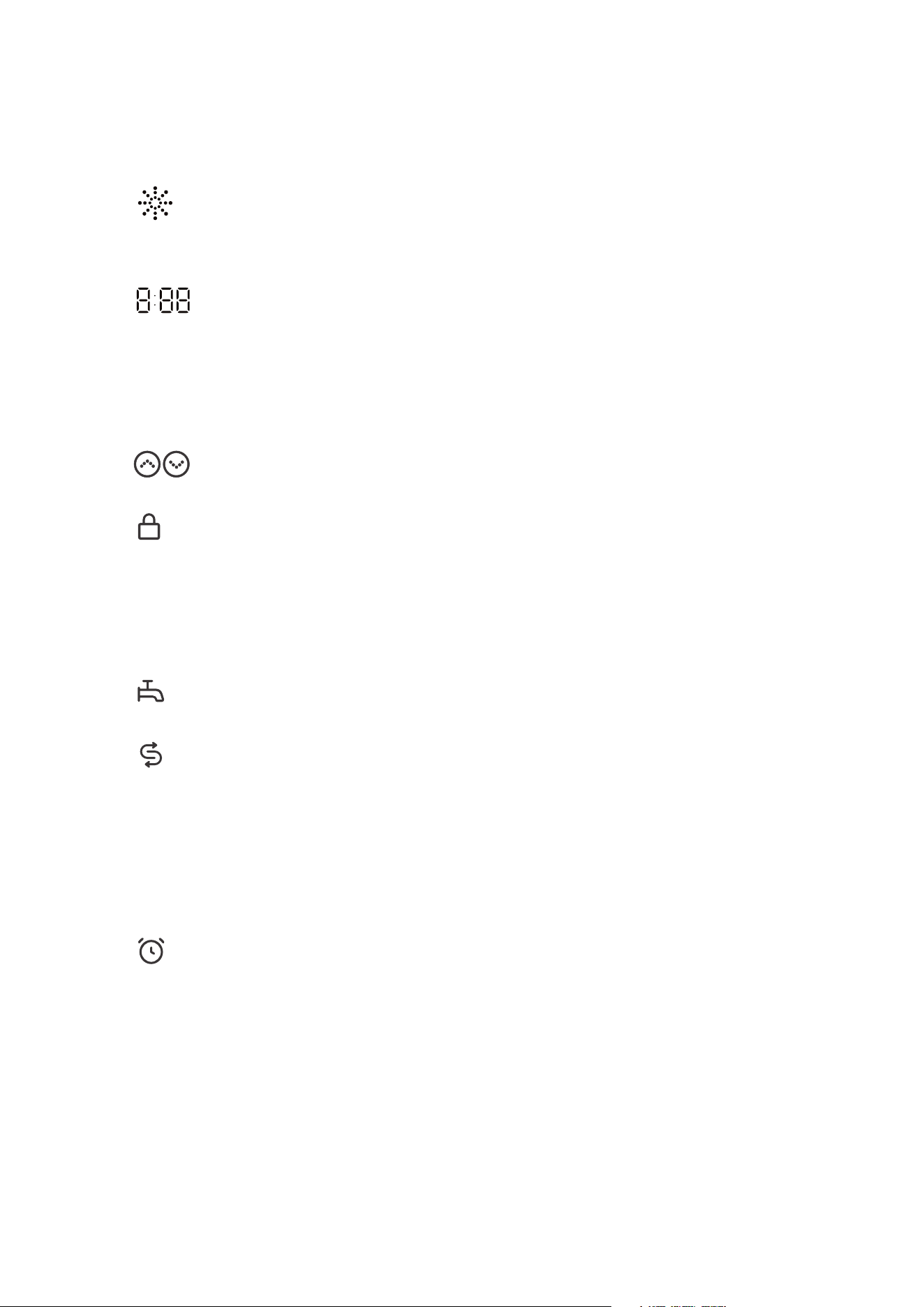
• Machine Care: This function is used to clean the inside of the dishwasher
and eliminate residual dirt, odor, white spots and other dirt. You care
not required to place tableware in the machine when using this function.
• Dual wash: It is used to operate the machine without loading it completely.
With dual wash function you can save both water and power while using
the lower and ipper baskets of the machine. Special cleaning for selected
areas. (Upper dish rack area or lower dish rach area).
12
PRODUCT OVERVIEW (Cont.)
4. DISPLAY:
Rinse Aid Indicator: this icon will light up when the liquid level of rinse
aid is low, it will turn off automatically when the rinse aid is replenished or
the liquid level is set to 0.
Digital display: the digital display on the control panel shows the
estimated program time. When the program and the option are selected,
the display will show the estimated total time to be consumed by the
program running. During operation, the display shows the remaining
estimated running time.
Dual wash indicator: the icon will flash when the DUAL WASH
function is selected.
Child lock indicator: While the program is running, you may press
and hold the Program and Delay timer for 3 second to activate or deactivate
the child lock. Child lock can prevent settings from being changed during
operation. All buttons on the control panel except fo the ON/OFF button will
be locked by selecting this function. This function does not lock the door.
Abnormal water inlet indicator: This icon will keep flashin when the
water inlet is abnormal (e.g. Closed faucet or water outage).
Salt indicator: This icon will light up when salt is insufficient, it will
turn off automatically when the salt is replenished. Since different salt
brands in the market have different particle sizes and since the water
hardness may vary, dissolution of the salt in water may take a couple
of hours. Therefore, salt indicator remains on for a while ater adding salt into
the machine.
Delay timer indicator: The display will show the delay time in the unit of
hour if you select the delay timer.
13
PRODUCT OVERVIEW (Cont.)
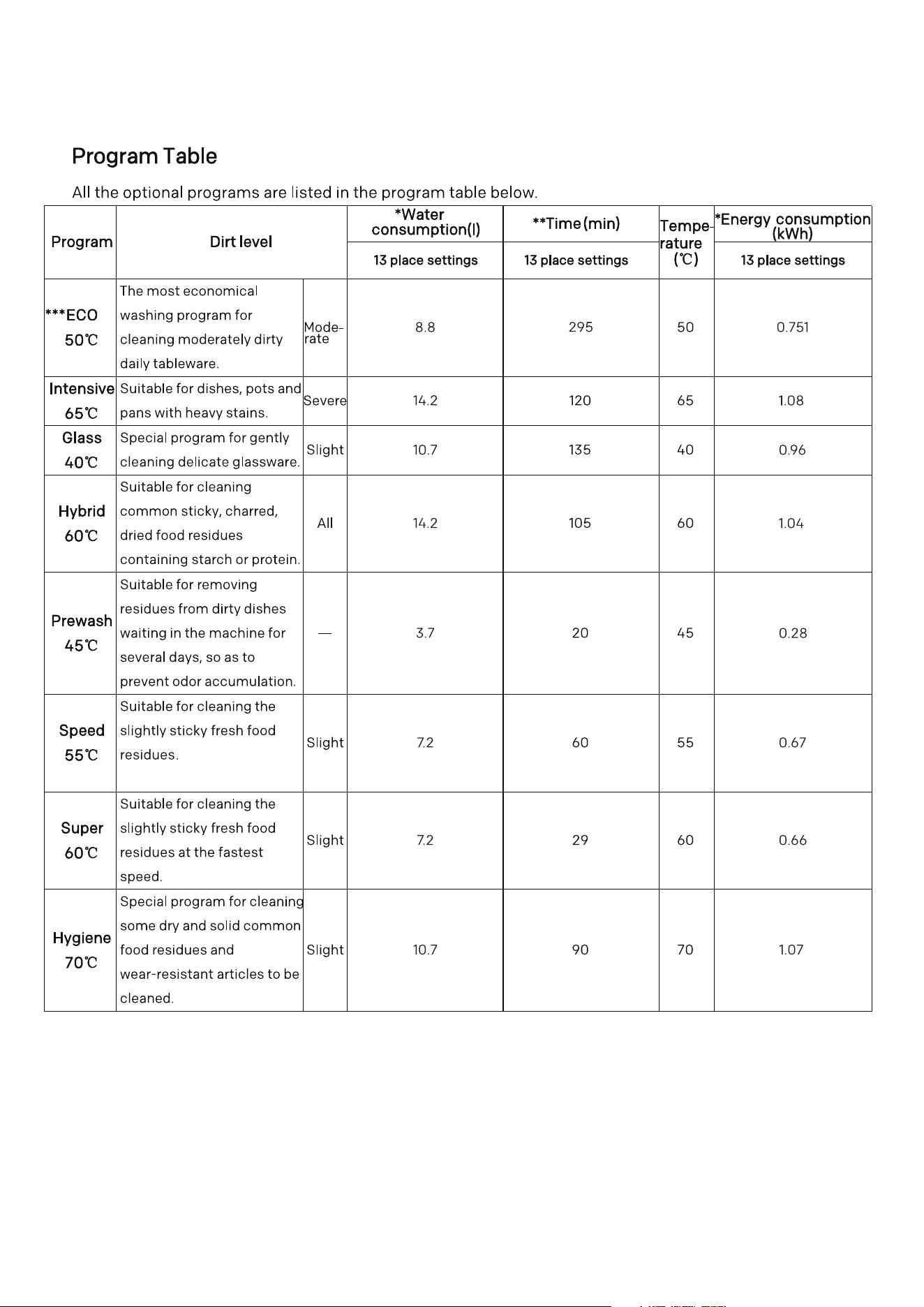
NOTE: The actual water consumption and energy consumption may vary with the dirt
level and water hardness.
The actual running time and program time displayed may vary with the options selected
for the program, dirt level, water temperature and water hardness. Therefore, the display
time and the actual running time may be different.
Select the ECO programme for energy-saving dishwashing. This programme is the most
efficient in terms of its combined energy and water consumption for cleaning dishes
with a normal level of soiling.

14
Before installing your appliance, read all safety instructions in this manual,
especially the sections on electrical safety and installation.
GETTING STARTED
UNPACKING
• When unpacking the appliance, be sure to keep all the packaging materials until
you have made sure your new appliance is undamaged and in good working
order. Plastic can be a suffocation hazard for babies and young children,
make sure the materials are out of their reach.
TRANSPORTATION
• CAUTION: VERY HEAVY! Be sure to team lift the appliance with someone or
mechanical aid is required when moving the appliance. Keep the appliance
upright as possible when moving the appliance.
15
INSTALLATION
SELECT A PROPER POSITION
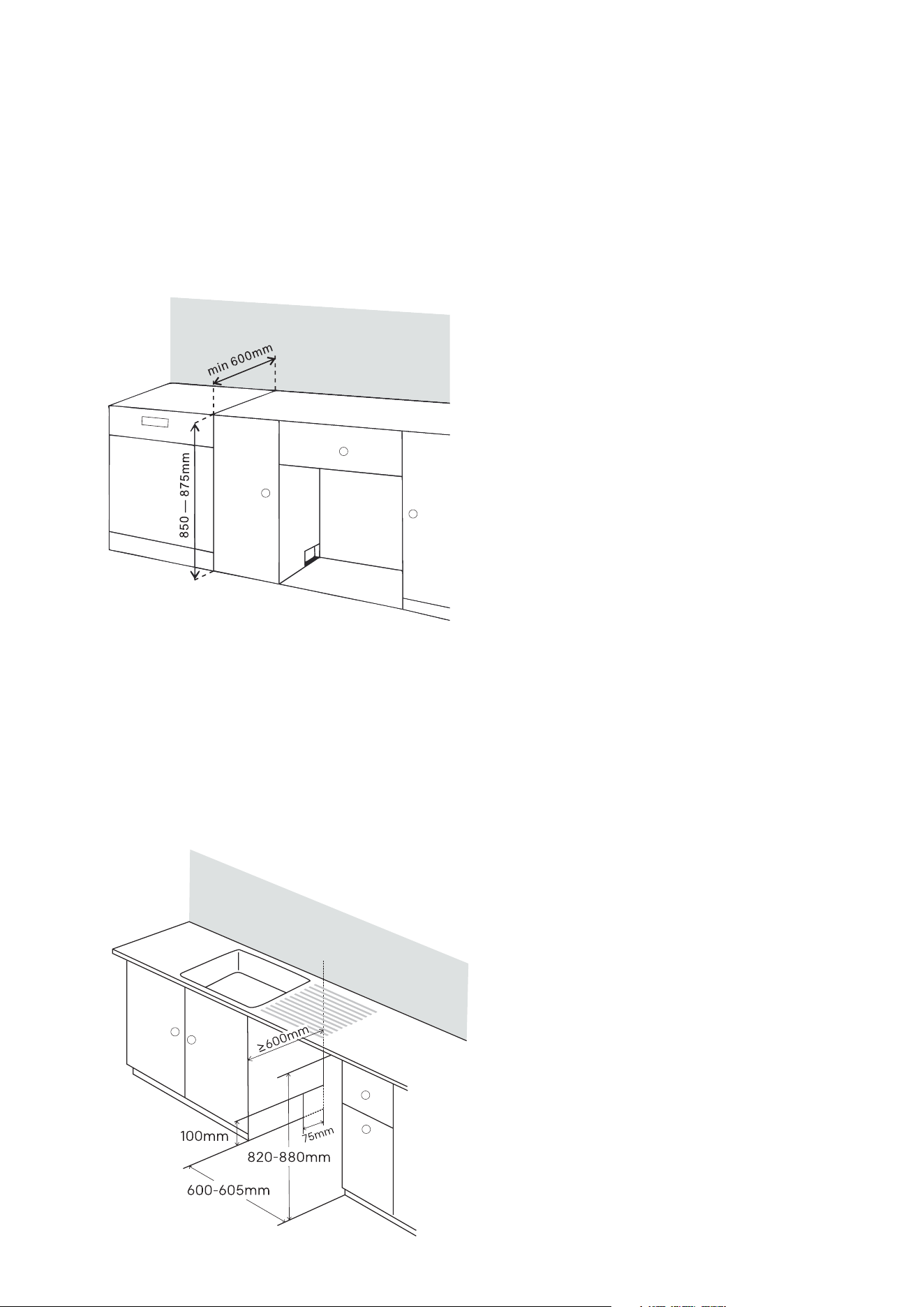
1. Freestanding installation mode:
Please install the dishwasher on a flat and stable ground. if the dishwasher in a
cornerm at least 50mm between the dishwasher and the adjacent wall shall be
reserved to ensure that there is enough space for the dishwasher to open and
close, and reinforce it with wooden strips.
Please place the dishwasher on a firm
and flat ground.
Do not install the dishwasher on an
elevated surface.
The bare wood around this machine
shall be sealed with waterproof paint or
sealant to prevent it from expanding in
case of water.
Push the dishwasher into the cabinet of
open space and make sure that the drain
hose at the rear of the dishwasher and in
the cabinet are not knotted or stretched.
Install the dishwasher in a flat place. Do
not place anything between the ground
and the machine foot.
2. Embedded installation mode:
Please install the dishwasher on a flat and stable ground. Prepare notches on both
sides for hoses and cables. (approx. 100 mm x 75 mm). The notch should be as
close to the sink as possible in order to facilitate the connection of the water inlet
pipe and drain pipe. In order to ensure smooth drainage, the installation position of
the dishwasher shall not be more than 1m away from the water tank. Please make
necessary height adjustments before pushing the dishwasher into the installation
position.
16
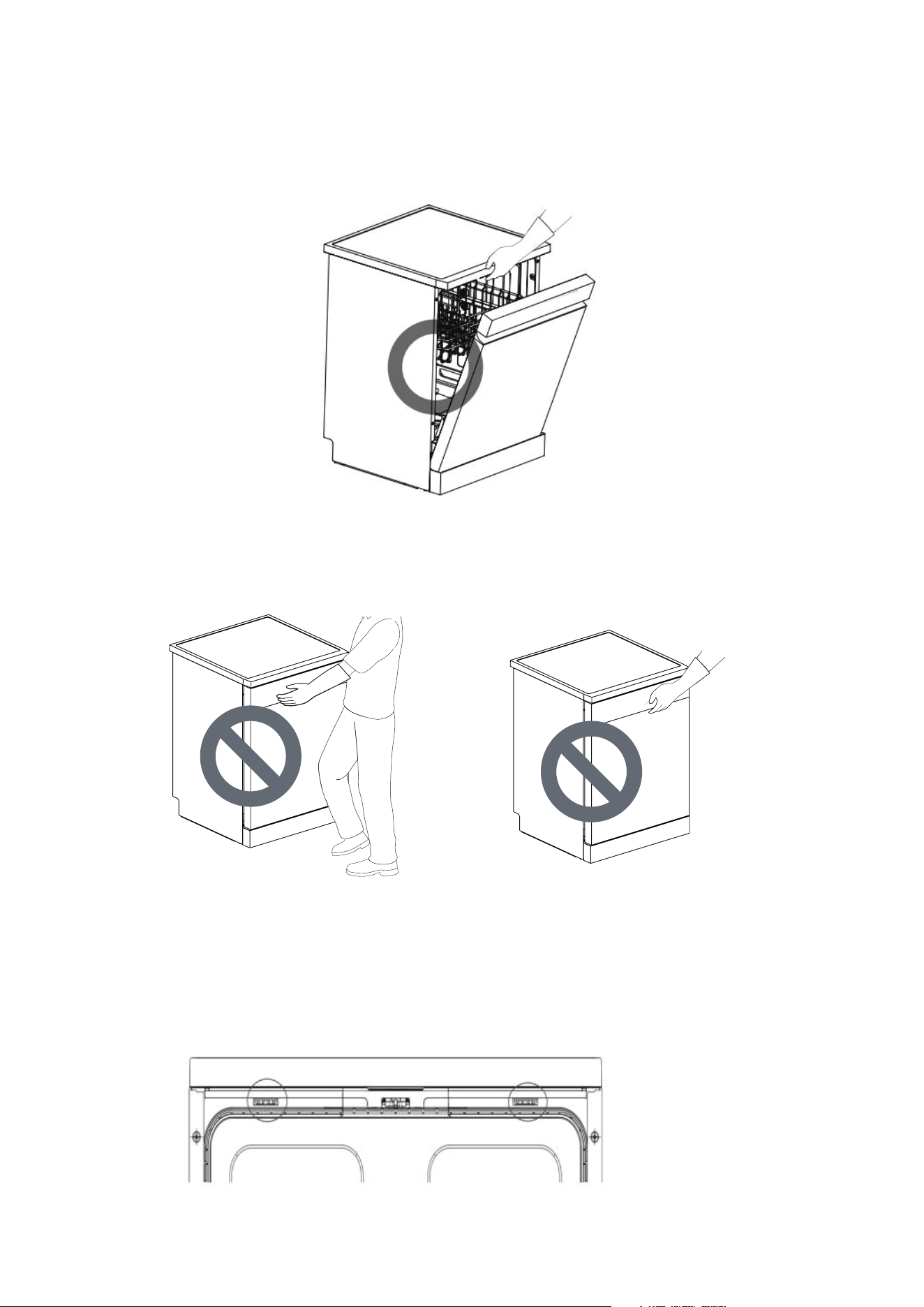
Open the door and grasp the front opening on the top of the main frame and liner
to move or lift the dishwaster.
CAUTION
Do not push the dishwasher door with your knees.
Do not use the handle to pull or lift the dishwasher, so as not to damage the door
and hinge.
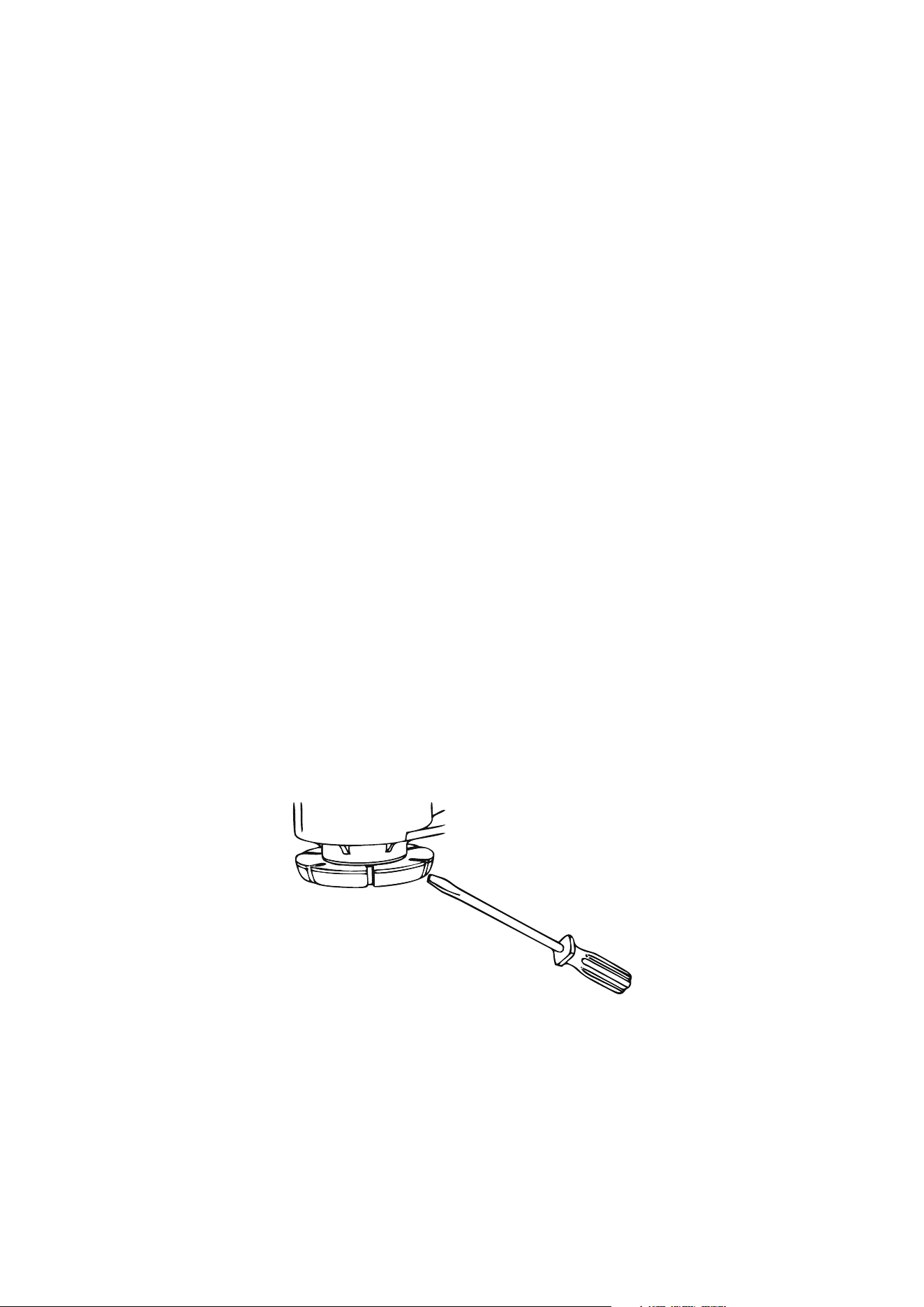
Remove the top cover
If the opening height is less than 850mm, please follow the instructions below.
1. Use tools to press the two locating pins of the top cover.
2. Lift the top cover and remove it.
INSTALLATION (Cont.)
17
INSTALLATION (Cont.)
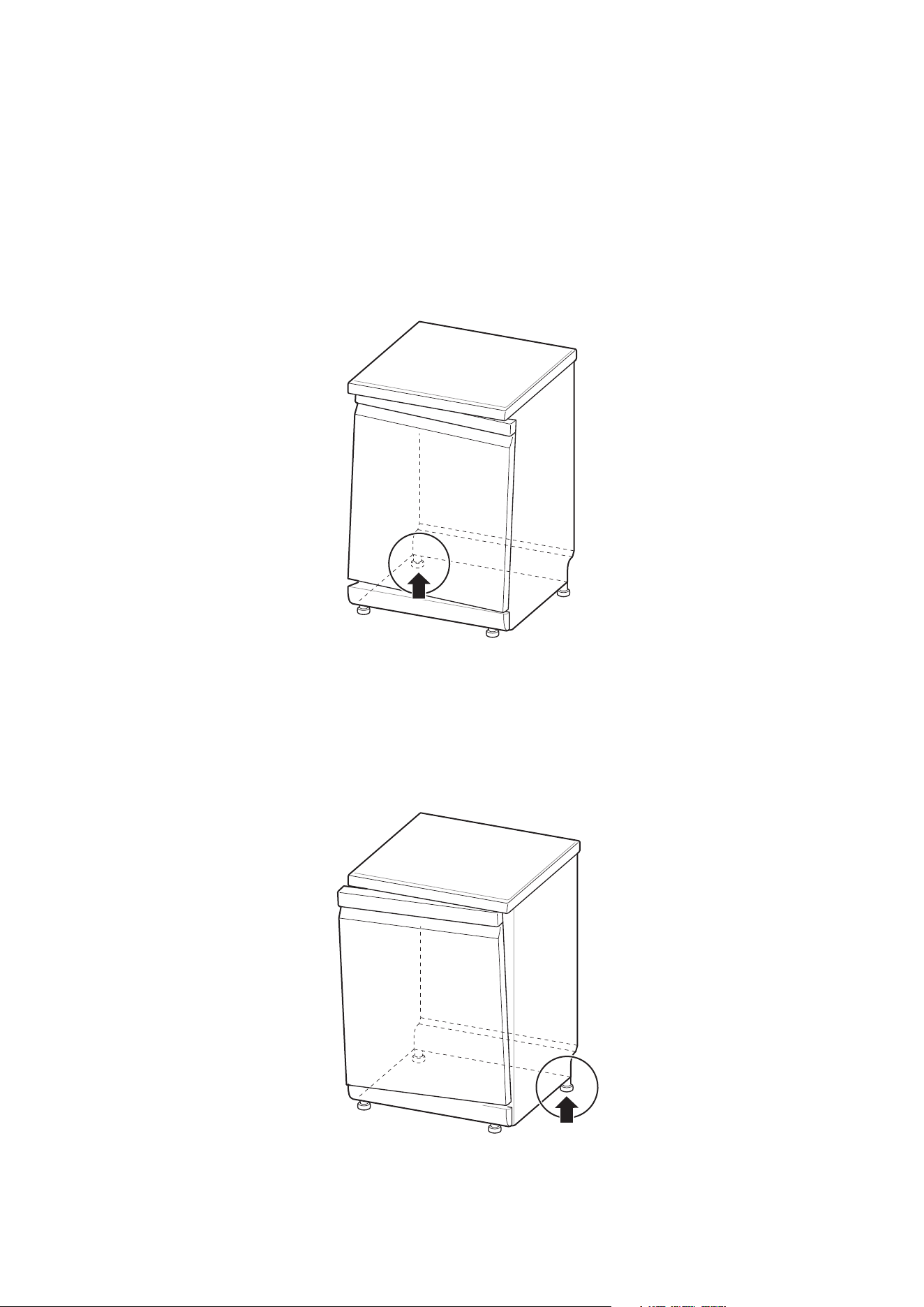
Level the Dishwasher
Please level the dishwasher to avoid unnecessary leakage and poor washing effect.
Check whether the dishwasher has been leveled properly after installation.
If the dishwasher shakes when the diagonal presses the top cover of the
dishwasher, the foot should be adjusted again.
Warning
Failure to level the dishwasher properly may result in water leaks, difficulty in door
closing or noise. If the cabinet opening is narrower than the recommended size,
the dishwasher must be carefully leveled and aligned; otherwise it will lead to
water leak in the front of the dishwasher, difficult to close the door or impossible
to operate. Any friction sound or jamming feeling when opening the door indicates
that the dishwasher is not leveled properly.
Adjust the feet
The feet should be adjusted as needed until the dishwasher is completely flat.
The feet are adjusted clockwise to raise and counterclockwise to lower. This
applies to fore-and-aft, side to side, and diagonal adjustments.
18
INSTALLATION (Cont.)
The door tilts to the right
1. Unscrew (counterclockwise) the left rear foot and level it.
2.Check the opening action of the door and repeat it if necessary until the door
can be opened and closed normally.
The door tilts to the left
1. Unscrew (counterclockwise) the right rear foot and level it.
2.Check the opening action of the door and repeat it if necessary until the door
can be opened and closed normally.
19
Connect the Drain Hose
If the end of the drain hose does not match the kitchen drain pipe, please use a
heat-resistant and detergent-resistant drain extension (not provided). These are
available from local pipeline suppliers.
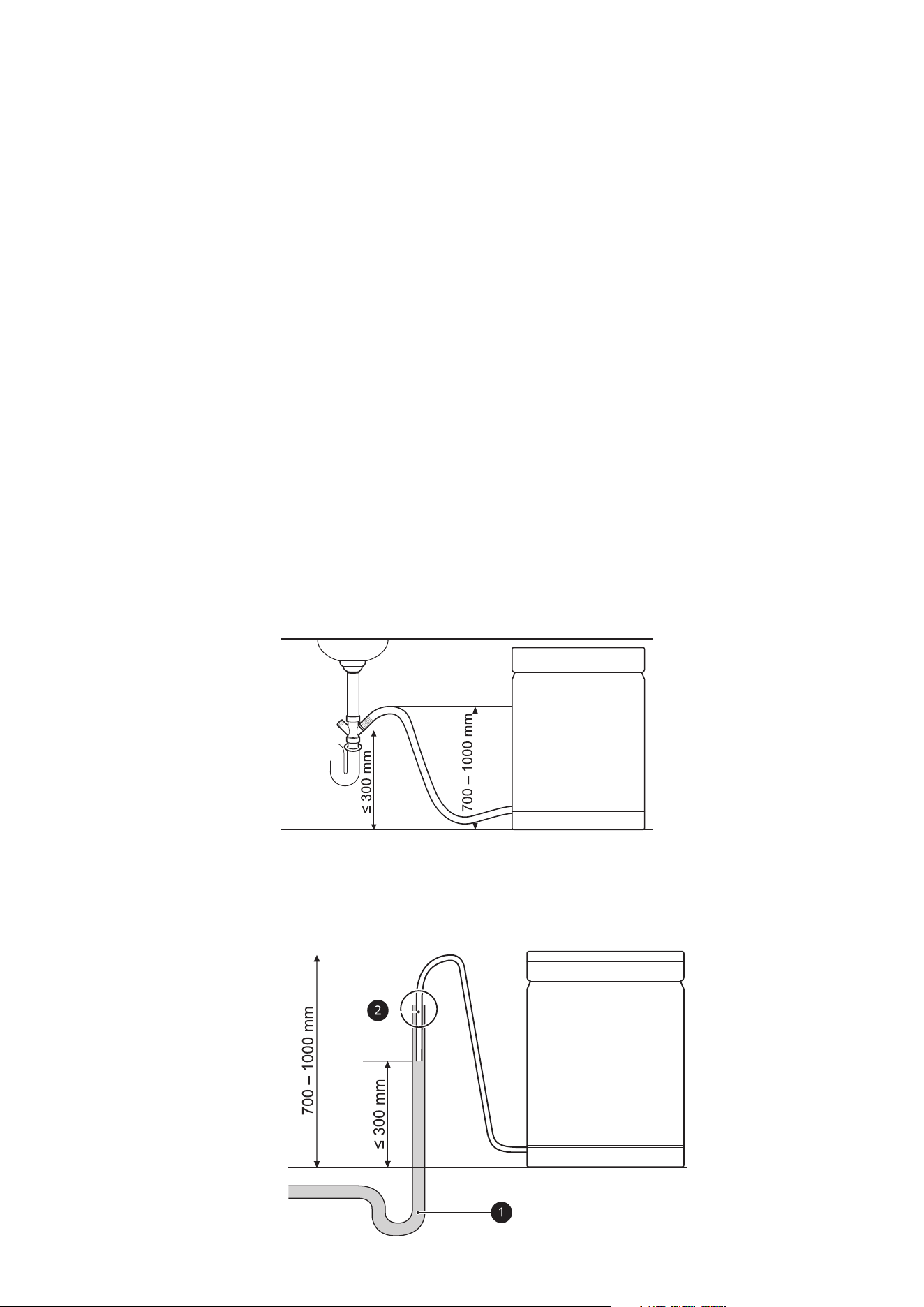
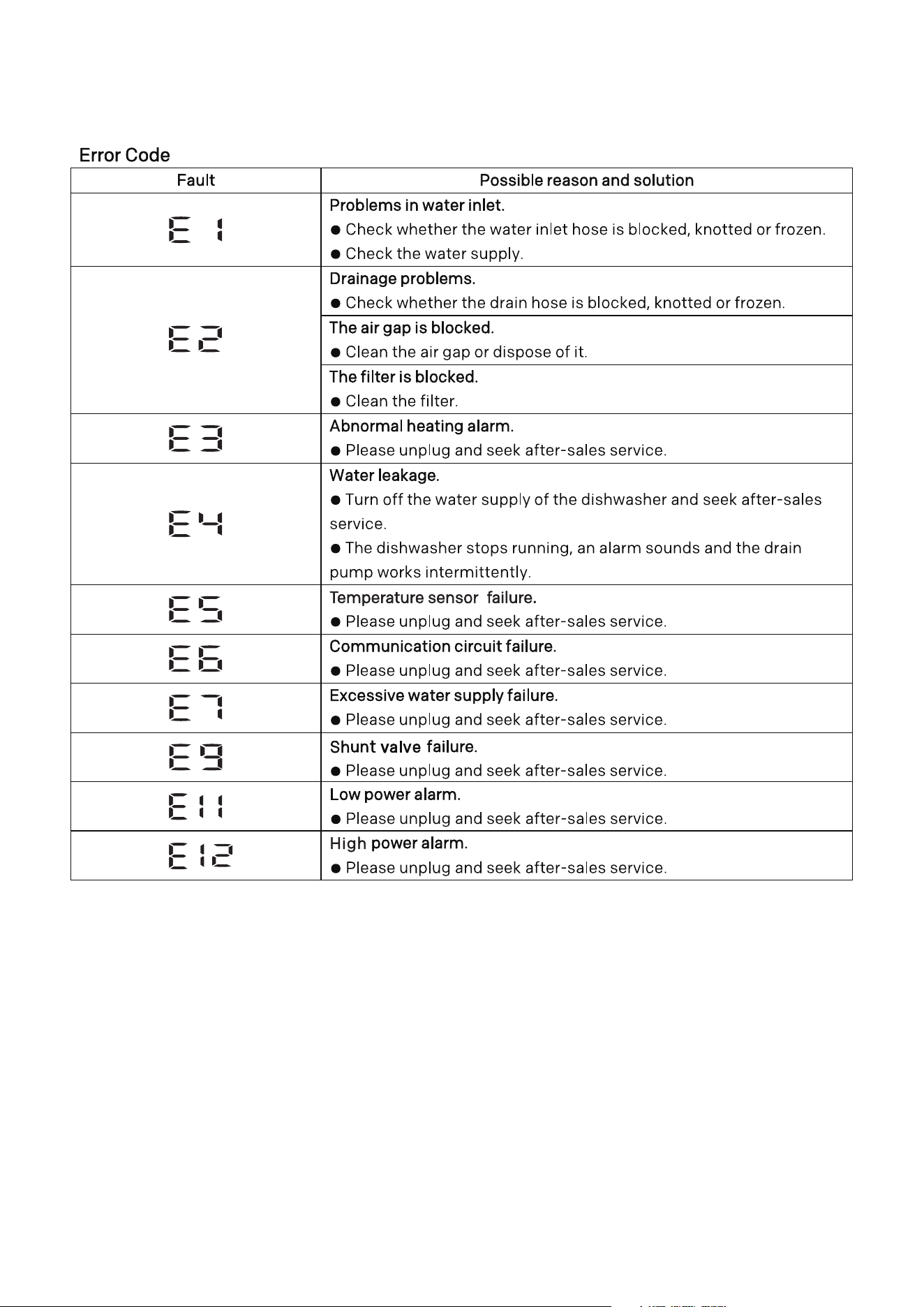
Connect the sewer pipe
Please check the sewer pipe during the first installation. If the sewer pipe under
the sink cannot discharge water normally, E2 error may occur.
CAUTION
Carefully pass the drain hose through the hole on the cabinet. The hole on the
cabinet may have sharp edges, which will damage the hose. Sharp edges should
be filed down to ensure that they do not damage the drain or inlet pipe.
One of the following methods can be used to prevent siphon effect:
1. When the drain hose is connected to the sewer pipe, it must be arched upward
and fixed on the lower surface of the kitchen table.
2. When the drain hose is connected to a separate riser 1, it must be ensured that
the connector 2 is air tight. Otherwise, it may cause odor leakage.
The riser diameter shall be at least 40mm.
INSTALLATION (Cont.)
20
INSTALLATION (Cont.)
Connect to Water Supply Pipe and Power Supply
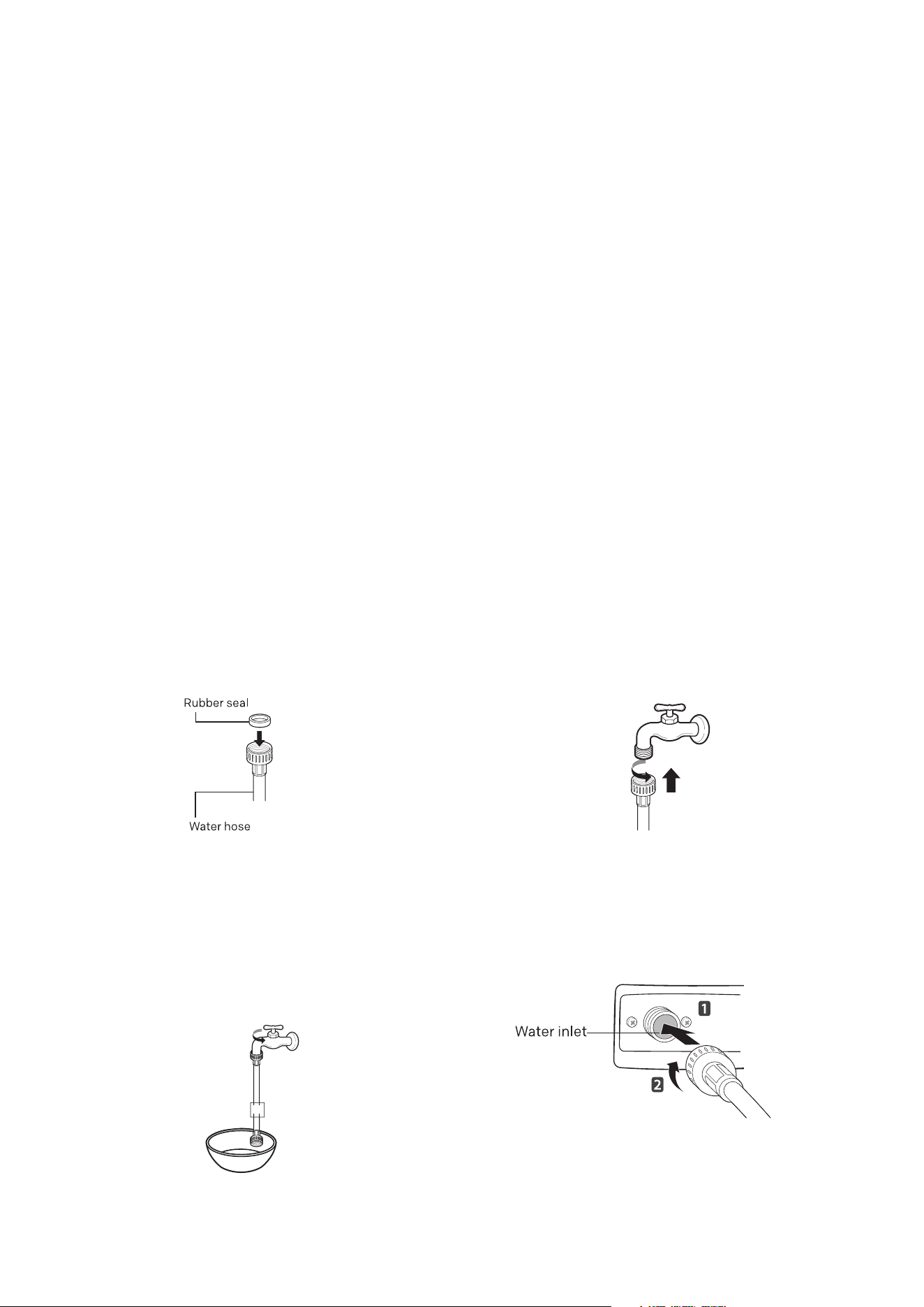
Connect the water inlet pipe to the faucet
The gasket shall be connected to the water inlet. Please use the new inlet pipe
attached. In order to ensure the quality, all dishwashers have been injected with
water for testing before leaving the factory. Therefore, there may be water in the
dishwasher, which is a normal phenomenon.
Inlet connection
1. The water supply pressure shall be between 30kPa and 1,000kPa.
2. Do not wear the thread when connecting the water inlet pipe with the valve.
3. If the water supply pressure exceeds 1,000kPa, please install a pressure
reducing device.
4. Turn on the faucet and check the connector for leakage.
5. Inspect pipes regularly, and change them if necessary.
6. Ensure that the pipes are not damaged or intertwined.
1. Check the rubber seal on both
sides of the hose. Insert the rubber
seal into the threaded joint of each
hose to prevent leakage.
3. Turn on the faucet to flush the
foreign matters (dirt, sand or sawdust)
in the water pipe after connecting the
water inlet hose to the faucet. Drain
the water into a bucket and check the
water temperature.
2. Connect the water supply hose to
the faucet by hand, and then tighten
it for 2/3 turn with pliers.
4. Connect the hose to the water
inlet valve tightly by hand, and then
tighten it for 2/3 turn with pliers.
5. Turn on the faucet to check
leakage. In case of water leakage,
please check steps 1-4.
Connection between water inlet pipe and faucet
21
Connect the power supply
Please connect this machine to a grounding socket according to the current
electrical wiring specifications and protect it with a circuit breaker or time-delay
fuse of at least 15 Amps. The two-wire system with grounding must be adopted
for wiring. Do not put the power cord behind this machine, but connect the plug
within 1.2m of the side.
WARNING
For the sake of personal safety, please remove the fuse, disconnect the circuit
breaker or turn off the power plug before installation.
Do not use extension cords or duplex adapter.
The plug must be inserted into a suitable socket, which should be properly
installed and grounded in accordance with all local rules and regulations.
This machine can only be maintained by qualified maintenance personnel. Repair
by personnel without relevant experience may cause personal injury or serious
failure.
Please connect it to a rated, protected and appropriately sized power circuit to
avoid electrical overload.
INSTALLATION (Cont.)
Final Installation
Please check whether the dishwasher is installed properly.
1. Turn on the power supply.
2. Turn on the water supply.
3. Ensure that the machine door can be opened and closed smoothly.
Please level the dishwasher again, if necessary.
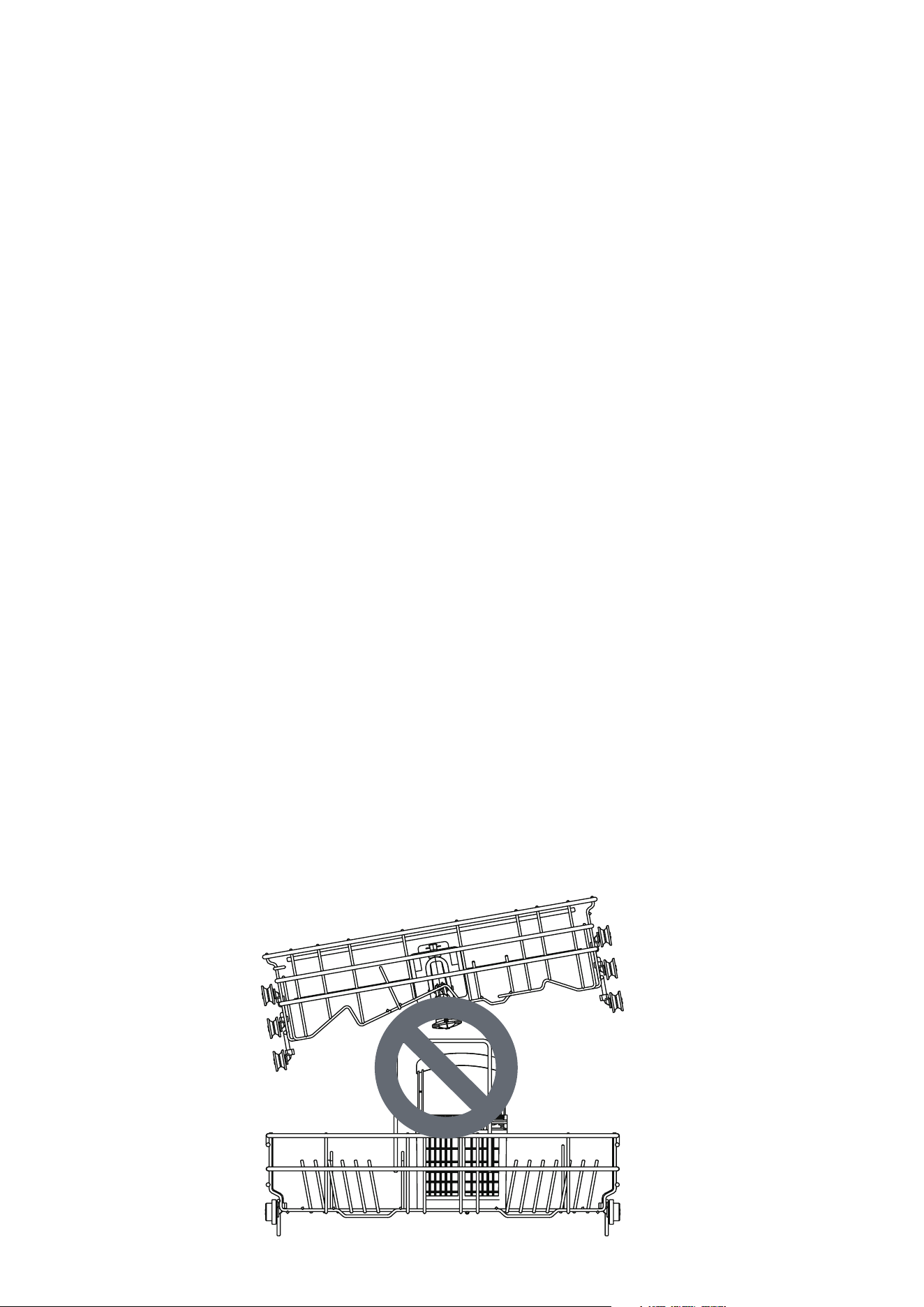
Please ensure that the dish rack is leveled if the door cannot be closed.
The picture below shows the inclined dish rack.
Please ensure that all packaging materials have been removed.
4. Check the drain and inlet pipes for leaks.

22
OPERATION
Loading
• Load only items suitable for the dishwasher.
• Remove solid, charred debris from the dishes before loading them into the
dishwasher.
• Place items with deep tray at an angle to help water loss and speed up the
drying process.
• Do not load any thermolabile or metal decorated items into the dishwasher.
CAUTION
• Do not open the door during operation or immediately after the washing
program as steam accumulation may cause burns when the door is opened.
Quick start
1. Load the dishes into the dishwasher
Scrape off excess food, bones, and any other hard and insoluble residues
from the dishes. Pull out each dish rack and load the dishes according to the
instructions in this manual.
2. Check the detergent
Add the recommended amount of detergent to the dispenser and close the
cover according to the instructions in this manual. If you need prewash, the
groove on the top of the cover should also be filled with detergent.
3. Close the machine door
4. Turn on the dishwasher
Press the “On/Off” button to turn on the display panel.
5. Check the rinse aid
If the rinse aid level in the dishwasher is low, the rinse aid icon will flash.
Please add rinse aid to improve drying performance.
6. Select the program and option
Select the most appropriate program and option. Please refer to the
program guide in this manual. The display will show the estimated time of
the program and the selected option.
7. Operate the dishwasher
Close the machine door first, and then press the start button to operate
the dishwasher. If the door is opened during the program running, the
dishwasher will stop. In such case, you may close the door to restore the
program.
8. Finish
After the program is completed, a prompt tone will be played, and the
machine will turn off automatically after a few minutes.

23
OPERATION (Cont.)
Before Use
Soft water system
This machine is equipped with a soft water system, which can lower the hardness
of inlet water. This system softens the water supply to a certain extent, so that
tableware can be washed as per quality requirements.
If the soft water system is not required, this machine can be used without
dishwashing salt, but the hardness level needs to be set to H0 so that the
corresponding icon will not be on all the time.
In order to achieve a satisfactory washing effect, this machine needs soft water,
otherwise water stains will remain on the tableware and inside the dishwasher.
If the hardness of tap water exceeds a certain level, it must be softened,
i.e. decalcified, by adding dishwashing salt to the water softener inside the
dishwasher. The amount of salt required is set according to the hardness of the tap
water.
Check the water hardness
• Check the local water hardness. The water company can help you check it.
• Set the softening system level of the dishwasher according to the hardness
level of water.
Set the soft water system
Adjust the settings according to the hardness level of the water used in the water
supply. The water softener has 9 adjustment levels, and the dishwasher has been
set to the water hardness level of H5 when leaving the factory.
1. Ensure that the dishwasher has been turned off, and press the “Dual Wash” and
“Machine Care” buttons for 3s to set the program.
2. Press the “Dual Wash” button.Dispaly the current setting.
3. Press the “Machine Care” button and set the expected value.The set value range
is H0-H8.
4. After completing the required water softener settings, press the “On/Off”
button to shut down and save the settings.
24
OPERATION (Cont.)
Dishwasher salt - This is to help prevent limescale build up
The dishwasher’s salt chamber must be filled before starting the washing program.
In case of insufficient salt, the salt icon on the display will light up unless the
hardness level is set to HO.
After loading the dishwashing salt, the washing program must be started
immediately to remove the salt and salt water around the inner cylinder and
prevent corrosion.
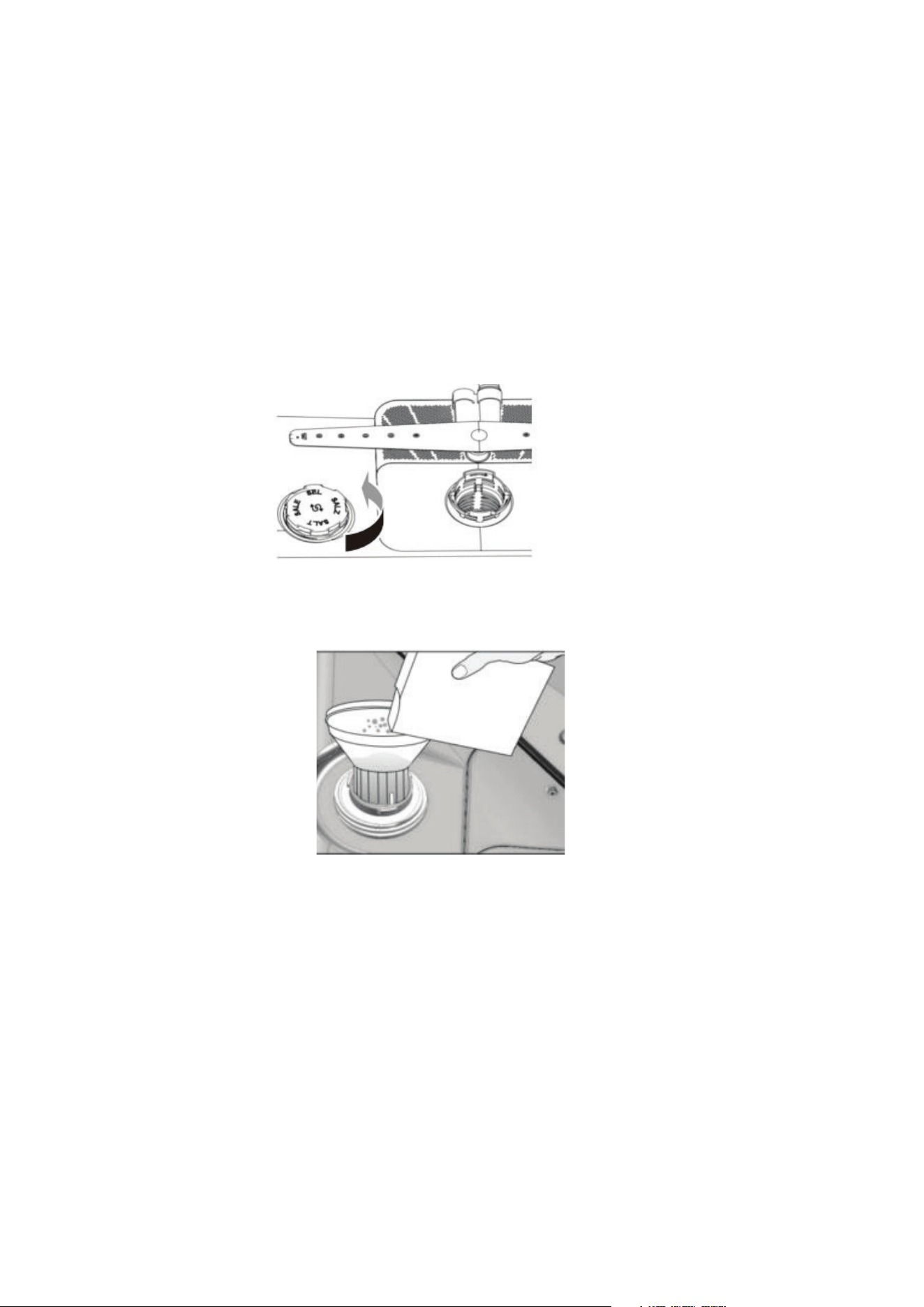
1. Take out the lower dish rack and add softening salt.
2. Turn the cover of the water softener counterclockwise to open it.
3. If you intend to use the hard water softener system before using this
machine for the first time, you must use the salt funnel to add not more than
650g of salt to the salt chamber of this machine.
4. Fill the salt chamber of this machine with water only before the first use.
5. Tighten the cover again.
6. Run the rinse program without tableware.
CAUTION
Do not pour any detergent into the water softener to avoid failure.
Clean the salt particles around the water softener cover. Otherwise, the salt
solution may corrode the dishwasher and dishes.
Align the cover horizontally and rotate it clockwise for sealing properly. Loosened
cover may cause the salt solution to leak from the softener, return to the inner tank
and cause corrosion.
After adding dishwashing salt, the washing program should run without tableware.
If not, any spilled salt may cause rust or damage to the dishwasher.
25
OPERATION (Cont.)
Add detergent to the dispenser
The amount of detergent required depends on the size and dirt level of the
tableware.
Please put the detergent into the detergent compartment before starting any
program.
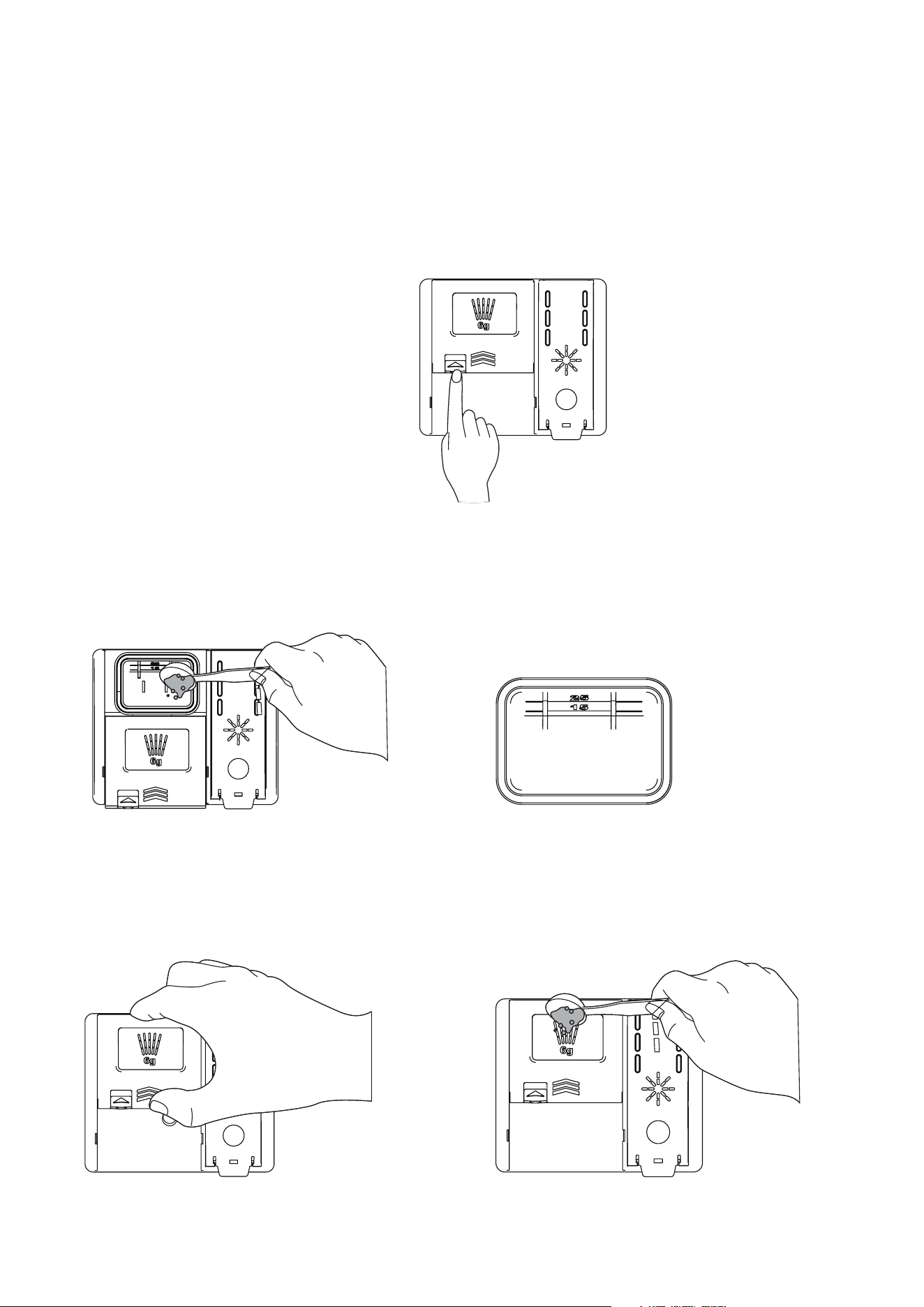
1. Press the button on the
dispenser cover to open it.
2.Add tableware detergent to the main washing compartment until the liquid
level is between the tick mark 15 and tick mark 25.
• Fill to more than tick mark 25 in case of hard water or heavily soiled tableware.
• Fill to tick mark 15 in case of soft water or slightly soiled tableware.
3. Push on the detergent
cover and slide it in
4. If you need pre-wash, please
fill the recessed pre-wash
compartment on the cover with
detergent.

26
OPERATION (Cont.)
Warning:
Dishwasher detergents and rinse aid contain the same chemicals as all other
household detergents. Therefore, they must be kept out of the reach of children.
Use dishwasher detergent only. Improper detergent may cause the dishwasher
to fill with foam during operation. Too much foam may mitigate the washing
performance and may cause the dishwasher to leak.
Do not pull up the dispenser to close the dishwasher door to avoid damaging the
dispenser.
Note
You may check whether the detergent is completely washed off after the washing
program is completed.
Some dishwasher detergent tablets may get stuck in the dispenser due to their
large size. Before starting the program, you may place the tablets at the bottom of
the washing bucket next to the filter.
Too much detergent will leave a film on the tableware and in the dishwasher,
resulting in poor washing effect.
If the liquid rinse aid is used, the water can be drained from the dishes after final
rinsing, so as to improve drying performance.
Do not use detergent tablets to shorten the washing cycle. Tablets may not be
dissolved completely, resulting in residual detergent on tableware and poor
cleaning efficiency.
The rinse aid can help remove spots, residues and white films caused by hard
water. But it cannot help remove excess detergent residues.
Warning:
Some dishwasher detergents are strongly alkaline. They can be extremely
dangerous if swallowed. Avoid contact with the skin and eyes and keep children
away from the dishwasher when the door is open. Check that the detergent
receptacle is empty after completion of the wash cycle.
27
OPERATION (Cont.)
Add rinse aid in the dispenser
When more rinse aid is required, the rinse aid indicator will appear on the display.
It is suggested to use rinse aid to remove water stains on the dishes and improve
drying performance.
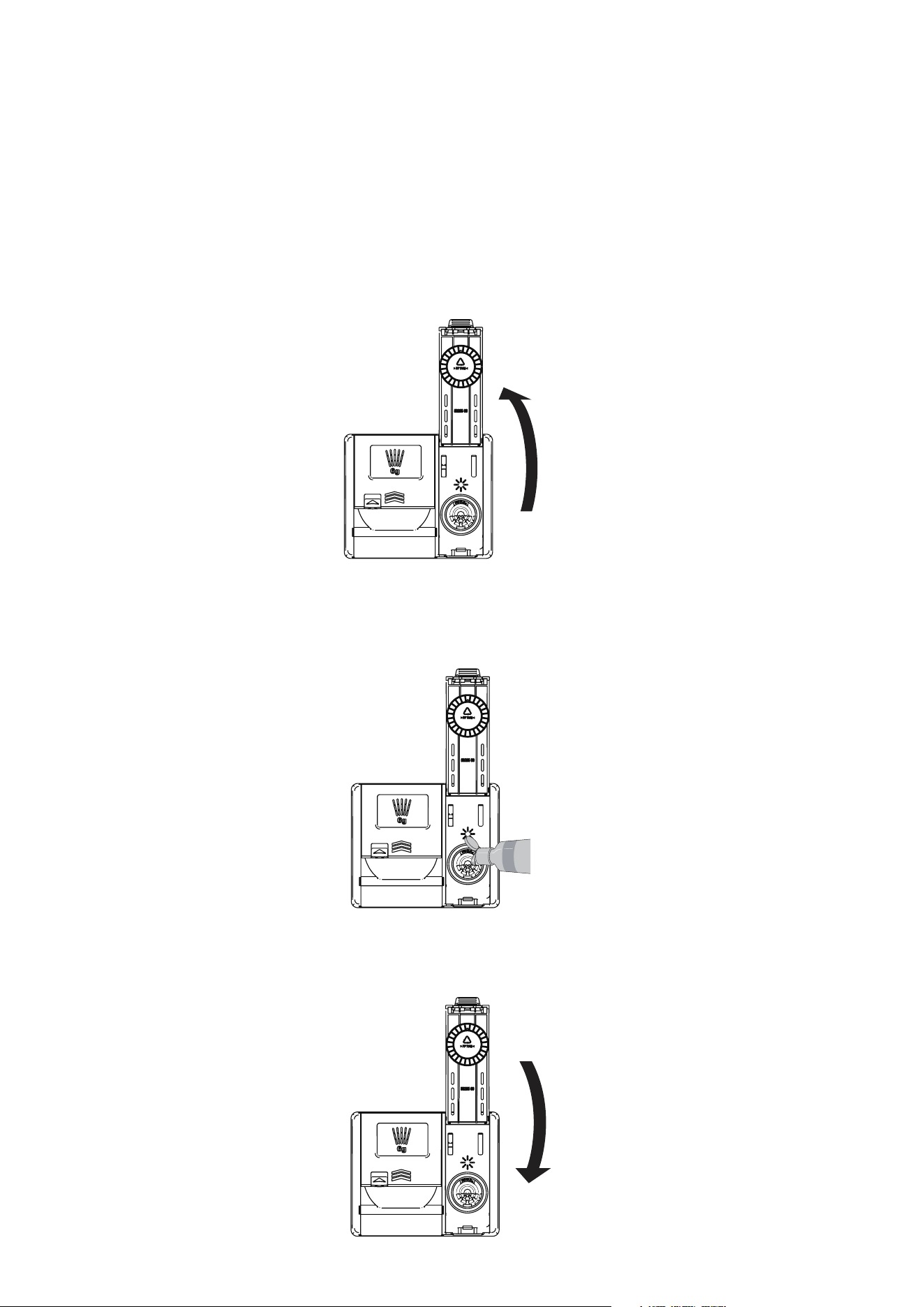
1. Lift the clamshell-style cover and open the rinse aid box cover.
2. Add liquid rinse aid to the maximum filling level. The rinse aid should be
precipitated in the dispenser during filling; otherwise bubbles may lead to poor
drying performance. Do not overfill the dispenser.
3. Close the cover to lock the dispenser. In the final rinsing cycle, the rinse aid will
be dispensed automatically.

28
OPERATION (Cont.)
Adjust the rinse aid dispenser
The dispenser has 9 adjustment levels. The rinse aid dispenser has been set to
level d3 when it leaves factory. You may check and change this setting using the
buttons on the control panel.
1. Ensure that the dishwasher has been turned off.
2. Press “Dual Wash” and “Machine Care” simultaneously to enter the operation
setting procedure, and press “Intensive” to check the current settings.
3. Press “Machine Care” to change the settings of rinse aid dispenser. Level d0 to
d8 can be gradually set by pressing this button.
4. After completing the required rinse aid dispenser settings, press the “On/Off”
button to shut down and save the settings.
Replenish the rinse aid
The refilling frequency of the dispenser depends on the frequency of dishwashing
and the rinse aid setting.
When more rinse aid is required, the rinse aid icon will flash, unless the rinse aid
dispenser is set to level d0.
Note:
If you use hard water and find calcium accumulation on the tableware, please set
the level to high.
Too low level of the rinse aid dispenser will lead to spots and stripes on the dishes
and poor drying performance.
Too high level will lead to foaming, resulting in poor washing effect.

29
OPERATION (Cont.)
Loading into the Dishwasher
Please always follow the following instructions in order to achieve effective
washing effect.
Remove large food particles, including bones, from dishes before loading.
Soak the dishes containing burnt food before putting them into the dishwasher.
Put deep pots or plates upside down.
Ensure that all items do not touch each other.
Tableware with excessive width should be placed at an angle so that the water can
flow out freely.
The tableware cannot be placed with the mouth upward.
Tableware with excessive height cannot be Tableware with excessive height cannot
be placed in the corner of dish rack.
Ensure that small items will not fall off the rack, so small items such as the lid
should be placed in the cutlery basket.
The interior of small tableware is not easy to be sprayed and cleaned, resulting in
poor washing effect. It is not suggested to clean small tableware in the dishwasher.
Items unsuitable for dishwasher
• Copper or anodized alumina.
• Hand-painted silver leaf or gold leaf pottery.
• Wood or bone treated utensils.
• Iron or non rust proof utensils.
• Plastic items unsuitable for the dishwasher.
• Expensive utensils, such as silverware and plates with gold rings.
• Fragile items such as crystal glasses.
CAUTION
• Do not put pots or pans with plastic handles into the dishwasher as the handles
may deteriorate due to heat and detergent.
• Waterproof or durable lipstick stains on eyeglasses may not be removed during
washing.
• Some foods may contain natural dyes, such as carrots, tomatoes and ketchup.
If a large amount of these foods come into contact with the pottery in the
dishwasher, these dyes will discolor the plastic items in the dishwasher.
However, such discoloration will not affect the stability of plastic items.
Cleaning silver tableware may also cause discoloration of plastic items.

30
OPERATION (Cont.)
Loading into the Lower Dish Rack
Instructions for loading into the lower dish rack:
• The plate should be upright and face the center of the rack, and the pot, pan
and large plate must be inverted.
• Load dishes, plates, soup bowls and the like between the fork teeth.
• Ensure that the pan handle and other large items do not interfere with the
rotation of the spray arm.
• Small items such as cups, wine glasses or small plates cannot be placed on the
lower rack, but on the upper rack.
• Ensure that large items do not interfere with the rotation of the spray arm and
do not prevent the detergent dispenser from opening.
• Very dirty tableware (pots and pans) should be placed on the lower rack for a
better washing effect because of strong spraying water power.
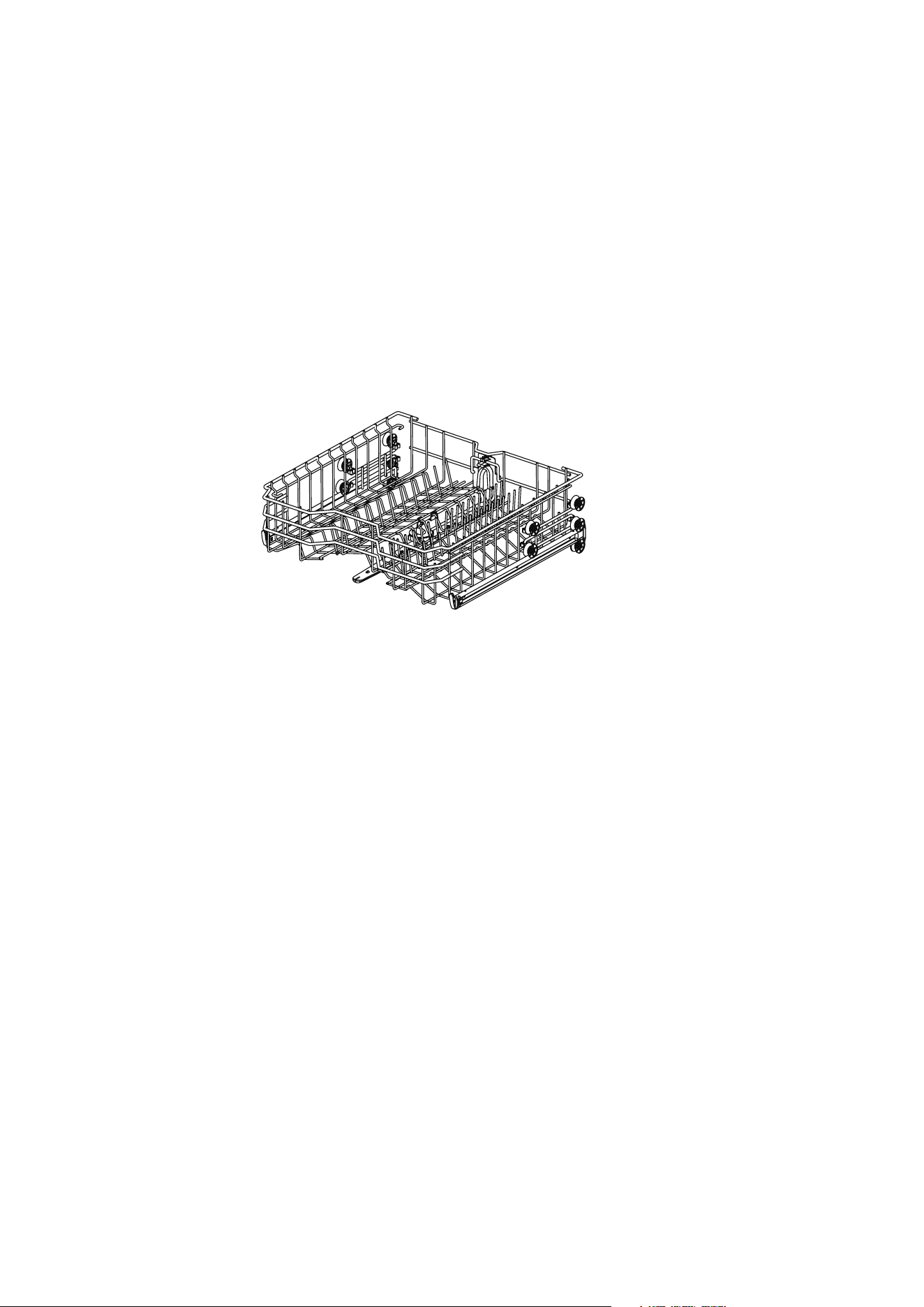
Loading into the Upper Dish Rack
Instructions for loading into the upper dish rack:
• Place the cup and glass in the row between the rack teeth. Placing them on the
rack will cause damage and water stains.
• Do not let the goblet touch other items to avoid fragmentation.
• Place the tableware with the open end facing down for easy cleaning and
drying.
• Do not stack tableware together.
• Cups, glasses and bowls must be upside down.
• Additional cups or tableware can be placed on the folding cup holder (for some
models).
• Ensure that the tableware will not interfere with the rotation of the spray arm
above and below the upper rack.
• When loading larger items into the upper rack, such as wine glasses or higher
cups, the plate rack, if any, may need to be removed.
31
OPERATION (Cont.)
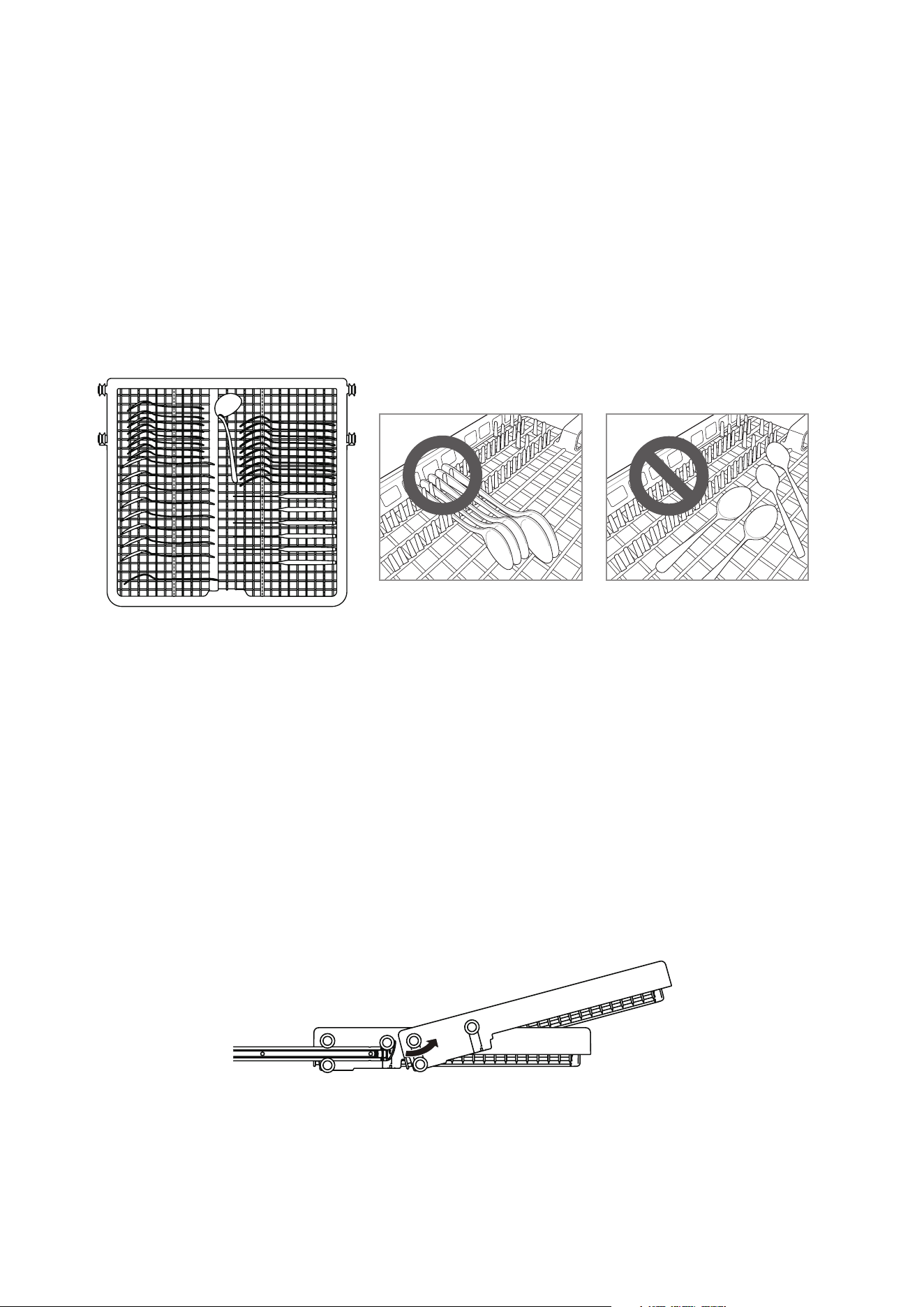
Upper dish rack with adjustable height
The height adjustment mechanism of the upper dish rack is specially designed for
you. By adjusting the height, you can create a large space in the lower or upper
part of the machine according to your needs, or lower the height when your rack is
empty or loaded.
Lower the dish rack:
Pull the upper dish rack out of the guide rail, and then clip the guide rail between
the second and third rows of rollers of the dish rack.
Lift the dish rack:
Pull the upper dish rack out of the guide rail, and then clip the guide rail between
the first and second rows of rollers of the dish rack.
Warning
Please ensure that there is no tableware on the dish rack before adjustment.
Otherwise, the tableware may be damaged or you may be injured.
Note
Please ensure that both sides of the upper rack are at the same height before
pushing the rack into the dishwasher. If the height of both sides is different, the
dishwasher door will not close and the middle spray arm cannot be connected to
the water inlet.
After adjusting the height, please check whether the spray arm can rotate freely.
Please check whether the spray arm does not interfere with the items on the lower
dish rack.
32
OPERATION (Cont.)
Loading into Cutlery Rack
The cutlery rack is best suited for flatware and most cooking or serving utensils.
The separators on the cutlery racks help keep flatware separated to avoid damage
and improve cleaning.
Note: For best cleaning performance, place flatware in the silverware baskets.
Heavily soiled utensils or items with baked on foods should be placed in the
middle rack or spoon basket for best performance.
Remove the Cutlery Rack
• The entire cutlery rack can be removed if more space is needed on the upper
rack for larger items.
• The entire cutlery rack can be removed if more space is needed on the upper
rack for larger items.
• Pull the rack out to the end of the rails. Then, lift the front of the rack so
that the rollers clear the stop on the end of the rail. The rack can now be slid
forward and removed from the rails.
Warning
• Be careful when loading and unloading items with sharp edges. Load sharp
knives with the blade down to reduce the risk of injury.

33
In order to maintain performance and prevent failures, it is important to regularly
check the outside and inside of the dishwasher (including the filter and spray arm).
WARNING:
• Do not use benzene or thinner when cleaning the outside and inside of the
dishwasher to prevent fire or explosion.
• Please wear gloves and/or protective clothing to prevent injury during machine
care and maintenance or cleaning.
WARNING:
• If the dishwasher is idle for a long time, please run the “Machine Care” program
without detergent to refresh the interior. After the program finishes, you may
clean the inside and outside of the dishwasher according to the maintenance
instructions.
• If you are absent for a long time in warm season, please close the water valve
and disconnect the power cord, or turn off the circuit breaker, and clean the fil-
ter, inner tank and dispenser to prevent odor.
• If you are absent for a long time in cold season and there is a possibility of
freezing temperature, please take anti-freezing measures for the water inlet
pipe and the dishwasher itself. These measures must be taken by qualified
maintenance personnel.
CLEANING AND MAINTENANCE

34
CLEANING AND MAINTENANCE (Cont.)
EXTERNAL CLEANING
In most cases, the external surface of the dishwasher can be cleaned with a soft
wet cloth or sponge and then wiped dry with a soft cloth. If the dishwasher is
provided with the stainless steel housing, you may use stainless steel cleaner.
CAUTION
Any edible oil splashed on the external surface of this product should be wiped
out immediately. Do not use cleaners that may contain alcohol, thinner, bleach,
benzene, flammable liquids or abrasives to clean the external surface of this
product to avoid discoloration or damage.
INTERNAL CLEANING
Please regularly clean the internal surface of the dishwasher with a soft wet cloth
or sponge to remove food and dirt particles.
To remove white spots and odors inside the dishwasher, please run an empty
program without detergent, pour a cup of white vinegar in the safety glass or
bowl of the dishwasher and put it on the upper rack. (Vinegar is an acid that may
damage electrical appliances if used frequently.)
CAUTION
Any edible oil splashed on the external surface of this product should be wiped
out immediately. Do not use cleaners that may contain alcohol, thinner, bleach,
benzene, flammable liquids or abrasives to clean the external surface of this
product to avoid discoloration or damage.
35
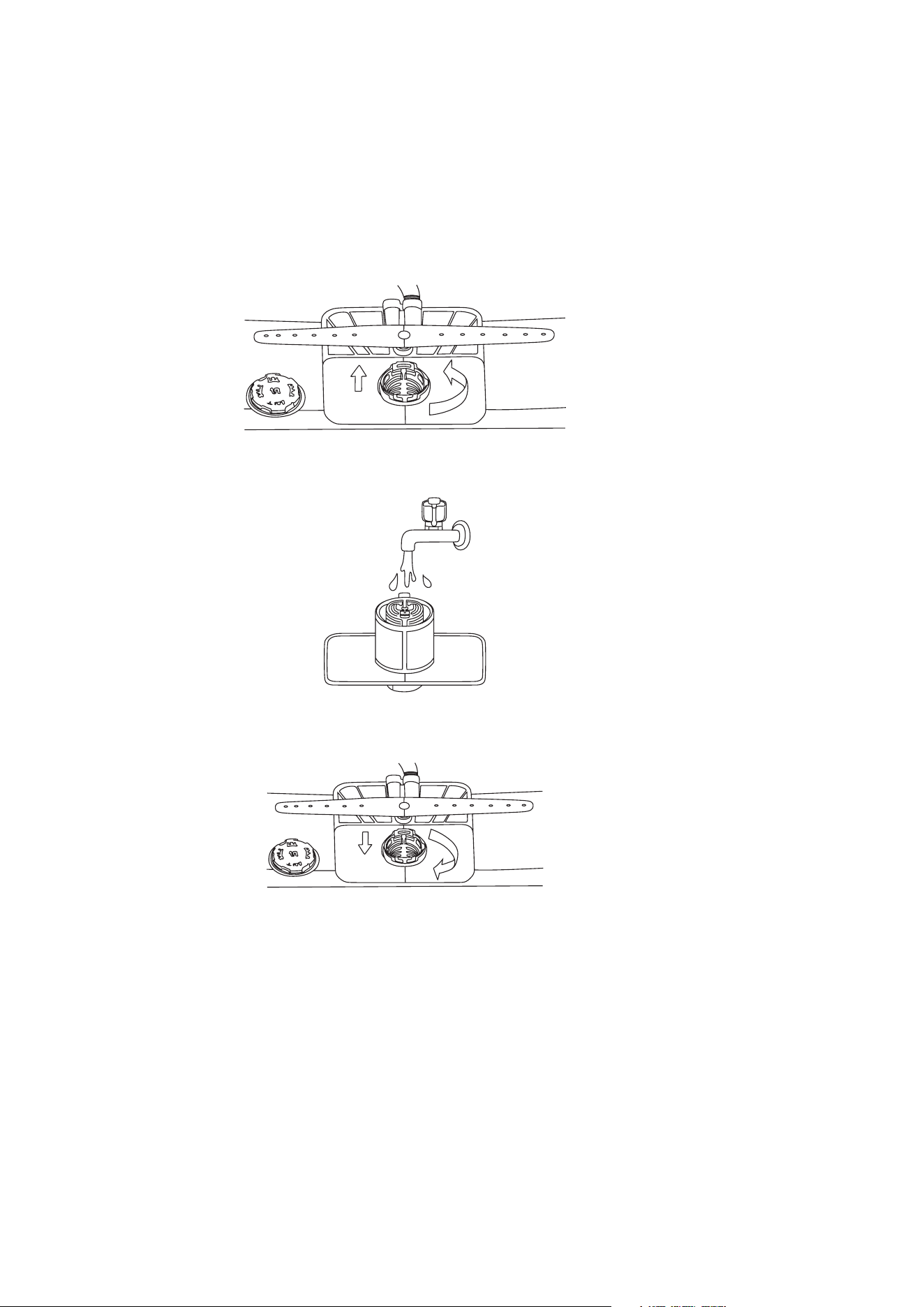
FILTER CLEANING
1. Remove the lower dish rack and fix the bottom spray arm.
2. Rotate the filter cup counterclockwise and take out the filter assembly
consisting of the filter cup 1, metal filter screen 2 and micro filter 3.
After removing the filter assembly, check and remove all foreign matter (if
necessary).
WARNING
Beware of sharp edges when cleaning metal filters.
Remove food residues from the filter to prevent odorous bacteria and possible
drainage problems.
NOTE:
Please clean the filter after each load for the best washing results. If food residues
remain in the filter, they may produce peculiar smell.
Clean the filter with a soft brush at least once a month.
Clean the filter with non-abrasive materials and warm water.
Ensure that the filter is assembled properly before starting the program. Rotate
firmly until there is a click sound during assembly.
3. Clean each filter with running water and a soft brush. Reassemble the filter
assembly before reinstallation.
4. Reinstall the filter assembly and fix them clockwise by rotating the filter cup
until it clicks into place .
CLEANING AND MAINTENANCE (Cont.)
36
CLEANING AND MAINTENANCE (Cont.)
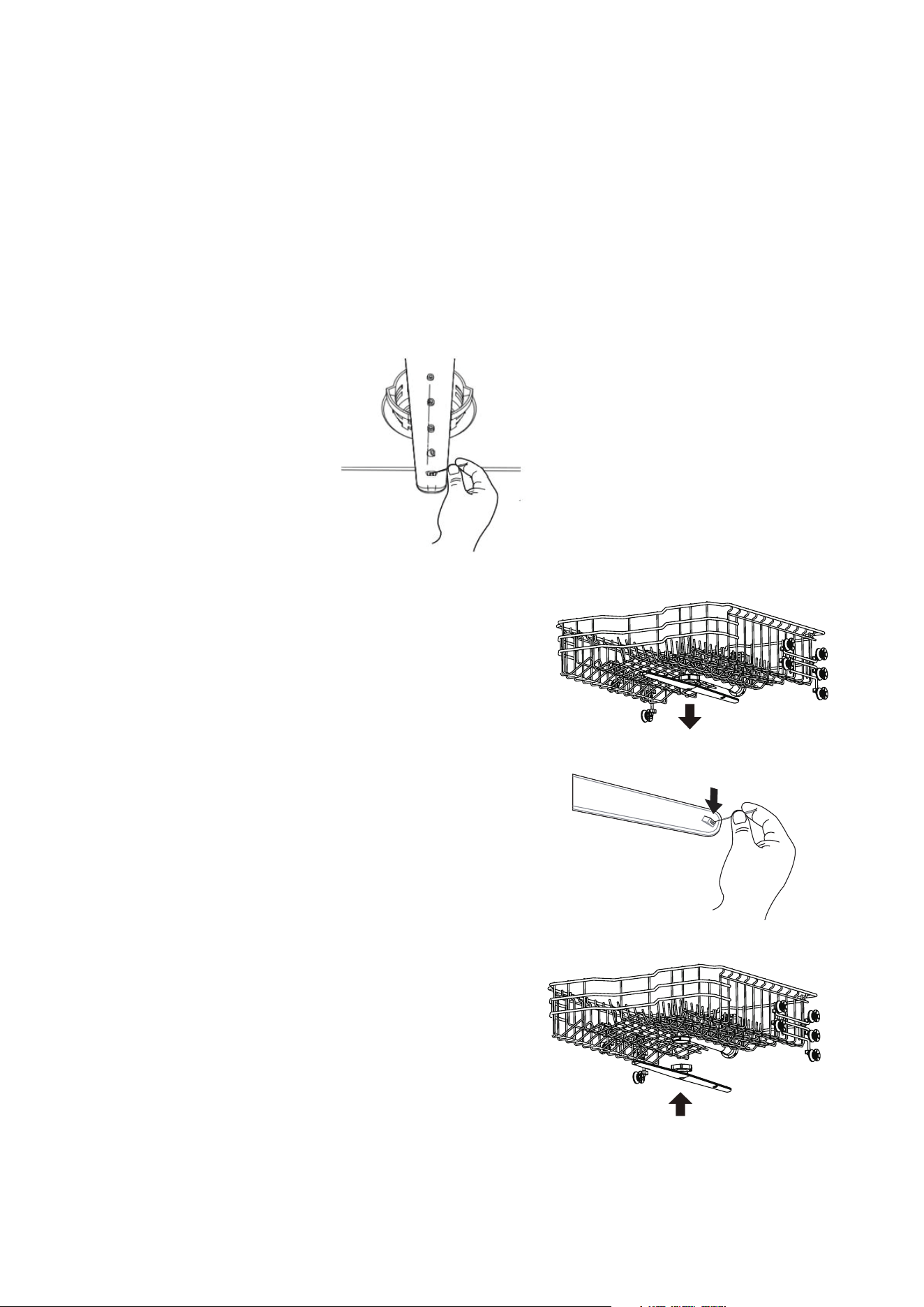
SPRAY ARM CLEANING
If the spray arm hole is blocked by any food residue, the tableware may not be
cleaned well due to improper water spray.
It is suggested that the spray arm be cleaned every two weeks.
Lower spray arm cleaning
1. Ensure that spray holes are not blocked by food particles.
2. Remove the food residue blocking the spray arm hole with a pin or any sharp
tool.
Middle spray arm cleaning
1. Pull the upper dish rack forward and
ensure that spray holes are not blocked
by food particles.
2. Before cleaning, rotate the nut
at the bottom of the spray arm
counterclockwise and pull it down to
remove the middle spray arm.
3. Remove food particles by flushing or
shaking the spray arm.
4. Remove the food residue blocking the
spray arm hole with a pin or any sharp
tool.
5. Clean the spray arm hole with running
water after removing the food residue.
6. Reinstall the middle spray arm in place
after cleaning. Turn the nut clockwise to
ensure that the nut locks the spray arm
to its original position.
7. After assembly, check whether the spray
arm rotates freely.

37
Please be sure to contact our call centre on info@ayonz.com if you cannot identify
the issue with the below information.
FAQs
Q: Does this dishwasher need rinse aid?
A: It is strongly suggested that rinse aid be used to enhance the drying
performance of the dishwasher. If not, water may remain on the dishes and
machine liner. Rinse aid helps ensure that most of the water is removed from the
dishes at the end of rinsing, and the load is ready for the drying cycle.
Q: Why is there a muddy white film on my tableware after washing?
A: It is usually caused by the reaction of minerals in the water with dishwasher
detergent. Do not use too much detergent. For the recommended amount of
detergent, please refer to “Add detergent to the dispenser” section. This machine
consumes less water than a traditional dishwasher, so adding rinse aid will help
wash off the film.
Q: How do I remove the white film on the machine liner?
A: Put 3 tablespoons (40 g) of citric acid powder in the main detergent
compartment. Run the “Machine Care” program once without detergent.
Q: Why do I hear the dishwasher whistling?
A: It is important to determine the duration of noise and the time when it occurs
(which part of the cycle). You can hear whistle when water is sucked into the
dishwasher. This is normal. If the water pressure is too high, the sound will be
louder. Therefore, if the noise is too loud, you may need to adjust the water valve
to reduce the pressure.
Q: Can this machine perform a “drain only” cycle?
A: To drain the accumulated water, you may press and hold the Start/Pause button
for 3s, and the program will reset for drainage. Once the dishwasher is drained, the
power supply will turn off.
Q: What is child lock? How is it activated?
A: Child lock is a function that prevents the control from being changed during the
program running. It will not prevent the door from being opened or the machine
from being turned off. To enable or disable it, you may press and hold both
“Program” and “Delay timer” buttons for 3s.
Q: Should I wash the dishes before loading them into the dishwasher?
A: No. The dishwasher can clean the dishes without pre-washing.
38
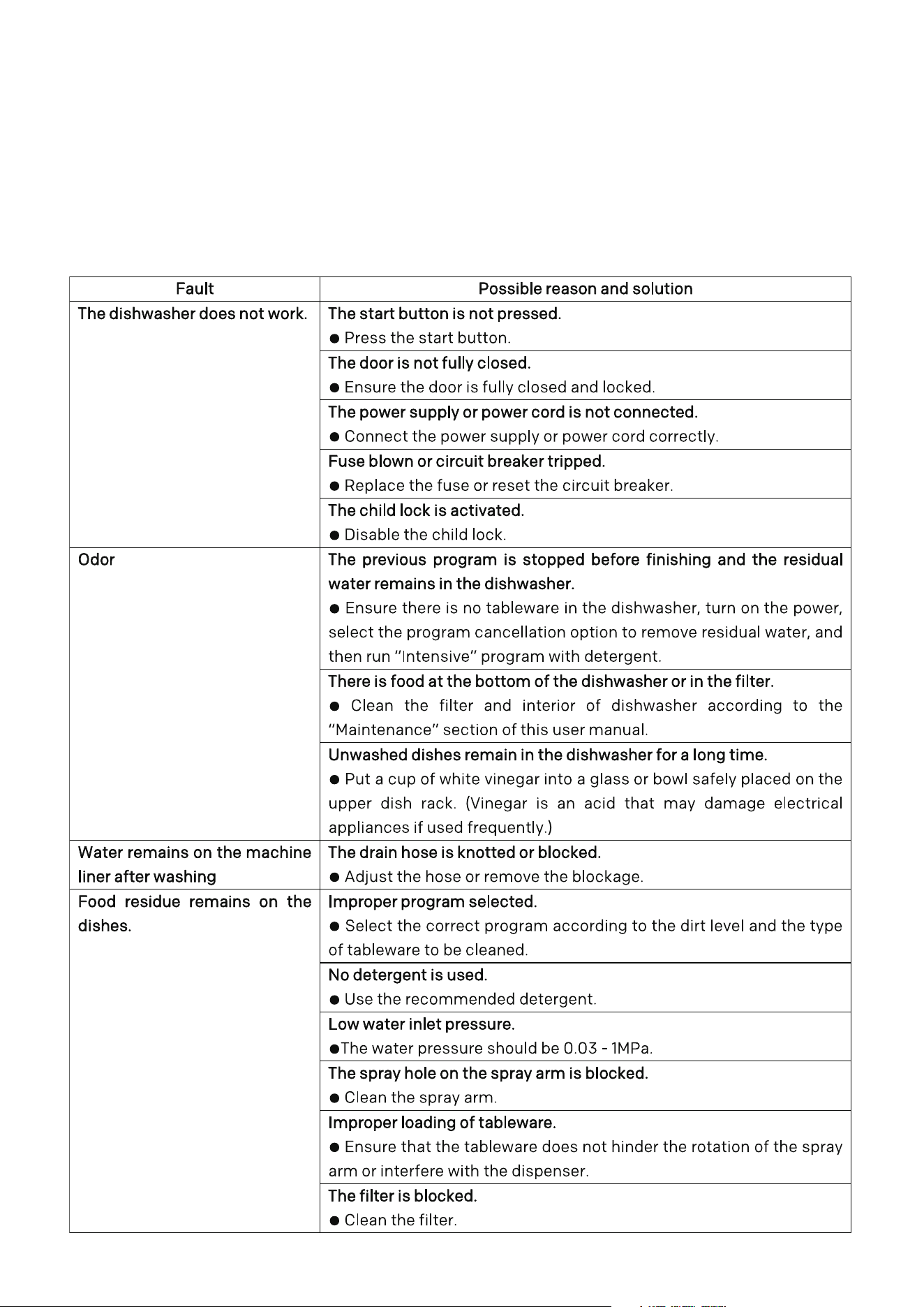
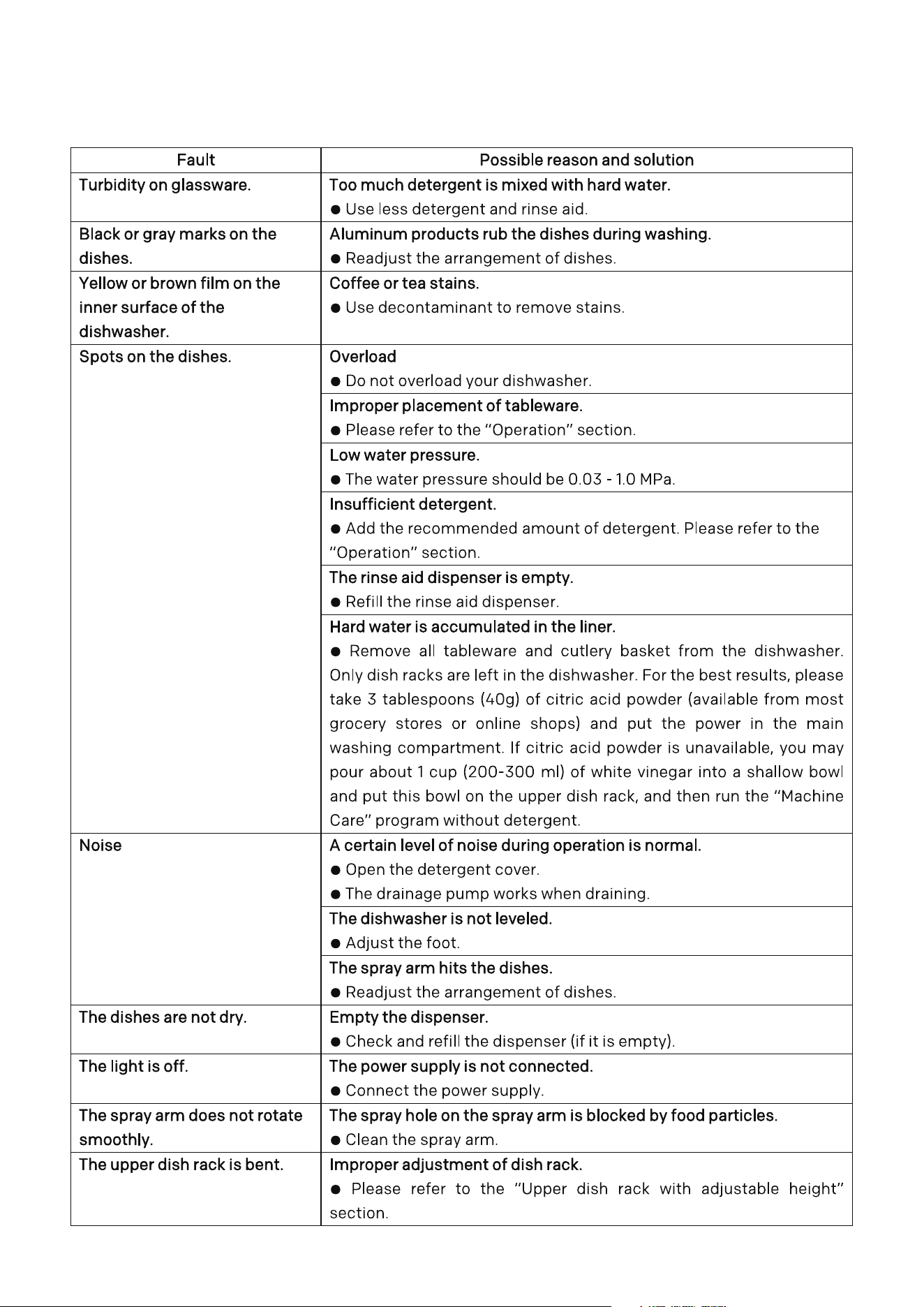
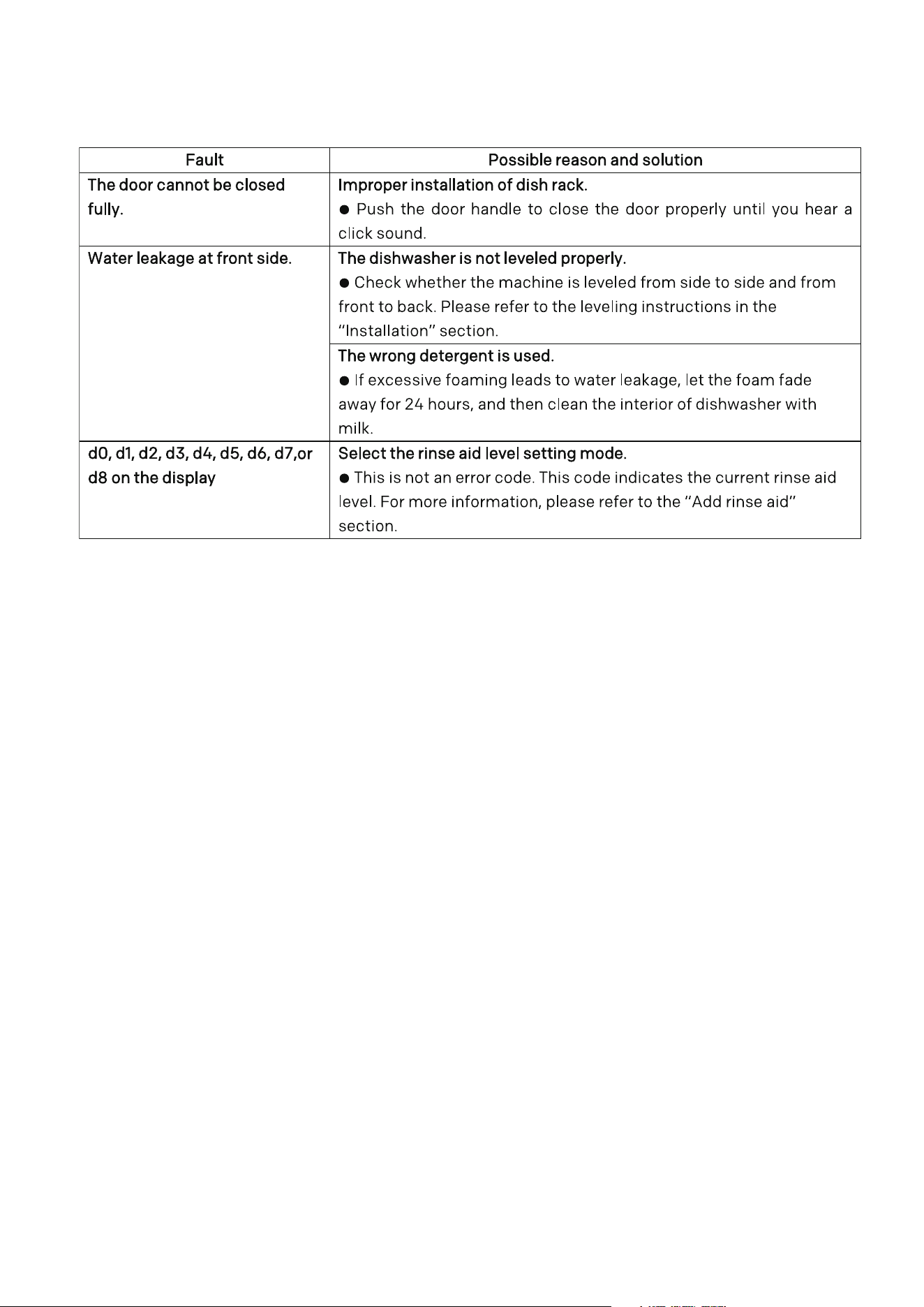
FAQs
SELF-INSPECTION
This machine is equipped with an automatic error monitoring system to detect
and diagnose problems in the early stage. If your dishwasher does not work
properly or does not work at all, please check it according to the following
instructions before seeking service.
39
FAQs
40
FAQs
41
FAQs

42
SPECIFICATIONS
Power Supply 220-240V ~ 50Hz
Rated Power 1920W
Dimensions 598 x 598 x 845 mm (W x D x H)
Weight
Net: 50 kg
Gross: 54 kg

43

CUSTOMER HELPLINE:
info@ayonz.com
02 8279 8606
DISTRIBUTED BY:
Ayonz Pty Ltd