Visit Our Website
SCAN ME
PyleUSA.com
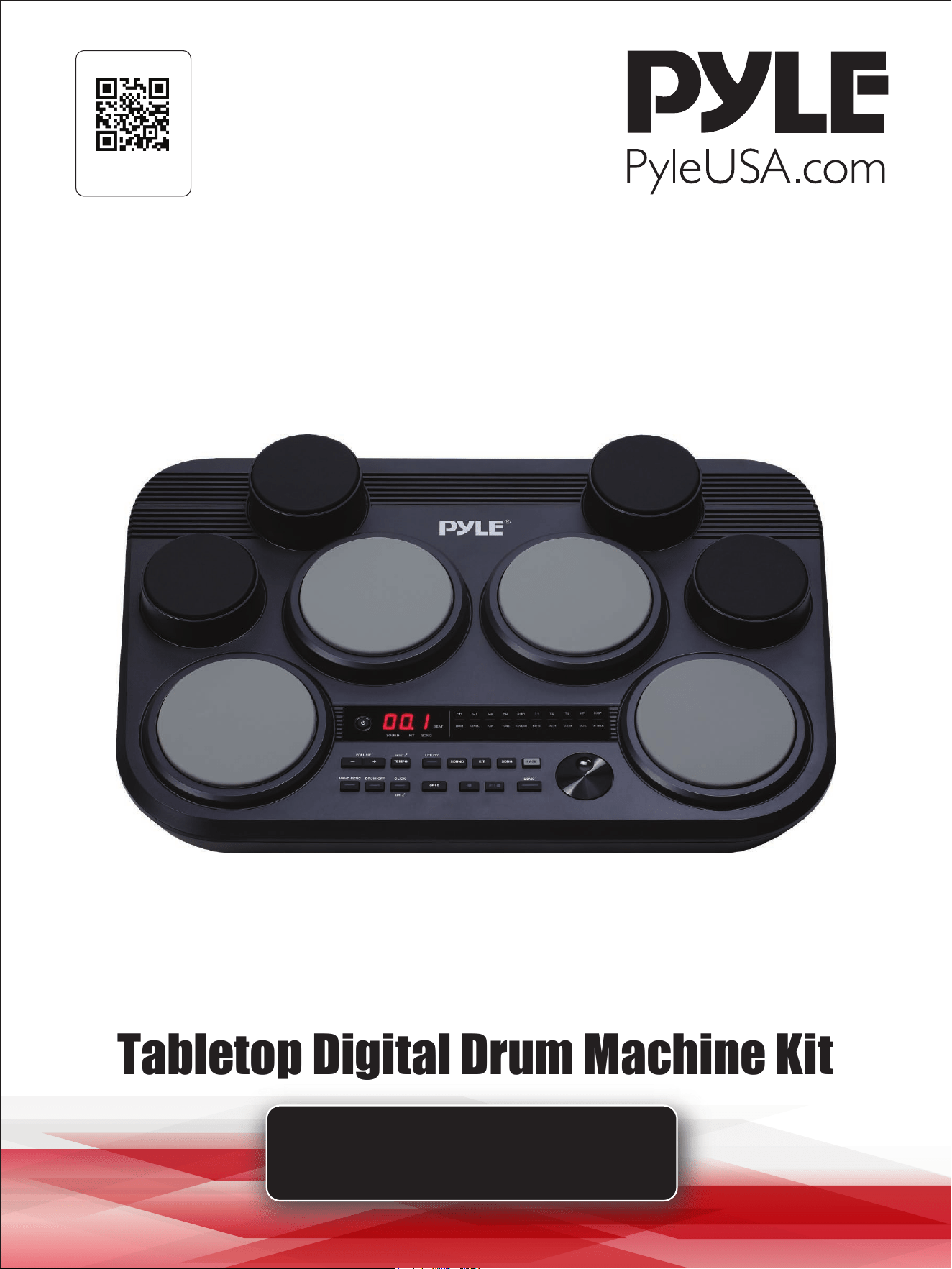
Tabletop Digital Drum Machine Kit
USER GUIDE
PTED09
www.PyleUSA.com
2
Contents
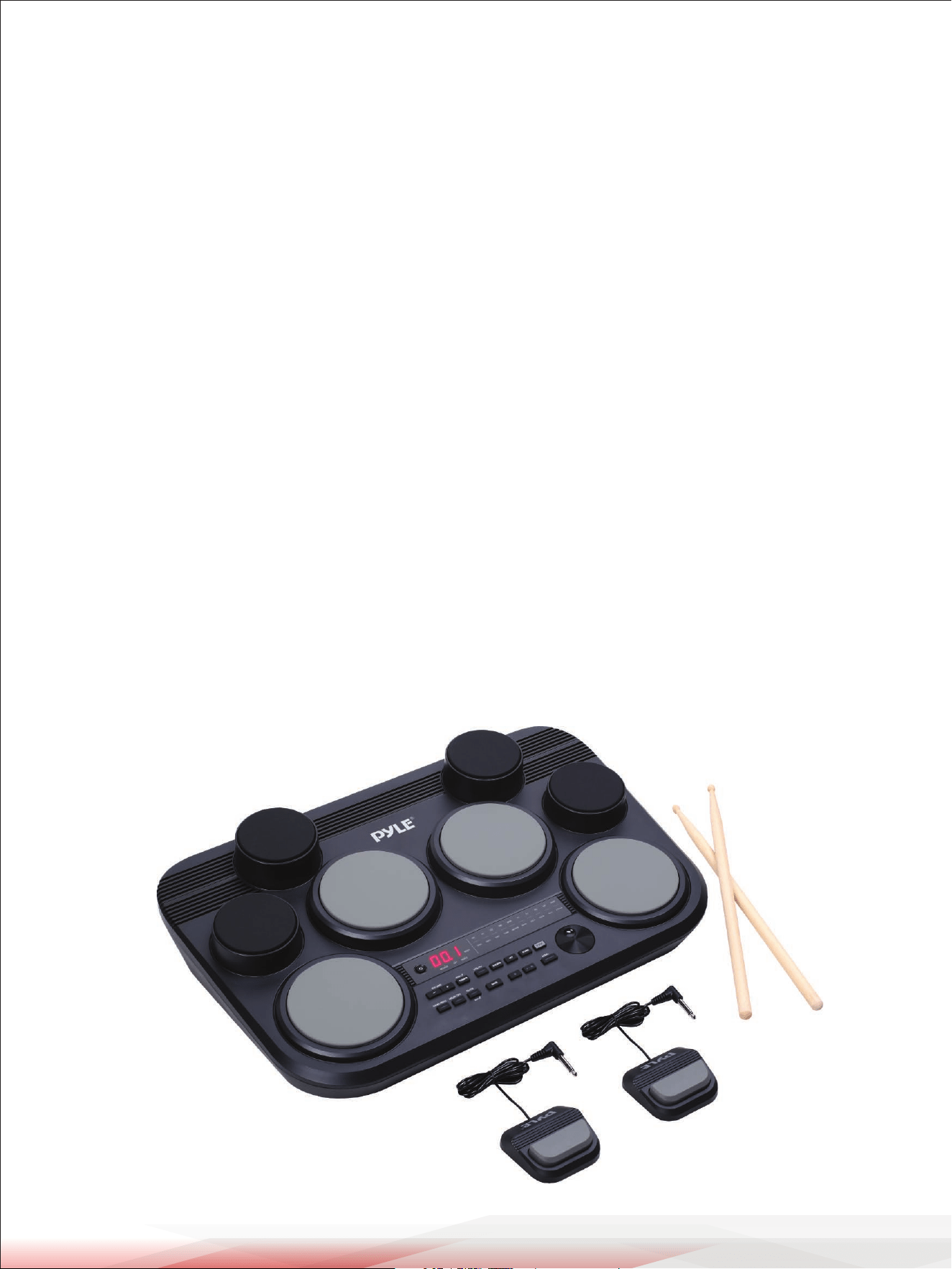
Main Features and Technical Specs
Panel & Display Description
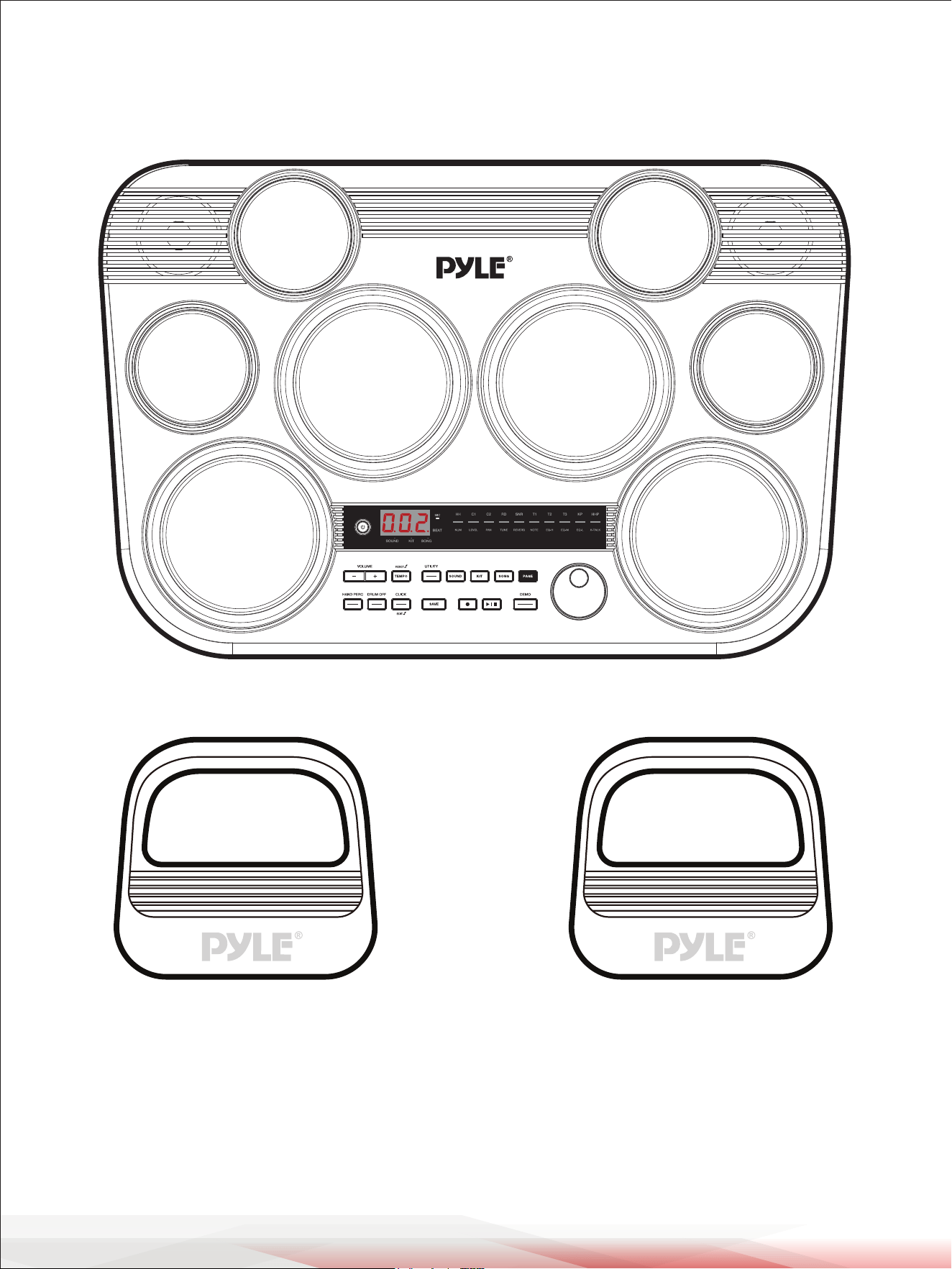
Drum Pad Description (default setting)
Front Panel
Rear Panel
Getting Ready to Play
Setting Up Power Supply
Turning On the Power
Turning O the Power
Auto Power O
Playing the Rubber Head Pad
Drum Kits and Sounds
Selecting a Drum Kit
Selecting a Sound
Saving a User Kit
Song
Selecting a Song
Playing a Song
Muting the Drums in a Song
Click
Turning the Click On or O
Setting the Click Parameters
Adjusting the Tempo
Recording
Prepare Recording
Start / Stop Recording
Utility Settings
Hand Percussion
Connecting to Computer
Factory Reset
Troubleshooting
Prompt Messages
Drum Sound List
Drum Kit List
Song List
GM Backing Sound List
GM Drum Kit List
MIDI Implementation Chart
Register Product
5
6
6
7
7
8
8
8
8
8
8
9
9
9
9
11
11
11
11
12
12
12
12
13
13
13
14
15
15
16
16
16
17
19
20
21
22
24
25
www.PyleUSA.com
3
IC WARNING
- English:
This device complies with Industry Canada licence-exempt RSS standard(s).
Operation is subject to the following two conditions:
(1) This device may not cause interference, and (2) This device must accept any interference,
including interference that may cause undesired operation of the device.
- French:
L’émetteur/récepteur exempt de licence contenu dans le présent appareil est conforme aux CNR d’Innovation,
Sciences et Développement économique Canada applicables aux appareils radio exempts de licence.
L’exploitation est autorisée aux deux conditions suivantes:
(1) L’appareil ne doit pas produire de brouillage; (2) L’appareil doit accepter tout brouillage radioélectrique subi,
même si le brouillage est susceptible d’en compromettre le fonctionnement.
This equipment complies with IC RSS-102 radiation exposure limits set forth for an uncontrolled environment.
This equipment should be installed and operated with minimum distance 20cm between the radiator and your
body.
Cet équipement est conforme aux limites d'exposition aux rayonnements IC établies pour un environnement
non contrôlé. Cet équipement doit être installé et utilisé avec un minimum de 20cm de distance entre la source
de rayonnement et votre corps.

www.PyleUSA.com
4
INFORMATION FOR YOUR SAFETY!
FCC REGULATION WARNING (for USA)
This equipment has been tested and found to comply
with the limits for a Class B digital device, pursuant to
Part 15 of the FCC Rules.
These limits are designed to provide reasonable
protection against harmful interference in a residential
installation. This equipment generates, uses, and can
radiate radio frequency energy and, if not installed
and used in accordance with the instructions, may
cause harmful interference to radio communications.
However, there is no guarantee that interference will
not occur in a particular installation.
If this equipment does cause harmful interference to
radio or television reception, which can be determined
by turning the equipment o and on, the user is
encouraged to try to correct the interference by one
or more of the following measures:
•Reorient or relocate the receiving antenna.
•Increase the separation between the equipment
and receiver.
•Connect the equipment into an outlet on a circuit
dierent from that to which the receiver is connected.
•Consult the dealer or an experienced radio/TV
technician for help.
Unauthorized changes or modications to this
system can void the user's authority to operate this
equipment.
PRECAUTIONS
PLEASE READ CAREFULLY BEFORE PROCEEDING
Please keep this manual in a safe place for future
reference.
Power Supply
•Please connect the designated AC adaptor to an AC
outlet of the correct voltage.
•Do not connect it to an AC outlet of voltage other
than that for which your instrument is intended.
•Unplug the AC power adaptor when not using the
instrument, or during electrical storms.
Connections
Before connecting the instrument to other devices,
turn o the power to all units. This will help prevent
malfunction and/or damage to other devices.
Location
Do not expose the instrument to the following
conditions to avoid deformation, discoloration, or
more serious damage:
•Direct sunlight
•Extreme temperature or humidity
•Excessive dusty or dirty location
•Strong vibrations or shocks
•Close to magnetic elds
Interference with other electrical devices
Radios and televisions placed nearby may experience
reception interference. Operate this unit at a suitable
distance from radios and televisions.
Cleaning
Clean only with a soft, dry cloth. Do not use paint
thinners, solvents, cleaning uids, or chemical-
impregnated wiping cloths.
Handling
Do not apply excessive force to the switches or controls.
Do not let paper, metallic, or other objects into the
instrument. If this happens, remove the electric plug
from the outlet. Then have the instrument inspected
by qualied service personnel.
Disconnect all cables before moving the instrument.
CAUTION:
The normal function of the product may be
disturbed by Strong Electro Magnetic
Interference. If so, simply reset the product
to resume normal operation by following
the owner's manual. In case the function
could not resume, please use the product in
another location.

www.PyleUSA.com
5
Main Features and Technical Specs
Features:
•
8 Drum Pads with Touch Sensitivity
•Compact and Portable Tabletop Design
•Preloaded with 80 Drum Kits
•10 Custom User Kits Storage
•Headphone & USB Outputs
•3-Digit LED Control Display
•110 Preloaded Songs with 600 Dierent Sound Options
•1 Demo Song
•4 x 5" Rubber Drums
•4 x 3.5" Rubber Cymbals
•Connect & Stream Audio from External Devices
•5 User-Dened Songs Storage
•USB-C Port Doubles as MIDI In/Out
•1/8" Auxiliary Input
•(1) Kick, (1) Hi-Hat & DC Power Inputs
•Drum O Practice Feature
•MIDI Recording Capability
•Adjustable Tempo Range from 30-280 BPM
•EQ Eects
•Hand Percussion Mode: Touch-Responsive Pads
What's in the Box:
•
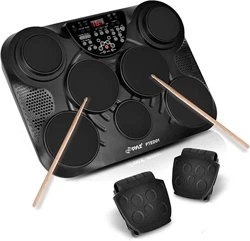
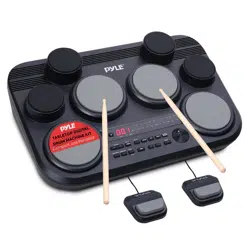
Tabletop Digital Sound Module
•(2) Digital Foot Pedals
•(2) Drum Sticks
•Wall Power Adapter
•US Adapter Plug
Technical Specs:
•
Cymbal & Drum Sounds: 600 [A1]
•Audio Drum Kits: 80
•Musical Songs: 110
•Demo Songs:1
•USB Input: Type C
•External Device Connection: Aux (1/8") Input
•Power Supply: (IN)100-240V AC 50/60HZ 1.0A
•Max; (OUT)12V DC 2A, 2000mAh
•Product Dimensions (L x W x H): 23.22’’ x 15.35’’ x 5.19’’ -inches
California Prop 65 Warning
WARNING:
This product can expose you to chemicals, which is known to
the state of California to cause cancer birth defects and other
reproductive harm. Do not ingest.
For more info go to: www.P65warnings.ca.gov
www.PyleUSA.com
6
Panel & Display Description
Drum Pad Description (default setting)
HI-HAT PEDAL KICK PEDAL
www.PyleUSA.com
7
Front Panel
Rear Panel
1
3
6
9
7
8
4
5
2
10
11
12 14
13 15 16 17
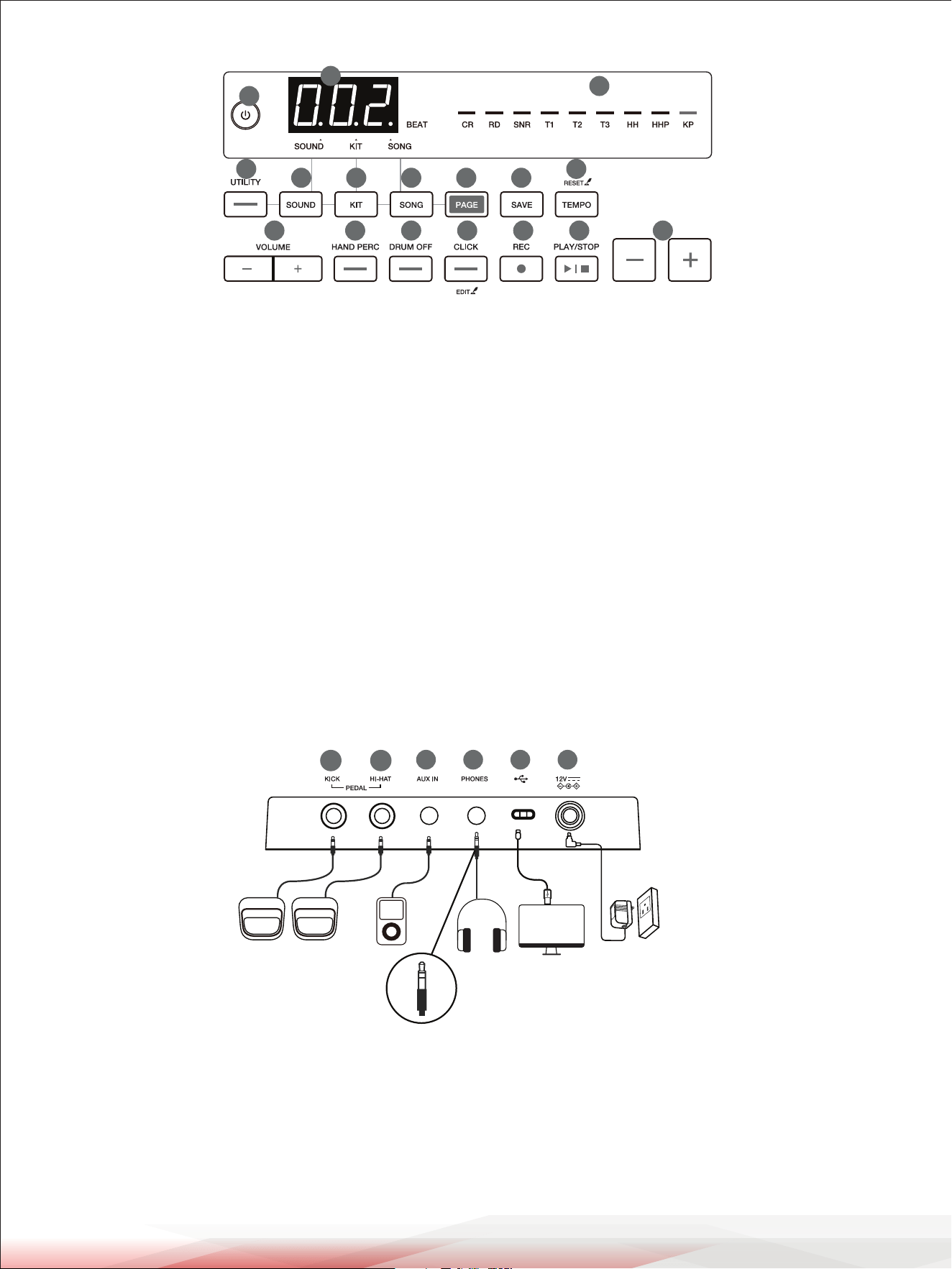
1. [POWER] Button: Turn the power on or o.
2. 3-Digit LED: Display the current mode and
parameters.
3. Drum Pad Indicator / Page Indicator:
Drum pad indicator: _ blinks.
Page (sub-menu) indicator: stays lit.
4. [UTILITY] Button: Enter the Utility menu, then use
the [PAGE] button to change the sub-menu.
5. [SOUND] Button: Enter the Sound menu, then use
the [PAGE] button to change the sub-menu.
6. [KIT] Button: Enter the Kit menu, then use the [PAGE]
button to change the sub-menu.
7. [SONG] Button: Enter the Song menu, then use the
[PAGE] button to change the sub-menu.
8. [PAGE] Button: Change the sub-menu of the current
main menu.
9. [SAVE] Button: Save the current kit settings to a
user kit.
10. [TEMPO] Button: Press to enter the Tempo menu.
Press and hold to reset to the default tempo of
the current song.
11. [VOLUME +/-] Buttons: Adjust the master volume.
13. [DRUM OFF] button: Mute or unmute the drum
part in a song.
14. [CLICK] Button: Press to turn the click on or o.
Press and hold to enter the Click menu, then use
the [PAGE] button to change the sub-menu.
15. [RECORD] Button: Enter or exit Record mode.
16. [PLAY/STOP] Button: Play or stop playing a song.
17. Data Button: Adjust the parameters.
20 21 22 2318 19
18. KICK PEDAL Jack:
For connecting the Kick pedal.
19. HI-HAT PEDAL Jack:
For connecting the Hi-Hat pedal.
Note: If connecting a kick pad or Hi-Hat pedal,
please use a MONO cable.
20. AUX IN Jack: For connecting an external audio
player, such as an MP3.
21. PHONES Jack: For connecting a pair of headphones
or an external audio amplier. Please use head-
phones without a mic. Using headphones with a
mic may cause abnormal sound.
22. USB Jack: For connecting to a computer or a
portable power bank.
23. Power Jack: For connecting the specied power
adapter.
www.PyleUSA.com
8
Getting Ready to Play
Setting Up Power Supply
1. Connect the power adapter to the power jack on the rear panel.
2. Connect the other end of the power cord to an appropriate AC outlet.
Notes:
1. Use the specied power adapter.
2. Even when the module is turned o, electricity is still owing to the module at
a minimum level. Please unplug the module when it is not in use for an
extended period.
3. The module supports using USB power. Ensure the use of a high-quality USB-C
cable and USB power adapter.
•It supports a USB power adapter of 5V/2A.
•It supports a portable power bank of 5V/2A.
It may not support all power bank brands.
•When using the module to communicate with a computer/mobile device,
make sure to use the DC12V power adapter to power the module; otherwise,
it may not function normally.
•When using USB power, the module will automatically reduce the output
volume. In such a case, we suggest using headphones or external speakers.
Turning On the Power
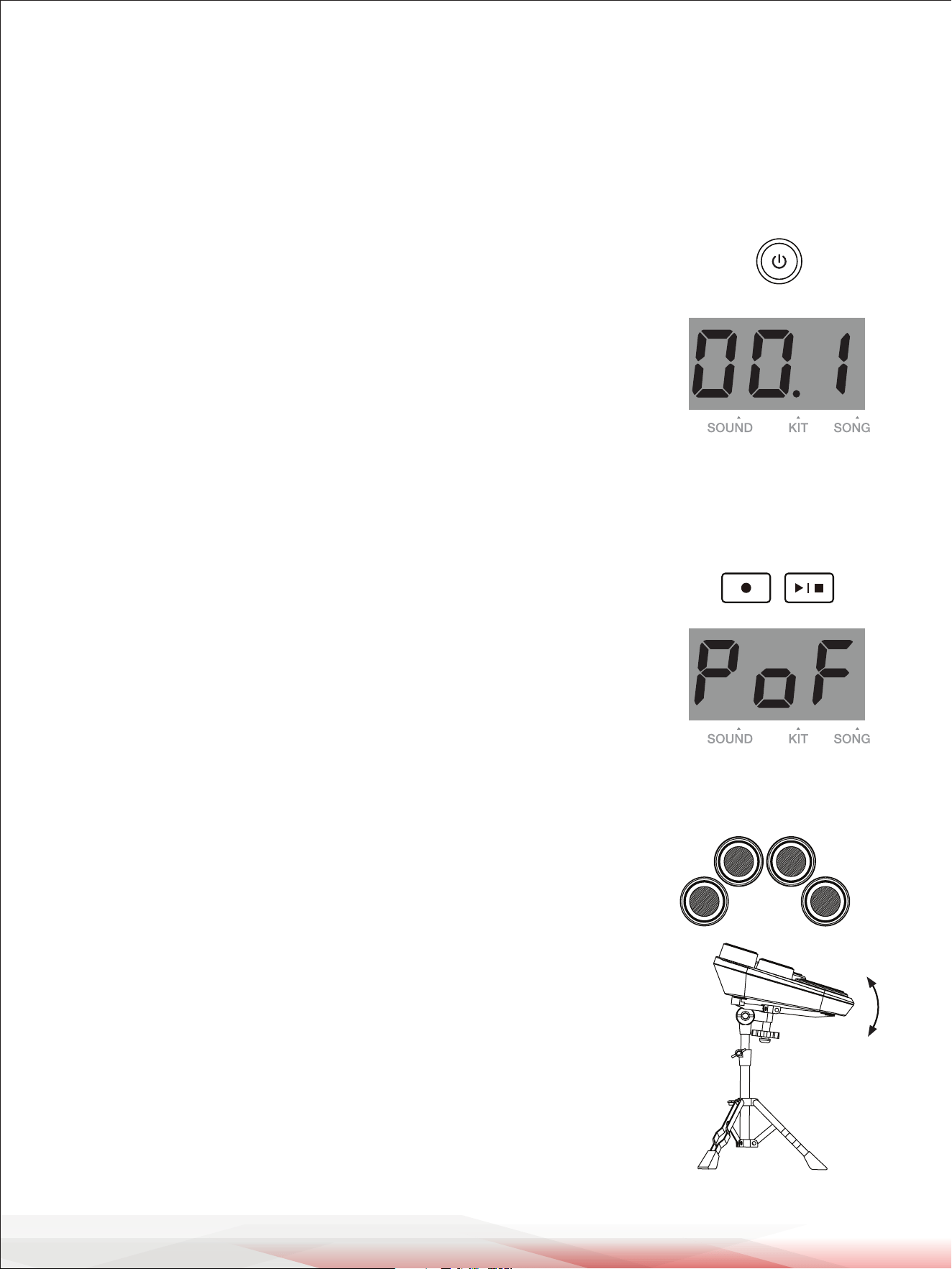
1. Press the [POWER] button to turn on the module. The display shows the current
mode and parameter.
2. Use the [MASTER VOLUME +/-] buttons to adjust the volume. Strike the pads
and listen with headphones until you reach an appropriate volume level.
Notes:
1. Before turning on or o the power, make sure you have turned down the
volume of all connected equipment.
2. When using the power adapter, the maximum volume level can reach 16.
When using USB power, the maximum volume level will be limited to 12.
Turning O the Power
Press the [POWER] button to turn o the module. The display turns o.
Auto Power O
In order to save energy, the module will automatically turn o after 30 minutes
if it is not in use (playing, striking, pressing buttons, etc.). To disable this function,
hold the [PLAY/STOP] button and then turn on the power.
The display will temporarily show “PoF.”
Playing the Rubber Head Pad
1. When playing the rubber head pads, make sure not to strike the rim of the
pads. If you strike the edge area of the pad, it may cause noise and crosstalk.
2. When mounting the module to a snare drum stand, ensure that the drum pads
are tilted properly towards the player. Doing this will help reduce the chance
of striking the edge area of the rubber head pads. We suggest using a 14-inch
snare drum stand.
www.PyleUSA.com
9
Drum Kits and Sounds
Selecting a Sound
You can change the sound for each drum pad.
1. Press the [SOUND] button to enter the Sound menu. The sound indicator lights up on the display.
2. Strike the pad that you want to edit. The corresponding pad indicator blinks.
3. Use the data button to select a sound including a USER sound. You can press the [PAGE] button to change
the sub-menu.
Saving a User Kit
1. Press the [SAVE] button. The current user kit number (such as “U01") blinks on
the display.
2. Use the data button to select a user kit slot to save the setting (U01-U10).
3. Press the [SAVE] button again to conrm saving. The kit number on the display stops blinking.
Note:
Unsaved kit settings will be lost when you enter other menus or change the kit number.
Selecting a Drum Kit
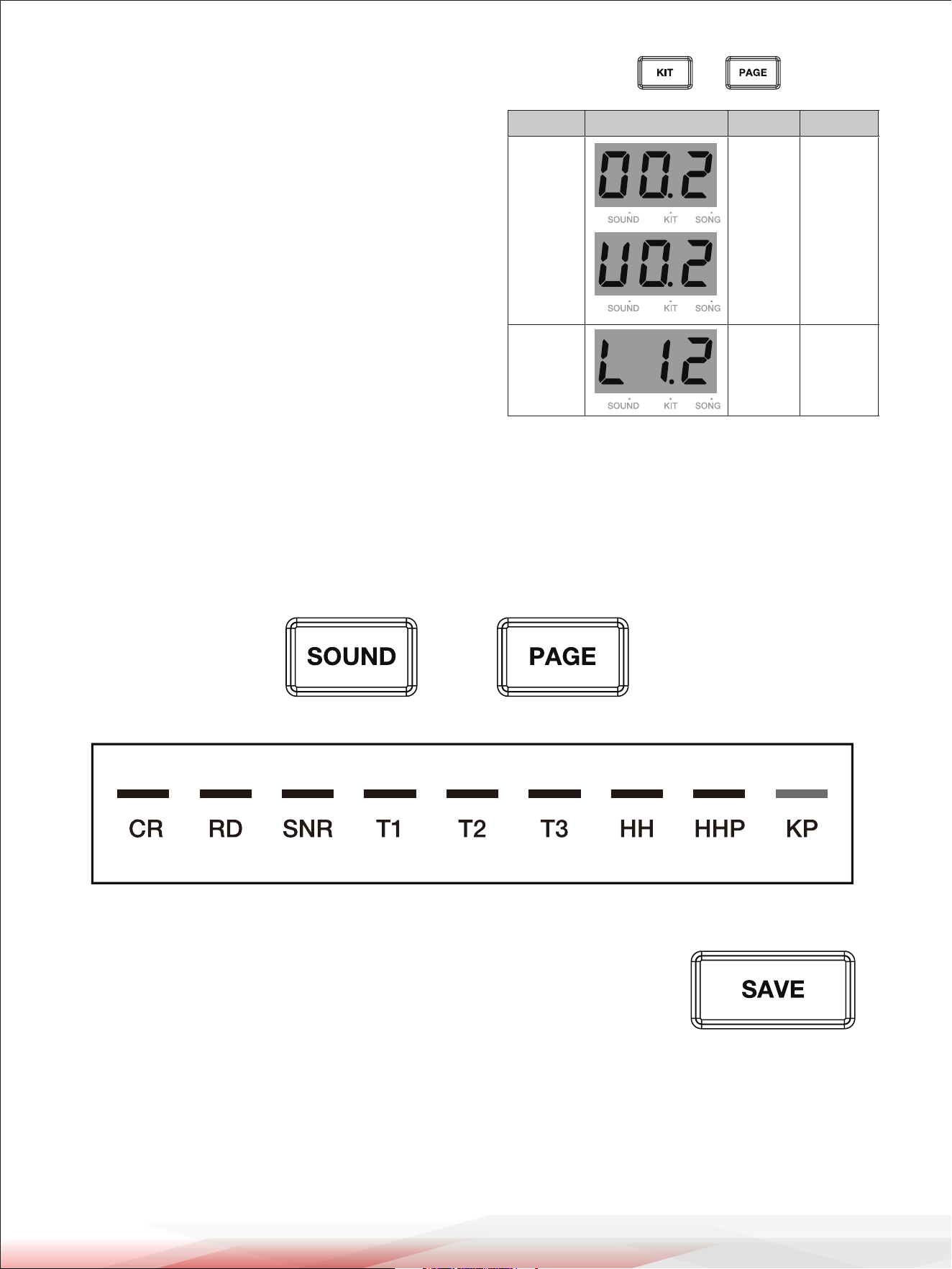
1. Press the [KIT] button to enter the Kit menu.
The kit indicator lights up on the display.
2. The display shows the current kit number.
Use the data button to select a desired drum kit.
You can press the [PAGE] button to change the sub-menu.
Sub-menu Display Range Description
Kit
Number
1~45,
U01~U10
Select a kit
number.
Kit
Volume
0~32 Adjust the
kit volume.
www.PyleUSA.com
10
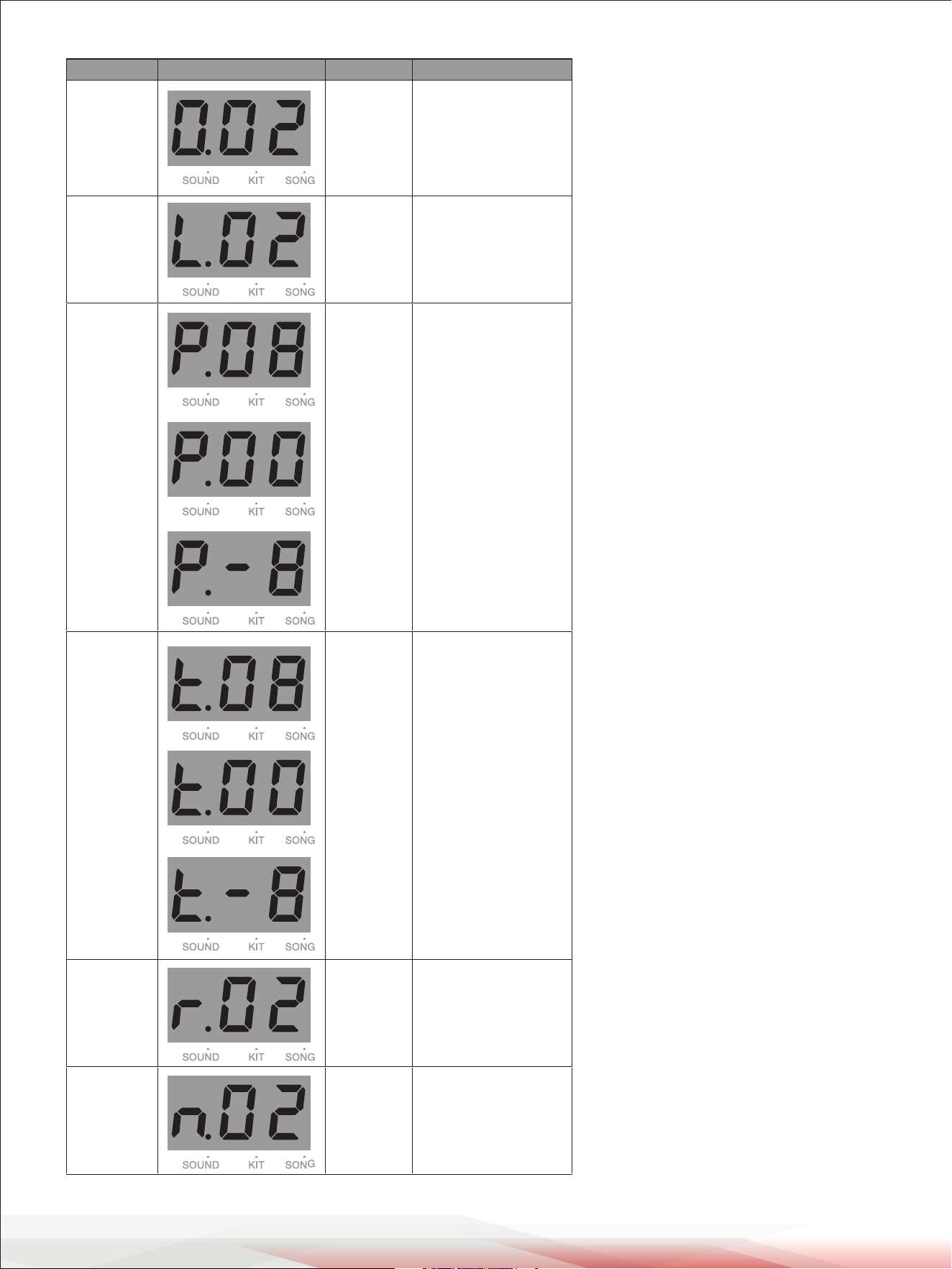
Sub-menu Display Range Description
Num 1~273 Select a sound
number.
Level 0~32 Adjust the sound
volume.
Pan -8~0~8 Adjust the pan of
the sound.
Tune -8~0~8 Adjust the pitch of
the sound.
Reverb 0~16 Adjust the reverb
level of the sound.
MIDI Note 0~99 The MIDI note will
be sent via MIDI
OUT.
www.PyleUSA.com
11
Song
Playing a Song
1. Press the [PLAY/STOP] button to play or stop the current song.
When the song is playing, you can use the data button to
select a song. The selected song will start playing when the
current measure is nished.
2. While the song is playing, you can press the [CLICK] button to
turn the click on or o.
3. While the song is playing, the dots on the display blink with the
song tempo. The three dots will blink at the same time at the
rst beat of each measure.
4. Press the [TEMPO] button to enter the Tempo menu.
The display shows the current tempo. You can use the data
button to change the tempo. If you press and hold the [TEMPO]
button, it will reset to the default tempo of the current song.
You can press other menu buttons to exit the Tempo menu.
Or if there's no operation within 3 seconds, it will automatically
exit and go back to the previous menu.
Muting the Drums in a Song
1. Press the [DRUM OFF] button to mute the drum part of the
current song. The button indicator turns on.
2. When the drum part is muted, the corresponding drum pad
indicators will turn on according to the drum rhythm.
3. Press the [DRUM OFF] button again to unmute the drum part.
Selecting a Song
1. Press the [SONG] button to enter the Song menu.
The song indicator lights up on the display.
2. The display shows the current song number.
You can use the data button to select a song.
If you select song No.1~100, it will loop playing this
song. If you select song No.101~110 or a user song,
it will play this song once and then stop.
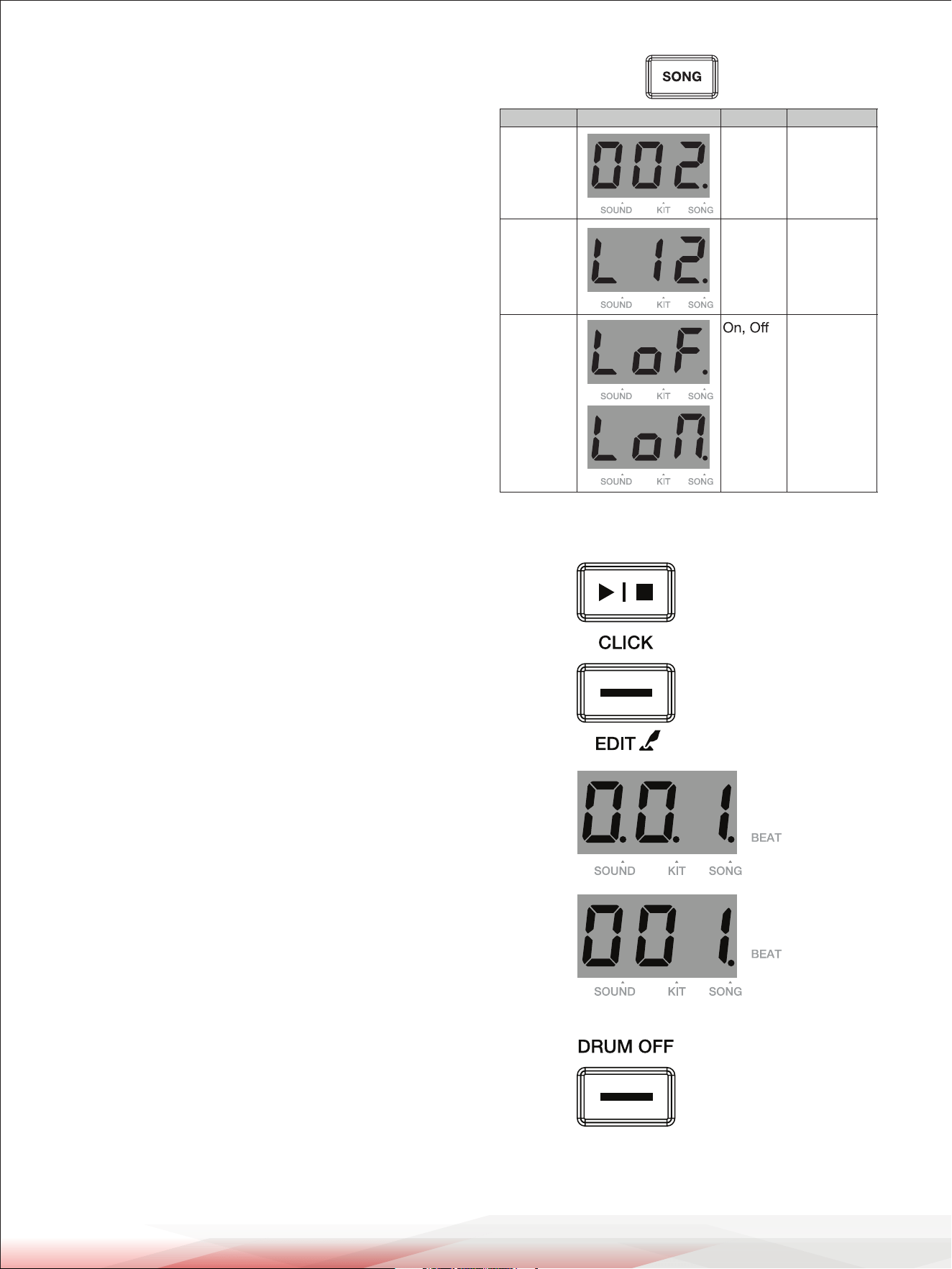
Sub-menu Display Range Description
Song Num 1~100,
U01~U05
Select a song
number
Song Vol 0~32 Adjust the
song volume
PAD LED
ON/OFF
Turn the pad
indicator
on/o for
song
playback.
LoF: light o.
Lon: light on.
The First Beat
Other Beats
www.PyleUSA.com
12
Click
Turning the Click On or O
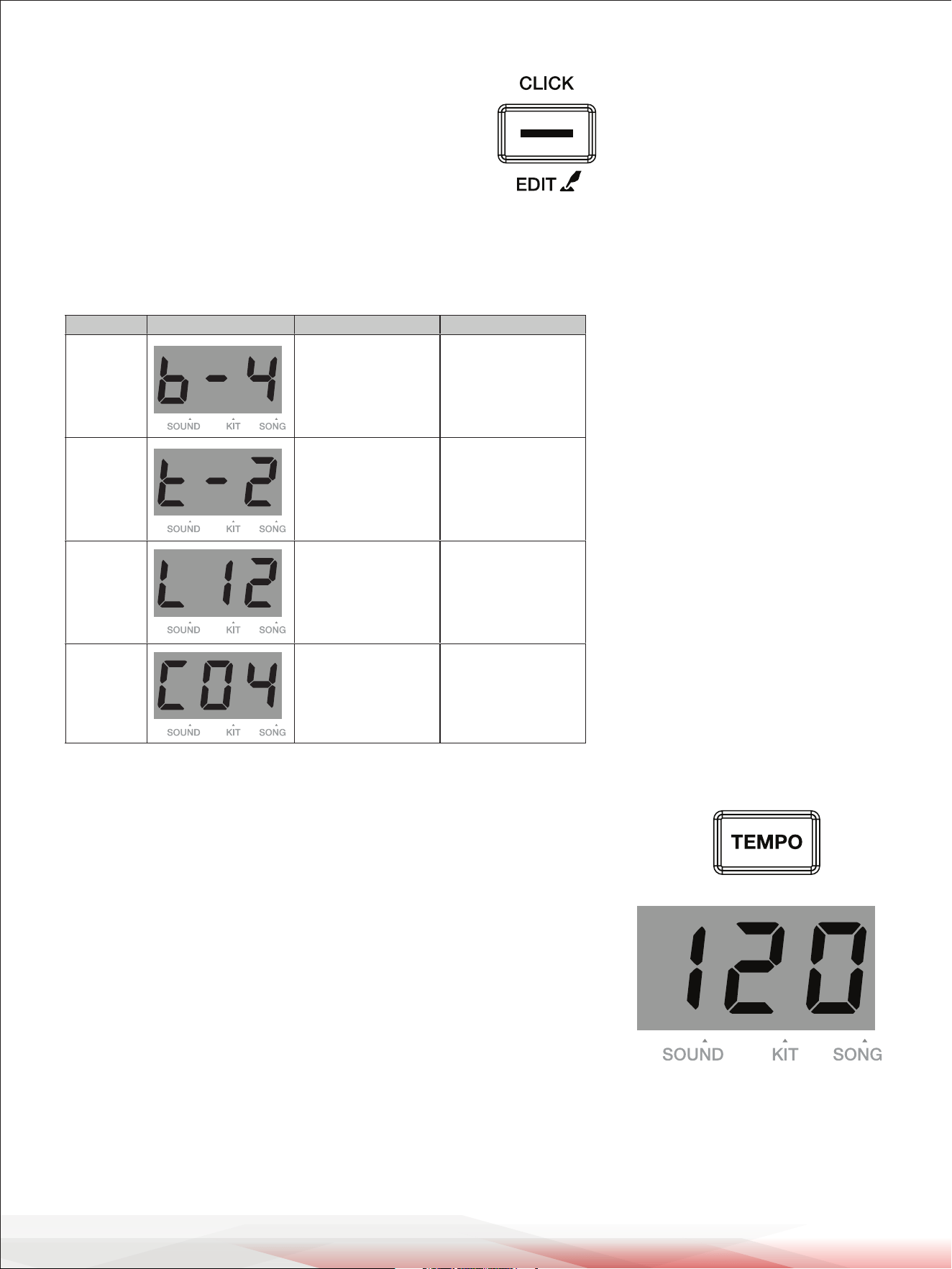
1. Press the [CLICK] button to start the click.
The button indicator blinks in sync with the tempo.
2. Press the [CLICK] button again to turn o the click.
Setting the Click Parameters
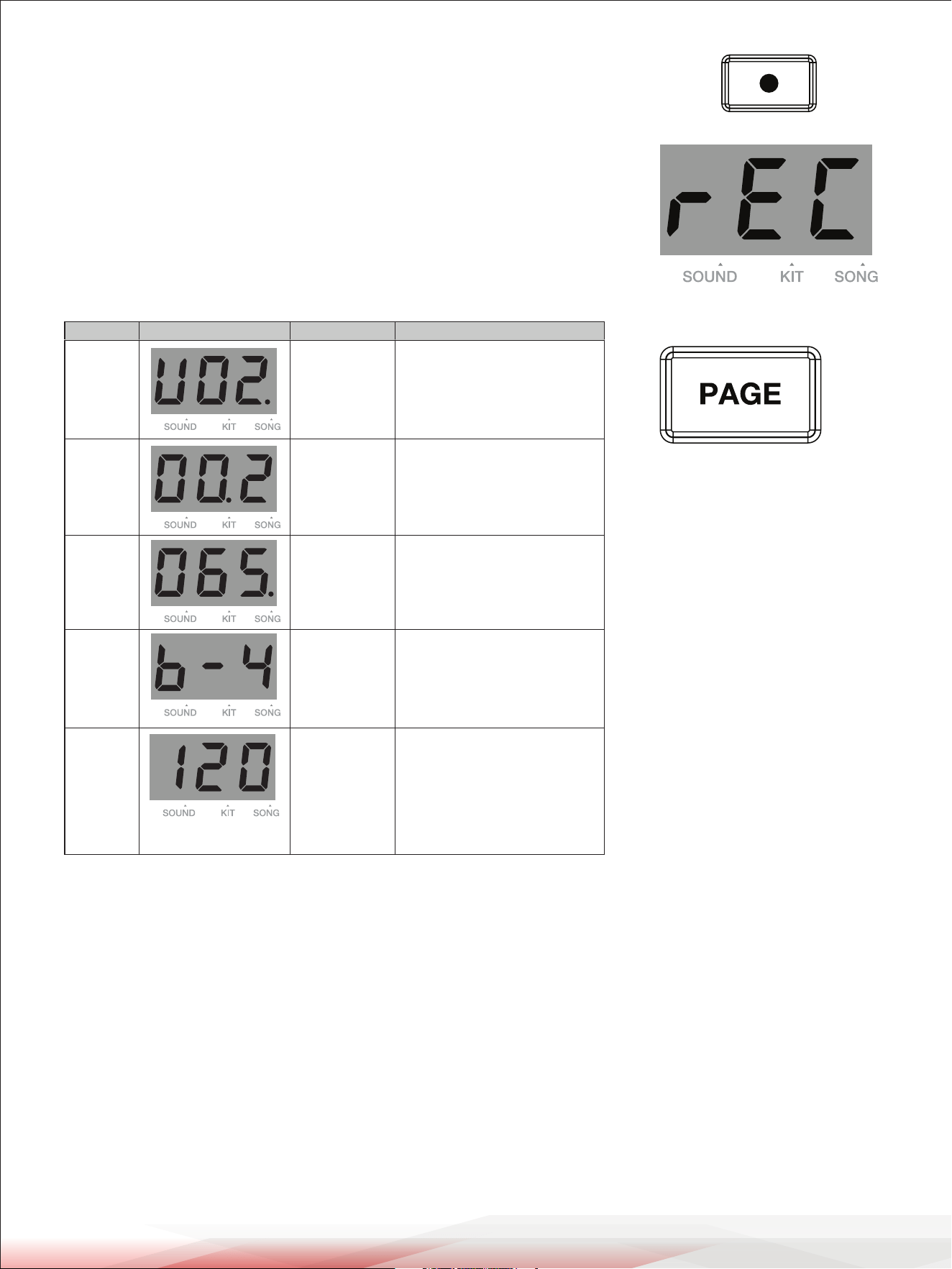
1. Press and hold the [CLICK] button to enter the Click menu. The display shows the corresponding click parameter.
2. Use the data button to adjust the parameters. You can press the [PAGE] button to change the sub-menu.
Adjusting the Tempo
1. Press the [TEMPO] button to enter the Tempo menu.
The display will show the current tempo.
2. Use the data button to adjust the tempo within the range of 30 to 280.
If you long-press the [TEMPO] button, it will reset to the default tempo
of the current song.
3. To exit the Tempo menu, press other menu buttons.
If there's no operation within 3 seconds, it will automatically exit and
return to the previous menu.
Note:
The click tempo will change in sync with the current song tempo.
When you change the song, the tempo will adjust accordingly.
Sub-menu Display Range Description
Beat 0~9 Set the beat.
Rhythm
Type
2 (half note)
4 (quarter note)
8 (eighth note)
3 (eighth note triplet)
16 (sixteenth note)
Set the rhythm of
the click.
Volume 0~16 Set the click volume.
Sound 1~6 Set the click sound.
www.PyleUSA.com
13
Recording
Prepare Recording
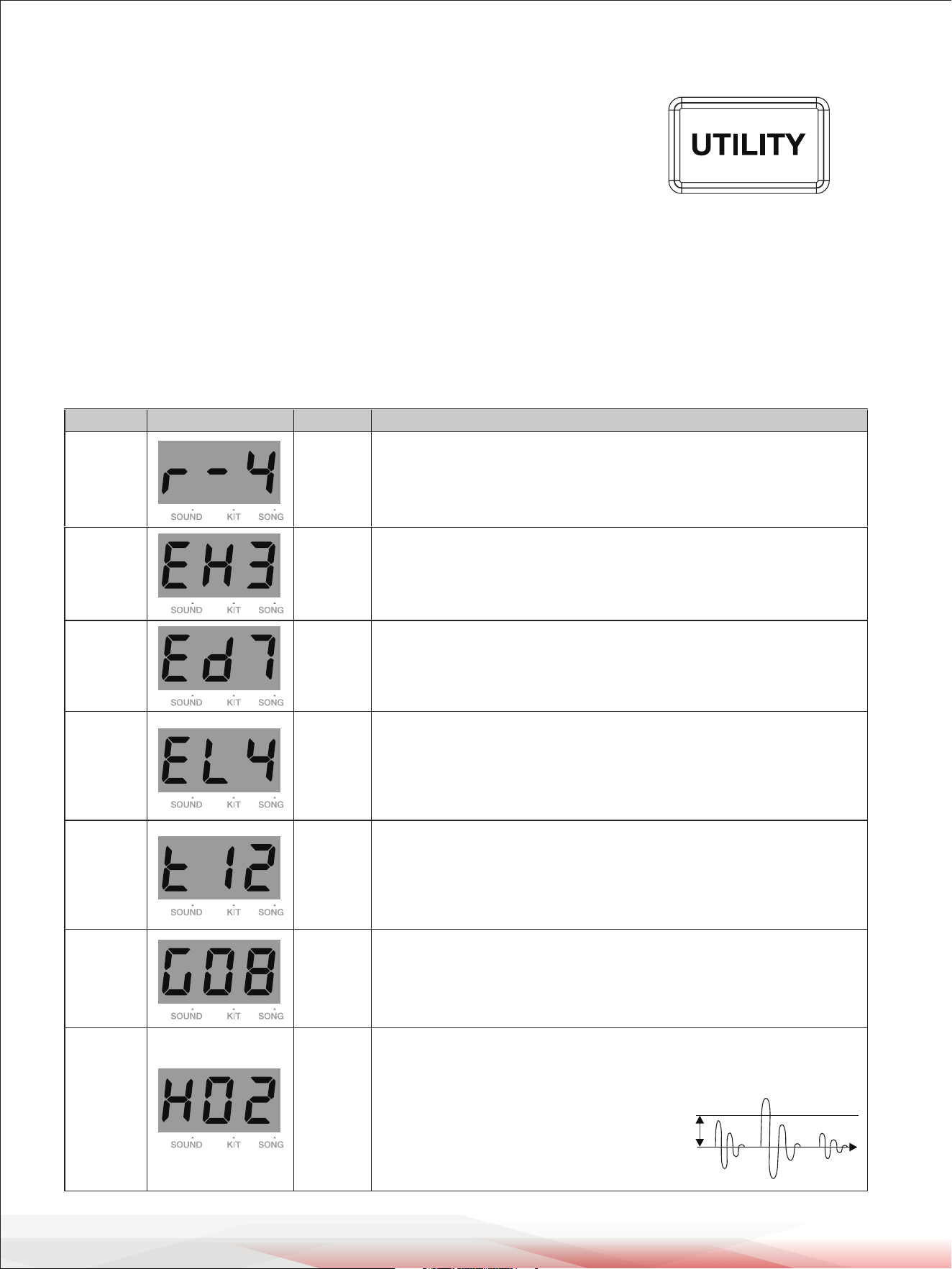
1. Press the [RECORD] button to enter Record mode.
The display will show "REC". The [RECORD] button indicator lights up,
and the [PLAY/STOP] button indicator blinks.
2. Press the [PAGE] button to navigate to the sub-menu, then use the data
button to adjust the parameters.
Start/Stop Recording
1. In Record mode, press the [PLAY/STOP] button or strike a pad to start recording. The display shows the measure
counts of recording. The dots on the display blink according to the selected tempo and beat. During recording,
the [RECORD] and the [PLAY/STOP] button indicators stay lit.
2. Press the [PLAY/STOP] button to stop recording. The [RECORD] and the [PLAY/STOP] button indicators turn o.
Notes:
1. It can record up to 8000 strikes. When the recording is full, the display will show "FUL" and return to the
Song menu.
2. When editing kit settings, save the edited kit as a user kit before entering Record mode. If you use unsaved kit
settings for recording, when you play back this user song, it will sound dierent from the recording.
Sub-menu Display Range Description
UserSong
U01~U05 Select a user song number.
Kit 1~45,
U01~U10
Select a kit for recording.
Song --- ,1~100
Select a song for accompaniment.
“---” means no song is selected
for accompaniment.
Beat 0~9
Click Beats: Available only
when the Song sub-menu is
set to “---”.
Tempo 30~280
Set the tempo for recording.
Note: It will use the song tempo
when using song accompaniment.
When no song is selected, it will
use the default tempo of 120.
www.PyleUSA.com
14
Utility Settings
In Utility Settings, you can set the global EQ and trigger parameters.
Global EQ: The 3-band EQ can adjust separately the bass (100Hz),
the mid-range (500~3KHz), and the treble (12KHz) within the adjustable
range of -6dB to +6dB.
Trigger parameters: Adjust the crosstalk, gain, and threshold for a pad.
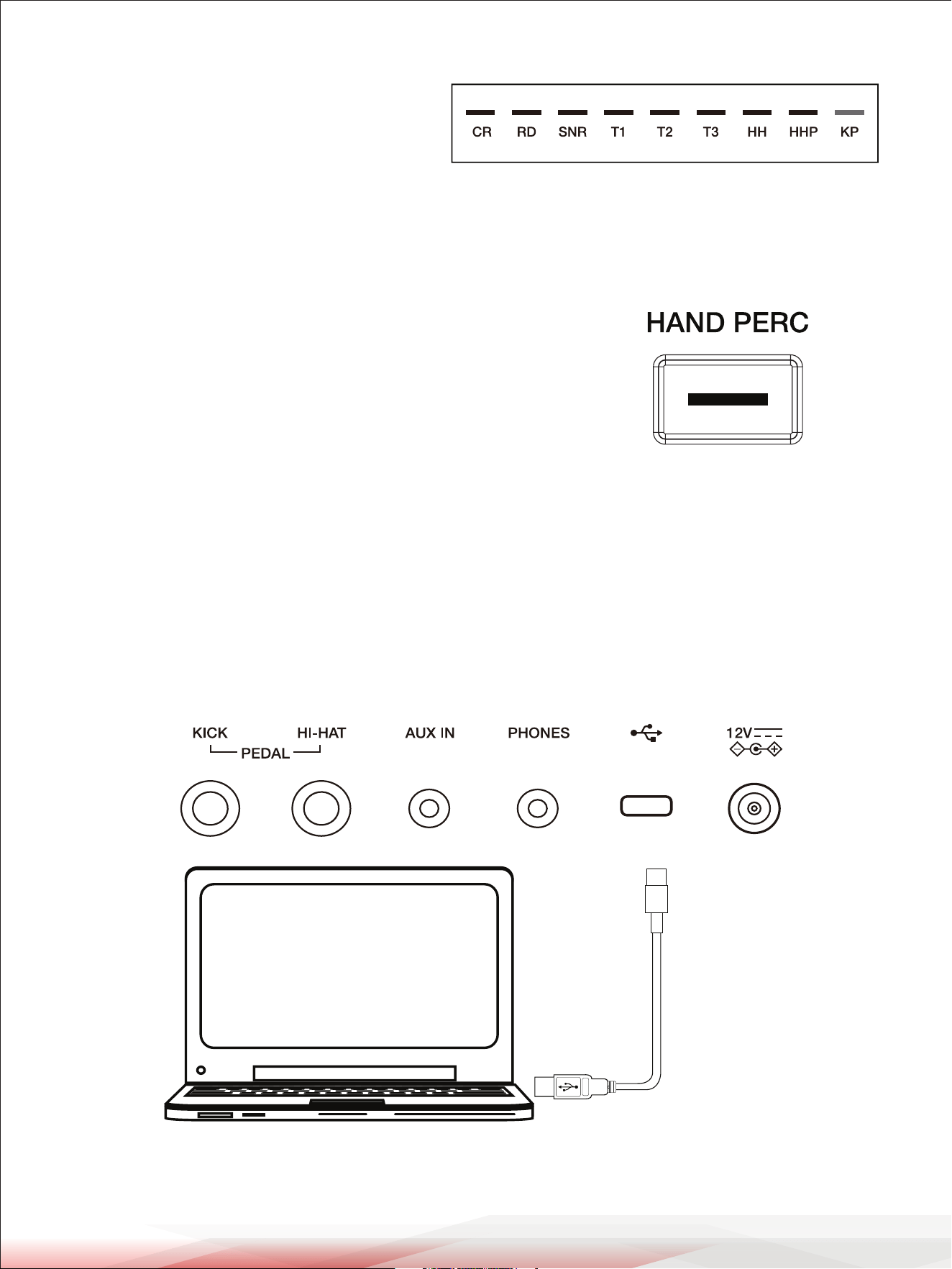
1. Press the [UTILITY] button to enter the Utility menu. The display shows the parameter of the current sub-menu.
2. Use the data button to adjust the parameter. Press the [PAGE] button to navigate to dierent sub-menus.
Detailed parameters and their ranges:
Sub-menu Display Range Description
Reverb
0~4 Set the reverb level.
EQ High
1~9
Set the high-band gain, range is:
1=-3dB, 2=-2dB, 3=-1.5dB, 4=-1dB, 5=0dB, 6=1dB, 7=1.5dB, 8=2dB, 9=3dB
EQ Middle
1~9
Set the mid-band gain.
Same range as the high-band gain.
EQ Low
1~9
Set the Low-band gain.
Same range as the high-band gain.
Pad X-Talk
0~32
This setting helps prevent “crosstalk”. Crosstalk means when you strike a pad,
the adjacent pad also produces sound. For example: when you hit the snare,
tom1 also produces sound. In this case, you can gradually increase the “X-talk”
value for tom1.
Note: If the X-talk value is set too high, when two pads are being played at the
same time, the one being struck less forcefully may not produce sound.
Pad Gain
0~32
Adjust the sensitivity of pads.
Higher sensitivity allows the pad to produce a loud volume even when playing
softly.
Lower sensitivity makes the pad produce a low volume even when playing
forcefully.
Pad
Threshold
0~32
Setting the threshold of the pads. It will produce sound only when the
trigger signal is above the threshold level. This setting can prevent unwanted
sounding, such as crosstalk. If setting this value too high, it may not
produce sound when striking softly.
You can adjust the threshold in this way:
1. Set the value to a low level.
2. Raise the value gradually, and strike the pad
to check, until you get an appropriate level.
AB C
Threshold
www.PyleUSA.com
15
Notes:
1. These settings will be saved automatically when
you turn o the power: utility settings, master
volume, the number/volume/pad LED setting of
the current song, and the beat/volume/sound
setting of the click.
2. Hold [UTILITY] + [SAVE] buttons and turn on the power to reset the utility settings, song number,
and master volume to the default settings.
Hand Percussion
The module provides easy access to hand percussion practice.
1. Press the [HAND PERC] button to enter Hand Percussion mode.
The current drum kit will change to use the hand percussion kit.
The pad sensitivity will automatically be readjusted to a higher level
suitable for hand practice.
2. Press the [HAND PERC] button again to exit this mode.
Note:
When entering Hand Percussion mode, the current song will change to use a song that has a hand percussion kit.
Upon exiting this mode, it will revert to the previous song and adjust the current drum kit accordingly.
Connecting to Computer
The module has a USB jack that can be connected to a computer for MIDI input or MIDI output.
The module can work without installing a driver in the Windows operating system and macOS, and it will be
recognized under the name "e-drum."
Note:
The module is compatible with these USB ports: USB 3.0, USB 2.0 full speed, and USB high speed.
www.PyleUSA.com
16
Factory Reset
1. Push the [POWER] button to turn the power o.
2. Hold the [+] and [-] buttons and push [POWER] to perform a factory reset.
Note: This operation will reset all data.
Troubleshooting
Prompt Messages
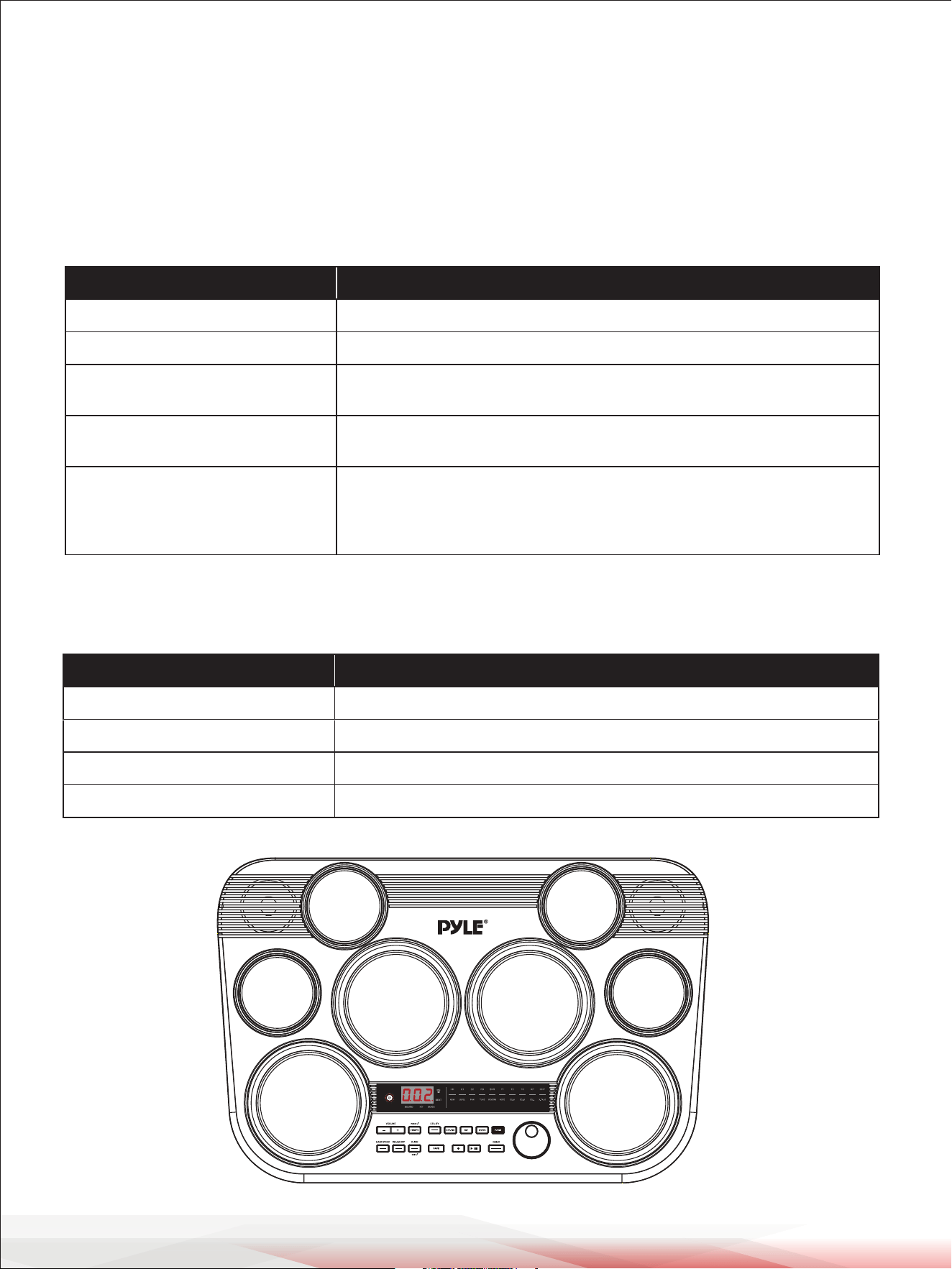
Problem Possible Cause and Solution
No sound. Use the [VOLUME +/-] buttons to set an appropriate volume level.
No sound from the pads. Make sure the pad volume is not set to “0”.
No click sound.
1. Make sure the click is turned on.
2. Make sure the click volume is not set to “0”.
The pad volume doesn’t match
the song playback volume.
Adjust the pad volume to match the song playback volume.
Cannot connect to computer.
1. Make sure the USB cable is connected correctly.
2. Make the connection again (keep the computer on, then turn the
module on, then connect the USB cable).
3. The module should work without installing a driver.
Message on display Meaning
Pof
--- No data in the user sound.
NUL No data in the user song.
FUL The memory of the user song is full.
Auto Power O function is disabled.
www.PyleUSA.com
17
Drum Sound List
No. Name
KICK
1 Rock Kick
2 Fusion Kick
3 1970's Kick
4 Reggae Kick
5 Old School Kick
6 Magic Kick
7 Noise Kick
8 Lo-Fi Kick
9 Junkyard Kick
10 24''Acoustic Kick
11 24''Standard Kick
12 Brush Kick
13 Jazz Kick
14 Room Kick
15 Vintage Kick
16 HipHop Kick
17 Drum & Bass Kick
18 Electronic Kick 1
19 Dance Kick
20 FX Mix Kick
21 Techno Kick
22 808 Kick
23 909 Kick
24 Electronic Kick 2
SNARE
25 14'' Acoustic Snare
26 14'' Standard Snare
27 14'' Funk Snare
28 Brush Snare
29 14'' Jazz Snare
30 14'' Rock Snare
31 13'' Damped Snare
32 Orchestra Snare
33 Orchestra Snare Rim
34 Room Snare
35 Fusion Snare
36 Big Band Snare
37 Vintage Snare
38 Live Snare
39 Reggae Snare
40 R&B Snare 1
41 808 Snare
42 909 Snare
43 R&B Snare 2
44 Electronic Snare
45 Power Snare
46 Dance Snare
47 Old School Snare
48 House Snare
49 Lo-Fi Snare
50 Junkyard Snare
51 Noise Snare
52 Drum & Bass Snare
53 Techno Snare
54 Techno Snare Rim
55 Magic Snare
56 Acoustic Snare Stick
57 Standard Snare Stick
58 Brush Snare Stick
59 Rock Snare Stick
60 Live Snare Stick
61 Room Snare Stick
62 Fusion Snare Stick
63 Brush Swirl
Tom
64 Acoustic Tom 1
65 Acoustic Tom 2
66 Acoustic Tom 3
67 Acoustic Tom 4
68 Acoustic Tom 5
69 Acoustic Tom 6
70 Brush Tom 1
71 Brush Tom 2
72 Brush Tom 3
73 Brush Tom 4
74 Brush Tom 5
75 Brush Tom 6
76 Jazz Tom 1
77 Jazz Tom 2
78 Jazz Tom 3
79 Jazz Tom 4
80 Jazz Tom 5
81 Jazz Tom 6
82 808 Tom 1
83 808 Tom 2
84 808 Tom 3
85 808 Tom 4
86 808 Tom 5
87 808 Tom 6
88 909 Tom 1
89 909 Tom 2
90 909 Tom 3
91 909 Tom 4
92 909 Tom 5
93 909 Tom 6
94 Electronic Tom 1
95 Electronic Tom 2
96 Electronic Tom 3
97 Electronic Tom 4
98 Electronic Tom 5
99 Electronic Tom 6
100 Power Tom 1
101 Power Tom 2
102 Power Tom 3
103 Power Tom 4
104 Power Tom 5
105 Power Tom 6
106 Lo-Fi Tom 1
107 Lo-Fi Tom 2
108 Lo-Fi Tom 3
109 Lo-Fi Tom 4
110 Lo-Fi Tom 5
111 Lo-Fi Tom 6
112 Junkyard Tom 1
113 Junkyard Tom 2
114 Junkyard Tom 3
115 Junkyard Tom 4
116 Junkyard Tom 5
117 Junkyard Tom 6
118 Noise Tom 1
119 Noise Tom 2
120 Noise Tom 3
121 Noise Tom 4
122 Noise Tom 5
123 Noise Tom 6
124 Techno Tom 1
125 Techno Tom 2
126 Techno Tom 3
127 Techno Tom 4
128 Techno Tom 5
129 Techno Tom 6
130 Magic Tom 1
131 Magic Tom 2
132 Magic Tom 3
133 Magic Tom 4
Ride
134 20'' Funk Ride
135 808 Ride
136 909 Ride
137 Ride
138 House Ride
139 Lo-Fi Ride
140 Junkyard Ride
141 Noise Ride
Crash
142 16'' Acoustic Crash 1
143 16'' Acoustic Crash 2
144 16'' Acoustic Crash Edge
145 16'' Rock Crash
146 16'' Rock Crash Edge
147 808 Crash
www.PyleUSA.com
18
Drum Sound List
148 909 Crash
149 Electronic Crash
150 EDM Crash 1
151 EDM Crash 2
152 Brush Crash
153 Lo-Fi Crash
154 China
155 Splash
Hihat
156 14'' Acoustic Hi-hat Close
157 14'' Acoustic Hi-hat Open
158 14'' Acoustic Hi-hat Edge
Close
159 14'' Acoustic Hi-hat Edge Open
160 14'' Acoustic Hi-hat Pedal
161 14'' Acoustic Hi-hat Splash
162 Rock Hi-hat Close
163 Rock Hi-hat Open
164 Fusion Hi-hat Close
165 Fusion Hi-hat Open
166 Lo-Fi Hi-hat Close
167 Lo-Fi Hi-hat Open
168 Lo-Fi Hi-hat Edge
169 Lo-Fi Hi-hat Pedal
170 Lo-Fi Hi-hat Splash
171 808 Hi-hat Close
172 808 Hi-hat Open
173 808 Hi-hat Pedal
174 808 Hi-hat Splash
175 909 Hi-hat Close
176 909 Hi-hat Open
177 909 Hi-hat Pedal
178 909 Hi-hat Splash
179 Dance Hi-hat Close
180 Dance Hi-hat Open
181 Dance Hi-hat Pedal
182 Dance Hi-hat Splash
183 EDM_Hi-hat Close
184 EDM_Hi-hat Open
185 EDM_Hi-hat Pedal
PERCUSSION 1
186 Vibra-slap
187 Vibraphone G3
188 Vibraphone A3
189 Vibraphone B3
190 Vibraphone C4
191 Vibraphone D4
192 Vibraphone E4
193 Vibraphone F4
194 Vibraphone G4
195 Vibraphone A4
196 Vibraphone B4
197 Vibraphone C5
198 Vibraphone D5
199 Vibraphone E5
200 Vibraphone F5
201 Vibraphone G5
202 Orchestra Timp C2
203 Orchestra Timp D2
204 Orchestra Timp E2
205 Orchestra Timp F2
206 Orchestra Timp G2
207 Orchestra Timp A2
208 Orchestra Timp B2
209 Orchestra Timp C3
210 Orchestra Timp D3
211 Orchestra Timp E3
212 Orchestra Timp F3
213 Orchestra Timp G3
214 Orchestra Timp A3
215 Orchestra Timp B3
216 Orchestra Timp C4
PERCUSSION 2
217 Taiko Drum
218 Maracas
219 Sticks
220 Metronome Bell
221 Synthesis Percussion
222 High Q
223 Low Q
224 Mute Hi Conga
225 Open Hi Conga
226 Low Conga
227 High Bongo
228 Low Bongo
229 High Timbale 1
230 High Timbale 2
231 Low Timbale 1
232 Low Timbale 2
233 High Agogo
234 Low Agogo
235 Claves
236 Jingle Bell
237 Cowbell
238 Bell Tree
239 Tambourine
240 Cabasa
241 Long Guiro
242 Short Guiro
243 Wood Hi
244 Wood Low
245 Cuica Mute
246 Cuica Open
247 Triangle Mute
248 Triangle Open
Chinese
249 Dagu 1
250 Dagu 2
251 Zhu ban
252 Nan Bang
253 Damuyu
254 Xiaomuyu 1
255 Xiaomuyu 2
256 Xiaomuyu 3
257 Xiaomuyu 4
258 Paigu 1
259 Paigu 2
260 Paigu 3
261 Mangluo 1
262 Mangluo 2
263 Mangluo 3
264 Daluo 1
265 Daluo 2
266 Dabo 1
267 Dabo 2
268 Xiaobo
269 Xiaoluo
270 Tenluo
271 Penglin 1
272 Dogluo
Animal
273 Mute
www.PyleUSA.com
19
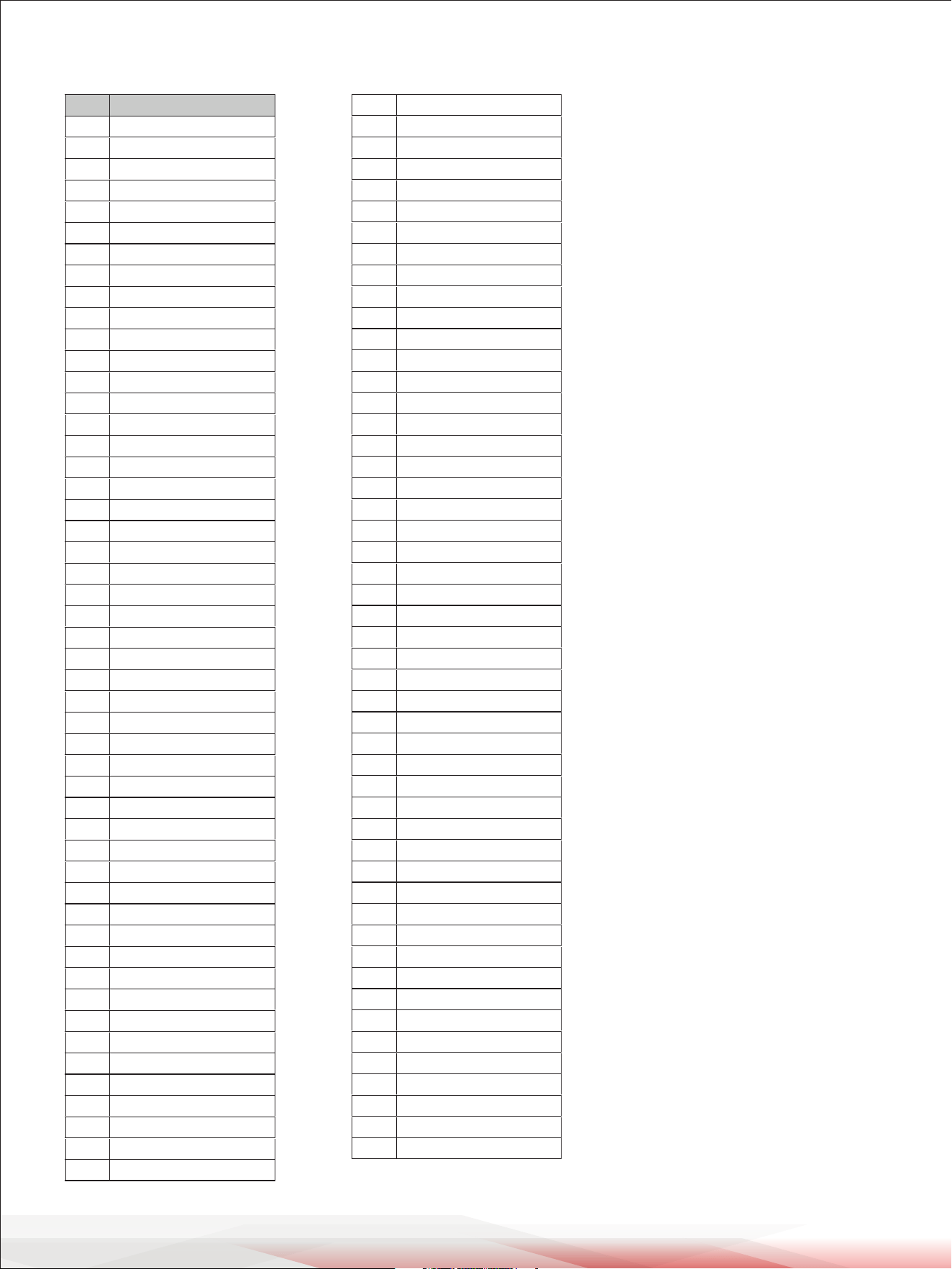
Drum Kit List
No. Preset Kit Name
1 Standard 1
2 Hard Rock
3 Ballad
4 Acoustic
5 Latin Perc
6 Standard 2
7 Jazz Brush
8 Dacne
9 Rock
10 Jazz 1
11 808 1
12 909 1
13 Latin
14 Room
15 Jazz 2
16 Metal
17 Vibraphone
18 Electronic
19 Reggae
20 Fusion
21 Drum & Bass
22 Pop
23 Brush
24 World
25 Ska
26 Chinese Perc
27 Orchestra
28 Lo_Fi
29 1970's
30 Hip Hop
31 Big Band
32 Old School
33 Rock Ballad
34 808 2
35 909 2
36 Magic
37 Live
38 House
39 Percussion
40 Teckno
41 Vintage
42 Junkyard
43 Noise
44 Studio 1
45 Studio 2
User Kit
46 Standard 1
47 Hard Rock
48 Ballad
49 Acoustic
50 Funk Band
51 Standard 2
52 Jazz Brush
53 Dacne
54 Rock
55 Jazz 1
www.PyleUSA.com
20
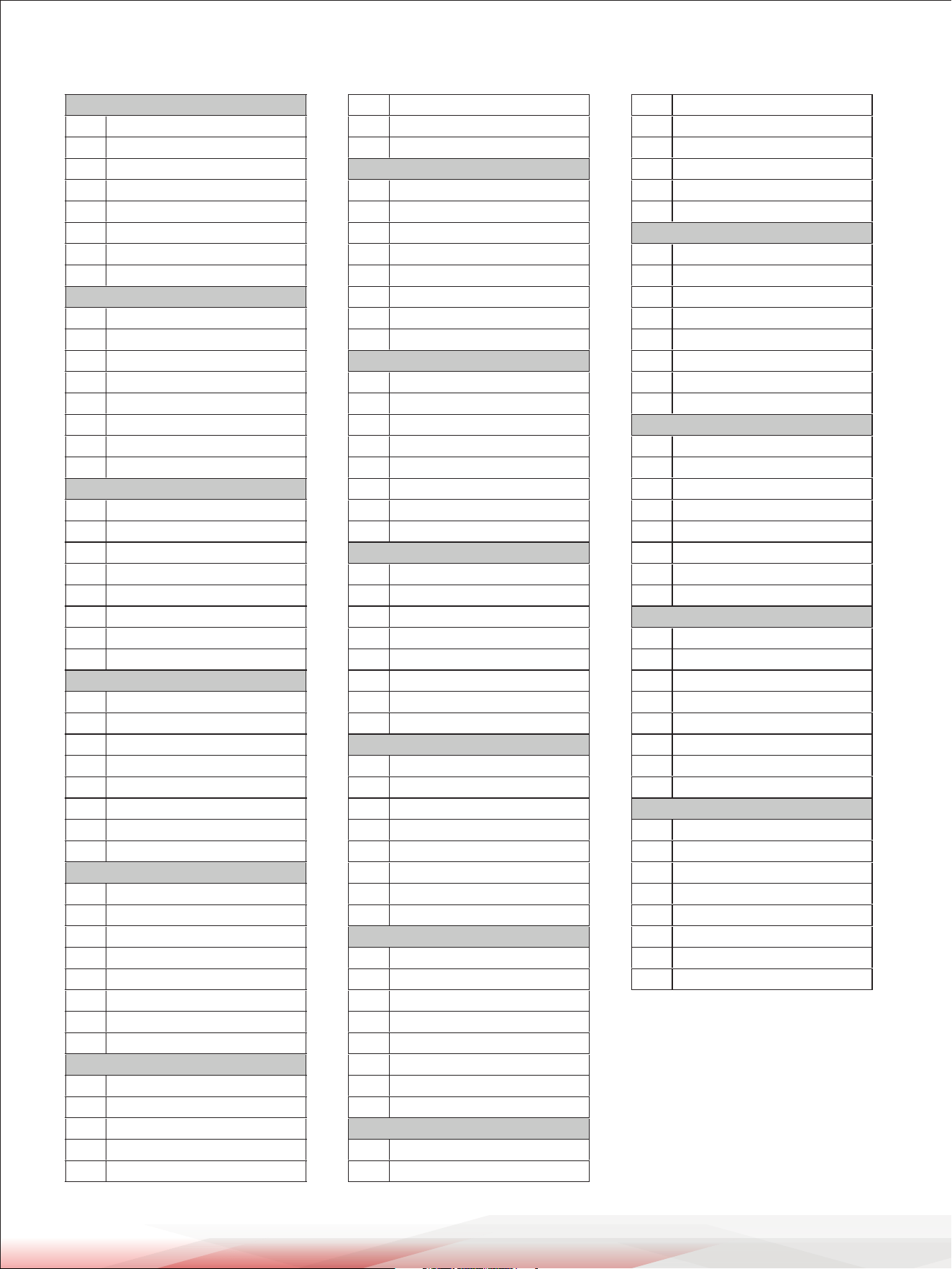
Song List
No.
Name
1 Gospel1
2 Gospel2
3 Pop Latin1
4 Pop Latin2
5 City Pop
6 Pop Fusion
7 Jazz Fusion
8 Hardcore
9 Slow R&B
10 City Funk
11 R&B1
12 Funk1
13 Medium Swing
14 Ele Dance
15 Disco1
16 Trance1
17 Hiphop1
18 Punk1
19 Punk2
20 Hardcore Rock
21 Pop Rock
22 Bossa Nova1
23 Salsa1
24 Reggae1
25 Mambo1
26 R&B Pop
27 Dance Pop1
28 Dance Pop2
29 Ele Pop
30 Blues Funk
31 Nu Jazz Funk
32 Funk2
33 Funk3
34 Pop Funk1
35 Pop Funk2
36 Retro Funk
37 Fusion1
38 Fusion2
39 Fusion3
40 Fusion4
41 Cool Jazz
42 Big Band 1
43 Big Band 2
44 Swing
45 3/4 Jazz
46 Jazz
47 Latin Jazz1
48 Latin Jazz2
49 Dance1
50 Disco House
51 Trance2
52 TripHop
53 Break Beat1
54 DanceFunk
55 HipHop
56 Dance2
57 Drum N'Bass2
58 Break Beat2
59 Classic Rock
60 Heavy Rock
61 Rock Ballad
62 Rock N'Roll
63 Rock
64 80's Metal
65
66 60's Rock
67 Samba1
68 Bossa Nova2
69 Salsa2
70 Ska
71 Raggae 2
72 Latin Rock1
73 Latin Rock2
74 Mambo2
75 Samba2
76 Latin Pop
77 Gtr Bossa
78 Latin Dance1
79 Latin Dance2
80 R&B2
81 Jazzy Funk
82 Blues
83 Country Pop
84 Country Blues
85 Ballad
86 Brit Pop
87 8Beat Pop
88 60's Pop
89 8Beat 1
90 8Beat 2
91 8BeatBallad1
92 8BeatBallad2
93 16BeatBallad1
94 16BeatBallad2
95 World
96 Latin
97 Disco2
98 Metal
99 Hard Rock
100 8Beat3
Shue
www.PyleUSA.com
21
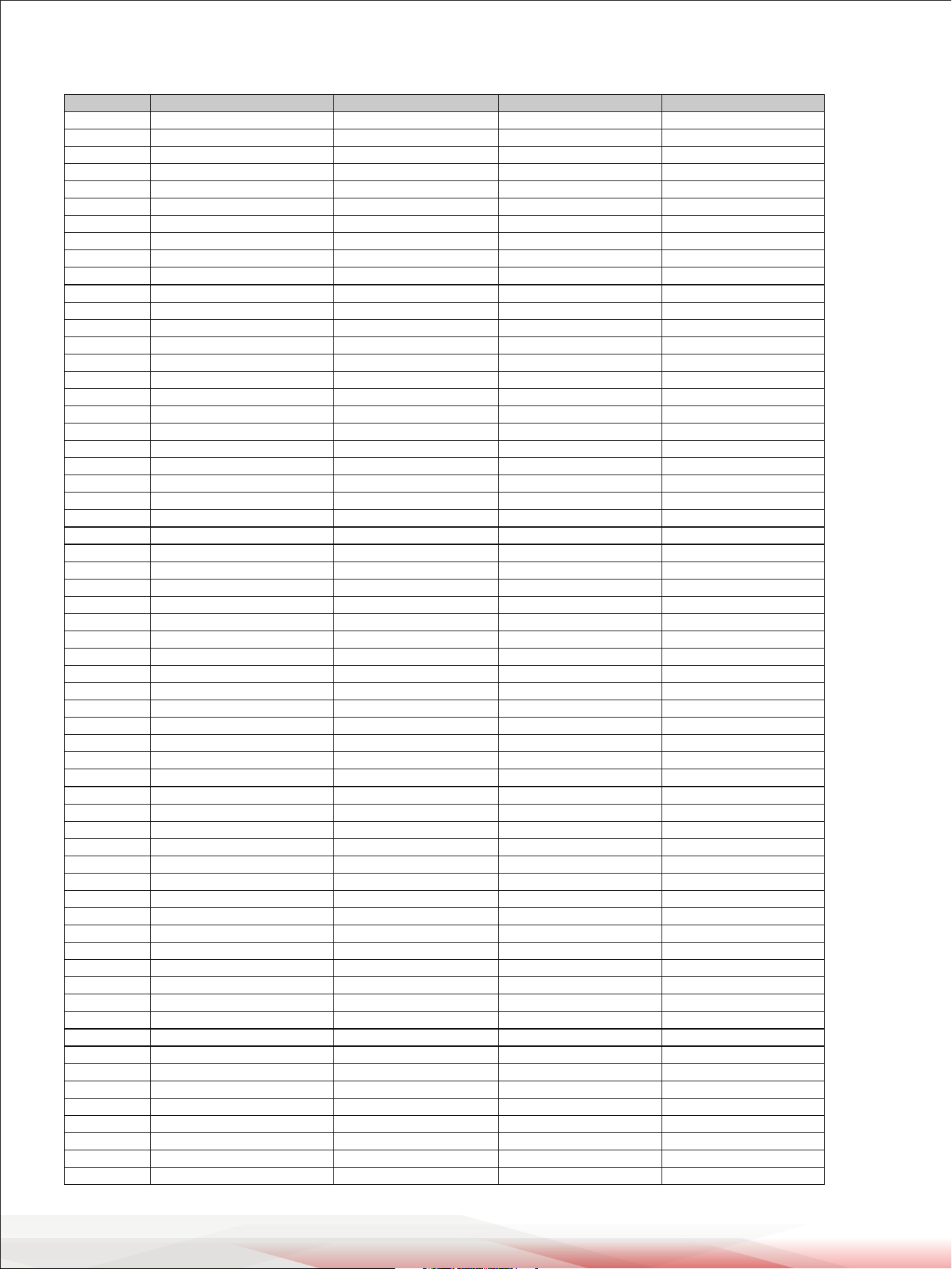
GM Backing Sound List
PIANO
1 Acoustic Grand Piano
2 Bright Acoustic Piano
3 Electric Grand Piano
4 Honky-Tonk Piano
5 E.Piano 1
6 E.Piano 2
7 Harpsichord
8 Clavi
MALLET
9 Celesta
10 Glockenspiel
11 Music Box
12 Vibraphone
13 Marimba
14 Xylophone
15 Tubular Bells
16 Dulcimer
ORGAN
17 Drawbar Organ
18 Percussive Organ
19 Rock Organ
20 Church Organ
21 Reed Organ
22 Accordion
23 Harmonica
24 Tango Accordion
GUITAR
25 Nylon Guitar
26 Steel Guitar
27 Jazz Guitar
28 Clean Guitar
29 Muted Guitar
30 Overdriven Guitar
31 Distortion Guitar
32 Guitar Harmonics
BASS
33 Acoustic Bass
34 Finger Bass
35 Pick Bass
36 Fretless Bass
37 Slap Bass 1
38 Slap Bass 2
39 Synth Bass 1
40 Synth Bass 2
STRINGS
41 Violin
42 Viola
43 Cello
44 Contrabass
45 Tremolo Strings
46 Pizzicato Strings
47 Orchestral Harp
48 Timpani
STRINGS ENSEMBLE
49 Strings Ensemble 1
50 Strings Ensemble 2
51 Synth Strings 1
52 Synth Strings 2
53 Choir Aahs
54 Voice Oohs
55 Synth Voice
56 Orchestra Hit
BRASS
57 Trumpet
58 Trombone
59 Tuba
60 Muted Trumpet
61 French Horn
62 Brass Section
63 Synth Brass 1
64 Synth Brass 2
REED
65 Soprano Sax
66 Alto Sax
67 Tenor Sax
68 Baritone Sax
69 Oboe
70 English Horn
71 Bassoon
72 Clarinet
PIPE
73 Piccolo
74 Flute
75 Recorder
76 Pan Flute
77 Blown Bottle
78 Shakuhachi
79 Whistle
80 Ocarina
LEAD
81 Lead1 (Square)
82 Lead2 (Sawtooth)
83 Lead3 (Calliope)
84
85 Lead5 (Charang)
86 Lead6 (Voice)
87 Lead7 (Fifths)
88 Lead8 (Bass & Lead)
PAD
89 Pad1 (Newage)
90 Pad2 (Warm)
91 Pad3 (Polysynth)
92 Pad4 (Choir)
93 Pad5 (Bowed)
94 Pad6 (Metallic)
95 Pad7 (Halo)
96 Pad8 (Sweep)
EFFECTS
97 FX1 (Rain)
98 FX2 (Soundtrack)
99 FX3 (Crystal)
100 FX4 (Atmosphere)
101 FX5 (Brightness)
102 FX6 (Goblins)
103 FX7 (Echoes)
104
ETHNIC
105 Sitar
106 Banjo
107 Shamisen
108 Koto
109 Kalimba
110 Bagpipe
111 Fiddle
112 Shanai
PERCUSSIVE
113 Tinkle Bell
114 Agogo
115 Steel Drums
116 Wood Block
117 Taiko Drum
118 Melodic Tom
119 Synth Drum
120 Reverse Cymbal
SOUND EFFECTS
121 Guitar Fret Noise
122 Breath Noise
123 Seashore
124 Bird Tweet
125 Telephone Ring
126 Helicopter
127 Applause
128 Gunshot
FX8 (Sci-)
Lead4 (Chi)
www.PyleUSA.com
22
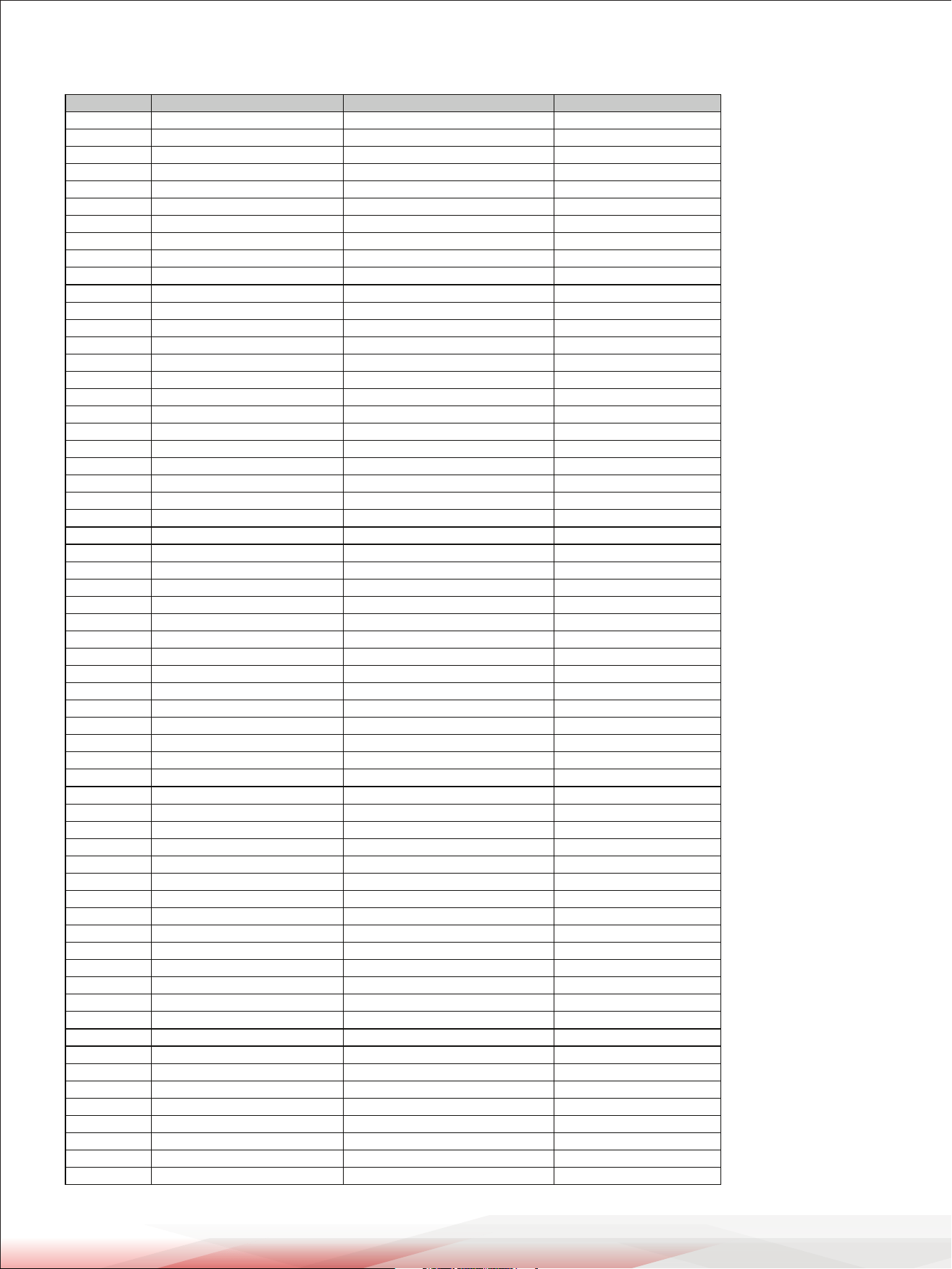
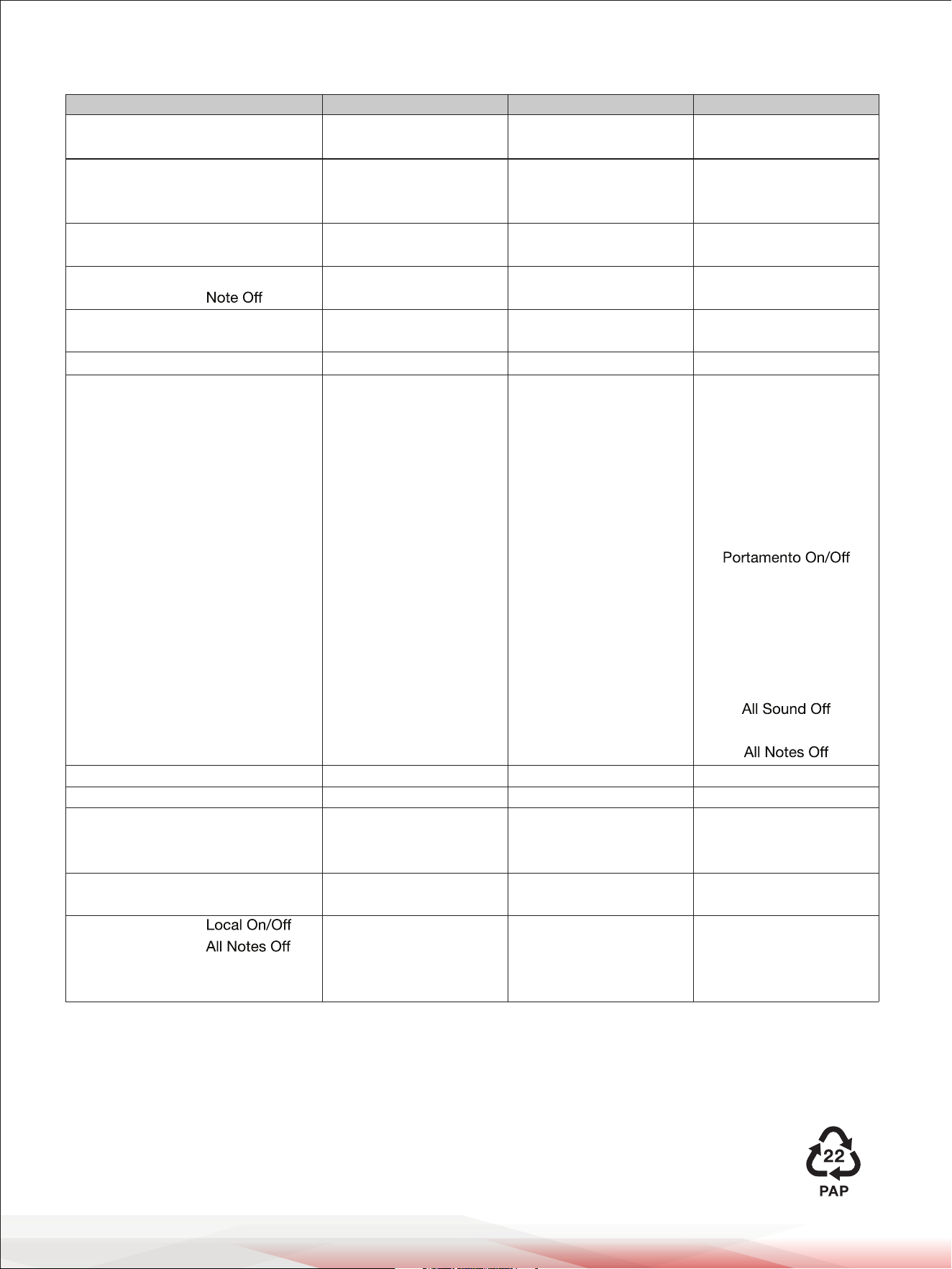
GM Drum Kit List
Standard Set Room Set Jazz Set Rock Set
Note# PC# 00 PC# 04 PC# 08 PC# 16
Eb1[27] High Q <- <- <-
E 1[28] Slap <- <- <-
F 1[29] Scratch Push <- <- <-
F#1[30] Scratch Pull <- <- <-
G 1[31] Sticks <- <- <-
G#1[32] Square Click <- <- <-
A 1[33] Metronome Click <- <- <-
Bb1[34] Metronome Bell <- <- <-
B 1[35] Acoustic Bass Drum <- <- <-
C 2[36] Bass Drum Room Kick Jazz Kick Rock Kick Drum
C#2[37] Side Stick <- <- <-
D 2[38] Acoustic Snare Room Snare 1 Jazz Snare 1 Rock Snare Drum1
Eb2[39] Hand Clap <- <- <-
E 2[40] Electric Snare Room Snare 2 Jazz Snare 2 Rock Snare Drum2
F 2[41] Low Floor Tom Room Low Floor Jazz Low Floor Rock Low Floor
F#2[42] Closed Hi-hat <- <- <-
G 2[43] High Floor Tom Room High Floor Tom Jazz High Floor Tom Rock High Floor Tom
G#2[44] Pedal Hi-hat <- <- <-
A 2[45] Low Tom Room Low Tom Jazz Low Tom Rock Low Tom
Bb2[46] Open Hi-hat <- <- <-
B 2[47] Low-Mid Tom Room Low-Mid Tom Jazz Low-Mid Tom Rock Low-Mid Tom
C 3[48] High Mid Tom Room High Mid Tom Jazz High Mid Tom Rock High Mid Tom
C#3[49] Crash Cymbal 1 <- <- <-
D 3[50] High Tom Room High Tom Jazz High Tom Rock High Tom
Eb3[51] Ride Cymbal 1 <- <- <-
E 3[52] China Cymbal <- <- <-
F 3[53] Ride Bell <- <- <-
F#3[54] Tambourine <- <- <-
G 3[55] Splash Cymbal <- <- <-
G#3[56] Cowbell <- <- <-
A 3[57] Crash Cymbal 2 <- <- <-
Bb3[58] Vibra-slap <- <- <-
B 3[59] Ride Cymbal 2 <- <- <-
C 4[60] High Bongo <- <- <-
C#4[61] Low Bongo <- <- <-
D 4[62] Mute Hi Conga <- <- <-
Eb4[63] Open Hi Conga <- <- <-
E 4[64] Low Conga <- <- <-
F 4[65] High Timbale <- <- <-
F#4[66] Low Timbale <- <- <-
G 4[67] High Agogo <- <- <-
G#4[68] Low Agogo <- <- <-
A 4[69] Cabasa <- <- <-
Bb4[70] Maracas <- <- <-
B 4[71] Short Whistle <- <- <-
C 5[72] Long Whistle <- <- <-
C#5[73] Short Guiro <- <- <-
D 5[74] Long Guiro <- <- <-
Eb5[75] Claves <- <- <-
E 5[76] Hi Wood Block <- <- <-
F 5[77] LowWood Block <- <- <-
F#5[78] Mute Cuica <- <- <-
G 5[79] Open Cuica <- <- <-
G#5[80] Mute Triangle <- <- <-
A 5[81] Open Triangle <- <- <-
Bb5[82] Shaker <- <- <-
B 5[83] Jingle Bell <- <- <-
C 6[84] Bell Tree <- <- <-
C#6[85] Castanets <- <- <-
D 6[86] Mute Surdo <- <- <-
Eb6[87] Open Surdo <- <- <-
www.PyleUSA.com
23
GM Drum Kit List
Electric Set Analog Set Brush Set
Note# PC# 24 PC# 25 PC# 40
Eb1[27] <- <- <-
E 1[28] <- <- <-
F 1[29] <- <- <-
F#1[30] <- <- <-
G 1[31] <- <- <-
G#1[32] <- <- <-
A 1[33] <- <- <-
Bb1[34] <- <- <-
B 1[35] <- <- <-
C 2[36] Electric Bass Drum Analog Bass Drum Brush Kick
C#2[37] <- Analog Rim Shot <-
D 2[38] Electric Snare 1 Analog Snare 1 Brush Tap
Eb2[39] <- Analog Clap <-
E 2[40] Electric Snare 2 Analog Snare 2 Brush Slap
F 2[41] Electric Low Floor Analog Low Floor Brush Low Floor
F#2[42] <- Analog Closed Hi-hat <-
G 2[43] Electric High Floor Tom Analog High Floor Tom Brush High Floor Tom
G#2[44] <- Analog Pedal Hi-hat <-
A 2[45] Electric Low Tom Analog Low Tom Brush Low Tom
Bb2[46] <- Analog Open Hi-hat <-
B 2[47] Electric Low-Mid Tom Analog Low-Mid Tom Brush Low-Mid Tom
C 3[48] Electric High Mid Tom Analog High Mid Tom Brush High Mid Tom
C#3[49] <- Analog Cymbal <-
D 3[50] Electric High Tom Analog High Tom Brush High Tom
Eb3[51] <- <- <-
E 3[52] <- <- <-
F 3[53] <- <- <-
F#3[54] <- <- <-
G 3[55] <- <- <-
G#3[56] <- <- <-
A 3[57] <- <- <-
Bb3[58] <- <- <-
B 3[59] <- <- <-
C 4[60] <- <- <-
C#4[61] <- <- <-
D 4[62] <- <- <-
Eb4[63] <- <- <-
E 4[64] <- <- <-
F 4[65] <- <- <-
F#4[66] <- <- <-
G 4[67] <- <- <-
G#4[68] <- <- <-
A 4[69] <- <- <-
Bb4[70] <- <- <-
B 4[71] <- <- <-
C 5[72] <- <- <-
C#5[73] <- <- <-
D 5[74] <- <- <-
Eb5[75] <- <- <-
E 5[76] <- <- <-
F 5[77] <- <- <-
F#5[78] <- <- <-
G 5[79] <- <- <-
G#5[80] <- <- <-
A 5[81] <- <- <-
Bb5[82] <- <- <-
B 5[83] <- <- <-
C 6[84] <- <- <-
C#6[85] <- <- <-
D 6[86] <- <- <-
Eb6[87] <- <- <-
www.PyleUSA.com
24
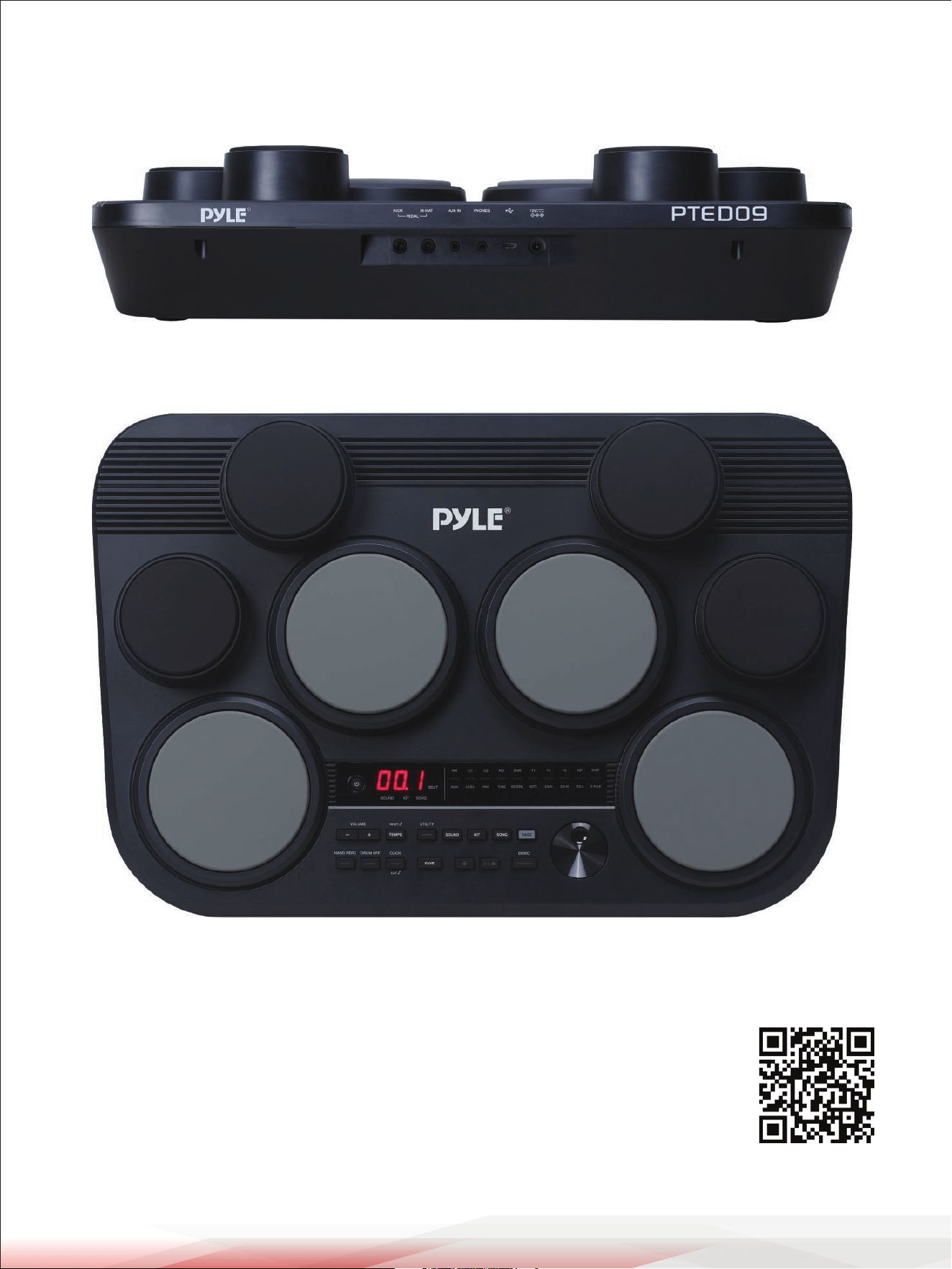
MIDI Implementation Chart
Notes:
o: Yes
x: No
Function
Basic Channel
Mode
Note Number
Velocity
After Touch
Pitch Bend
Control Change
Program Change
System Exclusive
System Common
System Real Time
Aux Messages
Default
Changed
Default
Messages
Altered
Note
True Voice
Note On
key’s
Channel
0
1
5
6
7
10
11
64
65
66
67
80
81
91
93
120
121
123
Song Position
Song Select
Tune Request
Clock
Commands
Active Sensing
System Reset
Transmitted
10ch
x
x
x
********
0-127
********
o 9nH, V=1-127
o (9nH, V=0)
x
x
x
x
x
x
x
x
x
x
x
x
x
x
x
x
x
x
x
x
x
x
x
x
x
x
x
o
x
x
o
x
Recognized
1-16ch
x
x
x
********
0-127
0-127
1-127
0-127
x
x
o
o
o
o
o
o
o
o
o
o
o
o
o
o
o
o
o
o
o
o
o
x
x
x
x
x
x
x
x
x
Remarks
Bank Select
Modulation
Portamento Time
Data Entry
Volume
Pan
Expression
Sustain Pedal
Sostenuto Pedal
Soft Pedal
Reverb Program
Chorus Program
Reverb Level
Chorus Level
Reset All Controllers
Start/Stop
www.PyleUSA.com
25
Register Product
Thank you for choosing PyleUSA. By registering your product, you ensure that you receive
the full benets of our exclusive warranty and personalized customer support.
Complete the form to access expert support and to keep your PyleUSA purchase in perfect
condition.
PyleUSA.com/register

Questions or Comments?
We are here to help!
Phone: 1.718.535.1800
PyleUSA.com/ContactUs