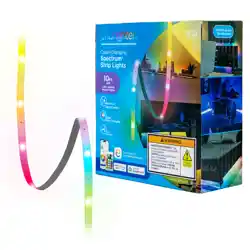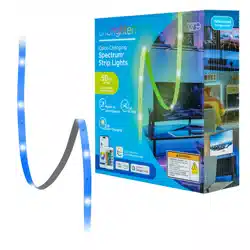
Your Enbrighten VIBE strip lights enhance your
space with vibrant colors, dynamic modes and
customizations through the free Enbrighten app.
Model: 84995
INSIDE THE BOX
Color-Changing
Spectrum
™
Strip Lights
Thank you for your purchase!
Instructions
made easy
Register your
product
Discover more innovative
lighting at
www.enbrightenme.com.
Read instructions or watch
an easy-to-follow video.
Scan code or visit
byjasco.com/84995i.
Receive exclusive deals and
register your product.
Scan code or visit
byjasco.com/deals.
Having problems?
Let us know how we
can help.
Call 1-800-225-0653, M-F.
Like our product?
Leave a review on your
favorite retailer website
or amazon.com.
PAIRING AND MANUAL OPERATION
WARRANTY INFORMATION
FCC STATEMENT
RISK OF ELECTRIC SHOCK
• DO NOT SUBMERSE
• DO NOT USE AROUND AQUARIUMS
• DO NOT USE IN WET LOCATIONS
• FOR ADULT USE ONLY
• BE CAUTIOUS OF STATIC ELECTRICITY DURING INSTALLATION AND USE
RISK OF FIRE
• NOT INTENDED FOR USE NEAR OPEN FLAMES OR ABOVE STOVES,
COOKTOPS, SINKS OR OTHER HEAT-PRODUCING APPLIANCES, SUCH AS
COFFEE MAKERS, TOASTERS OR TOASTER OVENS
• USE INDOORS ONLY
• TURN OFF THE POWER AND UNPLUG THE ADAPTER WHEN TAPE LIGHTS
WILL NOT BE USED FOR A LONG TIME
WARNING
DO NOT PLUG IN THE TAPE LIGHT UNTIL IT IS REMOVED FROM THE REEL
AND FULLY EXTENDED, AS IT CAN GET HOT AND DAMAGE THE PRODUCT.
WARNING
• DO NOT MIX OLD AND NEW BATTERIES
• DO NOT MIX ALKALINE STANDARD (CARBON-ZINC) OR RECHARGEABLE
(NICKEL-CADMIUM) BATTERIES
• DO NOT USE IN WET LOCATIONS
• BATTERY MAY LEAK HARMFUL LIQUIDS OR IGNITABLE MATERIALS OR
EXPLODE, CAUSING INJURY OR PRODUCT DAMAGE
• REPLACE FULLY DISCHARGED BATTERY IMMEDIATELY
• REMOVE BATTERY IF PRODUCT IS TO BE UNUSED FOR EXTENDED PERIODS
• STORE INDOORS WHEN NOT IN USE
WARNING
• INGESTION HAZARD: THIS PRODUCT CONTAINS A BUTTON CELL OR COIN BATTERY.
• DEATH OR SERIOUS INJURY CAN OCCUR IF INGESTED.
• A SWALLOWED BUTTON CELL OR COIN BATTERY CAN CAUSE INTERNAL CHEMICAL
BURNS IN AS LITTLE AS 2 HOURS.
• KEEP NEW AND USED BATTERIES OUT OF REACH OF CHILDREN.
• SEEK IMMEDIATE MEDICAL ATTENTION IF A BATTERY IS SUSPECTED TO BE
SWALLOWED OR INSERTED INSIDE ANY PART OF THE BODY.
• LITHIUM COIN CELL BATTERY #CR2025
• 3 VOLTS
• REMOVE AND IMMEDIATELY RECYCLE OR DISPOSE OF USED BATTERIES ACCORDING
TO LOCAL REGULATIONS AND KEEP AWAY FROM CHILDREN. DO NOT DISPOSE OF
BATTERIES IN HOUSEHOLD TRASH OR INCINERATE.
• EVEN USED BATTERIES MAY CAUSE SEVERE INJURY OR DEATH.
• CALL A LOCAL POISON CONTROL CENTER FOR TREATMENT INFORMATION.
• NON-RECHARGEABLE BATTERIES ARE NOT TO BE RECHARGED.
• DO NOT FORCE DISCHARGE, RECHARGE, DISASSEMBLE, HEAT ABOVE [60°C OR 140°F]
OR INCINERATE. DOING SO MAY RESULT IN INJURY DUE TO VENTING, LEAKAGE OR
EXPLOSION RESULTING IN CHEMICAL BURNS.
• ENSURE THE BATTERY IS INSTALLED CORRECTLY ACCORDING TO POLARITY (+ AND -).
• ALWAYS COMPLETELY SECURE THE BATTERY COMPARTMENT. IF THE BATTERY
COMPARTMENT DOES NOT CLOSE SECURELY, STOP USING THE PRODUCT,
REMOVE THE BATTERY AND KEEP IT AWAY FROM CHILDREN.
WARNING
100%
recyclable
Separate
paper
from plastic
before
recycling
byjasco.com/recycle
paper made from 25%
post consumer waste
IMPORTANT — PLEASE READ
Refer to the manual or visit www.enbrightenme.com/warranty
for limitations and restrictions on warranties and the product
registration information.
This Jasco product has a 3-year limited warranty. Please contact
our U.S.-based Consumer Care at 1-800-225-0653, M-F, or
www.enbrightenme.com/warranty if the unit should prove defective
within the warranty period.
SETUP
Remotely operate your smart strip lights with the easy-to-use
Enbrighten app. Follow the available instructions and resources
to set up your smart device.
INSTALLING BATTERY (REMOTE)
1. Simultaneously push in the tab as you pull out the battery drawer.
2. Place a new CR2025 battery in the drawer with (+) side of the battery
facing up (see diagram on back of remote).
3. Push the battery drawer into the remote until it snaps into place.
TEST YOUR STRIP LIGHTS
1. Fully extend the strip lights.
2. Connect the power adapter to a 120VAC 60Hz wall outlet.
3. Press the ON/OFF button on the in-line controller to ensure strip lights
are working properly.
REMOTE CONTROL
Functional range*: Up to 20ft. (6m)
Battery type: CR2025 (included)
*Functional range may be adversely aected by one or more of the
following factors: radio frequency interference, low battery level and
obstructions between the remote control and receiver.
REMOTE CONTROL OPERATION
The remote control uses infrared
(IR) technology to communicate
with the strip lights. When using
the remote control, point it at the
strip lights’ IR receiver on the
in-line controller, making sure
there are no obstructions in the
signal path.
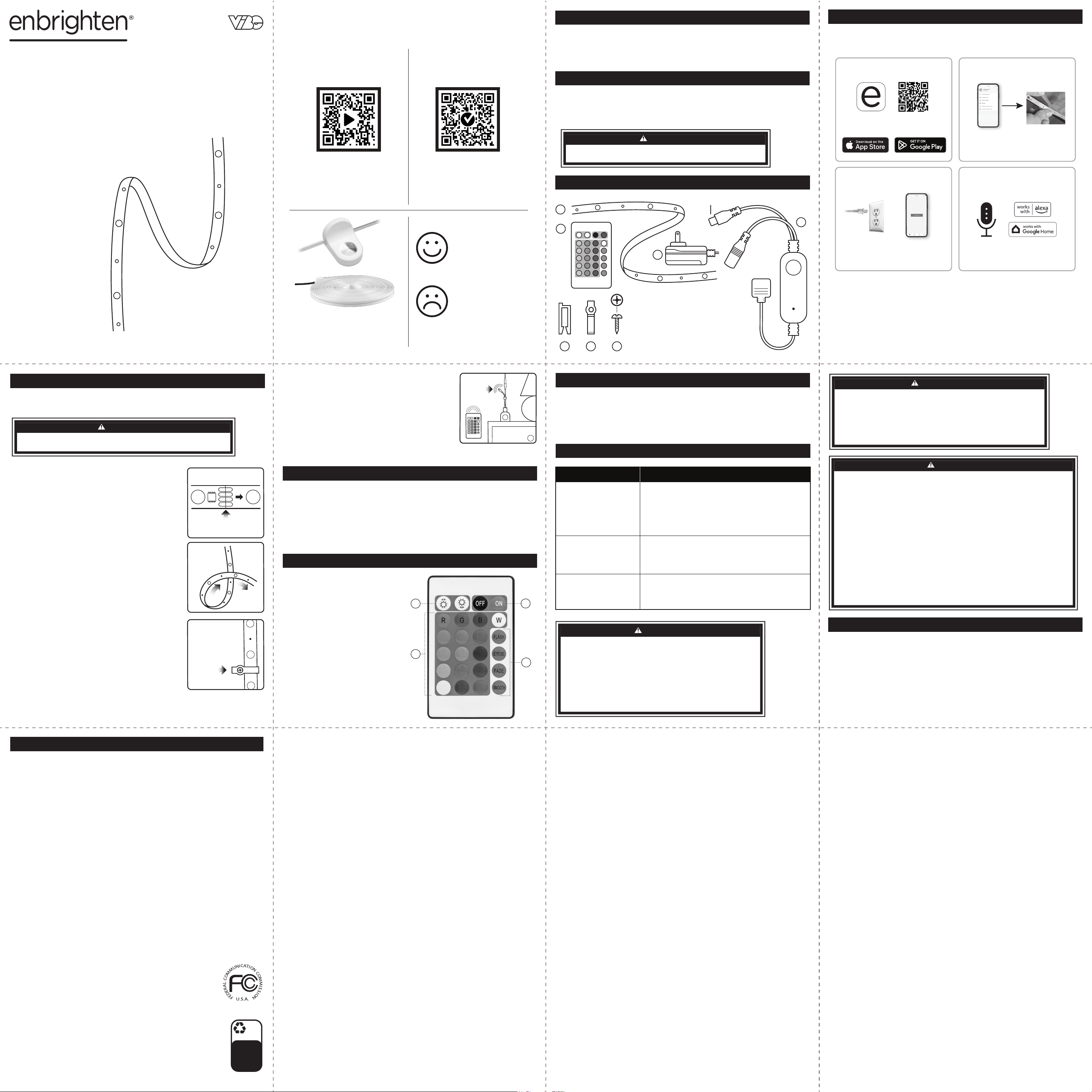
A. ON/OFF
B. Dimming
C. Color Modes
D. Eects
App Store is a service mark of Apple Inc.
Google, Google Play and Google Home are
trademarks of Google LLC.
Amazon, Alexa and all related logos are
trademarks of Amazon.com, Inc. or its aliates.
MADE IN VIETNAM
Distributed by Jasco Products Company LLC,
10 E. Memorial Rd., Oklahoma City, OK 73114.
This Jasco product has a 3-year limited
warranty. For warranty details, visit
www.enbrightenme.com/warranty.
Questions? Contact our U.S.-based
Consumer Care at 1-800-225-0653, M-F.
www.enbrightenme.com
©JASCO 2025 | 84995 | 05/20/25 v2
INSTALLATION
Read all instructions before installing. Please read all the warning
statements included in these instructions.
Suppliers Declaration of Conformity | Model #: 84995 |
Jasco Products Co., 10 E. Memorial Rd., Oklahoma City, OK 73114, www.byjasco.com
This device complies with Part 15 of the FCC and Industry Canada license-exempt RSS standards.
Operation is subject to the following two conditions: (1) this device may not cause harmful
interference, and (2) this device must accept any interference received, including interference that
may cause undesired operation.
FCC NOTE: The manufacturer is not responsible for any radio or TV interference caused by
unauthorized modifications to this equipment. Such modifications could void the user’s authority to
operate the equipment.
NOTE: This equipment has been tested and found to comply with the limits for a Class B digital
device, pursuant to Part 15 of the FCC Rules. These limits are designed to provide reasonable
protection against harmful interference in a residential installation. This equipment generates, uses
and can radiate radio frequency energy and, if not installed and used in accordance with the
instructions, may cause harmful interference to radio communications. However, there is no
guarantee interference will not occur in a particular installation. If this equipment does cause harmful
interference to radio or television reception, which can be determined by turning the equipment o
and on, the user is encouraged to try to correct the interference by one or more of the following
measures:
• Reorient or relocate the receiving antenna.
• Increase the separation between the equipment and receiver.
• Connect the equipment into an outlet on a circuit dierent from that to which the
receiver is connected.
• Consult the dealer or an experienced radio/TV technician for help.
Important note: To comply with the FCC RF exposure compliance requirements, no change to the
antenna or the device is permitted. Any change to the antenna or the device could result in the
device exceeding the RF exposure requirements and void user’s authority to operate the device.
CAN ICES-3(B)/NMB-3(B)
A
B
C
D
A
B
C
D
Download the app
Scan the QR code or search Enbrighten
on the Apple App Store or on Google Play
Voice control works with
Amazon Alexa or Google Assistant
Select “Support” in the Enbrighten app or follow
the steps in the Amazon Alexa or Google Home
app to connect your Enbrighten account
Create an account in
the Enbrighten app
Install the smart
strip lights using the
provided instructions
1. 2.
Setup and installation
Plug the strip light
into the outlet
Add devices, control
the strip lights from
anywhere and create
schedules
3. 4.
Setup and installation
Voice control
DO NOT CONNECT THE POWER SUPPLY WHILE INSTALLING THE STRIP LIGHTS.
MUST REMOVE STRIP LIGHTS FROM REEL BEFORE POWERING.
CAUTION
TROUBLESHOOTING
PATENTS/PATENTS PENDING
WWW.BYJASCO.COM/PATENTS
SETUP
PROBLEM CORRECTIVE ACTION
CORRECTIVE ACTION
Cannot pair to
the Enbrighten app
• Confirm the strip lights are powered.
• Enable Bluetooth on your smartphone.
• Ensure your smartphone is connected to a
2.4GHz Wi-Fi network—5GHz not supported.
• Verify your Wi-Fi network name and password.
• Try manual setup mode—see app for details.
Device oine • Confirm the strip lights are powered.
• Verify your Wi-Fi is working.
• Remove the strip lights from the app and
pair them again.
Remote not working • Battery may be installed incorrectly.
Reinstall battery.
• Battery may need to be replaced.
Install new CR2025 battery.
In-line controller
The in-line control button provides easy pairing to the Enbrighten app
as well as manual ON/OFF control of your strip lights.
ON: Press the button once.
OFF: Press the button once.
Pairing Mode: Press button for 10 seconds to enter app pairing mode.
A. RGBIC LED strip lights (50ft.) x1
B. IR remote control with
CR2025 battery (included)
C. In-line controller with pairing
button and mic for MusicSync
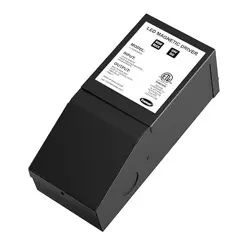
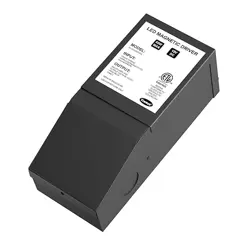
D. Power adapter with 5ft. cord
E. 3M mounting clips x2
F. Clear mounting clips x15
G. Mounting screws x15
E F
G
. IR Reciever
1. Determine the best placement for your strip
lights, making sure to adhere to the following:
• Remove any nails, metal or other conductive
objects from the installation surface before
attaching strip lights, as it could cause
the lights to short circuit.
• Do not stick the strip lights to a glass surface.
• Avoid installing lights near heat sources
or potentially dangerous sources, such as
sharp objects, candles, liquids, corrosive
chemicals, etc.
• Select a location within reach of the nearest
wall outlet.
2. The strip lights can be cut to length, if desired,
and should be cut only on the copper strips
(see Fig. 1).
3. Connect the strip lights to the in-line controller.
4. Remove the adhesive backing from the back of
the strip lights, then firmly press the strip lights
onto a flat surface. Avoid bending the strip
lights where the LEDs and circuits are located,
as it could cause damage. If bending the strip
lights is required for your chosen location,
bend the lights in a loose loop (see Fig. 2).
5. For a more secure installation, place the clear
mounting clips over the strip light strand and
use the screws to secure them in place
(see Fig. 3).
6. Connect the power adapter to the in-line
controller and plug it into a 120VAC 60Hz
wall outlet.
Figure 2
Figure 1
Cut on the
copper strip only
7. Use the 3M clips to mount the in-line
controller/IR receiver by removing the
paper backing and pressing them firmly
against a flat surface.
Note: Do not place the IR reciever inside or
behind furniture. There must be a clear
line-of-sight signal path between the top
edge of the remote.
Figure 3
Use the clear
mounting clips
and screws to
secure the strip
light installation
Figure 4
Do not
block IR
reciever
DENTRO DE LA CAJA
EMPAREJAMIENTO Y FUNCIONAMIENTO MANUAL
INFORMACIÓN DE GARANTÍA
DÉCLARATION DE LA FCC
RIESGO DE DESCARGA ELÉCTRICA
• NO SUMERGIR
• NO UTILIZAR CERCA DE ACUARIOS
• NO UTILIZAR EN LUGARES HÚMEDOS
• SOLO PARA USO DE ADULTOS
• TENGA CUIDADO CON LA ELECTRICIDAD ESTÁTICA DURANTE LA
INSTALACIÓN Y EL USO
RIESGO DE INCENDIO
• NO ESTÁ DISEÑADO PARA USAR CERCA DE LLAMAS ABIERTAS O
ENCIMA DE ESTUFAS, COCINAS, FREGADEROS U OTROS APARATOS
QUE PRODUCEN CALOR, COMO CAFETERAS, TOSTADORAS U HORNOS
TOSTADORES.
• USE SOLO EN INTERIORES
• APAGUE LA CORRIENTE Y DESENCHUFE EL ADAPTADOR CUANDO LAS
TIRAS DE LUCES NO SE UTILIZARÁN DURANTE UN TIEMPO PROLONGADO
ADVERTENCIA
NO ENCHUFE LA TIRA DE LUCES HASTA QUE ESTÉ RETIRADA DEL CARRETE Y
COMPLETAMENTE EXTENDIDA, YA QUE PUEDE CALENTARSE Y DAÑAR EL PRODUCTO.
ADVERTENCIA
• NO MEZCLE BATERÍAS VIEJAS Y NUEVAS
• NO MEZCLE BATERÍAS ALCALINAS ESTÁNDAR (CARBONO-ZINC) O
RECARGABLES (NÍQUEL-CADMIO)
• NO UTILIZAR EN LUGARES HÚMEDOS
• LA BATERÍA PUEDE DERRAMAR LÍQUIDOS NOCIVOS O MATERIALES
INFLAMABLES, EXPLOTAR Y CAUSAR LESIONES O DAÑOS AL PRODUCTO.
• REEMPLACE LA BATERÍA TOTALMENTE DESCARGADA INMEDIATAMENTE
• RETIRE LA BATERÍA SI EL PRODUCTO NO SE VA A UTILIZAR DURANTE
PERÍODOS PROLONGADOS
• GUARDAR EN EL INTERIOR CUANDO NO ESTÉ EN USO
ADVERTENCIA
• PELIGRO DE INGESTA: ESTE PRODUCTO CONTIENE UNA BATERÍA DE BOTÓN.
• PUEDE PRODUCIRSE MUERTE O LESIONES GRAVES EN CASO DE INGESTIÓN.
• UNA BATERÍA DE BOTÓN INGERIDA PUEDE CAUSAR QUEMADURAS QUÍMICAS INTERNAS
EN TAN SÓLO 2 HORAS.
• MANTENGA LAS BATERÍAS NUEVAS Y USADAS FUERA DEL ALCANCE DE LOS NIÑOS.
• BUSQUE ATENCIÓN MÉDICA INMEDIATA SI SOSPECHA QUE UNA BATERÍA FUE INGERIDA
O INSERTADA DENTRO DE CUALQUIER PARTE DEL CUERPO.
• BATERÍA DE BOTÓN DE LITIO #CR2025
• 3 VOLTIOS
• RETIRE Y RECICLE O DESECHE INMEDIATAMENTE LAS BATERÍAS USADAS DE ACUERDO
CON LAS NORMAS LOCALES Y MANTÉNGALAS FUERA DEL ALCANCE DE LOS NIÑOS. NO
DESECHE LAS BATERÍAS EN LA BASURA DOMÉSTICA NI LAS INCINERE.
• INCLUSO LAS BATERÍAS USADAS PUEDEN CAUSAR LESIONES GRAVES O LA MUERTE.
• LLAME A UN CENTRO LOCAL DE CONTROL DE INTOXICACIONES PARA OBTENER
INFORMACIÓN SOBRE EL TRATAMIENTO.
• LAS BATERÍAS NO RECARGABLES NO DEBEN RECARGARSE.
• NO FUERCE SU DESCARGA, RECARGA, DESMONTAJE O CALENTAMIENTO POR ENCIMA
DE [60 °C O 140 °F] NI LAS INCINERE. HACERLO PUEDE PROVOCAR LESIONES DEBIDO A
LA VENTILACIÓN, FUGAS O EXPLOSIONES QUE PROVOQUEN QUEMADURAS QUÍMICAS.
• ASEGÚRESE DE QUE LA BATERÍA ESTÉ INSTALADA CORRECTAMENTE SEGÚN LA
POLARIDAD (+ Y -).
• SIEMPRE ASEGURE COMPLETAMENTE EL COMPARTIMIENTO DE LA BATERÍA. SI EL
COMPARTIMENTO DE LA BATERÍA NO CIERRA DE FORMA SEGURA, DEJE DE USAR EL
PRODUCTO, RETIRE LA BATERÍA Y MANTÉNGALA FUERA DEL ALCANCE DE LOS NIÑOS.
ADVERTENCIA
IMPORTANTE, LEER
Consulte el manual o visite www.enbrightenme.com/warranty para conocer las
limitaciones y restricciones de las garantías y la información de registro del producto.
Este producto Jasco tiene una garantía limitada de 3 años. Comuníquese con
nuestro servicio de atención al cliente con sede en EE. UU. al 1-800-225-0653, de
lunes a viernes, o www.enbrightenme.com/warranty si la unidad resulta defectuosa
dentro del período de garantía.
SETUP
Opere de forma remota sus tiras de luces inteligentes con la aplicación Enbrighten
fácil de usar. Siga las instrucciones y los recursos disponibles para configurar su
dispositivo inteligente.
INSTALACIÓN DE LA BATERÍA (REMOTO)
1. Presione simultáneamente la pestaña mientras extrae el compartimento de la batería.
2. Coloque una batería CR2025 nueva en el cajón con el lado (+) de la batería hacia arriba
(vea el diagrama en la parte posterior del control remoto).
3. Empuje el compartimento de la batería en el control remoto hasta que encaje
en su lugar.
PRUEBE SUS TIRAS DE LUCES
1. Extienda completamente las tiras de luces.
2. Conecte el adaptador de corriente a una toma de pared de 120 V CA 60 Hz.
3. Presione el botón ON/OFF en el controlador en línea para asegurarse de que las
tiras de luces funcionen correctamente.
CONTROL REMOTO
Rango funcional*: Hasta 20 pies (6 m)
Tipo de batería: CR2025 (incluida)
*El rango funcional puede verse afectado negativamente por uno o más
de los siguientes factores: interferencia de radiofrecuencia, nivel bajo de
batería y obstrucciones entre el control remoto y el receptor.
FUNCIONAMIENTO DEL CONTROL REMOTO
El control remoto utiliza tecnología
infrarroja (IR) para comunicarse con las
tiras de luces. Al utilizar el control
remoto, apúntelo al receptor IR de las
tiras de luces en el controlador en
línea, asegurándose de que no haya
obstrucciones en la trayectoria de la
señal.
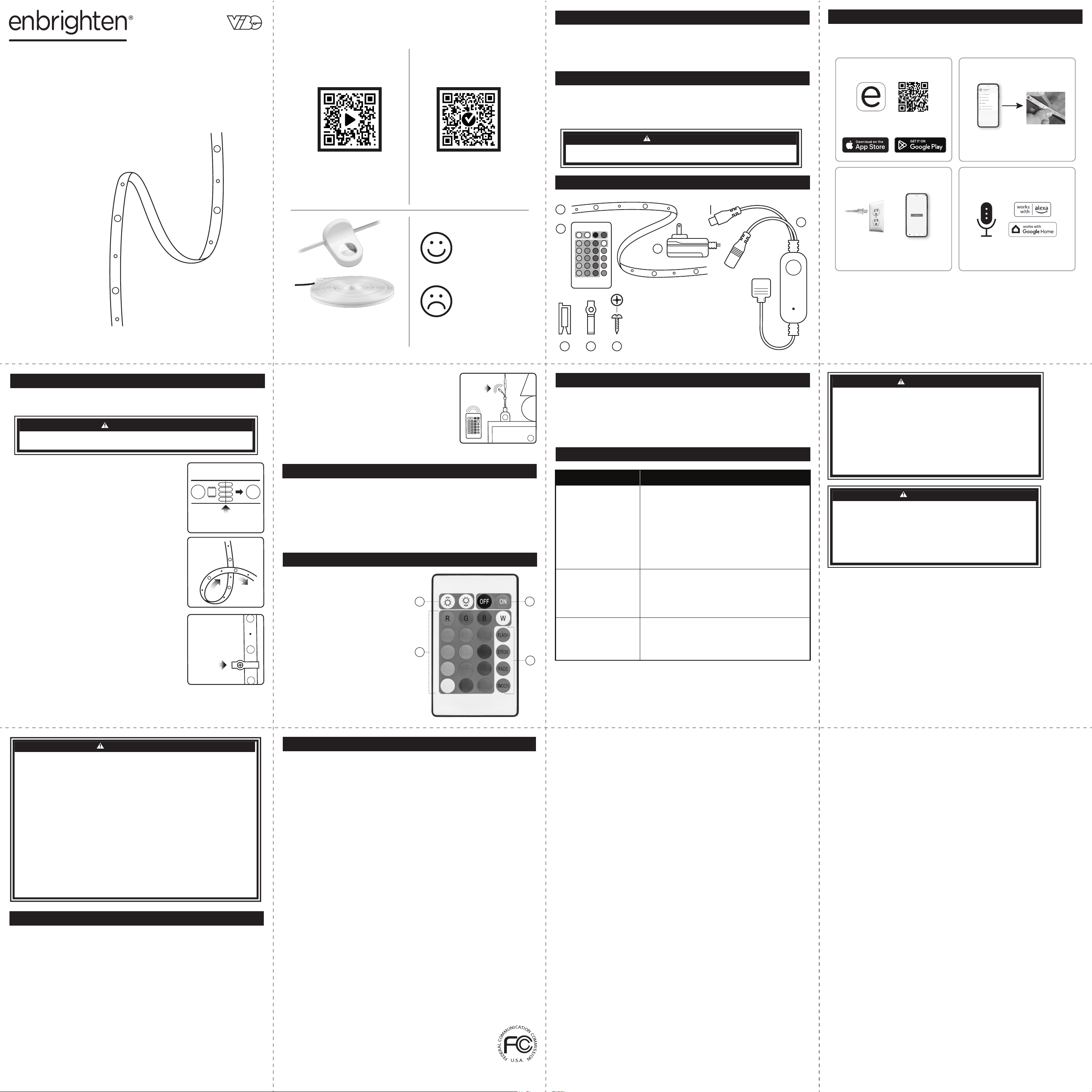
A. Encendido/Apagado
B. Atenuación
C. Modos de color
D. Efectos
App Store es una marca de servicio de Apple Inc. Google,
Google Play y Google Home son marcas comerciales de
Google LLC. Amazon, Alexa y todos los logotipos
relacionados son marcas comerciales de Amazon.com, Inc.
o sus afiliados.
HECHO EN VIETNAM
Distribuido por Jasco Products Company LLC,
10 E. Memorial Rd., Oklahoma City, OK 73114.
Este producto Jasco tiene una garantía limitada
de 3 años. Para conocer los detalles de la garantía,
visite www.enbrightenme.com/warranty.
¿Preguntas? Comuníquese con nuestro servicio de atención
al cliente con sede en EE. UU. al 1-800-225-0653, de lunes
a viernes.
www.enbrightenme.com
INSTALACIÓN
Lea todas las instrucciones antes de instalar. Lea todas las advertencias
que se incluyen en estas instrucciones.
Declaración de conformidad de proveedores | Modelo n.º: 84995 |
Jasco Products Co., 10 E. Memorial Rd., Oklahoma City, OK 73114, www.byjasco.com
Este dispositivo cumple con la Parte 15 de las normas RSS exentas de licencia de la FCC y de
Industry Canada. La operación está sujeta a las dos condiciones siguientes: (1) este dispositivo no
puede causar interferencias dañinas, y (2) este dispositivo debe aceptar cualquier interferencia
recibida, incluida aquella que pueda causar un funcionamiento no deseado.
NOTA DE LA FCC: El fabricante no es responsable de ninguna interferencia de radio o TV causada
por modificaciones no autorizadas a este equipo. Tales modificaciones podrían anular la autoridad
del usuario para operar el equipo.
NOTA: Este equipo ha sido probado y se ha determinado que cumple con los límites para un
dispositivo digital de Clase B, de conformidad con la Parte 15 de las Normas de la FCC. Estos límites
están diseñados para proporcionar una protección razonable contra interferencias dañinas en una
instalación residencial. Este equipo genera, usa y puede irradiar energía de radiofrecuencia y, si no se
instala y usa de acuerdo con las instrucciones, puede causar interferencias dañinas en las
comunicaciones por radio. Por otro lado, tampoco es posible garantizar que no ocurrirán
interferencias en una instalación en particular. Si este equipo causa interferencias dañinas en la
recepción de radio o televisión, lo cual se puede determinar encendiendo y apagando el equipo, se
recomienda al usuario que intente corregir la interferencia mediante una o más de las siguientes
medidas:
• Cambiar la orientación o ubicación de la antena receptora.
• Aumentar la distancia entre el equipo y el receptor.
• Conectar el equipo a un tomacorriente en un circuito diferente de aquel
al que se conectó el receptor.
• Consultar al distribuidor o a un técnico de radio/TV experimentado para obtener ayuda.
Nota importante: En cumplimiento de los requisitos de exposición a RF de la FCC, se prohíbe
cualquier cambio en la antena o en el dispositivo. Cualquier cambio en la antena o en el dispositivo
podría provocar que el dispositivo exceda los requisitos de exposición a RF y anular la autoridad del
usuario para operar el dispositivo.
CAN ICES-3(B)/NMB-3(B)
A
B
C
D
A
B
C
D
Descarga la aplicación
Scan the QR code or search Enbrighten
on the Apple App Store or on Google Play
El control por voz funciona con Amazon Alexa
o Google Assistant
Seleccione "Soporte" en la aplicación
Enbrighten o siga los pasos en la aplicación
Amazon Alexa o Google Home para conectar su
cuenta Enbrighten
Create an account in
the Enbrighten app
Install the smart
strip lights using the
provided instructions
1. 2.
Configuración e instalación
Conecte la tira
de luz al
tomacorriente
Añade dispositivos,
controla las tiras de
luz desde cualquier
lugar y crea horarios
3. 4.
Configuración e instalación
Control de voz
NO CONECTE LA FUENTE DE ALIMENTACIÓN MIENTRAS INSTALA LAS TIRAS DE LUCES.
DEBE RETIRAR LAS TIRAS DE LUCES DEL CARRETE ANTES DE ENCENDERLAS.
PRECAUCIÓN
SOLUCIÓN DE PROBLEMAS
PATENTES/PATENTES PENDIENTES
WWW.BYJASCO.COM/PATENTS
CONFIGURACIÓN
Las tiras de luces Enbrighten VIBE mejoran su
espacio con colores vibrantes, modos dinámicos
y personalizaciones a través de la aplicación
gratuita Enbrighten.
Modelo: 84995
Tiras de luces LED Spectrum
™
que cambian de color
PROBLEMA SOLUCIÓN
CORRECTIVE ACTION
No se puede empare-
jar con la aplicación
Enbrighten
• Confirme que las tiras de luces estén
alimentadas
• Habilite Bluetooth en su teléfono inteligente.
• Asegúrese de que su teléfono inteligente esté
conectado a una red Wi-Fi de 2,4 GHz (no es
compatible con 5 GHz)
• Verifique el nombre y la contraseña de su red
Wi-Fi
• Pruebe el modo de configuración manual:
consulte la aplicación para obtener más
detalles
Dispositivo
desconectado
• Confirme que las tiras de luces estén
alimentadas
• Verifique que su Wi-Fi esté funcionando.
• Retire las tiras de luces de la aplicación y
emparejélas nuevamente
El control remoto
no funciona
• La batería puede estar instalada de forma
incorrecta. Reinstale la batería.
• Es posible que sea necesario reemplazar la
batería. Coloque una batería CR2025 nueva.
Controlador en línea
El botón de control en línea permite un fácil emparejamiento con la aplicación
Enbrighten, así como el control manual de encendido y apagado de las tiras de luces.
ENCENDIDO: Presione el botón una vez.
APAGADO: Presione el botón una vez.
Modo de emparejamiento: Presione el botón durante 10 segundos para ingresar al
modo de emparejamiento de aplicaciones.
A. Tira de luces LED RGBIC (50 pies) x1
B. Control remoto IR con batería
CR2025 (incluida)
C. Controlador en línea con botón de
emparejamiento y micrófono para
MusicSync
D. Adaptador de corriente con cable
de 5 pies
E. Clips de montaje 3M x2
F. Clips de montaje transparentes x15
G. Tornillos de montaje x15
E F
G
El receptor IR
1. Determine la mejor ubicación para sus tiras
de luces, asegurándose de cumplir con lo
siguiente:
• Retire todos los clavos, metales u otros objetos
conductores de la superficie de instalación
antes de colocar las tiras de luces, ya que
podrían provocar un cortocircuito en las luces.
• No pegue las tiras de luces sobre una superficie
de vidrio.
• Evite instalar luces cerca de fuentes de calor o
fuentes potencialmente peligrosas, como objetos
afilados, velas, líquidos, productos químicos
corrosivos, etc.
• Seleccione una ubicación que esté al alcance
del tomacorriente de pared más cercano.
2. Las tiras de luces se pueden cortar a la longitud
deseada, si se desea, y deben cortarse solo en
las tiras de cobre (ver Figura 1).
3. Conecte las tiras de luces al controlador en líea.
4. Retire la cubierta adhesiva de la parte posterior
de las tiras de luces y luego presione firmemente
las tiras de luces sobre una superficie plana.
Evite doblar las tiras de luces donde se encuen
tran los LED y los circuitos, ya que podría causar
daños. Si es necesario doblar las tiras de luces
para la ubicación elegida, dóblelas formando un
bucle suelto (consulte la Fig. 2).
5. Para una instalación más segura, coloque los
clips de montaje transparentes sobre la tira de
luces y use los tornillos para asegurarlos en su
lugar (ver Fig. 3).
6. Conecte el adaptador de corriente al contro
lador en línea y enchúfelo a un tomacorrien
te de pared de 120 V CA, 60 Hz.
Figura 2
Figura 1
Corte solo en
la tira de cobre
7. Utilice los clips 3M para montar el
controlador en línea/receptor IR quitando el
papel protector y presionándolos
firmemente contra una superficie plana.
Nota: No coloque el receptor de infrarrojos
dentro o detrás de muebles. Debe haber una
trayectoria de señal con campo visual claro
entre el borde superior del control remoto y
el receptor de infrarrojos. (ver Figura 4).
Figura 3
Utilice los clips
de montaje
transparentes para
montar el controlador
en línea/receptor I
Figura 4
No bloquee
el receptor IR
¡Gracias por su compra!
Instrucciones
fáciles
Registre su
producto
Descubra una iluminación más
innovadora en
www.enbrightenme.com.
Lea las instrucciones o mire el
video con el paso a paso.
Escanee el código o visite
byjasco.com/84995i.
Recibe ofertas exclusivas
y registra tu producto.
Escanee el código o visite
byjasco.com/deals.
¿Tiene algún
problema?
Díganos cómo podemos
ayudar.
Llame al 1-800-225-0653,
de lunes a viernes.
¿Le gusta nuestro
producto?
Deje una reseña en el
sitio web de su
comercio favorito o en
amazon.com.