INSTRUCTIONS FOR USE
Cooker hood
EN
CBB761SSC
CBB861SSC
CBB862WGC

3Pictograms used ........................................
4Safety ..........................................................
7Your cooker hood ......................................
7Dear customer! ............................................
8Description hood .........................................
8Description user interface ............................
9Operation ....................................................
9Switching extraction on and off ...................
9Switch on the boost setting ..........................
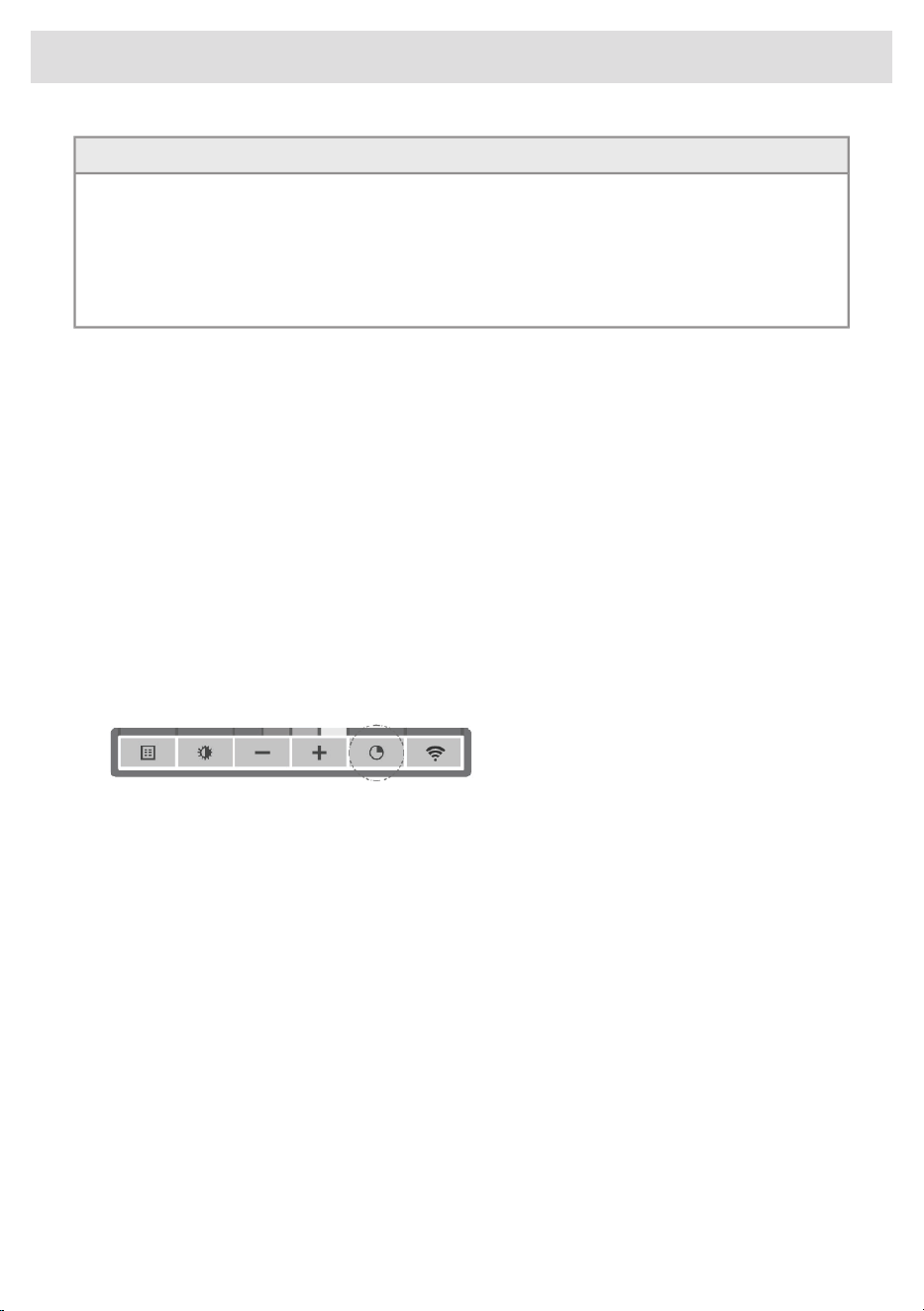
9Switching on the timer .................................
10Switching on recirculation mode .................
10Switching off recirculation mode .................
10Clean Air function ........................................
11Switching the light on and off ......................
11Changing the colour temperature ................
11
Making the connection between cooker hood
and hob ........................................................
12Wi-Fi connectivity ......................................
12ConnectLife-app and Wi-Fi connection ......
18Remote control ...........................................
18Description remote control ..........................
18Pairing the remote ........................................
19Switching extraction on and off ...................
19Switch on the boost setting ..........................
19Switching on the timer .................................
20Switching on recirculation mode .................
20Switching off recirculation mode .................
20Clean Air function ........................................
21Switching the light on and off ......................
21Changing the colour lighting temperature ....
22Maintenance ...............................................
22Cleaning .......................................................
23Filter indication .............................................
23Lighting ........................................................
24Battery of the remote ...................................
25Technical data ............................................
25EU Product Sheet ........................................
26Compliance information ...............................
27Installation ..................................................
27.....................................................................
28Preparations for installation .........................
29Appliance dimensions .................................
29Built-in ..........................................................
30Environmental aspects ..............................
30
Tips for energy-efficient cooking with
hoods ...........................................................
30Disposal of the appliance and packaging ....
Contents
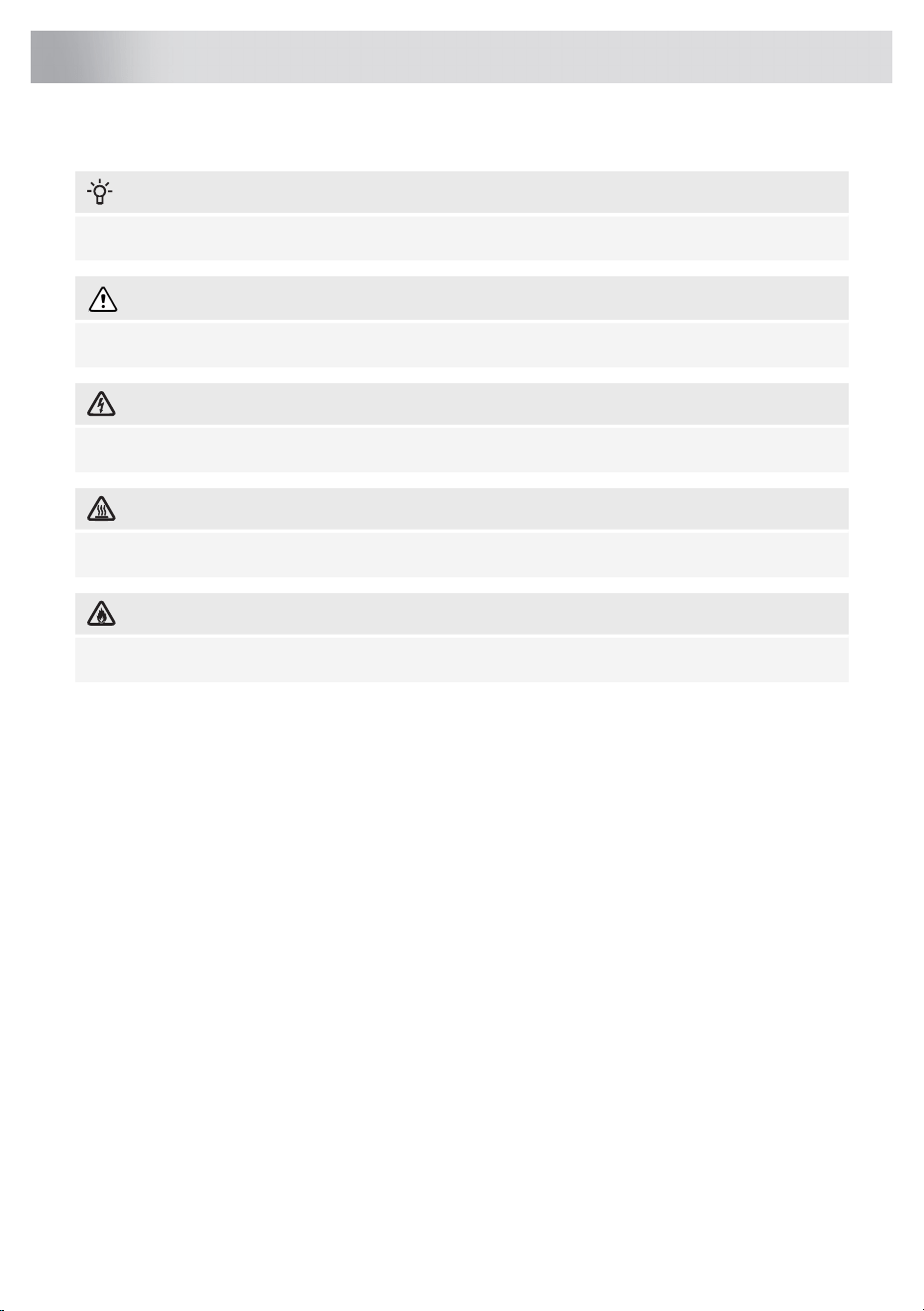
The following symbols are used throughout the manual, and they have the following meanings:
INFORMATION!
Information, advice, tip or recommendation
WARNING!
Warning – general danger
ELECTRIC SHOCK!
Warning – danger of electric shock
HOT SURFACE!
Warning – danger of hot surface
DANGER OF FIRE!
Warning – danger of fire
It is important that you carefully read the instructions.
3
Pictograms used

WARNING!
READ CAREFULLY AND KEEP IT FOR FUTURE REFERENCE!
Safe use
• The manufacturer cannot be held liable for any damage resulting
from failure to follow the safety instructions and warnings.
• Damage caused by incorrect connection, incorrect fitting, or
incorrect use is not covered by the warranty.
• Children shall not play with the appliance. Cleaning and user
maintenance shall not be made by children without supervision.
• This appliance is only designed for household use.
• Always provide adequate ventilation!
• There shall be adequate ventilation of the room when the range
hood is used at the same time as appliances burning gas or other
fuels.
• When the range hood and appliances supplied with energy other
than electricity are simultaneously in operation, the negative
pressure in the room must not exceed 4 Pa (4 × 10
-5
bar).
• Local regulations concerning the discharge of air have to be
fulfilled.
• Never use a steam cleaner for cleaning the appliance. Only clean
the appliance when switched off. The steam of a steam cleaner
could reach the conducting parts and cause an electrical short.
4
Safety
WARNING!
• This appliance can be used by children aged from 8 years and
above and persons with reduced physical, sensory or mental
capabilities or lack of experience and knowledge if they have
been given supervision or instruction concerning use of the
appliance in a safe way and understand the hazards involved.
• This appliance and the accessible parts will become hot during
use. Do not touch hot parts. Keep children younger than 8 away
from the appliance unless they are under continuous
supervision.
ELECTRIC SHOCK!
Avoid the risk of electric shock; make sure the appliance is
switched off before cleaning the appliance.
• Only use the appliance inside the home.
• Do not use the cooker hood if the grease filter has not been fitted
properly!
• Do not lean against the cooker hood.
• Never use the cooker hood as a working surface unless this is
indicated explicitly.
• Grease and oil are inflammable when overheated. Remain in the
cooking area when preparing meals.
• To prevent hot fat from catching fire, you should only deep-fry
under continuous supervision.
• The cooker hood should be cleaned regularly both on the outside
as well as the inside (at least 1 x per month). Insufficient cleaning
or a delay in the replacement of filters can cause a fire hazard.
• Clean the filters on time.
• The grease filters can become hot during use. After cooking wait
at least 30 minutes before cleaning.
• Please note! Intensive use can lead to condensation on the
cooker hood. Condensation is simple to remove with a dry cloth.
5
Safety

• Follow the instructions in the manual for cleaning or replacing the
grease filters and/or carbon filters!
DANGER OF FIRE!
• There is a risk of fire if the instructions for cleaning or replacing
grease filters and/or carbon filters are not followed.
• Through grease deposits in the metal grease filter. Never work
with open flame under the appliance (eg. flambéing).
Always use the appliance with the metal grease filter. Clean the
grease filter regularly.
• Through overheated fat or oil. Never extinguish a fire with water;
always use a fire blanket, lid or plate.
• The appliance may have sharp edges; please be careful during
cleaning.
• The light emitted by LED lights is very dazzling and can damage
the eyes. Do not look directly into the switched on LED lights for
longer than 100 seconds.
• When washing grease filters in the dishwasher it is recommended
to use a short, non-intensive programme. Check the grease filter
after washing in the dishwasher for wear (loose material). Wear
can occur as a result of frequent washing. If loose material is
visible, replace the filters in order to prevent this loose material
from ending up in the food that is cooked.
• Do not use the appliance in temperatures below 5 °C.
• Keep a 20 cm separation distance to the appliance.
6
Safety

Dear customer!
Welcome to our growing ASKO family!
We are proud of our appliances. We hope that this appliance will be an appreciated and dependable
aid for many years to come.
Please read the operating instructions before use. They include general tips, information about the
settings and adjustments you can make, and the best way to take care of your appliance.
TIP!
You can find the most recent version of the instructions for use on our website.
Enjoy your cooking!
7
Your cooker hood
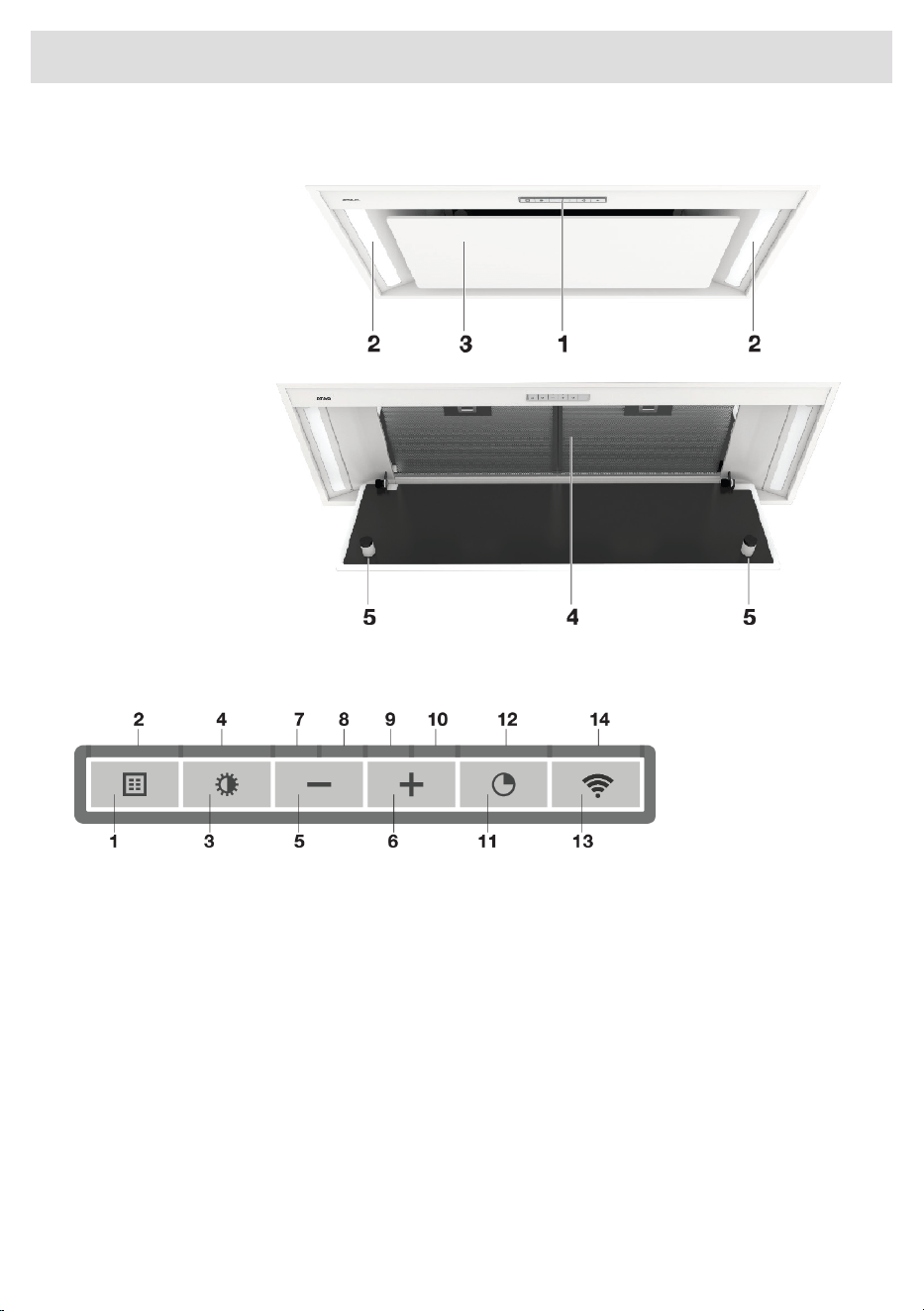
Description hood
1. Button Control
2. LED bar
3. Edge extraction
panel
4. Grease filter
5. Magnet
Description user interface
1. Filter reset button
2. Filter indicator, signals when filters require cleaning
3. Lighting button, switches on/off and dims the lighting
4. Lighting indicator
5. – (minus) push-button, reduces air extraction capacity and switches off
6. + (plus) push-button, switches on and increases air extraction capacity
7. Speed level 1 indicator
8. Speed level 2 indicator
9. Speed level 3 indicator
10. Speed level 4/boost indicator
11. Push-button timer function, turns off the hood after time
12. Timer indicator light
13. Wi-Fi push-button
14. Wi-Fi indicator light
8
Your cooker hood
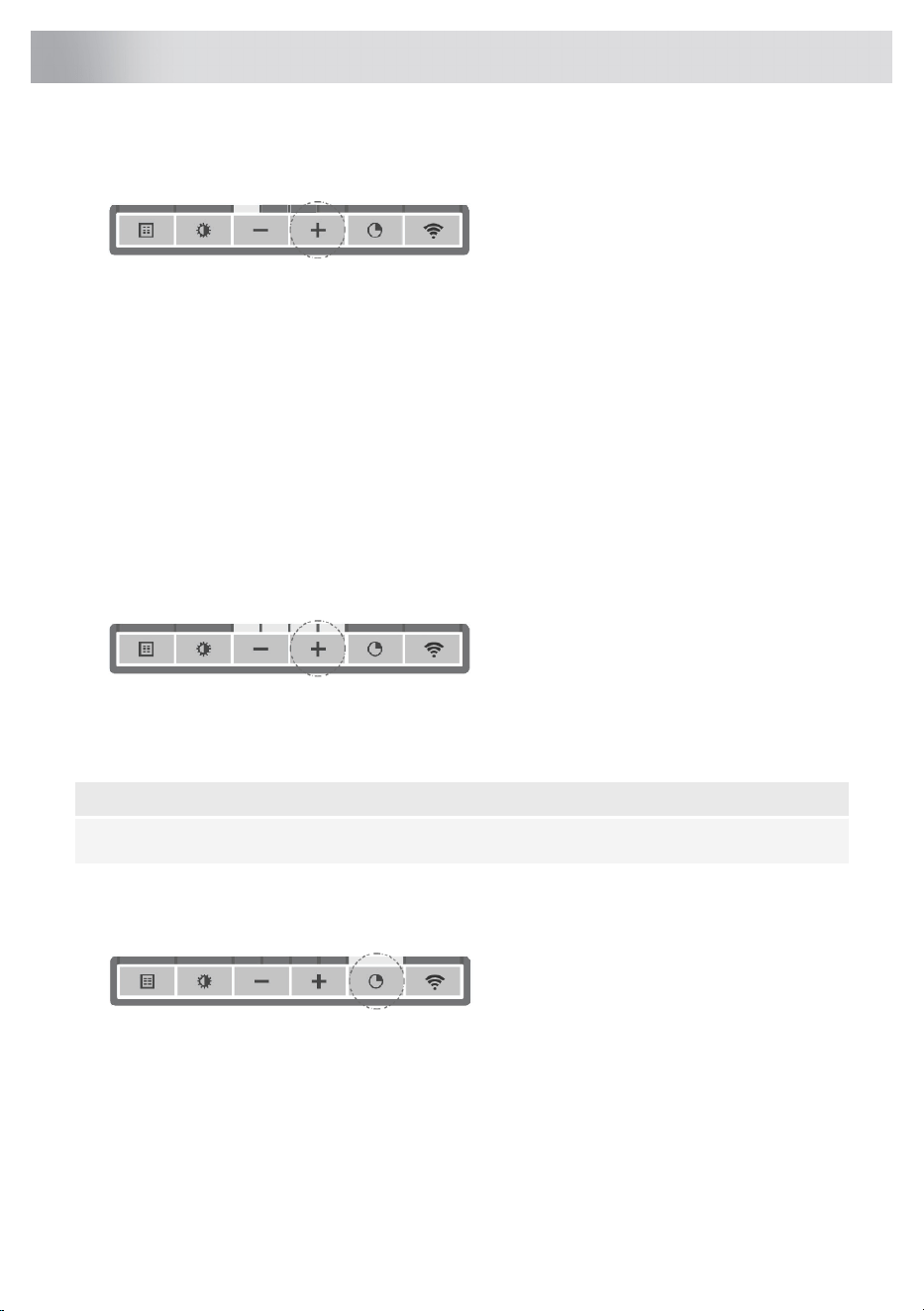
Switching extraction on and off
1. Press the + (plus) button.
The cooker hood will switch on at the lowest setting.
2. Press the + (plus) button again for a higher fan setting. Press and hold the + (plus) button for
1 second to select the highest setting (boost).
3. Press the – (minus) button to select a lower setting.
The extraction setting is indicated in the speed level indicators.
Each light area represents a speed level. Speed level indicator 4 also serves as a boost indicator
when it blinks.
4. If the extraction capacity is set to position 1, switch off the cooker hood by briefly pressing the
- (minus) button.
5. To switch off the cooker hood, press and hold the – (minus) button for at least 1 second.
Switch on the boost setting
1. Press and hold the + (plus) button for at least 1 second.
The boost setting is switched on for 10 minutes. The speed level 4 indicator will flash during this
period. The original extraction setting will be reactivated after this period.
2. Press and release the – (minus) button to switch off the boost setting.
NOTE!
If the boost setting has been selected, the timer function cannot be activated.
Switching on the timer
1. Press the timer button.
The timer indicator will start to blink.
The cooker hood will switch off automatically after 10 minutes.
2. Switch off the timer function by pressing a random button (except the one for lighting).
9
Operation
TIP!
This hood is set as an extractor hood on delivery (the air is exhausted to the outside). The hood
can also be set to recirculation use (the air is blown back into the room after filtration through
grease filters and a combi-filter).
With an RMS kit (recirculation modification set), the air will first be cleaned by the grease filters,
and then odours will be filtered by the combi-filter. The cleaned air is recirculated back into the
kitchen.
Switching on recirculation mode
Simultaneously press and hold the timer button and the light button until the filter indicator flashes
3 times.
The carbon filter indicator is activated.
Switching off recirculation mode
Simultaneously press and hold the timer button and the light button until the filter indicator lights up
for 3 seconds and then turns off.
Clean Air function
The Clean Air function allows you to freshen the air in your kitchen for a short period every hour, for
a maximum of 24 hours at level 1.
1. Switch off the cooker hood.
2. Press and hold the timer button for approximately 3 seconds.
The cooker hood will switch on automatically for 10 minutes every hour at the lowest speed
setting. During extraction, the indicator lights show a fast-running light. When the hood switches
off after 10 minutes, the indicator lights show a slow running light until the hood switches on
again after 50 minutes.
3. Switch off the Clean Air function in the meantime by pressing a random button (any button other
than the light button).
10
Operation

Switching the light on and off
1. Shortly press and release the light button.
The light switches on at maximum strength.
2. Press and hold the lighting button to set the lighting strength.
The lighting changes from maximum to minimum strength and vice versa.
3. To turn off the light, shortly press the light button while the light is on.
Changing the colour temperature
You can adjust the lighting color temperature.
1. Press and hold the light button. Press the – (minus) button to make the light ‘colder’ or press the
+ (plus) button to make the light ‘warmer’.
Making the connection between cooker hood and hob
To operate the cooker hood with the hob, you must make a connection between the hob and the
hood.
To make the connection, the Connection setup mode of the cooker hood and the hob must be
activated.
See also the manual for the hob. Check our website for the full range of hobs that can be connected
to your cooker hood.
1. The hood and lights must be switched off.
2. Press and hold simultaneously the – (minus) and the + (plus) button for 3 seconds. All the
indicators will blink simultaneously for a maximum of 3 minutes.
3. On your hob, activate the pairing mode in the user menu (see the hob manual). The connection
to the hob is established.
4. If the connection is successful, the cooker hood will return to standby.
NOTE!
When operating is overruled (by manually operating the cooker hood) in connection mode, the
pairing will be lost and must be paired again.
11
Operation
ConnectLife-app and Wi-Fi connection
This appliance is equipped with a Wi-Fi module that allows the appliance to connect to the internet
via your home network and to use it with the ConnectLife-app, installed on a mobile device like a
smartphone or tablet.
The app is available on the Apple App Store and Google Play Store. You will need the app to connect
the appliance to your network. After your user account is paired with the appliance, the app can be
used to monitor the status of the appliance and enables to update its firmware.
You can find direct links for the different stores to the ConnectLife-app under
www.connectlife.io/getstarted and more information about the system, support, available
functionalities, and additional options under www.connectlife.io.
Preparation
• Make sure you know the name/SSID of your router’s Wi-Fi network and its password
1)
.
• Make sure you have the label with the QR code of the appliance unique ID (‘AUID’) accessible
– you need to scan it with your mobile device when the App prompts to do so.
• Your smart device's Bluetooth is turned on.
•
Install the ConnectLife-app on a mobile device – scan the QR
code to find it.
• Launch the App. Please register if you don’t have an account yet.
• Log in with your account.
• The App will need access the mobile’s location to search for Wi-Fi
networks and to the camera to scan QR codes.
Wi-Fi Connection setup
You will first connect your mobile device directly to the appliance via Wi-Fi, and then use this
connection to share the data of your Wi-Fi home network. The cooker hood can then connect to the
home network.
1. Launch the ConnectLife-app.
2. In the ConnectLife application, go to the "Add device" menu and select the appropriate type of
device. Then scan the QR code (it can be found on the rating plate of the appliance; you can
also enter the AUID/SN code manually).
Follow the instructions in the ConnectLife-app.
The user account signed in on the mobile device used for the Connection setup will automatically
be paired with the cloud. If you’d like to pair another account, e.g. on a second user’s mobile device
see “Pairing additional user”.
For safety reasons, only paired users can communicate with the cooker hood.
1)
NOTE: only 2,4 Ghz networks are supported
12
Wi-Fi connectivity
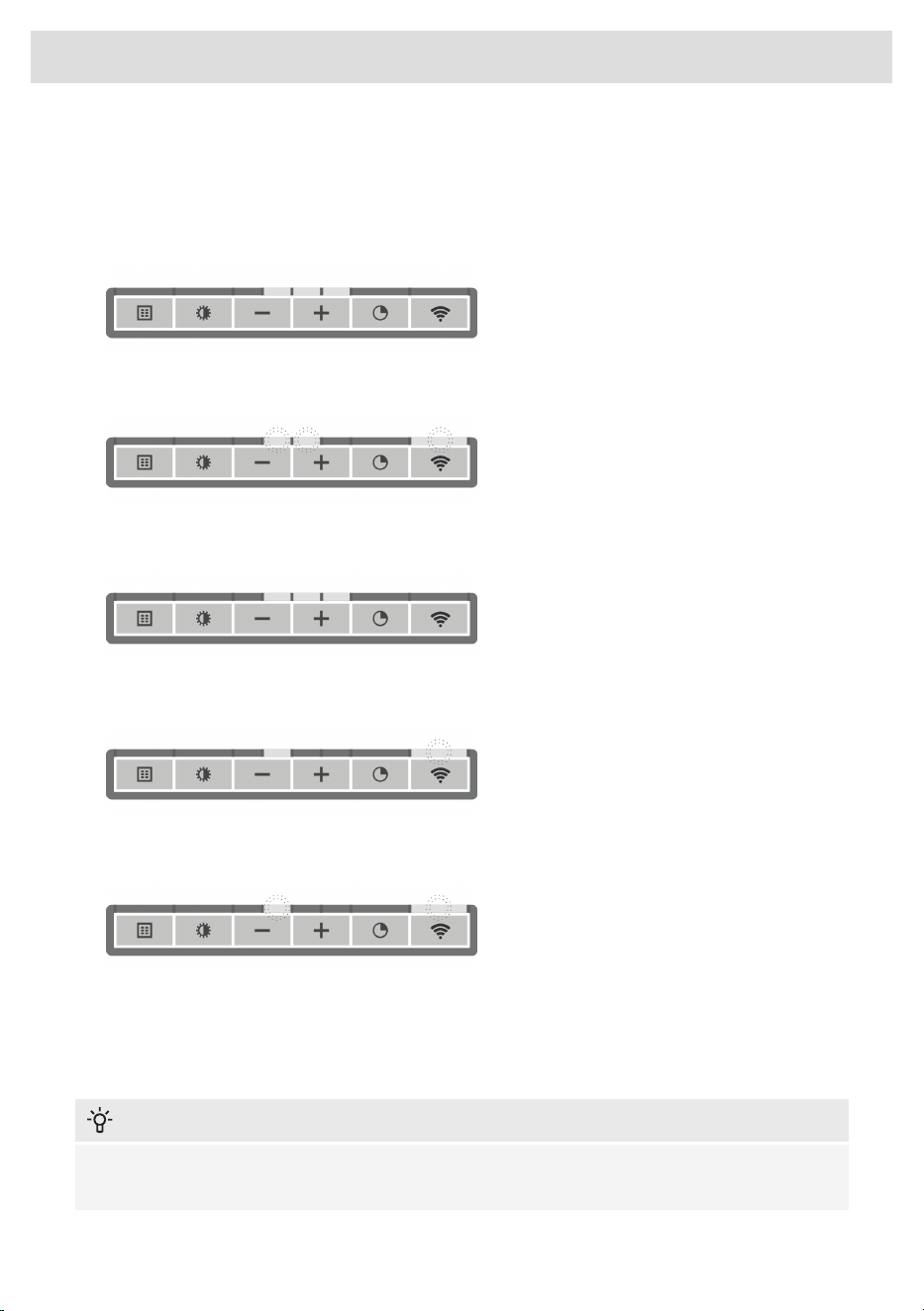
First steps to set up the Wi-Fi connectivity:
1. Check the “Requirements” as described above.
2. The hood and lights must be switched off.
3. Press the Wi-Fi button for 3 seconds. Speed levels 2 and 3 indicators will light up. The Wi-Fi
menu is activated.
4. Press the Wi-Fi button for 3 seconds to turn on Wi-Fi. Speed level 2 and 3 indicators will blink 3
times. The Wi-Fi indicator flashes.
Wi-Fi is enabled.
After 3 seconds it will return to the Wi-Fi-menu.
5. Simultaneously press the + (plus) and timer button for 3 seconds to access 'Connection settings'.
Speed level 2 indicator lights up and Wi-Fi indicator flashes.
6. Touch the timer key to enable 'Connection Setup Mode'.
Speed level 2 indicator and Wi-Fi indicator will flash.
This mode will be disabled automatically after 5 minutes.
7. Start the ConnectLife-app and follow the instructions in the app.
8. If the ConnectLife-app does not connect to the device, wait 10 minutes and repeat the steps
described or press the '-' (minus) button for 3 seconds to leave the Wi-Fi menu.
INFORMATION!
Troubleshoot quickly by turning the Wi-Fi module off and on again. You can find more help in the
"Wi-Fi troubleshooting" section.
13
Wi-Fi connectivity
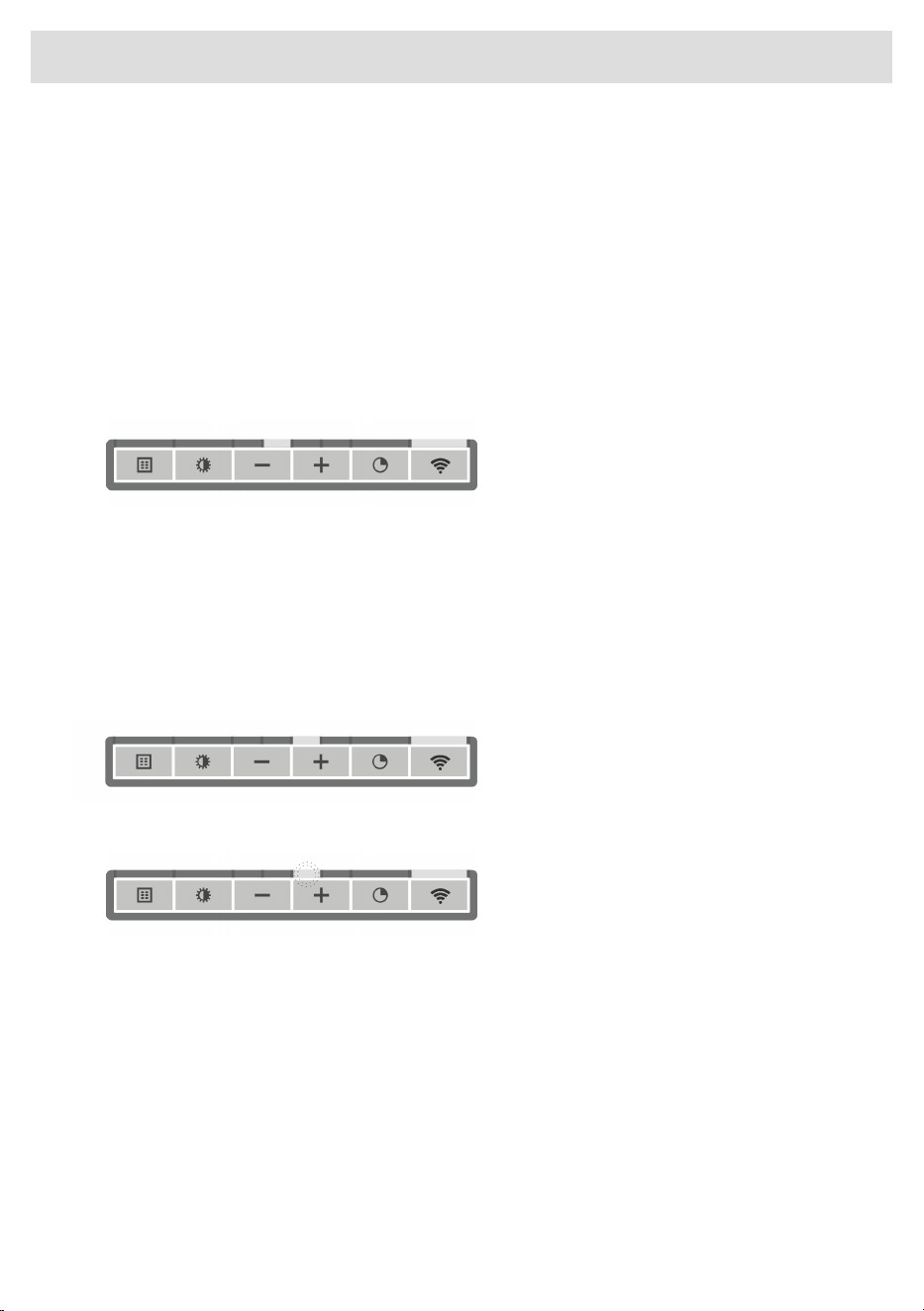
Depending on the Wi-Fi state, there are 1 to 3 options available in the menu:
• The Connection Setup Mode
• The Pairing Mode
• Remote control mode
If more than 1 option is available then use the + (plus) and - (minus) buttons to toggle between the
options.
Connection Setup Mode
• The appliance must be connected to the Cloud for the application to monitor and control the
appliance remotely.
• Speed level 2 indicator and Wi-Fi indicator will light up.
• Touch the timer key to enable 'Connection Setup Mode'. Speed level 2 indicator will flash.
• This mode will be disabled automatically after 5 minutes.
• Follow the instructions of the ConnectLife-app.
Pairing Mode
When the process was successful and you want to pair another user, you can use the “Pairing mode”
of the Wi-Fi menu and the “Pairing” or “Discovery” option of the ConnectLife-app. In the
ConnectLife-app, select option 'Add Appliance' and follow the instructions.
• Touch the timer key to enable 'Pairing mode'. The speed level 3 indicator will flash.
• This mode will be disabled automatically after 3 minutes.
• On the ConnectLife-app, use the 'Pairing' or 'Discovery' option of the ConnectLife app to pair
another user.
14
Wi-Fi connectivity
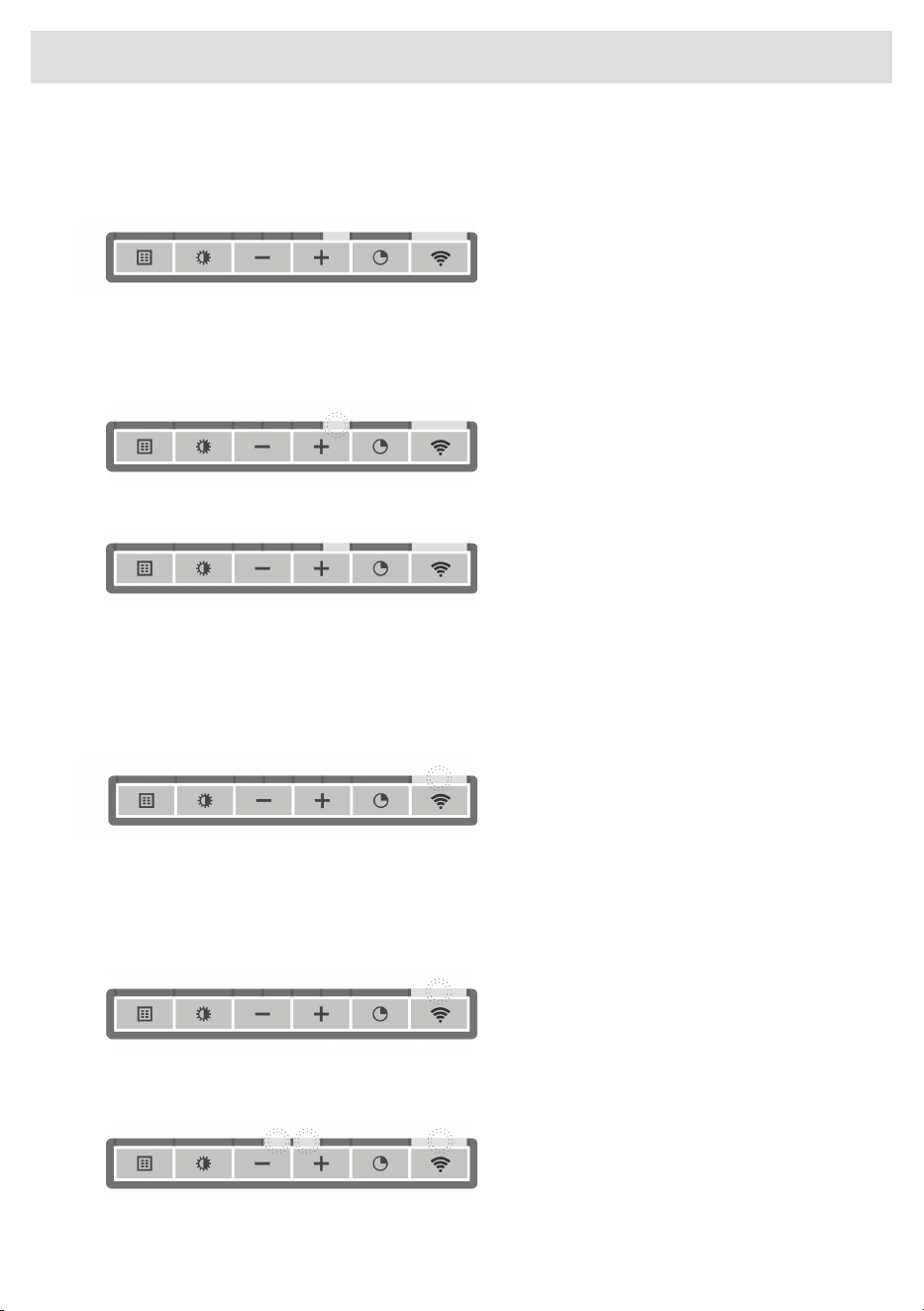
Remote control mode switch on and off
To be able to change function settings remotely, the appliance must be switched on and the
ConnectLife-app must be enabled. Speed level 4 indicator and Wi-Fi indicator will lit static.
Remote control mode is only available if the Wi-Fi connectivity setup has been performed. Touch
the timer key to enable 'Remote control'.
• Speed level 4 indicator is blinking: Remote control is enabled.
• Speed level 4 indicator lit static: Remote control is disabled.
Wi-Fi menu
To access the Wi-Fi menu the hood must be on standby (the hood and lights must be switched off).
Press the Wi-Fi button for 3 seconds. Speed levels 2 and 3 indicators will light up. The Wi-Fi menu
is activated.
Switching on Wi-Fi:
• The hood and lights must be switched off.
• Press the Wi-Fi button for 3 seconds. Speed levels 2 and 3 indicators will light up. The Wi-Fi
menu is activated.
• Press the Wi-Fi button to turn on Wi-Fi. Speed levels 2 and 3 indicators will blink 3 times. The
Wi-Fi indicator will flash. After 3 seconds it will return to the Wi-Fi menu.
15
Wi-Fi connectivity

Switching off Wi-Fi:
• The hood and lights must be switched off.
• Press the Wi-Fi button for 3 seconds. Speed levels 2 and 3 indicators will light up. The Wi-Fi
menu is activated.
• Press the Wi-Fi button to turn off Wi-Fi. The Wi-Fi indicator will turn off. After 3 seconds it will
return to the Wi-Fi menu.
• Press the '-' (minus) button for 3 seconds to exit the WiFi menu.
Displaying the Wi-Fi status:
• Wi-Fi module disabled: Wi-Fi indicator is off.
• Configuration in progress: Wi-Fi indicator flashes.
• Connected to home network router: Wi-Fi indicator flashes.
• Connected to home network router and cloud: Wi-Fi indicator continuously lit.
16
Wi-Fi connectivity
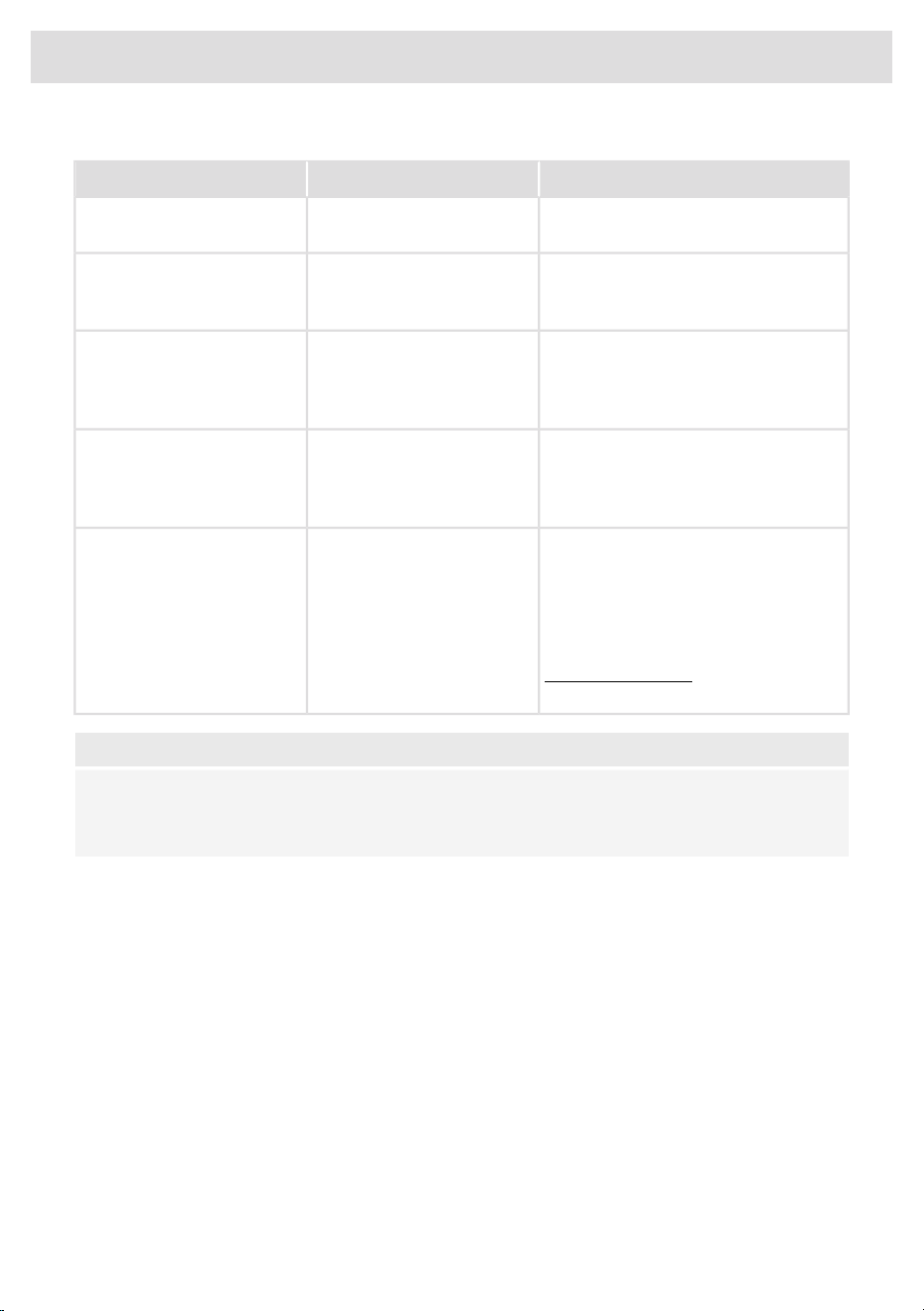
Wi-Fi troubleshooting
SolutionPossible causeSymptom
Switch on Wi-Fi (see 'Switching on
Wi-Fi').
Wi-Fi turned off.Wi-Fi icon not shown.
Check that your home network signal
is strong and internet connection is
working.
Home network issues.Wi-Fi setup failed.
Please check the network settings.
Ensure a 2.4 GHz and visible network.
If the signal is too weak, try to move the
network router closer to the appliance.
The home network is not on
2.4 GHz, the network is
hidden, or the signal strength
is too weak.
Home network is not
displayed during connection
setup.
Ensure that Wi-Fi is enabled, and the
internet connection of your home
network is working. Repeat the
connection setup if necessary.
Wi-Fi is disabled or home
network issues.
Appliance is shown
disconnected on the mobile
app.
First disable the Wi-Fi and enable it
again. Check that the internet
connection in your home network is
working. Repeat the connection setup
if necessary.
Further troubleshooting available on
www.connectlife.io or contact the
service department.
Different causes.Other Wi-Fi problem.
NOTE!
Unpair: When the appliance needs to be connected to another network, use the setting ‘unpair’
in the app. The appliance will be deleted from the app and will not be linked to the current user
account.
17
Wi-Fi connectivity
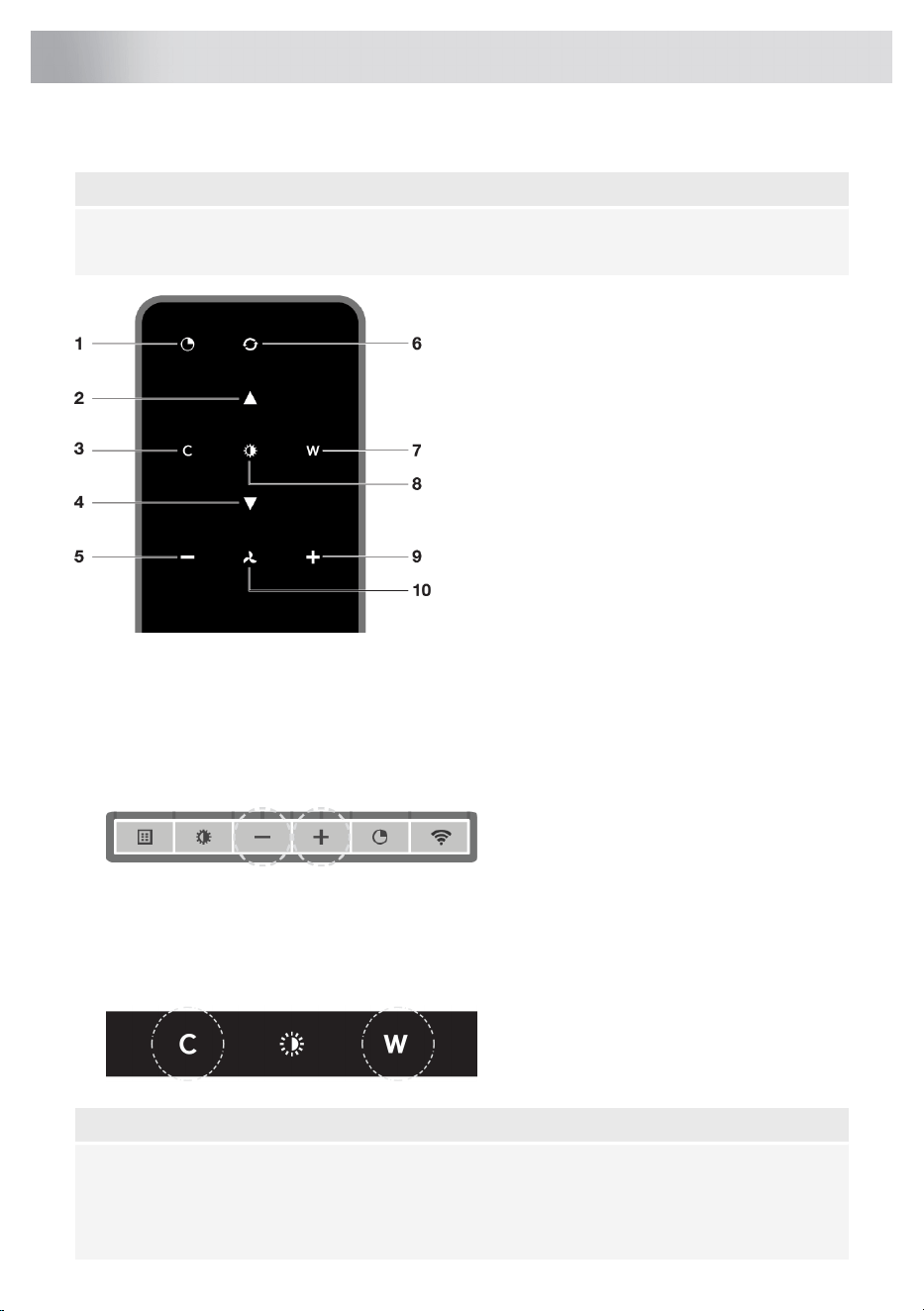
Description remote control
NOTE!
The remote control is available as an accessory for this cooker hood and is not included with this
appliance.
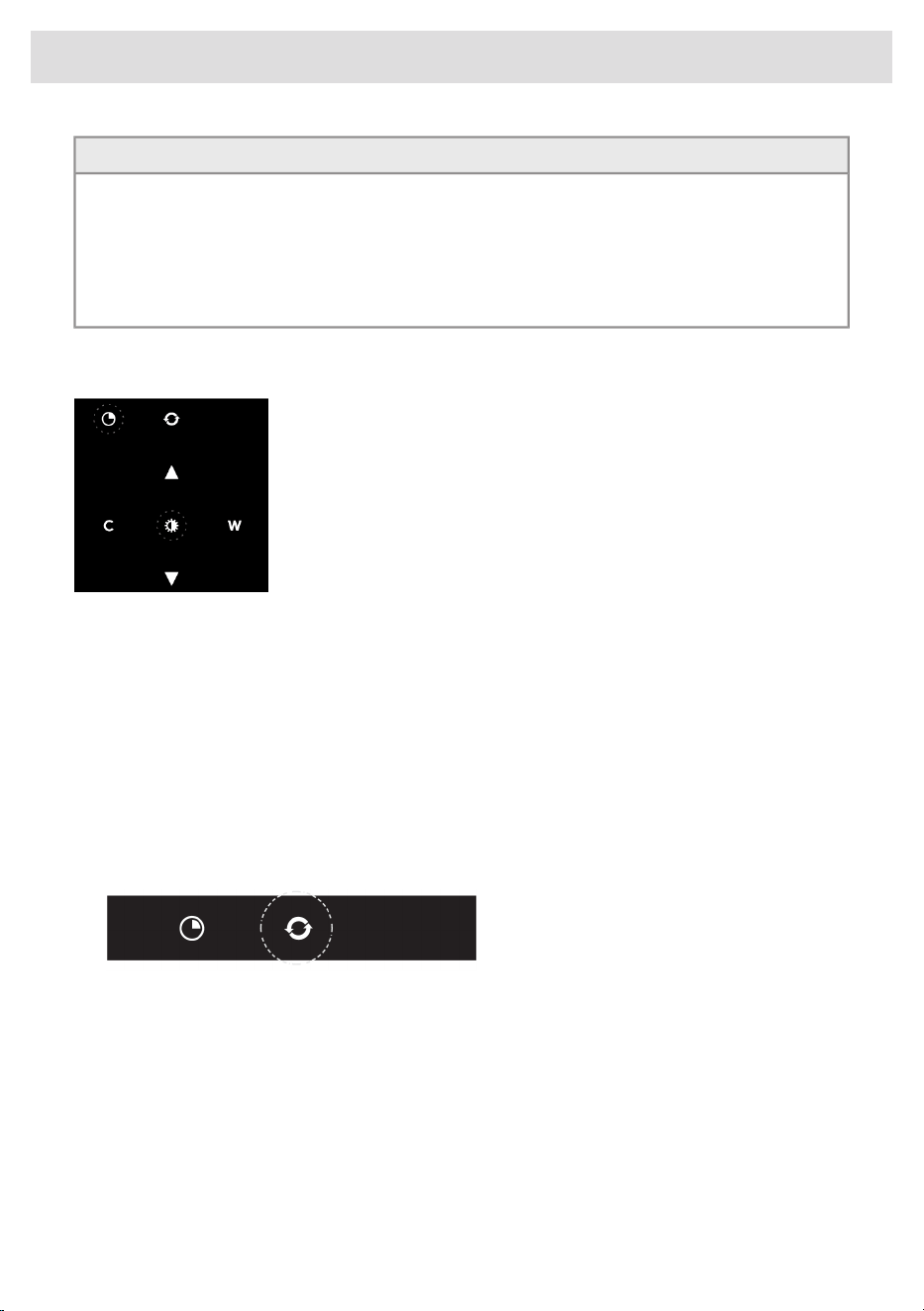
1. Timer function
2. Increase light intensity
3. Colder light temperature
4. Decrease light intensity
5. Decrease air extraction capacity
6. Clean Air function
7. Warmer light temperature
8. Switch on/off lighting
9. Increase air extraction capacity
10. Fan on/off
Pairing the remote
This remote control must be paired to the cooker hood before first use.
1. Switch on the appliance. Press and hold the – (minus) button and + (plus) button for 3 seconds.
The hood will start ‘pairing mode’ for 5 minutes
2.
3. Activate the ’Remote pairing mode’ by holding ‘c’ and ‘w’ for 3 sec.
4. During pairing all the indicators on the hood and remote will blink. All indicators will turn off when
the connection is established.
If the pairing cannot be established, first de-energise the appliance (unplug it from the
mains), wait a few minutes and then reconnect it. Try the pairing again.
NOTE!
• Remote control will go into standby after 30 seconds. The remote will wake up when it is
picked up or detects movement.
• Avoid to store the remote control in a drawer. The movement of the drawer may inadvertently
activate the remote control and significantly shorten battery life.
18
Remote control
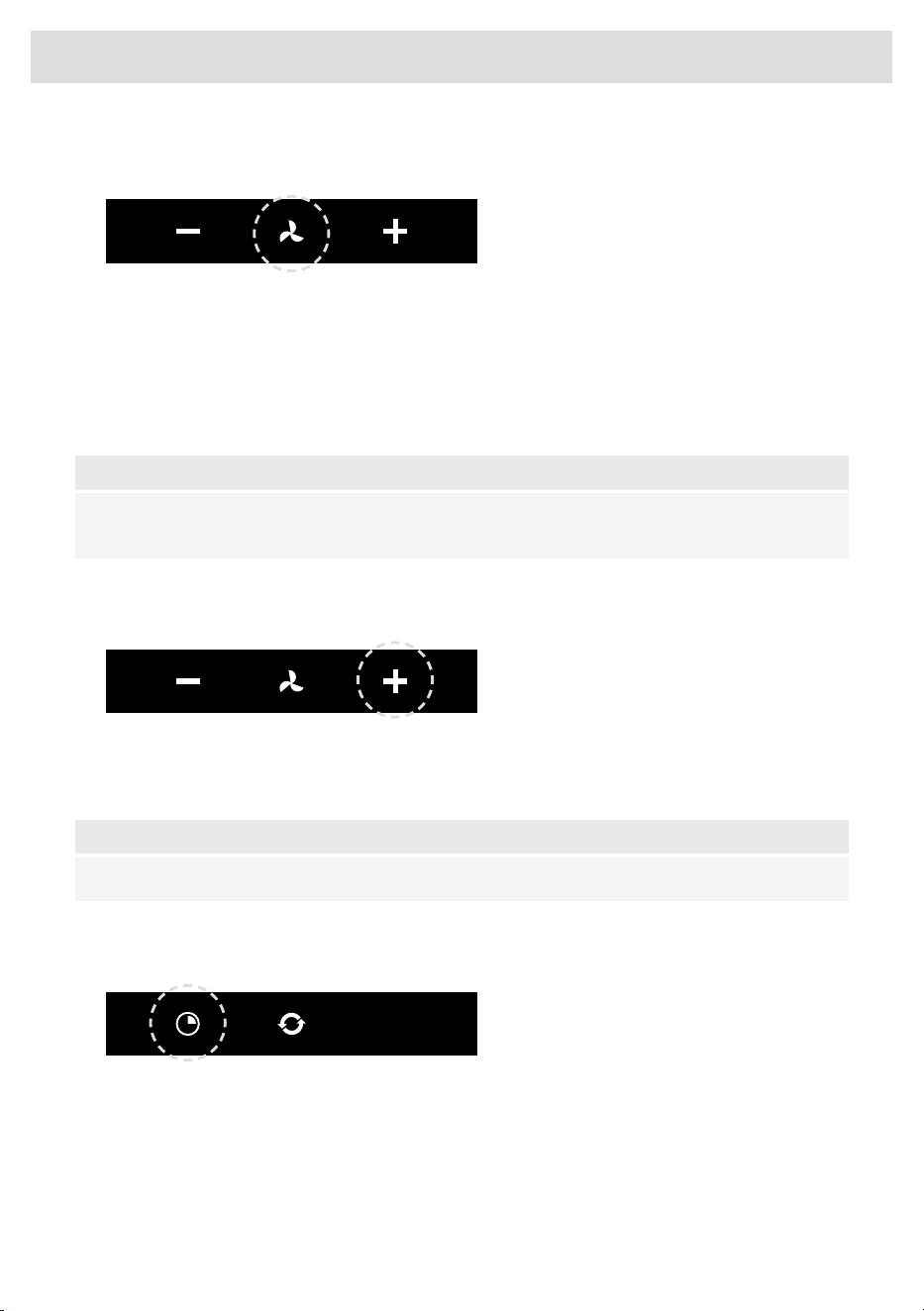
Switching extraction on and off
1. Press and hold the ‘Fan’ key on the remote for 1 second.
The cooker hood will switch on at the lowest setting.
2. Press the ‘+’ key again for a higher fan setting. Press and hold the ‘+’ key for 1 second to select
the highest setting (boost).
3. Press the ‘-’ key to select a lower setting.
The extraction setting is indicated by the speed level indicators on the hood.
4. To switch off the cooker hood, press and hold the ‘Fan’ key for 1 second.
NOTE!
Lighting and motor key must be pressed for at least 1 second. This is to prevent the functions
from being accidentally switched on or off.
Switch on the boost setting
1. Press and hold the ‘+’ button for at least 1 second.
The boost setting is switched on for 10 minutes. The speed level 4 indicator will flash during this
period. The original extraction setting will be reactivated after this period.
2. Press and release the ‘-’ key to switch off the boost setting.
NOTE!
If the boost setting has been selected, the timer function cannot be activated.
Switching on the timer
1. Press the timer key.
The timer indicator will start to blink.
The cooker hood will switch off automatically after 10 minutes.
2. Switch off the timer function by pressing a random button (except the one for lighting).
19
Remote control
TIP!
The cooker hood can be used in extraction mode or recirculation mode. The air extraction capacity
is adapted to the selected mode. The hood will start-up in the default extraction mode. It has to
be reset for recirculation mode.
With an RMS kit (Recirculation modification set) the air will first be cleaned by the grease filters
and then odours will be filtered by the charcoal filter. The cleaned air is recirculated back into the
kitchen.
Switching on recirculation mode
When the light and fan are off, simultaneously hold the timer key and
the light key until the filter indicator flashes 3 times.
The carbon filter indicator is activated.
Switching off recirculation mode
When the light and fan are off, simultaneously hold the timer key and the light key until the filter
indicator lights up for 3 seconds and then turns off.
Clean Air function
The Clean Air function allows you to freshen the air in your kitchen for a maximum of 24 hours at
level 1.
1. Switch off the cooker hood.
2. Press and hold the ‘Clean Air’ key for approximately 3 seconds.
The cooker hood will switch on automatically for 10 minutes every hour at the lowest speed
setting. During extraction, the display will show a fast-moving ‘snake’. When the hood switches
off after 10 minutes, the display will show a slow-moving ‘snake’ until the hood switches on again
after 50 minutes.
3. Switch off the Clean Air function by pressing the timer, clean air, ‘-’ or ‘+’ keys (any key other
than the light key).
20
Remote control

Switching the light on and off
1. Press and hold the light key for 1 second.
The light switches on at maximum strength.
2. Press and hold the ‘increase light’ or ‘decrease light’ key to set the lighting intensity.
3. To turn off the light, press and hold the light key for 1 second.
NOTE!
Lighting and motor key must be pressed for at least 1 second. This is to prevent the functions
from being accidentally switched on or off.
Changing the colour lighting temperature
You can adjust the lighting color temperature.
1. Press and hold the light key for 1 second.
The light switches on at maximum strength.
2. Press the ‘C’ key to make the light ‘colder’ or press the ‘W’ key to
make the light ‘warmer’.
21
Remote control
Cleaning
WARNING!
Important! For all maintenance, first, switch off the mains power to the cooker hood by pulling
the plug out of the socket or by turning off the home's master switch. The hood needs to be
cleaned regularly, both inside as well as outside (at least as often as the grease filter).
Do not use abrasive cleaning products. Do not use alcohol!
If the instructions regarding cleaning the appliance or replacing the filters are not followed, this
can cause a fire. These instructions must be followed! The manufacturer is not liable for damage
to the hood or fire damage resulting from incompetent maintenance or from non-adherence to
the safety instruction above.
Cooker hood
Clean the cooker hood with soapy water and a soft cloth.
Then rinse with clean water. Do not use aggressive cleaning agents such as caustic soda. The cooker
hood finish stays in good condition if it is buffed periodically following the application of wax.
NOTE!
Stainless steel cooker hoods
Do not use scouring pads or other abrasive cleaners on stainless steel cooker hoods. Finish with
a non-abrasive, non-polishing agent and buff the stainless steel in the direction of the grain.
Metal grease filters
Metal grease filters should be cleaned once a month (or when indicated by the filter cleaning indicator
– if present on the model) using a neutral cleaning agent, either by hand or in the dishwasher on a
short, low-temperature program. Place the grease filters with the openings facing downwards in the
dishwasher so the water can drain out of the filter. Aluminium grease filters become dull as a result
of dishwasher cleaning agents. This is normal and does not effect the working.
Cleaning
The filters can be cleaned in the dishwasher. Allow the filters to drain well before replacing.
The filters can also be cleaned by hand.
Clean the filters in soapy water with washing up liquid and rinse. Allow the filters to drain well. The
underside of the cooker hood can be cleaned with a mild cleaning agent and a damp cloth. Dry off
with a paper towel.
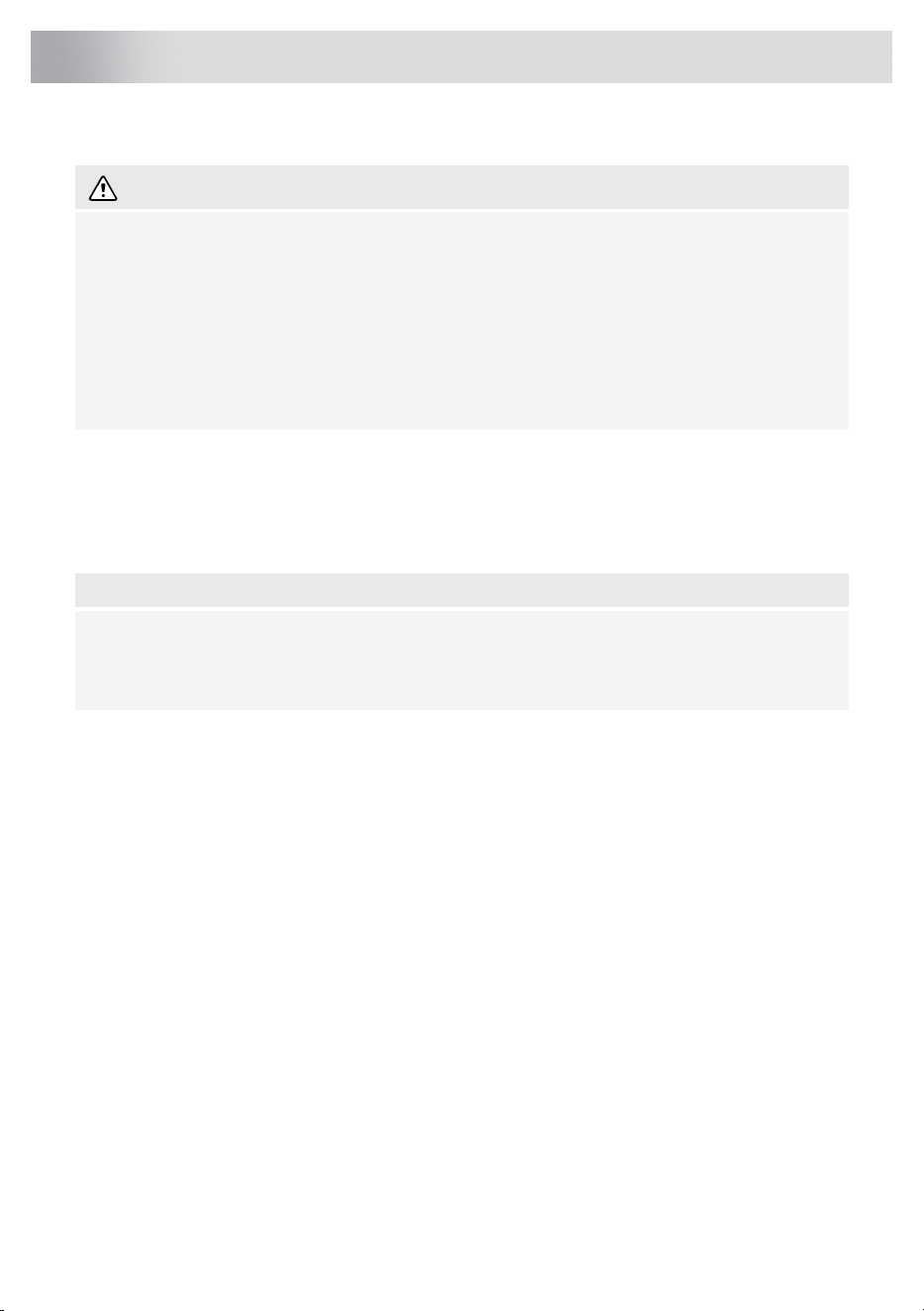
Replacing cassette filter
The filter should be placed with the locking mechanism on the front. Open the filter access latch.
The notches at the front of the filter will then slot in. Hold the access latch in this position when placing
the filters.
1. Slot the notches at the back of the filter in the specially designed opening of the cooker hood.
2. Tilt the filter upwards.
3. Release the filter access hatch. The notches at the back of the filter will extend outwards and
slot into the specially designed openings of the cooker hood.
22
Maintenance
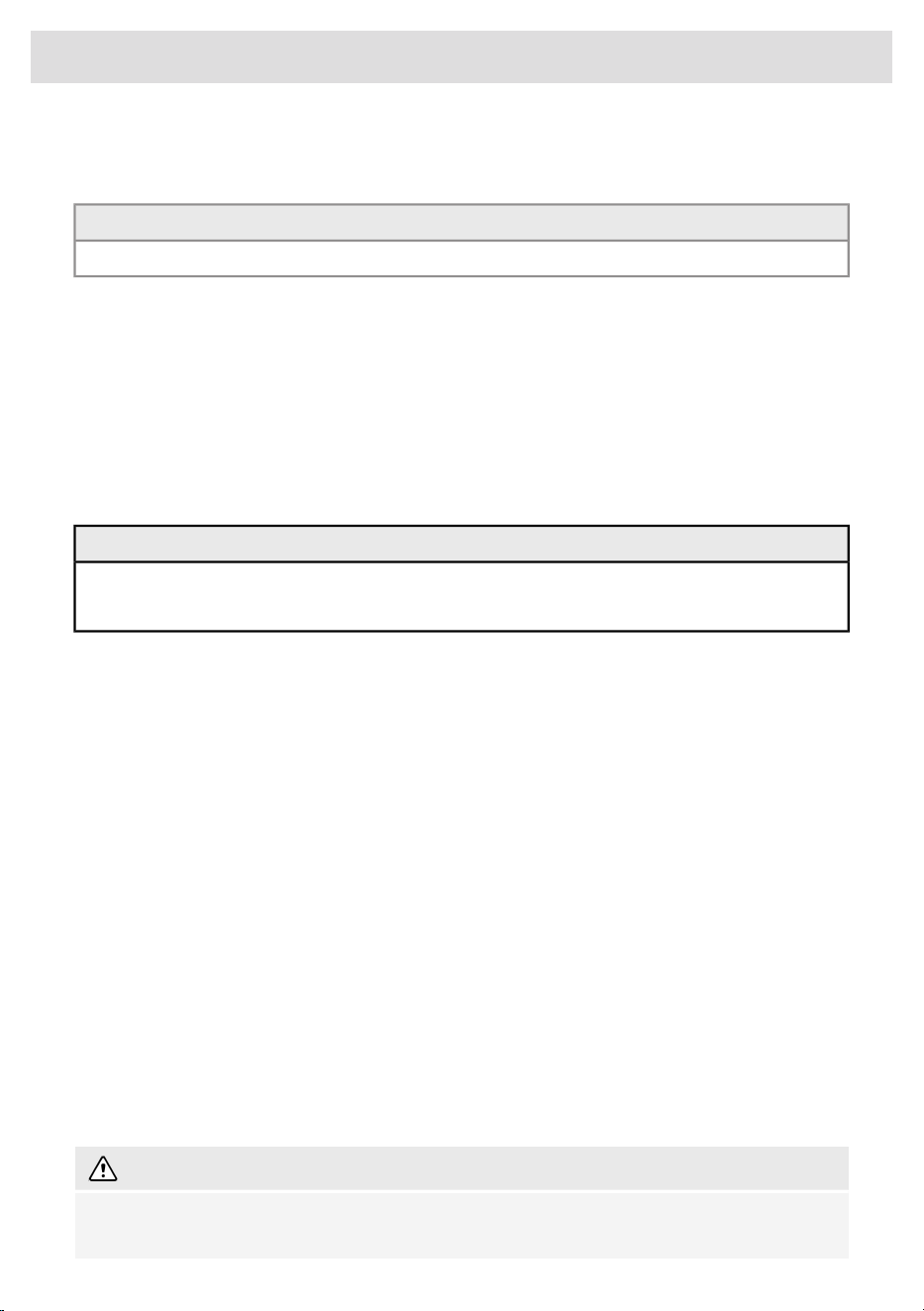
The filter is now in position again.
4. Press the edge extraction panel firmly in the magnetic seal again (you will hear a click).
TIP!
The edge extraction panel can be removed for cleaning.
Active carbon filters
The regenerable active carbon filter must be washed by hand with neutral cleaning products, or in
the dishwasher at a maximum temperature of 65 °C (the washing should be done without any plates,
dishes, cups, etc. in the machine). Do not use washing detergent.
Remove the excess water without damaging the filter, remove the holder and let the filter dry in the
oven for at least 40 minutes at a maximum temperature of 70 °C.
To keep the regenerable carbon filter efficient, this action should be repeated every 2 months or
when indicated by the filter indicator. The filter must be replaced after no more than 3 years, or if it
has been damaged.
CAUTION!
It is important that the grease filters and the regenerable active carbon filter are thoroughly dry
before repositioning.
Replacing the carbon filter
To replace the carbon filter, consult the manual for the recirculation kit.
Filter indication
Saturation of grease and carbon filters
The filters should be replaced or cleaned when the filter indicator is lit.
Grease filter
The filter indicator will light up after 30 operating hours.
• The grease filters should then be cleaned.
• Reset the memory by pressing and holding '-' (minus) button on the remote control until the filter
indicator goes off.
Carbon filter
The filter indicator will flash after 120 operating hours.
• The carbon filter should then be cleaned or replaced.
• Reset the memory by pressing and holding '-' (minus) button on the remote control until the filter
indicator goes off.
Lighting
WARNING!
The hood is fitted with LED lights. An authorized technician must replace these. Do not attempt
to replace the LED lights yourself.
23
Maintenance

Battery of the remote
NOTE!
• When the batteries are replaced the pairing connection will remain.
• Replace the batteries in time, as the receiving distance will be shortened if the voltage of the
battery is too low.
• Don’t forget to remove the batteries if you don’t use the remote for a long time.
• Don’t leave the remote lying upside down on a conductive surface.
• The warranty does not cover the batteries.
• The battery may drain more quickly in connection with the lit icons.
• Avoid to store the remote control in a drawer. The movement of the drawer may inadvertently
activate the remote control and significantly shorten battery life.
• Battery specifications: Two AAA batteries.
24
Maintenance
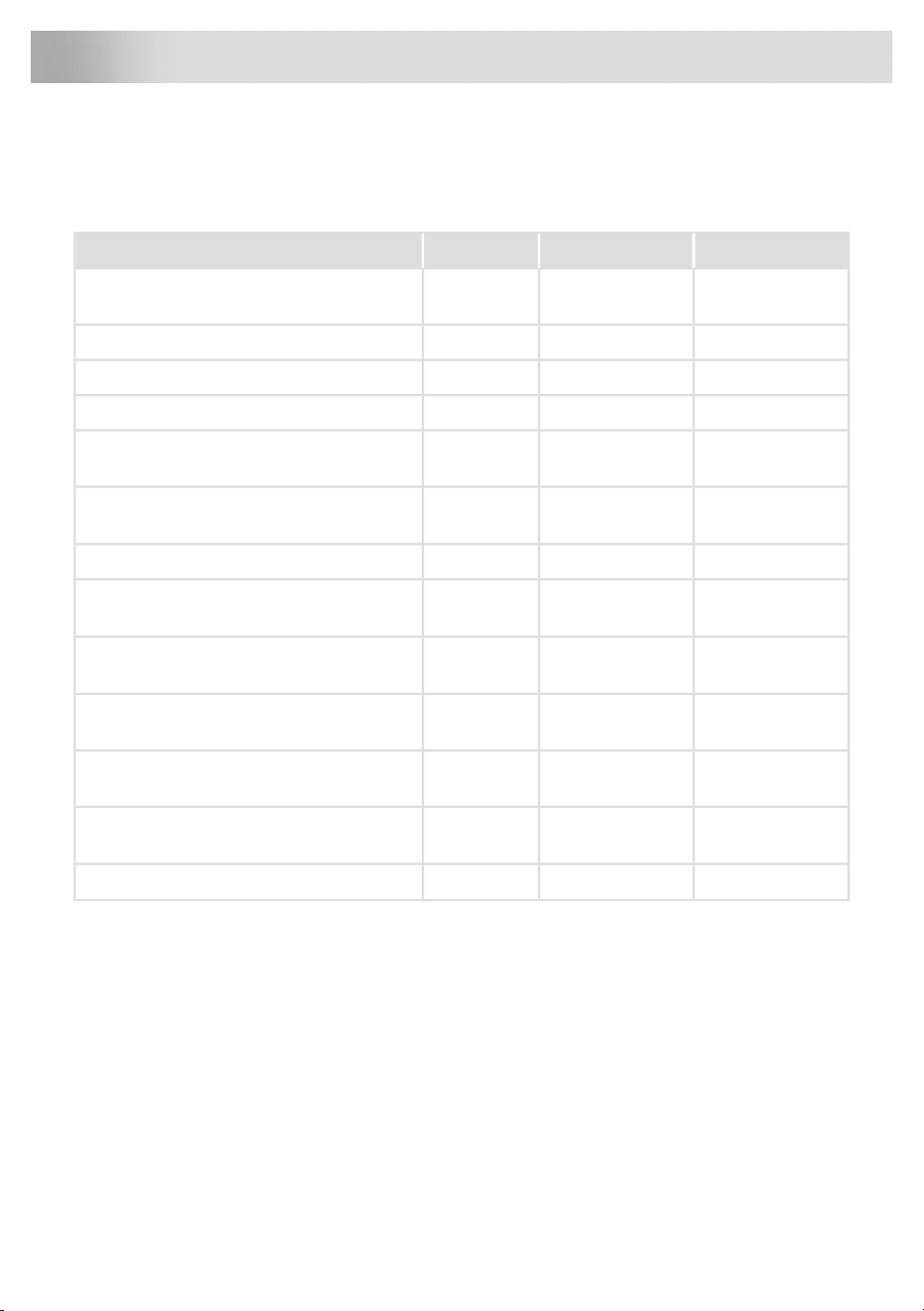
EU Product Sheet
Data determined according to:
Standard EN61591 and Commission Regulations (EU) no. 65/2014 and (EU) no. 66/2014.
CBB862WGCCBB861SSCCBB761SSCModel identification
20.720.720.7Annual Energy Consumption (AEC
hood
)
[kWh/a]
0.60.60.6Time increase factor (f)
37.637.637.6Fluid Dynamic Efficiency (FDE
hoods
)
33.233.233.2Energy Efficiency Index (EEI
hood
)
337337337Measured air flow rate at best efficiency
point (Q
BEP
) [m
3
/h]
328328328Measured air pressure at best efficiency
point (P
BEP
) [Pa]
420420420Maximum air flow (Q
max
) [m
3
/h]
81.781.781.7Measured electric power input at best
efficiency point (W
BEP
) [W]
3.93.93.9Nominal power of the lighting system (W
L
)
[W]
218218218Average illumination of the lighting system
on the cooking surface (E
middle
) [lux]
---Measured power consumption in standby
mode (P
s
) [W]
0.380.380.38Measured power consumption off mode (P
o
)
[W]
585858Sound power level (L
WA
) [dB]
25
Technical data
EU Product Fiche
CBB862WGCCBB861SSCCBB761SSCModel identification
55.955.955.9Lighting Efficiency (LE
hood
) [lux/W]
92.492.492.4Grease Filtering Efficiency (GFE
hood
)
[%]
290-420290-420290-420Air flow at minimum and maximum
speed in normal use [m
3
/h]
640640640Air flow at intensive or boost setting
[m
3
/h]
50-5850-5850-58Airborne acoustical A-weighted sound
power emissions at minimum and
maximum speed in normal use [dB(A)]
676767Airborne acoustical A-weighted sound
power emissions at intensive or boost
setting [dB(A)]
Compliance information
RF moduleRadio equipment type
2402 - 2477 MHz (16 channels)Operating frequency range
-5.2 dBm EIRP average (calculated)Maximum output power
-7 dBiMaximum antenna gain
Wi-Fi moduleRadio equipment type
2412 - 2472 MHzOperating frequency range
16.8 dBm EIRP average (calculated)Maximum output power
0 dBiMaximum antenna gain
BLE moduleRadio equipment type
2402 - 2480 MHzOperating frequency range
7.63 dBm EIRP average (calculated)Maximum output power
0 dBiMaximum antenna gain
Hereby, ASKO declares that the radio equipment type Cooker hood is in compliance with Directive
2014/53/EU.
26
Technical data
Safety regulations
Faulty parts may only be replaced by original parts. The manufacturer
can only guarantee that original parts meet safety requirements.
If the supply cord is damaged, it must be replaced by the
manufacturer, its service agent or similarly qualified persons in order
to avoid a hazard.
WARNING!
This appliance should only be connected by a registered installer.
• Check the appliance for transport damage. Do not connect a damaged appliance.
• Always use the original Supply cord to connect the appliance.
• The electrical connection must comply with national and local regulations.
• The wall plug socket and plug should always be accessible.
• If a stationary appliance is not fitted with a supply cord and a plug, or with other means for
disconnection from the supply mains having a contact separation in all poles that provide full
disconnection under overvoltage category III conditions, the means for disconnection must be
incorporated in the fixed wiring in accordance with the wiring rules. This is also applicable for
appliances with a supply cord and plug when the plug is not accessible after installing the
appliance. Using an omnipolar switch with a contact separation of at least 3 mm fitted in the
fixed wiring will fulfil this requirement.
• The appliance should not be connected to the mains via a multi-plug adapter or extension cable,
as the safe use of the equipment cannot be guaranteed.
• Disconnect the appliance from the mains supply before starting any repair work.
• We advise you to wear protective gloves when assembling the cooker hood because of the
possible sharp edges.
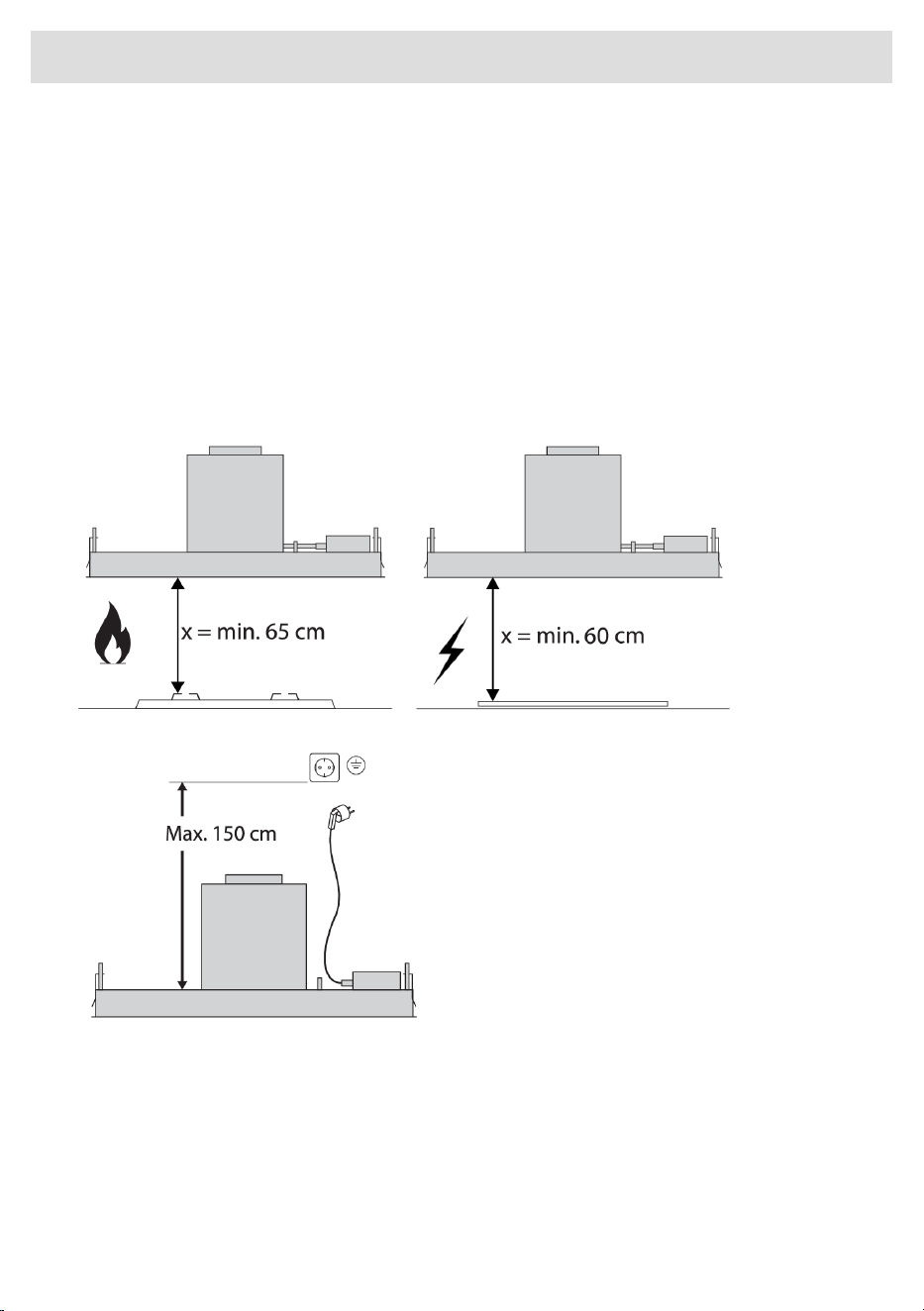
• The distance between the lowest point of the cooker hood and the supporting surface for the
cooking vessels gas hob should be at least 65 cm.
• If the instructions of the gas hob specify a greater distance, this has to be taken into account.
WARNING!
Extraction hoods and other appliances that extract cooking vapours can affect the safe operation
of appliances that burn gas or other fuel (including those in other rooms) by backflowing
combustion gases. These gases can potentially lead to carbon monoxide poisoning. After installing
an extraction hood or other vapour extractor, the operation of appliances with flue gas extraction
must be tested by a competent person to ensure that the combustion gases do not flow back.
Never open the casing of the appliance.
WARNING!
Failure to install screws or fixing devices in accordance with these instructions may result in an
electrical hazard.
27
Installation
If the safety instructions and warnings are not followed, the manufacturer cannot be held responsible
for any resulting damage.
If you decide to discontinue using the appliance because of a fault, we recommend you cut off the
cable after removing the plug from the plug socket. Take the appliance to your municipality’s waste
disposal site.
Place the appliance in an environment that meets the following conditions:
• Ambiant temperature range: +5….+40 °C;
• Humidity: 30….70% RH;
• Maximum altitude: 2000 meters above sea level.
Preparations for installation
28
Installation
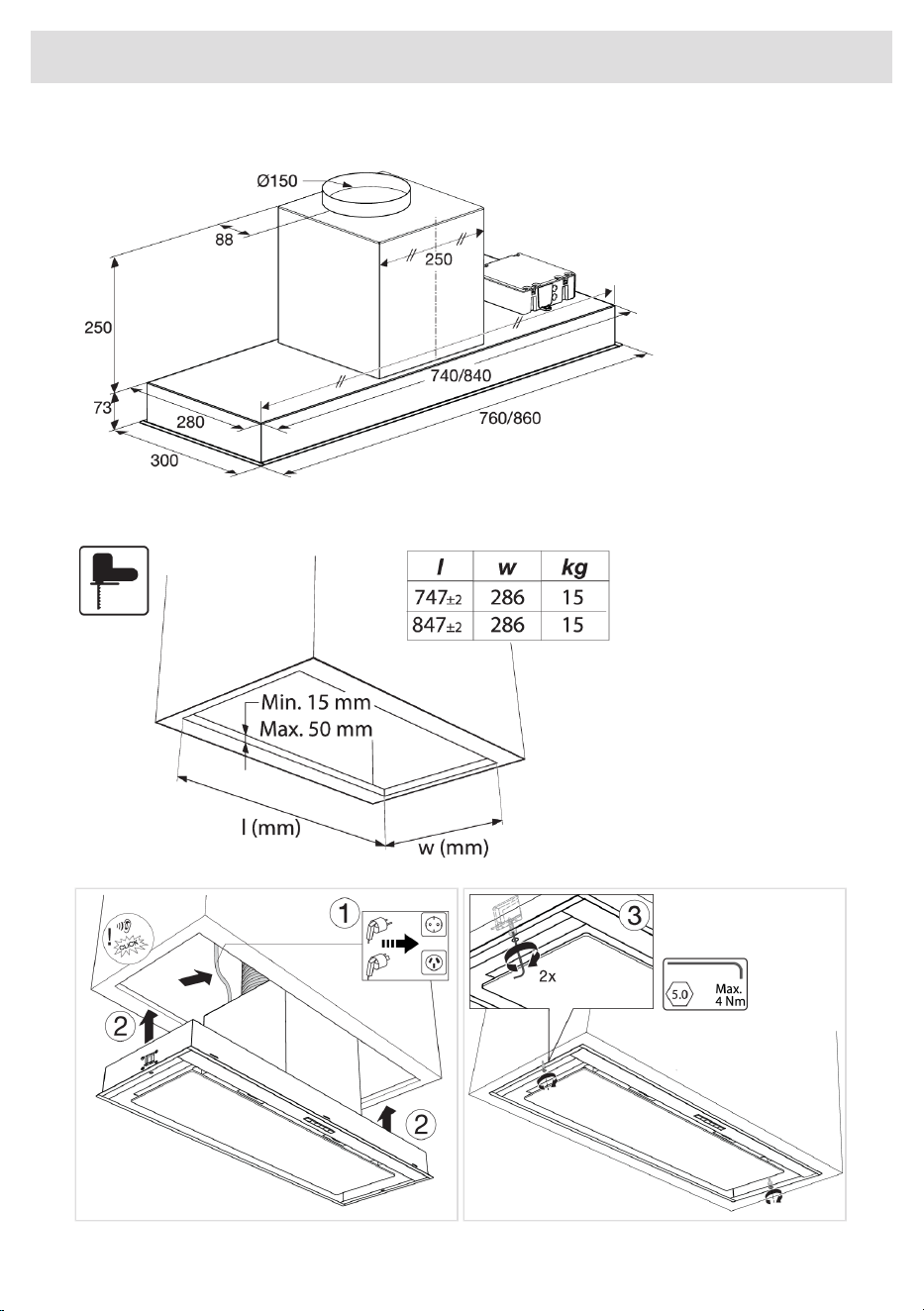
Appliance dimensions
Built-in
29
Installation
Tips for energy-efficient cooking with hoods
• Use a low extractor setting and use the highest setting (boost) only if necessary.
• A well-ventilated kitchen makes the range hood more efficient.
• Clean filters regularly and replace filters when needed to keep the filter efficiency high, as a
saturated filter cannot perform and leads to longer usage times.
Disposal of the appliance and packaging
Sustainable materials have been used during the manufacture of this appliance. This appliance must
be disposed of responsibly at the end of its service life. Ask your local authorities for more information
about how to do this.
The appliance packaging is recyclable. The following may have been used:
• cardboard;
• polyethylene film (PE);
• CFC-free polystyrene (PS rigid foam).
Dispose of these materials in a responsible manner and in accordance with government regulations.
The product has been marked with a crossed-out dustbin symbol to
remind you of the obligation to dispose of electrical household
appliances separately. This means that the appliance may not be
included with normal domestic refuse at the end of its service life.
The appliance must be taken to a special municipal centre for separated
waste collection or to a dealer providing this service.
A separate collection of household appliances helps to prevent any
potential negative impact on the environment and on human health
caused by improper disposal. It ensures that the materials of which the
appliance is composed can be recovered to obtain significant savings
in energy and raw materials.
Declaration of conformity
We hereby declare that our products satisfy the applicable European
directives, orders and regulations, as well as the requirements stated
in the referenced standards.
30
Environmental aspects

31
Your notes
926728
www.asko.com
We reserve the right to make changes.
-a3