

ENGLISH_index
www.lg.com
Copyright © 2025 LG Electronics Inc.
All Rights Reserved.
Safety and Reference
OWNER’S MANUAL
Please read this manual carefully before
operating your set and retain it for
future reference.
The model and serial number of the product are
located on the back and on one side of the product.
Record them below in case you ever need service.
Model
Serial No.
*MFL721415032507REV02*
2
Before reading this manual
• ReadthismanualthoroughlybeforeoperatingyourTV,andkeepitforfuturereference.
• Onthewebsiteyoucandownloadthemanualincludinginstallation,using,troubleshooting,specifications,licenseetcandviewitscontentsonyourPCor
mobiledevice.
• User Guide : FormoreinformationaboutthisTV,readtheUSERGUIDEembeddedintheproduct.(Dependingonmodel)
- ToopentheUSERGUIDE →[ ]→[Support]→[UserGuide]
Separate Purchase
• Separatepurchaseitemscanbechangedormodifiedforqualityimprovementwithoutanynotification.Contactyourdealertobuytheseitems.These
devicesonlyworkwithcertainmodels.
• Themodelnameordesignmaybechangeddependingontheupgradeofproductfunctions,manufacturer’scircumstancesorpolicies.
• Acabletoconnectantennasandexternaldevicesmustbepurchasedseparately.
Note
• Productspecificationsorcontentsofthismanualmaybechangedwithoutpriornoticeduetoupgradeofproductfunctions.
• Theitemssuppliedwithyourproductmayvarydependingonthemodel.
• ImageshownmaydifferfromyourTV.
Warning! Safety instructions
CAUTION
RISKOFELECTRICSHOCK
DONOTOPEN
CAUTION:TOREDUCETHERISKOFELECTRICSHOCK,DONOTREMOVECOVER(ORBACK).NOUSER-SERVICEABLEPARTSINSIDE.REFERTOQUALIFIEDSERVICE
PERSONNEL.
Thissymbolisintendedtoalerttheusertothepresenceofuninsulated“dangerousvoltage”withintheproduct’senclosurethatmaybeofsufficient
magnitudetoconstituteariskofelectricshocktopersons.
Thissymbolisintendedtoalerttheusertothepresenceofimportantoperatingandmaintenance(servicing)instructionsintheliterature
accompanyingthisapparatus.
WARNING:TOREDUCETHERISKOFFIREANDELECTRICSHOCK,DONOTEXPOSETHISPRODUCTTORAINORMOISTURE.
• TOPREVENTTHESPREADOFFIRE,KEEPCANDLESOROTHERITEMSWITH
OPENFLAMESAWAYFROMTHISPRODUCTATALLTIMES.
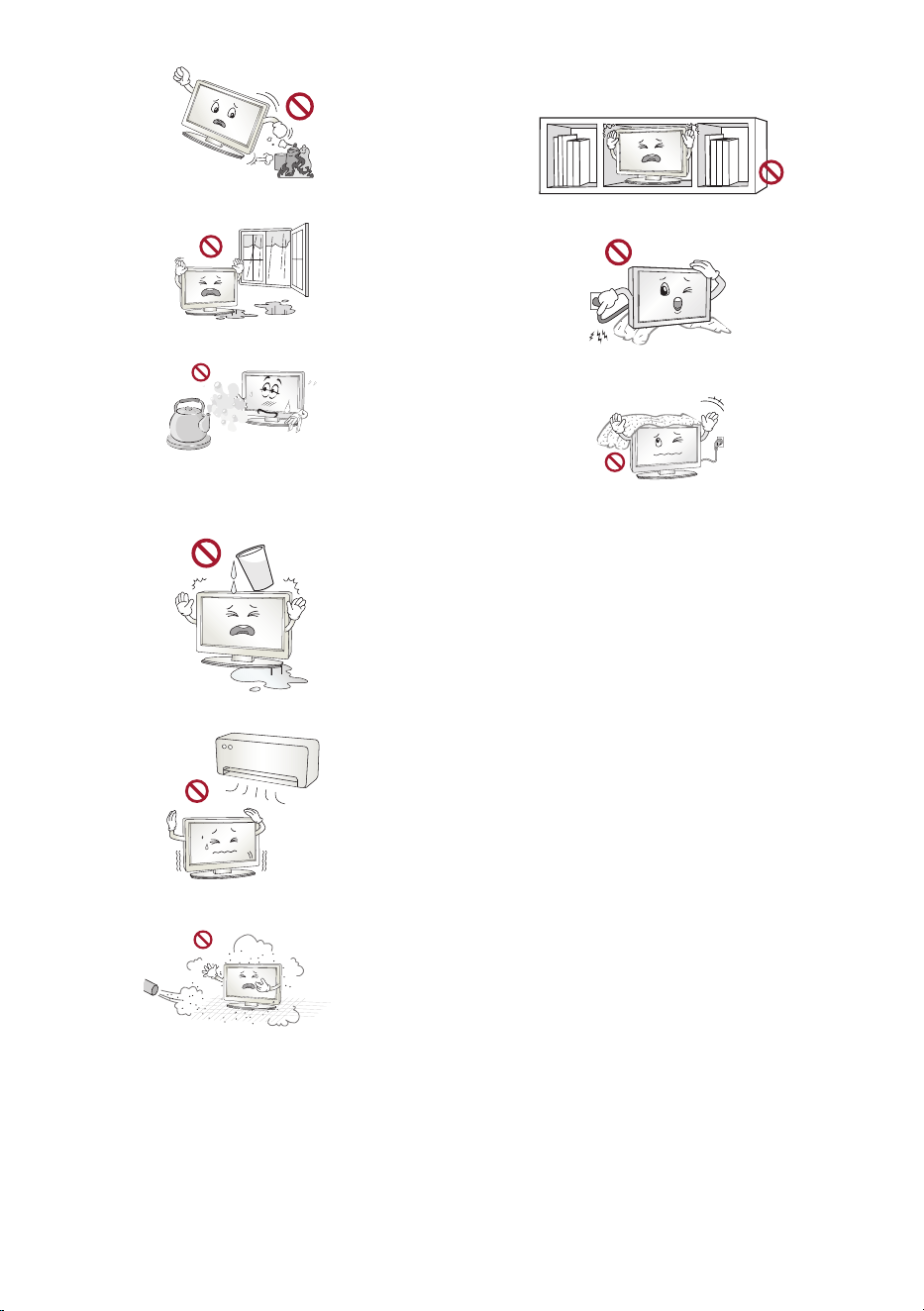
• Installation
- Donotplacethedeviceand/orremotecontrolinthefollowing
environments:
* Anareaexposedtodirectsunlight.
* Anareawithhighhumiditysuchasabathroom.
* Nearanyheatsourcesuchasstovesandotherdevicesthatproduce
heat.
* Nearkitchencountersorhumidifierswheretheycaneasilybe
exposedtosteamoroil.
3
* Nearflammableobjectssuchasgasolineorcandles.
* Anareaexposedtorainorwind.
* Anareathatmaybeexposedtowaterdropletsorsplashes.
* Donotplaceitemscontainingliquid—suchasvases,cups,
etc.—ontopofthedeviceoritsmainunit(e.g.,theshelvesabove
theunit).
* Anareathatmaybedirectlyexposedtoairconditionerairflow.
* Anareawithexcessivedust.
Otherwise,thismayresultinfire,electricshock,combustion/explosion,
malfunctionorproductdeformation.
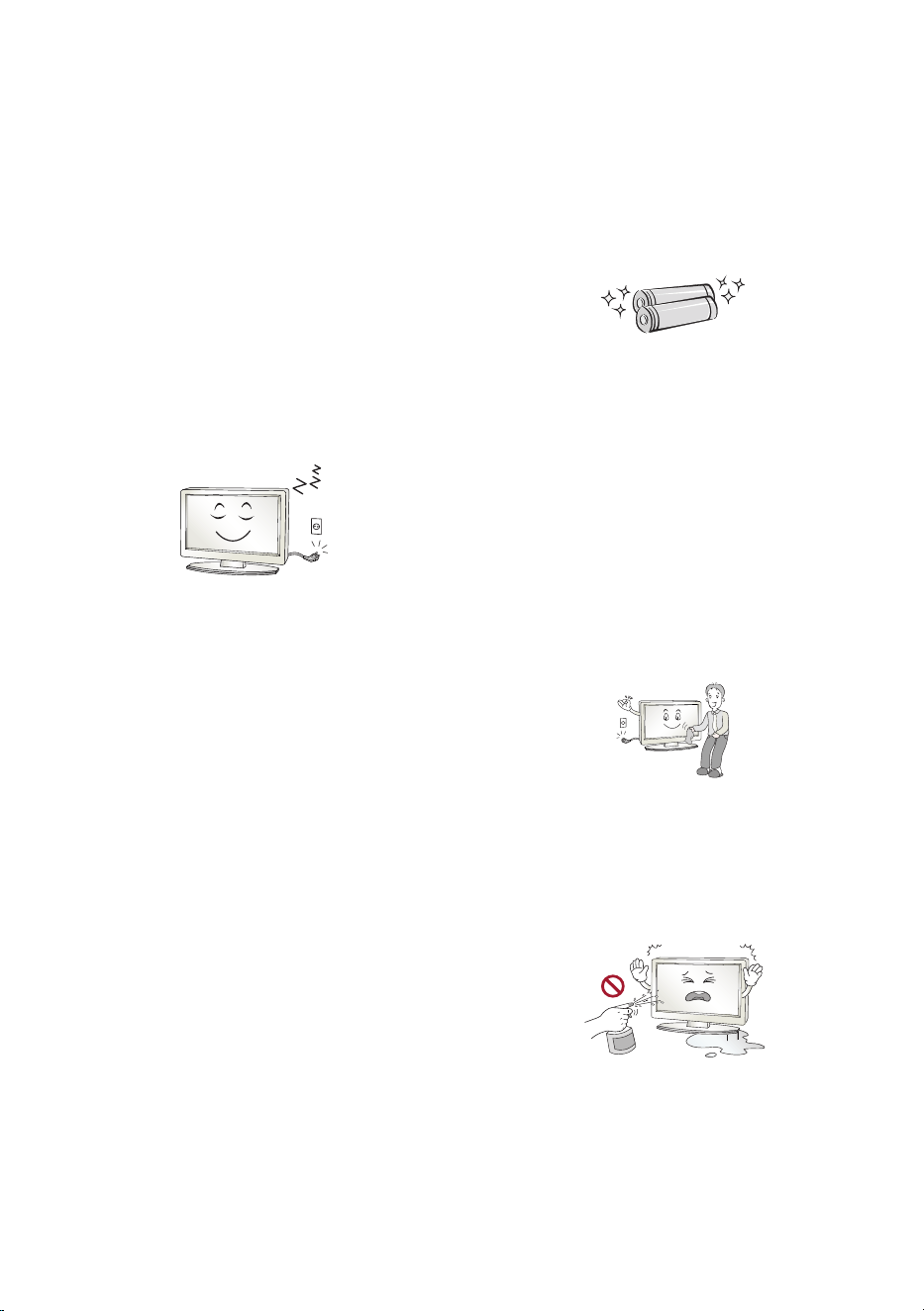
• Ventilation
- Installthedevicewherethereisproperventilation.
- Donotinstallinaconfinedspacesuchasabookcase.
- Donotinstallthedeviceonacarpetorcushion.
- Donotblockorcoverthedevicewithclothorothermaterialswhile
unitispluggedin.
• Takecarenottotouchtheventilationopenings.WhenwatchingtheTV
foralongperiod,theventilationopeningsmaybecomehot.
• Protectthepowercordfromphysicalormechanicalabuse,suchasbeing
twisted,kinked,pinched,closedinadoor,orwalkedupon.Payparticular
attentiontoplugs,walloutlets,andthepointwherethecordexitsthe
device.
• DonotmovetheTVwhilstthePowercordispluggedin.
• Donotuseadamagedorlooselyfittingpowercord.
• Besuretograsptheplugwhenunpluggingthepowercord.Donotpull
onthepowercordtounplugtheTV.
• DonotconnecttoomanydevicestothesameACpoweroutletasthis
couldresultinfireorelectricshock.
• Disconnecting the Device from the Main Power
- Thepowerplugisthedisconnectingdevice.Incaseofanemergency,
thepowerplugmustremainreadilyaccessible.
• DonotletyourchildrenclimborclingontotheTV.Otherwise,theTV
mayfallover,whichmaycauseseriousinjury.
• Outdoor Antenna Grounding(Candifferbycountry):
- Ifanoutdoorantennaisinstalled,followtheprecautionsbelow.
Anoutdoorantennasystemshouldnotbelocatedinthevicinityof
overheadpowerlinesorotherelectriclightorpowercircuits,orwhere
itcancomeincontactwithsuchpowerlinesorcircuitsasdeathor
seriousinjurycanoccur.
• Nevertouchthisapparatusorantennaduringalightningstorm.Youmay
beelectrocuted.
4
• MakesurethepowercordisconnectedsecurelytotheTVandwallsocket
ifnotsecureddamagetothePlugandsocketmayoccurandinextreme
casesafiremaybreakout.
• Donotinsertmetallicorinflammableobjectsintotheproduct.Ifa
foreignobjectisdroppedintotheproduct,unplugthepowercordand
contactthecustomerservice.
• Donottouchtheendofthepowercordwhileitispluggedin.Youmay
beelectrocuted.
• If any of the following occur, unplug the product immediately
and contact your local customer service.
- Theproducthasbeendamaged.
- Ifwateroranothersubstanceenterstheproduct(likeanACadapter,
powercord,orTV).
- IfyousmellsmokeorotherodorscomingfromtheTV.
- Whenlightningstormsorwhenunusedforlongperiodsoftime.
EventheTVisturnedoffbyremotecontrolorbutton,ACpowersourceis
connectedtotheunitifnotunpluggedin.
• Power Saving
- Turnoffthedeviceafteruse,andunplugthepowercordifitwillnot
beusedforalongerperiodoftime(forNon-OLEDdevicesonly).
- IncaseofOLEDdevices,leavetheminstandbymodefortheautomatic
pixelrefreshtomaintainoptimaldisplayperformance.
• DonotusehighvoltageelectricalequipmentneartheTV(e.g.,abug
zapper).Thismayresultinproductmalfunction.
• Donotattempttomodifythisproductinanywaywithoutwritten
authorizationfromLGElectronics.Accidentalfireorelectricshock
canoccur.Contactyourlocalcustomerserviceforserviceorrepair.
Unauthorizedmodificationcouldvoidtheuser’sauthoritytooperate
thisproduct.
• Useonlyanauthorizedattachments/accessoriesapprovedbyLG
Electronics.Otherwise,thismayresultinfire,electricshock,malfunction,
orproductdamage.
• NeverdisassembletheACadapterorpowercord.Thismayresultinfire
orelectricshock.
• Handletheadaptercarefullytoavoiddroppingorstrikingit.Animpact
coulddamagetheadapter.
• Toreducetheriskoffireorelectricalshock,donottouchtheTVwithwet
hands.Ifthepowercordprongsarewetorcoveredwithdust,drythe
powerplugcompletelyorwipedustoff.
• Batteries
- Storetheaccessories(battery,etc.)inasafelocationoutofthereach
ofchildren.
- Donotshortcircuit,disassemble,orallowthebatteriestooverheat.
Donotdisposeofbatteriesinafire.Batteriesshouldnotbeexposed
toexcessiveheat.
- Caution:Riskoffireorexplosionifthebatteryisreplacedbyan
incorrecttype.
• Remote Control
- Checktheconditionoftheremotecontrolbatteriesregularlyto
preventcorrosionofthecontacts.
• Moving
- Whenmoving,makesuretheproductisturnedoff,unplugged,and
allcableshavebeenremoved.Itmaytake2ormorepeopletocarry
largerTVs.DonotpressorputstressonthefrontpaneloftheTV.
Otherwise,thismayresultinproductdamage,firehazardorinjury.
• Keepthepackinganti-moisturematerialorvinylpackingoutofthe
reachofchildren.
• Donotallowanimpactshock,anyobjectstofallintotheproduct,anddo
notdropanythingontothescreen.
• Donotpressstronglyuponthepanelwithahandorasharpobjectsuch
asanail,pencil,orpen,ormakeascratchonit.Itmaycausedamage
toscreen.
• Cleaning
- Whenyoucleanthedevice,unplugthepowercordandwipegently
withasoft/drycloth.
- Donotspraywaterorotherliquidsdirectlyonthedevice.
- Donotcleanthedevicewithchemicalssuchasglasscleaner,air
freshener,insecticide,lubricants,wax(car,industrial),abrasive,
thinner,benzene,alcohol,etc.,whichcandamagethedeviceand/
oritspanel.Otherwise,thismayresultinelectricshockordevice
damage.

5
Installation
Lifting and moving the TV
PleasenotethefollowingadvicetopreventtheTVfrombeingscratchedor
damagedandforsafetransportationregardlessofitstypeandsize.
• ItisrecommendedtomovetheTVintheboxorpackingmaterialthat
theTVoriginallycamein.
• BeforemovingorliftingtheTV,disconnectthepowercordandallcables.
• WhenholdingtheTV,thescreenshouldfaceawayfromyoutoavoid
damage.
• HoldthesideandbottomoftheTVframefirmly.Makesurenottohold
thetransparentpart,speaker,orspeakergrillarea.
• WhentransportingalargeTV,thereshouldbeatleast2people.
• WhentransportingtheTV,donotexposetheTVtojoltsorexcessive
vibration.
• WhentransportingtheTV,keeptheTVupright,neverturntheTVonits
sideortilttowardstheleftorright.
• Donotapplyexcessivepressuretocauseflexing/bendingofframe
chassisasitmaydamagescreen.
• WhenhandlingtheTV,becarefulnottodamagetheprotrudingbuttons.
• Avoidtouchingthescreenatalltimes,asthismayresultindamageto
thescreen.
• WhenattachingthestandtotheTVset,placethescreenfacingdownon
acushionedtableorflatsurfacetoprotectthescreenfromscratches.
Mounting on the Table
1 LiftandtilttheTVintoitsuprightpositiononatable.
• Leavea10cm(minimum)spacefromthewallforproperventilation.
(Dependingonmodel)
2 Connectthepowercordtoawalloutlet.
• Donotapplyforeignsubstances(oils,lubricants,etc.)tothescrewparts
whenassemblingtheproduct.(Doingsomaydamagetheproduct.)
• Donotuseanyunapproveditemstoensurethesafetyandproductlife
span.
• Anydamageorinjuriescausedbyusingunapproveditemsarenot
coveredbythewarranty.
• IfyouinstalltheTVonastand,youneedtotakeactionstopreventthe
productfromoverturning.Otherwise,theproductmayfallover,which
maycauseinjury.
• Whenassemblingthestand,ensurethatalloftheprovidedscrewsare
attached.Ifthescrewsarenotfullytightened,theproductmaytiltor
tipover,resultingindamage.Tighteningthescrewswithexcessiveforce
maycausethemtocomeoffduetoabrasionofthescrewjoint.
• Wheninstallingonacabinetorashelfusingastand,makesureitswidth
isgreaterthanthatoftheTV.(Dependingonmodel)
• IftheTVisplacedonthestand,itsscreenmaybetiltedbackslightly.If
thestandisnotlevelbecauseanobjectisplacedunderthestandorit
isnotonaflatsurface,theproductmayfallandcauseinjuryorproduct
damage.(Dependingonmodel)
• Ifthereisaproblemwithswivelangleadjustment,lifttheproduct
slightlyandputitbackdown.(Dependingonmodel)
Securing TV to the Wall
1 Insertandtightentheeye-bolts,orTVbracketsandboltsonthebackof
theTV.
• Ifthereareboltsinsertedattheeye-boltsposition,removethebolts
first.
2 Mountthewallbracketswiththeboltstothewall.Matchthelocationof
thewallbracketandtheeye-boltsontherearoftheTV.
3 Connecttheeye-boltsandwallbracketstightlywithasturdyrope.Make
suretokeeptheropehorizontalwiththeflatsurface.
• Useaplatformorcabinetthatisstrongandlargeenoughtosupportthe
TVsecurely.
• Brackets,boltsandropesarenotprovided.Youcanobtainadditional
accessoriesfromyourlocaldealer.

6
Stand (Separate Purchase)
Thismodelhasabuilt-inslimwallmountbracket.Ifyouwanttoinstalla
stand,youcanpurchaseitseparatelythroughLGTVsalesstoreandLGonline
brandshop.(Wallmountincludedmodelonly)
(Dependingonmodel)
Stand Model
SA-G5SN55 OLED55G5*
SA-G5SN65 OLED65G5*
ST-G4WR8377 OLED77/83G5*
SQ-G2DT97 OLED97G5*
Mounting to the Wall
AttachanoptionalwallmountbracketattherearoftheTVcarefullyand
installthewallmountbracketonasolidwallperpendiculartothefloor.
WhenyouattachtheTVtootherbuildingmaterials,pleasecontactqualified
personnel.LGrecommendsthatwallmountingbeperformedbyaqualified
professionalinstaller.WerecommendtheuseofLG’swallmountbracket.
LG’swallmountbracketiseasytomovewithcablesconnected.Whenyou
donotuseLG’swallmountbracket,pleaseuseawallmountbracketwhere
thedeviceisadequatelysecuredtothewallwithenoughspacetoallow
connectivitytoexternaldevices.Itisadvisedtoconnectallthecablesbefore
installingfixedwallmounts.
• Askaprofessionalinstallerappointedbythestoreforinstallationofthe
product.
Installationbysomeoneotherthanaprofessionalinstallerisextremely
dangerousandmayresultinpersonalinjury.
• Donotinstalltheproductinanunstablesitethatcannotwithstandits
weight.
Iftheinstallationsitelackssufficientrigidity,theproductmayfalland
causepersonalinjury.
• RemovethestandbeforeinstallingtheTVonawallmountby
performingthestandattachmentinreverse.
• Formoreinformationofscrewsandwallmountbracket,refertomanual
includedintheseparatelypurchasedwallmount.
• Ifyouintendtomounttheproducttoawall,attachVESAstandard
mountinginterface(optionalparts)tothebackoftheproduct.When
youinstallthesettousethewallmountingbracket(optionalparts),fix
itcarefullysoasnottodrop.
• WhenmountingaTVonthewall,makesurenottoinstalltheTVby
hangingthepowerandsignalcablesonthebackoftheTV.
• Donotinstallthisproductonawallifitcouldbeexposedtooiloroil
mist.Thismaydamagetheproductandcauseittofall.
• WheninstallingtheFullContactWallMount,theTVmaynotbe
contactedfirmlyagainstthewallduetosomewallconditions.
Precautions for Safety
(Wallmountincludedmodelonly)
• Donothangontheproductorsubjectittosevereimpactafter
installation.
Doingsomaycausetheproducttofallandcausepersonalinjury.
• Wheninstallingtheproductonawall,donothangthepowerlineor
signalcablesfromthebackoftheTV.
Thiscandamagethecords,resultinginafire,electricalshockor
malfunctionoftheproduct.
• Besuretowearworkgloveswheninstallingtheproduct.
- Installingwithunprotectedhandsmayresultininjury.
• Besuretohaveatleasttwopeoplewheninstallingtheproductor
adjustingtheproduct’sheight.
Attemptingtoperforminstallationoradjustmentspersonallymayresult
inpersonalinjuryordamagetotheproduct.
• Makesureawallisavailablepriortoproceedingwithinstallation.Make
useoftheanchorsandscrewsprovidedwiththeproduct.
Useofanyunauthorizedanchorsorscrewsmaynotsupportthe
product’sweight,whichposessafetyrisks.
7
Before Installation
(Wallmountincludedmodelonly)
• Installationofthisproductonaconcretewallorwoodstudis
recommended.Installationofthisproductonothersurfaces(Drywall,
plywood,bricks,etc.)isnotrecommended.Improperinstallationmay
resultintheproductfalling.
• Installtheproductonlyonaverticalwall.
Donotinstallonatiltedwallthatexceedsbuildingstandardsoronthe
heavilytitledwallorceiling.
LGisnotresponsibleforproblemscausedbyimproperinstallationofthe
product,e.g.,heavilytiltedwallsandceilings.
• Checktheenclosedaccessoriesbeforeinstallation.Wearenot
responsibleforanylostordamagedaccessoriesaftertheinner
packagingisopened.
• Whenaninfantorsmallchildswallowstheenclosedaccessories,
varioussafetyaccidentssuchaschokingmayoccur.Keeptheenclosed
accessoriesoutofthereachofinfantsandchildren.
• Whentighteningscrews,tightenuntilfullysnug.
Avoidusingexcessiveforcewhentighteningthescrews.Doingsomay
damagethewallandproductorreducetherigidityorperformanceof
theproduct.
• AvoidinstallingaTVthatexceedsthespecifiedtensileload,anddonot
allowanyexternalforcetobeappliedtotheproduct.
• Avoidaccidentsbyusingworktoolswithcareduringinstallation.
Tools for Installation
• “+”shapedscrewdriver(manualorelectric)/level/drill/Ø8mmdrill
bitforconcreteorØ4mmdrillbitforsteel
Securing TV to the Wall
(Wallmountincludedmodelonly)
• PleaseusetheTVclosetothewallafterinstallation.
How to fix anchors and screws
(Wallmountincludedmodelonly)
Pleasemakesurethat:
• Shouldusetheenclosedanchorsandscrewsoncrack-freeconcretewalls.
• Thewallmountshouldbeattachedtoastud.Thisusuallywillnotbea
problem,butdependingonindividualcircumstances,theremaybecases
whentheabilitytomountintoastudisnotpossible.Inthiscase,there
areavarietyofdrywallanchors,suchastogglebolts,whichmayprovide
asolution.Ifusingdrywallanchors,pleasebesuretheanchorsandthe
wallhavetheabilitytosupporttheweightofyourTV.Pleasenotethat
thesuppliedanchorsmaynotbethecorrectonesforyourindividual
situation,soyoushouldcheckwithalocalprofessional.
• Otherunspecifiedwallsmustbecapableofsupportingpulloutloadsof
over70kgf(686N)andshearloadsofover100kgf(980N)perfastener.
• UseanØ8mmdrillbitforconcreteandahammer(impact)drillorØ
4mmdrillbitforwoodstudtodrillholes.
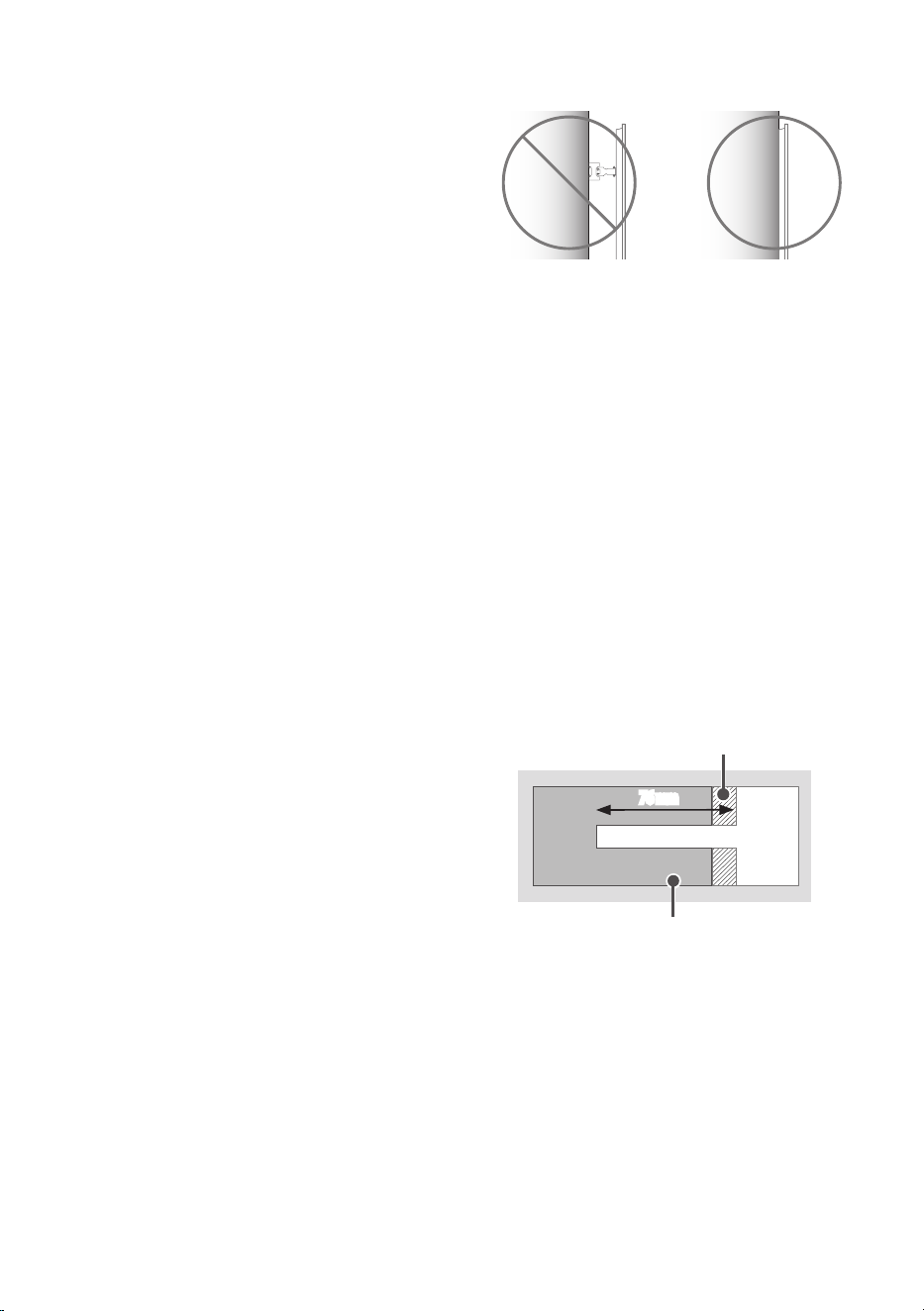
For installation on wood stud
Drywall
Woodstud
76mm
UsetheØ4mmdrillbitforwoodtodrillholeswiththedepthof76mm.
(Cleanthedrilledhole.)
Withoutusingthewallmountinganchor,fastenthewallmountingscrew
directlytothewoodstud.
8
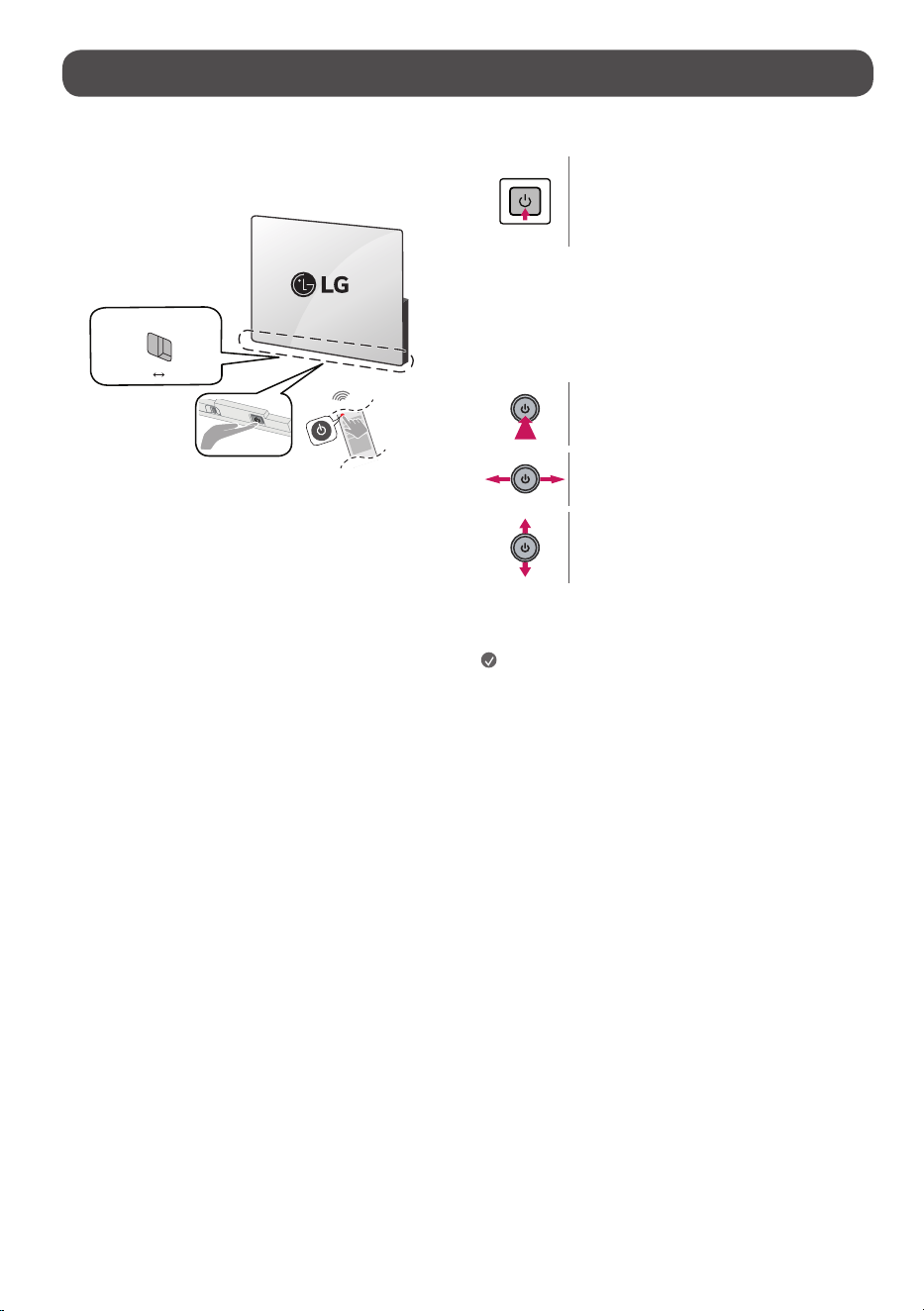
Starting TV
Turning on the TV
YoucansimplyoperatetheTVfunctions,usingthebutton.(Dependingon
model)
Micswitch
Off
On
<Atype>
PowerOn(Press)
PowerOff
1)
(PressandHold)
MenuControl(Press
2)
)
MenuSelection(PressandHold
3)
)
1) Allrunningappswillclose,andanyrecordinginprogresswillstop.
(Dependingoncountry)
2) YoucanaccessandadjustthemenubypressingthebuttonwhenTVison.
3) Youcanusethefunctionwhenyouaccessmenucontrol.
<Btype>
PowerOn(Press)
PowerOff
1)
(Pressandhold)
VolumeControl
ProgrammesControl
1) Allrunningappswillclose,andanyrecordinginprogresswillstop.
(Dependingoncountry)
Note
• IftheTVisturnedonforthefirsttimeafteritwasshippedfromthe
factory,initializationoftheTVmaytakeafewminutes.
• YourTV’sOSD(OnScreenDisplay)maydifferslightlyfromthatshown
inthismanual.
• YoucanturntheTV-embeddedmicrophoneonandoffbycontrollingthe
microphoneswitchatthebottomoftheTV.
• Formodelswithmotionsensorsifyousetscreenonwiththemotion
sensor,theTVwillturnonbyrecognisingthemotion.(Dependingon
model)
9
Connections
ConnectvariousexternaldevicestotheTVandswitchinputmodestoselect
anexternaldevice.Formoreinformationofexternaldevice’sconnection,refer
tothemanualprovidedwitheachdevice.
Antenna/Cable
ConnecttheTVtoawallantennasocketwithanRFcable(75Ω).
• Useasignalsplittertousemorethan2TVs.
• Iftheimagequalityispoor,installasignalamplifierproperlytoimprove
theimagequality.
• Iftheimagequalityispoorwithanantennaconnected,trytorealignthe
antennainthecorrectdirection.
• Anantennacableandconverterarenotsupplied.
• ForalocationthatisnotsupportedwithUltraHDbroadcasting,thisTV
cannotreceiveUltraHDbroadcastsdirectly.
• UsetheAVcoverforaestheticpurposes.Connectingtoomanycables
maycauseliftingproblems.Insuchacase,removetheAVcoverbefore
use.(Dependingonmodel)
Satellite dish
ConnecttheTVtoasatellitedishtoasatellitesocketwithasatelliteRFcable
(75Ω).(Dependingonmodel)
HDMI
• WhenconnectingtheHDMIcable,theproductandexternaldevices
shouldbeturnedoffandunplugged.
Note
• IfthedeviceconnectedtoInputPortalsosupportsHDMIDeepColour,
yourpicturemaybeclearer.However,ifthedevicedoesn’tsupportit,it
maynotworkproperly.Inthatcase,changetheTV’s[HDMIDeepColour]
settingtooff.
•
→[ ]→[General]→[ExternalDevices]→[HDMISettings]
→ [HDMIDeepColour]
• UseacertifiedcablewiththeHDMIlogoattached.
• IfyoudonotuseacertifiedHDMIcable,thescreenmaynotdisplayora
connectionerrormayoccur.
• RecommendedHDMICableTypes
- UltraHighSpeedHDMI
®
/™cable(3morless)
USB
SomeUSBHubsmaynotwork.IfaUSBdeviceconnectedusingaUSBHubis
notdetected,connectittotheUSBportontheTVdirectly.
Note
• Foranoptimalconnection,HDMIcablesandUSBdevicesshouldhave
bezelslessthan10mmthickand18mmwidth.Useanextensioncable
thatsupports
iftheUSBcableorUSBmemorystickdoesnotfit
intoyourTV’sUSBport.(Dependingonmodel)
IR Blaster
Controltheset-topbox(cable/satellite/IP/OTT),Blu-ray/DVDplayer,
soundbar,gameconsoles,etc.,usingtheIRBlaster.(Dependingoncountry)
(Dependingonmodel)
Note
• ConnecttheIRBlastercabletotheTV’sIRBlasterport.
• Useuniversalcontrolsettingstocontrolthedevice.
• SecuretheIRBlasterwiththe3Mtapeprovided.
External Devices
Availableexternaldevicesare:Blu-rayplayer,HDreceivers,DVDplayers,VCRs,
audiosystems,USBstoragedevices,PC,gamingdevices,andotherexternal
devices.
Note
• Theexternaldeviceconnectionmaydifferfromthemodel.
• InPCmode,theremaybenoiseassociatedwiththeresolution,vertical
pattern,contrastorbrightness.Ifnoiseispresent,changethePCoutput
toanotherresolution,changetherefreshratetoanotherrateoradjust
thebrightnessandcontrastonthe[Picture]menuuntilthepictureis
clear.
• InPCmode,someresolutionsettingsmaynotworkproperlydepending
onthegraphicscard.
• IfUltraHDcontentisplayedonyourPC,videooraudiomaybecome
disruptedintermittentlydependingonyourPC’sperformance.
(Dependingonmodel)
• WhenconnectingtoawiredLAN,useaCAT7cablewithhigh-speed
Internettransmission.(Onlywhen
portisprovided.)

10
Specications
Power requirement
OLEDB5*
OLEDC5*
OLEDCS5*
OLED48/55/65/77/83G5*
AC100-240V~50/60Hz
OLED97G5*
AC200-240V~50/60Hz
(Dependingoncountry)
Broadcasting Specifications
Televisionsystem Terrestrial/Cable/SatellitesDigitalTV
Externalantennaimpedance 75Ω
• Certain8Kinput/decodingstandardsmaynotbesupported.Anadditionaldevicemaybenecessarytosupportcertain8Kstandards.Upscaledandenhanced
8Kimageswillvarydependinguponthesourcecontent.(Dependingonmodel)
Environment Condition
OperatingTemperature 0°Cto40°C StorageTemperature -20°Cto60°C
OperatingHumidity Lessthan80% StorageHumidity Lessthan85%
Conditions for Wall Mount Installation
TiltAngle 0°-15°
* Thisspecificationappliesonlytoproductswithanadjustablewallmountangle.
• Forinformationofthepowersupplyandpowerconsumption,refertothelabelattachedtotheproduct.
- ThetypicalpowerconsumptionismeasuredinaccordancewithIEC62087oreachcountry’senergyregulations.
* Onsomemodels,thelabelisinsidetheexternaldeviceconnectionterminalcover.
* Dependingonthemodelorcountry,thetypicalpowerconsumptionmaynotbeonlabel.

11
Product Information
Open Source Software Notice
Information
Toobtainthesourcecodethatiscontainedinthisproduct,underGPL,LGPL,
MPL,andotheropensourcelicensesthathavetheobligationtodisclose
sourcecode,andtoaccessallreferredlicenseterms,copyrightnoticesand
otherrelevantdocumentspleasevisithttps://opensource.lge.com.
LGElectronicswillalsoprovideopensourcecodetoyouonCD-ROMfora
chargecoveringthecostofperformingsuchdistribution(suchasthecostof
media,shipping,andhandling)uponemailrequestto[email protected].
Thisofferisvalidtoanyoneinreceiptofthisinformationforaperiodofthree
yearsafterourlastshipmentofthisproduct.
Licenses
(MagicRemotesupportedmodelsonly)

12
Troubleshooting
InTV/HDMIinput,pressthe buttonontheremotecontrolthreetimestodisplaythemodelnameandserialnumberonthescreen.
Cannot control the TV with
the remote control.
• Checktheremotecontrolsensorontheproductandtryagain.
• Checkifthereisanyobstaclebetweentheproductandtheremotecontrol.
• Checkifthebatteriesarestillworkingandproperlyinstalled( to , to ).
No image display and no
sound is produced.
• Checkiftheproductisturnedon.
• Checkifthepowercordisconnectedtoawalloutlet.
• Checkifthereisaprobleminthewalloutletbyconnectingotherproducts.
The TV turns off suddenly. • Checkthepowercontrolsettings.Thepowersupplymaybeinterrupted.
• Checkiftheauto-offfunctionisactivatedonthesettingsrelatedtime.
• Theauto-offfunctionmayhaveworked.Thisproductisequippedwithanauto-offfunctionthatautomatically
turnsoffthepoweriftheremotecontrolisnotusedfor15minuteswithoutaninputsignal.
When connecting to the
PC (HDMI), no signal is
detected.
• TurntheTVoff/onusingtheremotecontrol.
• ReconnecttheHDMIcable.
• RestartthePCwiththeTVon.
Abnormal Display • Iftheproductfeelscoldtothetouch,theremaybeasmall“flicker”whenitisturnedon.Thisisnormal,thereis
nothingwrongwithproduct.
• Thispanelisanadvancedproductthatcontainsmillionsofpixels.Youmayseetinyblackdotsand/orbrightly
coloureddots(white,red,blueorgreen)atasizeof1ppmonthepanel.Thisdoesnotindicateamalfunctionand
doesnotaffecttheperformanceandreliabilityoftheproduct.Thisphenomenonalsooccursinthird-partyproducts
andisnotsubjecttoexchangeorrefund.
• Youmayfinddifferentbrightnessandcolourofthepaneldependingonyourviewingposition(left/right/
top/down).Thisphenomenonoccursduetothecharacteristicofthepanel.Itisnotrelatedwiththeproduct
performance,anditisnotmalfunction.
• Avoidtouchingthescreenorholdingyourfinger(s)againstitforlongperiodsoftime.Doingsomayproducesome
temporarydistortioneffectsonthescreen.
Generated Sound
(Dependingonmodel)
• “Cracking” noise:AcrackingnoisethatoccurswhenwatchingorturningofftheTVisgeneratedbyplasticthermal
contractionduetotemperatureandhumidity.Thisnoiseiscommonforproductswherethermaldeformationis
required.
• Electrical circuit humming/panel buzzing:Alowlevelnoiseisgeneratedfromahigh-speedswitchingcircuit,
whichsuppliesalargeamountofcurrenttooperateaproduct.Itvariesdependingontheproduct.Thisgenerated
sounddoesnotaffecttheperformanceandreliabilityoftheproduct.

13
The TV does not turn on
continuously due to Always
Ready mode operation or
does not automatically
turn on by sensor.
(Dependingonmodel)
• ThemotionsensorislocatedonthebottomcentreoftheTV.
• Themotionsensorisonlysupportedbysomemodels.
• Ifthereisaforeignsubstanceonthemotionsensor,itmaynotworkproperly.
• IftheenvironmentaroundtheTVistoobrightortoodark,themotionsensormaynotworkproperly.
• ObstaclesinfrontoftheTVmayaffectthedetectionfunctionofthemotionsensor.
• ItcanoperatebyrecognisingchangesinlightingaroundtheTVormovementofobjects(pets/robotvacuum
cleaners,etc.).
• Makesuretowringanyexcesswaterorcleanerfromthecloth.
• DonotspraywaterorcleanerdirectlyontotheTVscreen.
• Makesuretosprayjustenoughofwaterorcleanerontoadryclothtowipethescreen.

14
Precautions for Protecting the OLED TV Screen
UnlikeregularLED/LCDs,OLEDTVsproduceimagesthatemitlightforeach
pixel,achievingaperfectblackcolouranddeliveringclearimageswithout
blurring.
Duetothenatureoftheorganicmaterialsusedtoachievehigh-resolution
imagequality,OLEDdisplaysgenerallyexperienceimageretentiononthe
screen,whichcanbeapersistentphenomenon.Thisphenomenonisobserved
inallOLEDpanels,andalthoughrecommendedpicturemodescanminimise
imageretention,currenttechnologycannotcompletelypreventthisfrom
occurring.
Displayingthesameimageforalongtimeorrepeatedlydisplayingthe
sameimagecancauseimageretentiononthescreen,whichisacommon
phenomenoninOLEDpanelproductsduetothenatureoftheproduct.This
producthasabuilt-inscreenprotectionfeature.Avoiddisplayingimagesthat
arelikelytocauseimageretention,andfollowtherecommendations.
Images that are likely to cause image
retention
• Imageswithblackareasonthetopandbottomand/ortheleftandright
sidesofthescreen.
• Imageswhoseaspectratiois4:3or21:9.
• Imagesthatarefixedforalongtime,suchasprogramnumber,station
logo,gameconsoleicon,set-topboxmenu,etc.
• Otherfixedscreenimagesorrepeatedlydisplayedimages.
Running [Pixel Cleaning] to Protect the
OLED TV Screen
TheOLEDTVisequippedwithapixelcleaningfeaturetocheckthestatusof
thescreenbyitselfandpreventimageretentionthatleavesanimageona
screen.Thisfeatureautomaticallycalculatestheoptimalexecutiontimebased
ontheaccumulatedviewingtimeandisautomaticallyexecutedwhenthe
TVisturnedoff.Whilethisfeatureisrunning,horizontallinesmayappearat
thetopandbottomofthescreen.Thepixelcleaningfeatureworkswhenthe
productisconnectedtothepowercordandmainpower.
• Torunthisfunctionmanually,pressthe
buttonontheremote
control,goto[ ]→[General]→[OLEDCare]→ [OLEDPanelCare]
andpress[PixelCleaning].
Recommendations for Minimising
Image Retention
WhenwatchingtheTVforalongtime,pressthe buttonontheremote
control,goto[ ]→[Picture]→[SelectMode]andsetthemodeto[Auto
PowerSave],goto[AdvancedSettings]→[Brightness]andset[OLEDPixel
Brightness]toalowerlevel.Inaddition,pressthe buttonontheremote
control,goto[ ]→[General]→[OLEDCare]→ [OLEDPanelCare]and
setthe[AdjustLogoBrightness]valueto[High].
Whenshowingimageswithblackbarsatthetop/bottom/left/rightsideof
thescreen,pressthe
buttonontheremotecontrol,goto[ ],andgoto
[Picture]→[AspectRatio]→[UserSelection]→[VerticalZoom]or[4-Way
Zoom]toremovetheblackbars.
Turnoffthemenusforsettingupdevicessuchasset-topboxessothatthey
arenotdisplayedonthescreenforalongtime.
Note
• Whenthescreenisshowingonefixedimageforalongtime,thescreen
brightnesswillbeautomaticallyreducedandthenrestoredoncethe
screencontentchanges.Thisisanormalfunctiontominimiseimage
retention.
15
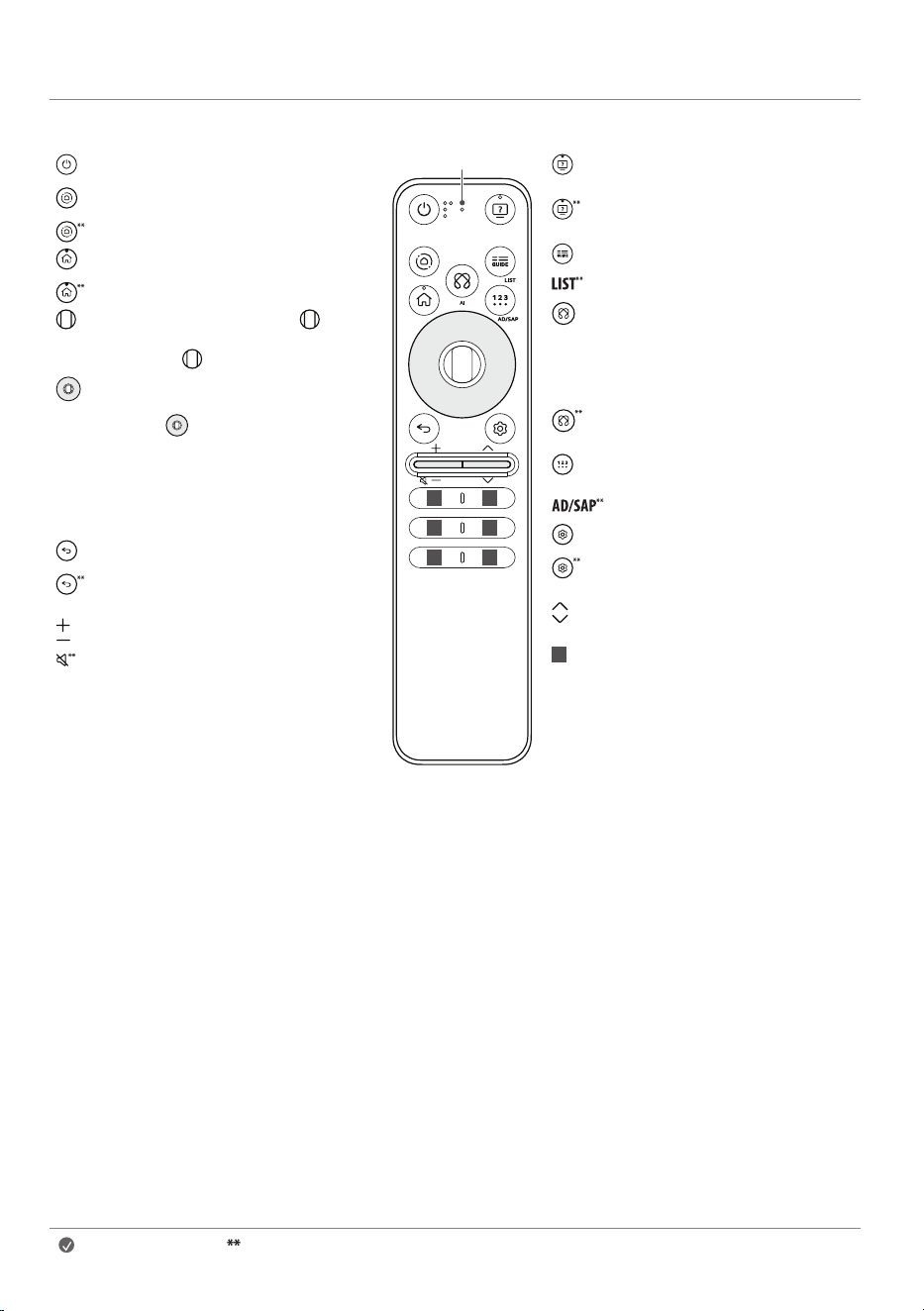
Using Magic Remote Control
PowerTurnstheTVonoroff.
Home HubAccessesthe[HomeHub].
Home HubChangestheinputsource.
HomeAccessestheHomemenu.
HomeThescreenzoomfunctionisactivated.
Wheel (OK)Pressthecentreof buttonto
selectamenu.Youcanchangeprogrammes
byusing button.
Up/Down/Left/RightPresstheup,down,
leftorrightbuttontoscrollthemenu.Ifyou
press buttonswhilethepointerisinuse,
thepointerwilldisappearfromthescreen
andMagicRemotewilloperatelikeageneral
remotecontrol.Todisplaythepointeronthe
screenagain,shakeMagicRemotetotheleft
andright.
Back Returnstothepreviouslevel.
BackThescreendisplayedontheTVisclosed
andthehomemenuappears.
Volume buttonsAdjuststhevolumelevel.
Volume buttonsMutesallsounds.
1 1
1
1
1
1
Microphone
Accessibility Accessesthe[Accessibility]
app.
AccessibilityAccessesthe[Accessibility
Shortcuts].
Accessesthe[Guide].
Accessesthesavedprogrammeslist.
AI Networkconnectionisrequiredtouse
thevoicerecognitionfunction.
Checkforrecommendedcontent.(Some
recommendedservicesmaynotbe
availableinsomecountries.)
AI Speakwhilepressingandholdingthe
buttontousethevoicerecognitionfeature.
More actions Displaysmoreremote
controlfunctions.
Audiodescriptionsfunctionwillbeenabled.
Q. SettingsAccessestheQuickSettings.
Q. SettingsDisplaystheAllSettings
menu.
Programme buttons Scrollsthroughthe
savedprogrammes.
1
Various services buttonConnectsto
variousservicessuchasstreamingand
voicesearch.
Note To use the button, press and hold for more than 1 second.
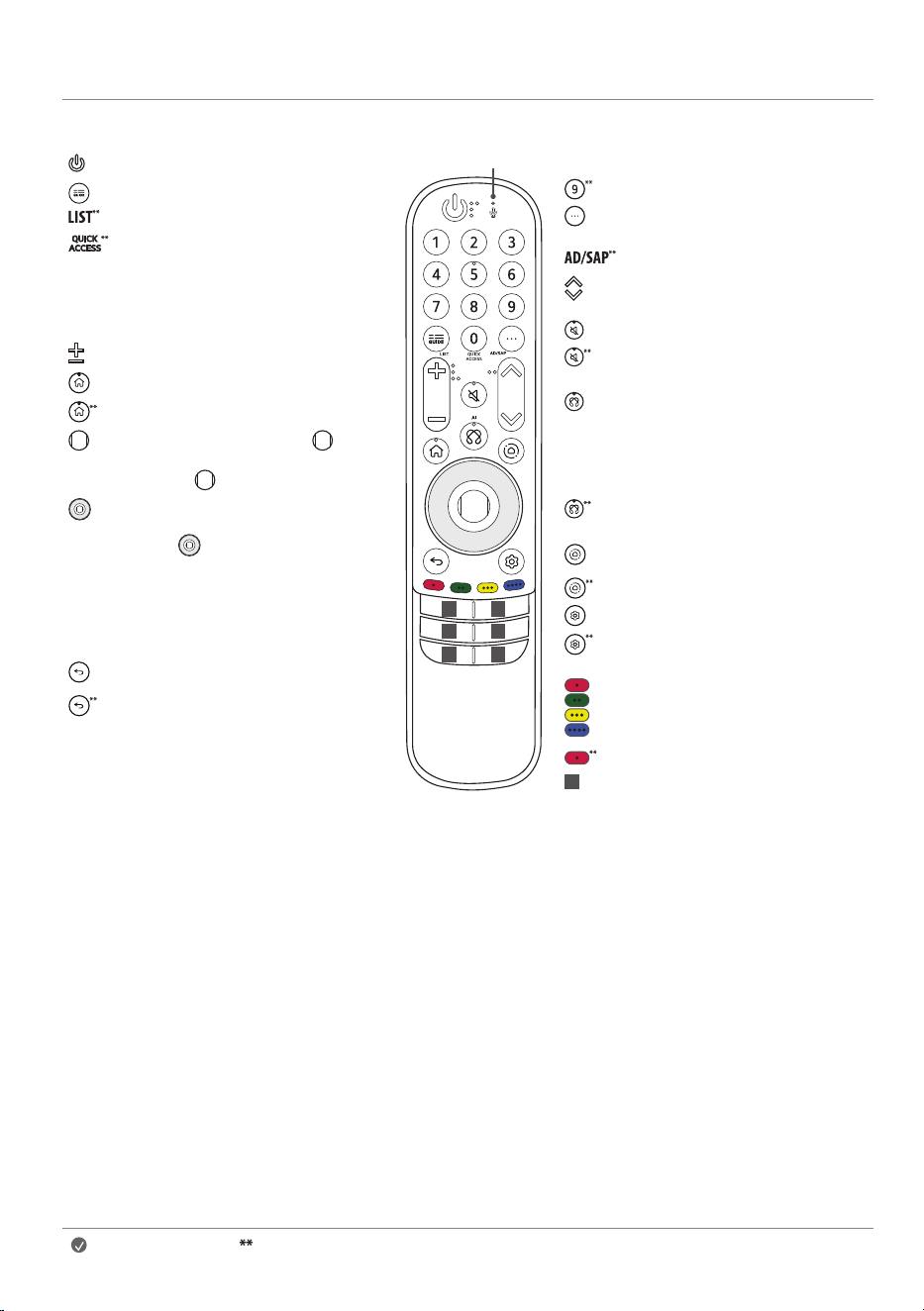
16
PowerTurnstheTVonoroff.
Accessesthe[Guide].
Accessesthesavedprogrammeslist.
Accessesthe[EditQuickAccess].
- [EditQuickAccess]isafeaturethatallows
youtoenteraspecifiedapporLiveTV
directlybypressingandholdingthe
numberbuttons.
Volume buttonsAdjuststhevolumelevel.
HomeAccessestheHomemenu.
HomeThescreenzoomfunctionisactivated.
Wheel (OK)Pressthecentreof buttonto
selectamenu.Youcanchangeprogrammes
byusing button.
Up/Down/Left/RightPresstheup,down,
leftorrightbuttontoscrollthemenu.Ifyou
press buttonswhilethepointerisinuse,
thepointerwilldisappearfromthescreen
andMagicRemotewilloperatelikeageneral
remotecontrol.Todisplaythepointeronthe
screenagain,shakeMagicRemotetotheleft
andright.
Back Returnstothepreviouslevel.
BackThescreendisplayedontheTVisclosed
andthehomemenuappears.
1 1
11
1 1
Microphone
Number buttons Entersnumbers.
Accessesthe[QuickHelp].
More actions Displaysmoreremote
controlfunctions.
Audiodescriptionsfunctionwillbeenabled.
Programme buttons Scrollsthroughthe
savedprogrammes.
MuteMutesallsounds.
MuteAccessesthe[AccessibilityShortcuts]
app.
AI Networkconnectionisrequiredtouse
thevoicerecognitionfunction.
Checkforrecommendedcontent.(Some
recommendedservicesmaynotbe
availableinsomecountries.)
AI Speakwhilepressingandholdingthe
buttontousethevoicerecognitionfeature.
Home HubAccessesthe[HomeHub].
Home HubChangestheinputsource.
Q. SettingsAccessestheQuickSettings.
Q. SettingsDisplaystheAllSettings
menu.
Theseaccessspecialfunctionsinsome
menus.
Red button Runstherecordfunction.
1
Various services buttonConnectsto
variousservicessuchasstreamingand
voicesearch.
Note To use the button, press and hold for more than 1 second.
17
Thedescriptionsinthismanualarebasedonthebuttonsontheremote
control.PleasereadthismanualcarefullyandusetheTVcorrectly.
(Somebuttonsandservicesmaynotbeprovideddependingonmodelsor
regions.)
How to register the Magic Remote
Control
TousetheMagicRemote,firstpairitwithyourTV.
1 PutbatteriesintotheMagicRemoteandturntheTVon.
2 PointtheMagicRemoteatyourTVandpressthe Wheel (OK)onthe
remotecontrol.
* IftheTVfailstoregistertheMagicRemote,tryagainafterturningtheTV
offandbackon.
How to deregister the Magic Remote
Control
Pressthe (Back)and (Home)buttonsatthesametime,forfive
seconds,tounpairtheMagicRemotewithyourTV.
* Pressandholdthe (Home)and (Q. Settings)buttonsformore
than5secondstodisconnectandre-registertheMagicRemoteatthe
sametime.
• ItisrecommendedthatanAccessPoint(AP)belocatedmorethan
0.2mawayfromtheTV.IftheAPisinstalledcloserthan0.2m,the
Magicremotecontrolmaynotperformasexpectedduetofrequency
interference.
Using Always Ready
(Dependingonmodel)
YoucanoperatetheTVandconnecttoBluetoothwithdirectvoicerecognition
whilethepowerisoff.
* → [ ] →[General]→[AlwaysReady],setting[Enablethe
function]toon.
* Pressingthe / buttonwhilewatchingTVswitchesthescreento
[AlwaysReady]thatisturnedon,andpressingthe / buttononce
moreturnsthescreento[AlwaysReady]thatisturnedoff.
* Pressthe (Home)buttonorthe (Back)buttontowatchTVwhen
thescreenisin[AlwaysReady]thatisturnedon.
* Pressthe Wheel (OK)buttontodisplaythewallpaperwhenthe
screenisin[AlwaysReady]thatisturnedoff,andpressthe / button
towatchTV.
Note
• UsingAlwaysReadymayincreaseenergyconsumption.
• Formoreinformationaboutthefeature,refertothe → [ ] →
[Support]→[UserGuide]→[Troubleshooting]→[LearnMoreAbout
AlwaysReady].