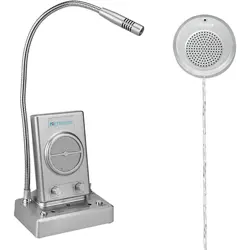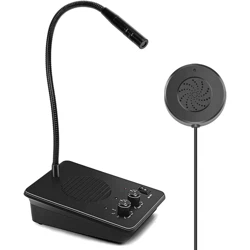

Window Speaker Intercom System
User Manual
Product Overview:
The window speaker intercom is an electronic intercom system, suitable for the voice communication in
closed business window or noisy places. With advanced language processing chip, unique design and strict
quality management, it can reach high standards on sound quality, volume, anti-interference, anti-howling
and other performances. The product is widely used in banks, hospitals, stations, securities and other service
windows.
Product List:
1 main unit, 1 loudspeaker box, 1 DC12V power adapter and 5 locating pieces (the zip ties and locating
pieces are used to fix the cable from the external loudspeaker box).
Product Features:
Dual channels, with auto control and switch, which can effectively prevent self-excited howling and
cross-interference between channels;
A professional structural design of loudspeaker box, which can perfectly eliminate resonance and make
the sound pure, natural, permeable and clear.
Exquisite silver shell, noble and decent;
A wide dynamic working range, able to effectively adapt to all kinds of working environments.
Super-strong background noise suppressing circuit, and the machine is free from noise in a static state;
Linear volume control, no noise during volume adjustment;
Large power, can work continuously for a long time;
Automatic two-way record conversion.
Technical Parameters:
Working Voltage:
DC12V
Max. Working Current:
200mA
Output Power:
2W+3W
Microphone Sensitivity:
45dB±2dB

Undistorted Frequency:
10Hz~15KHz
Dimensions of the Loudspeaker Box:
φ72mm+18mm
Dimensions of the Main Unit: 138mm(L)*98mm(W)*45mm(H)
Installation and Use:
1. Put the main unit in a proper position on the workbench and adjust the microphone to the opposite side
of the staff.
2. Stick the external loudspeaker box to the glass outside the workbench, so that the customers can use it.
The installation position shall facilitate the use of customers. Insert the plug of external loudspeaker box into
the loudspeaker jack of the main unit.
3. Plug the power adapter into a 100V-240V socket, and insert the output end into the power jack of the
main unit;
4. After checking that the wiring is correct, turn on the power. When you speak to the internal microphone,
the sound will come out from the external loudspeaker box. When you speak to the external microphone, the
sound will come out from the main loudspeaker box, accompanied by the flash of audio indicator.
5. Slowly adjust the inner/outer knobs, to make the sound clear and loud.
Artificial Troubleshooting:
Faults
Troubleshooting Methods
The internal and
external loudspeaker
boxes make no
sound
They are not plugged in the power supply properly, re-plug into the power supply.
The back of main unit is misplugged, re-plug correctly.
Howling
The installation window has poor acoustical insulation. It is necessary to widen the
distance between the main unit and external loudspeaker box. Turn down the internal
and external volumes as appropriate.
The internal volume
is too low
If the internal volume is too low, turn up clockwise as appropriate. If the customer is
too far away from the external microphone, ask him/her to speak closer to the
external microphone.
The external volume
is too low
If the internal microphone is not pointed at the staff, readjust the position. If the
external volume is too low, turn up clockwise as appropriate. If the staff is too far

away from the internal microphone, ask him/her to speak closer to the internal
microphone.
The voice is
intermittent and the
talk can’t go on
smoothly
The speaker is too far away from the microphone and must approach it. When one
party is talking, but the other party is forestalling him/her, his/her voice will be
suppressed. If the ambient noise is too loud, turn down the volume on the louder side,
or ask the other party to get close to the microphone and speak into it.