
2-CHANNEL, 250-WATT POWER AMPLIFIER WITH DSP
UA 2-125 | UA 2-125 ARC
INSTALLATION AND SUPPORT MANUAL
2
TWO-CHANNEL DSP POWER AMPLIFIER
TABLE OF CONTENTS
2 Box Contents
2 Introduction
2 Important Safety Information
3 Product Description
3 Placement
3 Unpacking and Record Keeping
4 Front and Rear Panel Connections
5 SonARC App Setup
5 Amplifier and Source Connections
5 Powering the Amplifier
6 Standard Stereo
6 Power Sharing Mode
7 IR Learning
7 Mounting the Amplifier
8 T-Nut and Din Rail Installation
8 Protecting Circuitry and LEDs
8 SonARC App Guidelines
14 Amplifier Power Requirements
14 Specifications
15 Troubleshooting
16 Warranty Statement
BOX CONTENTS
(1) Quickstart Guide
(1) Sonance UA 2-125 or UA 2-125 ARC Amplifier
(1) Power Cord (region dependent)
(2) Mounting Brackets
(1) IR Receiver Module
(1) Speaker Block Connector
(4) M3 T-Nuts
INTRODUCTION
Thank you for selecting a Sonance UA 2-125 or UA
2-125 ARC amplifier. Sonance has over four decades of
experience in premium distributed audio amplification.
This amplifier has been precision engineered to
provide maximum installation flexibility, low energy
consumption, and audiophile sound in a compact form
factor. Please take the time to carefully read through
the manual, study the illustrations and system diagrams.
This extra time can lead to trouble free operation and
continued musical enjoyment.
READ THIS SECTION IN ITS ENTIRETY BEFORE
ATTEMPTING USE OF THIS AMPLIFIER.
IMPORTANT SAFETY INSTRUCTIONS
Always follow these basic safety precautions when
using your amplifier to reduce the risk of fire, electric
shock, and injury to people or objects.
1. Read all the safety and operating instructions
before operating the amplifier and retain them for
future reference.
2. Adhere to all warnings and precautions listed on the
amplifier and in the operating instructions.
3. Follow all operating instructions.
4. Never use the amplifier next to water.
5. Keep amplifier dry at all times.
6. Ventilation: situate the amplifier so that its location
does not interfere with its proper ventilation.
7. Heat: situate the amplifier away from heat sources
such as radiators, stoves, etc. (including amplifiers).
8. Grounding or Polarization: take precautions so that
these attributes are not defeated.
9. Power-Cord Protection: route power supply cords
so they will not be walked on or pinched by items.
10. Cleaning: use ‘canned air’ or wipe the amplifier
with a soft cloth. Do not use solvents, as they may
damage the amplifier.
11. Non-Use Periods: unplug the amplifier’s power
cord from the outlet when the amplifier will be left
unused for a long period of time.
12. Moisture: do not expose the amplifier to dripping
or splashing. Do not place objects filled with liquids
(ex. vases, drinking glasses) on the amplifier.
13. Damage Requiring Service: have the amplifier
serviced by a qualified service technician when the
power cord or power supply is damaged, dropped,
the enclosure is damaged, something has spilled
into the amplifier, it has been exposed to rain, or the
amplifier is not operating properly.
AUDIO CONNECTOR PANEL
UA 2-125
SERIAL NUMBER
100-120V
~
/ 220-240V
~
50/60Hz 80Watts
IN
L
HDMI IN
BLE ANTENNA - DO NOT BLOCK
STAT US SETUP
IR
CLIP
4 MINIMUM
CLASS 2 WIRING
eARC
R
OUT
UA 2-125 ARC
SERIAL NUMBER
100-120V
~
/ 220-240V
~
50/60Hz 80Watts
POWER INLET PANEL
AUDIO CONNECTOR PANEL POWER INLET PANEL
UA 2-125 ARC
UA 2-125

3
14. Servicing: do not attempt to self service the amp.
Contact Sonance Technical Support for servicing
options.
15. Power Requirement: do not connect the Sonance
amplifier to the accessory outlet of any other
component.
WARNING: The power mains plug serves as the
amplifier’s disconnect device. The disconnect device
shall remain readily operable during operation. To
ensure that the disconnect device is easily accessible,
the user should not place the amp in a confined area
during operation.
16. Storms: to prevent damage to components, unplug
all electronic equipment during thunderstorms.
17. Unplug by grasping the plug; do not pull on the
cord.
WARNING: Any changes or modifications to this unit
not expressly approved by the party responsible for
compliance could void the user’s authority to operate
the equipment.
FCC COMPLIANCE STATEMENT: This equipment has
been tested and found to comply with the limits for a
Class B digital device, pursuant to part 15 of the FCC
Rules. These limits are designed to provide reasonable
protection against harmful interference in a residential
installation. This equipment generates, uses, and can
radiate radio frequency energy and if not installed and
used in accordance with the instructions, may cause
harmful interference to radio communications. There
is no guarantee that interference will not occur in a
particular installation. If this equipment does cause
harmful interference to radio or television reception,
which can be determined by turning the equipment
o and on, the user is encouraged to try to correct the
interference by one or more of the following measures:
• Connect the equipment into an outlet on a
circuit dierent from that to which the receiver is
connected
• Consult the dealer or technician for help
• Reorient or relocate the receiving antenna
• Increase distance between the equipment and
receiver
• Disconnect, then reconnect all cables
S/N:__________________________________________
Date of Sale:___________________________________
Dealer Name:__________________________________
Contact Info:___________________________________
PRODUCT DESCRIPTION
UA 2-125 | UA 2-125 ARC is a high power 2-channel
audio amplifier equipped with advanced DSP
functionality, capable of delivering an enhanced user
experience with perfect matching to other Sonance
speaker products. HDMI or S/PDIF (coaxial or Toslink) in
addition to Stereo Analog Line Inputs and Line Outputs
provide reliable connectivity. Specific equalization
presets allow multiple speaker types and acoustic
environments to easily be set-up and optimized within
minutes. Features the SonARC Setup and Control App
to link via short-range wireless connectivity to securely
configure the device. The amplifier has automatic
protection features to safeguard against overload, low
impedance load, thermal overload and over/under
power voltage situations.
PLACEMENT
The amplifier should be placed in a dry, non-condensing
environment with ventilation. Locate the amplifier so it
is completely isolated from temperature extremes, rain,
snow, direct sunlight, and atmospheric contaminants.
Do not locate the amplifier outdoors. Any moisture
related damage (such as from condensation) is not
covered by the factory warranty. Locate the amplifier
on a shelf or at the lowest place in a rack that has good
circulation of fresh air to dissipate heat. The amplifier
can be placed into a back box behind a television
display or other enclosure with little ventilation as
long as the ambient temperature does not exceed
35-degrees Celsius.
UNPACKING AND RECORD KEEPING
Save the carton and packing inserts for future safe
transport in case the amplifier is moved or requires
shipping for repair. Before proceeding with installation,
locate the serial number on the rear panel of the unit
and note it here for future reference:
4
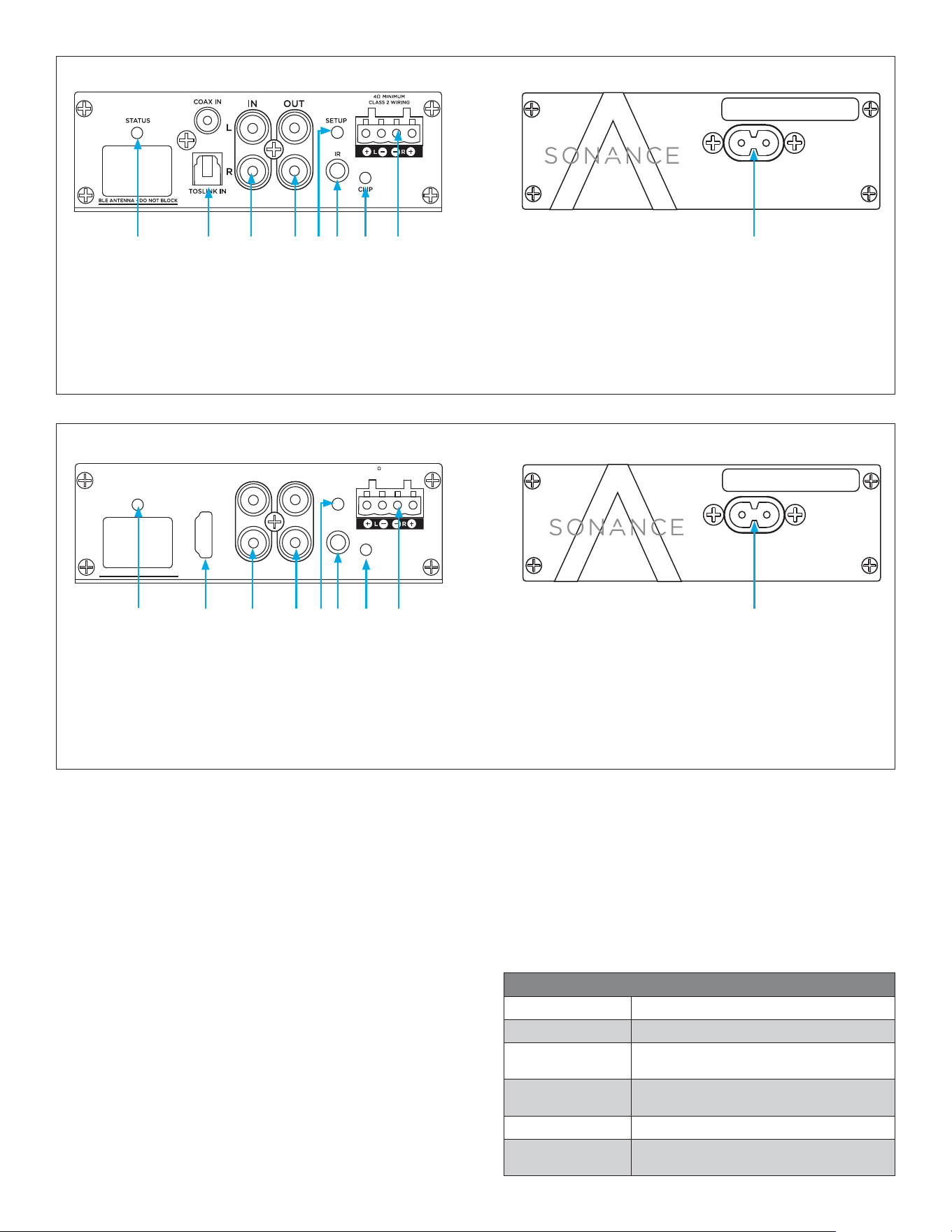
UA 2-125 Amplifier Audio Connector Panel
1 2 3
Power Inlet Panel
9. AC Input
5
8
6
Audio Connector Panel
1. Setup Button
2. IR Control Input
3. Speaker Output
4. COAX/Toslink Digital Inputs
7
UA 2-125
SERIAL NUMBER
100-120V
~
/ 220-240V
~
50/60Hz 80Watts
UA 2-125 Amplifier Power Inlet Panel
9
5. Status LED
6. RCA Stereo Input
7. RCA Stereo Output
8. Clip LED
IN
L
HDMI IN
BLE ANTENNA - DO NOT BLOCK
STATU S SETUP
IR
CLIP
4 MINIMUM
CLASS 2 WIRING
eARC
R
OUT
UA 2-125 ARC Amplifier Audio Connector Panel
1 2 3
Power Inlet Panel
9. AC Input
5 87
Audio Connector Panel
1. Setup Button
2. IR Control Input
3. Speaker Output
4. HDMI Input
4 6
UA 2-125 ARC
SERIAL NUMBER
100-120V
~
/ 220-240V
~
50/60Hz 80Watts
UA 2-125 ARC Amplifier Power Inlet Panel
9
5. Status LED
6. RCA Stereo Input
7. RCA Stereo Output
8. Clip LED
POWER INLET PANEL
POWER CORD
The UA 2-125 and UA 2-125 ARC amplifiers feature a
removable power cord. Plug the female end of the power
cord into the Power Cord Connector on the amplifier
rear panel (9). The male end of the power cord is to be
plugged into a wall socket at a later step.
AUDIO CONNECTOR PANEL
SPEAKER CONNECTIONS
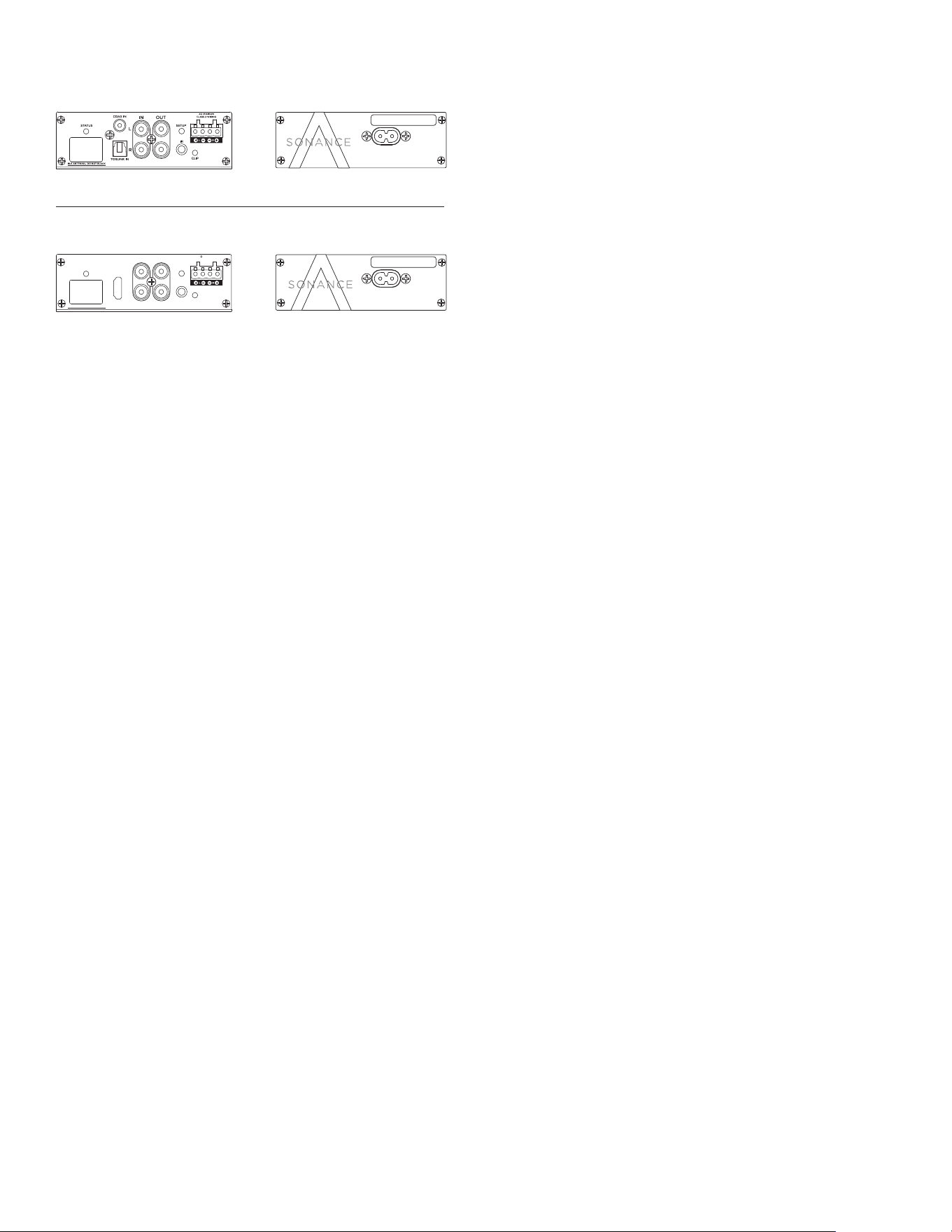
The removable speaker block connectors (3) used on
the amplifier accept up to a 12-gauge wire. Follow the
connection layout on the rear panel of the amplifier.
Make sure no bare wires come in contact with the
amplifier chassis. Audio connector panel provides
connectivity to signal sources and amplifier speaker
output. Depending on model choice, the digital inputs
supported are 2-channel PCM (S/PDIF) over COAX or
Toslink for UA 2-125 and HDMI for UA 2-125 ARC (4),
while both support analog line input (6) and output (7).
Pressing the setup button (1) will reactivate the internal
radio if it has been turned o in the settings using the
SonARC control app.
Status Indicator (5) shows the presence of power and the
current operational state of the amplifier.
Clip indicator (8) shows when the amp is being overdriven.
Both models feature a 3.5mm IR port (2) for connecting
an infrared receiver. This enables control using common IR
remote controls.
4
STATUS INDICATOR LED
GREEN Analog Input Active
ORANGE Standby
RED FLASHING
Protection State; Amp Overdriven
or Clipping
BLUE
IR Learning Mode or Short-Range
Wireless Radio Reactivated
WHITE Digital Input Active
PURPLE
Mix Mode (Both Analog and Digital
Inputs Active)
5
IMPORTANT: Do not plug the amp’s power code into
a convenience outlet on any other audio or video
component.
SOURCE CONNECTIONS
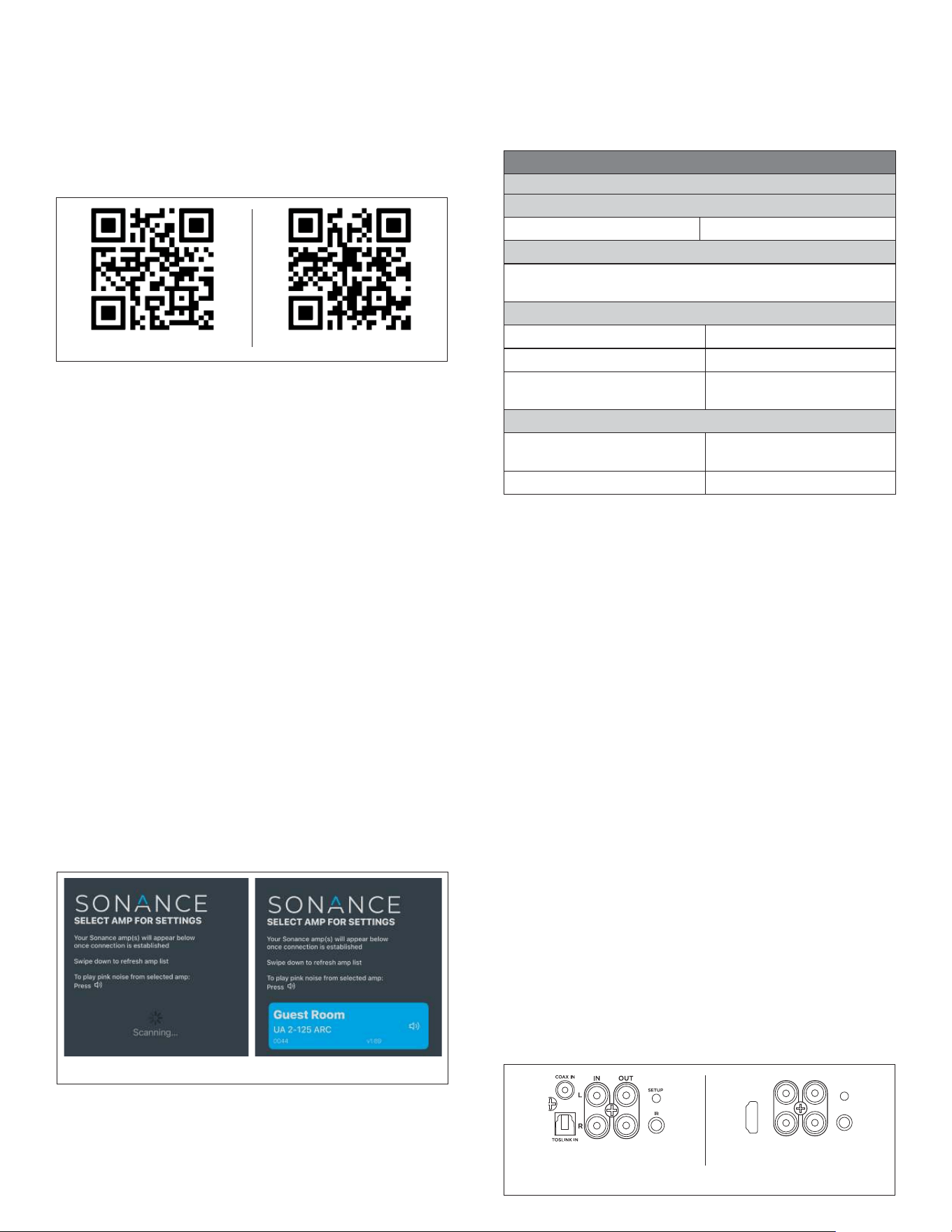
UA 2-125: Features stereo analog line input and S/PDIF
(Coax and Toslink) digital input signal types. Connect to
either the Coax or Toslink (optical), but not both. Only
one can be used at a time. The UA 2-125 will automatically
detect which one is being used.
UA 2-125 ARC: Features stereo line input and HDMI digital
input signal types. Use a high-quality HDMI cable certified
to HDMI 2.1 to connect to a TV. Plug the one end of the
HDMI cable into the TV using a port labeled “ARC” or
“eARC”, and plug the other end into the UA 2-125 ARC’s
HDMI IN port. Ensure that audio type is set to “PCM” in
the settings of the connected TV. For most TVs, navigate
within the TV settings menu to “audio” or “sound” to find
digital audio output format (“Digital Audio Out”, “Audio
Format”, or “HDMI Audio Format”. Select “PCM”. Press
“OK” or “Enter” to confirm the selection.
AMPLIFIER CONFIGURATION
Suggested Settings for Initial Configuration of Amp and Sources
GENERAL
Autosense Always ON
VOLUME
No setting changes for eARC sources; Set amp
volume to “fixed” for most other source applications
INPUT
Default | Secondary As Required
Source Switching Mode Duck/Mute/Mix
Input Trim
0 dB (or as required to
match source signal)
AMP & DSP
Output Trim
0dB (8 ohm)
-3dB (4 ohm)
DSP Preset None Applied
POWERING THE AMPLIFIER
The UA 2-125 and UA 2-125 ARC feature a removable
power cord. The amplifier will automatically start when
power is applied. The Status LED will illuminate GREEN
when connected to power. If the electrical service is
subject to frequent sags, spikes or brownouts, a power
conditioner designed for use with high fidelity equipment
should be employed to protect the amp.
CONNECT TO AMPLIFIER
1. Once the app is loaded onto a device, open/launch
the app within range of the amplifier (up to ten
meters away, depending on obstructions).
2. The amplifier should automatically send signal to
appear in the app home screen. If the amp is not
visible in the app, press and release the SETUP
button on the audio connector panel of the amplifier.
The indicator LED will blink blue while it sends signal
to nearby devices.
3. The amp will appear listed in the app homepage.
Drag the app screen down and release to refresh
the search if no amplifier is listed. The app home
screen will also display a list of previously connected
amplifiers within signal range.
NOTE: When more than 5 UA amplifiers are within
range, it is recommended to either turn o the BLE
Radio within each amp (located under GENERAL)
except for the one to be configured, or connect power
to and configure only one amplifier at a time.
4. When multiple amplifiers are displayed on the page,
pressing the sound icon in the blue amp tile will
trigger the amplifier to send pink noise signal to the
speakers to help identify (see Figure 1).
Figure 1: Connecting the Amplifier
Google Play iOS Store
SONARC APP SETUP
UA 2-125 amps are configurable via iOS app or Android
app over short-range wireless connectivity. To enable
this feature, a smart device is required (iOS or Android)
with Bluetooth
®
turned on. Download the “SonARC for
Sonance UA Series” app from the iOS or Google Play
store or scan the appropriate QR Code to download.
5. Once the amp appears in the app, tap the selected
amp on screen to begin setup and configuration.
6. See the Amplifier Configuration Chart for
recommended basic settings. Proceed with
remaining installation steps. Return to the SONARC
APP GUIDELINES section of the manual for full
features and settings.
*The Bluetooth
®
word mark and logos are registered trademarks owned
by Bluetooth SIG, Inc.
Figure 2: Source Connections
UA 2-125
IN
L
HDMI IN
OCK
SETUP
IR
eARC
R
OUT
UA 2-125 ARC
6
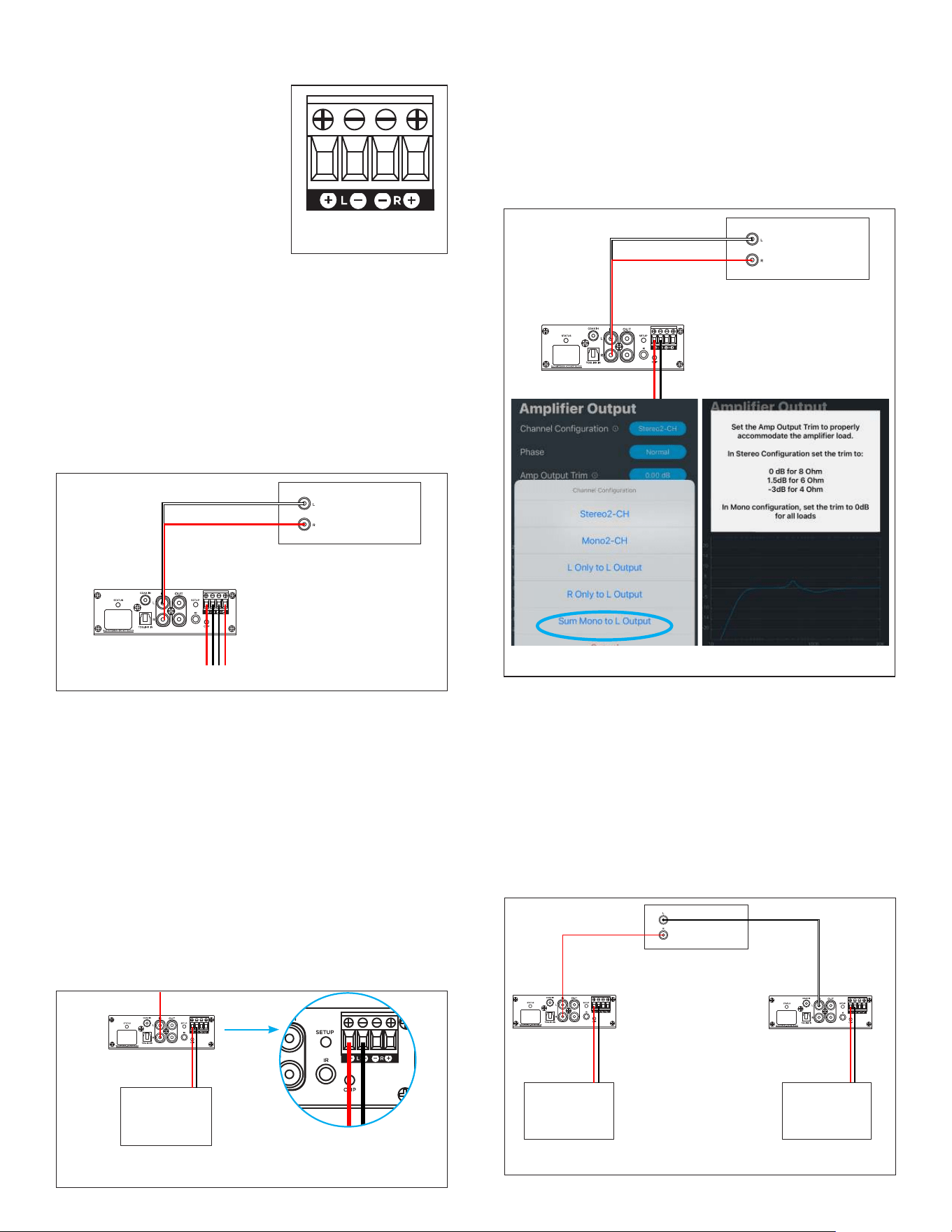
Figure 5: Power Sharing Mode Connect Left
Channel Speaker Out Only
POWER SHARING MODE
UA 2-125 amps can be installed and set up for Power
Sharing Mode to achieve a max 250W power by
leveraging full power from a single channel output.
This mode is recommended to support subwoofers
or speakers that require high power. To deploy Power
Sharing Mode for a pair of speakers, two amplifiers will
be required. Power Sharing Mode for one subwoofer
would require one amplifier.
SPEAKER OUTPUT CONNECTIONS
POWER SHARING MODE: Speaker wire connection must
be made to the positive and negative wire ports on the
speaker block connector on the LEFT CHANNEL ONLY.
Leave the right channel ports empty (see Figure 5).
SOURCE INPUT CONNECTIONS
POWER SHARING MODE: When connecting a source
for a subwoofer to a UA 2-125/UA 2-125 ARC amplifier
in Power Sharing Mode, connect the inputs for both Left
and Right channels and set the Amp Output Channel
Configuration in the SonARC App to Sum Mono to L
Output configuration (see Figure 6). Remember to set
the sub’s DSP filter (see Page 9).
Speaker or
Subwoofer
UA 2-125
Figure 6: Power Sharing Mode for Subwoofer
When connecting a source for a pair of speakers with
a pair of UA amps in Power Sharing Mode, connect the
Left input to the amp designated for the Left speaker
and the Right input to the amp designated for the Right
speaker to divide the stereo signal to the two amps that
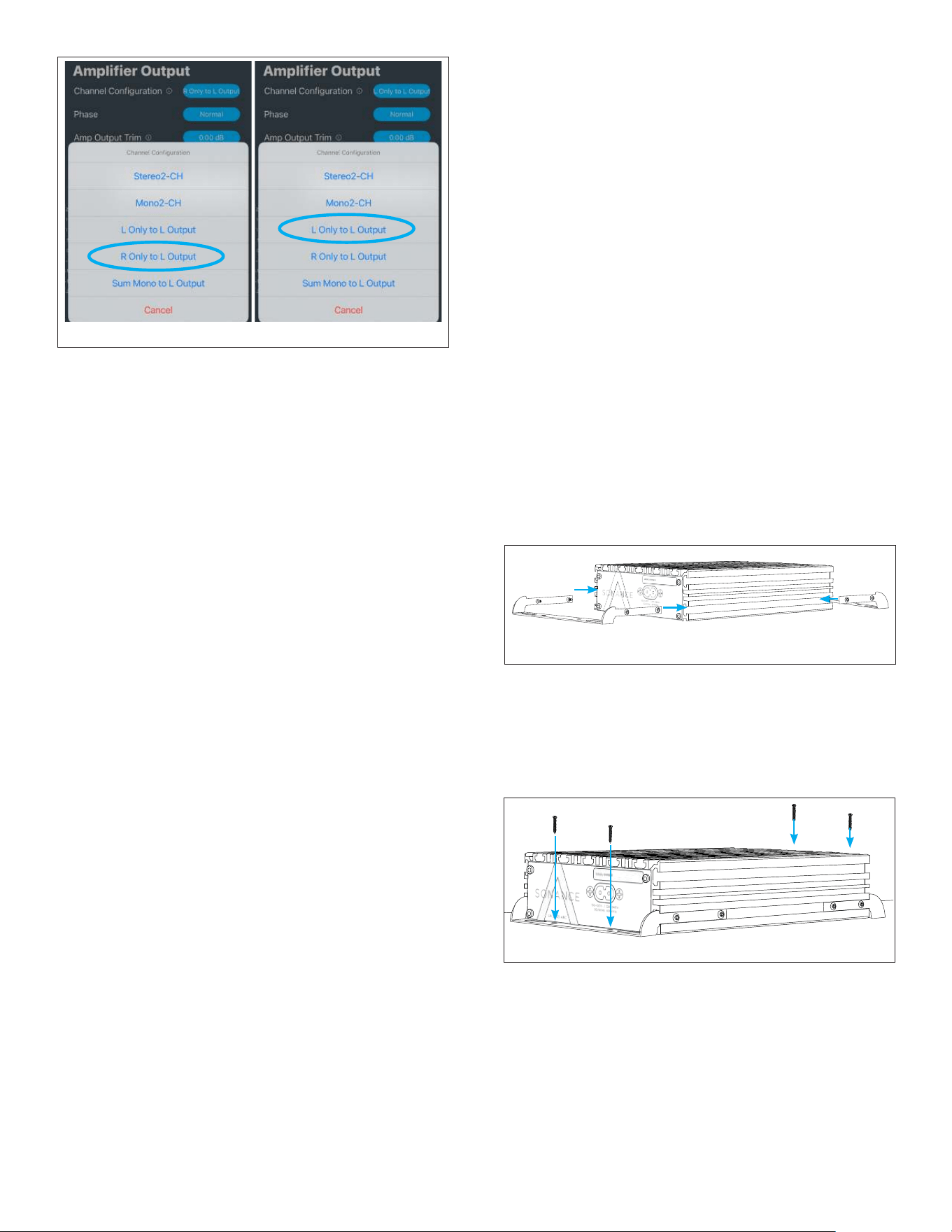
feed each stereo speaker. In the SonARC app, under
Amp & DSP | Amplifier Output, set each amp Channel
Configuration to “L Only to L Output” for the Left
Channel Amplifier, and “R Only to L Output” for the Right
Channel Amplifier (see Figure 7 and 8).
STANDARD STEREO
For a standard speaker pair setup, connect speaker wire
from the left speaker to the left portion of the speaker
block connector, inserting the stripped end of the
positive strand to the positive port and the stripped end
of the negative strand to the negative port. Repeat these
steps for the right speaker wire, connecting the positive
to positive and negative to negative on the right ports
of the speaker block connector. Plug the speaker block
connector into the speaker output port on the amplifier.
Figure 4: Standard Stereo Connection
SOURCE
UA 2-125
SOURCE
UA 2-125
For optimal performance, use
pure copper speaker wire that
complies with fire rating codes.
Be sure to check local codes
governing wire that may be
installed within walls or ceilings.
The amplifier uses speaker
block connectors that can
accommodate up to 12 gauge
wire (see Figure 3).
SPEAKER CONNECTIONS
Figure 3: Speaker
Block Connector
(250W)
-
L SPEAKER
UA 2-125
SOURCE
R SPEAKER
UA 2-125
Figure 7: Power Sharing Mode, Two Amps for Stereo
(250W) (250W)
7
Figure 9: Attaching The Brackets - Bottom-Mount
4. SECURE THE BRACKETS:Once the bracket arms
are properly positioned and all screws are aligned
with the chassis T-slots, tighten each screw to
secure the mounting brackets firmly in place.
5. MOUNT TO SURFACE:Position the amplifier
with the brackets flush against the desired
Figure 8: Power Sharing Mode, Two Amps for Stereo
MOUNTING THE AMPLIFIER
The UA 2-125 and UA 2-125 ARC amps feature a T-slot
chassis design for flexible mounting and placement.
MOUNTING BRACKET INSTALLATION
The included ambidextrous mounting brackets can
be configured for either bottom-mount or top-mount
(inverted) installation.
1. PREPARE THE BRACKETS:Begin by loosening the
screws on each bracket arm (there are two screws
per arm) to provide clearance for positioning. Do not
fully remove the screws.
2. INSERT BRACKETS INTO CHASSIS:Slide each
bracket into the T-slot openings at both ends of the
chassis. The brackets should slide smoothly into
position.
3. POSITION FOR MOUNTING ORIENTATION: For
bottom-mount installation (amplifier right-side
up):Position the bracket arms in the T-slot on the
bottom of the chassis at both the front and rear ends
(see Figure 9). For top-mount installation (amplifier
inverted):Position the bracket arms in the T-slot on
the top of the chassis, ensuring the flat portion of
the bracket arms will sit flush against the mounting
surface when inverted
IR LEARNING
This amplifier is equipped with a 3.5mm IR input jack
that allows for command learning from third-party
remote controls. Follow the steps below to teach the
amplifier IR commands for functions such as volume
control, power, and input selection.
1. Insert a 3.5mm mono cable into the IR jack labeled
“IR” on the connections inlet panel
2. Launch the SonARC app and select the amplifier
from the listed amps.
3. Tap the IR LEARNING section from the list to access
IR programming for power, volume, and mute.
4. Tap “learn” for a desired command. The indicator
LED will blink Blue while waiting for the remote
command.
5. Press the button on the remote while aiming at the
IR emitter to program the button to perform the
command.
6. Once the signal is received, the indicator LED will
illuminate green.
7. REPEAT FOR ADDITIONAL COMMANDS. Continue
teaching the amplifier additional commands by
repeating the previous step.
8. Use the remote to verify that the amplifier responds
to the newly learned commands.
NOTE: When IR 3.5mm cable is inserted into the
IR port, HDMI CEC control signals from the TV are
disabled to prevent conflicts with the IR remote control
commands.
For most UA 2-125 ARC applications, the IR receiver
is not needed. Your TV can send remote control
commands over the HDMI cable using CEC. This works
very will with most TVs. We strongly recommend
using CEC control whenever possible. Be sure CEC
functionality is turned on in your TV’s settings and that
the IR receiver is not plugged into the IR port.
Figure 10: Mount to Surface
mounting surface. Ensure adequate clearance for
the connection panel and power inlet panel to
accommodate all cable connections. Secure the
amplifier to the mounting surface using appropriate
screws through the bracket mounting holes
(minimum four screws recommended) see Figure 10.
IMPORTANT:Before mounting, ensure all audio and
power connections have been made and verified
as outlined in the previous sections. Verify that the
selected location provides proper ventilation as
outlined in the PLACEMENT section.
8
SONARC APP GUIDELINES
Detailed descriptions and setting information for
SonARC for Sonance UA Series App. Reference the
guideline chart on the following pages for descriptions
and explanations of the SonARC UA App settings and
features.
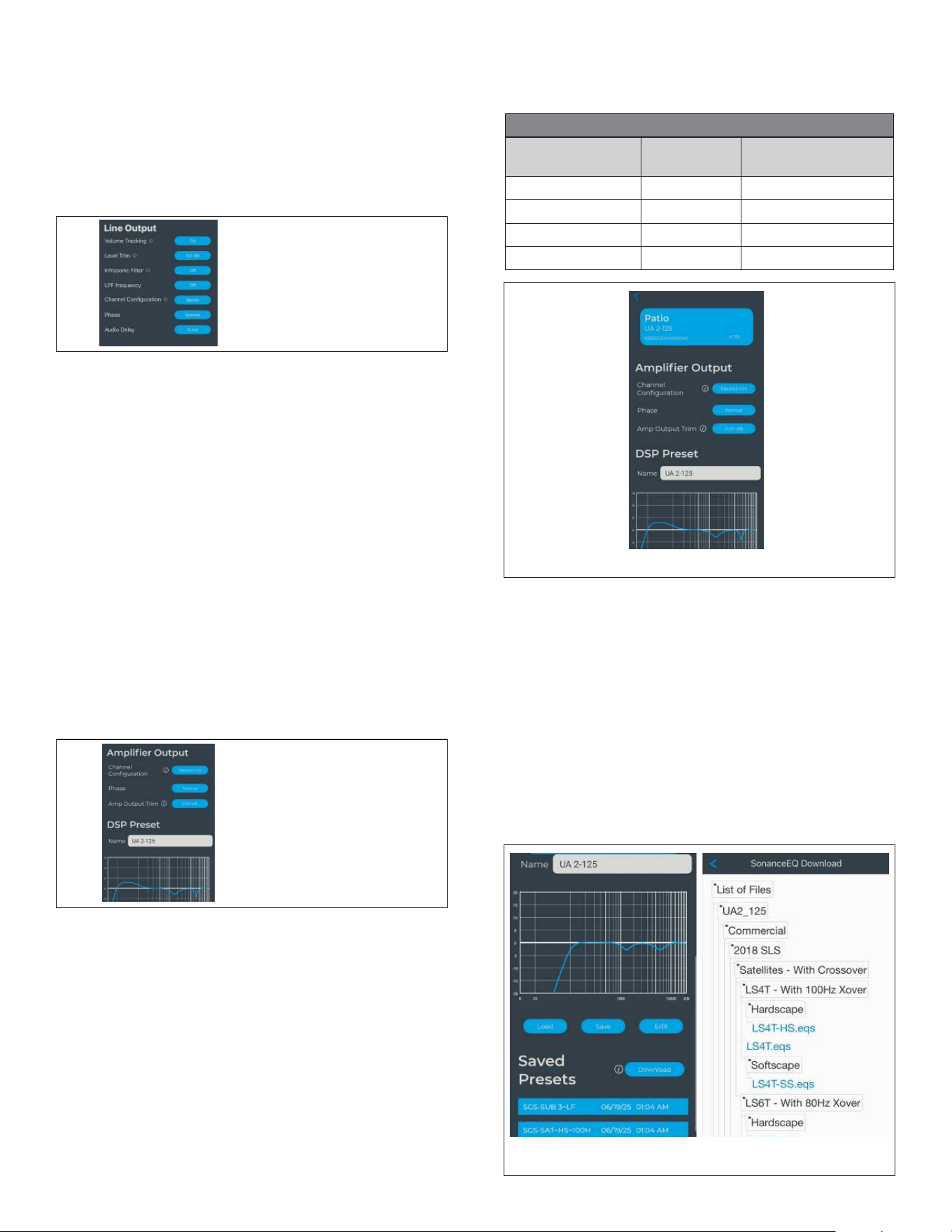
GENERAL PAGE
Allows naming of the amplifier and the basic
configuration of power saving Auto Sense operation,
how long it waits before sleeping if no signals are
present to be amplified, how long the LED indicators
will illuminate (automatically turn o after a preset
time or always on), if the BLE radio link is enabled (it is
required for controlling the amplifier but can be turned
o afterward) see Figure 13.
Figure 13: General App Screen
Figure 11:
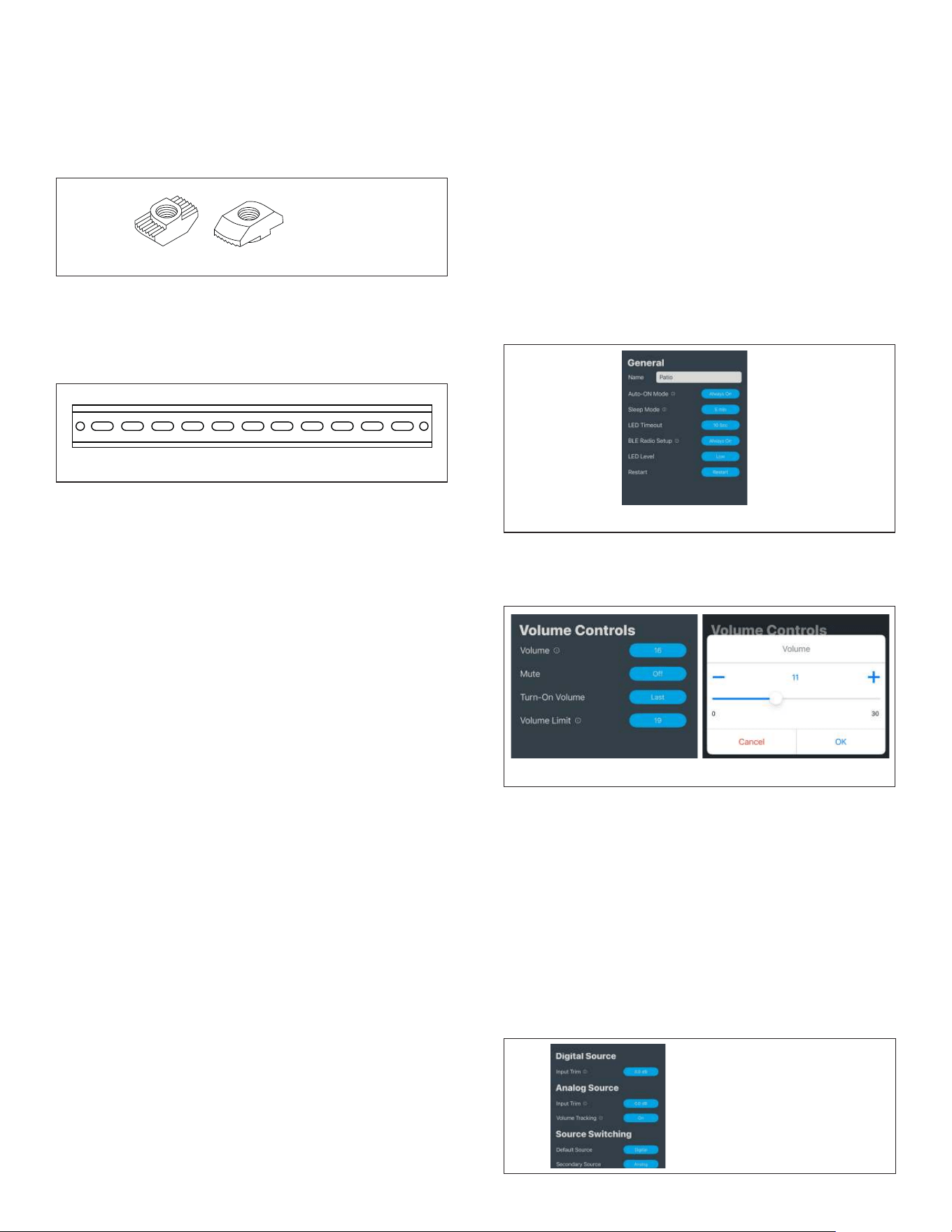
T-Nuts
Figure 12: Din Rail
DIN RAIL INSTALLATION
For DIN rail mounting applications, compatible DIN rail
adapters can be used with the T-slot chassis design. DIN
rail hardware and information is available online and is
not specific to Sonance.
NOTE:Always verify that the mounting method
selected can safely support the amplifier’s weight (UA
2-125: 5lbs 4oz / UA 2-125 ARC: 5lbs 6oz) and that
proper ventilation is maintained in the final installation
location.
PROTECTION CIRCUITRY
The amplifier has a multi-stage protection system to
prevent damage to your amplifier and speakers.
AMPLIFIER CHANNEL PROTECTION
If a channel encounters a short-circuit or extremely low
impedance, the amplifier will self-protect.
STATUS INDICATOR LED
• GREEN: analog input selected
• ORANGE: standby
• RED FLASHING: protection state; amp overdriven/
clipping
• BLUE: setup mode; short-range wireless or IR
learning
• WHITE: digital input selected
• PURPLE: mix selected
The status indicator always displays the present state
of the amplifier, unless set to ten second timeout. These
settings can be adjusted in the Sonance SonARC App
under “General”. Within the app, LED Level can be set
to Low, Medium, or High, and LED Timeout can be set to
Always On (default setting) or ten sec.
CLIP INDICATOR LED
When being overdriven, audio peaks display as RED
flashes. If this situation occurs, the amp is being
overdriven and the volume control needs to be reduced
until the peaks no longer cause illumination of the Clip
Indicator.
VOLUME PAGE
Volume adjustments, limit setting, turn-on volume
setting, and mute.
Figure 14: Volume App Screens
INPUTS PAGE
Use the Input Trim setting to match the input sensitivity
of the UA 2-125 to the maximum signal level of the
connected source. Digital sources are almost always
referenced to 0dBFS (Full Scale). Leave this set to 0dB
unless 1) you know that the digital source has built-in
attenuation, 2) you need to adjust relative source levels
for mix mode, or 3) as directed by the Sonance tech
support team.
For Analog sources, the default input trim setting is
0dB and corresponds to a maximum analog signal
level of 2Vrms. Each additional 6dB of Input Trim
gain corresponds to a matching signal with half the
amplitude:
T-NUT INSTALLATION
The UA amplifiers include four T-Nuts that can slide into
the T-slot chassis in any desired slot and in any desired
orientation to attach to any universally compatible
T-slot hardware. Use the screws from the included amp
brackets to secure the T-nuts into position.
Figure 15: Input
App Screen
9
Volume tracking on or o for flexibility for control within
the app or control at the analog source. Configuration
of which input signal (digital or analog) is going to
be the primary source and which is going to be the
secondary source for automatic switchover and mixing/
ducking and muting modes. For Ducking and Mute
modes, the primary signal is either muted or ducked by
the appearance of a signal on the secondary channel.
There is also adjustability of switching hold time for
muting and ducking.
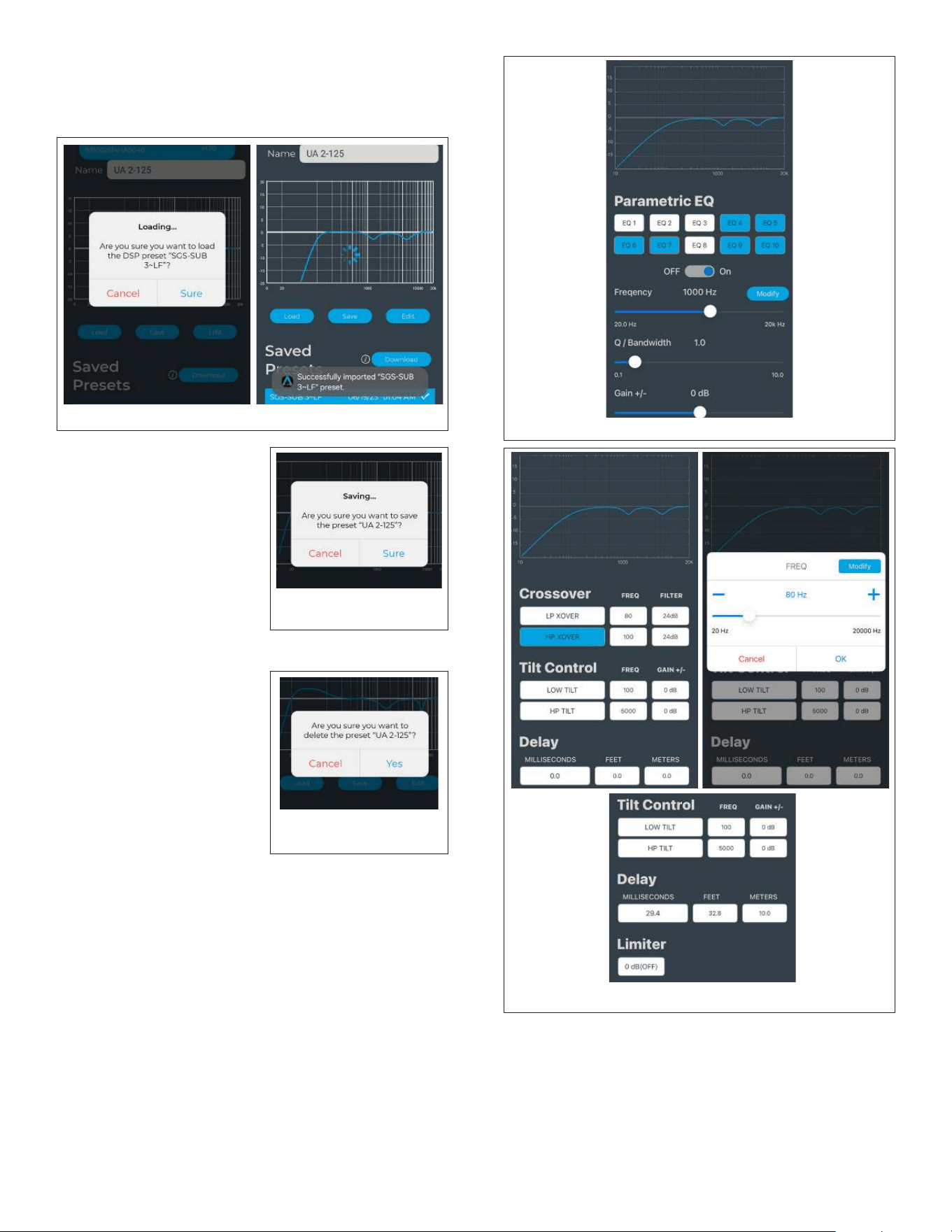
LINE OUTPUT PAGE
Settings for managing line output behavior for
applications like daisy-chaining multiple amplifiers for
multiple pairs of speakers or outputting to an active
subwoofer. Turn on or o volume tracking, adjust level
trim, infrasonic filter, channel configuration, phase, and
audio delay.
AMP & DSP PAGE
AMPLIFIER OUTPUT -> CHANNEL CONFIGURATION:
1. 2-channel stereo (L & R) mode (2 x 125 watts).
Figure 16: Line
Output App Screen
Figure 17: Amp &
DSP App Screen
* 0dB Input Trim gain: 2Vrms max signal
* 6dB Input Trim gain: 1Vrms max signal
* 12dB Input Trim gain: 500mVrms max signal
* 18dB Input Trim gain: 250mVrms max signal
* 24dB Input Trim gain: 125mVrms max signal
Do not set the Input Trim gain to a setting higher than
needed to match your source signal level. Doing so can
cause the input signal to be clipped, leading to severe
distortion and potential speaker damage.
Figure 18: Amp & DSP App Screen
2. Single Channel Power Sharing (L) Mode (1 x 250
watts). For Power Sharing mode, the Left channel
output delivers up to 250 watts into a 4ohm load..
The Channel Configuration can be set for Sum
Mono to L Output, L Only to L Output, or R Only to
L Output (see Power Sharing Mode section of the
manual for connection details). This setting allows
for control of source channel routing to the Left
Output. Use L Output settings to get 250w single
channel power into a single 4 ohm load.
OUTPUT TRIM
For most installations, you do not need to adjust the
output trim in the SonARC App. Leave the output trim
setting at 0dB (default) for stereo 8Ω or single channel
(8Ω, 6Ω, or 4Ω) operation.
DSP
DSP equalization curves may be applied to the audio
signal to compensate the magnitude and frequency
response as desired and the inbound audio signal can
be delayed 30 milliseconds.
Sonance has an extensive library of DSP EQ curves and
downloadable presets.
Downloading Presets from the DSP Library:
Tap “download” to browse hundreds of Presets for
various Sonance and James speaker and subwoofer
models. Sections within the library can be tapped to
collapse and expand by product category. Select the
desired preset file to initiate download. Tap the back
arrow to return to the list of saved presets.
Figure 19: Downloading DSP Presets
from the Sonance EQ Library
OUTPUT TRIM
LOAD
IMPEDANCE
#
CHANNELS
OUTPUT TRIM
SETTING
8Ω, 6Ω, or 4Ω 1 0dB
8Ω 2 0dB
6Ω 2 -1.5dB
4Ω
2
-3dB
When driving stereo lower impedance loads, adjust
the output trim in the SonARC App to ensure optimal
performance:
10
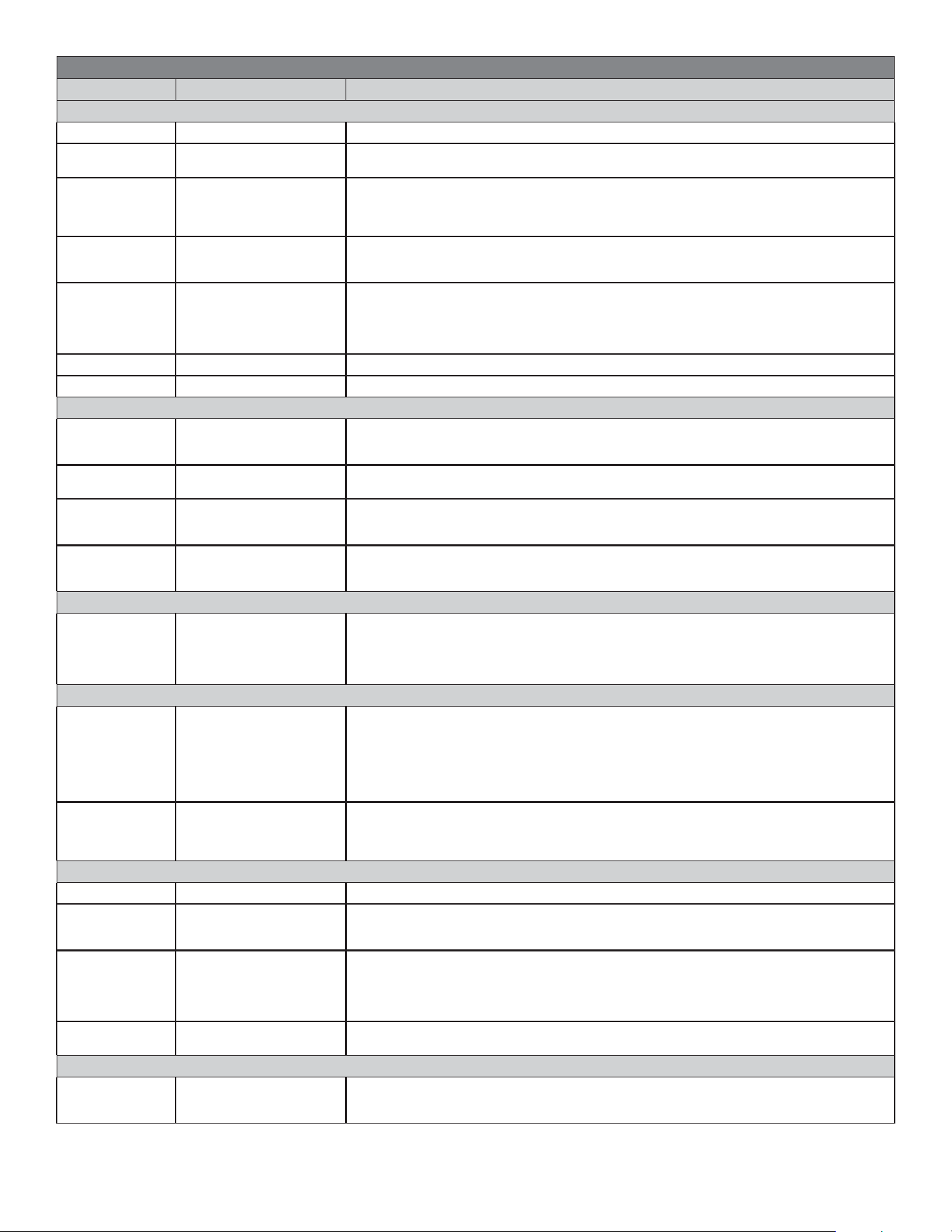
Figure 20: DSP App Screens
DSP
SAVING PRESETS
When making adjustments
to a loaded DSP Preset
profile, a loaded DSP profile
can be named and saved to
the Saved Presets list. Edit
the name in the text field,
tap “Save” and the profile
will appear in the Saved
Presets list for future recall.
Figure 21: Saving
DSP Presets
DSP
DELETING SAVED PRESETS
To remove DSP Preset profiles
from the Saved Presets list,
tap and hold the profile. A
pop up window will appear
asking “Are you sure you
want to delete the profile/
preset?” Confirm the deletion
by selecting “Yes”, or select
“Cancel” to keep the profile
in the Saved Presets list.
Figure 22: Deleting
Saved Presets
DSP
EDITING PRESETS
The SonARC app allows for robust editing within DSP
presets. To edit, first download and load a DSP EQ
Preset from the DSP EQ Library in the app. Once a
preset is loaded, select “Edit” to access Parametric EQ,
Frequency, Q/Bandwidth, Gain, Crossover, Tilt Control,
Delay, and Limiter settings.
PARAMETRIC EQUALIZATION
Configuration for the ten bands of parametric
equalization is available. Equalization filters may boost
or cut the desired frequency with adjustable bandwidth
filters. Each one can be individually turned on or o as
required by selecting the EQ button and then toggling
the on/o switch.
Figure 23: Parametric EQ App Screen
Figure 24: Crossover, Delay App Screens
CROSSOVER | DELAYS
When the amplifier is used to provide high and low
passed signals to drive woofers and tweeters separately,
crossover and tilt control can be adjusted. Delay
compensation can be applied in time or distance units
of measurement as required (up to 29.4ms, 32.8 feet, or
10 meters).
DSP
LOADING PRESETS
Tap to select a profile from the list of stored presets,
then tap “load” to load the DSP Preset.
11
SONARC APP GUIDELINES
APP SETTING SELECTIONS DETAILS
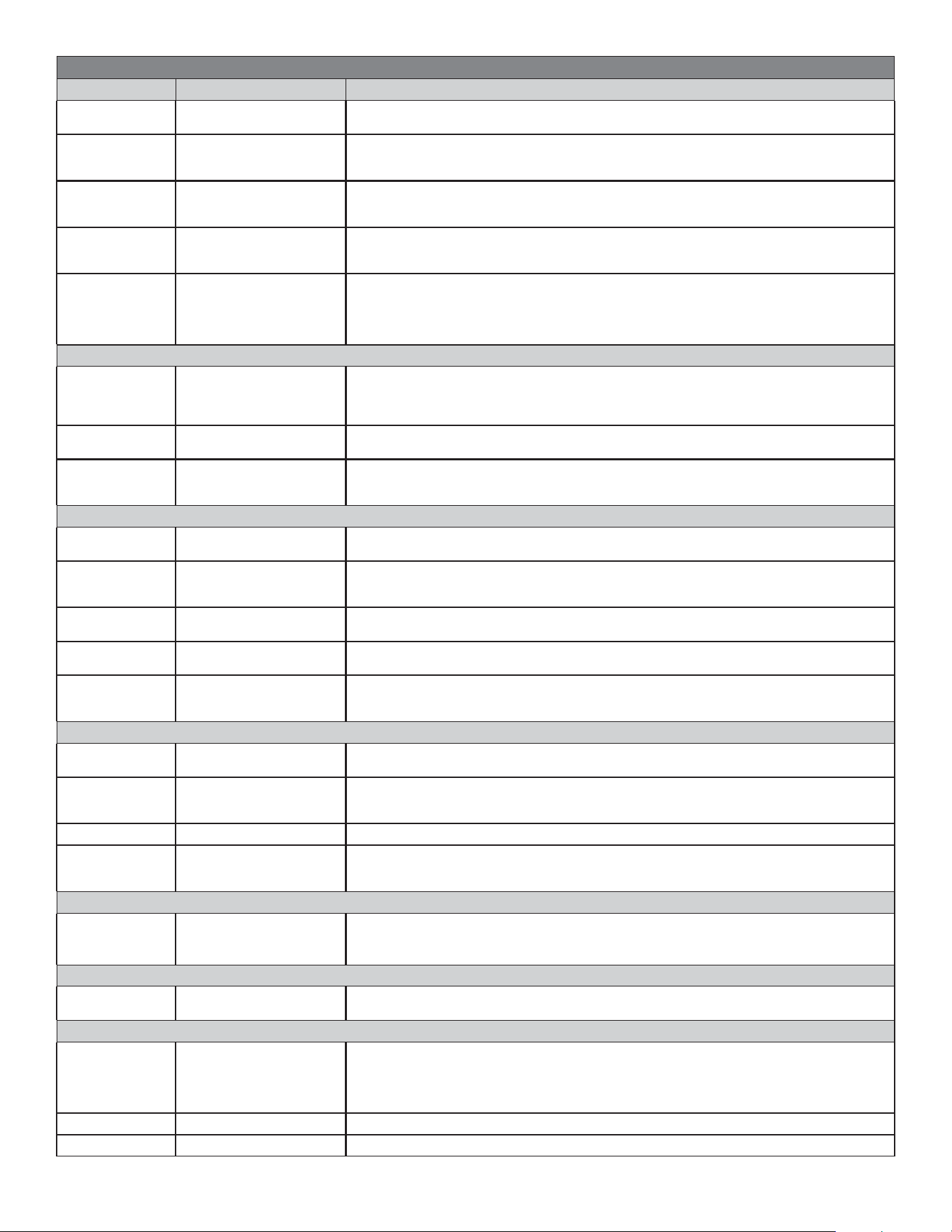
GENERAL
Name Text Field Enter desired name for amplifier; appears in list of available amps in homepage.
Auto-ON Mode
Auto Sense or
Always On
Auto Sense activates/wakes the amp from sleep mode automatically when incoming
audio is detected. When Always On is selected, the amp will not go into sleep mode.
Sleep Mode 1-180 Minutes
Sleep mode puts the amp into power saving mode. Use this setting to choose the
duration of time before the amp goes into sleep mode after no incoming audio is
detected. Adjust the value by tapping “+” or “-” in the pop up, or press and adjust the
slider to the left and right. Select “OK” to confirm and save choice.
LED Timeout
10 Sec or
Always On
By default, the amp indicator LED will remain illuminated at all times. If this setting is
changed to “10 Sec”, the LED will turn o after 10 sec and will not reilluminate until the
amp receives a new signal or setting adjustment (ie. switchover behavior is changed).
BLE Radio Setup
Always On,
2 Min Time Out,
or O
To restrict remote access to the amp’s settings, the BLE radio can be disabled. A
2-minute timeout can be set to allow adjustments for a short period after the amp is
turned on, or it can be set to O to disable immediately. Once disabled, the amp will
no longer be visible in the app. To restore discoverability, press the setup button on the
amplifier. The BLE radio setting will default to “Always On” following this action.
LED Level Low, Middle, or High Defines indicator LED brightness that illuminates on the connector panel of the amp.
Restart Cancel or Restart Would you like to restart the amp? Make selection in pop up window.
VOLUME
Volume 0-30
Master volume; can simultaneously control the volume of all input sources as well as
the volume of the amp and line-out. Adjust the volume by tapping “+” or “-” in the pop
up, or press and adjust the slider to the left and right. Select “OK” to confirm and save.
Mute O or On
Select “On” to mute all amplifier channels. Select “O” to return to normal volume
output from all channels.
Turn-On Volume Fixed or Last
Defines the volume condition upon amp startup. Select “Fixed” to define the value for
the volume (0-30), or “Last” to keep the volume as it was in the last state before the
amp was in sleep mode or standby.
Volume Limit 1-30
Sets the maximum volume control level the amplifier can reach. Adjust the volume
limit by tapping “+” or “-” in the pop up, or press and adjust the slider to the left and
right. Select “OK” to confirm and save choice.
INPUTS - DIGITAL SOURCE
Input Trim -18 dB - 6 dB
By default, the digital source input trim is set to 0.0 dB as it will apply to most
use cases. The input trim can be adjusted by 0.5 dB increments if TV output is not
sucient or if the TV volume level needs to be reduced. Adjust the input trim by
tapping “+” or “-” in the pop up, or press and adjust the slider to the left and right.
Select “OK” to confirm and save.
INPUTS - ANALOG SOURCE
Input Trim 0 dB - 24 dB
By default, the analog source input trim is set to 0.0 dB as it is optimized for most
sources that have 2v maximum output. The input trim can be adjusted by 0.5 dB
increments according to the output level of the source device. Adjust the input trim
by tapping “+” or “-” in the pop up, or press and adjust the slider to the left and right.
Select “OK” to confirm and save. Adjust to +6 dB for sources with 1v output, +12 dB
for sources with 500mV output, +18 dB for sources with 250mV output, +24 dB for
sources with 125mV output.
Volume Tracking O or On
When turned “On”, volume tracking lets the anolog input track to the master volume.
When set to “Fixed”, volume will remain at a fixed level. When set to “O”, the volume
will not be adjusted in the amp, but instead will need to be adjusted using the analog
source.
INPUTS - SOURCE SWITCHING
Default Source Analog or Digital Defines which source input will be primary to activate the amplifier.
Secondary
Source
None, Analog, or Digital
Defines which source input will be secondary. In “Mute” and “Duck” modes, a signal on
the Secondary Source will override playback of the Default source. Select “None” if no
second source is connected.
Switchover
Behavior
Mute, Duck, or Mix
Defines how dual input sources behave if there is incoming audio for both inputs at the
same time. When “Mute” is selected, the default/primary source will mute when there
is incoming audio from the secondary source. When “Duck” is selected, the default
source volume will significantly reduce (-20 dB) when there is incoming audio from the
secondary source. When “Mix” is selected, the inputs will combine equally.
Switching Hold
Time
1-30
Defines the length of time audio will hold when switching sources from one input
source to another after audio stops.
LINE OUTPUT
Volume Tracking O or On
With volume tracking set to “On”, the line output level will increase and decrease with
the volume of the Sonance amp. Volume tracking set to “O” keeps the output at a
consistent level regardless of the Sonance amp volume.
12
SONARC APP GUIDELINES
APP SETTING SELECTIONS DETAILS
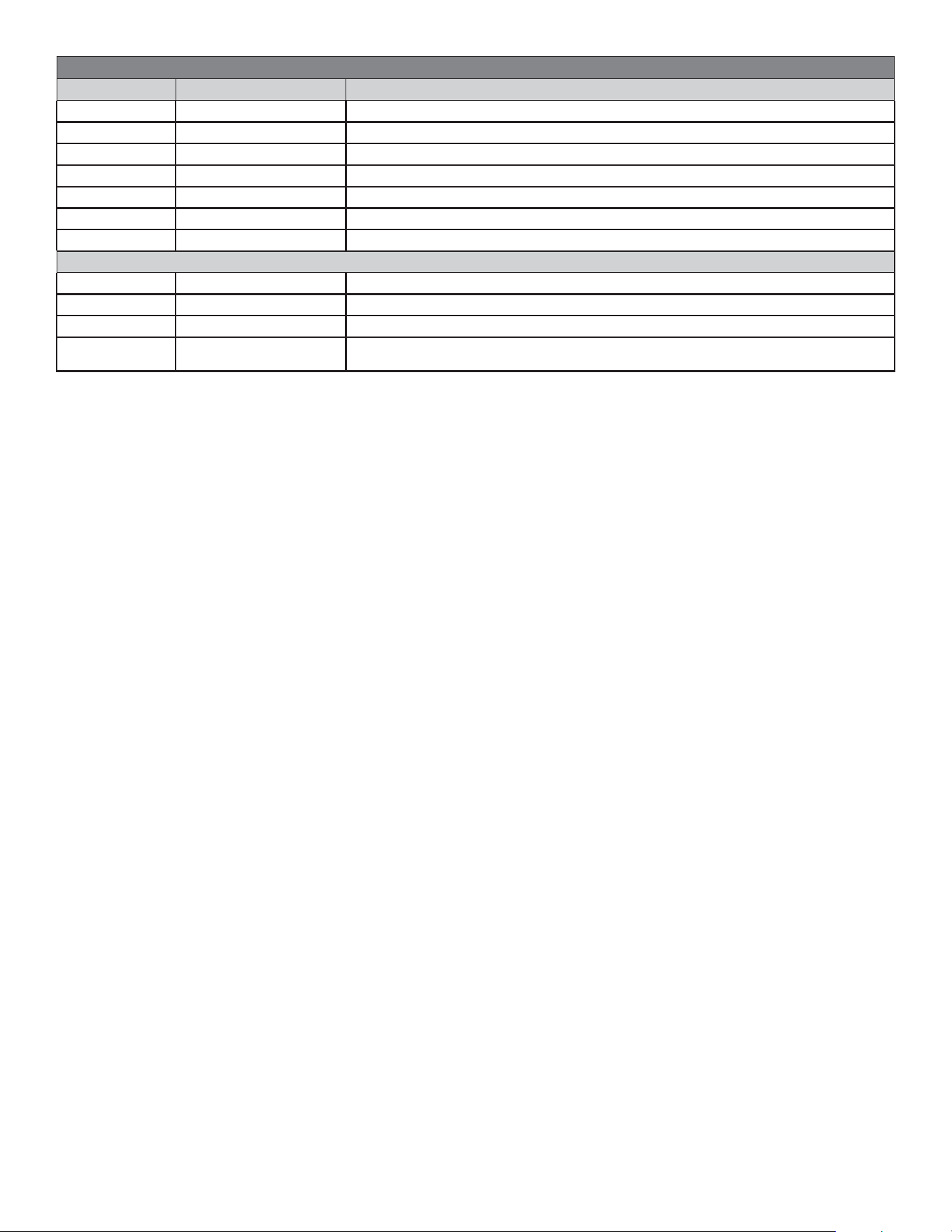
Infrasonic Filter O, 20Hz, or 30Hz
The Infrasonic Filter is a high pass filter that prevents extreme low requencies from
damaging the equipment. Use this setting to enable and set the filter frequency.
LPF Frequency
O, 60Hz, 70Hz,
80Hz, 90Hz, 100Hz,
110Hz, or 120Hz
The Low Pass Frequency can be adjusted to match the rollo frequency of a
connected active subwoofer. See the specifications for the subwoofer and match the
rollo frequency to the LPF frequency in this setting.
Channel
Configuration
Stereo or Mono
For standard stereo pair speaker connections to the amp, set channel configuration to
“Stereo”. When configuring the amp for a single speaker or Power Sharing Mode for a
single speaker or subwoofer, set channel configuration to “Mono”.
Phase Normal or Inverted
By default, the line out phase will be set to “Normal”. You may choose to invert the line
out phase for active subwoofer applications if the subwoofer sounds like it is out of
phase in certain room set ups.
Audio Delay 0-30 ms
Audio delay can be adjusted to help correct for audio playback that is not properly
synced. This may occur when connecting multiple amplifiers in a daisy chain (line out
to new additional amplifier input). Adjust the audio delay in millisecond increments
by tapping “+” or “-” in the pop up, or press and adjust the slider to the left and right.
Select “OK” to confirm and save choice.
AMP & DSP - AMPLIFIER OUTPUT
Channel
Configuration
Stereo2-CH, Mono-2CH,
L Only to L Output,
R Only to L Output,
Sum Mono to L Output
Use L Output settings to get 250w single channel power from L speaker output into
a single 4 ohm load. Connect speakers to L channel only. This setting allows you to
control which source channels are routed to the L output.
Phase Normal or Inverted
By default, the amp output phase will be set to “Normal”. You may choose to invert the
line out phase to correct speaker polarity or passive subwoofer phase correction.
Amp Output
Trim
-6 dB - 0 dB
Set the Amp Output Trim to properly accommodate the amplifier load. In Stereo
Configuration, set the trim to 0 dB for 8 ohm; -1.5 dB for 6 ohm; -3 dB for 4 ohm. In
Mono configuration, set the trim to 0 dB for all loads.
AMP & DSP - DSP PRESET
Name Text Field
Enter desired name for preset. This will be the name of the DSP profile when selected
for “Save” and will appear in the list of saved presets on the bottom of the screen.
Load
Must Select a Saved
Preset to Import
Select from downloaded DSP Presets in the Saved Preset list at the bottom of the
screen before pressing “load”. If no saved presets are listed, click the “Download”
button to select an EQ profile from the library.
Save Cancel or Sure
Save the current DSP settings for future recall? If adjustments are made to an imported
profile, the new DSP/EQ profile/preset can be saved into the Saved Preset list.
Edit Loads an Editing Menu
Edit and apply Parametric EQ, Frequency, Q/Bandwidth, Gain, Crossover, Tilt Control,
Delay, and Limiter settings to an already loaded DSP Preset.
Saved Presets Download
Browse the Sonance custom DSP preset library designed specifically to optimize
a range of Sonance speakers and subwoofers. Once downloaded, use the import
function to load the custom preset from the menu below.
PROFILE BACKUP
Backup Profile
Text Field: enter a file
name for the profile, save
Save a backup profile to restore all amplifer settings, IR codes, and DSP to a previous
configuration for easy recall. Saved profiles are accessible after factory reset.
Restore Profile Load
Restrore the currently selected profile to apply all saved amp settings? Select “Cancel”
or “Sure”. A profile from the list of Available Backup Files must be selected to initiate.
If no profiles are listed, a backup profile must be created. See “Backup Profile” above.
Share Profile - Send an amplifier profile to another device via email, AirDrop, etc.
Available Backup
Files
-
A list of all saved backup profiles will appear here. If no profiles are listed, a backup
profile must be created. See “Backup Profile” above. Backup files are also saved to the
device’s FILES folder as a .bin file.
PROFILE BACKUP - RESET
Reset All
Settings
Cancel or Sure
It is recommended to save a backup profile before reset. Would you like to reset all
amp settings to factory defaults? Select “Cancel” or “Sure”. CAUTION: This function
will erase all settings and return the amplifier to its factory default!
STATUS
-
Normal, Too Hot, or
System Protection
Displays current amp status.
IR LEARNING
- -
Plug the included IR receiver into the amp to configure an IR remote to control the
amp. Press Learn, and choose the remote button you wish to program to control the
selected function. NOTE: When IR 3.5mm cable is inserted into the IR port, all digital
communications will be disabled (ie. CEC, eARC, S/PDIF commands such as ON/OFF,
Volume UP/DOWN).
Power On - Select “Learn” to initiate signal for IR learning
Power O - Select “Learn” to initiate signal for IR learning
13
SONARC APP GUIDELINES
APP SETTING SELECTIONS DETAILS
Volume Up +1 - Select “Learn” to initiate signal for IR learning
Volume Down -1 - Select “Learn” to initiate signal for IR learning
Volume Up +3 - Select “Learn” to initiate signal for IR learning
Volume Down -3 - Select “Learn” to initiate signal for IR learning
Mute On - Select “Learn” to initiate signal for IR learning
Mute O - Select “Learn” to initiate signal for IR learning
Mute Toggle - Select “Learn” to initiate signal for IR learning
UPDATES
Firmware - -
Installed Version - Displays the firmware version currently installed.
Latest Version - Displays the firmware version currently available.
Update Local or Internet
Proceed with firmware update? Select “Local” or “Internet”, then select “Update Now”
or “Cancel” at any time to terminate update process.
14
UA 2-125 | UA 2-125 ARC AMPLIFIER SPECIFICATIONS
Number of Channels 2 (1 stereo pair)
Power Output - 8 ohms x2 (Stereo) 125W per channel
Power Output - 4 ohms x2 (Stereo) 125W per channel
Power Output - 4 ohms x1 (Single Channel) 250W
Frequency Response 20Hz - 20kHz , +/- 0.5dB
Total Harmonic Distortion <0.1% (1kHz, 100W, 4Ω or 8Ω)
Signal to Noise Ratio >100dB (20-20kHz, A-weighted)
Analog Input Sensitivity 170 mVrms for full output power, +24dB input trim
2 Vrms for full output power, 0dB input trim
Analog Input Impedance 32 kohms
Analog RCA Output Source Resistance 600 ohms
Analog Maximum Source Input Voltage 2 Vrms
COAX Digital Input S/PDIF format, 2ch PCM
Optical TOSLINK Digital Input S/PDIF format, 2ch PCM
HDMI Digital Input HDMI ARC, eARC, and CEC capable, 2ch PCM,
Power Consumption
8 or 4 ohms (sinewave, full power, 125W x2) 300 Watts
8 or 4 ohms (sinewave, 1/4 power, 31W x2) 80 Watts
@idle (active, no output) 8 Watts
@idle (amp output o) 3 Watts
@standby <0.5 Watt
@sleep mode <0.5 Watt
Heat Output
@8 ohms (sinewave, full power) 171 BTU/h (both channels driven)
@4 ohms (sinewave, full power) 171 BTU/h (both channels driven)
@8 ohms (sinewave, 1/4 power) 62 BTU/h (both channels driven)
@4 ohms (sinewave, 1/4 power) 62 BTU/h (both channels driven)
AC Voltage 100-240Vac 50/60Hz
Mounting Options Seismic tether (hole in chassis);
slide-in mounting bracket; 20mm series T-slots
Dimensions (WxHxD) 8.2” x 5.32” x 1.78” (208mm x 135mm x 45mm)
Dimensions (LxWxD) w/ Mounting Brackets 8.86” x 5.32” x 1.78” (225mm x 135mm x 45mm)
UA 2-125 Shipping Weight 5lbs 4oz (2.38Kg)
UA 2-125 ARC Shipping Weight 5lbs 6oz (2.44Kg)
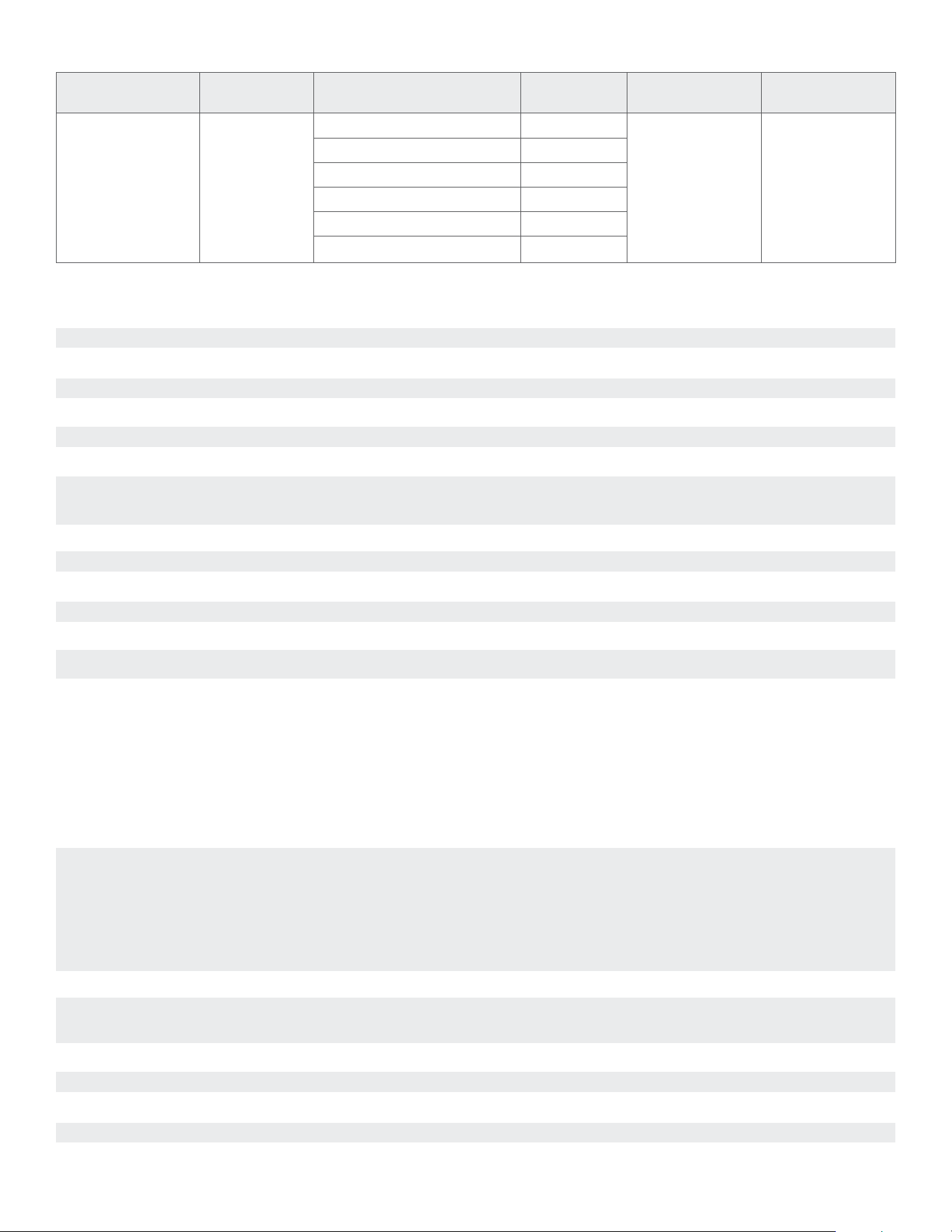
MODEL
INPUT
VOLTAGE
OUTPUT POWER (SINEWAVE)
AC POWER
DRAW
15 AMP BREAKER
QTY OF AMPLIFIERS
20 AMP BREAKER
QTY OF AMPLIFIERS
UA 2-125
North America SKU: 93550
International SKU: 93551
UA 2-125 ARC
North America SKU: 93548
International SKU: 93549
100-240V AC
Full Power All Channels @8 ohms 300W
8 10
Full Power All Channels @4 ohms 300W
1/4 Power All Channels @8 ohms 80W
1/4 Power All Channels @4 ohms 80W
@ Idle 8W
Sleep Mode <0.5W
UA 2-125 | UA 2-125 ARC AMPLIFIER POWER REQUIREMENTS:

15
TROUBLESHOOTING
NO POWER
Audio Connector Panel status LED does not illuminate
when AC cord is plugged into an outlet and the amp is
switched on.
CHANNEL OUT
One channel of the amp does not have output.
CAUSE: AC cable is improperly seated either at the
back of the amp or at the AC outlet.
SOLUTION: Verify that both ends of the power cable
are securely seated.
CAUSE: There is no AC current at the outlet.
SOLUTION: Securely insert the AC cord into another
known working AC outlet.
NO AUDIO
Status indicator illuminated Green but no audio from
speakers.
CAUSE: Current selected source is not sending an
audio signal into the amp.
SOLUTION: Verify that the source is powered on,
operating and not in a muted or paused state.
CAUSE: Audio interconnect cables are not pushed-in
securely at the source, at the preamp and/or at the
amp’s input connectors.
SOLUTION: With the amp powered o, carefully rein-
sert each of the RCA connections at the source, and
preamp/zone controller. Ensure RCA connectors are
plugged into the amplifier’s INPUT terminals, not the
OUTPUT terminals.
CAUSE: The line level interconnect cables are
defective.
SOLUTION: Substitute another interconnect cable for
the source to preamp.
CAUSE: The speaker wires at either the output of
the amp or at the speaker location are not securely
connected.
SOLUTION: Reattach the speaker wires on the
4-terminal speaker block connectors. Verify amplifier
output with a short piece of speaker wire and a
known good speaker.
PROTECT MODE
Status Indicator LED is flashing RED.
CAUSE: Line-level interconnect cable from the source
to the aected amp channel is loose, disconnected or
faulty.
SOLUTION: Verify that the interconnect cables are
properly seated at both the amp end inputs and
source end outputs. Disconnect both interconnects
on the amp end (1L and 1R input connections on
the amp). Connect the functioning channel’s cable
from the source to the non-functioning channel’s
input jack on the amp (for example: if 1L is faulty,
connect 1R’s cable to the 1L input jack and test).
Test playback to see if the speaker connected to
the non-functioning channel works. If the aected
channel is now working, the problem could be with
that channel at the source or with the interconnect
cable for the non-functioning channel. Replace the
aected channel’s interconnect cable and retest. Test
source on another audio system to confirm channel
outputs are functioning. Check coax, Toslink and
HDMI connections as appropriate to model.
CAUSE: Speaker wire leading out to the channel is
loose, disconnected or faulty.
SOLUTION: Verify proper connection of the speaker
wire at amp end and speaker end. If the channel is
still inoperative, disconnect the speaker wire from
the non-functioning channel at both the amp end
and speaker end. Connect a new, test speaker wire
from the aected amp channel output to the speaker
or to a new, test speaker. If the aected channel
is now working, the problem must be the speaker
wire; replace with a new speaker wire. If the aected
channel is still not working, the aected channel
in the amp could be defective; contact Sonance
Technical Support for next steps.
CAUSE: The amplifier is in an over-temperature
condition due to overload.
SOLUTION: Allow the amplifier to be suciently
cooled until the Status LED returns to ORANGE,
BLUE, GREEN, or WHITE. Ensure that the amplifier is
placed in a location for proper ventilation.
CAUSE: The amplifier receiving an over-current
from short-circuited output wiring or too low output
impedance load being driven.
SOLUTION: Remedy the shorted output. Check all
wiring and speakers to ensure no shorts are present.
Disconnect from AC Power before attempting to fix
and reconnect the wiring.
CAUSE: The amplifier Output Channel Configuration
is set up for Power Sharing Mode in the Amplifier &
DSP page of the settings.
SOLUTION: Use the Amp & DSP page of the SonARC
app to change the Channel Configuration to either
Stereo 2-ch or Mono 2-ch.
CAUSE: Input / Source settings are mis-configured
and the input signal is being ignored.
SOLUTION: Use the Input page of the SonARC app
to properly configure the Input settings for the
desired source. Make sure the source is set up as
either a Default source or Secondary source. If set
as the Default source, make sure there is not a signal
on the Secondary source that his causing the Default
source to be muted or ducked.
CAUSE: TAmp is actually powered but is in standby
mode. There is no active signal and status LED is
dark because it is set to time out.
SOLUTION: Send an audio signal to the amplifier, or
use the General page of the SonARC app to change
the LED Timeout to Always On.

16
©2025 Sonance. All rights reserved. Sonance is a registered trademarks of Dana Innovations. Due to continuous product improvement, all features and
specifications are subject to change without notice. For the latest Sonance product specification information visit our website: www.sonance.com
SONANCE • 991 Calle Amanecer • San Clemente, CA 92673 USA • PHONE: (949) 492-7777
08.12.2025 REV3
LIMITED TWO (2) YEAR WARRANTY
Sonance warrants to the first end-user purchaser that this Sonance-brand product (Sonance UA 2-125 or UA 2-125 ARC), when
purchased from an authorized Sonance Dealer/Distributor, will be free from defective workmanship and materials for the period stated
below. Sonance will at its option and expense during the warranty period, either repair the defect or replace the Product with a new or
remanufactured Product or a reasonable equivalent.
EXCLUSIONS: TO THE EXTENT PERMITTED BY LAW, THE WARRANTY SET FORTH ABOVE IS IN LIEU OF, AND EXCLUSIVE OF, ALL
OTHER WARRANTIES, EXPRESS OR IMPLIED, AND IS THE SOLE AND EXCLUSIVE WARRANTY PROVIDED BY SONANCE. ALL OTHER
EXPRESS AND IMPLIED WARRANTIES, INCLUDING THE IMPLIED WARRANTIES OF MERCHANTABILITY, IMPLIED WARRANTY OF
FITNESS FOR USE, AND IMPLIED WARRANTY OF FITNESS FOR A PARTICULAR PURPOSE ARE SPECIFICALLY EXCLUDED.
No one is authorized to make or modify any warranties on behalf of Sonance. The warranty stated above is the sole and exclusive
remedy and Sonance’s performance shall constitute full and final satisfaction of all obligations, liabilities and claims with respect to the
Product.
IN ANY EVENT, SONANCE SHALL NOT BE LIABLE FOR CONSEQUENTIAL, INCIDENTAL, ECONOMIC, PROPERTY, BODILY INJURY, OR
PERSONAL INJURY DAMAGES ARISING FROM THE PRODUCT, ANY BREACH OF THIS WARRANTY OR OTHERWISE.
This warranty statement gives you specific legal rights, and you may have other rights which vary from state to state. Some states do
not allow the exclusion of implied warranties or limitations of remedies, so the above exclusions and limitations may not apply. If your
state does not allow disclaimer of implied warranties, the duration of such implied warranties is limited to period of Sonance’s express
warranty. Your Product Model and Description: Sonance UA 2-125 or UA 2-125 ARC Amplifier. Warranty Period for this Product: Two (2)
years from the date on the original sales receipt or invoice or other satisfactory proof of purchase.
Additional Limitations and Exclusions from Warranty Coverage: The warranty described above is non-transferable, applies only to the
initial installation of the Product, does not include installation of any repaired or replaced Product, does not include damage to allied
or associated equipment which may result for any reason from use with this Product, and does not include labor or parts caused by
accident, disaster, negligence, improper installation, misuse (e.g., overdriving the amplifier or speaker, excessive heat, cold or humidity),
or from service or repair which has not been authorized by Sonance.
Obtaining Authorized Service: To qualify for the warranty, you must contact your authorized Sonance Dealer/Installer or call Sonance
Customer Service at (949) 492-7777 within the warranty period, must obtain a return merchandise number (RMA), and must deliver
the Product to Sonance shipping prepaid during the warranty period, together with the original sales receipt, or invoice or other
satisfactory proof of purchase.
Warranty Process: Please follow the troubleshooting instructions in this manual or work with your Sonance dealer to determine the
exact nature of the fault. Sonance provides a 2-Year Limited Warranty to the original owner with proof of purchase from an authorized
Sonance dealer. The warranty does not cover shipping charges back to Sonance or the use of the product in an environment or
application not approved by Sonance.
In order to initiate a warranty claim:
1. Contact Sonance Technical Support with a description of the fault, the amplifier’s serial number and the date of purchase from an
authorized Sonance dealer at: technicalsupport@sonance.com
2. Sonance Technical Support will follow-up and may request additional troubleshooting.
3. Once a determination has been made on the fault, Sonance Customer Service will follow-up by email. Please have a scanned
copy of your Sonance UA 2-125 or UA 2-125 ARC Amplifier sales invoice ready to send upon request to document the amplifier’s
warranty status.
4. Sonance Customer Service will provide an RMA number to be included on the shipping label of the packaging. Please send the
amplifier back in its original factory carton, which has been specifically designed to protect the amplifier during transit. Write the
RMA # on the shipping label, not directly on the product carton.
Contact us at: https://www.sonance.com/company/contact