ninjakitchen.com
SLUSHI™ MAX SMART FROZEN DRINK MAKER
WITH RAPIDCHILL PRO TECHNOLOGY
FS605 Series | Owner’s Guide
1 Read all instructions prior to using the appliance and its accessories.
2 Carefully observe and follow all warnings and instructions. This unit contains electrical connections
and moving parts that potentially present risk to the user.
3 Take inventory of all contents to ensure you have all parts needed to properly and safely operate
your appliance.
4 Turn the appliance OFF, then unplug the appliance from the outlet when not in use, before
assembling or disassembling parts, and before cleaning. To unplug, grasp the plug by the body
and pull from the outlet. NEVER unplug by grasping and pulling the flexible cord.
5 Before use, wash all parts that may contact food. Follow washing instructions covered in this
instruction manual.
6 DO NOT operate any appliance with a damaged cord or plug, or after the appliance malfunctions
or is dropped or damage in any manner. This appliance has no user-serviceable parts. If damaged,
contact SharkNinja for servicing.
7 This appliance has important markings on the plug. The entire supply cord is not suitable for
replacement. If damaged, please contact SharkNinja for service.
8 Extension cords should NOT be used with this appliance.
9 To protect against the risk of electric shock, DO NOT submerge the appliance or allow the power
cord to contact any form of liquid.
10 DO NOT allow the cord to hand over the edges of tables or counters. The cord may become snagged
and pull the appliance o the work surface.
11 DO NOT allow the unit or the cord to contact hot surfaces, including stoves and other heating appliances.
12 ALWAYS use the appliance on a dry and level surface.
13 DO NOT allow children to operate this appliance or use as a toy. Close supervision is necessary when
any appliance is used near children.
IMPORTANT SAFETY INSTRUCTIONS
PLEASE READ ALL INSTRUCTIONS BEFORE USE • FOR HOUSEHOLD USE ONLY
Read and review instructions for operation and use.
Indicates the presence of a hazard that can cause personal injury, death, or substantial property damage if
the warning included with this symbol is ignored.
Combustible material. May burst if heated. (Indicated by a fl ame symbol with white background, surrounded
by a red diamond.)
Flammable material. (Indicated by a fl ame symbol with yellow background, surrounded by a black triangle.)
For indoor and household use only.
When using electrical appliances, basic safety precautions should always be followed, including the following:
DANGER: Risk of fire or explosion. Flammable refrigerant used. DO NOT puncture refrigerant
tubing. Dispose of product properly in accordance with the applicable federal or local regulations
pertaining to flammable refrigerants.
WARNING: To reduce the risk of injury, fire, electrical shock, or property damage, basic safety
precautions must always be followed, including the following numbered warnings and subsequent
instructions. DO NOT use appliance for other than intended use.
ninjakitchen.com
ninjakitchen.com
14 This appliance is NOT intended for use by persons (including children) with reduced physical,
sensory, or mental capabilities or lack of experience and knowledge, unless they have been given
supervision or instruction concerning use of the appliance by a person responsible for their safety.
Children should be supervised to ensure that they do not play with the appliance.
15 Use ONLY attachments and accessories that are provided with the product or are recommended by
SharkNinja. The use of attachments not recommended or sold by SharkNinja may cause fire, electric
shock, or injury.
16 Keep hands, hair, and clothing out of the container when loading and operating.
17 During operation and handling of the appliance, avoid contact with moving parts.
18 DO NOT microwave the containers or accessories provided with the appliance.
19 DO NOT use mechanical devices or other means to accelerate the defrosting process, other than
those recommended by the manufacturer.
20 DO NOT damage the refrigerant circuit. This warning is only applicable for appliances with
refrigerating circuits that are accessible by the user.
21 DO NOT use electrical appliances inside the food storage compartments of the appliance, unless they
are of the type recommended by the manufacturer.
22 DO NOT add frozen fruit, frozen vegetables, or ice to the unit.
23 DO NOT add hot ingredients to the unit.
24 DO NOT submerge the motor base or control panel in water or other liquids.
25 DO NOT fill vessel past the MAX FILL line.
26 NEVER leave the appliance unattended while in use.
27 Before operation, ensure all utensils are removed from containers. Failure to remove utensils can
cause containers to shatter and potentially result in personal injury and property damage.
28 DO NOT carry the unit by the bail handle. Hold the unit by grasping both sides of the unit under the
motor base.
29 DO NOT process hard, loose ingredients, or ice. This appliance is not intended to process loose frozen
fruit, a block of solid ice, or ice cubes.
30 ALWAYS keep the unit upright.
31 After unboxing the unit for the first time, ensure the unit is upright for at least 2 hours before
operating to let the refrigerant oils settle in the air conditioning system for best performance.
32 The supply cord cannot be replaced. If the cord is damaged, the appliance should be discarded safely.
33 Keep rear and sides of the unit open so the compressor can operate properly and not overheat.
34 Keep ventilation openings in the appliance enclosure and built-in structure clear of obstruction.
35 DO NOT damage the refrigerant circuit. This warning is applicable only for appliances with refrigerating
circuits that are accessible by the user.
36 When using appliance, make sure both sides and back of it are at least 4 (four) inches away from walls.
37 When positioning the appliance, ensure the supply cord is not trapped or damaged.
38 DO NOT place multiple portable socket-outlets or portable power supplies at the rear of the appliance.
IMPORTANT SAFETY INSTRUCTIONS
PLEASE READ ALL INSTRUCTIONS BEFORE USE • FOR HOUSEHOLD USE ONLY
SAVE THESE INSTRUCTIONS
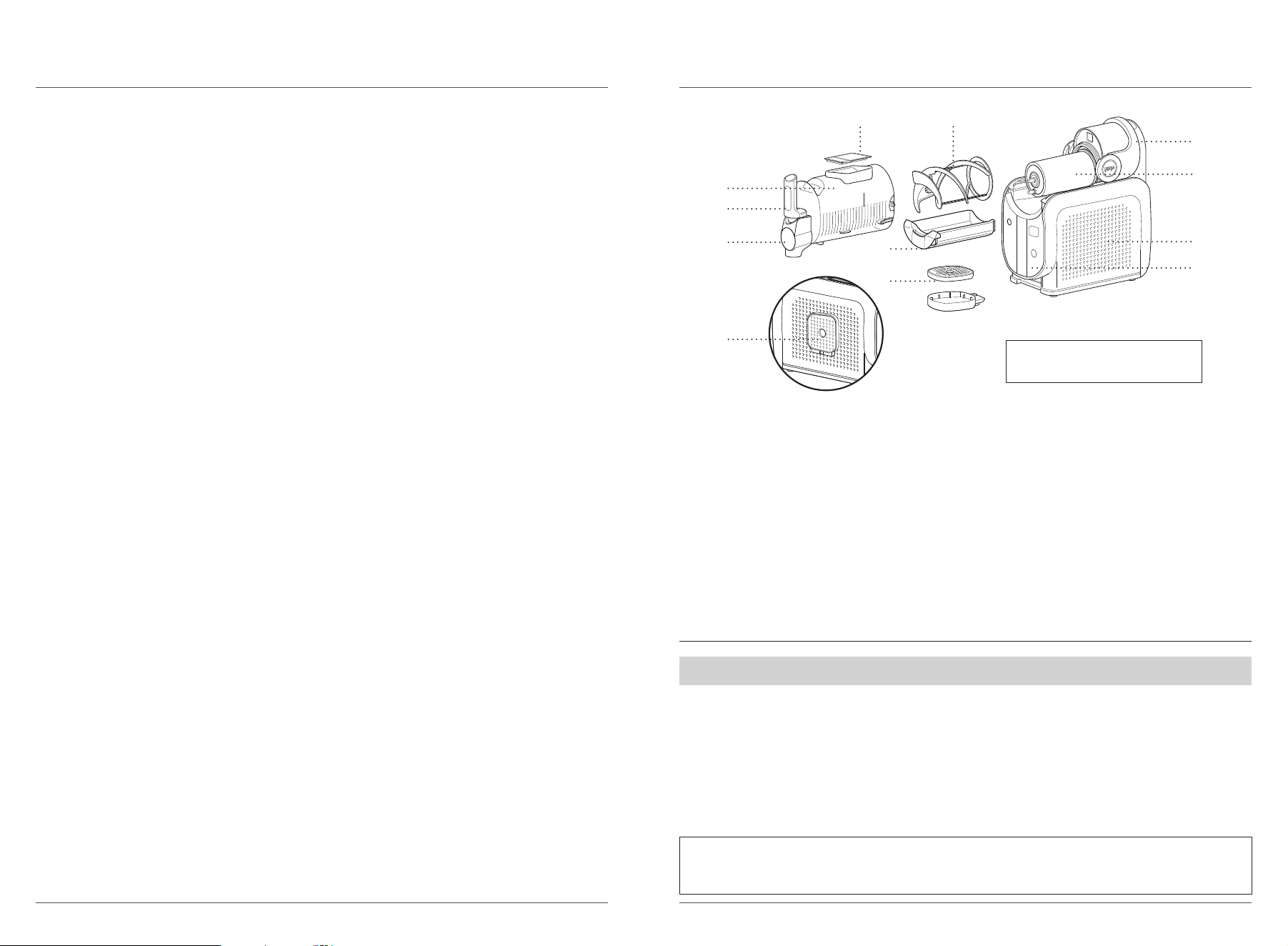
PARTS
A Easy-Fill Port and Cover
B Vessel*
C Comfort Handle
D Pour Spout with Removable Shroud
E Condensation Catch
F 2-Part Drip Tray
G Bail Handle
H Evaporator (Attached to Motor Base)
I Auger
J Motor Base
K Control Panel
L Drip Tray Storage (Left Side of Motor Base)
To find great recipes, visit ninjakitchen.com.
A
E
B
C
H
1 Remove all packaging materials from the unit.
2 Wash all removable parts in warm, soapy water.
3 Thoroughly rinse and air-dry all parts.
4 Wipe control panel, motor base, and evaporator with a soft, damp cloth. Allow to dry completely
before using.
5 If unit was not in the upright position before use, place it upright on a countertop for at least 2 hours
before operating. This allows the refrigerant to settle in the condenser for optimal and safe use.
BEFORE FIRST USE
F
G
I
J
K
D
* 24-oz minimum liquid capacity. 112-oz maximum liquid capacity.
L
NOTE: Colors, components, and
functions may vary by model.
IMPORTANT: Review all warnings at the beginning of this Owner’s Guide before proceeding.
NOTE: All attachments are BPA free. Accessories are dishwasher safe but should NOT be cleaned
with a heated dry cycle. DO NOT force parts in dishwasher if the dishwasher cavity is too small.
Handwash the parts if this occurs.
ninjakitchen.com
ninjakitchen.com
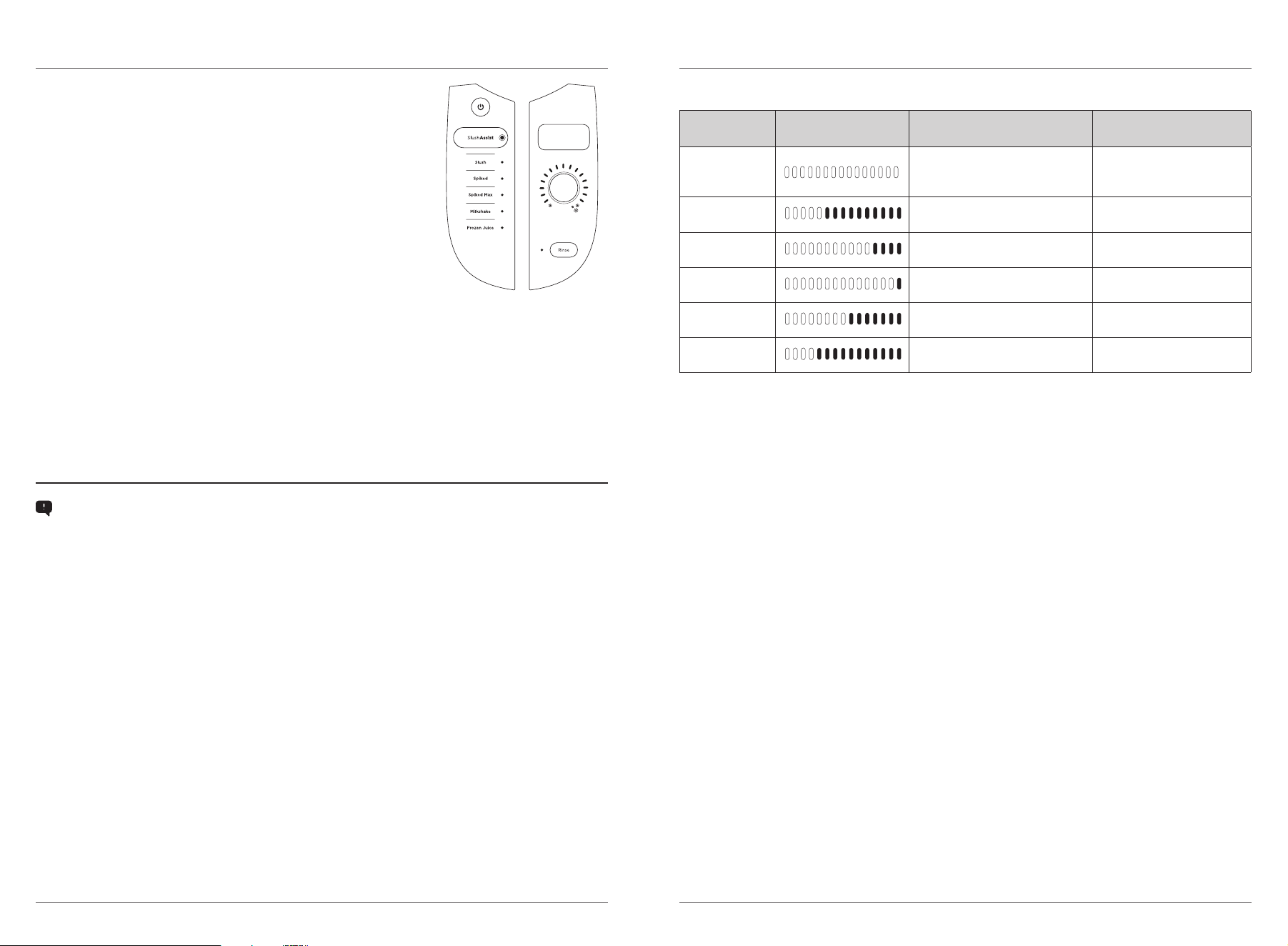
USING THE CONTROL PANEL
POWER
• Press to power the unit on and o.
RINSE CYCLE
• This cycle agitates, without cooling, to rinse the unit.
SLUSHASSIST™ PROGRAM
• Unique program that senses combinations of ingredients, auto-adjusts
settings, and delivers the optimal slush output every time. Perfect for
measurement-free, at-home creations.
• When SLUSHASSIST is selected, the associated LEDs illuminate in
blue. The top right control panel screen reads “SENSING” and the
temperature control LEDs rotate clockwise for 10–15 minutes while the
optimal slush texture is being calculated.
• When “SENSING” has finished, the LEDs around the dial will display
the set temperature and slushing will continue. If desired, adjust the
texture using dial after “SENSING” stage is complete.
PRESET PROGRAMS
• 5 presets deliver pre-programmed temperatures. Adjust the temperature any time by using the
temperature dial, if needed.
TEMPERATURE CONTROL SETTING
• The temperature control dial displays temperatures from cold (left) to coldest (right). After selecting a
preset program, the target temperature on the dial will become solid and the left range of LEDs on the
dial will pulse. When each temperature is reached, the LEDs will become solid. Your slush is complete
when all LEDs in the range are solid and “ENJOY” is displayed on the top right control panel.
• Adjust the temperature using the dial for your perfect frozen drink texture.
• For thinner, more sippable frozen drinks, adjust the temperature by turning the dial counterclockwise.
• For thicker, colder frozen drinks, adjust the temperature by turning the dial clockwise.
TROUBLESHOOTING TIPS
• RECIPE NOT SLUSHING? If your recipe has not reached the desired texture after 60 minutes, turn the
temperature dial clockwise once to get to a colder temperature. Wait 5–10 minutes to test the recipe.
If the texture still isn’t what you desire, repeat turning dial clockwise one more level. Repeat until
desired texture is achieved.
• SLUSH NOT DISPENSING? For the best dispensing experience, fill the unit to the max fill line and ensure
the unit is running. For a smoother dispense experience, turn the temperature dial counterclockwise once
to get to a warmer temperature. More sippable frozen drinks will dispense more smoothly.
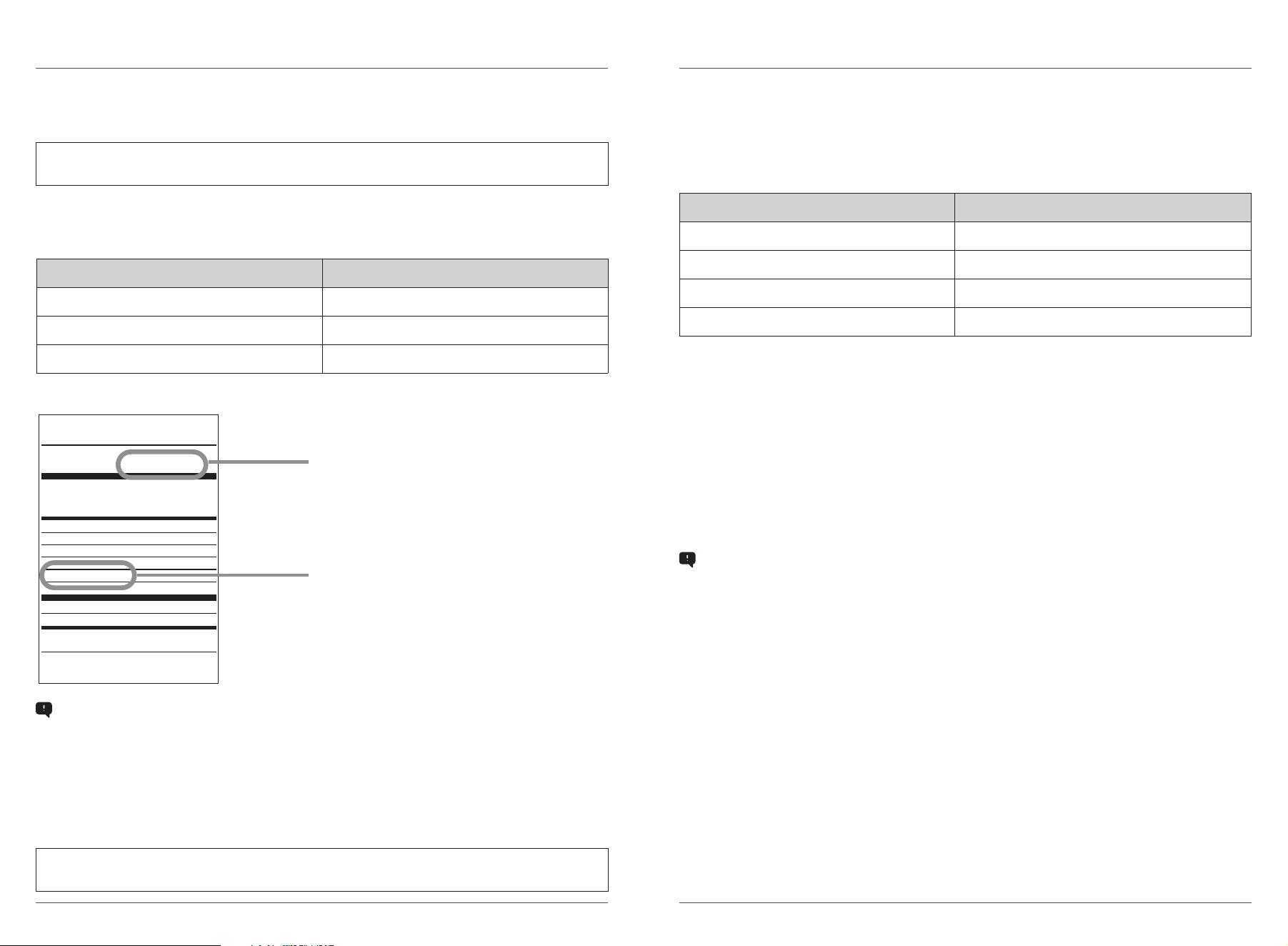
PRESETS
Each preset (excluding the SLUSHASSIST™ program) will start at a default temperature for ideal
texture. If desired, adjust the temperature for your personal perfect frozen drink texture.
PRESET
DEFAULT/OPTIMAL
TEMPERATURE
DESIGNED FOR RECIPE EXAMPLES
SLUSHASSIST
At-home creations or beverages
that don’t fit under the preset
descriptions
Mixed beverages with or
without alcohol
SLUSH
Transforming your everyday
beverages
Soda, lemonade
SPIKED
Beverages with up to
15% alcohol by volume (ABV)
Spiked seltzer,
hard ciders, rosé
SPIKED MAX
Beverages with up to
20% alcohol by volume (ABV)
Premixed margaritas,
Moscow Mules
MILKSHAKE
Dairy- and creamier-based
beverages
Chocolate milk,
blended milkshake
FROZEN
JUICE
Naturally sweetened beverages Orange juice, apple cider
ninjakitchen.com
ninjakitchen.com
REQUIRED SUGAR CONTENT
Too little sugar or too much alcohol will prevent proper freezing of a slush output. Follow guidelines
below for a perfect slush every time.
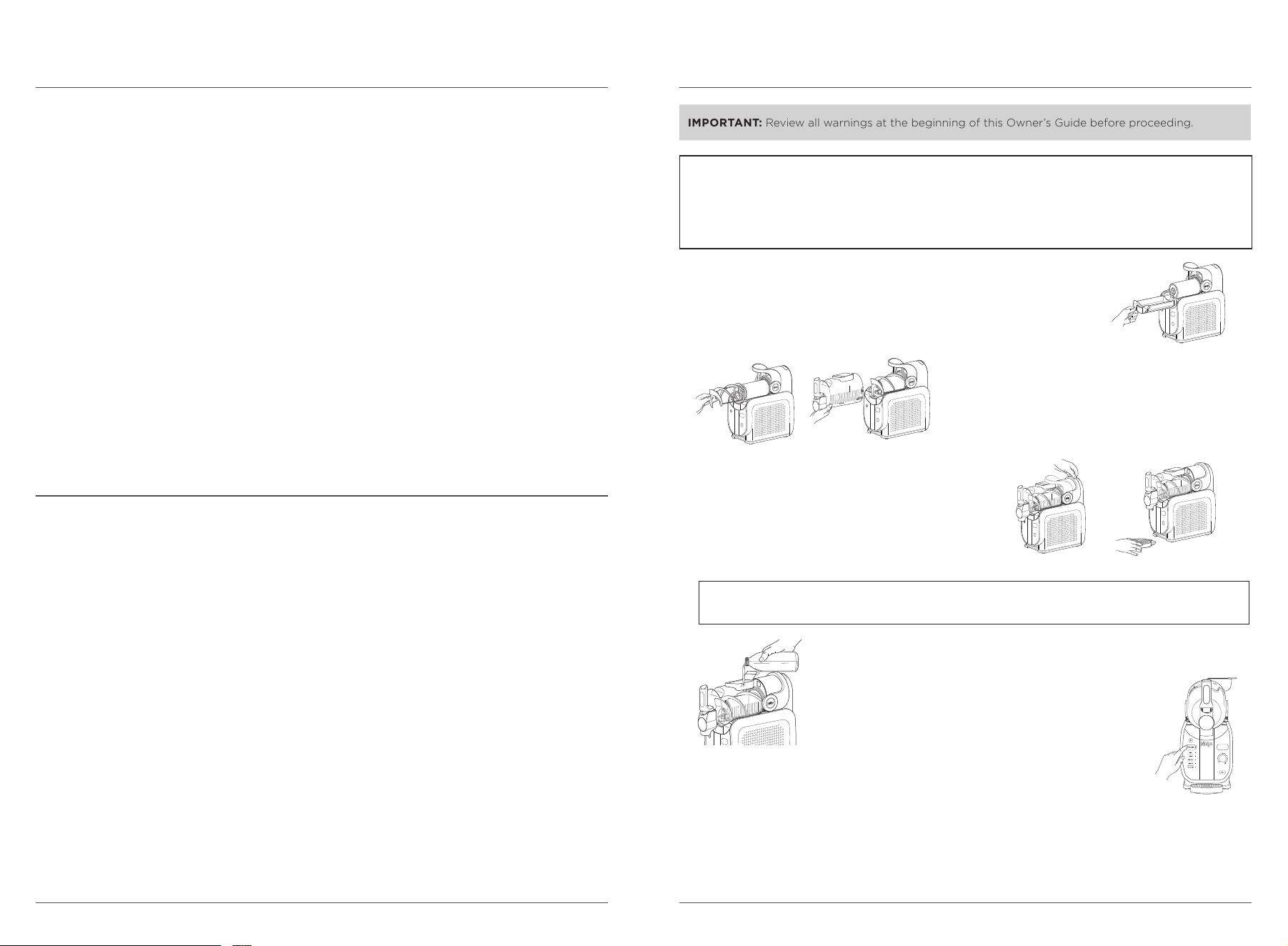
All inputs must contain at least 4.5% sugar.
SUGAR GUIDELINES
Refer to drink/liquid nutrition label to ensure sugar content meets the recommended
minimums below:
Nutrition Facts
8 Servings per container
Serving size 8 fl oz (240 ml)
Amount per serving
Calories
120
% Daily Value*
Total Fat 0g 0%
Sodium 25mg 1%
Total Carbohydrate 31g 11%
Total Sugars 26g
Protein 0g
Potassium 251mg 6%
Vitamin C 108mg 120%
Not a signicant source of saturated fat, trans fat, cholesterol,
dietary ber, added sugars, vitamin D, calcium and iron.
* The % Daily Value (DV) tells you how much a nutrient in a
serving of food contributes to a daily diet. 2,000 calories a day
is used for general nutrition advice.
Serving Size
Total Sugars
(26 g meets the minimum requirements)
EXAMPLE: Apple juice
SERVING SIZE Minimum Total Sugar Amount
8 oz (240 ml) 11 g
12 oz (355 ml) 16 g
20 oz (591 ml) 26 g
TROUBLESHOOTING TIPS
Low-sugar alert: “ADD SUGAR” LED will illuminate on the top right screen of the control panel when
sugar content is too low. Unit will continue to beep when error occurs for 15 minutes until the error is
resolved.
To fix low sugar: Add 2 tablespoons simple syrup, flavored syrup, allulose syrup (diet/low sugar drinks),
honey, agave nectar, maple syrup, or grenadine per 8 oz liquid. Or if using granulated sugar, coconut
sugar, or date sugar, dispense 8 oz liquid into separate container and mix to dissolve before retuning
liquid to vessel. If at MAX FILL, dispense and extra 8 oz liquid to account for the addition and set aside.
Press program again to clear error and continue slushing.
NOTE: Pre-frozen ingredients taste sweeter. Worried your drink might be too sweet? Don’t worry, it
won’t taste as sweet after you freeze and slush it into a frozen drink.
NOTE: Sugar-free substitutes or artificial sweeteners will not aid in meeting total minimum or
maximum sugar requirements.
ALCOHOL GUIDELINES
Ninja SLUSHi MAX unlocks colder temperatures, which enable drinks with higher alcohol contents to
slush. Use SLUSHASSIST™ for your favorite frozen cocktails at home. If using SPIKED preset, inputs must
contain between 2.8% and 15% ABV. If using SPIKED MAX preset, inputs can contain up to 20% ABV.
HARD ALCOHOL/SPIRIT GUIDELINES
To create frozen cocktails, see chart below for the maximum hard alcohol/spirit (vodka,
tequila, etc.) content per total recipe size.
Total Recipe Size Maximum Alcohol Amount
3
1
/2 cups (28 oz)
3
/4 cup (6 oz)
7 cups (56 oz) 1
1
/2 cups (12 oz)
10 cups (84 oz) 2
1
/4 cups (18 oz)
14 cups (112 oz) 3 cups (24 oz)
Chart above is a guide for incorporating hard alcohol/spirits (35% +) ONLY. When using other alcohols
such as wine, beer, seltzer, or premade cocktails, refer to the Inspiration Guide.
TROUBLESHOOTING TIPS
High-alcohol/high-sugar alert: If the alcohol and sugar content of the input is too high, the unit will detect
it and provide an alert. “ADD WATER” LED will illuminate on the top right screen of the control panel.
To fix high alcohol: Add 3 tablespoons water per 8 oz to the vessel (2
1
/4 cups per 112 oz). After you have
added water, press program again to clear error and continue slushing.
TIPS
• When using light or lower-sugar drink mixes, omit water from the recipe and replace with additional
light drink mix in the equal amount.
• When using premade mixes containing alcohol, omit addition of alcohol from chart instructions and
replace with additional drink mix in equal amount.
• When using full-sugar premade mixes with blender instructions, use
1
/2 the amount of ice
recommended on package instructions in the form of water (e.g., 1 cup ice =
1
/2 cup water).
• When using light-sugar premade mixes with blender instructions, use
1
/4 the amount of ice
recommended on package instructions in the form of water (e.g., 1 cup ice =
1
/4 cup water).
ninjakitchen.com
ninjakitchen.com
TIPS & TRICKS
• Keep unit upright for at least 2 hours before first use.
• DO NOT add hot ingredients.
• DO NOT add ice or solid ingredients like fruit, ice cream, or frozen fruit.
• Pre-frozen ingredients taste sweeter. Worried your drink might be too sweet? Don’t worry, it won’t
taste as sweet after you freeze and slush it into a frozen drink.
• All inputs must include at least 4.5% sugar.
• When using the SPIKED preset, all inputs must contain between 2.8% and 15% alcohol.
• When using SPIKED MAX preset, all inputs must contain between 2.8% and 20% alcohol.
• For best results, chill liquid(s) or blended ingredients before adding to the unit.
• For the frostiest results, chill serving glasses before dispensing your frozen drink.
• For your ideal frozen drink texture, use the temperature control dial to adjust.
• When using the Milkshake preset, dispense contents within 30 minutes of the preset ending to avoid a
foamy output.
• For the best dispensing experience, fill the unit to the max-fill line (112 oz) and ensure the dispense
handle is fully extended for maximum liquid dispensing.
• You can run the unit up to 12 hours.
• When dispensing liquid from the RINSE feature, gradually pull the dispense handle for the liquid
dispense flow. Do not open the dispense nozzle fully unless you are pouring into a large, open
container to avoid overspill.
• All parts except the motor base, including the evaporator, are dishwasher safe but should NOT be
cleaned with a heated dry cycle. Do not force parts in dishwasher if the dishwasher cavity is too small.
Hand-wash the parts if this occurs.
Minimum input = 3 cups (24 oz) Maximum input = 14 cups (112 oz)
This is NOT a blender.
DO NOT process a solid block of ice or ice cubes.
DO NOT make a smoothie or process hard, loose ingredients.
DO NOT attempt to blend or macerate non-liquid ingredients.
USING THE NINJA SLUSHI™ MAX
FROZEN DRINK MAKER
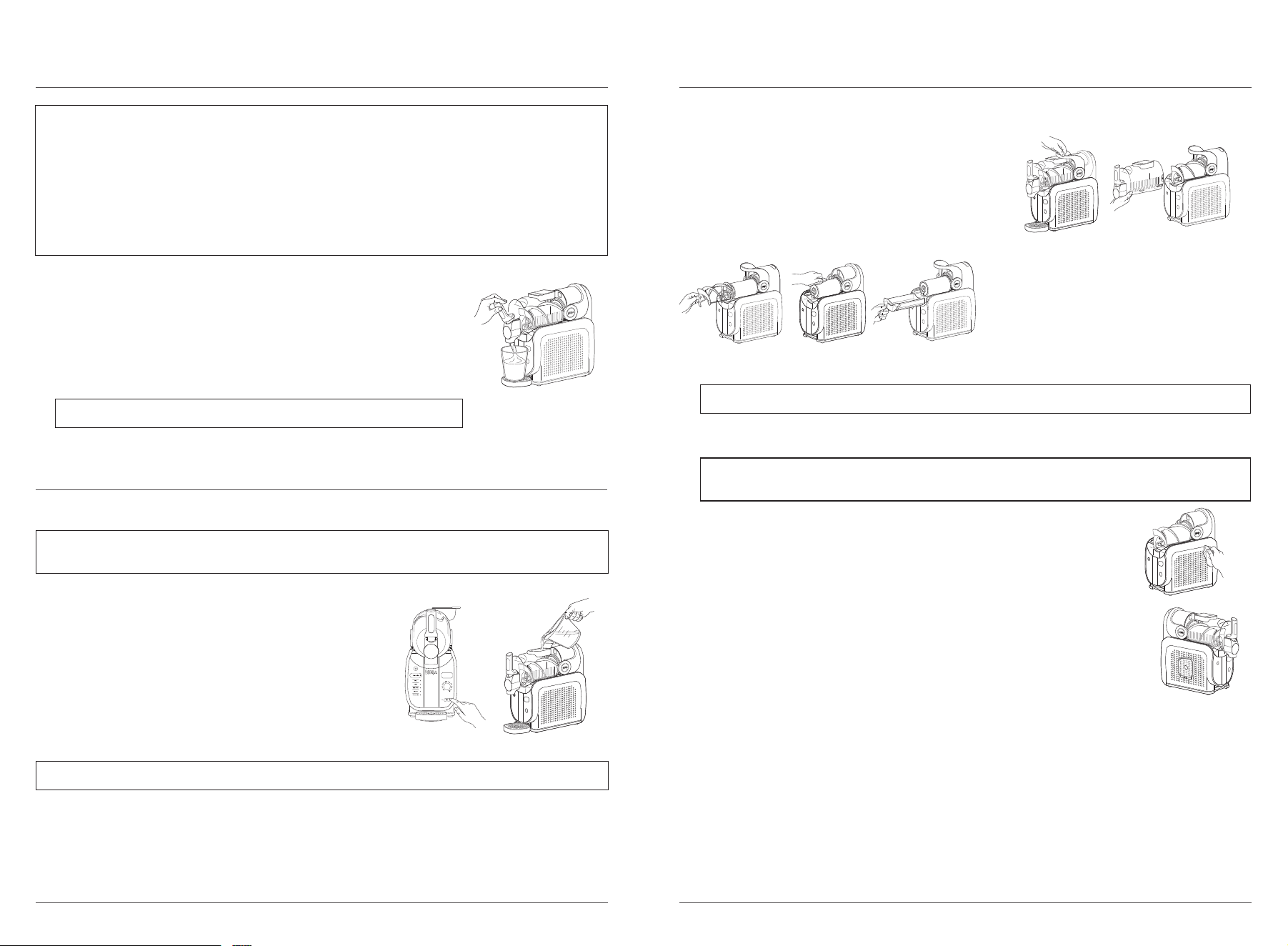
1 Ensure all parts are fully cleaned and the motor base is level on a flat,
solid surface.
2 Install the condensation catch under the evaporator by sliding it into the
rail grooves.
IMPORTANT: Review all warnings at the beginning of this Owner’s Guide before proceeding.
3 Install the auger by sliding it over the evaporator and
rotating until it fits into place on the pin.
4 With the bail handle up, slide the vessel over the
installed auger and evaporator.
5 Lock the vessel in place by pushing the bail handle
back to seal the vessel.
6 Insert the drip tray in front of the motor base until it
clicks in place.
7 Plug in the unit.
8 Open the cover on the top of the vessel.
9 Add liquid(s) and/or blended ingredients through
the easy-fill port and close the cover. To prevent leaking
and spills, ensure the vessel is locked in place before
adding liquid(s) to the vessel.
10 Press the power button to turn the unit on.
11 Choose your desired preset.
12 When SLUSHASSIST™ is selected, all LEDs will illuminate blue, and “SLUSHASSIST”
and “SENSING” will appear in the top right corner of the control panel display. The
temperature dial will rotate clockwise while sensing until the unit determines the
temperature needed for the output. Determined temperature is indicated by a solid
LED on the temperature settings.
If a preset is selected, temperature is automatically set to the predetermined temperature and
slushing will begin.
NOTE: Make sure the unit has been sitting upright on the countertop for at least 2 hours before first
use, so the refrigerant can settle in the condenser for optimal and safe use.
NOTE:
• Minimum 24-oz input required for using the unit.
• Maximum 112-oz liquid capacity.
• DO NOT add ice or solid ingredients like fruit, ice cream, or frozen fruit.
• DO NOT add hot ingredients.
Add
water
Add
sugar
Sensing
Slush Assist
Enjoy
ninjakitchen.com
ninjakitchen.com
13 Unit will beep, LEDs will remain solid, and “ENJOY” will appear on
display screen once frozen drink reaches temperature.
14 Place a cup on the drip tray, under the handle.
15 To dispense slush, slowly pull the handle. To stop, release the
handle back in place.
16 Enjoy your latest frozen drink creation.
17 Run the unit up to 12 hours.
NOTE:
• Temperature Control Setting LEDs will pulse while frozen drink is freezing to the set temperature level.
Once frozen drink reaches the desired temperature, LEDs will remain .solid, the unit will beep and
“ENJOY” appears on the control panel. Unit will continue running to keep your frozen drink at the ideal
temperature and be ready to dispense.
• Creating drinks can take up to 15–60 minutes depending on ingredients, volume, and starting
temperature.
• Pre-frozen ingredients taste sweeter. Worried your drink might be too sweet? Don’t worry, it won’t
taste as sweet after you freeze and slush it into a frozen drink.
NOTE: DO NOT turn o preset until all frozen drink has been dispensed.
USING THE NINJA SLUSHI™ MAX
FROZEN DRINK MAKER – CONT.
7 Hand-wash all parts in warm, soapy water, or use a dishwasher. If needed, repeat until all parts are
fully clean.
8 Wipe down the motor base with a sanitized or warm, damp cloth.
9 Allow all parts to dry thoroughly before reassembling and/or storing the unit.
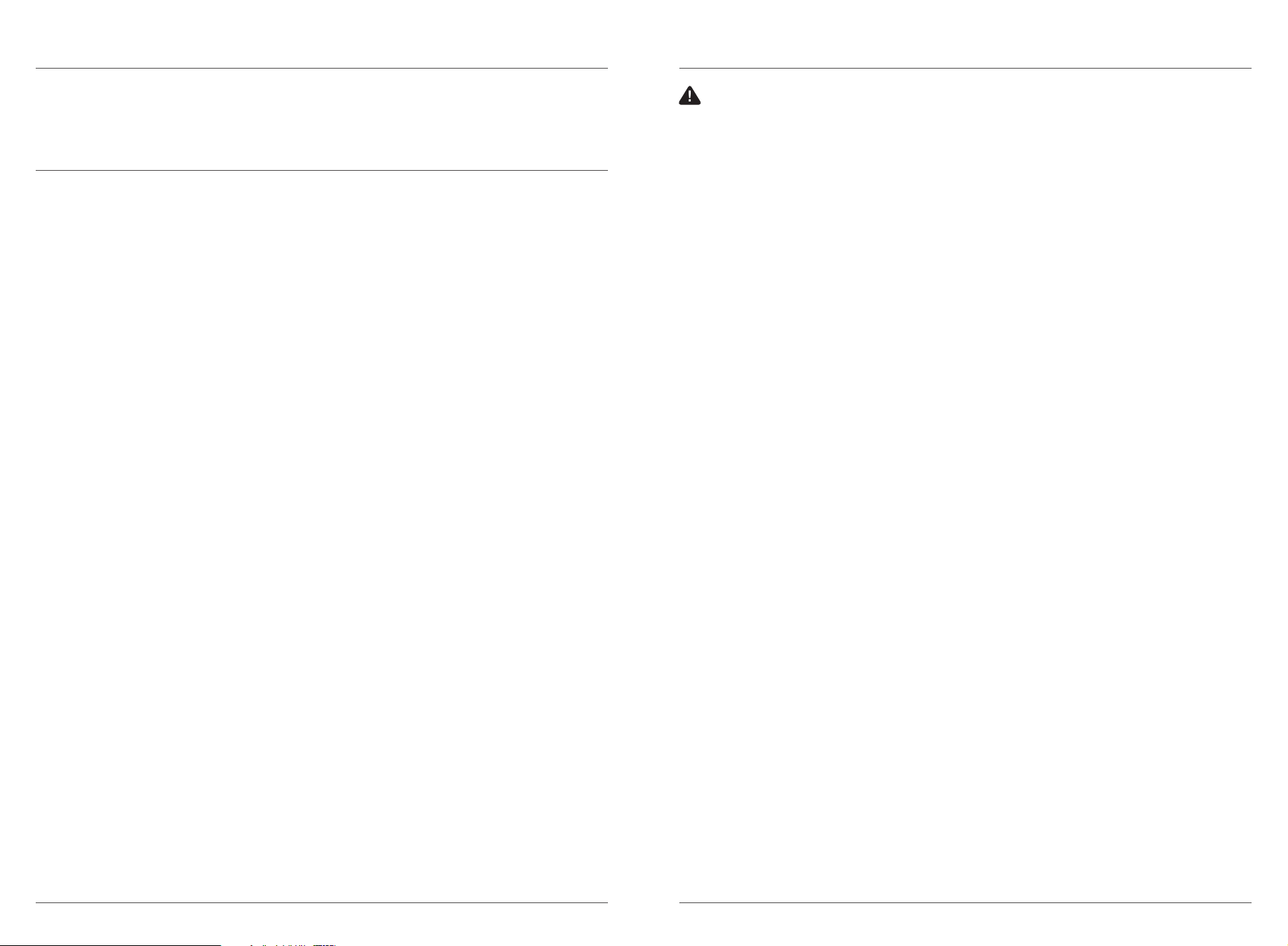
DISASSEMBLY & CLEANING
For best results, use the Rinse cycle before disassembling and cleaning all parts.
CARE & MAINTENANCE – CONT.
This cycle agitates, without cooling, to rinse the unit. After using the RINSE cycle, wash all parts
by hand or in a dishwasher to fully clean the unit after each use.
1 Dispense any remaining frozen drink.
2 Stop the current preset. Press the RINSE button.
3 Add warm water up to the vessel’s max fill line (112 oz).
4 Slowly dispense the water from the unit and repeat as needed
with clean water until it runs clear.
5 Stop Rinse cycle by pressing the RINSE button again and
leave vessel cover open to air-dry.
6 Press the power button to turn the unit o.
USING THE RINSE CYCLE
1 Unlock the bail handle by pulling forward and remove the
vessel by gently pulling it o the unit. Ensure the vessel is
tipped downward to prevent remaining liquid from spilling
out the back of the vessel. Set aside.
2 Slide the auger o the evaporator. Set aside.
3 Wipe down the evaporator with a sanitized
or warm, damp cloth.
4 Gently slide the condensation catch out of
the unit, since there may be residual liquid in
the condensation catch. Set aside.
5 Wipe down unit underneath the evaporator
with a sanitized or warm, damp cloth.
6 If needed, remove the drip tray and/or
spout shroud.
Add
water
Add
sugar
Sensing
Slush Assist
Enjoy
NOTE: Liquids from rinsing will dispense quickly from vessel pour spout. Ensure you use a large
cup or bowl to capture this liquid.
NOTE: If needed, repeat until all remaining frozen drink is rinsed o the evaporator.
CARE & MAINTENANCE
STORING
For cord storage, wrap cord with the hook-and-loop fastener near the back of the
motor base. DO NOT wrap the cord around the bottom of the base. Store the unit
upright and store all parts assembled. Store the drip tray on the left side of the unit
by hanging it in place. When moving the unit, lift from the bottom of the motor base.
DO NOT store ingredients inside the vessel.
RESETTING THE MOTOR
This unit features a unique safety system that prevents damage to the motor and drive system should
you inadvertently overload it. If the unit is overloaded, the motor will be temporarily disabled. Should
this occur, follow the reset procedure below.
1 Unplug the unit from the electrical outlet.
2 Allow the unit to cool for approximately 15 minutes.
3 Remove all parts and accessories. Ensure no ingredients are jamming the auger.
IMPORTANT: Ensure that maximum capacity is not exceeded. This is the most typical cause of appliance
overload.
DO NOT process a solid block of ice or ice cubes. DO NOT make a smoothie or process hard, loose ingredients.
If your unit needs servicing, please call Customer Service at 1-877-646-5288. So we may better assist you,
please register your product online at registeryourninja.com and have the product on hand when you call.
NOTE: Drip tray cover can be removed for easy cleaning.
NOTE: All parts, except the motor base, including the evaporator, are dishwasher safe, but
should NOT be cleaned with a heated dry cycle.
ninjakitchen.com
ninjakitchen.com
PRODUCT REGISTRATION
Please visit registeryourninja.com to register your new Ninja product within ten (10) days of purchase.
You will be asked to provide the store name, date of purchase, and model number along with your name
and address.
The registration will enable us to contact you in the unlikely event of a product safety notification. By
registering, you acknowledge you have read and understood the instructions for use and warnings set
forth in the accompanying instructions.
To order additional parts and attachments, visit ninjaaccessories.com.
ORDERING REPLACEMENT PARTS TROUBLESHOOTING GUIDE
Unit is dicult to remove from counter for storage.
• Place your hands underneath both sides of the motor base and gently pull the unit up and toward you.
Can I add frozen fruit or ice?
• No. DO NOT add frozen ingredients or ice when using this unit.
Vessel not installed alert: If the vessel is not installed correctly, the unit will detect it and provide an
alert. All preset LEDs will flash.
• To prevent leaking and spills, ensure the vessel is empty before assembling or disassembling onto the
motor base. With the bail handle up, slide the vessel over the installed auger and evaporator.
• Lock the vessel in place by pushing the bail handle back to seal the vessel.
• Press the Power button to turn unit on, and the preset LEDs will illuminate, indicating the unit is
ready for use.
Low-sugar alert: If the sugar content of the input is too low, the unit will detect it and provide an
alert. “ADD SUGAR” LED will illuminate in the top right corner of the control panel. The unit will beep
every minute for 15 minutes.
• Check the sugar content in your recipe to ensure it contains at least 4.5% sugar.
• If using a premade beverage, check the ingredient list to ensure the sugar content is at least 4.5%
and ensure the beverage doesn’t include artificial sweeteners. Refer to the Required Sugar Content
section for more details.
• If a drink does not meet minimum requirements of total sugar, add 2 tablespoons flavored syrup,
sugar, date sugar, coconut sugar, maple syrup, agave, simple syrup, or honey per serving (8 oz).
• Restart the unit by pressing the preset again.
High-alcohol/high-sugar alert: If the alcohol and sugar content of the input is too high, the unit will
detect it and provide an alert. “ADD WATER” LED will illuminate in the top right corner of the control
panel. The unit will beep every minute for 15 minutes.
• If using SPIKED, check the alcohol content in your recipe to ensure it contains between 2.8% and 16%
alcohol or use SLUSHASSIST™. If using MAX SPIKED, check the alcohol content in your recipe to
ensure it contains between 2.8% and 20% alcohol or use SLUSHASSIST.
• If using hard alcohol/spirits (35%+), use 4 oz for every 24 oz of total recipe size. Refer to the Alcohol
Guidelines section for more details.
• If a drink exceeds the maximum alcohol amount, add 3 tablespoons water per serving (8 oz) to dilute
the input.
• Reset the unit by pressing the preset. Restart by pressing the preset again to resume creating your
frozen drink.
Motor stall alert: If the motor stalls while running, the unit will detect it and provide an alert. Every
Temperature Control LED will flash, and the unit will beep every minute for 15 minutes.
• This unit features a unique safety system that prevents damage to the motor and drive system
should you inadvertently overload it. If the unit is overloaded, the motor will be temporarily disabled.
• Unplug the unit from the electrical outlet.
• Allow the unit to cool for approximately 15 minutes.
• Remove all parts and accessories. Ensure no ingredients are jamming the auger.
• Plug in the unit again and reassemble all parts to resume unit use.
If the auger stops and the unit flashes “SENSING”, allow the unit to complete its process and do not
intervene. The unit will correct itself after this behavior.
Unit failure alert: If the unit fails, the unit will detect it and provide an alert. Every other Temperature
Control LED will flash alternately, and the unit will beep every minute for 15 minutes.
• If the unit fails, please call Customer Service at 1-877-646-5288.
Unit sideways alert: If the unit is on its side during use, the unit will detect it and provide an alert.
The top 5 and bottom 5 Temperature Control LEDs will flash alternately, and the unit will beep every
minute for 15 minutes.
• Place the unit upright and let it stand for at least 2 hours before using.
WARNING: To reduce the risk of shock and unintended operation, turn power o
and unplug unit before troubleshooting.
NOTES
ninjakitchen.com
ninjakitchen.com
The One (1) Year Limited Warranty applies to purchases made from authorized retailers of
SharkNinja Operating LLC. Warranty coverage applies to the original owner and to the original product
only and is not transferable.
SharkNinja warrants that the unit shall be free from defects in material and workmanship for a period
of one (1) year from the date of purchase when it is used under normal household conditions and
maintained according to the requirements outlined in the Owner’s Guide, subject to the following
conditions and exclusions:
What is covered by this warranty?
1. The original unit and/or non-wearable parts deemed defective, in SharkNinja’s sole discretion,
will be repaired or replaced up to one (1) year from the original purchase date.
2. In the event a replacement unit is issued, the warranty coverage ends six (6) months following the
receipt date of the replacement unit or the remainder of the existing warranty, whichever is later.
SharkNinja reserves the right to replace the unit with one of equal or greater value.
California Residents Only: The One (1) Year Limited Warranty period begins on the original date of
delivery or pickup.
What is not covered by this warranty?
1. Normal wear and tear of wearable parts (such as blending vessels, lids, cups, blades, blender
bases, removable pots, racks, pans, etc.), which require regular maintenance and/or replacement
to ensure the proper functioning of your unit, are not covered by this warranty. Replacement parts
are available for purchase at ninjaaccessories.com.
2. Any unit that has been tampered with or used for commercial purposes.
3. Damage caused by misuse, abuse, negligent handling, failure to perform required maintenance
(e.g., failure to keep the well of the motor base clear of food spills and other debris), or damage
due to mishandling in transit.
4. Consequential and incidental damages.
5. Defects caused by repair persons not authorized by SharkNinja. These defects include damages
caused in the process of shipping, altering, or repairing the SharkNinja product (or any of its parts)
when the repair is performed by a repair person not authorized by SharkNinja.
6. Products purchased, used, or operated outside North America.
How to get service
If your appliance fails to operate properly while in use under normal household conditions within the
warranty period, visit ninjakitchen.com/support for product care and maintenance self-help. Our
Customer Service Specialists are also available at 1-877-646-5288 to assist with product support and
warranty service options, including the possibility of upgrading to our VIP warranty service options
for select product categories. So we may better assist you, please register your product online at
registeryourninja.com and have the product on hand when you call.
SharkNinja will cover the cost for the customer to send in the unit to us for repair or replacement. A fee
of $20.95 (subject to change) will be charged when SharkNinja ships the repaired or replacement unit.
How to initiate a warranty claim
You must call 1-877-646-5288 to initiate a warranty claim. You will need the receipt as proof of purchase.
We also ask that you register your product online at registeryourninja.com and have the product on
hand when you call, so we may better assist you. A Customer Service Specialist will provide you with
return and packing instruction information.
How state law applies
This warranty gives you specifi c legal rights, and you also may have other rights that vary from state
to state. Some states do not permit the exclusion or limitation of incidental or consequential damages,
so the above may not apply to you.
ONE (1) YEAR LIMITED WARRANTY
NJA_1_YR_IB_LMTD_WRNTY_US_ENG
SharkNinja Operating LLC
US: Needham, MA 02494
CAN: Ville St-Laurent, QC H4S 1A7
1-877-646-5288
ninjakitchen.com
Illustrations may dier from actual product. We are constantly striving to improve our products,
therefore the specifications contained herein are subject to change withoutnotice.
NINJA SLUSHI and SLUSHASSIST are trademarks of SharkNinja Operating LLC.
This product may be covered by one or more U.S. patents.
See sharkninja.com/patents for more information.
© 2025 SharkNinja Operating LLC
FS605Series_IB_MP_Mv12
TECHNICAL SPECIFICATIONS
Voltage: 120V~, 60Hz
Power: 490 Watts
RECORD THIS INFORMATION
Model Number: ____________________
Serial Number: _____________________
Date of Purchase: ___________________
(Keep receipt)
Store of Purchase: __________________
REGISTER YOUR PURCHASE
registeryourninja.com
Scan QR code using mobile device
@ninjakitchen