In-Wall
Smart
Dimmer
All brand names shown are trademarks of
their respective owners
MADE IN CHINA/HECHO EN CHINA
Distributed by Jasco Products Company LLC,
10 E. Memorial Rd., Oklahoma City, OK 73114.
©JASCO 2020 | ZW3010 | 39351 | 09/02/20 v4
Z-Wave® certified
wireless lighting control
39351
ZW3010
For deals, to register
your purchase and to
tell us how we’re
doing, simply scan
the code or visit
byjasco.com/deals
Instructions made easy
Read instructions or
watch easy-to-follow
video. Scan code or visit
byjasco.com/39351i
Thank you for your purchase!
Like our product?
Leave a review
on amazon.com
Having problems?
Let us know how
we can help.
1-800-654-8483
between 7AM-8PM,
M-F, Central Time.
For additional UltraPro
products, visit our website.
www.ezzwave.com
WARRANTY
Jasco Products Company warrants this product to be free from manufacturing defects for five years
from the original date of consumer purchase. This warranty is limited to the repair or replacement of
this product only and does not extend to consequential or incidental damage to other products that
may be used with this product. This warranty is in lieu of all other warranties, expressed or implied.
Some states do not allow limitations on how long an implied warranty lasts or permit the exclusion or
limitation of incidental or consequential damage, so the above limitations may not apply to you. This
warranty gives you specific rights and you may also have other rights which vary from state to state.
Please contact our U.S.-based Consumer Care at 1-800-654-8483 (option 1) between 7AM – 8PM, M-F,
Central Time or www.byjasco.com if the unit should prove defective within the warranty period.
2. INSTALLATION (CONT.)
2. INSTALLATION
1. FEATURES
SPECIFICATIONS - IMPORTANT!
ZW3010
Power: 120VAC, 60Hz
Signal (frequency): 908.4/916MHz
Maximum loads: 1-gang 600W, 2-gang 500W or 3-gang 400W incandescent, 300W dimmable
CFL/LED
Range: Up to 150ft. line of sight between the wireless controller and the closest Z-Wave receiver module
Operating temperature range: 32-104° F (0-40° C)
Type 1 enclosure, independently mounted (vertical position only), operating control: type 1.c action,
pollution degree (2), rated impulse voltage (2500V), software class A
For indoor use only
Specifications subject to change without notice due to continuing product improvement
Z-WAVE INTEROPERABILITY
This product can be included and operated in any Z-Wave network with other Z-Wave certified
devices from other manufacturers and/or other applications. All non-battery operated nodes within
the network will act as repeaters regardless of vendor to increase reliability of the network.
WARNING
RISK OF FIRE
RISK OF ELECTRICAL SHOCK
RISK OF BURNS
CONTROLLING APPLIANCES
CAUTION: TO REDUCE THE RISK OF
OVERHEATING AND POSSIBLE
DAMAGE TO OTHER EQUIPMENT,
DO NOT INSTALL TO CONTROL A
RECEPTACLE, A MOTOR-OPERATED
APPLIANCE, FLUORESCENT
LIGHTING FIXTURE OR
TRANSFORMER-SUPPLIED
APPLIANCE.
• ONLY USE TO CONTROL
INCANDESCENT OR DIMMABLE
CFL/LED BULBS
• DO NOT EXCEED RATINGS
• DO NOT USE TO CONTROL ANY
DEVICE WHERE UNINTENDED
OPERATION COULD CAUSE
UNSAFE CONDITIONS (HEAT
LAMP, SUN LAMP, ETC.)
• FOR INDOOR USE ONLY
NOT FOR USE WITH MEDICAL
OR LIFE-SUPPORT EQUIPMENT
Z-Wave enabled devices should
never be used to supply power to
or control the ON/OFF status of
medical and life-support
equipment.
FCC/IC
This device complies with Part 15 of the FCC and Industry Canada license-exempt RSS
standards. Operation is subject to the following two conditions: (1) this device may not
cause harmful interference, and (2) this device must accept any interference received,
including interference that may cause undesired operation.
FCC NOTE: The manufacturer is not responsible for any radio or TV interference caused
by unauthorized modifications to this equipment. Such modifications could void the
user’s authority to operate the equipment
NOTE: This equipment has been tested and found to comply with the limits for a Class B
digital device, pursuant to Part 15 of the FCC Rules. These limits are designed to provide
reasonable protection against harmful interference in a residential installation. This
equipment generates, uses and can radiate radio frequency energy, and if not installed
and used in accordance with the instructions, may cause harmful interference to radio
communications. However, there is no guarantee interference will not occur in a particular
installation. If this equipment does cause harmful interference to radio or television
reception, which can be determined by turning the equipment o and on, the user is
encouraged to try to correct the interference by one or more of the following measures:
• Reorient or relocate the receiving antenna.
• Increase the separation between the equipment and receiver.
• Connect the equipment into an outlet on a circuit dierent to which the receiver is
connected.
• Consult the dealer or an experienced radio/TV technician for help.
Important note: To comply with the FCC RF exposure compliance requirements, no
change to the antenna or the device is permitted. Any change to the antenna or the
device could result in the device exceeding the RF exposure requirements and void user’s
authority to operate the device.
Responsible Party - US Contact Information
FCC — U2ZZW3010 | IC: 6924A-ZW3010
Jasco Products Company | Model: ZW3010/39351
10 E. Memorial Rd., Oklahoma City, OK 73114 | 1-800-654-8483
CAN ICES-3(B)/NMB-3(B)
CHANGING THE COLOR OF THE PADDLE
NOTE: Additional colors available on
www.byjasco.com.
1. Lift the air gap tab at the base of the
paddle.
2. Push side tabs in on one side and
then the other to release paddle. Lift
the cover up and o.
3. Simply put the new paddle onto the
dimmer by inserting the air gap and
side tabs and snapping securely into place.
• May be used in single-pole installation or with up to four add-on switches
(model 39350) in 3-way or 4-way wiring configurations
• Compatible with all incandescent and most dimmable CFL/LED bulbs
• Auto line/load detection
• Blue LED indicates dimmer location in a dark room
• Screw terminal installation — requires wiring connections for line (hot), load,
neutral and ground. Traveler wire required for 3-way or 4-way installation
• This Z-Wave device has advanced features that allow you to customize
your experience. For a complete list of adjustable configurations, visit
www.ezzwave.com
3. CONNECTION
3. CONNECTION (CONT.)
OPTIONAL CUSTOMIZATION
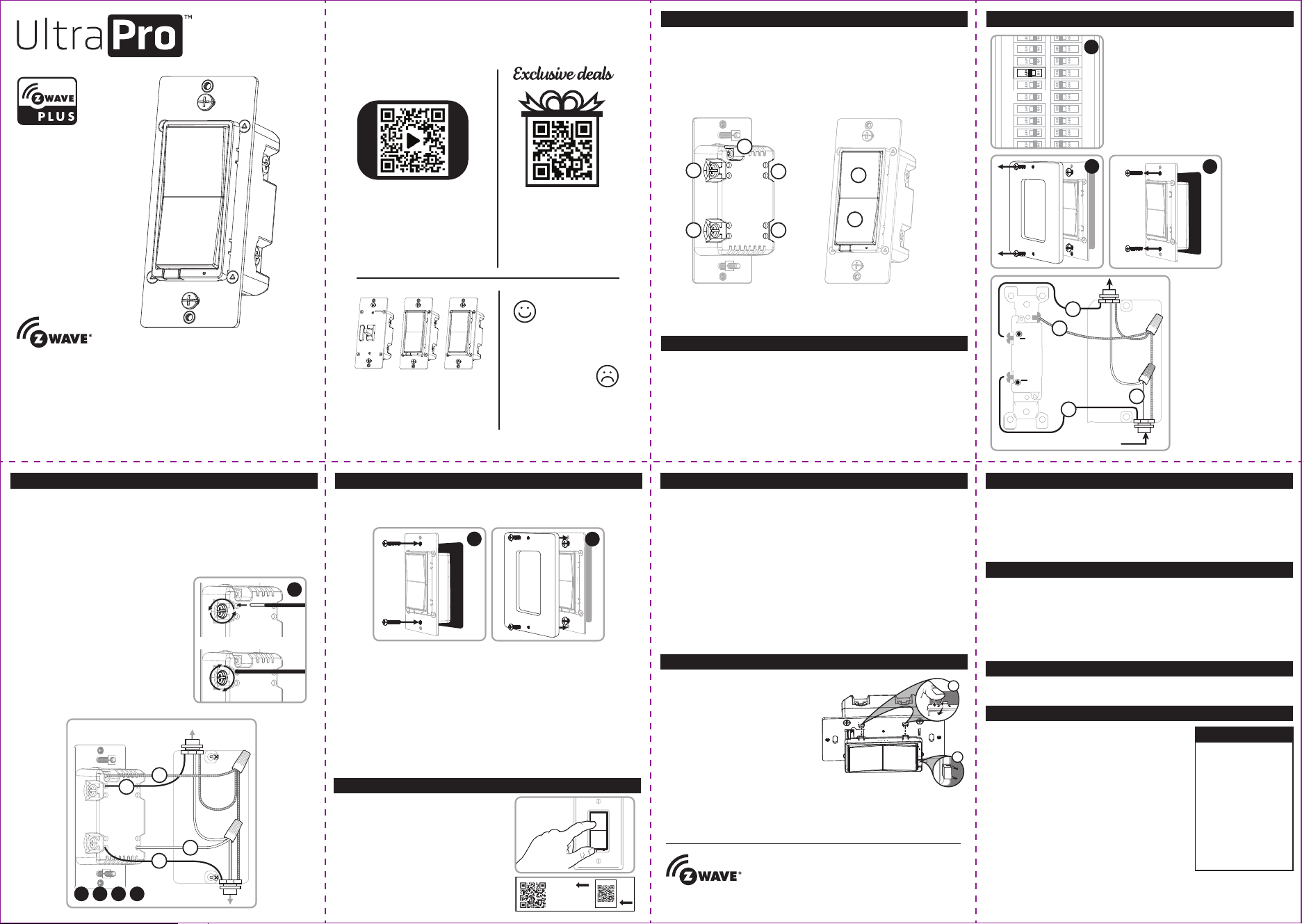
A. Ground (Green/Bare)
B. Line or Load (Black)
C. Line or Load (Black)
D. Traveler (Red/Other)
E. Neutral (White)
E. Top rocker — press & release to turn dimmer
ON, press & hold to increase brightness
F. Bottom rocker — press & release to turn
dimmer OFF, press & hold to dim
A
B
C E
D
F
G
This device supports Association Command Class (3 Groups)
• Association Group 1 supports Lifeline, Multilevel Switch Report,
Central Scene notification
• Association Group 2 supports Basic Set and is controlled by pressing
the ON or OFF button with the local load
• Association Group 3 supports Basic Set and is controlled by double
pressing the ON or OFF button
• Each Association Group supports 5 total nodes
1
2
WARNING — SHOCK HAZARD
Turn OFF the power to the branch circuit for the dimmer and lighting fixture at
the service panel. All wiring connections must be made with the POWER OFF to
avoid personal injury and/or damage to the dimmer. This device is intended for
installation in accordance with the National Electric Code and local regulations in
the United States or the Canadian Electrical Code and local regulations in Canada.
If you are unsure or uncomfortable about performing this installation, consult a
qualified electrician.
REMOVING AND RESETTING THE DEVICE
1. Follow the instructions for your Z-Wave certified controller to remove a
device from the Z-Wave network.
2.
Once the controller is ready to remove your device, press and release the top
or bottom of the smart dimmer (rocker).
RETURNING DIMMER TO FACTORY DEFAULTS
Quickly press ON (top) button three times, then, immediately press the OFF
(bottom) button three times. The LED will flash ON/OFF five times when
completed successfully.
NOTE: This should only be used in the event your network’s primary controller is
missing or otherwise inoperable.
NOTE: SmartStart enabled products can be added into a Z-Wave network by
scanning the QR code on the product with a controller providing SmartStart
inclusion. No further action is required and the SmartStart product will be added
automatically within 10 minutes of being switched on in the network vicinity.
Z-WAVE DSK
PIN: XXXXX
DSK :
XXXXX
-25651-22671
-26939-47599
-19612-25872
-47752
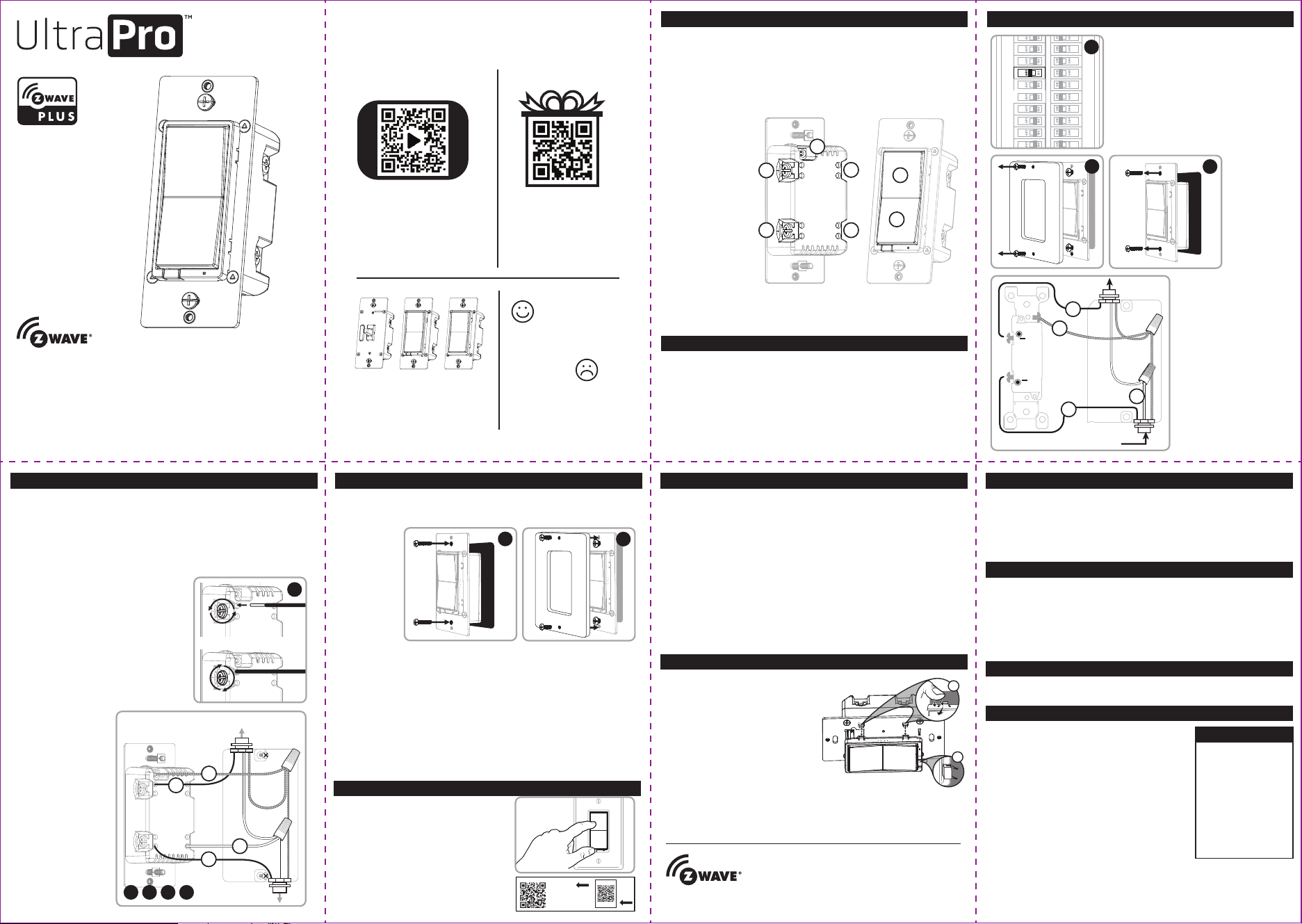
MULTI-SWITCH WIRING
Add-on switch model 39350 is required for
multi-switch installations. For more information
on multi-switch installations, refer to the add-on
switch manual.
SINGLE-SWITCH WIRING
1. Shut o power to the circuit at circuit breaker
or fuse box.
IMPORTANT! Verify power is OFF to switch box
before continuing.
2. Remove wallplate.
3. Remove the switch mounting screws.
4.
Carefully remove the switch
from the switch box. DO
NOT disconnect the wires.
5. There are up to five screw
terminals on the dimmer;
these are marked:
A. GROUND — Green/Bare
B. LINE OR LOAD — Black
(connected to power or
lighting)
C. LINE OR LOAD — Black
(connected to power or
lighting)
D. TRAVELER —
Red/Other (only in
3-way installations)
E. NEUTRAL — White
Match these screw terminals
to the wires connected to the
existing switch.
6. Disconnect the wires from the existing switch. Label wires according to the
previous terminal connection.
OBSERVE IMPORTANT WIRING INFORMATION
IMPORTANT! This dimmer is rated for and intended to only be used with copper wire.
WIRE GAUGE REQUIREMENTS
Use 14AWG or larger wires suitable for at least 80° C for supplying line (hot),
load, neutral, ground and traveler connections.
WIRE STRIP LENGTH
7. For attachment using the enclosure’s holes,
strip insulation 5/8in. (16mm). Do not wrap
wires around screws.
UL specifies the tightening torque for the
screws is 14Kgf-cm (12lbf-in).
8. Connect the green or bare copper ground
wire to the GROUND terminal (A).
9. Connect the black wire from the light to
either LINE/LOAD terminal (B).
10. Connect the black wire from the electrical
service panel (hot) to the other
LINE/LOAD terminal (C).
11. Connect the white wire to the neutral
terminal (E) (use a jumper wire if needed).
7
12. Insert dimmer into the switch box being careful not to pinch or crush wires.
13. Mount the wallplate.
14.
Reapply power to the circuit at fuse box or circuit breaker and test the system.
MANUAL CONTROL
The front panel rocker dimmer allows the user to turn ON/OFF the connected fixture.
1. To turn the connected fixture ON, press and release the top of the rocker.
2. To turn the connected fixture OFF, press and release the bottom of the rocker.
ADJUST DIM LEVELS
1. To increase brightness, press and hold the top of the rocker.
2. To decrease brightness, press and hold the bottom of the rocker.
CYCLE LED LIGHT
The LED below the dimmer acts as a guide light or status indicator.
How to cycle through options: Press up three times and down once quickly.
1. LED is ON when the load is OFF (guide light in the dark) (default).
2. LED is ON when the load is ON (indicates the dimmer is ON).
3. LED is always OFF.
4. LED is always ON (illuminates dimmer in the dark).
OUT TO
LIGHT (LOAD)
FROM
BREAKER BOX
Insert wires into holes, do not wrap
wires around screws.
Do not remove screws.
B
A
E
C
1
2
3
OUT TO
LIGHT (LOAD)
FROM
BREAKER BOX
B
A
E
C
8 9 10 11
CONNECTING TO A Z-WAVE NETWORK
1. Follow the instructions for your Z-Wave
certified controller to add a device to the
Z-Wave network.
2. Once the controller is ready to add your
device, press and release the top or
bottom of the smart dimmer (rocker).
If prompted by the controller to enter the S2
security code, refer to the QR code/security
number on the back of the box or the QR
code label on the product.
2. INSTALLATION (CONT.) 2. INSTALLATION (CONT.)
12
13
MULTI-SWITCH WIRING
Add-on switch model 39350 is required for
multi-switch installations. For more information
on multi-switch installations, refer to the add-on
switch manual.
SINGLE-SWITCH WIRING
1. Shut o power to the circuit at circuit breaker
or fuse box.
IMPORTANT! Verify power is OFF to switch box
before continuing.
2. Remove wallplate.
3. Remove the switch mounting screws.
4.
Carefully remove the switch
from the switch box. DO
NOT disconnect the wires.
5. There are up to five screw
terminals on the dimmer;
these are marked:
A. GROUND — Green/Bare
B. LINE OR LOAD — Black
(connected to power or
lighting)
C. LINE OR LOAD — Black
(connected to power or
lighting)
D. TRAVELER —
Red/Other (only in
3-way installations)
E. NEUTRAL — White
Match these screw terminals
to the wires connected to the
existing switch.
Interruptor
de pared
reductor
de luz
inteligente
Todas las marcas que aparecen aquí son marcas
registradas de sus respectivos dueños
HECHO EN CHINA
Distribuido por Jasco Products Company LLC,
10 E Memorial Rd., Oklahoma City, Oklahoma 73114.
©JASCO 2020 | ZW3010 | 39351 | 09/02/20 v4
39351
ZW3010
Lea las instrucciones o mire el
video con el paso a paso.
Escanee el código o visite
byjasco.com/39351i
GARANTÍA
Jasco Products garantiza que este producto está libre de defectos de fabricación durante un periodo
de dos años a partir de la fecha original de compra por parte del consumidor. Esta garantía se limita a
la reparación o sustitución de este producto solamente y no se extiende a daños derivados o
accidentales causados a otros productos que se usen con esta unidad. Esa garantía remplaza a todas
las demás garantías expresas o implícitas. Algunos estados no autorizan limitaciones en cuanto a la
duración de una garantía implícita ni permiten la exclusión o limitación por daños accidentales o
derivados; por lo tanto, puede que las anteriores limitaciones no apliquen en su caso. Esta garantía le
da a usted derechos específicos, y otros que usted puede tener y que varían según el estado en el que
usted reside. Si la unidad resultare defectuosa dentro del periodo de garantía, comuníquese por favor
con Atención al Cliente en el 855-698-8324 entre 7 y 20 h, Hora del Centro, o a través de nuestro sitio
de internet (www.byjasco.com).
2. INSTALACIÓN (CONT.)
2. INSTALACIÓN
1. CARACTERÍSTICAS
ESPECIFICACIONES - ¡IMPORTANTE!
ZW3010
Alimentación: 120VAC, 60Hz.
Señal (frecuencia): 908.4/916MHz
Cargas máximas: caja para 1 conexiones 600W, caja para 2 conexiones 500W, caja para 3 conexiones
400W sólo las lámparas incandescente 300W CFL/LED
Alcance: Hasta 150 pies (45,72m) en línea de visión directa entre el control remoto inalámbrico y el
módulo receptor Z-Wave más cercano
Rango de temperatura de funcionamiento: 0-40 °C (32-104 °F)
Recinto de tipo 1, independientemente montado (solo en posición vertical), acción tipo 1.c de control
de operación, grado de contaminación (2), voltaje de impulso nominal (2500V), software de clase A
Para uso en espacios interiores solamente
Especificaciones sujetas a cambio sin aviso debido a continuas mejoras del producto.
INTEROPERABILIDAD Z-WAVE
Este producto se puede incluir y puede funcionar en cualquier red Z-Wave con dispositivos de otros
fabricantes y otras aplicaciones que cuenten con la homologación Z-Wave. Todos los nodos que
formen parte de la red y que funcionen sin pilas actuarán de repetidores independientemente del
proveedor con el fin de aumentar la fiabilidad de la red.
ADVERTENCIA
RIESGO DE INCENDIO
RIESGO DE DESCARGA ELÉCTRICA
CONTROL DE EQUIPOS ELECTRODOMÉSTICOS
PRECAUCIÓN: A FIN DE DISMINUIR EL RIESGO DE
RECALENTAMIENTO Y DE POSIBLES DAÑOS EN
LOS DEMÁS EQUIPOS, NO INSTALAR PARA
CONTROLAR APARATOS QUE FUNCIONAN A
MOTOR, ARTEFACTOS DE ILUMINACIÓN DE LUZ
FLUORESCENTE O APARATOS ALIMENTADOS
CON TRANSFORMADORES.
• USAR EXCLUSIVAMENTE PARA CONTROLAR
BOMBILLAS CFL/LED INCANDESCENTES O
ATENUABLES
• NO SUPERE LOS VALORES NOMINALES
ELÉCTRICOS
• NO UTILICE PARA CONTROLAR NINGÚN
DISPOSITIVO DONDE UN FUNCIONAMIENTO
INESPERADO PODRÍA CAUSAR CONDICIONES
INSEGURAS (LÁMPARA DE CALOR, LÁMPARA
SOLAR, ETC.)
• USE SOLAMENTE EN INTERIORES
FCC/IC - ES
Este dispositivo cumple con las Especificaciones del apartado 15 de las normas de la FCC
y con las especificaciones de las normas radioeléctricas (RSS) del Ministerio de Industria
de Canadá aplicables a aparatos exentos de licencia. El funcionamiento está sujeto a las
siguientes dos condiciones: (1) este dispositivo no debe provocar interferencia perjudicial,
y (2) este dispositivo debe aceptar toda interferencia que reciba, incluso la que pudiera
causar un funcionamiento no deseado.
NOTA DE LA FCC: El fabricante no se hace responsable de ninguna interferencia de radio
o TV ocasionada por modificaciones no autorizadas efectuadas a este equipo. Dichas
modificaciones podrían anular la autoridad del usuario para utilizar el equipo.
NOTA: Este equipo ha sido probado y cumple con los límites para aparatos digitales de
Clase B, de conformidad con el apartado 15 de las normas de la FCC. Estos límites están
diseñados para proveer protección razonable contra interferencias perjudiciales en una
instalación residencial. Este equipo genera, usa y puede irradiar energía de
radiofrecuencias y, si no se instala y usa según las instrucciones, puede provocar
interferencia perjudicial a las radiocomunicaciones. No obstante, no hay garantías de que
no ocurrirá interferencia en una instalación en particular. Si este equipo provoca
interferencia perjudicial a la recepción de radio o televisión, lo que puede determinarse
encendiendo y apagando el equipo, se recomienda que el usuario intente corregir la
interferencia por medio de la implementación de una o más de las siguientes medidas:
• Reorientar o reubicar la antena receptora.
• Incrementar la separación entre el equipo y el receptor.
• Conectar el equipo a un tomacorriente de un circuito diferente del circuito al que está
conectado el receptor.
• Consultar al distribuidor o a un técnico con experiencia en radio/televisión para
solicitar asistencia.
NOTA IMPORTANTE: Para cumplir con los requisitos de cumplimiento de exposición de
radiofrecuencia de la FCC, no se permiten cambios a la antena o el dispositivo. Cualquier
cambio a la antena o dispositivo podría hacer que el dispositivo supere los
requerimientos de exposición de radiofrecuencia y anular la autoridad del usuario para
operar el dispositivo.
Parte responsable - Información de contacto de los Estados Unidos
FCC — U2ZZW3010 | IC: 6924A-ZW3010
Jasco Products Company | Model: ZW3010/39351
10 E. Memorial Rd., Oklahoma City, OK 73114 | 1-800-654-8483
CAN ICES-3(B)/NMB-3(B)
PARA CAMBIAR EL COLOR DE LA PALETA
NOTA: Colores adicionales disponibles
en www.byjasco.com.
1. Levante la presilla del entrehierro en
la base de la paleta.
2. Presione las presillas laterales
primero de un lado y luego del otro
para aflojar la paleta. Levántela y
sáquela.
3. Simplemente coloque la nueva
paleta sobre el interruptor al insertar el entrehierro y las
presillas laterales encajándolas bien en su lugar.
• Se puede utilizar en una instalación unipolar o hasta con cuatro interruptores
auxiliares (modelo 39350) en configuraciones de cableado de 3 o 4vías
• Compatible con todas las bombillas incandescentes y la mayoría de las
bombillas CFL/LED
• Detección de línea/carga automática
• Un LED azul indica la ubicación del interruptor en habitaciones oscuras
• Instalación de terminales de tornillo — requiere de conexiones de cables para
line (hot) (línea [con corriente]), load (carga), neutral (neutro) y ground
(tierra). Se requiere un cable puente para instalaciones de 3 o 4 vías.
• Este dispositivo
Z-Wave cuenta con
características
avanzadas que le
permiten personalizar
su experiencia.
Consulte la lista
integral de
configuraciones
ajustables en
www.ezzwave.com
3. CONEXIÓN
3. CONEXIÓN (CONT.)
PERSONALIZACIÓN OPCIONAL
A. Tierra (verde/pelado)
B. Línea o carga (negro)
C. Línea o carga (negro)
D. Puente (rojo/otro)
E. Neutro (blanco)
F. Interruptor basculante superior: presione y suelte para encender el
atenuador de luz y presione sin soltar para aumentar la intensidad de brillo.
G. Interruptor basculante inferior: presione y suelte para apagar el atenuador
de luz y presione sin soltar para atenuar.
A
B
C E
D
F
G
Este dispositivo es compatible con la Clase de comandos de asociación (3grupos)
• Grupo de asociación 1: es compatible con la red vital (Lifeline), informe de
interruptor de varios niveles, notificación de escena central
• Grupo de asociación 2: es compatible con el conjunto básico (Basic Set) y se
controla presionando el botón de encendido o apagado con la carga local.
• Grupo de asociación 3: es compatible con la configuración básica y, para
controlarlo, se presiona dos veces el botón de encendido/apagado.
• Cada grupo de asociación es compatible con un total de 5 nodos.
1
2
ADVERTENCIA— DESCARGA ELÉCTRICA
Interrumpa la alimentación al circuito derivado del interruptor y al accesorio de
iluminación desde el panel de servicio. Todas las conexiones de cableados deben
realizarse con el SUMINISTRO DE CORRIENTE INTERRUMPIDO para evitar
lesiones personales o daños al interruptor. Este dispositivo está diseñado para la
instalación conforme al Código de Normas de Electricidad y las reglamentaciones
locales en EE.UU. o el Código de Normas de Electricidad y las reglamentaciones
locales en Canadá. Si no está seguro o tiene dudas sobre cómo realizar la
instalación, contacte a un electricista profesional.
QUITAR Y RESTABLECER EL DISPOSITIVO
1. Siga las instrucciones provistas para su controlador Z-Wave homologado
para quitar un dispositivo de la red Z-Wave.
2. Una vez que el controlador esté listo para quitar su dispositivo, presione y
suelte la parte superior o inferior del atenuador inalámbrico inteligente
(interruptor basculante).
RESTABLECER LOS AJUSTES DE FÁBRICA DEL ATENUADOR DELUZ
Presione rápidamente el botón superior ON tres (3) veces y luego presione de
inmediato el botón inferior OFF tres (3) veces. La luz LED parpadeará ON/OFF
cinco (5) veces cuando se haya completado el proceso de forma exitosa.
NOTA: Realice esta acción solo en caso de que el controlador principal de su red
falte o no funcione.
NOTA: Los productos habilitados para SmartStart se pueden agregar a una red
Z-Wave escaneando el código QR de Z-Wave que se encuentra en el producto
con un controlador que ofrezca inclusión de SmartStart. No se requieren
acciones adicionales y el producto SmartStart se agregará automáticamente
dentro de 10 minutos de encenderlo en la proximidad de la red.
Z-WAVE DSK
PIN: XXXXX
DSK :
XXXXX
-25651-22671
-26939-47599
-19612-25872
-47752
CABLEADO DEL INTERRUPTOR MULTIFÁSICO
El interruptor auxiliar UltraPro modelo 39350 es
necesario para instalaciones múltiples vías. Para
obtener más información sobre instalaciones
múltiples vías, consulte el manual o la guía rápida
que viene con el interruptor auxiliar.
CABLEADO DEL INTERRUPTOR MONOFÁSICO
1. Interrumpa la alimentación al circuito desde el
panel de fusibles o el de cortacircuitos.
¡IMPORTANTE! Antes de continuar, compruebe
que se haya INTERRUMPIDO la alimentación
eléctrica a la caja del interruptor.
2. Retire la placa.
3. Retire los tornillos de soporte del interruptor.
4. Saque el interruptor de la caja
con cuidado. NO desconecte
los cables.
5. Hay hasta cinco terminales de
tornillo en el atenuador; están
marcados de la siguiente
manera:
A. GROUND (Tierra):
verde/pelado.
B. LINEA O CARGA (LINE OR
LOAD) — Negro
(conectado a la
alimentación o a la luz).
C. LINEA O CARGA (LINE OR
LOAD) — Negro
(conectado a la
alimentación o a la luz).
D. TRAVELER (Puente):
rojo/otro (solo en
instalaciones de 3vías).
E. NEUTRAL (Neutro—
blanco).
Haga corresponder estos terminales de tornillo con los cables conectados al
interruptor existente.
6. Desconecte los cables del interruptor existente. Tome la precaución de rotular
los cables según la conexión anterior al terminal.
OBSERVE LA SIGUIENTE INFORMACIÓN IMPORTANTE SOBRE EL CABLEADO
¡IMPORTANTE! Este atenuador de luz ha sido clasificado para uso exclusivo con
cables de cobre y está diseñado específicamente para ese tipo de cable.
REQUISITOS DE CALIBRE DEL CABLEADO
Use cables de 14AWG o superior que sean
adecuados para una temperatura de al menos
80° c para suministro de las conexiones line
(hot) (línea [con corriente]), load (carga),
neutral (neutro), ground (tierra) y traveler
(puente).
LONGITUD DE CABLE SIN AISLACIÓN
7.
Para conectar utilizando los orificios del
recinto: pelar 5/8 de pulgada del aislamiento
(16mm). No pase los cables alrededor de los
tornillos.
La norma de UL especifica que el par de
apriete de los tornillos debe ser de
14Kgf-cm (12lbf-in).
8. Conecte el cable de cobre verde o pelado
de conexión a tierra al terminal GROUND
(tierra) (A).
9. Conecte el cable
negro del dispositivo
de iluminación a
cualquiera de los
terminales marcados
LINE OR LOAD (línea
o carga) (B).
10. Conecte el cable
negro del panel de
servicio eléctrico
(hot) (con corriente)
a cualquiera de los
terminales marcados
LINE OR LOAD (línea
o carga) (C).
11. Conecte el cable
blanco al terminal
NEUTRAL (neutro)
(E) (use un cable
puente, de ser
necesario).
7
12. Introduzca el atenuador de luz en la caja del interruptor, con cuidado de no
comprimir o presionar los cables.
13. Instale la placa de pared.
14. Reanude el
suministro de
energía al
circuito desde
el panel de
fusibles o el de
cortacircuitos
y pruebe el
sistema.
CONTROL
MANUAL
El interruptor
basculante del
panel frontal
permite al usuario
ENCENDER/
APAGAR el accesorio conectado.
1. Para ENCENDER el dispositivo conectado, pulse y suelte la parte superior del interruptor basculante.
2. Para APAGAR el dispositivo conectado, pulse y suelte la parte inferior del interruptor basculante.
REGULACIÓN DE LA ATENUACIÓN
1. Para aumentar la intensidad del brillo, presione sin soltar la parte superior del interruptor basculante.
2. Para disminuir la intensidad del brillo, presione sin soltar la parte inferior del interruptor basculante.
CICLO DE LUZ LED
La luz LED que brilla debajo del atenuador de luz actúa como una luz guía o un indicador de estado.
Cómo alternar las opciones, pulse hacia arriba tres veces y luego hacia abajo una vez
rápidamente.
1. La luz LED está ENCENDIDA cuando la carga está APAGADA (luz guía en la oscuridad) (defecto).
2. La luz LED está ENCENDIDA cuando la carga está ENCENDIDA (indica que el atenuador
está ENCENDIDO).
3. La luz LED está APAGADA todo el tiempo.
4.
La luz LED siempre está ENCENDIDA (ilumina el atenuador en la oscuridad).
B
A
E
C
SALIDA AL
ACCESORIO DE
ILUMINACIÓN
(CARGA)
DESDE EL PANEL
DE CORTACIRCUITOS
Inserte los cables en los orificios, no pase
los cables alrededor de los tornillos.
No quite los tornillos.
1
2
3
B
A
D
C
SALIDA AL
ACCESORIO DE
ILUMINACIÓN
(CARGA)
DESDE EL PANEL
DE CORTACIRCUITOS
8 9 10 11
CONECTAR A UNA RED Z-WAVE
1. Siga las instrucciones provistas para su
controlador Z-Wave homologado para
agregar un dispositivo a la red Z-Wave.
2. Una vez que el controlador esté listo para
incluir su dispositivo, presione y suelte la
parte superior o inferior del atenuador
inalámbrico inteligente (interruptor
basculante).
Si el controlador indica que ingrese el código
de seguridad S2, consulte el código QR o el
número de seguridad que se encuentra
al dorso de la caja, o la etiqueta con el
código QR que se encuentra en el producto.
2. INSTALACIÓN (CONT.) 2. INSTALACIÓN (CONT.)
12
13
Para acceder a ofertas,
registrar su compra y
darnos su opinión sobre
nosotros, tan solo
escanee el código o visite
byjasco.com/deals
Instrucciones fáciles
¡Gracias por su compra!
¿Le gusta nuestro
producto?
Deje una reseña
en amazon.com
¿Tiene algún
problema?
Díganos cómo
podemos ayudar. Llame
al 1-800-654-8483, entre
las, 7 a.m. y las 8 p.m., hora
estándar del centro
Para ver más UltraPro
productos visite nuestro sitio
web
www.ezzwave.com
Ofertas exclusivas
Control inalámbrico para
iluminación certificado por Z-Wave®
SE PROHÍBE SU EMPLEO EN EQUIPO
MÉDICO O EQUIPO PARA EL
MANTENIMIENTO DE LAS FUNCIONES
VITALES
LOS DISPOSITIVOS Z-WAVE NUNCA SE
DEBEN USAR PARA SUMINISTRAR ENERGÍA
ELÉCTRICA, NI PARA CONTROLAR EL
ESTADO DE ENCENDIDO O APAGADO DEL
EQUIPO MÉDICO Y/O EL EQUIPO PARA EL
MANTENIMIENTO DE FUNCIONES VITALES.