1 2
3 4 5 6
7 8 9
User Manual
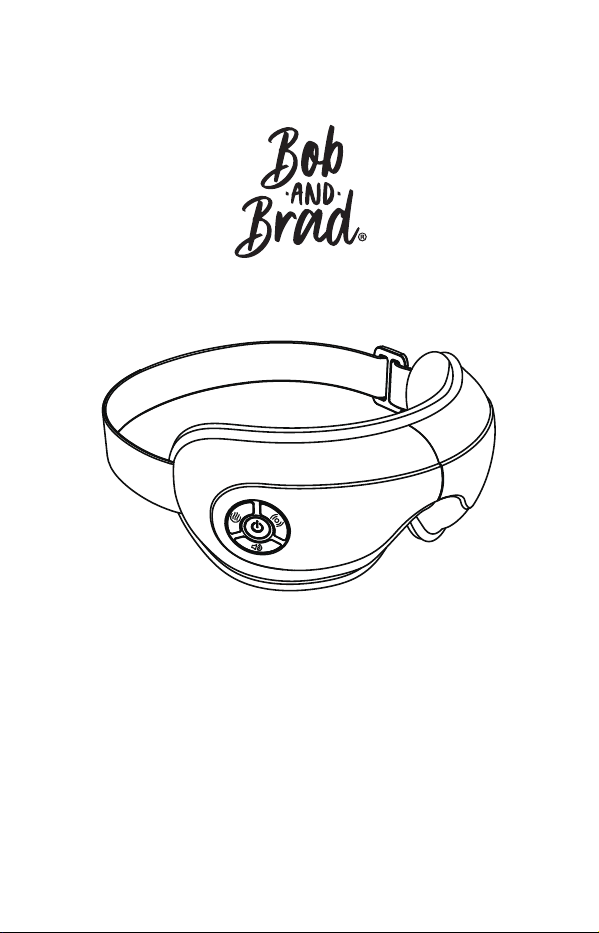
Eye Massager
Model: EM-30
FCC ID: 2ATAW-EM-30
备注(印刷时删除此备注)
说明书尺寸:95x148mm,封面和封底157g双铜过哑胶,内页128g, 骑马钉

1 2
3 4 5 6
7 8 9

Thank you for purchasing the BOB AND BRAD Eye Massager! Please read
this instruction manual carefully before using the product and follow the
instructions during use. BOB AND BRAD holds no responsibility for injuries
caused by misuse or negligence in following the instructions outlined.
Please keep this manual for future reference.
Please consult your doctor before use if you are:
Children under 8
Pregnant women
Allergic to leather material
People with brain conditions or any mental disorders
People who have undergone eye surgeries or have eye conditions,
such as glaucoma, cataract, or retinal detachment
People with swelling or wounds around the eye area
People who have concerns over health
If you feel unwell or have any unusual discomfort, please stop
using the device immediately.
Children, disabled people, and the elderly should only use this product
when properly supervised.
There is a heating function in this device, therefore, people who are not
sensitive to heat should take extra care about using it.
The product is intended for personal use; it is not intended to replace
medical care or medical devices.
Remove glasses, contact lenses, hairpins, hair accessories, among
others, before using the device.
Start the eye massager AFTER putting it on, in order to avoid damage to
the airbag due to over pressure.
1.
●
●
●
●
●
Please read all the contents of this manual and operate the product
according to the instructions.
DANGER - To reduce the risk of electric shock:
WARNING - To reduce the risk of fire, electric shock, or injury to persons:
Always unplug the charger from the electrical outlet after
charging the device.
Never use pins or other metallic fasteners on this product.
Important Safety Instructions
1.
2.
3.
4.
5.
6.
2.
●
●
1 2
3 4 5 6
7 8 9

You must have your eyes closed while massaging.
Do not use the device for more than 20 minutes each time.
DO NOT disassemble the product.
DO NOT impact or squeeze its interior lithium battery or expose it to fire.
DO NOT use if the battery has been immersed in water.
DO NOT use in high temperatures or humid environments. Avoid direct
exposure to the sun.
Only use the charger (DC 5V 1A-2A, not included) to recharge the
device.
Avoid contact with sharp objects.
Do not use the device while driving or walking.
Do not use the device while charging.
Do not use the device with wet hands.
Never operate this device if it is not working properly, has been
damaged, or dropped into water.
Do not use the device if, while the battery is in use or charging, it emits
an odor, gives off excessive heat, or shows signs of deformation.
Do not operate under a blanket or pillow. Excessive heating can occur
and cause fire, electric shock, or injury to persons.
For hygiene, clean the contact area of the eye massager with a
disinfectant wipe before each use.
2. Package Contents
1 x BOB AND BRAD Eye Massager
1 x Type-C USB Cable
1 x Storage Bag
1 x User Manual
1 x Quick Guide Card
1. Specifications
Product Name: Eye Massager
Model: EM-30
Input: 5V 1A
Rated Voltage: 3.7V
Rated Power: 5W
Timer: 15 Minutes
Product Weight: 0.7lb
Product Size: L8.5 x W4.6 x H3.8 inch
Battery Capacity: 1500mAh
Charging Time : 2-3 hrs
About the Product
SAVE THESE INSTRUCTIONS
7.
8.
9.
10.
11.
12.
13.
14.
15.
16.
17.
18.
19.
20.
21.
1 2
3 4 5 6
7 8 9
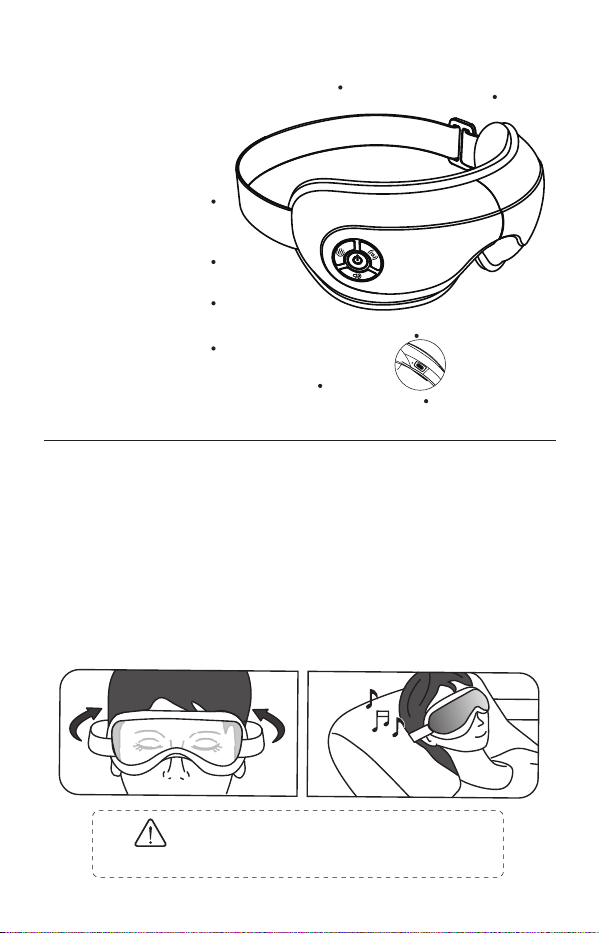
Remove glasses, contact lenses, hairpins, hair accessories, among
others, before using the device.
Make sure the device is turned off. Do NOT turn on the eye massager
before putting it on, in order to avoid damage to the airbags due to over
pressure.
Wear the device and ensure it fits your eyes properly. Adjust the elastic
band to the most comfortable and secured position.
Press and hold the power button for about 2 seconds to turn on the eye
massager.
1. Wearing the device
3. Product Structure
Using the Product
a.
b.
c.
d.
LED Indicator
Long Press: Power On/Off
Short Press: Mode Change
Short Press: Pressure Change
Long Press: BT On/Off
Short Press: Heat Change
Long Press: Heat Off
Short Press: Volume Change
Long Press: Next Track
Type-C Charging Port
Adjustable Strap
It is NOT recommended to use the device
for more than 20 minutes at a time.
Attention
Double Leather Pad
---
------------------
---------------------
----
------------------------
--------------
---
----
-----------------
-------------
----
----
----------------
-----
1 2
3 4 5 6
7 8 9
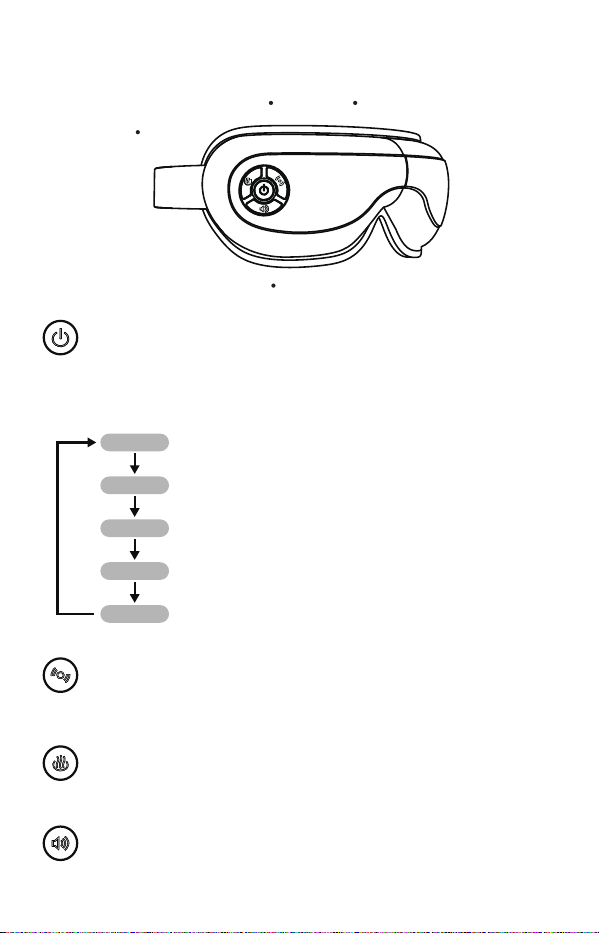
Press and hold the Power button for about 2 seconds to turn on/off
the device. Mode 1 (Air Pressure + Heat + Music) will be activated
by default.
Short press to cycle through Soft Pressure (Default)/Moderate
Pressure/Strong Pressure/No Pressure.
Long press to turn on/off the BT connection.
Short press to cycle through High Heat/Low Heat (Default)/No
Temperature.
Long press to turn off the heating function.
Short press the button to adjust the music volume: Medium Volume
(Default)/Maximum Volume/No Volume/Low Volume
Long press the button to change the built-in music tracks:
Piano--The Meditation--Soft Rain--Stream Running
Short press again to cycle through the following modes. Audio voice will
confirm each mode change.
Mode 1: Air Pressure + Heat + Music
Mode 2: Air Pressure + Heat
Mode 3: Air Pressure Only
Mode 4: Heat Only (Voice broadcast will be disabled.)
Mode 5: Heat + Music
2. Operation Instruction
Power Button
Heat
Volume
Air Pressure
------------
----------
-----------
-------------
-------------
----------
1 2
3
4 5 6
7 8 9
Wireless / BT Music
BT Paring Name: EM-30
BT Connection: Turn on your smartphone's BT. Search and connect to
''EM-30'' to play your own music on the device. Once paired successfully,
the device will be automatically connected to BT when it is turned on each
time.
Note: After BT connection, the device will not play built-in music. Long press
the Volume button to play the next song.
BT Disconnection: Long press the Air Pressure button to turn on/off the BT
connection.
The device comes partially charged. Please fully charge it before first use.
Low Battery Alarm
When the device is in low battery, the power indicator will flash red slowly
and is accompanied by an alert notification "Low power, please charge." It
will automatically shut off if the battery runs out.
Charging
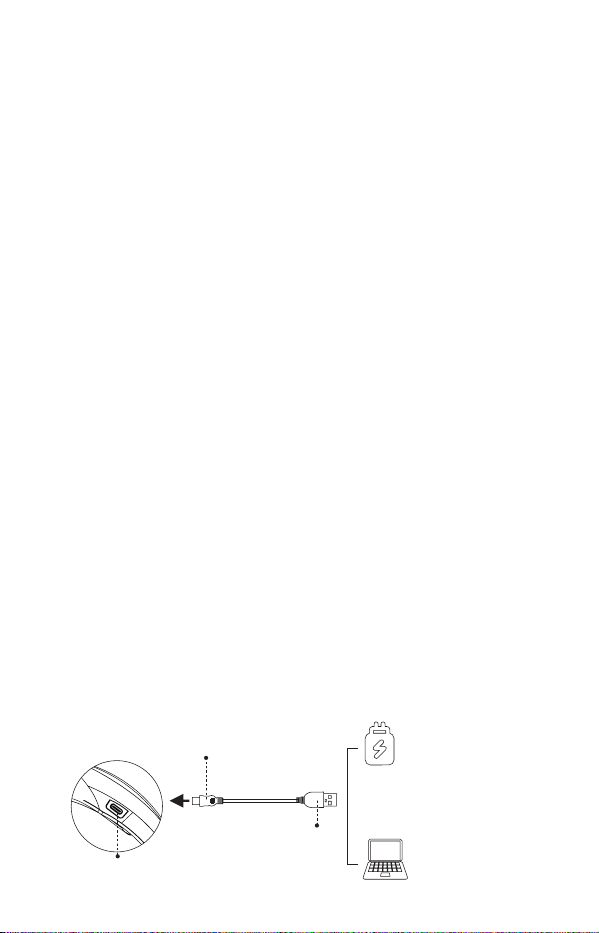
Charge the device using the Type-C cable and a DC 5V 1A-2A mobile
charger (not included). The indicator will remain solid red while the device is
being charged.
Note:
1. The device will not work while being charged.
2. It takes about 2-3 hours to fully charge the device. Once charging is
complete, the power indicator will remain solid blue.
3. If the charging current or voltage is less than 5V/1A, charging time will be
longer.
15-Minute Auto-off Timer
The timer will automatically shut the device off after 15 minutes of
continuous use (the duration of one massage cycle).
3. Charging the device
USB-C Plug
USB-C Socket
USB Plug
Adapter
Other Power Sources
1 2
3 4
5 6
7 8 9

Cleaning and Maintenance
FCC Statement
FCC Statement Note
Turn off the device before cleaning it. Use a soft cotton cloth dampened with
mild detergent to wipe it clean.
Do not spray water on the device or submerge it in water or any other liquid.
Do not expose the device to direct sunlight or high temperature. If the device
has not been used for over 3 months, please recharge it before use.
Do not disassemble the device by yourself. Otherwise, it may cause
damage and void the manufacturer's warranty.
Battery life can vary by application and/or operating conditions. To prolong
its lifespan, if the device will not be used for a long period, please fully
charge it before storing it. Then, please keep it powered off and charge it
every two months.
This device complies with Part 15 of the FCC Rules. Operation is subject to
the following two conditions:
This device may not cause harmful interference.
This device must accept any interference received , including
interference that may cause undesired operation.
This equipment has been tested and found to comply with the limits for a
Class B digital device, pursuant to Part 15 of the FCC Rules. These limits
are designed to provide reasonable protection against harmful interference
in a residential installation. This equipment generates, uses and can radiate
radio frequency energy and, if not installed and used in accordance with the
instructions, may cause harmful interference to radio communications.
However, there is no guarantee that interference will not occur in a
particular installation. If this equipment does cause harmful interference to
radio or television reception, which can be determined by turning the
equipment off and on, the user is encouraged to try to correct the
interference by one or more of the following measures:
Reorient or relocate the receiving antenna.
Increase the separation between the equipment and receiver.
Connect the equipment into an outlet on a circuit different from that to
which the receiver is connected.
Consult the dealer or an experienced radio/TV technician for help with the
supplied fastener.
Changes or modifications not expressly approved by the party responsible
for compliance could void the user's authority to operate the equipment.
1.
•
•
•
•
•
(2)
(1)
2.
3.
4.
5.
1 2
3 4 5
6
7 8 9
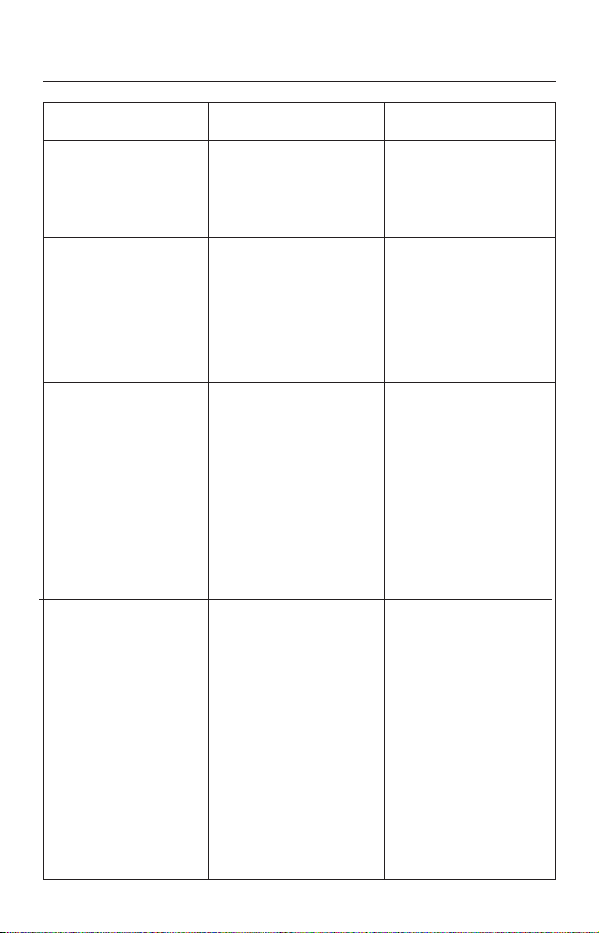
Troubleshooting Guide
Problem
There is a
mechanical or air
sound coming from
the device.
The device turns off
automatically. / The
device does not turn
on. / Buttons are not
responsive. / Air
pressure is weak.
The device cannot
be charged.
No heat
1. Using other types of
charging cables
2. Using improper
charger with its voltage
not as indicated
3. Low battery
protection is triggered
due to a prolonged
period of not being
charged.
1. A mode without the
heat function is
selected.
2. Built-in heat
protection is triggered
due to excessive use.
3. "Low Heat" mode is
selected and not as
much heat can be felt
as in the High Heat
mode.
1. Select a mode with
the heat function.
2. Turn it off for a
while to cool down.
3. Press Heat Button
to choose a more
suitable setting.
1. Use the Type-C
charging cable.
2. Use the DC 5V
1A-2A charger only.
3. Contact BOB AND
BRAD after-sales
service team.
1.Low battery
2.Built-in 15mins
auto-off timer is
activated.
1.Charge the device.
2.Turn on the device
again.
Normal sound of air
inflation or air
pressure.
No action required.
Cause Solution
1 2
3 4 5 6
7 8 9
Guarantee
Thank you for shopping with us! This product comes with a one-year
warranty from the date of purchase. Warranty will be voided due to any of
the following:
Damage by improper operation, such as improper components
connection.
Negligence and damage because of transportation or other accidents.
Maintenance and modification without approval.
Other damage caused by force majeure, such as natural disaster,
abnormal voltage, among others.
Damage caused by general use outside home (e.g. industrial and
commercial use).
Aging, wearing and tearing caused by normal operation of the product
without affecting the normal operation of the product.
(1)
(2)
(3)
(4)
(5)
(6)
No air pressure
No broadcast or
music
1. Volume level is
low or volume level
is at no volume.
2. Heat Only mode
is selected, in which
broadcast or music
will be disabled.
1.A mode without
the air pressure
function is selected.
2.“No Pressure”
mode is selected.
1. Select a mode with
the air pressure
function.
2. Press Air Pressure
Button to choose Soft
Pressure/Moderate
Pressure/Strong
Pressure/No Pressure.
1. Press the Volume
Button to adjust volume
level. If BT is
connected to play your
own music, please
check first if the volume
on the phone is too
low. Then, please
check if the phone is
playing music.
2.Do not choose the
Heat Only mode if you
need voice broadcast
or music.
1 2
3 4 5 6
7
8 9
Guarantee
Thank you for shopping with us! This product comes with a one-year
warranty from the date of purchase. Warranty will be voided due to any of
the following:
Damage by improper operation, such as improper components
connection.
Negligence and damage because of transportation or other accidents.
Maintenance and modification without approval.
Other damage caused by force majeure, such as natural disaster,
abnormal voltage, among others.
Damage caused by general use outside home (e.g. industrial and
commercial use).
Aging, wearing and tearing caused by normal operation of the product
without affecting the normal operation of the product.
FCC Radiation Exposure Statement
The device has been evaluated to meet general RF exposure requirement.
The device can be used in portable exposure condition without restriction.
(1)
(2)
(3)
(4)
(5)
(6)
1 2
3 4 5 6
7 8
9
A Dedicated Team Just For You
Made in China
US Importer:
Amazing Impulse, LLC
7025 CR 46A Ste 1071-412
Lake Mary, FL 32746
US
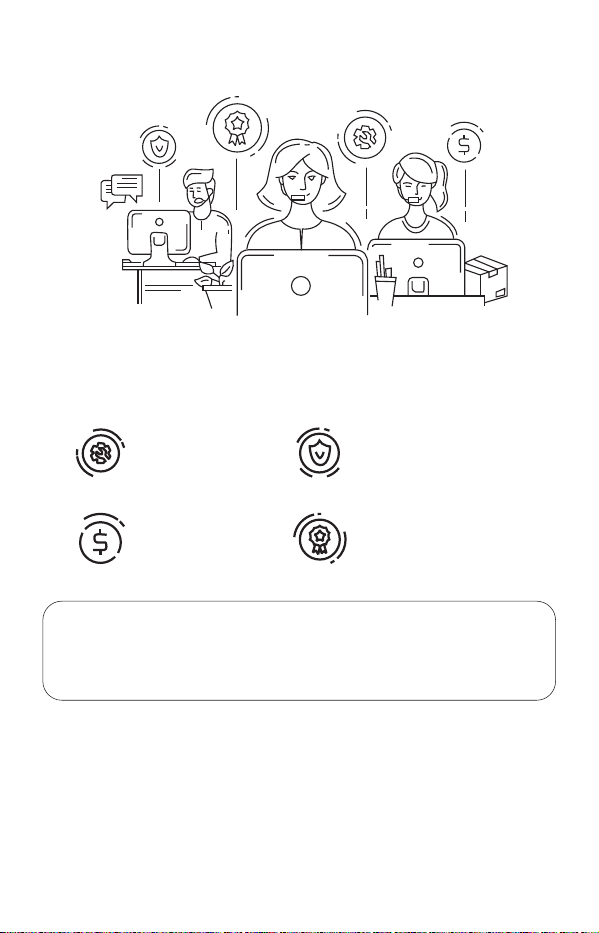
Every Bob and Brad product is backed by a 1-year warranty and an award-winning
customer service team. If you are in any way dissatisfied with a product you ordered,
we'll exchange it, replace it or refund your money under the warranty. Simply email us
the problem, and we'll take care of it.
Answer questions about
your device and best
practices.
Product Knowledge
Place New Orders
Help you solve any
issues with your device.
Troubleshoot
Initiate Returns
Provide instructions for
replacements, returns
and refunds.
Help with placing orders
online or via authorized
resellers.
Call: +1 (612) 567-3035 Mon-Fri 9:00AM-4:30PM (CST)
Email: [email protected]
Get in Touch.
1 2
3 4 5 6
7 8 9