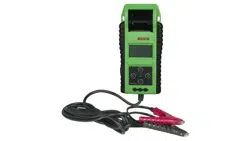
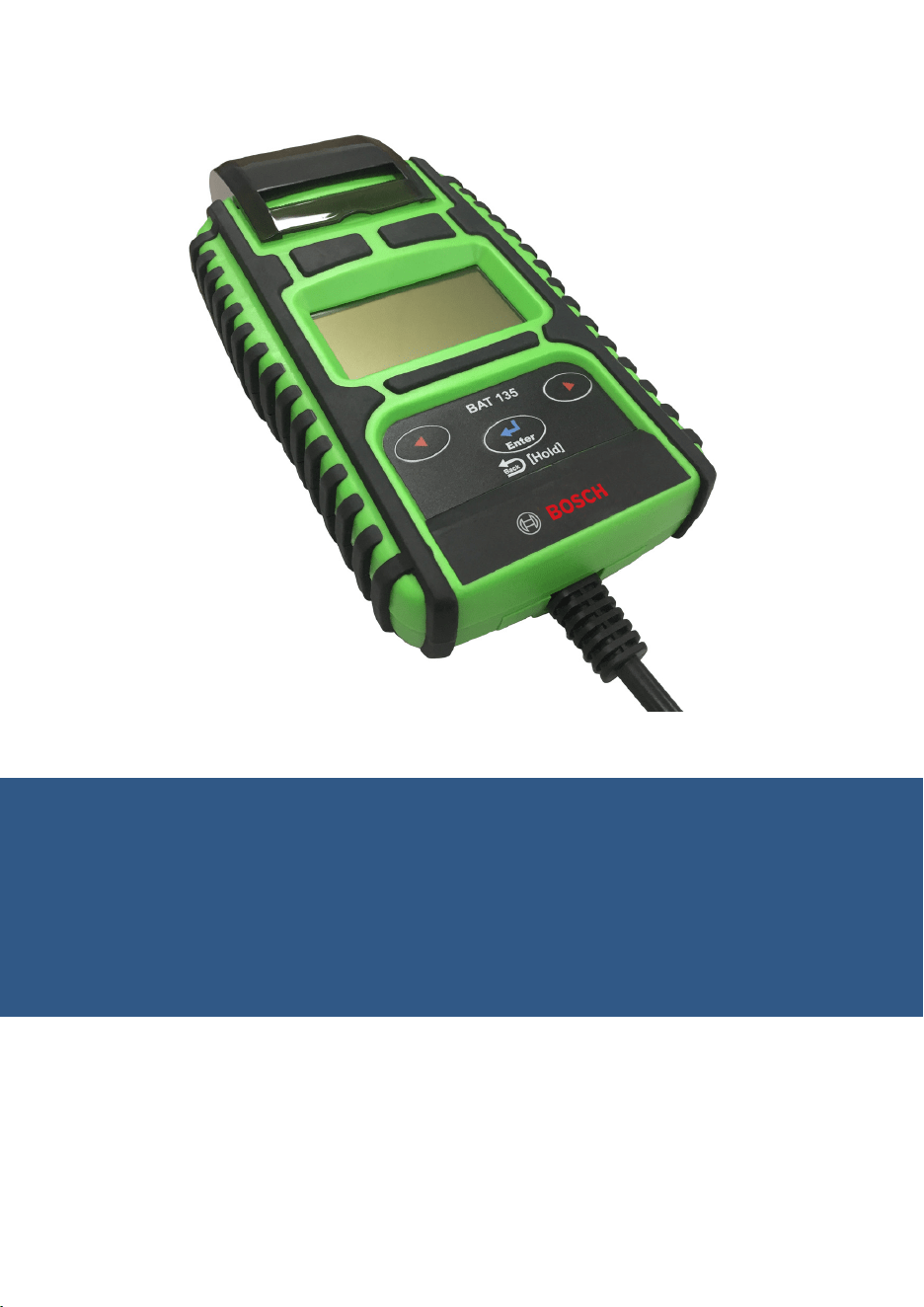
BAT 135 Battery Tester Operating Instructions
EN
BAT 135 | REV. C | APRIL 2019
en
|
2
|
Contents
|
BAT 135 Battery Tester
Contents
1 Introduction 3
2 Safety Warnings and Instructions 3
3 Paper Loading 4
4 Test Preparation 4
5 Battery Testing 5
6 Start/Stop Test 6
7 System Test 7
8 Glossary 10
9 Warranty Terms and Conditions 11
Appendix A - System Analyzer Screens 12
Appendix B - Surface Charge Notice 13
Appendix C - Decoding Test Codes 15
BAT 135 | REV. C | APRIL 2019
Introduction
|
BAT 135 Battery Tester | 3
|
en
1 Introduction
The BAT 135 Battery Tester is used to test 6 and 12 volt batteries, and to test 12
and 24 volt charging systems. The suggested operation range is from 0 degrees
Centigrade (32 degrees Fahrenheit) to 50 degrees Centigrade (122 degrees Fahren-
heit) in ambient temperature.
2 Safety Warnings and Instructions
WARNING
This product can expose you to chemicals including arsenic, which is
known to the State of California to cause cancer. For more information,
go to www.P65Warnings.ca.gov.
CAUTION
Do not expose the tester to rain or snow.
} Working in the vicinity of a lead acid battery is dangerous. Batteries generate
explosive gases during normal operation. For this reason it is important that you
refer back to these instructions if you have any questions on tool operation.
} To reduce risk of battery explosion, follow these instructions, those published
by the battery manufacturer, and the manufacturer of any equipment you intend
to use in the vicinity of the battery. Observe cautionary markings on these
items.
} Another person should be within range of your voice or close enough to come to
your aid when you work near a lead acid battery.
} Have plenty of fresh water and soap nearby in case battery acid contacts skin,
clothing, or eyes.
} Wear safety glasses and protective clothing.
} If battery acid contacts your skin or clothing, wash immediately with soap and
water. If acid enters your eye, immediately flood the eye with running cold water
for at least ten minutes and seek immediate medical attention.
} NEVER smoke or allow a spark or flame in vicinity of the battery or engine.
} Be extra cautious to reduce the risk of dropping a metal tool onto the battery. It
could spark or short-circuit the battery or other electrical parts and could cause
an explosion.
} Remove personal metal items such as rings, bracelets, necklaces, and watches
when working with a lead acid battery. These items can produce a short-circuit
current high enough to weld a ring or like to metal causing a severe burns.
BAT 135 | REV. C | APRIL 2019
en
|
4
|
Paper Loading/Replacement
|
BAT 135 Battery Tester
3 Paper Loading/Replacement
Do the following to load paper:
1. Connect BAT 135 to battery. (See Pg. 5 for connection instructions.)
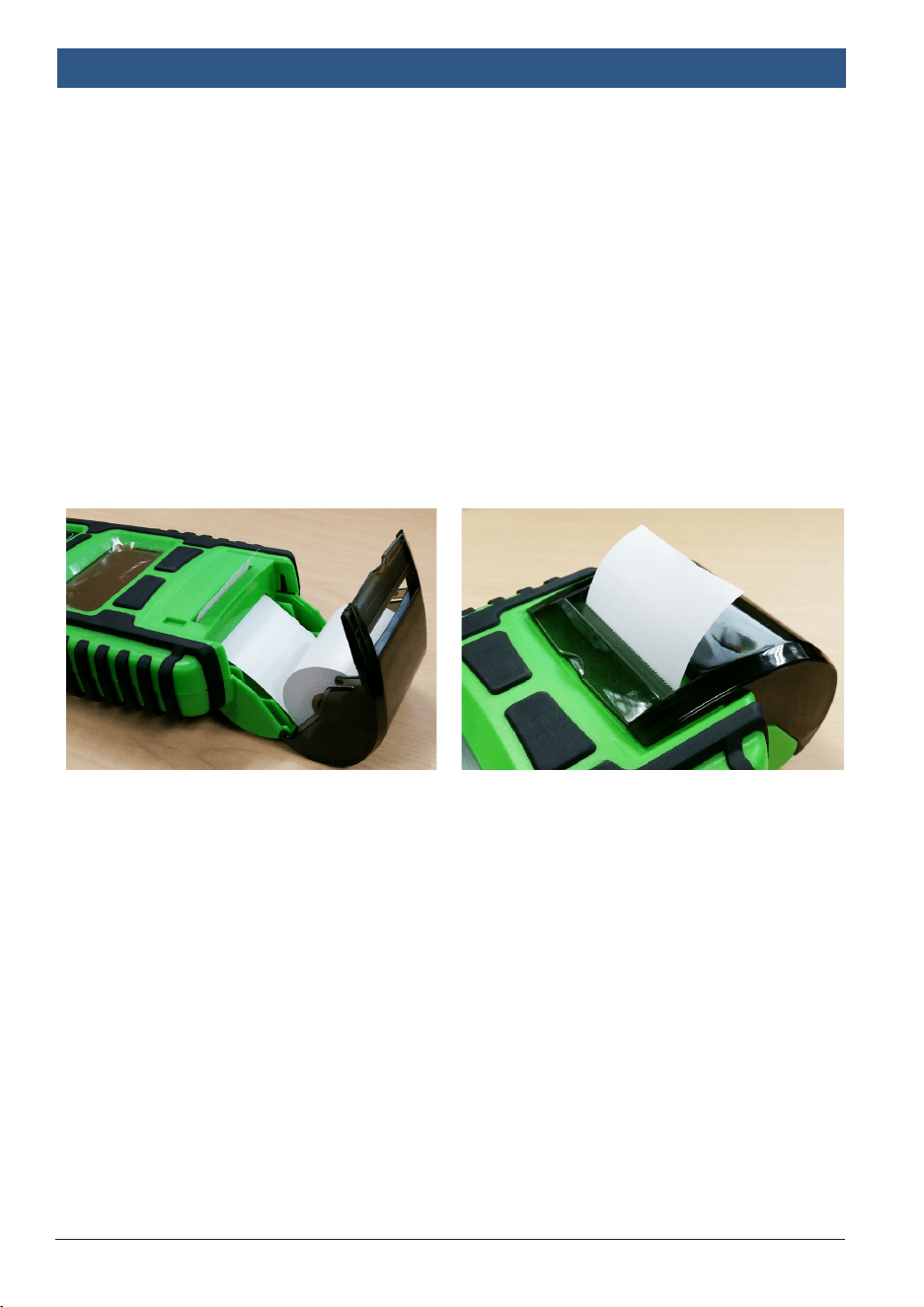
2. Open the clear cover. Insert a new paper roll into the clear portion of the
cover with the leading edge coming out from under the paper roll. Insert
the end of the paper into the auto-feed slot of the printer. The paper
should automatically load. (See Fig. 1)
3. Slowly pull approximately 1 in. of paper straight up from the top of the
tester. Feed the 1 in. strip of paper through the serrated slot in the clear
cover as it is being closed. (See Fig. 2)
Note: The battery clamp replacement part number is PN 1699501731. Replace-
ment thermal paper rolls are available at most office supply retailers. The paper
is 2 1/4 in. wide, with a maximum roll length of 98 ft.
4 Test Preparation
1. Ensure that the area around the battery is well ventilated while the battery
is being tested.
2. Clean battery terminals. Be careful to keep corrosion from coming in
contact with your eyes.
3. Inspect the battery for cracked or broken case or cover. If the battery is
damaged, do not use the tester.
4. If the battery is not a sealed maintenance free type, add distilled water in
each cell until the battery acid reaches the level specified by the
manufacturer. This helps purge excessive gas from cells. Do not overfill.
5. If necessary to remove battery from vehicle to test, always remove the
ground terminal from the battery first. Make sure all accessories in the
vehicle are off to prevent arcing.
(Figure 1) (Figure 2)
BAT 135 | REV. C | APRIL 2019
Battery Testing
|
BAT 135 Battery Tester | 5
|
en
5 Battery Testing
CAUTION
Before you test a battery in a vehicle, turn off the ignition and all
accessories and loads. Close all vehicle doors and the trunk lid.
Note: Each time you connect the tester to a battery, the tester will run a quick
cable verification to ensure a proper connection through the output cables to
sensors in the clamp jaws. If the connection checks out OK, the display will
momentarily flash and proceed to the Home Screen. In operation the tester
will only show three results: CHECK CLAMPS / VOLTAGE HIGH / VOLTAGE
LOW.
1. Make sure you have put 6 AA alkaline 1.5V batteries into the battery chamber.
Li-Ion or lithium batteries are not recommended because of the initial 1.7 Volt
output. When the batteries are weak, the screen will display “POWER LOW.”
Replace all 6 batteries at one time.
Note: Nothing will be seen on the display until the tester is connected to a
vehicle battery.
2. Make sure the battery terminals are clean. Wire brush them if necessary.
Clamp the black load lead to the vehicle negative battery terminal. Clamp the
red load lead to the vehicle positive battery terminal.
3. View the
System Analyzer Screens
diagram (
Appendix A
) for selection options.
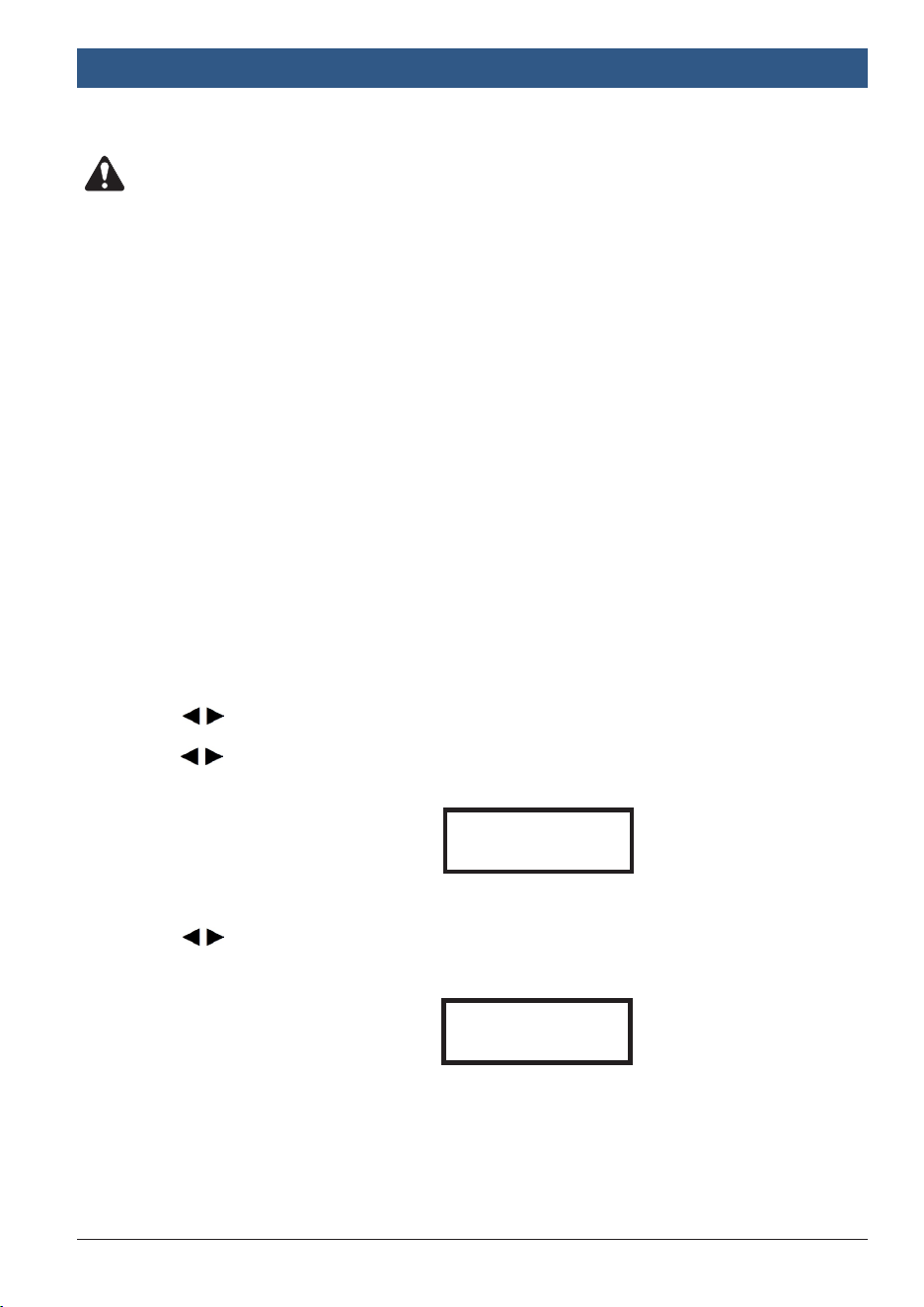
4. Press to select Battery Test, then press ENTER.
5. Press to select one of the following battery types:
} FLOODED
} AGM FLAT
} AGM SPIRAL
} VRLA/GEL
Press ENTER to confirm choice.
6. Press to select one of the following battery ratings.
} CCA/SAE
} EN
} JIS
} DIN
} IEC
} CA/MCA
Press ENTER to confirm choice.
BATTERY TYPEtu
AGM FLAT PLATE
Example
SELECT RATINGtu
CCA/SAE
Example
BAT 135 | REV. C | APRIL 2019
en
|
6
|
Battery Testing
|
BAT 135 Battery Tester
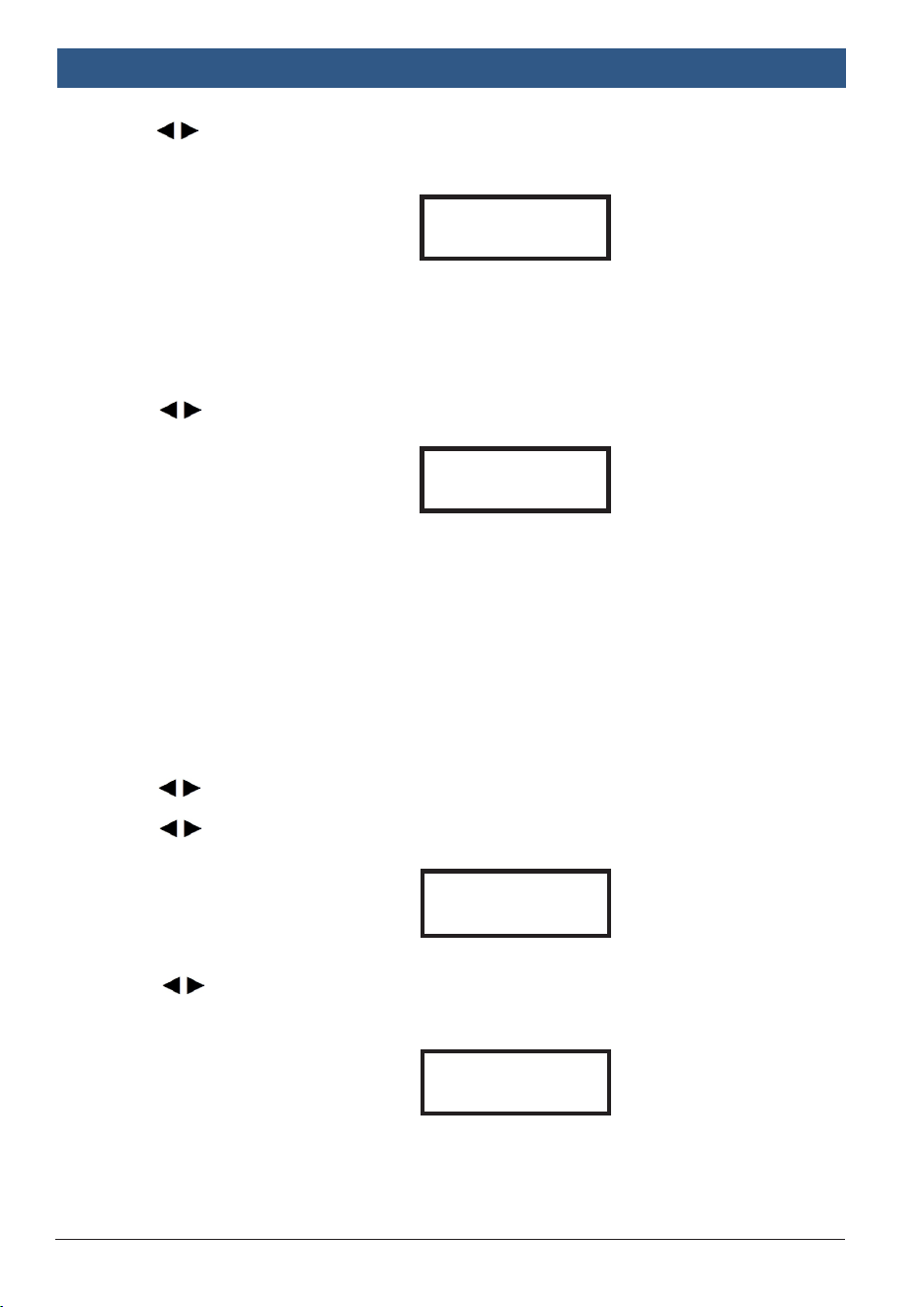
7. Press to select the battery capacity of SAE from one of the following:
} CCA/SAE: 40~2000
} EN: 40~1885
} DIN: 25~1120
} IEC: 30~1320
} JIS: By battery type number
} CA/MCA: 50~2400
Press ENTER to begin the test.
8. Press to confirm the temperature.
Press ENTER to begin the test.
Note: Before the test is started, you can always return to the previous page by
pressing and holding ENTER for two seconds.
Important: If prompted by the tester to remove a surface charge, refer to
Appendix B, Surface Charge Notice
.
6 Start/Stop Test
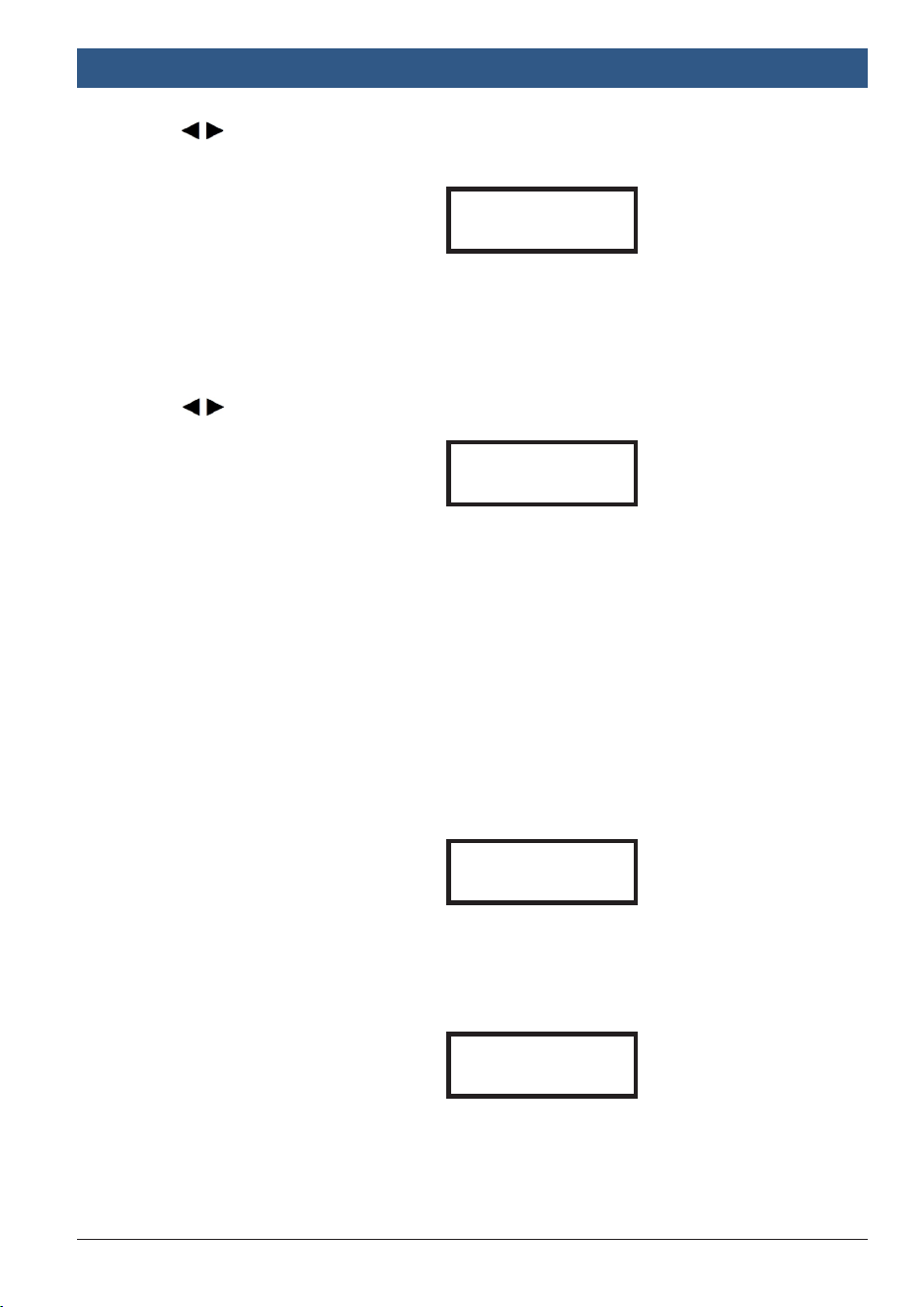
1. Press to select Start/Stop Test, then press ENTER.
2. Press to select one of the following the battery types:
} EFB
} AGM FLAT
Press ENTER to confirm choice.
3. Press to select one of the following battery ratings:
} CCA/SAE
} EN
} JIS
} DIN
} IEC
} CA/MCA
Press ENTER to confirm choice.
SET CAPACITY tu
xxxx CCA/SAE
Example
Above 32°F/0°C
tu
Yes / No
Example
BATTERY TYPE
tu
EFB
Example
SELECT RATING
tu
CCA/SAE
Example
BAT 135 | REV. C | APRIL 2019
Battery Testing
|
BAT 135 Battery Tester | 7
|
en
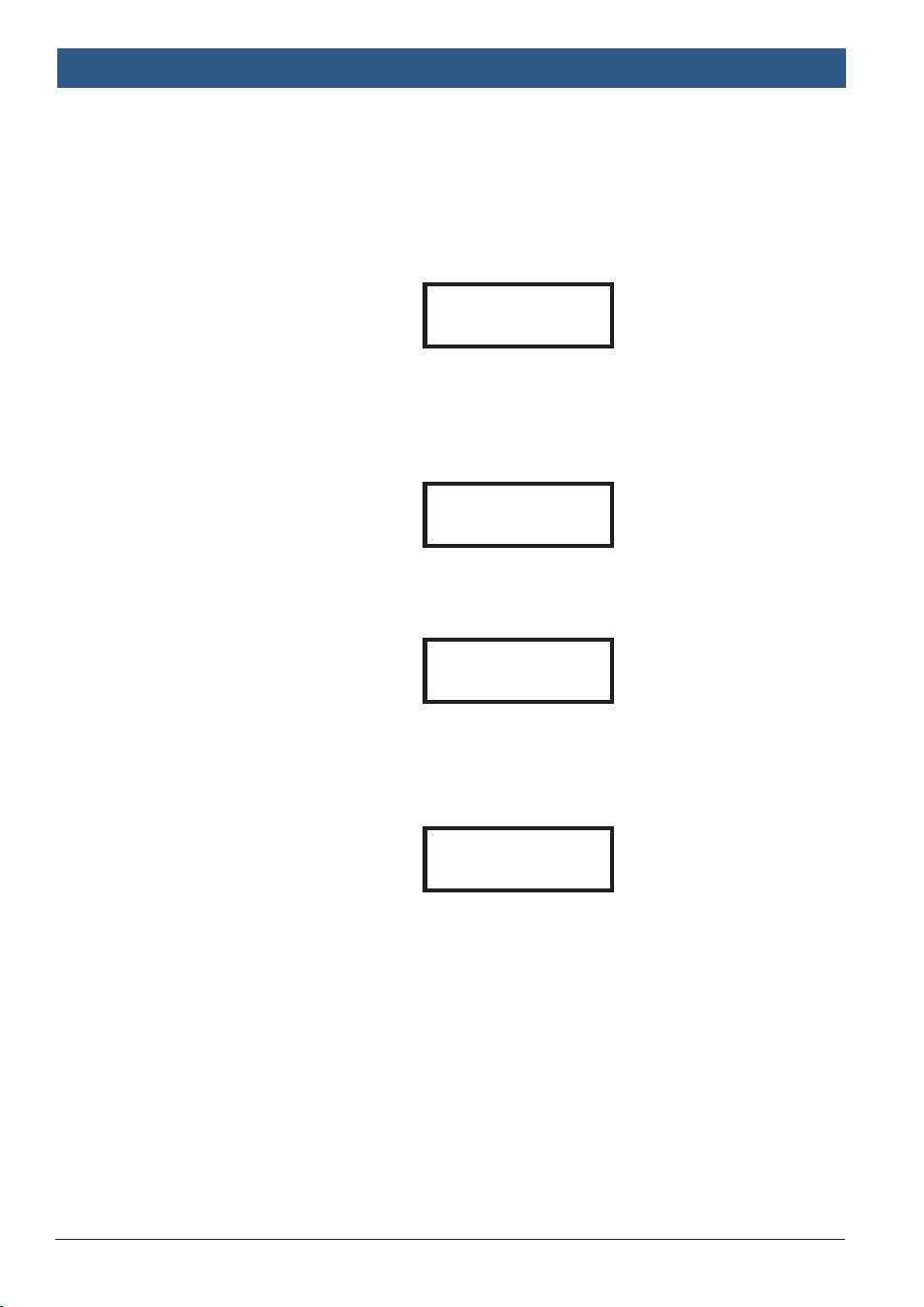
4. Press to input one of the following battery capacities of SAE:
} CCA/SAE: 40~2000
} EN: 40~1885
} DIN: 25~1120
} IEC: 30~1320
} JIS: By battery type number
} CA/MCA: 50~2400
Press ENTER to begin test.
5. Press to confirm temperature.
Press ENTER to begin test.
Note: Before the test is started, you can always return to the previous page by
pressing and holding ENTER for two seconds.
Important: If prompted by the tester to remove a surface charge, refer to
Appendix B, Surface Charge Notice
.
7 System Test
1. Press ENTER to view the System Test screen.
2. Turn off all vehicle accessory loads such as lights, air conditioning, radio, etc.
before starting the engine.
SET CAPACITY tu
xxxx CCA/SAE
Example
Above 32°F/0°C
tu
Yes / No
Example
SYSTEM TEST
xx. xxV
Example
TURN OFF LOADS
START ENGINE
Example
BAT 135 | REV. C | APRIL 2019
en
|
8
|
System Test
|
BAT 135 Battery Tester
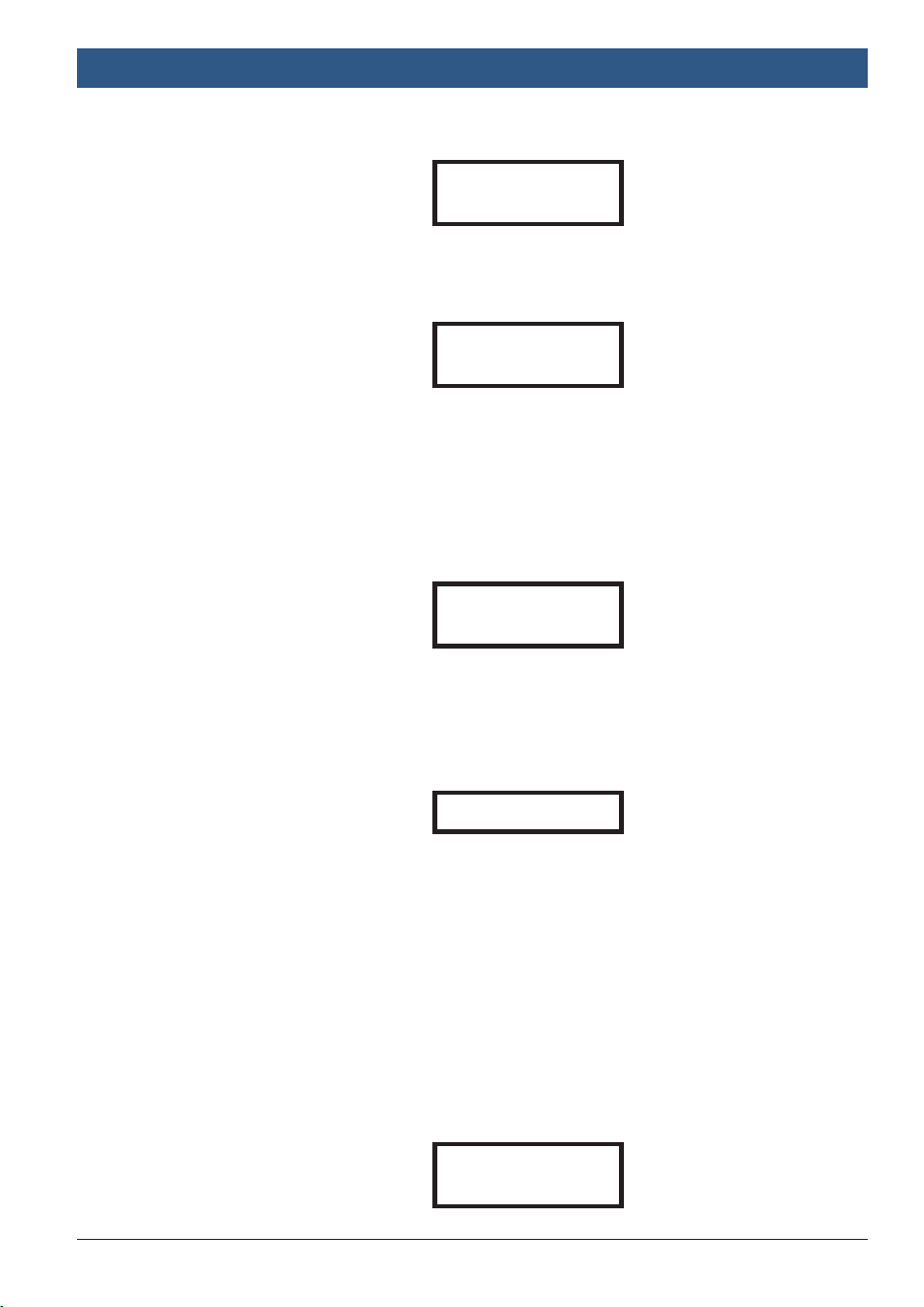
3. When the engine is started, one of three results will be displayed, along with
the reading taken:
} Cranking Volts Pass
The system is showing normal draw. Press ENTER to start the charging
system test.
} Cranking Volts Fail
The cranking voltage is below normal limits. Troubleshoot the starter with
the manufacturer’s recommended procedure.
} Cranking Volts Not Detected
The cranking voltage is not detected.
4. If the cranking voltage is normal, press ENTER to begin the charging system
test.
5. Press ENTER. The following screen appears.
6. Press ENTER. One of the following two results for the Charging Volts Test at
Idle will be displayed.
} PASS
} FAIL
7. Monitoring the charging system at idle, press ENTER for the charging system
with accessory loads. Turn on the blower to High (heat), High Beam
headlights, and Rear Defogger. Do not use cyclical loads such as air
CRANKING VOLTS
xx. xxV PASS
Example
CRANKING VOLTS
xx. xxV FAIL
Example
CRANKING VOLTS
NOT DETECTED
Example
MAKE SURE ALL
LOADS ARE OFF
Example
BAT 135 | REV. C | APRIL 2019
System Test
|
BAT 135 Battery Tester | 9
|
en
conditioning or windshield wipers.
8. When testing older model diesel engines, run up the engine to 2500 rpm for
15 seconds. You will view the following screen:
9. Press ENTER to determine the amount of ripple from the charging system to
the battery. One of two testing results will be displayed, along with the
reading taken.
} Ripple Detected
Diodes function well in the alternator / stator.
} No Ripple Detected
One or more diodes in the alternator are not functioning or there is stator
damage. Ensure that the alternator mounting is sturdy and that the belts
are in good shape and functioning properly. If the mounting and belts are
good, replace the alternator.
10. Press ENTER to continue testing the charging system with accessory loads.
One of two results will be displayed.
} PASS
} FAIL
11. Press ENTER when the charging system test is completed. Turn all accessory
loads and engine off. Press ENTER to return to Step 1 or remove the test
clamps from the battery posts after completion of testing to end test.
TURN ON LOADS
AND PRESS ENTER
Example
RUN ENGINE UP TO
2500 RPM 15 SEC.
Example
RIPPLE DETECTED
xx. xxV NORMAL
Example
NO RIPPLE DETECTED
Example
TEST OVER. TURN
OFF LOADS & ENGINE
Example

BAT 135 | REV. C | APRIL 2019
en
|
10
|
Glossary
|
BAT 135 Battery Tester
8 Glossary
Gelled Electrolyte (GEL) Battery
A lead-acid electric storage battery that:
} Is sealed using special pressure valves and should never be opened.
} Is completely maintenance-free. (However, connections must be retorqued and
the battery cleaned periodically.)
} Uses thixotropic gelled electrolyte.
} Uses a recombination reaction to prevent the escape of hydrogen and oxygen
gases normally lost in a flooded lead-acid battery (particularly in deep-cycle
applications).
} Is non-spillable, and therefore can be operated in virtually any position.
(However, upside-down installation is not recommended.)
Absorbent Glass Mat (AGM) Battery
A lead-acid electric storage battery that:
} Is sealed using special pressure valves and should never be opened.
} Is completely maintenance-free. (However, connections must be retorqued and
the battery cleaned periodically.)
} Has all of its electrolyte absorbed in separators consisting of a sponge-like
mass of matted glass fibers.
} Uses a recombination reaction to prevent the escape of hydrogen and oxygen
gases normally lost in a flooded lead-acid battery (particularly in deep-cycle
applications).
} Is non-spillable, and therefore can be operated in virtually any position.
(However, upside-down installation is not recommended.)
Valve Regulated Lead Acid (VRLA) Battery
A battery that is sealed Maintenance Free with a “Bunce” Valve or Valves in the top
that opens when a preset pressure is realized inside the battery and lets the
excess gas pressure out. Then the valve resets itself.
Starting, Lighting, Ignition (SLI) Battery
A battery that performs three basic functions on all normal vehicles. Batteries
given this description will have been specifically designed for service on cars and
trucks within a voltage controlled electrical system. Those SLI batteries which are
intended for heavy haulage vehicles fitted with large diesel motors may often be
called COMMERCIAL batteries. They have to be much more powerful and more
robust than batteries intended for cars.
State of Health (SOH)
Percent of battery capacity remaining compared with the marked original battery
capacity.

BAT 135 | REV. C | APRIL 2019
Glossary
|
BAT 135 Battery Tester | 11
|
en
State of Charge (SOC)
Percent of battery actually charged.
Cold Cranking Amps (CCA)
The current in amperes which a new fully charged battery can deliver for 30 se-
conds continuously without the terminal voltage falling below 1.2 volts per cell,
after it has been cooled to 0 degrees F and held at that temperature. This rating
reflects the ability of the battery to deliver engine starting currents under winter
conditions.
Ampere-Hour
The unit of measurement of electrical capacity. A current of one ampere for one
hour implies the delivery or receipt of one ampere-hour of electricity. Current
multiplied by time in hours equals ampere-hours.
9 Warranty Terms and Conditions
Any battery tester found defective in material or workmanship within one year
from the date of purchase by a retail customer will be repaired or replaced accord-
ing to published defective return test repair procedures. The existence of a defect
shall be determined by the manufacturer in accordance with published warranty
repair procedures. The warranty repair procedures are available upon request.
This warranty does not cover any unit that has been damaged due to accident,
abuse, alternation, use for a purpose other than that for which it was intended, or
failure to follow operating instructions. This warranty is expressly limited to origi-
nal retail buyers. This warranty is not assignable or transferable. Proof of purchase
is required for all alleged claims. Warranty cannot be authorized without proof of
purchase. Warranty claims must be sent pre-paid with dated proof of purchase.
Damage incurred during shipment is the responsibility of the shipper (customer
returning unit) If the returned unit qualifies for warranty, the shipper will only
incur shipping cost. The manufacturer reserves the right to substitute or offer
alternative warranty options at its discretion.
The sole and exclusive remedy for any unit found to be defective is repair or
replacement, at the option of the manufacturer. In no event shall the manufacturer
be liable for any direct, indirect, special, incidental, or consequential damages
(including lost profit) whether based on warranty, contract, tort, or any other legal
theory.
Return Goods
Pack with sufficient over-pack to prevent damage during shipment. Damage
BAT 135 | REV. C | APRIL 2019
en
|
12
|
Warranty Terms and Conditions
|
BAT 135 Battery Tester
incurred during return shipment is not covered under this warranty. Repair costs
for such damages will be charged back to shipper.
WHEN RETURNING GOODS, INDICATE “RETURN GOODS”
ON ALL INVOICES AND RELATED SHIPPING DOCUMENTS
TO PREVENT ANY EXTRA CHARGE.
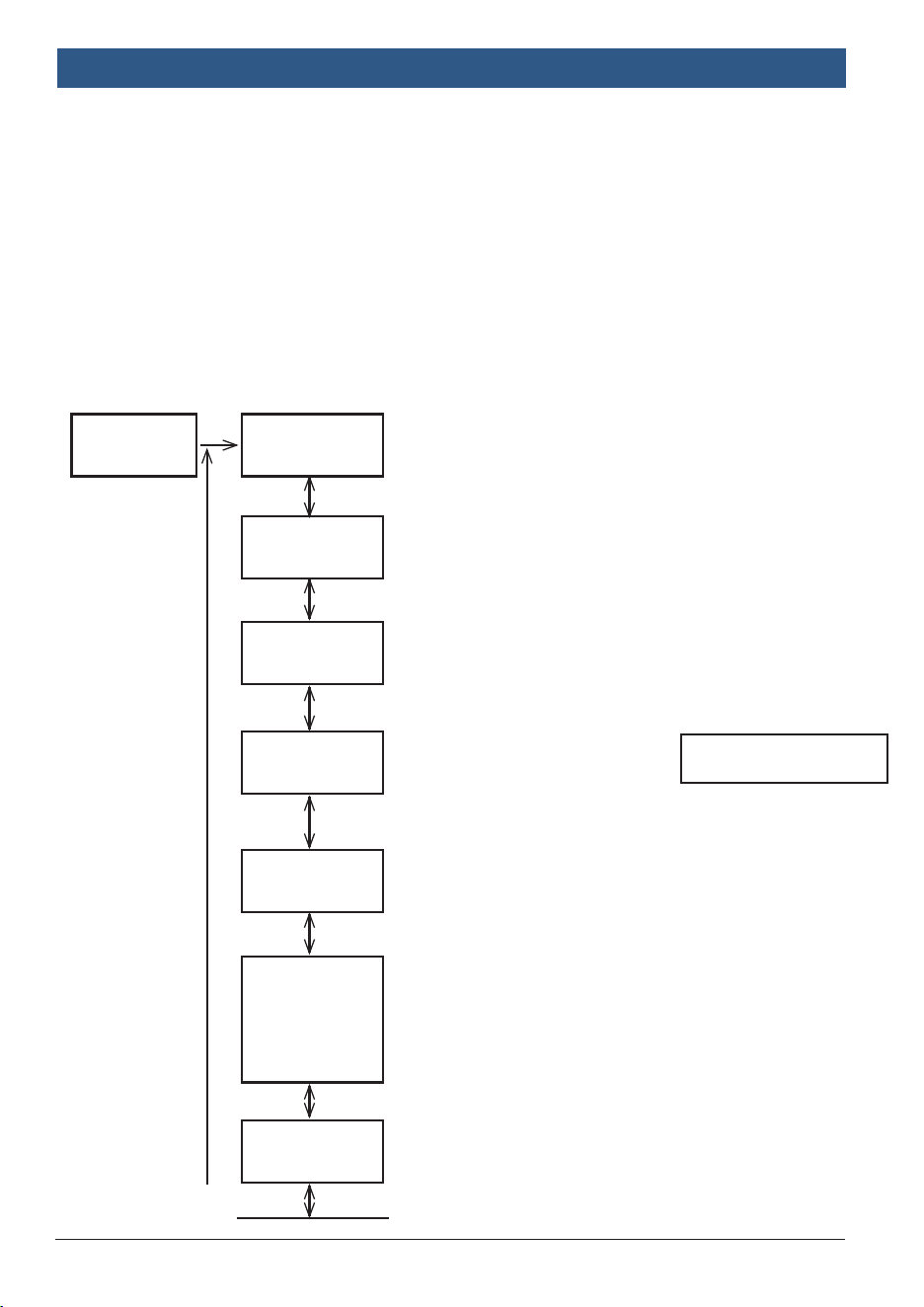
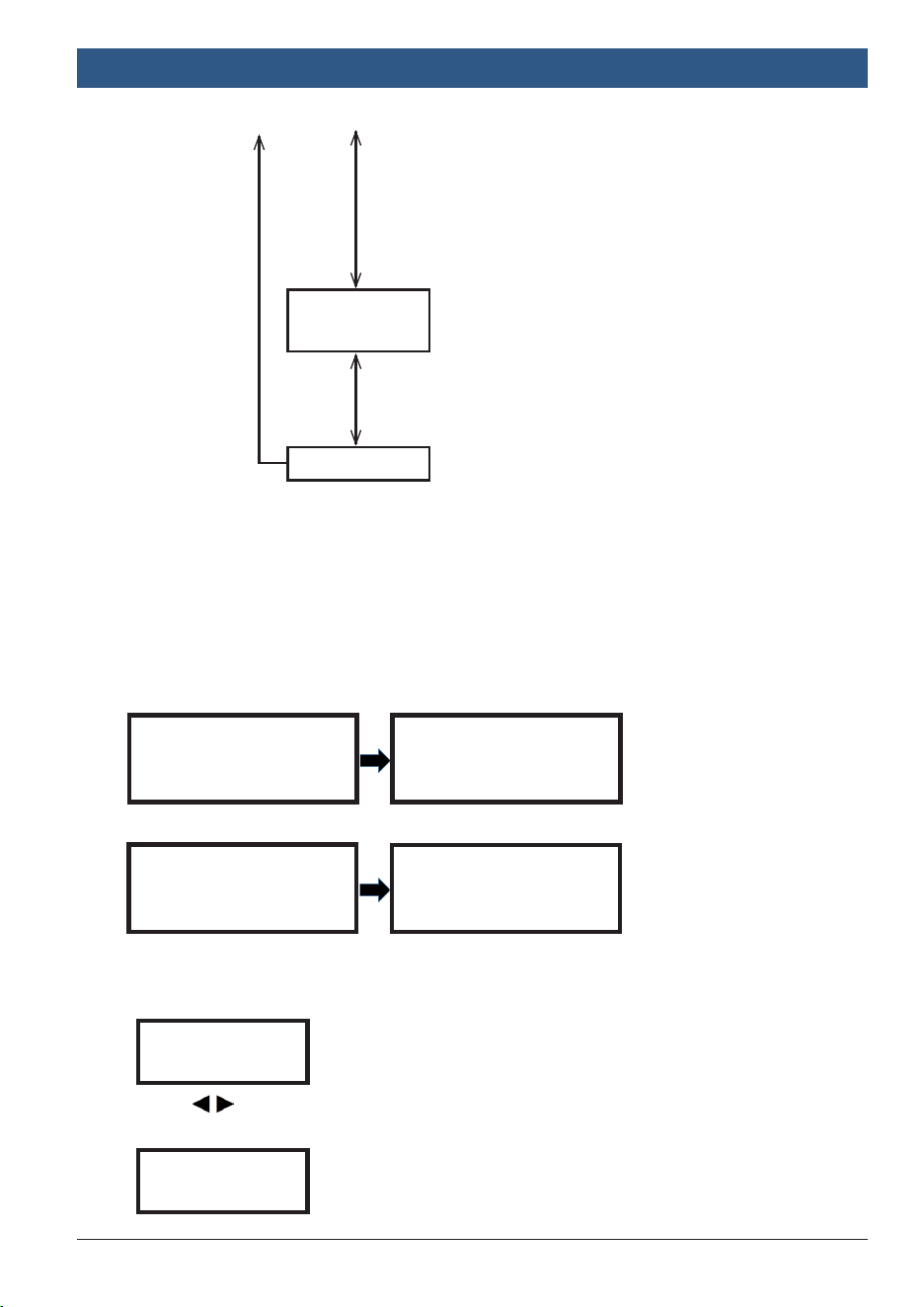
Appendix A System Analyzer Screens
The following screens are available for system analysis, testing, and customization.
Note: Current language is
displayed initially.
SYSTEM ANALYZER
BATTERY TEST
tu
xx.xx V
SYSTEM TEST
tu
xx.xx V
LANGUAGE
tu
SELECT
LANGUAGE tu
ENGLISH
DATE & TIME
2006/11/25
tu
(Time Setting)
TEST COUNTER
BATTERY /
SYSTEM / START
STOP TEST
DISPLAY
START STOP TEST
tu
xx.xx V
*Press
t / u
to select language,
start-stop test or system test.
*Press «ENTER» to do battery
test.
*Press «ENTER»to do a
system test. *Press
t / u
to
select battery test, system test
or start-stop test.
*Press «ENTER» to do a start-
stop test. *Press
t / u
to select
system test, start-stop test or
language.
*Press «ENTER»to set language.
*Press
t / u
to select language.
(English, French, Spanish,
Portuguese)
*Press «ENTER» to conrm
choice & go back to battery test.
*Press «ENTER» to see how
many times you tested in battery/
system/start stop test.
*Press «ENTER» to conrm
Time Setting.
(continued on next page)
BAT 135 | REV. C | APRIL 2019
Appendix A
|
BAT 135 Battery Tester | 13
|
en
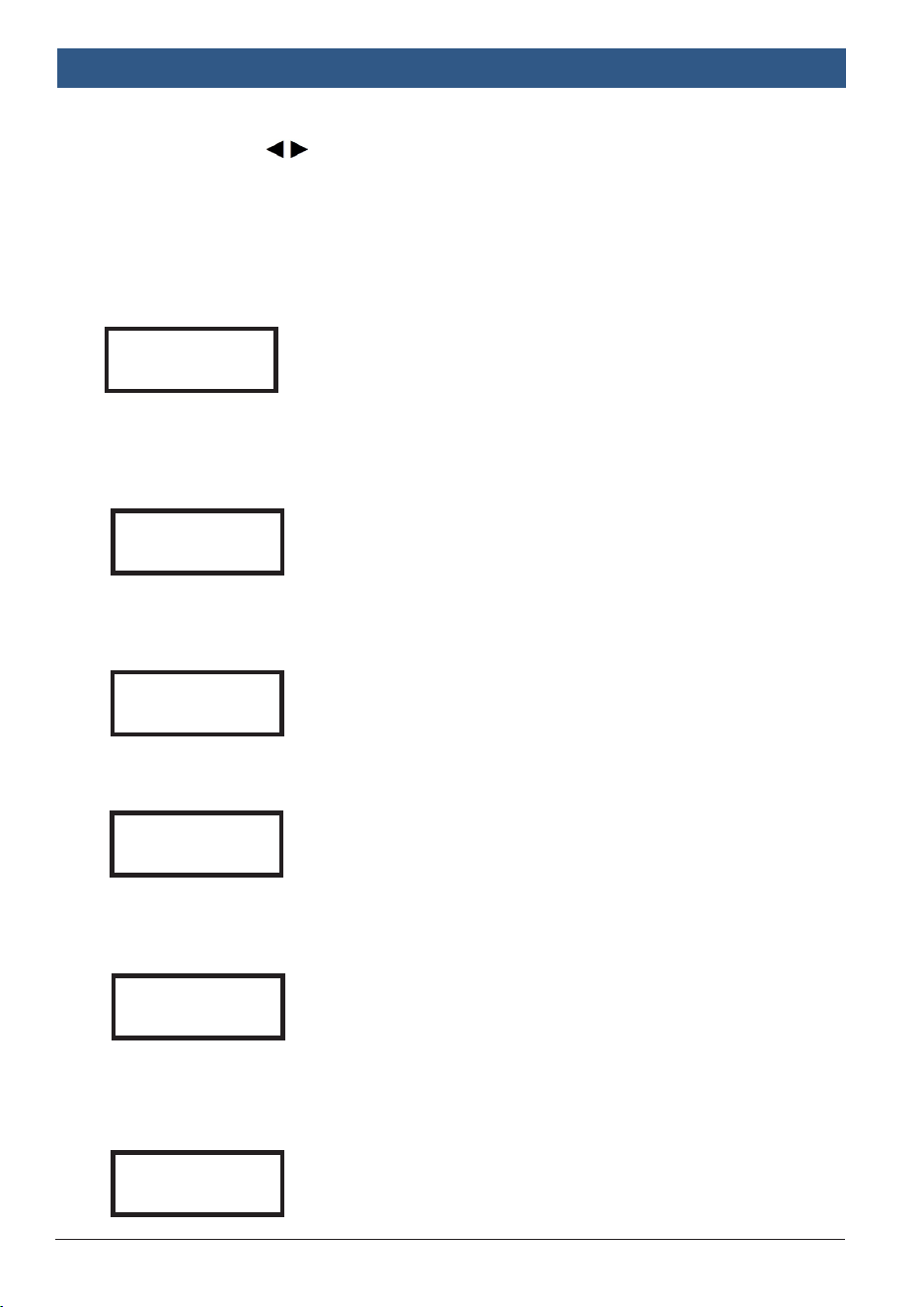
Appendix B Surface Charge Notice
The tester will resume testing after it detects that the surface charge is removed.
1. Test the battery for a few seconds.
TESTING
2. Press to select battery fully charged or not if tester asks, then press
ENTER to confirm choice.
IS BATTERY tu
CHARGED? YES
The battery will hold a surface charge if the engine has been running or after
the battery has been charged. The tester may prompt you to remove the surface
charge. Follow the instructions indicating when to turn the headlights on and
off or apply a load into the battery.
In Vehicle
SURFACE CHARGE
IN VEHICLE? YES
TURN HEADLIGHTS
ON FOR 15 SECS
Out of Vehicle
SURFACE CHARGE
IN VEHICLE? NO
TESTING
BRIGHTNESS
t ADJUST u
CUSTOMIZE
*Press
t / u
to
adjust “Year.”
*Press «ENTER» to
finish “Year.” Repeat
previous step to
finish “Month,” “Day,”
“Hour” and “Minute.”
*Press «ENTER» to
confirm the bright-
ness setting.
*Press
t / u
to adjust
the brightness of the
display.
*Press «ENTER» to
edit customized info.
BAT 135 | REV. C | APRIL 2019
en
|
14
|
Appendix B
|
BAT 135 Battery Tester
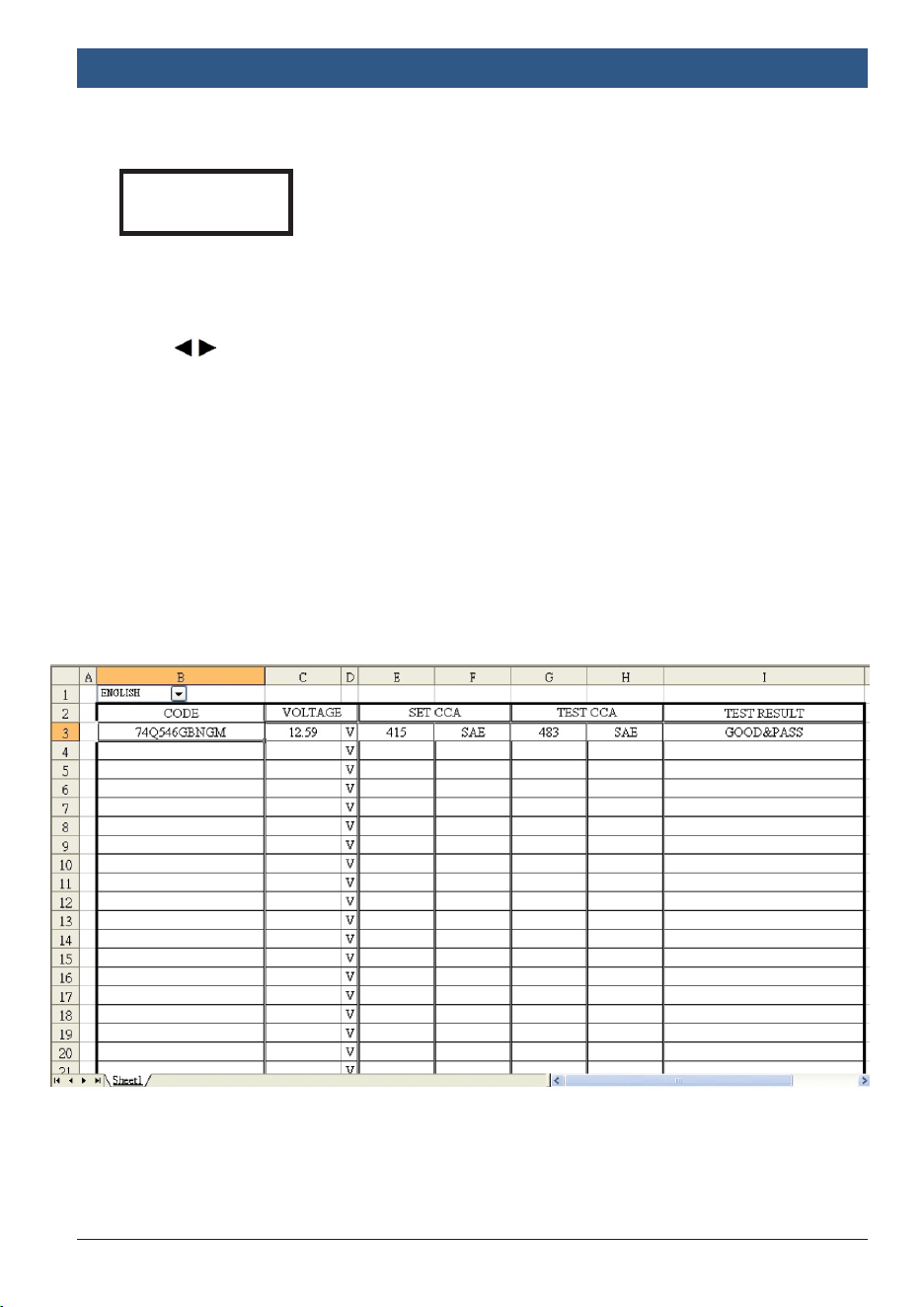
3. When the test is completed, the display shows the actual volts and the actual
SAE or %. Press to select:
} SOH (STATE OF HEALTH)
or
} SOC (STATE OF CHARGE)
One of 6 results will be displayed.
Good & Pass
The battery is good and capable of holding a charge.
GOOD & PASS
xx.xxV xxxx CCA/SAE
xx.xx mΩ
Marginal Battery
A Marginal battery indicates that your battery is functioning properly, but its life
expectancy is compromised. The battery should be closely monitored with more
frequent battery checkups.
Recharge & Retest
The battery is discharged, the battery condition cannot be determined until it is
fully charged. Recharge and retest the battery.
Bad & Replace
The battery will not hold a charge. It should be replaced immediately.
Bad Cell & Replace
The battery has at least one cell short circuit. It should be replaced
immediately.
Load Error
The tested battery is bigger than 2000SAE or 200AH. Or the clamps are not
connected properly. Fully charge the battery and retest after excluding both previous
reasons. If reading is the same, the battery should be replaced immediately.
MARGINAL BATTERY
xx.xxV xxxx CCA/SAE
xx.xx mΩ
BAD & REPLACE
xx.xxV xxxx CCA/SAE
xx.xx mΩ
BAD CELL & REPLACE
xx.xxV xxxx CCA/SAE
xx.xx mΩ
LOAD ERROR
RECHARGE & RETEST
xx.xxV xxxx CCA/SAE
xx.xx mΩ
BAT 135 | REV. C | APRIL 2019
Appendix C
|
BAT 135 Battery Tester | 15
|
en
4. Press ENTER to get a test code for record.
Note: A BARCODE will appear after printing. Pay attention to the BARCODE
Scanner, which only supports CODE39 format. See
Appendix C, Generating
Test Codes
.
5. Press to select result printing: YES or NO. Press ENTER to confirm your
choice.
6. Press ENTER to return to Step 5, or remove the test clamps from the battery
posts after completion of testing batteries to end test.
CODE
xxxxxxxxxxx
Do the following to decode test codes:
1. Download the decoding software via: https://www.boschdiagnostics.com/
pro/products/bat135
2. Click the icon labeled “BT/RTxxx” and the sheet below will appear.
3. Input the test code into the chart manually or by barcode scanner.
4. Test results will appear in the chart after decoding, as shown above.
Appendix C Decoding Test Codes

Bosch
Automotive Service Solutions, Inc.
655 Eisenhower Drive
Owatonna, MN 55060 USA
Phone: (800) 533-6127
www.boschdiagnostics.com
PN 1699200248