Owner's Manual
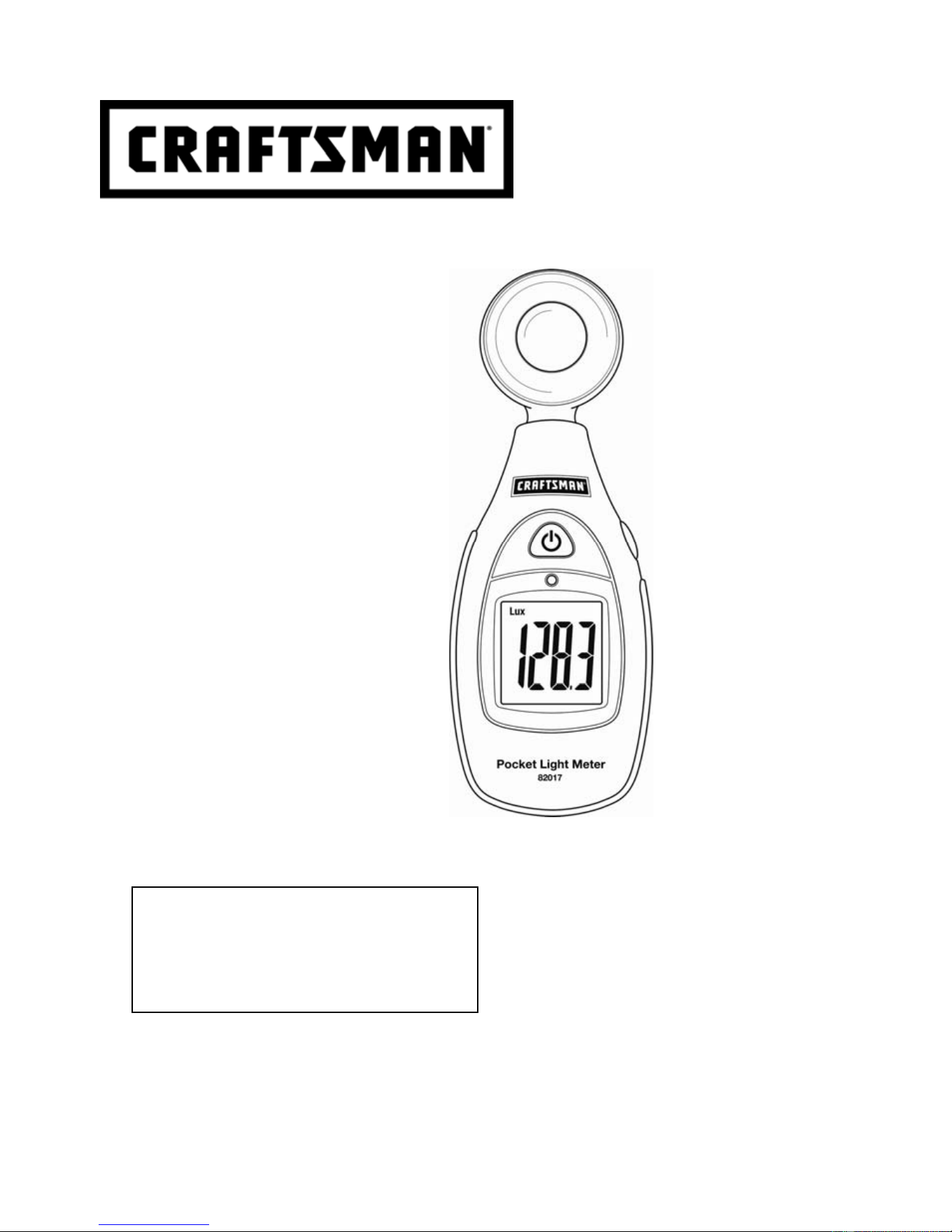
Pocket Light Meter
Model 82017
Sears Brands Management Corp., Hoffman Estates, IL 60179 U.S.A.
www.craftsman.com 122112
CAUTION: Read, understand and
follow Safety Rules and Operating
Instructions in this manual before
using this product.
Safety
Operation
Maintenance
Español
Downloaded from www.ManualsFile.com manuals search engine

2
ONE YEAR FULL WARRANTY
CRAFTSMAN ONE YEAR FULL WARRANTY
FOR ONE YEAR from the date of purchase, this product is warranted against defects in material or
workmanship. A defective product will be replaced free of charge.
For warranty coverage details to obtain free replacement, visit the web site: www.craftsman.com
This warranty is void if this product is ever used while providing commercial services or if rented to
another person.
This warranty gives you specific legal rights, and you may also have other rights which vary from
state to state.
Sears Brands Management Corporation, Hoffman Estates, IL 60179
For Customer Assistance Call 9am-5 PM (EST)
Monday through Friday 1-888-326-1006
SAFETY INSTRUCTIONS
Use CAUTION when operating this device. The light sensor is sensitive and should be handled with
great care.
SPECIFICATIONS
Ranges and Resolution Accuracy
LUX
200.0, 2000, 20000, 40000
Foot candles (Fc)
20.0, 200.0, 2000, 4000
± (5% reading + 10 digits (<10000 LUX/fc)
± (10% reading + 10 digits (>10000 LUX/fc)
Note that readings over 1999 will show the x10 or x100 multiplier. In
these cases, multiply the displayed value by the multiplier to obtain the
correct reading.
Display 1999 Count Backlit LCD with LUX, fc, battery, and MAX indicators
Display Polarity Automatically detects polarity; displays (-) for negative polarity
Over range indication LCD displays ‘OL’
Low Battery Indication Battery icon appears when battery voltage is below operating level
Measurement rate 2.5 readings per second, nominal
Measurement Repeatability ±2%
MAX indication Displays highest reading
Temperature coefficient ±0.1% per
o
C
Photo detector Silicon photo-diode with spectral response filter
Sensor Calibration Calibrated to standard incandescent lamp; color temperature 2856k
Spectral response CIE photopic (CIE human eye response curve)
Power supply 9V battery
Auto Power Off Meter automatically switches off after 17 minutes of inactivity
Operating conditions Temperature: 32 to 104
o
F (0 to 40
o
C); Humidity: < 80% RH
Storage conditions Temperature: 14 to 140
o
F (-10 to 60
o
C); Humidity: < 80% RH
Dimensions 6.2 (H) x 2.1 (W) x 1.3 (D) "(157 x 54 x 34mm)
Weight 6 oz. (170g)
Downloaded from www.ManualsFile.com manuals search engine
3
BATTERY INSTALLATION
When the battery power begins to fail the low battery symbol will appear on the LCD. Replace the 9V
battery by following these steps.
1. Open the rear battery compartment to access the battery
2. Replace the 9V battery, carefully securing the battery in the compartment
3. Securely fasten the compartment cover
4. Ensure that the compartment cover is securely fastened before using the meter
METER DESCRIPTION
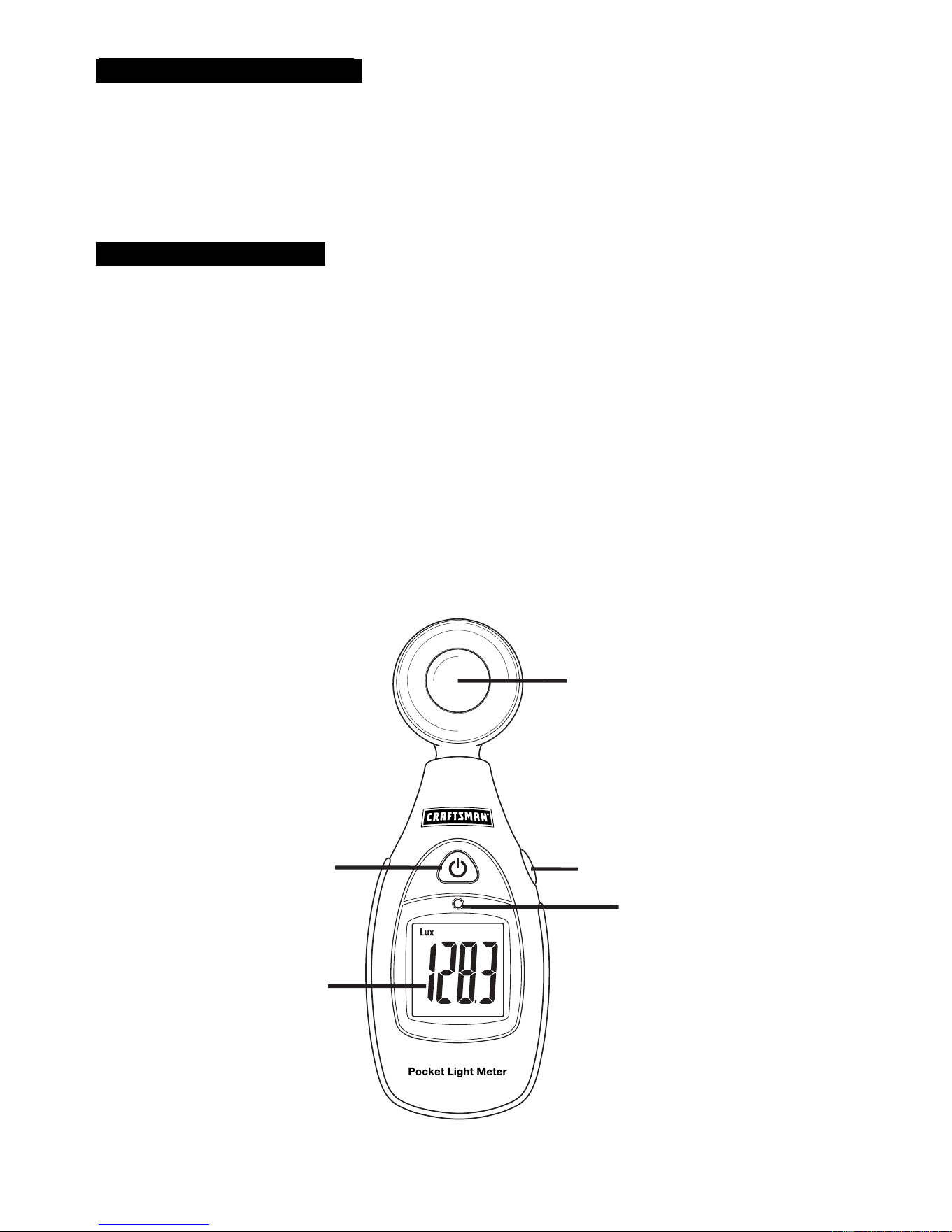
1. Photo detector (Light Sensor): The sensor contains a long life silicon photo diode
2. MAX-LUX/fc function button: Press button momentarily to view the maximum (MAX) reading.
Press the button momentarily again to release the MAX display and return to the normal operating
mode. Press and hold this button for at least 2 seconds to switch between LUX and fc (foot candle)
units of measure. Note that 1fc = 10.76 LUX).
3. LCD Backlight Control Sensor: The meter switches the LCD backlight ON and OFF
automatically based on environmental lighting conditions.
4. LCD display: 1999 count, backlit LCD with LUX, fc, MAX, and low battery icons.
5. Power button: Press to switch the unit ON or OFF.
Note: Battery compartment and tripod mount located on rear of instrument.
1
2
3
5
4
Downloaded from www.ManualsFile.com manuals search engine

4
OPERATING INSTRUCTIONS
Turn Power ON or OFF
Press the button to turn power on or off. If the display does not switch on, check that a 9V battery
is installed and is fresh.
Selecting LUX or Foot candle (fc) units of measure
Press and hold the MAX-LUX/fc button for at least 2 seconds to switch between LUX and Fc units.
Measurement Procedure
1. Switch the meter ON and position the light sensor to capture the light that is to be measured.
2. The display will indicate the light level in Fc or LUX units.
3. The meter automatically selects the correct range. If the ‘OL’ icon appears, the light
measurement is out of range and cannot be measured accurately.
4. If the x10 or x100 indicator appears, multiply the displayed value by the corresponding multiplier
to obtain the correct measurement value.
Max Hold
Momentarily press the MAX-LUX/fc button to view the highest reading (MAX) encountered since the
meter was last switched ON. Press the button again to return to the normal operating mode. To reset
the MAX reading, switch the meter OFF and then ON again.
Backlight
The meter automatically controls the LCD backlighting (ON and OFF) to match the available
environmental lighting.
Downloaded from www.ManualsFile.com manuals search engine
5
APPENDIX
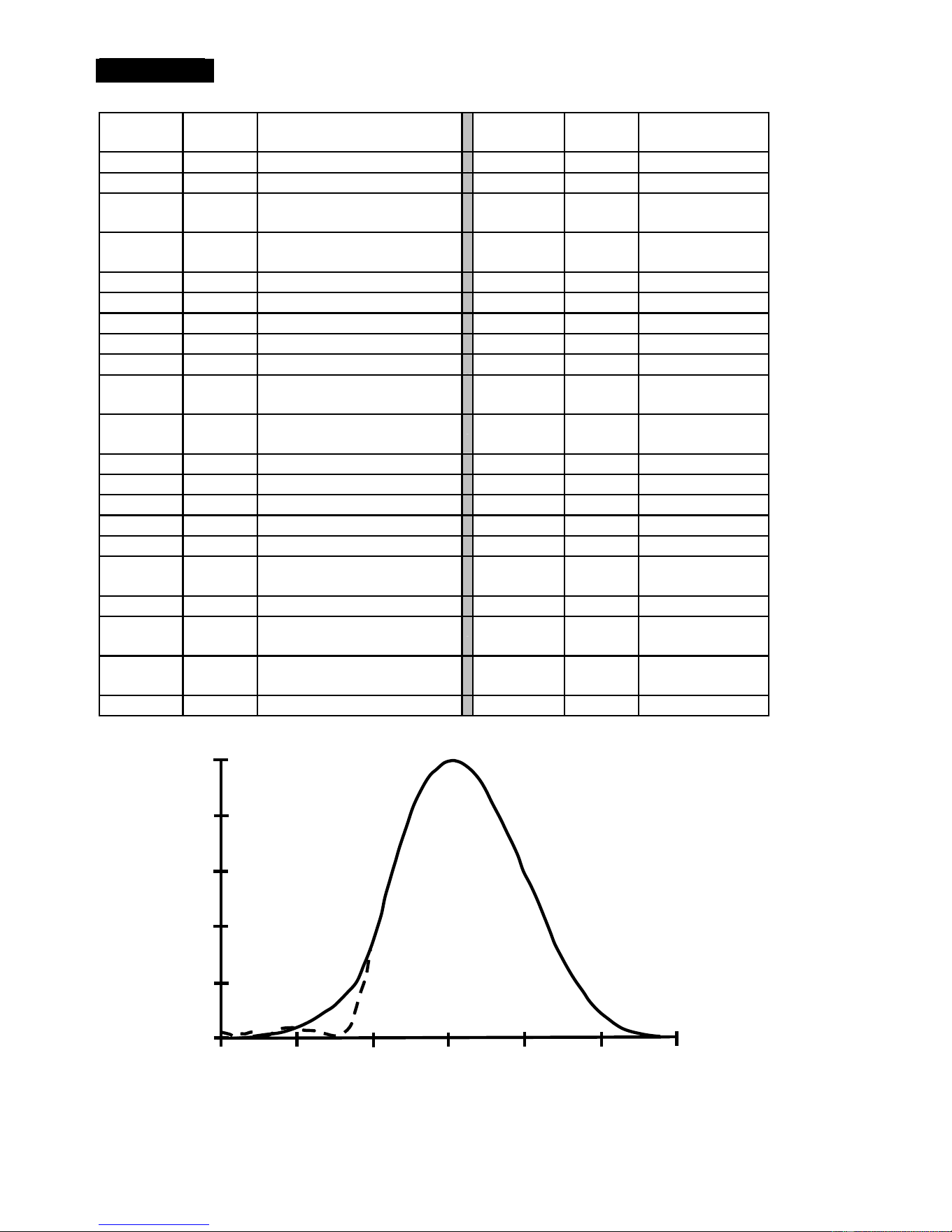
Typical Light Levels
Lux Foot
Candles
Lux Foot
Candles
Factories
Home
20-75 2-7 Emergency Stairs, Warehouse
100-150 10-15 Washing
75-150 7-15 Exit/Entrance Passages
150-200 15-20 Recreational
Activities
150-300 15-30 Packing Work
200-300 20-30 Drawing Room,
Table
300-750 30-75 Visual Work: Production Line
300-500 30-50 Makeup
750-1,500 75-150 Typesetting: Inspection Work
500-1,500 50-150 Reading, Study
1,500-3,000 150-300 Electronic Assembly, Drafting
1,000-2,000 100-200 Sewing
Office
Restaurant
75-100 7-10 Indoor Emergency Stairs
75-150 7-15 Corridor Stairs
100-200 10-20 Corridor Stairs
150-300 15-30 Entrance,
Wash Room
200-750 20-75 Conference,
Reception Room
300-750 30-75 Cooking Room,
Dining Table
750-1,500 75-150 Clerical Work
750-1,500 75-150 Show Window
1,500-2,000 150-2000 Typing, Drafting
Store
Hospital
75-150 7-15 Indoors
30-75 3-7 Emergency Stairs
150-200 15-20 Corridor/Stairs
75-100 7-10 Stairs
200-300 20-30 Reception
100-150 10-15 Sick Room,
Warehouse
300-500 30-50 Display Stand
150-200 15-20 Waiting Room
500-750 50-75 Elevator
200-750 20-75 Medical Exam
Room
750-1,500 75-150 Show Window,
Packing Table
750-1,500 75-150 Operating Room
1,500-3,000 150-300 Storefront, Show Window
5,000-10,000
500-1000 Eye Inspection
Spectral Sensitivity
400 450 500 550 600 650 700
Wavelength (nm)
- - - - - Light Meter Response
_____
CIE Response
R
e
l
a
t
i
v
e
R
e
s
p
o
n
s
e
1
0.8
0.6
0.4
0.2
0
Downloaded from www.ManualsFile.com manuals search engine

6
TROUBLESHOOTING
There may be times when your meter does not operate properly. Here are some common problems
that you may have and some easy solutions to them.
Meter Does Not Operate:
1. Read all of the instructions in this manual before use.
2. Check to be sure that the battery is properly installed.
3. Check to be sure that the battery is fresh.
If You Do Not Understand How the Meter Works:
Call our Customer Service Line 1-888-326-1006.
SERVICE AND PARTS
For replacement parts shipped directly to your home
Call 9 am – 5 pm Eastern Time, M - F
1-888-326-1006
Downloaded from www.ManualsFile.com manuals search engine