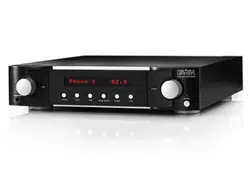

PREAMPLIFIER OWNER’S MANUAL
N
0
5206


1
N
0
5206 PREAMPLIFIER / OWNER’S MANUAL
TABLE OF CONTENTS
TABLE OF CONTENTS
Overview 2
Installation 4
Unpacking, Placement and ventilation 4
Power requirements, Operating states 5
Connections 6
Rear panel overviews 6
External component connections 7
Quick Listen 11
Control 11
Front-panel overview 12
Remote control overview 13
Remote control operation 14
5Kontrol Smart-Device App 14
Browser Setup Panel 15
Setup 16
Setup navigation 16
Input setup 17
Volume setup 21
Power setup 22
Display setup 22
Advanced setup 23
SSP (Surround Processor Integration) setup 26
Troubleshooting 28
Specifications 30

2
N
0
5206 PREAMPLIFIER / OWNER’S MANUAL
OVERVIEW
Congratulations on your purchase of the Mark Levinson
®
N
0
5206
Preamplifier. You now possess one of the finest audio
reproduction devices in the world, a product that will provide
an exceptional music listening experience for years to come.
The N
0
5206 harnesses decades of superlative audio
engineering and the latest advancements to deliver
unmatched performance and value. With a bold industrial
design, fully discrete PurePath cicuitry, PrecisionLinkII DAC,
MainDrive headphone power, the N
0
5206 delivers luxurious
fidelity with premium features and flexibility and is proudly
designed, engineered, and precision-crafted in the USA.
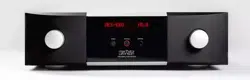
Industrial Design
Robust materials, lavish finishes and striking geometry are
hallmark attributes of Mark Levinson designs. The one-inch-
thick, bead-blasted, black-anodized, solid aluminum front
panels are machined and contoured to flow seamlessly into
a sleek glass display, which itself is recessed into a clear-
anodized aluminum bezel.
The iconic Mark Levinson hourglass knobs are redefined
– machined with a gently curved profile transitioning into
a rounded front, with feet to match. With debossed top
cover vents, screen-printed logo behind the glass panel,
and aluminum buttons, no detail has been overlooked. An
elegant 5000 series custom aluminum IR remote control
is included.
Digital Audio
The N
0
5206 offers outstanding digital audio capability through
the Mark Levinson PrecisionLink II DAC. An ESS Sabre Pro
series 32-bit D/A converter with jitter elimination circuitry
and a fully balanced, discrete current-to-voltage converter
form the heart of the digital audio processing stage. There
are seven user selectable PCM filters and 4 low-pass filters
for DSD playback.
The N
0
5206 includes MQA (Master Quality Authenticated)
technology, which enables playback of MQA audio files and
streams from any digital input. In addition, a Bluetooth
receiver equipped with aptX-HD provides for the highest
quality Bluetooth playback available.
MainDrive Class A Headphone Power
Like the acclaimed 500 series components, the N
0
5206
features a MainDrive headphone output which employs a
preamp output stage specifically designed with the current
and power capacity to drive headphones directly in pure
class A, without a separate headphone amp.
Control
System integration and communication ports include
Ethernet, RS-232, IR input, and 12V trigger input and output.
An internal webpage allows setup, import and export
of configurations, and software updates using a PC and
standard web browser. In addition, drivers are available for
major control systems.
Analog Input Stage
The foundation of the N
0
5206’s analog capability is its
proprietary PurePath circuitry – a fully discrete, direct-
coupled, dual-monaural line-level preamp circuit, for
which the Shelton engineering team has been awarded
two patents. A unique single gain stage mated to a digitally
controlled resistor network for volume adjustment maintains
maximum signal integrity and widest possible bandwidth.
Each of its four stereo line level inputs – two balanced XLR
and two single-ended, using custom Mark Levinson RCA
connectors – has its own individual high-reliability signal
switching relays.
A newly designed phono stage features a hybrid gain topology,
mating key discrete components from the acclaimed 500
series Pure Phono stage with low-noise integrated circuits
for high performance and space efficiency. Also, like the
500 series, a hybrid active/passive RIAA equalizer employs
precision resistors and polypropylene capacitors for
exceptional accuracy and sonic clarity. The user can select
MM/MC gain and infrasonic filter from the setup menu, while
capacitive and resistive loading settings are easily accessed
from the rear panel.
OVERVIEW

3
N
0
5206 PREAMPLIFIER / OWNER’S MANUAL
OVERVIEW
Highlights
Digital
• 32 bit/384 kHz DAC with 4x DSD capability
• Digital inputs: 1 x USB (asynchronous),
2 x coaxial S/PDIF, 2 x optical S/PDIF,
and 1 AES/EBU XLR balanced
• Bluetooth audio input including aptX-HD support
• MQA Full Decoding
Analog
• PurePath Class A design
• 2 x balanced XLR stereo, 2 x RCA stereo,
1 x RCA phono (MM/MC)
• Home theater processor pass-thru mode
• Subwoofer high-pass filter via either single-ended RCA
or balanced XLR outputs
• Moving coil and moving magnet phono inputs with
adjustable resistive/capacitive loading
Outputs
• Balanced XLR and single-ended RCA outputs
• MainDrive headphone output:
1 x 1/4-inch/6.35mm jack (front panel)
Control
• Control ports: Ethernet (RJ45), RS-232 (DB9),
12V trigger input/output and IR input (3.5mm jack)
• Webpage setup, configuration import/export,
software updates
• Included handheld IR remote control
• Available 5Kontrol smart device app (iOS and Android)
• Control modules for third-party automation
For the most up to date information please visit
www.MarkLevinson.com

4
N
0
5206 PREAMPLIFIER / OWNER’S MANUAL
INSTALLATION
UNPACKING
When unpacking your N
0
5206:
• Save all packing materials in case you need to ship your
preamp in the future.
• Inspect your preamp for signs of damage during
shipment. If you discover damage, contact your
authorized Mark Levinson
®
dealer for assistance in
making appropriate claims.
• Locate and remove the accessories from the shipping
carton. Make sure that all of the items listed below are
included. If any are missing, contact your authorized
Mark Levinson dealer.
1 x IEC power cord (terminated according to the region to
which the unit is shipped)
1 x Remote control plus 2 x AAA batteries
1 x Owner’s manual
1 x Safety information sheet
1 x Hex tool for remote
Please register your N
0
5206 within 15 days of your
purchase. Register online at www.MarkLevinson.com.
Retain your original, dated sales receipt as proof of
warranty coverage.
PLACEMENT AND VENTILATION
• Install the preamplifier on a shelf with several inches
of clearance above it to ensure proper ventilation. DO
NOT install the preamplifier inside of an enclosed
cabinet or rack.
• Ensure that you install the preamplifier on a solid, flat
and level surface.
• Install the preamplifier as close as possible to associated
audio components to keep interconnecting cables as
short as possible.
• Select a dry, well-ventilated location that is out of direct
sunlight.
• DO NOT expose the N
0
5206 to high temperatures,
humidity, steam, smoke, dampness, or excessive dust.
INSTALLATION

5
N
0
5206 PREAMPLIFIER / OWNER’S MANUAL
INSTALLATION
POWER REQUIREMENTS
The N
0
5206 is configured at the factory for 100, 115, or 230
VAC power operation at 50Hz or 60Hz. Before operating the
amplifier, ensure that the power label on the rear panel
near the AC input connector indicates the correct operating
voltage. A detachable IEC power cable intended for use in the
region where the N
0
5206 is sold is included.
Connection to an AC voltage other than that for which the
N
0
5206 is intended can create a safety and fire hazard and
may damage the unit. If you have any questions about the
voltage requirements for your N
0
5206 or about the line
voltage in your area, contact your authorized Mark Levinson
dealer before plugging the N
0
5206 into an AC power outlet.
WARNING! MAKE SURE all components in the audio system
are properly grounded. Do NOT defeat the safety purpose
of polarized or grounding-type plugs with “ground-lifter”
or “cheater” adapters. Doing so may cause a dangerous
voltage to build up between components, which may result
in personal injuries and/or product damage.
Unplug the N
0
5206 from the AC wall outlet during lightning
storms and extended periods of non-use.
CAUTION: Before moving the unit, make sure it is powered
off by removing the power cord from the AC power outlet
and the unit’s rear panel.
OPERATING STATES
The N
0
5206 has three operating states:
Off:
The AC mains power is disconnected by removing the
power cord from the rear panel.
Standby:
The
Standby
mode has three settings that can
be selected via the
Setup
menu: Green, Power Save, and
Normal. (See page 22 for more information on changing
Standby
mode settings.)
Green:
This mode removes power from almost all of the
amplifier’s circuits, allowing the unit to be activated only via
an IR control signal, a 5V – 12V trigger or a double press
of the
Standby
button. This mode provides maximum power
conservation and is the factory-default
Standby
mode.
Power Save:
This mode removes power from the audio
circuits, but keeps the control circuitry powered and ready
to receive commands from the front panel controls, or the
remote control or the web-browser Graphical User Interface
(GUI). This mode provides moderate power conservation.
Normal:
This mode shuts off the display and mutes its audio
outputs but keeps all of its control and audio circuits powered.
This mode provides the least amount of power conservation
but allows the N
0
5206’s audio circuits to remain warmed up
to deliver optimal performance at all times.
On:
All circuits are fully powered.
Auto off:
The N
0
5206 has an Auto Off feature that
automatically places it into the
Standby
mode after 20
minutes of no user control input or audio signal passing
through the unit. The factory default setting for the Auto
Off feature is On (engaged) as required for certain regions.
You can disable the Auto Off feature in the
Setup
menu (see
page 16).
6
N
0
5206 PREAMPLIFIER / OWNER’S MANUAL
CONNECTIONS
CONNECTIONS
REAR-PANEL OVERVIEW
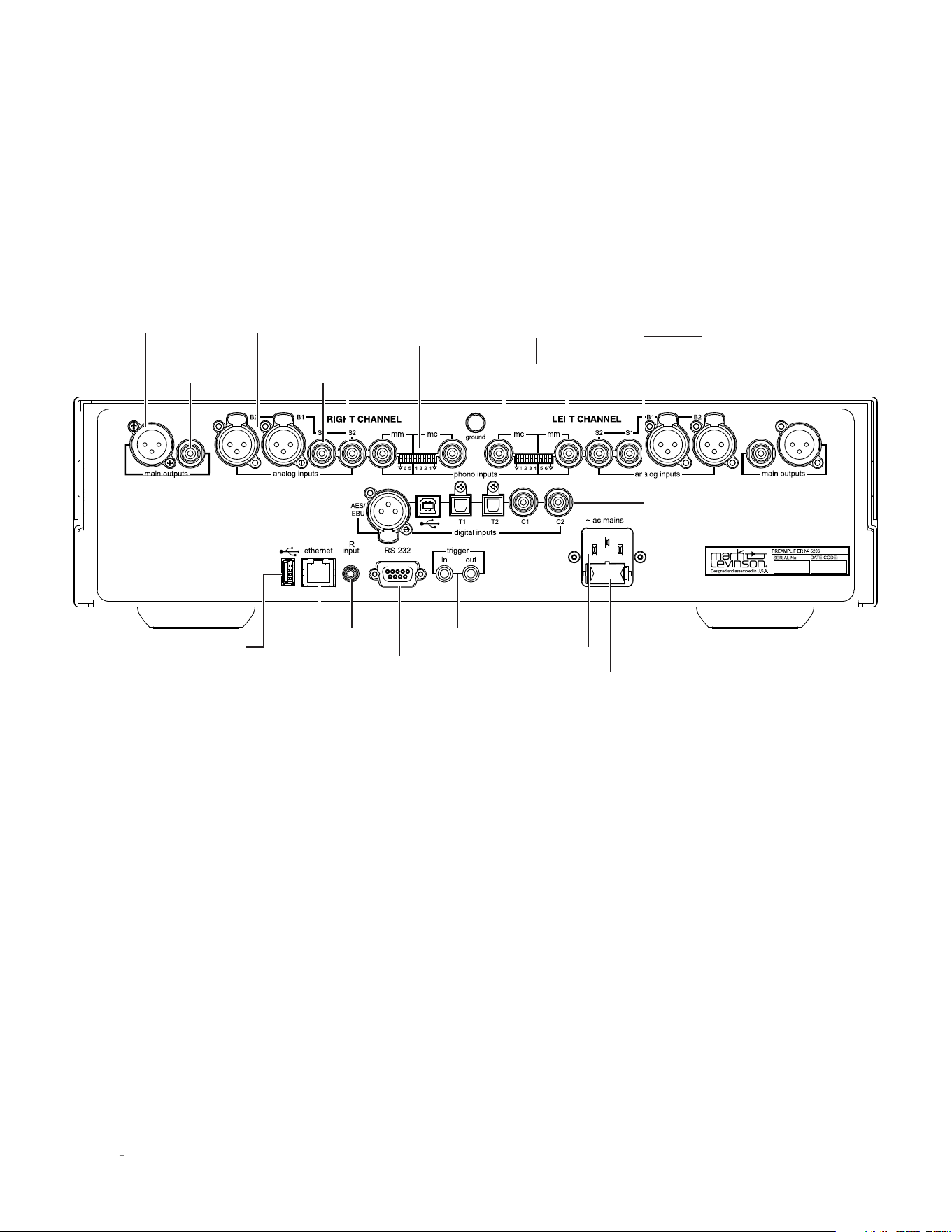
AC Mains Inlet
Fuse
Compartment
(see rear-panel
labeling for value)
Line Out
Single Ended
RCA
USB A for
Updates
Ethernet RS232
DB9F
IR In Trigger
In and Out
Line Out
Balanced
XLR
Two Balanced
XLR Analog In Two Single
Ended RCA
Analog In
Moving Magnet
and Moving Coil
Phono Inputs
Digital Inputs:
• AES XLR Input
• Asynchronous USB 2.0 B Audio
• 2 x Optical
• 2 x Coax
Phono Capacitive
and Resistive
Loading
Selection

7
N
0
5206 PREAMPLIFIER / OWNER’S MANUAL
CONNECTIONS
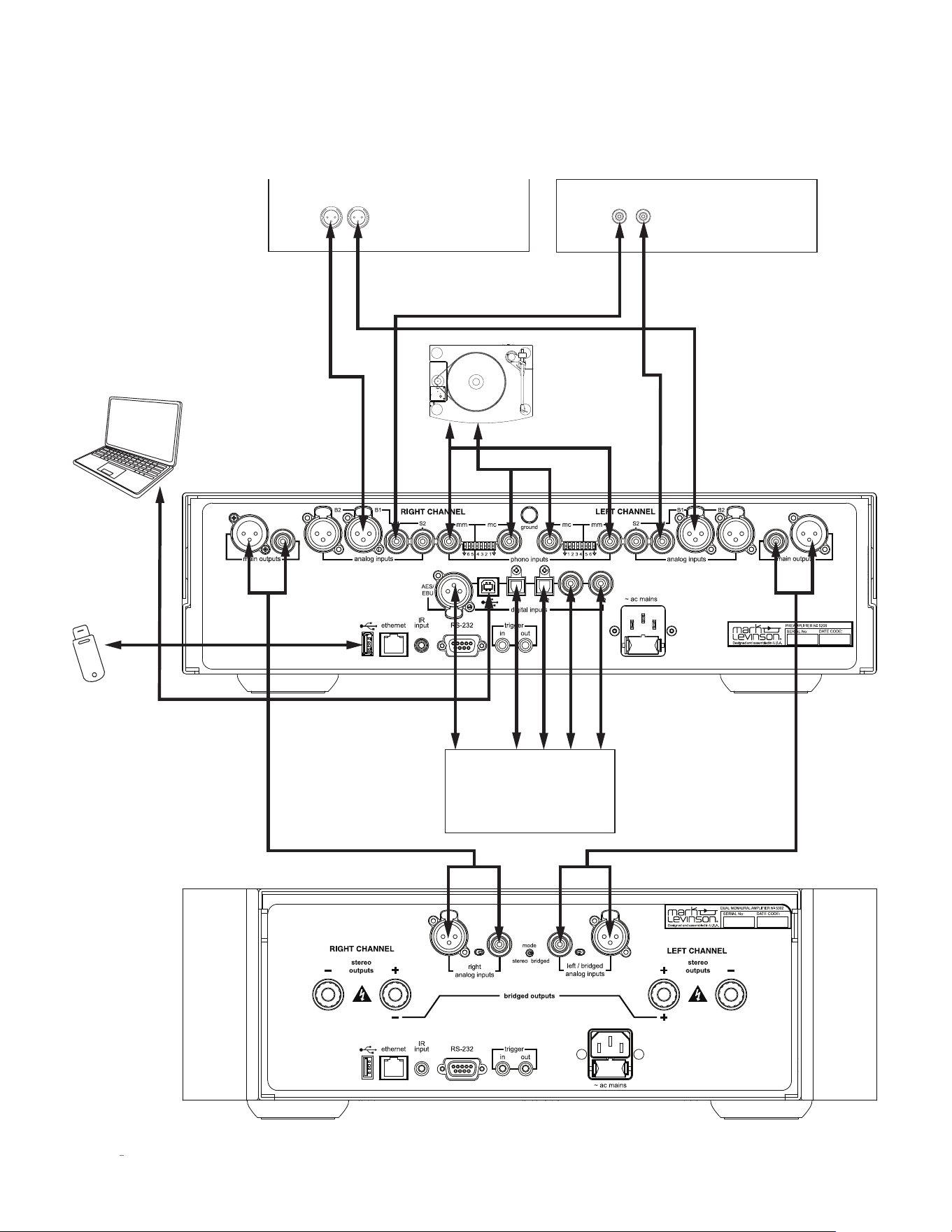
EXTERNAL COMPONENT CONNECTIONS
CAUTION: Before making connections, make sure the
N
0
5206 and all associated components are powered off and
disconnected from electrical outlets.
Main Drive headphone output (front panel):
Connect any
headphone equipped with a 1/4" tip/ring/sleeve “phone” plug
or adapter. The line outputs are muted when headphones are
plugged in.
Balanced analog inputs:
These connectors, labeled B1 and
B2, accept left-channel and right-channel balanced input
signals from source components with balanced (male XLR)
output connectors.
Balanced
Input Connector
(female XLR)
Pin
3
Pin
1
Pin
2
Balanced connector pin assignments:
1. Pin 1: Signal ground
2. Pin 2: Signal + (non-inverting)
3. Pin 3: Signal – (inverting)
Connector ground lug: Chassis ground
Single-ended analog inputs:
The N
0
5206 has two analog
RCA input connectors per channel (labeled S1 and S2) that
accept left-channel and right-channel single-ended input
signals from source components with unbalanced RCA type
output connectors.
Phono inputs:
The N
0
5206 has two analog phono preamplifier
inputs per channel (labeled MM and MC) that accept left-
channel and right-channel moving magnet (MM) and moving
coil (MC) phono cartridge input signals.
If your turntable has a moving magnet cartridge, connect
it to the MM inputs. If your turntable has a moving coil
cartridge, connect it to the MC inputs. You may connect only
one turntable and cartridge to the N
0
5206; do not connect
both the MM and MC inputs. If the turntable is equipped with
a ground wire, connect it to the ground screw.
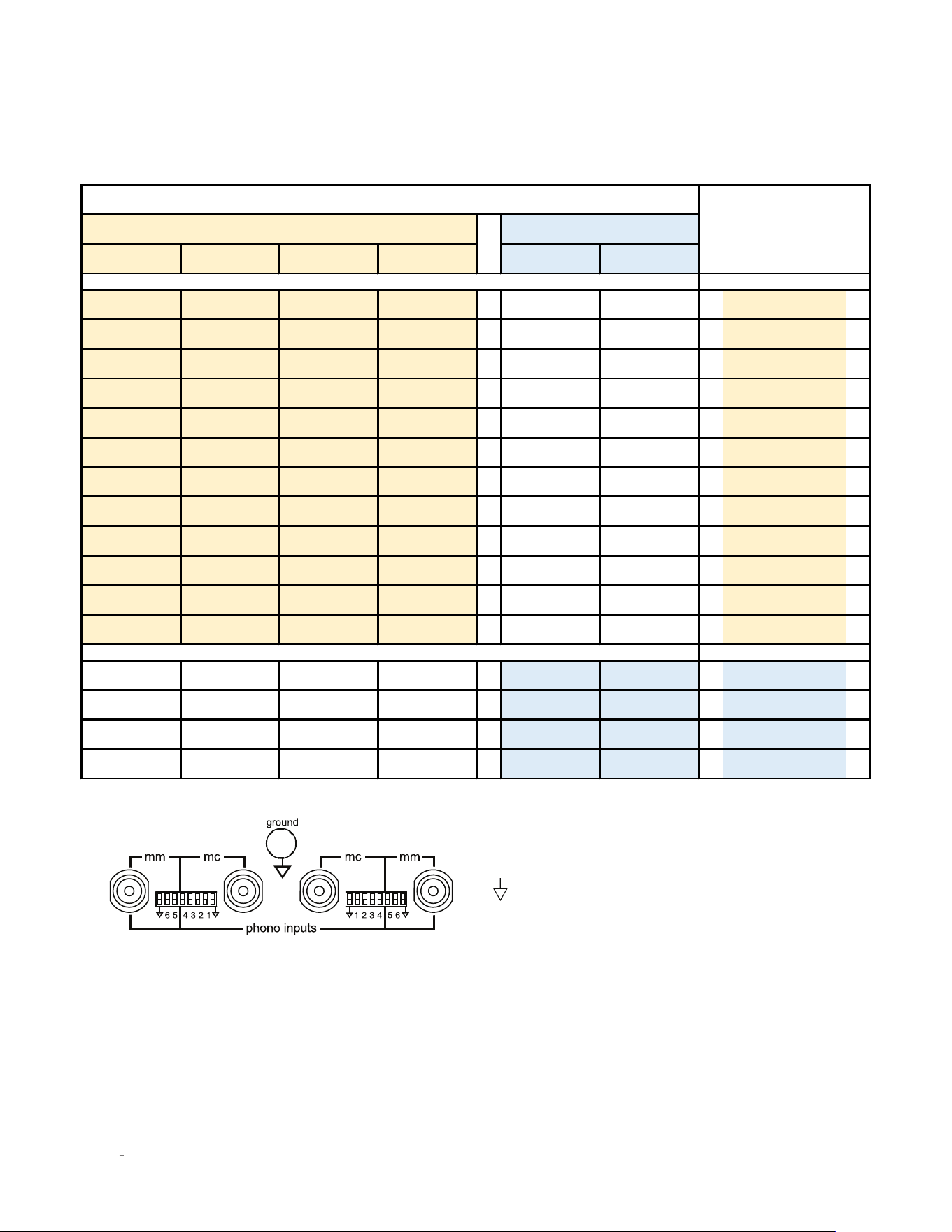
The white DIP switches adjacent to the phono inputs set the
input resistance for moving coil cartridges and the input
capacitance for moving magnet cartridges. Selecting the
right setting is essential for getting the best performance
from your turntable. Consult the cartridge’s owner’s manual
for the recommended load setting. Use a small tool such
as a jeweler’s screwdriver to push the switches up or down
as needed. The factory default is all switches in the down
position. Follow the chart on the next page to make the
correct settings. Choose the setting that is closest to the
specified setting. For example, if the specified MC load is 100
Ohms, use the 110 Ohm setting.
CAUTION: The volume should be set to 0 or the preamp
muted while re-setting the DIP switches.
CAUTION: Do not use the phono inputs for any source
component other than a turntable.
8
N
0
5206 PREAMPLIFIER / OWNER’S MANUAL
The phono inputs are balanced. Setting the ground switch
to the
up
position references the input to ground which
is sometimes useful if there is excessive noise or hum
present. Be sure to use the ground switch designated for the
connected input.
1 2 3 4 5 6
x x
1000Ω
x x 500Ω
x x 250Ω
x x 200Ω
x x 125Ω
x x 110Ω
x x 90Ω
x x 82Ω
x x 62Ω
x x 52Ω
x x 43Ω
x x 37Ω
x x x x
20pF
x x x x
70pF
x x x x
120pF
x x x x 170pF
Moving Coil
Moving Magnet
Loading
Value
Loading Switches
CONNECTIONS
9
N
0
5206 PREAMPLIFIER / OWNER’S MANUAL
Digital inputs
The N
0
5206 has six digital audio input
connectors: an AES/EBU-format XLR connector (labeled
AES/EBU), an asynchronous USB-B digital audio connector
(labeled with a USB icon
),
two optical (TOSLINK)
S/PDIF connectors (labeled T1 and T2), and two coaxial (RCA)
S/PDIF connectors (labeled C1 and C2).
USB port:
This USB Type-A connector allows you to perform
firmware upgrades that may be offered in the future, and to
import and export setup configurations via a standard USB
drive or memory stick (FAT32 formatted). Firmware updates
may also be accomplished via download when the unit is
connected to a local area network (LAN) via an Ethernet
cable. (See page 23 for more detailed firmware update
instructions.)
Bluetooth:
Bluetooth-enabled smart devices may be
paired with the N
0
5206 to stream audio content wirelessly.
Qualcomm
®
aptX™-HD audio ensures your Bluetooth
®
wireless enabled device can deliver High Definition
(HD) audio. (See Setup on page 19 for Bluetooth pairing
instructions.)
Line output connectors:
The N
0
5206 provides both
unbalanced RCA and balanced XLR line-level output
connectors for connecting to an external power amplifier.
Note: The line outputs are variable and will follow the
settings of the volume, balance and mute controls.
Ethernet port:
This RJ45 jack supports connection to a home
network via Cat5e or CAT6 Ethernet cable and allows you to
access the
Setup
menu and other controls via a browser-based
setup panel.
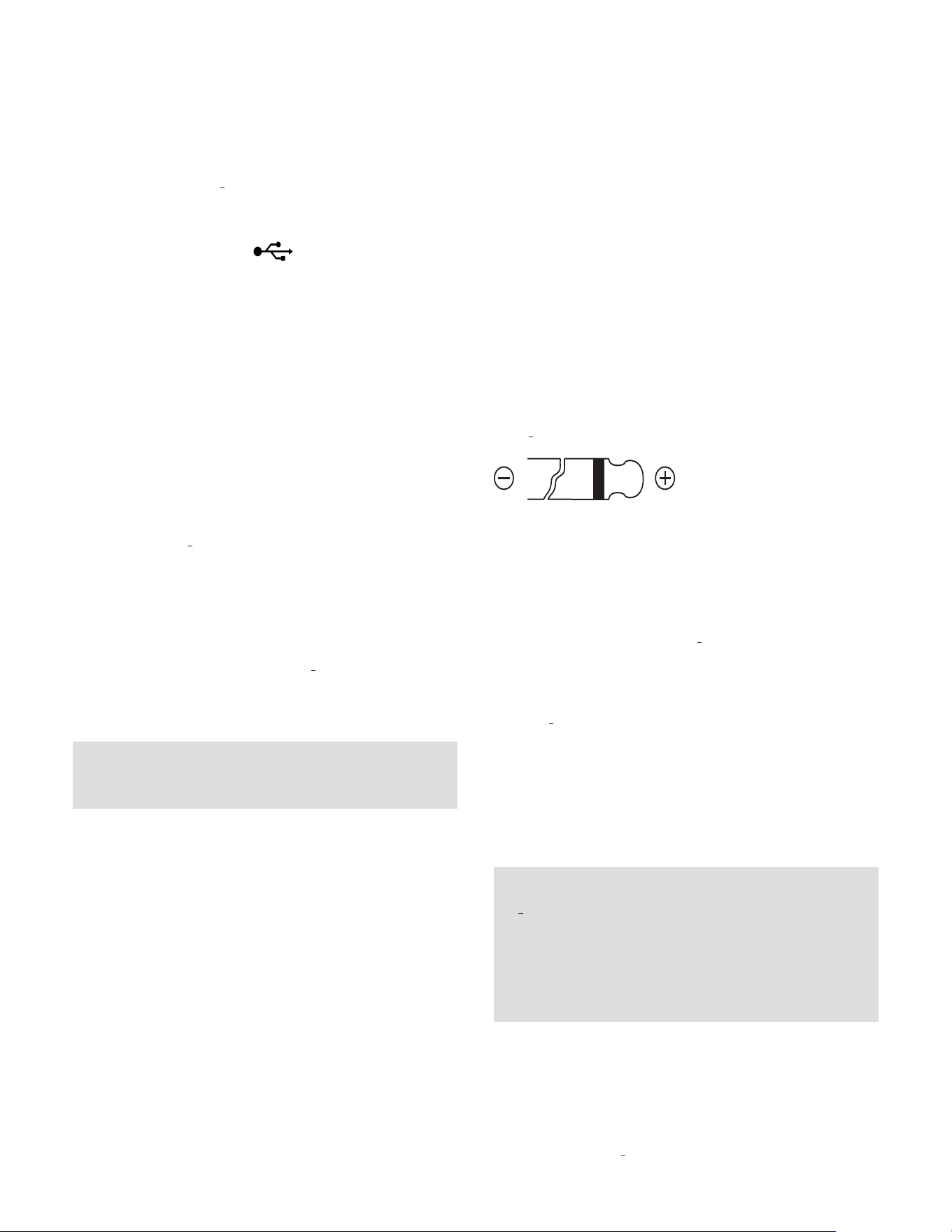
IR input connector:
This 1/8-inch (3.5mm) connector accepts
IR (infrared) control signals from other equipment. (See
illustration below.)
RS-232 port:
This DB9F connector provides serial control
through a standard RS-232 protocol.
See www.MarkLevinson.com for RS232 code data.
Trigger output connector:
This 3.5mm tip/sleeve connector
can be used to activate other components in the audio
system and listening room, such as amplifiers, lights and
window shades. A 12V 100mA DC signal is output whenever
the N
0
5206 is on. (See illustration below.)
Trigger input connector:
This 3.5mm tip/sleeve connector
can be connected to the trigger output of another system
component or control system that supplies a trigger voltage.
Whenever the units detects a voltage between 5V and 12V
DC at this connection it will turn
On
. When the trigger signal
at this connection ceases the N
0
5206 will enter the
Standby
mode. (See illustration above.)
AC mains connector:
This connector provides AC power
to the N
0
5206 when the supplied power cord is connected
from it to an AC electrical outlet. This should be the LAST
connection you make in the hookup process.
We recommend that you unplug the unit from the AC wall
outlet during lightning storms and extended periods of
non-use.
NOTE: After connecting all source components to the
N
0
5206, we suggest using the
Setup
menu to set the
names of all unused inputs to “Disable.” This will remove
the unused inputs from the list of available inputs and
skip over them when scrolling through inputs. (See
Setup/Input on page 18 for more information.)
CONNECTIONS
10
N
0
5206 PREAMPLIFIER / OWNER’S MANUAL
CONNECTIONS
Balanced
Analog Source
Component
Unbalanced (RCA)
Analog Source
Component
OrOr
Digital Source
Component
Use Thumb Drive
For Updates
Or Or
Or
Computer

11
N
0
5206 PREAMPLIFIER / OWNER’S MANUAL
QUICK LISTEN / CONTROL
CONTROL
The N
0
5206 is highly flexible and allows a variety of means
of setup and control including front panel control knobs,
IR remote, available Mark Levinson 5Kontrol smart device
app (iOS and Android), as well as integration with 3rd party
control systems. Additionally, an internal webpage allows
setup, import and export of configurations, and firmware
updates using a PC or tablet and a standard web browser.
1. Connect the N
0
5206 to a power amplifier. Consult the
amplifier’s owner’s manual for connection and operation
guidance.
2. Connect the supplied power cable to the N
0
5206’s AC
Mains connector and an electrical outlet. Power on the
N
0
5206, all source components, and the power amplifier.
3. Press the Standby button on the N
0
5206’s front panel or
remote control to turn it on.
4. Rotate the N
0
5206’s input select knob or press the Select
+/– buttons on the remote to select the input for the
source component you want to hear.
5. Make sure the N
0
5206’s volume is set to a reasonable
level (30 is a good starting point).
6. Begin playing the selected source device.
7. Sit back, relax and delight in the incredible realism of
your Mark Levinson high-performance audio system.
8. For more information on how to get the best performance
and convenience from your new amplifier, read on. You
will be glad you did.
QUICK LISTEN
12
N
0
5206 PREAMPLIFIER / OWNER’S MANUAL
CONTROL
The Mark Levinson team designed the N
0
5206 for elegant
simplicity and ergonomics; therefore, the knobs perform
a variety of functions depending on the operating mode.
There are two modes of operation,
Listening
mode and
Setup
mode, and three modes of
Standby
, Green, Power
Save, and Normal.
Please read this section carefully and take the time to learn
the operating modes. We strongly recommended you turn
your volume very low or all the way down before entering the
Setup
mode.
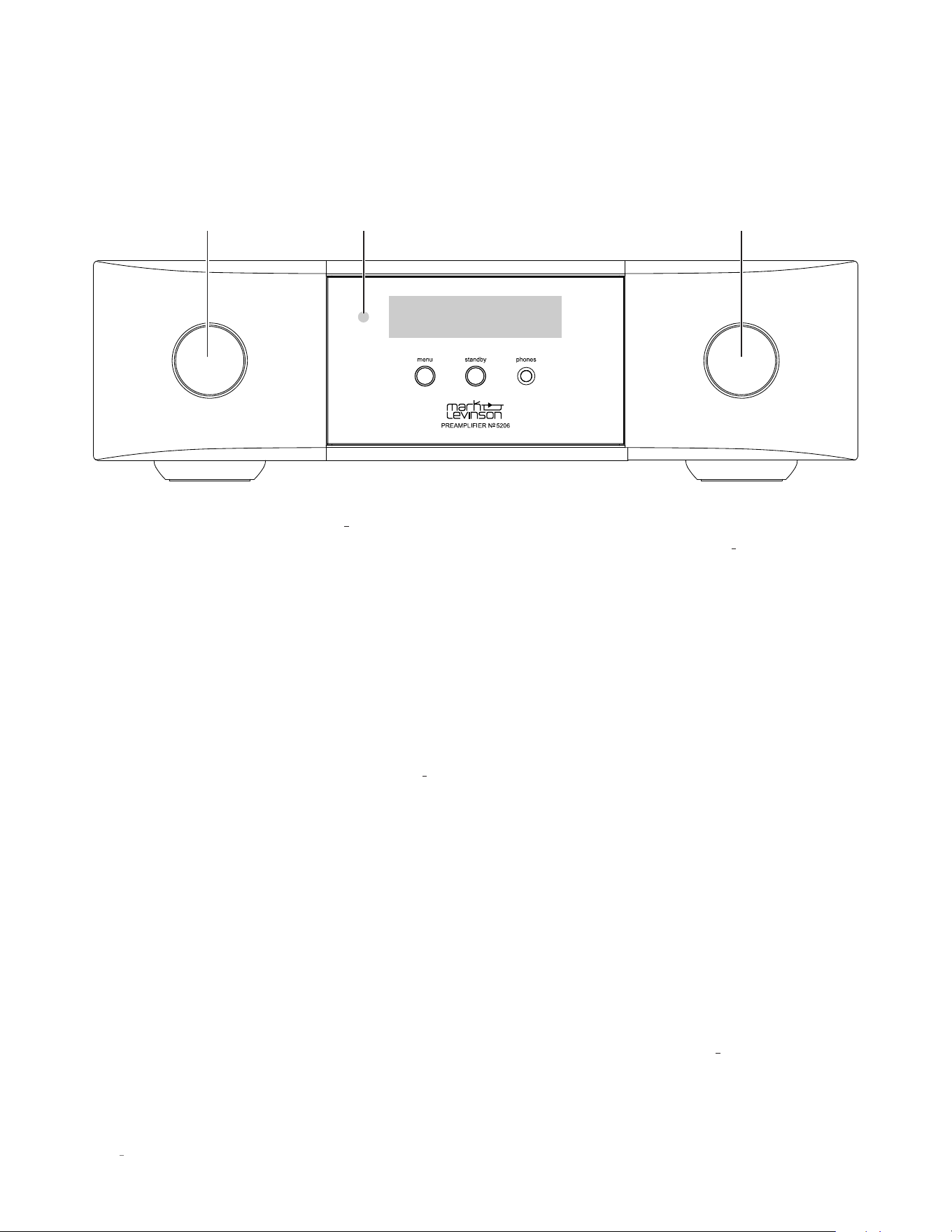
Standby button and LED:
Press this button to put the N
0
5206
into and out of the
Standby
mode. The LED illuminates steady
RED when the unit is
On
. When the unit is in the
Standby
state, the LED flashes slowly.
Input/Select knob:
When in listening mode rotate this knob
to select the desired source signal to send to all outputs. The
front panel display indicates the name and volume level of the
selected input. (Note: The Select knob will bypass any input
for which the Input Name parameter is set to “Disabled” in
the setup mode.) When in setup mode, turning this knob will
scroll through menu choices.
IR receiver:
The IR receiver receives commands from the
included remote control when the rear-panel IR input is not
being used.
Menu button:
Press this button to display the
Setup
menu,
which you can use to customize the N
0
5206 to suit your other
system components and individual preferences. This button
performs a “Back” function when more than two levels deep
into menu parameters.
Headphone output:
Connect any headphone equipped
with a 1/4" tip/ring/sleeve “phone” plug or adapter. When
headphones are plugged in the line outputs are muted.
Volume/Scroll/Enter:
This knob is a rotary encoder and
switch. When in listening mode, this knob acts as a volume
control. Turn this knob to adjust the volume level. When the
setup mode is activated by pressing the Menu button, this
knob/button scrolls through the setting options and acts to
select or deselect the displayed choice when pushed inward.
Push to display the sampling rate for digital inputs when in
listening mode. If “MQA” or “MQA.” is displayed along with
the sampling rate, it indicates that the product is decoding
and playing an MQA stream or file. “MQA.” indicates it is
playing an MQA Studio file, which has either been approved
in the studio by the artist/ producer or has been verified by
the copyright owner.
Front panel display:
This 32-character alphanumeric display
provides information about the N
0
5206’s operating status.
During normal operation, it indicates the name and volume
level of the selected input.
FRONT-PANEL OVERVIEW
Input/ Select Knob
IR Receiver Volume/Scroll/Enter
13
N
0
5206 PREAMPLIFIER / OWNER’S MANUAL
CONTROL
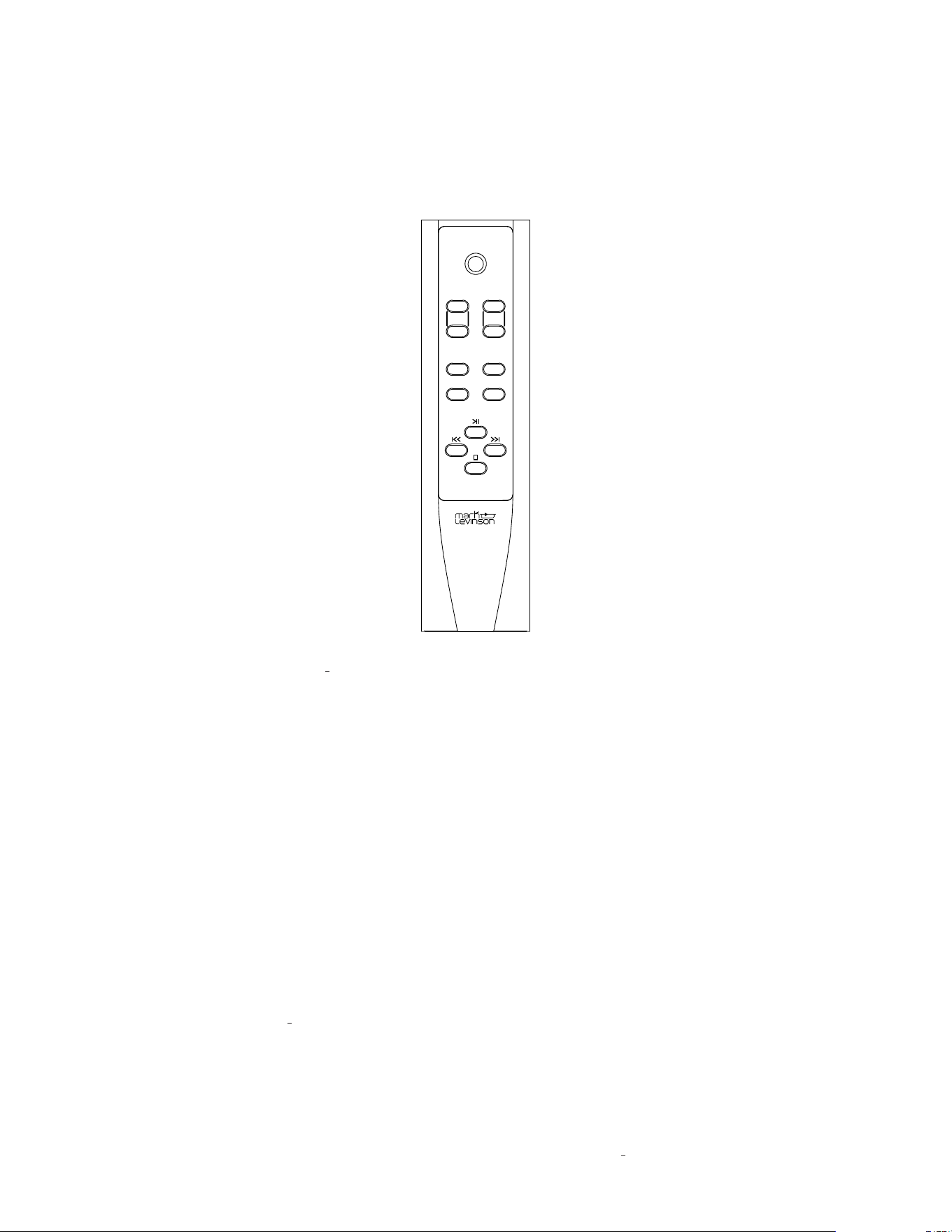
REMOTE CONTROL
REMOTE CONTROL OVERVIEW
Standby:
Press this button to put the N
0
5206 into and out of
the
Standby
mode. Press this button twice to wake up unit
from green
Standby
mode.
Input +/-:
Press these buttons to select the desired input.
Allow a moment for the relays to switch. The name and
volume level of the selected input is indicated on the front-
panel display. These buttons are also used to select functions
in the
Setup
mode (see page 16).
Volume +/– buttons:
Press these to adjust the volume
level of the line and headphone outputs. The minimum
volume level is 0; the default maximum volume level is 80,
but you can change that value in the
Setup: Volume
menu
(see page 21).
Menu:
Press this button to display the
Setup
menu, which
you can use to customize the N
0
5206 to suit your system
and preferences. The word “Setup” appears on the front
panel display when the
Setup
menu is active. This button
performs a “Back” function when more than two levels deep
into menu parameters and is used to exit the
Setup
menu.
Mute:
Press this button to mute and unmute the line and
headphone outputs by the amount determined in the
Setup
menu (the default value is -40dB). The word “Mute” appears
on the front panel display when the mute function is engaged.
Enter:
Press this button to select or deselect a menu item
when in the
Setup
mode.
Balance:
Press this button to set the left-to-right channel
balance. The symbols < - - L/R - - > appear in the front panel
display. To change balance, use the Volume + button to shift
channel balance to the right in .5dB steps. Use the Volume –
button to shift channel balance to the left. Maximum shift is
-20dB, followed by the reverse channel turning off.
While in
Balance
mode other controls will not operate. To
exit the
Balance
mode, push the Balance button a second
time.
Bluetooth transport control
: When using a Bluetooth source
these buttons control navigation of the program material
when used with compatible Apps.
standby
input
volume
enter menu
balance mute
14
N
0
5206 PREAMPLIFIER / OWNER’S MANUAL
REMOTE CONTROL OPERATION
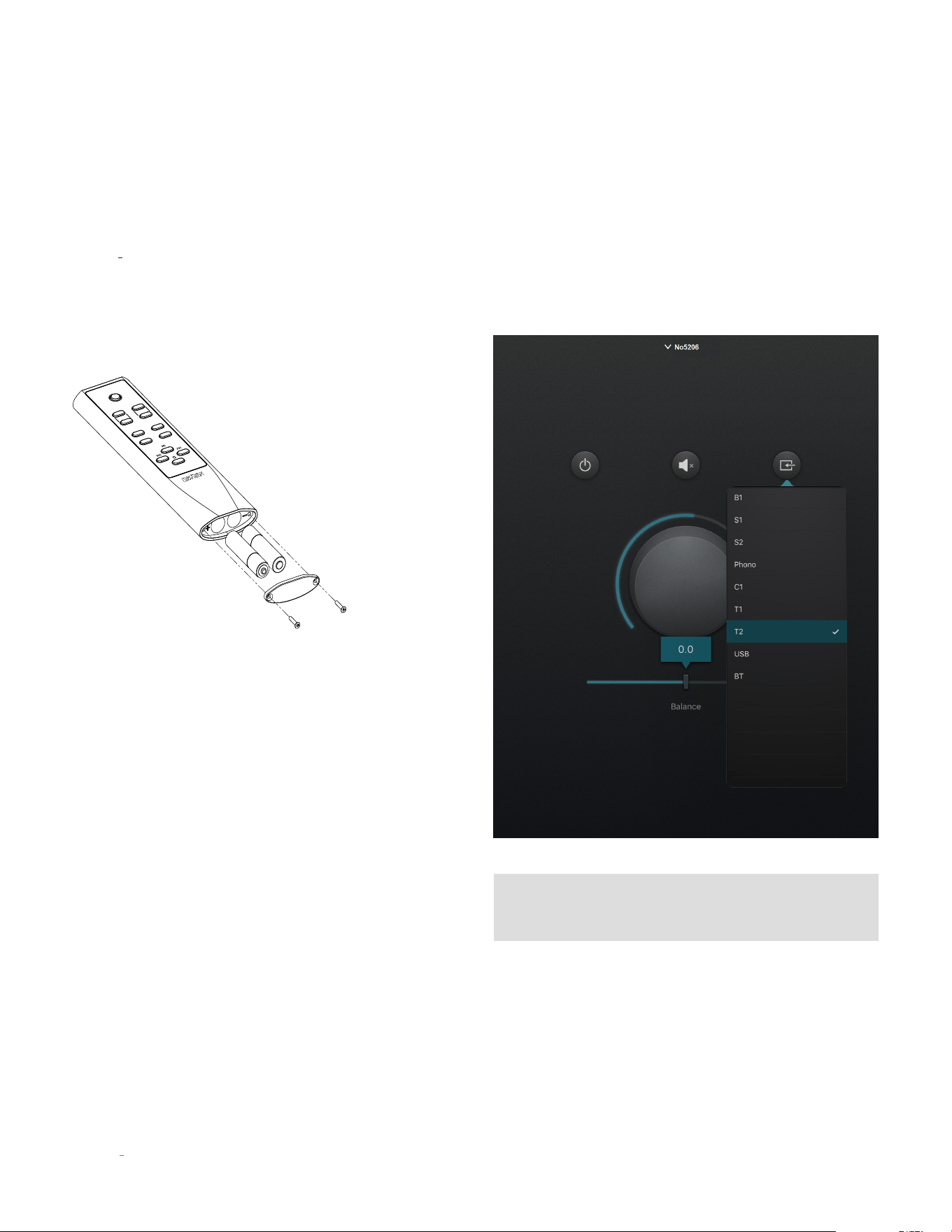
Battery Installation
Your N
0
5206 remote control comes with two AAA alkaline
batteries. To install the batteries, use the included hex tool
to remove the battery cover, insert the batteries and replace
the battery cover and hex screws. Be sure to observe proper
battery polarity.
standby
input
volume
enter menu
balance mute
Using the Remote Control
When using the remote control, aim it toward the unit’s
front panel IR receiver. Make sure that no objects, such as
furniture, block the remote’s view of the receiver. Bright
lights, fluorescent lights, and plasma video displays may
interfere with the function of the remote.
• The remote has a range of about 17 feet (5m), depending
on the lighting conditions.
• You can use the remote at an angle of up to 45° on either
side of the unit.
• Placing the preamplifier behind tinted glass will reduce
the remote control’s effective range.
If the remote control operates intermittently, replace both
batteries with new ones.
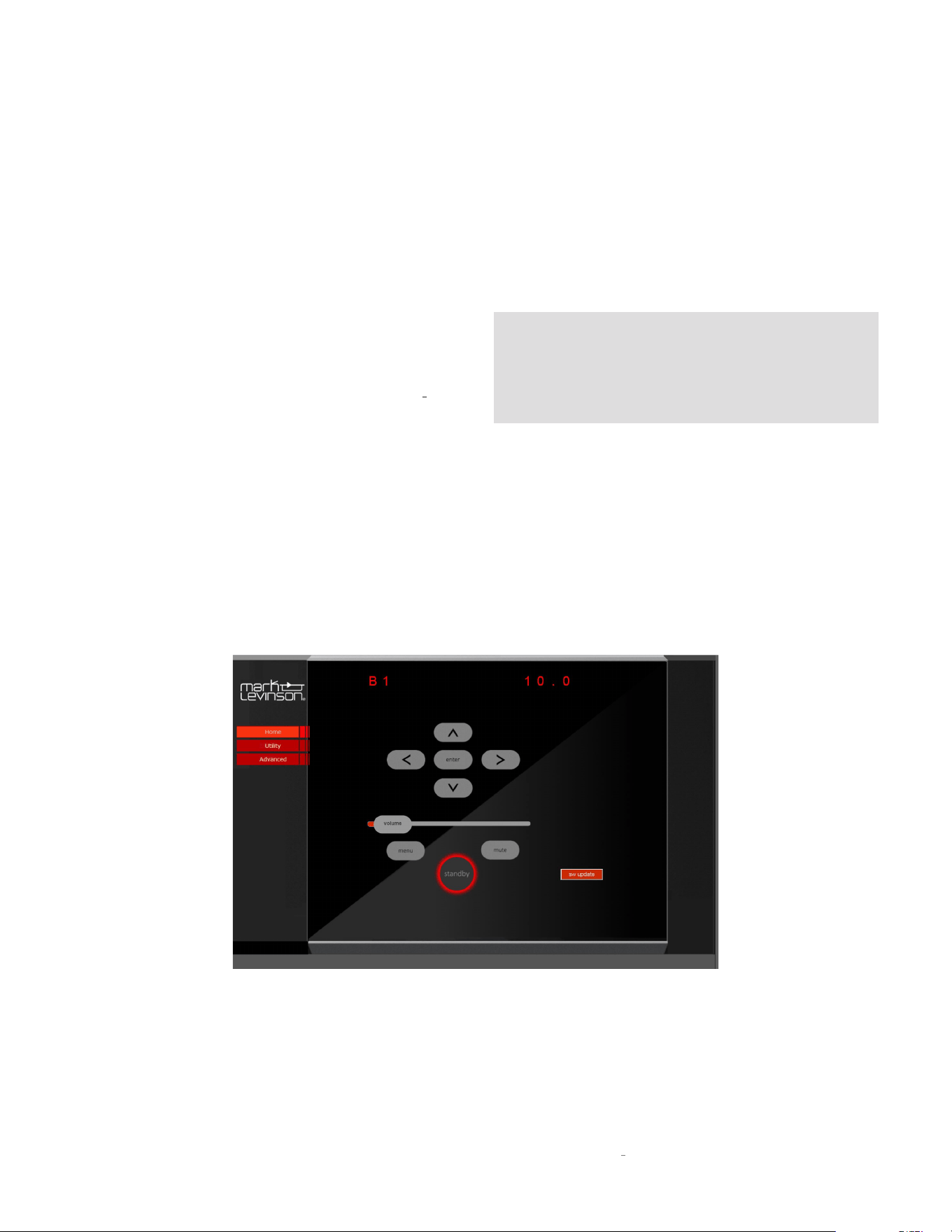
5KONTROL SMART-DEVICE APP
All of the functions of the remote are duplicated on the Mark
Levinson 5Kontrol smart-device app. The app also provides
navigation control of selected media sources and can control
other Mark Levinson products.
NOTE: The front panel display is replicated on the top of
the Home and Advanced Update pages
CONTROL
15
N
0
5206 PREAMPLIFIER / OWNER’S MANUAL
BROWSER SETUP PAGE (BSP)
The BSP is a highly convenient means of keeping the
firmware of your preamplifier up to date and for performing
setup functions. It is accessed via a major web browser on
a PC or tablet. In order to access the BSP, you must first
connect the unit to your Local Area Network (LAN). If there is
no easy access to a LAN there are other means of setup and
control, discussed elsewhere in this manual.
• Connect the Ethernet port on the rear panel of the N
0
5206
to an Ethernet port on your home network’s router, switch
or hub with a Category 5e or Category 6 Ethernet cable.
• Find the IP address of your unit by navigating through the
Setup menu to Advanced/Network/IP.
• Open a browser in a PC or tablet that is connected to your
home LAN.
• Enter the IP address of your unit in the address line.
• The preamplifier’s Browser Setup Panel Home page will
appear on the screen.
• The BSP controls are intuitive and behave much like the
front panel and remote controls.
NOTE: We do not recommend using the BSP as a
substitute for the front panel, remote control or 5Kontrol
App for real-time volume, input selection or any other
listening mode functions due to network latencies.
CONTROL

16
N
0
5206 PREAMPLIFIER / OWNER’S MANUAL
SETUP
SETUP MENU NAVIGATION
The
Setup
menus on your Mark Levinson preamplifier
allow you to customize and configure the unit for higher
performance, power economy, and convenience.
There are two means for accessing and navigating the
Setup
menu: via the front panel display using the front
panel or remote control, or via the Browser Setup Page on
a networked browser-enabled device. Regardless of the
method you choose, the procedures are similar.
Remote and Front Panel Operation
Press the
Menu
button to display the
Setup
menu on the
preamplifier’s front-panel display. When the
Setup
menu
is active, use the Select knob to scroll through options, the
Volume knob on the front panel or Enter button on the remote
to select and deselect options, and the Volume knob to adjust
parameters. To move back a level in the menu structure (or
exit the
Setup
menu), press the Menu button repeatedly until
the desired menu appears in the display.
Browser Setup Page (BSP) Operation
Connect your Mark Levinson preamplifier to a PC or tablet
via your home network and open a browser. Simply type in
your unit’s IP address into a major browser connected to the
same network as the N
0
5206, and the BSP will appear in a
few moments. Network speed and quality of the connection
will affect the response time of the BSP (see page 15 for
instructions on finding the IP address on your N
0
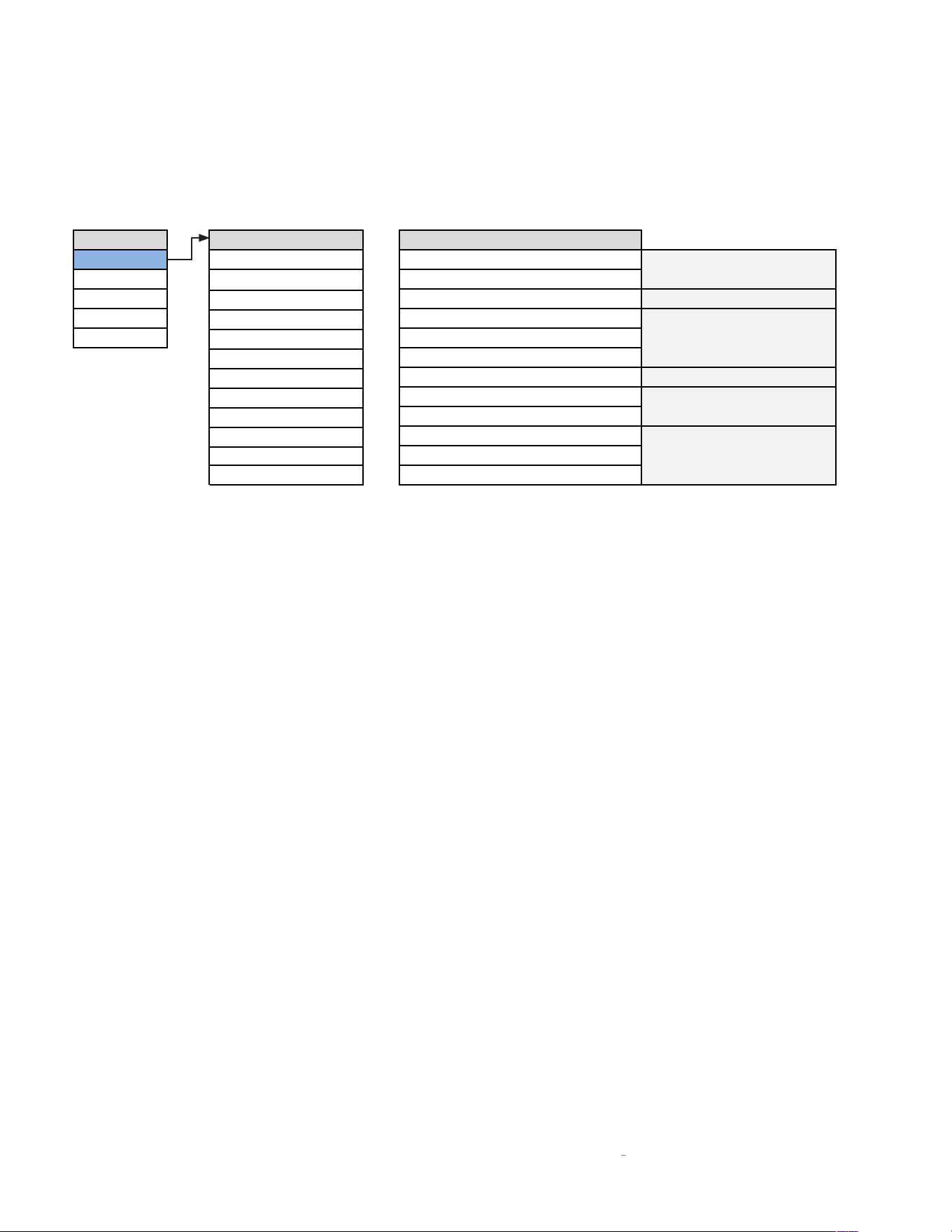
5206). The
Home screen displays the current active input name near the
top of the screen, the current volume level in the slider, and
navigation controls. In addition, there is a SW update button
which provides a one touch software update from our FTP
site. CAUTION: If you choose to update the unit’s software,
DO NOT interrupt the process.
Click the
Menu
icon to activate the setup mode. When the
Setup
menu is active, use the Left < and Right > arrows
to scroll through options, use the Enter icon to select and
deselect options, and the Up
�
and Down
ˇ
arrows to adjust
parameters. To move back a level in the menu structure (or
exit the
Setup
menu), click the Menu button repeatedly until
the desired menu appears in the display.
SETUP
17
N
0
5206 PREAMPLIFIER / OWNER’S MANUAL
SETUP
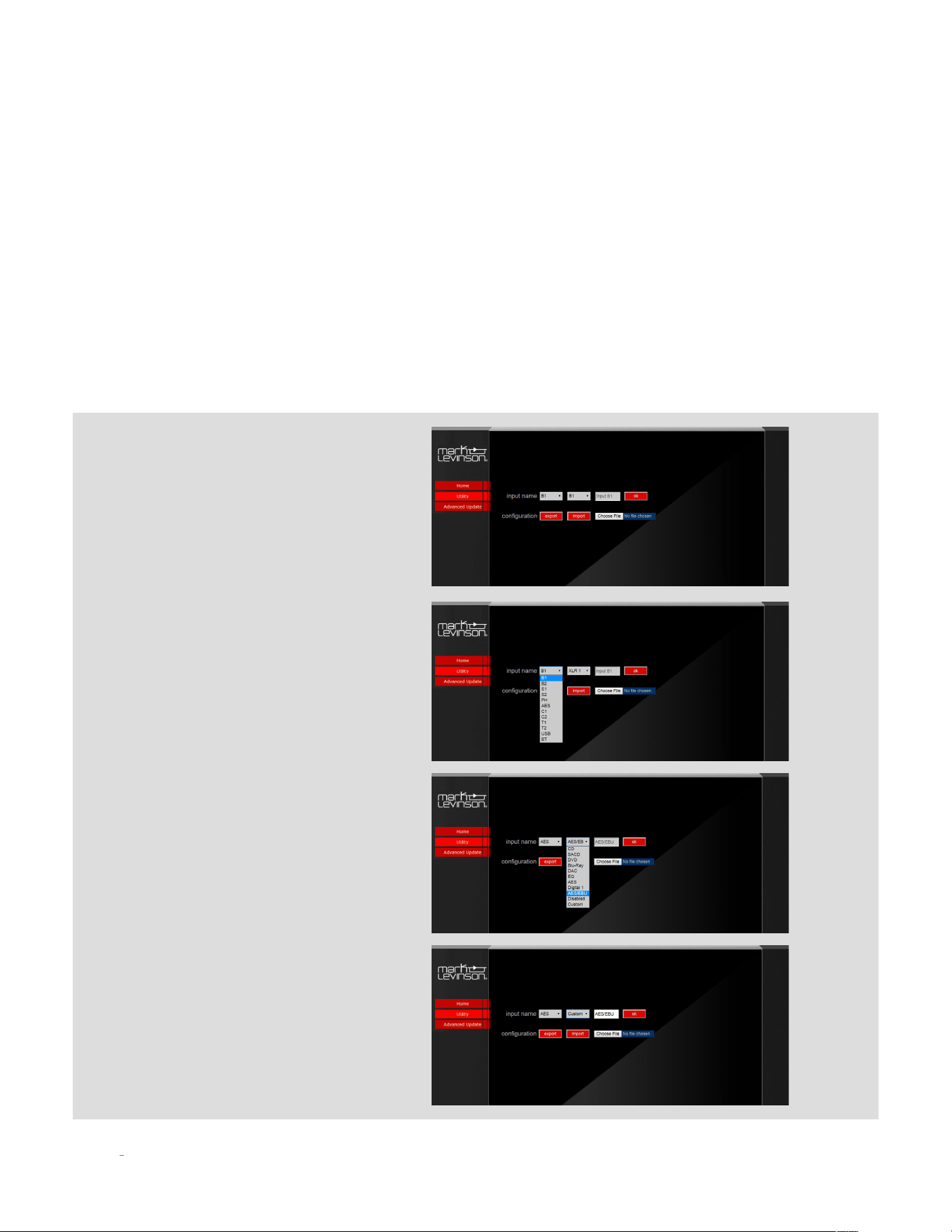
INPUT SETUP
Setup Menu Input Setup Set Input X
Input
B1 (analog XLR)
Name=XXX
Volume
B2 (analog XLR)
Offset=XXX
Power
S2 (analog RCA)
SSP=On/Off
Display
Phono
PCM Filter=XXX
Advanced
C1 (digital coaxial)
PLL Lock= Normal/Wide
T1 (digital optical)
Upsample=On/Off
T2 (digital optical)
DSD Filter= XXX
USB
BT Name
BT (Bluetooth)
BT Pairing= Enable/Forget
Ph Balance= +/- 3dB
Infra Filt = On/Off
Phono Type= MM/MC
S1 (analog RCA)
C2 (digital coaxial)
AES (digital XLR)
Available for analog inputs
Available for USB input
Available for all inputs
Available for digital and
Bluetooth inputs only
Available for Bluetooth
input only
Available for phono
input only
18
N
0
5206 PREAMPLIFIER / OWNER’S MANUAL
The following settings are available for all inputs:
Name:
This option offers a choice of preset names for the
selected input (CD, SACD™, DVD, Blu-ray™, DAC, EQ, etc.).
Additionally, the following names are available for each input:
Disabled:
This option removes the selected input from
the list of available inputs. The input will be skipped when
scrolling through the inputs.
Custom:
This option allows you to enter a custom name for
the selected input. Use the Select knob to select the character
you want to change, use the Volume knob to choose from
the list of available characters and press Enter to confirm
each character. After the ninth character is entered, the new
name will be saved.
Browser Setup Page method:
The easiest way to change input name is
to select the
Utility
tab on the BSP.
Select an alternate name (or
Disable
, or
Custom
) from the next drop down menu
and click OK to save.
If you selected
Custom
, you can type the
custom name in the text box and click
OK to save.
Select the input you want to rename
from the first drop-down menu. These
correspond with the labeled inputs on
the rear panel.
SETUP

19
N
0
5206 PREAMPLIFIER / OWNER’S MANUAL
Offset:
The output level of audio devices can vary from brand-
to-brand and model-to-model, making some devices play
louder or quieter than others. The Offset adjustment allows
you precisely compensate for source volume differences so
that all connected devices play at a similar volume level. The
setting offers a range of –12.0dB to +12.0dB, in 0.5 dB steps.
The following settings are available only for digital and
Bluetooth inputs:
PCM Filter:
This setting lets you set the filter characteristic
for PCM digital content such as the digital output from a CD
player. We recommend trying several of these filters with the
types of music you typically listen to and choose the one you
prefer. There are no right or wrong choices.
The available filters are:
• Apodiz Fast
• Hybrid fast
• Brickwall
• Fast linear
• Slow linear
• Slow minimum
• Fast minimum
“Fast” filters provide steeper roll-off at high frequencies
and therefore do a better job of attenuating unwanted high
frequency “aliased” signals. However, they exhibit more
ringing on signal transients.
“Slow” filters exhibit less ringing on transients, but they do a
poorer job of attenuating unwanted high frequency signals.
“Linear Phase” filters exhibit symmetric pre- and post-
ringing, i.e., they ring before and after the transient signal.
“Minimum Phase” filters exhibit only post-ringing, which
some listeners feel sounds more natural, but they typically
ring for longer than linear phase filters.
The “Hybrid” filter blends some linear phase and some
minimum phase characteristics to achieve good high
frequency attenuation with reduced pre-ringing.
The “Apodizing” filter blends linear phase characteristics
with techniques to reduce pre and post-ringing.
The “Brick Wall” filter is optimized purely for attenuating
unwanted high frequency aliased signals.
The following setting is available only for analog inputs
B1, B2, S1, S2:
SSP:
This setting configures the selected analog input for
integration with a multichannel surround sound processor.
The Default setting is "Off". Selecting "On" will pass the
signal though the outputs at unity gain and disable volume
control. (See SSP Setup on page 27 for more information.)
PLL Lock:
Normal –
This is the default setting and is appropriate for
almost all sources.
Wide –
Choose this setting if you experience noise or
signal dropouts (most likely from high jitter sources such
as cable TV set-top boxes).
Upsample On/Off:
“Up-sampling” is the process of increasing the effective
sampling rate of a digital audio signal. When the user
selects this option in the N
0
5206, signals at 44.1, 88.2,
or 176.4kHz are up-sampled to 352.8kHz, and signals at
48, 96, and 192kHz are up-sampled to 384kHz. Because
these lower resolution signals inherently have fewer
samples per second, it is in theory not possible to
perfectly re-create the additional samples that would
have been present in a higher resolution signal. However,
the advanced up-sampling algorithm in the N
0
5206 is
able to approximate these additional data points very well,
and with most program material it offers a noticeable
subjective improvement. Just like the user’s choice of
digital filter, it is neither “right” nor “wrong” to enable or
disable up-sampling; it is entirely a matter of preference.
Selecting "Off" will maintain the original sample rate.
BT Pairing:
Set to Enable and press
Enter
to start Bluetooth pairing.
Start the pairing procedure on your Bluetooth device. The
name ML5206 followed by a 4-digit identifier unique to
each unit should appear on your device. Select this to
complete pairing.
Set to
Forget
to unpair and forget your device.
SETUP

20
N
0
5206 PREAMPLIFIER / OWNER’S MANUAL
BT Name:
This displays the Bluetooth Name that will appear on your
Bluetooth player device when scanning to pair. This name
cannot be changed.
The following setting is available only for the
asynchronous USB input:
DSD Filter:
This setting lets you set the low-pass filter
characteristic for DSD high-resolution digital content.
You can select from roll-offs that begin at 47kHz, 50kHz,
60kHz or 70kHz. The audible effects of the different roll-off
characteristics are subtle and will vary depending on the
type of musical content and the high-frequency bandwidth of
your speakers and headphones. Feel free to experiment to
find the DSD filter setting that sounds best to you.
The following settings are available only for the Phono
input of the N
O
5206:
Cartridge Type:
Select either moving magnet (MM) or
moving coil (MC) cartridge.
Infrasonic Filter:
This option sets the infrasonic “rumble”
filter on or off.
Balance:
This option applies balance adjustment to the
Phono input from -3dB to +3dB in 0.5 dB steps.
NOTE: After connecting all source components to the
N
0
5206, we suggest using the
Setup
menu to set the
names of all inputs that are not being used to “Disabled.”
This action will remove the unused inputs from the list
of available inputs, thereby making source selection
faster and more convenient.
SETUP
21
N
0
5206 PREAMPLIFIER / OWNER’S MANUAL
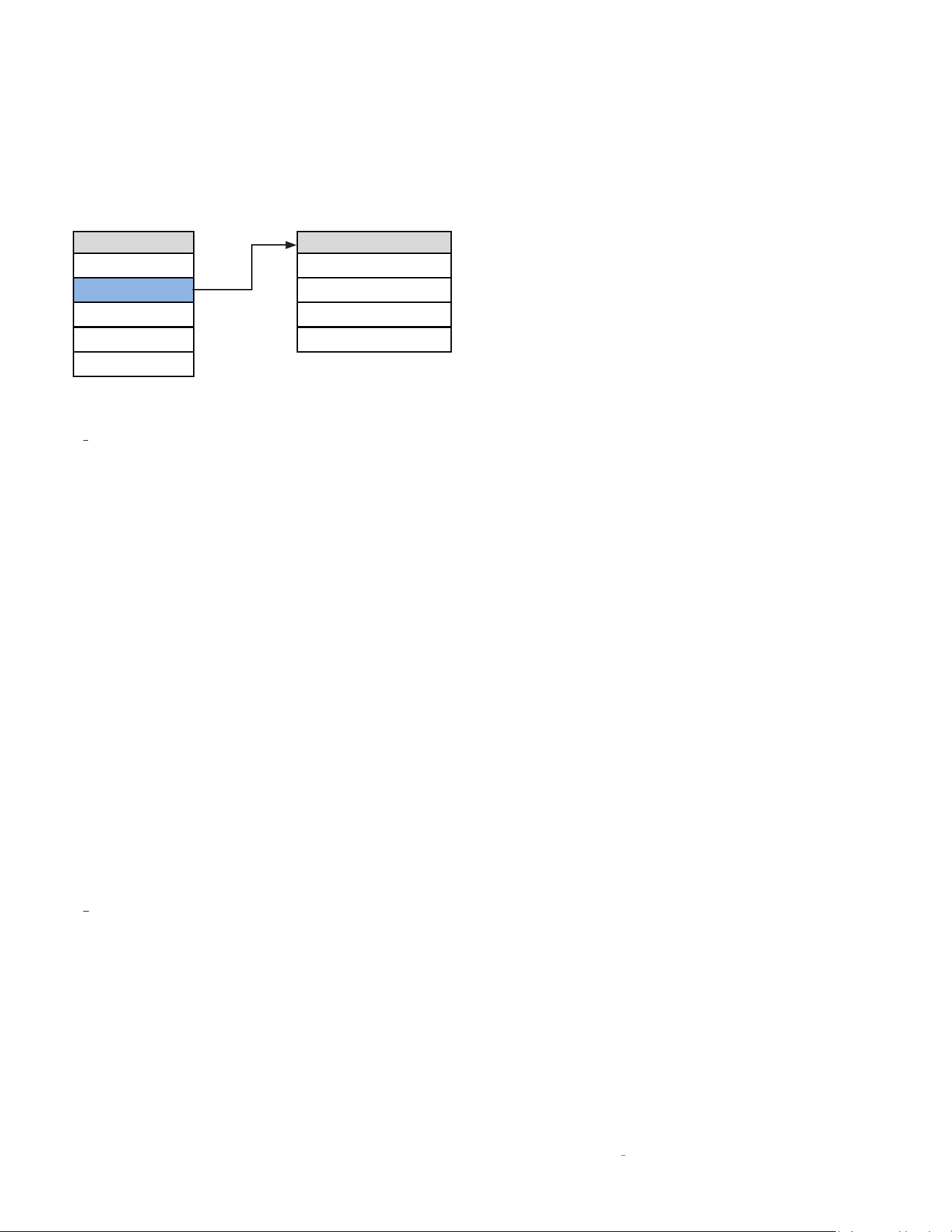
VOLUME SETUP
Setup Menu Volume
Input
Max 80dB
Volume
Mute -40dB
Power
Turn On 40dB
Display
Taper Mode 1
Advanced
The Volume settings let you customize the action of the
N
0
5206 Volume and Mute functions.
Max Vol:
This setting determines the maximum volume level
setting in 0.5dB increments between 40.0dB and 80.0dB. The
factory default maximum volume is 80.0dB. Set this value
to the volume slightly below where your speakers start to
distort audibly.
Mute:
This setting lets you set the amount of output level
attenuation that occurs when the Mute button is engaged, in
0.5dB increments between –10dB and –80.0dB. The factory
default mute attenuation is –40dB.
Turn On:
This control lets you set the initial volume upon
turn-on. Choose a turn-on volume level in 0.5dB increments
between 10.0dB and 60.0dB. The factory default setting is
40.0dB.
Last:
When selected, sets the turn-on volume level to the
last used volume setting.
CAUTION: Setting the Turn On parameter to “Last” can
result in louder-than-expected power-up volume if the
N
O
5206 was set to a high volume level setting when last
powered down.
Taper:
This setting lets you choose the desired taper for the
volume control from the following options:
Mode 1:
The faster you rotate the volume knob, the more
quickly the volume will change. Slowly turning the knob
slows the rate the volume changes, allowing you to make
precise adjustments in the listening level.
Mode 2:
Similar to Mode 1, with a “faster” response curve,
with more gain change for a similar range of knob travel.
Mode 3:
When increasing the volume the volume
changes quickly through the low volume range, and
then decelerates in the higher range, for precision
adjustments. When decreasing the volume the control
works oppositely, changing quickly through the high
volume range and decelerating in the lower range.
SETUP
22
N
0
5206 PREAMPLIFIER / OWNER’S MANUAL
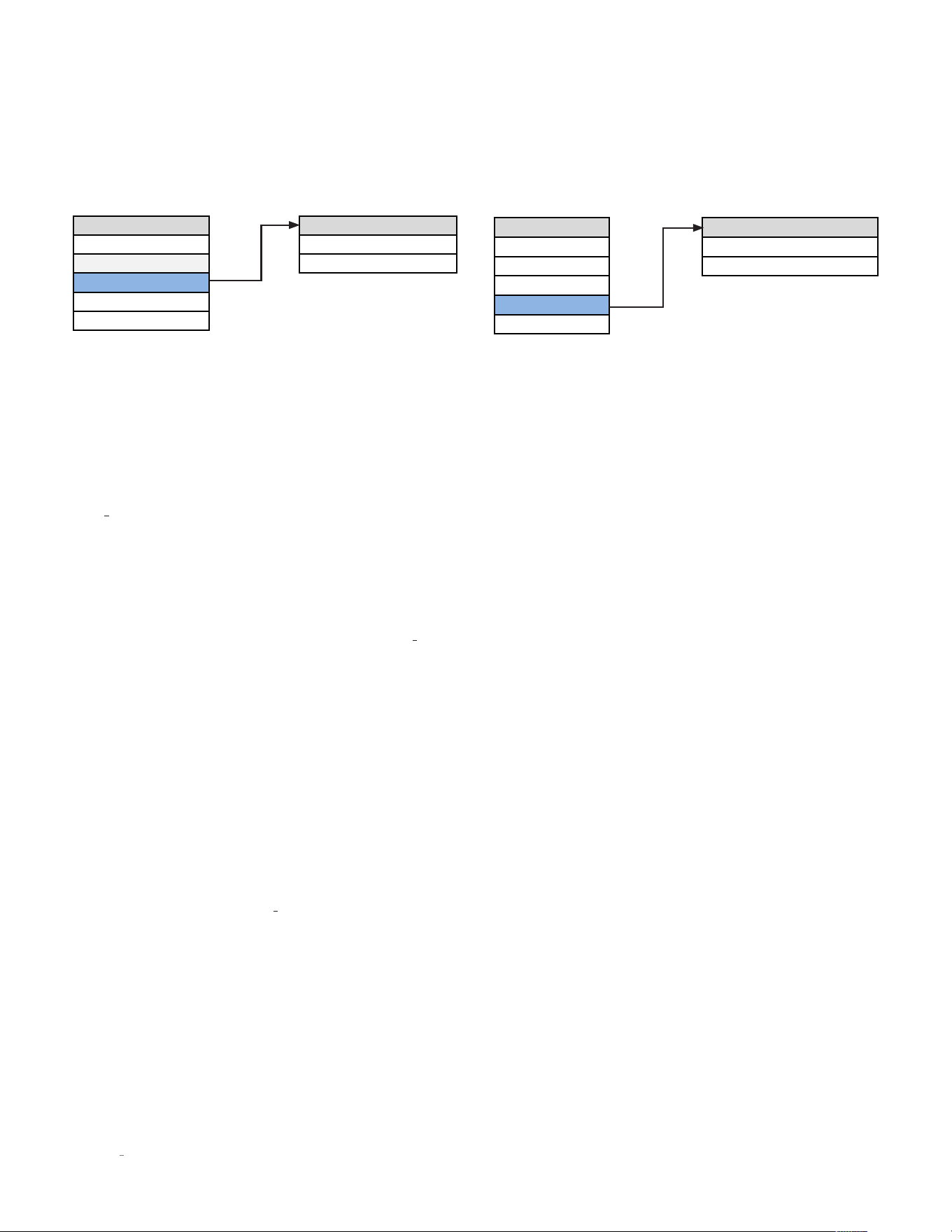
POWER SETUP
Setup Menu Power
Input
Standby
Volume
Auto Off
Power
Display
Advanced
The Power parameters let you customize power-related
functions.
Standby:
This setting lets you set the
Standby
mode to one of
the following options:
Green:
This mode removes power from almost all of the
N
0
5206’s circuits, allowing the unit to be activated only via
an IR control signal, a 5V – 12V trigger voltage or a press
of the
Standby
button. This mode provides maximum
power conservation and is the factory-default
Standby
mode.
Power Save:
This mode removes power from the N
0
5206’s
audio circuits but keeps the control circuitry powered and
ready to receive commands from any of the control inputs.
This mode provides moderate power conservation.
Normal:
This mode shuts off the unit’s display and mutes
its audio outputs, but keeps all of its control and audio
circuits powered. This mode provides the least amount
of power conservation but allows the audio circuits to
remain warmed up to deliver optimal performance at all
times.
Auto Off:
This setting lets you engage or disengage the Auto
Off function, which puts your N
0
5206 into the
Standby
mode
after 20 minutes of inactivity (no audio signal, and no user-
control input).
DISPLAY SETUP
Setup Menu Display
Input
Auto Off = On/Off
Volume
Timer = 10s/3s
Power
Display
Advanced
The Display function allows you to choose whether the
front panel display stays on all the time, or turns off after a
selectable amount of time.
Auto Off:
When set to Off, the display remains lit as long as
the unit is in listening mode. When set to On, the display will
turn off after 3, 5 or 10 seconds.
Timer:
The timer determines when the display turns off,
after 3, 5, or 10 seconds.
SETUP
23
N
0
5206 PREAMPLIFIER / OWNER’S MANUAL
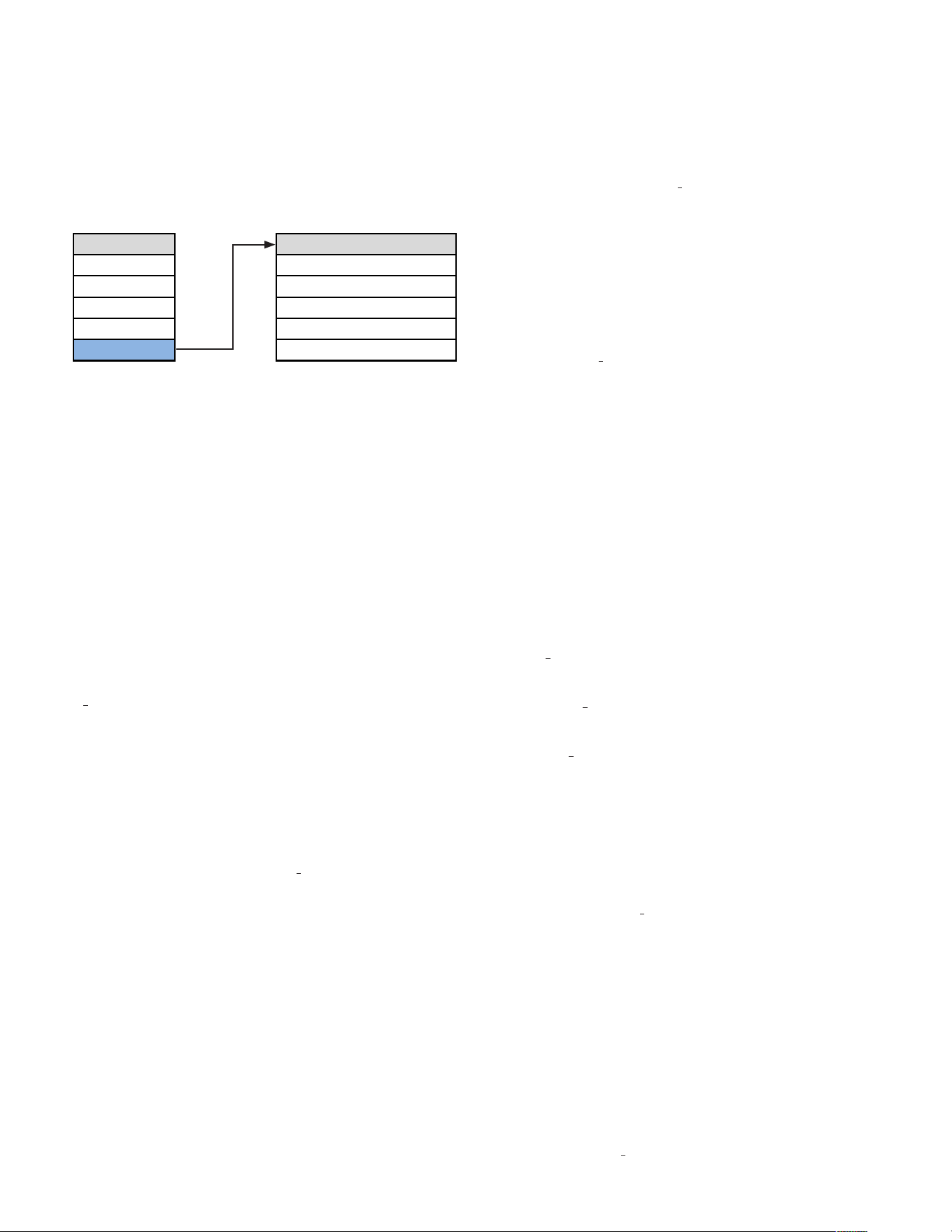
ADVANCED SETUP
Setup Menu Advanced
Input
Firmware
Volume
Config
Power
Network
Display
Trigger
Advanced
Front IR
The Advanced section of the
Setup
menu gives you access
to a range of configuration and administrative settings and
functions.
Firmware:
This menu gives you access to the following
firmware-related functions:
Version:
Push
Enter
to display the version number of the
currently loaded firmware. Pushing
Enter
a second time will
show the date of the version, and then automatically scroll
and display the versions of the individual componants of the
update package. (This setting is informational only, and does
not provide any user adjustments.)
To check if your unit’s firmware is up to date, go to the
N
0
5206 product page on www.MarkLevinson.com, select
the Downloads tab and look for the latest firmware update
file. If there is a later version download the firmware and the
instructions. You may use either of the options described
below to update your unit. If your unit’s firmware version is
the same as the one displayed on the website, no further
action is required.
Update:
Lets you update your N
0
5206’s firmware, either
from a drive inserted in the rear-panel USB port or via a web
browser. (For browser connection guidance see Browser
Setup Page (BSP) on page 24.)
ENET:
Select this if your N
0
5206 is connected to a home
network. The unit will access the Mark Levinson server and
download the latest firmware. The download and installation
process takes at least 15 minutes and should not be
interrupted. The unit will cycle through several stages of
downloading and installing new operating files and go in and
out of
Standby
mode. BE PATIENT. You will know when the
process is almost over when you see “Booting…” followed
by “Starting N
0
5206…” followed by “Firmware Version
[number]…” followed by “Starting...”. The unit will then enter
Standby
mode. Wait for the
Standby
LED to start blinking
before attempting to turn on the unit. BE PATIENT.
(If you select ENET when the unit is not connected to a
network the unit‘s display shows “Failed” to remind you to
connect to a network and begin downloading the firmware.)
To update via a flash drive:
1. Download the firmware file from the product page at
www.MarkLevinson.com and save it to a USB drive.
2. Select USB and press Enter.
3. The N
0
5206 will read the USB drive. (The display will show
“Check Update” while the drive is being read.)
4. When the N
0
5206 finds a valid firmware file on the drive,
the display will show “Downloading.”
• If the N
0
5206 does not find a valid firmware file on the
drive, the display will show “Not Available.”
The installation process takes at least 15 minutes and
should not be interrupted. The unit will cycle through several
stages of downloading and installing new operating files and
go in and out of
Standby
mode. BE PATIENT. You will know
when the process is almost over when you see “Booting…”
followed by “Starting N
0
5206” followed by “Firmware Version
[number]…” followed by “Starting...”. The unit will then enter
Standby mode. Wait for the
Standby
LED to start blinking
before attempting to turn on the unit. BE PATIENT.
SETUP
24
N
0
5206 PREAMPLIFIER / OWNER’S MANUAL
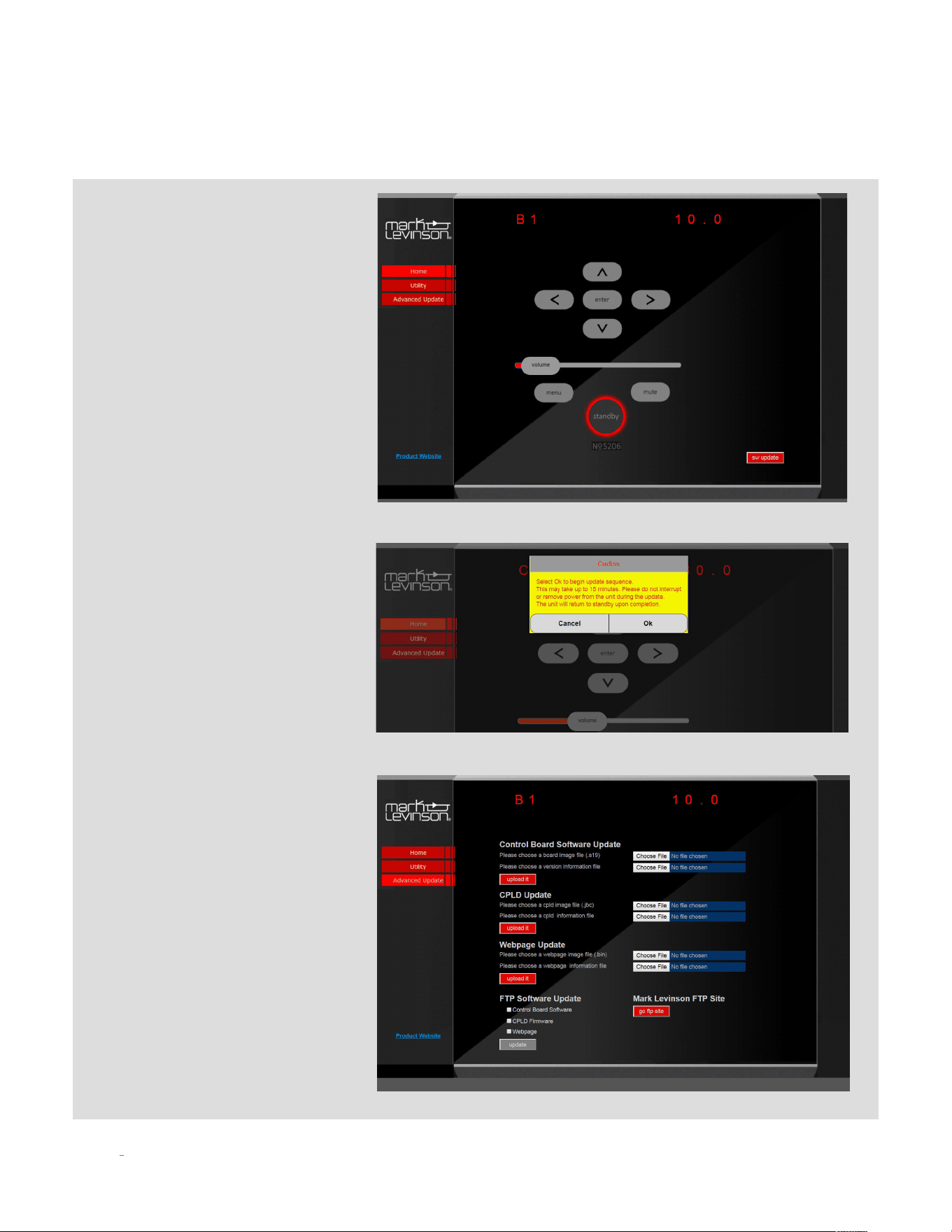
Browser method:
Make sure your unit is connected to a
network with Internet access. Select
the
Home
tab on the screen. Click
the Software Update tab. You will be
prompted for confirmation. Click OK
and the unit will begin the update
sequence. Please be patient and DO
NOT INTERRUPT. This can take up to 15
minutes. The unit will return to
Standby
Mode when complete. Click Cancel to go
back to the home page.
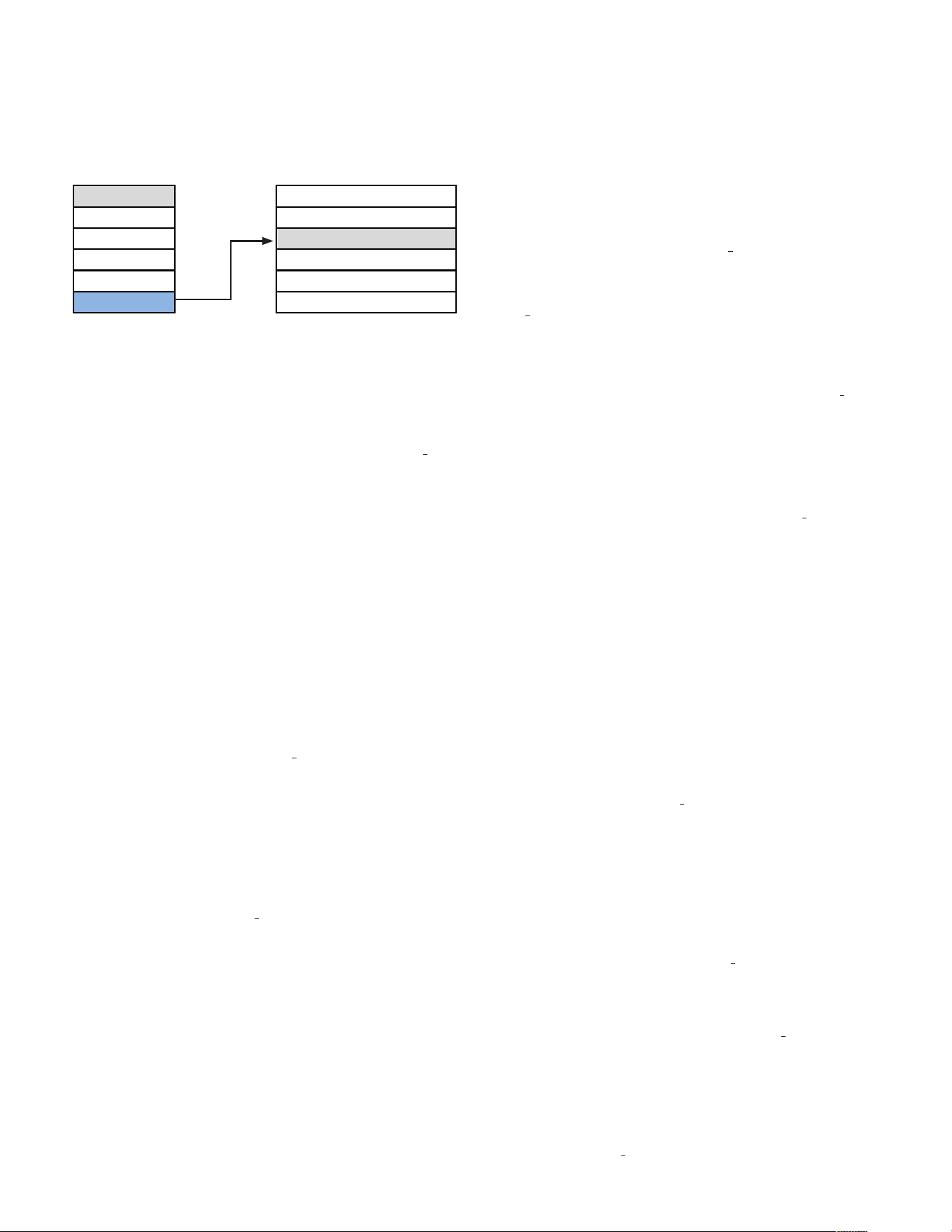
Advanced Update:
The
Advanced Update
page functions are
used for uploading individual software
files from the FTP server, a USB drive or
your PC’s hard drive. It is highly unlikely
an end user will need to use this page.
This page should be accessed by trained
installers or service professionals.
SETUP
25
N
0
5206 PREAMPLIFIER / OWNER’S MANUAL
SETUP
Setup Menu Advanced
Input
Firmware
Volume
Power
Network
Display
Trigger
Advanced
Front IR
Config
Config:
This menu group allows you to lock, restore, import,
or export Setup configuration settings.
Config Export:
Press Enter to export all setup configuration
information to a thumb drive inserted in the rear panel USB
port. This data can then be used to configure other N
0
5206
units or serve as a backup so you can quickly reconfigure
your unit. Once you have your unit’s configuration precisely
as you would like it, we strongly recommend you save a
Config Export file to a thumb drive in case an untoward
event erases your configuration settings.
Config Import:
Press Enter to import all setup
configuration information from a thumb drive inserted in
the rear-panel USB port.
Config Lock:
Engage the Lock to prevent accidentally
changing the Setup parameters. The factory default
setting is Off.
Config Restore:
Restores all N
0
5206 parameters to their
factory-default conditions.
Network:
This menu offers access to the following network-
related parameters. They are useful only if you want to
connect your unit to a network to access controls and setup
functions via PC or tablet.
Name:
Displays your N
0
5206’s network name in this
format No5206XXXX (the X’s represent the last four
characters of the unit’s unique MAC address). Use the
input select control to select the character you want
to change, and the volume control to scroll through
available characters.
Current Gateway:
Displays the Gateway IP address. This
setting is informational only and does not provide any
user adjustments.
DHCP:
Lets you toggle DHCP mode (network auto-
configuration) On or Off. The factory default behavior is
On. When the mode is set to Off, you can specify static IP
and Subnet addresses for your N
0
5206. Selecting Renew
(available only when DHCP is set to On) refreshes your
DHCP configuration, assigning a new IP address to your
N
0
5206. This function is often useful when troubleshooting
a network connection.
Current IP:
Shows the IP address currently assigned
at the factory (or by DHCP or manually) to your N
0
5206.
Enter this number in the address (URL) line of a browser
connected to the Internet. (This setting is informational
only and does not provide any user adjustments.)
Current Subnet:
Shows the subnet address currently
assigned (by DHCP or manually) to your N
0
5206. (This
setting is informational only and does not provide any
user adjustments.)
Trigger:
This setting configures the 12V trigger. NOTE: Using
a trigger input overrides the
Standby
button.
Mode:
These choices determine how the 12V trigger
signals are sent and received.
Normal:
The default setting, appropriate for most
other components.
Pulsed:
Some products (such as some older Mark
Levinson components) require a pulsed trigger signal.
Theater:
Turns on the N
0
5805 and automatically selects
the input configured for SSP mode.
Off:
Disables the Trigger In/Out connections.
Delay:
This setting determines the amount of time after
fully exiting the
Standby
mode that the unit waits to pass
a trigger signal to the trigger output jack. The choices
are 0 - 10 seconds, with 0 being the default. NOTE: as it
can take a few seconds for the N
0
5206 to enter and exit
Standby
mode, the net trigger delay time will be longer
than the value you select.
Front IR:
This menu allows you to turn the N
0
5206’s front IR
receiver on or off. If you plan to use the rear-panel IR input,
you must set the front IR receiver to Off. If you use a 3rd party
control via IP or RS232, and do not plan to use IR for control,
we recommend you turn the IR control to Off.

26
N
0
5206 PREAMPLIFIER / OWNER’S MANUAL
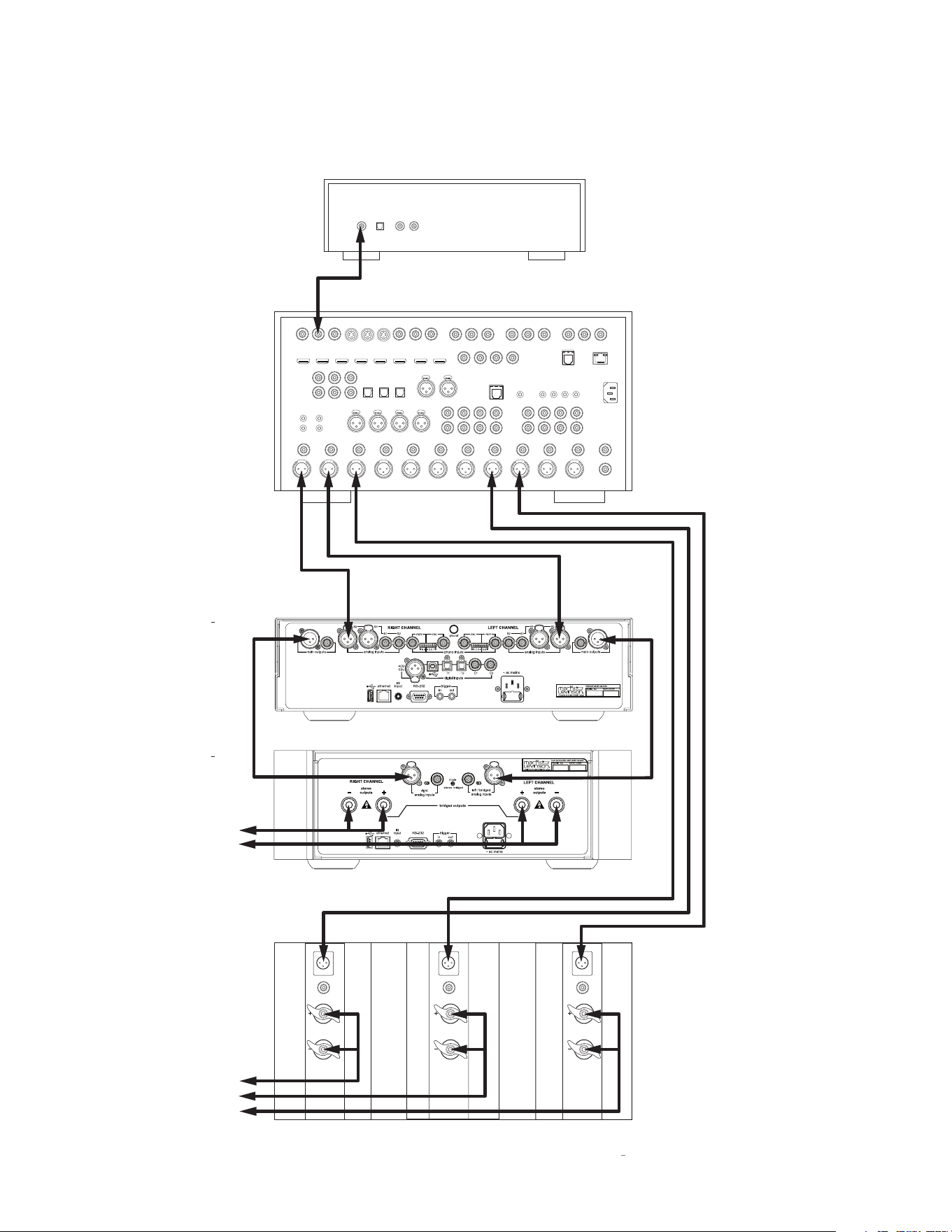
SURROUND SOUND PROCESSOR (SSP) SETUP
The SSP (Surround Sound Processor) mode allows the
N
0
5206 to be seamlessly integrated into a multichannel
home cinema system. Any analog input may be designated
as the surround sound processor input by turning this mode
ON. When the SSP mode is activated the N
0
5206’s volume
control is deactivated and the level is fixed at unity gain. This
allows the surround sound processor to control the volume
of the left and right speakers powered by the N
0
5206 in
unison with the rest of the system. Room correction EQ and
level calibrations performed in this mode and stored in the
surround sound processor will be maintained unaltered.
CAUTION: Prior to entering SSP mode make sure the
volume of your surround sound processor is all the
way down. Gradually increase volume as desired and
perform calibration.
To start, enter the
Setup
mode and navigate to the analog
input you plan to use for SSP and select On. Connect the
N
0
5206 with a surround-sound processor (see illustration on
next page).
1. Make sure the N
0
5206 and all associated components
are powered off and disconnected from electrical
outlets.
2. Connect the output connectors on the surround-sound
source component to the input connectors on the
surround-sound processor. For example, if the source
component is a Blu-ray disc player, connect it to the
appropriate input connectors on the surround sound
processor.
3. Connect the front left and right output connectors
on the processor to the desired analog input
connectors on the N
0
5206. For best performance, use
balanced connections whenever possible. NOTE: we
recommend renaming the input you select for SSP
operation to a name like “Theater” or “Movies.”
4. Connect the center, surround, and subwoofer output
connectors on the processor to the appropriate input
connectors on the designated power amplifier(s).
5. Connect the speaker outputs of the power amplifier
that is connected to the N
0
5206 to the system’s front
left and right (primary) speakers.
6. Perform a system calibration as per the surround
processor’s instructions.
7. Select the designated analog input whenever you wish
to listen to multichannel source material.
SETUPSETUP
27
N
0
5206 PREAMPLIFIER / OWNER’S MANUAL
SETUP
outputs
inputs
single ended
balanced
outputs
inputs
single ended
balanced
outputs
inputs
single ended
balanced
Analog OutputDigital Output
OpticalCoaxial RL
Composite Video Inputs Component Video Inputs
HDMI OutputsHDMI Inputs
Digital Audio Inputs
Analog Audio In 1Analog Audio In 2
Analog Audio Inputs
ASE/EBU Inputs
Component Video Output
RS-232
Trigger Outputs
IR Input
Link
Surround
Back
Remote Zone
Left
Left
Right
Right
Left
Right
Left
Right
Left
Right
Left
Center
Front
Analog Audio Outputs
Microphone Inputs
12
RR
R
LL
L
3
3
3
12
12
3
Y
Y/G
Pb
Pb/B Pr/R
2
Y/G
Pb/B Pr/R
1
Y/G
Pb/BPr/R
4
Y/G
Pb/B Pr/R
Pr
1
1
2
2
312
312
312
645
645
4
56
R
L
FL
FR SUB
CTRSL
SR BR
BL
43
Subwoofer 1 Subwoofer 2
Surround
Right
7.1 Channel Input
AC Input
Ethernet
Monitor
Out
S-Video Inputs
SURROUND-SOUND
SOURCE DEVICE
SURROUND-SOUND
PROCESSOR
N
0
5206
PREAMPLIFIER
N
0
5302
POWER AMPLIFIER
CENTER & SURROUND
POWER AMPLIFIER
To Front
Left & Right
Speakers
To Center &
Surround
Speakers

28
N
0
5206 PREAMPLIFIER / OWNER’S MANUAL
TROUBLESHOOTING
NO POWER
Examine the power cord to ensure that it is connected to both the AC mains connector and a working, un-switched electrical outlet.
Check the mains fuse accessible on the rear panel mains inlet.
Examine the electrical circuit breaker to ensure that power is being supplied to the electrical outlet to which the N
0
5206 is connected.
Make sure the N
0
5206 is not in
Standby
mode. The front-panel standby LED illuminates fully and continually when the N
0
5206 is On.
The LED flashes slowly when the N
0
5206 is in
Standby
mode.
NO SOUND
Make sure the N
0
5206’s line outputs are connected to the line inputs of an external power amplifier.
Make sure the external power amplifier is properly connected to loudspeakers.
Confirm that the external power amplifier’s power cord is connected to both the AC mains connector and a working, un-switched electrical outlet.
Make sure the external power amplifier’s ON/OFF switch is set to the ON position.
Consult the power amplifier’s owner’s manual for further guidance.
REMOTE CONTROL DOES NOT OPERATE
Eliminate obstructions between the remote control IR transmitter and the IR receiver on the N
0
5206’s front-panel display.
Check the menu to make sure the front panel IR was not disabled.
Make sure the rear-panel IR input connector is not being used.
Make sure the remote control is positioned within 17 feet (5m) and within a 45-degree angle of the N
0
5206’s front panel.
Make sure the IR receiver on the N
0
5206's front-panel display is not exposed to intense sunlight, halogen light, or fluorescent light.
This can cause IR reception to become unreliable.
Replace the remote control batteries.
“MISSING” INPUT
Make sure the Name parameter for the selected input has not been set to Disabled in the
Setup
menu.
(Refer to Setup/Inputs/ on page 18 for more information.)
TROUBLESHOOTING

29
N
0
5206 PREAMPLIFIER / OWNER’S MANUAL
TROUBLESHOOTING
AUDIO HAS A HUMMING SOUND
Disconnect components one at a time to isolate the problem.
Once you have identified the problematic component, make sure it is properly grounded and connected to the same electrical circuit
as the N
0
5206.
VOLUME CAN’T BE SET TO MAXIMUM
You have the option of establishing a maximum volume level in the
Setup
menu. If this option is set, it can prevent the N
0
5206 from reaching the
maximum volume level of 80.0. (Refer to Setup/Volume/MaxVol on page 21 for more information.)
FRONT-PANEL DISPLAY NOT WORKING
Press any remote or front panel button to restore the display from the off mode.
(Refer to Setup/Display/Auto-Off on page 22 for more information.)
NO CONNECTIVITY VIA ETHERNET
Verify that an Ethernet cable is correctly connected between the router, switch or hub and the N
0
5206.
Verify the age of the router, switch or hub. If the router, switch or hub is more than ten years old, there may be a communication
issue with the N
0
5206. Power cycle the unit and use a newer router, switch or hub between the network and the N
0
5206.
IF ALL ELSE FAILS…
Power cycle the N
0
5206 by unplugging the power cord, waiting at least 10 seconds and reconnecting the power cord.
Restore factory-default settings (see Setup/Advanced/Config/Restore on page 25).
Contact your authorized Mark Levinson dealer.
Contact Mark Levinson Customer Service at 888-691-4171 or www.MarkLevinson.com.

30
N
0
5206 PREAMPLIFIER / OWNER’S MANUAL
SPECIFICATIONS
ANALOG LINE STAGE
Line Input Impedance: Balanced (XLR): 20kΩ; Single-ended (RCA): 10kΩ
Volume Control: Balanced; voltage mode; digitally-controlled resistor network
Gain: 8dB maximum, single-ended outputs
14dB maximum, balanced outputs
Output Impedance: 55Ω
Output Overload: >7.5V RMS, single-ended outputs
>15V RMS, balanced outputs
Frequency Response: 20Hz to 20kHz, ±0.03dB; <2Hz to 250kHz, +0.1/–3dB (At unity gain volume setting)
Total Harmonic Distortion: <0.003%, 20Hz to 20kHz
[At unity gain volume setting, 2V RMS single-ended/4V RMS balanced out]
Signal-To-Noise Ratio: >93dB, 20Hz to 20kHz, wideband, unweighted
[At unity gain volume setting, referred to 2V RMS single-ended/4V RMS balanced out]
Subwoofer High-Pass Filter: Selectable; 80Hz, 2nd order (12dB/octave)
PHONO STAGE
RIAA Frequency Response: 20Hz to 20kHz, ±0.3dB
Infrasonic Filter: Selectable; 20Hz, 1st order (6dB/octave)
MOVING-MAGNET MODE
Input Resistance: 47kΩ
Input Capacitance: Selectable; 20, 70, 120, or 170pF
Gain: 39dB at 1kHz
Total Harmonic Distortion: <0.01%, 1kHz, 2V RMS output; <0.05%, 20kHz, 2V RMS output
Signal-To-Noise Ratio: >80dB, 20Hz to 20kHz, wideband, unweighted, referred to 2V RMS output
Maximum Input Level: >190mV at 1kHz; >1.6V at 20kHz
SPECIFICATIONS

31
N
0
5206 PREAMPLIFIER / OWNER’S MANUAL
SPECIFICATIONS
MOVING-COIL MODE
Input Resistance: Selectable, 37Ω to 1000Ω
Gain: 69dB at 1kHz
Total Harmonic Distortion: <0.01%, 1kHz, 2V RMS output; <0.05%, 20Hz to 20kHz, 2V RMS output
Signal-To-Noise Ratio: >68dB, 20Hz to 20kHz, wideband, unweighted, referred to 2V RMS output
Maximum Input Level: >6.5mV at 1kHz; >19mV at 20kHz
DIGITAL-TO-ANALOG CONVERTER STAGE
Output Voltage: 5.6V RMS at 0dBFS, maximum volume, single-ended outputs
11.2V RMS at 0dBFS, maximum volume, balanced outputs
Frequency Response: 20Hz to 20kHz, +0/–0.05dB (44.1kHz/16 bit signal); 20Hz to 20kHz, +0/–0.02dB (192kHz/24 bit signal)
Total Harmonic Distortion: <0.0025%, 20Hz to 20kHz, 3V RMS single-ended output [with 44.1kHz/16 bit signal]
<0.002%, 20Hz to 20kHz, 6V RMS balanced output [with 44.1kHz/16 bit signal]
<0.002%, 20Hz to 20kHz, 3V RMS single-ended output [with 192kHz/24 bit signal]
<0.0017%, 20Hz to 20kHz, 6V RMS balanced output [with 192kHz/24 bit signal]
<0.004%, 90kHz, 3V RMS single-ended output [with 192kHz/24 bit signal]
<0.003%, 90kHz, 6V RMS balanced output [with 192kHz/24 bit signal]
Signal-To-Noise Ratio: >92dB, 20Hz to 20kHz, wideband, unweighted, with 44.1kHz/16 bit signal
[referred to 3V RMS single-ended or 6V RMS balanced output]
>98dB, 20Hz to 20kHz, wideband, unweighted, with 192kHz/24 bit signal
[referred to 3V RMS single-ended or 6V RMS balanced output]
Sample Rates/Bit Depth: PCM: 32, 44.1, 48, 88.2, 96, 176.4, 192, 352.8, or 384kHz; up to 32 bits; DSD: Native or DoP; single,
double, or quad speed (2.8, 5.6, or 11.2MHz)
Digital Processing: Full MQA decoding; PCM: Seven user-selectable digital filter settings;
user-selectable up-sampling to 352.8/384kHz; DSD: Four user-selectable digital filter settings
HEADPHONE OUTPUT
Total Harmonic Distortion: <0.04%, 20Hz and 1kHz, 2V RMS output, 30Ω load; <0.1%, 20kHz, 2V RMS output, 30Ω load
Output Overload: >3.3V RMS, 30Ω load
Signal-To-Noise Ratio: >88dB, 20Hz to 20kHz, wideband, unweighted, referred to 2V RMS output
Output Impedance: <2.5Ω, 20Hz to 20kHz

32
N
0
5206 PREAMPLIFIER / OWNER’S MANUAL
SPECIFICATIONS
GENERAL
Analog Input Connectors: 2 pairs balanced line-level inputs (XLR); 2 pairs single-ended line-level inputs (RCA); 1 pair single-ended
moving-coil phono inputs (RCA); 1 pair single-ended moving-magnet phono inputs (RCA)
Digital Audio Connectors: 2 optical digital inputs (Toslink); 1 asynchronous USB digital input (USB-B); 2 coaxial digital S/PDIF input
(RCA); 1 balanced digital AES/EBU input (XLR)
Output Connectors: 1 pair single-ended (RCA) and 1 pair balanced (XLR)
Control Connectors: 1 RS-232 port (DB9 connector); 1 baseband IR input (⅛"/3.5mm phone jack);
1 programmable 12V DC trigger output (⅛"/3.5mm phone jack), 100mA maximum;
1 programmable 12V DC trigger input (⅛"/3.5mm phone jack);
1 Ethernet port (RJ-45 connector)
Mains Voltage: 100VAC, 115VAC, or 230VAC, factory set
Power Consumption: Power on: 70W
Power on (headphones connected): 85W
Normal standby: 65W
Power Save standby: 4W
Green standby: <0.4W
Dimensions/Weight (Unit Only): Height: 4.96"/126mm
Height without feet: 4.50"/114mm
Width: 17.25"/438mm
Depth, enclosure only: 18.00"/457mm
Depth, with knobs and rear connectors: 19.25"/489mm
Weight: 34 lbs/15.4kg
Dimensions/Weight (With Packaging): Height: 13.63"/346mm
Width: 24.25"/616mm
Depth: 29.00"/737mm
Weight: 48 lbs/21.7kg


HARMAN International Industries, Incorporated
8500 Balboa Boulevard
Northridge, CA 91329 USA
© 2020 HARMAN International Industries, Incorporated. All rights reserved.
Mark Levinson is a registered trademark of HARMAN International Industries, Incorporated.
Other company and product names may be trademarks of the respective companies with which they
are associated.
"MQA" is a trade mark of MQA Limited © 2018.
This document should not be construed as a commitment on the part of HARMAN International
Industries, Incorporated. The information it contains, as well as the features, specifications and
appearance of the product, is subject to change without notice. HARMAN International Industries,
Incorporated, assumes no responsibility for errors that may appear within this document
For customer service and product shipment information, refer to our Website: www.MarkLevinson.com
Part No. 070-00004 rev B.0 www.MarkLevinson.com