WirelessSmartWatchPagerManual
2-2 Delete Buttons:
2-2-1: Press any key to turn the screen,Hold[ ] for 3 seconds to enter
Settings.
2-2-2: Press[ ][ ]to choose the button number to delete,
Press[ ] to delete it. When button line turns to”Trigger Button”
(meaning button is deleted)
I.Introduction
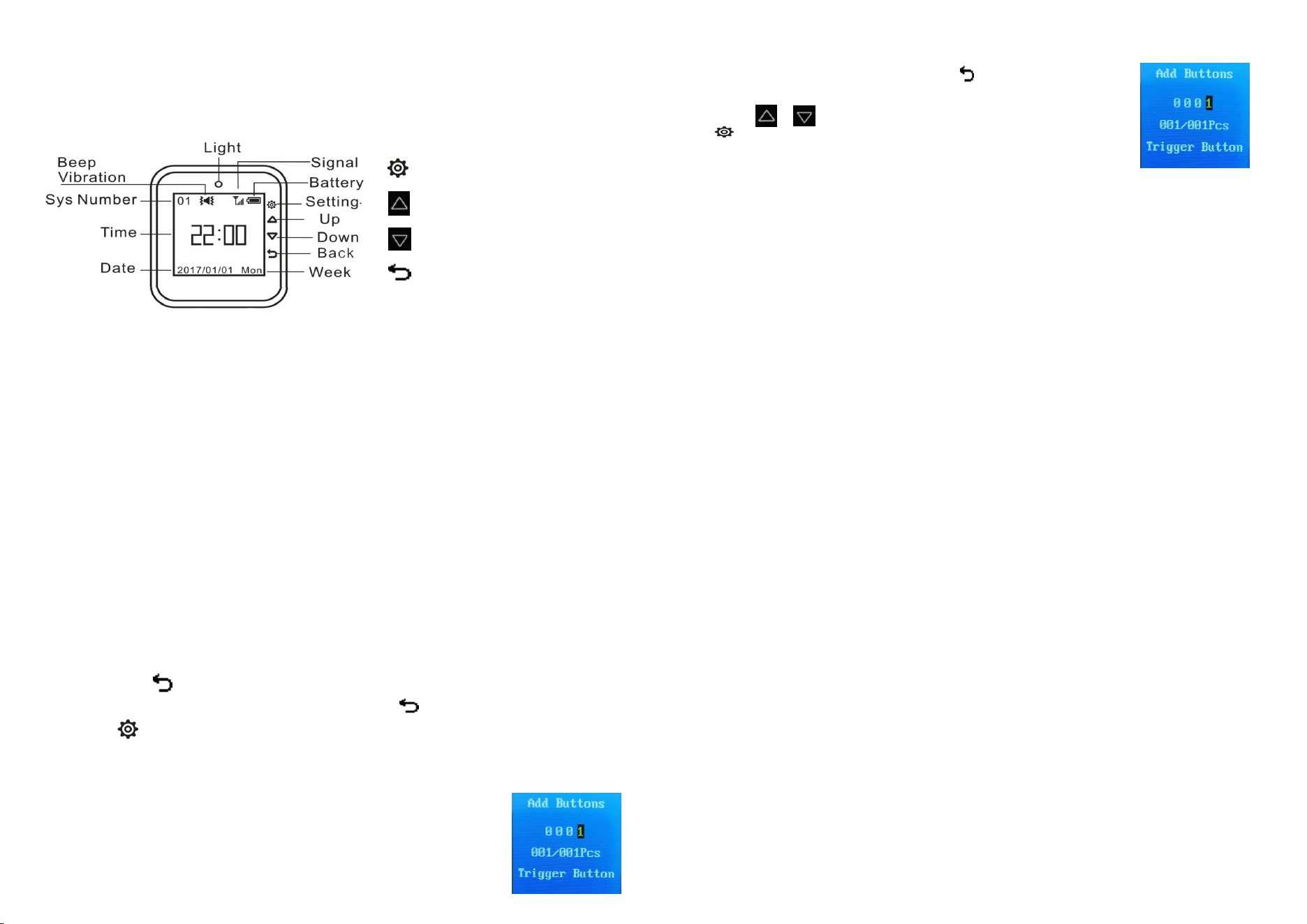
Setup Key
2-5 Prompt Setting: To choose the working mode from 4 different modes
Up Key
2-6 Prompt Time: To set the times the alarm repeated after trigger
2-7 Screensaver: To set how long the pager screen turns off automatically
Down Key
2-8 Language: To choose from Enlgish/Russian/French
Back key
2-13 Call Log: To check call log
IV.Other
functions
as
a
watch
2-3 Alarm Clock: To set alarm for specific time to alarm
2-4 Date & Time: To set the time right
II.Features
2-9 Timer: To choose from Enlgish/Russian/French
1.
TFT color screen with back light
2. Pop-up button on the side
3. Micro USB rechargeable
4. Pair max 500 wireless buttons, edited name
for different buttons
5. 4 Working Modes for different needs:
Beeping, vibrate, flashing/Mute
6. Black box function, save call records for
query
7. Calendar display, shutdown is not lost time
8. Alarm Clock function
9. Power On/Off Timer
10. Password protection to prevent wrong
operation
11. Innovative energy saving technology,
super long standby time
12. Call range 150 -300m (open space)
13. Charging Time: 2.5h
14. Compatible with 1527 (150k – 470k
resistance) and 2262 (1.5 M – 4.7 M
resistance) all series accessories
2-10 Auto Clear Time: To set how long the paging log clear aotomatically
2-11 Timeout Prompt: To set how long the pager alarm again after no
2-12 Default Set: To return to default
2-14 About me: To check software version
V.
Product
Spec
1.Supplyvoltage:DC3.7V(Rechargeable
battery)400mAhLithiun
2.Chargingtime:2.5h
3.Workingcurrent:<4mA
Standbycurrent:<50µA
4.Workingfrequency:433.92MHz
5.Callrange:300m(openspace)
6.Ambienttemperature:-20℃—55℃
7.Productsize:45×40×15mm
(Notincludingwatchstrap)
8.Weight:51g
III.How
to
Use
VI.
Troubleshooting
1. Press the transmitter, the watch does not respond?
1.Power on/Power off
1.The transmitter is not registered
2.The transmitter is lower battery
3.Airplane mode enabled
Poweron: Hold[ ] for 3 seconds to turn on the pager (Power light will flash shortly)
Poweroff: Press any key to turn the screen, then hold[ ] for 3 seconds to,
then press [ ]to turn off
2.Settings(16 sections)
2-1 Add buttons:
2-1-1: Press any key to turn the screen,Hold[] for 3 seconds to enter
Settings.
2-1-2: Press[] to add buttons. When button line turns to”Trigger Button”,
Press the button and the button is paired. The third line will turn to
“00X/00XPcs” (meaning, button number/total buttons paired)