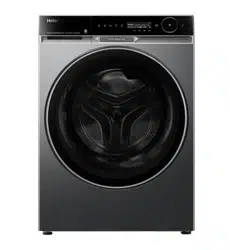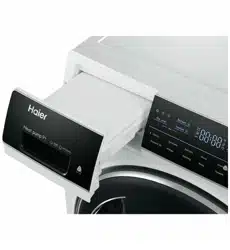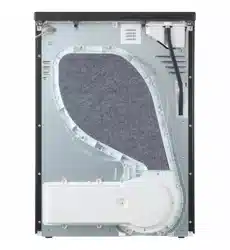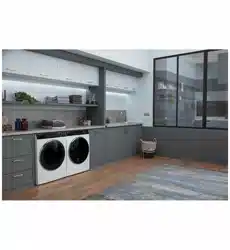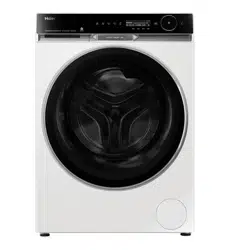
HWF12PXW1
HWF12PXB1
NZ AU

NZ AU
心
Warning-Important Safety information
.
General information and tips
i
�
Environmental information
冗
_
Disposal
心RNING!
.
2
Le
g
e
n
d
Help protect the environment and human health.
Put the packaging in applicable containers to
recycle it. Help to recycle waste of electrical and
electronic appliances. Do not dispose appliances
marked with this symbol with the household
waste. Return the product to your local recycling
facility or contact your municipal office.
Risk
of
inju
or
suocation!
Disconnect the appliance from the mains supply. Cut off the mains cable and
dispose of it. Remove the door catch to prevent children and pets from getting
trapped in the appliance.
Thank you for purchasing a Haier Product.
Please read these instructions carefully before using this appliance. The instructions contain
important information which will help you get the best out of the appliance and ensure safe
and proper installation, use and maintenance.
Keep this manual in a convenient place so you can always refer to it for the safe and proper
use of the appliance.
If you sell the appliance, give it away, or leave it behind when you move house, make sure you
also pass this manual so that the new owner can become familiar with the appliance and
safety warnings.
Please read these instructions carefully before using this appliance. The instructions contain
important information which will help you get the best out of the appliance and ensure safe
and proper installation, use and maintenance.
Keep this manual in a convenient place so you can always refer to it for the safe and proper
use
of the appliance.
If you sell the appliance, give it away, or leave it behind when you move house, make sure you
also pass this manual so that the new owner can become familiar with the appliance and
safety warnings.

NZ AU
3
1-
Sa
inrmation...........................................................................................................................
4
2-
Product
description.........................................................................................................................
7
3-
Control
panel
....................................................................................................................................
8
4-
Programmes...................................................................................................................................
15
S-
Consumption..................................................................................................................................
16
6-
Daily
use
...........................................................................................................................................
17
7-
A pp usage instructions....
......................................................................................................
22
8-
Eco-friendly
washing....................................................................................................................
23
9-
Care
and
cleaning..........................................................................................................................
24
10-
Troubleshooting..........................................................................................................................
27
1
l-lnstallation.....................................................................................................................................
31
12-
Technical
data...............................................................................................................................
35
13-
Customer
service........................................................................................................................
37
NZ AU
Before switching on the appliance for the first time, read the
following safety hints!
心
.
RNING!
Bere
rst
use
4
►
Do not operate this machine if it has been damaged during
transport.
Contact your dealer or Haier service technician.
►
Ensure all transport bolts are removed before running the appliance.
Failure to do so might end in damage to the appliance.
►
Remove all packaging and keep out of reach of children.
►
This appliance is heavy, we recommend 2 people to move and
install the appliance.
► This product has been designed for personal, family or household
use.
This product is not designed for any commercial use. Any
commercial use will terminate this products manufacturer’s
warranty.
Daily
use
►
This appliance is not intended for use by persons (including children)
with reduced physical, sensory or mental capabilities, or lack
of experience and knowledge, unless
they are supervised or
given
instructions on how to use it by someone responsible for their
safety.
►
Supervise children to ensure they do not play with the appliance or
climb inside the drum.
►
Do not swing on or put weight on the door.
►
The appliance should only be used for garments recommended
for machine washing. Always follow the advice on the care label.
►
Do not touch or operate the machine with wet hands or with bare-
feet.
►
Do not place dripping wet clothing in or on top of the appliance as it
may create an electrical hazard.
►
Do not use the appliance if industrial chemicals (e.g. solvents) have
been used on the clothes.
►
Remove all items such as lighters and matches from pockets.
►
Pull up zips, fix loose threads and protect embellishments to
prevent garments from being damaged and entangled.
►
Garments that contain metal reinforcements should not be placed
in the appliance. If necessary, use an appropriate laundry bag or net.

1-Safety information
5
NZ AU
WARNING!
Daily use
▶ The appliance might get hot during operation, use caution if in close
proximity.
▶ Unplug the appliance before undertaking maintenance. Hold the plug
(not the cable) when unplugging the machine.
▶ Ensure there are no undesirable objects inside the drum before
starting a cycle.
▶ Ensure that the ambient temperature is between 5℃
and 35℃
before using the appliance.
Capacity
▶ Do not overload the appliance beyond its rated capacity.
▶ MAXIMUM WASH CAPACITY: 12Kg.
▶ Capacity refers to the maximum wash weight of items the appliance
can wash each time.
Washer Information
▶
Do not open the detergent dispenser drawer during a cycle.
▶
If a high wash temperature is selected, the door glass will be come
hot. Do not touch the surface and keep children away
from the appliance.
▶
Do not add petrol, dry-cleaning solvents, perfumes or other
flammable or explosive substances to the wash water. These
substances give off vapours that could ignite or explode.
▶
Do not wash articles that have been previously cleaned in,washed in,
soaked in, or spotted with gasoline, dry-cleaning
solvents, or other flammable or explosive substances as they
give off vapours that could ignite or explode.
▶
Do not wash an electric blanket in your washer unless the care label
specifically states it is safe to do so.
▶
Fabric softeners, or similar products, should be used as specified by
the manufacturer instructions.
心 RNING!
.
Maintenance, Cleaning and Disposal
6
NZ AU
► Keep the gasket, dispenser and door clean to prevent odours.
► Do not use water spray or steam to clean the appliance.
► A damaged electrical cable must be replaced by a Haier service
technician or similarly qualified person. Do not use the appliance until
it has been repaired to avoid a risk of electric shock.
► When disposing of the appliance, it is recommended that the door is
removed to avoidchildren getting trapped inside, and that the
electrical cable is cut off close to themachine.
► Unless the product is modified by an certified technician, any
changes might result in loss of warranty.
Intended
use
This appliance is intended for washing machine-washable laundry only. Please follow
the instructions on the label of each garment. It is designed exclusively for domestic
use inside the house. It is not intended for commercial or industrial use.
Changes or modifications to the device are not allowed. Unintended use may cause
hazards and loss of all warranty and liability claims.
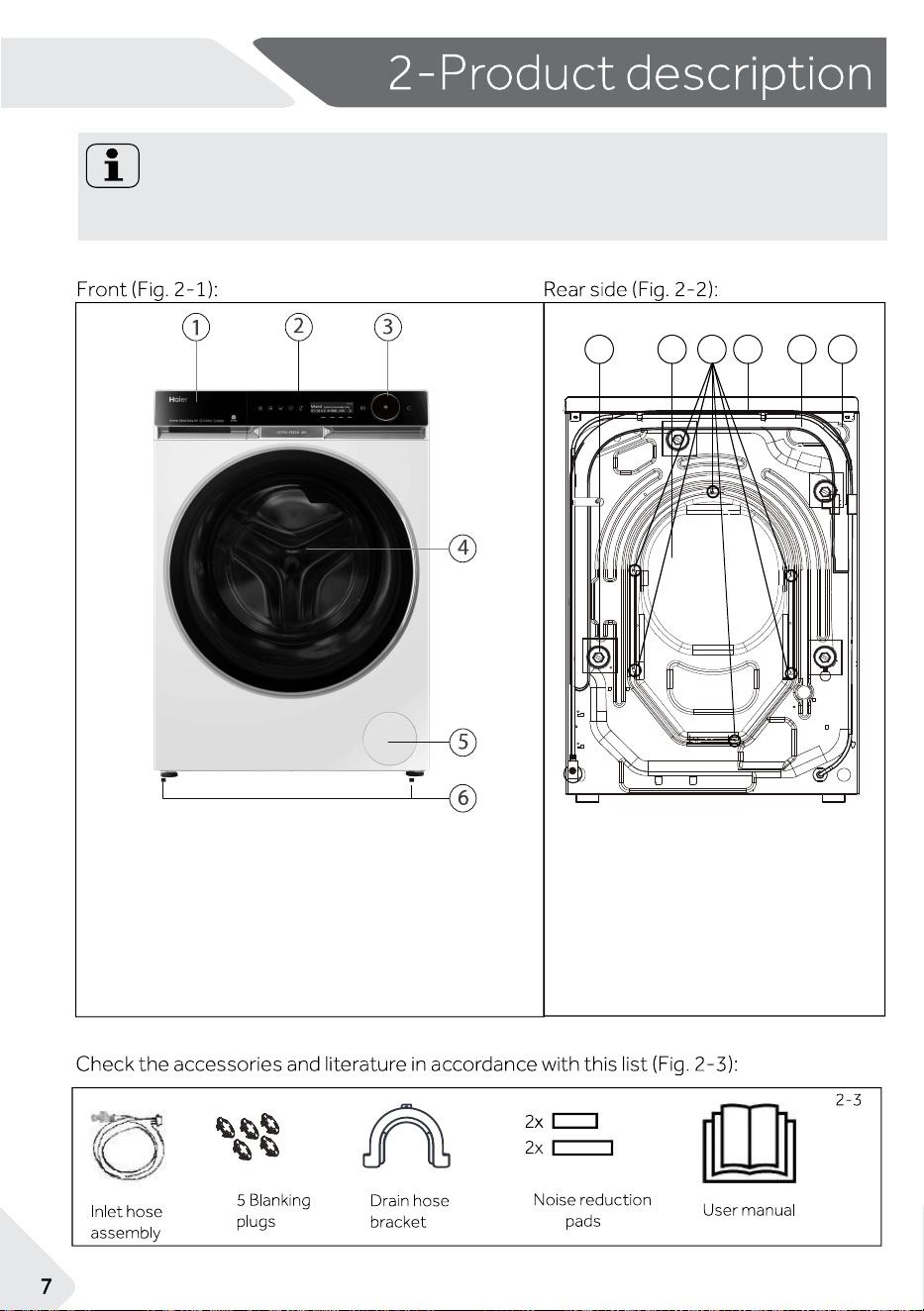
2.2 Accessories
2.1 Picture of appliance
2-1
1
2
3 4 5
6
T1
T2
T3
T4
1 Transportation bolts (T1-T4)
2 Backcover
3 Backcover screws
4 Power cord
5 Drain hose
6 Water inlet valve
2-2
NZ AU
Note:
Due to technical changes and different models, the illustrations in the following
chapters may differ from your model.
1
Detergent / Softener drawer
2
Top panel
3
Control panel
4
Door
5
Filter cover
6
Adjustable feet
Stain removal
Delay
Temp.
Anti-crease
Extra R ins e
Speed
1000 302
01 10
Mixed
Cycle for mixed loads. 12kg
NZ AU
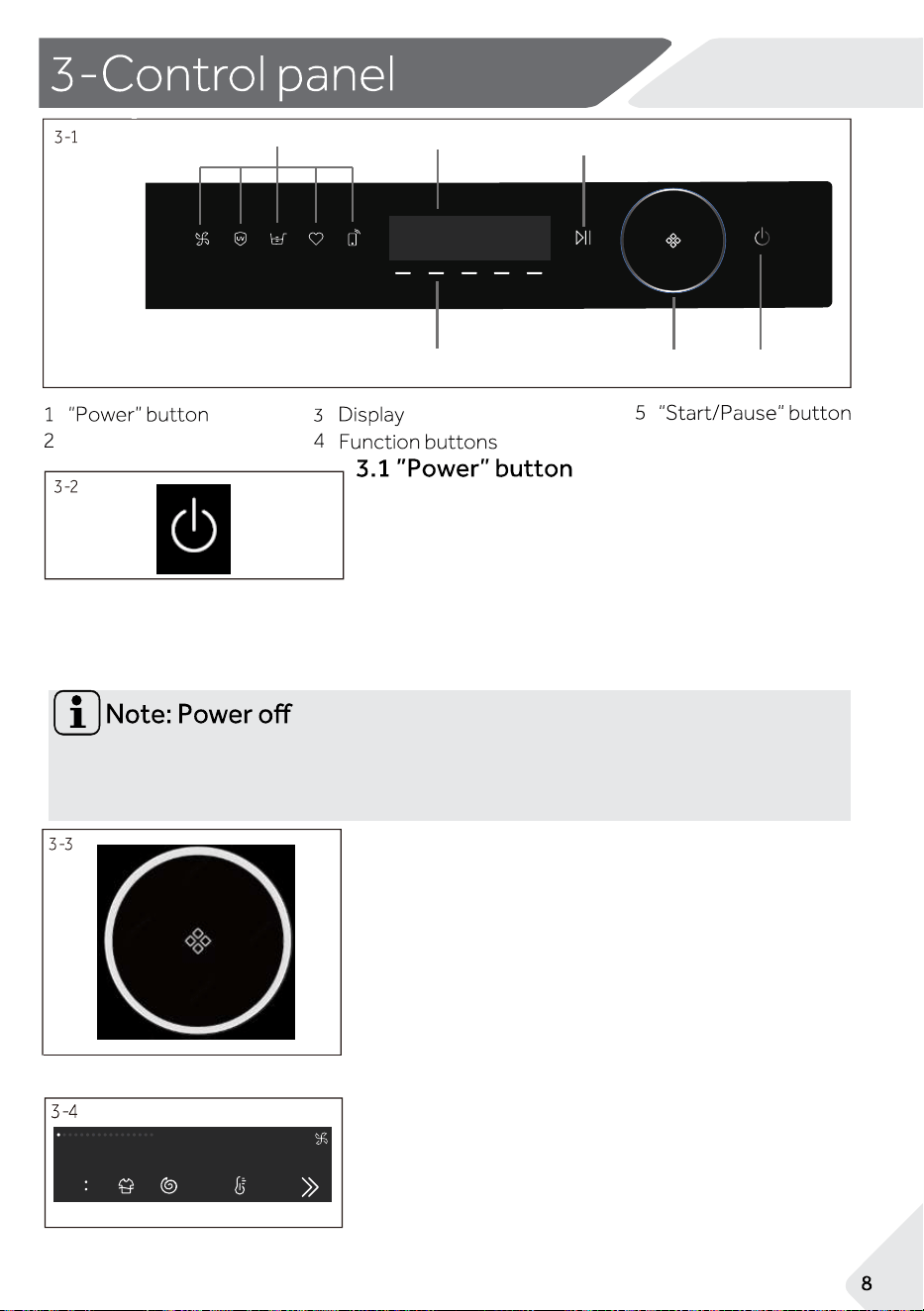
Dial
6
Operation buttons
6
1
2
5
3
4
Without Wi-Fi connection, the switched-on appliance automatically powers off if it is
not activated within 2 minutes after the product is powered on or after the cycle is
finished. With Wi-Fi connection, the waiting time duration is 24h.
3.2 Dial
1.Rotate the dial(Fig. 3-3) to select a cycle, and
its default settings will be displayed on the
screen.
2.Quick cycle selection function: On the
cycle
selection interface, you can quickly turn
the dial
(more than half a turn within 2 seconds)to enter
the program for quick selection.
Press the Power button (Fig. 3-2) to turn ON and OFF the
product. When the product is on, the default cycle and
options on the screen will be illuminated; meanwhile, the
screen will also display possible modifiers and options in
dim light; in dim light the displays shows possible modifiers
and selectable options. For Wi-Fi connection: Press and
hold the Power button for five seconds until the "APP" is
displayed on the screen.
3.3 Display
The display (Fig. 3-4) will show important
information about the cycle: Options and
modifiers,remaining time, error codes and
service information, warnings and notifications.
Stain removal
Delay
Tem
Wool
Spin
Smart
Shirt
Quick 15’
Cotton
Babycare
Synthetics
Cotto
Delicate
Allergy care
Refre
REFRESH
Anti-crease
esni RartxE
Spe
Wool
Spin
Sma rt
Shi rt
Quick 15 ’
Cotton
Remote
Ba bycar e
Synth etics
Eco 40-60
Cotton 2 0°C
Deli cate
Allergy ca re
Refre sh
REFRESH
525 DRUM
Smart
Shirt
Quick 15’
Cotton
Babycare
Allergy care
3-6
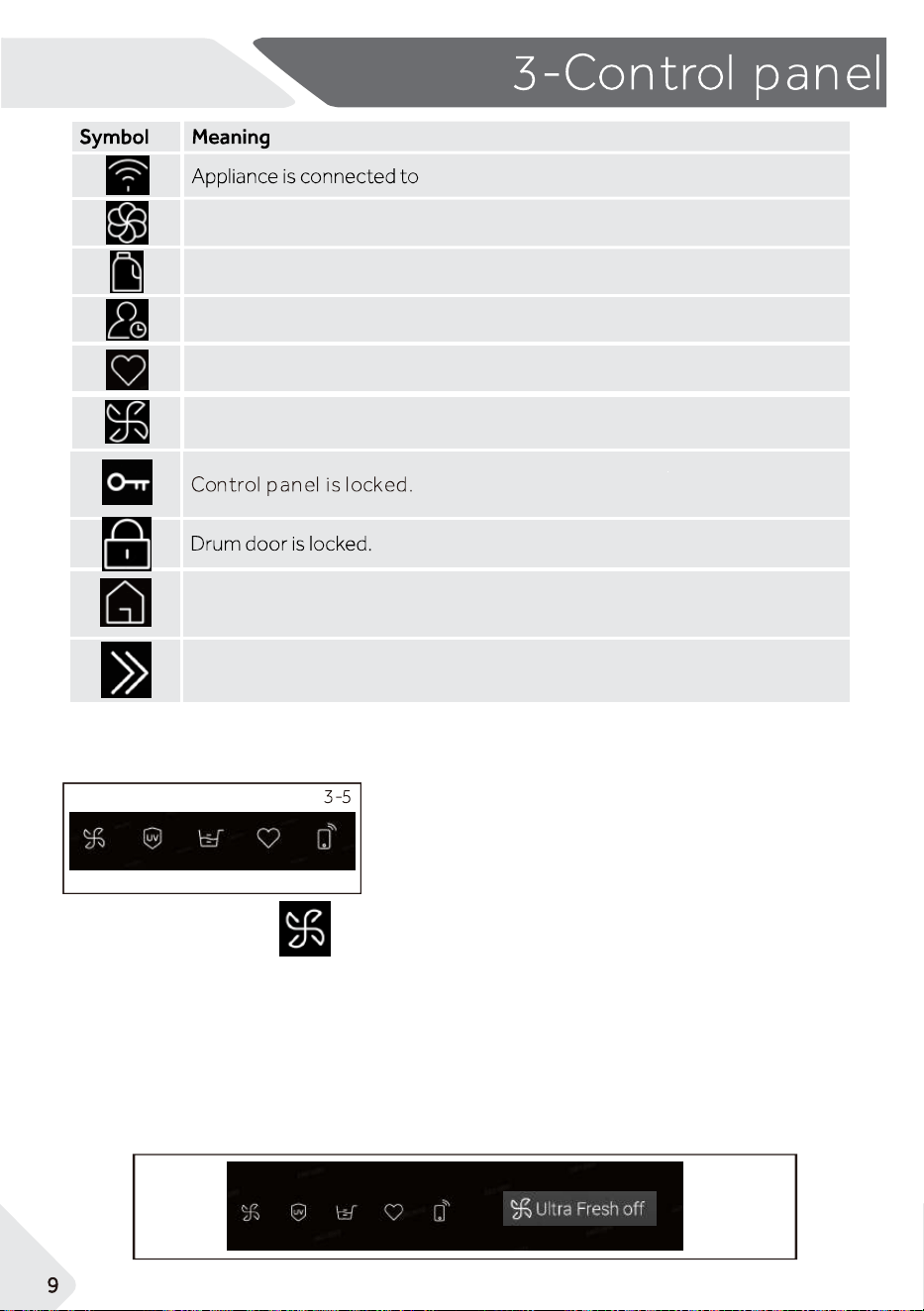
Softener in drawer.
Detergent in drawer.
Wi-Fi.
Favourite.
Ultra fresh.
Used to return to the main interface.
For more parameter selection.
i-time.
3.4 Function buttons
NZ AU
buttons, which can be selected as required.
3.4.1
Function buttons
These five buttons (Fig.3-5) are special function
This is the Ultra Fresh function button, it is on by default. If users want to deactivate this
function, then touch this button, the fresh air icon will become dim, and the screen will display "
Ultra Fresh off" (Fig.3-6). When this function is on, it will only start when the cycle is finished
Air will be blown into the drum by the fan from behind, freshen the garments, dry the gasket
and other parts, help to prevent the growth of mould, bacteria and bad odors inside the drum
Air will flow out from the front bottom of the control panel, it will last up to 12 hours till users
stop it.
removal
Delay
Temp.
Wool
Spin
art
Shirt
Quick 15’
Remote
ycare
Eco 40-60
Cotton 20°C
Delicate
Allergy care
Refresh
Extra Rinse
Speed
Spin
Remote
Eco 40-60
Cotton 20°C
Delicate
Refresh
Extra Rinse
Speed
Temp.
Spin
Remote
Eco 40-60
Cotton 20°C
Delicate
Refresh
Extra Rinse
Temp.
Spin
Remote
hetics
Eco 40-60
Cotton 20°C
Delicate
Refresh
Speed
Temp.
Spin
Remote
hetics
Eco 40-60
Cotton 20°C
Delicate
Refresh
Extra Rinse
Speed
Temp.
Remote
Eco 40-60
Cotton 20°C
Refresh
Speed
Delay
Temp.
Smart
Shirt Cotton
Remote
Synthetics
Delicate
Refresh
Anti-crease
Extra Rinse
Speed
3-9
3-8
3-7
UV Sanitise on
UV Sanitise off
3-10
Detergent
Softener
NZ AU
3.4.2
Function buttons
3.4.3
Function buttons
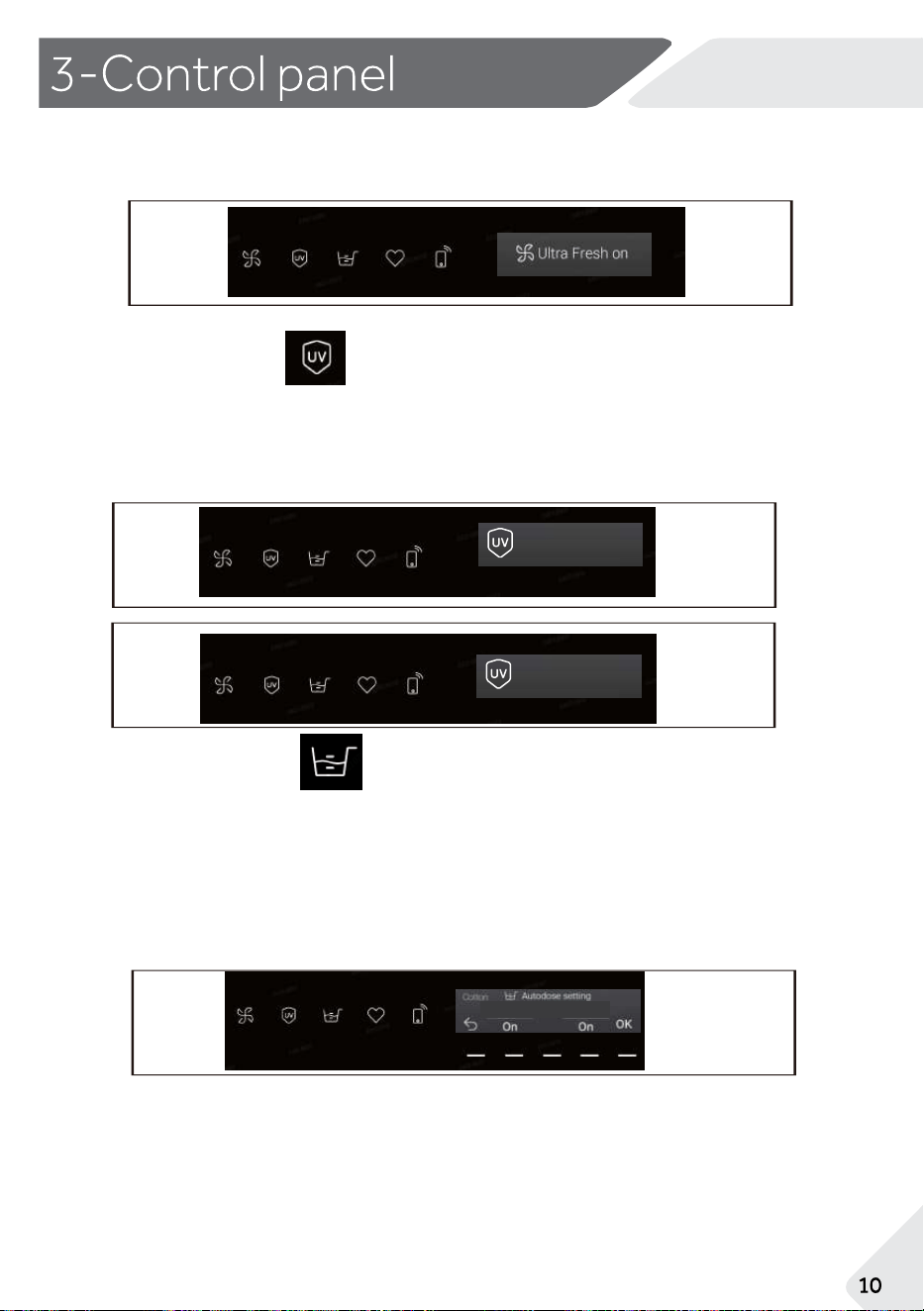
This is the Autodose function button, touch this button, the icon will light up and
the function will be activated. Users can adjust its setting (Fig.3-10) as necessary.
This is the UV Sanitise function button, use this button to turn On and OFF (Fig.3-8, Fig.3
-9) the UV sanitise function during wash and rinse.
This function can reduce germs and microorganisms in the water, and so to
guarantee a
cleaner wash.
Touch this button again, fresh air icon will
light up, screen display" Ultra Fresh on
"(Fig.3-7).
3-15
3-14
3-1
3
3-12
Favourite on
Favourite Programe added
Favourite off
NZ AU
3.4.5
Function buttons
3.
5
Other function buttons
3.5.1
Temp. function
3.5.2 Spin
function
3.5.3 Rinse function
3.4.4
Function buttons
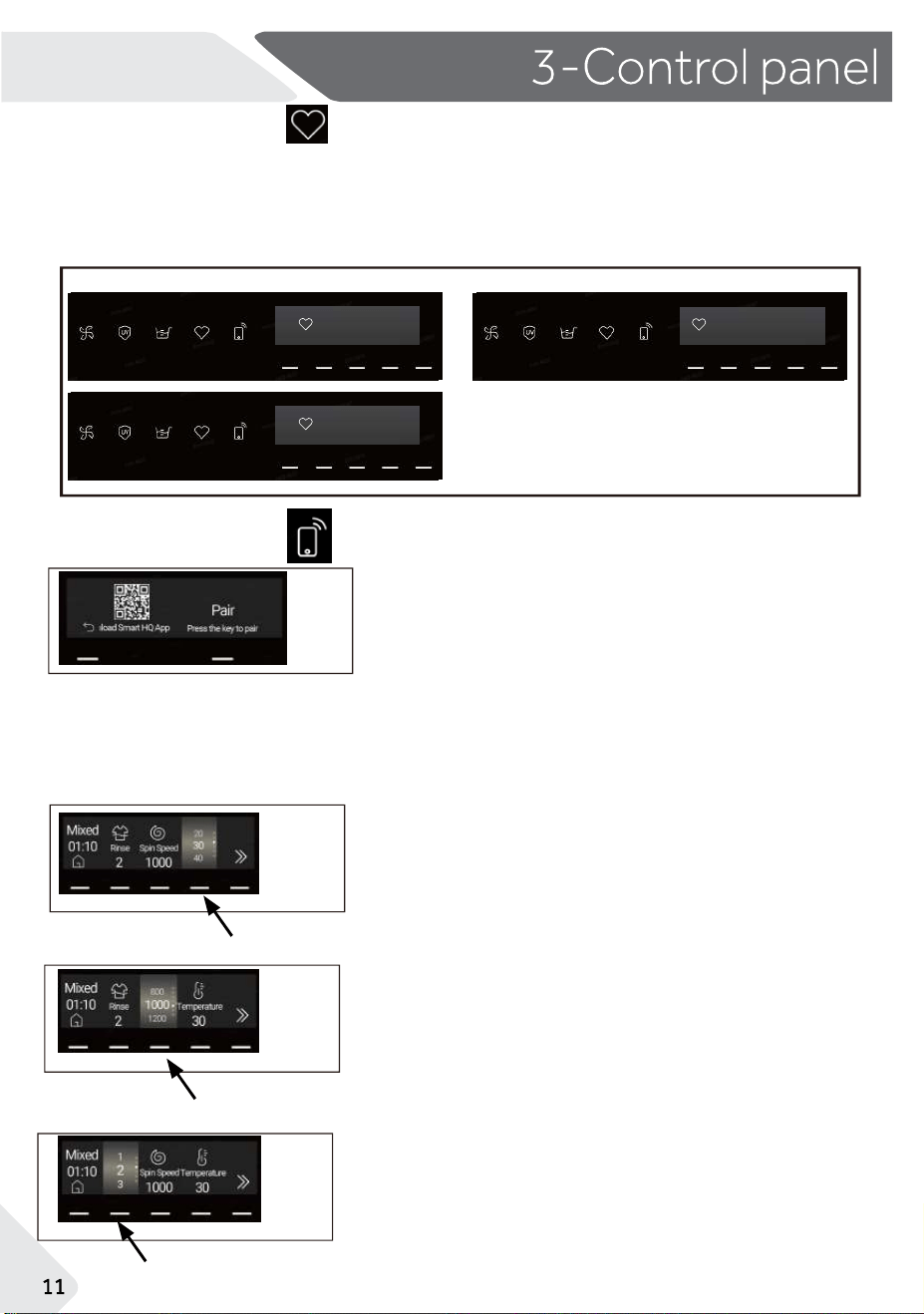
This is the Favourite function button. Choose a cycle and preferred settings, start the cycle, then
press this Favourite button for 3 seconds to save it as your favourite cycle (Fig.3-11). Users can
save up to 3 favourite cycles.
In future, users can press the Favourite button to directly select cycle from your favourite cycles
with preferred settings.
3-11
1.
Touch ”Rinse“ button(Fig.3-15)to select the
number of rinses(0/1/2/3/4/5).
2. Different cycles have different rinse options.
1.
Touch “Temp.”button(Fig.3-13)to select a
different temperature(--/20/30/40/60/90).
2.
Different cycles have different temperature
options, when users select "--", water will not be
heated.
1.
Touch “Spin" button(Fig.3-14)to select a
different speed (0/400/600/800/1000/1200/
Max).
2.Different cycles have different spin speed
options, when users select "0", product will not spin.
This is the Remote Mode function button, touch
this button, the remote mode will be on, then users
can press the
'' Pair ''
button to pair the product with
your phone, after which the product can be
controlled by the Smart HQ APP.
When users are controlling the product through the
Remote Mode, the product door will be
automatically locked. And at the end of the cycle,
the Remote Mode will be turned off automatically
and unlock the door.
3-20
NZ AU
3.5.4
Detergent function
3-16
3.5.5
Softener function
3-17
3.5.6
Delay
Start
function
3-18
3.5.7
Stains function
3-19
3.6
Setting function
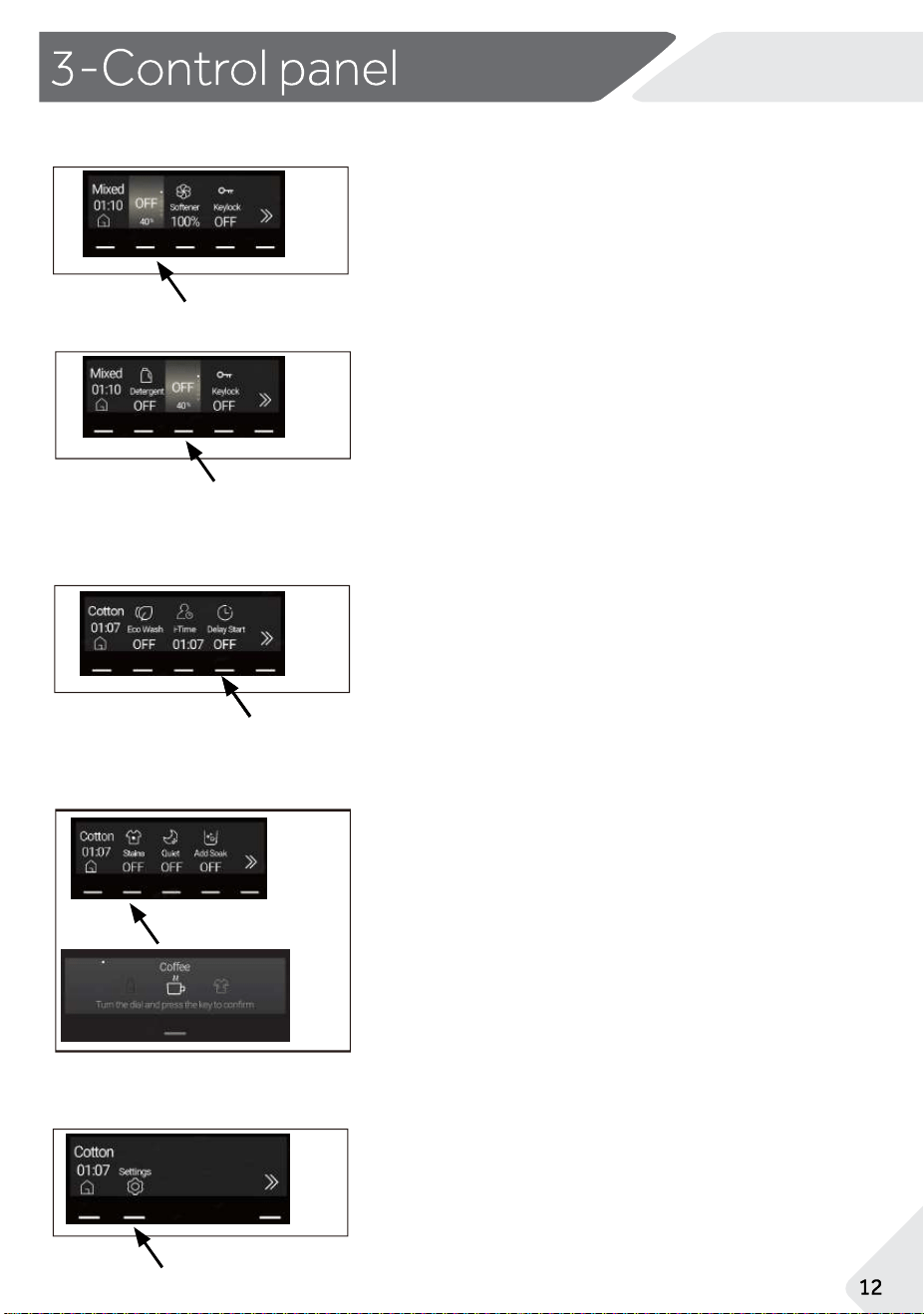
Touch "Detergent" button(Fig.3-16)to select the
detergent auto-dosing dosage
(OFF/40%/70%/100%/150%/200%).
Touch "Softener" button (Fig.3-17)to select
the softener auto-dosing dosage
(OFF/40%/70%/100%/150%/200%).
Touch "Delay Start" button to select preferred options
from 0.25hr to 12hr
(15min/30min/1hr/2hr/3hr/4hr/5hr/6hr/7hr/8hr/9hr/1
0hr/11hr/12hr).
For example, select 06:00, touch the "Start/Pause"
button, then the cycle will start in 6 hours. This function
is not available on some cycles.
Touch "Stains" button (Fig.3-19) to select different
stain options
(OFF/Juice/Wine/Grass/Soil/Blood/Milk/Coffee/Sweat
/Tea/Lipstick/Ink/Oil).
1.
Touch "Settings" button (Fig.3-20) to enter the
settings page.
2.
You can set Wi-Fi(ON/OFF), E-Label, Font (Standard/
Large), Water hardness (Soft/Medium/Hard).
Remote
Stain removal
Delay
Temp.
Wool
Spin
Smart
Shirt
Quick 15’
Cotton
Remote
Ba bycare
Synthetics
Eco 40-60
Cotton 20°C
Deli cate
Allergy ca re
Refresh
REFRESH
525 DRUM
Anti-crease
Extra Rinse
Speed
Stain remova l
Delay
Temp.
Wool
Spin
Smart
Shirt
Quick 15’
Cotton
Remote
Ba bycare
Synthetics
Eco 40-60
Cotton 20°C
Deli cate
Allergy care
Refresh
REFRESH
525 DRUM
Anti-crease
Extra Rins
3-24
3-21
3-22
3-23
NZ AU
3.7 Keylock
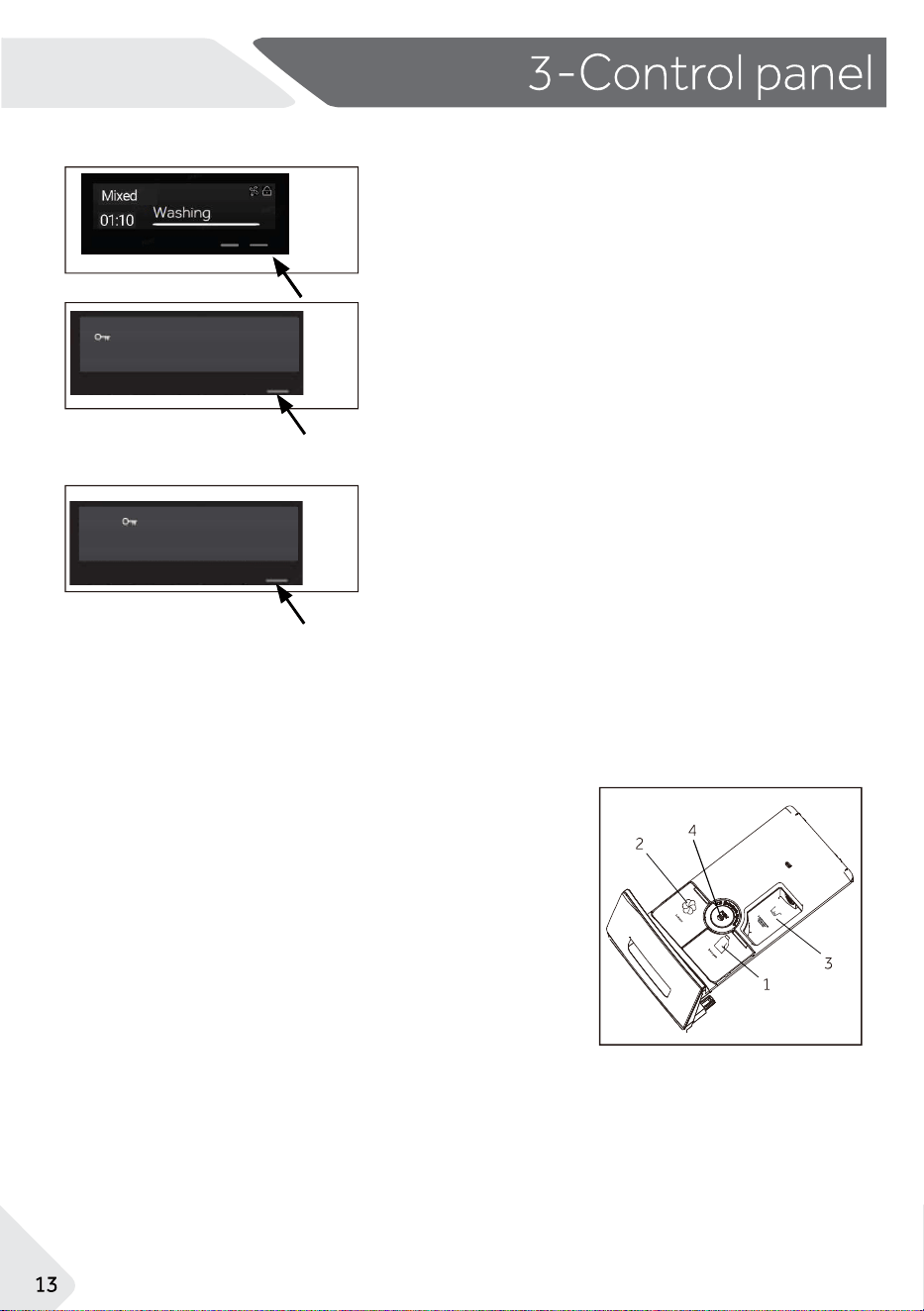
1.Use Keylock to disable the buttons on the display panel.
Key Lock can be used at any time including while a cycle is
running.
2.When locked, the controls will be unresponsive except the
the Power button.To activate, press the first button from
the right (Fig. 3-21), then the screen will pop up the prompt
(Fig. 3-22), press the button for 3 seconds as per the
prompt, then the Keylock will be activated.
3. When the machine is in standby mode, operate on the
screen to find the Keylock setting, press 3 seconds on the
corresponding button to activate the Keylock function.
3.8 Detergent drawer
Open the drawer, following components can be
seen (Fig.3-24).
1: Compartment for liquid detergent.
2: Compartment for softener.
3: Compartment for powder detergent.
4: Lock tab, press it down to pull out the drawer.
Different types of detergent/softener are
usually suitable with different washing
temperatures, please refer to the instructions
of the detergent/softener.
Whether to activate Keylock
Press 3 seconds to activate
Keylock active
Start/Pause button disabled
Press 3 seconds to deactivate
4. When the Keylock function is activated, press any key,
the screen will pop up another prompt (Fig. 3-23) regarding
how to deactivate the function, press the button for 3
seconds, then the Keylock function will be deactivated.
Remote
Stain removal
Delay
Temp.
Wool
Spin
Smart
Shirt
Quick 15’
Cotton
Remote
Ba bycare
Synthetics
Eco 40-60
Cotton 20°C
Deli cate
Allergy ca re
Refresh
REFRESH
525 DRUM
Anti-crease
Extra Rinse
Speed
Stain remova l
Delay
Temp.
Wool
Spin
Smart
Shirt
Quick 15’
Cotton
Remote
Ba bycare
Synthetics
Eco 40-60
Cotton 20°C
Deli cate
Allergy care
Refresh
REFRESH
525 DRUM
Anti-crease
Extra Rins
3-25
NZ AU
3.9
Add
Garment
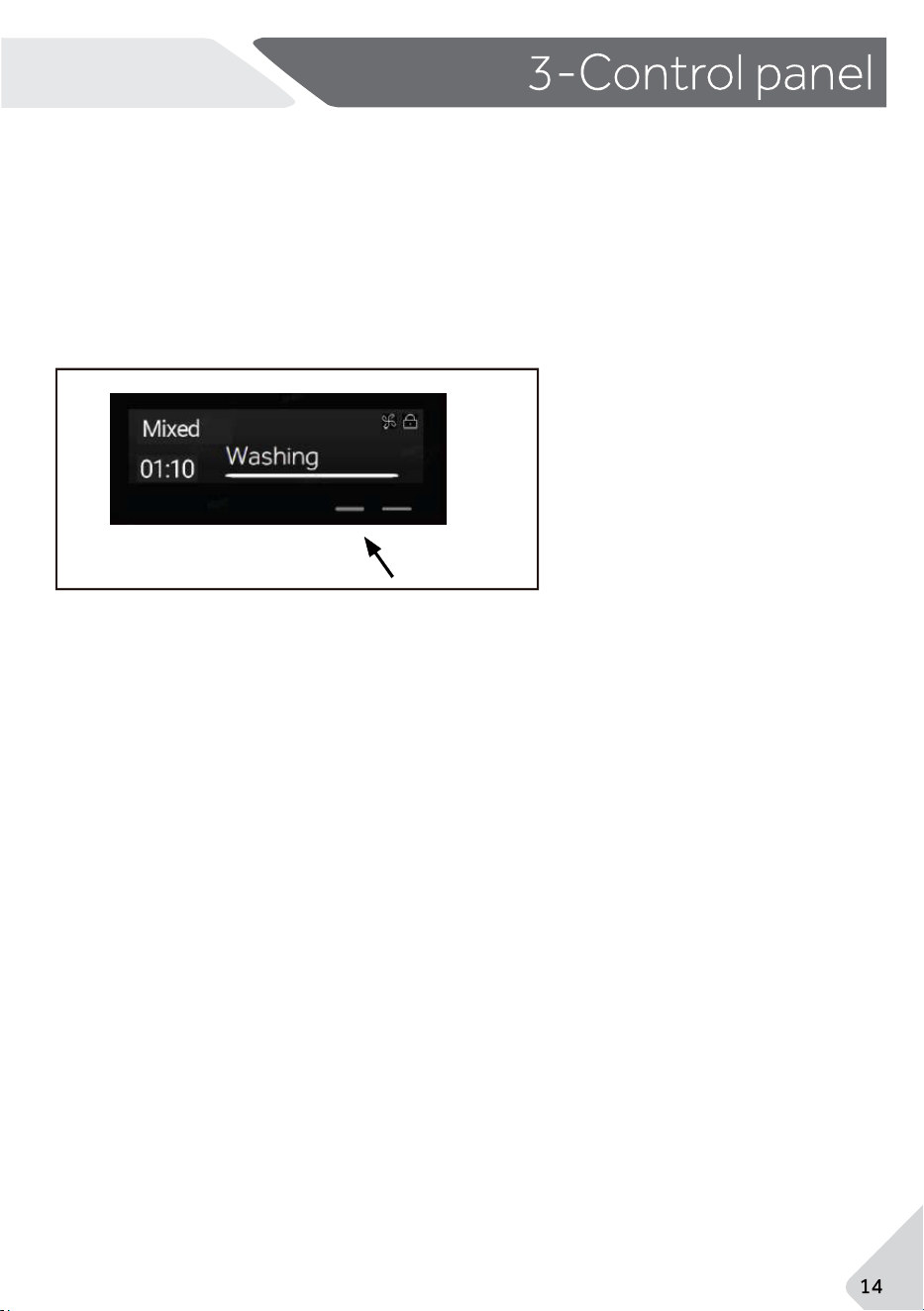
When the cycle is running, users can press the second button(Fig.3-25)from the
right to activate the function of Add Garment as per prompt information.
Product will stop running ( if the water level is too high, it will be automatically drained to a
level where the door can be opened). Then open the door, add garment in, close
the door, and press the " Start/Pause " button to resume the running.
Remote
- -
Max. load
reTemperatu
unctionF
in °C
1)
Default
Stains
selectable
range
Fabrics
type
Cotton / Synthetic
30
-- to 40
Delay Start
•
Yes,
º
Optional,
/
No
Express 15
-- to 40
--
1000
•
Max
Towels
60-- to 90
•
1000-- to 60Bedding 30
•
600
•
-- to 30 30
Delicate
--to 90 30
•
1000
Cotton
1000
Shirts
Duvet
3
800
•
1000
Allergy Care
60
Refresh
--to 60 30
1000
60
--to 90
-- to 40
•
/
and
silk
•
•
•
Softener
Detergent
Laundry
Powder
º
º
º
Cotton
•
º
•
º
º
Mixed 12
in kg
º
/
Synthetic
Wool
Infantwear
Spin
default duration(min)
1
8
3
12
12
3.5
--to 60 30
/
/
//
1
1000
800
1000
1000
/
º
º
º
º
º
º
º
º
º
º
º
º
º
º
•
•
•
/
/
/
/
/
º
º
º
º
º
º
º
º
º
º
º
º
º
º
º
12
12
/
•
•
•
•
•
º
•
º
40
70
15
94
67
65
92
2
º
º
º
º
º
18
113
74
70
40
8
61
108
Rinse and Spin
12
/
•
º
1000
•
º
º
26
•
Ultra Gentle
3
-- to 30
30
•
•
º
600
/
/
•
º
/
Ultra Fresh
/
/
/
/
/
/
/
/
///
/
Drum Clean
/
/
•
•
/
/
/
/
/
•
//
6
-- to 40
40
/
/
/
/
•
•
•
•
º
/
/
/
/
/
•
º
º
º
º
º
º
º
º
/
/
/
/
º
º
Quiet
/
/
/
º
º
º
º
º
º
º
º
º
º
º
º
º
/
15
-- to 90
0-- to 9
--
/
--
600
/
•
/
º
/
•
•
º
º
/
º
/
º
47
120
60
º
º
Cotton / Synthetic
Delicate laundry
Cotton
Synthetic or mixed
fabirc
Cotton/Synthetic
Cotton/Synthetic
Cotton
Cotton/Synthetic
Machine-washable
fabric made of wool
or with wool content
Cotton/Synthetic
Not-fragile fabric
Not-fragile fabric
••
--
ºº
/
•
•
º
••
/
º
•
/
/
/
•
•
•
º
º
•
•
•
•
º
º
º
º
º
º
º
º
º
•
NZ AU
4-Cycles
Softener
Liquid Detergent
Powder
Cycle
Defaul
t
spin
speed
in rpm
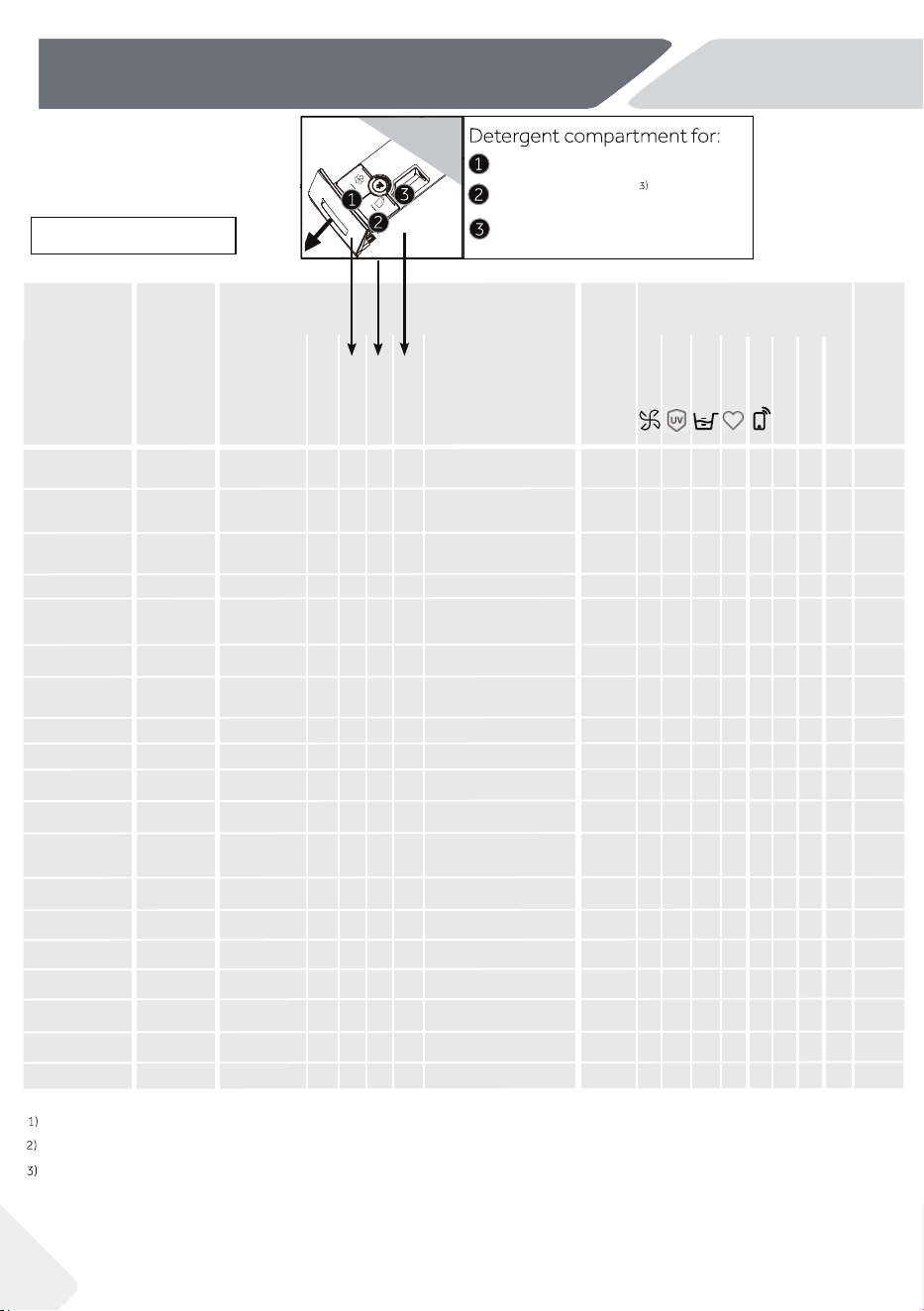
atednot be helWater wil
Choose 90°C wash temperature only for special hygienic requirements
Reduce detergent
amount because the cycle "Express 15" duration is short.
If users deactivate the Autodose function, then the product will not be able to dose the
detergent automatically.
When wash heavy loads, the product may vibrate if loads are tangled.
NZ AU
Woolmark WOOL CARE
The wool wash cycle of this machine has been tested and approved by The
Woolmark Company for the washing of machine washable wool products
provided that the products are washed according to the instructions on the
garment label and those issued by the manufacturer of this washing machine.
M1766(HWF12PXW1, HWF12PXB1).
Registration Cycle
Registration cycle for the Energy and Water Labeling is based on: AS/NZS 2040.2 Cotton,
40°C, Spin Speed: Max, Rinse: 4, Ultra Fresh off, Detergent off, Softener off, which is the
recommended water and energy saving cycle for normally soiled load in everyday washing
scenario.
The detergent is added as 100% powder detergent, put directly into the bottom of the drum,
then add the maximum amount of anti-foaming agent into the bottom of the drum, and then
add the PBIS solution to the bottom of the drum, put in the standard load, and start the
registration cycle.
This product is equipped with a loading weight recognition sensor. When the load weight
is low, corresponding energy, water and washing time will be adjusted automatically for
some cycles. The displayed cycle duration may vary depending on the load weight,
including "Express 15, Delicate, Bedding, Wool, Mixed" cycles.
1
7
NZ AU
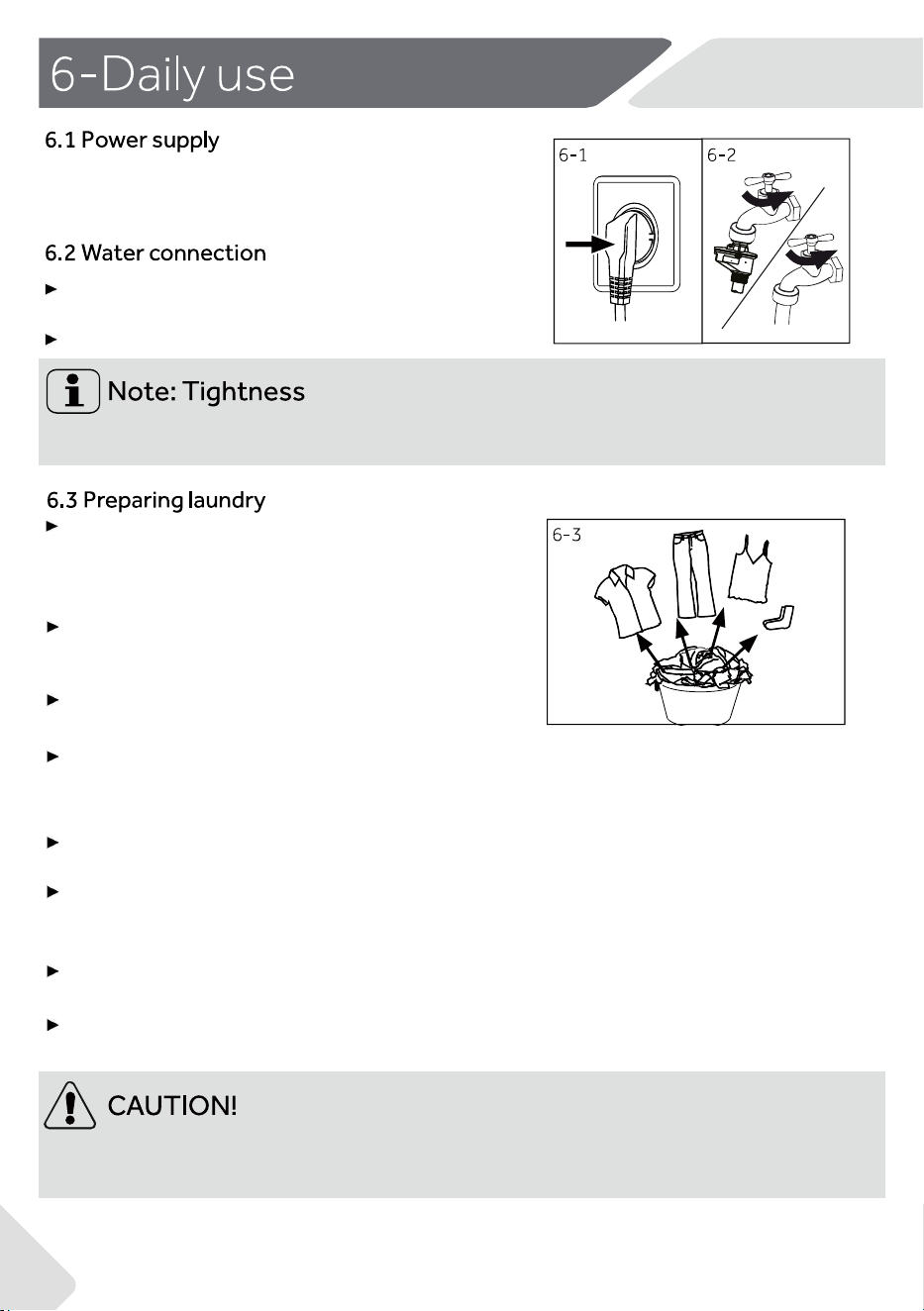
Turn on the tap (Fig.6-2).
Non-textile, as well as small, loose or sharp-edged items may cause malfunctions and
damage to clothes and appliance.
Connect the washing machine to a power supply
(220V to 240V~/50Hz; Fig. 6-1). Please also refer to
section 11-Installation(see page 34).
Before connecting, make sure the water inlet is
clean and intact.
Before use, turn on the tap to check if there is any water leakage around the joint
between
the tap and the inlet hose.
Sort out clothes according to fabric (cotton, syn-
thetics, wool or silk etc.) and how dirty they are
(Fig.6-3). Pay attention to the instructions on the
clothes
labels.
Separate white clothes from coloured ones. Wash
coloured textiles first by hand to check if
they fade
or run.
Empty pockets (keys, coins, etc.) and remove
harder decorative objects (e.g. brooches).
Garments without hems, delicates and finely woven textile
such as fine curtains should be put into a wash bag to care for
this delicate laundry (hand or dry cleaning would be better).
Close zippers, Velcro fastener and hooks, make sure the
buttons are sewn on tightly.
Place sensitive items like laundry without firm hem, delicate
underwear and small items such as socks, belts, bras, etc. in a
wash bag.
Unfold large pieces of fabric such as bed sheets,bedspreads
etc.
Turn jeans and printed, decorated or color-intensive textiles
inside out; possibly wash separately.
回回回回
Bleaching
�
D
rying
o
田
Ironing
邑
远
Pro
f
e
ssional Textile Care
@@
回回品]-支
�
0曰
云
©恋
四
�
四
四
�
�
因
丘
忘
►
►
NZ AU
Some of these symbols may not be in the device menu.
6.4 Loading theappliance
►
Put in the laundry piece by piece.
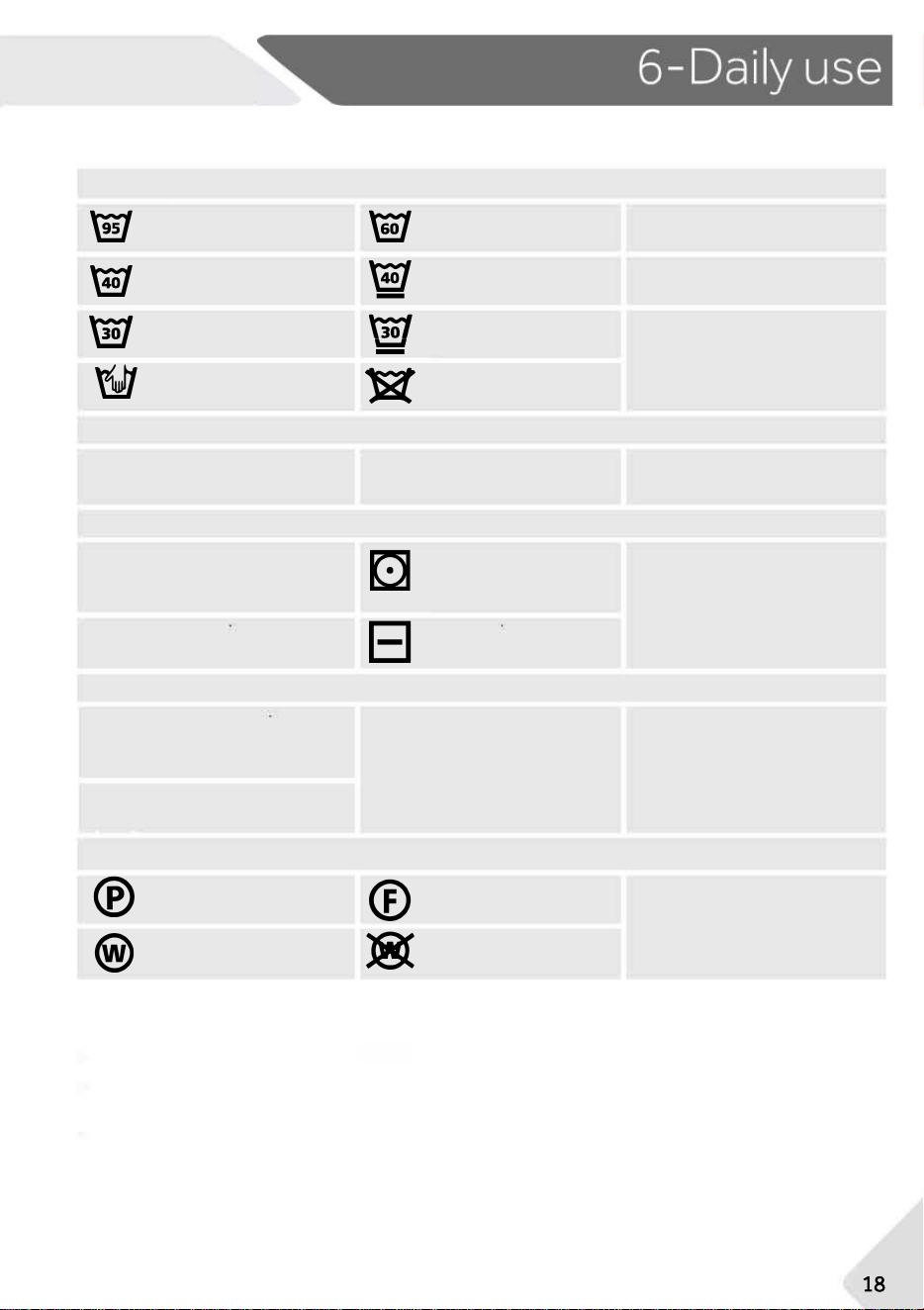
Fabric Care
chart
Washing
Washable up to 60°C
normal process
Washable up to 40°C
gentle process
Washable up to 30°C
gentle process
Do not wash
Washable upto60
gentle process
Washable up to40
very gentle process
Washable up to30
very gentle process
Any bleaching allowed
Only oxygen/
non-chlorine
Tumble drying possible
normal temperature
Tumble drying possible
lower temperature
Do not tumble dry
Line drying
Flat drying
Iron at a maximum
temperature
up to 200 °C
Do not iron
Iron at a moderate
temperature
up to 150°C
Iron at a low temper-
ature up to 110 °C;
without steam (steam
ironing may cause irre-
versible damage)
Dry cleaning in tetra-
chloroethene
Professional wet clean
Dry cleaning in hy-
drocarbons
Do not professional
wet clean
Do not dry clean
Do not bleach
Don't overload. Note the different maximum load according to cycles! Rule of
thumb for maximum load: Keep six inches between load and drum top.
Close the door carefully. Make sure that no pieces of laundry are pinched.
Washable up to 95°C
normal process
Washable up to 40°C
normal process
Washable up to 30°C
normal process
Wash by hand
max. 40°C
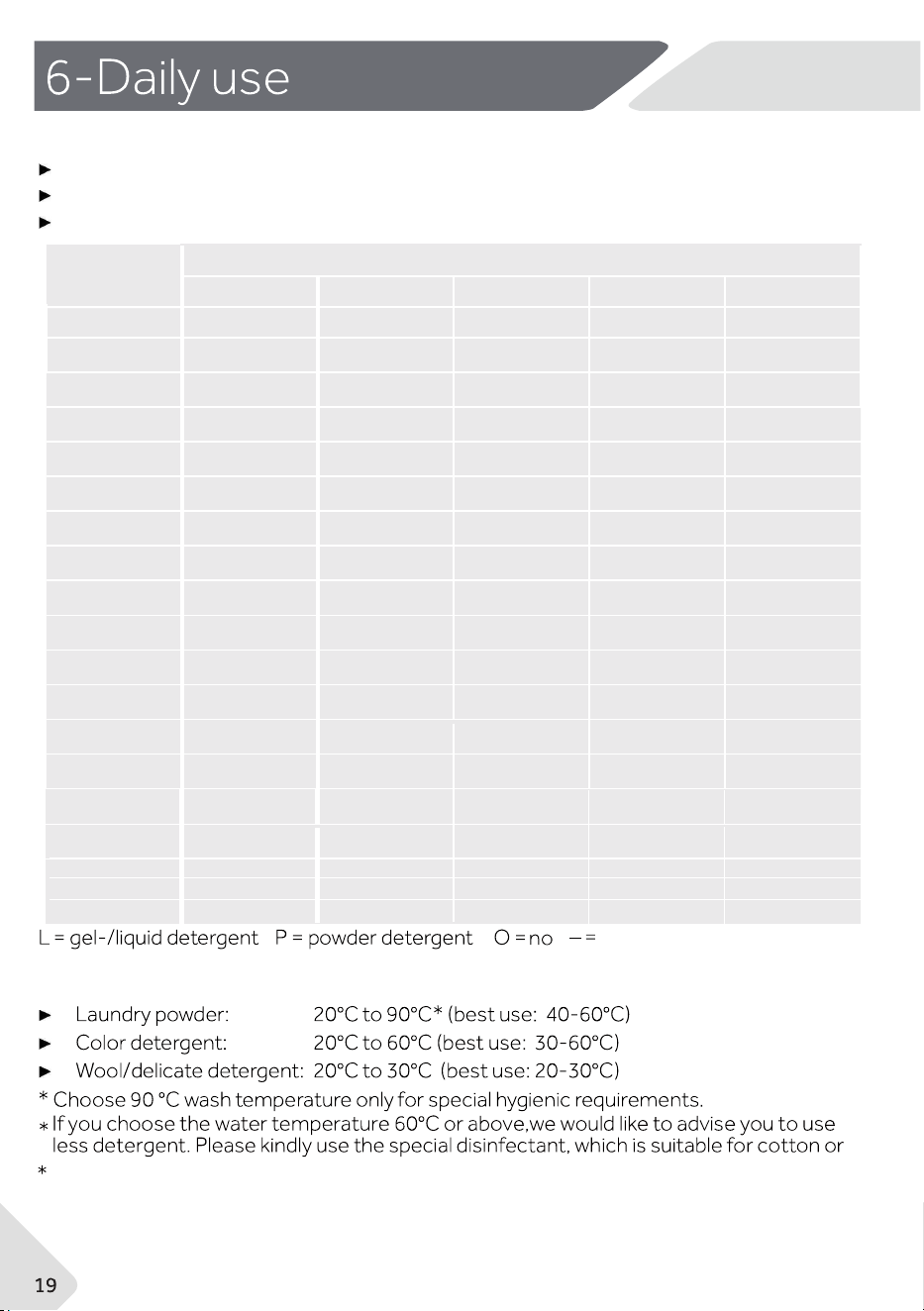
6.5 Selecting detergent
It is better to use less or not use suds detergent powder.
Cycle
Kind of detergent
Universal Colour Delicate Special Softener
Mixed
√L - -
Express 15
Towels
Bedding
Delicate -
Cotton
Synthetic
Refresh
Allergy Care
Duvet
Shirts
Infantwear
Spin
Rinse and Spin
Sport
Wool
√
√= Recommended
√
L√
L√
- -
√
-
-
L√
√
-
-
√
-
√
√
-
√
√
√
-
-
√
√
√
-
-
√
√
-
-
-
√
√
√
-
-
√
√
-
-
-
-
-
-
-
-
√
√
√
-
√
-
√
√
-
-
√L
√
o
-
-
-
-
-
-
-
-
-
-
deprecated
-
√
-
√
√
Drum Clean
Ultra Gentle
Ultra Fresh
-
-
-
√
-
-
-
√
√
√
-
- -
-
-
NZ AU
Washing efficiency and performance is determined by detergent quality.
Use only machine wash approved detergent.
If needed, use specific detergents, e.g for synthetic and woolen fabric.
If using liquid detergent, it is not recommended to activate the time delay.
We recommend by using:
S tain remov al
Delay
Temp.
REFR
E
SH
Anti-creas e
Extra Ri nse
Speed
Wool
Spin
Sma rt
Shi rt
Quick 1 5’
Cotton
Remote
Ba bycar e
Synth etics
Eco 40-60
Cotton 2 0°C
Deli cate
Al lergy ca re
Refr esh
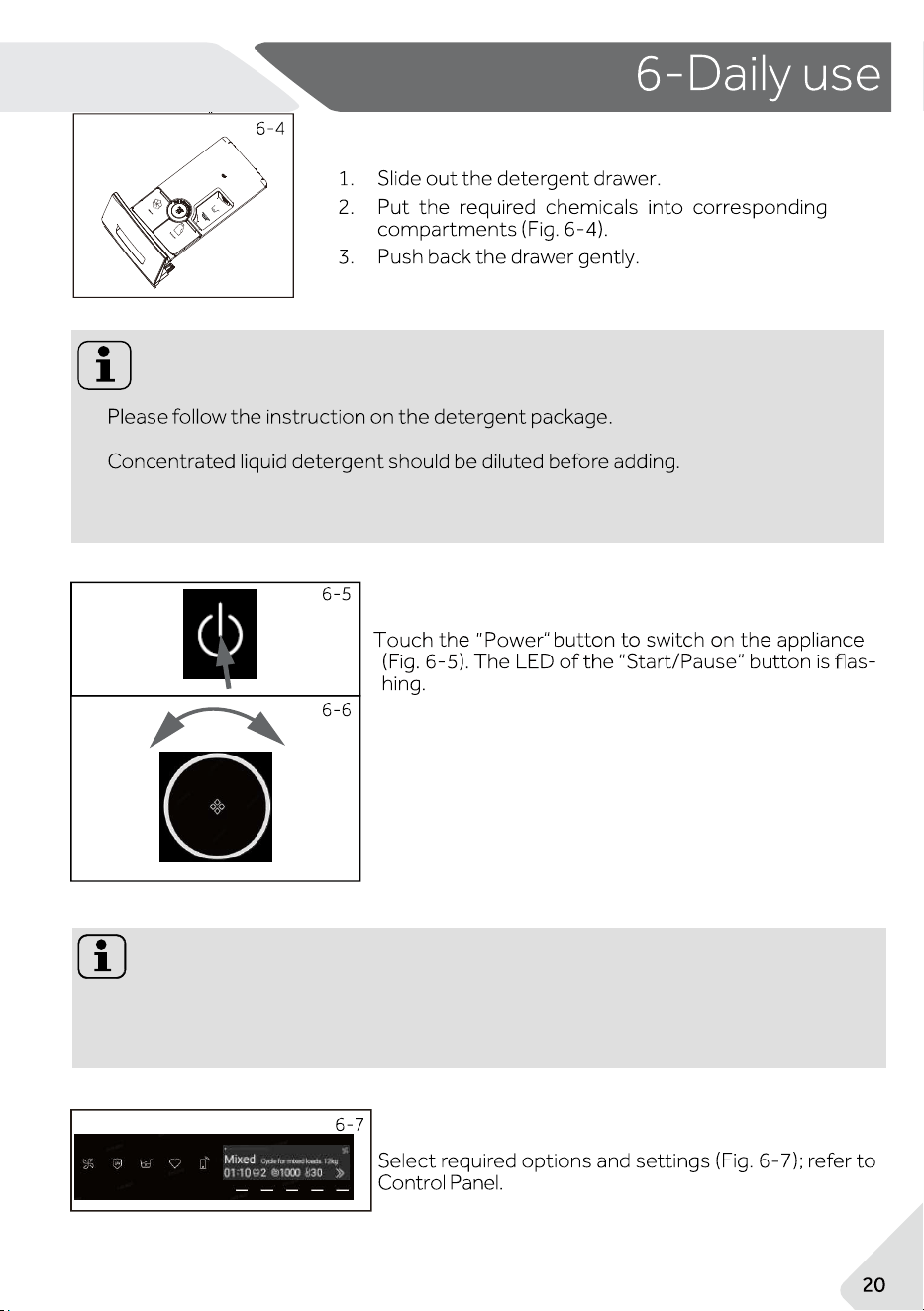
6.6 Adding detergent
6.7 Switch on the appliance
6.9 Add individual selections
Note: Odour removal
Note:
▶
▶
▶
NZ AU
Carefully choose the cycle settings according to the care symbols on all laundry
labels and according to the cycle table.
6.8 Select a cycle
To get the best washing results, select a cycle which fits
the degree of soiling and sort of laundry type.
Turn the dial (Fig. 6-6) to select the right cycle.
Before first use, we recommend to run cycle "Self-clean"with no load and small
amount
of detergent in detergent compartment (2) or special machine cleaner to remove
possible corruptive residues.
Temp.
Smart
Shirt
Quick 15’
Cotton
Remote
Babycare
Synthetics
Delicate
Allergy care
Refresh
Speed
▶
▶
Note: Standby-mode/energy-saving mode
6.12 After washing
NZ AU
6.10 Start the cycle
Touch "Start/Pause" button (Fig. 6-8) to start. The LED of the "Start/
Pause"button stops flashing and lights up continuously.
Appliance operates according to present settings.
Changes are only possible by cancelling the cycle.
6.11 Interrupt/ cancel cycle
1. At the end of the cycle, the screen will display ''END''.
2. The appliance switches off automatically
3. Remove laundry as soon as possible to avoid formation of wrinkles.
4. Turn off the water supply.
5. Unplug the power cord.
6.
Open the door to prevent formation of moisture and odours. Leave it open while not
used.
To save energy, the product will enter standby-mode and the display will turn off after 2
minutes of inactivity. Touch the ''Power'' button to exit the standby-mode.
To interrupt a running cycle touch gently "Start/Pause" .Touch it again to resume
operation.
To cancel a running cycle and all its individual setting JS.
Touch "Start/Pause" button to interrupt the running cycle, select a new cycle and start it.
2.
Go to the settings screen and select “Voice”.
Select voice"OFF",buzzer sound deactivated.Select voice“ON”,buzzer sound
activated.
Note: Door lock
For safety reasons, the door is locked during the washing cycle. It is only possible to
open the door at the end of the cycle or after the cycle was cancelled correctly (see
description above).
In case of high water level, high water temperature and when the drum is spinning, it
is not possible to open the door; screen display "Lock":The water level, temperature
, or rotational speed does not meet the requirements for opening the door.
6.13 Activate or deactivate the buzzer

NZ AU
7.APP usage Instructions
Your appliance can be connected to your home wireless network and operated remotely using
the app.
Getting started
Ensure your home Wi-Fi network is turned on.
You will be given step by step guidance on both your appliance and mobile device.
It may take up to 10 minutes to connect your appliance.
On your mobile device:
1. Your product is Wi-Fi connectable, please visit the web page below to download the app and
find
out more:
Australia
https://www.haier.com.au/smart
New Zealand https://www.haier.co.nz/smart
2. Register and create an account.
3. Add your appliance and set up the Wi-Fi connection
NZ AU
To achieve best use of energy, water, detergent and time, you should use the recom
mended maximum load size.
Do not overload (hand width clearance above laundry).
For slightly soiled laundry, select the Express 15 cycle.
Apply exact dosages of each washing agent.
Choose the lowest adequate washing temperature, modern detergents are efficiently
cleaning below 60°C.
Raise default settings only due to heavy staining.
General information:
▶
The “Mixed” cycle is able to clean normally soiled cotton laundry declared to be
washable at 40 °C or 60 °C;
▶
The most efficient cycles in terms of energy consumption are generally those
that perform at lower temperatures and longer duration;
▶
ing speed: the higher
the spinning speed in the spinning phase, the higher the noise and the lower the remain-
ing moisture content.
1
2
3. Wipe the inside of the sink clean with a towel.
4
9.2 Cleaning the machine
9.3 Water inlet valve and inlet valve filter
9.4 Cleaning the drum
Note: Hygiene
9-5
Turn on the tap to see if it leaks.
After the procedure, open the door, use a towel to clean the stains and foam
around the gasket, and keep the inside and outside of the gasket clean.
9-49-3
NZ AU
9.1 Cleaning the detergent drawer
Make sure there are no detergent residues.
Clean the drawer regularly (Fig. 9-1):
To prevent blockage of water supply by solid substan-
ces like lime, clean regularly the inlet valve filter.
Remove accidentally washed items,especially
metal parts such as pins, coins, etc. from the
drum (Fig. 9-5) and the groove of the door gasket
(rubber) because they cause rust stains and
damage.
For regular maintenance, we recommend running the cycle " Self-clean" within every 100
cycles to avoid possible corrosive residues. Add a small amount of detergent to the
detergent compartment (2) or use a special machine cleaner.
NZ AU
If the appliance is left idle for a longer period:
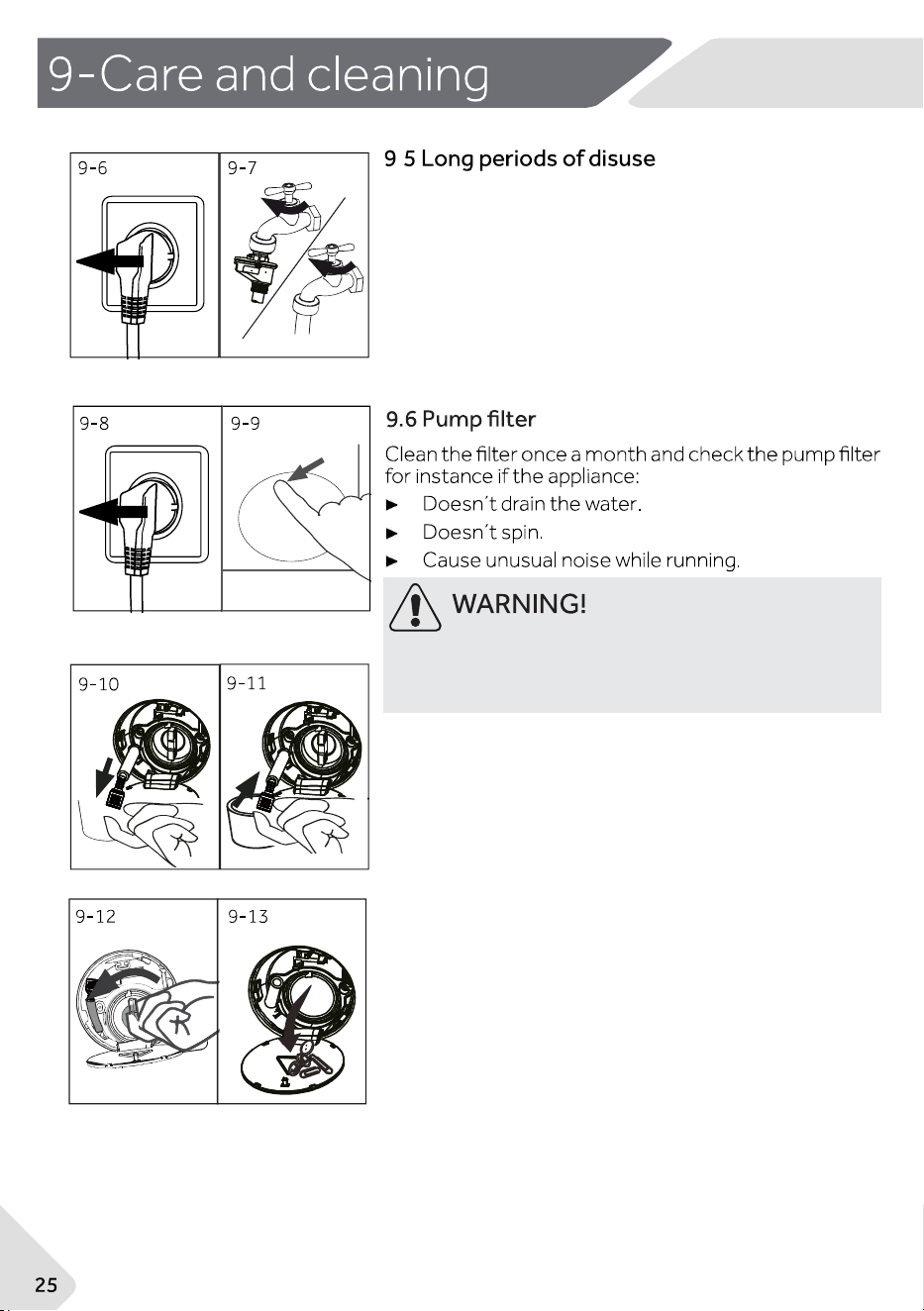
1. Pull out the electrical plug (Fig. 9-6).
2. Turn off water supply (Fig.9-7).
3. Open the door to prevent formation of moisture
and odours. Leave it open while not used.
Before next usage, check carefully power cord, water
inlet and drain hose. Make sure everything is properly
installed and without leakage.
Scalding Risk! Water in the pump filter can be very hot
!Before any caution, please ensure water has cooled
down.
1. Turn off and unplug the machine (Fig. 9-8).
2. Push and open service flap (Fig.9-9).
3.
Provide a flat container to catch residual water. (Fig
9-10) There could be bigger amounts!
4. Pull the drain hose out and hold its end above the
container (Fig. 9-10).
5. Take the sealing plug out of the drain hose (Fig.
9-10).
6. After complete drainage, close drain hose (Fig.
9-11) and push it back into the machine.
7.Unscrew and remove the pump filter in
counterclockwise direction(Fig.9-12).
8. Remove contaminants and dirt (Fig.9-13).
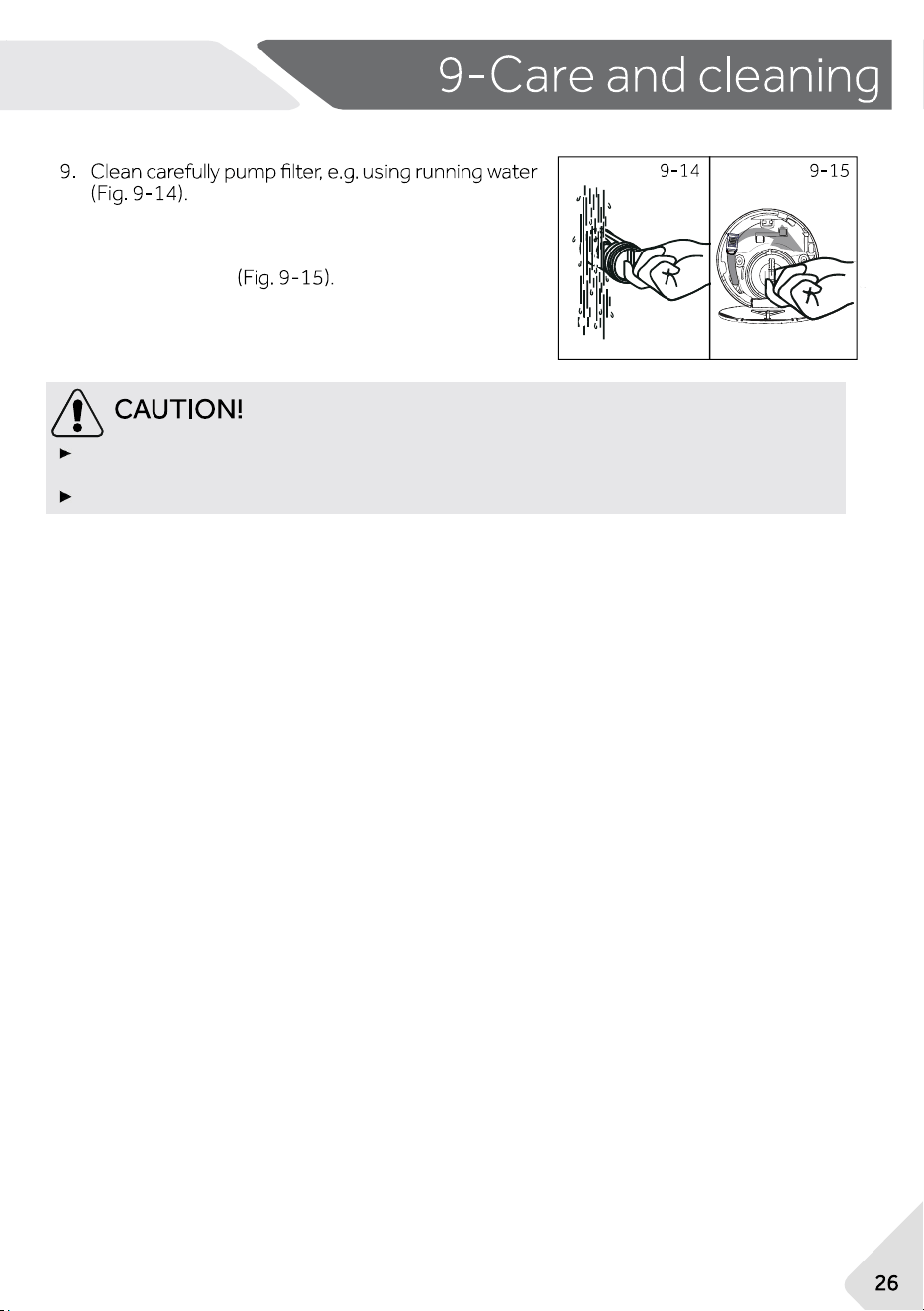
10.
After cleaning, reinstall the handle and tighten it
until it does not move. At this time, the handle is
in vertical state
NZ AU
11. Close service flap.
Pump filter sealing has to be clean and undamaged. If the lid is not fully tightened,
water can escape.
The filter must be in place, or it may lead to leakage.
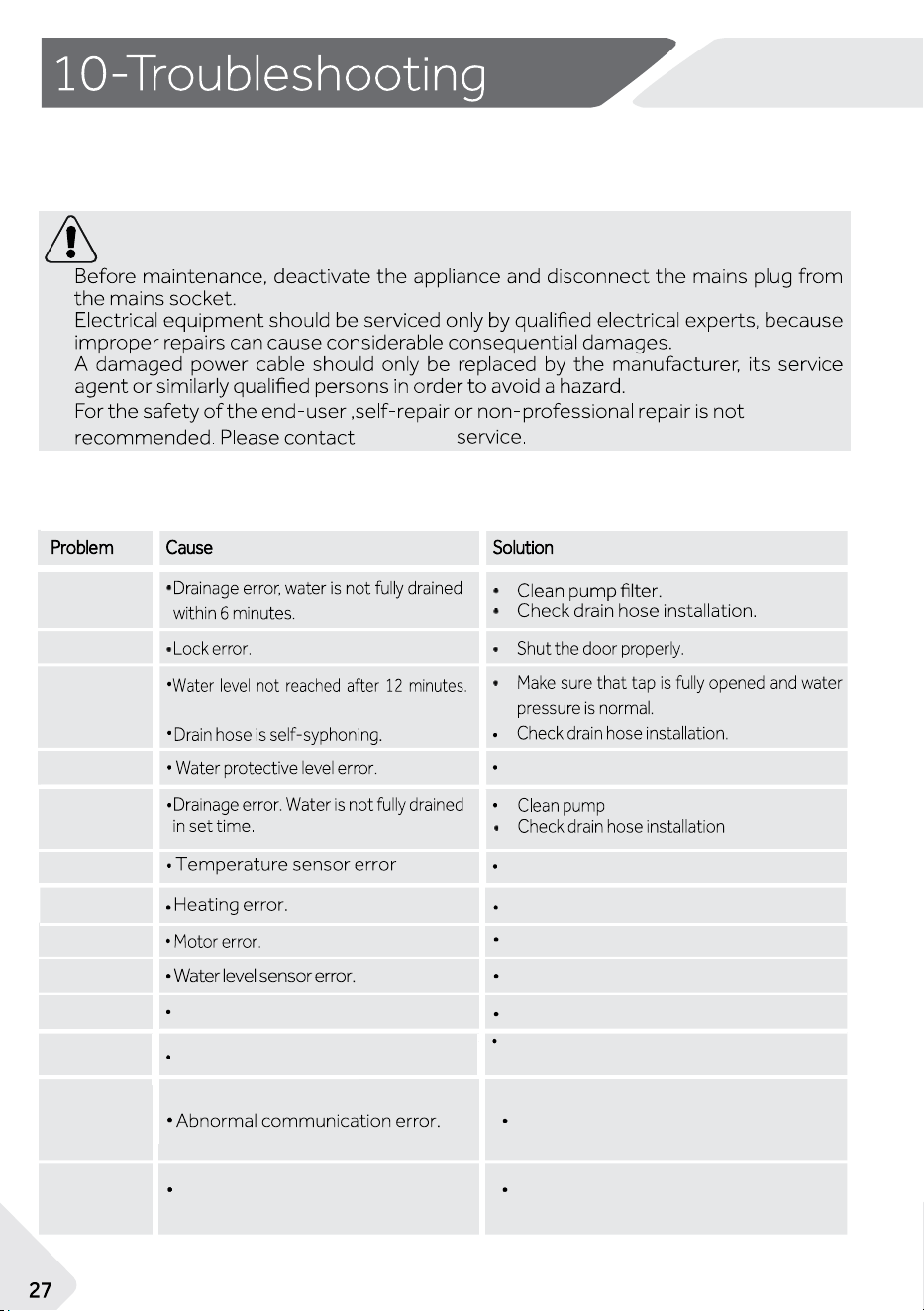
10.1 Troubleshooting with display code
WARNING!
.
CLR FLTR
E2
E4
E8
E5
F3
F4
F7
FA
FH
.
FC0/FC1/
FC2
F0
Water overflowed abnormally.
▶
▶
▶
▶
FC28
Check the stepper motor drive board or
connecting harness
NZ AU
customer
Contact customer service.
Contact customer service.
Contact customer service.
Contact customer service.
Contact customer service.
Contact customer service.
Contact customer service.
Contact customer service.
Open drain pump to drain. Shut down the
machine.
Many occur
ring problems could be solved by yourself without specific expertise. In case
of a problem, please check all shown possibilities and follow below instructions before you
contact customer service. See CUSTOMER SERVICE.
filter
.
The 12V load control board
communication abnormality.
The Wi-Fi module fails to be configured
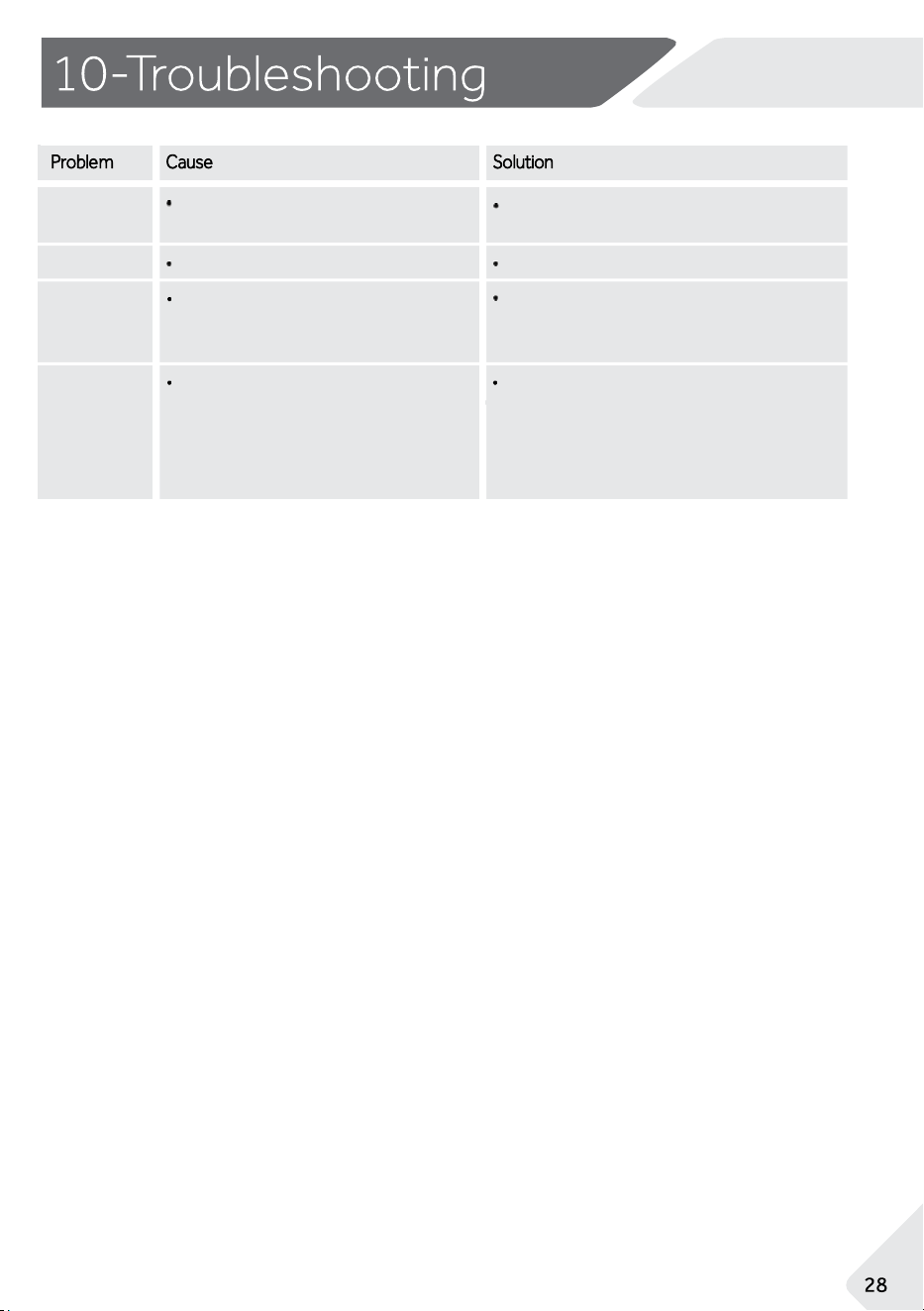
FCU
nd
Lock
Eb
Laundry is caught in the door when
closed.
Signal transmission error between
the display board and the flow board
The water level, temperature, or
spin speed does not meet the
requirements for opening the door
Model has not been selected
Check the wiring connection between
the UI and WP panel, check the UI panel.
Set the machine model
Please open the door and put the clothes
into the drum completely. Then press the
"Start" button to run the cycle.
NZ AU
Contact customer service.
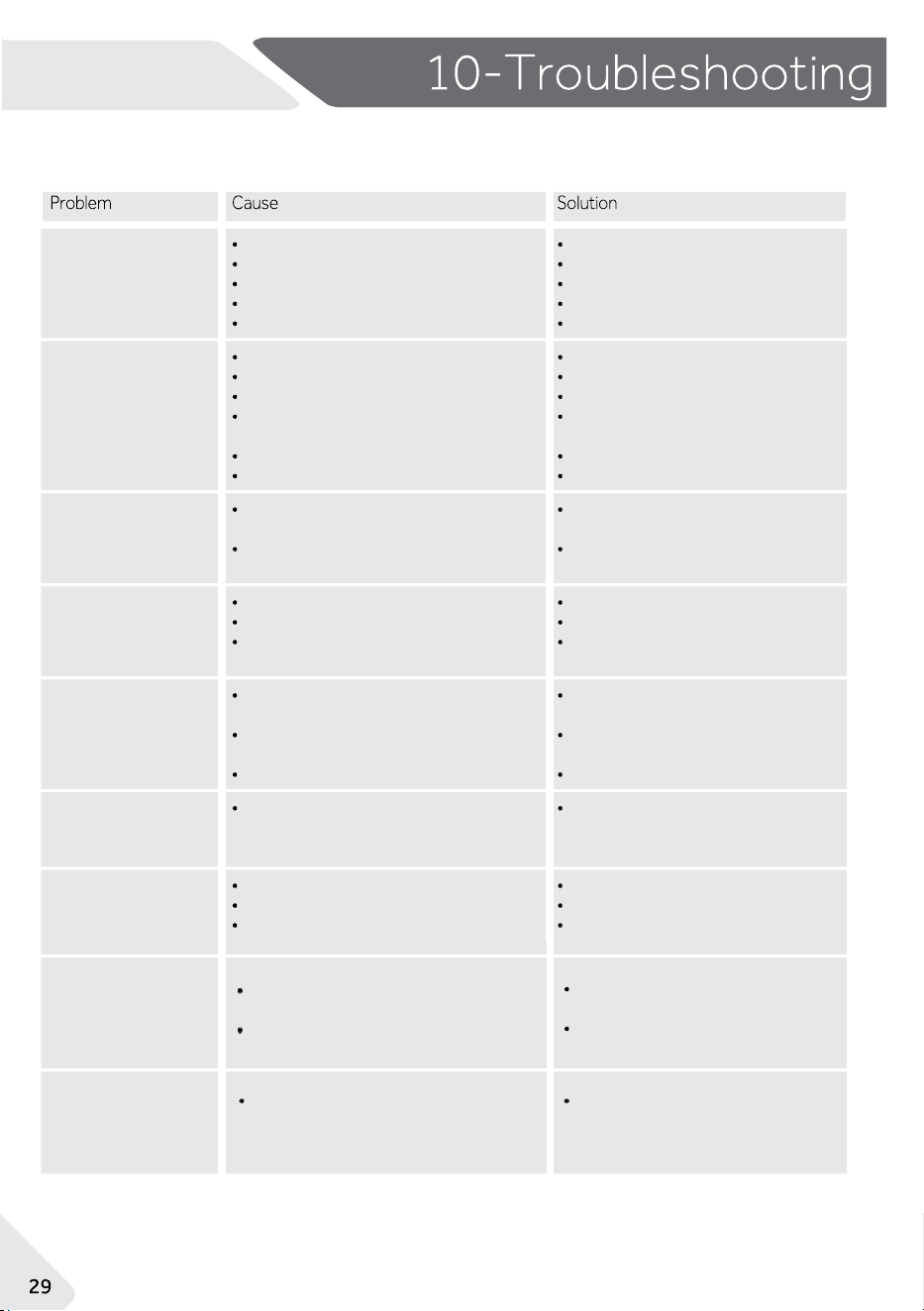
10.2 Troubleshooting without display code
NZ AU
Height of drain hose is below 60
cm
Drain hose end could reach into
water.
Water or electric failure.
Appliance displays error code
Problem due to load pattern
During soaking process.
Machine is
draining
while being filled.
Drainage failure
Strong vibration
while spinning
Washing machine
fails to operate.
Operation stops
for a period of
time.
Automatic adjust-
ment of washing
time.
Check water tap.
Check inlet hose.
Unblock inlet hose filter.
Check water pressure.
Close the door properly.
Ensure the water supply.
Make sure that drain hose is
properly installed.
Make sure the drain hose is not
in water.
Unblock drain hose.
Clean pump filter.
Make sure that drain hose is
properly installed
Check power and water supply.
Consider display codes
Reduce or adjust load.
Cancel cycle and restart
This is normal and doesn't af-
fect functionality.
Cycle is not yet started.
Door is not properly closed.
Machine has not been switched on
Power failure.
Key lock is activated
Check cycle and start it.
Close the door properly
Switch the machine on.
Check power supply.
Deactivate key lock.
Washing machine
can not be filled
with water.
No water.
Inlet hose is kinked.
Inlet hose filter is blocked.
Water pressure is less than 0.05
MPa
Door is not properly closed
Water supply failure.
Not all transportation bolts have
been removed
Appliance is not on solid and flat
ground.
Something wrong with the load.
Remove all transportation bolts
Ensure solid and flat ground.
Check load weight and balance
Detergent is not appropriate.
Excessive use of detergent.
Drain hose is blocked
Pump filter is blocked.
Drain hose end is higher than 100
cm above floor level
Excessive foam
overflows drum
and/or detergent
drawer.
Check detergent recommen
dations.
Reduce amount of
detergent.
Cycle duration can change
automatically.
Operation stops
before wash cycle
ends.
NZ AU
Spinning fails.
Unsatisfactory
washing result.
Washing powder
residues are on the
laundry.
Laundry has grey
patches.
Unbalance of laundry.
ficient.
Maximum load has been exceeded.
Laundry was unevenly distributed
in the drum.
Insoluble particles of detergent can
remain as white spots on the laun-
dry.
Caused by fats such as oils, creams
or ointments.
Reduce loading.
Pretreat the laundry with a spe-
cial cleaner.
Check machine load and laun-
dry and run a spinning cycle
again.
Degree of soil does not match with
selected cycle.
Detergent quantity was not suf-
Select another programme.
Choose the detergent
according to the degree of
soil and
according to
manufacture
specifications.
Loosen the laundry.
Perform extra rinse.
Try to brush the residues from
the
laundry.
Choose another detergent.
10.3 In case of power failure
The current cycle and its setting will be saved.
When power supply is restored, operation will be re-
sumed.
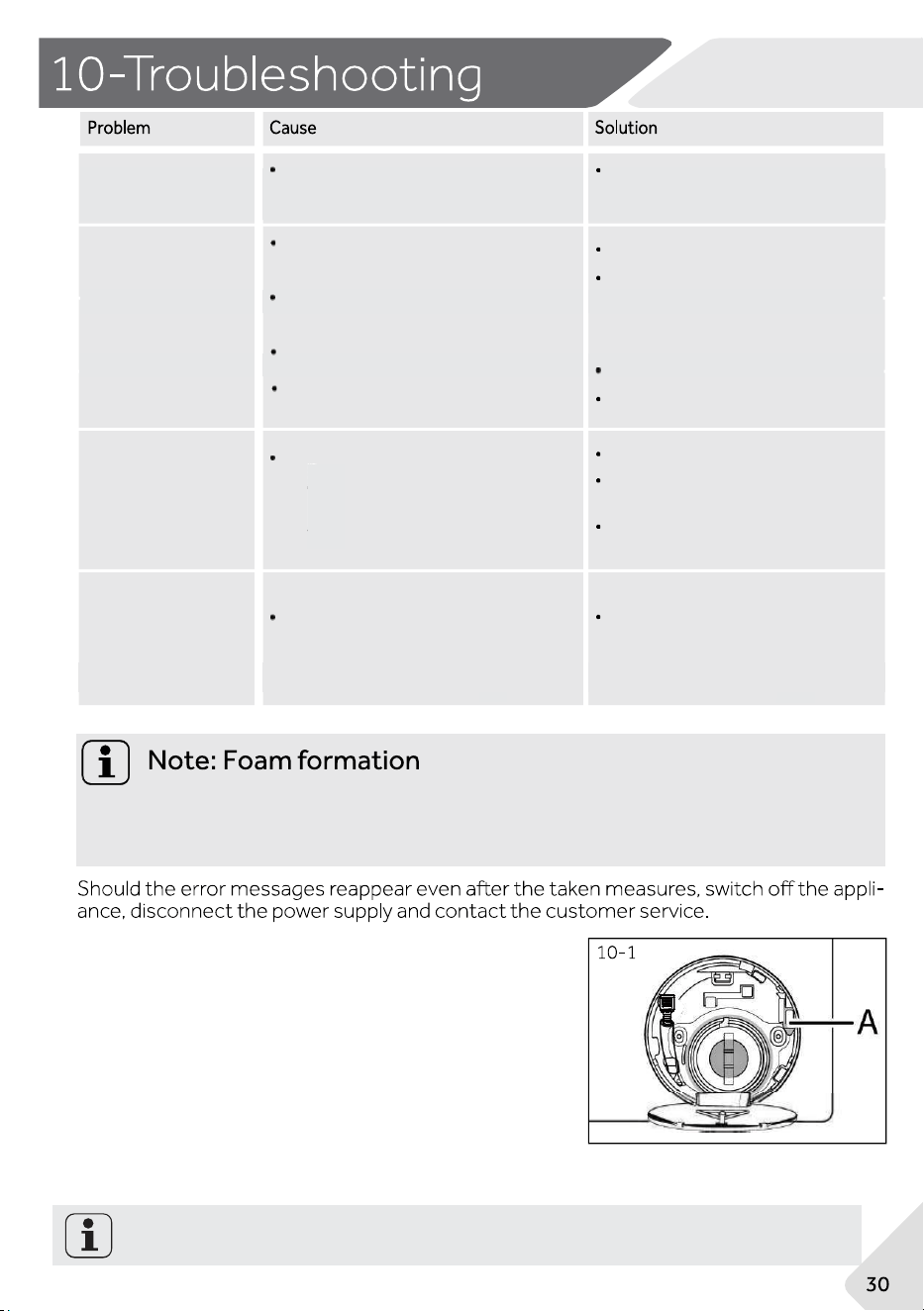
In case of an emergency(such as an power failure,
and the door is locked), you can manually open the
door lock and remove your load. In order to do that,
water level needs to be lowered as described in"
Pump filter". Then pull lever (A) until door is unlocked
by a gentle click.
When the washing machine is in a safe state (water level below the window with a certain distance,
drum temperature below 55℃, drum is not spinning), can unlock the door.
If too much foam is inspected during spin cycle, motor stops and drain pump will be ac
-
tivated for 90 seconds. If that elimination of foam fails up to 3 times, cycle ends
without spinning.
1.
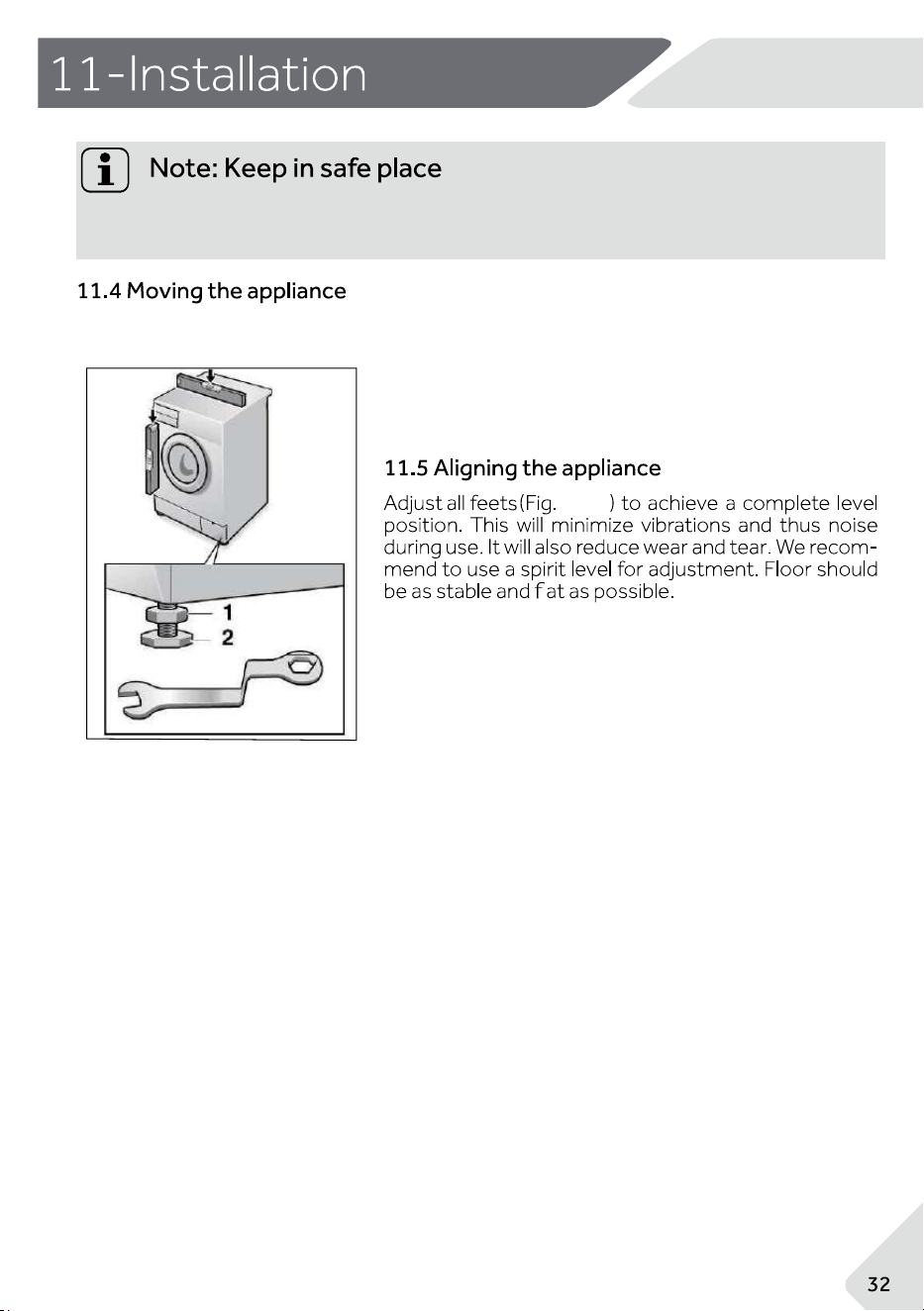
11.3 Dismantle the transportation bolts
The transportation bolts are designed for clamping
anti - vibration components inside the appliance
during transportation to prevent inner damage.
2.
Remove all 4 bolts on the rear side and take out
plastic spacers (Fig. 11-4)(Fig. 11-5).
Fill left holes with blanking plugs(Fig. 11-6) (Fig. 11-7).
11-6
11-7
-511
11-4
’
NZ AU
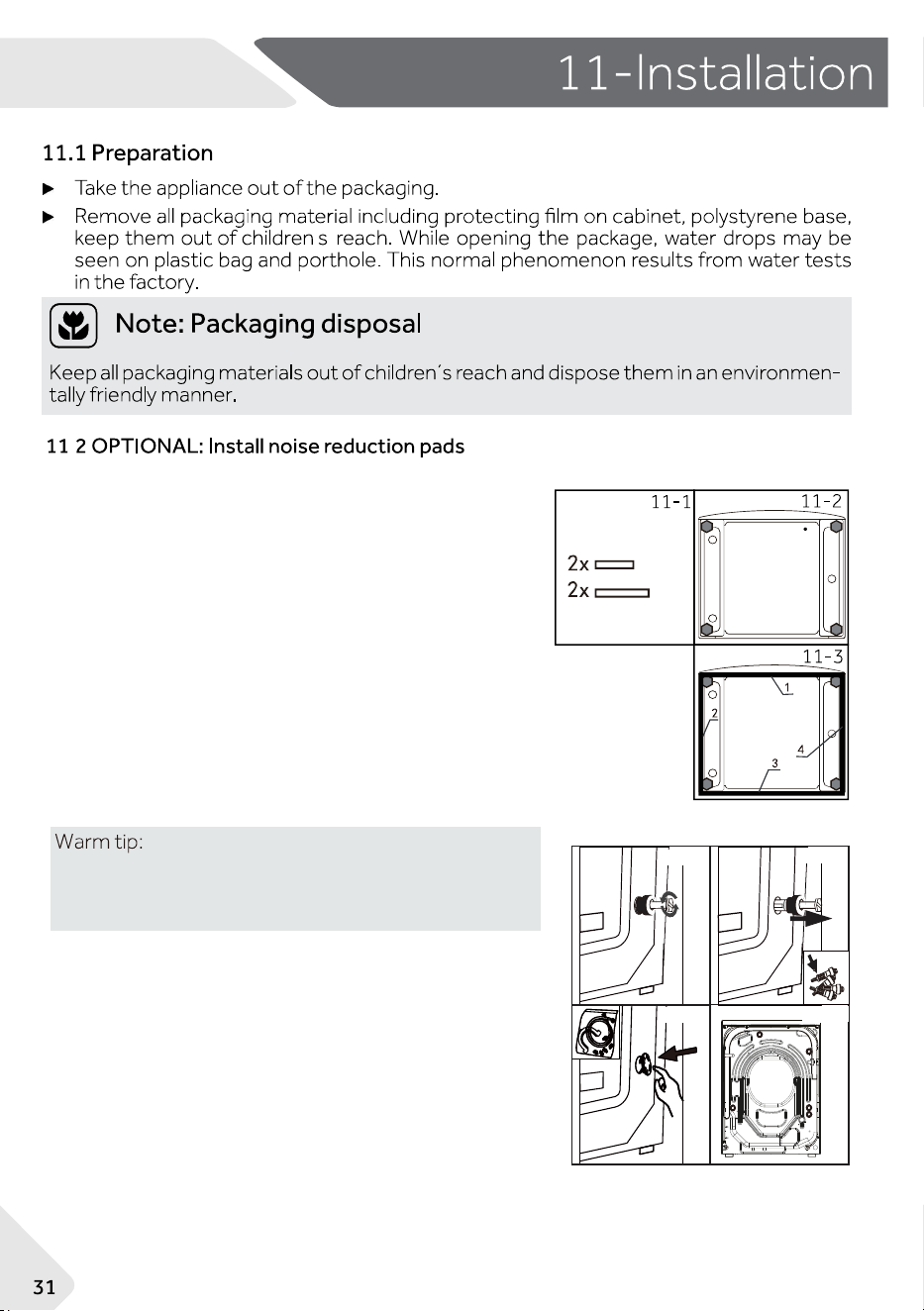
1.When opening the shrink package, you will find four
noise
reduction pads. These are used for reducing noise
(Fig. 11-1).
2. Lay the washing machine down to its side, port-hole
pointing upwards, bottom side towards operator (Fig. 11-
2).
3. Take out the noise reduction pads and remove the
double-sided adhesive protective film;paste around the
bottom; the noise reduction pads under the washing
machine cabinet as shown in Figure 11-3(two longer pads
in position 1 and 3, two shorter pads in position 2 and 4).
Finally set the machine upright again(Fig. 11-3).
Noise reduction pad is optional, which could help to
reduce noise. Please assemble it or not according
to your own demand.
11-8
11-8
NZ AU
Keep all parts of the transport protection in a safe place for later use. Whenever the
appliance is to be moved, reinstall the protection parts first.
If the machine is to be moved to a distant location, reinstall the transportation bolts in
reverse order.
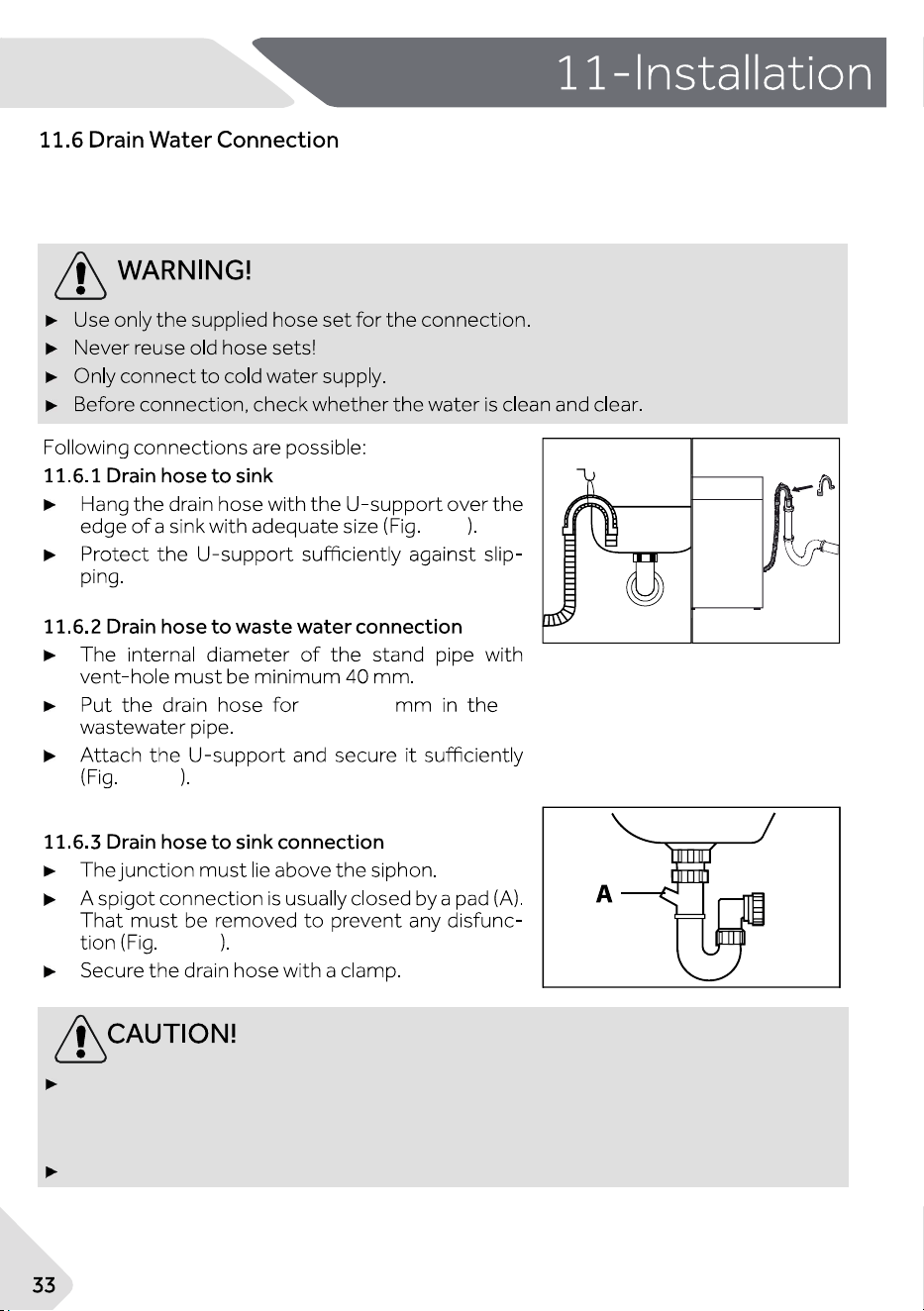
1. Loosen the locknut (1) with a wrench.
2. Adjust the height by turning the foot (2).
3. Tighten lockout (1) against the housing.
11-9
11-9
11-10
11-10
11-11
11-11
60-100
NZ AU
The drain hose should not be submerged in water and should be securely fixed and leak-free. If
the drain hose is placed on the ground or if the pipe is at a height of less than 60 cm, the
washing machine will continuously drain while being filled (self-siphoning).
Drain hose is not to be extended. If necessary contact customer service.
Fix the water drain hose properly to the piping. The hose has to reach at one point a
height between 60 and 100 cm above the appliance bottom line! If possible, always
keep the drain hose fixed to the clip at the back of the appliance.
11-12
11-1311-12
11-13
11-14
NZ AU
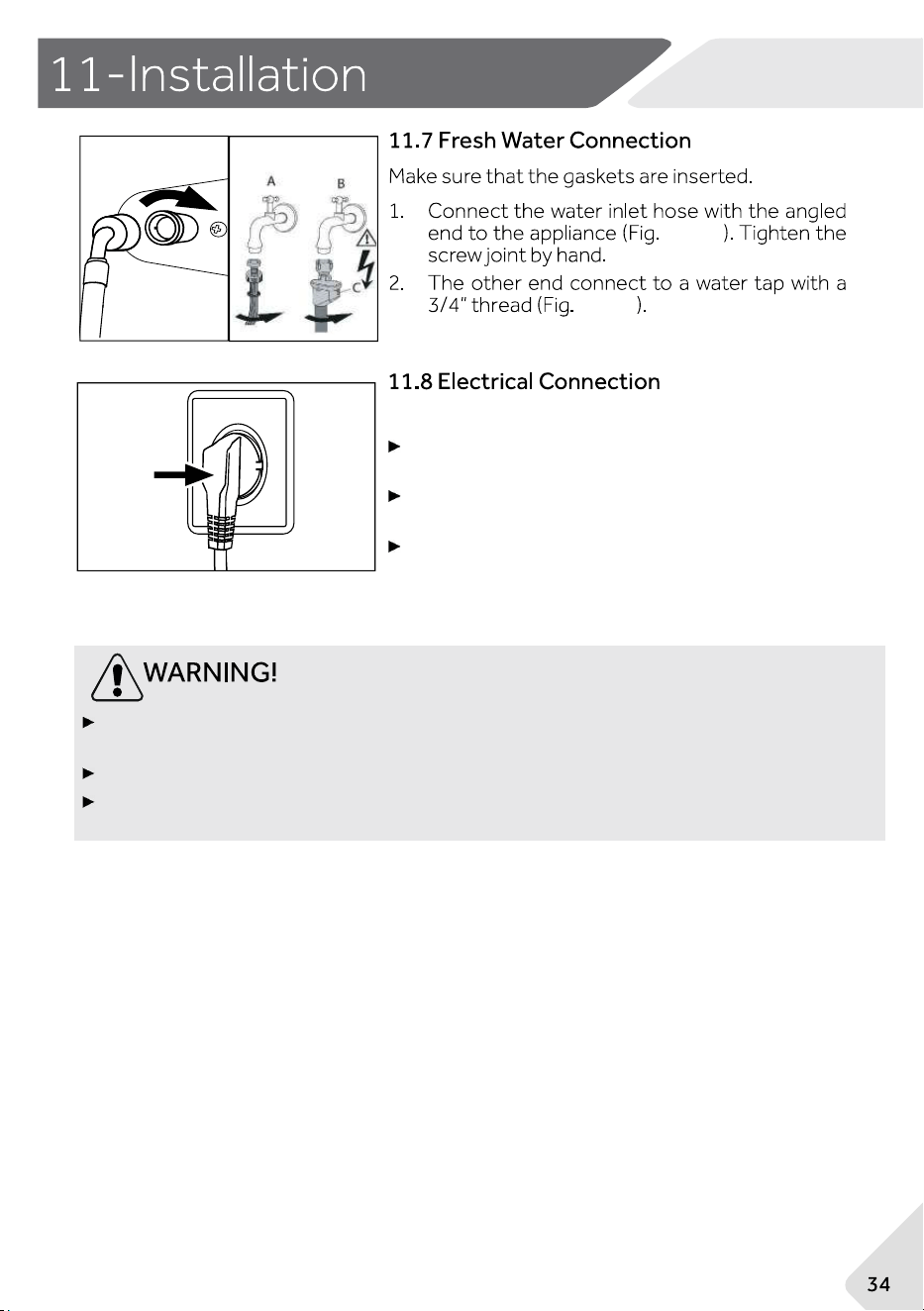
Before each connection check if:
power supply, socket and fusing are appropriate to
the rating plate.
the power socket is earthed and no multi-plug or
extension are used.
the power plug and socket are fully matched.
Ensure always that all connections (power supply, drain and fresh water hose) are firm,
dry and leak free!
Make sure that these parts are never to be crushed, kinked or twisted.
If the supply cord is damaged, it must be replaced by the service agent (see warranty
card) in order to avoid a hazard.
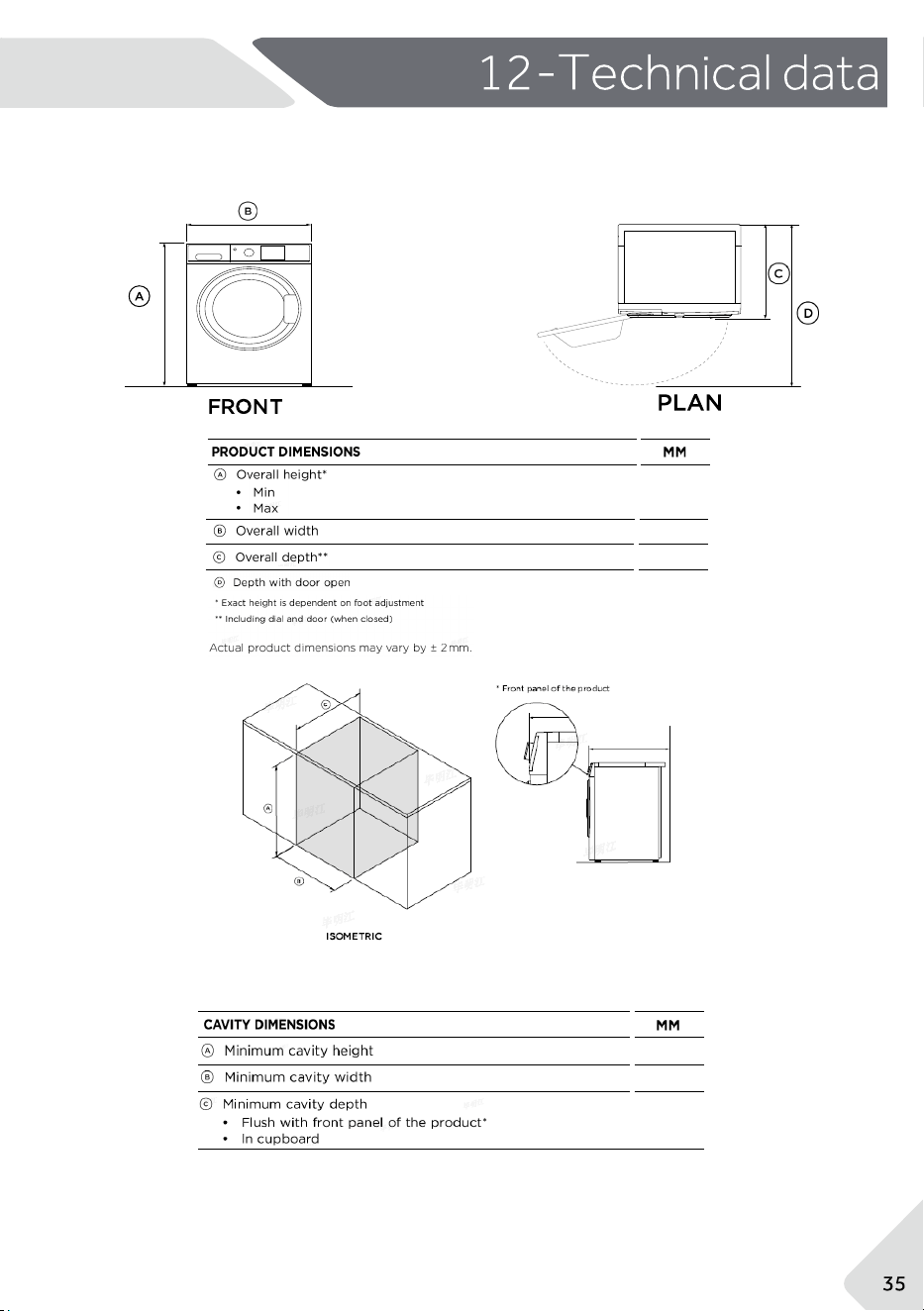
12.1 Additional technical data
595
1169
850
865
NZ AU
865
622
688
738
678
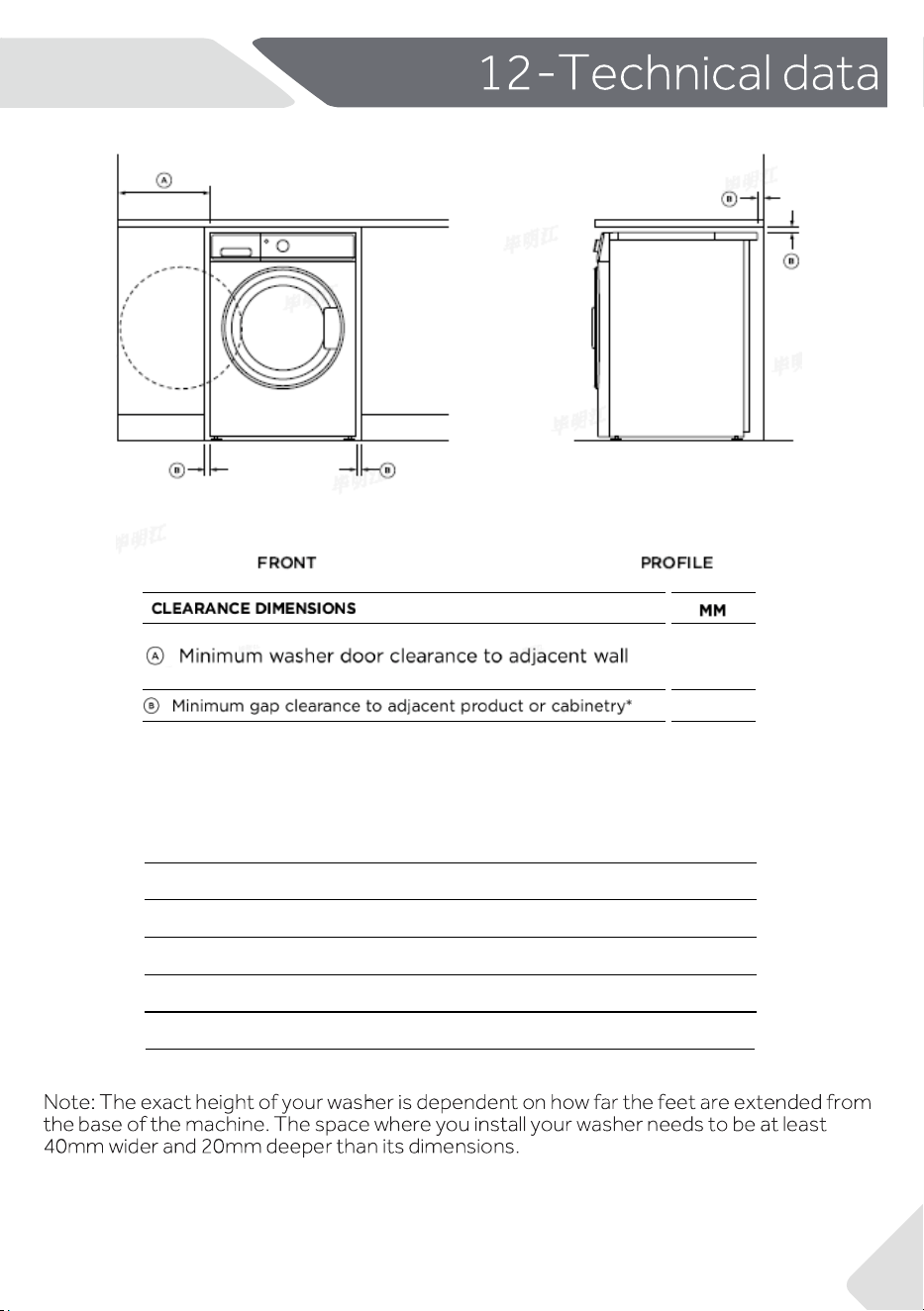
ELECTRICAL
Volts
Hz
Amps(maximum)
Power consumption(w)
220-240V
50
10A
2000
36
NZ AU
240
15
▶ your local dealer,or
▶ The Service and Support area at www.haier.com where you can find telephone
numbers, FAQs and where you can activate a service claim.
Model ____________________ Serial No. _____________________
Also check the Warranty Card supplied with the product in case of warranty.
For General business enquiries and for more information, please refer to
www.haier.com
We recommend our Haier Customer Service and the use of original spare parts.
If you have a problem with your appliance, please first check the section
TROUBLESHOOTING.
If you cannot find a solution there please contact.
Before contacting our service team, ensure that you have the following
information available.
The information can be found in the rating plate.
3
7
NZ AU