To Reduce The Risk Of Injury, User Must Read And
Understand Operator’s Manual. Save These Instructions For Future Reference.
260-9477
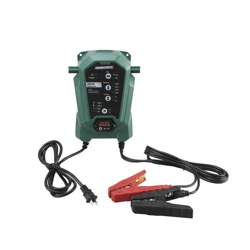
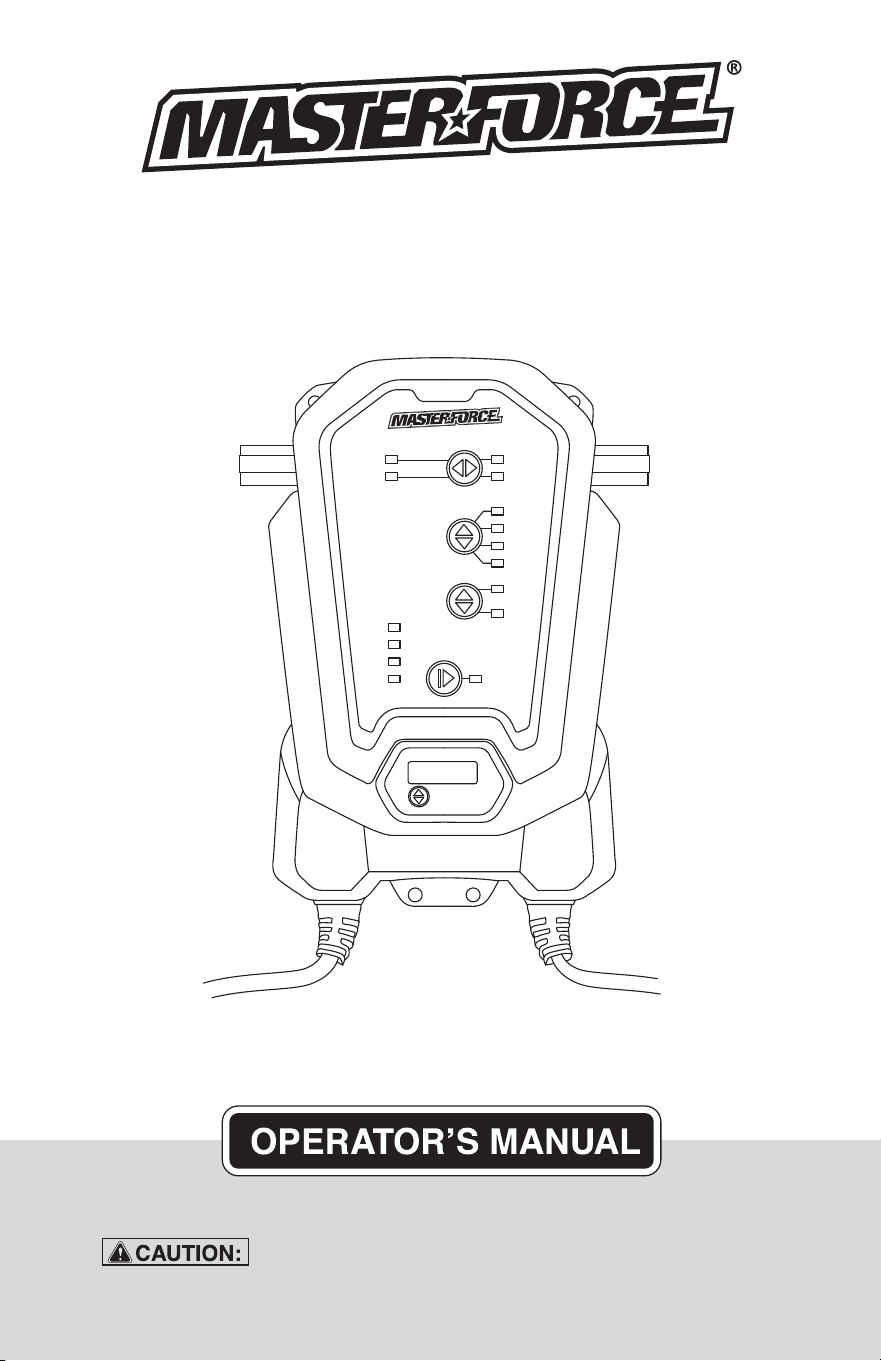
5/10A/15A Battery Charger
with 20A Boost

TABLE OF CONTENTS
Safety Symbols..............................................................................Page 3
Safety Information..........................................................................Page 4
Safety Precautions for Working in the Vicinity of a Battery........Page 5
Safety Precautions for Using the Charger....................................Page 6
About Battery Charger...................................................................Page 6
Connecting to the Battery............................................................. Page 7
Charging Steps...............................................................................Page 7
Charging Modes.............................................................................Page 8
Charging Stages.............................................................................Page 9
Specifications.................................................................................Page 9
Error Code.....................................................................................Page 10
Maintenance and Care.................................................................Page 10
Warranty........................................................................................Page 15
Page 3
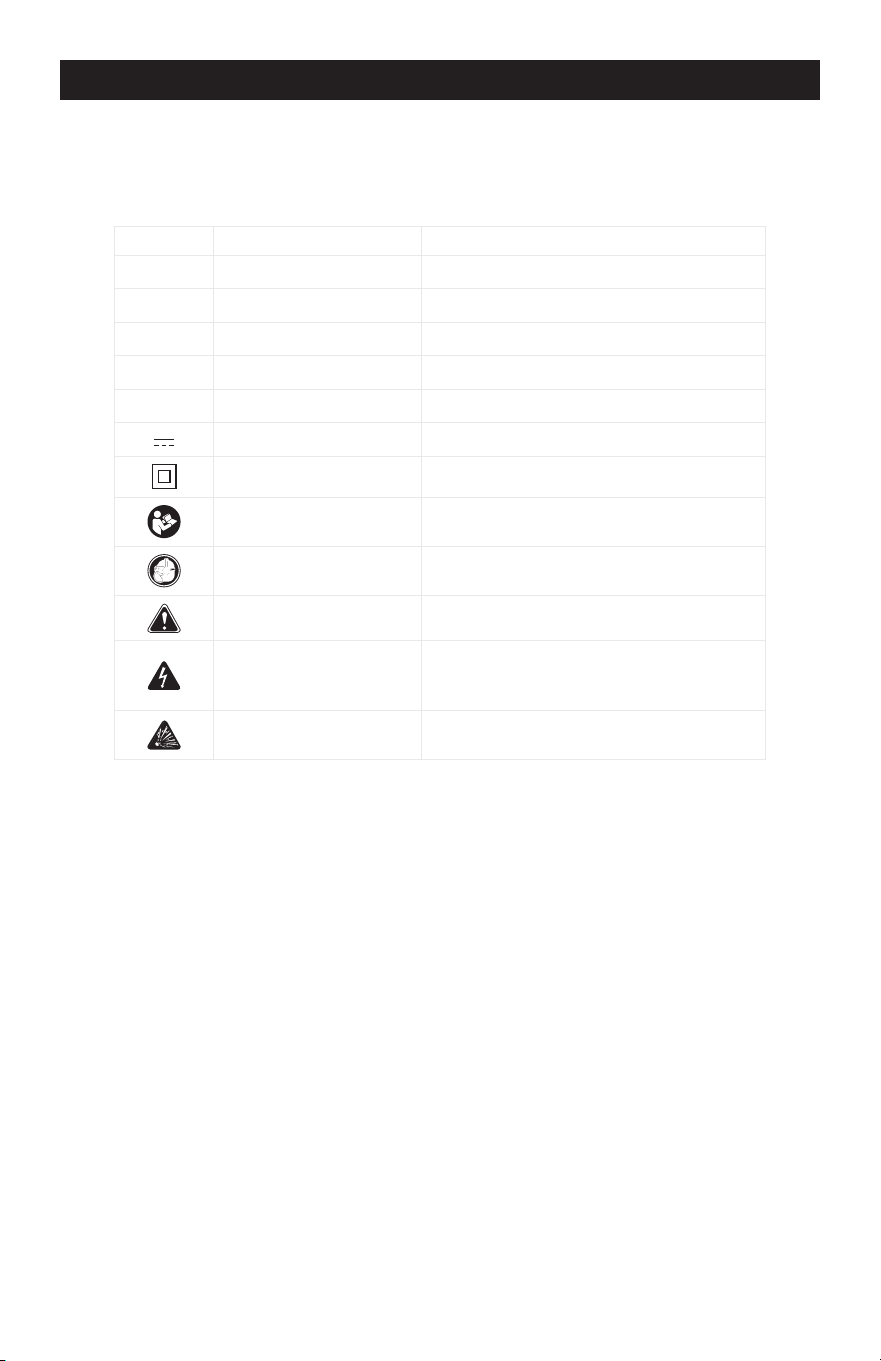
SAFETY SYMBOLS
Some of the following symbols may be used on your charger. Please study
them and learn their meaning. Proper interpretation of these symbols will allow
better and safer operation of the charger.
Symbol Name Reason/Solution
V Volts Voltage
A Amperes Current
Hz Hertz Frequency
W Watts Power
~ Alternating current Type of current
Direct current Type or characteristic of current
Class II construction Double-insulated construction
Read the operator’s
manual
To reduce the risk of injury, read and
understand the operator’s manual
Wear safety equipment
Operation of the charger can result in
damage to unprotected person
Warning symbol Alerts user to warning message
Electric shock symbol
Connect only to properly grounded
outlets. Replace defective cords or
wire immediately.
Explosive gas symbol
Risk of explosive gases during normal
operation of a lead-acid battery
Page 4
SAFETY INFORMATION
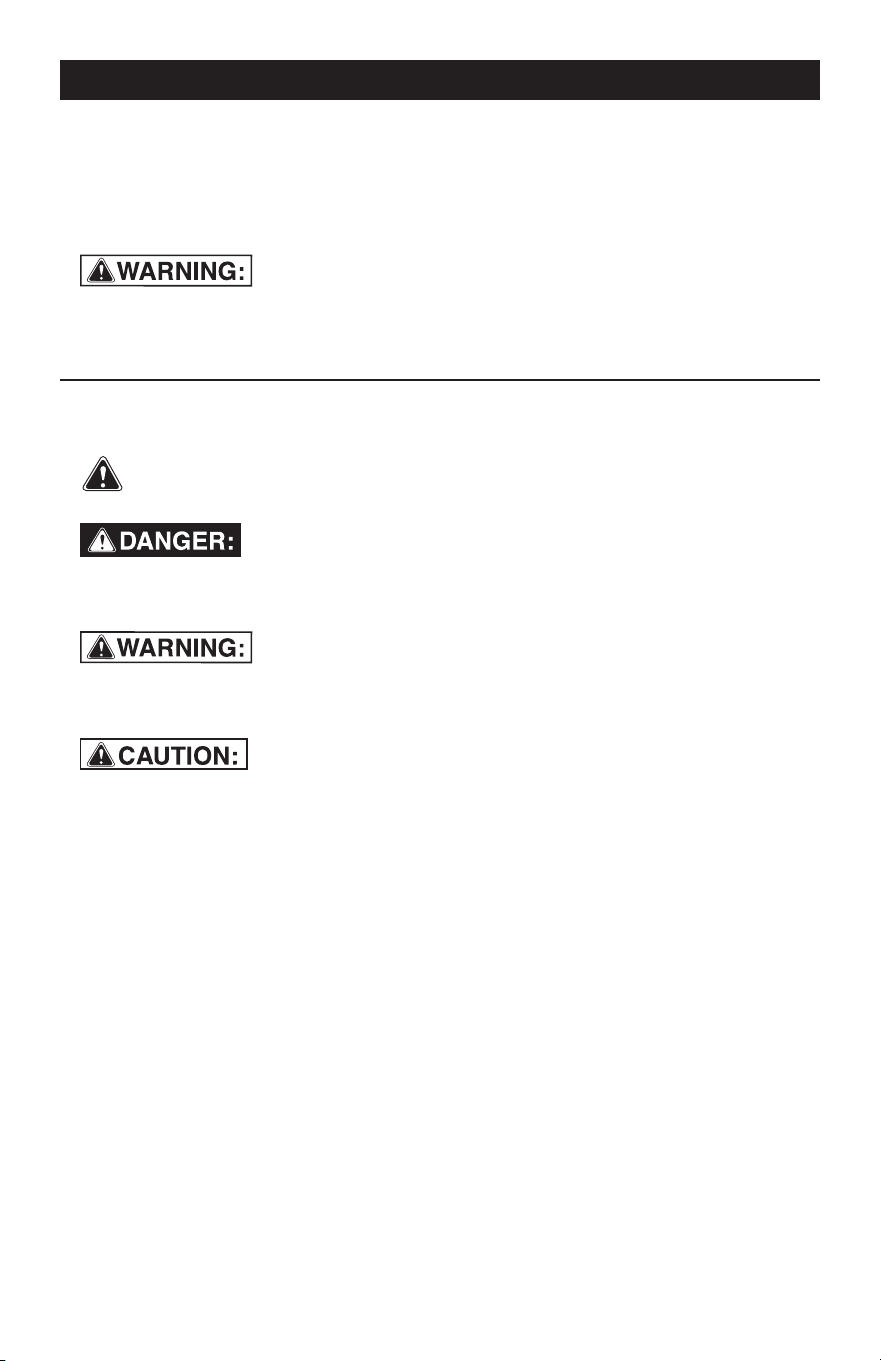
The purpose of safety symbols is to attract our attention to possible dangers. The
safety symbols, and the explanations with them, deserve your careful attention and
understanding. The symbol warnings do not by themselves eliminate any danger.
The instructions and warnings they give are no substitutes for proper accident pre-
vention measures.
Be sure to read and understand all safety instructions in this
manual, including all safety alert symbols, such as “DANGER”, “WARNING” and
“CAUTION” before using this battery charger. Failure to follow all instructions
listed below may result in electric shock, fire and/or serious personal injury.
SYMBOL MEANING
SAFETY ALERT SYMBOL: Indicates DANGER, WARNING or CAUTION.
May be used in conjunction with other symbols or pictographs.
Failure to obey this safety warning WILL result in death or serious
injury to yourself or to others. Always follow the safety precautions to reduce the risk
of fire, electric shock and personal injury.
Failure to obey this safety warning CAN result in death or
serious injury to yourself or to others. Always follow the safety precautions to
reduce the risk of fire, electric shock and personal injury.
Failure to obey this safety warning MAY result in personal
injury to yourself or others, or property damage. Always follow the safety precautions
to reduce the risk of fire, electric shock and personal injury.

Page 5
1.
SAFETY PRECAUTIONS FOR WORKING IN THE VICINITY OF A BATTERY
1.1
1.2
1.3
1.4
1.5
1.6
1.7
1.8
Consider having someone close
enough or within the range of your
voice to come to your aid when you
work near a battery.
Do NOT smoke, strike a match, or
cause a spark in vicinity of battery or
engine. Avoid explosive gas, flames
and sparks.
Remove all personal jewelry, such as
rings, bracelets, necklaces, and
watches while working with a vehicle
battery. These items may produce a
short circuit that could cause severe
burns.
Be extra cautious to reduce risk of
dropping a metal tool onto the
battery. It might spark or short-circuit
a battery or other electrical hardware
which may cause an explosion or fire.
Wear complete eye protection, hand
and clothing protection. Avoid touch-
ing eyes while working near a battery.
Study all battery manufacturer’s
specific precautions such as remov-
ing or not removing cell caps while
charging and recommended rates of
charge.
Clean battery terminals before
connected with the charger. Be
careful to keep corrosion from
coming in contact with eyes.
When it is necessary to remove a
battery from vehicle to charge, always
remove grounded terminal from
battery first. Make sure all accesso-
ries in the vehicle are off in order to
prevent an arc.
1.9
1.10
1.11
1.12
It is NOT intended to supply power to
an extra-low-voltage electrical
system or to charge dry-cell batteries.
Charging dry-cell batteries may burst
and cause injury to persons and
property.
NEVER charge a frozen, damaged,
leaking or non-rechargeable battery.
If battery electrolyte contacts skin or
clothing, wash immediately with soap
and water. If electrolyte enters eye,
immediately flood eye with running
clean cold water for at least 15
minutes and get medical attention
immediately.
RISK OF EXPLOSIVE GASES.
a.
WORKING IN VICINITY OF A LEAD-
ACID BATTERY IS DANGEROUS.
BATTERIES GENERATE EXPLO
-
SIVE GASES DURING NORMAL
BATTERY OPERATION. FOR
THIS REASON, IT IS OF UTMOST
IMPORTANCE THAT YOU FOL
-
LOW THE INSTRUCTIONS EACH
TIME YOU USE THE CHARGER.
b.
To reduce risk of battery explo
-
sion, follow these instructions and
those published by battery manu
-
facturer and manufacturer of any
equipment you intend to use in
vicinity of battery. Review caution
-
ary markings on these products
and on engine.

2. SAFETY PRECAUTIONS FOR USING THE CHARGER
-
Page 6
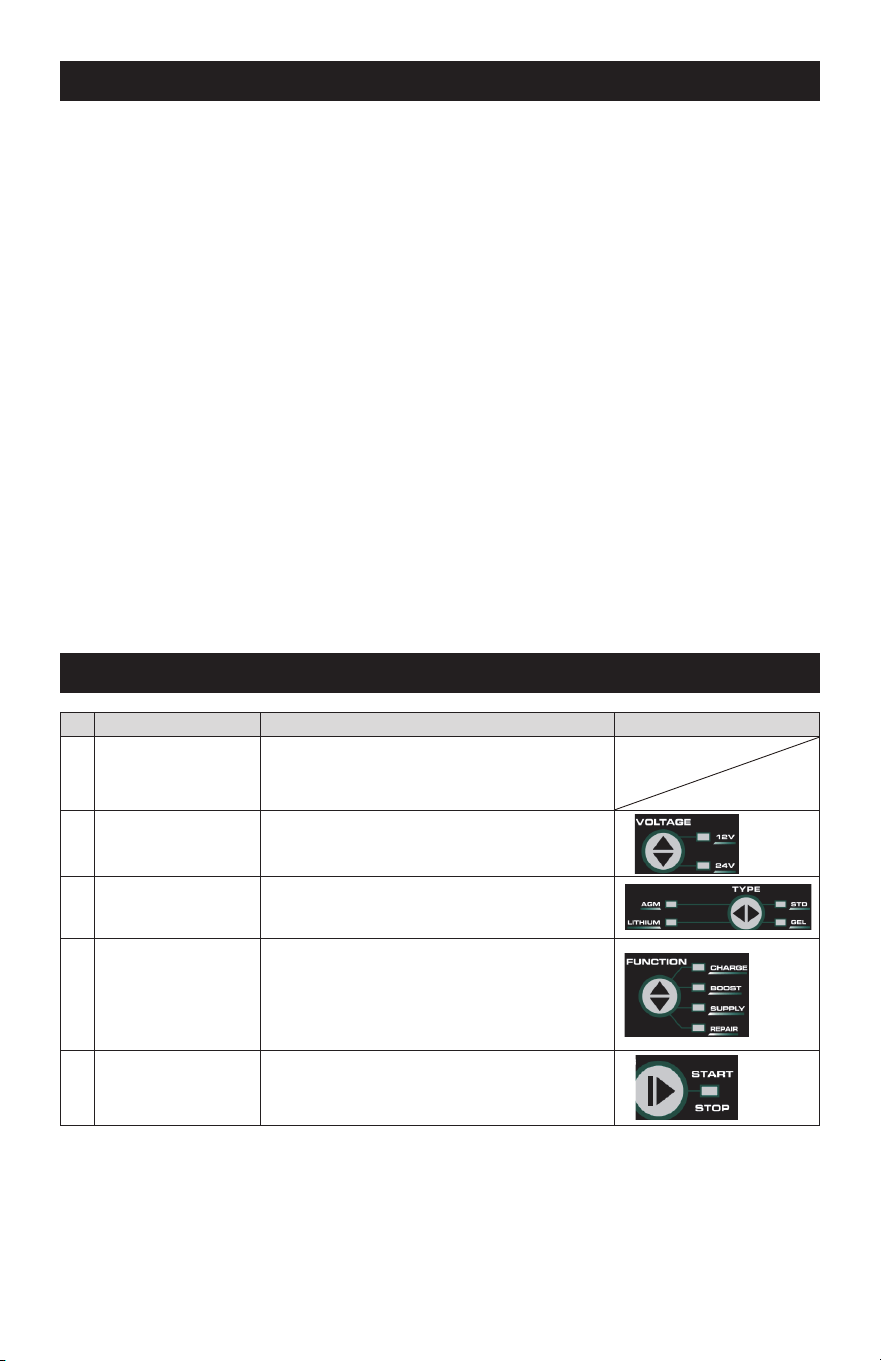
3. ABOUT BATTERY CHARGER
3.1
3.2
3.3
3.4
3.5
The battery charger is designed for
charging 12V/24V lead-acid and 12V
lithium-ion batteries.
Built-in intelligent microprocessor
makes charging faster, easier and
safer.
This charger has safety features,
including spark proof, protection for
reverse polarity, short circuit,
overcharge and overheat.
When starting, the battery voltage
type is 12V by default. The user can
select battery voltage type by press-
ing “VOLTAGE” button in standby.
When starting, the charger works for
STD battery type by default. The user
can select battery type include STD,
GEL, AGM, LIFEPO4 (4-cell) by
3.6
3.7
3.8
pressing “TYPE” button in standby.
When the charger is powered on, it
enters the standby mode by default.
The user can select functions includ-
ing CHARGE, SUPPLY, REPAIR,
BOOST by pressing “FUNCTION”
button in standby. And press
“START/STOP” button to start.
The user can check the charge
current or the battery voltage by
pressing the button beside nixie tube.
When battery level indicator turns to
100%(solid CHARGED LED), it will
automatically switches from full
charge to maintenance status to
maintain batteries during prolonged
periods of storage without overcharg-
ing or damaging the battery.
2.1
2.2
2.3
2.4
2.5
Do NOT place the charger in the
engine compartment or near moving
parts or near the battery; place as far
away from them as DC cable permits.
NEVER place a charger directly above
a battery being charged; gases or
fluids from battery will corrode and
damage charger.
Do NOT cover the charger while
charging.
Do NOT expose to rain or wet conditions.
Connect and disconnect DC output
only after setting AC cord from
electric outlet.
Use of an attachment not recom-
mended or sold by the manufacturer
may result in a risk of fire, electric
shock or injury to persons.
2.7
2.8
2.9
2.10
2.6
Do not overcharge batteries by
selecting the wrong charge mode.
To reduce the risk of damage to
electric plug and cord, pull by the
plug rather than the cord when
disconnecting charger.
To reduce risk of electric shock,
unplug charger from outlet before
attempting any maintenance or
cleaning.
Operate with caution if the charger
has received direct hit of force or
been dropped. Have it checked and
repaired if damaged.
Any repair must be carried out by the
manufacturer or an authorized repair
agent in order to avoid danger.
Page 7
4. CONNECTING TO THE BATTERY
5. CHARGING STEPS
4.1
4.2
4.3
4.4
4.5
Identify polarity of battery posts. The
positive battery terminal is typically
marked by these letters or symbol
(POS, P, +). The negative battery
terminal is typically marked by these
letters or symbol (NEG, N,-).
Do not make any connections to the
carburetor, fuel lines, or thin metal
parts.
Identify if you have a negative or
positive grounded vehicle. This can
be done by identifying which battery
post (NEG or POS) is connected to
the chassis.
For a negative grounded vehicle
(most common): connect the RED
POSITIVE clamp first to the positive
batt
ery terminal, then connect the
BLACK NEGATIVE clamp to the
negative battery terminal or vehicle
chassis.
For a positive grounded vehicle (very
uncommon): connect the BLACK
4.6
4.7
NEGATIVE clamp first to the negative
battery terminal, then connect the
RED POSITIVE clamp to the positive
battery terminal or vehicle chassis.
When disconnecting, disconnect in
the reverse sequence, removing the
negative first (or positive first for
positive ground systems).
A marine (boat) battery must be
removed and charged on shore. To
charge it on board requires equip-
ment specially designed for marine
use.
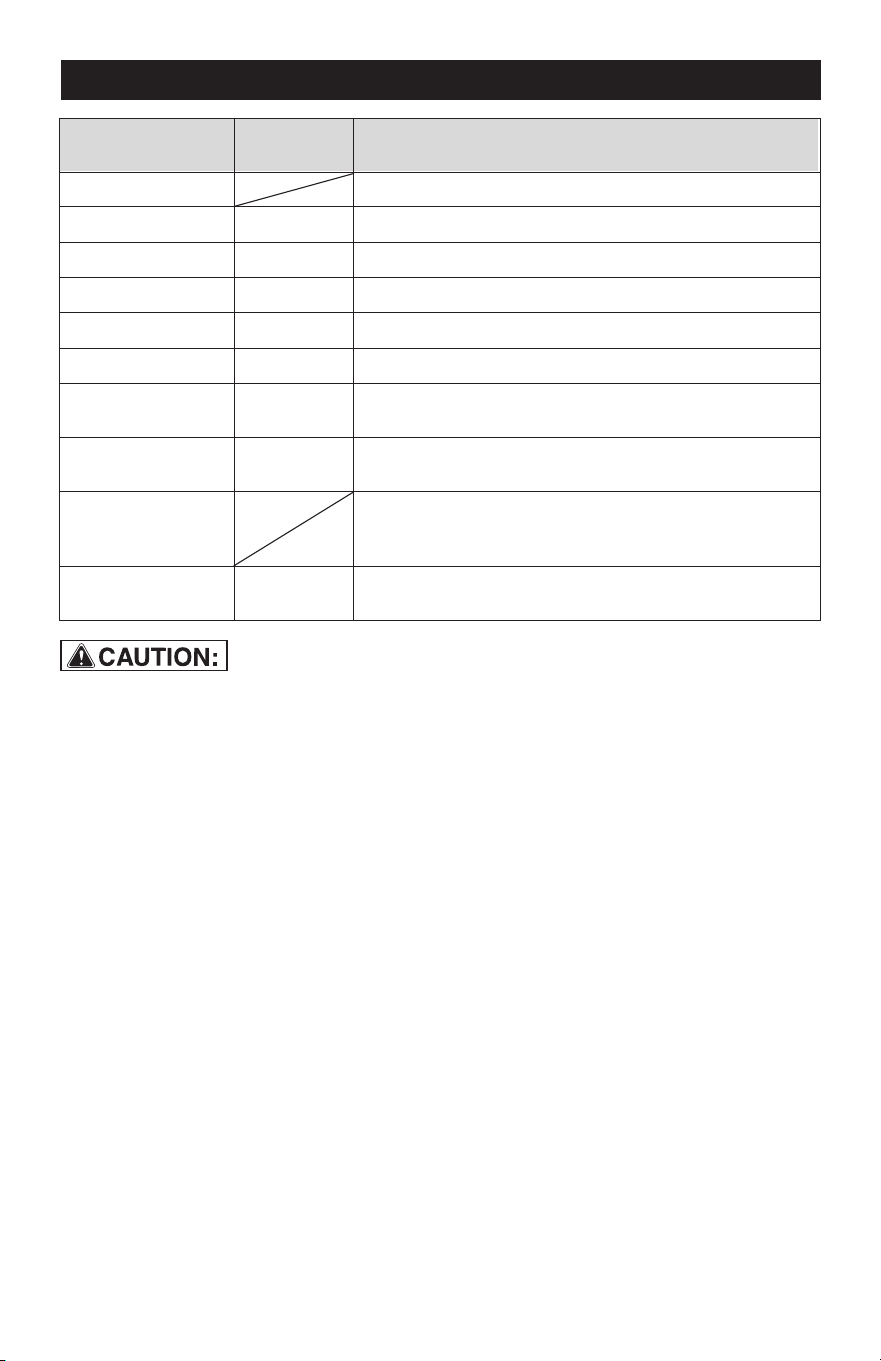
No.
Step Digital Display Step Select Key
1
Connected battery voltage
2
Confirm battery
voltage type
Select battery voltage
3
Confirm battery
type
Corresponding battery type LED
4
Confirm FUNCTION
and CHARGE RATE
5
START or STOP
Corresponding Function LED
Correctly connect
the charger to the
battery
In 12V, CHARGE 12V-5A -> CHARGE 12V-10A ->
CHARGE 12V-15A ->12V-BOOST -> 12V-SUPPLY
-> 12V REPAIR
In 24V, CHARGE 24V-5A -> CHARGE 24V-8A ->
24V REPAIR
Page 8
6. CHARGING MODES
Mode
Battery
Size (Ah)
Explanation
Standby
Not charging or providing any power
12V-5A CHARGE
Charging 12V STD/GEL/AGM/LITHIUM batteries20-100
12V-10A CHARGE Charging 12V STD/GEL/AGM/LITHIUM batteries20-150
12V-15A CHARGE Charging 12V STD/GEL/AGM/LITHIUM batteries50-300
24V-5A CHARGE Charging 24V STD/GEL/AGM batteries
An advanced battery recovery mode for repairing
12V old, idle, stratified or sulfated batteries
An advanced battery recovery mode for repairing
24V old, idle, stratified or sulfated batteries
Delivering 20A for five (5) minutes to jump charge
your battery
Converting to a DC power supply for powering 12V
DC device or as a memory retainer when replacing
a battery
20-100
24V-8A CHARGE Charging 24V STD/GEL/AGM batteries20-150
12V REPAIR 20-300
24V REPAIR 20-150
12V SUPPLY
12V BOOST 20-300
12V LITHIUM mode is designed for 12V
lithium-ion (4-cell LiFePO4) batteries
only. REPAIR is not allowed in this mode.
Some lithium-ion batteries may be unsta-
ble and unsuitable for charging. Consult
the lithium battery manufacturer before
charging and ask for recommended
charging voltage and current.
12V LITHIUM MODE
REPAIR mode is for LEAD-ACID batteries
only. It is an advanced battery recovery
mode for repairing old, idle, stratified or
sulfated batteries. NOT all batteries can be
recovered. One REPAIR cycle can take up
to eight (8) hours to complete the recovery
process and will enter to 5A CHARGE
when completed. This mode uses a high
charging voltage and may cause some
water loss in WET cell batteries. Plus,
some batteries and electronics may be
sensitive to high charging voltages. To
minimize risks, disconnect the battery from
REPAIR MODE
12V BOOST MODE
12V BOOST mode is the advanced mode
that requires your full attention before
selecting. To operate BOOST, the charger
must be connected to a 12V battery with
the battery clamps connected. For optimal
results, allow boost to complete its 5-min-
ute charge. After 300-second boost, digital
tube will show “COOLING”, and you are
12V SUPPLY MODE
12V SUPPLY mode converts the charger to
a constant voltage, constant current DC
power supply. It can be used to power
12VDC devices. Prior to use, read your
12VDC device manual to determine if it is
suitable for use with this mode. As a power
supply, it can also be used to retain a
vehicle’s on-board computer settings
during battery repair or replacement. 12V
Supply Mode provides 10A (Max). Both
spark proof and reverse polarity protection
are disabled in this mode. Do NOT allow
the positive and negative battery clamp to
touch or connect to each other as the
charger could generate sparks.
the vehicle before using this mode.
If you choose 24V Mode(s) for 12V battery,
the 12V battery will be damaged!
Page 9
ready to start your vehicle (whether the
battery level bar is 100% or not). After each
boost, the charger has mandatory 5-min-
ute rest for safety reasons. After cooling,
charger will enter to standby. If unsuccess-
ful when starting your vehicle, let the
battery rest for 15 minutes and try boost
again. Most vehicles will start with one (1)
boost. If two (2) boosts cannot successfully
start your vehicle, have your battery
replaced or evaluated by a local battery
store.
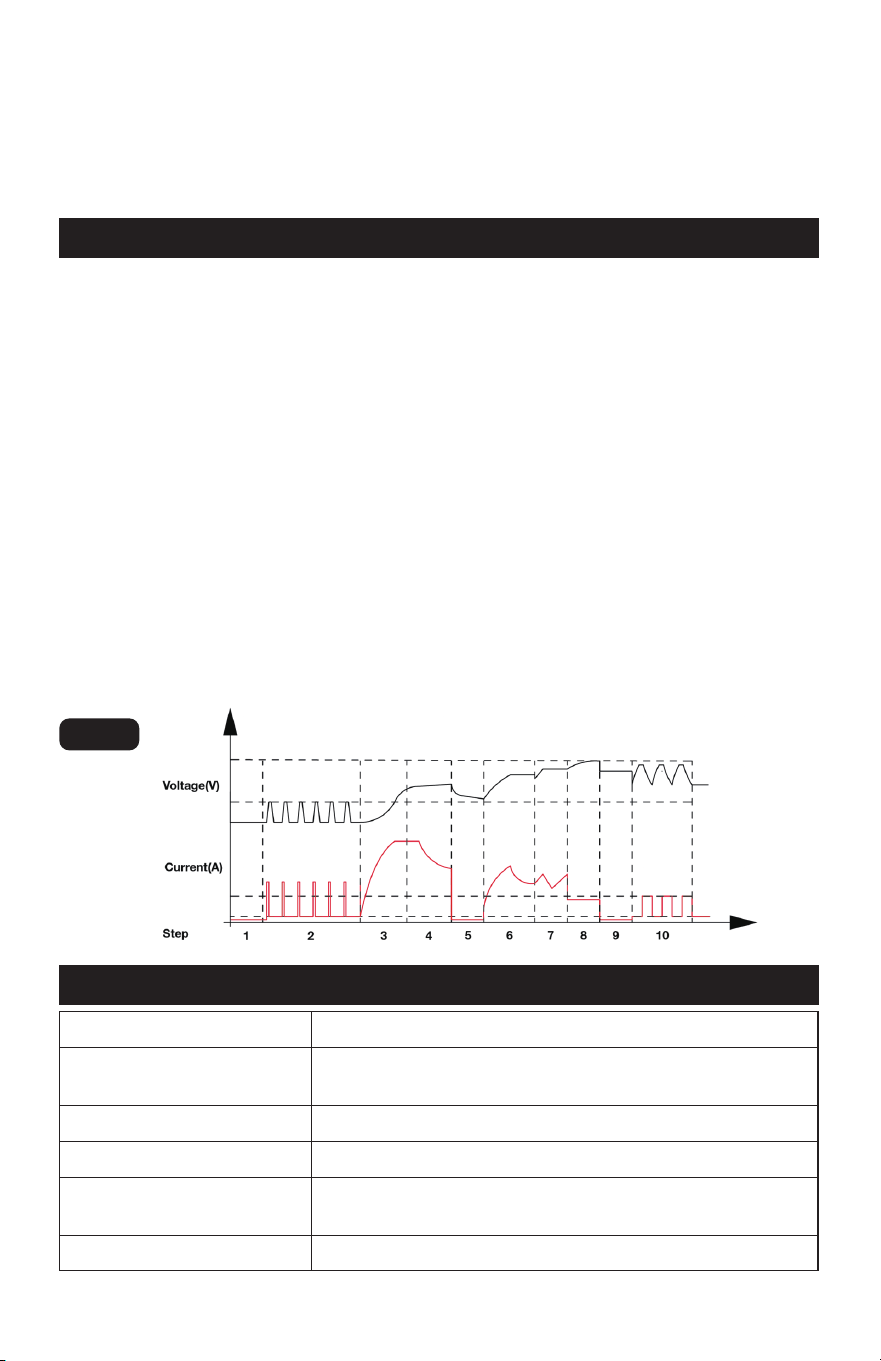
7. CHARGING STAGES
7.1
7.2
7.3
7.4
7.5
7.6
ANALYSING 1 (Checks if battery has
connected with the charger and also
check battery voltage)
DESULPHATION (Pulsing charging to
remove sulphate)
SOFT START (Charges with gradually
increasing charging current)
CONTROLLED CURRENT CHARGE
(Adjusts the charging current intelli-
gently)
ANALYSING 2 (Tests if the battery
can absorb charge)
CONSTANT OUTPUT CHARGE
(Charges with constant voltage and
7.7
7.8
7.9
7.10
RECOVERY CYCLE CHARGE
(Absorbs more charge and compen-
sates side effect of reduced charging
current)
ABSORPTION (Charges with
constant trickle current for
maximum battery voltage)
ANALYSING 3 (Tests if the battery
can hold charge)
MAINTENANCE (Continuously
monitors the battery, and charges
with trickle current once the voltage
is lower than threshold)
compensates fake full charge caused
by high current charging)
Fig. 1
8. SPECIFICATIONS
AC Input 100-120 VAC, 50-60Hz, 400W
DC Output
12VDC, 5A/10A/15A or 24VDC, 5A/8A or 12VDC,
20A (BOOST) 300s ON,300s OFF; Temperature Controlled
Charger Type 10 Steps, Full-automatic Charging Cycle
Start Voltage >1V
Battery Type
All Types of 12V &24V Lead-acid Batteries, and 12V
Lithium Ion Batteries
Ambient Temperature 32˚F ~ 104˚F

Page 10
9. ERROR CODE
No. LED DISPLAY CAUSE SOLUTION
1
ERROR + OVER HEA
T
The charger is
overheated
The charging will automatically
pause. Do NOT cut off the power
supply, and the charger will
work again when cooled down
2
ERROR +
NO CONNECTION
(1) Open-circuit
(2) Dirty battery posts
(3) Dead battery
(4) Output short circuit
(1) Connect the red and black
clamps to the battery posts
(2) Clean the battery posts
(3) Replace the battery with a
new one immediately
(4) Disconnect red and black
output terminals
3
ERROR + BATT TYPE
Charging in 12V modes
for 24V battery
Charging in 24V modes
for 12V battery
Please choose the correct
charge mode.
If you choose 24V Modes for
12V battery, the 12V battery
will be damaged!
4
ERROR + BAD BATT
Battery cannot store
electric or it cannot be
recovered through
REPAIR mode
(1) Replace the battery with a
new one
(2) If REPAIR Mode has not
been tried, try it for recover
y
5
ERROR + REVERSE Reverse polarity
Exchange the red and black
clamps to the correct battery
posts
6
ERROR + OVERLOAD
Overload in SUPPLY
mode (will automatically
shut down for 30 seconds
as protection)
Disconnect the external device
1
NOTE: After full charging cycle and with
100% of battery level indicator, use this
battery to start matched vehicle’s engine. If
engine cannot be activated (exclude the
problem of vehicle itself), it indicates this
battery has declined storage capacity and
need to be replaced or try REPAIR Mode
for recovery.
10. MAINTENANCE AND CARE
•
•
•
•
•
Clean the clamps each time you are
finished charging. Wipe off any battery
fluid that may have come in contact
with the clamps to prevent corrosion.
Occasionally cleaning the case of the
charger with a soft cloth will keep the
finish shiny and help prevent corrosion.
Coil the input and output cords neatly
when storing the charger. This will help
prevent accidental damage to the
cords and charger.
Store the charger unplugged from the
AC power outlet in an upright position.
Store the clamps on the storage areas
provided on the handle. Do not store
the clamps clipped together, on or
around metal, or clipped to the cables.
A minimal amount of care can keep your
battery charger working properly for years.

Page 11
NOTES

Page 12
NOTES

Page 13
NOTES

Page 14
NOTES

5/10A Battery Charger with 15A Boost
WARRANTY
90-DAY MONEY BACK GUARANTEE
This MASTERFORCE™ brand battery charger carries our 90-Day Money Back
Guarantee. If you are not completely satisfied with your MASTERFORCE™
brand product for any reason within ninety (90) days from the date of purchase,
return the item with your original receipt to any MENARDS
®
retail store, and we
will provide you a refund – no questions asked.
3-YEAR LIMITED WARRANTY
This MASTERFORCE™ brand battery charger carries our famous No Hassle
3-Year Limited Warranty to the original purchaser. If, during normal use, this MAS-
TERFORCE™ product breaks or fails due to a defect in material or workmanship
within three (3) years from the date of original purchase, simply bring the item
with the original sales receipt back to your nearest MENARDS
®
retail store. At its
discretion, MASTERFORCE™ agrees to ha
ve the item or any defective part(s)
repaired or replaced with the same or similar MASTERFORCE™ product or part
free of charge, within the stated warranty period, when returned by the original
purchaser with original sales receipt. Not withstanding the foregoing, this limited
warranty does not cover any damage that has resulted from abuse or misuse of
the Merchandise. This warranty: (1) excludes expendable parts including but not
limited to blades, brushes, belts, bits, light bulbs, and/or batteries; (2) shall be
void if this product is used for commercial and/or rental purposes; and (3)
does
not cover any losses, injuries to persons/property or costs. This warranty does
give you specific legal rights and you may have other rights, which vary from
state to state. Be careful, battery chargers are dangerous if improperly used or
maintained. Seller’s employees are not qualified to advise you on the use of this
merchandise. Any oral representation(s) made will not be binding on seller or its
employees. The rights under this limited warranty are to the original purchaser
of the merchandise and may not be transferred to any subsequent owner. This
limited warranty is in
lieu of all warranties, expressed or implied including war-
ranties or merchantability and fitness for a particular purpose. Seller shall not be
liable for any special, incidental, or consequential damages. The sole exclusive
remedy against the seller will be for the replacement of any defects as provided
herein, as long as the seller is willing or able to replace this product or is willing
to refund the purchase price as provided above. For insurance purposes, seller
is not allowed to demonstrate any of these products for you.
For questions/comments, technical assistance or repair parts—
Please call toll free at: 1-877-898-3958.
Page 15

© 2024 Menard, Inc., Eau Claire, WI 54703
01/2024