Install / Use & Care
MANUAL
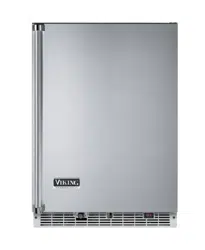
Professional Undercounter Refrigerator / Beverage Center
FBUI5242D
FBUI5242G
2
NOTE
!
CAUTION
Contents:
Important Safety Instructions ...............................................2
Unpacking Your Appliance ..................................................3
Installing Your Appliance ......................................................4
Installing the Anti-Tip Device ...............................................6
Service Information ............................................................19
Troubleshooting .................................................................20
Warranty .............................................................................21
Important Safety Instructions
Warnings and safety instructions appearing in this
guide are not meant to cover all possible conditions and
situations that may occur. Common sense, caution, and
care must be exercised when installing, maintaining, or
operating this appliance.
Recognize Safety Symbols,
Words, and Labels.
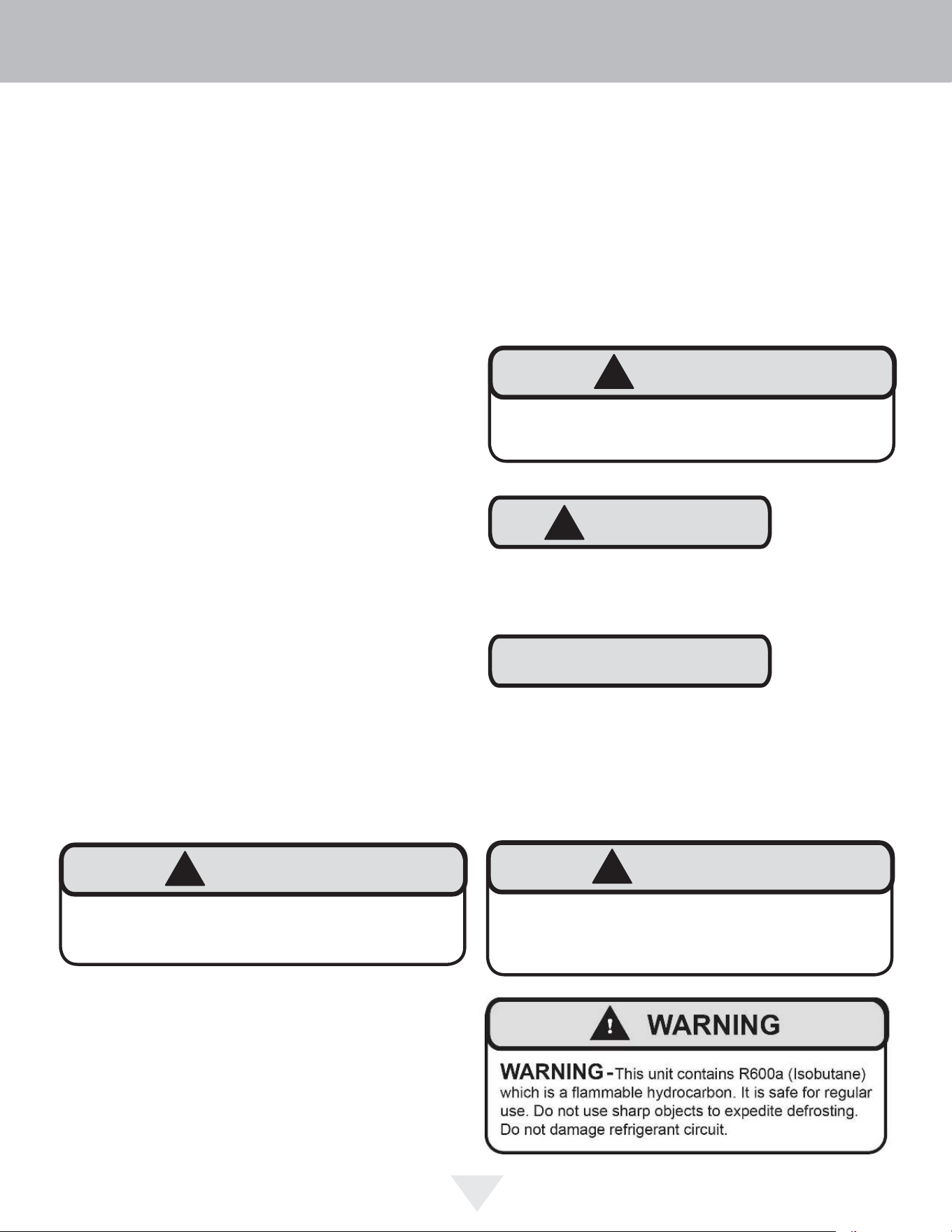
CAUTION-Hazards or unsafe practices which could re-
sult in personal injury or property / product damage.
NOTE-Important information to help assure a problem
free installation and operation.
CONTENTS
!
WARNING
WARNING - You can be killed or seriously injured
if you do not follow these instructions.
!
WARNING
State of California Proposition 65 Warning:
This product contains one or more chemicals known
to the State of California to cause cancer.
!
WARNING
State of California Proposition 65 Warning:
This product contains one or more chemicals known
to the State of California to cause birth defects or
other reproductive harm..
Using Your Electronic Control ...........................................16
Energy Saving Tips ............................................................18
Cutout & Dimensions ...........................................................8
Drawer Divider .....................................................................9
Integrated Panel Dimensions .............................................11
Integrated Panel Installation ...............................................12
Care and Cleaning .............................................................18
Shelving Configurations........... ..........................................17
3
NOTE
!
CAUTION
XXXXXXXXXXXX
VIKING RANGE, LLC
GREENWOOD, MS 38930
!
WARNING
WARNING - Help Prevent Tragedies
Child entrapment and suffocation are not problems of
the past. Junked or abandoned refrigerators are still
dangerous - even if they sit out for "just a few hours".
If you are getting rid of your old refrigerator, please
follow the instructions below to help prevent
accidents.
Before you throw away your old refrigerator or
freezer:
• Take off the doors or remove the drawers.
• Leave the shelves in place so children may not
easily climb inside.
!
WARNING
WARNING - Dispose of the plastic bags which can
be a suffocation hazard.
!
WARNING
EXCESSIVE WEIGHT HAZARD
Use two or more people to move product.
Failure to do so can result in personal injury.
Remove Interior Packaging
Your appliance has been packed for shipment with all parts
that could be damaged by movement securely fastened.
Remove internal packing materials and any tape holding
internal components in place. The owners manual is
shipped inside the product in a plastic bag along with the
warranty registration card, and other accessory items.
Important
Keep your carton and packaging until your appliance
has been thoroughly inspected and found to be in good
condition. If there is damage, the packaging will be needed
as proof of damage in transit. Afterwards please dispose of
all items responsibly.
Note to Customer
This merchandise was carefully packed and thoroughly
inspected before leaving our plant. Responsibility for its
safe delivery was assumed by the retailer upon acceptance
of the shipment. Claims for loss or damage sustained in
transit must be made to the retailer.
DO NOT RETURN DAMAGED MERCHANDISE TO THE
MANUFACTURER - FILE THE CLAIM WITH THE
RETAILER.
If the appliance was shipped, handled, or stored in other
than an upright position for any period of time, allow the
appliance to sit upright for a period of at least 24 hours
before plugging in. This will assure oil returns to the
compressor. Plugging the appliance in immediately may
cause damage to internal parts.
Figure 1
The following information will be
required when registering your
appliance.
Service Number
Serial Number
Date of Purchase
Dealer’s name and address
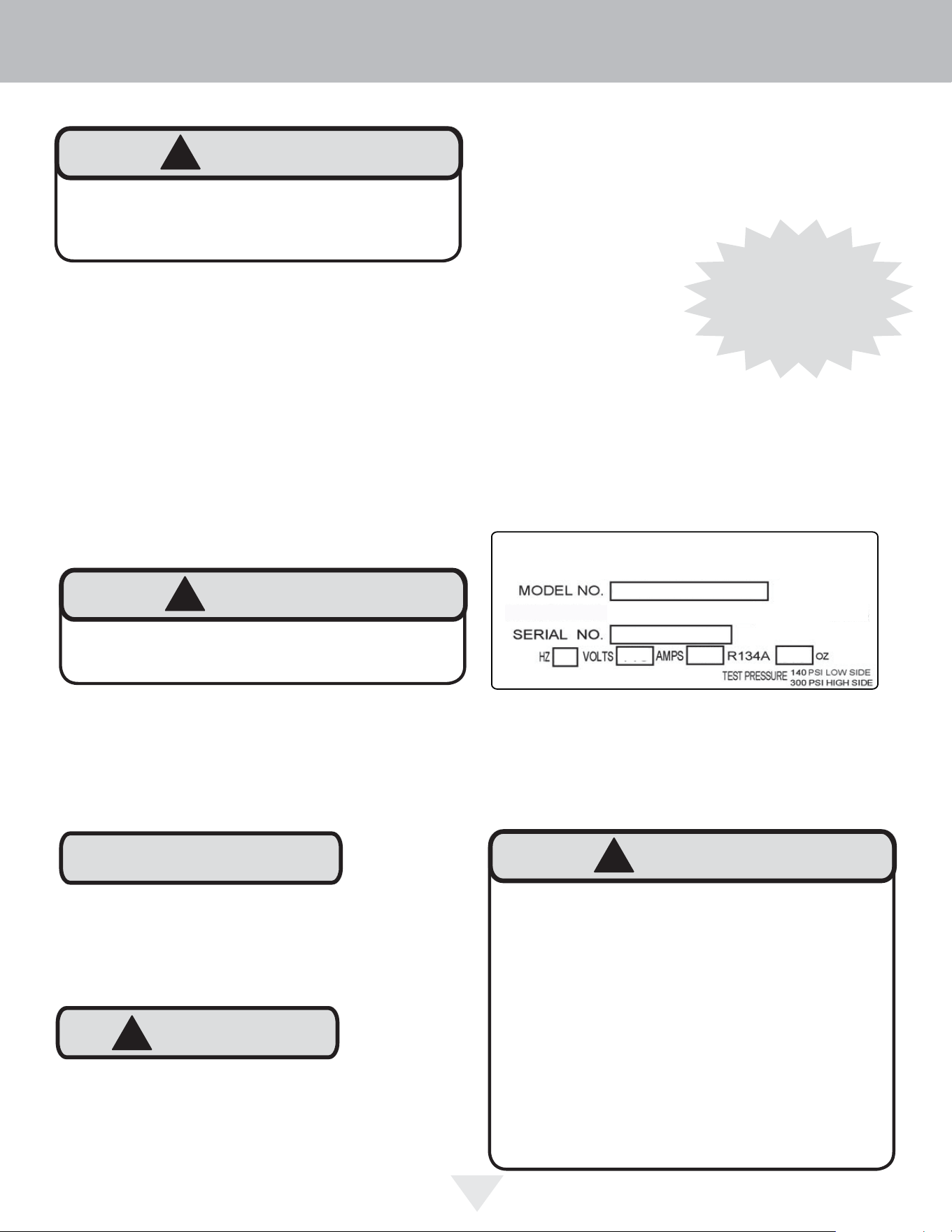
The service number and serial number can be found on the
serial plate which is located inside the cabinet on the left
side near the top. See fi gure 1.
Warranty Registration
It is important you send in your warranty registration card
immediately after taking delivery of your appliance or
you can register online at www.vikingrange.c
om.
UNPACKING YOUR APPLIANCE
Online registration
available at
www.vikingrange.com
4
!
CAUTION
Select Location
The proper location will ensure peak performance of your
appliance. We recommend a location where the unit will
be out of direct sunlight and away from heat sources. To
ensure your product performs to specifi cations, the recom-
mended installation location temperature range is from 55
to 100°F (13 to 38°C).
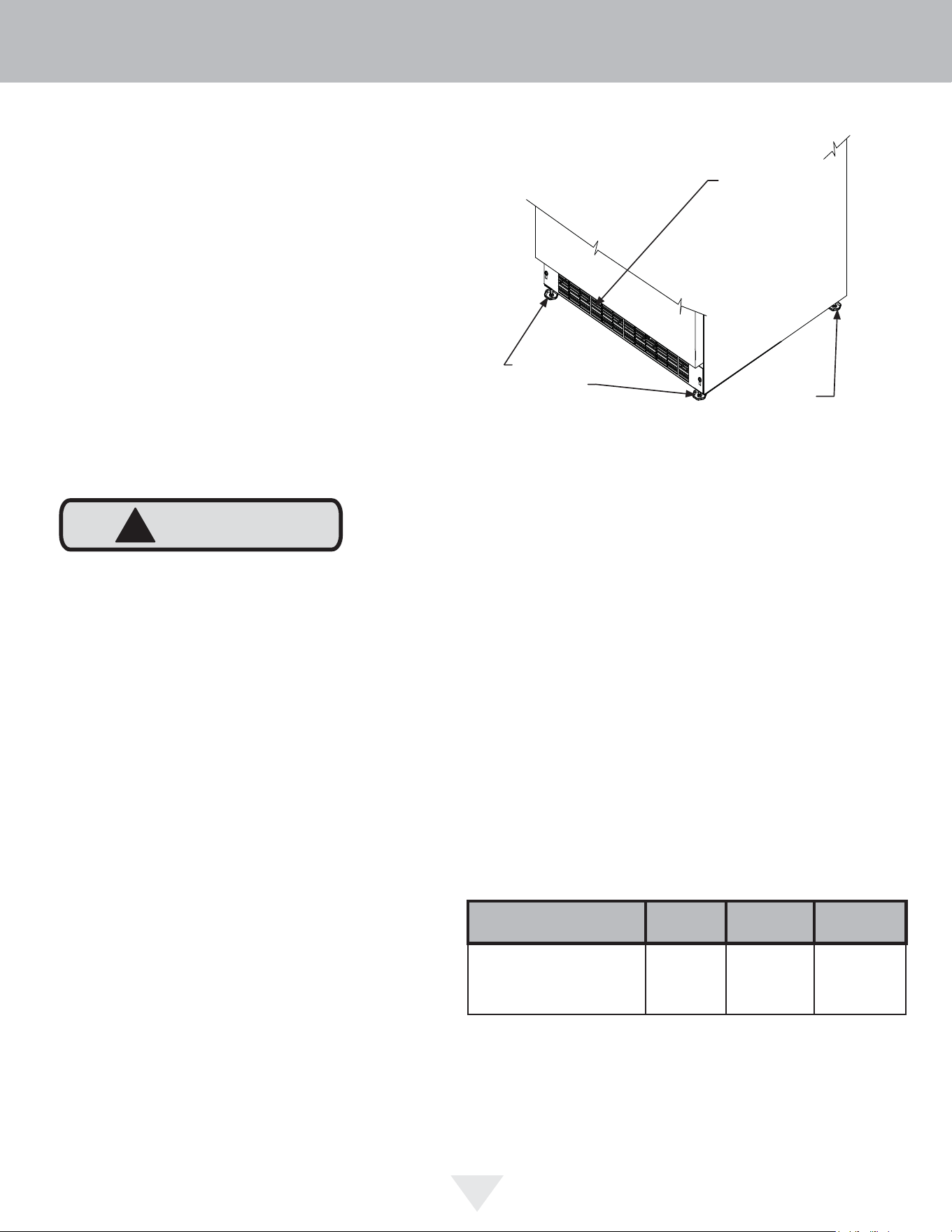
Cabinet Clearance
Ventilation is required from the bottom front of the appli-
ance. Keep this area open and clear of any obstructions.
Adjacent cabinets and counter top can be installed around
the appliance as long as the front grille remains unob-
structed. All Professional models with articulated hinges are
intended for built-in applications only.
Front Grille
Do not obstruct the front grille. The openings within the
front grille allow air to fl ow through the condenser heat ex-
changer. Restrictions to this air fl ow will result in increased
energy usage and loss of cooling capacity. For this reason
it is important this area to not be obstructed and the grille
openings kept clean. Viking Range, LLC does not recom-
mend the use of a custom made grille as air fl ow may be
restricted. (See Figure 2).
INSTALLING YOUR APPLIANCE
Figure 2
Front Leveling
Legs
Front Grille,
keep this area
open.
Leveling Legs
Adjustable legs at the front and rear corners of the appli-
ance should be set so the unit is fi rmly positioned on the
fl oor and level from side to side and front to back. The
overall height of your appliance may be adjusted higher (by
turning the leveling leg out, CCW) and lower (by turning the
leveling leg in, CW) dimensions as shown in Table "A".
To adjust the leveling legs, place the appliance on a solid
surface and protect the fl oor beneath the legs to avoid
scratching the fl oor. With the assistance of another person,
lean the appliance back to access the front leveling legs.
Raise or lower the legs to the required dimension by turning
the legs. Repeat this process for the rear by tilting the appli-
ance forward using caution. On a level surface check the
appliance for levelness and adjust accordingly.
The front grille screws may be loosened and the grille ad-
justed to the desired height. When adjustment is complete
tighten the two front grille screws. (See Figure 5).
Rear
Leveling
Legs
Model
Door
Style
Minimum
Height
Maximum
Height
FBUI5242
(D,G)
33
3
⁄4"
(85.7 cm)
34
3
⁄4"
(88.3 cm)
Table A
5
NOTE
INSTALLING YOUR APPLIANCE
Figure 5
Front grille screw
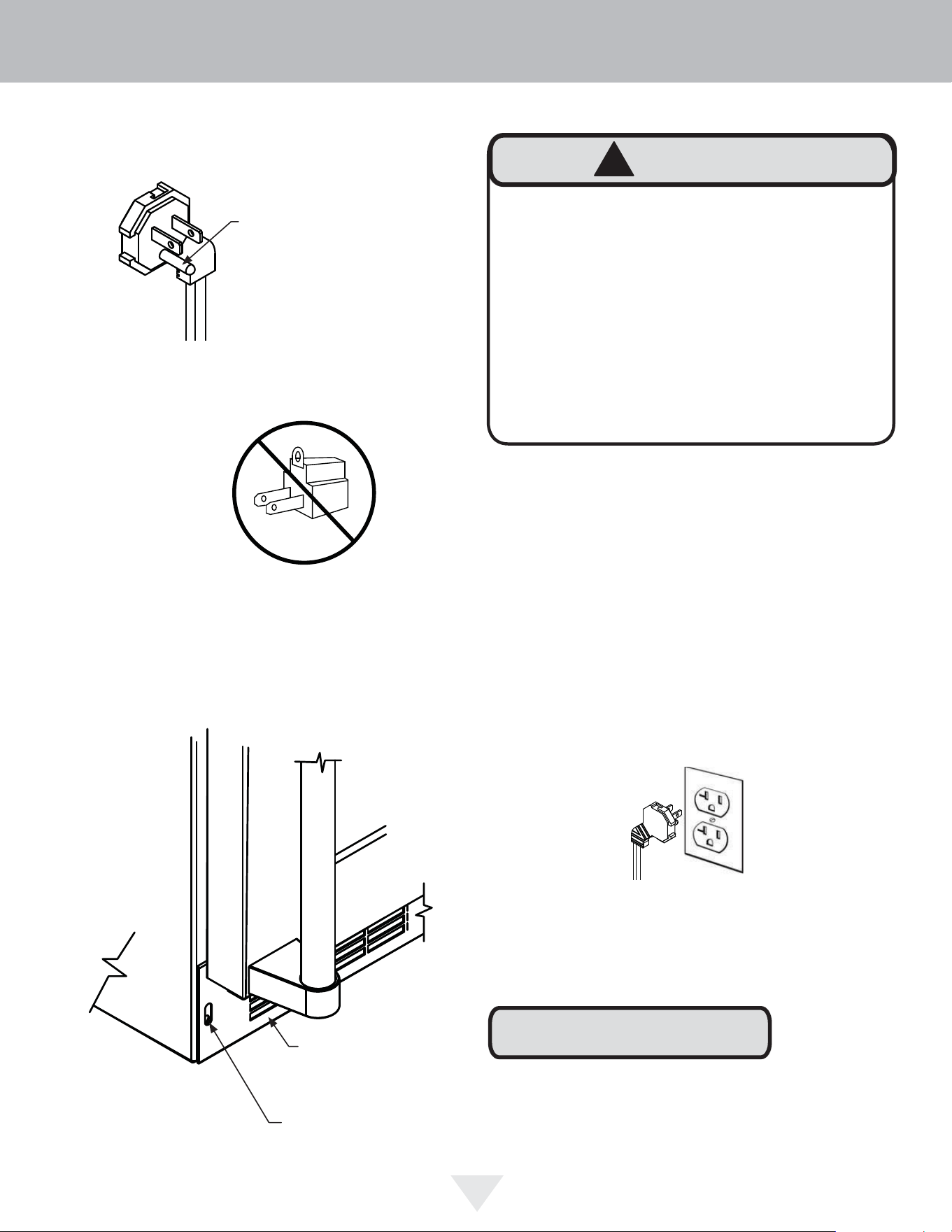
Electrical Shock Hazard
• Do not use an extension cord with this appliance.
They can be hazardous and can degrade product
performance.
• This appliance should not, under any circumstanc-
es, be installed to an un-grounded electrical supply.
• Do not remove the grounding prong from the power
cord. (See Figure 3).
• Do not use an adapter. (See Figure 4).
• Do not splash or spray water from a hose on the
appliance. Doing so may cause an electrical shock,
which may result in severe injury or death.
!
WARNING
Front grille
Ground Fault Circuit Interrupters (GFCI) are prone to nui-
sance tripping which will cause the appliance to shut down.
GFCI’s are generally not used on circuits with power equip-
ment that must run unattended for long periods of time, un-
less required to meet local building codes and ordinances.
Electrical Connection
A grounded 115 volt, 15 amp dedicated circuit is required.
This product is factory equipped with a power supply
cord that has a three-pronged, grounded plug. It must be
plugged into a mating grounding type receptacle in accor-
dance with the National Electrical Code and applicable lo-
cal codes and ordinances (see Figure 6). If the circuit does
not have a grounding type receptacle, it is the responsibility
and obligation of the customer to provide the proper power
supply. The third ground prong should not, under any cir-
cumstances, be cut or removed.
Figure 6
Figure 3
Figure 4
Do not remove
ground prong
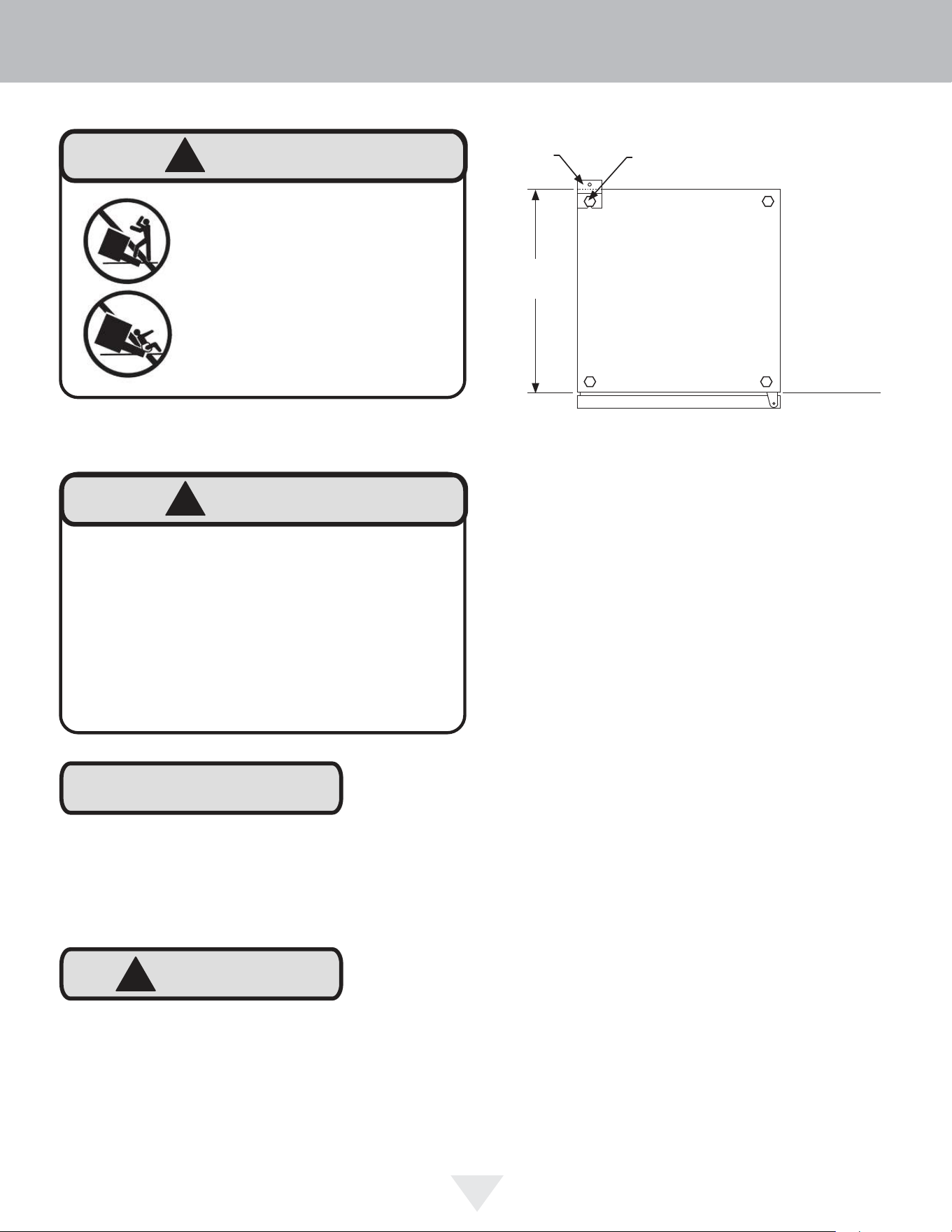
1) Decide where you want to place the beverage center.
Slide it into place, being careful not to damage the floor,
leaving 1" (2.5 cm) of clearance from the rear wall to allow
room for the anti-tip bracket.
2) Raise the rear leveling legs approximately
1
⁄4" (6 mm) to
allow engagement with the anti-tip bracket. Level the unit by
adjusting all the leveling legs as required. Turning the
leveling leg counterclockwise will raise the unit and clock-
wise will lower the unit.
3) Make sure the beverage center is in the desired loca-
tion, then mark on the floor the rear and side corner of the
cabinet where the anti-tip bracket will be installed. If the
installation does not allow marking the rear corner of the
cabinet, then make temporary lines on the floor marking the
front corner of the cabinet, excluding the door. Slide the
beverage center out of the way. From the temporary line
extend the sidewall line back 21
1
⁄2" (54.6 cm) as shown in
Figure 8.
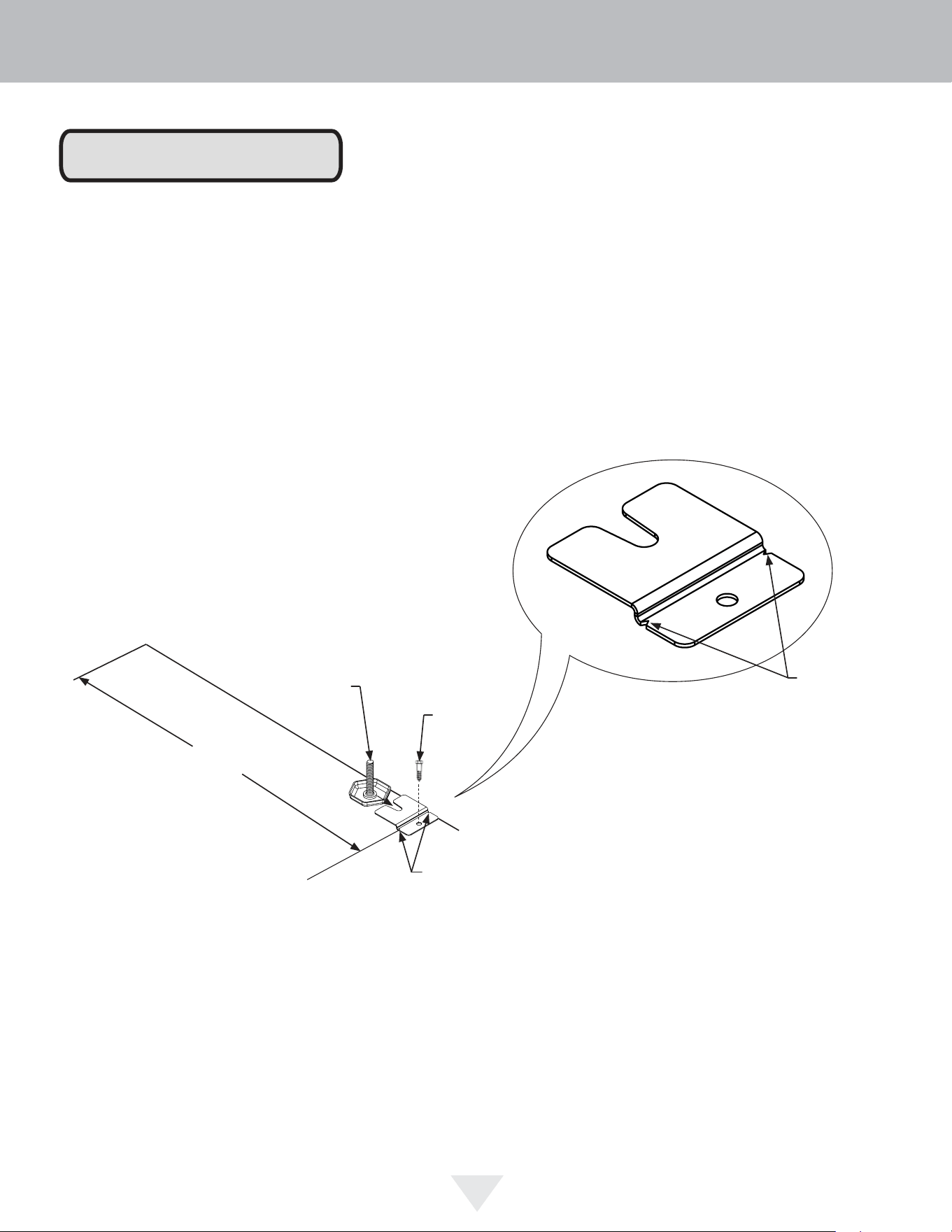
4) Align the anti-tip bracket to the marks on the floor so the
side of the bracket lines up with the side of the cabinet
mark, and the "V" notches on the anti-tip bracket line up
with the end of the 21
1
⁄2" (54.6 cm) line (Rear of cabinet
line).
5) Fasten the anti-tip bracket to the floor using the supplied
screw. (See Figure 8).
6) Slide the cabinet back into position, making sure the rear
cabinet leveling leg slides under the anti-tip bracket engag-
ing the slot.
Front of cabinet
Figure 7
Step by step instructions for locating the po-
sition of the bracket:
21
1
⁄2"
(54.6 cm)
Anti-Tip
Bracket
Leveling Leg
Bottom View of
Beverage
Center
!
WARNING
• ALL APPLIANCES CAN TIP
RESULTING IN INJURY.
• INSTALL THE ANTI-TIP
BRACKET PACKED WITH
THE APPLIANCE.
• FOLLOW THE INSTRUC-
TIONS BELOW
!
CAUTION
NOTE
Any finished flooring should be protected with appropriate
material to avoid damage when moving the unit.
Floor Mount Installation
The anti-tip bracket is to be located on the floor in the left or
right rear corner of the wine cellar as shown in Figure 7.
If installing on a concrete floor, concrete fasteners are
required, (not included with the anti-tip kit).
Anti-Tip Device
!
WARNING
If your beverage center is not located under a counter
top (free standing), you must use an anti-tip device
installed as per these instructions. If the beverage
center is removed from its location for any reason,
make sure that the device is properly engaged with
the anti-tip bracket when you push the beverage
center back into the original location. If the device is
not properly engaged, there is a risk of the beverage
center tipping over, with the potential for property dam-
age or personal injury.
INSTALLING THE ANTI-TIP DEVICE
6
NOTE
When the floor mounted anti-tip bracket is used the mini-
mum adjusted height of the cabinet is increased by
3
⁄8" (9 mm).
Figure 8a
"V" notches
in bracket
"V" notches
in bracket
Figure 8
21
1
⁄2"
(54.6 cm)
Front of cabinet line
Rear Leveling leg
Side of cabinet line
Rear of cabinet line
Screw
INSTALLING THE ANTI-TIP DEVICE
7
8
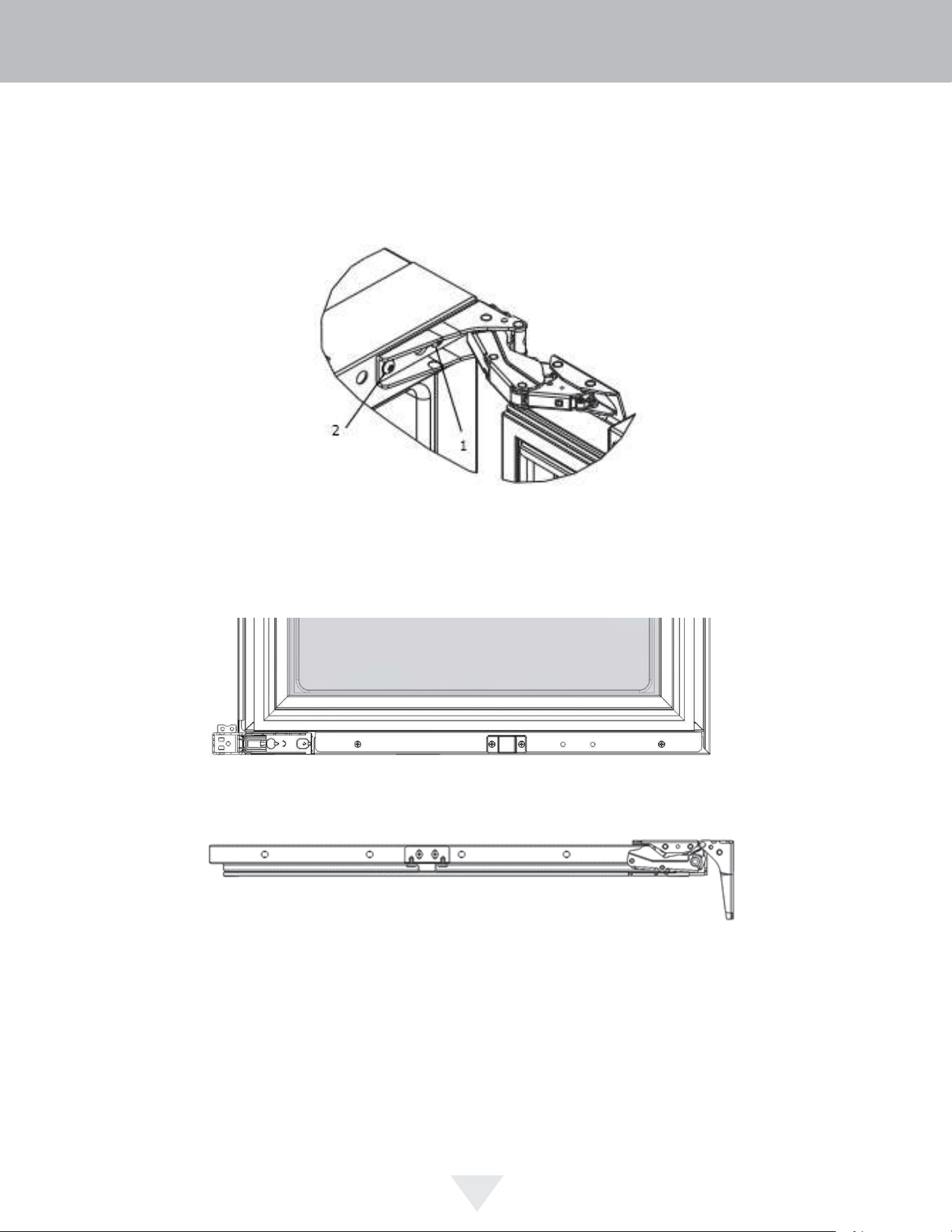
Door Reversing Instructions
1. Open door.
2. Loosen screw #1 and #2 using a Philips Screwdriver on top and bottom hinge. Slide door and remove the door from the
unit.
Figure 9
3. Once door is removed, using a Philips Screwdriver remove screws from magnet actuator located on inside and bottom
of door. (On Integrated Models magnet actuator will be located on bottom of door.
Figure 10
Figure 11
4. Remove caps from top of door. Using a Philips Screwdriver, install magnet actuator on opposite side. Install caps into
opposite side.
5. Remove caps from screw holes on opposite side (2 on top and bottom). Using a Philips Screwdriver remove the 4
screws that you previously loosened.
6. Reinstall screws and caps on opposite side.
7. Once screws are partially installed, rotate the door 180°, align the hinge over screw #1 and slide into position. Tighten
screws on top and bottom.
8. Door is now reversed.
DOOR REVERSAL
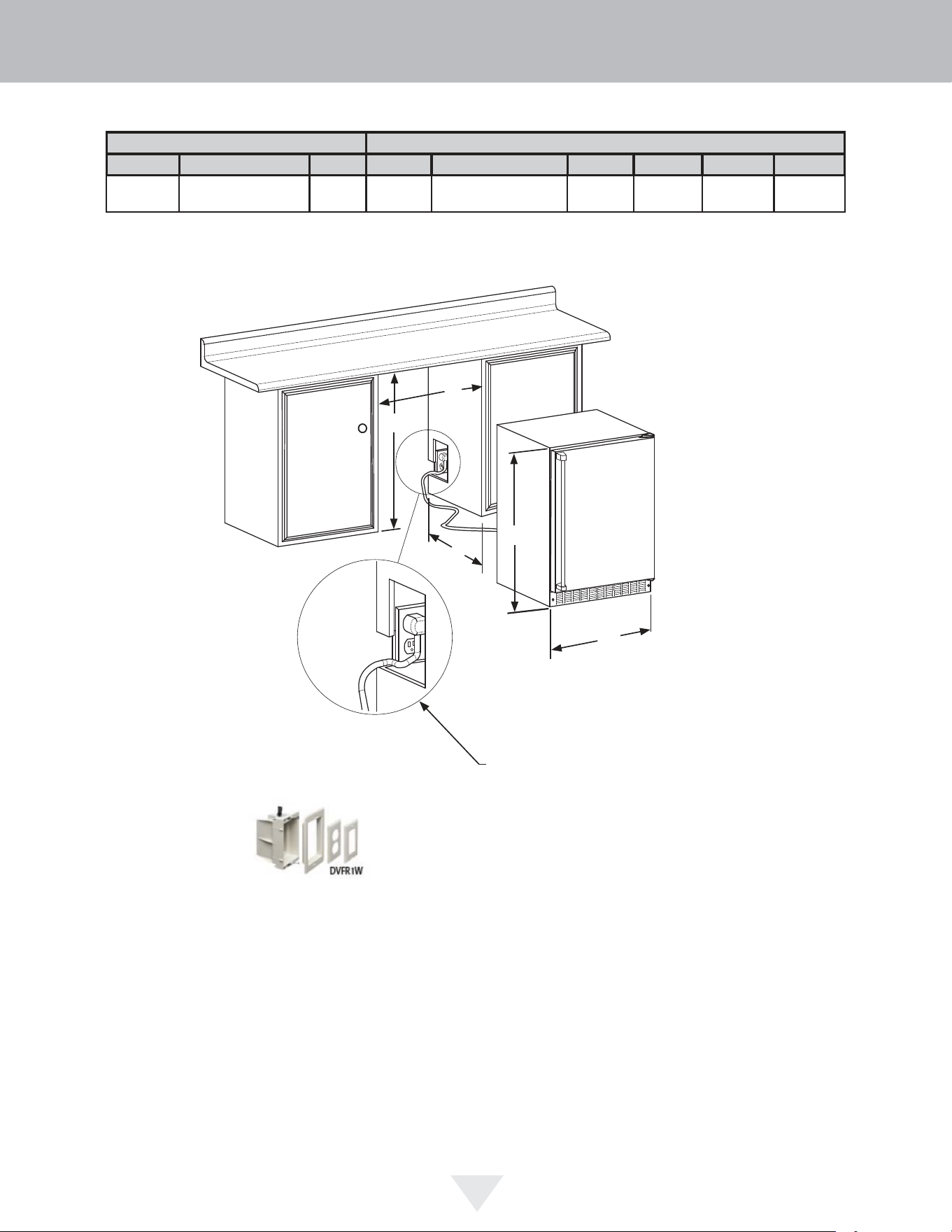
ROUGH-IN OPENING DIMENSIONS CABINET DIMENSIONS
“A” “B” “C” “D” “E” “F” “G” “H” “J”
24”
(61 cm)
34” to 35”
(86.4 cm to 88.9 cm)
24”
(61 cm)
23 7/8”
(60.7 cm)
33 3/4” to 34 3/4”
(85.7 cm to 88.3 cm)
23 5/8”
(60 cm)
-
47 3/4”
(121.3 cm)
-
“A”
“B”
“D”
“E”
Solid Door
Shown
If necessary, to gain clearance inside the rough-in
opening, a hole can be cut through the adjacent
cabinet and the power cord routed through this hole to
a power outlet. Another way to increase the available
opening depth is to recess the power outlet into the
rear wall to gain the thickness of the power cord plug.
Not all recessed outlet boxes will work for this
application as they are too narrow, but a recessed
outlet box equivalent to Arlington #DVFR1W us
recommended for this application.
“C”
CUTOUT AND PRODUCT DIMENSIONS
9
Figure 12
Figure 13
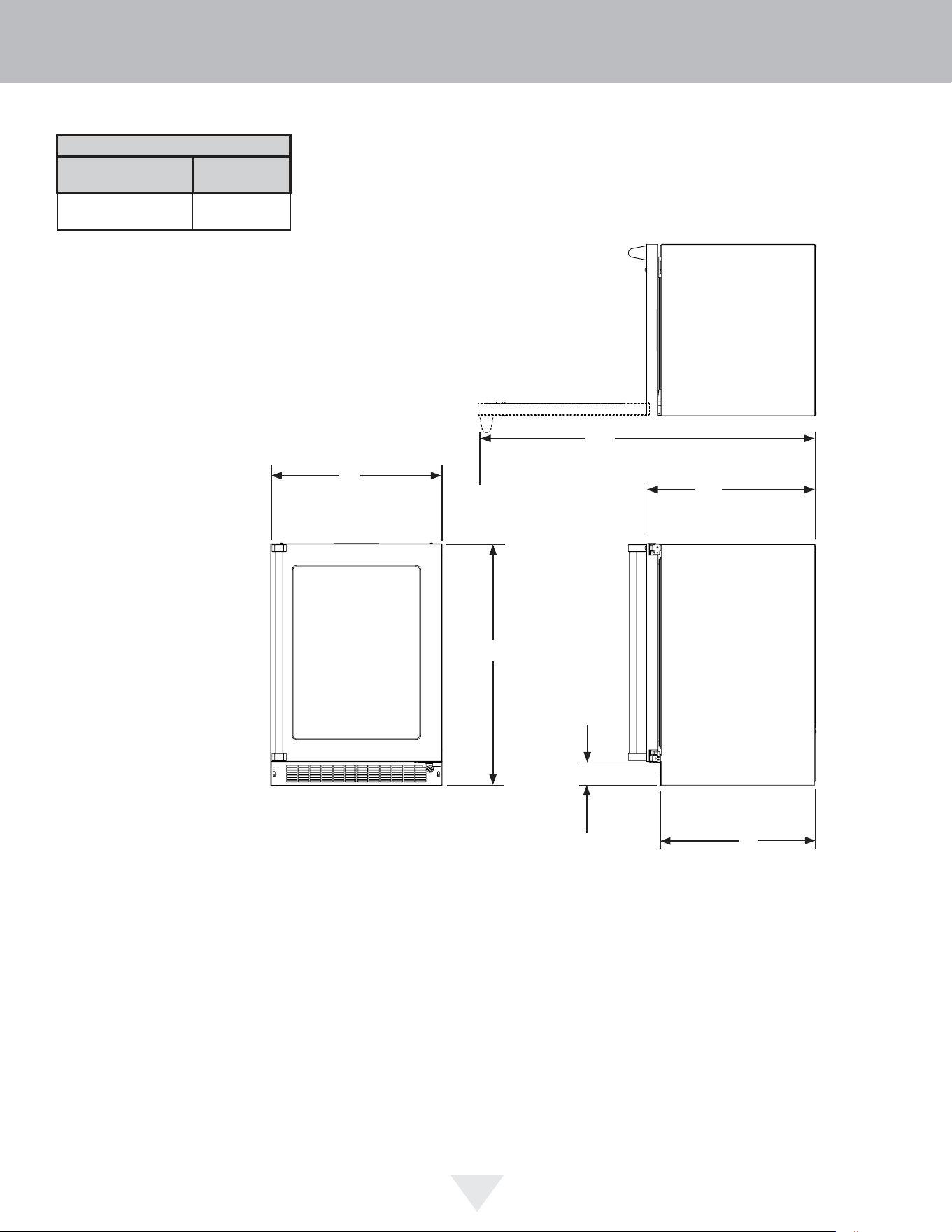
PRODUCT DATA
ELECTRICAL
REQUITEMENTS #
PRODUCT
WEIGHT
115V/60Hz/15A
140 lbs
(63.6 kg)
3 1/2” (8.9 cm)
Minimum
“D”
“E”
“F”
Glass Door
Shown
21 1/2”
(54.6 cm)
“H”
Minimum rough-in opening is required to be larger than the
adjusted height of the cabinet.
A grounded 15-amp dedication circuit us required. Follow
all local building codes when installing electrical and
appliance.
CUTOUT AND PRODUCT DIMENSIONS
10
Figure 14
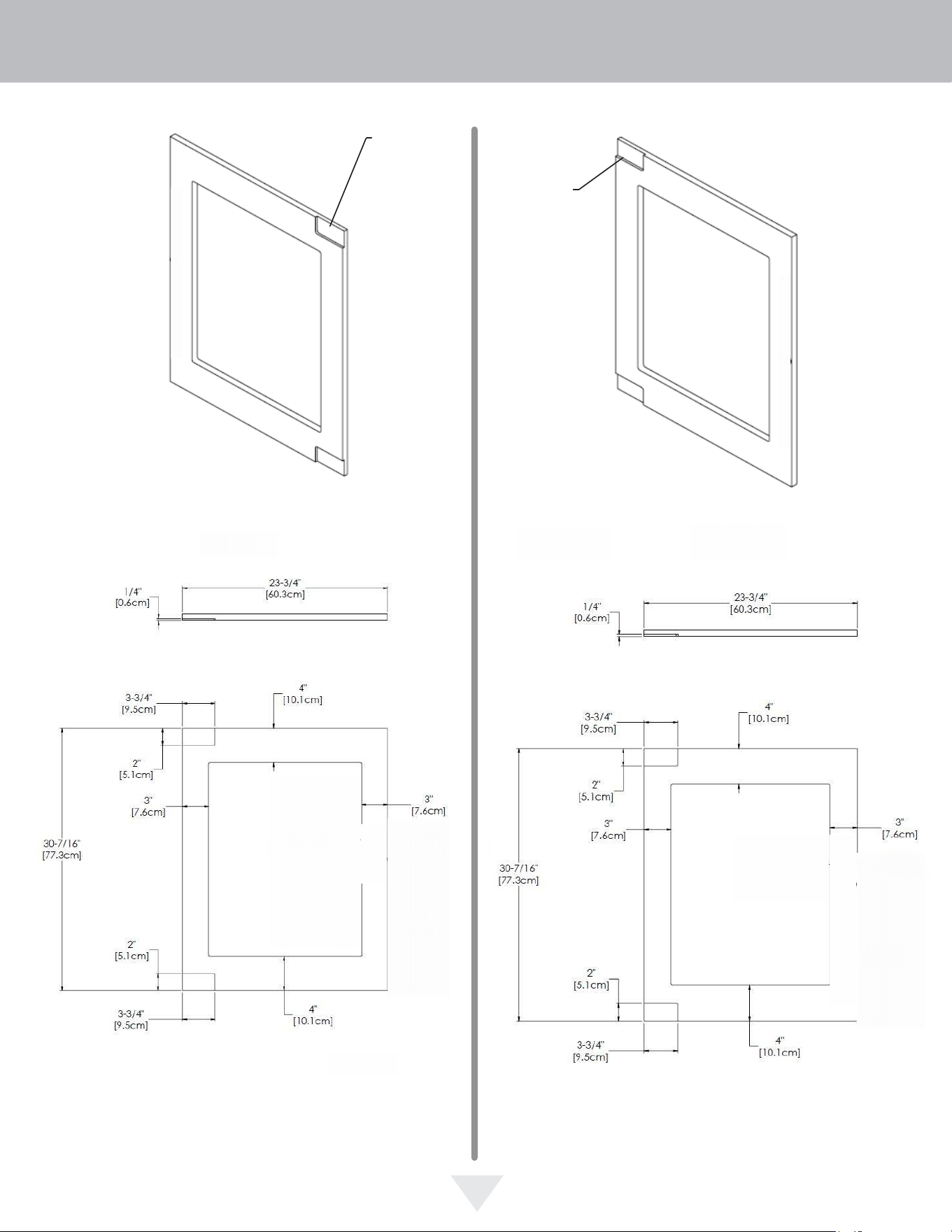
1
5
⁄32"
(2.9 cm)
Hinge side of door
Top of door
Right Hand Hinged Door
24" (61 cm) wide appliance
Right Hand Hinged Door
24" (61 cm) wide appliance
Clearance
for hinge
at top and
bottom
Hinge side of door
Top of door
Left Hand Hinged Door
24" (61 cm) wide appliance
Left Hand Hinged Door
24" (61 cm) wide appliance
Clearance
for hinge
at top and
bottom
1/4"
[0.6cm]
4"
[10.1cm]
3-3/4"
[9.5cm]
2"
[5.1cm]
3-3/4"
4"
2"
3"
3"
2"
3-3/4"
4"
15-1/4"
3"
[7.6cm]
30-7/16"
[77.3cm]
30-7/16"
2"
[5.1cm]
4"
[10.1cm]
15-1/4"
[38.7cm]
3"
[7.6cm]
INTEGRATED PANEL DIMENSIONS
11
Figure 15 Figure 16
Figure 17 Figure 18
!
CAUTION
Integrated door panel installation:
Step 1: Removing the Door
Open the door and loosen the screws holding the hinges to
the cabinet (2 at the top and 2 at the bottom hinge). Do not
remove the screws but loosen them enough so the hinges
can be slipped off of the screws when sliding the door to
the side.
With a helper, and being careful not to scratch the cabinet
or the door, slide the door to the side about
1
⁄2 inch and
remove the hinges and door from the unit.
!
WARNING
Integrated panel models are designed for use with
built-in installations only. Use in freestanding instal-
lations could result in personal injury.
If you purchased an integrated panel model, your unit is
equipped with articulated hinges to allow fully integrated
built-in installations. Custom panel thicknesses of
5
⁄8" (15
mm) and
3
⁄4" (18 mm) are accommodated.
It is important to use the factory provided grille that came
with the product to assure proper air flow is maintained
through the condenser. The use of a custom grille is not
recommended and will void the warranty.
!
WARNING
The articulated hinges have many pinch points. Care-
fully close / collapse the hinges as soon as the door is
removed from the cabinet.
INTEGRATED PANEL INSTALLATION
12
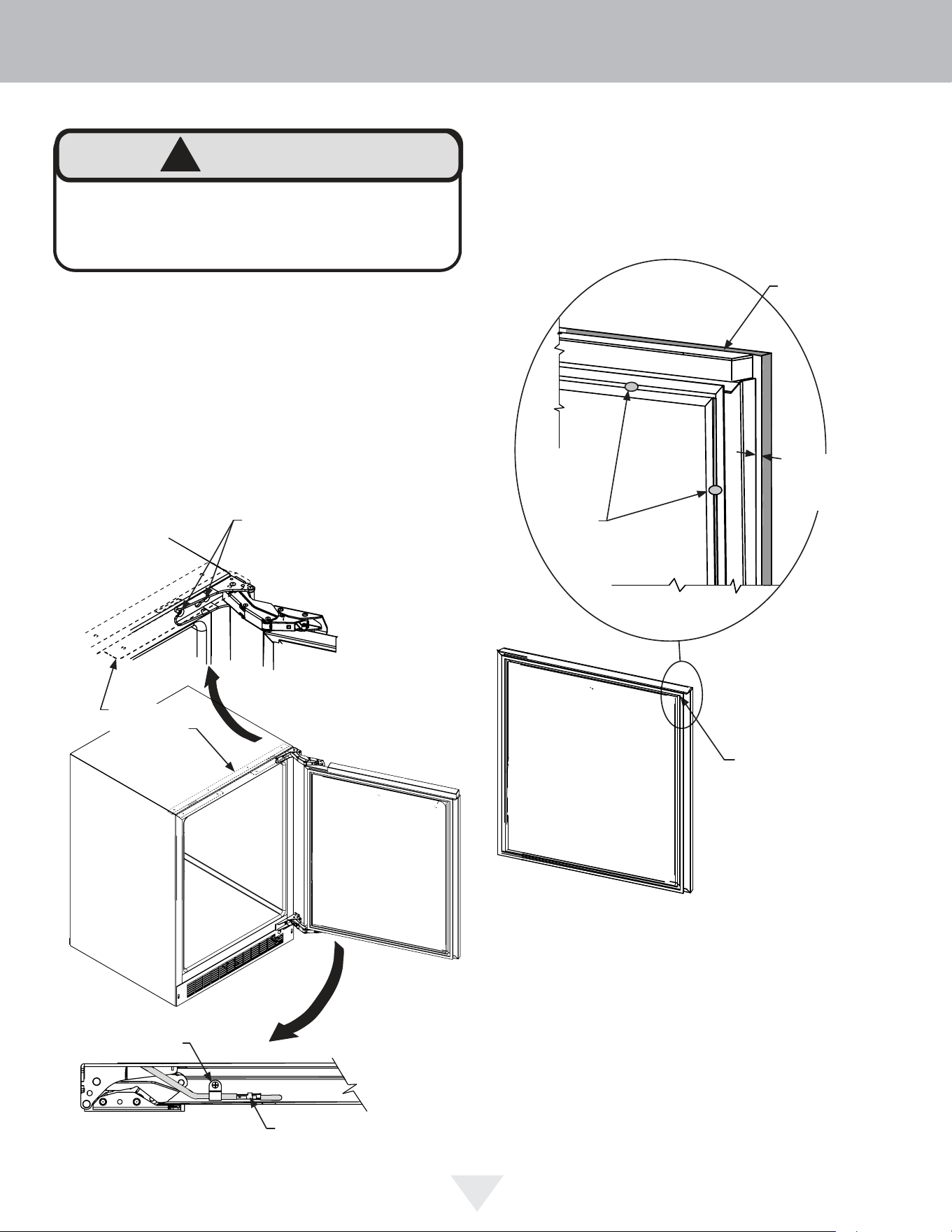
Integrated
panel flush
with top and
side of door.
Magnetic Gasket
remove starting at a
corner, grasp and pull
away from the door.
Step 3: Cut and drill the integrated panel
Depending on your model cut the integrated door panel to
the dimensions shown in Figures 15 to 18. The window
cut out is for glass door models only. If your appliance has
a lock also drill the lock hole in the panel, see Figure 21.
Integrated panel
to be centered
on width of door.
Figure 20
Holes in
gasket
retainer.
Figure 20a
Step 2: Remove the door gasket
With the door laying on a flat surface and starting at a
corner of the door remove the magnetic door gasket from
the interior side of the door, see Figure 17. Set the gasket
aside on a flat surface.
There are 10 holes in the gasket retainer extrusions, (3 on
each side and 2 at the top and bottom which are used to
fasten the panel to the front of the door. The screws are
provided in the literature pack along with the door lock,
which is provided on certain models.
Loosen (do not remove ) these
2 phillips head screws on the
top and bottom hinges
!
WARNING
Use extreme caution with the articulated hinges. The
hinge is self closing and many pinch points exist prior
to built-in installation. Do not remove the cabinet "Z"
bracket from the top of the cabinet.
Figure 19b
Bottom of
door
"P" clamp
and screw
Wire connector
see Figure 6
Figure 19
Figure 19a
Cabinet
"Z" Bracket
INTEGRATED PANEL INSTALLATION
13
!
CAUTION
#10 x
1
⁄2"
screw
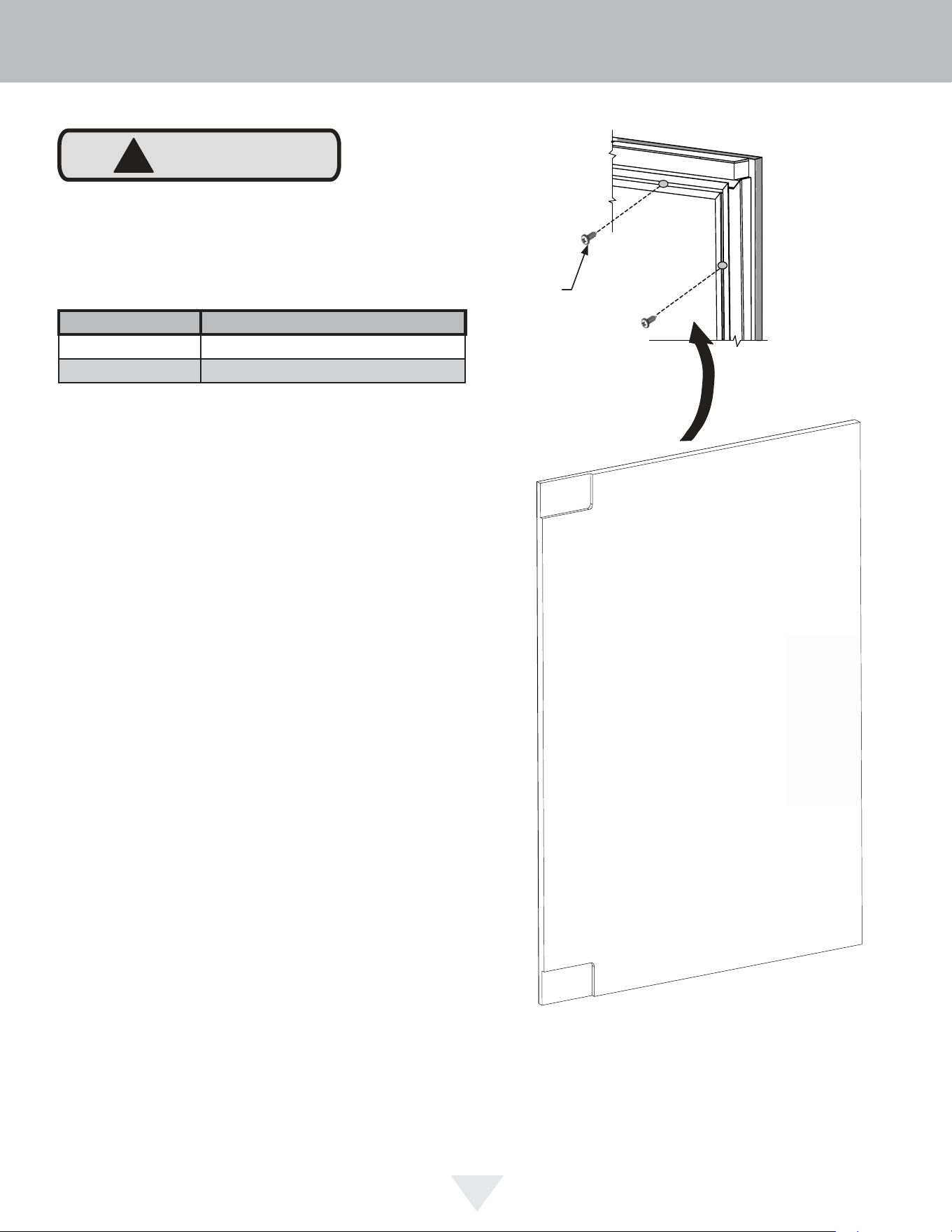
Step 4: Assemble the panel to the door
The preferred method of attaching the panel to the door
is to clamp the panel to the door so it cannot move while
drilling the screw pilot holes. Use bar clamps or "C" clamps
with pads on the clamping surfaces that will not mar the
panel or the door. The custom integrated panel should be
flush with the top of the door and centered along the width
of the door. Drill holes through the gasket extrusion using
the 10 holes as pilot holes. Use the drill size from the
chart in Table "A", being careful not to drill through the
front surface of the panel. If the integrated panel is thinner
than
5
⁄8" (16 mm) thick shorter screws will have to be
obtained. Fasten the panel to the door with the 10 screws
provided in the literature pack. (See Figure 21a). Remove
the clamps and replace the gasket in the gasket extrusion
channels of the door. Some force may be
required to seat the gasket into the channels. Be sure the
gasket corners are seated properly.
Material Type #10 Wood Screw
Hardwood
1
⁄8" (3.2 mm) Diameter. Pilot Hole
Softwood
7
⁄64 (2.8 mm) Diameter. Pilot Hole
Table A
Weight of integrated door panel must not exceed 15
pounds (6.8 kg) for a solid door model or 10 pounds
(4.5 kg) for a glass door model.
A A
B B
C C
D D
8
8
7
7
6
6
5
5
4
4
3
3
2
2
1
1
PANEL-WOOD
DO NOT SCALE DRAWING
24 Panel
SHEET 1 OF 1
UNLESS OTHERWISE SPECIFIED:
SCALE: 1:5
WEIGHT:
REV
DWG. NO.
D
SIZE
TITLE:
NAME
DATE
COMMENTS:
Q.A.
MFG APPR.
ENG APPR.
CHECKED
DRAWN
FINISH
MATERIAL
INTERPRET GEOMETRIC
TOLERANCING PER:
DIMENSIONS ARE IN INCHES
TOLERANCES:
FRACTIONAL
ANGULAR: MACH
BEND
TWO PLACE DECIMAL
THREE PLACE DECIMAL
APPLICATION
USED ON
NEXT ASSY
PROPRIETARY AND CONFIDENTIAL
THE INFORMATION CONTAINED IN THIS
DRAWING IS THE SOLE PROPERTY OF
<INSERT COMPANY NAME HERE>. ANY
REPRODUCTION IN PART OR AS A WHOLE
WITHOUT THE WRITTEN PERMISSION OF
<INSERT COMPANY NAME HERE> IS
PROHIBITED.
Figure 21 - Back of Panel
1
⁄2" (13 mm)
diameter drill through
door panel, from other
side
13
⁄16" (20.5 mm)
counter bore,
7
⁄16" (11
mm) deep.
Hinge side of door
Figure 21a
INTEGRATED PANEL INSTALLATION
14
Cabinet
"Z" bracket
#8 x
3
⁄4" black
screws
(3 places)
Figure 24
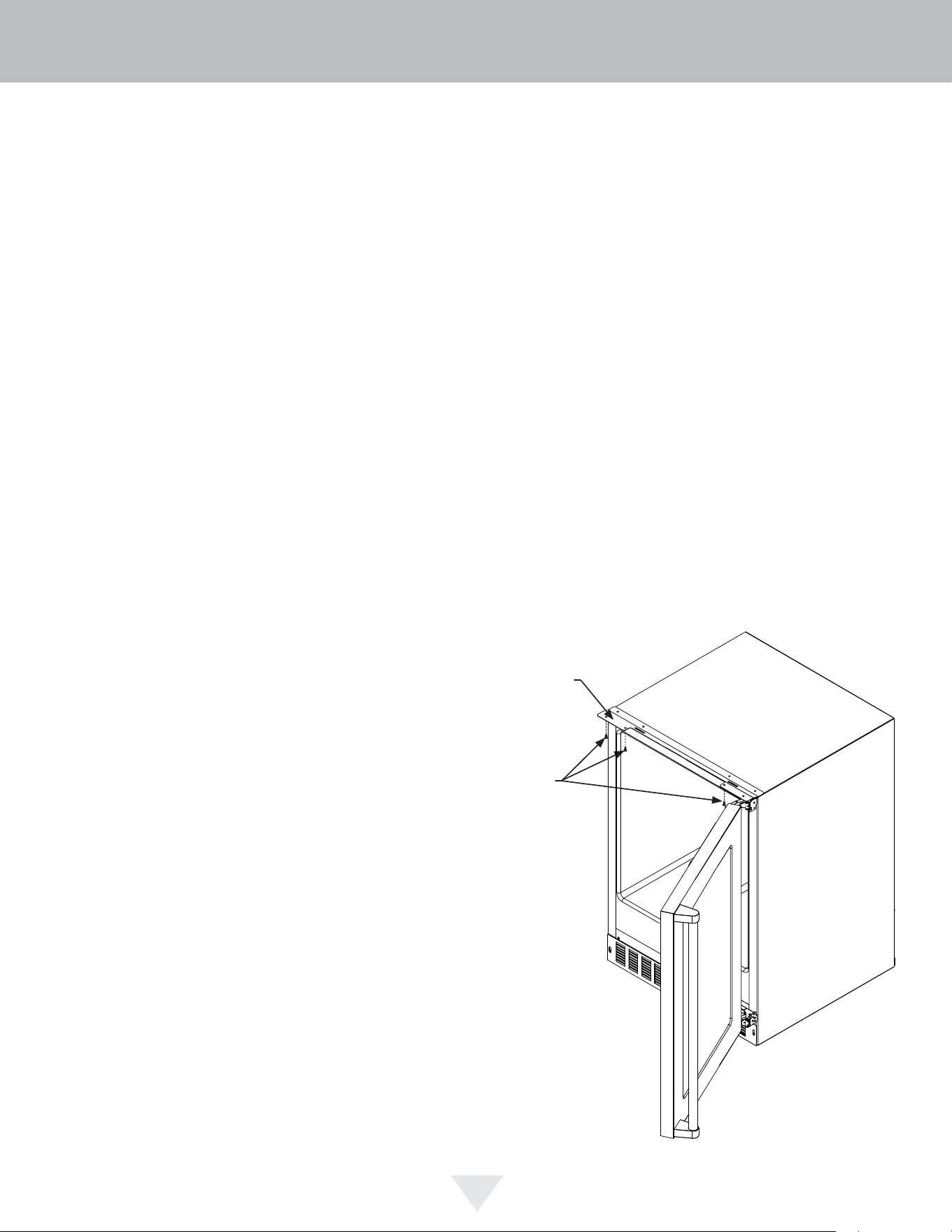
Step 5: Install the door
Carefully open the top and bottom hinges on the door being
careful as there are many pinch points. Place the hinges
over the 4 screws in the cabinet, 2 at the top and 2 at the
bottom and slide the door into position. Tighten the 4 hinge
screws with a phillips screwdriver. (See Figures 21 and
21a).
SECTION A-A
SCALE 1 : 1
LOCK
NUT
BRASS EXTENSION
CAM
PHILLIPS SCREW
13/16 COUNTER
BORE 7/16 DEEP
1/2 HOLE
3/4 INCH
WOOD PANEL
SPRING WASHER
INNER
DOOR
Step 6: Secure the cabinet
Use the #8 x
3
⁄4" black screws from the literature pack to
secure the counter top to the cabinet top through the holes
in the cabinet "Z" bracket.
Figure 23
Cam stop
washer
Spring
washer
Cam
Set screw
Lock
Key
Retainer
nut
Screw
Brass
extension
(2 lengths
provided)
Figure 22
INTEGRATED PANEL INSTALLATION
15
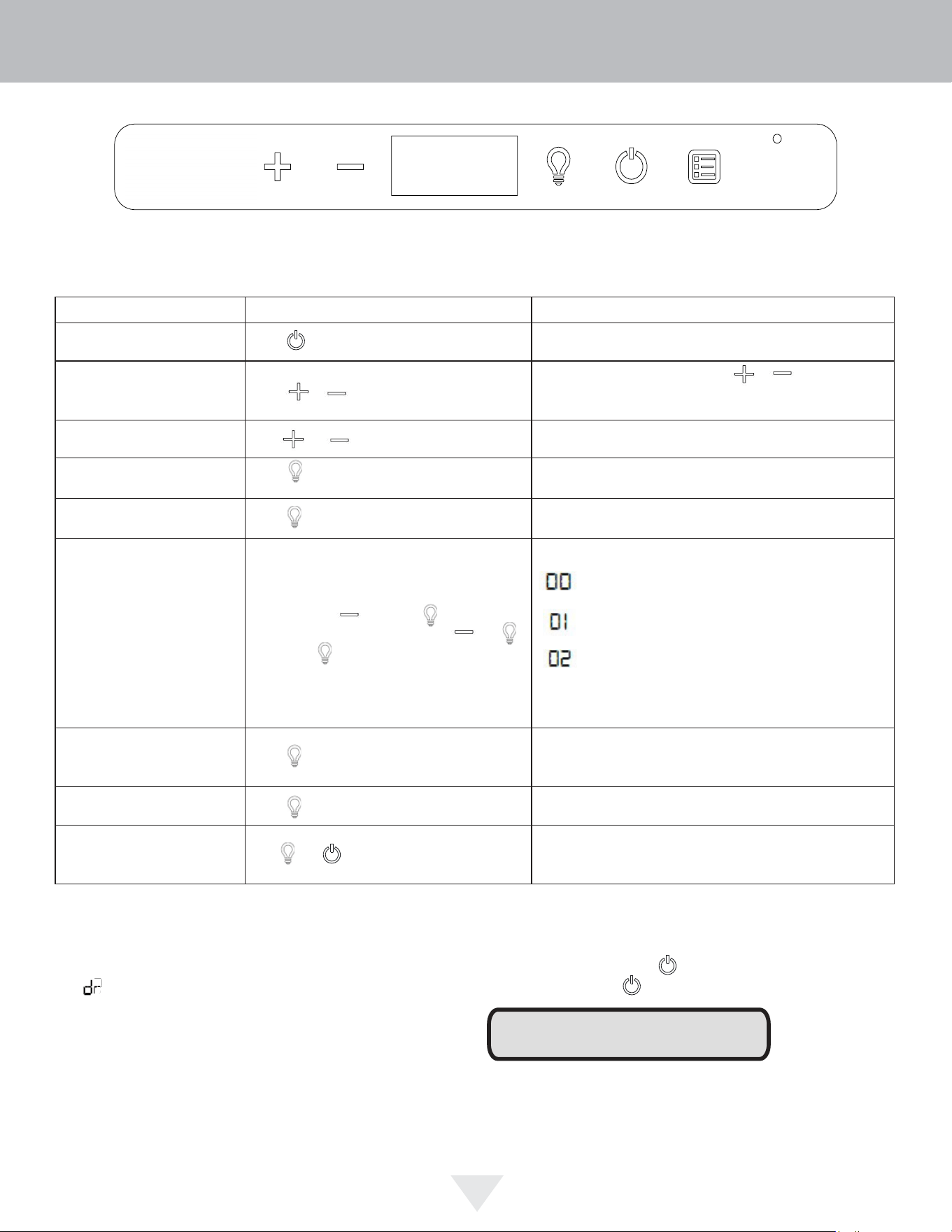
Control Function Guide
Function Command Notes
ON/OFF Press and release. Unit will immediately turn ON or OFF.
Adjust Temperature Press or and release.
When the display is flashing, press or to adjust the set
point temperature. Note: temperature displayed is the actual
temperature inside unit.
Toggle Between
o
F /
o
C Hold and for 5 seconds. The display will change units.
Leave Interior Light On
Press and release to leave interior light on for
12 hours; press again to deactivate.
After 12 hours, factory default is restored; light will turn on when
door is open.
Hide Display
Press .
Display will turn off when door is closed. Unit will continue to
operate. Repeat command to turn on display.
Adjust Light Color
Press and hold then press and wait for
UI to flash. Once UI flashes, release and ,
and use the to scroll through options 0-2.
Option Open Door Closed Door
White White
Blue Blue
White Blue
Light will be set at full intensity when door is open, and 50%
intensity when door is closed.
Enable Sabbath Mode Press and hold for 5 seconds and release.
The
o
F /
o
C symbol will flash briefly after 5 seconds. Interior
light and display will go dark and remain so until user resets
mode - unit continues to operate.
Disable Sabbath Mode Press and release. Display and interior light return to normal operation.
Showroom Mode Hold and for 5 seconds.
The
o
F /
o
C symbol will flash. Display will be lit and interior light
will function. Unit will not cool. Repeat command to return to
normal operation.
Door Alert Notication
When the door is left open for more than 30 minutes:
• A tone will sound for several seconds every minute
• will appear in display
• Close door to silence alert and reset
First Use
Initial startup requires no adjustments. When plugged in, the unit will
begin operating under the factory default settings. If the unit was turned off
during installation, simply press and the unit will immediately switch on.
To turn the unit off, press .
Temperature displayed reflects actual temperature inside unit. If the
temperature displayed is different than selected, the unit is progressing
towards the selected temperature. Time to reach set point varies based
upon ambient temperature, temperature of product loaded, door
openings, etc. Viking recommends allowing the unit to reach set points
before loading.
NOTE
High/Low Temp. Notifications
When the compartment temperature exceeds the control setting
for an extended amount of time:
• “HH” will appear in display (High Temp)
• “LL” will appear in display (Low Temp)
Contact service dept. for further instructions.
USING YOUR ELECTRONIC CONTROL
16
Figure 25
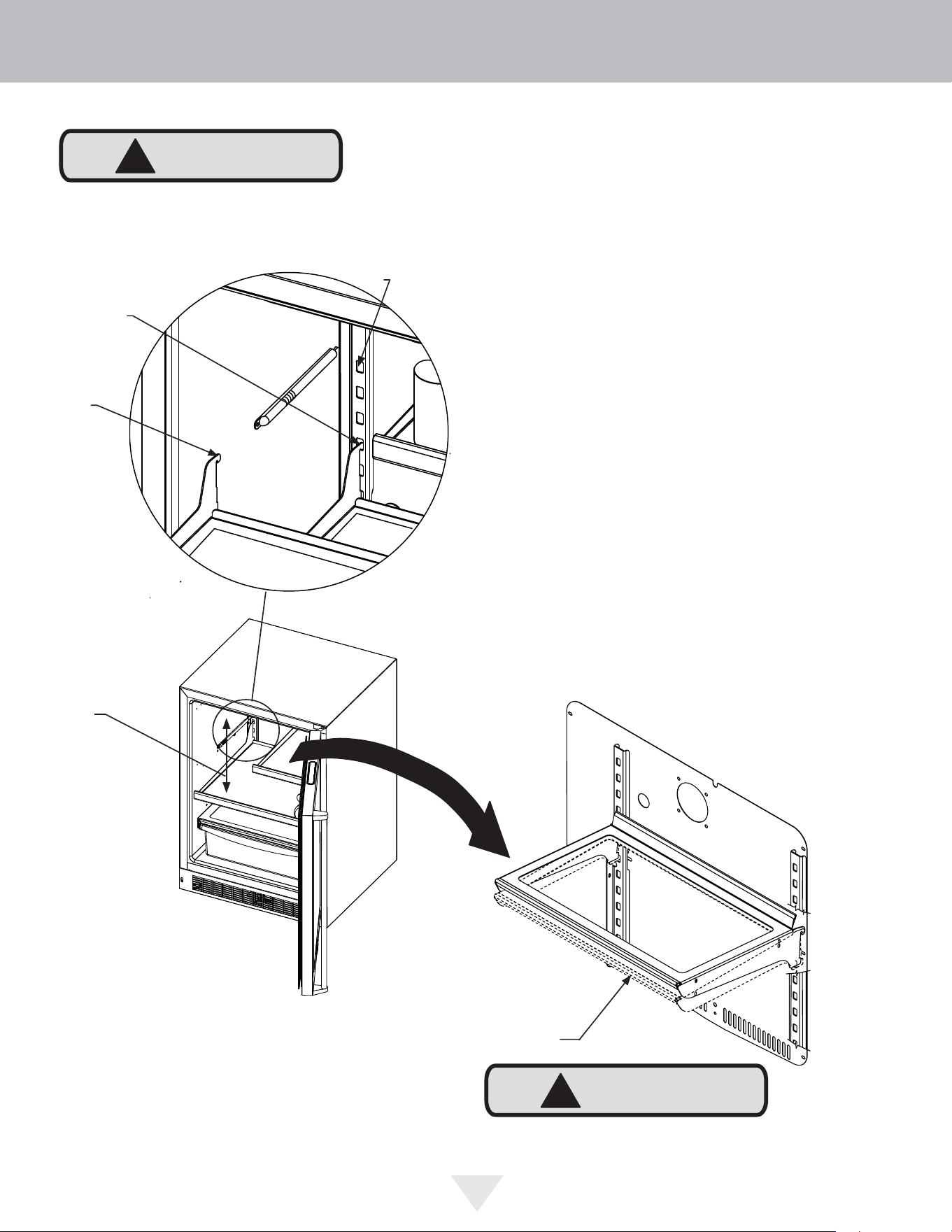
17
Tall bottle
storage
area
To Add or Remove a Shelf
Remove stored product from the shelf. Do not try to remove
a loaded shelf from the appliance. Grasp the shelf front with
both hands, rotate the front upward and lift out. (See Figure
26b). To install a shelf insert the shelf in the appliance and
insert the top hooks into the shelf support slots and drop
the shelf down so the hooks drop over the bottom of the
slots.
Rear tang
(hook) on
shelf
Shelf support
slot
Installed shelf
tang
Make sure your cantilever shelf is secure on the shelf
supports by pressing down on the shelf before loading the
shelf.
!
CAUTION
Grasp the shelf by the front with
both hands and rotate the front
of the shelf up, then lift the shelf
up and remove the shelf from the
shelf ladders.
!
CAUTION
Never try to move a loaded shelf, remove everything from
the shelf before moving. Use both hands when moving a
shelf.
Figure 26a
Figure 26
Figure 26b
SHELVING CONFIGURATIONS
18
!
CAUTION
Front Grille
Be sure that nothing obstructs the required air fl ow open-
ings in front of the cabinet. At least once or twice a year,
brush or vacuum lint and dirt from the front grille area (see
page 4).
SHOCK HAZARD: Disconnect electrical power from the
appliance before cleaning with soap and water.
Cabinet
The painted cabinet can be washed with either a mild soap
and water and thoroughly rinsed with clear water. NEVER
use abrasive scouring cleaners.
Interior
Wash interior compartment with mild soap and water. Do
NOT use an abrasive cleaner, solvent, polish cleaner or
undiluted detergent.
Care of Appliance
1. Avoid leaning on the door, you may bend the door
hinges or tip the appliance.
2. Exercise caution when sweeping, vacuuming or mop-
ping near the front of the appliance. Damage to the
grille can occur.
3. Periodically clean the interior of the appliance as
needed.
4. Periodically check and/or clean the front grille as
needed.
In the Event of a Power Failure
If a power failure occurs, try to correct it as soon as pos-
sible. Minimize the number of door openings while the
power is off so as not to adversely affect the appliance's
temperature.
Light assembly replacement
All models use an LED to illuminate the interior of the ap-
pliance. This component is very reliable, but should it fail,
contact a qualifi ed service technician for replacement of the
LED.
The following suggestions will minimize the
cost of operating your refrigeration appliance.
1. Do not install your appliance next to a hot appliance
(cooker, dishwasher, etc.), heating air duct, or other
heat sources.
2. Install product out of direct sunlight.
3. Ensure the front grille vents at front of appliance be-
neath door are not obstructed and kept clean to allow
ventilation for the refrigeration system to expel heat.
4. Plug your appliance into a dedicated power circuit. (Not
shared with other appliances).
5. When initially loading your new product, or whenever
large quantities of warm contents are placed within
refrigerated storage compartment, minimize door
openings for the next 12 hours to allow contents to pull
down to compartment set temperature.
6. Maintaining a relatively full storage compartment will
require less appliance run time than an empty compart-
ment.
7. Ensure door closing is not obstructed by contents
stored in your appliance.
8. Allow hot items to reach room temperature before plac-
ing in product.
9. Minimize door openings and duration of door openings.
10. Use the warmest temperature control set temperature
that meets your personal preference and provides the
proper storage for your stored contents.
11. When on vacation or away from home for extended pe-
riods, set the appliance to warmest acceptable tem-
perature for the stored contents.
12. Set the control to the “off” position if cleaning the
appliance requires the door to be open for an extended
period of time.
13. For wine storage products:
When serving temperatures are not required,
return the compartment(s) set temperature to the
ideal red and white wine long term storage tem-
perature of 13°C / 55°F.
CARE AND CLEANING AND ENERGY SAVING TIPS

19
If service is required, call your authorized service agency.
Have the following information readily available:
• Model number
• Serial number
• Date purchased
• Name of dealer from whom purchased
Clearly describe the problem that you are having. If you are
unable to obtain the name of an authorized service agency,
or if you continue to have service problems, contact Viking
Range, LLC at (888) 845-4641 or write to:
VIKING RANGE, LLC
PREFERRED SERVICE
111 Front Street
Greenwood, Mississippi 38930 USA
Record the information indicated below. You will need it
if service is ever required. The serial number and model
numbers for your refrigerator are located on the upper wall,
behind the lighting:
Model No. ___________________________________
Serial No. _____________________________________
Date of Purchase ______________________________
Date Installed _________________________________
Dealer’s Name ________________________________
Address _____________________________________
__________________________________________
If service requires installation of parts, use only authorized
parts to insure protection under the warranty.
Keep this manual for future reference.
SERVICE INFORMATION
20
• Never attempt to repair or perform maintenance on
the appliance until the main electrical power has been
disconnected. Turning the appliance control "OFF"
does not remove electrical power from the units wiring.
• Replace all parts and panels before operating.
!
WARNING
Electrocution Hazard
Before You Call for Service
If the appliance appears to be malfunctioning, read
through this manual fi rst. If the problem persists, check the
troubleshooting guide below. Locate the problem in the
guide and refer to the cause and its remedy before calling
for service. The problem may be something very simple
that can be solved without a service call. However, it may
be required to contact your dealer or a qualifi ed service
technician.
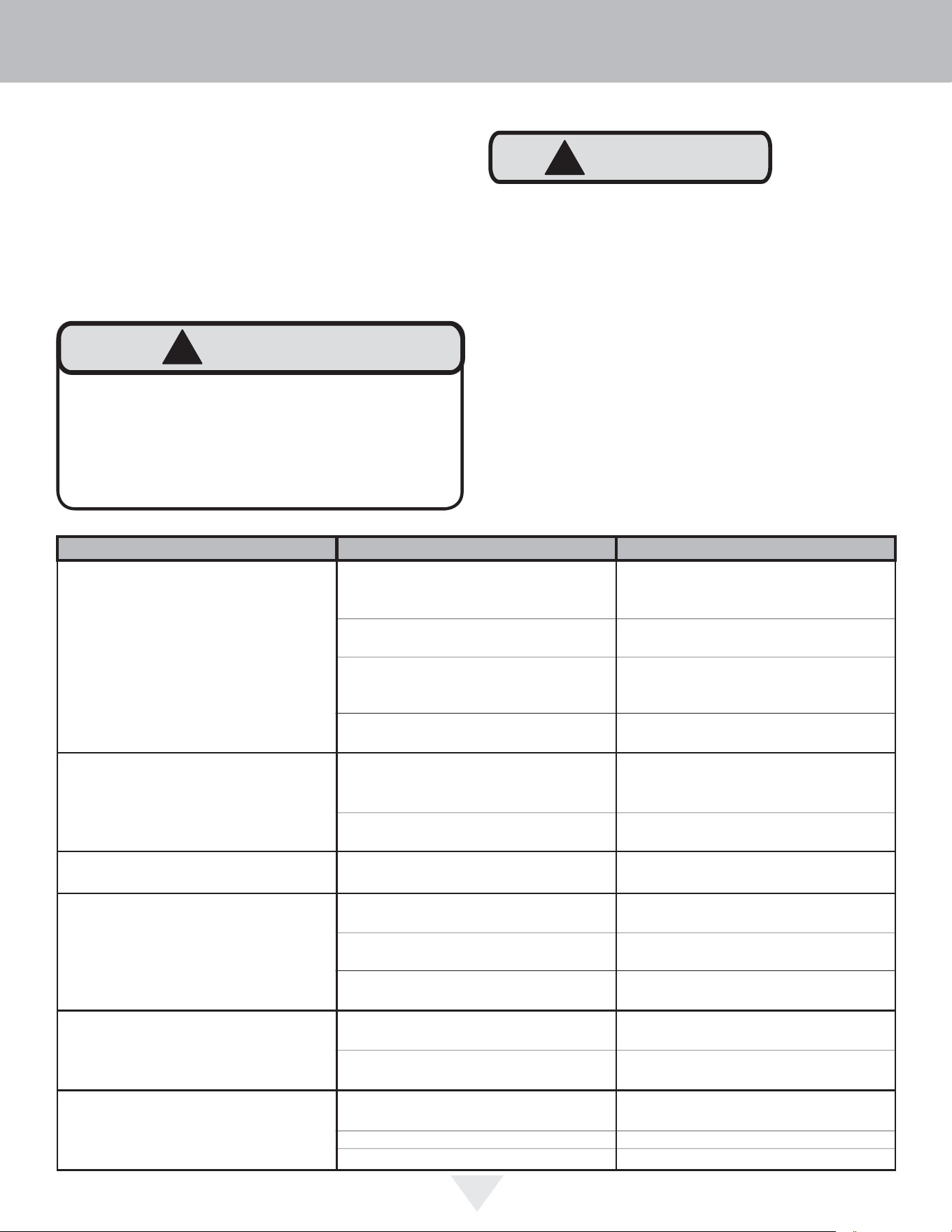
TROUBLESHOOTING
Problem Possible Cause Remedy
Appliance not cold enough
(See “Adjusting the temperature" on
page 9)
• Control set too warm
• Content temperature not stabi-
lized.
• Excessive usage or prolonged
door openings.
•Airfl ow to front grille blocked.
• Door gasket not sealing properly.
• Adjust temperature colder. Al-
low 24 hours for temperature to
stabilize.
• Allow temperature to stabilize for
at least 24 hours.
•Airfl ow must not be obstructed to
front grille. See “clearances” on
page 4.
• Check door alignment and/or
replace door gasket.
Appliance too cold
(See “Adjusting the Temperature” on
page 9)
• Control set too cold
• Door gasket not sealing properly.
• Adjust temperature warmer.
Allow 24 hours for temperature to
stabilize.
• Check door alignment and/or
replace door gasket.
No interior light. • Failed LED light assembly or light
switch.
• Contact a qualifi ed service techni-
cian.
Light will not go out when door is
closed
• Display light is turned on. (Glass
door models only.
• Door not activating light switch.
• Failed light switch
• Turn off display light, shut door.
• Appliance not level, level appli-
ance, (See page 4, “leveling legs”)
• Contact a qualifi ed service techni-
cian.
Noise or Vibration • Appliance not level
• Fan hitting tube obstruction.
• Level appliance, see “Leveling
Legs” on page 4.
• Contact a qualifi ed service techni-
cian.
Appliance will not run. • Appliance turned off
• Power cord not plugged in.
• No power at outlet.
• Turn appliance on. See “Starting
your appliance” on page 8.
• Plug in power cord.
• Check house circuit.
!
CAUTION
In the unlikely event you lose cooling in your unit, do not
unplug the product from the electric supply, but do call
a qualifi ed service technician immediately. It is possible
that the loss of cooling capacity is a result of excessive
frost build-up on the evaporator cooling coil. In this case,
removing power to the unit will result in the melting of this
excessive quantity of ice, which could generate melt water
that exceeds the capacity of the defrost drain system and
could result in water damage to your home. The end-user
will be ultimately responsible for any water damage caused
by prematurely turning the unit off without appropriately
managing the excess water run-off.

21
HOUSEHOLD PRODUCT WARRANTY
UNDERCOUNTER REFRIGERATOR / BEVERAGE CENTER WARRANTY
TWO YEAR FULL WARRANTY
Undercounter refrigerators / Beverage Centers and all of their component parts, except as detailed below*†, are warranted to be free from defective materials or
workmanship in normal residential use for a period of two (2) years from the date of original retail purchase. Viking Range, LLC, warrantor, agrees to repair or
replace, at its option, any part which fails or is found to be defective during the warranty period.
*FULL NINETY (90) DAY COSMETIC WARRANTY:
Product is warranted to be free from cosmetic defects in materials or workmanship (such as scratches on
stainless steel, paint/porcelain blemishes, etc.) for a period of ninety (90) days from the date of original retail purchase or closing date for new
construction, whichever period is longer. Any defects must be reported to the selling dealer within ninety (90) days from date of original retail purchase.
Viking Range, LLC uses high quality processes and materials available to produce all color finishes. However, slight color variation may be noticed because
of the inherent differences in painted parts and porcelain parts as well as differences in kitchen lighting, product locations, and other factors. Therefore,
this warranty does not apply to color variation attributable to such factors.
†FULL NINETY (90) DAY WARRANTY IN “RESIDENTIAL PLUS” APPLICATIONS: Viking products are designed and certified for residential use only. They are
not intended for use in commercial applications. Viking products should only be used in accordance to national and local codes. Viking is not
responsible for property damage or injury resulting from use in a commercial application. To support the manufacturing quality of its appliance’s Viking
will provide a full 90 day warranty for products used in “Residential Plus “applications. This “Residential Plus” warranty applies to applications where use
of the product extends beyond residential use but is in compliance with national and local code. In some jurisdictions these applications are zoned as
residential. Examples of, but not limited to, such applications covered by this warranty are bed and breakfasts, fire stations, private clubs, churches,
condominium/apartment common areas etc. Under this "Residential Plus" warranty, the product, its components and accessories are warranted to be free
from defective material or workmanship for a period of ninety (90) days from the date of original retail purchase. Viking Range, LLC, warranter, agrees to
repair or replace, at its option, any part which fails or is found to be defective during the warranty period. This warranty covers parts and labor. This
warranty excludes use of the product in all commercial locations such as restaurants, food service locations and institutional food service locations.
SIX YEAR FULL WARRANTY ON SEALED REFRIGERATION PARTS AS LISTED
Any sealed refrigeration system component, as listed below, is warranted to be free from defective materials or workmanship in normal household use during the
third through the sixth year from the date of original retail purchase. Viking Range, LLC, warranter, agrees to repair or replace, at its option, any part which fails or is
found to be defective during the warranty period.
Sealed Refrigeration System Components: Compressor, Evaporator, Condenser, Connecting Tubing, Dryer/Strainer
TWELVE YEAR LIMITED WARRANTY ON SEALED REFRIGERATION PARTS AS LISTED
Any sealed refrigeration system component, as listed above, which fails due to defective materials or workmanship in normal household use during the seventh
through the twelfth year from the date of original retail purchase will be repaired or replaced, free of charge for the part itself, with the owner paying all other costs,
including labor.
WARRANTY TERMS
This warranty extends to the original retail purchaser of the product warranted hereunder and to each transferee owner of the product during the term of the
original purchaser's warranty. the warranty is transferable by the original retail purchaser via home sale only. If a transferee owner is unable to provide proof of
purchase from the original purchaser and the product has not been previously registered, the production date of the product, located in the serial number of the
product, will serve as the effective warranty start date.
The activation date of the warranty begins from the date of original retail purchase. In the case of new product purchase via building development sales, activation
begins from the earlier date of either certificate of occupancy or 24 months from date of manufacture. Note date of manufacture is identified by serial tag on
product.
This warranty does not cover units purchased as b-stock, liquidation, salvage, seconds, refurbished, as-is, used products.
This warranty shall apply to products purchased in the United States and Canada. Products must be purchased in the country where service is requested. Warranty
service must be performed by a Viking Range LLC authorized service agency or representative. Warranty shall not apply to damage resulting from abuse, accident,
natural disaster, loss of electrical power to the product for any reason, alteration, improper installation, improper operation, or repair service of the product by
anyone other than a Viking Range LLC authorized service agency or representative. This warranty does not apply to commercial usage. Warrantor is not responsible
for consequential or incidental damage whether arising out of breach of warranty, breach of contract or otherwise. Some jurisdictions do not allow the exclusion or
limitation of incidental or consequential damages, so the above limitations do not apply to you.
Owner shall be responsible for proper installation, providing normal care and maintenance, providing proof of purchase upon request, and making the product
reasonably accessible for service. If the product or one of its component parts contains a defect or malfunction during the warranty period, after a reasonable
number of attempts by the warrantor to remedy the defects or malfunctions, the owner is entitled to either a refund or replacement, at the warrantor’s discretion of
the product or its component part or parts. Warrantor’s liability on any claim of any kind, with respect to the goods or services covered hereunder, shall in no case
exceed the price of the goods or service or part thereof which gives rise to the claim.
WARRANTY SERVICE
Under the terms of this warranty, service must be performed by a Viking Range LLC authorized service agent or representative. Service will be provided during
normal business hours Labor performed at overtime or premium rates shall not be covered by the warranty. To obtain warranty service contact Viking Range LLC
Customer Care at 1-888-845-4641. Please have model number, serial number, and date of original purchase available when calling. IMPORTANT: Retain proof of
original purchase to establish warranty period. The return of the owner registration card is not a condition of warranty coverage. You should, however, return the
owner registration card so Viking Range LLC can contact you should any question of safety arise which could affect you. Any implied warranties of merchantability
and fitness applicable to the above described burner assemblies, infrared rotisserie burners, grill grates, and stainless steel parts are limited in duration to the period
of coverage of the applicable express written limited warranties set forth above. Some jurisdictions do not allow limitations on how long an implied warranty lasts, so
the above limitations may not apply to you. This warranty gives you specific legal rights, and you may also have other rights which may vary from jurisdiction to
jurisdiction.
Specifications subject to change without notice.

30736
Viking Range, LLC
111 Front Street
Greenwood, Mississippi 38930 USA
(662) 455-1200
For product information,
call 1-888-(845-4641)
or visit our web site at vikingrange.com
(111124)