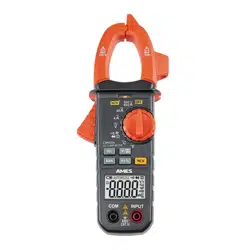
Visit our website at: http://www.harborfreight.com
Email our technical support at: [email protected]
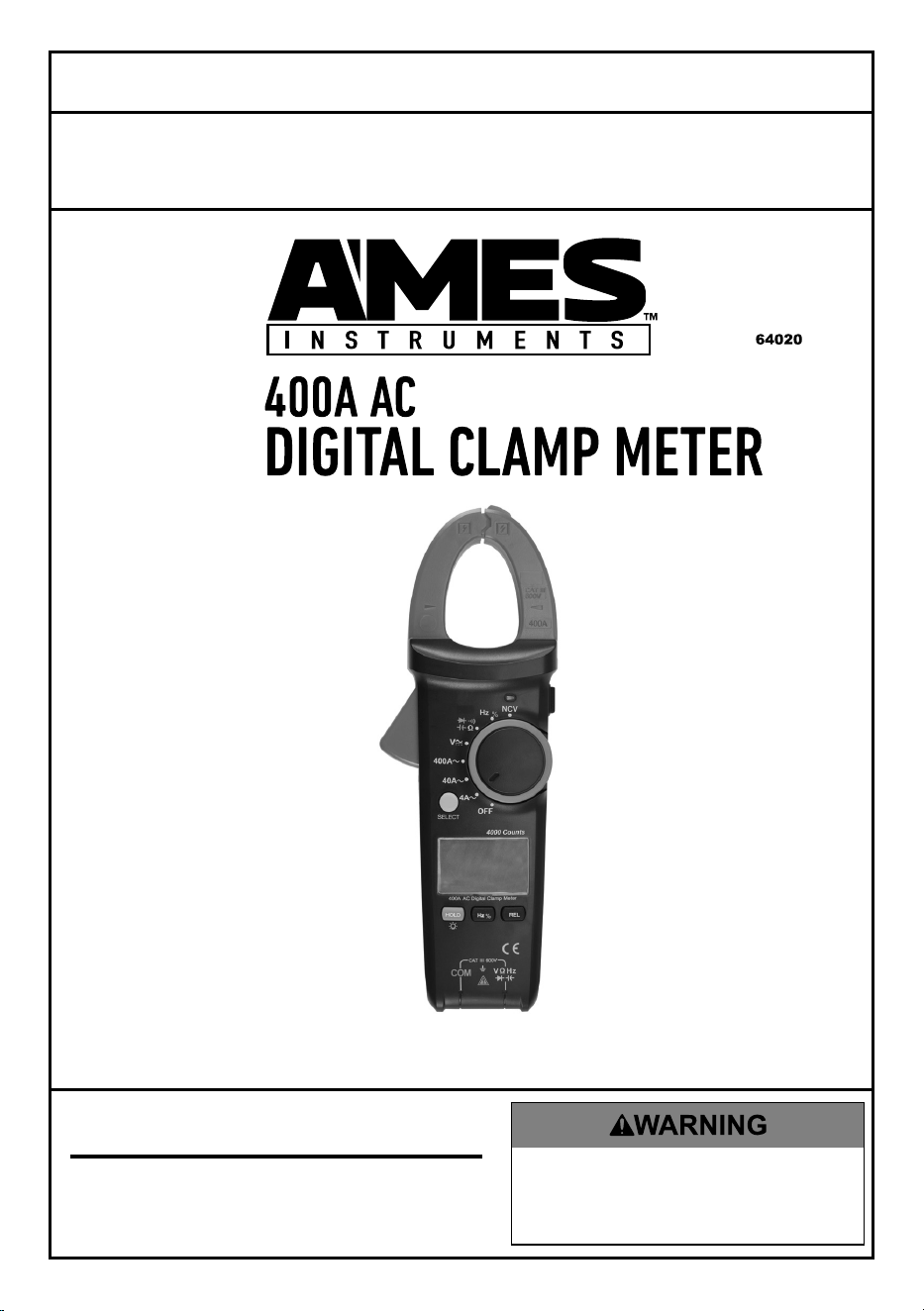
Owner’s Manual & Safety Instructions
Save This Manual Keep this manual for the safety warnings and precautions, assembly,
operating, inspection, maintenance and cleaning procedures. Write the product’s serial number in the
back of the manual near the assembly diagram (or month and year of purchase if product has no number).
Keep this manual and the receipt in a safe and dry place for future reference. 17h
When unpacking, make sure that the product is intact
and undamaged. If any parts are missing or broken,
please call 1-888-866-5797 as soon as possible.
Copyright
©
2017 by Harbor Freight Tools
®
. All rights reserved.
No portion of this manual or any artwork contained herein may be reproduced in
any shape or form without the express written consent of Harbor Freight Tools.
Diagrams within this manual may not be drawn proportionally. Due to continuing
improvements, actual product may differ slightly from the product described herein.
To ols required for assembly and se rv ic e m ay n ot b e i nc lu de d .
Read this material before using this product.
Failure to do so can result in serious injury.
SAVE THIS MANUAL.
Page 2 For technical questions, please call 1-888-866-5797. Item 64020
Table of Contents
Safety ..........................................3
Specifications ..............................5
Setup ...........................................6
Operation .....................................8
Maintenance ...............................14
Warranty .....................................16
WARNING SYMBOLS AND DEFINITIONS
This is the safety alert symbol. It is used to alert you to
potential personal injury hazards. Obey all safety messages
that follow this symbol to avoid possible injury or death.
Indicates a hazardous situation which, if not avoided,
will result in death or serious injury.
Indicates a hazardous situation which, if not avoided,
could result in death or serious injury.
Indicates a hazardous situation which, if not avoided,
could result in minor or moderate injury.
Addresses practices not related to personal injury.

Page 3For technical questions, please call 1-888-866-5797.Item 64020
SAFETYOpERATIONMAINTENANCE SETUp
IMpORTANT SAFETY INFORMATION
Safety Warnings and precautions
Read all safety warnings and all instructions.
Failure to follow the warnings and instructions may result
in electric shock, fire and/or serious injury.
Save all warnings and instructions for future reference.
1. Electrical shock can cause death
or injury! NEVER TOUCH exposed
conductors of electricity.
2. Test cable voltages with care.
Only use one hand when securing
the clamp around cable.
3. Inspect the Meter before use. In
addition to a general inspection:
a. Check the insulation
protecting the connectors.
b. Check the Test Leads for
exposed metal, damaged
insulation, and continuity.
c. Replace damaged test lead
immediately, before use.
4. Do not use the Meter if:
a. Either of the Test Leads are
damaged in any way.
b. Test Leads are dirty or
have residue on them.
c. The battery is low.
d. Near any explosive
gasses or fumes.
e. Any abnormal operation is
detected. (If in doubt about
the condition of the Meter,
have it serviced before use.)
f. The battery cover is open.
5. Power this Meter using only
the battery(ies) referenced in
the Specifications Chart.
6. Use caution when working near
voltages above 30 VAC rms, 42 VAC
peak, or 60 VDC. Voltages this high
present a risk of electric shock.
7. Disconnect the circuit’s power
before connecting the meter in
series, when measuring current.
8. Connect the common (COM) test
lead first and disconnect it last.
9. Hold the probes with fingers
behind guards.
10. Avoid electrical shock. Use extreme
caution when working near uninsulated
conductors or bus bars. Prevent body
contact with grounded surfaces such
as pipes, radiators, ranges, and cabinet
enclosures when testing voltages.
11. Observe work area conditions. Do
not test voltages in damp or wet
locations. Don’t expose to rain.
Keep work area clean and well lit.
12. Keep children away. Children must
never be allowed in the work area.
13. Stay alert. Watch what you are doing,
use common sense. Do not operate
any meter when you are tired.
14. Do not operate meter if under the
influence of alcohol or drugs. Read
warning labels on prescriptions
to determine if your judgment or
reflexes are impaired while taking
drugs. If there is any doubt,
do not operate the meter.
Page 4 For technical questions, please call 1-888-866-5797. Item 64020
SAFETY OpERATION MAINTENANCESETUp
15. People with pacemakers should
consult their physician(s) before
use. Electromagnetic fields in close
proximity to heart pacemaker could
cause pacemaker interference
or pacemaker failure.
16. Do not test voltage on circuits
higher than 600 volts.
17. Do not test current on circuits
higher than 400A.
18. Use as intended only.
19. Prior to testing resistance, diodes,
or continuity; disconnect all power
to the circuit and discharge all
high-voltage capacitors.
20. Dress properly. Protective,
electrically nonconductive
clothes and nonskid footwear are
recommended when working.
21. Wear ANSI-approved safety
goggles during use.
22. Only use accessories intended
for use with this Meter.
23. Performance of this Meter may vary
depending on battery condition.
24. Use the proper settings, terminals,
techniques, and range for the
tests performed. Start with the
range stated in the instructions.
25. Do not apply voltage to the
Test Leads when the Meter is in
the ohms testing setting. Damage
can occur to the Meter.
26. Do not switch between testing modes
with the Meter connected to a circuit.
27. Do not use the Meter at a setting
marked as blank on the scale.
28. Prior to testing capacitors, resistance,
diodes, or continuity; disconnect all
power to the circuit and discharge
all high-voltage capacitors.
29. Have the Meter calibrated by a
qualified technician every year.
30. Do not disassemble Meter; take
it to a qualified technician when
service or repair is required.
31. The warnings, cautions, and
instructions discussed in this
instruction manual cannot cover all
possible conditions and situations that
may occur. It must be understood
by the operator that common sense
and caution are factors which cannot
be built into this product, but must
be supplied by the operator.
SAVE THESE INSTRUCTIONS.
Page 5For technical questions, please call 1-888-866-5797.Item 64020
SAFETYOpERATIONMAINTENANCE SETUp
Specifications
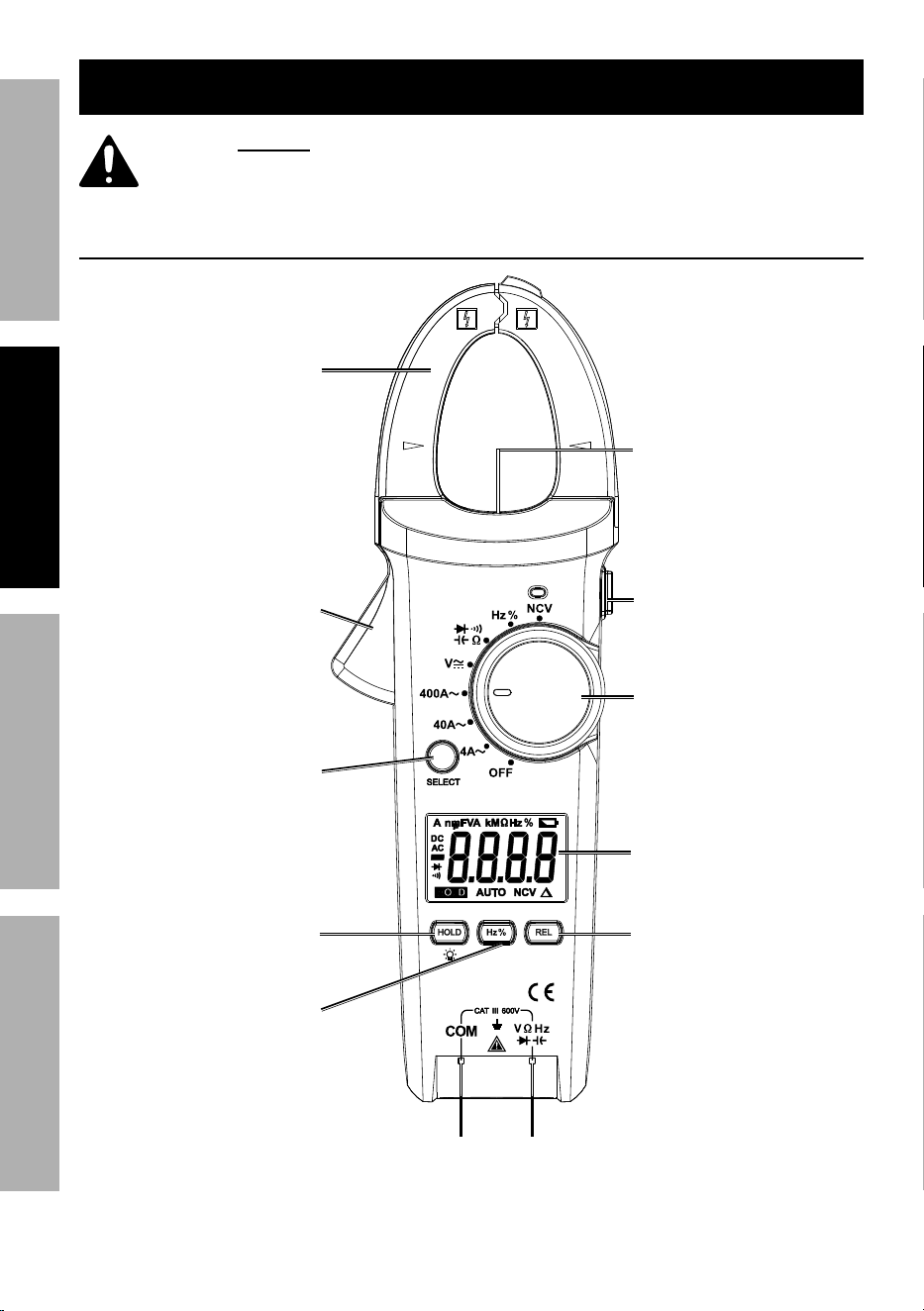
DC Voltage Ranges: 400mV / 4V / 40V / 400V / 600V
DC Voltage Accuracy (@ 400mV) ± 1.0% of rdg + 8D
(@ 4V) ± 0.8% of rdg + 1D
(@ 40V, 400V) ± 0.8% of rdg + 3D
(@ 600V) ± 1.0% of rdg + 3D
AC Voltage Ranges: 4V / 40V / 400V / 600V
Frequency Range: 40Hz - 400Hz
AC Voltage Accuracy (@ 4V, 40V, 400V) ± 1.2% of rdg + 5D
(@ 600V) ± 1.5% of rdg + 5D
AC Current Ranges: 4A / 40A / 400A
Frequency Range: 50Hz - 60Hz
AC Current Accuracy (@ 4A) ± 2.5% of rdg + 30D
(@ 40A) ± 2.5% of rdg + 5D
(@ 400A) ± 1.8% of rdg + 9D
Resistance Ranges: 400Ω / 4kΩ / 40kΩ / 400kΩ / 4MΩ / 40MΩ
Resistance Accuracy (@ 400Ω) ± 1.2% of rdg + 2D
(@ 4kΩ, 40kΩ, 400kΩ) ± 1.0% of rdg + 2D
(@ 4MΩ) ± 1.2% of rdg + 3D
(@ 40MΩ) ± 2.0% of rdg + 5D
Diode Forward DC Current: ~1mA
Reverse DC Voltage: 1.5V
Continuity Meter beeps at < 30Ω
Capacitance Ranges: 50nF / 500nF / 5μF / 50μF / 100μF
Capacitance Accuracy (@ 50nF) ± 4.0% of rdg + 25D
(@ 500nF, 5μF, 50μF, 100μF) ± 4.0% of rdg + 5D
Frequency Range: 10Hz - 1MHz
Frequency Accuracy ± 0.1% of rdg + 4D
Sampling Rate ~3 times/second
Operating Temperature Range: 32° - 86°F
Operating Humidity 32° - 86°F ≤ 80% RH
87° - 104°F ≤ 75% RH
105° - 122F° ≤ 45% RH
Jaw Opening 30mm
Display LCD
Battery 3 AAA (included)
Page 6 For technical questions, please call 1-888-866-5797. Item 64020
SAFETY OpERATION MAINTENANCESETUp
Setup - Before Use:
Read the ENTIRE IMpORTANT SAFETY INFORMATION section
at the beginning of this manual including all text under
subheadings therein before set up or use of this product.
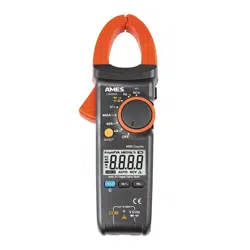
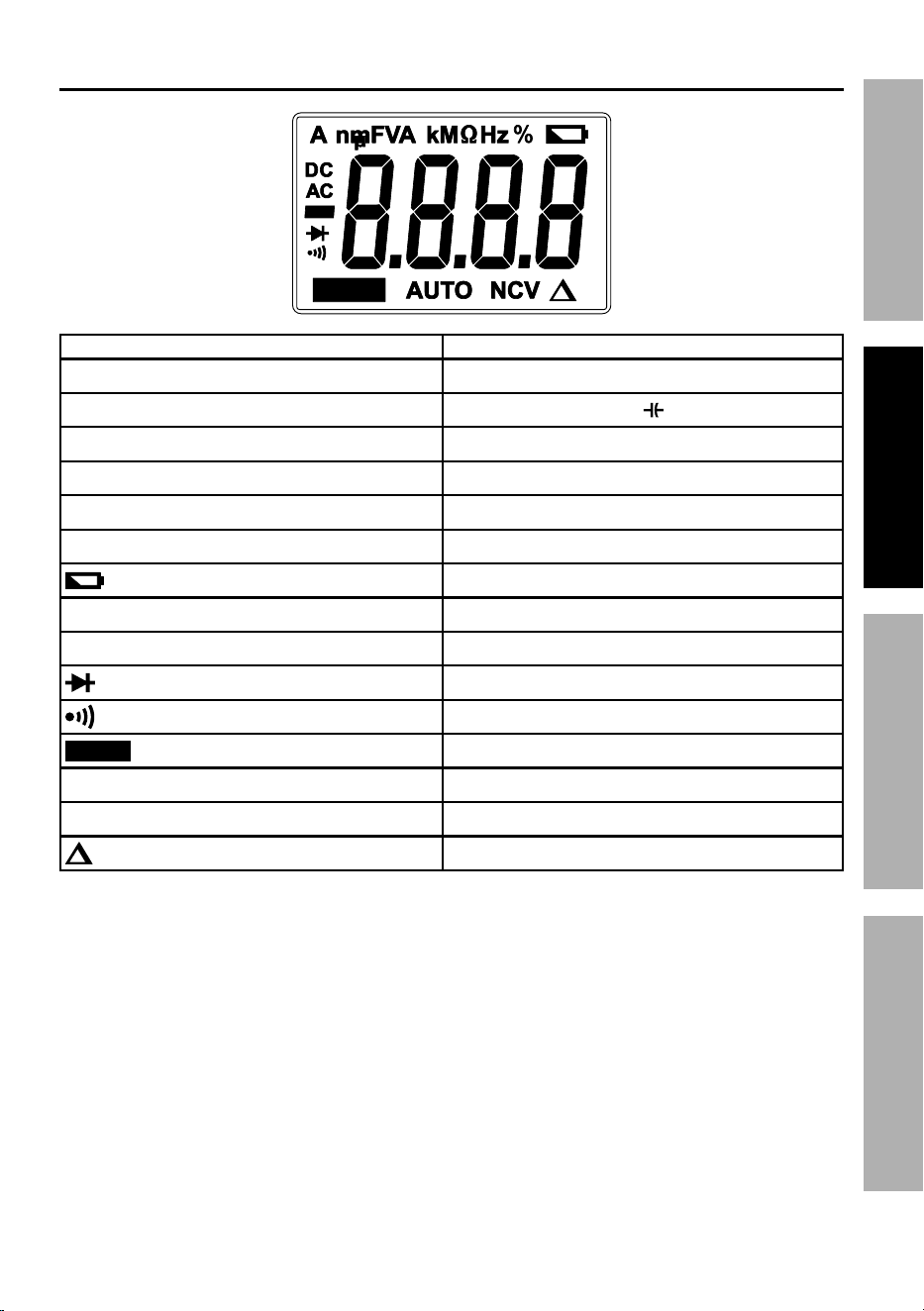
Functions
Clamp
Trigger
400A
CATIII
600V
Current
Clamp
Worklight
Worklight
Button
Rotary
Switch
Display
COM
Jack
Select
Button
Input
Jack
Frequency/Duty
Cycle Button
Relative Value
Button
Data Hold/
Light Button
Page 7For technical questions, please call 1-888-866-5797.Item 64020
SAFETYOpERATIONMAINTENANCE SETUp
Display
HOLD
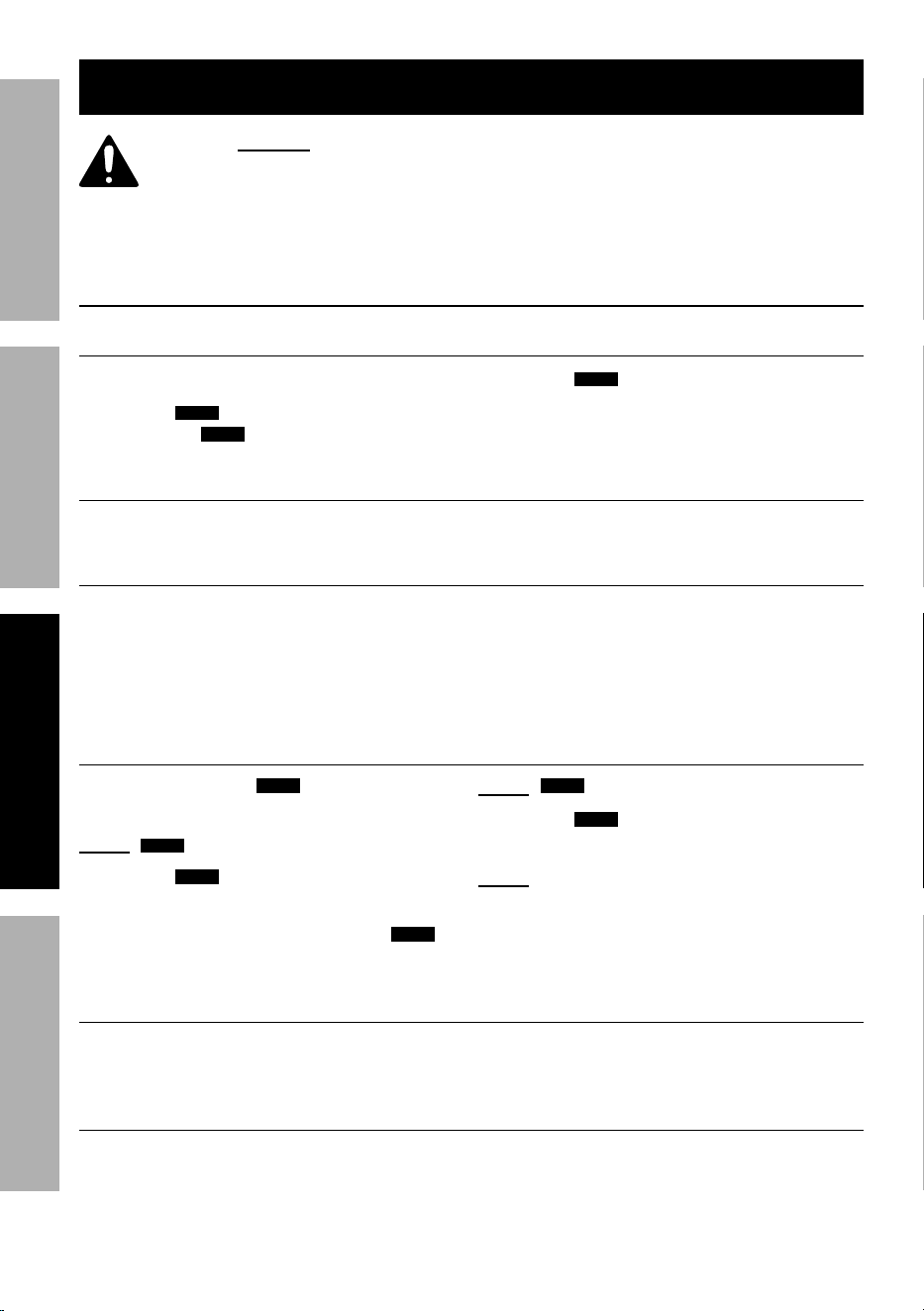
Symbol Description
μA, mA, A Amps (Current)
nF, uF, mF
Farads (Capacitance)
V, mV Volts (Voltage)
Ω, kΩ, MΩ ohms (Resistance)
Hz, kHz Hertz (Frequency)
% Duty Cycle
Low Battery
DC Direct Current
AC Alternating Current
Diode
Continuity
HOLD
Data Hold
AUTO Auto-Range
NCV Non-Contact Voltage Sensor
Relative Value
Page 8 For technical questions, please call 1-888-866-5797. Item 64020
SAFETY OpERATION MAINTENANCESETUp
Operating Instructions
Read the ENTIRE IMpORTANT SAFETY INFORMATION section
at the beginning of this manual including all text under
subheadings therein before set up or use of this product.
Electrical shock can cause death or injury! NEVER TOUCH
exposed conductors of electricity.
General Operation
Data Hold Button
Keep current reading on display.
1. Press
HOLD
button to keep current
reading.
HOLD
will appear on Display.
2. Press
HOLD
button to release hold.
Hz% Button
Switch between frequency and duty cycle measurements. See page 12.
REL Button
Show difference between two
readings in AC Current and
AC/DC Voltage. See page 9.
Zero out Test Lead resistance to
obtain accurate low resistance
reading. See page 11.
Zero out initial capacitance
reading. See page 11.
Backlight
1. Press and hold
HOLD
button
until Backlight turns on.
Note:
HOLD
will appear on Display.
2. Press
HOLD
button again
to release hold.
3. When finished, press and hold
HOLD
button until Backlight turns off.
Note:
HOLD
will appear on Display.
4. Press
HOLD
button again
to release hold.
Note: Frequent use of backlight
will shorten battery life.
Worklight
1. Press Worklight button to
turn on Worklight.
2. Press Worklight button again
to turn off Worklight.
Auto power Off
Meter will automatically turn off after 30 minutes of non-use. To
conserve battery power, turn Meter off after use.
Page 9For technical questions, please call 1-888-866-5797.Item 64020
SAFETYOpERATIONMAINTENANCE SETUp
Measurement Operation
Note: Remove plugs from
ends of Test Leads (included)
before connecting to Meter.
Note: Test Lead probes have removable
covers for overvoltage protection. With
covers in place, Test Leads are rated for
use with CAT IV circuits. Exposed probes
are rated for use with CAT II circuits.
AC Current Measurement
Measure AC conductors carrying
up to 400 amperes.
WARNING! To prevent electric
shock, test conductor voltages
with care. Only use one hand when
securing clamp around conductor.
WARNING! Remove Test Leads before
taking measurements with Current Clamp.
Note: Amperage is always tested
in series with circuit under test.
Note: To measure 2- and 3-wire power
cords, use an AC Line Splitter (not included)
and follow its instructions.
1. Turn Rotary Switch to 4A~, 40A~ or
400A~ position. Start with highest
range if amperage is unknown.
2. Using one hand, press Trigger to open
Clamp Jaws. Position Clamp Jaws
around conductor to be tested.
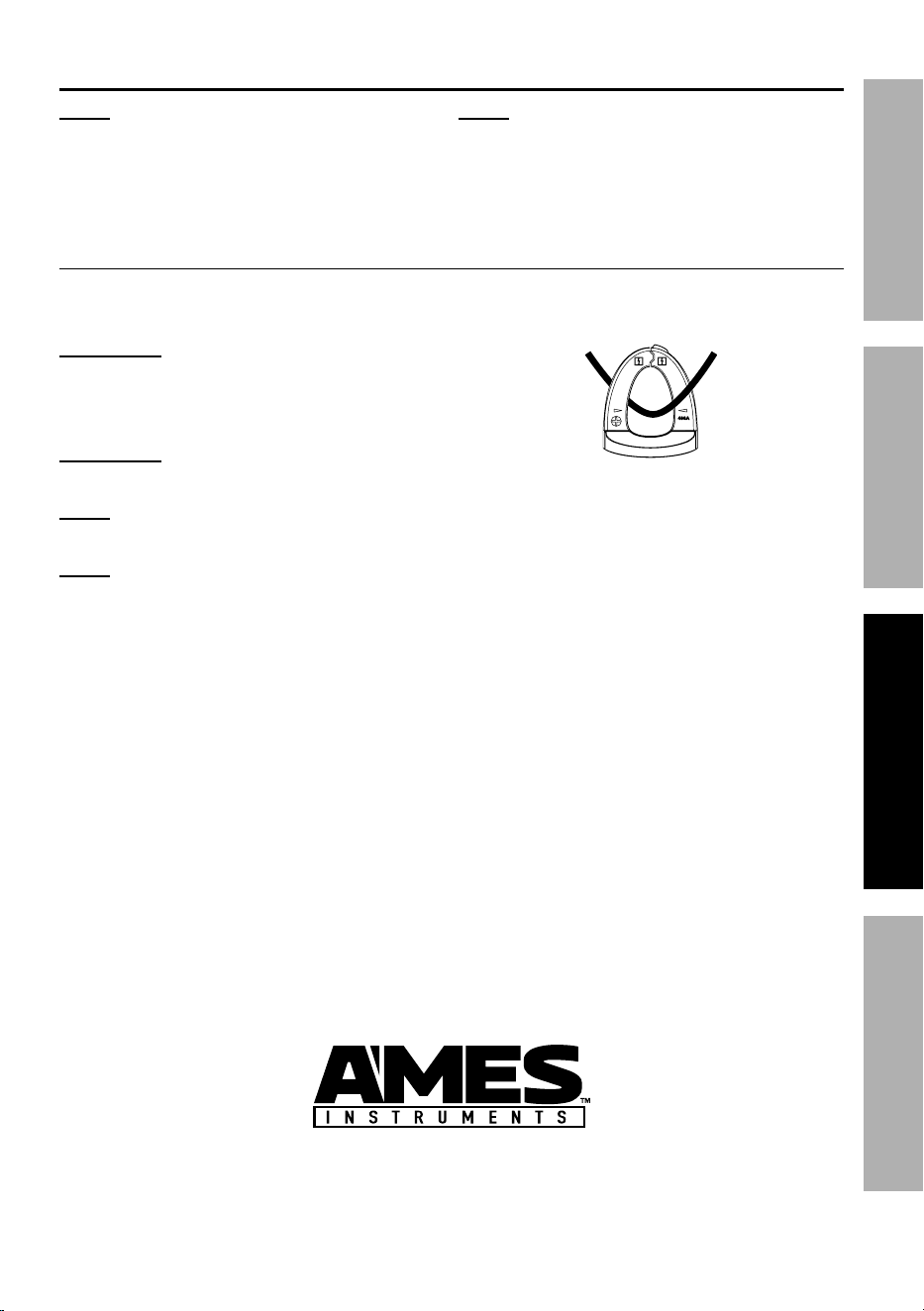
3. Center conductor between arrows
in Clamp Jaws, as shown.
4. Read measurement. Switch to
lower ranges, as necessary, to
get most accurate reading.
5. To compare difference between
two readings, press REL button
to store current reading. Take
second measurement, reading
will be difference between
first and second reading.
6. When testing is complete, turn
Rotary Switch to OFF, and store Meter.

Page 10 For technical questions, please call 1-888-866-5797. Item 64020
SAFETY OpERATION MAINTENANCESETUp
AC/DC Voltage Measurement
Measure AC conductors carrying
up to 600 VAC, 50-60 Hz.
Measure DC conductors
carrying up to 600 VDC.
WARNING! Use caution when working
near voltages above 30 VAC rms, 42
VAC peak, or 60 VDC. Voltages this
high present a risk of electric shock.
1. Plug black Test Lead into
black COM Jack.
Plug red Test Lead into red Input Jack.
2. Turn Rotary Switch to v position.
3. Press SELECT button to choose
between AC and DC.
4. Carefully touch exposed
conductors with tips of probes.
5. Read measurement.
6. To compare difference between
two readings, press REL button
to store current reading. Take
second measurement, reading
will be difference between
first and second reading.
Note: If voltage is too high,
display will read OL.
7. When testing is complete, turn
Rotary Switch to OFF, remove
Test Leads and store with Meter.
Diode Measurement
Test voltage drop in diodes. Open
circuit voltage is 1.5V.
WARNING! To prevent electric
shock, disconnect all power to
circuit and discharge all high-voltage
capacitors before measuring.
1. Plug black Test Lead into
black COM Jack.
Plug red Test Lead into red Input Jack.
2. Turn Rotary Switch to Ω position.
3. Press SELECT Button
until is displayed.
4. Connect red probe to diode’s anode
and black probe to its cathode.
5. Approximate forward voltage drop
of diode will be displayed in mV.
Note: If circuit is open or diode polarity
is reversed, display will read OL.
6. When testing is complete, turn
Rotary Switch to OFF, remove
Test Leads and store with Meter.

Page 11For technical questions, please call 1-888-866-5797.Item 64020
SAFETYOpERATIONMAINTENANCE SETUp
Continuity Measurement
Test continuity between two
points of a circuit.
WARNING! To prevent electric
shock, disconnect all power to
circuit and discharge all high-voltage
capacitors before measuring.
1. Plug black Test Lead into
black COM Jack.
Plug red Test Lead into red Input Jack.
2. Turn Rotary Switch to Ω position.
3. Press SELECT button
until is displayed.
4. Short Test Leads together, meter
should beep continuously.
5. Connect Test Leads to two points of
circuit. If resistance value is less than
30Ω, Meter will beep continuously.
6. When testing is complete, turn
Rotary Switch to OFF, remove
Test Leads and store with Meter.
Capacitance Measurement
Measure capacitance up to 100μF.
WARNING! To prevent electric
shock, disconnect all power to
circuit and discharge all high-voltage
capacitors before measuring.
Note: It may take up to 30 seconds
for reading to stabilize.
1. Plug black Test Lead into
black COM Jack.
Plug red Test Lead into red Input Jack.
2. Turn Rotary Switch to Ω position.
3. Press SELECT button
until n F appears.
4. Press REL button to zero out
reading as necessary.
5. Carefully touch capacitor
leads with tips of probes.
6. Read measurement.
Note: If capacitor is short
circuited or capacitance is too
high, display will read OL.
7. When testing is complete, turn
Rotary Switch to OFF, remove
and store capacitor and Meter.

Page 12 For technical questions, please call 1-888-866-5797. Item 64020
SAFETY OpERATION MAINTENANCESETUp
Resistance Measurement
Measure circuit resistance up to 40MΩ.
WARNING! To prevent electric
shock, disconnect all power to
circuit and discharge all high-voltage
capacitors before measuring.
Note: When measuring ohms, start with
lowest range if resistance is unknown.
Note; When measuring above 1MΩ, it may
take a few seconds for reading to stabilize.
1. Plug black Test Lead into
black COM Jack.
Plug red Test Lead into red Input Jack.
2. Turn Rotary Switch to Ω position.
3. Press SELECT button until
MΩ is displayed.
Note: For low resistance measurements,
short Test Leads together. If
there is resistance present, press
REL button to zero out resistance
for most accurate reading.
4. Carefully touch exposed
conductors with tips of probes.
5. Read measurement.
Note: If resistance value is too
high, display will read OL.
6. When testing is complete, turn
Rotary Switch to OFF, remove
Test Leads and store with Meter.
Frequency/Duty Cycle Measurement
Measure frequency up to 1MHz.
1. Plug black Test Lead into
black COM Jack.
Plug red Test Lead into red Input Jack.
2. Turn Rotary Switch to Hz% position.
3. Connect Test Leads across
circuit to be measured.
4. Read measurement.
5. Press Hz% button to
switch to Duty Cycle.
6. Read measurement.
7. When testing is complete, turn
Rotary Switch to OFF, remove
Test Leads and store with Meter.

Page 13For technical questions, please call 1-888-866-5797.Item 64020
SAFETYOpERATIONMAINTENANCE SETUp
NCV - Non-Contact AC Voltage Sensing
Detect AC voltage above 90V AC
from distance of ≤10mm.
1. Turn Rotary Switch to NCV position.
2. Place NCV Sensor within 10mm
of unshielded conductor.
3. NCV light will come on and Meter will
beep to indicate presence of voltage.
NCV
Sensor
WARNING! Even if no indication is
given, voltage may still be present.
Do not rely solely on NCV detection
to determine presence of voltage.
Page 14 For technical questions, please call 1-888-866-5797. Item 64020
SAFETY OpERATION MAINTENANCESETUp
Maintenance and Servicing
procedures not specifically explained in this manual
must be performed only by a qualified technician.
Cleaning, Maintenance, and Lubrication
1. Wipe unit with a dry, lint-free cloth.
Do not use solvents or abrasives.
2. Remove batteries if not in
use for long periods.
3. Store unit in a dry location.
4. Other than battery(ies), there
are no replaceable parts on this
Meter. Repairs should be done
by a qualified technician.
Battery Replacement
When symbol appears on
display, replace battery(ies).
1. Remove Test Leads from Meter.
2. Turn Meter over.
3. Remove screw and battery cover.
4. Remove battery(ies) and
replace with same.
5. Replace cover and screw.

Page 15For technical questions, please call 1-888-866-5797.Item 64020
SAFETYOpERATIONMAINTENANCE SETUp
Calibration
Have Meter calibrated by a qualified technician every year.
Record Serial Number Here:
Note: If product has no serial number, record month and year of purchase instead.

Limited 90 Day Warranty
Harbor Freight Tools Co. makes every effort to assure that its products meet high quality
and durability standards, and warrants to the original purchaser that this product is free from
defects in materials and workmanship for the period of 90 days from the date of purchase.
This warranty does not apply to damage due directly or indirectly, to misuse, abuse, negligence
or accidents, repairs or alterations outside our facilities, criminal activity, improper installation,
normal wear and tear, or to lack of maintenance. We shall in no event be liable for death,
injuries to persons or property, or for incidental, contingent, special or consequential damages
arising from the use of our product. Some states do not allow the exclusion or limitation of
incidental or consequential damages, so the above limitation of exclusion may not apply to you.
THIS WARRANTY IS EXPRESSLY IN LIEU OF ALL OTHER WARRANTIES, EXPRESS OR
IMPLIED, INCLUDING THE WARRANTIES OF MERCHANTABILITY AND FITNESS.
To take advantage of this warranty, the product or part must be returned to us with transportation
charges prepaid. Proof of purchase date and an explanation of the complaint must accompany
the merchandise. If our inspection verifies the defect, we will either repair or replace
the product at our election or we may elect to refund the purchase price if we cannot readily
and quickly provide you with a replacement. We will return repaired products at our expense,
but if we determine there is no defect, or that the defect resulted from causes not within
the scope of our warranty, then you must bear the cost of returning the product.
This warranty gives you specific legal rights and you may also
have other rights which vary from state to state.
3491 Mission Oaks Blvd. • pO Box 6009 • Camarillo, CA 93011 • 1-888-866-5797